REMOTE CONTROL SETTING AND OPERATION
TRANSMITTER OPERATION
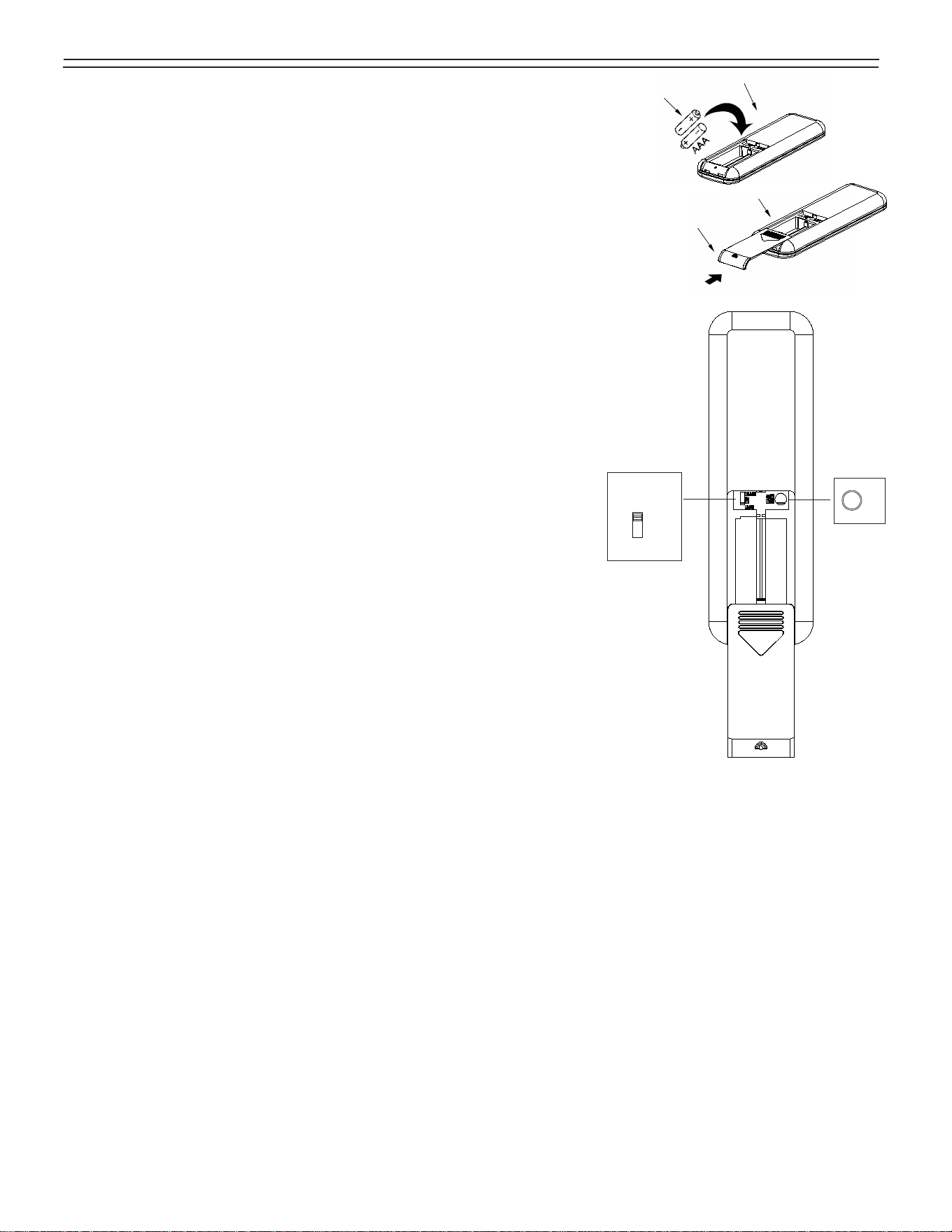
Remove the battery cover from the remote control transmitter and install batteries,
Replace the cover.
Note : Use 2 1.5V/AAA batteries (included).
Note : If not using for long period of time, remove battery to prevent damage
to remote transmitter, and store the remote transmitter away from excess
heat or humidity.
L.CODE
COMMON
CODE
Universal Mode
edLearning Mo
Note: Ensure electricity is turned off before installing the receiver (Refer
to the ceiling fan instructions)
LEARN
Learn
UNIVERSAL MODE AND LEARNING MODE
There is a “Universal Mode” and “Learning Mode” with the
remote control.
When selecting “
Universal Mode
”,
simply place dip (code) switch at UPPER
position.
Your fan
remote control is
ready to use.
Note: If using universal mode, your fan can be controlled with other
remote
transmitters with the same setting.
To control the fan with specific
remote transmitter, choose “
Learning Mode
”
by placing the dip (code) switch at LOWER position and then select learn
function setting as below.
Learn function setting:
Restore power source to your fan, press and hold
the “
LEARN
” button for at least 3 seconds.
You must press the “
LEARN
”
button within 60 seconds of
restoring power to the fan.
Note: Power must be off for a minimum 10 seconds, then turn the power
back on for
remote control learn function setting.
Note: If the fan is installed with light, light will blink 3 times
, and fan will keep
running at minimum speed . The remote control setting process is
complete
and your fan is
ready for use. For fans
without light, the fan
will be running
with minimum speed sustainably.
Note: To control multiple fans, ensure the settings are set at the same setting.
A fan can be controlled by 2 transmitters maximum.
RECEIVER PROTECTIVE FUNCTIONS
Lock protection- The DC motor has a built-in safety feature against blade or motor obstruction during operation. should
something obstruct the fan blades or motor, the motor will keep trying to run for 5 times and then stop operation
after about 60 seconds of interruption. Please
remove obstacles and
reset.
To
reset, turn the fan off with
remote
transmitter and then turn the fan on. Or, you may turn the power off for 15 seconds. Then turn the power back on, and
then turn the fan on.
Over load protection (current limit)- The device limits the maximum current output from the
receiver/drive when the fan
or light load is increased abnormally. The fan will shut off if over lamped.
This equipment has been tested and found to comply with the limits for a Class B digital device, pursuant to part 15 of
the FCC Rules.
These limits are designed to provide reasonable protection against harmful interference in a residential installation. This
equipment generates, uses and can radiate radio frequency energy and, if not installed and used in accordance with the
instructions, may cause harmful interference to radio communications. However, there is no guarantee that interference
will not occur in a particular installation.
If this equipment does cause harmful interference to radio or television reception, which can be determined by turning the
equipment off
and on, the user is encouraged to try to correct the interference by one or more of the following measures:
- Reorient or relocate the receiving antenna. -Increase the separation between the equipment and receiver.
- Connect the equipment into an outlet on a circuit different from that to which the receiver is connected.
- Consult the dealer or an experienced radio/TV technician for help.
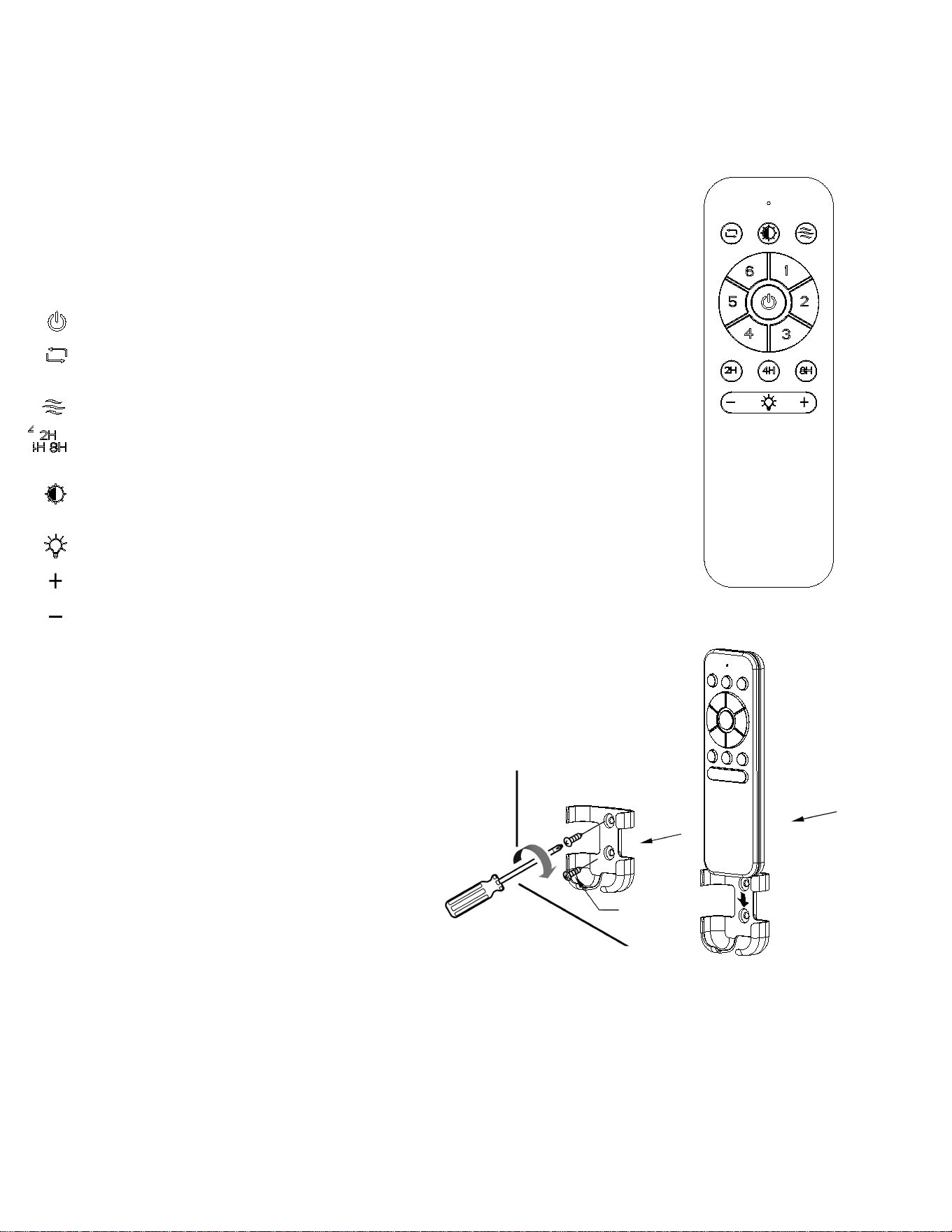
Install Transmitter wall mount cradle with 2 screws provided.
WALL MOUNT CRADLE INSTALLATION
Note
: This
remote control has an auto
resume function, the fan and light will maintain
the
last setting if power is turned off.
THIS DEVICE COMPLIES WITH
PART 15 OF THE FCC RULES OPERATION IS
SUBJECT TO THE FOLLOWING TWO CONDITIONS. (1)THIS DEVICE MAY NOT
CAUSE HARMFUL INTERFERENCE AND (2) THIS DEVICE MUST ACCEPT ANY
INTERFERENCE RECEIVED, INCLUDING INTERFERENCE THAT MAY CAUSE
UNDESIRED OPERATION.
NOTE:
1. When powering on after installation, the fan may start automatically due to factory preset settings.
2. If fan or light isn’t working,
reset power (
turn the power off for at least 10 seconds
and then turn the power back on
)
and
redo the learn function setting.
3. If there are multiple fans in the same room, when setting, please make sure the power supply for the setting fan is
independent of the other fans.
Timing button - The fan will turn off after 2/4/8 hours automatically.Timer function
will be cancelled when you have any other operations after setting timer.
Color temperature adjusting - It could let lamp change color temperature when
you click this button.
Lamp switch - Click lamp switch.
Dimmer button - Press and hold down to dim lamp to bright.
Dimmer button - Press and hold down to dim lamp to dark.
REMOTE CONTROL FAN SPEED FUNCTIONS
Fan speed
1 =
minimum speed
2 = low speed
3 = medium low speed 4 = medium speed
5 = medium high speed 6 = high speed
Fan off button - Click to turn fan off.
Forward /Reverse button -
This button controls the direction of the fan
rotation
.
Press once to change direction of the fan
rotation. Fan must be running to
reverse.
Natural wind button:Creating gentle sea-breeze effect.
88TLP2026052201
Radiation Exposure Statement:
This equipment complies with FCC radiation exposure limits set forth for an uncontrolled environment.
Changes or modifications not expressly approved by the party responsible for compliance could void the user's authority to
operate the equipment. This device complies with part 15 of the FCC Rules. Operation is subject to the following two conditions:
(1)This device may not cause harmful interference, and
(2)this device must accept any interference received, including interference that may cause undesired operation.

