DubbingAIHeadphonesUserManual
Foreword
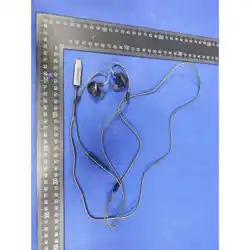
ThankyouforchoosingDubbingAIHeadphones.Ourvoice-changingwiredin-earheadphones
featureanover-earweardesign,integratedin-linecontrolswithabuilt-inmicrophone,and
supportmusicplaybackcontrol,callmanagement,andreal-timevoiceinput.Idealforgaming,
livestreaming,voicechat,anddailycalls,theydelivercrystal-clear,stableaudioandimmersive
AIreal-timevoicechanging.
Toensuresafeandproperuse,preventpersonalinjuryorpropertydamage,pleasereadthis
manualcarefully
—
especiallythe
SafetyWarnings
and
Notes
—
beforefirstuse,andkeepitfor
futurereference.Foranyissuesnotaddressedinthismanual,contactourofficialcustomer
support.
•
OfficialWebsite:https://dubbingai.io
•
CustomerSupport:support@dubbingai.io
I.SafetyWarnings
1.ElectricalSafety
Ensureasecureconnectionbetweentheheadphoneplugandyourdevice
’
sporttoprevent
overheating,devicedamage,oraudiomalfunctionscausedbypoorcontact.
•
Donot
plug/unplugtheheadphonewithwethandstoavoidshortcircuitsorelectricshocks
fromwaterenteringtheport.Iftheplugorcablegetswet,dryitthoroughlybeforeuse.
•
Immediatelystopusingtheheadphonesifthecableorplugisdamaged,cracked,orthe
internalwiresareexposed.
Donot
attempttodisassembleorrepairthedeviceyourself(risk
ofelectricshock)
—
contactofficialafter-salesserviceforassistance.
•
Avoiddamagingtheinsulationlayer;donotpull,twist,orbendthecableexcessivelyto
preventinternalwireshortcircuits.
2.Environmental&PlacementSafety
Donot
placetheheadphonesinhigh-temperatureenvironments(e.g.,directsunlight,near
heaters/stoves).Temperaturesexceeding45°Cmaycausematerialaging,deformation,casing
cracking,orinternalcomponentdamage.
•
StorageConditions
:Temperature-20°Cto50°C,relativehumidity
≤
90%.
•
Keeptheheadphonesawayfrommoistareas(e.g.,bathrooms,kitchensplashzones).Water
ingresscancauseshortcircuits,audiodegradation,andevenearinfectionsfrombacterial
growth.
•
Donot
immersetheheadphonesinfire/water,orexposethemtocorrosiveliquids(e.g.,
alcohol,gasoline,acid/alkalinesolutions)
—
thismaycausedamage,fire,ortoxicgasleakage.
•
Storetheheadphonesoutofreachofchildrenandpets.Theheadphonesandaccessories
(e.g.,eartips)aresmallpartsthatposeachokinghazardifingested.Preventchildrenfrom
playingwiththecabletoavoidentanglementorpullinginjuries.
3.UsageScenarioSafety
•
Avoidusingtheheadphones(oruseonlyoneear)whiledriving,cycling,crossingthestreet,
orperformingactivitiesrequiringfullattention.Blockingambientsounds(e.g.,vehiclehorns,
verbalalerts)mayleadtosafetyaccidents.
Adheretolocallaws
—
manyregionsprohibit
double-earheadphoneusewhiledriving.
•
Followon-siteregulationswhenusingnearmedicaloraviationequipment.Audiosignals
fromtheheadphonesmayinterferewiththenormaloperationofsuchdevices.
•
Avoidprolongeduseathighaltitudes(above2000meters).Ifused,monitorformalfunctions
causedbyenvironmentalimpactsoninsulationperformanceandstopuseimmediatelyif
issuesarise.
4.Cleaning&MaintenanceSafety
•
Disconnecttheheadphonesfromyourdevicebeforecleaning.Wipethecasing,eartips,and
pluggentlywithadry,soft,lint-freecloth.
Donot
useaerosolsprays,solvents,abrasives,or
corrosivecleaners(e.g.,alcohol,ammonia)
—
thesewilldamagethesurfaceandinternal
components.
•
Cleantheeartipmeshandmicrophoneportregularly:removedebrisandearwaxwitha
clean,drysoft-bristledbrushtopreventclogsthatreduceaudio/microphoneperformance.
Ensuretheheadphonesarefullydrybeforereuse.
•
Forlong-termstorage,keeptheheadphonesinadry,well-ventilatedarea.Avoidsqueezing
orpullingthecable;wrapitlooselyanddonotbendthecableconnectorexcessively.
5.OtherSafetyRequirements
•
Donotdisposeoftheheadphoneswithregularhouseholdwaste.Followlocale-waste
regulationsandhandthemovertoauthorizedrecyclingfacilitiestoprotecttheenvironment.
•
Donot
disassembleormodifytheheadphonesyourself.Disassemblymaycausecomponent
damage,insulationfailure,andsafetyhazards,andwillvoidthewarranty.Contactofficial
after-salesserviceforfaultyunits.
•
Immediatelydisconnectandstopusingtheheadphonesiftheyexhibitabnormal
overheating,strangeodors,staticnoise,ornosound.Contactafter-salesservicefor
inspectionandrepairtoavoidfurtherrisks.
II.PackageContents
•
WiredAIHeadphones×1
•
ProtectiveStoragePouch×1
•
ReplacementEarTips×3pairs(fordifferentearsizes,enhancedwearingcomfort)
•
UserManual(IncludingSafetyWarnings)×1
III.ProductDesign&Controls
KeyComponents&In-lineControls
ProductSpecifications
IV.UserInstructions
1.HowtoWear
1. Identifytheleft/rightmarkings:
L
(Left)and
R
(Right)ontheheadphonecasingsforcorrect
earplacement.
2. Attachaproperlysizedeartiptotheheadphonedriverunitforasnugfitintheearcanal
—
thisreducesambientnoiseandimprovesaudioquality.
3. Gentlyinserttheheadphoneintoyourearandadjustforacomfortable,securefit(avoid
excessivetightnessthatirritatestheearcanalorloosenessthatcausesslipping).
2.HowtoConnect
1. InserttheType-Cconnectorfullyintoyourdevice
’
saudioporttopreventaudio
malfunctionsfrompoorcontact.
2. Audiooutputwillautomaticallyswitchtotheheadphonesafterasuccessfulconnection.If
not,manuallyselect
Headphones
astheoutputdeviceinyourdevice
’
saudiosettings.
3.HowtoSetUp
TounlockthefullAIvoice-changingfeaturesandcustomsettings,youneedtodownloadthe
DubbingAIVoiceChangerApp
.
1. DownloadtheappviatheofficiallinkorbyscanningtheQRcodeontheproduct/retailpage.
2. Afterconnectingtheheadphonestoyourdevice,opentheapptocustomize:
◦
Voicetonepresets
◦
Monitor(hearyourownvoice)toggle
◦
Otheradvancedaudiosettings
AppInterfaceBasicOperations
•
ConnectionRequest
:ConfirmpairingbetweentheappandDabingAIHeadphonestoaccess
allfeatures.
•
VoiceChangerToggle
:Turnreal-timevoicechangingon/off.
•
MonitorToggle
:Enable/disablehearingyourownvoicethroughtheheadphones.
•
VoiceLibrary
:Accesspresetvoicetones(e.g.,DreamGod,Jianghu,Phoenix,SweetGirl)and
freetrialoptions.
•
DeviceDetection
:Tap
DetectHeadphones
iftheappfailstorecognizethedevice(check
apppermissionsfirstifdetectionfails).
•
AppNavigation
:SoundLibrary|Store|DabingDevices|MyAccount
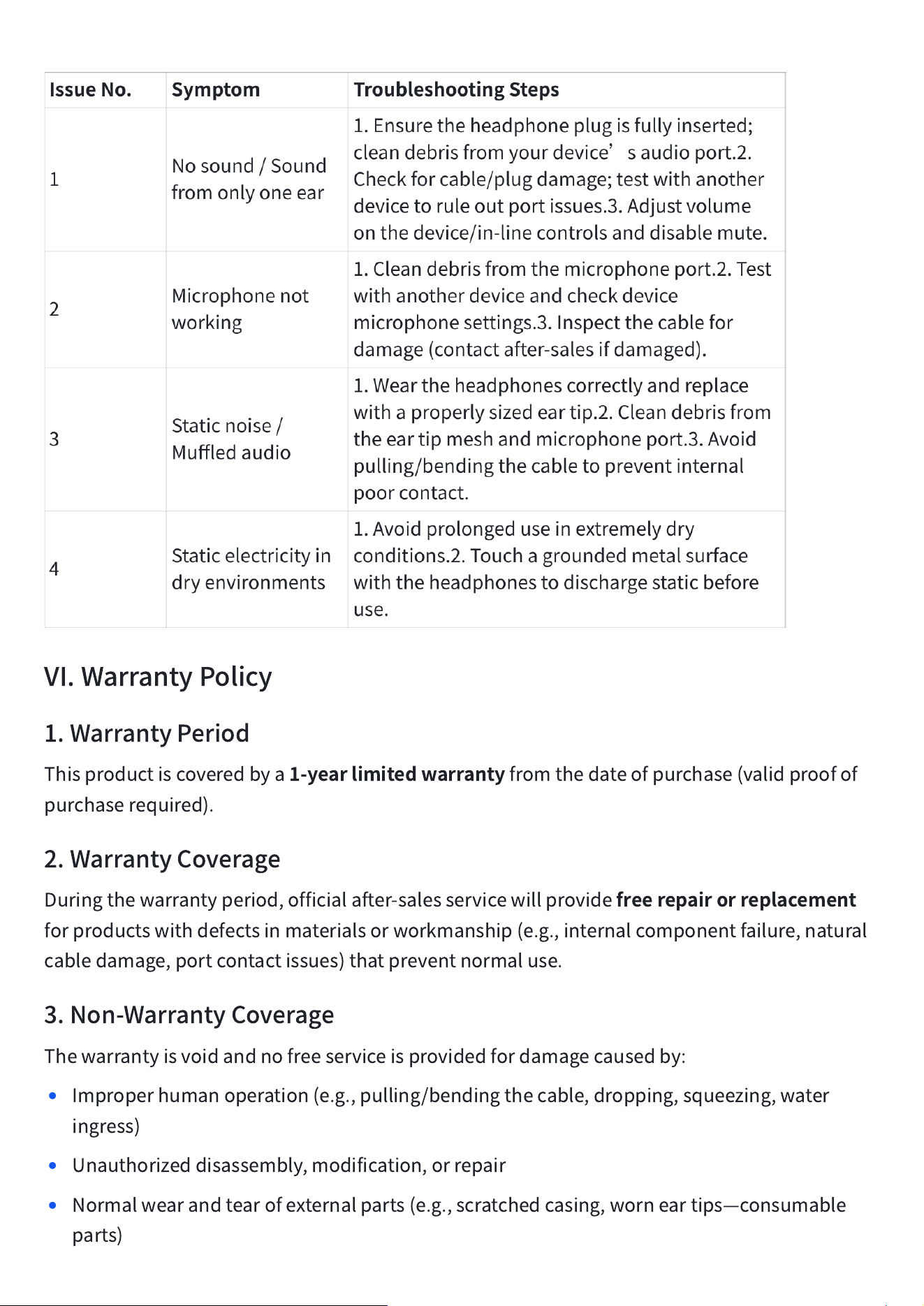
V.Troubleshooting
VI.WarrantyPolicy
1.WarrantyPeriod
Thisproductiscoveredbya
1-yearlimitedwarranty
fromthedateofpurchase(validproofof
purchaserequired).
2.WarrantyCoverage
Duringthewarrantyperiod,officialafter-salesservicewillprovide
freerepairorreplacement
forproductswithdefectsinmaterialsorworkmanship(e.g.,internalcomponentfailure,natural
cabledamage,portcontactissues)thatpreventnormaluse.
3.Non-WarrantyCoverage
Thewarrantyisvoidandnofreeserviceisprovidedfordamagecausedby:
•
Improperhumanoperation(e.g.,pulling/bendingthecable,dropping,squeezing,water
ingress)
•
Unauthorizeddisassembly,modification,orrepair
•
Normalwearandtearofexternalparts(e.g.,scratchedcasing,worneartips
—
consumable
parts)
•
Lackofvalidproofofpurchase
•
Forcemajeure(e.g.,earthquake,fire,flood,othernaturaldisasters)
DubbingAIreservestherighttointerpretthetermsofthiswarranty.
Updated:[03/27/2026]
FCC Warning
This device complies with Part 15 of FCC Rules. Operation is subject to two conditions:
(1) This device may not cause harmful interference, and (2) this device must accep t any
interference received, including interference that may cause undesired operation. Changes
or modifications not expressly approved by the party responsible for compli ance could
void the user’s authority to operate the equipment.
Note: This equipment has been tested and found to comply with Class B digital device
limits under Part 15. These limits provide reasonable protection against harmful inter
ference in a residential installation. This equipment generates, uses, and can radiate ra
dio frequency energy and, if not installed and used in accordance with the instructions,
may cause harmful interference to radio communications. However, there is no guara ntee
that interference will not occur in a particular installation. If this equipment does
cause harmful interference to radio or television reception (which can be determined b y
turning the equipment off and on), the user is encouraged to try to correct the interfe
rence by one or more of the following measures:
Reorient or relocate the receiving antenna.
Increase the separation between the equipment and receiver.
Connect the equipment to an outlet on a circuit different from that to which the receiv
er is connected.
Consult the dealer or an experienced radio/TV technician for help.
This equipment meets general RF exposure requirements and can be used in portable
exposure conditions without restriction.