EN
For detailed information on operation and safe use of the
product, refer to the other manuals that are included with
the product and are available on the Epson website.
FR
Pour des informations détaillées sur le fonctionnement et
l’utilisation en toute sécurité du produit, reportez-vous aux
autres manuels qui sont fournis avec le produit et qui sont
disponibles sur le site Web d’Epson.
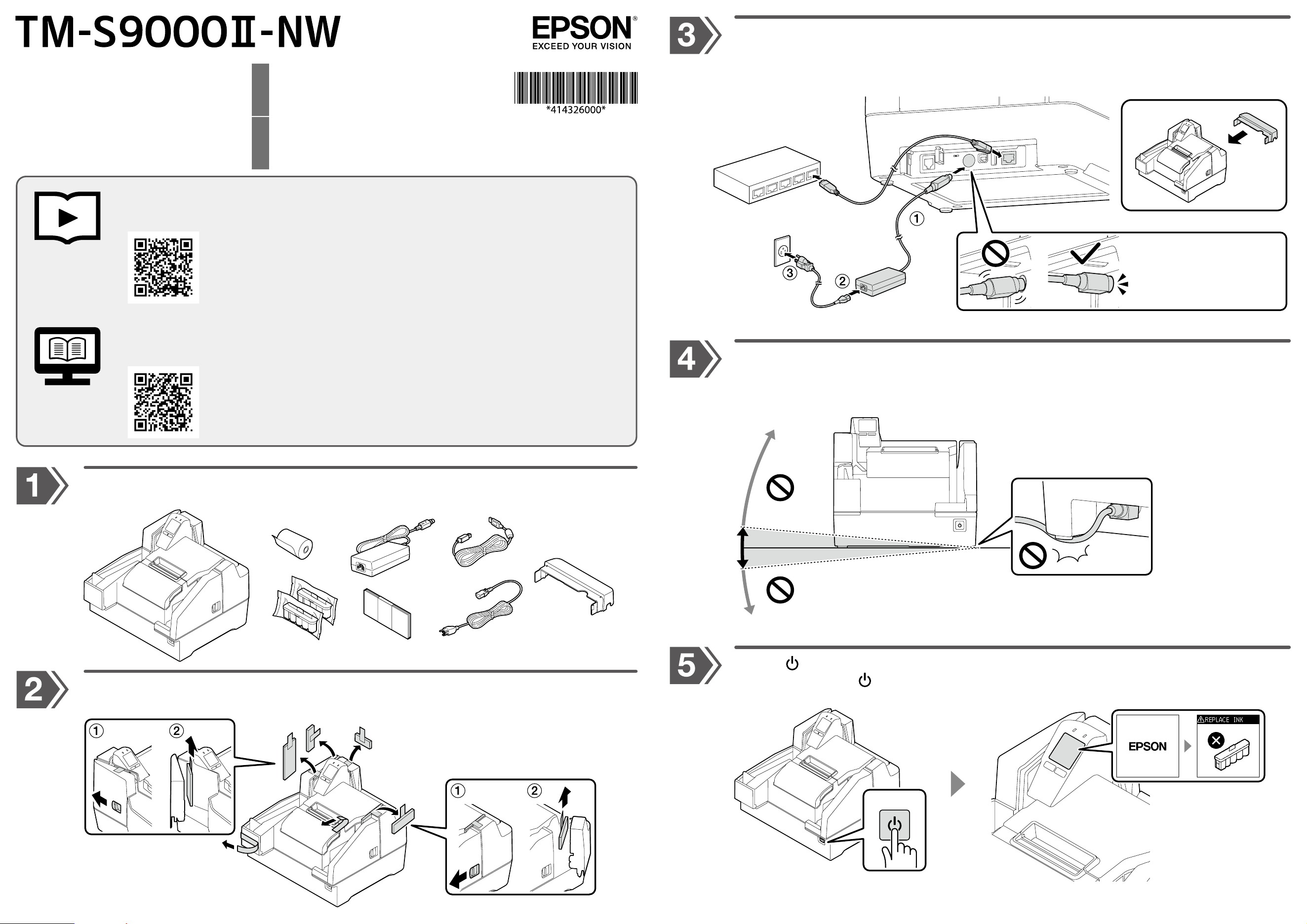
Unpack. Make sure that you have the all items shown below.
Déballez. Vériez que vous disposez bien de tous les éléments représentés ci-dessous.
Setup Guide
Guide d’installation
Remove all the protective materials. Make sure to remove the materials inside the product.
Retirez tous les matériaux de protection. Veillez à retirer les matériaux qui se trouvent à l’intérieur du produit.
Connect to a hub and to the power source. Insert each plug as far as it goes with the correct
orientation.
Procédez au raccordement à un concentrateur et à la source d’alimentation. Insérez chaque che à
fond dans le bon sens.
Place the product on a at surface. Do not tilt it more than 5 degrees. Be careful not to let the cables
get caught under the product.
Placez le produit sur une surface plane. Ne l’inclinez pas à plus de 5degrés. Veillez à ne pas coincer les
câbles sous le produit.
Press the button to turn the product on. The screen will prompt you to install the ink cartridge.
Appuyez sur le bouton pour mettre le produit sous tension. L’écran vous invite à installer la cartouche
d’encre.
Setup and cleaning procedures can also be viewed in the video.
Les procédures d’installation et de nettoyage sont également détaillées dans la vidéo.
©Seiko Epson Corporation 2022.
Printed in XXXXXX
For more details, see TM-S9000II-NW Technical Reference Guide.
Pour plus de détails, reportez-vous au TM-S9000II-NW Technical Reference Guide.
https://www.epson- biz.com/?prd=tms9 k2nw&inf=manual
B
C
D
E
F
A
Ethernet
AC Adapter V
+5°
+5°
+5°
-5°
-5°
-5°
1 sec.
ON
Insert with the at side
facing down.
Procédez à l’insertion avec le
côté plat orienté vers le bas.
https://www.epson-biz.com/?prd=tms9k2nw&inf=video
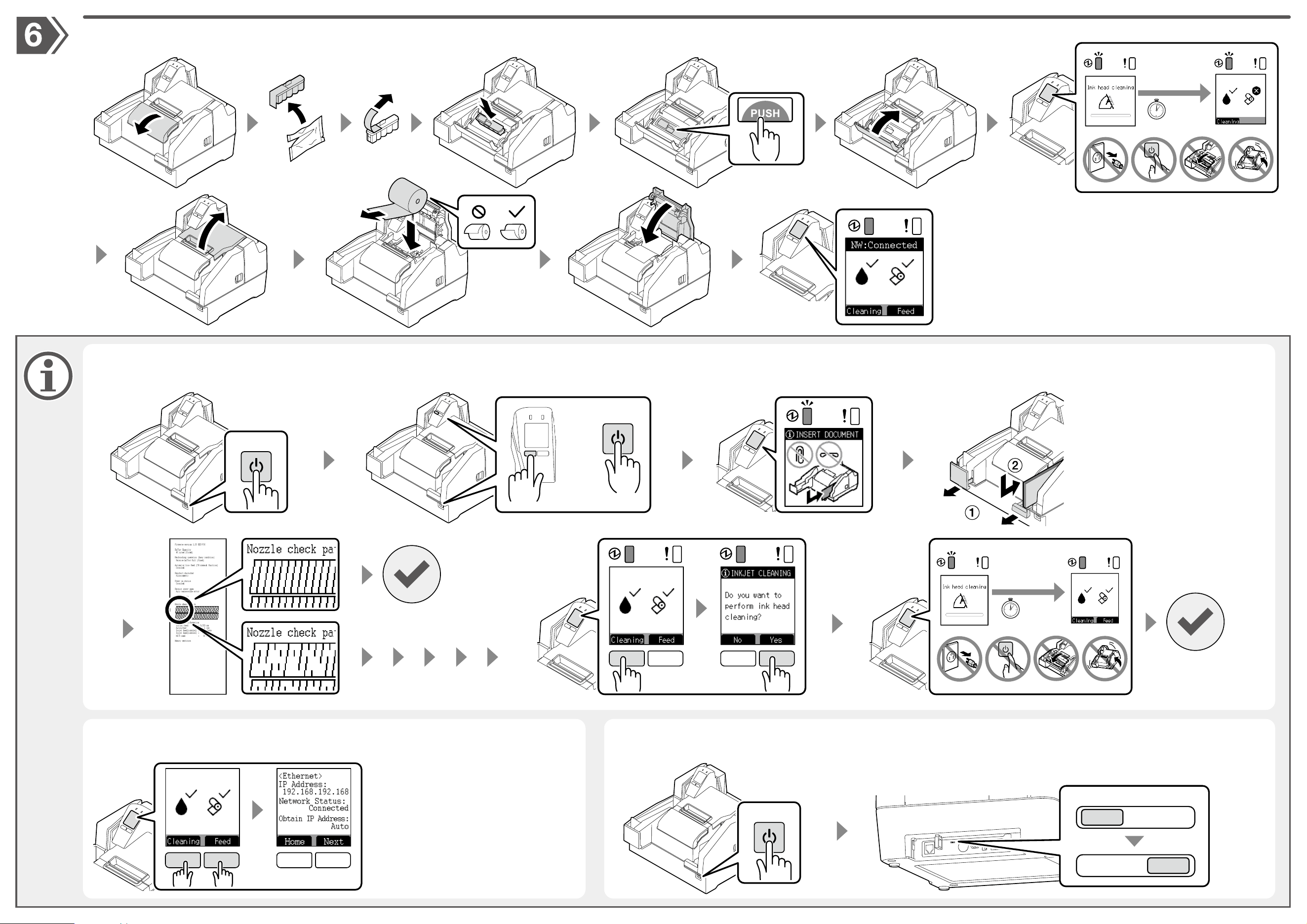
For a test print, turn the product o and then back it on while holding down the left button. If the test pattern is faint, press the left button and then press the right button to run a head cleaning.
An de procéder à un test d’impression, mettez le produit hors tension, puis de nouveau sous tension tout en appuyant sur le bouton de gauche sans le relâcher. Si le motif de vérication est peu
marqué, appuyez sur le bouton de gauche, puis appuyez sur le bouton de droite pour nettoyer la tête.
Press the two buttons simultaneously for
2 seconds to display the settings on the
screen.
Appuyez simultanément sur les deux
boutons pendant 2 secondes pour acher
les paramètres à l’écran.
The default connection mode is network. Turn o the product and then change the mode
to USB using the switch on the back.
Le mode réseau est le mode de connexion par défaut. Mettez le produit hors tension, puis
passez en mode USB à l’aide du commutateur situé à l’arrière.
Checking Nozzles and Cleaning Ink Head
Vérication des buses et nettoyage de la tête d’impression
Checking the Network Settings
Vérication des paramètres réseau
For Connecting the Product via USB
Pour la connexion USB du produit
4 min.
Follow the on-screen instructions to install the ink cartridge and then the roll paper. When you nish installing the consumables, the home screen is displayed.
Suivez les consignes achées à l’écran pour installer la cartouche d’encre, puis le rouleau de papier. L’écran d’accueil s’ache une fois l’installation des consommables terminée.
3 sec.
OFF
ON
+
1 sec.
1 min.
Network
USB
3 sec.
OFF
Home screen
Good
No good
Completed
Terminé
Completed
Terminé