QM-NP-S601-SL-WW-V01.20260709-1908
Quick Start Guide
Schnellstartanleitung
Guía de inicio rápido
Guide de démarrage rapide
Guida rapida
快速入门指南
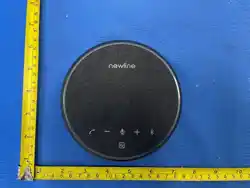
NP-S601 Bluetooth Conference Speakerphone
NP-S601 Bluetooth-Konferenzlautsprecher
Altavoz de conferencia Bluetooth NP-S601
Haut-parleur de conférence Bluetooth NP-S601
Vivavoce per conferenze Bluetooth NP-S601
NP-S601 蓝牙会议全向麦克风
NewPie92
Dual-Unit Daisy-Chain/ Zwei-Geräte-Kaskadierung/ Cascada de Dos Unidades/
Ca
scade de Deux Unités/ Cascata a Due Unità/ 双机级联拓展
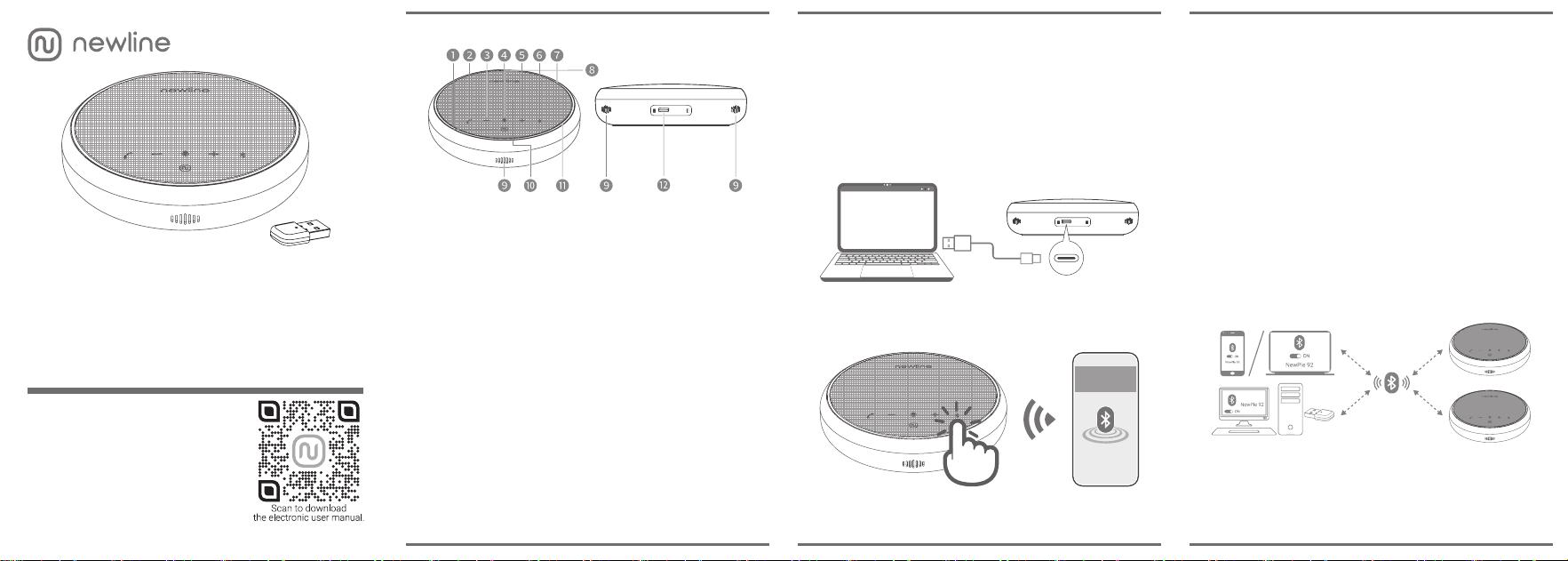
1. Functions
❶ Power Button/ Einschalttaste/ Botón de encendido/ Bouton
de mise en marche/ Pulsante di accensione/ 电源键
❷ Call/ Hang Up (Long Press to Reject)/ Anrufen/ Auflegen (Gedrückt
halten zum Ablehnen)/ Llamar/ Colgar (Mantener pulsado para
rechazar)/ Appeler/ Raccrocher (Appuyer longuement pour rejeter)/
Chiama/ Chiudi (Tieni premuto per rifiutare)/ 接听/ 挂断(长按拒接)
❸ Decrease Volume/ Lautstärke verringern/ Bajar volumen/
Diminuer le volume/ Abbassa volume/ 音量减小
❹ Microphone Mute Switch/ Mikrofon-Stummschaltetaste/ Botón
de silencio del micrófono/ Touche de coupure du microphone/
Pulsante silenziamento microfono/ 麦克风静音键
❺ Increase Volume/ Lautstärke erhöhen/ Subir volumen/
Augmenter le volume/ Alza volume/ 音量增大
❻ Bluetooth Switch/ Bluetooth-Taste/ Botón de Bluetooth/
Touche Bluetooth/ Pulsante Bluetooth/ 蓝牙键
❼ Status Light Ring Indicator/ Status-Leuchtring/ Anillo
luminoso indicador de estado/ Anneau lumineux d'état/
Anello luminoso di stato/ 状态光圈指示灯
❽ Power Indicator/ Betriebsanzeige/ Indicador de encendido/
Voyant d'alimentation/ Indicatore di alimentazione/ 电源指示灯
❾ Microphone/ Mikrofon/ Micrófono/ Microphone/ Microfono/ 麦克风
❿ Speakers/ Lautsprecher/ Altavoces/ Haut-
parleurs/ Altoparlanti/ 扬声器
⓫ Bluetooth Indicator/ Bluetooth-Anzeige/ Indicador de Bluetooth/
Voyant Bluetooth/ Indicatore Bluetooth/ 蓝牙指示灯
⓬ USB-C Charging/ Data Port/ USB-C-Lade-/Datenanschluss/
Puerto de datos/ carga USB-C/ Port de charge/ données
USB-C/ Porta dati/ ricarica USB-C/ USB-C 充电 / 数据接口
⓭ USB Bluetooth Dongle Status LED/ Status-LED des USB-
Bluetooth-Dongles/ LED de estado del adaptador USB
Bluetooth/ Voyant d'état du dongle USB Bluetooth/ LED di stato
del dongle USB Bluetooth/ USB 蓝牙适配器状态指示灯
2. Connect to Computer via a USB-C Cable
Mit dem Computer über ein USB-C-Kabel verbinden/ Conectar al ordenador
mediante un cable USB-C/ Se connecter à l'ordinateur via un câble USB-C/
Collega al computer tramite cavo USB-C/ 通过 USB-C 线缆连接至电脑
3. Connect to Computer via Bluetooth
Bluetooth
NewPie 92
2 s
Mit dem Computer über Bluetooth verbinden/ Conectar al ordenador mediante
Bluetooth/ Se connecter à l'ordinateur via Bluetooth/ Collega al computer
tramite Bluetooth/ 通过蓝牙连接至电脑
Steps: 1. Power On: Hold ❶ for 2 s. 2. Pair: Hold ❻ for 2 s (LED ⓫ Flashes
Red/Blue). 3. Select "NewPie 92".
Schritte: 1. Einschalten: ❶ für 2 Sek. gedrückt halten. 2. Koppeln: ❻ für 2 Sek.
gedrückt halten (LED ⓫ blinkt rot/blau). 3. “NewPie 92” auswählen.
Pasos: 1. Encender: mantener pulsado ❶ por 2 s. 2. Emparejar: mantener
pulsado ❻ por 2 s (el LED ⓫ parpadea en rojo/azul). 3. Seleccionar "NewPie 92".
Étapes: 1. Allumer : maintenir ❶ 2 s. 2. Appairer : maintenir ❻ 2 s (le voyant
⓫ clignote rouge/bleu). 3. Sélectionner « NewPie 92 ».
Passaggi: 1. Accendi: tieni premuto ❶ per 2 s. 2. Accoppia: tieni premuto ❻ per
2 s (il LED ⓫ lampeggia in rosso/blu). 3. Seleziona "NewPie 92".
步骤: 1. 开机:长按 ❶ 2秒。2. 配对:长按 ❻ 2秒 (指示灯 ⓫ 红蓝闪烁)。3.选
择“NewPie 92”。
4. Wireless Dual-Unit Daisy-Chaining
Drahtlose Dual-Geräte-Kaskadierung/ Conexión en cadena inalámbrica de
dos unidades/ Connexion en cascade sans fil double unité/ Collegamento in
cascata wireless a due unità/ 无线双机级联
4.1. Pairing the Speakerphone With the USB Dongle
Speakerphone mit dem USB-Dongle koppeln/ Emparejamiento del altavoz con el
adaptador USB/ Appairage du haut-parleur avec le dongle USB/ Accoppiamento
del vivavoce con il dongle USB/ 扬声器与 USB 适配器配对
Steps:
1. Insert Dongle: Plug the USB Bluetooth Dongle into a USB-A port. The LED
⓭ will flash blue slowly, entering pairing mode.
2.
Pair Dongle: Place NewPie 92 close to the dongle; connection will complete
automatically.
3.
Connected: The voice prompt plays "Dongle Connected," the speakerphone
LED ⓫ turns yellow, and the dongle LED ⓭ stays solid blue.
4.
Enter Cascading Mode: Press and hold the Phone Button ❷ on both NewPie
92 units simultaneously for 5s until you hear "Link Mode".
5.
Automatic Pairing: The devices will automatically complete daisy-chaining
and play "Link Connected" upon success.
Schritte:
1.
Dongle anschließen: USB-Bluetooth-Dongle in einen USB-A-Anschluss stecken.
Die LED ⓭ blinkt langsam blau (Kopplungsmodus).
2.
Dongle koppeln: NewPie 92 nah am Dongle platzieren; die Verbindung wird
automatisch hergestellt.
3. Verbunden: Sprachansage "Dongle Connected" ertönt, die Speakerphone-
LED⓫ leuchtet gelb und die Dongle-LED ⓭ leuchtet dauerhaft blau.
4.
Kaskadierungsmodus aktivieren: Die Telefontaste ❷ auf beiden NewPie
92-Geräten gleichzeitig 5 Sek. gedrückt halten, bis die Sprachansage "Link
Mode" ertönt.
5. Automatische Kopplung: Die Geräte führen die Kaskadierung automatisch
durch und geben bei erfolgreicher Verbindung "Link Connected" aus.
Pasos:
1.
Insertar el adaptador: conecte el adaptador USB Bluetooth en un puerto
USB-A. El LED ⓭ parpadeará en azul lentamente (modo de emparejamiento).
2.
Emparejar el adaptador: coloque el NewPie 92 cerca del adaptador; la
conexión se completará automáticamente.
3.
Conectado: sonará la indicación por voz "Dongle Connected", el LED de
Bluetooth ⓫ cambiará a amarillo y el LED del adaptador ⓭ se iluminará
en azul fijo.
4.
Activar modo cascada: mantener pulsado el botón de teléfono ❷ en ambas
unidades NewPie 92 a la vez durante 5 s hasta escuchar "Link Mode".
5.
Emparejamiento automático: los dispositivos completarán la conexión
en cadena automáticamente e indicarán "Link Connected" al conectarse.
Étapes:
1.
Insérer le dongle : branchez le dongle USB Bluetooth sur un port USB-A. Le
voyant ⓭ clignote lentement en bleu (mode d'appairage).
2.
Appairer le dongle : placez le NewPie 92 à proximité du dongle ; la connexion
s'établit automatiquement.
3.
Connecté : l'invite vocale émet « Dongle Connected », le voyant du haut-
parleur ⓫ s'allume en jaune et le voyant du dongle ⓭ devient bleu fixe.
4.
Activer le mode cascade : appuyer simultanément sur la touche Téléphone❷
des deux unités NewPie 92 pendant 5 s jusqu'à entendre « Link Mode ».
5.
Appairer automatiquement : les appareils complètent automatiquement la
connexion en cascade et émettent « Link Connected » une fois connectés.
Passaggi:
1.
Inserisci il dongle: collega il dongle USB Bluetooth a una porta USB-A. Il
LED⓭ lampeggerà lentamente in blu (modalità accoppiamento).
2.
Accoppia il dongle: posiziona il NewPie 92 vicino al dongle; la connessione
si completerà automaticamente.
3.
Connesso: la guida vocale riprodurrà "Dongle Connected", il LED del vivavoce⓫
diventerà giallo e il LED del dongle ⓭ rimarrà blu fisso.
4.
Attiva modalità cascata: tieni premuto il pulsnate Telefono ❷ su entrambe
le unità NewPie 92 contemporaneamente per 5 s fino a sentire "Link Mode".
5.
Accoppiamento automatico: i dispositivi completeranno automaticamente
il collegamento in cascata, riproducendo "Link Connected" a connessione
riuscita.
步骤:
1.
插入适配器:将 USB 蓝牙适配器插入 USB-A 接口,指示灯 ⓭ 蓝灯慢闪
进入配对模式。
2. 配对适配器:将 NewPie 92 靠近蓝牙适配器,系统将自动完成无线配对。
3.
连接成功:听到语音提示“Dongle Connected”,扬声器指示灯 ⓫ 变为黄
色,适配器指示灯 ⓭ 变为蓝灯常亮。
4.
进入级联模式:同时长按两台 NewPie 92 的通话键 ❷ 5 秒,直到听到语
音提示“Link Mode”。
5.
自动配对:设备将自动完成双机级联配对,连接成功后将播放语音提示“Link
Connected”。
4.2. Disconnect Link
Disconnect Link: Press and hold the Phone Button on either device for 5s to
hear "Link Disconnected" and break the link.
Verbindung trennen: Die Telefontaste an einem der beiden Geräte 5 Sek. gedrückt
halten; es ertönt “Link Disconnected” und die Kaskadierung wird aufgehoben.
Desconectar enlace: mantener pulsado el botón de teléfono en cualquiera de los
dispositivos durante 5 s para escuchar "Link Disconnected" y romper el enlace.
Déconnecter la liaison : appuyer sur la touche Téléphone de l'un des appareils
pendant 5 s pour entendre « Link Disconnected » et rompre la liaison.
Sconnetti collegamento: tieni premuto il pulsante Telefono su uno dei dispositivi
per 5 s per sentire "Link Disconnected" e interrompere il collegamento.
断开级联: 长按任意一台设备上的通话键 5 秒,系统将播放语音提示“Link
Disconnected”并断开级联。
European & UK Authorized Representative
Product Name: NewPie92 Model Number: NP-S601
Brand: N newline Country of Origin: Made in China
Manufacturer: Newline Co., LTD.
10/F., Building 4B, 17 Haitian 1st Road, Shenzhen Software Industry Base,
Nanshan District, Shenzhen, Guangdong 518054, P. R. China. Tel: +86 (755) 8366 1664
Importer: shanghaixinheshidaikejiyouxiangongsi
Room 143, Building 7, No.51, Lane 1895, Hutai Road, Jing'an District, Shanghai, China.
Email: suppo[email protected]
EU REP UK REP
XDH Tech KOVA ASSOCIATES LTD
37 passage du Ponceau, Bureau 270, Paris,
France.
72a Kingston Road, Portsmouth, Hampshire,
PO2 7PA, United Kingdom.
Tel: +33 06 52 76 88 98 Tel: +44 7542 988998
Email: [email protected] Contact Person: Louisa Timms
Email: [email protected]
FCC
Compliance
Statement
This
equipment
has
been
tested
and
found
to
comply
with
the
limits
for
a
Class
B
digital
device,
pursuant
to
part
15
of
the
FCC
Rules.
These
limits
are
designed
to
provide
reasonable
protection
against
harmful
interference
in
a
residential
installation.
This
equipment
generates
uses
and
can
radiate
radio
frequency
energy
and,
if
not
installed
and
used
in
accordance
with
the
instructions,
may
cause
harmful
interference
to
radio
communications.
However,
there
is
no
guarantee
that
interference
will
not
occur
in
a
particular
installation. If this equipment does cause harmful interference to radio or television reception, which can be
determined by turning the equipment off and on, the user is encouraged to try to correct the interference by
one or more of the following measures:
Reorient or relocate the receiving antenna.
Increase the separation between the equipment and receiver.
Connect the equipment into an outlet on a circuit different from that to which the receiver is connected.
Consult the dealer or an experienced radio/TV technician for help.
This
device
complies
with
Part
15
of
the
FCC
Rules.
Operation
is
subject
to
the
following
two
conditions:
(1) this device may not cause harmful interference, and (2) this device must accept any interference received,
including interference that may cause undesired operation.
Changes
or
modifications
not
expressly
approved
by
the
party
responsible
for
compliance
could
void
the
user's authority to operate the equipment or warranty.
FCC Radiation Exposure Statement
This equipment complies with FCC radiation exposure limits set forth for an uncontrolled environment. This
equipment should be installed and operated with minimum distance 0cm between the radiator and your body.