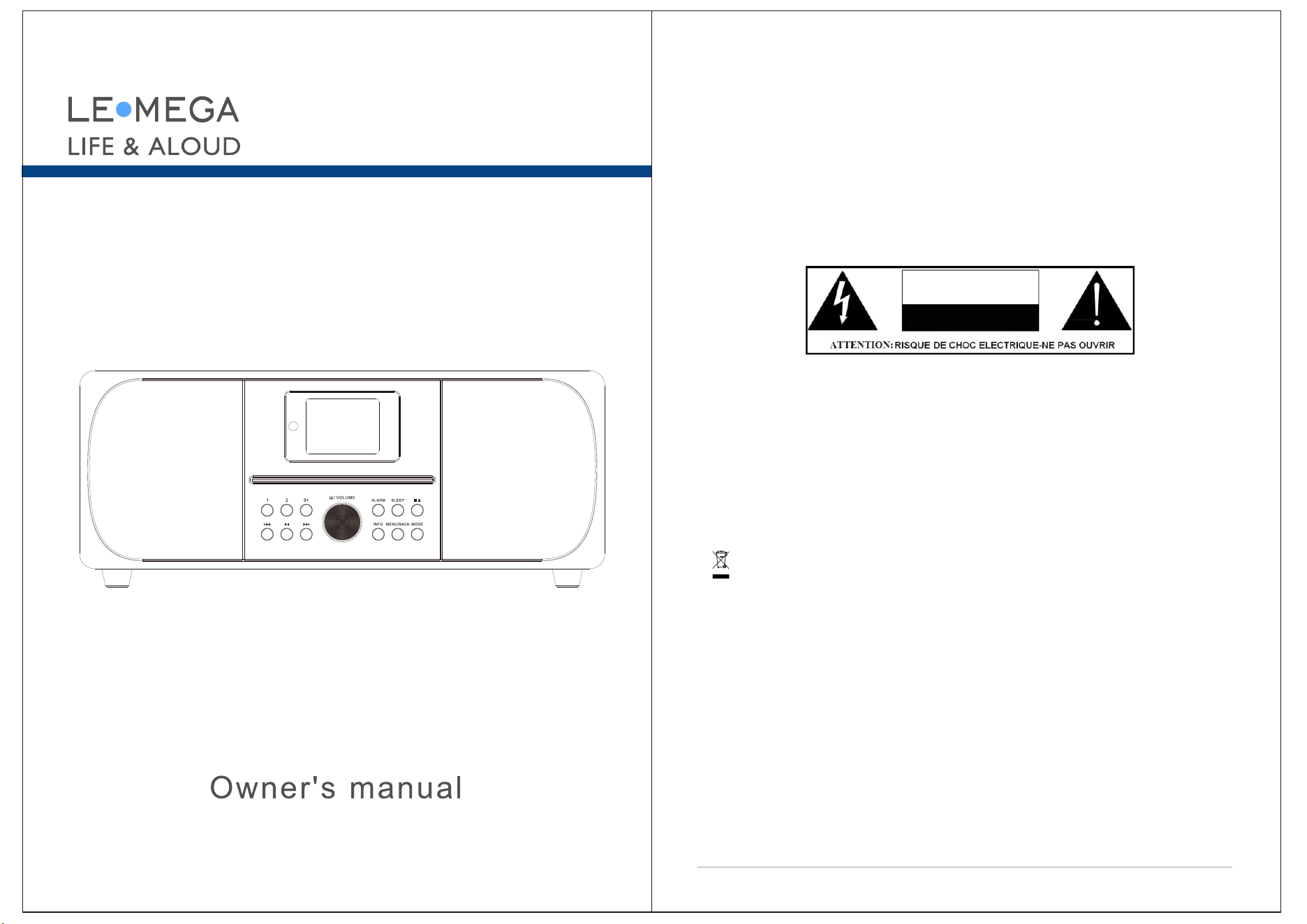
Safety
Safety Instructions
Please store this instruction manual for future reference.
WARNING: To reduce the risk of fire or electric shock, do not expose this
apparatus to rain or moisture. The apparatus shall not be exposed to dripping
or splashing and that objects filled with liquids, such as vases, shall not be
placed on apparatus.
WARNING: The direct plug-in adapter is used as disconnect device, the
disconnect device shall remain readily operable.
This lightning flash with arrowhead symbol within an equilateral triangle is
intended to alert the user to the presence of non-insulated “dangerous
voltage” within the product's enclosure that may be of sufficient magnitude to
constitute a risk of electric shock.
Warning: To reduce the risk of electric shock, do not remove cover(or
back) as there are no user-serviceable parts inside. Refer servicing to
qualified personnel.
The exclamation point within an equilateral triangle is intended to alert
the user to the presence of important operating and maintenance
instructions in the literature accompanying the appliance.
Correct Disposal of this product. This marking indicates that this
product should not be disposed with other household wastes throughout the
EU. To prevent possible harm to the environment or human health from
uncontrolled waste disposal, recycle it responsibly to promote the
sustainable reuse of material res
ources. To return your used devic
e, please
use the return and collection systems or contact the retailer where the
product was purchased. They can take this product for environmental safe
recycling.
No naked flame sources, such as lighted candles, should not be placed
on the apparatus.
Do not use this product near water or moisture.
Clean only with a dry cloth.
Unplug this product from the wall outlet before cleaning.
Place th unit on a solid surfacee .
1
MSY6 ALL-IN-ONE MUSIC SYSTEM
CAUTION
RISK OF ELECTRIC SHOCK
DO NOT OPEN
3
Do not put it in a closed bookcase or a cabinet that may keep air from
flowing through its ventilation openings.
Do not install near any heat sources, such as radiators, heat registers,
stoves or other appliances that produce heat.
Protect the power cord from being walked on or pinched, particularly at
plugs and the point where they exit from the product.
Servicing is required when the product has been damaged. Do not attempt
to service this product yourself. Opening or removing covers may expose you
to dangerous voltages or other hazards. Please contact the manufacturer to
be referred to an authorized service center near you.
To prevent risk of fire or electric shock, avoid over loading wall outlets,
extension cords, or integral convenience receptacles.
Do not let objects or liquids enter the product.
Use proper power sources. Plug the product into a proper power source,
As described in the operating instructions or as marked on the product.
Changing sources while a CD is playing causes the CD to stop playback.
Playback will resume when the source is set to CD again.
The sound quality of MP3, CD-R/CD-RW, and even commercially recorded
discs can vary greatly. The same holds true for the sound quality of portable
MP3 players.
Do NOT use any CD lens cleaning discs since these are not designed for
slot-load machines.
Avoid bending the disc when loading or ejecting.
Do not move the unit while a disc is playing and do not ship the unit with a
CD inside.
Do not try to insert a disc in the slot if one is already inside the unit.
Do not insert specially shaped discs or 3" CD “single” discs.
You may experience a delay in playback when inserting MP3 or WMA discs
while the player reads the directory.Paper labels stuck to CD-R/CD-RWs may
become loose and possibly damage the player.
CDs with severe scratches may not play properly.
Do not insert anything except a CD inside the loading slot in the rare event
you experience an error, unplug the power cord for 60 seconds and then
plug it back in firmly.
2
Carton contents
After you unpack the box, you will find the following items:
1 MSY6 unit
1 power adapter
1 owner's manual
1 Remote Control
Main controls
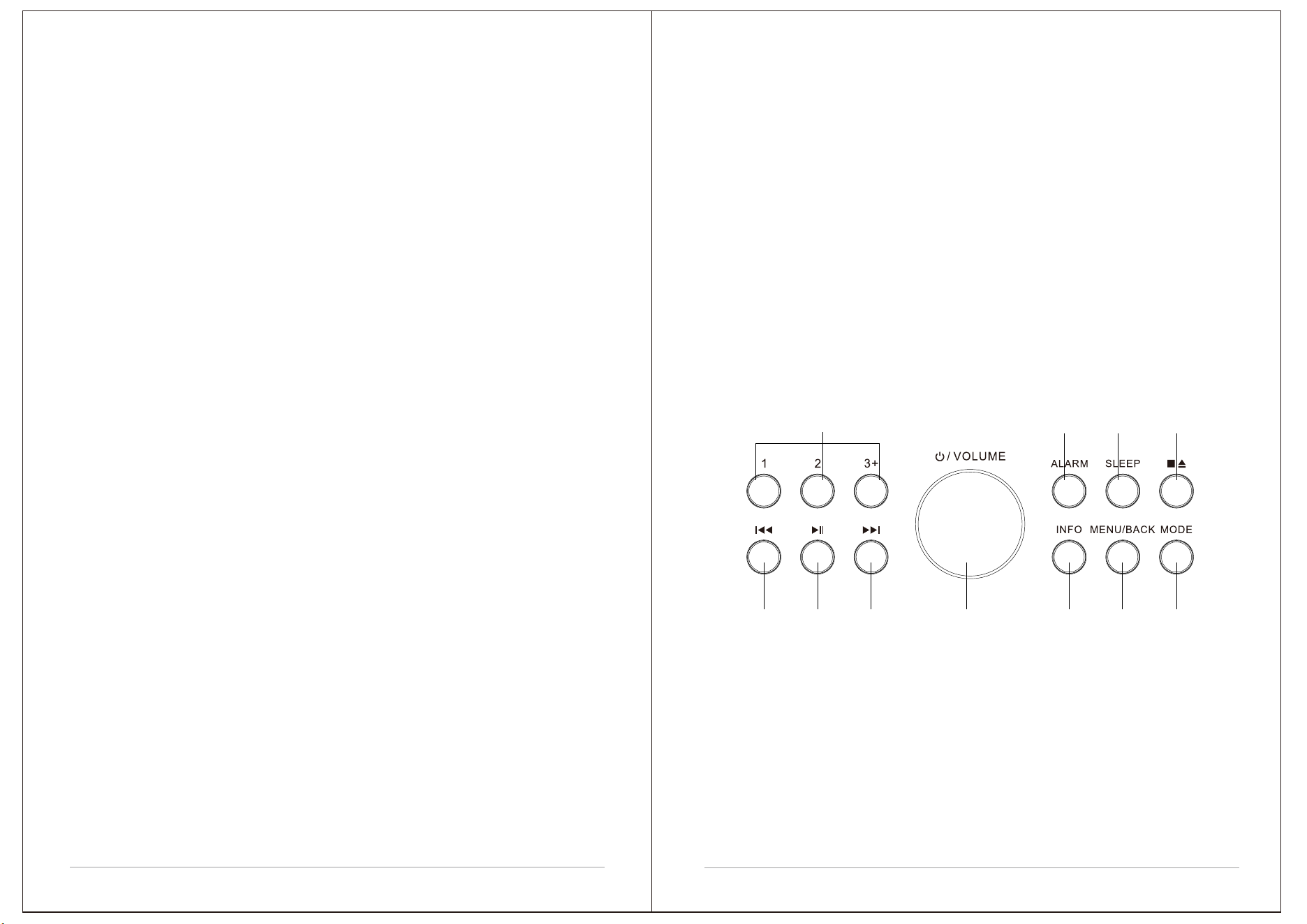
13610 2 4 7
58911
1. KNOB: SELECT/ VOLUME/MUTE/SNOOZE:
a. SELECT: Turn to scroll through a menu or station list. The chosen option is
highlighted, Press to the button to select.
b. VOLUME: Turn to the button to adjust the volume up or down when
playback.
c. MUTE: Press to the button to mute the music when playing.
d. SNOOZE: Press the button to snooze a set time when alarm sounding.
e. POWER ON | OFF the unit: Long press this button to power on/standby the unit.
2. INFO: View more information about the station or track playing. Press
again to cycle through further information screens then return to the normal
Now playing screen.
3. / [TUNE+] : Next: Press to select the next track under FM/DAB/
Bluetooth / CD mode; Press and hold the Tune+ button 2 seconds to auto
scan the stations under the FM mode.
4. BACK/MENU:
a. BACK: press the BACK to return to the previous screen.
b. MENU: press the MENU to show the MENU for the current mode. Press
again to show now playing screen.
5.
6.
:In CD mode, Press to stop CD track. Press again fo
r CD ejection.
: Press to select Play/Pause under USB Playback,
Bluetooth and CD mode. In FM mode, press to do auto scan the stations.
7. MODE: Press to Source to select different modes , DAB, FM, Bluetooth, CD,
USB Playback and AUX.
8. SLEEP: When playing, press Sleep, MSY6 wil l back to set sleep time. When
playing, opens the sleep menu to set the time interval before the unit is set to
Standby mode. When alarm is sounding, allows you to set the snooze interval.
9. ALARM: Press to Alarm, the screen will display Alarm 1 and Alarm 2; then
Rotate and press the SELECT button to select alarm 1 or alarm 2 to set up.
10. / [TUNE-] : Previous: Press to select the previous track under
FM/DAB / Bluetooth/CD mode; Press and hold the Tune- button 2 seconds to
auto-scan the stations under the FM mode.
4
5
11. PRESET
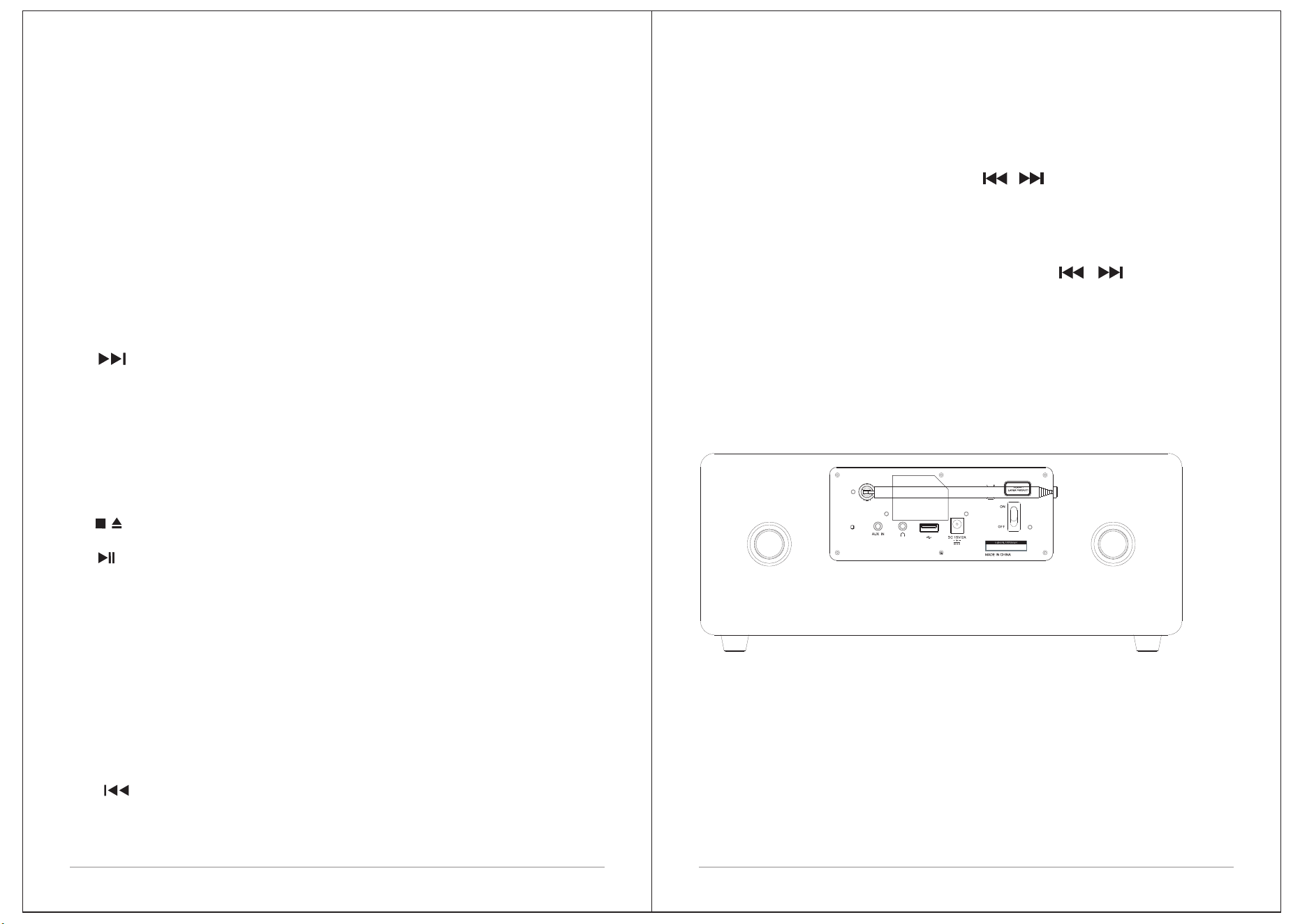
Connectors
As shown below has connectors from left to right)for the followings:
USB socket for USB stick with MP3 music playback (not for
charging).
DC Power in 15V/2A
Power Switch
Aux in (to connect external MP3 music source from the iPod, or Pad other
devices
Headphone out for the headphone playback.
Saving Presets--FM, DAB, total can save 40 preset
stations [20 DAB stations and 20 FM stations].
To save a quick preset hold either button 1 or 2 for 2 seconds.
To save more than 3 preset, press and hold the Preset button 3+ for
2 seconds, use the navigation control / or rotate the knob to
select and push Select knob to save.
Recall Presets-- FM, DAB
Short Press Preset button 1 or 2 to recall a quick preset. Press the
Preset button 3+ and use the navig
ation control / or rotate
the knob to tune into the station.
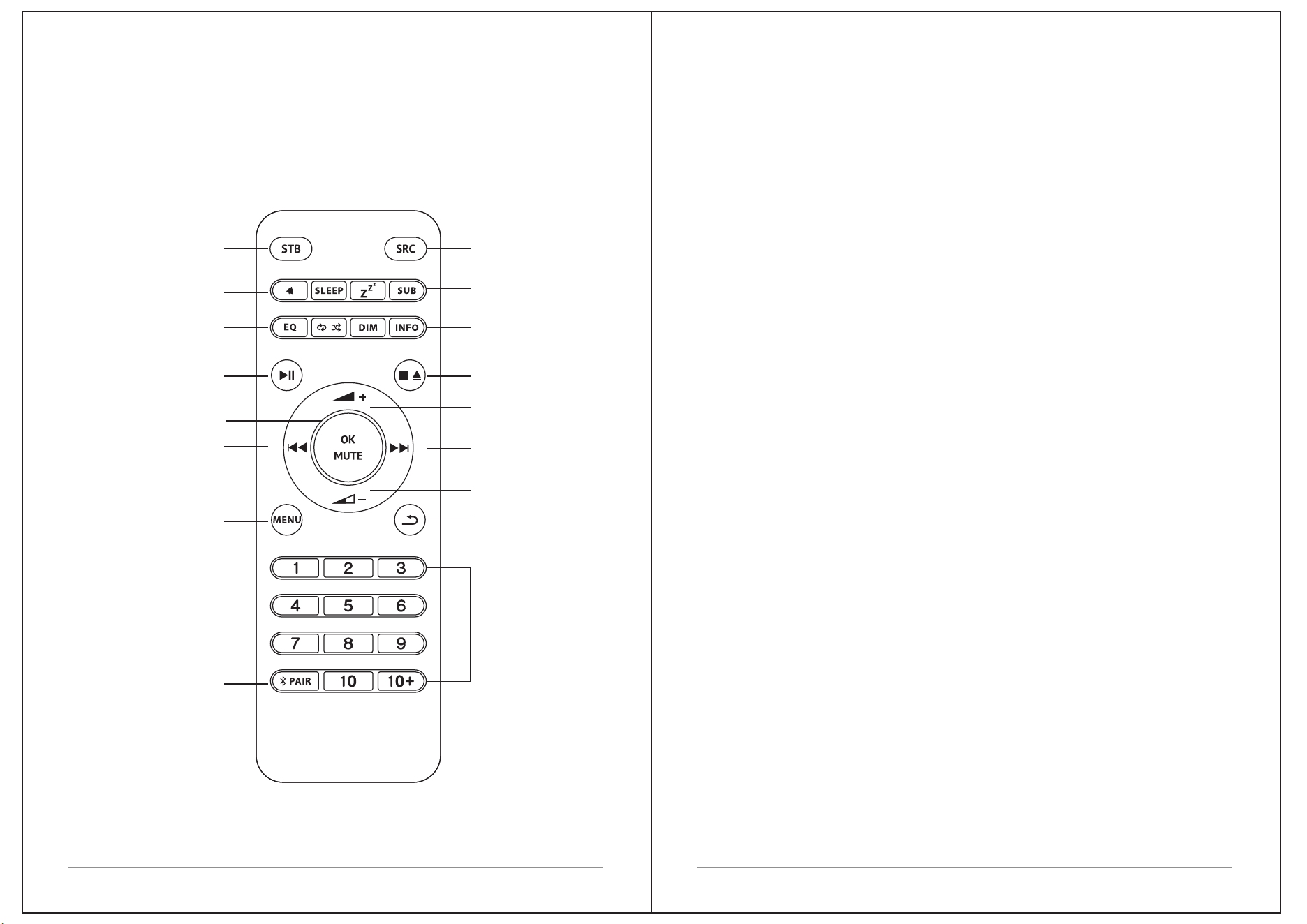
Remote control
Most of the functions of the LEMEGA MSY6 can be controlled using either the
product or the remote control.
7
6
ON/ STANDBY
ALARM/SLEEP
EQ/
REPEAT&SHUFFLE
[CD]
PLAY/PAUSE
OK/MUTE
PREVIOUS/
TUNE-
MENU
BLUETOOTH PAIR
SOURCE/MODE
SNOOZE/
SUBWOOFER
DIM / INFO
STOP (CD)/
EJECT (CD)
NEXT/
TUNE+
BACK
VOLUME -
VOLUME +
PRESETS
Insert the power adapter on the backside.
Extend the telescopic antenna in its full length for better FM/DAB reception.
Press the Power Knob once to begin start-up process
MENU /BACK BUTTON
Pressing the button will take you to the Source Menu for the particular mode of
operation you are in. For example, pressing MENU button when in
DAB Mode will take you to the DAB MODE MENU. Pressing the button for a
second time will return you to the 'playing screen' that you just left.
NAVIGATING THE MENU
Most of the functions of MSY6 can be accessed in 2 ways:
- via MENU button
- using the optional remote control (shortcuts)
MENU button displays different contents, depending on the current
selected mode.
Follow instructions on the display, and
- Use Knob to select and confirm
- Back to step back in the menu tree
- Press MENU to exit menu
- Press SRC [Source] to select MODE
During playback, press INFO button to display current mode additional
information.
PRESETS
PRESETS button is used to conveniently store and recall your favorites. It
works
- in FM mode
- in DAB mode
In
order to save a preset:
- keep PRESETS button pressed
- select preset position on
the list with the knob
- press knob to confirm
To recall presets:
- Press PRESETS button
- select preset with the knob
- press knob to confirm
First steps with MSY6
9
Press and hold or to automatically tune to the previous or next
available FM station. Short Press or to select the Previous or next
stations.
SCAN SETTING
Additional Functions
EQUALIZER
Press MENU > System Setting > Equalizer and pick your favourite EQ setting.
MSY6 can also store Bass/Treble combination. Select "MY EQ Settings" and
adjust settings at your preference.
ALARM
MSY6 can store 2 independent alarms. Press ALARM Button to set up
Alarms and follow
Sources [mode]
MSY6 can play different sources:
FM, DAB, CD, AUX, BLUETOOTH, USB Playback.
Press MODE to display sources list and press KNOB to select.
FM
When listening to FM radio, MSY6 displays the station name and other
RDS/BDS informations when available.
CHANGE STATION
8
STATION SCAN
We recommend to perform a full scan from time to time to discover new
stations. Press the MENU button and select Full Scan or Press button to
perform the scan
You can change the scan settings to only stop at sta
tions with a strong signal
by selecting Menu/Scan setting/Strong stations only.
MONO
As an FM signal becomes weaker, the level of hiss can increase.
To reduce it, select Menu/Audio setting/Forced Mono.
DAB [Optional]
When listening to DAB radio, M
SY6 di
spl
ays the station name and other DLS
informations. The first time you select DAB Radio, MSY6 performs an auto-scan
of available stations.
CHANGE STATION
Press or to automatically tune to the next available DAB station.
Scroll dial can be used to list all available stations. Highlight the station you
wish to listen and press the Scroll dial to confirm.
STATION ORDER
The DAB station list can be ordered by Alphanumeric, Ensemble or Valid.
To change station order, select Menu/Station order and make your selection.
CD
MSY6 can play CDs. To insert a CD, gently push it into the CD slot. Once loaded,
it will play automatically.
Track number and time is shown on the display,
together with CD text, if available. Use buttons on MSY6 or on the optional
remote to perform basic functions like pause, next track, stop, etc.
Press eject button to unload the CD. Keep pressed eject button to force eject
process.
Bluetooth
MSY6 can connect to Bluetooth devices and stream in CD quality.
As soon as you switch to Bluetooth, MSY6 attempts to connect to the last device
it was paired with. If it is the first time, MSY6 displays "Bluetooth discoverable":
check your Bluetooth device setting page and select "LEMEGA MSY6 " in the
available devices list.
To connect a new device, press MENU button > Connect Device.
Use buttons on MSY6 or on the optional remote to perform basic functions like pause,
next track, stop, etc.
Please refer to your Bluetooth device to start playing music on MSY6 .
Connect your Bluetooth headset to the MSY6
With the MSY6 you have the possibility to connect a Bluetooth headset via Bluetooth.
Please switch your headphones to the pairing mode.
1. Press the menu button in any mode, except Bluetooth mode and go to Bluetooth
headphone.
11
10
2. Choose “Bluetooth headphone On
“
3. The Bluetooth symbol is flashing and waiting for pairing
4. After successful pairing, the symbol is not flashing and you can enjoy
your music.
Tips: The headphone must have the function “simple pairing“
or automatic “handshake“
Aux In
MSY6 accepts analogue audio sources, using a mini jack connector. For best
performance, we recommend to balance the volume level on your device.
SLEEP
MSY6 can set a 15-30-45-60-90 minutes sleep timer. Press SLEEP Button
and scroll the SELECT knob to choose the time you want.
USB Playback
Connect a USB memory stick, select USB Mode and listen to stored MP3 music files.
SOFTWARE UPDATE
From time to time, MSY6 may make software upgrades available with bug Fixes and/
or additional features.
This feature is for service centre.
FACTORY RESET
Press MENU > System Settings > Factory reset and confirm with the SELECT knob.
Backlight
The MSY6 has a backlight with three brightness settings, and adjustable
timeout [this is the time delay, in seconds, after which the display switches
to the Dim level].
There are three settings:
•Timeout - On | 10 | 20 | 30 | 45 | 60 | 90 | 120 | 180 sec
•On level - High | Medium | Low
•Dim level - High | Medium | Low
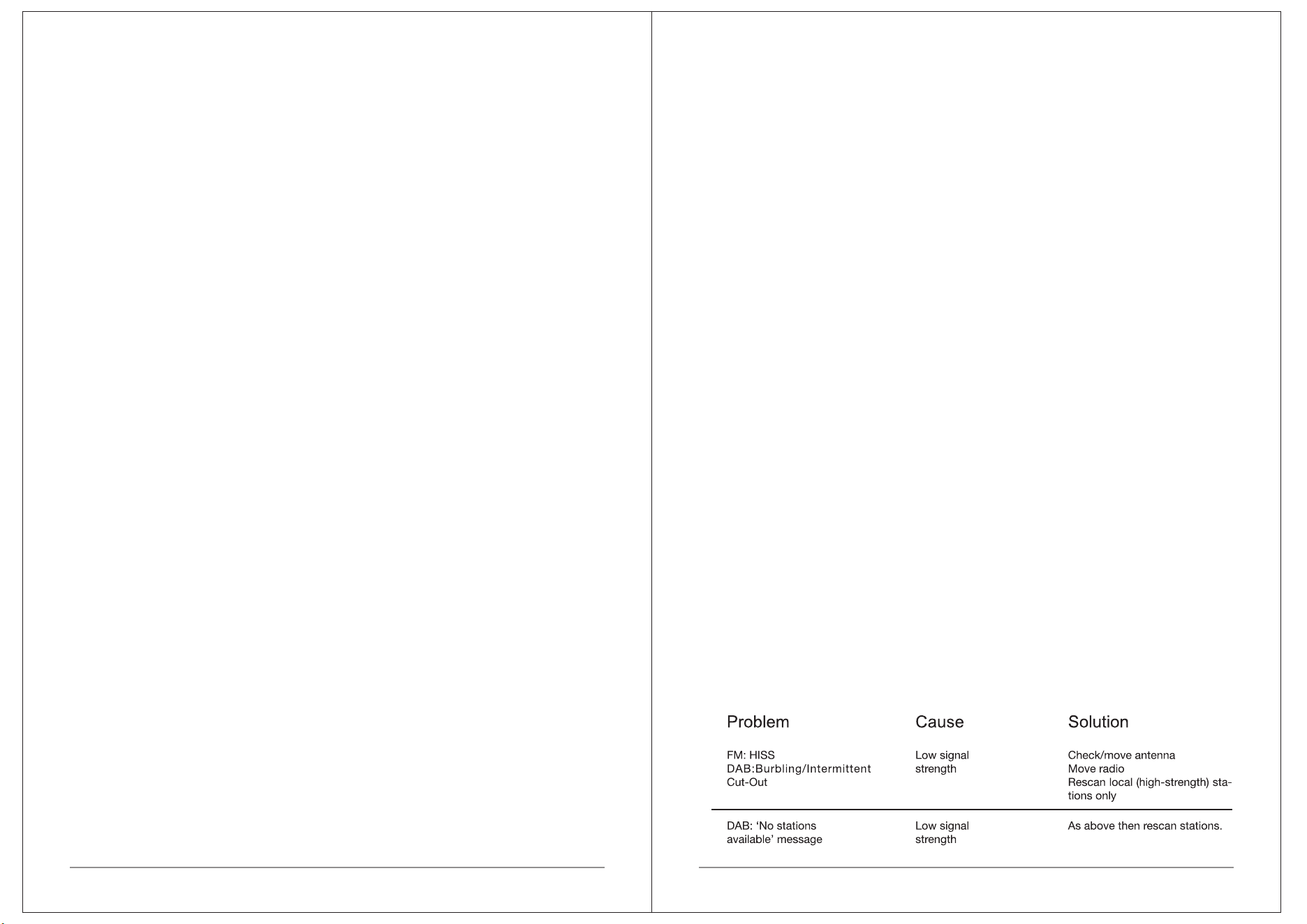
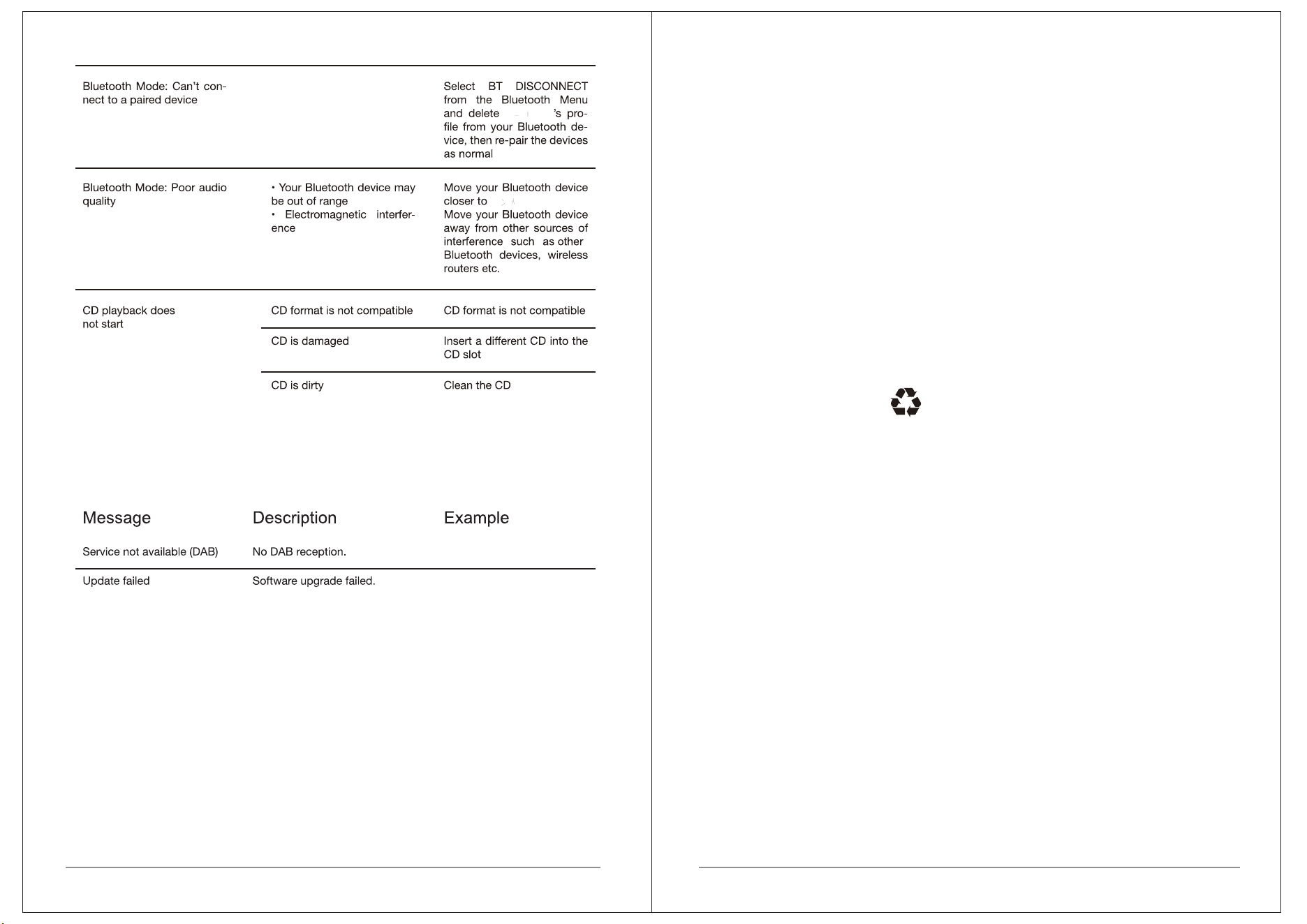
TROUBLESHOOTING AND ERRORS MESSAGES
Language
The default language is Engli s h . To change, select Menu > System
settings > Language > then select your languag. e
Time/Date
The time and date can be updated manually or automatically With
auto-update , the time and date are automatically synchronised with
national time signals broadcast over DAB and F M [(when available] .
You can also select the display format for the time and d. ate
The Time menu contains the following optio: ns
• Set Time/Date – [see below]
• Auto update - Update from Any | Update from Digital Radio |
Update from FM | No Update
• Set 12/24 hour - 12 | 24
•
•
Set date format - DD-MM-YYYY | MM-DD-YYYY.
Set time/date
This option is for manually setting the time and date displayed.The time
displays as hh:mm, with the first value, hh, active (flashing). Adjust each
value using the select control knob and push Select knob to confirm. The
next value then becomes active and flashes. The date values follow and
are set in the same way.
Note: The date displays as DD-MM-YYYY or MM-DD-YYYY depending on
your choice of date format (see above).
Clock Style - Normal Digital / Big Digital / Classic Analog /
Modern Analog
12 13
MSY6
MSY6
TECHNICAL SPECIFICATION:
Model:
Type:
Speaker:
Power:
MSY
6 ALL-IN-ONE MUSIC SYSTEM
CD/ DAB/DAB+/FM/AUX/Bluetooth Music System
2 x 3" (full range)
RMS 30W
Power Supply: 15V 2A DC mains supply
Dimension (mm): 350W x 144H x 215D
Weight: 3.5 KG
Specifications are subject to change without notice.
If you have any questions or suggestions, Please share with us.
www.lemegaaudio.com
info@lemegaaudio.com
FCC WARNING
This device complies with part 15 of the FCC Rules. Operation is subject to the
following two conditions: (1) this device may not cause harmful interference, and (2)
this device must accept any interference received, including interference that may
cause undesired operation.
Any changes or modifications not expressly approved by the party responsible for
compliance could void the user's authority to operate the equipment.
NOTE: This equipment has been tested and found to comply with the limits for a
Class B digital device, pursuant to Part 15 of the FCC Rules. These limits are
designed to provide reasonable protection against harmful interference in a
residential installation. This equipment generates, uses and can radiate radio
frequency energy and, if not installed and used in accordance with the instructions,
may cause harmful interference to radio communications. However, there is no
guarantee that interference will not occur in a particular installation.
If this equipment does cause harmful interference to radio or television reception,
which can be determined by turning the equipment off and on, the user is
encouraged to try to correct the interference by one or more of the following
measures:
-- Reorient or relocate the receiving antenna.
-- Increase the separation between the equipment and receiver.
-- Connect the equipment into an outlet on a circuit different
from that to which the receiver is connected.
-- Consult the dealer or an experienced radio/TV technician for help.
To maintain compliance with FCC’s RF Exposure guidelines, This equipment should
be installed and operated with minimum distance between 20cm the radiator your
body: Use only the supplied antenna.
MSY6 ALL-IN-ONE MUSIC SYSTEM