BUTTON
OPERATION
Standard
Mode
Initiate
RCC
receiving
Press and
hold 3s
Enter into
time and
date setting
Time
Setting
Mode
Confirm
setting
Press and
hold 3s
Increase
rapidly
Decrease
rapidly
C53: 单张双面240x210mm
1089
2025 91-1089-00 120925
ABOUT THIS INSTRUCTION MANUAL
These operating instructions are to be considered a component of
the device. Please read the safety instructions and the operating
instructions carefully before use.
Keep these instructions for renewed use at a later date. When the
device is sold or given to someone else, the instruction manual must
be provided to the new owner/ user of the product.
The device is intended only for indoor use.
GENERAL WARNINGS
• Risk of electric shock — This device contains electronic
components. Only use the device as described in the manual;
otherwise, you run the risk of an electric shock.
• Choking hazard — Children should only use the device under adult
supervision. Keep packaging material, like plastic bags and rubber
bands, out of the reach of children, as these materials pose a
choking hazard.
• Risk of chemical burn — Keep batteries out of the reach of
children! Make sure you insert the batteries correctly. Leaking battery
acid can lead to chemical burns. Avoid contact of battery acid with
skin, eyes and mucous membranes. In the event of contact, rinse the
affected region immediately with a plenty of water and seek medical
attention.
• Risk of fire/explosion — Do not expose the device to high
temperatures. Use only the recommended batteries. Do not
short-circuit the device or batteries, or throw them into a fire.
Excessive heat or improper handling could trigger a short-circuit, a
fire or an explosion.
• Do not disassemble the device. In the event of a defect, please
contact your dealer. The dealer will contact the Service Centre and
can send the device in to be repaired, if necessary.
• Use only the recommended batteries. Always replace weak or
empty batteries with a new, complete set of batteries at full capacity.
Do not use batteries from different brands or with different
capacities. The batteries should be removed from the unit if it has
not been used for a long time.
OVERVIEW
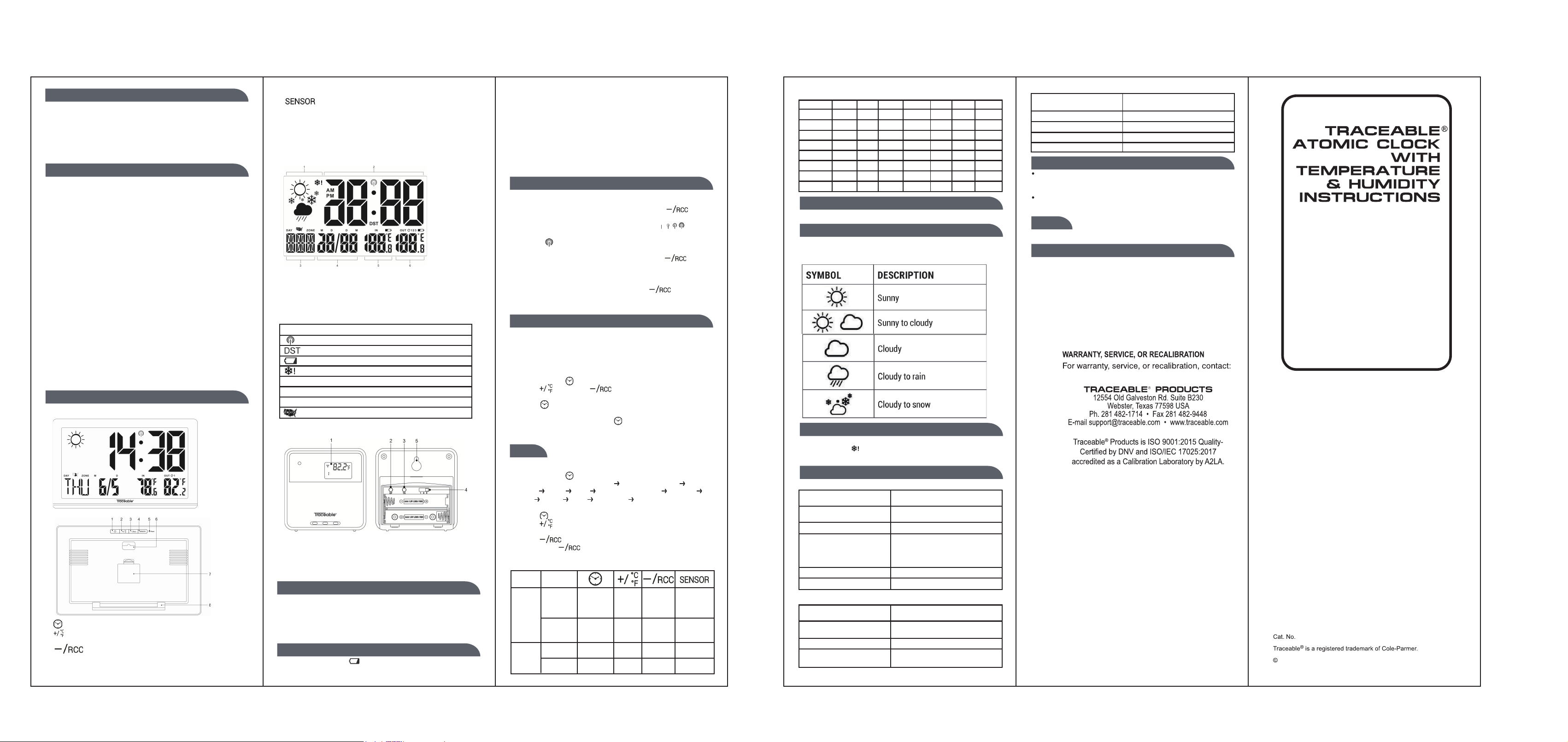
MAIN UNIT:
1. – Press and hold to enter time and date setting mode.
2. - While in setting mode, press to increase one unit, press and
hold to increase rapidly.
3. - While in setting mode, press to decrease one unit,
press and hold to decrease rapidly. While in normal display mode,
press once to initiate RCC receiving or press and hold to stop
RCC receiving.
4. - Press to toggle between outdoor sensor channel 1-3.
Press and hold to initiate outdoor sensor search.
5. Reset – Use a ball pen to press to reset all setting.
6. Wall Mount hole.
7. Battery compartment.
8. Table stand
MAIN UNIT LCD DISPLAY
1.Weather forecast
2. Time Display
3. Weekday display and Time Zone indicator
4. Date display
5. Indoor Temperature display
6. Outdoor Temperature display
Symbol Description
RCC signal received
Daylight Saving Time ON
Low battery indicator
Ice alert indicator
[IN] Indoor indicator
[OUT] Outdoor channel indicator
[ZONE] Time zone indicator
Displayed US time zone
OUTDOOR SENSOR
1.Outdoor temperature display
2. ℃/℉ switch
3. TX (Initiate paring with main unit).
4. Channel switch.
5. Wall Mount hole
GETTING STARTED
INSERT BATTERIES
1.Remove the battery door from the back
2. Insert 2 pieces LR6 (AA)/ 1.5V batteries. Please make sure with
correct polarity (+/-) of the batteries.
3.Reattach the battery door.
NOTE:
Replace batteries when displays, or when the display is dim.
OUTDOOR SENSOR
1.The main unit can receive data from up to 3 outdoor sensors. 1
Sensor is included with delivery.
2. Remove the battery door from the back.
3. Insert 2x AAA (LR03)/1.5V batteries. Please ensure the polarities
(+/-) of the batteries match upon installation.
4. Select a channel, then press TX.
5. Reattach the battery door.
6. Place the sensor within 30 m (98 ft) of the main unit using the
table stand or wall mount.
CLOCK
CLOCK RECEPTION
1.When you insert or replace the batteries, RCC reception is
initiated. To manually start RCC reception press the
[ ] button.
2. The receiving process duration is 7 minutes.
3.
During receiving process, the RCC signal symbol
[ ] flashes.
4. If the RCC receiving process is successful, a completed RCC
symbol [ ] will be shown in the display and the date and time
will be set automatically. If it fails within 7 minutes, RCC setting
will quit automatically. If that happens, press the [ ] button
to re-initiate RCC receiving.
5. RCC receiving will automatically start at 1:03, 2:03, 3:03, 4:03,
5:03 every night. Auto receiving function will cease if it is successful.
6. To stop RCC reception, press and hold the [ ] button.
7. If the device is still not receiving the signal, please proceed to set
the time manually.
NOTE:
-The RCC Clock receives WWVB signals as RCC signal.
-It is necessary to manually set the time zone in order to display
correct time.
TIME ZONE SETTING
To set a different time zone, proceed as follows:
1.Press and hold [ ] button to enter time and date setting.
2. Press [ ] button or [ ] button to select the Time zone
from E, P, M, C.
3. Press [ ] button to confirm Time Zone setting
4. Continue to proceed manual clock setting as below if you want to
set the clock manually or press [ ] several times to bypass
the manual setting and let the clock to set automatically by
receiving RCC signal.
NOTE: E = EST; P = PST; M = MST; C = CST
SET THE CLOCK MANUALLY
1.Press and hold [ ] button to enter into time and date setting.
2. Sequence of setting: Time Zone Year (2000 – 2099) Date
format Month Date Week Day Language 12/24 Hr
Hour Minute ℃/℉ DST on/off exit
3. During setting, the setting parameter will flash.
4. Press [ ] button to confirm setting and enter to next parameter
5. Press [ ] button once, the figure will increase 1 unit. Press and
hold the [+] button, the figures will increase rapidly.
6. Press [ ] button once, the figure will decrease 1 unit. Press
and hold the [ ] button, the figures will decrease rapidly.
7. If there is no action in 20 seconds, the setting will be saved and
will exit the setting mode.
MODE
Press once
Toggle
between
℃/℉
Toggle
between
outdoor sensor
channel 1-3.
Turn off
RCC
receiving
Initiate
outdoor
sensor search.
Increase
Press once
Decrease
Seven languages Week Day display:
English Italian France Spanish Dutch Danish German
Symbol ENG ITA FRE ESP NET DAN GER
Monday MON LUN LUN LUN MAA MAN MON
Tuesday TUE MAR MAR MAR DIN TIR DIE
Wednesday
WED MER MER MIE WOE ONS MIT
Thursday THU GIO JEU JUE DON TOR DON
Friday FRI VEN VEN VIE VRI FRE FRE
Saturday SAT SAB SAM SAB ZAT LOR SAM
Sunday SUN DOM DIM DOM ZON SON SON
°C/°F SETTING ]
Press [ + /°C°F ] button to switch Celsius (°C) / Fahrenheit (°F).
WEATHER FORECAST
This device forecasts the next 6-12 hours of weather within a 30-50
km (19-31 mile) radius with limited accuracy. Please do not rely on
this device for the weather forecast.
ICE ALERT
If the channel 1 sensor falls between 37°F to 28°F (3°C to -2°C), the
ice alert indicator will display, and will disappear once the
temperature is out of this range.
SPECIFICATIONS
MAIN UNIT:
L x W x H 15.3 x 1.0 x 8.9 Inches
389 x 26 x 225 mm
Weight 1.15 lbs (Exclude batteries)
520 g (Exclude batteries)
Temperature display range 14℉ to 122℉(-10℃ to +50℃)
Accuracy 32℉ to 104℉: +/- 2.7℉
<32℉ and > +104℉: +/- 3.6℉
0℃ to +40℃: +/- 1.5℃
<0℃ and >+40℃: +/- 2℃ (+/-4℉)
Resolution 0.2℉(0.1℃)
Power 2 x LR6 (AA) 1.5V batteries
OUTDOOR SENSOR
L x W x H 2.36×0.79×2.36 Inches
60 x 20 x 60 mm
Weight 0.088 lbs (Exclude batteries)
40 g (Exclude batteries)
Temperature display range 14℉ to 122℉(-10℃ to +50℃)
Accuracy 32℉ to 104℉: +/- 2.7℉
<32℉ and > +104℉: +/- 3.6℉
0℃ to +40℃: +/- 1.5℃
<0℃ and >+40℃: +/- 2℃ (+/-4℉)
Resolution 0.2℉(0.1℃)
Power 2 x LR03 (AAA) 1.5V batteries
Transmission range 98 ft (30 m)
Signal frequency 433 MHz
NOTE:
When the temperature is lower than 14℉ (-10℃), the temperature
displays LL.L. When the temperature is higher than 122℉ (50℃),
the temperature displays HH.H.
During RCC receiving process, temperature detection will be
stopped.
NOTE: The technical specifications for this product and the
contents of the user manual are subject to change without notice.
FCC STATEMENT
This device complies with Part 15 of the FCC Rules.
Operation is subject to the following two conditions: (1) This device
may not cause harmful interference, and (2) This device must accept
any interference received, including interference that may cause
undesired operation.
FCC ID: 2AO2J91-1089-00
-
-
-
--

FCC Caution
This device complies with part 15 of the FCC Rules. Operation is subject to the following two conditions:
(1) This device may not cause harmful interference, and
(2) this device must accept any interference received, including interference that may cause undesired operation.
Any Changes or modifications not expressly approved by the party responsible for compliance could void the user's authority to operate the equipment.
Note: This equipment has been tested and found to comply with the limits for a Class B digital device, pursuant to part 15 of the FCC Rules. These limits are designed to provide
reasonable protection against harmful interference in a residential installation. This equipment generates uses and can radiate radio frequency energy and, if not installed and used in
accordance with the instructions, may cause harmful interference to radio communications. However, there is no guarantee that interference will not occur in a particular installation. If
this equipment does cause harmful interference to radio or television reception, which can be determined by turning the equipment off and on, the user is encouraged to try to correct
the interference by one or more of the following measures:
-Reorient or relocate the receiving antenna.
-Increase the separation between the equipment and receiver.
-Connect the equipment into an outlet on a circuit different from that to which the receiver is connected.
-Consult the dealer or an experienced radio/TV technician for help.
The device has been evaluated to meet general RF exposure requirement. The device can be used in portable exposure condition without restriction.