User Manual
Smart Meat Thermometer
Questions or Concerns?
[email protected] | 1-888-402-1684
Mon–Fri, 9:00 am–5:00 pm PST/PDT

2
Table of Contents
Package Contents
Specifications
Important Safeguards & Warnings
Care & Maintenance
Getting To Know Your
Smart Meat Thermometer
Getting Started
Limited Warranty Information
Customer Support
2
2
3
6
8
10
13
18
Package Contents
1 x Smart Meat Thermometer
1 x Charging Case
1 x 1.5V AAA Battery (Pre-Installed)
1 x User Manual
Specifications
Model CMT-R161S
Probe Battery
2.4V, 5mAh,
rechargeable Li-ion
battery
Charging Case
Battery
1 x 1.5V AAA
Battery
Bluetooth
®
Frequency Range
2402–2480MHz
Maximum transmit power: < 4dBm (E.I.R.P.)
Probe Water
Resistance
IP67
Operating
Relative Humidity
≤ 90%
Temperature Range
Internal Temperature Sensor:
32°–212°F / 0°–100°C
Ambient Temperature Sensor:
32°–572°F / 0°–300°C

3
READ AND SAVE THESE
INSTRUCTIONS
IMPORTANT SAFEGUARDS &
WARNINGS
Follow basic safety precautions when
using your meat thermometer. Read
all instructions.
Key Safety Points
General Safety
• Use caution when removing the
thermometer after cooking. Use
heat-resistant gloves or oven mitts
to remove the thermometer or allow
food to cool before removing.
• Always insert the probe up to the
insertion line to avoid damaging the
product or causing injury. [Figure 1.1]
• The thermometer is only intended
to measure the temperature of meat
during cooking.
• It is recommended to use USDA-
• Do not exceed an internal
temperature of 212°F / 100°C and
an ambient temperature of 572°F/
300°C. If temperatures exceed the
allowed range, or the thermometer
directly touches open flame or hot
coal, you must wear eye protection
before removing the thermometer.
Figure 1.1

4
recommended safe minimum
internal temperatures to cook
dierent meats to avoid food
poisoning caused by raw or
undercooked meat and seafood.
• Check to make sure there are no
visible damages to the thermometer. If
damages are found, contact Customer
Support (see page 18).
• Do not hit the probe tip against
hard surfaces to avoid causing
damage.
• Do not use in hot oil, microwave
ovens, deep fryers, or pressure
cookers.
• Never use the thermometer with
microwave ovens, pressure cookers,
freezers, or use for boiling liquids,
making candy, open flames, or
measuring room and human body
temperatures.
• The thermometer can be used with
air fryers, ovens, smokers, grills,
BBQs, stoves, rotisserie cookers,
clay cookers, and slow cookers.
• Do not use in direct contact with
charcoal or fire, and make sure the
thermometer is removed before
searing.
• Do not insert the probe directly
under a heat source to avoid burns.
• The charging case must be kept
away from heat sources, such as a
grill cover.
• If the thermometer accidentally
falls into a cooking appliance,
immediately turn o the cooking

5
appliance and close the lid/door. Allow
the thermometer to fully cool o before
removing.
• Do not bend the probe. The handle
is able to withstand normal twisting
and pulling when inserting into
meat.
• Keep out of reach of children.
• Do not tamper with the
thermometer’s internal
components.
• Do not dispose of any part of the
thermometer in a fire.
• Do not use your thermometer if it
is damaged, not working, or if the
charging case is damaged. Contact
Customer Support (see page 18).
• To remove the batteries from your
equipment, reverse the procedure
described in the owner’s manual
for inserting batteries. For products
with a built-in battery that lasts for
the lifetime of the product, removal
may not be possible for the user.
In this case, recycling or recovery
centers handle the dismantling of
the product and the removal of the
battery. If, for any reason, it becomes
necessary to replace such a battery,
this procedure must be performed
by authorized service centers. In
the European Union and other
locations, it is illegal to dispose of
any battery with household trash.
All batteries must be disposed
of in an environmentally sound
manner. Contact your local waste-
management ocials for information

6
regarding the environmentally sound
collection, recycling and disposal of
used batteries.
• Do not use to take your own
temperature.
Do not poke the tip of the
probe to your fingers or body
parts to avoid risk of injury.
• If the thermometer is used in a
manner not specified in the user
manual, the protection provided by the
thermometer may be impaired.
• The thermometer will be hot
during and after use. Always
use heat-resistant gloves or
oven mitts to handle the hot
thermometer.
• Not for commercial use. Household
use only.
Care & Maintenance
• To clean, wash the thermometer
with hot, soapy water and a non-
abrasive sponge.
• Do not use cleaning products that
contain alcohol, ammonia, benzene,
or other abrasive chemicals to clean
the thermometer.
• The thermometer is water-resistant
but not waterproof. Store in a dry,
cool place. Do not soak in liquids,
sinks, or moisture for extended
periods of time.
• The charging case is neither water-
resistant nor waterproof.

7
• Do not soak the probe in cold water
immediately after cooking.
• When installing or changing the
charging case’s battery, make sure
to place the battery in the correct
polarity.
• Non-alkaline batter is not
recommended.
• Do not replace the battery while hands
are wet or while the thermometer is in
a wet environment.
SAVE THESE INSTRUCTIONS
WARNING: Danger of explosion
if battery is incorrectly replaced.
To reduce risk of fire, explosion or
leakage of flammable liquid/gas, do
not disassemble, crush, puncture,
short external contacts, expose to
temperature above 140°F (60°C),
sunshine, or the like, expose to
extremely low air pressure, or dispose
of in fire or water. Replace only with
specified batteries.
8
GETTING TO KNOW YOUR
SMART MEAT THERMOMETER
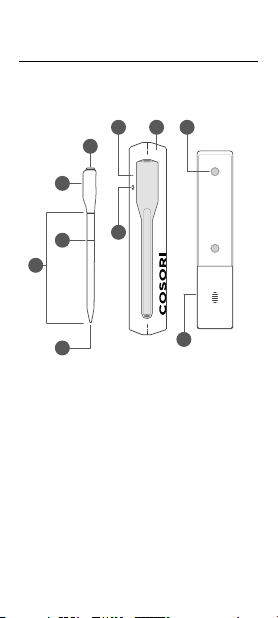
Meat Thermometer Diagram
A
F I
G
J
H
B
C
E
D
PROBE
A. Ambient Temperature
Sensor
B. Handle
C. Insertion Line
D. Internal Temperature
Sensor
E. Probe
F. Battery Level Indicator/
Bluetooth
®
Indicator
G. Battery Level Button
H. Charging Case
I. Magnets
J. Battery Compartment
Note:
• Do not use the thermometer outside of the
recommended temperature ranges.
• Always insert the probe up to the insertion line to
avoid damaging the product or causing injury.

9
Note:
• When the probe is put back in the charger, the LED
lights up green for 3 seconds, indicating the charger
recognizes the probe, and the probe should be able to
charge.
Battery Level Button
Bluetooth
®
Indicator
Disconnect from Bluetooth
®
• Flashing Red Indicator: Thermometer lost connection
with the charging case.
• Flashing Green Indicator: Thermometer is connected
to charging case.
• To disconnect, place the thermometer back into the
charging case.
• To reconnect, remove the thermometer from the
charging case and follow the instructions in the
VeSync app for adding a device.
Short press to check battery level of charging case by
LED indicator.
• Green on: Charging case’s battery is sucient.
• Red on: Charging case need to replace a new
AAA battery.
10
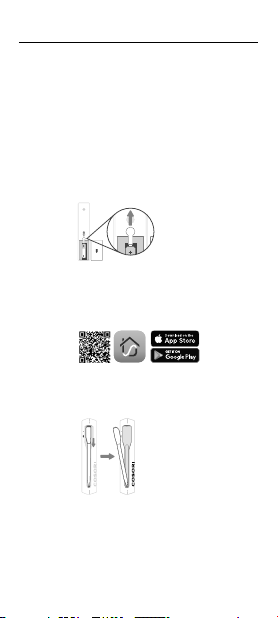
GETTING STARTED
1. Remove the insulation strip and charge the
thermometer for 2 hours. [Figure 2.1]
Figure 2.1
3. Push down on the thermometer and pull to remove
from the charging case to turn on Bluetooth
®
pairing.
[Figure 2.2]
Note: Place the thermometer back into the charging case
to turn o Bluetooth
®
pairing.
2. Open the VeSync app. If you already have an
account, tap Log In. To create a new account, tap
Sign Up.
Figure 2.2
4. Tap + to add the device. Tap Kitchen, then select
COSORI Smart Meat Thermometer and follow the
in-app instructions to
complete setup.
Note:
• Review the manual and VeSync app for
basic safety precautions and complete operating
instructions.
• Requires device to run app, Wi-Fi
®
or mobile data,
and iOS version 12 or Android version 6 (or above).
Standard data and messaging rates may apply.
Registration is required.

11
This device complies with Part 15 of the FCC Rules.
Operation is subject to the following two conditions:
1. This device may not cause harmful
interference, and
2. This device must accept any interference
received, including interference that may
cause undesired operation.
NOTE: This equipment has been tested and found
to comply with the limits for a Class B digital device,
pursuant to Part 15 of the FCC Rules. These limits are
designed to provide reasonable protection against
harmful interference in a residential installation. This
equipment generates, uses and can radiate radio
frequency energy and, if not installed and used in
accordance with the instructions, may cause harmful
interference to radio communications. However, there
is no guarantee that interference will not occur in a
particular installation. If this equipment does cause
harmful interference to radio or television reception,
which can be determined by turning the equipment
o and on, the user is encouraged to try to correct the
interference by one or more of the following measures:
• Reorient or relocate the receiving antenna.
• Increase the separation between the equipment and
receiver.
• Connect the equipment into an outlet on a
circuit dierent from that to which the receiver is
connected.
• Consult the dealer or an experienced radio/TV
technician for help.
FEDERAL COMMUNICATION
COMMISSIONINTERFERENCE
STATEMENT - PART 15
FCC Caution: Any changes or modifications not
expressly approved by the party responsible for
compliance could void the user’s authority to operate
this equipment.

12
This equipment complies with FCC radiation exposure
limits set forth for an uncontrolled environment. End users
must follow the specific operating instructions for satisfying
RF exposure compliance. To maintain compliance with
FCC RF exposure compliance requirements, please follow
operation instructions as documented in this manual.
This transmitter must not be co-located or operating in
conjunction with any other antenna or transmitter. The
availability of some specific channels and/or operational
frequency bands are country dependent and are firmware
programmed at the factory to match the intended
destination. The firmware setting is not accessible by
the end user.
Arovast Corporation hereby declares that this equipment
is in compliance with FCC requirements.
The declaration of conformity may be consulted in the
support section of our website, accessible from www.
cosori.com
FCC RADIATION EXPOSURE STATEMENT
FCC SUPPLIER’S DECLARATION
OF CONFORMITY (SDOC)

13
Product Name
COSORI Smart Meat
Thermometer
Model CMT-R161S
For your own reference, we strongly recommend
that you record your order ID and date of purchase.
Date of Purchase
Order ID
LIMITED WARRANTY INFORMATION
COSORI Limited Product Warranty
Register your products at https://warranty.
cosori.com/warranty to stay up to date with important
product information such as product updates, limited
warranties, usage and maintenance recommendations, and
notifications concerning safety warnings or product recalls.
Registration is not required to claim your limited warranty.
Two (2) Year Limited Consumer Product Warranty
Arovast Corporation (“Arovast”) warrants that the product
shall be free from defects in material and workmanship for
a period of 2 years from the date of original purchase
(“Limited Warranty Period”), provided the product was used
in accordance with its use and care instructions (e.g., in the
intended environment and under normal circumstances).
Your Limited Warranty Benefits
During the Limited Warranty Period and subject to this
limited Warranty Policy, Arovast will, in its sole and
exclusive discretion, either (i) refund the purchase price if
the purchase was made directly from the online COSORI
store, (ii) repair any defects in material or workmanship,
(iii) replace the product with another product of equal or
greater value, or (iv) provide store credit in the amount of
the purchase price.
Who Is Covered?
This limited warranty extends only to the original
consumer purchaser of the product and is not transferable
to any subsequent owner of the product, regardless
of whether the product transferred ownership during
the specified term of the limited warranty. The original
consumer purchaser must provide verification of the
defect or malfunction and proof of the date of purchase to
claim the Limited Warranty Benefits.

14
Be Aware of Unauthorized Dealers or Sellers
This limited warranty does not extend to products
purchased from unauthorized dealers or sellers. Arovast’s
limited warranty only extends to products purchased from
authorized dealers or sellers that are subject to Arovast’s
quality controls and have agreed to follow its quality
controls. Please be aware, products purchased from an
unauthorized website or dealer may be counterfeit, used,
defective, or may not be designed for use in your country.
You can protect yourself and your products by making sure
you only purchase from Arovast or its authorized dealers.
If you have any questions about a specific
seller, or if you think you may have purchased your
product from an unauthorized seller,
please contact our Customer Support via
What’s Not Covered?
• Normal wear and tear, including parts that might wear
out over time (e.g., batteries, filters, cleaning brush,
essential oil pads, etc.).
• If the proof-of-purchase has been altered in any
way or is made illegible.
• If the model number, serial number or production
date code on the product has been altered,
removed or made illegible.
• If the product has been modified from its original
condition.
• If the product has not been used in accordance
with directions and instructions in the user
manual.
• Damages caused by connecting peripherals,
additional equipment or accessories other than
those recommended in the user manual.
• Damages or defects caused by
accident, abuse, misuse, or improper
or inadequate maintenance.
• Damages or defects caused by service or repair of
the product performed by an unauthorized service
provider or by anyone other than Arovast.
• Damages or defects occurring during commercial
use, rental use, or any use for which the product
is not intended.
• If the unit has been damaged, including but not

15
limited to damage by animals, lightning, abnormal
voltage, fire, natural disaster, transportation,
dishwasher, or water (unless the user manual
expressly states that the product is dishwasher-
safe).
• Incidental and consequential damages.
• Damages or defects exceeding the cost of the
product.
Claiming Your Limited Warranty Service
in 5 Simple Steps:
1. Make sure your product is within the specified
limited warranty period.
2. Make sure you have a copy of the invoice and
order ID or proof-of-purchase.
3. Make sure you have your product.
DO NOT dispose of your product
before contacting us.
4. Contact our Customer Support team via support@
cosori.com
5. Once our Customer Support team has approved
your request, please return the product with a
copy of the invoice and order ID.
Sole and Exclusive Remedy
THE FOREGOING LIMITED WARRANTY
CONSTITUTES AROVAST CORPORATION’S EXCLUSIVE
LIABILITY, AND YOUR SOLE AND EXCLUSIVE REMEDY,
FOR ANY BREACH OF ANY WARRANTY OR OTHER
NONCONFORMITY OF THE PRODUCT COVERED BY
THIS LIMITED PRODUCT WARRANTY STATEMENT.
THIS LIMITED WARRANTY IS EXCLUSIVE, AND IN
LIEU OF ALL OTHER WARRANTIES. NO EMPLOYEE
OF AROVAST CORPORATION OR ANY OTHER PARTY IS
AUTHORIZED TO MAKE ANY WARRANTY IN ADDITION
TO THE LIMITED WARRANTY IN THIS LIMITED
PRODUCT WARRANTY STATEMENT.
Disclaimer of Limited Warranties
TO THE FULLEST EXTENT PROVIDED BY APPLICABLE
LAW, EXCEPT AS WARRANTED IN THIS LIMITED
PRODUCT WARRANTY POLICY, AROVAST
CORPORATION PROVIDES THE PRODUCTS YOU
PURCHASE FROM AROVAST CORPORATION “AS IS”
AND AROVAST CORPORATION HEREBY DISCLAIMS
ALL WARRANTIES OF ANY KIND, WHETHER

16
EXPRESS OR IMPLIED, STATUTORY, OR OTHERWISE,
INCLUDING BUT NOT LIMITED TO ANY WARRANTIES
OF MERCHANTABILITY, NON-INFRINGEMENT, AND
FITNESS FOR PARTICULAR PURPOSE.
Limitations of Liability
TO THE FULLEST EXTENT PROVIDED BY APPLICABLE
LAW, IN NO EVENT WILL AROVAST CORPORATION,
ITS AFFILIATES, OR THEIR LICENSORS, SERVICE
PROVIDERS, EMPLOYEES, AGENTS, OFFICERS, OR
DIRECTORS BE LIABLE FOR:
(a) DAMAGES OF ANY KIND ARISING OUT OF OR
IN CONNECTION WITH PRODUCTS PURCHASED
FROM AROVAST CORPORATION IN EXCESS OF THE
PURCHASE PRICE PAID BY THE PURCHASER FOR
SUCH PRODUCTS, OR
(b) INDIRECT, SPECIAL, INCIDENTAL,
CONSEQUENTIAL, OR PUNITIVE DAMAGES EVEN
IF AROVAST CORPORATION OR
ONE OF ITS SUPPLIERS HAS BEEN ADVISED OF THE
POSSIBILITY OR LIKELIHOOD OF SUCH DAMAGES.
AND REGARDLESS OF WHETHER CAUSED BY TORT
(INCLUDING NEGLIGENCE), BREACH OF CONTRACT,
OR OTHERWISE. OUR LIABILITY SHALL UNDER NO
CIRCUMSTANCES EXCEED THE ACTUAL AMOUNT
PAID BY YOU FOR THE DEFECTIVE PRODUCT, NOR
SHALL WE UNDER ANY CIRCUMSTANCES BE LIABLE
FOR ANY CONSEQUENTIAL, INCIDENTAL, SPECIAL OR
PUNITIVE DAMAGES OR LOSSES, WHETHER DIRECT
OR INDIRECT.
EXCEPT AS COVERED BY THIS LIMITED
PRODUCT WARRANTY STATEMENT, AROVAST
CORPORATION SHALL NOT BE LIABLE FOR COSTS
ASSOCIATED WITH THE REPLACEMENT OR REPAIR
OF PRODUCTS PURCHASED FROM IT, INCLUDING,
BUT NOT LIMITED TO, LABOR, INSTALLATION, OR
OTHER COSTS INCURRED BY THE USER AND, IN
PARTICULAR, ANY COSTS RELATING TO THE REMOVAL
OR REPLACEMENT OF ANY PRODUCT.
OTHER RIGHTS YOU MAY HAVE
SOME JURISDICTIONS DO NOT ALLOW FOR: (1)
EXCLUSION OF IMPLIED WARRANTIES; (2) LIMITATION
ON THE DURATION OF IMPLIED WARRANTIES; AND/
OR (3) EXCLUSION OR LIMITATION OF INCIDENTAL OR
CONSEQUENTIAL DAMAGES; SO THE DISCLAIMERS
IN THIS POLICY MAY NOT APPLY TO YOU. IN THESE
JURISDICTIONS YOU HAVE ONLY THE IMPLIED

17
WARRANTIES THAT ARE EXPRESSLY REQUIRED TO
BE PROVIDED IN ACCORDANCE WITH APPLICABLE
LAW. THE LIMITATIONS OF WARRANTIES, LIABILITY,
AND REMEDIES APPLY TO THE MAXIMUM EXTENT
PERMITTED BY LAW.
ALTHOUGH THIS LIMITED WARRANTY GIVES YOU
SPECIFIC LEGAL RIGHTS, YOU MAY HAVE OTHER
RIGHTS IN YOUR JURISDICTION. THIS STATEMENT
OF LIMITED WARRANTY IS SUBJECT TO APPLICABLE
LAWS THAT APPLY TO YOU AND THE PRODUCT.
PLEASE REVIEW THE LAWS IN YOUR JURISDICTION
TO UNDERSTAND YOUR RIGHTS FULLY.
CHANGES TO THIS POLICY
We may change the terms and availability of this limited
warranty at our discretion, but any changes will not be
retroactive.
This warranty is made by:
AROVAST CORPORATION
1202 N. Miller St., Suite A
Anaheim, CA 92806
USA

18
Google, Android, and Google Play are trademarks
of Google LLC.
App Store
®
is a trademark of Apple Inc.
iOS is a registered trademark of Cisco Systems, Inc. and/or its aliates in the
United States and certain other countries.
The Bluetooth
®
word mark and logos are registered trademarks owned by
Bluetooth SIG, Inc. and any use of such marks by Arovast Corporation
is under license. Other trademarks and trade names are those of their
respective owners.
Trademark Information
CUSTOMER SUPPORT
If you have any questions or concerns about your
new product, please contact our helpful Customer
Support Team.
*Please have your order invoice PDF or screenshot(s)
ready before contacting Customer Support.
Arovast Corporation
1202 N. Miller St., Suite A
Anaheim, CA 92806
USA
Email: [email protected]
Toll-Free: 1-888-402-1684
Support Hours
Mon–Fri, 9:00 am–5:00 pm PST/PDT
Online Manual
Need more help?
Scan here to view the manual for
more information.
A1-D-24E09-US