1
Instruction Manual
PRINTED 1215 198079-008
PLACE THESE INSTRUCTIONS ADJACENT TO HEATER AND NOTIFY OWNER TO KEEP FOR FUTURE REFERENCE.
COMMERCIAL ELECTRIC WATER HEATERS
Thank you for buying this energy efcient water heater.
We appreciate your condence in our products.
MODELS STCE31-50/80/119 &
ITCE31-50/80/119
INSTALLATION - OPERATION - SERVICE
MAINTENANCE - LIMITED WARRANTY
(OPTIONAL)
www.americanwaterheater. com
American Water Heater
Johnson City, TN 37605
2
SAFE INSTALLATION, USE, AND SERVICE
The proper installation, use and servicing of this water heater is extremely important to your safety and the safety of others.
Many safety-related messages and instructions have been provided in this manual and on your own water heater to warn you and
others of a potential injury hazard. Read and obey all safety messages and instructions throughout this manual. It is very important
that the meaning of each safety message is understood by you and others who install, use, or service this water heater.
This is the safety alert symbol. It is used to alert you
to potential personal injury hazards. Obey all safety
messages that follow this symbol to avoid possible
injury or death.
IMPORTANT DEFINITIONS
• QualiedInstallerorServiceAgency:
Installation and service of this water heater requires ability equivalent to that of a Qualied Agency (as dened by ANSI below) in the
eld involved. Installation skills such as plumbing, electrical supply are required in addition to electrical testing skills when performing
service.
• ANSIZ223.12006Sec.3.3.83:
“Qualied Agency” - “Any individual, rm, corporation or company that either in person or through a representative is engaged in and is
responsible for (a) the installation, testing or replacement of gas piping or (b) the connection, installation, testing, repair or servicing of
appliances and equipment; that is experienced in such work; that is familiar with all precautions required; and that has complied with all
the requirements of the authority having jurisdiction.”
DANGER
WARNING
CAUTION
DANGER indicates an imminently hazardous
situation which, if not avoided, will result in
death or injury.
WARNING indicates a potentially hazardous
situation which, if not avoided, could result
in death or injury.
CAUTION indicates a potentially hazardous
situation which, if not avoided, could result
in minor or moderate injury.
CAUTION used without the safety alert
symbol indicates a potentially hazardous
situation which, if not avoided, could result
in property damage.
CAUTION
All safety messages will generally tell you about the type of hazard, what can happen if you do not follow the safety message, and
how to avoid the risk of injury.
3
GENERAL SAFETY INFORMATION
When servicing this unit, verify the power to the unit is turned off prior to opening the control cabinet door.
PRECAUTIONS
DO NOT USE THIS WATER HEATER IF ANY PART HAS BEEN
EXPOSED TO FLOODING OR WATER DAMAGE. Immediately
call a qualied service technician to inspect the water heater and to
replace any part of the control system which has been under water.
If the unit is exposed to the following, do not operate heater until all
corrective steps have been made by a qualied service technician.
1. External re.
2. Damage.
3. Firing without water.
GROUNDING INSTRUCTIONS
This water heater must be grounded in accordance with the
National Electrical Code and/or local codes. These must be
followed in all cases. Failure to ground this water heater properly
may also cause erratic control system operation on ELECTRONIC
CONTROL models.
This water heater must be connected to a grounded metal, permanent
wiring system; or an equipment grounding conductor must be run with
the circuit conductors and connected to the equipment grounding
terminal or lead on the water heater.
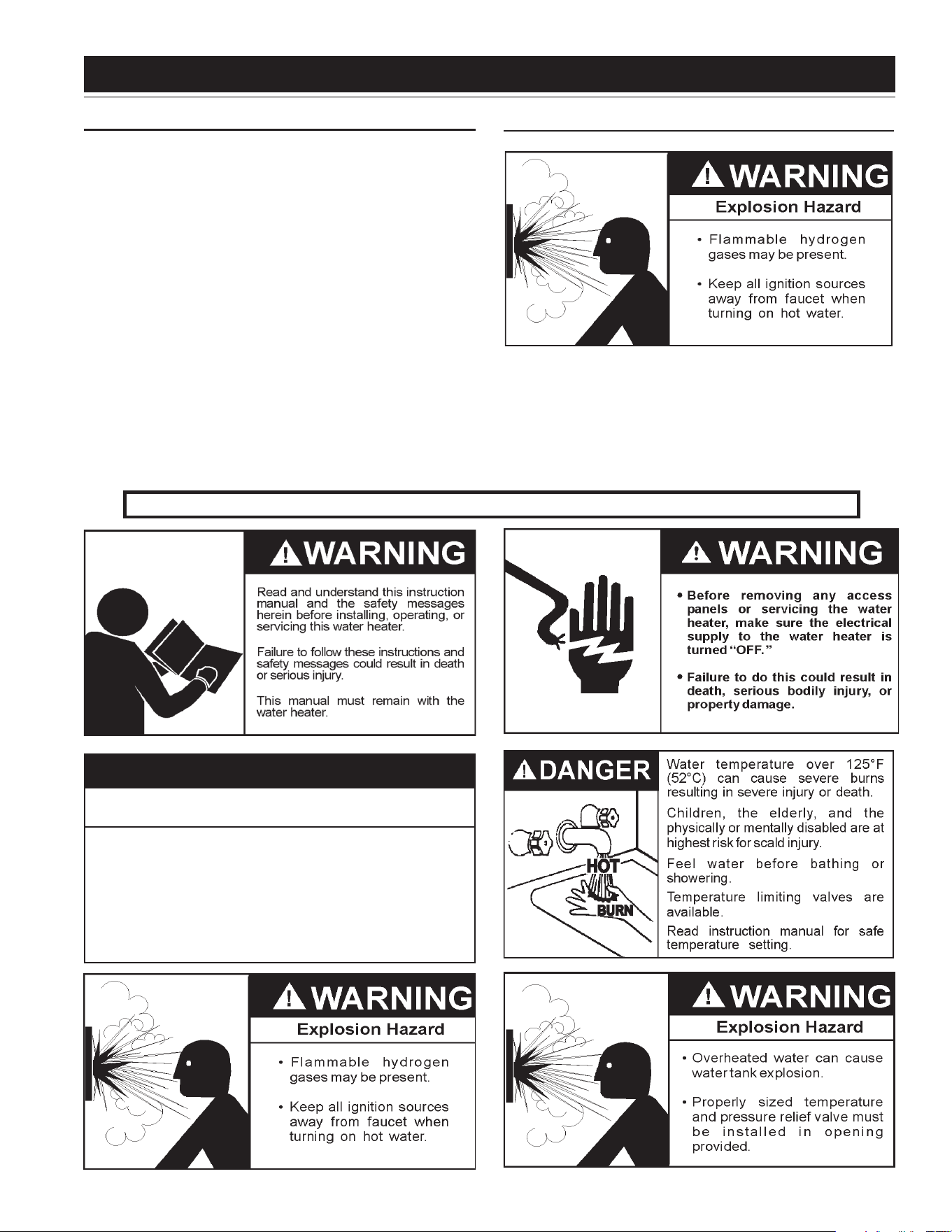
HYDROGEN GAS (FLAMMABLE)
Hydrogen gas can be produced in a hot water system served by this
heater that has not been used for a long period of time (generally two
weeks or more). Hydrogen gas is extremely ammable.
To reduce the
risk of injury under these conditions, it is recommended that the hot water
faucet be opened for several minutes at the kitchen sink before using any
electrical appliance connected to the hot water system. If hydrogen is present
there will probably be an unusual sound such as air escaping through the pipe
as the water begins to ow.
THERE SHOULD BE NO SMOKING OR
OPEN FLAME NEAR THE FAUCET AT THE TIME IT IS OPEN.
Improper installation, use and service may
result in property damage.
CAUTION
•
Do not operate water heater if any part has been
exposed to flooding or water damage.
•
Inspect anode rods regularly, replace when significantly depleted.
•
Install in location with drainage.
•
Fill tank with water before operation.
•
Properly sized thermal expansion tanks are required on all
closed water systems.
Refer to this manual for installation and service.
4
Thank You for purchasing this water heater. Properly installed and
maintained, it should give you years of trouble free service.
Abbreviations Found In This Instruction Manual:
• AHRI - Air Condition, Heating and Refrigeration Institute
• ANSI - American National Standards Institute
• ASME - American Society of Mechanical Engineers
• NEC - National Electrical Code
• NFPA - National Fire Protection Association
• UL - Underwriters Laboratory
PREPARING FOR THE INSTALLATION
1. Read the “General Safety Information” section of this manual rst and
then the entire manual carefully. If you don’t follow the safety rules, the
water heater may not operate safely. It could cause DEATH, SERIOUS
BODILY INJURY AND/OR PROPERTY DAMAGE.
This manual contains instructions for the installation, operation,
and maintenance of the electric water heater. It also contains
warnings throughout the manual that you must read and be
aware of. All warnings and all instructions are essential to the
proper operation of the water heater and your safety. READ
THE ENTIRE MANUAL BEFORE ATTEMPTING TO INSTALL
OR OPERATE THE WATER HEATER.
Detailed installation diagrams are in this manual. These diagrams will
serve to provide the installer with a reference for the materials and
method of piping suggested. IT IS NECESSARY THAT ALL WATER
PIPING AND THE ELECTRICAL WIRING BE INSTALLED AND
CONNECTED AS SHOWN IN THE DIAGRAMS.
Particular attention should be given to the installation of thermometers
at the locations indicated in the diagrams as these are necessary for
checking the operation of the heater.
Be sure to turn off power when working on or near the electrical
system of the heater. Never touch electrical components with wet
hands or when standing in water. When replacing fuses always use
the correct size for the circuit. see page 13.
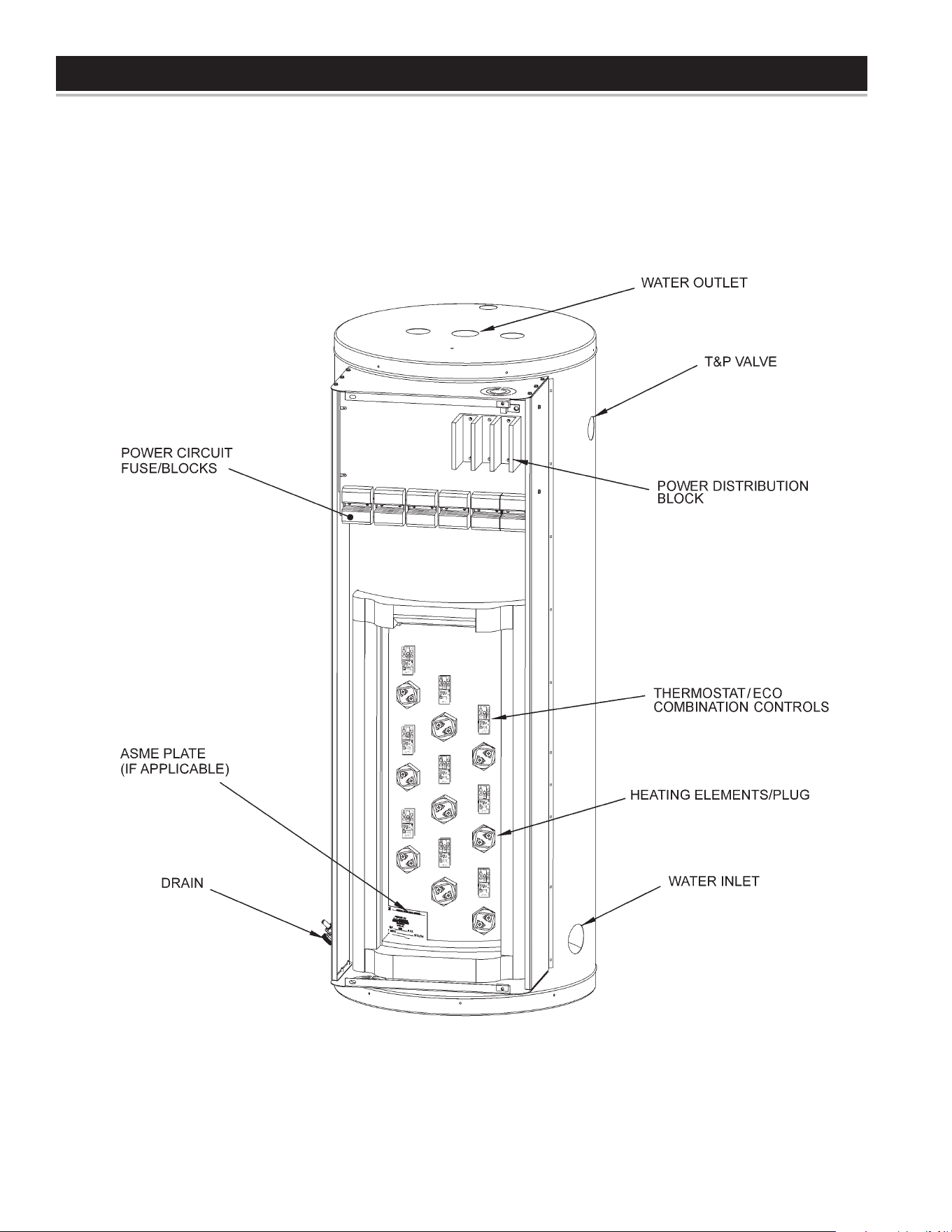
The principal components of the heater are identied on pages 7 & 8.
The model and rating plate on page 6 interprets certain markings into
useful information. Both of these references should be used to identify
the heater, its components and optional equipment.
2. The installation must conform with these instructions and the
local code authority having jurisdiction and the requirements of
the power company. In the absence of local codes, the installation
must comply with the current editions of the National Electrical
Code, NFPA 70 or the Canadian Electrical Code CSA C22.1.
The National Electrical Code may be ordered from: National Fire
Protection Association, 1 Batterymarch Park, Quincy, MA 02269.
The Canadian Electrical Code is available from the Canadian
Standards Association, 8501 East Pleasant Valley Road,
Cleveland, OH 44131.
3. If after reading this manual you have any questions or do not
understand any portion of the instructions, call the toll free number
listed on the back cover of this manual for technical assistance.
A sample rating plate is shown on page 6 of this manual. In order
to expedite your request, please have full model and serial number
available for the technician.
4. Carefully plan your intended placement of the water heater. Examine
the location to ensure the water heater complies with the “Locating
the New Water Heater” section in this manual.
Installation and service of this water heater requires ability equivalent
to that of a licensed tradesman or qualied agency (page 2) in the
eld involved. Plumbing and electrical work are required.
5. For installation in California this water heater must be braced or
anchored to avoid falling or moving during an earthquake. See
instructions for correct installation procedures. Instructions may be
obtained from California Ofce of the State Architect, 1102 Q Street,
Suite 5100, Sacramento, CA 95811.
6. Massachusetts Code requires this water heater to be installed in
accordance with Massachusetts 248-CMR 2.00: State Plumbing Code
and 248-CMR 5.00.
INTRODUCTION
SAFE INSTALLATION, USE AND SERVICE..................................... 2
GENERAL SAFETY INFORMATION ................................................. 3
TABLE OF CONTENTS .....................................................................4
INTRODUCTION ............................................................................... 4
Preparing for the New Installation .............................................4
DIMENSIONS AND CAPACITIES DATA ........................................... 5
APPROVALS ..................................................................................... 6
FEATURES AND COMPONENTS .................................................7-8
LOCATING THE NEW WATER HEATER .......................................... 9
INSTALLATION ...............................................................................10
Required Ability ........................................................................ 10
General .................................................................................... 10
Mixing Valve Usage ................................................................. 10
Chemical Vapor Corrosion ....................................................... 10
Circulating Pump ..................................................................... 10
Insulation Blankets ..................................................................10
Temperature-Pressure Relief Valve .................................... 10-11
Water Line Connection ............................................................ 11
Closed Water System .............................................................. 11
Thermal Expansion .................................................................. 11
ELECTRICAL ..................................................................................12
OPERATION ....................................................................................19
General .................................................................................... 19
Filling the Water Heater ........................................................... 19
Start Up ...................................................................................19
Draining the Water Heater ....................................................... 19
TEMPERATURE REGULATION ..................................................... 20
High Temperature Devices ...................................................... 20
Thermostat Controls ................................................................ 20
Thermostat Settings – Surface Mount Control Models ............ 20
Thermostat Settings – Electronic Control Models ...................21
ELECTRONIC CONTROL MODELS OPERATION ......................... 21
Control System Features ......................................................... 21
Control System Navigation ...................................................... 21
Desktop Screen ..................................................................21-23
Temperatures Menu ............................................................23-24
Temperature Settings ..............................................................24
Heater Status Menu ................................................................. 25
Economy Mode Setup Menu ..............................................25-26
Economy Mode Settings .....................................................26-28
Alarm Output Setup Menu ....................................................... 29
Display Settings Menu ............................................................. 29
Heater Information Menu ....................................................29-30
Current Fault / Alert Menu ....................................................... 30
Fault Occurrence Menu ........................................................... 30
Restore Factory Defaults Menu ..........................................30-31
MAINTENANCE .............................................................................. 31
General ...............................................................................31-32
Flushing ................................................................................... 32
Sediment Removal .................................................................. 32
Water and Lime Scale Removal .........................................32-33
TROUBLESHOOTING CHECKLIST ............................................... 34
Not Enough or No Water ......................................................... 34
Water Heater Makes Strange Sounds ..................................... 34
If You Cannot Identify or Correct the Source of Malfunction
............ 17
Leakage Checkpoints .............................................................. 35
PIPING DIAGRAMS ...................................................................36-47
MANIFOLD DIAGRAMS .................................................................. 48
PARTS LIST ...............................................................................48-49
WARRANTY .................................................................................... 51
TABLE OF CONTENTS
5
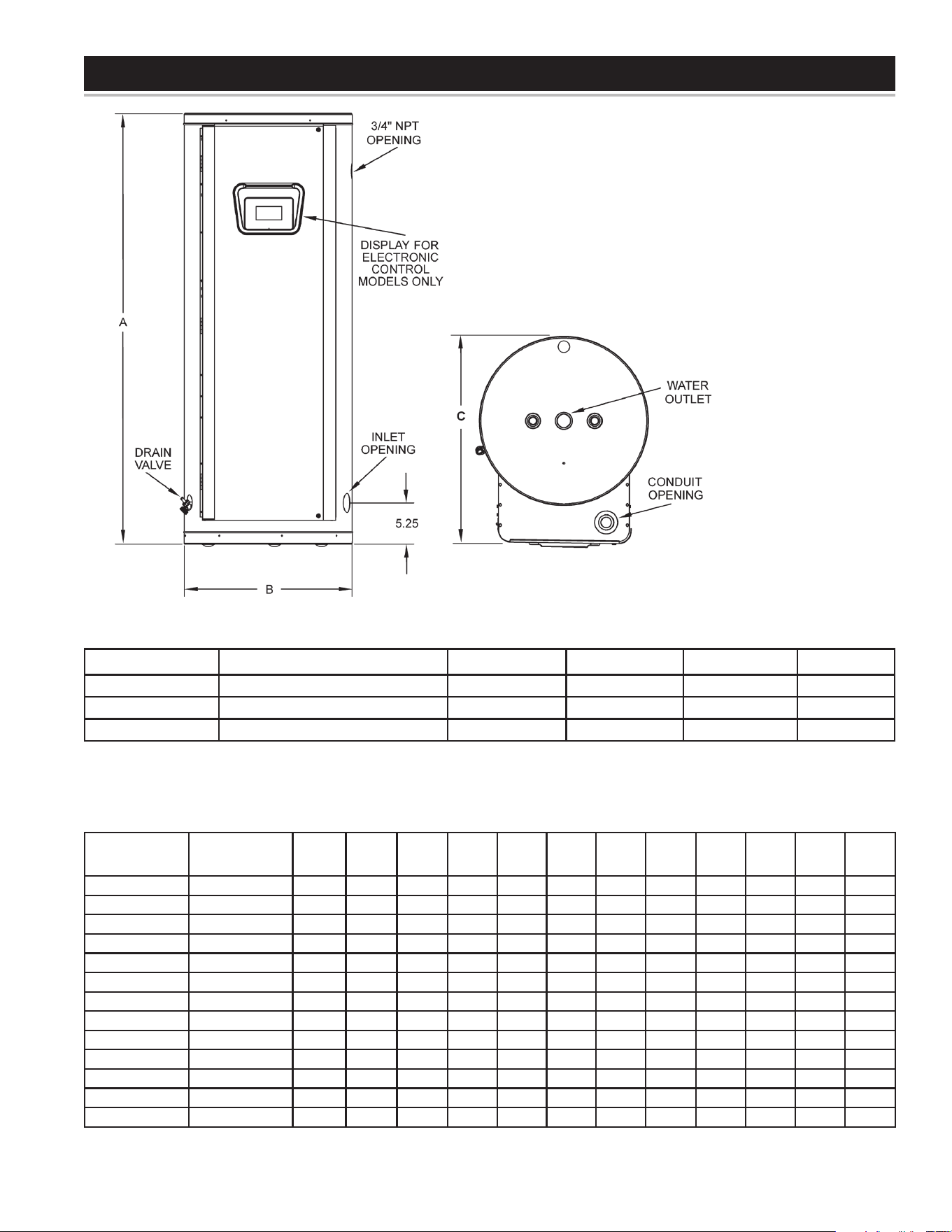
DIMENSIONS AND CAPACITIES DATA
Model Number Tank Capacity in Gallons (Liters) A - Inches (mm) B - Inches (mm) C - Inches (mm) Inlet/Outlet
(S,I)TCE31-50 50 (189.3) 55 3/4 (1416) 21 3/4 (552) 27 (685) 1 1/4
(S,I)TCE31-80 80 (302.8) 60 1/4 (1350) 25 1/2 (648) 31 (787) 1 1/4
(S,I)TCE31-119 119 (450.5) 62 1/4 (1581) 29 1/2 (749) 35 (889) 1 1/4
Table 1.
RECOVERY RATE IN GALLONS PER HOUR*
Temperature Rise °F
Standard
KW Input
BTU/
Hour 30° 40° 50° 60° 70° 80° 90° 100° 110° 120° 130° 140°
6 20,478 82 62 49 41 35 31 27 25 22 21 19 18
9 30,717 123 92 74 62 53 46 41 37 34 31 28 26
12 40,956 164 123 98 82 70 61 55 49 45 41 38 35
13.5 46,075 184 138 111 92 79 69 62 55 50 46 43 40
15 51,195 205 154 123 102 88 77 68 61 56 51 47 44
18 61,434 246 184 148 123 105 92 82 74 67 61 57 53
24 81,912 328 246 197 164 140 123 109 98 89 82 76 70
27 92,151 369 276 221 184 158 138 123 111 101 92 85 79
30 102,390 410 307 246 205 176 154 137 123 112 102 95 88
36 122,868 492 369 295 246 211 184 164 148 134 123 113 105
40.5 138,226 554 418 3332 277 237 208 1185 166 151 138 128 119
45 153,585 615 461 369 307 263 230 205 184 168 154 142 132
54 184,302 738 553 443 369 316 277 246 221 201 184 170 158
*Figured at 1 KW (3413 Btu) = 4.1 gallons at 100°F temperature rise.
To determine recovery rate per minute, divide recovery rate per hour by 60.
Table 2.
Figure 1
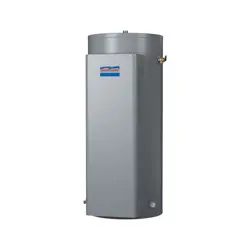
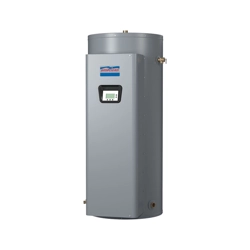
This Instruction Manual covers two different commercial
electricwaterheatermodels:
The rst models, identied as “STCE”, are referred to as “Surface Mount
Control” model. Those models are factory equipped with surface mounted
thermostat/ECO combination control.
The second models, identied as “ITCE”, are referred to as electronic control
model, are factory equipped with an electronic control system and immersion-
type temperature probe.
6
APPROVALS
MODEL AND RATING
All models are listed
by Underwriters
Laboratories Inc.
All models meet
National Sanitation
Foundation NSF-5
requirements.
LISTED
22U1
No. OF
WATTS
PHASE VOLTS - AC ELEMENTS EACH
RATED MEASURED
%
WATTS
COMMERCIAL STORAGE
TANK WATER HEATER
MODEL NUMBER SERIAL NUMBER ITEM ID / PART NUMBER
WATTS
TOTAL
CAPACITY US GAL STANDBY LOSS MAX WORKING
PRESSURE
Low Lead Content
Low Lead Content
7
FEATURES AND COMPONENTS
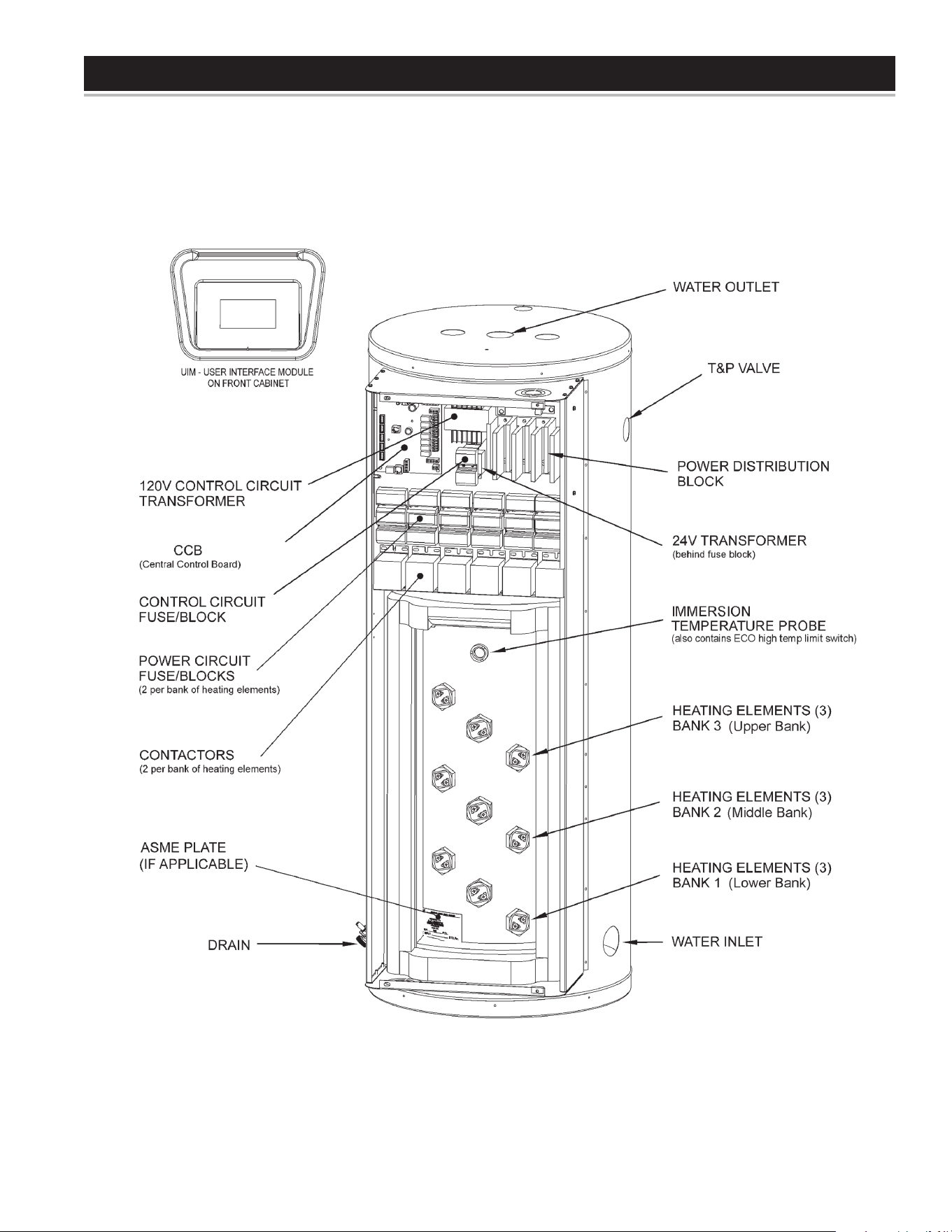
ELECTRONIC CONTROL MODELS
Figure 2
8
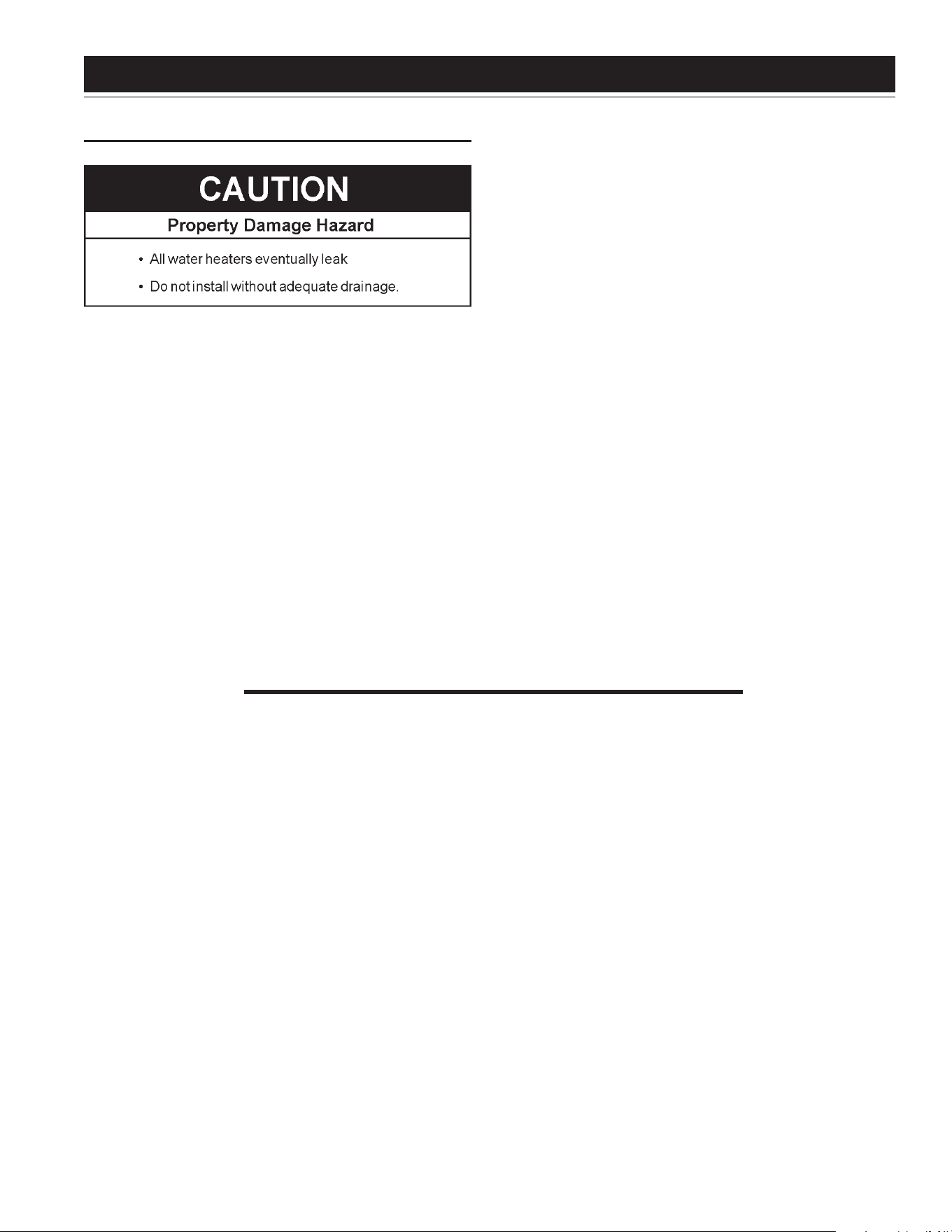
FEATURES AND COMPONENTS
SURFACE MOUNT CONTROL MODELS
Figure 3
9
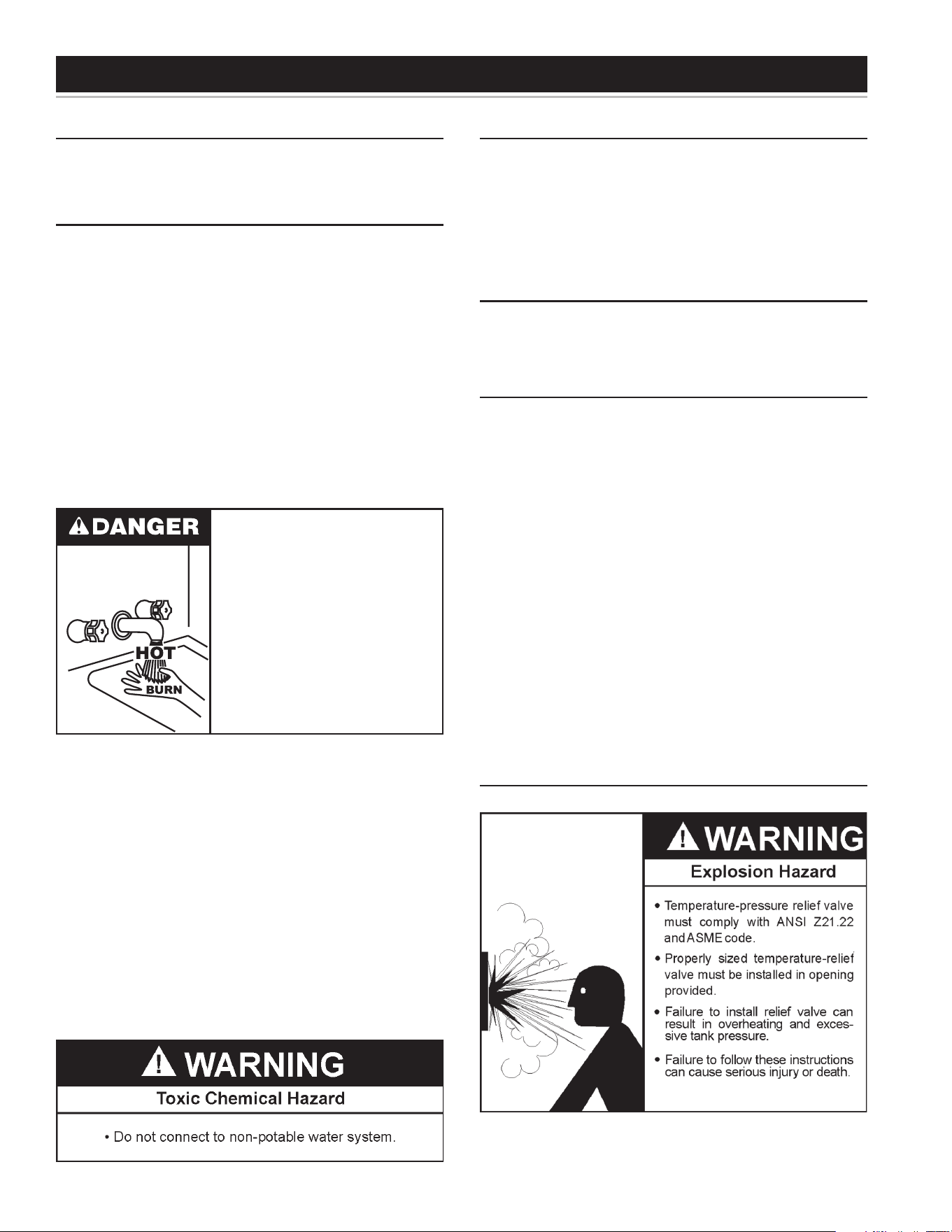
FACTS TO CONSIDER ABOUT THE LOCATION
Carefully choose a location for the new water heater. The placement
is a very important consideration for the safety of the occupants in
the building and for the most economical use of the water heater.
Whether replacing an old water heater or putting the water heater in
a new location, the following critical points must be observed. The
water heater must be located:
• On a level surface. Shim the channel type skid base as necessary
if levelling is required.
LOCATING THE NEW WATER HEATER
• Near a oor drain. The heater should be located in an area where
leakage of the tank or connections will not result in damage to
the area adjacent to the heater or to lower oors of the structure.
• Close to the point of major hot water usage and the power supply.
• Hot water piping and branch circuit wiring should be as short
as possible.
• Insulate hot and cold water piping where heat loss and
condensation may be a problem.
• Heater construction permits installation, maintenance, and
service work to be performed through the front control panel.
• Suggested clearances from adjacent surfaces are 12 inches
on top, 30 inches in front for access to the unit.
• The heater may be installed on or against combustible surfaces.
The left side and back may be placed ush against adjacent
surfaces.
• The temperature of the space in which the water heater is installed
must not go below 32°F or above 122°F.
10
INSTALLATION
REQUIRED ABILITY
Installation and service of this water heater requires ability equivalent
to that of a qualied agency (page 2) in the eld involved. Plumbing
and electrical work is required.
GENERAL
The installation must conform with these instructions and the
local code authority having jurisdiction and the requirements of
the power company. In the absence of local codes, the installation
must comply with the current editions of the National Electrical
Code, NFPA 70 or the Canadian Electrical Code CSA C22.1.
The National Electrical Code may be ordered from: National Fire
Protection Association, 1 Batterymarch Park, Quincy, MA 02269.
The Canadian Electrical Code is available from the Canadian
Standards Association, 8501 East Pleasant Valley Road,
Cleveland, OH 44131.
Note:To comply with NSF Standard 5 installation requirements
the bottom of the water heater must be sealed to the oor with a
silicone based sealant or elevated 6 inches above the oor.
Do NOT test electrical system before heater is lled with water, follow
the START UP procedure in the OPERATION section of this manual.
The principal components of the heater are identified in the
Features and Components illustrations on pages 6 and 7.
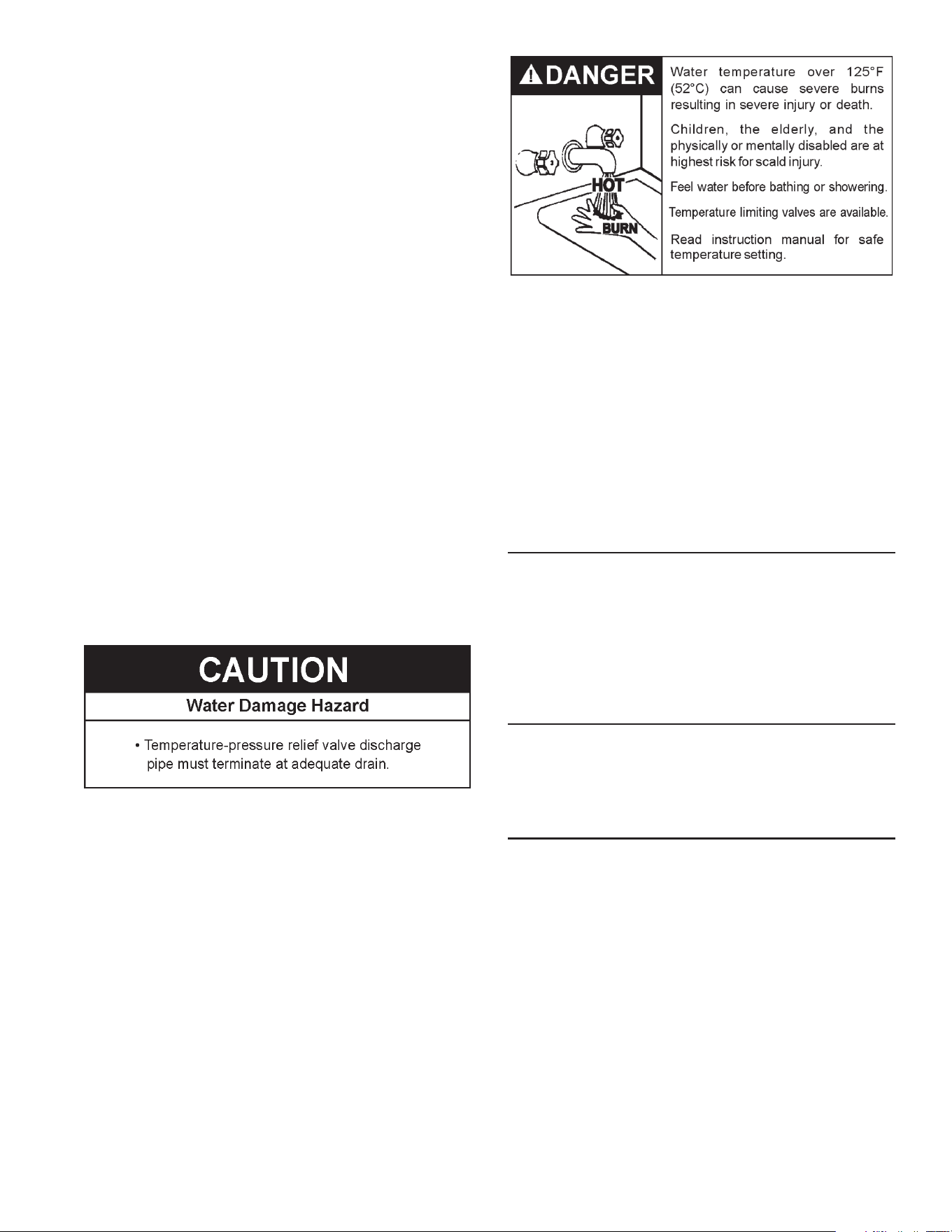
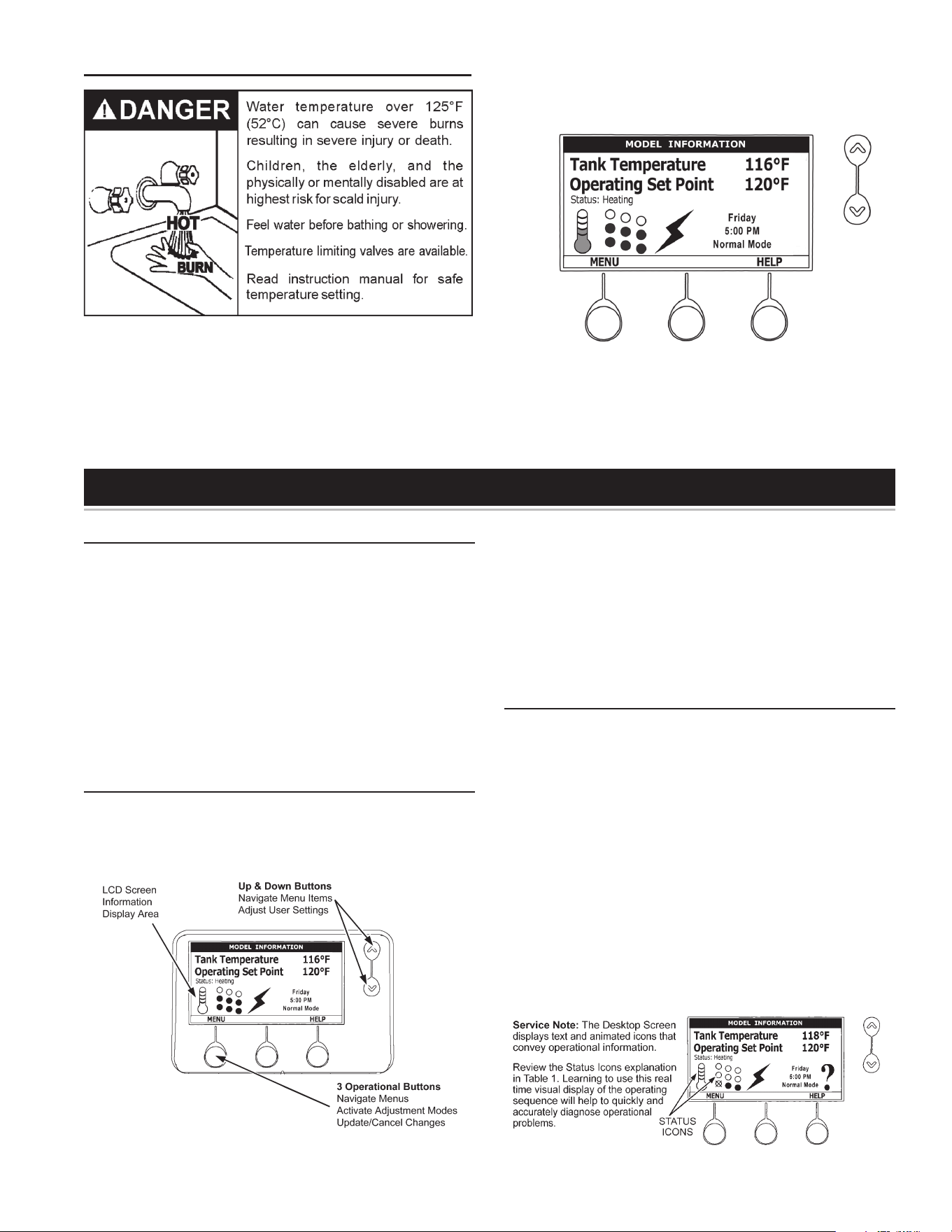
Water temperature over 125°F (52°C)
can cause severe burns instantly
resulting in severe injury or death.
Children, the elderly and the
physically or mentally disabled are at
highest risk for scald injury.
Feel water before bathing or
showering.
Temperature limiting devices such as
mixing valves must be installed
when required by codes and to
ensure safe temperatures at fixtures.
MIXINGVALVEUSAGE:
Water heaters are intended to produce hot water. Water heated to
a temperature which will satisfy space heating, clothes washing,
dish washing, cleaning and other sanitizing needs can scald and
permanently injure you upon contact. Some people are more likely
to be permanently injured by hot water than others. These include
the elderly, children, the infirm, or physically/developmentally
disabled. If anyone using hot water in your home ts into one of these
groups or if there is a local code or state law requiring a maximum
water temperature at the hot water tap, then you must take special
precautions. In addition to using the lowest possible temperature
setting that satises your hot water needs, a means such as a
MIXING VALVE, should be used at the hot water taps used by these
people or at the water heater.
MIXING VALVES for reducing point of use temperature are
available. Consult a qualied installer or service agency. Follow all
manufacturer’s Instructions for installation of these valves. Before
changing the factory setting on the thermostat, read the “Temperature
Regulation” section in this manual.
CONTAMINATED WATER
This water heater shall not be connected to any heating
system(s) or component(s) used with a non-potable water
heating appliance.
Toxic chemicals, such as those used for boiler treatment shall not
be introduced into this system.
CIRCULATING PUMP
Field installed circulating pumps should be of all bronze
construction.
INSULATION BLANKETS
Insulation blankets are available to the general public for
external use on electric water heaters but are not necessary with
this product. The purpose of an insulation blanket is to reduce
the standby heat loss encountered with storage tank heaters.
Your water heater meets or exceeds the EPACT and ASHRAE/
IES 90.1 standards with respect to insulation and standby loss
requirements, making an insulation blanket unnecessary.
Should you choose to apply an insulation blanket to this heater,
you should follow these instructions below. Failure to follow
these instructions can result in fire, serious personal injury,
or death.
• Do not cover the temperature and pressure relief (T & P) valve
with an insulation blanket.
• Do not cover the instruction manual. Keep it on the side of the
water heater or nearby for future reference.
• Do obtain new warning and instruction labels for placement on
the blanket directly over the existing labels.
TEMPERATURE-PRESSURE RELIEF VALVE
This water heater is provided with a properly rated/sized
and certified combination temperature - pressure relief valve
11
by the manufacturer. The valve is certified by a nationally
recognized testing laboratory that maintains periodic inspection
of production of listed equipment of materials as meeting the
requirements for Relief Valves for Hot Water Supply Systems,
ANSI Z21.22 • CSA 4.4, and the code requirements of ASME.
If replaced, the new valve must meet the requirements of local
codes, but not less than a c ombination temperature and pressure
relief valve rated/sized and certified as indicated in the above
paragraph. The new valve must be marked with a maximum set
pressure not to exceed the marked hydrostatic working pressure
of the water heater (150 psi = 1,035 kPa) and a discharge
capacity not less than the water heater Btu/hr or KW input rate
as shown on the water heater’s model rating plate.
For safe operation of the water heater, the temperature and
pressure relief valve must not be removed from its designated
opening nor plugged. The temperature-pressure relief valve
must be installed directly into the fitting of the water heater
designed for the relief valve. Install discharge piping so that
any discharge will exit only within 6 inches (15.2 cm) above, or
external to the structure. Do not pipe the discharge to a crawl
spac e. Be cer tain that no contact is made with any live electrical
part. The discharge opening must not be blocked or reduced in
size under any circumstances. Excessive length, over 30 feet
(9.14 m), or use of more than four elbows can cause restriction
and reduce the discharge capacity of the valve.
No valve or other obstruction is to be placed between the relief valve
and the tank. Do not connect discharge piping directly to the drain
unless a 6” (15.2 cm) air gap is provided. To prevent bodily injury,
hazard to life, or property damage, the relief valve must be allowed
to discharge water in adequate quantities should circumstances
demand. If the discharge pipe is not connected to a drain or other
suitable means, the water ow may cause property damage.
The Discharge Pipe:
• Shall not be smaller in size than the outlet pipe size of the
valve, or have any reducing couplings or other restrictions.
• Shall not be plugged or blocked.
• Shall not be exposed to freezing temperatures.
• Shall be of material listed for hot water distribution.
• Shall be installed so as to allow complete drainage of both
the Temperature-Pressure Relief Valve and the discharge
pipe.
• Must terminate a maximum of six inches above a oor drain
or external to the building. In cold climates, it is recommended
that the discharge pipe be terminated at an adequate drain
inside the building.
• Shall not have any valve or other obstruction between the
relief valve and the drain.
The temperature-pressure relief valve must be manually
operated at least once a year. Caution should be taken to
ensure that (1) no one is in front of or around the outlet of the
temperature-pressure relief valve discharge line, and (2) the
water manually discharged will not cause any bodily injury or
property damage because the water may be extremely hot. If
after manually operating the valve, it fails to completely reset
and continues to release water, immediately close the cold water
inlet to the water heater, follow the draining instructions in this
manual, and replace the temperature-pressure relief valve with
a properly rated/sized new one.
If you do not understand these instructions or have any questions
regarding the temperature-pressure relief valve call the toll free
number listed on the back cover of this manual for technical
assistance.
WATER LINE CONNECTIONS
This manual provides detailed piping installation diagrams (see
back section of this manual) for typical methods of application.
For the heater inlet and outlet connections, dielectric unions are
recommended. The water heater may be installed by itself, or with a
separate storage tank, on both single and two-temperature systems.
When used with a separate storage tank, the circulation may be either
by gravity or by means of a circulating pump. When a circulating
pump is used it is important to note that the ow rate should be
slow so that there will be a minimum of turbulence inside the heater.
CLOSED WATER SYSTEMS
Water supply systems may, because of code requirements or
such conditions as high line pressure, among others, have
installed devices such as pressure reducing valves, check valves,
and back flow preventers. Devices such as these cause the water
system to be a closed system.
THERMAL EXPANSION
As water is heated, it expands (thermal expansion). In a closed
system the volume of water will grow when it is heated. As the volume
of water grows there will be a corresponding increase in water pressure
due to thermal expansion. Thermal expansion can cause premature
tank failure (leakage). This type of failure is not covered under the limited
warranty. Thermal expansion can also cause intermittent temperature-
pressure relief valve operation: water discharged from the valve due to
excessive pressure build up. This condition is not covered under the
limited warranty. The temperature-pressure relief valve is not intended
for the constant relief of thermal expansion.
A properly sized thermal expansion tank must be installed on
all closed systems to control the harmful effects of thermal
expansion. Contact a local plumbing service agency to have a
thermal expansion tank installed.
12
ELECTRICAL
GENERAL
The installation must conform with these instructions and the local code authority having jurisdiction and the requirements of the power
company. In the absence of local codes, the installation must comply with the current editions of the National Electrical Code, NFPA 70 or
the Canadian Electrical Code CSA C22.1.
An electrical ground is required to reduce risk of electrical shock or possible electrocution. The water heater should be connected to a
separate grounded branch circuit with over-current protection and disconnect switch. The water heater should be grounded in accordance
with national and local codes.
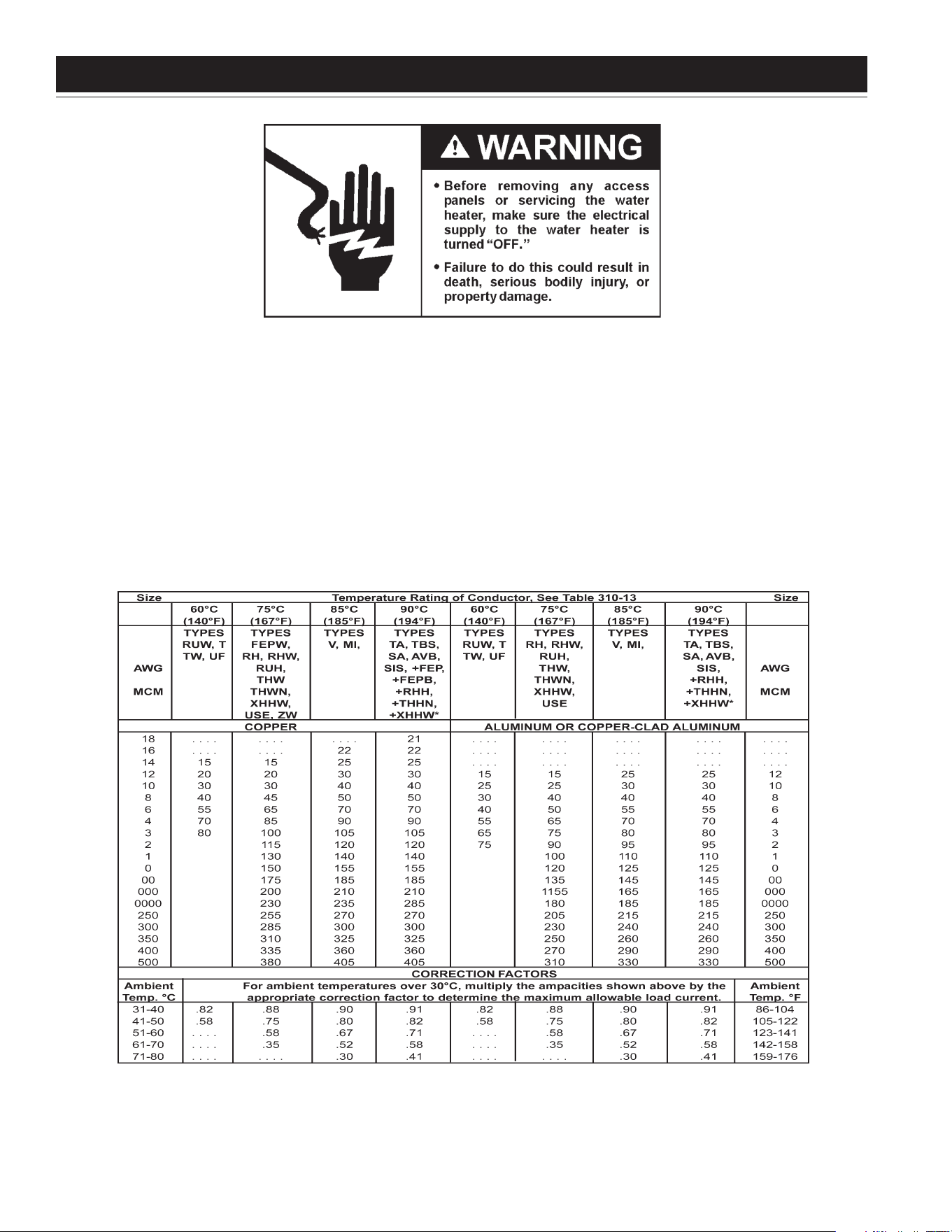
Voltage applied to the heater should not vary more than +5% to -10% of the model and rating plate marking for satisfactory operation.
Allowable Ampacities of Insulated Conductors
Not more than three conductors in raceway, cable, or earth (directly buried), based on ambient temperature of 30°C (86°F)
+The load current rating and the overcurrent protection for these conductors shall not exceed 15 amperes for 14 AWG. 20 amperes for 12 AWG.
and 30 amperes for 10 AWG copper; or 15 amperes for 12 AWG and 25 amperes for 10 AWG aluminum and copper-clad aluminum.
*For dry locations only. See 75°C column for wet locations.
Table 3.
13
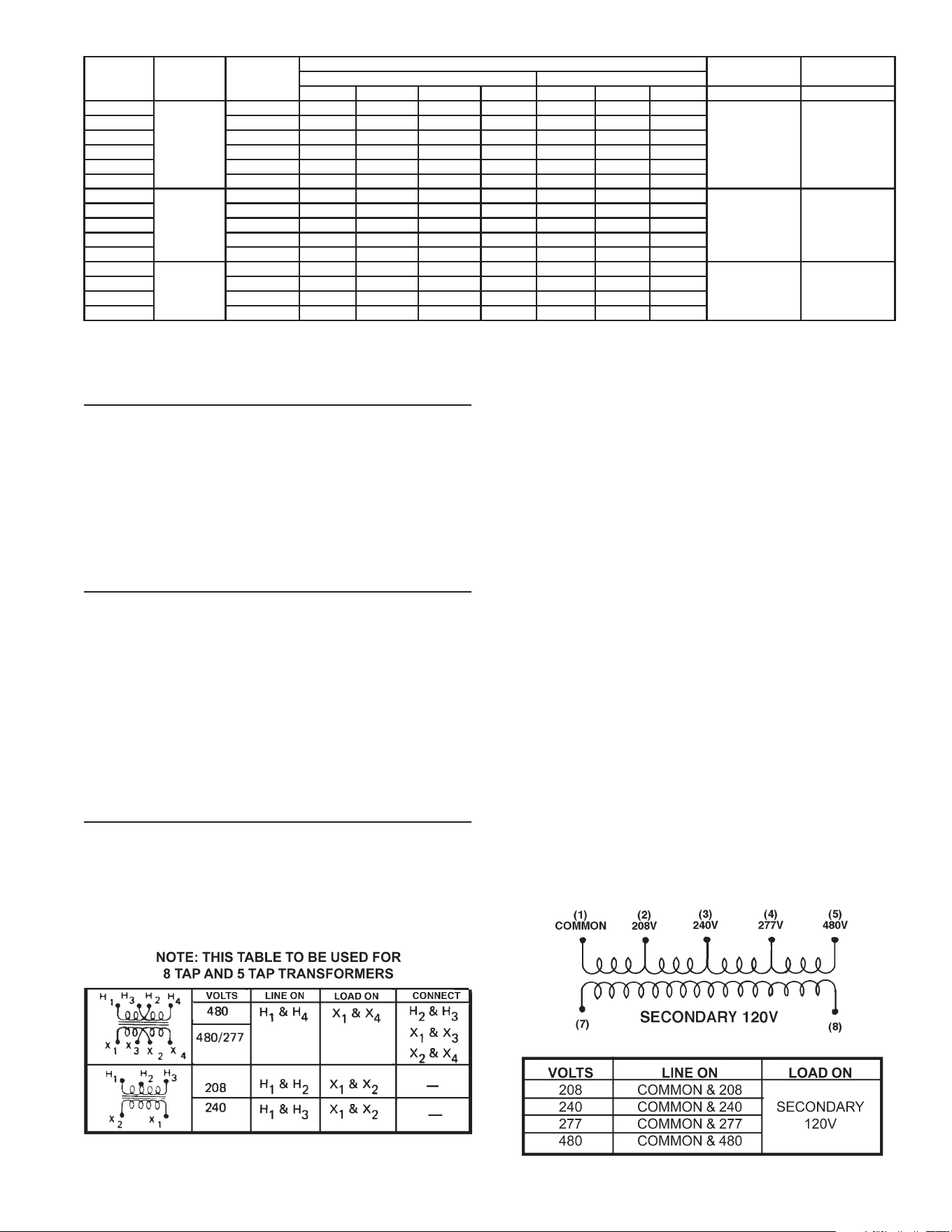
AMPERAGE TABLE/OVERCURRENT PROTECTION
The tables above provides the total connected heating element load
in amperes for branch circuit conductor and overcurrent protection
sizing. Single-phase heaters are two wire circuits. Three-phase
heaters are three wire circuits. In addition to the foregoing, a
grounded conductor is required.
The rating of the overcurrent protection must be computed on the basis
of 125% of the total connected load amperage. Where the standard
ratings and settings do not correspond with this computation, the next
higher standard rating or setting should be selected.
HEATER CIRCUITS - ELECTRONIC CONTROL MODELS
The water heater’s electrical components are pictured and identied
in Figure 2 and Figure 3 The model and rating plate illustration on
page 4 identies heater circuit ratings. The ELECTRONIC CONTROL
model has two electrical circuits:
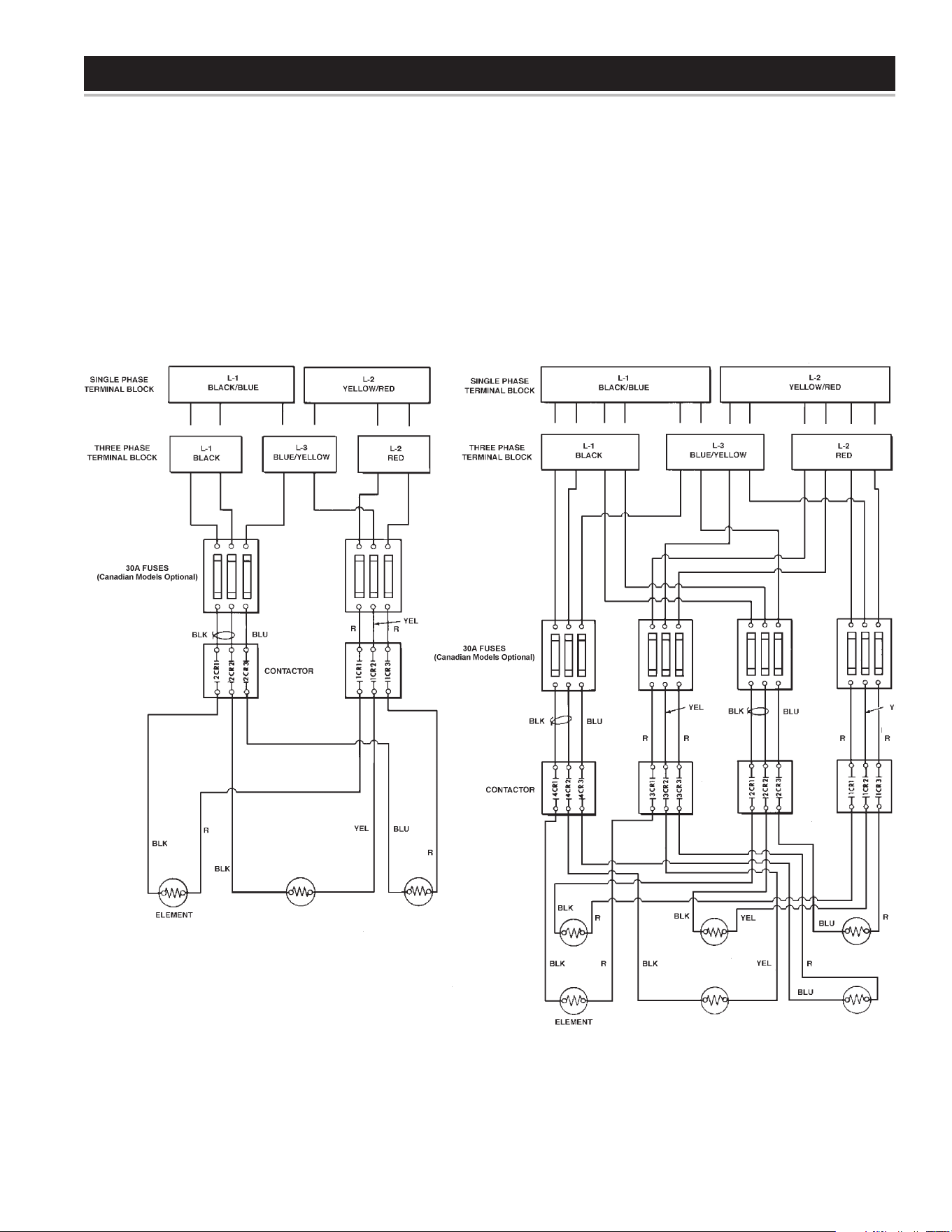
• The control circuit, which controls the electrical power to heating
elements, referring the following control circuit diagram Figure 6
• The power circuit, which is operated by the control circuit carries
the electrical load of the heating elements. The following
describes the heater circuits and includes wiring diagrams for
Delta conguration, refer to the “WYE Conguration Insert” for
water heaters operating at 380V/400V/416V/575V. All heater
circuits are designed for 50/60 cycle alternating current.
CONTROL CIRCUIT - ELECTRONIC CONTROL MODELS
These models are equipped with an electronic control system. The
system includes a CCB (Central Control Board), an immersion
temperature probe with ECO for temperature sensing and limiting, a
UIM (User Interface Module) for user interface & information display
and element current sensors for monitoring the power circuits. Refer
to the control circuit label on the water heater for details. The CCB is
powered by a small 120V/24V transformer. The control circuit operates
on 120V supplied by a larger 100VA transformer. Standard equipment
includes control circuit fusing using two, 3 amp, class G fuses with 600
volt rating. Do not substitute fuses of a different rating.
Sequence of Operation
1. When the control is powered, the UIM should display model
information, water temperature, Operating Set Point, heating
status and operating mode.
2. If the control determines that the actual water temperature inside
the tank is below the programmed Operating Setpoint minus the (1st)
differential, a call for heat is activated.
3. After all safety checks are veried, the CCB will energize contactor
coils starting with the lower bank of heating elements (each diagonal
row of three heating elements is considered a “bank” - see Figure 2)
then energize the middle bank (if so equipped) and top bank (if so
equipped). The middle and top banks (if so equipped) are energized
according to programmed 2nd and 3rd differential set points.
4. The control remains in the heating mode until the water temperature
reaches the programmed Operating Setpoint. At this point the
contactors will be de-energized in the reverse order.
5. The control system now enters the standby operating mode
while continuing to monitor the water temperature and the state
of other system devices. If the water temperature drops below
the programmed Operating Setpoint minus the (1st) differential,
the control will automatically return to step 2 and repeat the
heating cycle.
NOTE: See the Electronic Control Models Operation section for more
detailed information on temperature settings mentioned above.
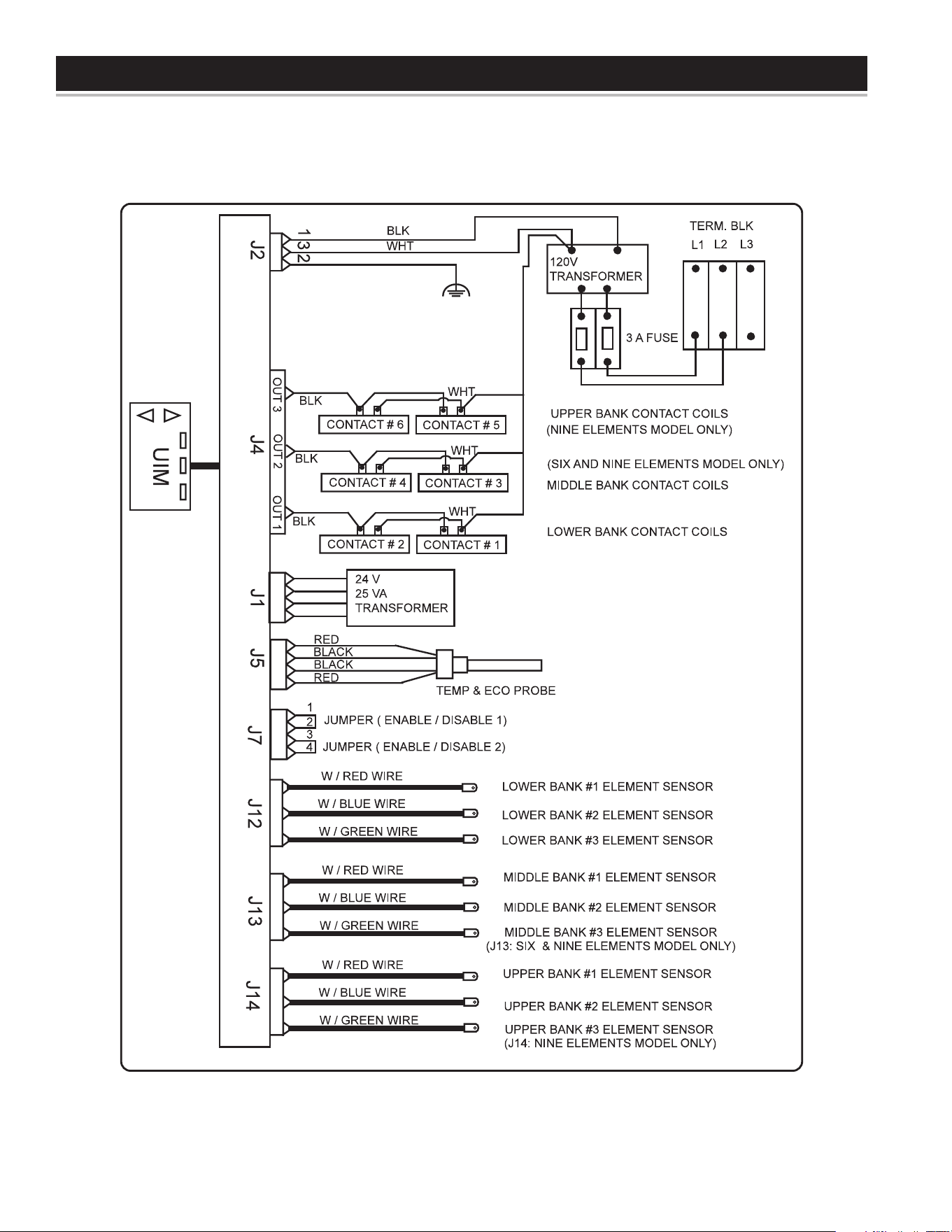
120 VAC CONTROL CIRCUIT TRANSFORMER CONNECTIONS - ELECTRONIC CONTROL MODELS
Table 4.
Table 5.
Figure 4
Figure 5
KW
Input
Number Of
Elements
Element
wattage
Full Load Current In Amperes
Number Of
Thermostats
Number Of
Fuses
Single Phase Three Phase
208V 240V 277V 480V 208V 240V 480V
6
3
2000 29 25 22 13 17 15 8
3 6
9 3000 44 38 33 19 25 22 11
12 4000 58 50 44 25 34 29 15
13.5 4500 65 57 49 29 38 33 17
15 5000 73 63 55 32 42 37 18
18 6000 - - - 75 65 38 - - - 44 22
18
6
3000 87 - - - - - - - - - 50 - - - - - -
6 12
24 4000 116 100 87 50 67 58 29
27 4500 130 113 98 57 75 65 33
30 5000 145 125 109 63 84 73 37
36 6000 - - - 150 130 75 - - - 87 44
36
9
4000 173 - - - - - - - - - 100 - - - - - -
9 18
40.5 4500 195 169 147 85 113 98 49
45 5000 217 188 163 94 125 109 55
54 6000 - - - 225 195 113 150 130 65
14
CCB (CENTRAL CONTROL BOARD)
CONTROL CIRCUIT DIAGRAM - ELECTRONIC CONTROL MODELS
Figure 6
WIRING DIAGRAMS
15
DIAGRAM 1.
WIRING DIAGRAMS
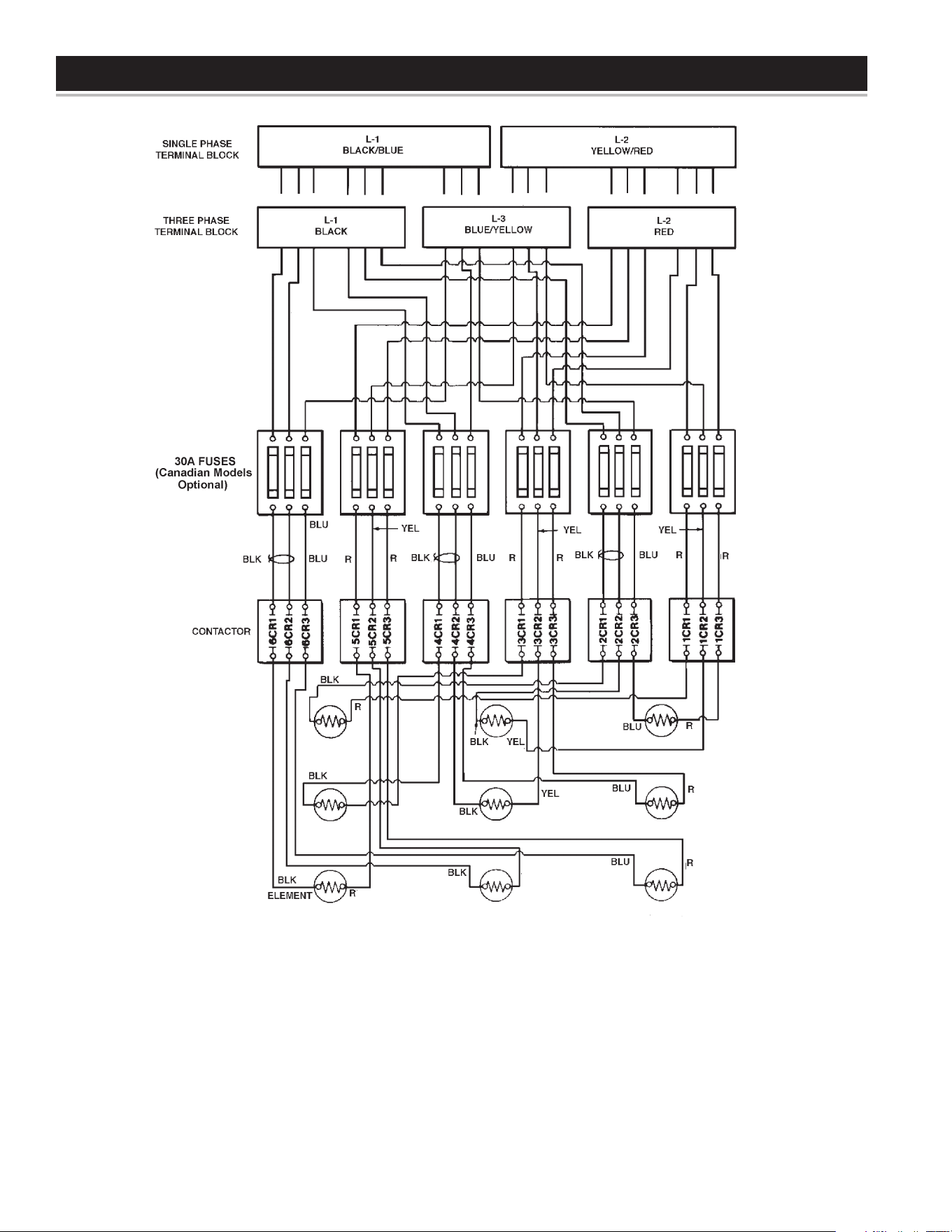
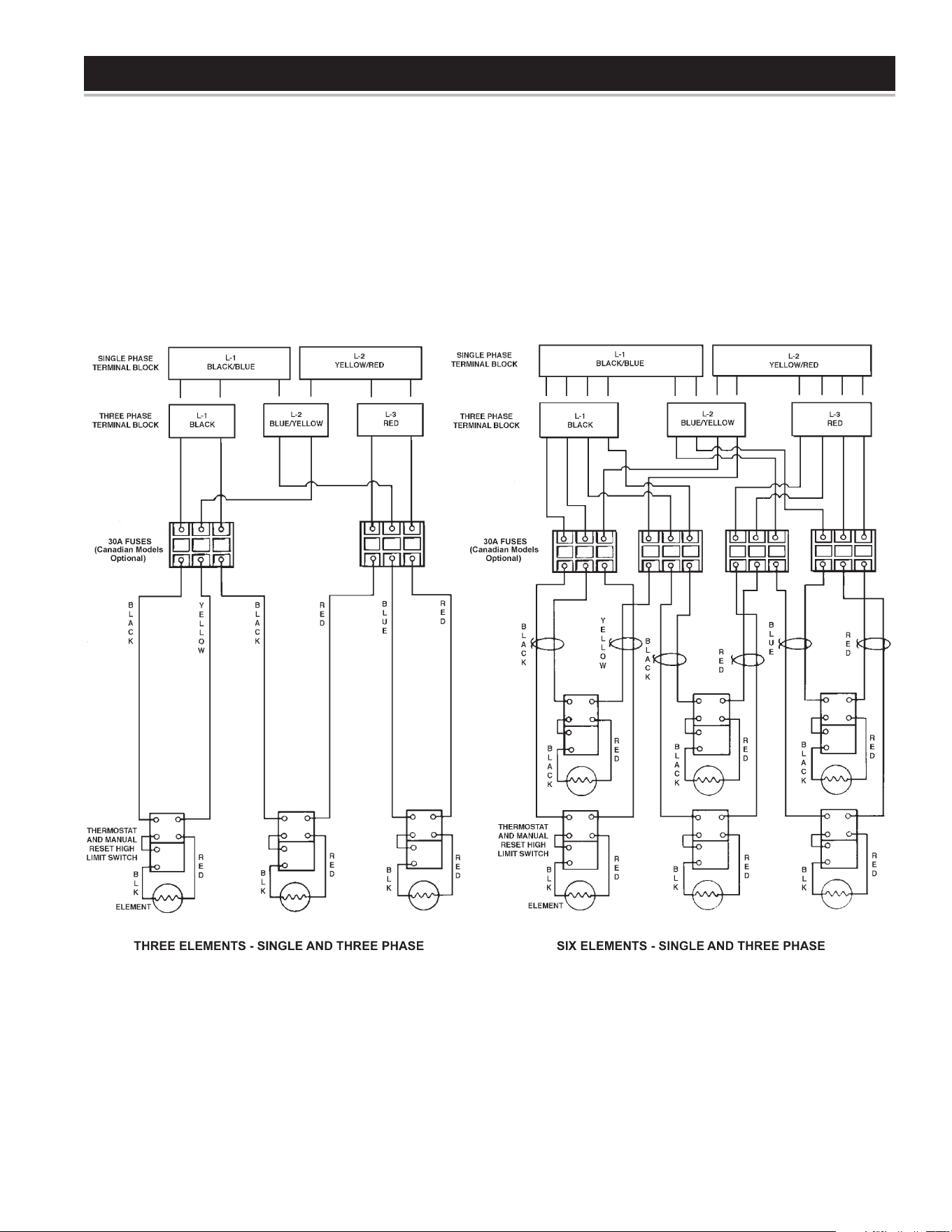
POWER CIRCUIT DIAGRAMS - ELECTRONIC CONTROL MODELS
The water heater’s electrical components are pictured and identied on page 7. The following describes the heater circuits and includes wiring
diagrams. All heater circuits are designed for 60/50 hertz alternating current. The water heater circuit wiring is 12 AWG, AWM, or TEW type,
rated 600 volts, 105°C. Fusing consists of three 30 amp fuses for each contactor. Fusing is an optional feature for Canadian models.
THREE ELEMENTS - SINGLE AND THREE PHASE
SIX ELEMENTS - SINGLE AND THREE PHASE
16
WIRING DIAGRAMS
NINE ELEMENT - SINGLE AND THREE PHASE
CONVERSION TO SINGLE PHASE
When the heater is shipped for connection to a three-phase electrical
service, it may be connected to a single-phase electrical service of
the same voltage by:
1. Disconnect blue wires and yellow wires from terminal L3.
2. Reconnect all blue wires to terminal L1 (with black wires).
3. Reconnect all yellow wires to terminal L2 (with red wires).
4. Connect incoming power to terminals L1 and L2.
CONVERSION TO THREE PHASE
When heater is shipped for connection to a single-phase electrical
service, it may be connected to a three-phase electrical service of
the same voltage by:
1. Disconnect blue wires from terminal L1.
2. Disconnect yellow wires from terminal L2.
3. Reconnect all blue wires and yellow wires to terminal L3.
4. Connect incoming power to terminals L1, L2, and L3.
DIAGRAM 2.
17
WIRING DIAGRAMS
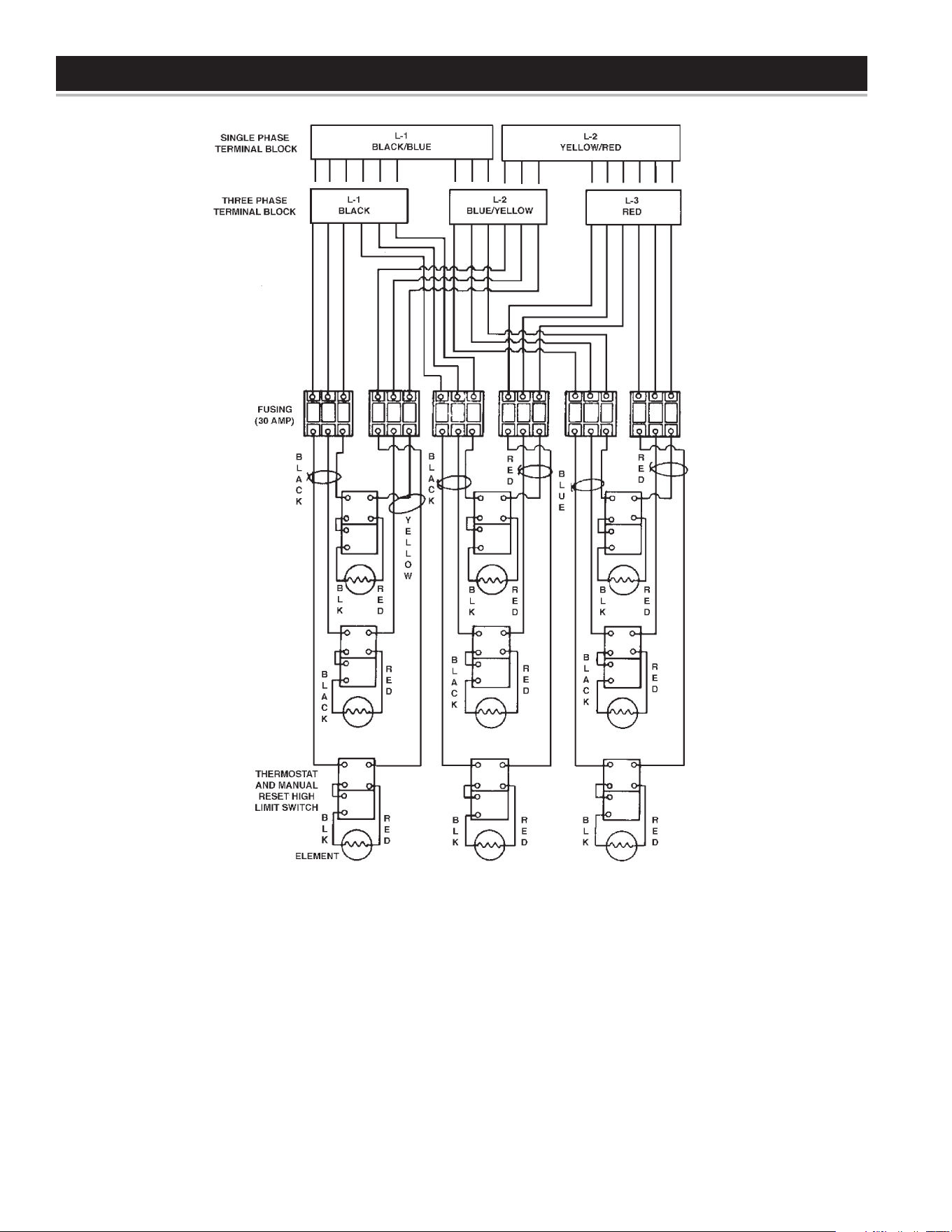
POWER CIRCUIT DIAGRAMS - SURFACE MOUNT CONTROL MODELS
The water heater’s electrical components are pictured and identied on page 8. The following describes the heater circuits and includes
wiring diagrams. All heater circuits are designed for 60/50 hertz alternating current. The water heater circuit wiring is 12 AWG, AWM, or
TEW type, rated 600 volts, 105°C. Fusing consists of two 30 amp fuses for each element. Fusing is an optional feature for Canadian models.
DIAGRAM 3.
18
WIRING DIAGRAMS
CONVERSION TO SINGLE PHASE
When the heater is shipped for connection to a three-phase electrical
service, it may be connected to a single-phase electrical service of
the same voltage by:
1. Disconnect blue wires from terminal L2.
2. Connect all blue wires to terminal L1 (with black wires).
3. Disconnect all red wires from terminal L3.
4. Connect all red wires to terminal L2 (with yellow wires).
5. Connect incoming power to terminals L1 and L2.
CONVERSION TO THREE PHASE
When heater is shipped for connection to a single-phase electrical
service, it may be connected to a three-phase electrical service of
the same voltage by:
1. Disconnect blue wires from terminal L1
2. Disconnect red wires from terminal L2.
3. Connect all blue wires to terminal L2 (with yellow wires).
4. Connect red wires to terminal L3.
5. Connect incoming power to terminals L1, L2 and L3.
NINE ELEMENTS - SINGLE AND THREE PHASE
DIAGRAM 4.
19
OPERATION
GENERAL
Refer to the Features and Components section of this manual
(pages 7 & 8) for the location of components mentioned in the
instructions that follow.
NEVER turn on power to the water heater without being certain the
water heater is lled with water and a temperature and pressure
relief valve is installed in the relief valve opening.
DO NOT TEST ELECTRICAL SYSTEM BEFORE HEATER IS
FILLED WITH WATER. FOLLOW FILLING AND START-UP
INSTRUCTIONS IN OPERATION SECTION.
FILLING THE WATER HEATER
1. Turn off the electrical disconnect switch.
2. Close the water heater drain valve.
3. Open a nearby hot water faucet to permit the air in the system to
escape.
4. Fully open the cold water inlet pipe valve allowing the heater and
piping to be lled.
5. Close the hot water faucet as water starts to ow. The heater is
now ready for STARTUP and TEMPERATURE REGULATION.
INITIAL START UP
The following checks should be made by the installer when the heater
is placed into operation for the rst time.
1. Turn off the electrical disconnect switch.
2. Open the front panel, check all water and electrical connections for
tightness. Also check connections on top and side of heater. Repair
water leaks and tighten electrical connections as necessary.
3. Depress the red manual reset button on each Thermostat/ECO
combination control (Surface Mount Control Models only).
4. Turn on the electrical disconnect switch.
5. Observe the operation of the electrical components during
the rst heating cycle. Use care as the electrical circuits are
energized.
6. Close the front panel.
Temperature control and contactor operation should be checked by
allowing heater to come up to temperature and shut off automatically.
Use care as the electrical circuits are energized.
DRAINING THE WATER HEATER
It is recommended that the water heater storage tank be drained
and ushed every 6 months to reduce sediment buildup. The
water heater should be drained if being shut down during freezing
temperatures. See Features And Components in this manual for the
location of the water heater components described below.
Burn harzard.
Hot water discharge.
Keep hands clear of drain
valve discharge.
TODRAINTHEWATERHEATERSTORAGETANK:
1. Turn off the electrical supply to the water heater at the breaker
or disconnect switch.
2. Ensure the cold water inlet valve is open.
3. Open a nearby hot water faucet and let the water run until the
water is no longer hot.
4. Close the cold water inlet valve to the water heater.
5. Connect a hose to the water heater drain valve and terminate it
to an adequate drain.
6. Open the water heater drain valve and allow all the water to
drain from the storage tank.
7. Close the water heater drain valve when all water in the storage
tank has drained.
8. Close the hot water faucet opened in Step 3.
9. If the water heater is going to be shut down for an extended
period, the drain valve should be left open.
20
HIGH TEMPERATURE LIMIT CONTROLS (ECO)
Both the ELECTRONIC CONTROL and SURFACE MOUNT
CONTROL model water heaters are equipped with one or more ECO
(energy cut off) non adjustable high temperature limit control(s). An
ECO is a normally closed switch that opens (activates) on a rise
in temperature. If the ECO switch contacts open (activate) due to
abnormally high water temperatures it will lock-out and disable further
heating element operation. It is important that a qualied service
agent be contacted to determine the reason for the ECO activation
before resetting the ECO. Once the reason has been determined
and corrected the ECO(s) can be reset as follows:
Surface Mount Control Models
Surface Mount Control models have multiple surface mounted
Thermostat/ECO combination controls. One for each installed heating
element - see the Surface Mount Control wiring diagrams in this manual.
The ECO high temperature limit switch contacts on each control will
open when the tank temperature reaches approximately 200°F/93°C. If
activated, the ECO reset button will be slightly extended and stiff to the
touch. When the ECO switch contacts open (activate) voltage to ONE
heating element ONLY is terminated to prevent further heating operation
of that element. Voltage may still be present at other heating elements
and they may still be heating the water.
The ECO is a manual reset switch. Should one or more ECO activate,
the tank temperature must drop below 120°F/49°C before an ECO
can be reset. To manually reset an ECO:
1. Disconnect the power supply to the water heater.
2. Allow the tank temperature to cool below 120°F/49°C.
3. Remove the front control cover from the effected control(s).
4. Press the manual reset button on each of the effected controls.
5. Once the control(s) has been reset the control cover should be
replaced prior to restoring power to the water heater.
Electronic Control Models
The ECO high temperature limit switch is located inside the immersion
Temperature Probe (two red wires) on ELECTRONIC CONTROL
models. The ECO switch contacts will open when the water
temperature reaches approximately 202°F/94°C. When the ECO
switch contacts open (activate) the electronic control system locks
out and displays a Fault message. Voltage to the contactor coils and
heating elements is terminated to prevent further heating operation.
Should the ECO activate, the water temperature must drop below
140°F/60°C before the control system can be reset. Once the water
temperature has cooled below this point the power supply to the water
heater must be turned off and on again to reset the control system.
THERMOSTAT CONTROLS
The water heaters covered in this instruction manual are equipped with
adjustable thermostat controls to control water temperature. Hot water
temperatures required for automatic dishwasher and laundry use can
cause scald burns resulting in serious personal injury and/or death.
The temperature at which injury occurs varies with the persons age and
duration of exposure. The slower response time of children, the elderly
or disabled persons increases the hazards to them. Never allow small
children to use a hot water tap or draw their own bath water. Never
leave a child or disabled person unattended in a bathtub or shower.
The water heater should be located in an area where the general
public does not have access to set temperatures.
Setting water heater temperatures at 120°F (49°C) will reduce risk of
scalds. Some areas require settings at specic lower temperatures.
THERMOSTAT SETTINGS - SURFACE MOUNT CONTROL
Adjustment of temperature controls on surface mounted controls is
to be performed by a qualied service agent at initial start-up.
These models have multiple thermostat/ECO combination controls
one for each heating element installed. These thermostats are set
from the factory at 140°F/60°C. Set the thermostat dial at the lowest
setting which produces an acceptable hot water supply. This will
always give the most energy efcient operation.
The water heater is supplied with thermostats that may come from
different manufactures and have different temperature indications
as described below.
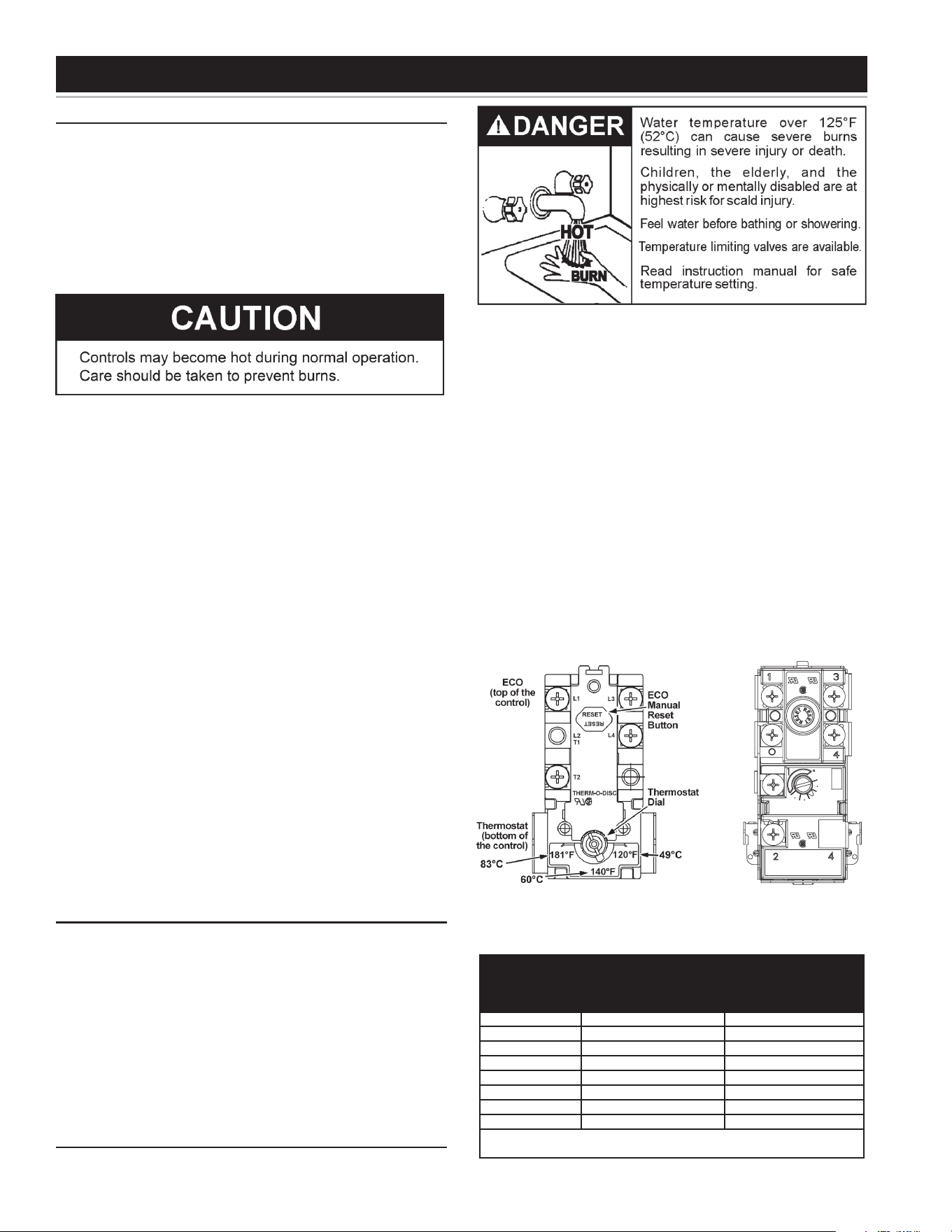
Thermodisc Thermostats
Thermodisc thermostats are adjustable from approximately 120°F
(49°C) (lowest setting) to 181°F (83°C) (highest setting) see gure
7A. These thermostats are set from the factory at approximately the
140°F (60°C) setting. The over temperature device (ECO high limit)
attached to each thermostat has a manual reset.
APCOM Thermostats
Apcom thermostats have three designated set points; LO, MED and
HI. See gure 7B. The approximate equivalent temperatures for these
three settings are: LO = 140°F (60°C), MED = 160°F (71°C) and HI
= 181°F (83°C). These thermostats are set from the factory at the
MED 140°F (60°C) setting. The over temperature device (ECO high
limit) attached to each thermostat has a manual reset.
APCOM
INC
40A 120-277 VAC
25A.480 VAC
125VA.PT.DTY.
120-480 VAC
MED
LO
HI
MODEL
WH19HC
30A 120-250 VAC
22A 277 VAC
12.5A 480VAC
125 VA.PT.DTY. 120-480 VAC
Figure 7A Figure 7B
Figure 7 shows the approximate time-to-burn relationship for normal
adult skin.
Water
Temperature °F
Time for 1st Degree
Burn
(Less Severe Burns)
Time for Permanent
Burns 2nd & 3rd
Degree
(Most Severe Burns)
110 (normal shower temp.)
116 (pain threshold)
116 35 minutes 45 minutes
122 1 minute 5 minutes
131 5 seconds 25 seconds
140 2 seconds 5 seconds
149 1 second 2 seconds
154 instantaneous 1 second
(U.S. Government Memorandum, C.P.S.C., Peter L. Arm-
strong, Sept. 15,1978)
Table 6.
TEMPERATURE REGULATION
21
THERMOSTAT SETTINGS - ELECTRONIC CONTROLS
These models are equipped with an electronic control system. The
control system senses temperature from a factory installed Immersion
Temperature Probe (see Figure 2). The “Operating Set Point” is
adjusted to control water temperature. This is an adjustable user
setting in the control system’s “Temperatures Menu.” This and all
control system menus are accessed through the UIM (User Interface
Module - see Figure 8) located on the front panel of the water heater.
The Operating Set Point is adjustable from 90°F/42°C to 190°F/88°C.
The factory setting is 120°F/49°C. See the Electronic Control Models
Operation section of this manual for instructions on how to adjust
the Operating Set Point and other user settings.
UIM (User Interface Module)
Figure 8
Set the Operating Set Point at the lowest setting which produces
an acceptable hot water supply. This will always give the most
energy efficient operation.
CONTROL SYSTEM FEATURES
AdvancedDiagnostics:Plain English text and animated icons display
detailed operational and diagnostic information. LCD screen on the
front of the water heater displays the Sequence of Operation in real
time. Fault or Alert messages are displayed when operational problems
occur. Advanced Service menu displays a list of possible causes for
current Fault and Alert conditions to aid in servicing.
EconomyMode Operation: Control system automatically lowers
the Operating Set Point by a programmed value during user dened
time periods. Helps reduce operating costs during unoccupied or
peak demand periods.
Linear Sequencing: Banks of heating elements (3 elements per
bank) are energized according to adjustable (1 to 20°) differential set
points for each bank. First bank on is the last bank off. Helps reduce
operating costs during low/moderate loads.
CONTROL SYSTEM NAVIGATION
The UIM (User Interface Module) is located on the front cabinet of the
Electronic Control Model water heaters. All operational information
and user settings are displayed and accessed using the UIM. The
UIM includes ve snap acting (momentary) user input buttons; an
Up, Down and 3 Operational Buttons.
UIM - USER INTERFACE MODULE
Figure 9
Up & Down Buttons
Used to navigate (up and down) and to select (highlight) menu items.
Also used to adjust or change (increase/decrease, on/off, set time)
various user settings.
Operational Buttons
The 3 Operational Buttons are multifunctional. Their current function
is dened by the text that appears above each button on the LCD
screen. The function will change depending on what menu is currently
displayed or what menu item is selected. When no text appears on the
LCD screen above an Operational Button there is no function assigned.
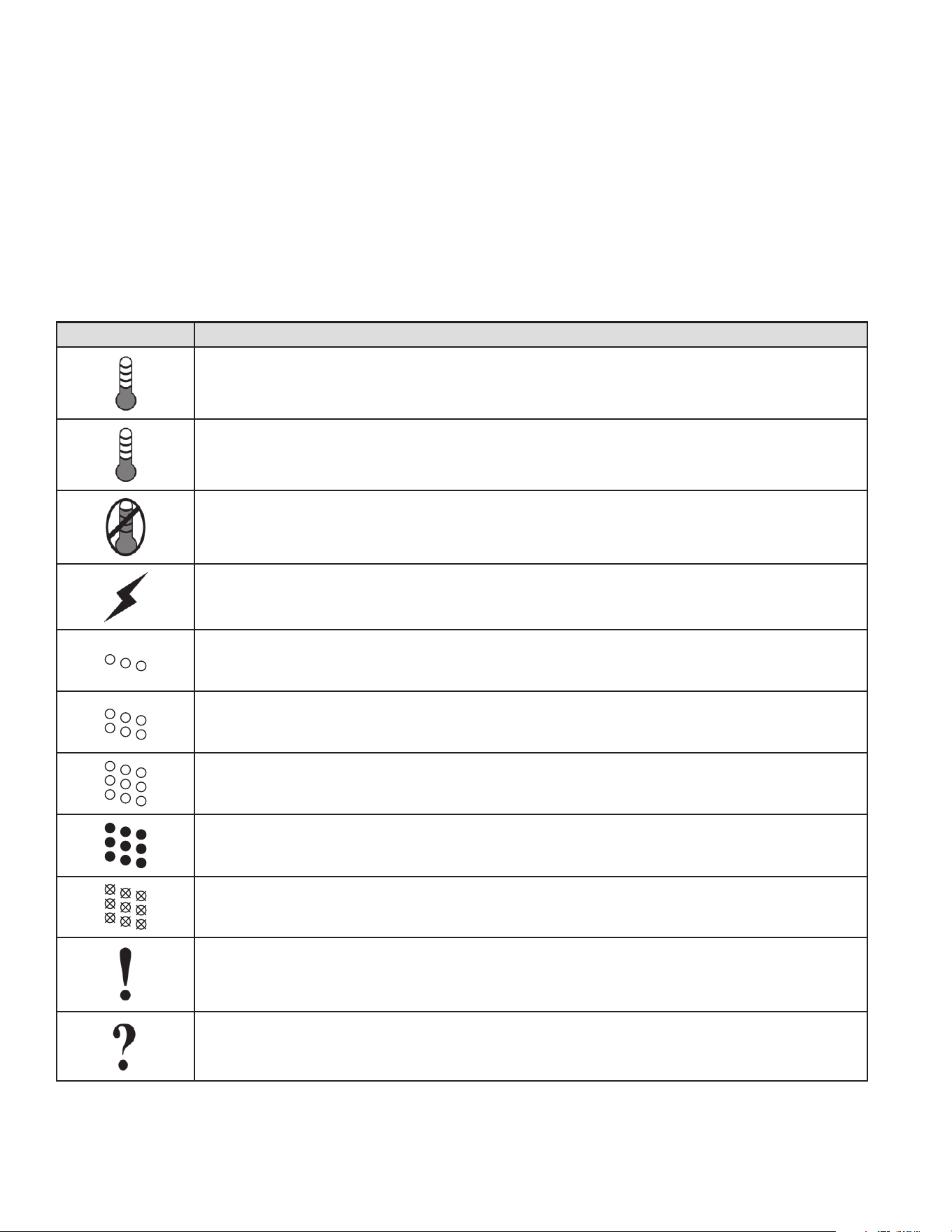
THE DESKTOP SCREEN
Figure 10 below shows the control system “Desktop Screen.” This
is the default screen. If there are no active Fault or Alert conditions
and no user input for approximately 10 minutes the control system
will return to this screen automatically.
Model Information
Model information and menu titles are shown in the black bar at the
top of the Desktop Screen.
Tank Temperature
Current water temperature as sensed from the immersion
Temperature Probe.
OperatingSetPoint:Temperature at which the control system will
maintain tank (water) temperature in the Normal Mode. This line of
text will read Economy Set Point whenever the control system is
operating in the Economy Mode.
Status: The Operating State of the control system is displayed
beneath the Operating Set Point.
Figure 10
ELECTRONIC CONTROL MODELS OPERATION
22
Menu: The left Operational Button is pressed to enter the Main Menu
where all control system menus are accessed. See Table 9. for a list
of control system menus.
Help:The right Operational Button is pressed to access instructions
and explanations for user settings, Operating States, Status Icons,
manufacturer’s web address, technical support phone number and
service agent contact information.
Day/Time/Operating Mode: The current time and day are
also displayed on the Desktop Screen. “Clock Not Set” will be
displayed until the time clock has been initially set. Day and Time
are adjusted in the Economy Mode Setup menu. The current
Operating Mode, either Normal Mode or Economy Mode, is
displayed beneath the day and time.
DiscreetMenuContact Information: From the Desktop Screen
press and hold down the middle (unmarked) Operational Button for
30 seconds and then release it. This will launch a discreet menu
where personalized contact information can be entered. Installing
contractors and/or service agents can enter their company name
and telephone number. This contact information will be displayed
with all Fault and Alert messages.
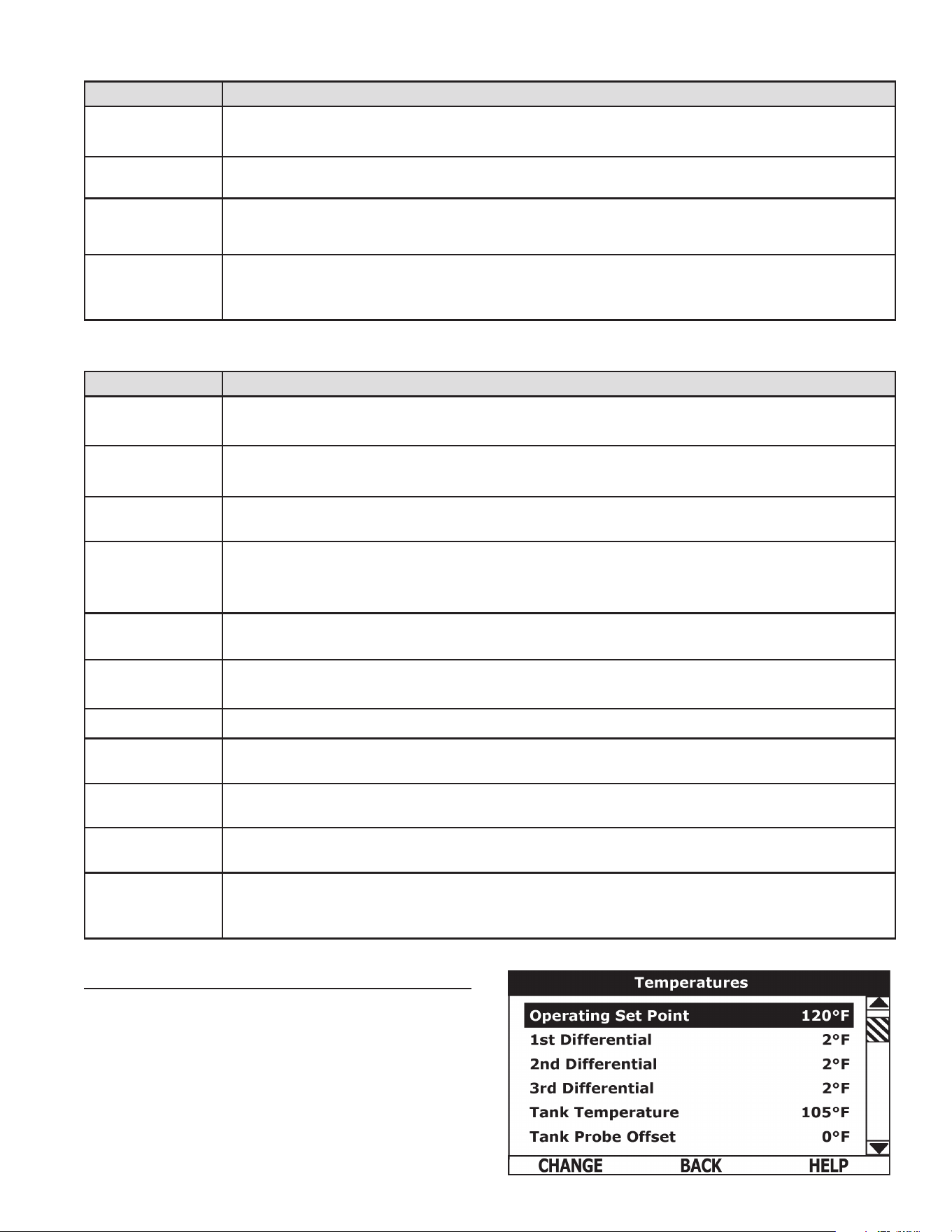
ICON DESCRIPTION
Water temperature in the tank has fallen. Shaded area of the animated thermometer icon will rise and fall in
response to water temperature in the storage tank as sensed from the immersion Temperature Probe.
Water temperature in the tank has reached the Operating Set Point. Shaded area of the animated thermometer
icon will rise and fall in response to water temperature in the storage tank as sensed from the immersion
Temperature Probe.
The control is unable to initiate a heating cycle. This will happen whenever a Fault condition is detected by the
control system or when either of the two Enable/Disable circuits are open circuits.
The control system is in Heating Mode and has energized the electromagnetic contactor coils for at least one bank
of heating elements. This animated icon DOES NOT indicate current has been sensed from the heating elements,
only that there is a call for heat present and the control system has initiated heating operation.
Heating elements icon for a water heater equipped with 1 Bank of heating elements. Each circle represents one
heating element. Each diagonal row of 3 elements = 1 Bank of elements. Open circles represent heating elements
the control system has not energized and is not sensing electrical current from.
Heating elements icon for a water heater equipped with 2 Banks of heating elements. Each circle represents one
heating element. Each diagonal row of 3 elements = 1 Bank of elements. Open circles represent heating elements
the control system has not energized and is not sensing electrical current from.
Heating elements icon for a water heater equipped with 3 Banks of heating elements. Each circle represents one
heating element. Each diagonal row of 3 elements = 1 Bank of elements. Open circles represent heating elements
the control system has not energized and is not sensing electrical current from.
Heating elements icon for a water heater equipped with 3 Banks of heating elements. Each circle represents one
heating element. Each diagonal row of 3 elements = 1 Bank of elements. Filled circles represent heating elements
the control system has energized AND is sensing electrical current from.
Heating elements icon for a water heater equipped with 3 Banks of heating elements. Each circle represents one
heating element. Each diagonal row of 3 elements = 1 Bank of elements. Open circles with an X represent heating
elements the control system has energized that it IS NOT sensing electrical current from.
The control has detected/declared a Fault Condition. Fault message details can be viewed in the Current Fault
menu. Heating operation is discontinued (locked out) until the condition that caused the fault is corrected. Power
to the water heater must be cycled off and on to reset the control system.
Note: Cycling power will not reset the control system if the condition that caused the fault has not been corrected.
The control has detected/declared an Alert Condition. The water heater will continue to operate during an Alert
Condition but there is an operational condition that requires the attention of a Qualied Service Agent. Alert message
details can be viewed in the Current Alert menu.
STATUS ICONS.
Table 7.
23
TEMPERATURES MENU
Operating Set Point
User adjustable setting 90°F to 190°F range; factory default is
120°F. When the water temperature sensed by the control system
from the immersion Temperature Probe reaches the Operating Set
Point the control system will end the heating cycle. A call for heat
will be activated again when the water temperature drops below the
Operating Set Point minus the 1st Differential Setting.
Example: Operating Set Point is 120°F, the 1st Differential Setting is
2°F (factory default). A call for heat will be activated when the sensed
water temperature drops to 118°F.
STATE DESCRIPTION
Standby
The water heater is not in an active heating cycle. This usually indicates the temperature in the tank has reached
the Operating Set Point and the control system has terminated the heating cycle.
Heating The control system is in the Heating Mode. At least one bank of heating elements has been energized.
Alert
The control system has detected/declared an Alert Condition. The controls system will continue heating operation.
However, a Qualied Service Agent should be contacted to check/service the water heater.
Fault
The control system has detected/declared a Fault Condition. The control system will discontinue heating operation
and “lock out.” Power to the water heater must be cycled off and on to reset the control system. Note; cycling power
will not reset the control system until the condition that caused the fault has been corrected.
MENUS DESCRIPTION
Temperatures
Most commonly accessed menu. Operating Set Point, Differential settings, Tank Temperature and Tank Probe
Offset are located in this menu.
Heater Status
Current Operating State/Mode (heating/standby etc) and status (open/closed - on/off - yes/no) of monitored water
heater functions and components are displayed in this menu.
Economy Mode
Setup
Seven day 24 hour time clock with temperature set back capability to reduce operating costs during unoccupied
or reduced demand periods.
Alarm Output
Setup
The control system’s CCB (Central Control Board) features on board SPDT (single pole double throw) relay contacts
for building EMS (Energy Management System) notication of operational conditions such as Fault Conditions and
heating mode status. This menu features a list of user denable conditions for relay activation.
Display Settings
Temperature units (°F or °C), appearance (brightness contrast) and backlight delay user adjustable settings are
located in this menu.
Heater Information
Elapsed time of operation, total heating cycle time, heating cycle count, heating element bank(s) cycle count and
heating bank on time along with UIM and CCB software revisions can be viewed in this menu.
Current Fault/Alert Displays any current Alert or Fault messages.
Fault History
Retains 9 event history of Fault/Alert messages with time stamp. The Fault History is useful when dealing with intermittent
operational problems or when the customer has reset the control system prior to a service agent’s arrival.
Fault Occurrence
Running total of all Fault and Alert Conditions that have occurred are displayed in this menu. Can help determine
potential root cause(s) of related operational problems.
Restore Factory
Defaults
This control system feature allows the user to restore control system user settings to their factory default settings.
Alarm Output Setup and Display Settings menu items ARE NOT changed when factory defaults are restored.
Help Menu
Accessible by pressing the corresponding Operational Button from most menus and screen displays. This menu
provides access to instructions and explanations for user settings, Operating States, Status Icons, manufacturer’s
web address, technical support phone number and service agent contact information.
Table 8.
Table 9.
CONTROL SYSTEM MENUS.
OPERATING STATES.
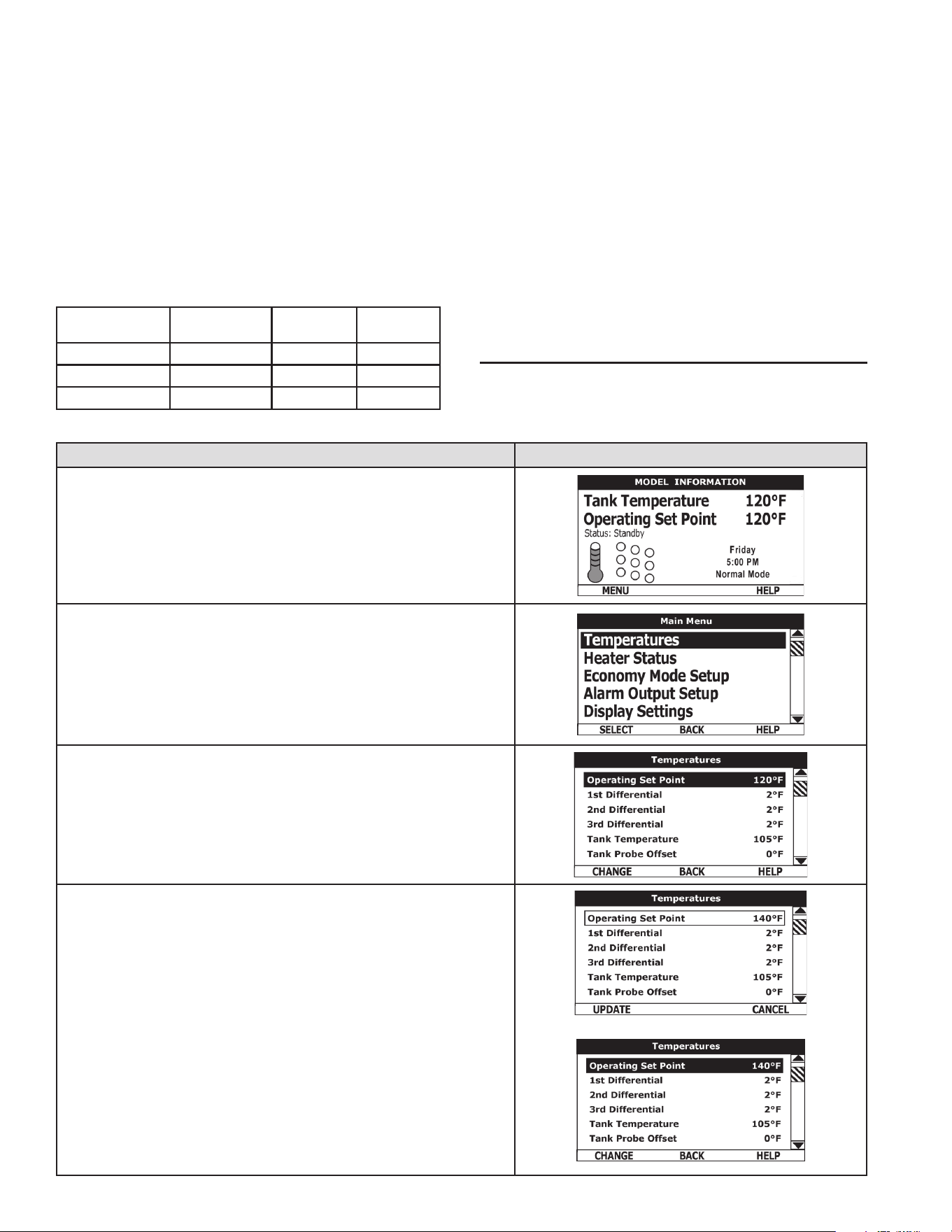
24
Differential Settings
Adjustable user setting(s) 1°F to 20° range; factory default is 2°F.
The water heaters covered in this Instruction Manual will have 3, 6 or
9 heating elements. Each group of 3 heating elements is one “Bank” of
heating elements. Heating elements are energized in Banks of 3. Each
Bank of heating elements will have a Differential Setting associated
with it. Differential Settings are located in the Temperatures Menu.
There is a 1st Differential Setting on all models. There will be one
additional Differential Setting visible/adjustable for each additional
Bank of (3) heating elements.
Operating Sequence
With an Operating Set Point of 120°F and all Differential settings at 2°F
the On/Off sequencing of heating element Banks would be as follows:
BANK NUMBER
DIFFERENTIAL
SETTING
TURN ON
TEMP
TURN OFF
TEMP
Bank 1 2°F 118°F 120°F
Bank 2 2°F 116°F 118°F
Bank 3 2°F 114°F 116°F
Tank Temperature
Non adjustable information display. Current water temperature as sensed
by the control system from the immersion Temperature Probe.
Tank Probe Offset
User adjustable setting -5°F to +5°F range; factory default is 0°F. If the
current Tank Temperature is sensed (from the immersion Temperature
Probe) at 120°F and the offset is adjusted to -5°F the control system
would calibrate or “offset” the Tank Temperature to 115°F. Heating cycles
would then start/stop based on the calibrated Tank Temperature.
Used to calibrate for slight differences in control system temperature
sensing. This can improve the precision of temperature control in
the storage tank and at points of use. This feature can also be
used to compensate for building recirculation loops (hot water
returning to the storage tank) that may cause the heating cycle to
terminate prematurely.
TEMPERATURE SETTINGS
The Operating Set Point and the Differential Settings are adjusted
in the Temperatures Menu. The following instructions explain how to
adjust these user settings and navigate the control system menus.
ACTION DISPLAY
From the Desktop Screen, press the Operational Button underneath “MENU”
to enter the Main Menu.
Notice how the text above the Operational Buttons on the display changes
as you navigate through the various menus and screens.
With Temperatures selected (highlight in black) in the Main Menu, press
the Operational Button underneath “SELECT” to enter the Temperatures
Menu.
If Temperatures is not selected use the Up and Down buttons to select this
menu item.
With the Operating Set Point selected in the Temperatures Menu, press
the Operational Button underneath “CHANGE” to activate the adjustment
mode for this menu item.
Press the Up and Down buttons to adjust the Operating Set Point to the
desired setting.
Press the Operational Button underneath “UPDATE” to conrm the new
setting. Press the Operational Button underneath “CANCEL” to discard the
new setting and retain the previous setting.
The new Operating Set Point value should now be displayed as the current
value.
NOTE: Use this same procedure to adjust the Differential settings and the
Tank Probe Offset in the Temperatures Menu.
This same procedure is used to change user settings in other control system
menus.
25
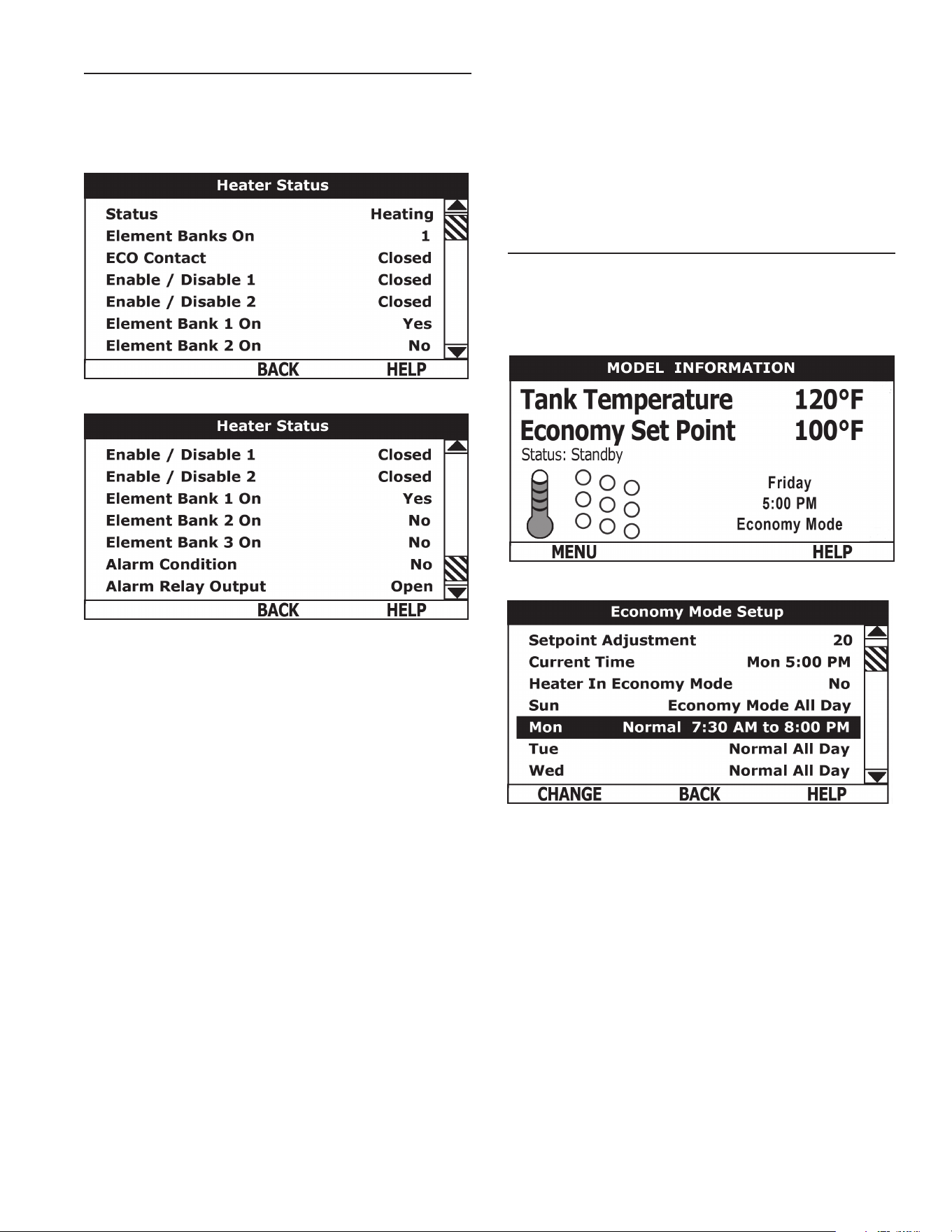
HEATER STATUS MENU
This menu displays non adjustable operational information. This
menu contains more information that can be displayed on one screen
of the LCD display. Use the Up & Down Buttons to navigate to the
bottom of this menu.
Top of Menu
Bottom of Menu
Status
Displays the current Operating State of the control system. IE:
Heating, Standby, Fault see Table 8.
Element Banks On
Displays the current number of heating element Banks the control
system has energized. Each Bank of elements contains 3 heating
elements.
ECO Contact
Displays the current state of the ECO high temperature limit
switch contacts. The ECO switch is located inside the immersion
Temperature Probe (two red wires).
Enable / Disable 1 & 2
Displays the current state, open or closed, of the two Enable/Disable
circuits (J7 socket on the CCB - see wiring diagrams) provided
for external supervisory controls such as building EMS (Energy
Management System). Both of these Enable/Disable circuits must be
closed to “enable” heating operation. If either Enable/Disable circuit is
open for any reason heating operation will be “disabled.” There is a plug
with two jumper wires installed from the factory in the CCB J7 socket to
enable heating operation when external controls are not in use.
Service Note: If a supervisory control(s) is used to enable/disable
heating operation, install eld wiring between the J7 socket on the CCB
and a set of “dry contacts” on the external control per all applicable
building codes. This is a switching circuit only: DO NOT apply any
external voltage or connect any load (IE: relay coil) to either circuit.
Element Bank On
Displays the on/off status of each Bank of heating elements. Yes =
On, No = Off.
Alarm Condition
Displays the status of the user denable Alarm Output function - see
Alarm Output Setup Menu. Yes = alarm condition has been met, No
= alarm condition has not been met.
Alarm Relay Output
Displays the state of the normally open contacts of the Alarm Output
relay. This relay (J3 contacts on the CCB) is used for building EMS
(Energy Management System) notication of operational conditions
such as Fault conditions.
ECONOMY MODE SETUP MENU
This menu contains settings used to establish an “Economy Set
Point” and “Economy Mode” operating periods. This control system
feature can help reduce operating costs during unoccupied, low load,
or peak demand periods.
Desktop Screen During Economy Mode
Economy Mode Setup Menu
Setpoint Adjustment
Adjustable user setting (2°F to 50°F - factory default is 20°F) the
control system uses to calculate the “Economy Set Point.” The Economy
Set Point = normal Operating Set Point minus the programmed Setpoint
Adjustment value. The Economy Set Point is the water temperature
the control system maintains during programmed Economy Mode time
periods. “Economy Set Point” is displayed instead of “Operating Set
Point” and “Economy Mode” appears beneath the current time on the
Desktop Screen during Economy Mode time periods.
Current Time
Seven Day 24 hr clock. Use this menu item to set the current time
and day of the week. Current day and time are not set from the
factory. “Clock Not Set” will be displayed on the Desktop until the
time/day has been initially set.
Heater In Economy Mode
Displays whether the control system is currently operating in
Economy Mode or not.
Daily Operating Mode (Sun - Mon - Tue - Wed - Thu - Fri - Sat)
Seven daily sub menus are listed at the bottom of the Economy Mode
Setup menu. There are 3 Operating Modes in each sub menu;
26
“Normal Operation All Day” - “Economy Mode All Day” and “Normal
Operation Between.” Only one Operating Mode can be active, the
factory default is Normal Operation All Day.
NormalOperationAllDay:When this operating mode is active the
normal Operating Set Point is used for the entire day.
EconomyModeAllDay:When this operating mode is active the
Economy Set Point is used for the entire day.
NormalOperationBetween: When this operating mode is active
there will also be start and stop times to program. The normal
Operating Set Point is used between the programmed start and stop
times and the Economy Set Point will be in effect during the rest of
the day. There is one start time and one stop time event per day.
ECONOMY MODE SETTINGS
Setpoint Adjustment Value
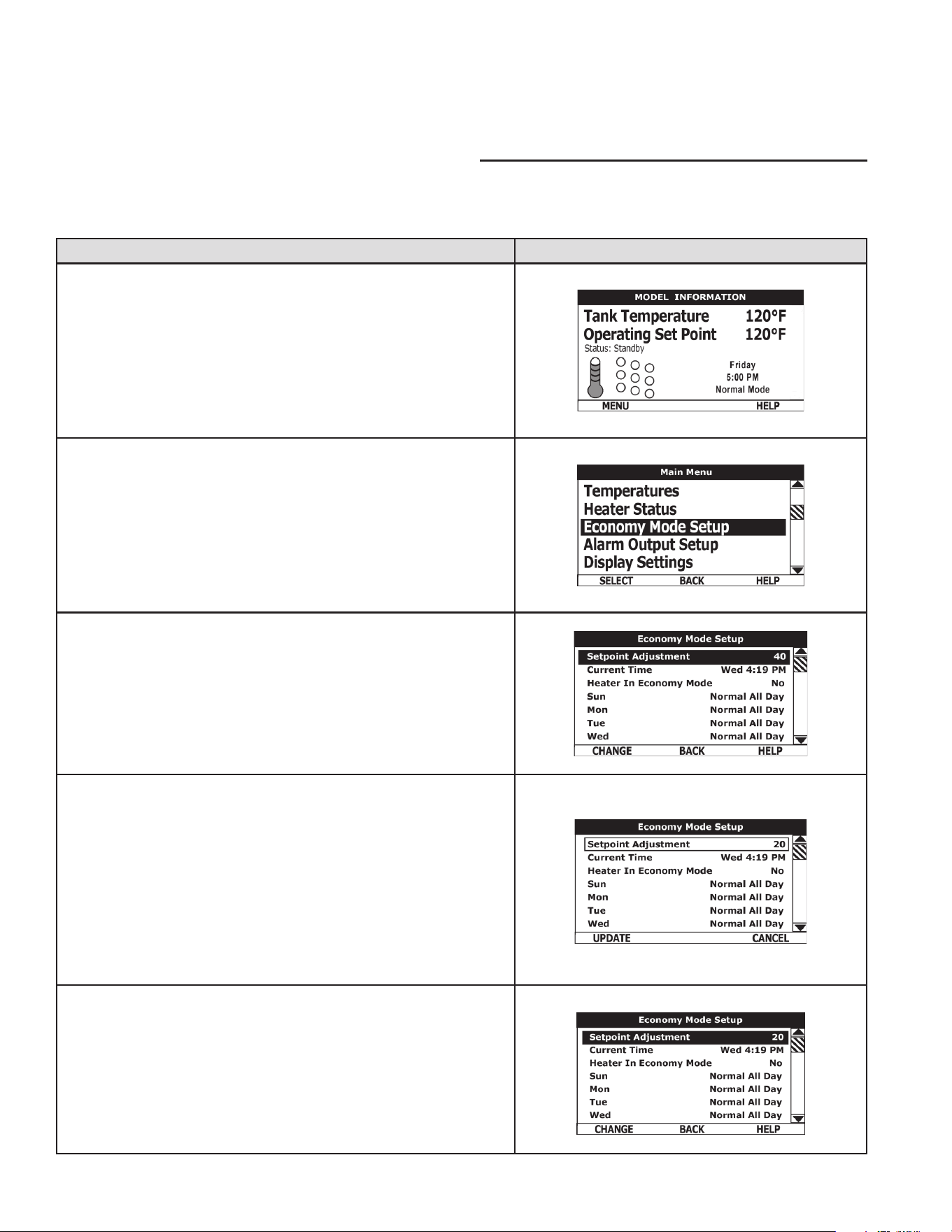
ACTION DISPLAY
From the Desktop Screen, press the Operational Button underneath “MENU”
to enter the Main Menu.
Notice how the text above the Operational Buttons on the display changes
as you navigate through the various menus and screens.
Use the Up/Down buttons to select (highlight in black) the Economy Mode
Setup menu from the Main Menu. Press the Operational Button underneath
“SELECT” to enter the Economy Mode Setup menu.
Use the Up/Down buttons to select (highlight in black) Setpoint Adjustment.
Press the Operational Button underneath “CHANGE” to activate the
adjustment mode for the Setpoint Adjustment value.
Use the Up/Down buttons to change the Setpoint Adjustment to the desired
value. The Setpoint Adjustment value is adjustable from 2°F to 50°F. The
factory default is 20°F.
Notice how the text above the Operational Buttons on the display changes
to “UPDATE” & “CANCEL” when the adjustment mode is activated and how
the current value is outlined rather than highlighted in black.
Press the Operational Button underneath “UPDATE” to enter and conrm
the new value. Pressing the Operational Button underneath “CANCEL”
would discard the new value and retain the previous value.
The new Setpoint Adjustment value should now be displayed as the
current value.
27
ECONOMY MODE SETTINGS
Time Clock Settings
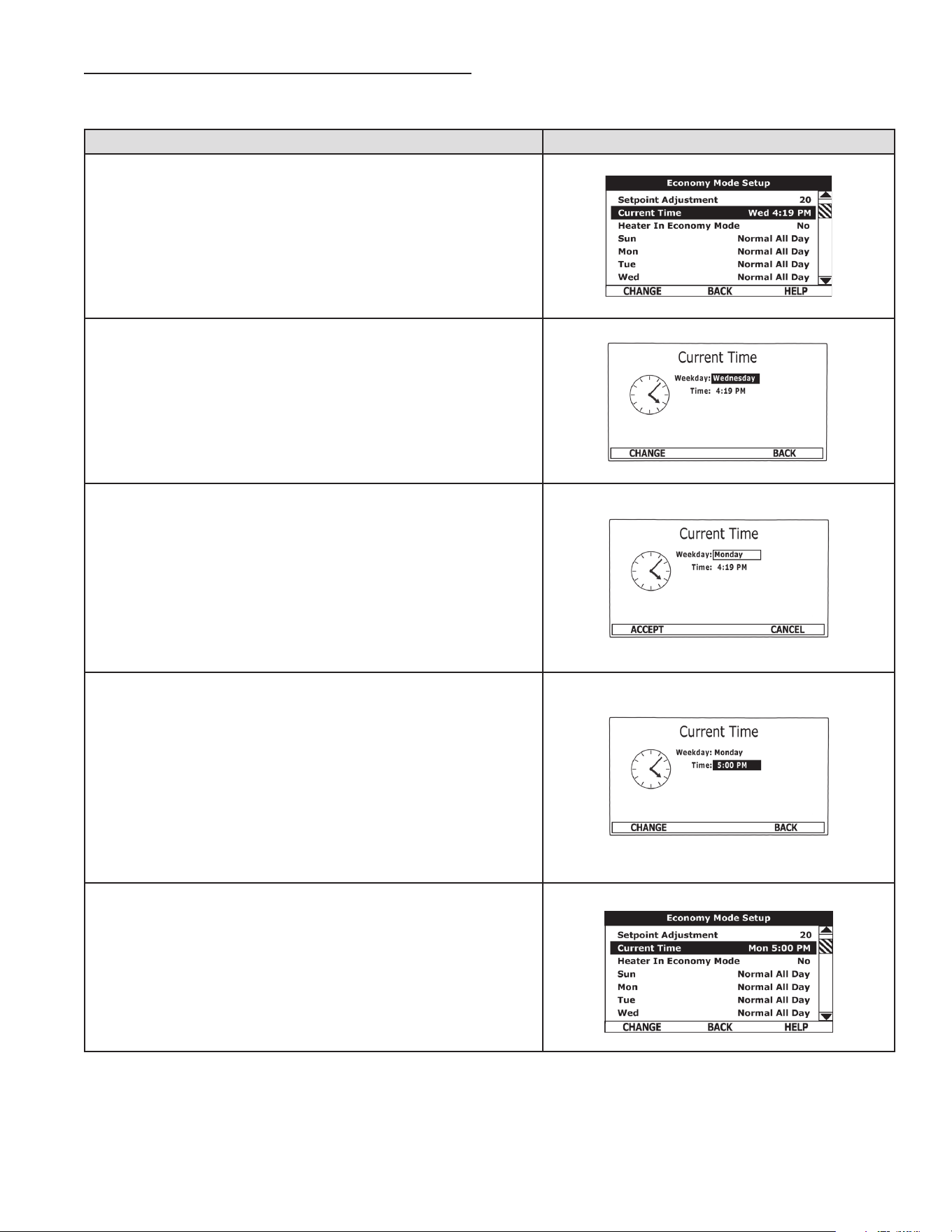
ACTION DISPLAY
From the Desktop Screen navigate to the Economy Mode Setup menu.
Use the Up/Down buttons to select (highlight in black) Current Time sub
menu. Press the Operational Button underneath “CHANGE” to enter the
Current Time sub menu.
Use the Up/Down buttons to select the “Weekday” setting.
Press the Operational Button underneath “CHANGE” to activate the
adjustment mode for this setting.
Press the Up and Down buttons to adjust the Weekday setting to the
current day.
Notice how the text above the Operational Buttons on the display changes
to “ACCEPT” & “CANCEL” when the adjustment mode is activated and how
the current setting is outlined rather than highlighted in black.
Press the Operational Button underneath “ACCEPT” to enter and conrm
the new setting. Pressing the Operational Button underneath “CANCEL”
would discard the new setting and retain the previous setting.
Use the Up/Down and the CHANGE/ACCEPT Operational Buttons to
individually select and change the remaining time settings (Hour, Minutes,
AM/PM) to the current time in the same way as outlined above.
When nished making changes press the Operational Button underneath
“BACK” to conrm all new settings and update the control system. The
display will automatically return to the Economy Mode Setup menu.
The new settings should be displayed as the Current Time.
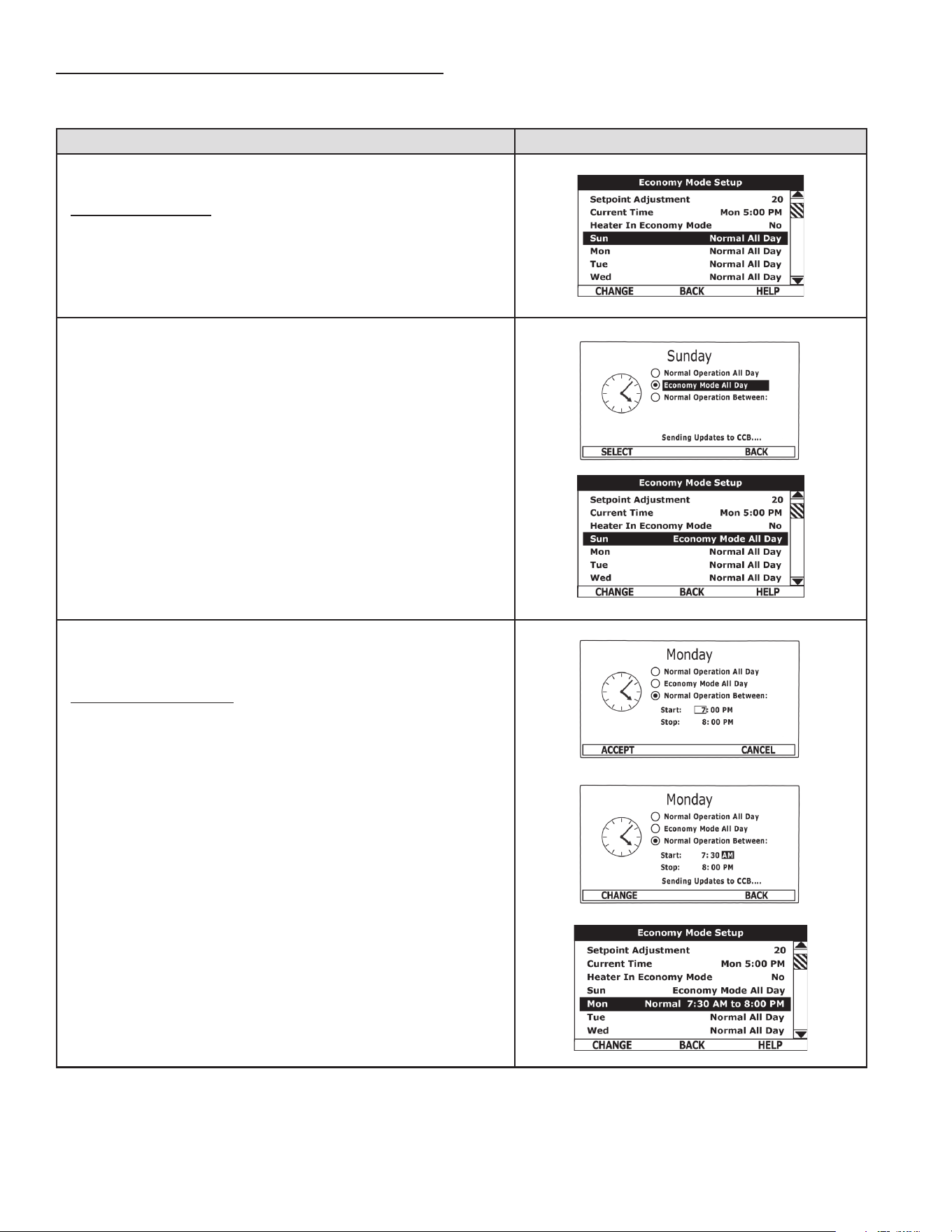
28
ECONOMY MODE SETTINGS
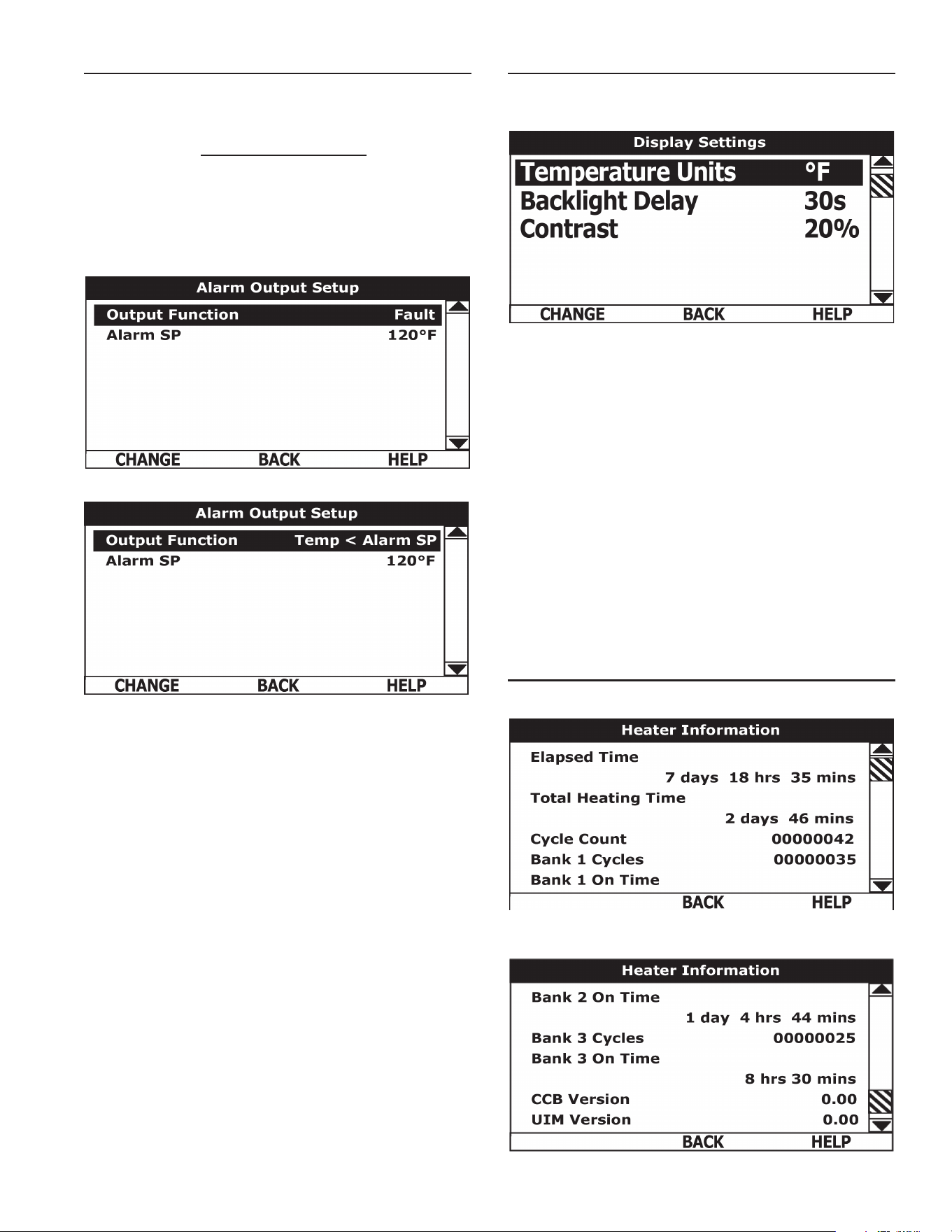
Daily Operating Mode Settings
ACTION DISPLAY
Economy Mode All Day:
From the Economy Mode Setup menu use the Up/Down buttons to select
(highlight in black) the Daily sub menu for “Sun.” Press the Operational
Button underneath “CHANGE” to enter this menu.
Use the Up/Down buttons to select (highlight in black) the “Economy Mode
All Day” setting.
Press the Operational Button underneath “SELECT” to change from the
factory default Normal Operation All Day setting to the Economy Mode All
Day setting.
Press the Operational Button underneath “BACK” to conrm the new setting
and update the control system. You will be returned to the Economy Mode
Setup menu. The new setting should now be displayed for Sun.
Normal Operation Between:
From the Economy Mode Setup menu use the Up/Down and CHANGE
buttons to enter the Mon sub menu.
Use the Up/Down buttons to select (highlight in black) the “Normal Operation
Between” setting. Press the Operational Button underneath “SELECT” to
change the operating mode for Monday to Normal Operation Between.
Note that when this setting is selected Start and Stop time user settings
appear on the display.
Use the Up/Down buttons to navigate between the Start and Stop time Hour,
Minutes and AM/PM settings.
With each item selected press the Operational Button underneath “SELECT”
to activate the adjustment mode for each setting. Use the Up/Down buttons
to change the value to the desired setting.
Press the Operational Button underneath “ACCEPT” to enter the new setting
or “CANCEL” to discard the new setting and retain the previous setting.
Press the Operational Button underneath “BACK” to conrm the settings
and update the control system. You will be returned to the Economy Mode
Setup menu. The new settings should be shown for Mon.
29
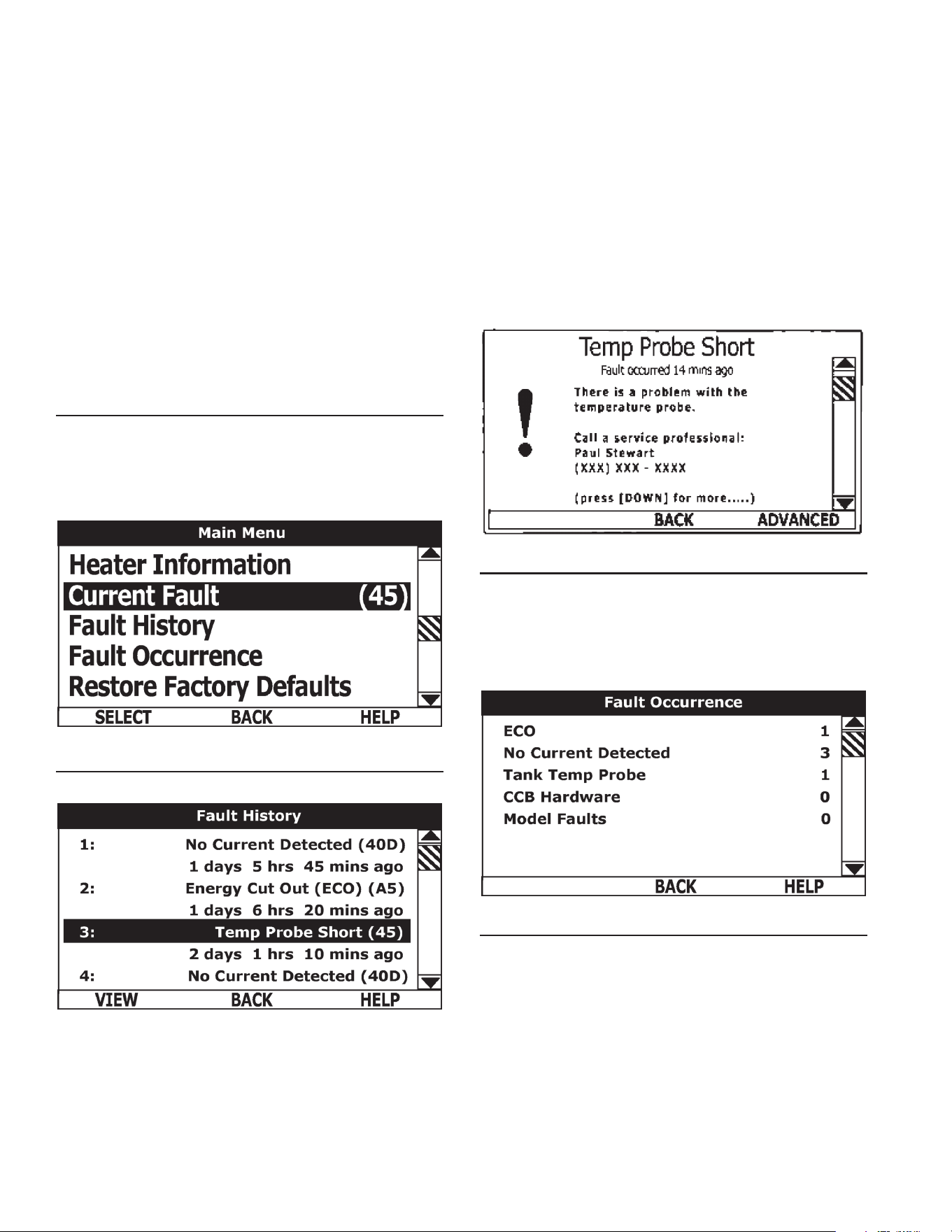
ALARM OUTPUT SETUP MENU
Permits user to set the condition (from a list of options) for when
the CCB’s integral alarm output relay will be energized. Alarm relay
connections (common, normally open, normally closed) are located
on the J3 terminal strip on the CCB. Alarm output relay contacts are
capable of switching 1 amp maximum at 120 VAC.
The alarm relay operates in the background according to the settings
in this menu and is not capable of disabling water heater operation.
The alarm relay is used for external notication/verication of
various operational conditions such as fault conditions and heating
mode status. This relay can be used with building EMS (Energy
Management System) and other external supervisory controls.
Output Function
Adjustable user setting. Available options for the Alarm Output
Function setting are:
HeatingMode: Used for heating mode on/off status notication.
Enable/DisableClosed:Used for notication and/or verication of
the enable/disable circuits open/closed status. There are two enable/
disable circuits available for external supervisory control(s) at the J7
socket on the CCB - see wiring diagrams. Enable/disable circuit(s)
status can be viewed in the Heater Status Menu.
Temp<HeaterSP: Used for external notication when current tank
temperature drops below Operating Set Point.
Temp<AlarmSP:Used for external notication when current tank
temperature drops below programmable Alarm SP.
FaultorAlert: Used for external notication whenever a Fault or
Alert condition is active.
Fault:Used for notication whenever a Fault condition is active.
Disabled: Disables the Alarm Relay Output Function.
AlarmSP:Adjustable user setting (90°F to 190°F) the control system
uses for the “Temp < Alarm SP” function described above. This setting
has no effect with any other Alarm Output functions.
AlarmOutputSettings: Changing the user settings in this menu is
done using the same methods for changing the Operating Set Point.
ServiceNote: Adjustable user settings in the Alarm Output Setup
menu are unaffected by Restore Factory Defaults.
DISPLAY SETTINGS MENU
Permits user to set display options for viewing information on the
UIM’s LCD screen.
Temperature Units
Adjustable user setting that changes temperature units display to
Celsius °C or Fahrenheit °F.
Backlight Delay
Adjustable user setting that determines how long the UIM’s LCD
backlight remains illuminated after a key has been pressed. Available
settings are; Always Off, 10, 30 or 60 seconds and Always On.
Contrast
Adjustable user setting to adjust the UIM’s LCD screen contrast
between text and background.
Display Settings
Changing the user settings in this menu is done using the same
methods for changing the Operating Set Point.
Service Note
Adjustable user settings in the Display Settings menu are unaffected
by Restore Factory Defaults.
HEATER INFORMATION MENU
This menu displays non adjustable operational information.
TOP OF MENU
BOTTOM OF MENU
30
Elapsed Time
Total accumulated time the control system (water heater) has been
energized.
Total Heating Time
Total accumulated time the control system has been in the heating
mode. IE: any heating elements have been energized.
Bank # Cycles
Total accumulated count of heating cycles for each Bank of heating elements.
Bank # On Time
Total accumulated heating on time for each Bank of heating
elements.
CCB Version
Software version for Central Control Board.
UIM Version
Software version for User Interface Module.
CURRENT FAULT / ALERT MENU
This menu displays non adjustable operational information. With the
Fault History sub menu selected in Main Menu; press the Operational
Button underneath “SELECT” to display the current Fault or Alert
message. If there is not a Fault or Alert condition currently active
“(none)” is displayed to the right of this menu.
Main Menu - Current Fault Selected
FAULT HISTORY MENU
Fault History Menu
This menu displays non adjustable operational information. The
control system records and stores the last 9 Fault and Alert
messages in chronological order in this menu. The most recent
will be at the top of the list. A time stamp is displayed below each
listed Fault and Alert message showing when the Fault or Alert
condition occurred.
The Fault History is useful when dealing with intermittent operational
problems or when the customer has reset the control system prior
to a service agent’s arrival.
With a Fault or Alert item selected press the Operational Button
underneath “VIEW” to display the details for the Fault or Alert
message. The Fault/Alert message screen displays a brief
description of the condition, contact information and access to the
Advanced service information sub menu.
Current / History Fault Message
FAULT OCCURRENCE MENU
Total accumulated number each individual Fault condition has
occurred is displayed in this menu. This running total of Fault
Occurrences can be useful in determining which (if any) operational
problems have been persistent.
Fault Occurrence Menu
RESTORE FACTORY DEFAULTS MENU
This control system menu allows the user to restore most of the
control system’s user settings to their factory default settings. User
settings in the Alarm Output Setup and Display Settings menus are
unaffected by executing Restore Factory Defaults.
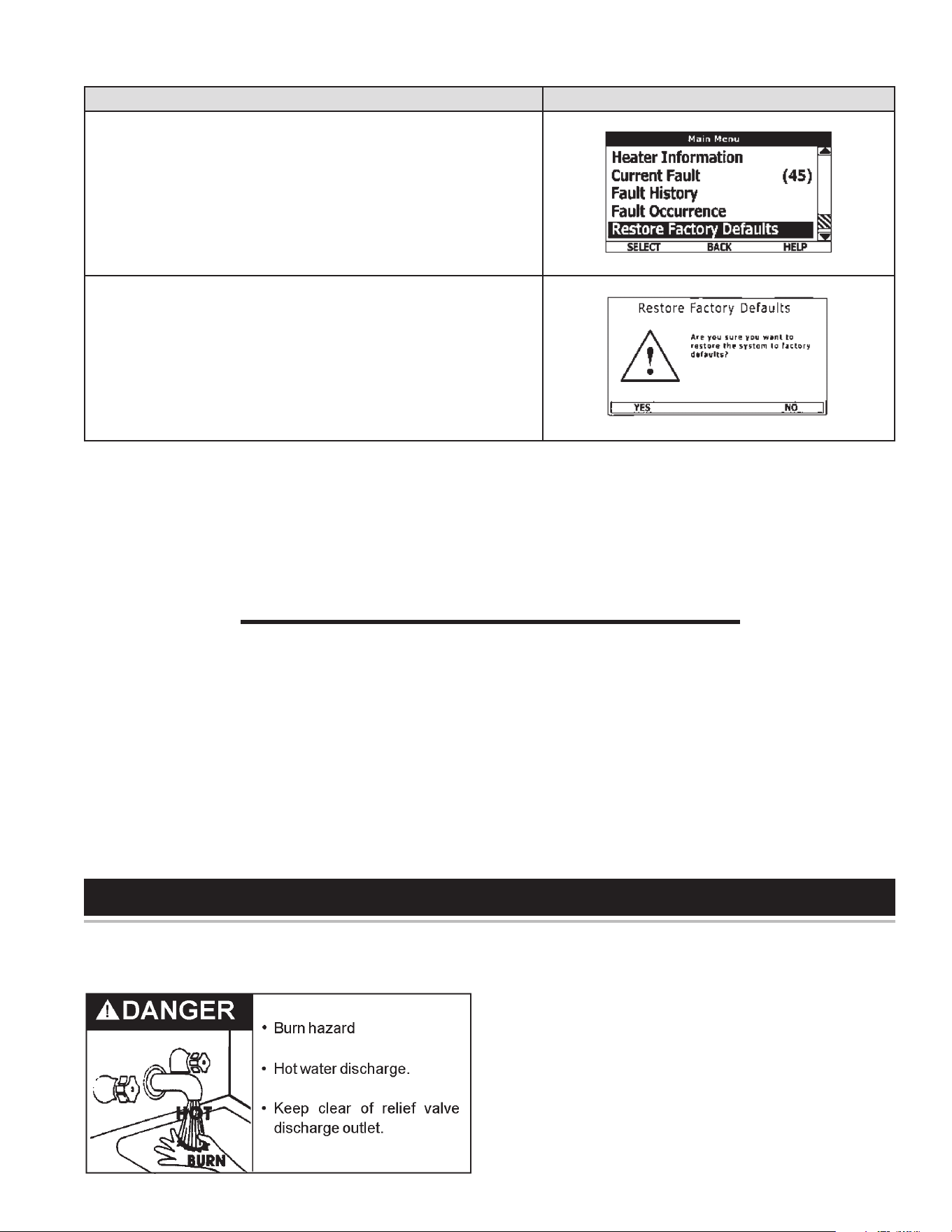
31
Restore Factory Defaults
ACTION DISPLAY
From the Main Menu use the Up/Down buttons to select (highlight in black)
the “Restore Factory Defaults” menu.
Press the Operational Button underneath “SELECT.” The Restore Factory
Defaults menu will be displayed.
From the Restore Factory Defaults menu press the Operational Button
underneath “YES.” The display will show text conrming the factory default
settings have been restored.
Press the Operational Button underneath “BACK” to exit the Restore Factory
Defaults menu.
GENERAL
Periodically the drain valve should be opened and the water
allowed to run until it flows clean. This will help to prevent
sediment buildup in the tank bottom.
Periodically check the temperature and pressure relief valve to ensure
that it is in operating condition. Lift the lever at the top of the valve
several times until the valve seats properly and operates freely.
Water heater maintenance includes periodic tank flushing and
cleaning, and removal of lime scale from the heating element.
The heater tank is equipped with an anode rod to aid in corrosion control
and should be inspected periodically (see Anode Rod Inspection).
MAINTENANCE
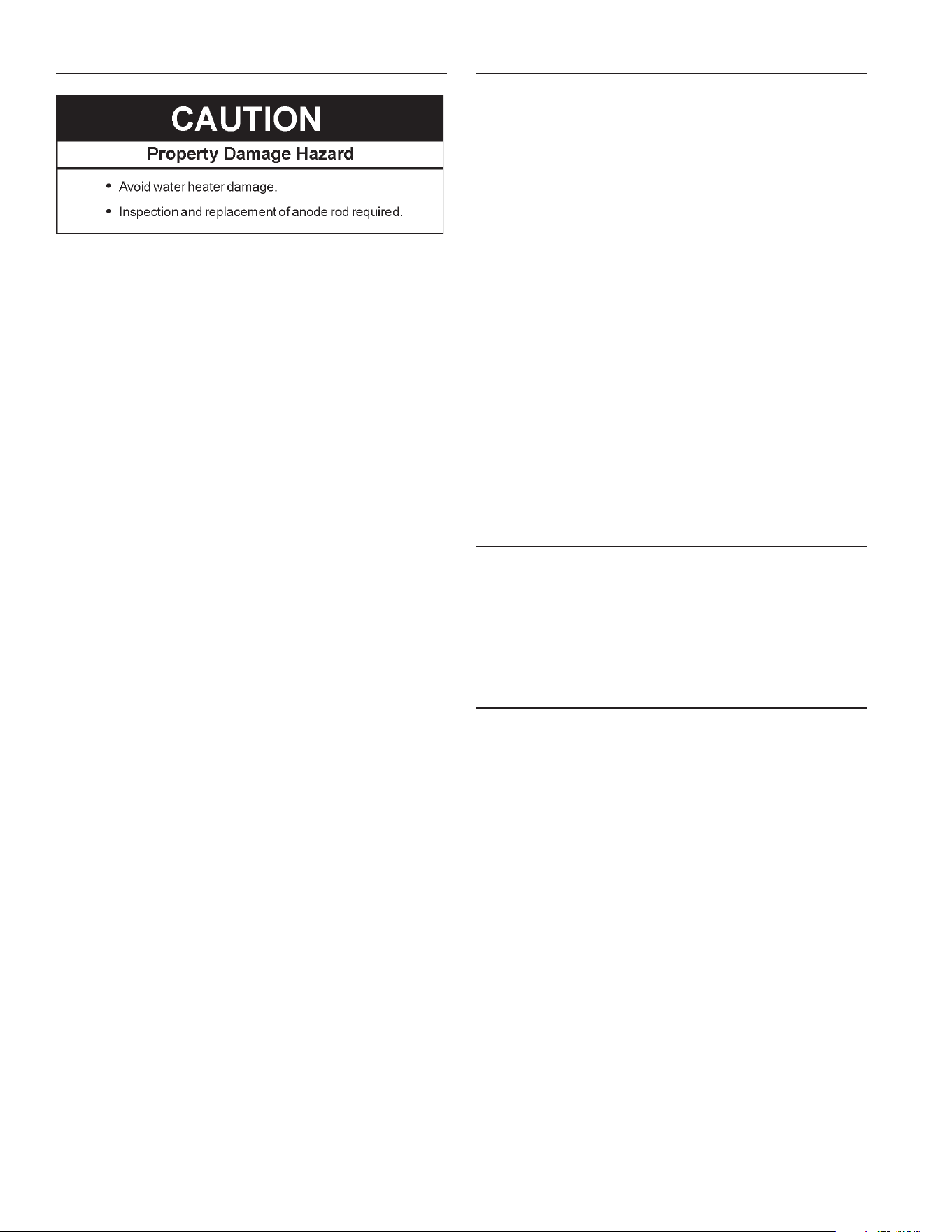
32
ANODE ROD INSPECTION
Each water heater contains at least one anode rod, which will
slowly deplete (due to electrolysis) prolonging the life of the
water heater by protecting the glass-lined tank from corrosion.
Adverse water quality, hotter water temperatures, high hot water
usage, hydronic heating devices, and water softening methods
can increase the rate of anode rod depletion. Once the anode rod
is depleted, the tank will start to corrode, eventually developing
a leak.
Certain water conditions will cause a reaction between the anode
rod and the water. The most common complaint associated with
the anode rod is a “rotten egg smell” produced from the presence
of hydrogen sulde gas dissolved in the water. IMPORTANT: Do
not remove this rod permanently as it will void any warranties. A
special anode rod may be available if water odor or discoloration
occurs. NOTE: This rod may reduce but not eliminate water odor
problems. The water supply system may require special ltration
equipment from a water conditioning company to successfully
eliminate all water odor problems.
Articially softened water is exceedingly corrosive because the
process substitutes sodium ions for magnesium and calcium ions.
The use of a water softener may decrease the life of the water
heater tank.
The anode rod should be inspected after a maximum of three
years and annually thereafter until the condition of the anode rod
dictates its replacement.
NOTE: Articially softened water requires the anode rod to be
inspected annually.
The following are typical (but not all) signs of a depleted anode
rod:
• The majority of the rods diameter is less than 3/8”.
• Signicant sections of the support wire (approx. 1/3 or more
of the anode rod’s length) are visible.
If the anode rod show signs of either or both it should be replaced.
NOTE: Whether re-installing or replacing the anode rod, check
for any leaks and immediately correct if found.
In replacing the anode:
1. Turn off electric supply to the water heater.
2. Shut off the water supply and open a nearby hot water faucet
to depressurize the water tank.
3. Drain approximately 5 gallons of water from tank. (Refer to
“Draining and Flushing” for proper procedures). Close drain
valve.
4. Remove old anode rod.
5. Use Teon® tape or approved pipe sealant on threads and
install new anode rod.
6. Turn on water supply and open a nearby hot water faucet
to purge air from water system. Check for any leaks and
immediately correct any if found.
7. Restart the water heater as directed in this manual. See the
Repair Parts Illustration for anode rod location.
FLUSHING THE WATER HEATER
1. Turn off the electrical supply to the water heater at the
breaker or disconnect switch.
2. Ensure the cold water inlet valve is open.
3. Open a nearby hot water faucet and let the water run until
the water is no longer hot. Then close the hot water faucet.
4. Connect a hose to the water heater drain valve and terminate
it to an adequate drain.
5. Ensure the drain hose is secured before and during the
entire ushing procedure. Flushing is performed with system
water pressure applied to the water heater.
6. Open the water heater drain valve to ush the storage tank.
7. Flush the water heater storage tank to remove sediment and
allow the water to ow until it runs clean.
8. Close the water heater drain valve when ushing is
completed.
9. Remove the drain hose.
10. Fill the water heater – see the Filling The Water Heater
section in this manual.
11. Turn on the electrical supply to the water heater.
12. Place the water heater back in operation. Allow the water
heater to complete several heating cycles to ensure it is
operating properly.
SEDIMENT REMOVAL
Water borne impurities consist of ne particles of soil and sand which
settle out and form a layer of sediment on the bottom of the tank. In
time, if not removed, the level of sediment might reach the heating
elements and cause their failure.
For convenience, sediment removal and element lime scale removal
should be performed at the same time as follows.
LIME SCALE REMOVAL
Lime scale accumulations on the heating elements is a normal
condition, common to all immersion type elements. Factors which
affect the amounts of this formation are:
1. Amount of hot water used. As the volume of water heated
increases, more scale results.
2. Water temperature. As the temperature of the water is increased,
more scale is deposited on the elements.
3. Characteristics of water supply.
Regardless of water treatment, the elements should be examined
regularly.
Lime scale accumulations may cause noises to occur during operation.
It is recommended that a heating element be removed periodically
for examination. If it is scaled, all of the elements should be removed
and cleaned. If the tank bottom has an accumulation of sediment it
should be cleaned.
Lime scale should be removed by dissolving the accumulation in
UN•LIME
®
delimer. Do not use muriatic or hydrochloric acid base
deliming solutions to remove lime scale from the elements.

33
THEPROCESSFORLIMESCALEREMOVALISASFOLLOWS:
1. Turn off electrical disconnect switch.
2. Drain the heater following DRAINING instructions.
3. Open front panel.
4. Disconnect the element wiring. Try not to disturb the wiring
unnecessarily and reconnection will be easier.
5. Unscrew each element.
6. Remove the elements and gaskets from the openings.
• Use a twisting, pulling action to remove elements scaled beyond
the size of the tank openings.
• Brush loose scale from elements.
7. Lime scale removal:
• Place limed ends of heating elements into UN•LIME delimer and
allow scale to dissolve. Do not permit delimer or water to contact
heating element electrical terminals.
• Silicates, sulfates, and aluminates must be removed by scraping
or other mechanical means. Lime scale dissolvents will
not remove these types of scale which are occasionally
encountered.
Call the toll free phone number on the back cover of this Instruction
Manual to purchase UN-LIME and heating element gaskets.
OTHERSCALEREMOVAL:
1. Flush cleaned ends of elements with water when deliming or
cleaning is completed.
2. Remove sediment and scale from the tank bottom through
the access provided by the element openings or drain valve
opening.
• The cold water inlet valve and drain valve may be opened to
aid the cleanout process.
3. Clean remaining gasket material from tank and element anges
Do not reuse original element gaskets.
4. Put new gaskets on each element and install into tank openings.
• Uniformly tighten element bolts. Torque to approximately
32 ft./lbs.
5. Attach element wires to connection points from which they were
removed.
6. Follow FILLING instructions to restore hot water service.
• Check for water leaks around elements and proper operation
when heater is lled.
• Close the front panel.
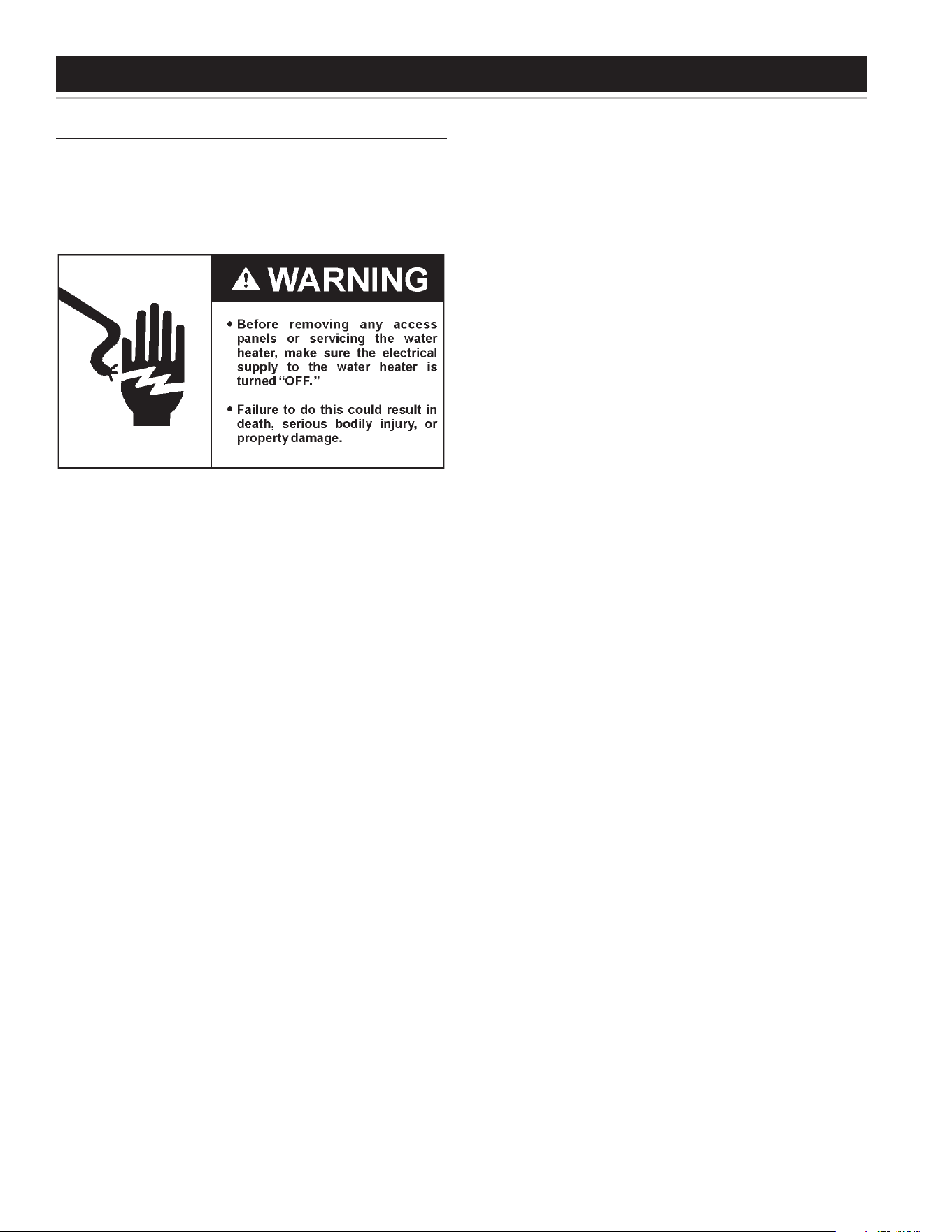
34
TROUBLESHOOTING CHECKLIST
CHECKLIST
Before calling for service, check the following points to see if the
cause of trouble can be identied and corrected.
Reviewing this checklist may eliminate the need of a service call and
quickly restore hot water service. See Figure 2 and Figure 3 in this
manual to identify and locate water heater components.
NOT ENOUGH OR NO HOT WATER
1. Be certain the electrical disconnect switch serving the water
heater is in the ON position.
2. Check the fuses.
• The electrical disconnect switch usually contains fuses.
• The heater has fusing.
3. If the water was excessively hot, and is now cold, the high limit
switch may have activated.
• See the Temperature Regulation section of this manual for
more information on how to reset the ECO high limit
controls.
4. The capacity of the heater may have been exceeded by a large
demand for hot water.
• Large demands require a recovery period to restore water
temperature.
5. Cooler incoming water temperature will lengthen the time required
to heat water to the desired temperature.
6. Look for hot water leakage.
7. Sediment or pipe scale may be affecting water heater operation.
ABNORMAL SOUNDS
1. Sediment or lime scale accumulations on the elements causes
sizzling and hissing noises when the heater is operating.
• The sounds are normal, however, the tank bottom and
elements should be cleaned. See the Maintenance section of
this manual.
2. Some of the electrical components of the water heater make
sounds which are normal.
• Contactors will “click” or snap as the heater starts and stops.
• Transformers and contacts often hum.
Water leakage is suspected
Refer to Leakage Checkpoint on the following page.
1. Check to see if the heater drain valve is tightly closed.
2. If the outlet of the relief valve is leaking it may represent:
• Excessive water temperature.
• Faulty relief valve.
• Excessive water pressure.
3. Excessive water pressure is the most common cause of relief
valve leakage. It is often caused by a “closed system”. See
“Closed Water Systems” and “Thermal Expansion” in the
Installation section of this manual for more information.
4. Examine the area around the element for gasket leakage.
• Tighten the elements or, if necessary, follow the WATER AND
LIME SCALE REMOVAL procedure to replace the gaskets.
IF YOU CANNOT IDENTIFY OR CORRECT THE SOURCE OF
MALFUNCTION
1. Turn the power supply to the water heater off.
2. Close the supply water inlet valve to the heater.
3. Contact a Qualied Service Agency in your area.
REPLACEMENT PARTS
Call the toll free phone number listed on the warranty sheet of this
Instruction Manual for assistance in locating replacement parts.
When ordering parts, specify complete model no., serial no., (see
rating plate), quantity and name of part desired. Standard hardware
items should be purchased locally.
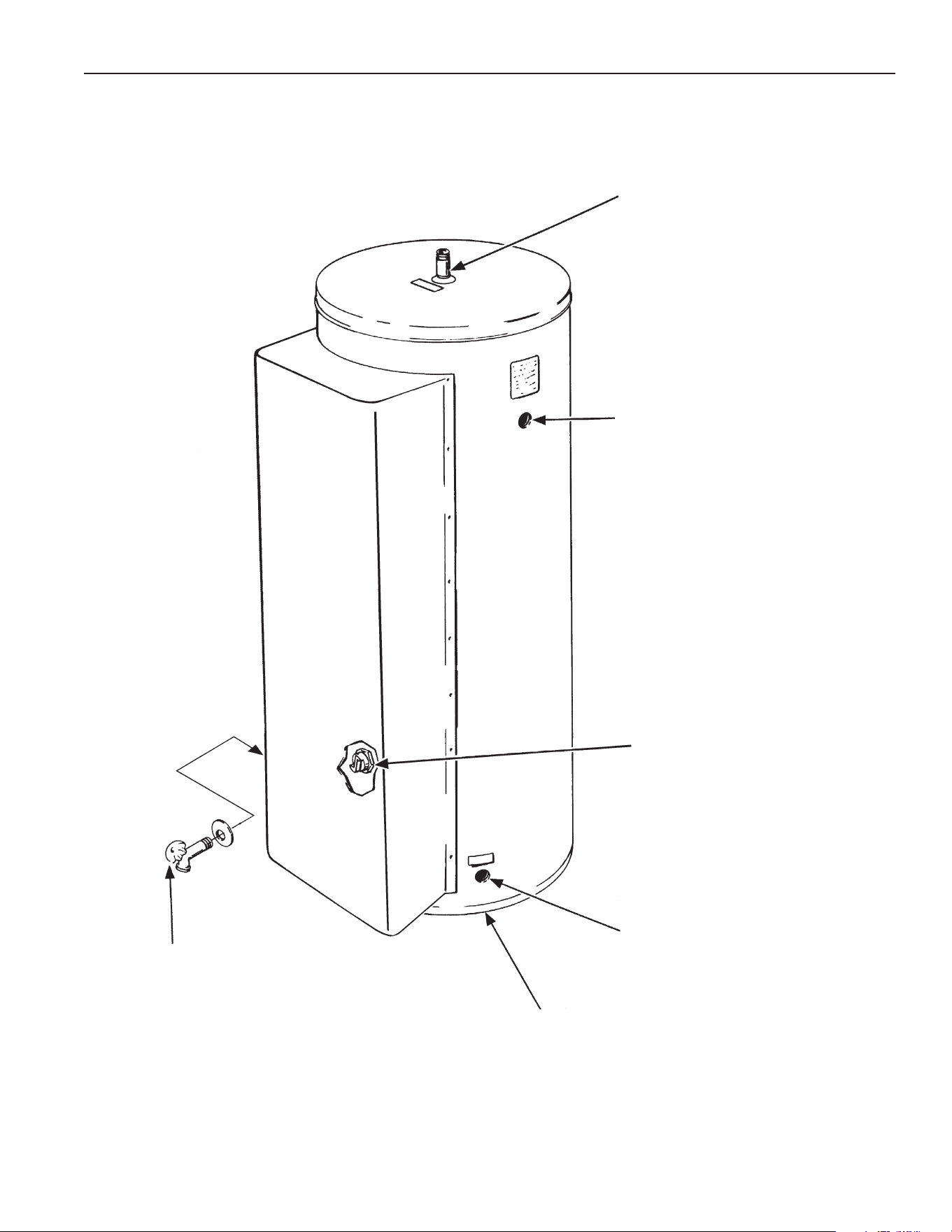
35
LEAKAGE CHECKPOINTS
INSTRUCTIONS: USE THIS ILLUSTRATIONAS A GUIDE WHEN CHECKING FOR SOURCES OF WATER LEAKAGE.
All water which appears at the heater bottom or on the
surrounding floor may be caused by condensation, loose
connections or relief valve operation and leakage. Do not
replace the heater until a full inspection of all potential leak
points is made and corrective steps taken to stop the leak.
Leakage from other appliances, water lines, or ground seepage
should also be suspected until proved otherwise.
Where possible, remove or lift top cover to
examine threads of ttings installed into tank
for evidence of leakage. Correct tting leaks
as necessary.
Relief valve operation and leakage may be
due to water expansion during heating cycle
or foreign material on seat of valve. If the valve
is not piped to an open drain, the released
water could be mistaken for a leaking heater.
To check where threaded portion enters tank,
insert Q-Tip® or similar absorbent material
between jacket opening and valve to swab
spud area. Remove valve* if leak is indicated
and repair with pipe joint compound.
Water on the side of the tank may be
condensation due to the panel or insulation
not being in place.
Water leaks at the elements may be due to:
1. Defective elements which leak at terminals
or through ange. Replace element*.
2. Loose element/gasket leak:
Tighten element with element wrench.
If leak continues, remove element* and
discard gasket. Clean gasket seating
areas and reinstall element with new
gasket.
Condensation and dripping may appear on
pipes when inlet water temperature is low.
Pipe tting may be leaking.
Drain valve leakage could be from the valve itself. Either
correct the problem or replace the valve*. To check for
leakage where threaded portion enters tank, insert Q-tip
or similar absorbent material between jacket opening
and valve to swab spud area. Remove valve* if leak is
indicated and repair with pipe joint compound.
* Contact a Qualied Service Agency as it is necessary to
shut off electricity and drain tank to perform procedure.
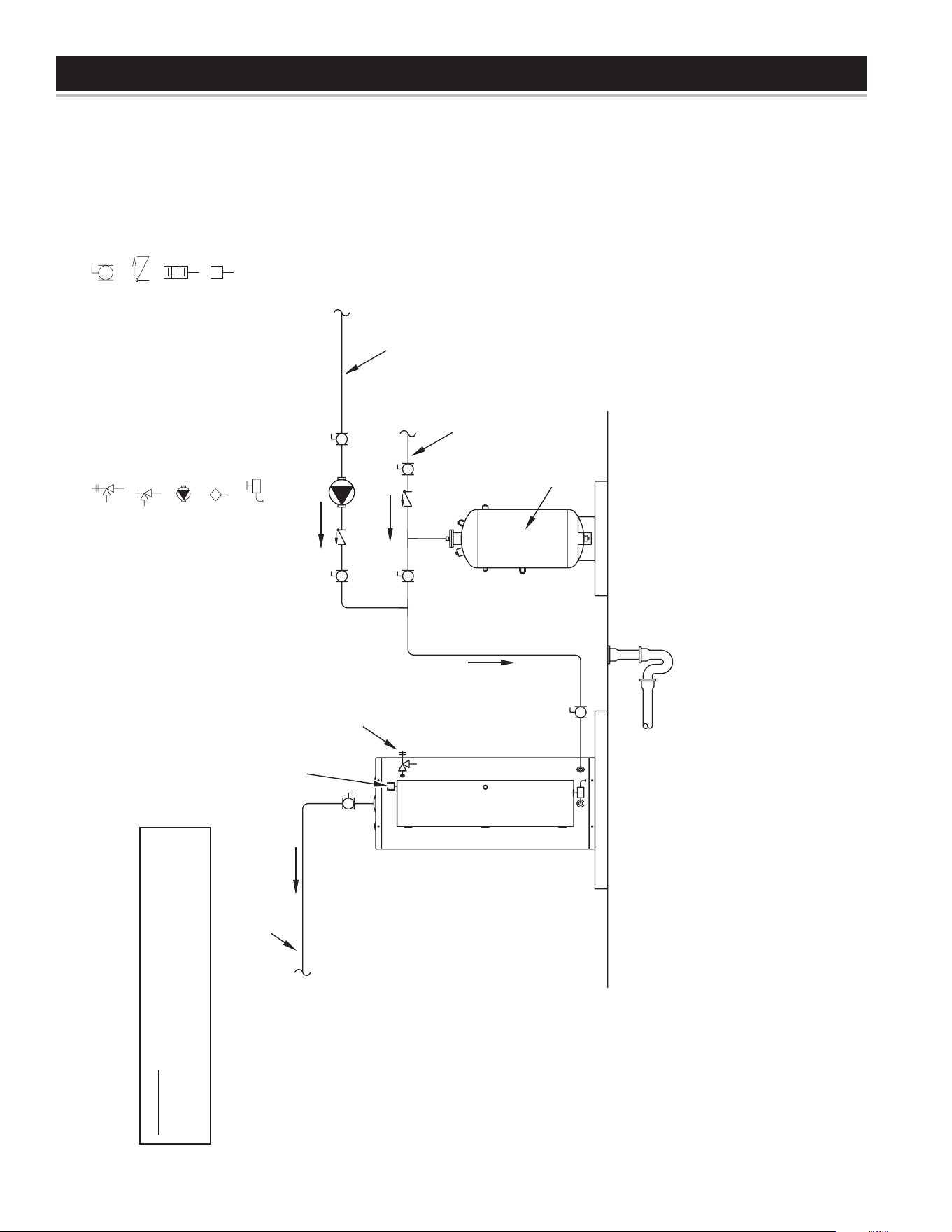
36
PIPING DIAGRAMS
NOTES:
1. Preferred piping diagram.
2. The temperature and pressure relief valve setting shall not exceed pressure rating of any component in the system.
3. Service valves are shown for servicing unit. However, local codes shall govern their usage.
COMMERCIAL ELECTRIC - (1 UNIT)
LEGEND
TEMPERATURE & PRESSURE
RELIEF VALVE
PRESSURE RELIEF VALVE
CIRCULATING PUMP
TANK TEMPERATURE CONTROL
DRAIN
FULL PORT BALL VALVE
TEMPERATURE GAGE
WATER FLOW SWITCH
CHECK VALVE
WARNING: THIS DRAWING SHOWS SUGGESTED
PIPING CONFIGURATION AND OTHER DEVICES;
CHECK WITH LOCAL CODES AND ORDINANCES
FOR ADDITIONAL REQUIREMENTS.
FINISHED
FLOOR
HOT WATER
TO FIXTURES
FUSED
DISCONNECT
SWITCH
HOT WATER
RETURN
EXPANSION
TANK
COLD WATER
SUPPLY
PIPE T&P TO
OPEN DRAIN
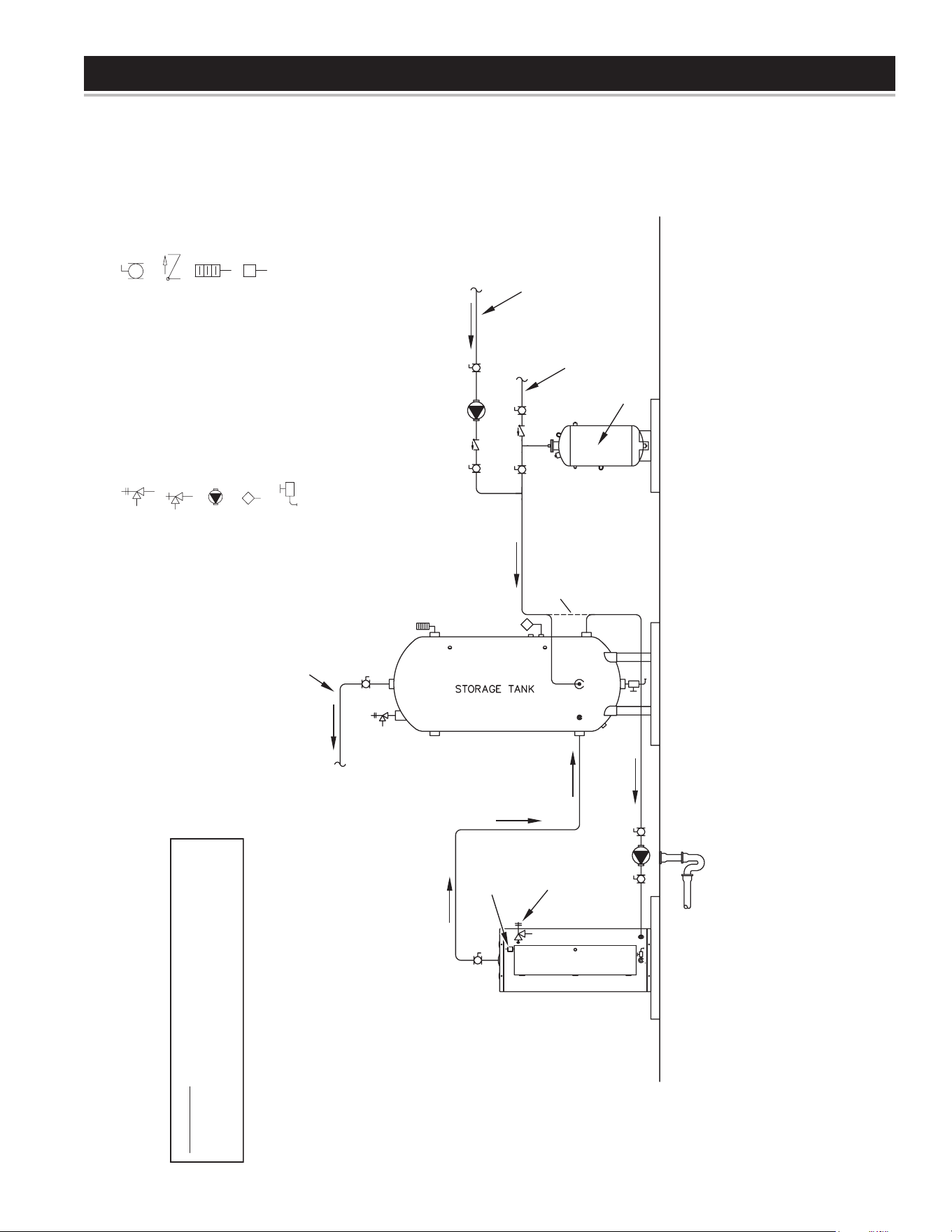
37
PIPING DIAGRAMS
NOTES:
1. Preferred piping diagram.
2. The temperature and pressure relief valve setting shall not exceed pressure rating of any component in the system.
3. Service valves are shown for servicing unit. However, local codes shall govern their usage.
4. The Tank Temperature Control should be wired to and control the pump between the water heater(s) and the storage tank(s).
5. The water heater’s operating thermostat should be set 5 degrees F higher than the Tank Temperature Control.
COMMERCIAL ELECTRIC - (1 UNIT) WITH VERTICAL STORAGE TANK
LEGEND
TEMPERATURE & PRESSURE
RELIEF VALVE
PRESSURE RELIEF VALVE
CIRCULATING PUMP
TANK TEMPERATURE CONTROL
DRAIN
FULL PORT BALL VALVE
TEMPERATURE GAGE
WATER FLOW SWITCH
CHECK VALVE
WARNING: THIS DRAWING SHOWS SUGGESTED
PIPING CONFIGURATION AND OTHER DEVICES;
CHECK WITH LOCAL CODES AND ORDINANCES
FOR ADDITIONAL REQUIREMENTS.
FINISHED
FLOOR
HOT WATER
TO FIXTURES
FUSED
DISCONNECT
SWITCH
EXPANSION
TANK
ALT. COLD WATER
CONNECTION
HOT WATER
RETURN
COLD WATER
SUPPLY
PIPE T&P TO
OPEN DRAIN
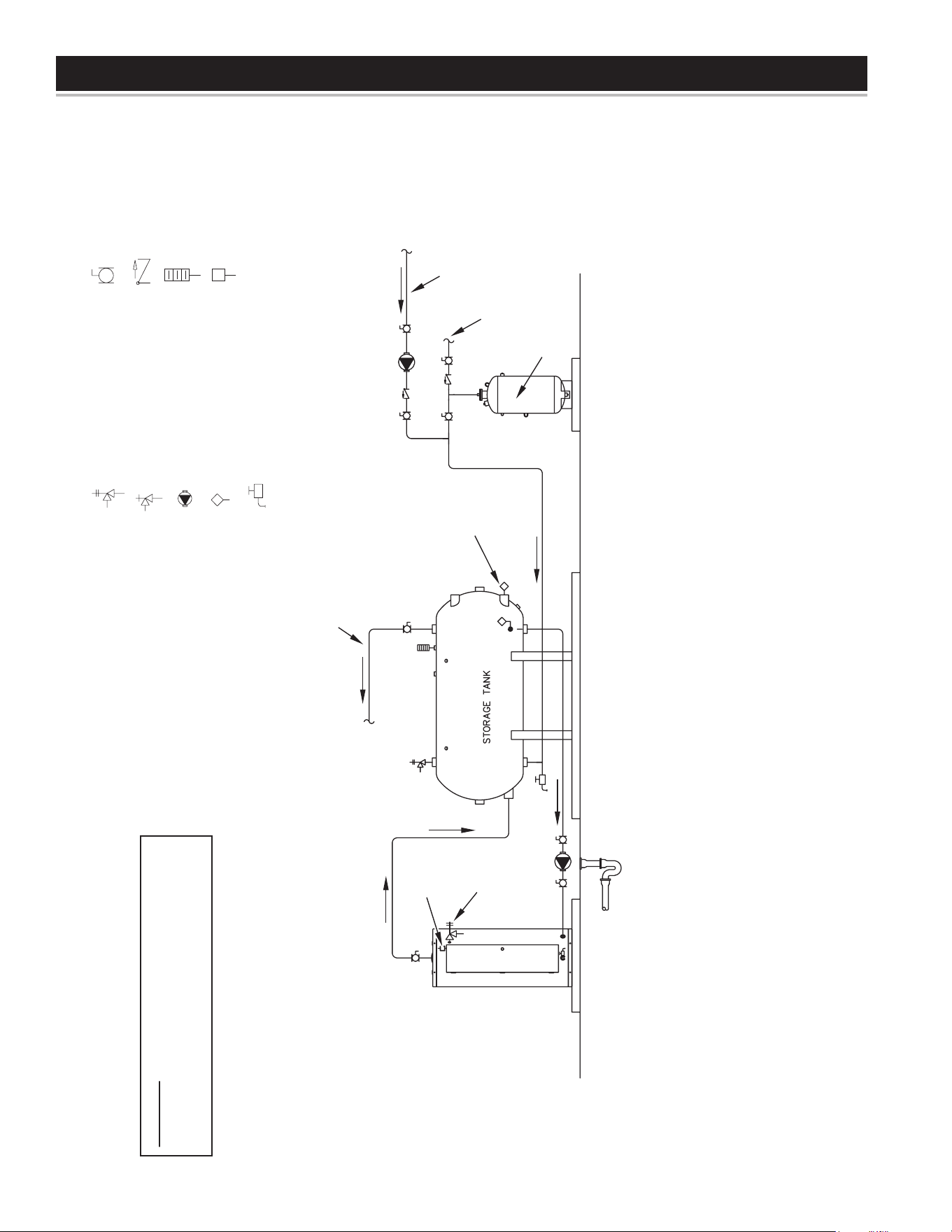
38
PIPING DIAGRAMS
NOTES:
1. Preferred piping diagram.
2. The temperature and pressure relief valve setting shall not exceed pressure rating of any component in the system.
3. Service valves are shown for servicing unit. However, local codes shall govern their usage.
4. The Tank Temperature Control should be wired to and control the pump between the water heater(s) and the storage tank(s).
5. The water heater’s operating thermostat should be set 5 degrees F higher than the Tank Temperature Control.
COMMERCIAL ELECTRIC - (1 UNIT) WITH HORIZONTAL STORAGE TANK
LEGEND
TEMPERATURE & PRESSURE
RELIEF VALVE
PRESSURE RELIEF VALVE
CIRCULATING PUMP
TANK TEMPERATURE CONTROL
DRAIN
FULL PORT BALL VALVE
TEMPERATURE GAGE
WATER FLOW SWITCH
CHECK VALVE
WARNING: THIS DRAWING SHOWS SUGGESTED
PIPING CONFIGURATION AND OTHER DEVICES;
CHECK WITH LOCAL CODES AND ORDINANCES
FOR ADDITIONAL REQUIREMENTS.
FINISHED
FLOOR
HOT WATER
TO FIXTURES
EXPANSION
TANK
ALTERNATE
LOCATION
HOT WATER
RETURN
COLD WATER
SUPPLY
FUSED
DISCONNECT
SWITCH
PIPE T&P TO
OPEN DRAIN
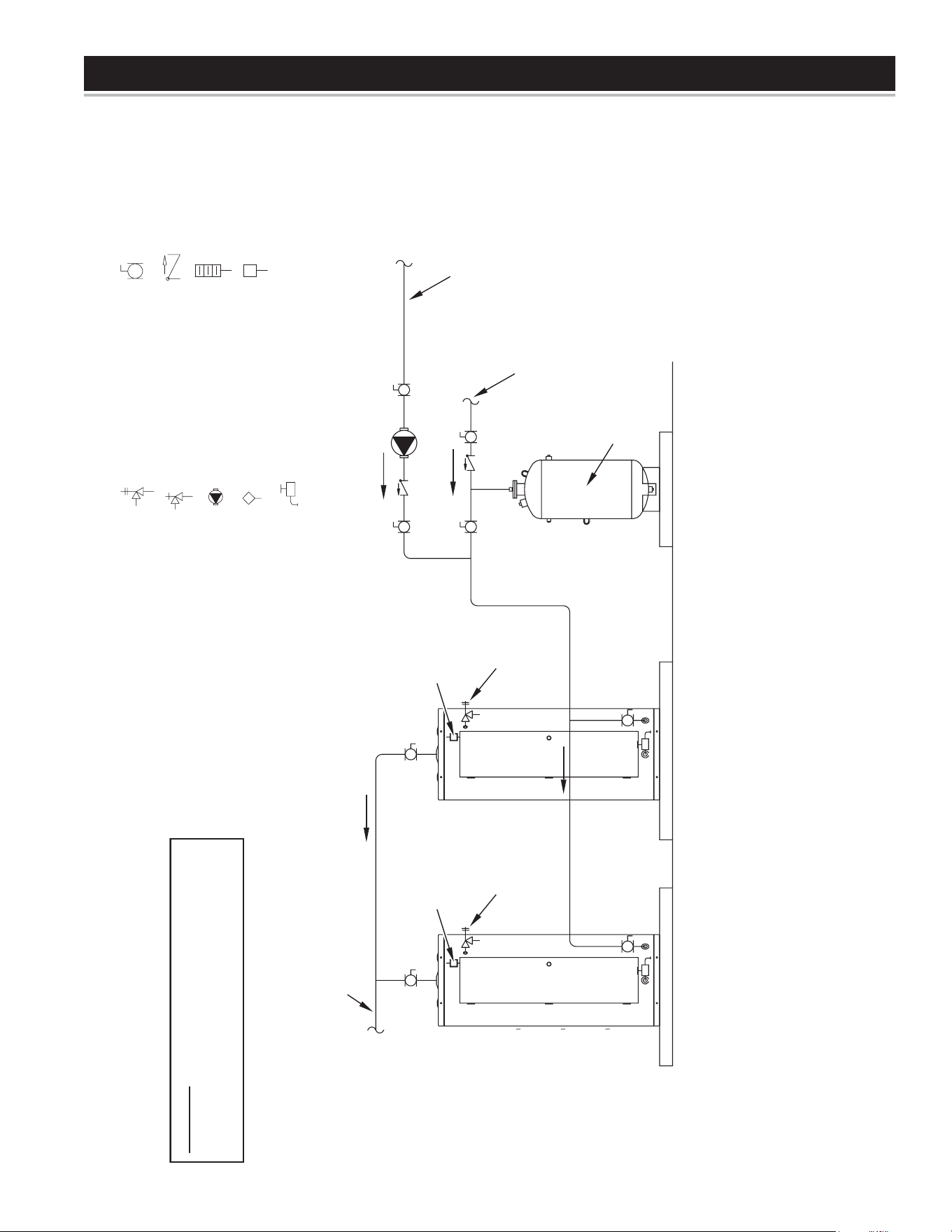
39
PIPING DIAGRAMS
NOTES:
1. Preferred piping diagram.
2. The temperature and pressure relief valve setting shall not exceed pressure rating of any component in the system.
3. Service valves are shown for servicing unit. However, local codes shall govern their usage.
COMMERCIAL ELECTRIC - (2 UNITS)
LEGEND
TEMPERATURE & PRESSURE
RELIEF VALVE
PRESSURE RELIEF VALVE
CIRCULATING PUMP
TANK TEMPERATURE CONTROL
DRAIN
FULL PORT BALL VALVE
TEMPERATURE GAGE
WATER FLOW SWITCH
CHECK VALVE
WARNING: THIS DRAWING SHOWS SUGGESTED
PIPING CONFIGURATION AND OTHER DEVICES;
CHECK WITH LOCAL CODES AND ORDINANCES
FOR ADDITIONAL REQUIREMENTS.
EXPANSION
TANK
HOT WATER
RETURN
COLD WATER
SUPPLY
FUSED
DISCONNECT
SWITCH
PIPE T&P TO
OPEN DRAIN
FUSED
DISCONNECT
SWITCH
PIPE T&P TO
OPEN DRAIN
HOT WATER
TO FIXTURES
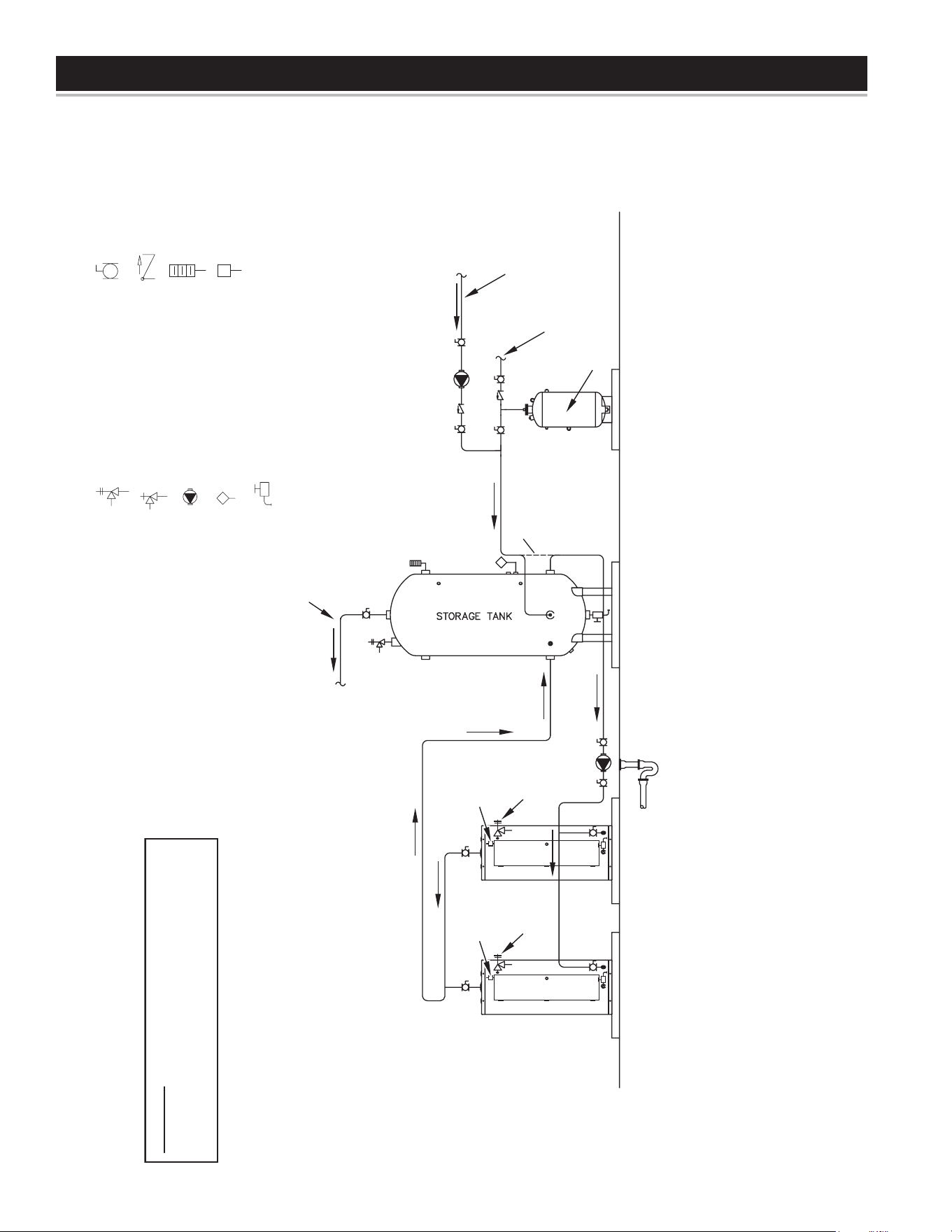
40
PIPING DIAGRAMS
NOTES:
1. Preferred piping diagram.
2. The temperature and pressure relief valve setting shall not exceed pressure rating of any component in the system.
3. Service valves are shown for servicing unit. However, local codes shall govern their usage.
4. The Tank Temperature Control should be wired to and control the pump between the water heater(s) and the storage tank(s).
5. The water heater’s operating thermostat should be set 5 degrees F higher than the Tank Temperature Control.
COMMERCIAL ELECTRIC - (2 UNITS) WITH VERTICAL STORAGE TANK
LEGEND
TEMPERATURE & PRESSURE
RELIEF VALVE
PRESSURE RELIEF VALVE
CIRCULATING PUMP
TANK TEMPERATURE CONTROL
DRAIN
FULL PORT BALL VALVE
TEMPERATURE GAGE
WATER FLOW SWITCH
CHECK VALVE
WARNING: THIS DRAWING SHOWS SUGGESTED
PIPING CONFIGURATION AND OTHER DEVICES;
CHECK WITH LOCAL CODES AND ORDINANCES
FOR ADDITIONAL REQUIREMENTS.
FINISHED
FLOOR
HOT WATER
TO FIXTURES
EXPANSION
TANK
ALT. COLD WATER
CONNECTION
HOT WATER
RETURN
COLD WATER
SUPPLY
FUSED
DISCONNECT
SWITCH
PIPE T&P TO
OPEN DRAIN
FUSED
DISCONNECT
SWITCH
PIPE T&P TO
OPEN DRAIN
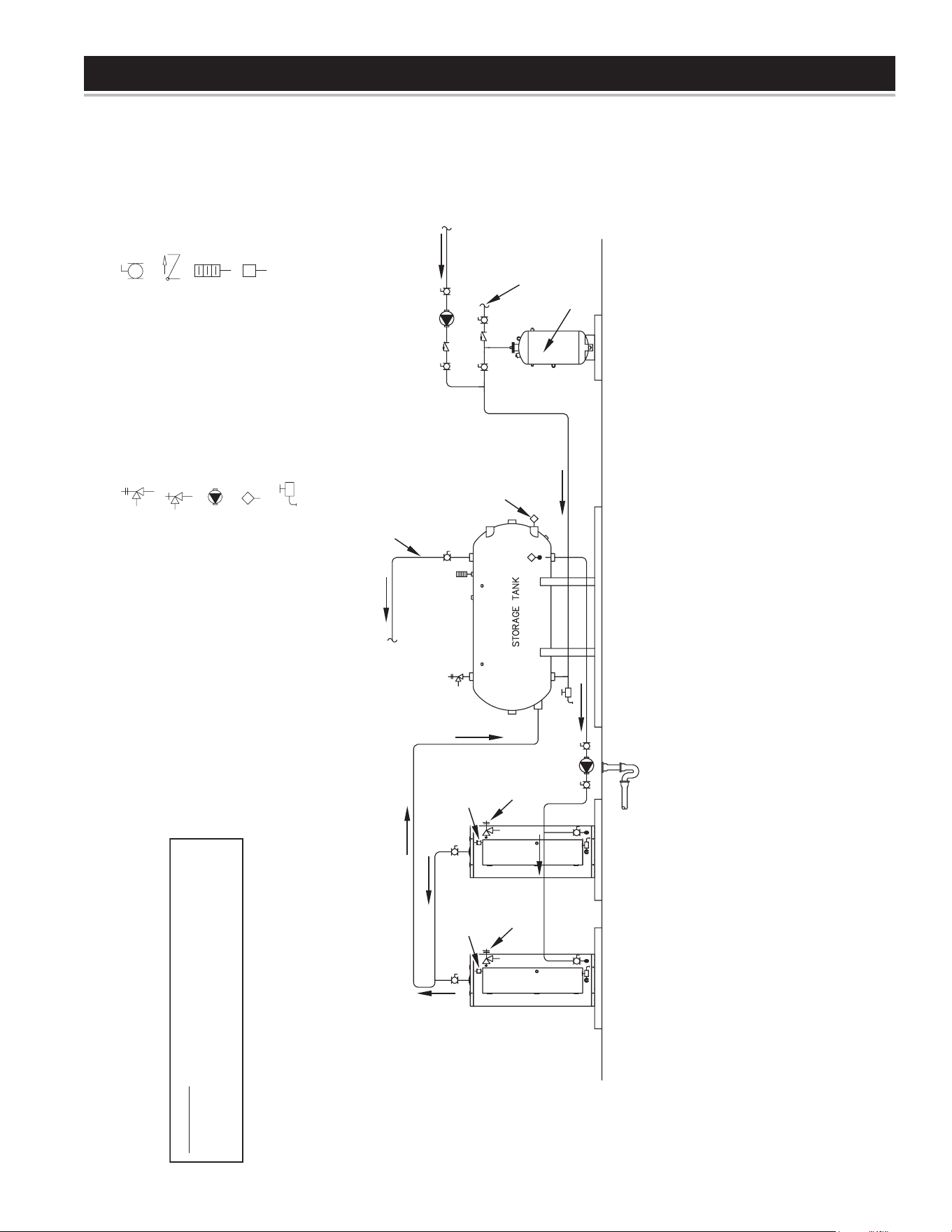
41
PIPING DIAGRAMS
NOTES:
1. Preferred piping diagram.
2. The temperature and pressure relief valve setting shall not exceed pressure rating of any component in the system.
3. Service valves are shown for servicing unit. However, local codes shall govern their usage.
4. The Tank Temperature Control should be wired to and control the pump between the water heater(s) and the storage tank(s).
5. The water heater’s operating thermostat should be set 5 degrees F higher than the Tank Temperature Control.
COMMERCIAL ELECTRIC - (2 UNITS) WITH HORIZONTAL STORAGE TANK
LEGEND
TEMPERATURE & PRESSURE
RELIEF VALVE
PRESSURE RELIEF VALVE
CIRCULATING PUMP
TANK TEMPERATURE CONTROL
DRAIN
FULL PORT BALL VALVE
TEMPERATURE GAGE
WATER FLOW SWITCH
CHECK VALVE
WARNING: THIS DRAWING SHOWS SUGGESTED
PIPING CONFIGURATION AND OTHER DEVICES;
CHECK WITH LOCAL CODES AND ORDINANCES
FOR ADDITIONAL REQUIREMENTS.
FINISHED
FLOOR
HOT WATER
TO FIXTURES
ALTERNATE
LOCATION
EXPANSION
TANK
HOT WATER
RETURN
COLD WATER
SUPPLY
FUSED
DISCONNECT
SWITCH
PIPE T&P TO
OPEN DRAIN
FUSED
DISCONNECT
SWITCH
PIPE T&P TO
OPEN DRAIN
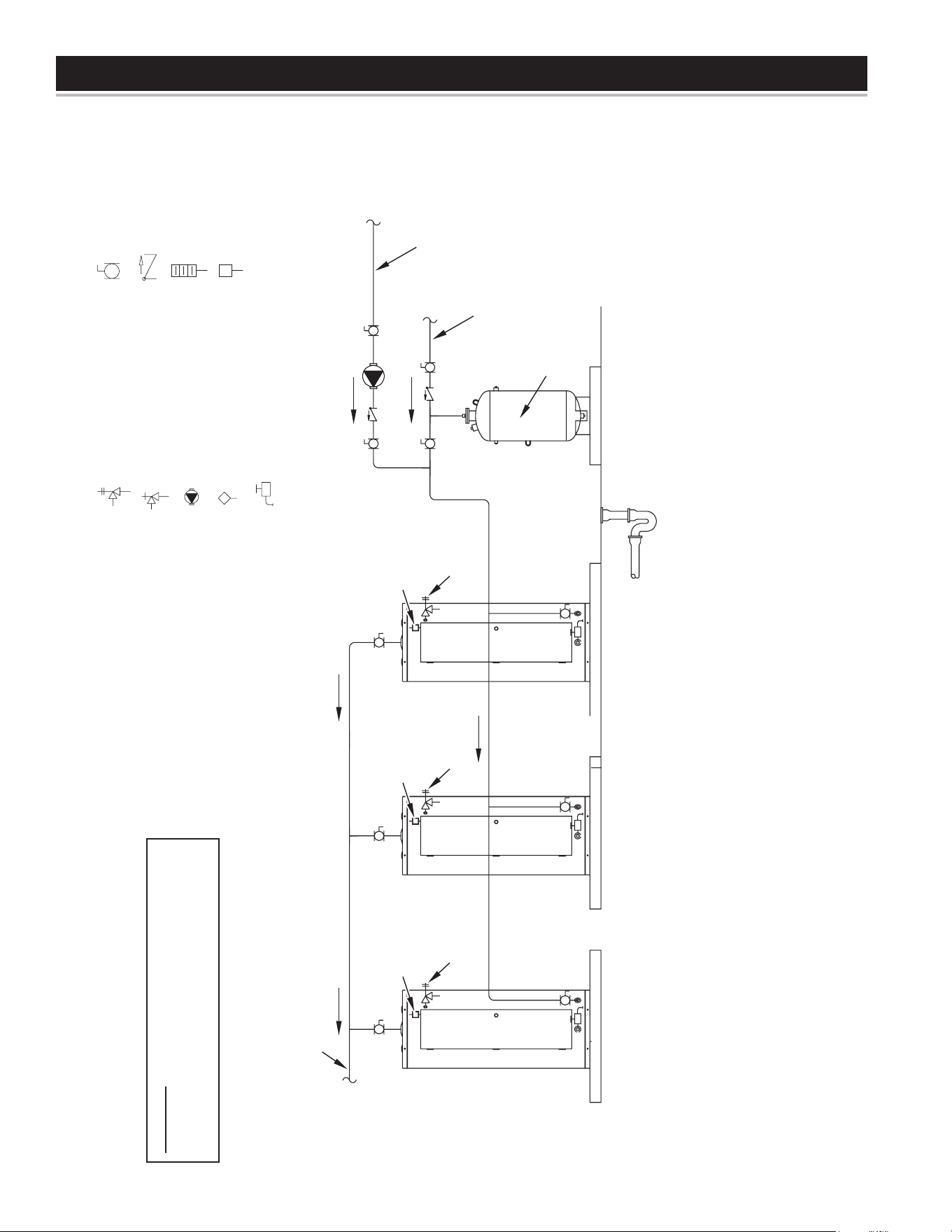
42
PIPING DIAGRAMS
NOTES:
1. Preferred piping diagram.
2. The temperature and pressure relief valve setting shall not exceed pressure rating of any component in the system.
3. Service valves are shown for servicing unit. However, local codes shall govern their usage.
COMMERCIAL ELECTRIC - (3 UNITS)
LEGEND
TEMPERATURE & PRESSURE
RELIEF VALVE
PRESSURE RELIEF VALVE
CIRCULATING PUMP
TANK TEMPERATURE CONTROL
DRAIN
FULL PORT BALL VALVE
TEMPERATURE GAGE
WATER FLOW SWITCH
CHECK VALVE
WARNING: THIS DRAWING SHOWS SUGGESTED
PIPING CONFIGURATION AND OTHER DEVICES;
CHECK WITH LOCAL CODES AND ORDINANCES
FOR ADDITIONAL REQUIREMENTS.
HOT WATER
TO FIXTURES
EXPANSION
TANK
HOT WATER
RETURN
COLD WATER
SUPPLY
FUSED
DISCONNECT
SWITCH
PIPE T&P TO
OPEN DRAIN
FUSED
DISCONNECT
SWITCH
PIPE T&P TO
OPEN DRAIN
PIPE T&P TO
OPEN DRAIN
FUSED
DISCONNECT
SWITCH
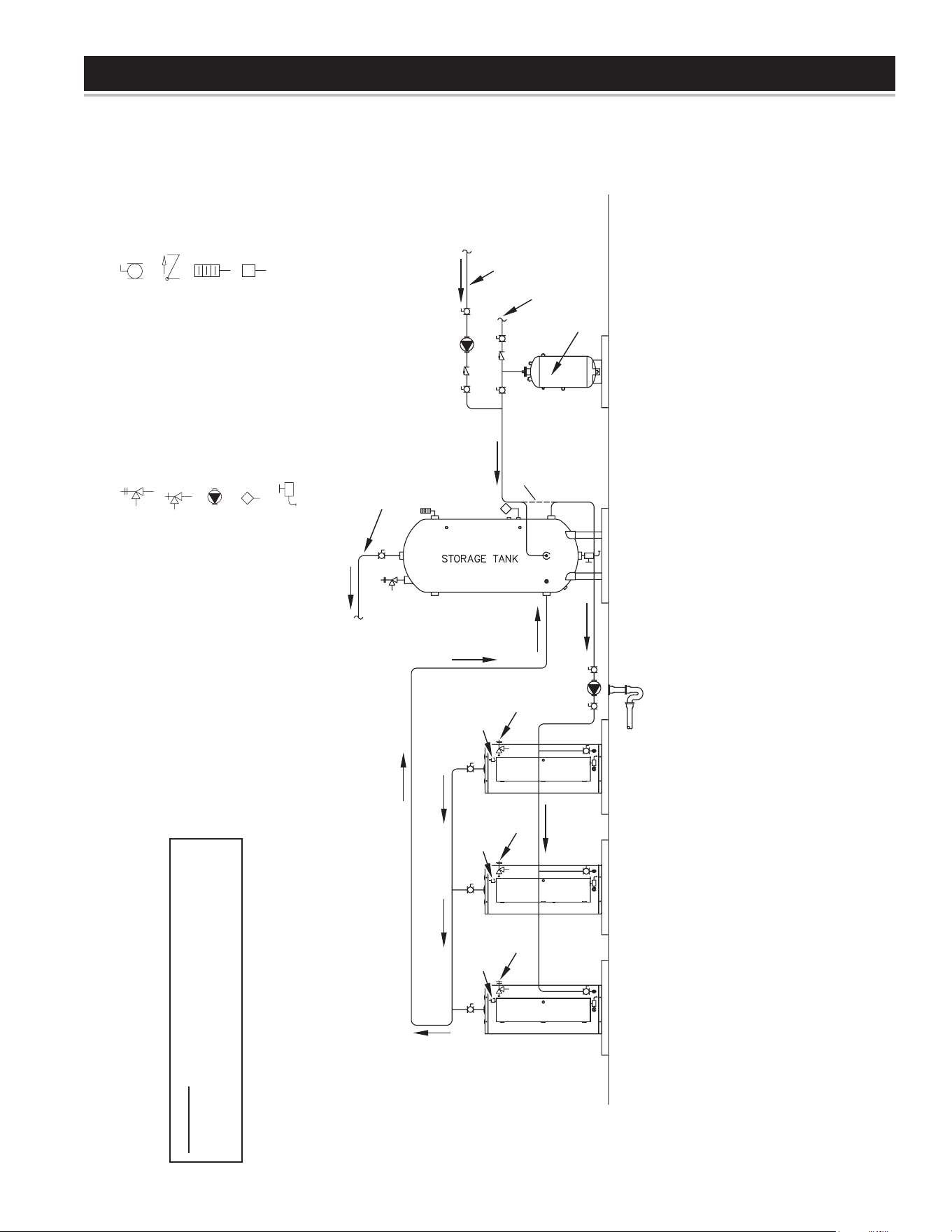
43
PIPING DIAGRAMS
NOTES:
1. Preferred piping diagram.
2. The temperature and pressure relief valve setting shall not exceed pressure rating of any component in the system.
3. Service valves are shown for servicing unit. However, local codes shall govern their usage.
4. The Tank Temperature Control should be wired to and control the pump between the water heater(s) and the storage tank(s).
5. The water heater’s operating thermostat should be set 5 degrees F higher than the Tank Temperature Control.
COMMERCIAL ELECTRIC - (3 UNITS) WITH VERTICAL STORAGE TANK
LEGEND
TEMPERATURE & PRESSURE
RELIEF VALVE
PRESSURE RELIEF VALVE
CIRCULATING PUMP
TANK TEMPERATURE CONTROL
DRAIN
FULL PORT BALL VALVE
TEMPERATURE GAGE
WATER FLOW SWITCH
CHECK VALVE
WARNING: THIS DRAWING SHOWS SUGGESTED
PIPING CONFIGURATION AND OTHER DEVICES;
CHECK WITH LOCAL CODES AND ORDINANCES
FOR ADDITIONAL REQUIREMENTS.
HOT WATER
TO FIXTURES
FINISHED
FLOOR
ALT. COLD WATER
CONNECTION
EXPANSION
TANK
HOT WATER
RETURN
COLD WATER
SUPPLY
FUSED
DISCONNECT
SWITCH
PIPE T&P TO
OPEN DRAIN
FUSED
DISCONNECT
SWITCH
PIPE T&P TO
OPEN DRAIN
FUSED
DISCONNECT
SWITCH
PIPE T&P TO
OPEN DRAIN
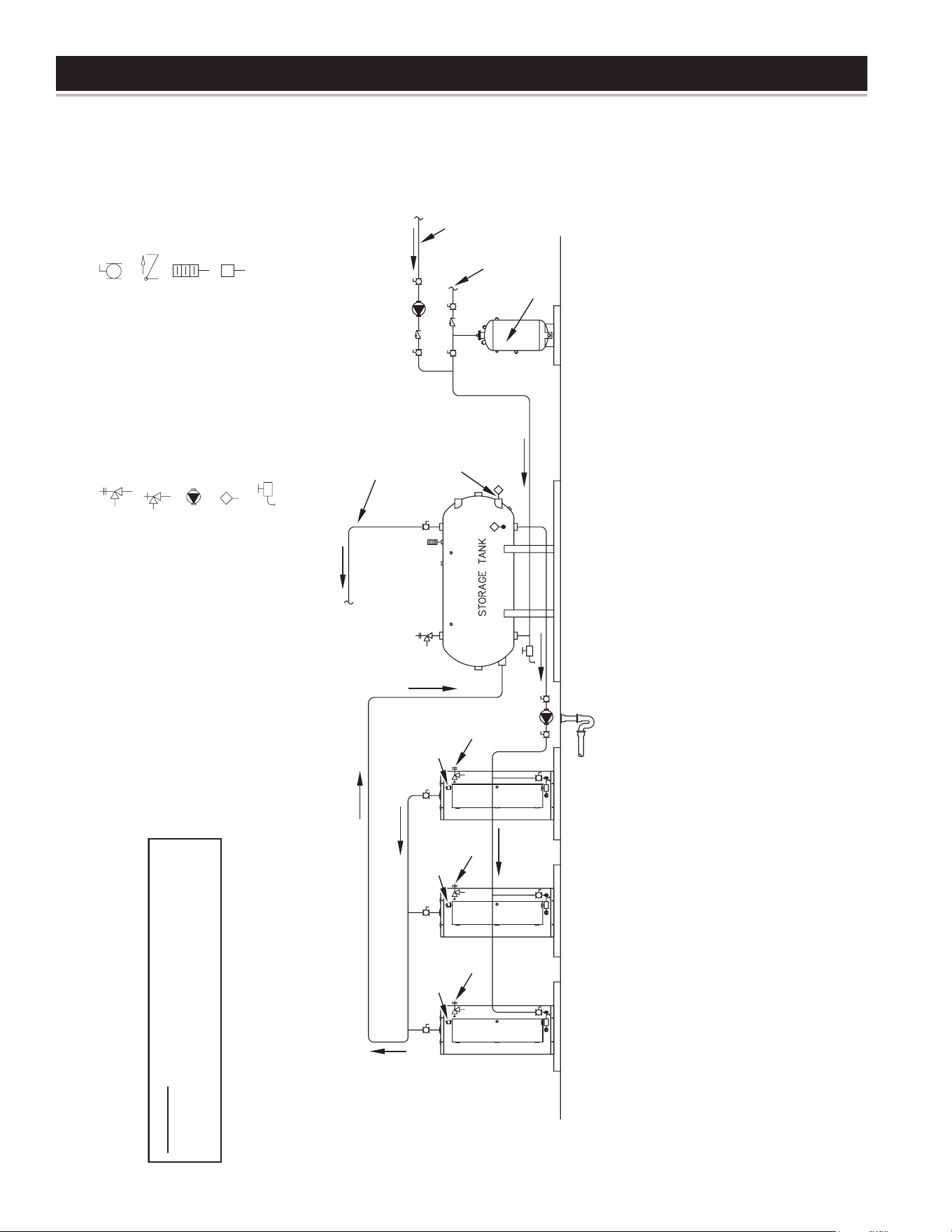
44
PIPING DIAGRAMS
NOTES:
1. Preferred piping diagram.
2. The temperature and pressure relief valve setting shall not exceed pressure rating of any component in the system.
3. Service valves are shown for servicing unit. However, local codes shall govern their usage.
4. The Tank Temperature Control should be wired to and control the pump between the water heater(s) and the storage tank(s).
5. The water heater’s operating thermostat should be set 5 degrees F higher than the Tank Temperature Control.
COMMERCIAL ELECTRIC - (3 UNITS) WITH HORIZONTAL STORAGE TANK
LEGEND
TEMPERATURE & PRESSURE
RELIEF VALVE
PRESSURE RELIEF VALVE
CIRCULATING PUMP
TANK TEMPERATURE CONTROL
DRAIN
FULL PORT BALL VALVE
TEMPERATURE GAGE
WATER FLOW SWITCH
CHECK VALVE
WARNING: THIS DRAWING SHOWS SUGGESTED
PIPING CONFIGURATION AND OTHER DEVICES;
CHECK WITH LOCAL CODES AND ORDINANCES
FOR ADDITIONAL REQUIREMENTS.
HOT WATER
TO FIXTURES
FINISHED
FLOOR
ALTERNATE
LOCATION
EXPANSION
TANK
HOT WATER
RETURN
COLD WATER
SUPPLY
FUSED
DISCONNECT
SWITCH
PIPE T&P TO
OPEN DRAIN
FUSED
DISCONNECT
SWITCH
PIPE T&P TO
OPEN DRAIN
FUSED
DISCONNECT
SWITCH
PIPE T&P TO
OPEN DRAIN
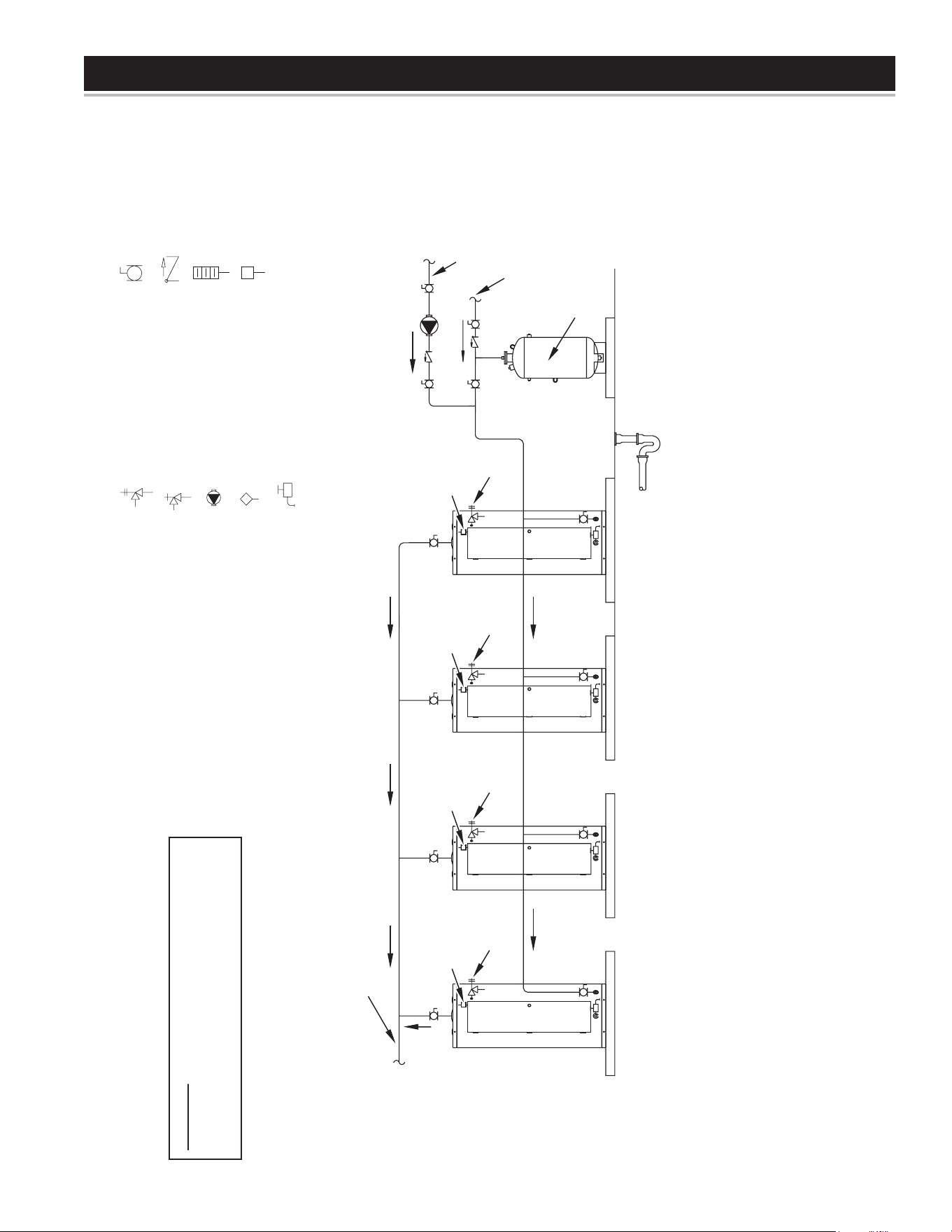
45
PIPING DIAGRAMS
NOTES:
1. Preferred piping diagram.
2. The temperature and pressure relief valve setting shall not exceed pressure rating of any component in the system.
3. Service valves are shown for servicing unit. However, local codes shall govern their usage.
COMMERCIAL ELECTRIC - (4 UNITS)
LEGEND
TEMPERATURE & PRESSURE
RELIEF VALVE
PRESSURE RELIEF VALVE
CIRCULATING PUMP
TANK TEMPERATURE CONTROL
DRAIN
FULL PORT BALL VALVE
TEMPERATURE GAGE
WATER FLOW SWITCH
CHECK VALVE
WARNING: THIS DRAWING SHOWS SUGGESTED
PIPING CONFIGURATION AND OTHER DEVICES;
CHECK WITH LOCAL CODES AND ORDINANCES
FOR ADDITIONAL REQUIREMENTS.
EXPANSION
TANK
HOT WATER
RETURN
COLD WATER
SUPPLY
FUSED
DISCONNECT
SWITCH
PIPE T&P TO
OPEN DRAIN
FUSED
DISCONNECT
SWITCH
PIPE T&P TO
OPEN DRAIN
FUSED
DISCONNECT
SWITCH
PIPE T&P TO
OPEN DRAIN
FUSED
DISCONNECT
SWITCH
PIPE T&P TO
OPEN DRAIN
HOT WATER
TO FIXTURES
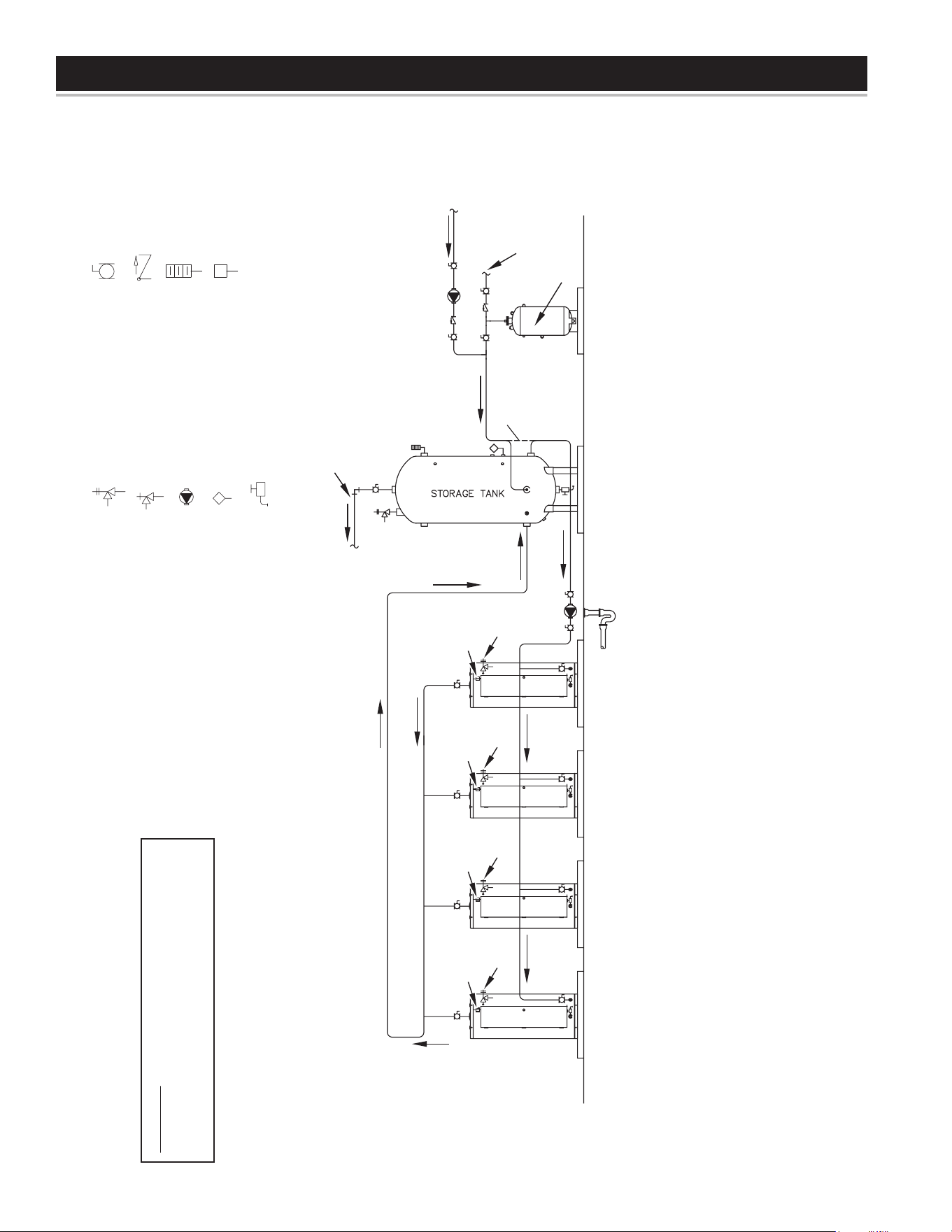
46
PIPING DIAGRAMS
NOTES:
1. Preferred piping diagram.
2. The temperature and pressure relief valve setting shall not exceed pressure rating of any component in the system.
3. Service valves are shown for servicing unit. However, local codes shall govern their usage.
4. The Tank Temperature Control should be wired to and control the pump between the water heater(s) and the storage tank(s).
5. The water heater’s operating thermostat should be set 5 degrees F higher than the Tank Temperature Control.
COMMERCIAL ELECTRIC - (4 UNITS) WITH VERTICAL STORAGE TANK
LEGEND
TEMPERATURE & PRESSURE
RELIEF VALVE
PRESSURE RELIEF VALVE
CIRCULATING PUMP
TANK TEMPERATURE CONTROL
DRAIN
FULL PORT BALL VALVE
TEMPERATURE GAGE
WATER FLOW SWITCH
CHECK VALVE
WARNING: THIS DRAWING SHOWS SUGGESTED
PIPING CONFIGURATION AND OTHER DEVICES;
CHECK WITH LOCAL CODES AND ORDINANCES
FOR ADDITIONAL REQUIREMENTS.
HOT WATER
TO FIXTURES
FINISHED
FLOOR
EXPANSION
TANK
HOT WATER
RETURN
COLD WATER
SUPPLY
ALT. COLD
WATER
CONNECTION
FUSED
DISCONNECT
SWITCH
PIPE T&P TO
OPEN DRAIN
FUSED
DISCONNECT
SWITCH
PIPE T&P TO
OPEN DRAIN
FUSED
DISCONNECT
SWITCH
PIPE T&P TO
OPEN DRAIN
FUSED
DISCONNECT
SWITCH
PIPE T&P TO
OPEN DRAIN
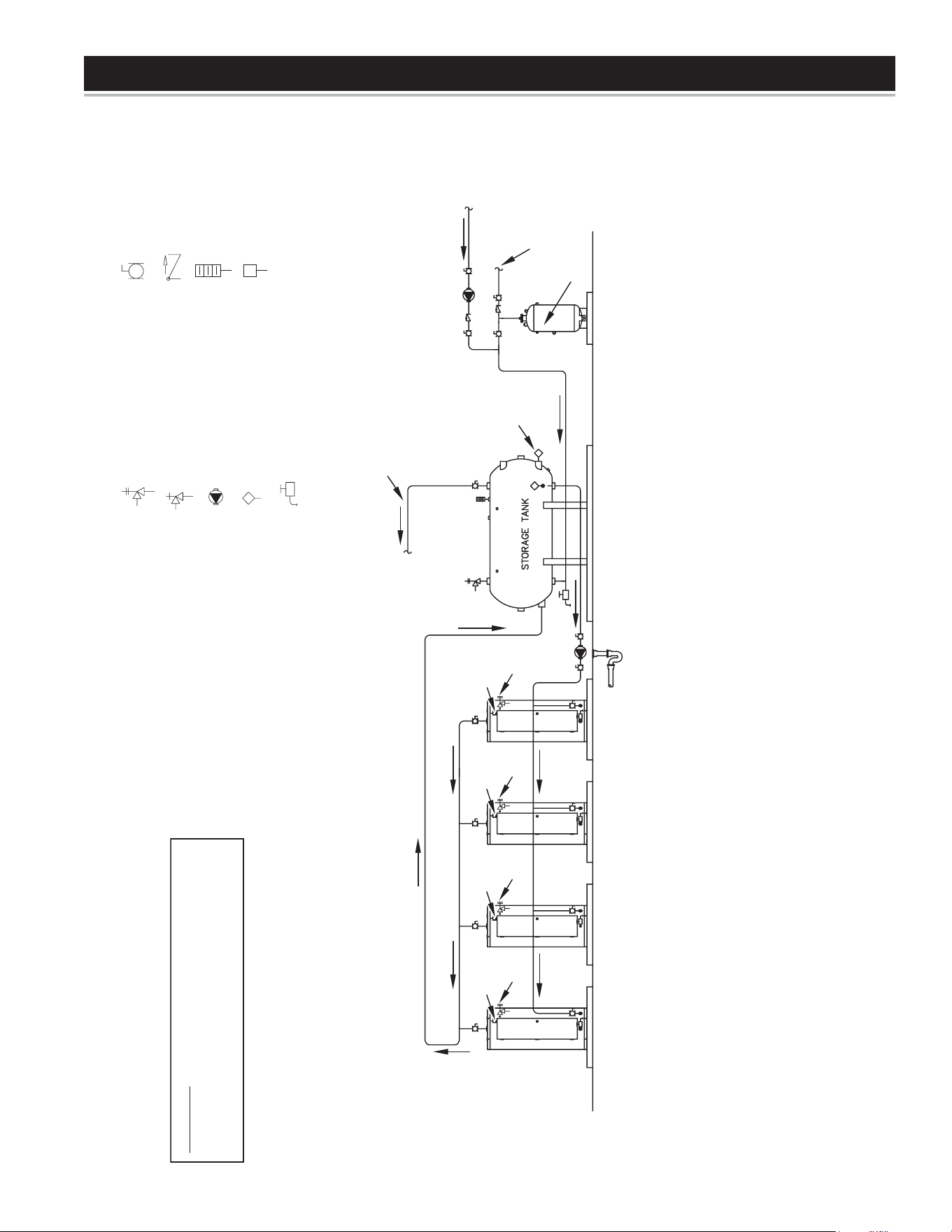
47
PIPING DIAGRAMS
NOTES:
1. Preferred piping diagram.
2. The temperature and pressure relief valve setting shall not exceed pressure rating of any component in the system.
3. Service valves are shown for servicing unit. However, local codes shall govern their usage.
4. The Tank Temperature Control should be wired to and control the pump between the water heater(s) and the storage tank(s).
5. The water heater’s operating thermostat should be set 5 degrees F higher than the Tank Temperature Control.
COMMERCIAL ELECTRIC - (4 UNITS) WITH HORIZONTAL STORAGE TANK
LEGEND
TEMPERATURE & PRESSURE
RELIEF VALVE
PRESSURE RELIEF VALVE
CIRCULATING PUMP
TANK TEMPERATURE CONTROL
DRAIN
FULL PORT BALL VALVE
TEMPERATURE GAGE
WATER FLOW SWITCH
CHECK VALVE
WARNING: THIS DRAWING SHOWS SUGGESTED
PIPING CONFIGURATION AND OTHER DEVICES;
CHECK WITH LOCAL CODES AND ORDINANCES
FOR ADDITIONAL REQUIREMENTS.
HOT WATER
TO FIXTURES
ALTERNATE
LOCATION
FINISHED
FLOOR
EXPANSION
TANK
HOT WATER
RETURN
COLD WATER
SUPPLY
FUSED
DISCONNECT
SWITCH
PIPE T&P TO
OPEN DRAIN
FUSED
DISCONNECT
SWITCH
PIPE T&P TO
OPEN DRAIN
FUSED
DISCONNECT
SWITCH
PIPE T&P TO
OPEN DRAIN
FUSED
DISCONNECT
SWITCH
PIPE T&P TO
OPEN DRAIN
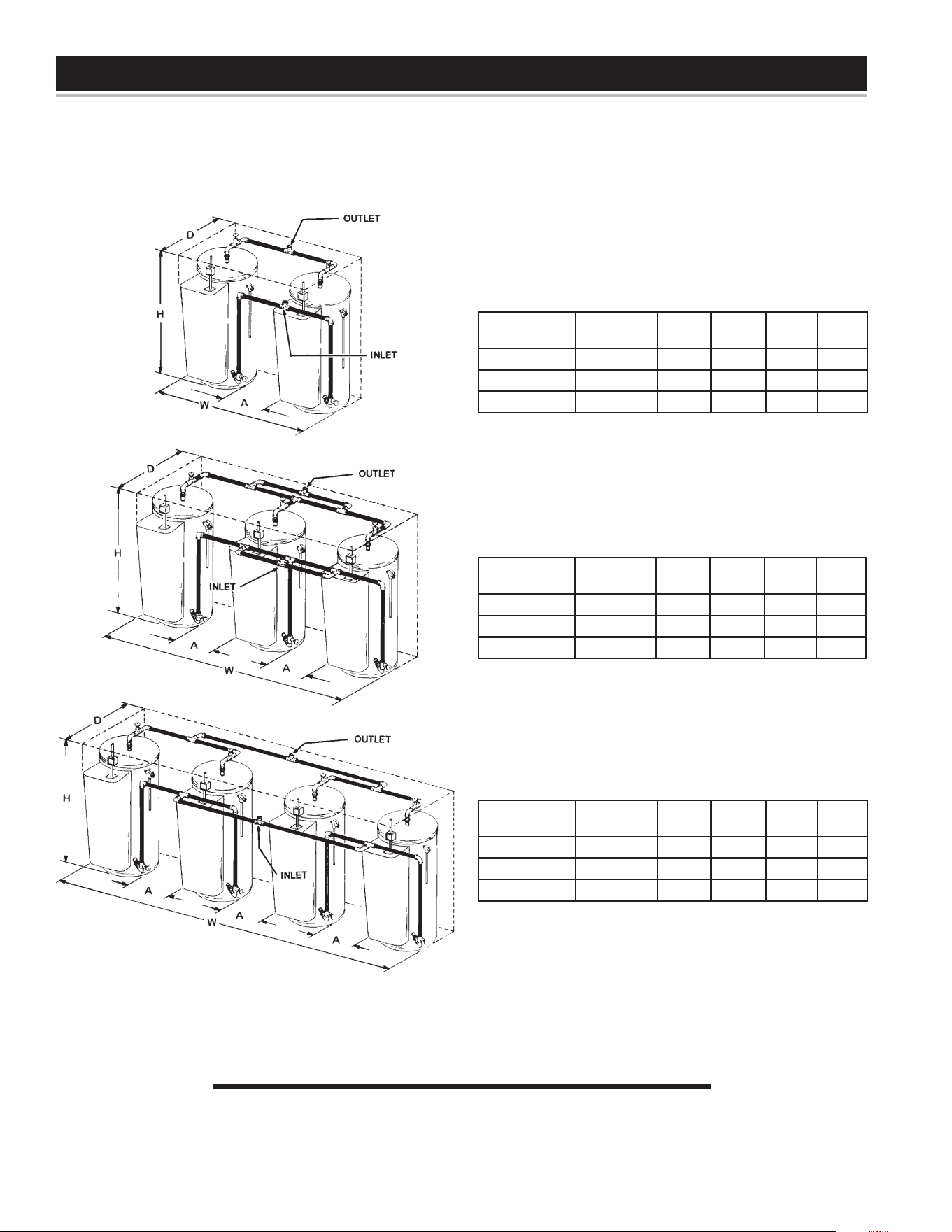
48
MANIFOLD KITS
MANIFOLD KITS
ALL DIMENSIONS IN INCHES
MANIFOLD KITS
TWO HEATERS
Tank Capacity
(Gallons)
Part
Number H W D A
52 9003429205 66 1/4 56 3/4 27 1/4 13 1/4
80 9003429205 70 1/2 60 1/4 31 1/4 9 3/4
120 9003429205 73 1/4 64 1/2 35 3/4 5 1/2
Inlet and outlet size - 1 1/2
THREE HEATERS
Tank Capacity
(Gallons)
Part
Number H W D A
52 9003430205 66 1/4 91 3/4 27 1/4 13 1/4
80 9003430205 70 1/2 95 1/4 31 1/4 9 3/4
120 9003430205 73 1/4 99 1/2 35 3/4 5 1/2
Inlet and outlet size - 2 1/2
FOUR HEATERS
Tank Capacity
(Gallons)
Part
Number H W D A
52 9003431205 66 1/4 126 3/4 27 1/4 13 1/4
80 9003431205 70 1/2 130 1/4 31 1/4 9 3/4
120 9003431205 73 1/4 134 1/2 35 3/4 5 1/2
Inlet and outlet size - 2 1/2
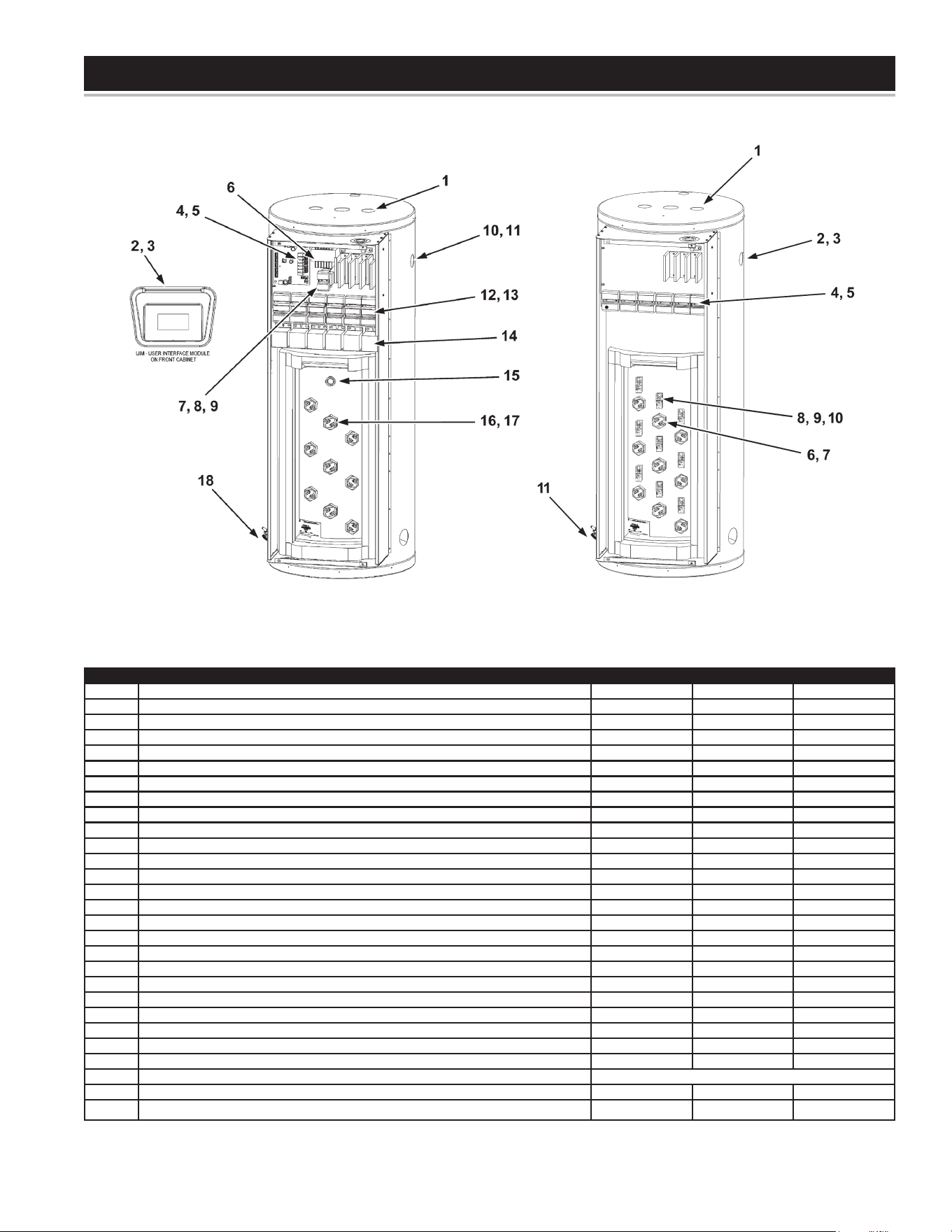
49
PARTS LIST
Item # Description ITCE31-50 ITCE31-80 ITCE31-119
1A Anode, 2 required (Alu, Std) 9003892005 9003892005 9003892005
1B Anode, 2 required (Mag, Special) 9001829005 9001829005 9001829005
2 Display - Board 9006240005 9006240005 9006240005
3 Display - Overlay 9006851005 9006851005 9006851005
4A CCB - 3 El Temperature controller 9006852005 9006852005 9006852005
4B CCB - 6 El Temperature controller 9006853005 9006853005 9006853005
4C CCB - 9 El Temperature controller 9006854005 9006854005 9006854005
5 Communication Cable 9006541015 9006541015 9006541015
6A Transformer - 100VA Std (208, 240, 277, 480V) 9006861005 9006861005 9006861005
6B Transformer - 100VA Universal (220, 380, 415, 575V) 9006862005 9006862005 9006862005
7 Transformer - 25VA 120/24V 9006863005 9006863005 9006863005
8 Fuse - Control Circuit 9005720215 9005720215 9005720215
9 Fuse Block - Control Circuit 9005721215 9005721215 9005721215
10 Nipple - T & P valve extension 9005717215 9005717215 9005717215
11A T & P Valve - 3 elements 9005715205 9005715205 9005715205
11B T & P - 6 or 9 elements 9005923205 9005923205 9005923205
12A Fuse - Power Circuit (not 54KW at 208V or not 575V) 9005904215 9005904215 9005904215
12B Fuse - Power Circuit for 54KW at 208V model 9006864015 9006864015 9006864015
12C Fuse - Power Circuit for 575V models 9005893215 9005893215 9005893215
13A Fuse Block - Power Circuit (not 54KW at 208V or not 575V Models) 9005009205 9005009205 9005009205
13B Fuse Block - Power Circuit for 54KW at 208V model 9005079205 9005079205 9005079205
13C Fuse Block - Power Circuit for 575V models 9005007205 9005007205 9005007205
14 Contactor 9005013205 9005013205 9005013205
15 Temperature probe 9006865015 9006865015 9006865015
16 Element Gasket (BOX OF 50) 9000308005 9000308005 9000308005
17 Elements (max 54KW 9 elements) SEE CHART
18 Drain Valve 9003907015 9003907015 9003907015
19* Element Sensors (1 per bank) 9006867005 9006867005 9006867005
* Not illustrated
ELECTRONIC CONTROL MODEL SURFACE MOUNT CONTROL MODEL
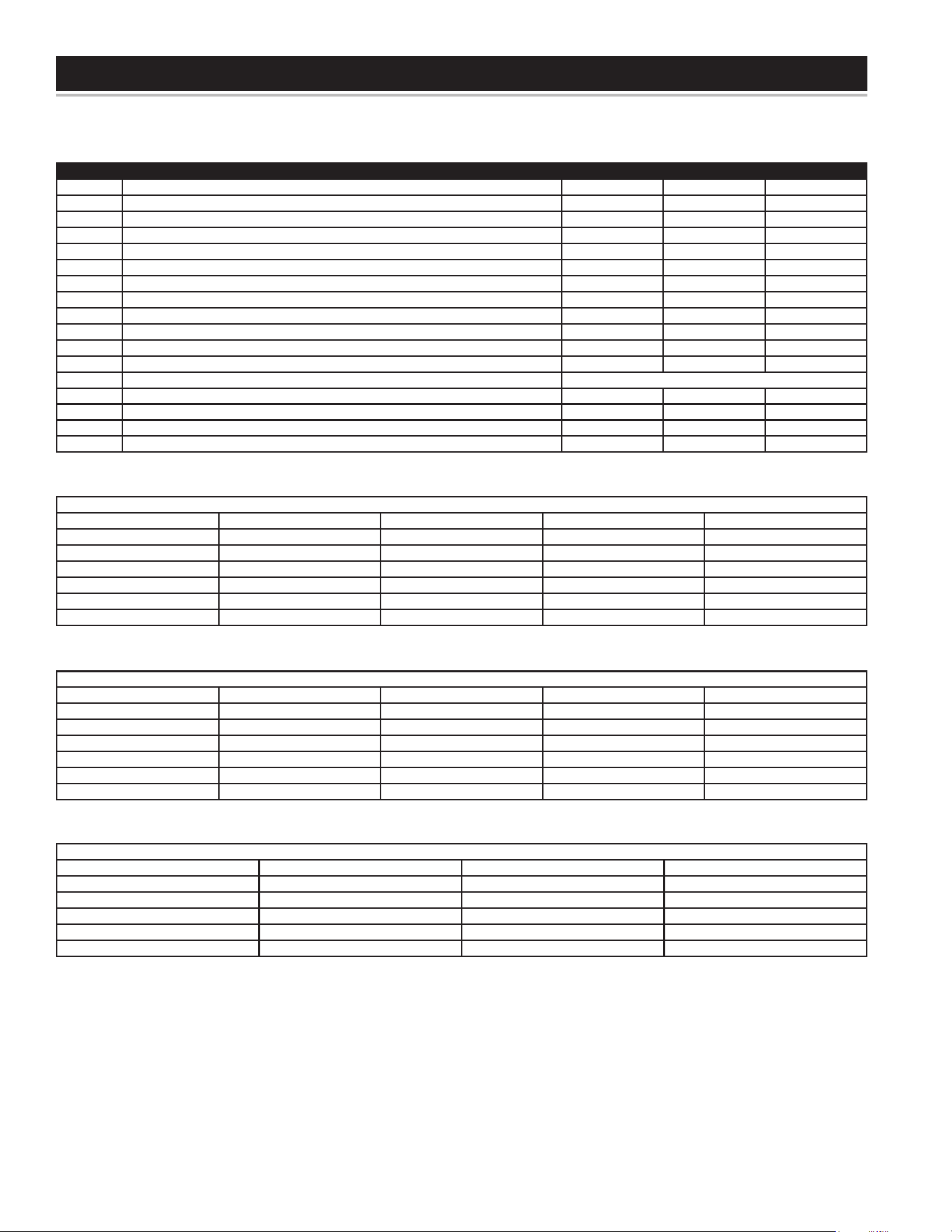
50
PARTS LIST
ReplacementIncoloyElements(GasketIncluded)ForHeaterswith“Y”Conguration
KW 380V 3Φ “Y” Cong 415V 3Φ “Y” Cong 575V 3Φ “Y” Cong
3 9006885005 900064005 9006889005
4 9006886005 9004751105 9006890005
4.5 9000050005 9006891005
5 9006887005 9004293005 9006892005
6 9006888005 9004287005 9006893005
Item # Description STCE31-50 STCE31-80 STCE31-119
1A Anode, 2 required (Alu, Std) 9003892005 9003892005 9003892005
1B Anode, 2 required (Mag) 9001829005 9001829005 9001829005
2 Nipple - T & P valve extension 9005717215 9005717215 9005717215
3A T & P Valve - 3 elements 9005715205 9005715205 9005715205
3B T & P - 6 or 9 elements 9005923205 9005923205 9005923205
4A Fuse - Power Circuit (not 54KW at 208V or not 575V) 9005904215 9005904215 9005904215
4B Fuse - Power Circuit for 54KW at 208V model 9006864015 9006864015 9006864015
4C Fuse - Power Circuit for 575V models 9005893215 9005893215 9005893215
5A Fuse Block - Power Circuit (not 54KW at 208V or not 575V Models) 9005009205 9005009205 9005009205
5B Fuse Block - Power Circuit for 54KW at 208V model 9005079205 9005079205 9005079205
5C Fuse Block - Power Circuit for 575V models 9005007205 9005007205 9005007205
6 Element Gasket (BOX OF 50) 9000308005 9000308005 9000308005
7 Elements (max 54KW 9 elements) SEE CHART
8 Bracket-T-Stat 9003898215 9003898215 9003898215
9 Personal Protector 9003899015 9003899015 9003899015
10 Thermostat 9004533215 9004533215 9004533215
11 Drain Valve 9003907015 9003907015 9003907015
Replacement Gold-Plated Elements (Gasket Included)
KW 208V (1Φ/3Φ) 240V (1Φ/3Φ) 277V 1Φ 480V (1Φ/3Φ)
2 9006875005 9006874005 9006884005 9006879005
3 9006869005 9006868005 9006880005
4 9006872005 9006869005 9006868005 9006881005
4.5 9006873005 9006870005 9006882005
5 9006876005 9006871005 9006883005
6 9006877005 9006873005 9006878005 9006884005
Replacement Incoloy Elements
(Gasket Included)
KW 208V (1Φ/3Φ) 240V (1Φ/3Φ) 277V (1Φ) 480V (1Φ/3Φ)
2 9004284005 9004283005 9004290005 9004298005
3 9000049005 9000664005 9004296005 9004300005
4 9004294005 9004751105 9004759005 9004763105
4.5 9004287005 9000050005 9004297005 9004760105
5 9004753105 9004293005 9004756115 9004761105
6 9004289005 9004287005 9004757115 9004762105
51
EFFECTIVE
For 3 Years, in the event of a tank leak, we will repair or, at our
discretion, replace the defective water heater.
For 1 Year, in the event of part failure, we will repair or, at our
discretion, replace the defective part.
We warrant this product against defects in materials or
workmanship as described in this document if installed within
the United States or Canada and provided the product remains
at its original place of installation.
Warranty coverage begins the date of installation OR the date of
manufacture if installation cannot be veried.
WHAT'S COVERED
Subject to these terms, in the event of defect in materials and/
or workmanship resulting in a tank leak during the rstthree
years, we will:
• Replace the water heater should the tank leak.
Subject to these terms, in the event of a defect in materials and/or
workmanship appearing during the rstyear, we will:
• Repair or, at our discretion, replace any part of the water
heater covered under this limited warranty excluding parts
subject to normal maintenance (Example: non-electronic
anode rod, lter, etc)
Service/labor, shipping, delivery, installation, handling or any
other costs are not covered at any time under this warranty.
Any replacement part or product will be warranted only for
the unexpired portion of the original water heater’s limited
warranty period.
If an identical model is no longer available due to a change in law,
regulation, or standard, we will replace the product with one having
comparable capacity and input. In these instances, the owner will
have the option of paying the difference between what was paid for
the original model and the new model with the additional features,
or receiving a refund of the portion of the purchase price, on a
pro-rata basis allocable to the unexpired portion of the warranty.
WHAT'S NOT COVERED
• Problems caused by improper: gas supply line sizing, gas type,
venting, connections, combustion air, voltage, wiring, or fusing
• Failure to follow applicable codes
• Failure to follow printed instructions
• Abuse, misuse, accident, re, ood, Acts of God
• Improper installation, sizing, delivery, or maintenance
• Claims related to rust, noise, smell, or taste of water
• Failure to conduct authorized factory start up if required
• Alterations to the water heater
• Non-outdoor heaters installed outdoors
• Damages due to a failure to allow for thermal expansion
• Heat exchanger failure due to lack of adequate / proper supply
of water
• Heaters moved from their original location
• Service trips to explain proper installation, use, or maintenance
of the product/unit or to describe compliance requirements
under applicable codes and regulations
• Charges related to accessing your heater including but not
limited to door/wall removal, equipment rental, etc.
• Replacement parts after expiration of this warranty
LIMITATIONS
NOTWITHSTANDING ANYTHING ELSE TO THE CONTRARY,
THIS IS YOUR SOLE AND EXCLUSIVE WARRANTY.
ALL OTHER WARRANTIES INCLUDING A WARRANTY
OF MERCHANTABILITY OR FITNESS FOR PARTICULAR
PURPOSE ARE EXPRESSLY DISCLAIMED. SELLER SHALL
NOT BE LIABLE FOR ANY CONSEQUENTIAL, INCIDENTAL,
SPECIAL, PUNITIVE OR OTHER INDIRECT DAMAGES. TOTAL
LIABILITY ARISING AT ANY TIME SHALL NOT EXCEED THE
PURCHASE PRICE PAID WHETHER BASED ON CONTRACT,
TORT, STRICT LIABILITY OR ANY OTHER LEGAL THEORY.
SERVICEINQUIRIES:
For service inquiries call the telephone number listed below. Be prepared to provide the following information:
name, address, and telephone number; the model and serial number of the water heater; proof of installation; and a clear description
of the problem.
For your records, fill in the product:
Serial: ___________________
Model: ___________________
U.S. Customers:
American Water Heaters
500 Princeton Road
Johnson City, TN 37605
800-999-9515
www.americanwaterheaters.com
COMMERCIAL
WATER HEATER
LIMITED WARRANTY

52
Technical Support and Parts: 800-456-9805
www.americanwaterheater.com
Copyright © 2015 American Water Heaters. All rights reserved