P/N YRD510 Rev B
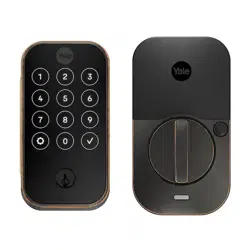
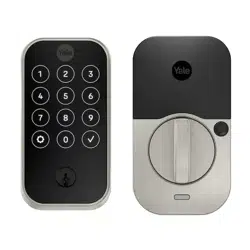
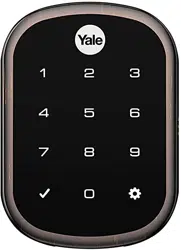
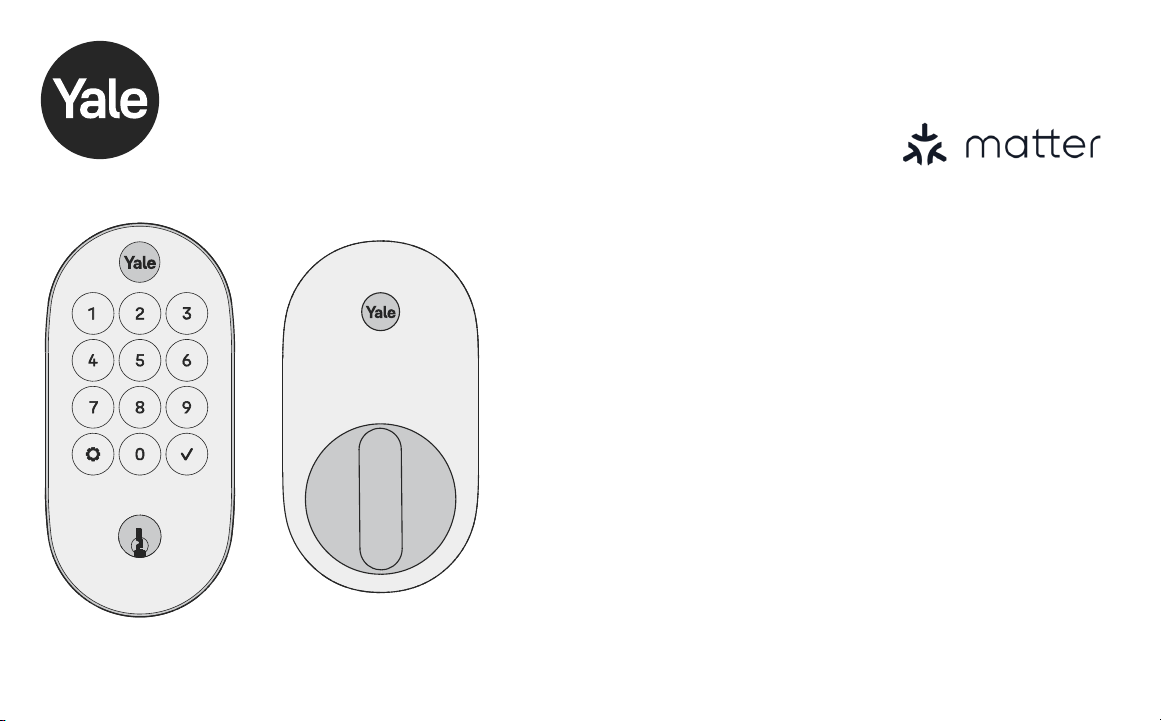
Smart Lock
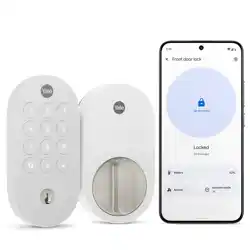
Designed for Google Home
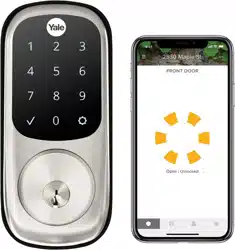
Keyed YRD510
Trusted Every Day
Install and Set Up Your Lock
Follow the step-by-step Installation and Setup Guide in this manual
(pages 10-22), or refer to the QR code on the quick start guide for
helpful videos.
Note: If you use the videos, please tear off the Door Checker and the Marking
Template (pages 5-8) to use when prompted.
Use Your Lock
How to use your lock, LED alerts, and more (pages 23-29).
ISL-P2126-00-006

P/N YRD510 Rev B

3
P/N YRD510 Rev B
Contents
In the Box ���������������������������������������������������������������������������������������� 4
Door Checker ���������������������������������������������������������������������������������� 5
Marking Template ��������������������������������������������������������������������������� 7
Installation and Setup Guide ��������������������������������������������������������� 9
Remove Existing Deadbolt ............................................................10
Check Door Measurements ........................................................... 11
Make or Adjust Holes .....................................................................12
Install Deadbolt Latch ....................................................................13
Install Exterior Keypad ................................................................... 14
Install Mounting Plate .................................................................... 15
Attach Wire Cable to Interior Lock ................................................ 16
Install Interior Lock ......................................................................... 17
Test Thumbturn and Key ................................................................18
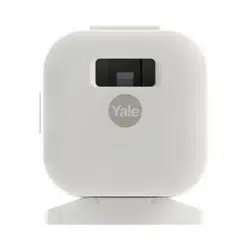
Install DoorSense (Optional) ........................................................ 19
Install Batteries ...............................................................................22
Using Your Lock ���������������������������������������������������������������������������� 23
LED Alerts ........................................................................................24
Resetting Your Lock to Factory Defaults ......................................25
Features ...........................................................................................26
Lock Operations Troubleshooting ................................................. 27
Hardware Troubleshooting ............................................................29
4
P/N YRD510 Rev B
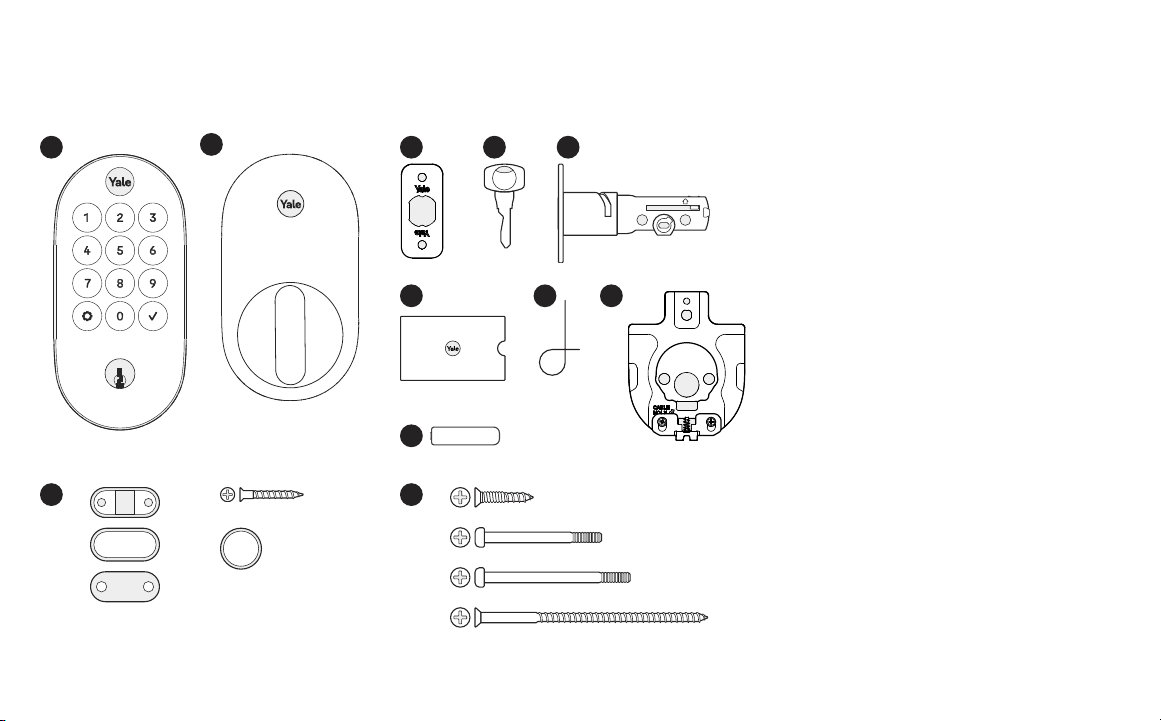
In the Box
Lock Hardware
b�
c�
d�
X 4
X 4
X 2
Add-Ons
1
2
3
6 87
4 5
UP
1� Exterior Keypad
2� Interior Lock
3� Strike Plate
4� Key
5� Adjustable Deadbolt
6� Manual
7� Reset Pin
8� Mounting Plate
9� AA Batteries
10� Screws
a� Strike Plate and Deadbolt Screws
b� Black Screw Set B
c� Silver Screw Set C
d� Optional Security Strike Plate Screws
11� DoorSense
a� Housing
b� Cover
c� Mounting Tape
d� Screws
e� Flush Mount Cap
X 2
X 2
X 2
9
11
10
a� a�d�
e�b�
c�
AA
5
P/N YRD510 Rev B
Tear Along the Dotted Line
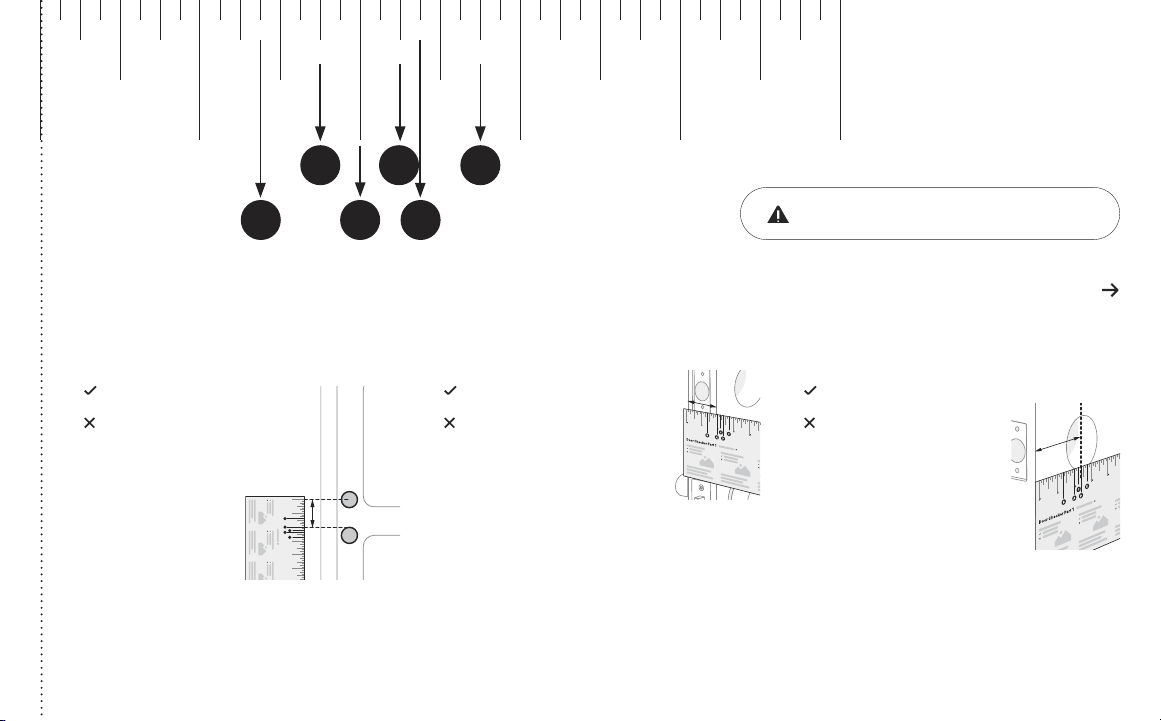
Door Checker Part 1
Measure Clearance Measure Door Thickness Measure Backset
A� 2” minimum clearance between top
of the door knob and center of deadbolt
hole.
C� 1-3/8” - 1-3/4” door thickness;
use black (medium) screws.
D� 1-3/4” - 2-1/4” door thickness;
use silver (longest) screws.
E� 2-3/8” backset, use out of box latch
setting.
F� 2-3/4” backset, adjust latch setting
(Step 2, point 1 of this manual).
Greater than A B, C or D Equals E or F
Less than A
Less than B or
greater than D
Doesn’t equal E or F
(Your door is not a match)
(Your door is not a match)
(Your door is not a match)
10 2 3 4 5
6
Door Checker Part 1
v
B A D
C E
v
v
See Reverse for Part 2
1/8 1/8 1/8 1/8 1/83/8 3/8 3/8 3/8 3/85/8 5/8 5/8 5/8 5/87/8 7/8 7/8 7/8 7/8
1/4 1/4 1/4 1/4 1/4
1/2
10 2 3 4 5
1/2 1/2 1/2 1/2
3/4 3/4 3/4 3/4 3/4
A EB
DC F
If printed from electronic file, Measure
ruler to check scale� Set print scale to 1:1�
6
P/N YRD510 Rev B
Tear Along the Dotted Line
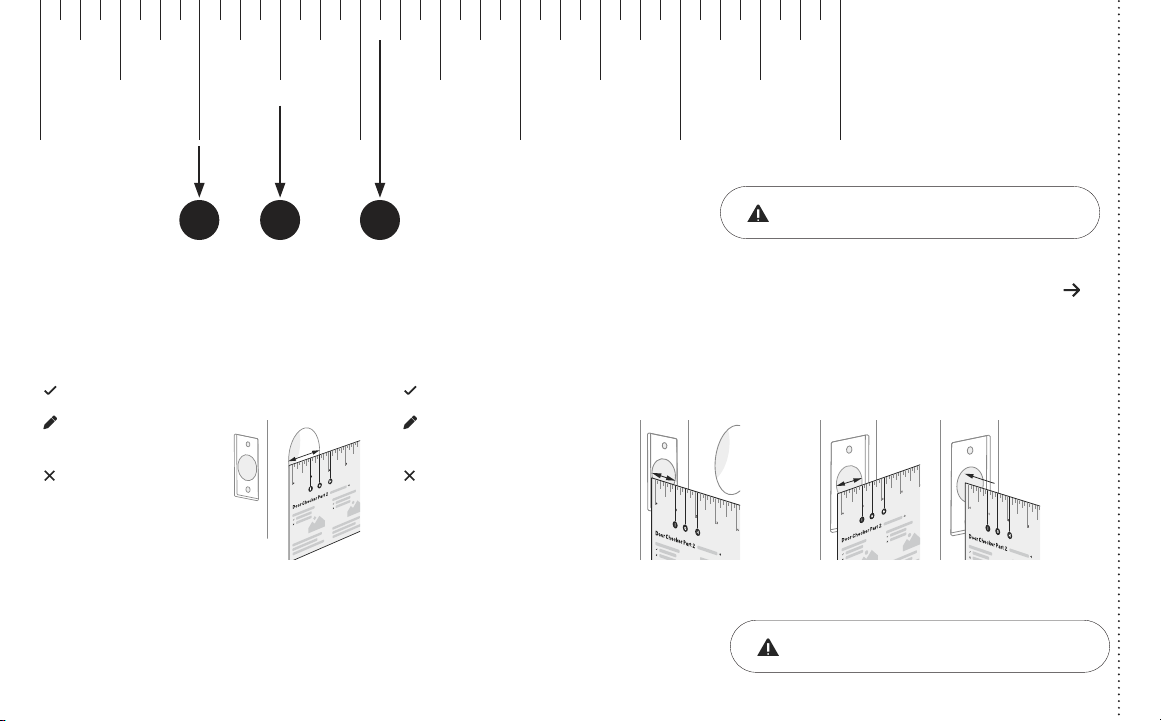
Door Checker Part 2
See Reverse for Part 1
Measure Face Bore
Equals G or H
Less than G Less than I
G� 1-1/2” face bore diameter.
H� 2-1/8” face bore diameter.
Measure Edge Bore and Strike Pocket
I� 1” edge bore diameter;
1” strike pocket diameter and depth.
Equals I
Greater than IGreater than H
(Adjust diameter to G or H) (Adjust diameter to I)
(Your door is not a match)(Your door is not a match)
(Edge Bore)Door
(Strike Pocket)
Frame
Diameter Depth
Minimum strike pocket depth is 1”.
HI G
1/8 1/8 1/8 1/8 1/83/8 3/8 3/8 3/8 3/85/8 5/8 5/8 5/8 5/87/8 7/8 7/8 7/8 7/8
1/4 1/4 1/4 1/4 1/4
1/2
10 2 3 4 5
1/2 1/2 1/2 1/2
3/4 3/4 3/4 3/4 3/4
If printed from electronic file, Measure
ruler to check scale� Set print scale to 1:1�
7
P/N YRD510 Rev B
Tear Along the Dotted Line
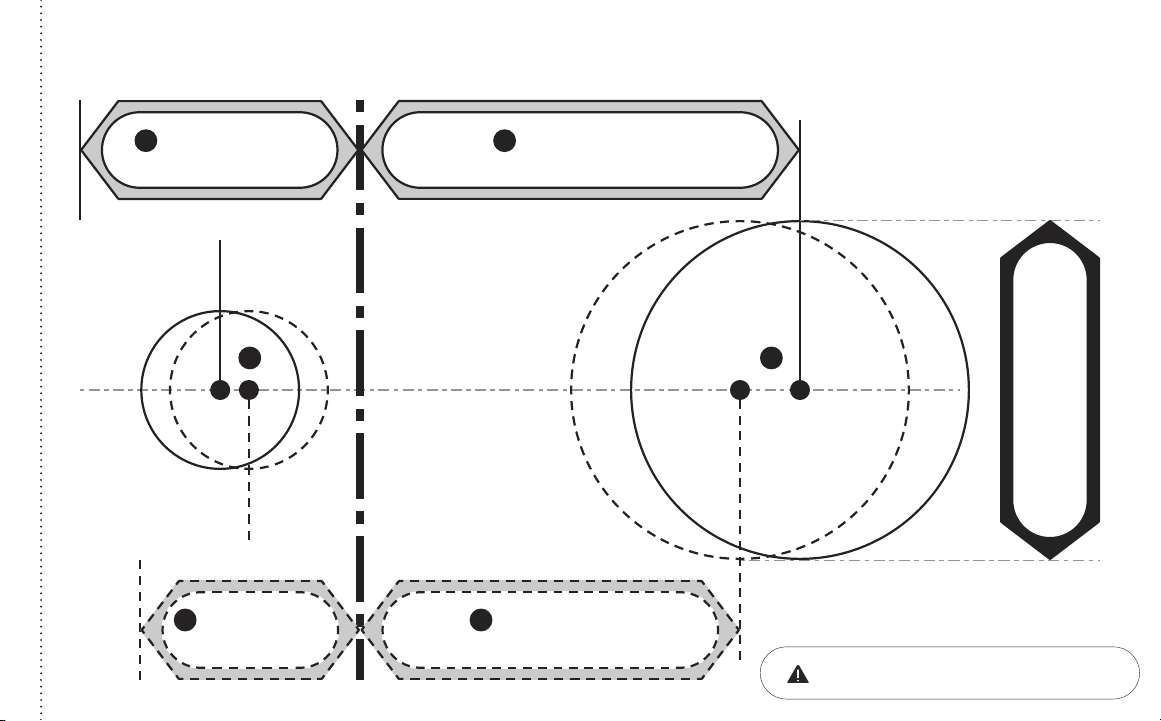
Marking Template for 2-1/8” (54mm) Face Bore
Center of
1” (25mm)
Edge Bore
Center of
1” (25mm)
Edge Bore
Centerline
Center of
2-1/8” (54mm)
Face Bore
Center of
2-1/8” (54mm)
Face Bore
I H
1-3/8” (35mm)
Door Thickness
B
2-3/8” (60mm)
Backset
E
1-3/4” (44�5mm)
Door Thickness
C
2-3/4” (70mm)
Backset
F
2-1/8”
If printed from electronic file, Measure
ruler to check scale� Set print scale to 1:1�
8
P/N YRD510 Rev B
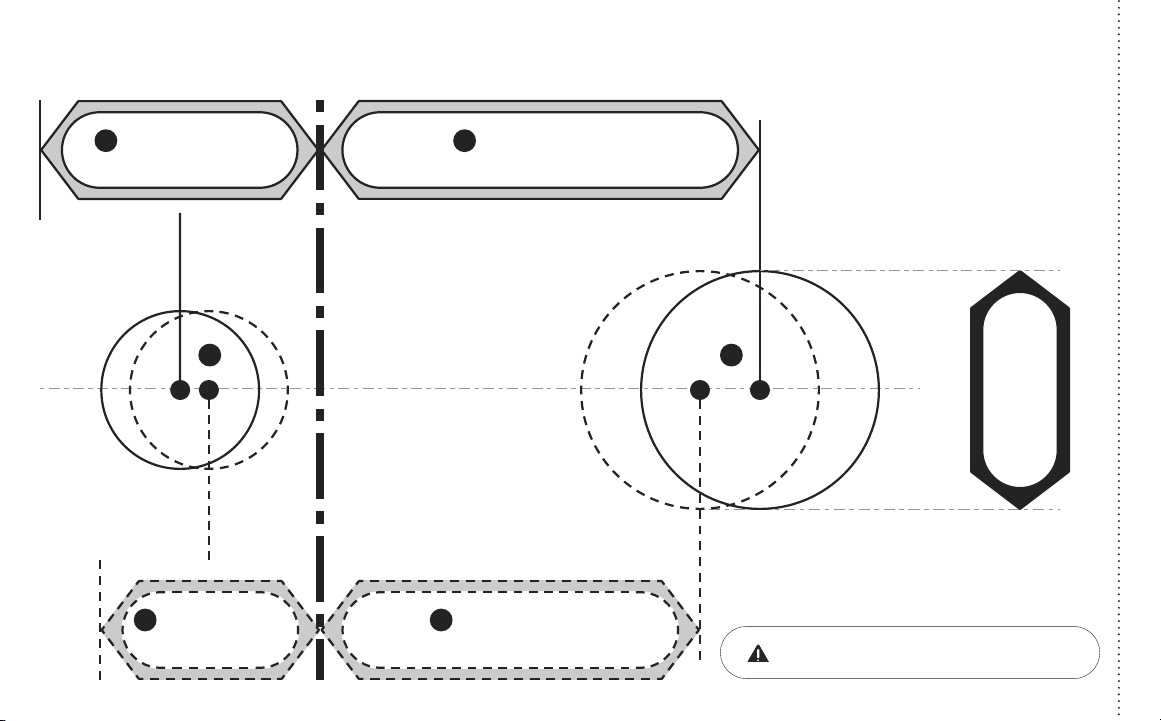
Marking Template for 1-1/2” (38mm) Face Bore
Center of
1” (25mm)
Edge Bore
Center of
1” (25mm)
Edge Bore
Centerline
Center of
1-1/2” (38mm)
Face Bore
Center of
1-1/2” (38mm)
Face Bore
1-1/2”
I G
1-3/8” (35mm)
Door Thickness
B
2-3/8” (60mm)
Backset
E
1-3/4” (44�5mm)
Door Thickness
C
2-3/4” (70mm)
Backset
F
Tear Along the Dotted Line
If printed from electronic file, Measure
ruler to check scale� Set print scale to 1:1�
9
P/N YRD510 Rev B
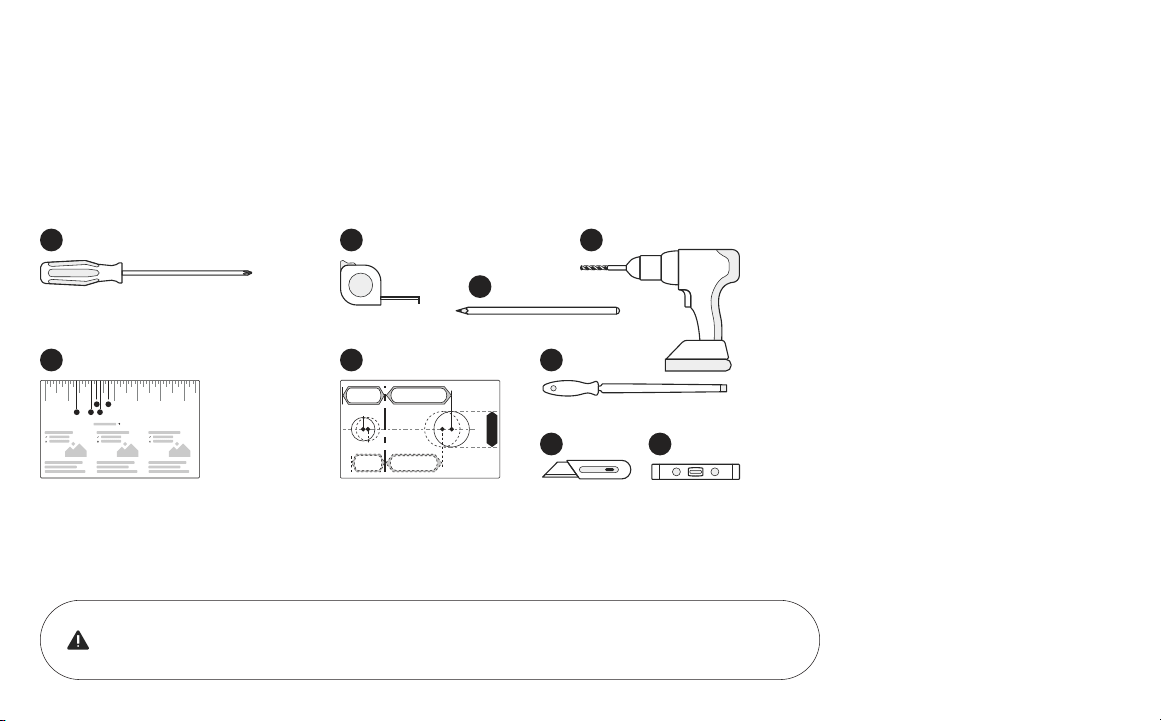
Required Tools
You Might Also Need
Failure to follow the Installation Guide precisely could result in damage to the product,
voiding the factory warranty, and could lead to failure of the product to provide access.
1� Phillips Head Screwdriver
2� Door Checker
(tear off pages 5-6 of this manual)
3� Tape Measure
4� Drill
5� Marking Template
(tear off pages 7-8 of this manual)
6� Pencil
7� Wood Mortise Chisel
8� Utility Knife
9� Level
10 2 3 4 5 6
Door Checker Part 1
v
B A D
C E
1 3
5
8
7
9
6
4
2
Installation and Setup Guide
10
P/N YRD510 Rev B
Frame Door
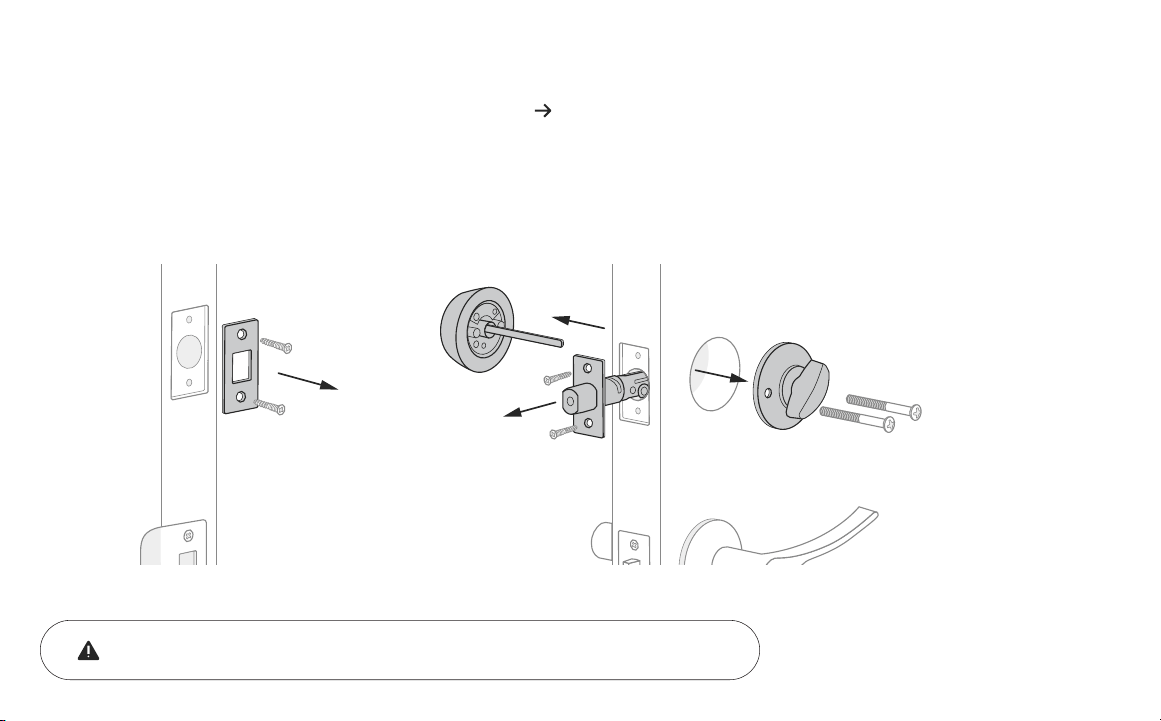
Keep your old deadbolt until your new lock has been successfully installed.
1a
Remove Existing Deadbolt
If you have a new door, please proceed to step 1b�
If you have a deadbolt on your door, use the diagram to help you remove it.
11
P/N YRD510 Rev B
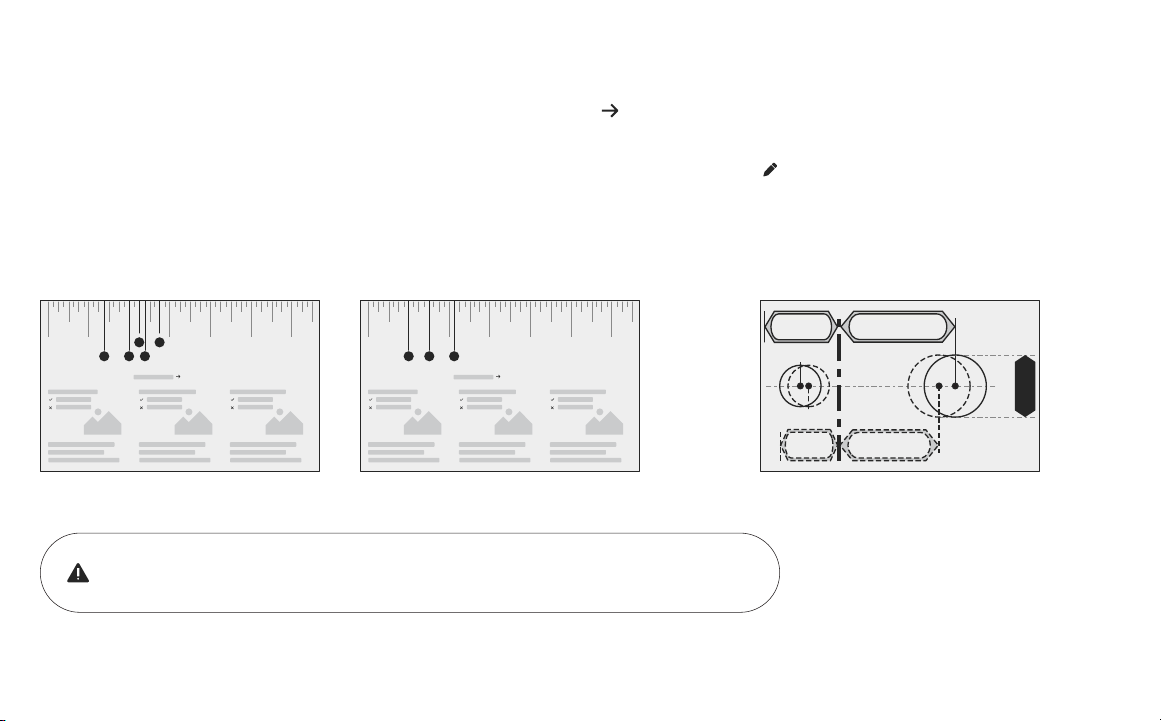
If you have confirmed that the existing holes are compatible with your new lock, please proceed to step 2 (skip step 1c)�
If you need to make adjustments, go to
step 1c and find the closest match to each
aspect of your door on the Marking Template.
Tear off the Door Checker (pages 5-6) and follow the guidelines on both sides to
measure each aspect of your door and frame. There are some cases when existing
holes cannot be adjusted to be compatible.
Please do not drill any holes until you confirm that your door is compatible.
10 2 3 4 5 6
Door Checker Part 1
v
B A D
C E
10 2 3 4 5 6
Door Checker Part 2
H F G
1b
Check Door Measurements
If your door doesn’t have holes, please proceed to step 1c�
12
P/N YRD510 Rev B
1c
Make or Adjust Holes
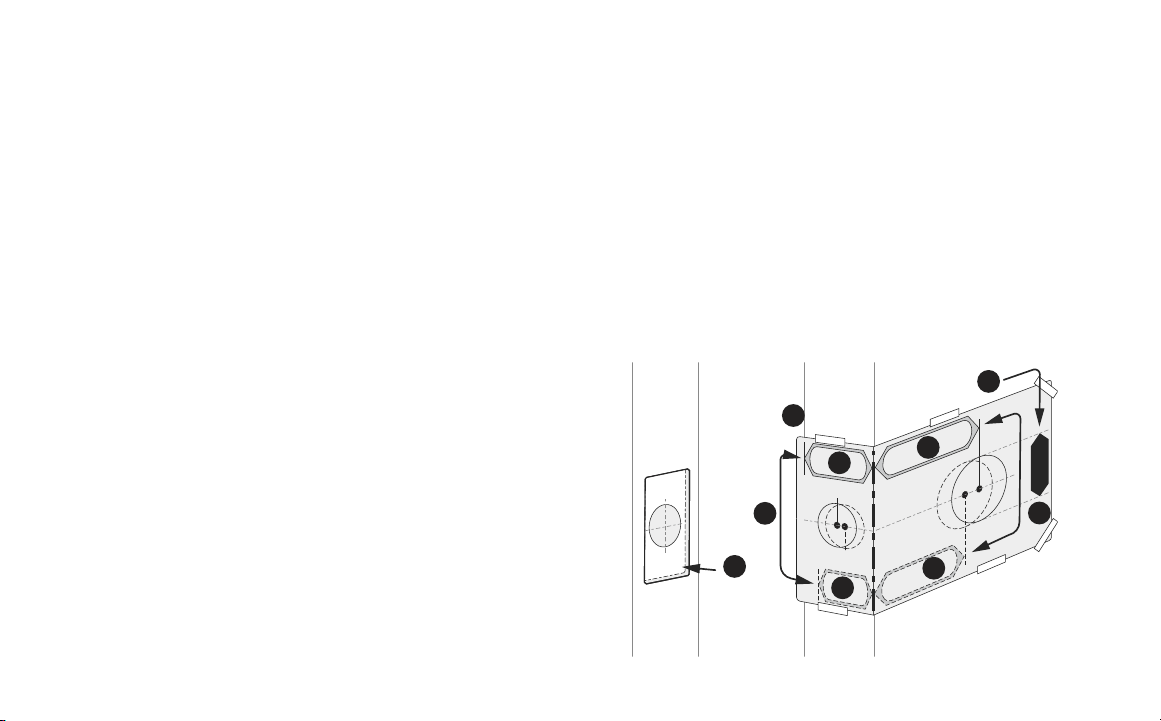
Skip this step if you have confirmed that the existing holes are compatible (step 1b)�
1� Tear off the Marking Template (pages 7-8), and choose the
preferred face bore diameter (2- 1/8” or 1-1/2”) on either side
of the template.
2� Tape the Marking Template onto the door as shown.
3� Check the door thickness. It should match either the shape
with solid outlines (1-3/4”), or the one with dashed outlines
(1-3/8”).
3a� Use solid lines as a template for 1-3/4” door thickness.
3b� Use dashed lines for 1-3/8” door thickness.
4� Choose your preferred backset. It should match either the
shape with solid outlines (2-3/4”), or the one with dashed
outlines (2-3/8”).
4a� Use solid lines as a template for 2-3/4” backset.
4b� Use dashed lines for 2-3/8” backset.
5� Drill holes in your door where marked.
6� On the door frame, align the center of the strike plate with the
center of the edge bore. Trace the strike plate, then chisel to the
depth of the strike plate so it sits flush with your door frame. Drill
the 1” diameter strike pocket with a minimum depth of 1”.
6
Frame Door
1
2
3a
4
3b
4a
4b
3
13
P/N YRD510 Rev B
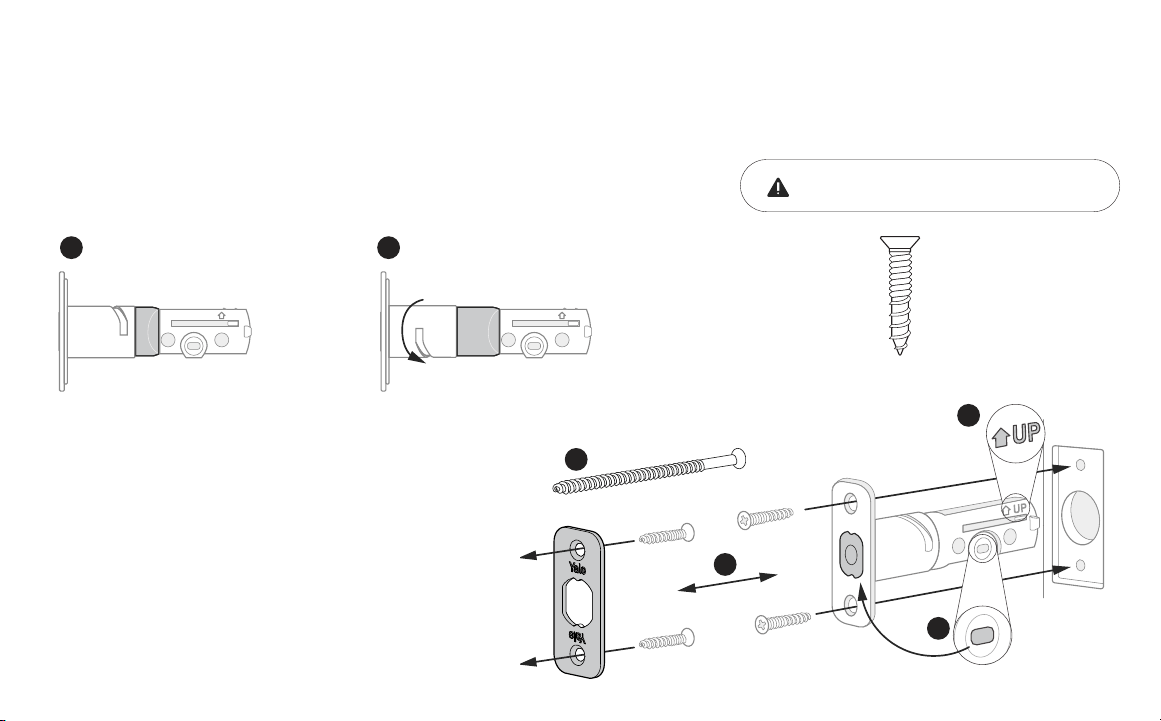
1� Correct deadbolt length is based on the backset. Refer to measurements
E and F on the Door Checker (page 5) to verify backset.
2� Align strike plate with deadbolt latch.
2a� (Option) Security screws can be used in place of the
small strike plate screws.
3� Make sure UP arrow on the deadbolt is facing upwards.
4� Deadbolt latch must be in an unlocked position.
Note: If the deadbolt latch is extended, use a small flathead
screwdriver to rotate slot until deadbolt latch is retracted.
x 2 for Deadbolt Latch
x 2 for Strike Plate
(Actual size)
2
Install Deadbolt Latch
2-3/4
2-3/8
UP
2-3/8” Backset
(Out of box)
E
2-3/4
2-3/8
UP
2-3/4” Backset
(To adjust, twist neck by holding the body stable)
F
2a
2
3
4
Minimum strike pocket depth is 1”.
14
P/N YRD510 Rev B
1
5
6
4
3
Install Exterior Keypad
3
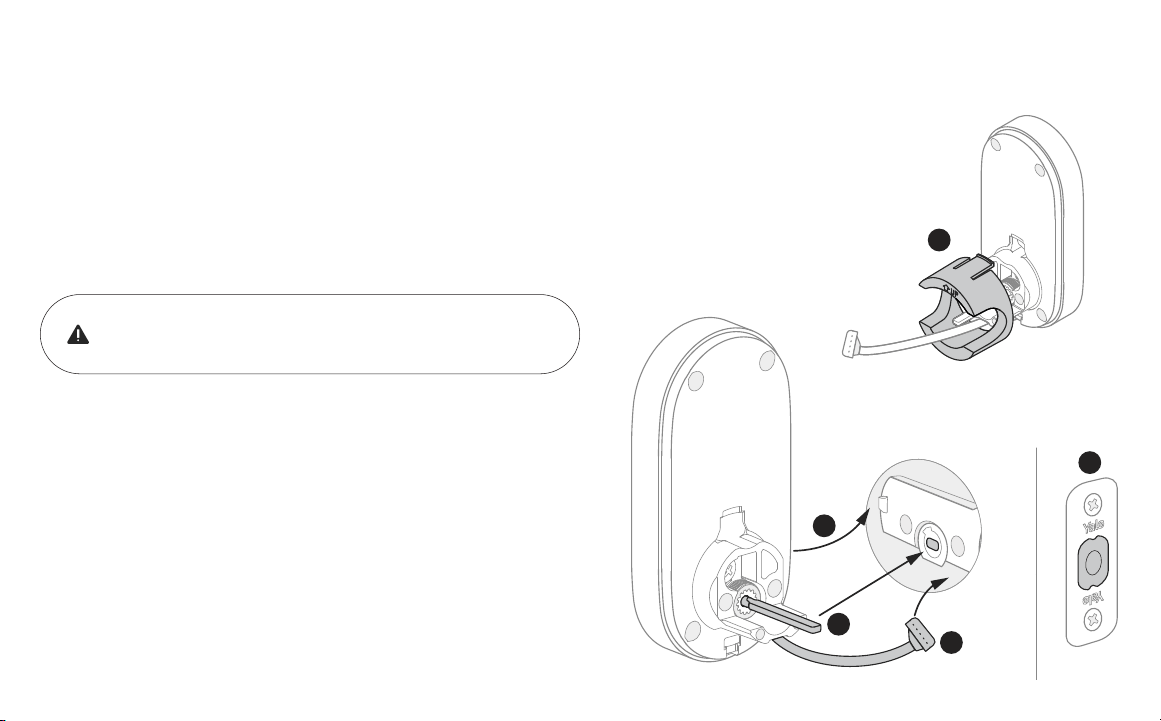
Install your lock with the door open�
Do not close your door until all the steps are completed.
1� Refer to measurements G and H on the Door Checker (page 6) to measure face bore
hole. If the hole is less than 2-1/8” (H), remove plastic adapter by applying pressure
to the tabs on its top and bottom and pulling it off the body of the exterior keypad.
Note: Removing the adapter might also help if your face bore and edge bore are of irregular shape
or are not properly aligned.
2� Remove the plastic cover from the keypad.
3� Make sure your deadbolt latch is in an unlocked position. Refer to
step 2, point 4 (page 13) for guidance on how to retract it, if needed.
4� Slide the tailpiece through the deadbolt latch slot.
5� Guide the wire cable under the deadbolt.
6� Slide the keypad in place, making sure it’s on the exterior
part of your door.
15
P/N YRD510 Rev B
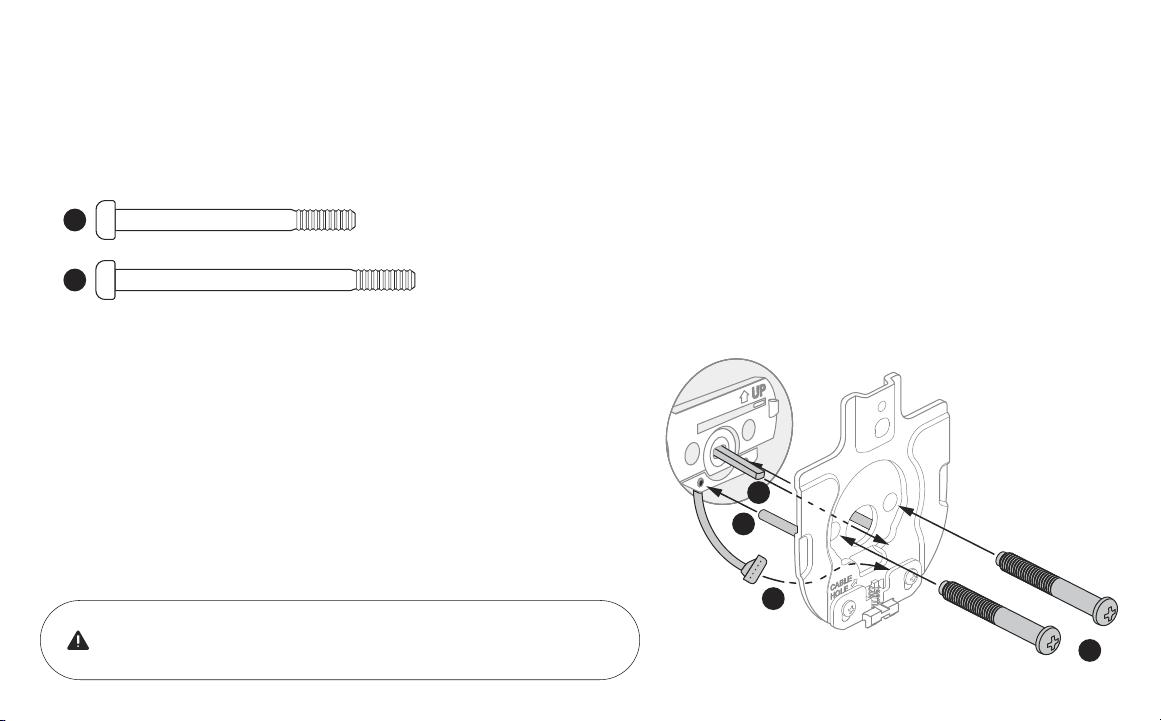
1� Refer to measurements B, C, and D on the Door Checker (page 5) to select screws.
2� Route the wire cable into the designated slot in the mounting plate. You
may have to squeeze the cable slightly in order for it to pass through.
3� Guide posts of the mounting plate into the holes on the exterior keypad.
4� Slide tailpiece through the designated slot in the mounting plate.
5� Tighten screws with a screwdriver to secure the mounting plate. As you
tighten the screws, make sure the mounting plate and the keypad are
straight.
x 2 Black Screws (1-3/8” - 1-3/4” door thickness)
x 2 Silver Screws (1-3/4” - 2-1/4” door thickness)
B
2
3
4
5
C
4
Install Mounting Plate
With the mounting plate installed, ensure that the wire cable is
not pinched to prevent it from reducing your lock’s battery life.
16
P/N YRD510 Rev B
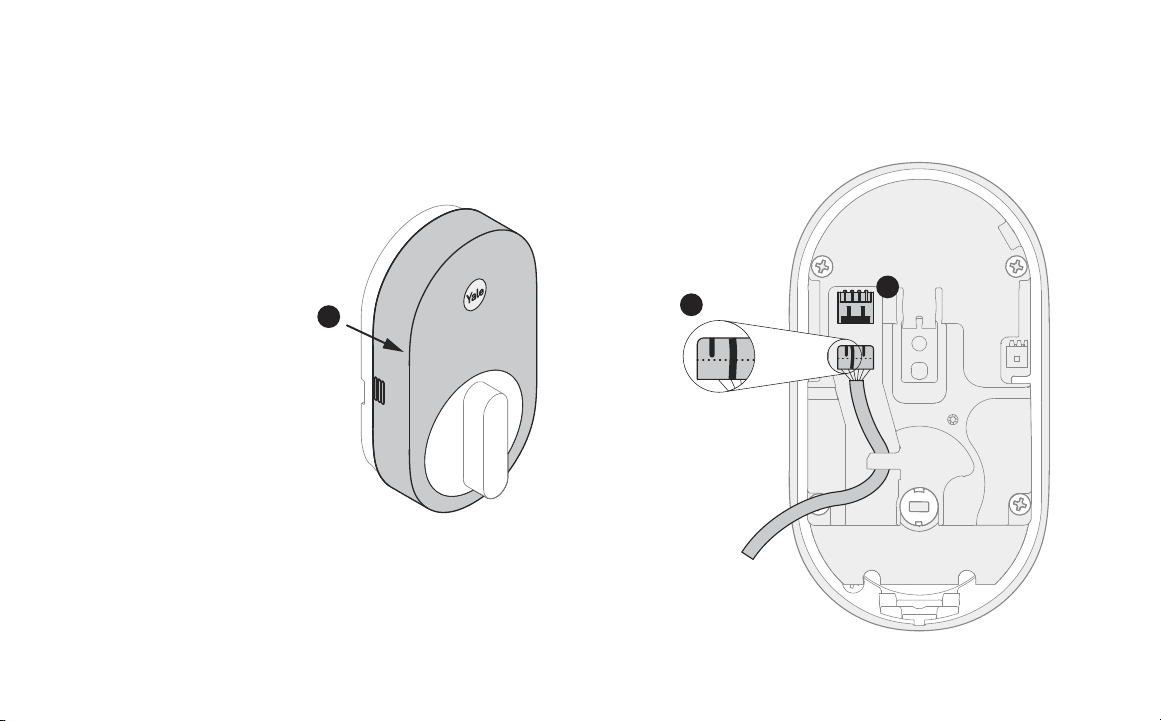
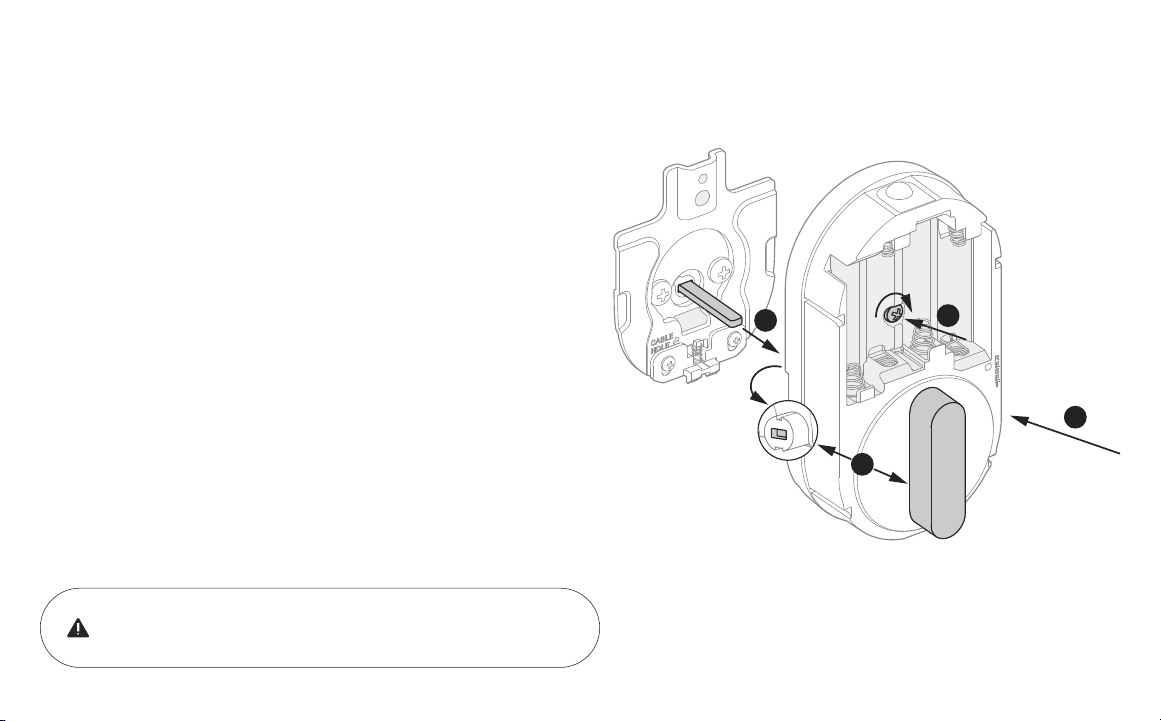
1� Remove battery cover by pinching the sides and pulling it off the
body of the interior lock.
2� Make sure the side of the cable end with the ridges and the marked
line faces outward.
3� Push cable into the designated slot until you hear a click.
2
1
3
5
Attach Wire Cable to Interior Lock
17
P/N YRD510 Rev B
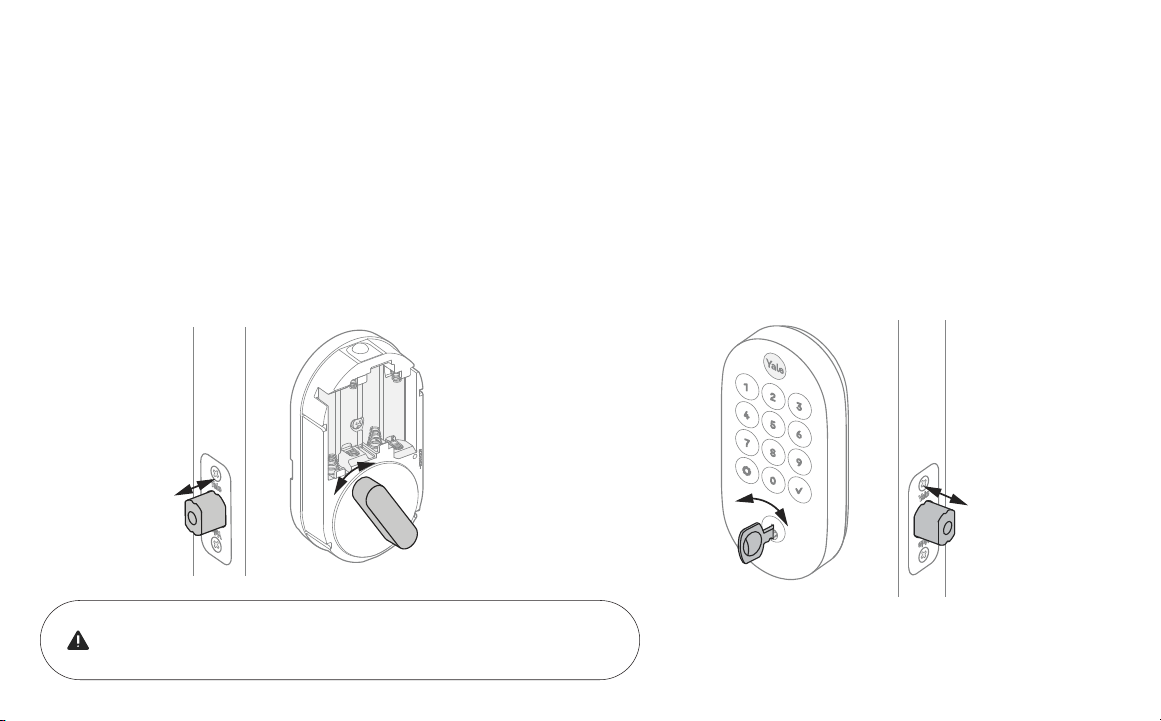
1� Make sure the tailpiece slot is in horizontal position. Use the
thumbturn to adjust if needed.
2� Slide the tailpiece through the designated slot on the back of the
thumbturn.
3� Press the lock against the mounting plate, adjusting its position until
it clicks into place and the bottom of the lock is held in place.
4� Tighten the one pre-installed screw.
3
When fully tightened, lock should be flush to door.
6
Install Interior Lock
2
1
4
18
P/N YRD510 Rev B
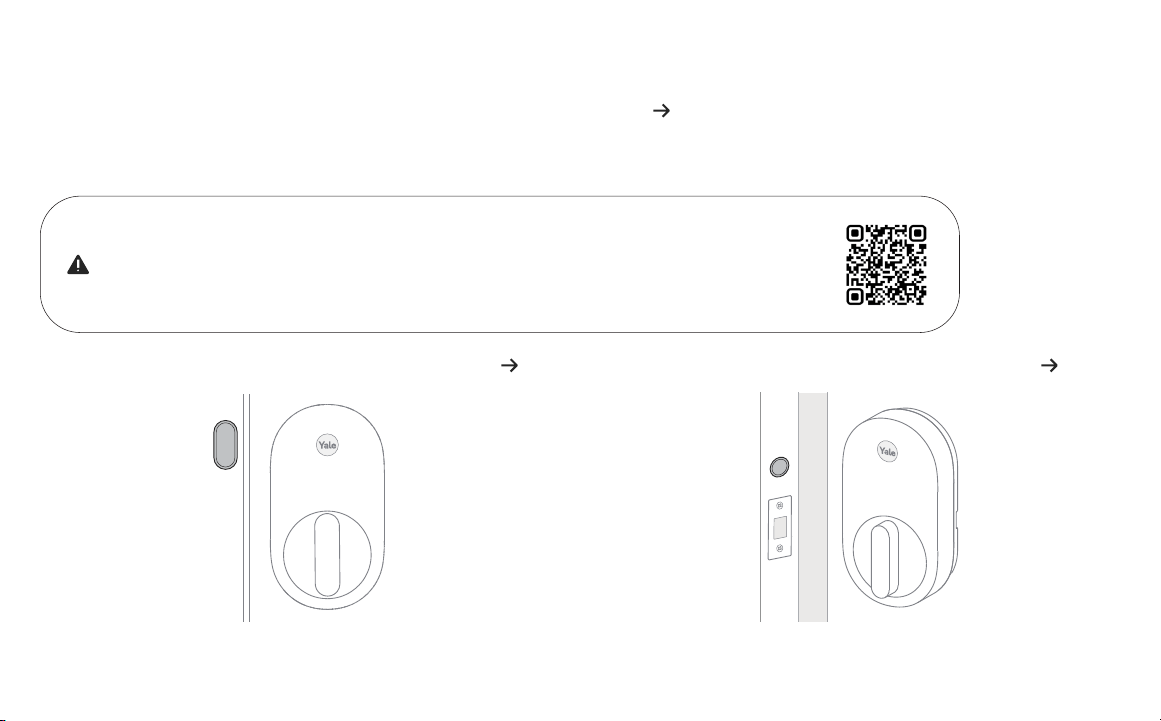
If deadbolt latch does not lock or unlock with the key (from the outside) or the
thumbturn (from the inside):
• Ensure that the deadbolt latch is centered in the face bore hole;
• Ensure that the tailpiece is positioned horizontally and inserted through
deadbolt latch slot (step 3, point 3) into the thumbturn slot (step 6, point 2).
Smooth deadbolt latch operation will enhance your battery life.
7
Test Thumbturn and Key
19
P/N YRD510 Rev B
Surface mount is a quick and easy option to secure DoorSense on the inside
of your door frame.
Flush mount is installing DoorSense into the edge of the door frame. It
provides a cleaner look with more robust performance but requires drilling.
For surface mount instructions, please proceed to step 8b. For flush mount instructions, please proceed to step 8c.
8a
Install DoorSense (Optional)
If you do not wish to install DoorSense, please proceed to step 9�
DoorSense is a magnetic sensor installed on your door frame that can keep track of when the door is opened and closed.
Before installing DoorSense confirm it is supported by the app the lock will be setup in.
If DoorSense is supported, it should only be installed and setup after your lock has been
configured in the app. Please follow the provided instructions for installation, then scan the
QR code to access calibration instructions for the door position sensor.
20
P/N YRD510 Rev B
It is recommended to complete the last step after your lock
is calibrated to ensure you are able to retrieve accurate door
state readings before modifying your frame.
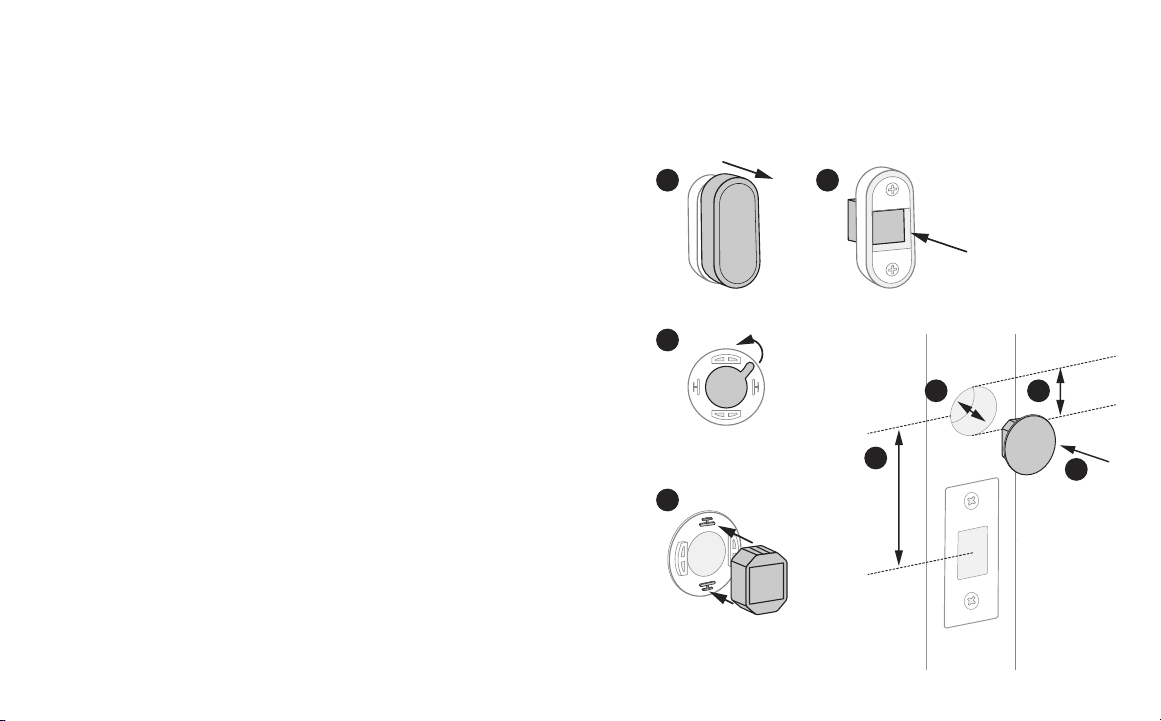
8b
DoorSense Surface Mount
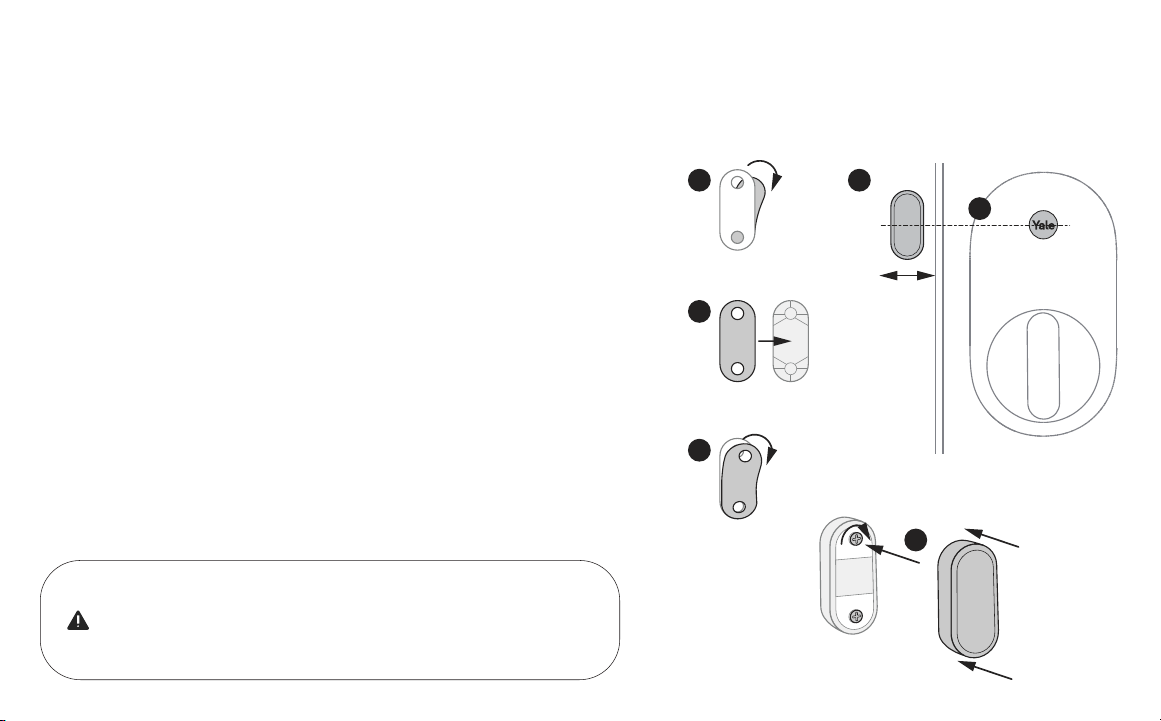
1� Remove one side of the backing from the adhesive.
2� Attach tape to the back of the DoorSense, ensuring it is aligned with the
edges of the device and the screw holes.
3� Remove the remaining backing from the adhesive.
4� Determine mounting location. For optimal performance, DoorSense
should be mounted within 1-1/2” from the edge of your door frame.
Note: DoorSense will still work if placed on curved or angled trim moulding around
the door frame as long as it is within 1-1/2” from the edge.
5� Ensure DoorSense is in proper position by center aligning it with the Yale
logo on the battery cover, and adhere it to the door frame.
6� Tighten pre-installed screws and attach cover.
1 4
5
2
3
6
1-1/2”
21
P/N YRD510 Rev B
1
3
4
5
8
67
2
2”
5/8”
1/2”
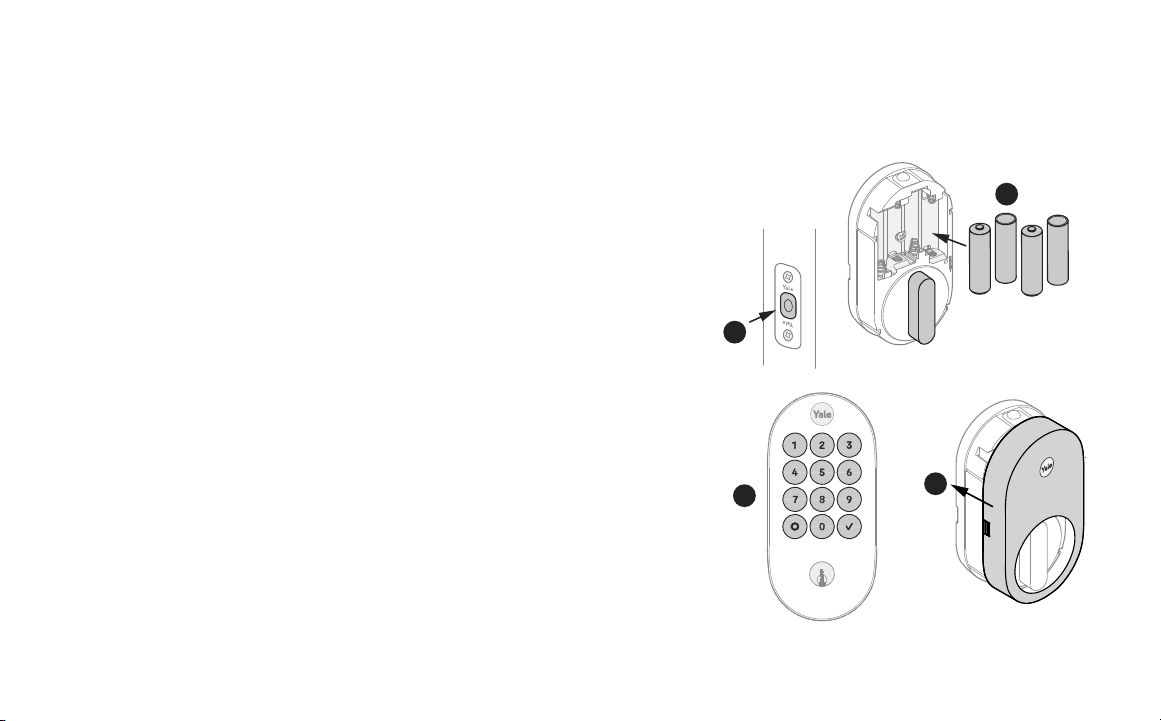
8c
DoorSense Flush Mount
Frame
1� Take off DoorSense cover.
2� Push the magnet out of the housing.
3� Expose the adhesive on the magnet cap by removing the blue backing.
4� Press the magnet onto the cap so that the notches interlock.
5� Determine mounting location on the door frame. The distance from the
center of the strike plate to the center of the DoorSense should be 2”,
making the DoorSense in line with the logo on the battery cover of the lock.
6� Mark a hole that’s horizontally centered on the door frame and is 5/8” in
diameter.
7� Drill a 1/2” deep hole where marked.
8� Insert DoorSense into the hole.
Note: If it is too snug to push in by hand, protect the frame with a piece of scrap wood
and use light blows with a hammer or mallet. If it is too loose, try wrapping tape around
it so that it fits snugly.
22
P/N YRD510 Rev B
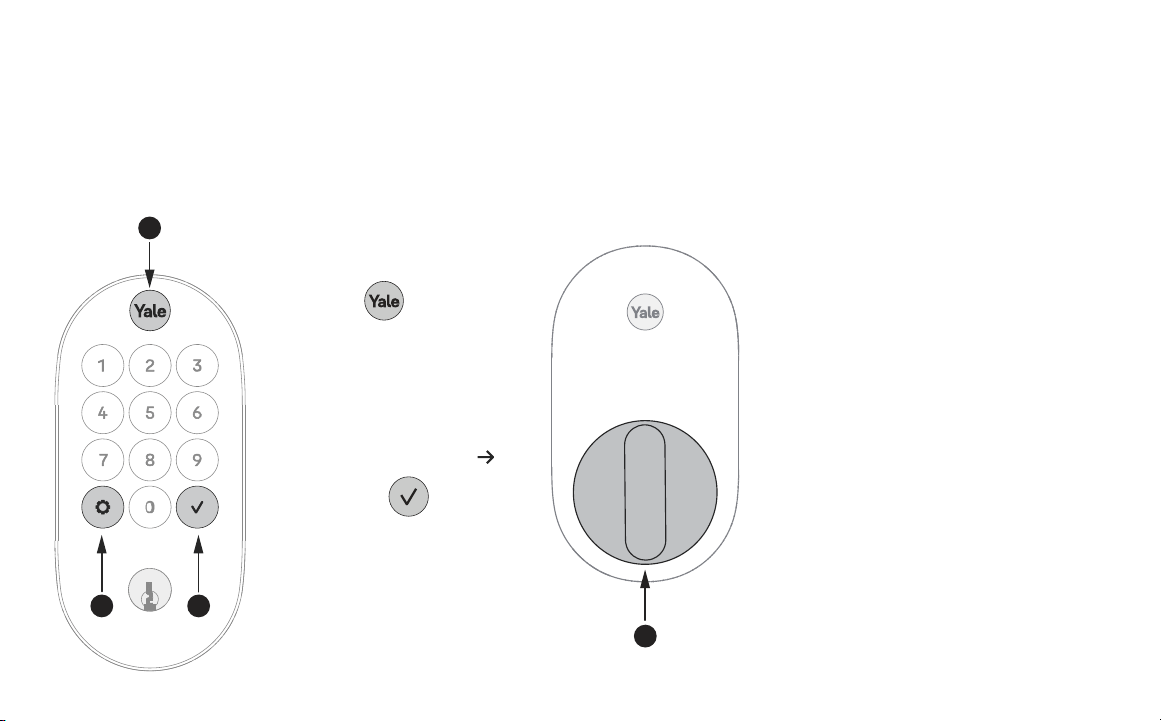
1� Before installing batteries, make sure the deadbolt latch is unlocked.
2� Install 4 batteries.
3� Once batteries are inserted, the entire keypad will light. Once this
happens, the lock is in pairing mode. Scan the QR code on the Quick Start
Guide for further instructions on setting up the lock.
4� Replace the battery cover.
3
1
2
9
Install Batteries
4
23
P/N YRD510 Rev B
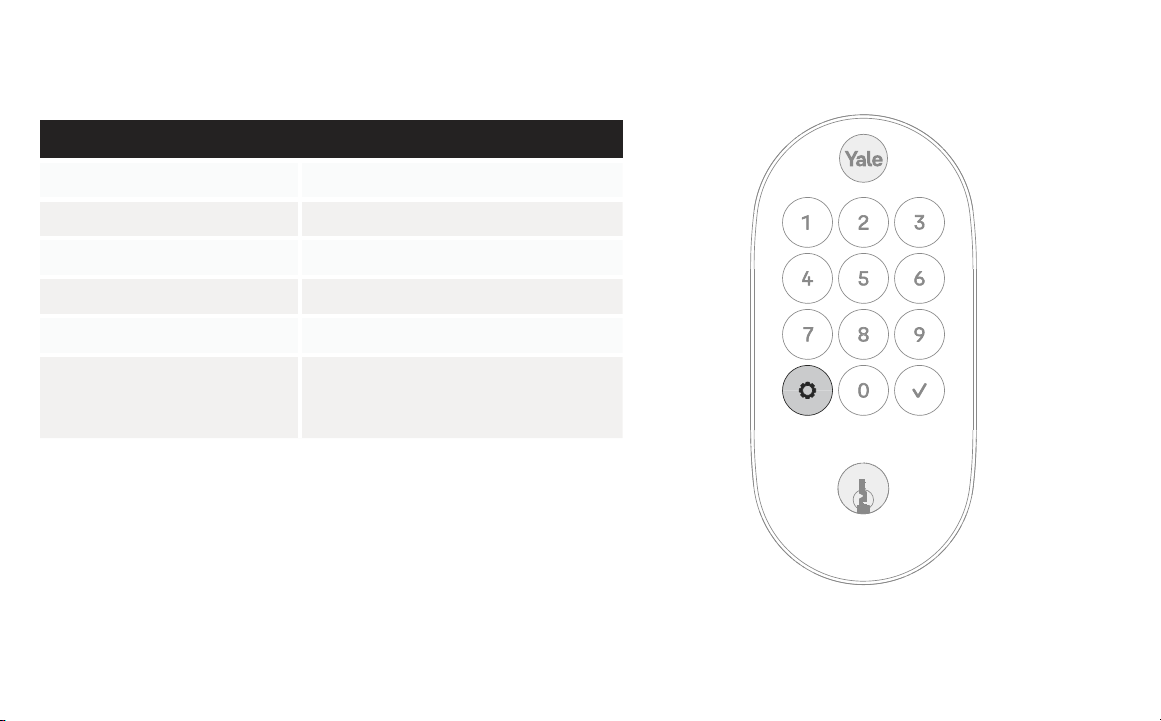
Using Your Lock
Exterior Keypad
To lock your door
Press
To unlock your door
With entry code
Press
Enter entry code
Interior Lock
1� Wake / One-Touch Locking
2� Warnings
3� Submit Entry Code
4� Thumbturn
2
1
3
4
24
P/N YRD510 Rev B
LED Alerts
Exterior Keypad Alerts
Gear flashes amber Low battery level 1 & 2
Gear flashes red Low battery level 3
Gear flashes white Matter Pairing / Pairing success
Keypad flashes white Bluetooth Pairing / Pairing success
Gear turns amber Pairing failure
Keypad and gear button flash
white 3 times
Entry Code is incorrect, the wrong number
of digits were entered, or the entry code is
out of schedule.
25
P/N YRD510 Rev B
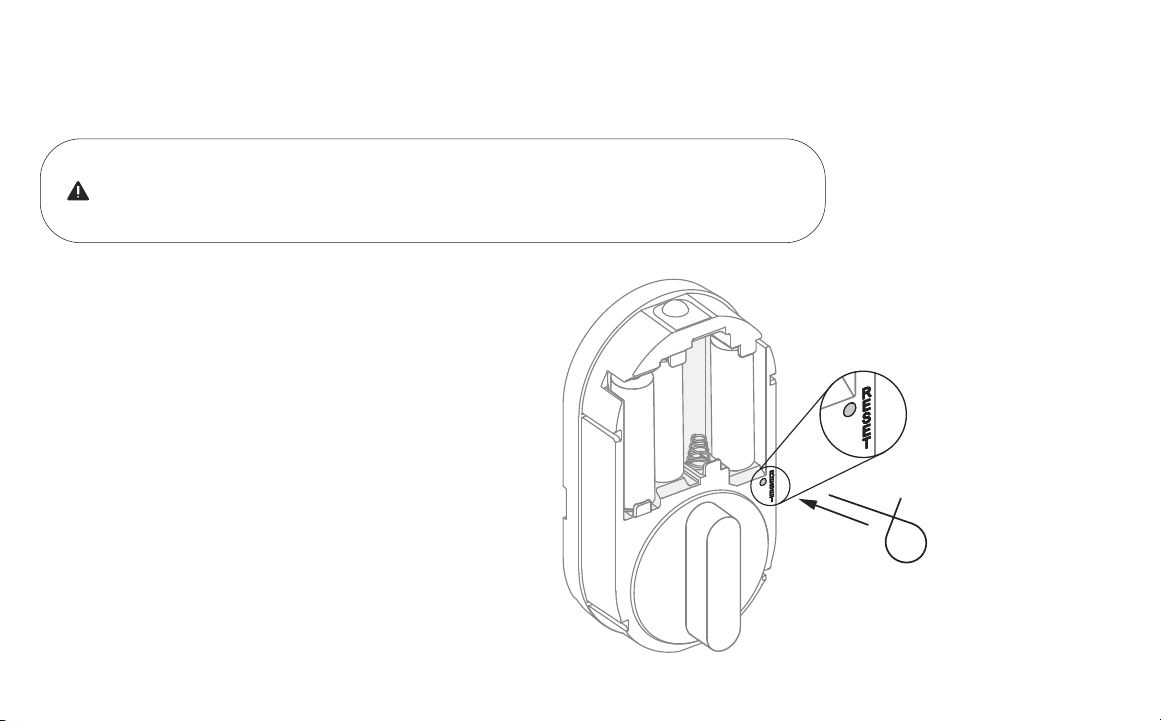
Resetting Your Lock to Factory Defaults
If you have set up your lock with Yale Access App, or other Matter enabled app,
you should reset the lock in the app with which the lock is set up� Go to your lock’s
settings and choose “Factory Reset”.
1� Remove one battery.
2� Insert reset pin into the designated reset hole.
3� Press and hold the reset button.
4� While holding the reset button, reinsert battery.
5� Keep holding the reset button for 5 more seconds.
6� Take out the reset pin.

26
P/N YRD510 Rev B
Features
DoorSense
· DoorSense keeps track of when your door is closed or open. Before installing DoorSense confirm it is supported by the app
the lock will be setup in.
Entry Codes · Entry codes can be created and managed in the Google Home app or other Matter enabled app.
Auto-Lock
· Auto-Lock automatically locks the door for you.
· It can be set to lock on a timer for as short as 30 seconds, or as long as 30 minutes.
· When using the Auto-Lock feature with DoorSense, your door will not lock until it is closed.
· Auto-Lock can be set up in the lock settings of the app.
Auto-Unlock
· Auto-Unlock knows when you arrive and unlocks the door as you approach.
· Auto-Unlock can be set up in the lock settings of the app.
Integrations
· Yale Access products work in harmony with some of your favorite Matter enabled devices through the Google Home app or
other Matter enabled app.

27
P/N YRD510 Rev B
Lock Operations Troubleshooting
Lock does not respond�
· Press any key to activate the keypad.
· If keypad numbers are visible, check if they respond when pressed.
· Check batteries are installed and oriented correctly in battery case. Replace batteries* if needed.
· Check that the keypad wire is fully connected and not pinched.
Lock does not respond – door is locked and
unaccessible�
· Batteries may not have enough power. Replace batteries*.
· Use mechanical key to unlock the door.
Lock is on for a while then shows no reaction�
Lights dim�
· Batteries do not have enough power. Replace batteries*.
Lock chimes indicating code acceptance
but door will not open�
· Check for any foreign objects between door and frame.
· Check that the wire is firmly connected to the interior lock.
Lock operates to allow access but will not
automatically unlock�
· Check to see if Auto-Lock is enabled.
· Disable Auto-Lock to lock the door manually.
Lock responds “Low Battery”� · Replace all four (4) batteries* with new AA alkaline batteries.
* After replacing your batteries, it’s highly recommended to use the app with which the lock is set up to lock or unlock your device. This will allow the app to
connect to the lock to ensure that the internal time of the device is correct.

28
P/N YRD510 Rev B
Entry code will not register�
· If low battery indicator is lit, replace batteries*.
· Verify that your entry code consists of 4 to 8 digits.
· Make sure you are using different entry codes for different users.
· The check mark must be pressed after entry code is entered.
Upon entering an entry code and pressing the
Check key, the lock displays “Invalid Code”
error or lock times out without responding�
· Verify entered code is a valid, previously programmed, 4 to 8 digit code.
· Vacation mode might be on. Only an admin user can switch vacation mode to normal in the app.
Upon entering an entry code and pressing the
Check key, lock responds “Wrong Number of
Digits”�
· The digits entered were incorrect or incomplete. Re-enter the correct code followed by the Check
key.
Deadbolt does not extend when locking the
door with the keypad�
· Lock was not handed properly. Find the setting called “Lock Handing” to fix this issue.
* After replacing your batteries, it’s highly recommended to use the app with which the lock is set up to lock or unlock your device. This will allow the app to
connect to the lock to ensure that the internal time of the device is correct.
Lock Operations Troubleshooting

29
P/N YRD510 Rev B
Deadbolt grinds and will not extend to lock
when using an entry code but thumbturn
locks and unlocks smoothly�
· Lock was not handed properly. Find the setting called “Lock Handing” to fix this issue.
Deadbolt is hitting the strike plate� · Reposition the strike plate to align with deadbolt.
Deadbolt is not fully extending� · Increase depth of the deadbolt strike pocket in the frame.
Resistance when locking deadbolt that
requires pushing or pulling on the door to
align deadbolt and latch�
Adjust your existing knob, lever, or handleset strike plate. Latch engagement into the strike is the main
component used for door alignment.
To adjust knob / lever / handleset strike plate:
1. Remove plate from door frame with a hand screwdriver. Note: using an electric driver may strip
screw heads or enlarge screw holes.
2. Locate tab on strike plate. Bend the tab towards surface of strike. Note: a small change may be all
that is required.
3. Reinstall strike plate using a screwdriver and test again.
4. If door cannot be adjusted sufficiently with strike tab, both knob/lever/handleset latch and deadbolt
could require adjustment – we suggest you contact a local locksmith for assistance.
Hardware Troubleshooting

P/N YRD510 Rev B
Trusted Every Day
Use:
Use of the Works with Apple badge means that an accessory has
been designed to work specifically with the technology identified
in the badge and has been certified by the developer to meet Apple
performance standards.
Apple is not responsible for the operation of this device or its
compliance with safety and regulatory standards.
Apple®, Apple Home™, Apple Watch®, HomeKit®, and iPhone® are
trademarks of Apple Inc., registered in the U.S. and other countries
and regions.
Google, Google Play and Google Home are trademarks of Google LLC.
Amazon, Alexa and all related logos are trademarks of Amazon.com,
Inc. or its affiliates.
The Bluetooth® word mark and logos are registered trademarks
owned by Bluetooth SIG, Inc. and any use of such marks by Yale is
under license. Other trademarks and trade names are those of their
respective owners.
RF Exposure Statement: FCC and IC RF Radiation Exposure
Statement: This equipment complies with FCC and IC RF Radiation
exposure limits set forth for an uncontrolled environment. This device
and its antenna must not be co-located or operating in conjunction
with any other antenna or transmitter. This equipment should be
installed and operated with a minimum distance of 20 cm between
the radiator and your body.
RF du FCC et IC d’exposition aux radiations: Cet équipement est
conforme à l’exposition de FCC et IC rayonnements RF limites
é-tablies pour un environnement non contrôlé. L’antenne pour
ce transmetteur ne doit pas être même endroit avec d’autres
émetteur sauf conformément à FCC et IC procédures de produits
Multi-émetteur. Cet équipement doit être installé et utilisé avec une
distance minimale de 20 cm entre le radiateur et votre corps.
FCC:
FCC ID: MZR-YRD510
FCC Part 15.19
This device complies with part 15 of the FCC rules Operation is
subject to the following two conditions: (1) This device may not cause
harmful interference, and (2) this device must accept any interference
received, including interference that may cause undesired operation.
FCC Part 15.21
Any changes or modifications (including the antennas) to this device
that are not expressly approved by the manufacturer may void the
user’s authority to operate the equipment.
Class B Equipment
This equipment has been tested and found to comply with the limits
for a Class B digital device, pursuant to Part 15 of the FCC Rules.
These limits are designed to provide reasonable protection against
harmful interference in a residential installation. This equipment
generates, uses, and can radiate radio frequency energy and, if not
installed and used in accordance with the instructions, may cause
harmful interference to radio communications. However, there is no
guarantee that interference will not occur in a particular installation. If
this equipment does cause harmful interference to radio or television
reception, which can be determined by turning the equipment off and
on, the user is encouraged to try to correct the interference by one or
more of the following measures:
• Reorient or relocate the receiving antenna.
• Increase the separation between the equipment and receiver.
• Connect the equipment into an outlet on a circuit different from that
to which the receiver is connected.
• Consult the dealer or an experienced radio/TV technician for help.
• Distance between EUT and users is 20 cm.
Warning:
Changes or modifications to this device, not expressly approved by
Yale Home could void the user’s authority to operate the equipment.
Industry Canada:
IC ID: 2676A-YRD510
This Class A digital apparatus meets all requirements of the
Canadian Interference Causing Equipment Regulations.
This device contains license-exempt transmitter(s)/receiver(s)
that comply with Innovation, Science and Economic Development
Canada’s license-exempt RSS(s). Operations is subject to the
following two conditions:
(1) This device may not cause interference
(2) This device must accept any interference, including interference
that may cause undesired operation of the device.
L’émetteur/récepteur exempt de licence contenu dans le présent
appareil est conforme aux CNR d’Innovation, Sciences et
Développement économique Canada applicables aux appareils radio
exempts de licence. L’exploitation est autorisée aux deux conditions
suivantes:
(1) L’appareil ne doit pas produire de brouillage;
(2) L’appareil doit accepter tout brouillage radioélectrique subi, même
si le brouillage est susceptible d’en compromettre le fonctionnement.
CAN ICES-3 (B) / NMB-3 (B)
Yale Home
24/7 Support: 1-855-213-5841 • support.shopyalehome.com
Yale® is a registered trademark of Master Lock Company LLC and its affiliates. Other products’ brand names may be trademarks or registered
trademarks of their respective owners and are mentioned for reference purposes only. ©Copyright 2025. All rights reserved. Reproduction in whole
or in part without the express written permission of Master Lock Company LLC or its affiliates is prohibited.