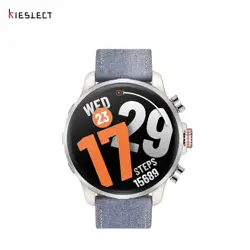

Kieslect Calling Watch
Kr 3 Series User Manual
Get the manual
in more languages

Notes:
1. Our company resees the right to modify the contents of this manual without
prior notice. It is normal that some functions may dier in some software versions.
2. Please read this manual carefully before using the watch.
3. Before using this watch, you need to connect the APP to synchronize the time and
set your personal information.
4. This product suppos 5ATM level waterproof, suitable for use in swimming pools
and shallow water; not suitable for deep sea diving, sea swimming or sauna, hot
water, tea and other corrosive liquids which are destructive to the watch, will not be
able to enjoy the product warranty and free repair seice.
5. Charge for no less than 2 hours before use. Please use the correct charging
adapter of 5V, >5V may damage the device.
6. If the watch cannot be turned on after a long time, please wipe the charging
contacts of the charging cable clean when using it again to avoid sweat or water
residue.
1
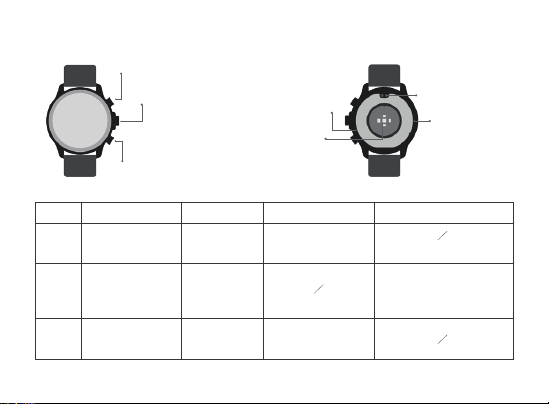
Hea rate
sensor area
Upper button
Down button
Charging po
Speaker
Middle button
2
01 Appearance & Charging
Button Functions
RevolveItem Press once Press twice Long press
Upper
button
Down
button
Power on / Power o /
Resta / turn o
Power Saving Mode
Voice assistant SOS
Display on /
Display o /
Home
Page turning /
Changing watch face /
Volume adjustment
Spo Mode
(Customized)
/Display on
Activity log
Middle
button
Menu / Back / Silence
incoming calls
Hang up the call
Microphone
3
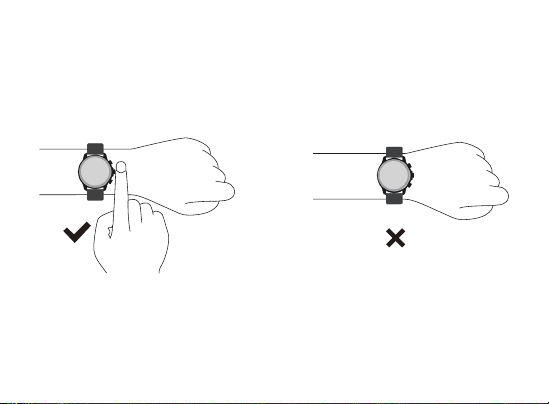
02 How to wear
Please wear the device correctly on your wrist, about one nger from your wrist bone,
and adjust it to a comfoable position.
The pictures below are for reference.
Tip: Incorrect wear may result in inaccurate health test data.

03.3 Open App, Click “ Add device now ” - Click to connect. - Click “ Pair ” to connect
with Audio Bluetooth.
Tip: The above operations are peormed using the iOS system, but there are slight
dierences when using the Android system. Please follow the connection instructions
on the APP to connect.
03.1 Scan QR code 03.2 Install “Kstyle OS” APP
4
03 Download and Connect APP
5
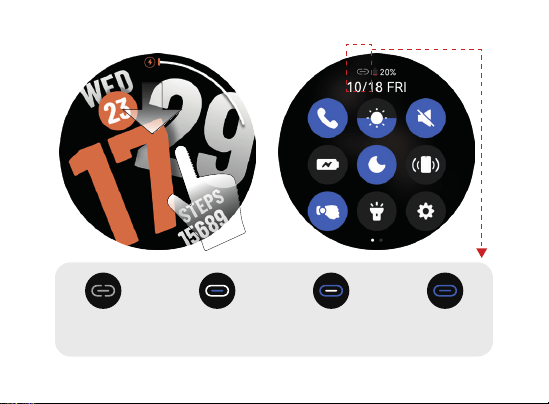
BT call
connection
03.4 Check connection status
APP
connection
APP+BT call
connection
No
connection

1.BT / BLE disconnected, please check if the Bluetooth of your cell phone and the
BT switch of your watch are on.
2.BT disconnected, can't use voice functions such as call / music / voice assistant,
please check whether the Bluetooth of your cell phone and the BT switch of your
watch are turned on.
3.BLE disconnect, can't connect APP, please check if your phone's Bluetooth is on.
4.BT / BLE connected.
For more information on setting up and using the watch, please
visit: https://www.kieslect.com/guide/user-manual/
6

Bluetooth:
Frequency Range:2402-2480MHz
Maximum EIRP: 4.50dBm
BLE:
1Mbps & 2Mbps
Frequency Range:2402-2480MHz
Maximum EIRP: 4.47dBm
7
05 Warranty
04 Parameters
Bluetooth: 5.3
Screen Size: 1.5"
Waterproof: 5ATM
Net Weight: 40g
Batte Type: Li-ion
Size: 47*12.6mm
Charging Voltage: 5V
Batte Capacity: 500mAh
Working Temperature: -20°C~60°C
1. The watch and charging cable warranty is one year.
2. Defects caused to the following reasons are not free warranty seices:
(1) Self-assemble or disassembly;
(2) Fall and damage during use;
(3) All man-made damage or due to the fault of a third pay, improper use (such as:
sma watch water, external force crushing, scratches in the use process, etc.);
3. For warranty seices, please contact us: seice@kieslect.com;
4. Please note that all functions of the product are based on physical objects.

If you need the warranty card, please go to the ocial website:
https://www.kieslect.com/download-center/ to download it.
8