
NO.2104009
System Components & Parts List
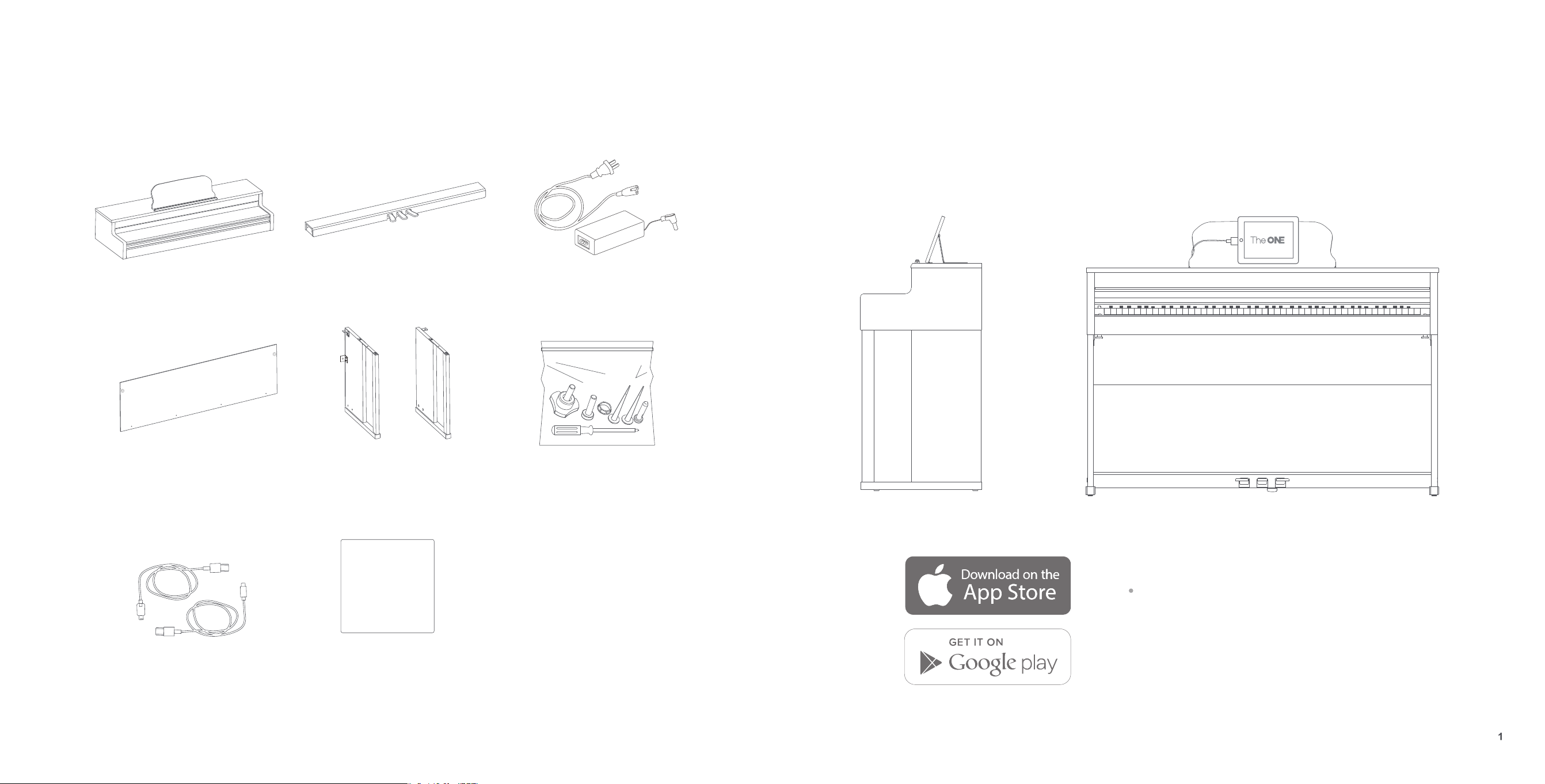
Carefully remove components from the packaging and check that all listed parts are included:
Main body Pedal
Back plate Piano legs (left and right)
User guide
User guide
Toolkit
Product Introduction
The ONE Smart Piano
The ONE piano is a smart instrument aimed at changing the way you and your family learn to play piano. Combining piano
education with fun exercises and your favorite songs, The ONE is suited for both seasoned piano performers as well as
beginners. Its sound quality resembles a grand piano and its functions are endless when connected with an App for your
mobile devices.
Power source DC 15V
For more information, visit:
https://www.smartpiano.com/pages/sheet-music
Search "The ONE Smart Piano"
on App Store or Google Play
Cables
Buy other cables from:
www.smartpiano.com
Toolkit
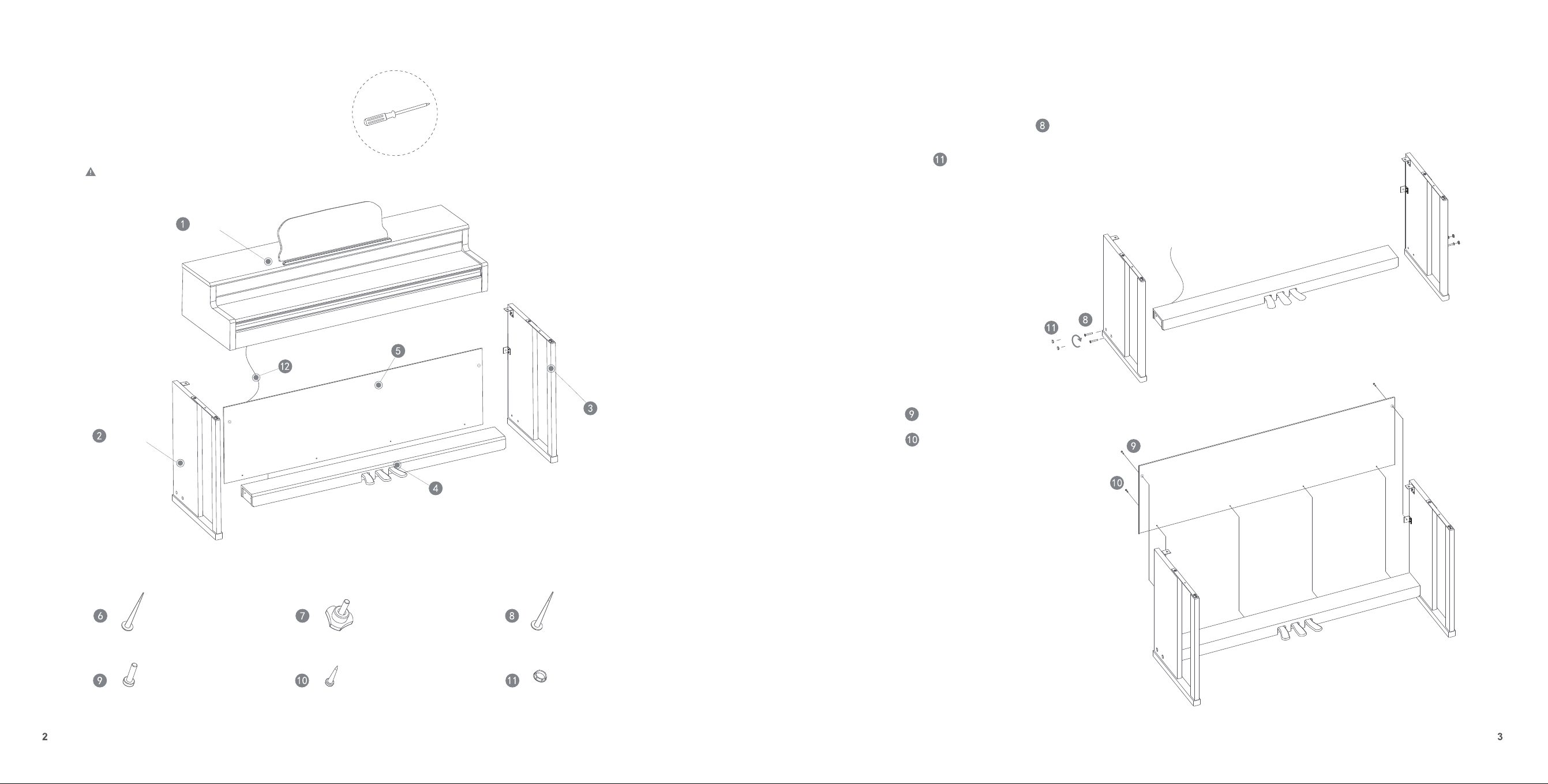
Before assembling the piano, find the cross screw-
driver from the toolkit. Check to make sure that all of
the following parts are in the package.
(Note: The product can be quite heavy, so we recommend having two people when moving it.)
Main body
Left Leg
Right Leg
Pedals
Back plate
Pedal line
Silver Philip’s Head Screw*2
Self-tapping Screw *4 Plastic Screw Cap *4
Self-tapping Screw *2 Hand Screw *2 Self-tapping Screw * 4
Assembly Instructions
Put on
(double-check the direction of the cap before assembling).
A.
Place the left and right legs on both sides, then fix the pedals
onto the legs as illustrated. Use
Self-tapping Head Screw to tighten the pedals.
1.
2.
Plastic Screw Cap
Please align the two ends to
find screw holes
Avoid pressure to the pedal cable.
Use
B.
to attach the back plate onto the framework completed in step A.
Use
to fix the pedal completed in step A.
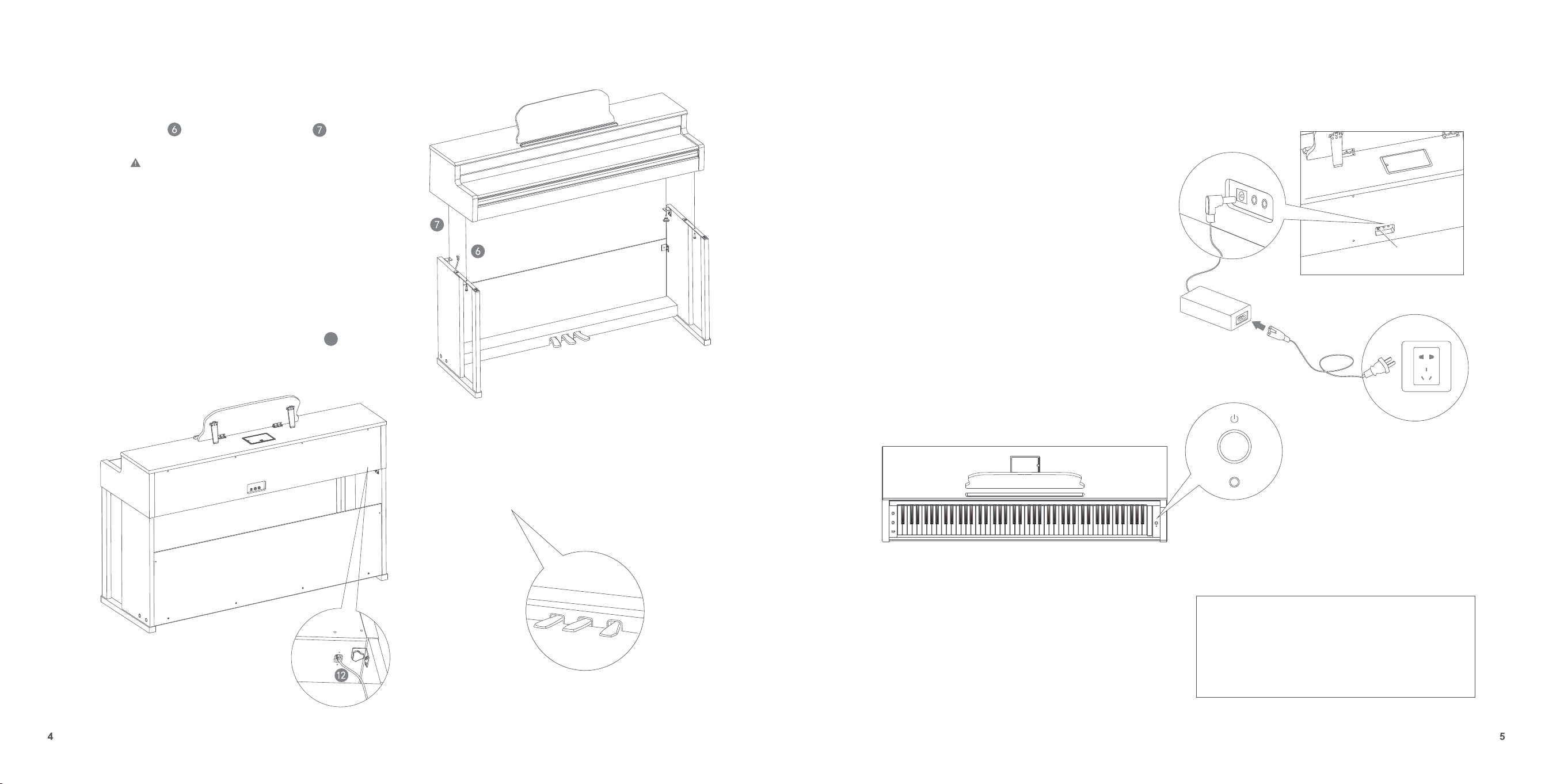
Assembly Instructions
D.
Pedal line
C.
1. Mount the main body onto what has been completed in step B.
Align two
Self-tapping Screw and two hand screws to
the screw holes, then tighten the screws.
(Note: The product can be heavy at this step, so it’s best
to have two people when carrying it)
After assembling the overall piano frame, insert
12
into the holes at the bottom of the main body and attach by using
the binding wire.
How to Use
Start-up
1.
2.
3.
E.
Place the piano in a static location in your room,
then unscrew the screw nut for fixation until it
presses against the floor. Do not unscrew the screw
nut earlier, or it will scratch your floor.
Power socket
Make sure the power is off. Before you switch the instrument on,
dial down the volume on the keyword as well as the volume of
any connected audio equipment to a minimum level.
Connect the AC/DC power adapter to the power socket on the
backside of the main body and plug the other side into the power
outlet.
Switch on the piano. Lit LED lights indicate that the piano is turned on.
4.
To turn off the product, press the “Power” button. To
prevent
accidental power-offs, the product can be turned off only when the
button is pressed for a longer time...
Note:
For safety reasons, unplug the instrument when not
in use for extended periods of time, or during
thunderstorms.
Connect
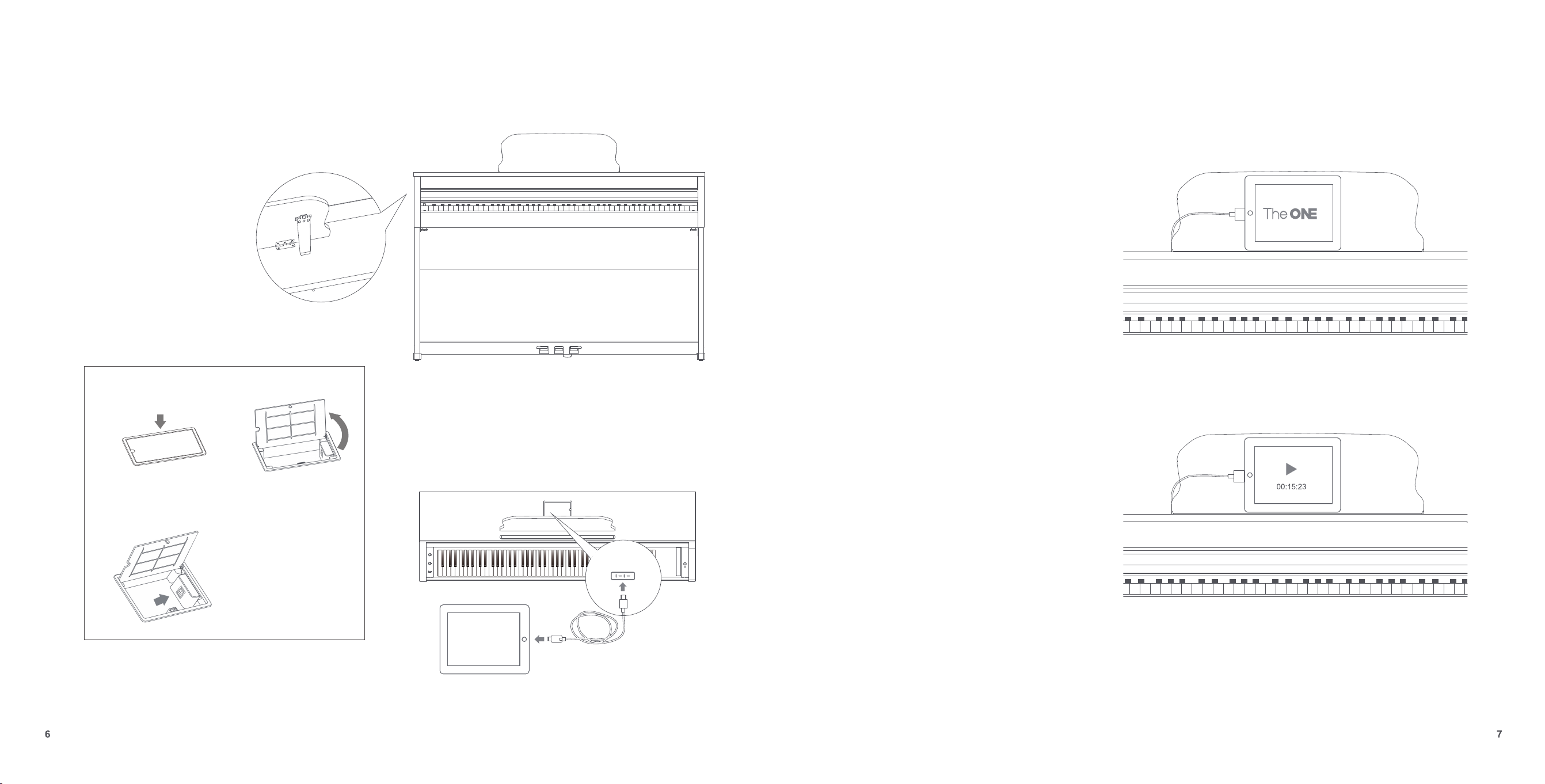
To Use the Stand
The music stand sits on the top of the piano.
You can flip up the stand fold to place scores or tablet devices.
Using the cable
B. Flip the cover overA. Gently press the cover
of the box to open the box
C. Plug in the cable along
the direction illustrated.
Connecting with Smart devices
Connect
When connected to a computer, this instrument can
be used as a MIDI keyboard. When connected with
tablets, USB MIDI bidirectional data transmission is
available. For example, you can record the music you
play on this instrument into your tablet. You can also
use the instrument as speakers to play music directly
from your tablet devices.
Download the “The ONE Smart Piano” app to access
extended and additional features.
You can also play music from your iPad through The
ONE piano.
You can use the piano as a form of high-quality
speakers for your iPad music.
MIDI Function
Socket 2
Socket 1
Note :
Recording Function
Connecting Earphones
Extended Functions
Setting Up the Timbre
There are 128 GM timbres and 4 drum combinations for you to
choose from your smart device.
When practicing late at night, you can play the piano with your
earphones as illustrated.
Socket : If you plug into these socket, the sound will only come out
from the earphones.
1. Avoid using the earphones for long periods of time at a high
volume, since extended use can cause ear fatigue or even
hearing damage.
2. The size of the earphone sockets are 3.5mm and 6.5mm.
Note :
Note :
1. For specific tablet set-up instructions, refer to the App
description in the App Store.
2. This product’s default instrumental sound is that of a grand
piano.
Simply tap the feature to start recording what you play and to share it on
your social networks.
When the product works independently, the default
power-off setting is 30 mins.
This module lists the main functions of the piano.
For more details on additional features, refer to the
"Settings - piano settings" in The One App.
Auto Power-off
You can set auto power-off from your smart devices. Options: Power-off,
30 mins, 60 mins. Default value: 30 mins
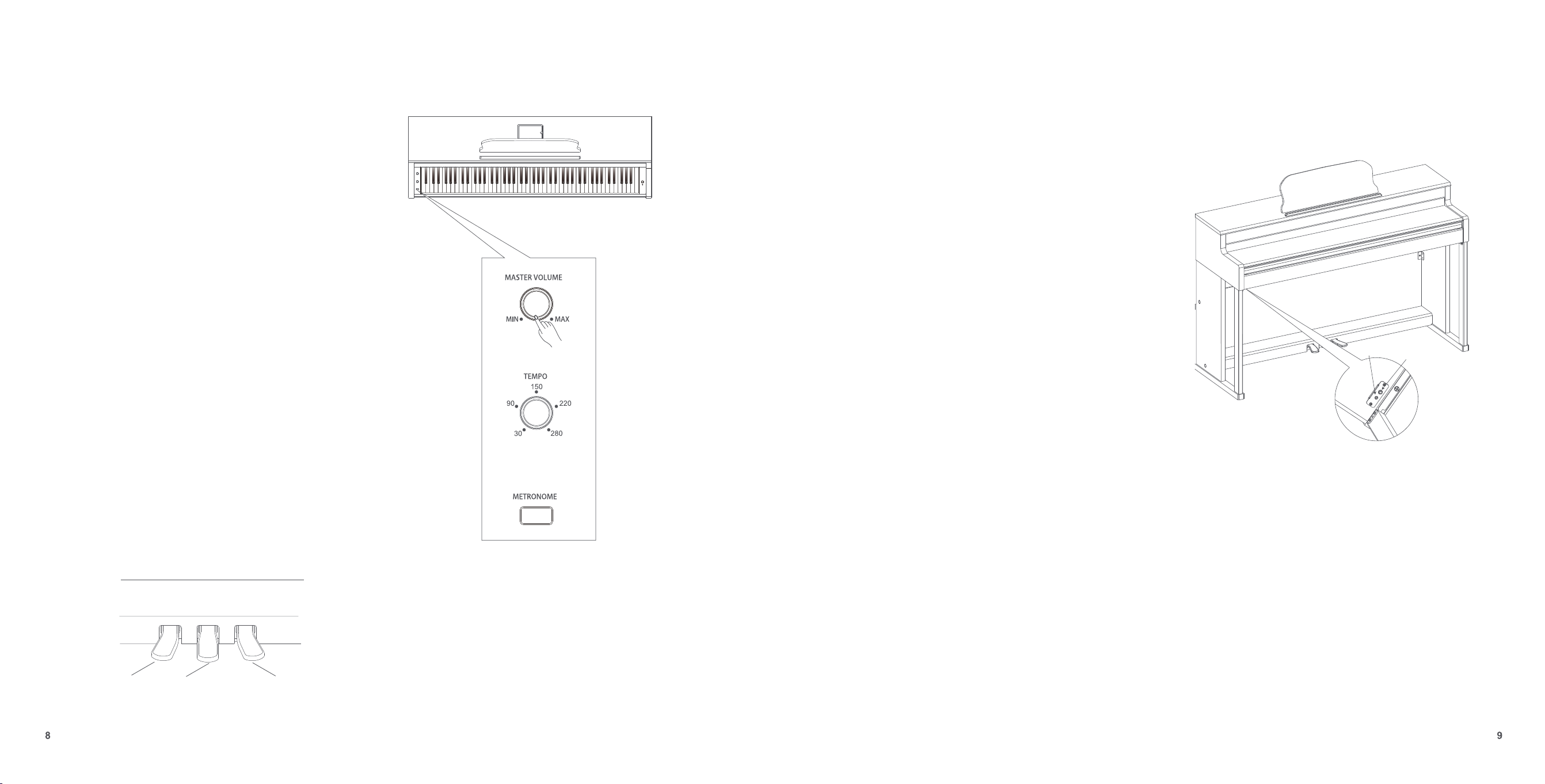
Soft Sostenuto Sustain
Functions
Master Volume Knob
Keyboard
Using the Metronome
Using the Pedals
After start-up, turn the volume knob to the right to increase the
volume, and turn the volume knob to the left to decrease the
volume. You can adjust in both directions to change the
volume.
This product is a 88-key graded hammer action piano
keyboard that supports a max of 128 key sounds at one time.
As you play the piano, you’ll experience a touch and feel
similar to that of a grand piano.
When you are practicing or recording your music, the
metronome helps you to learn rhythms.
Use the metronome function to help you keep a steady
tempo as you play.
1. Press the “Metronome” button to activate it.
2. Press the “Metronome” again to turn it off.You can adjust
the beat for different needs.The speed ranges from 30 –
280.
The beat goes higher when you turn the speed knob to the
right, and it goes lower when you turn the speed knob to
the left.
This piano equipped soft, sostenuto and sustain pedals.
Functions
88-key graded hammer action piano keyboard2.0
Specifications
Specifications
Interface
Power Source: 15V power cord connected to the back of the piano.
Cable Interface: The port is visible by pressing on and opening the small box on top of the
piano.
The interface supports four specialized cables for The ONE Smart Piano ( USB Type-C,
Headphone Jack: One 3.5mm, one 6.5mm headphone jacks.
AUX IN/OUT: 6.5mm Auxiliary audio input/output interface
Accessories
Care Instructions
Mounting screws
Screwdriver
The ONE Smart Piano Cable - 2 (Apple lightning connectors, USB Type-C )
User Manual
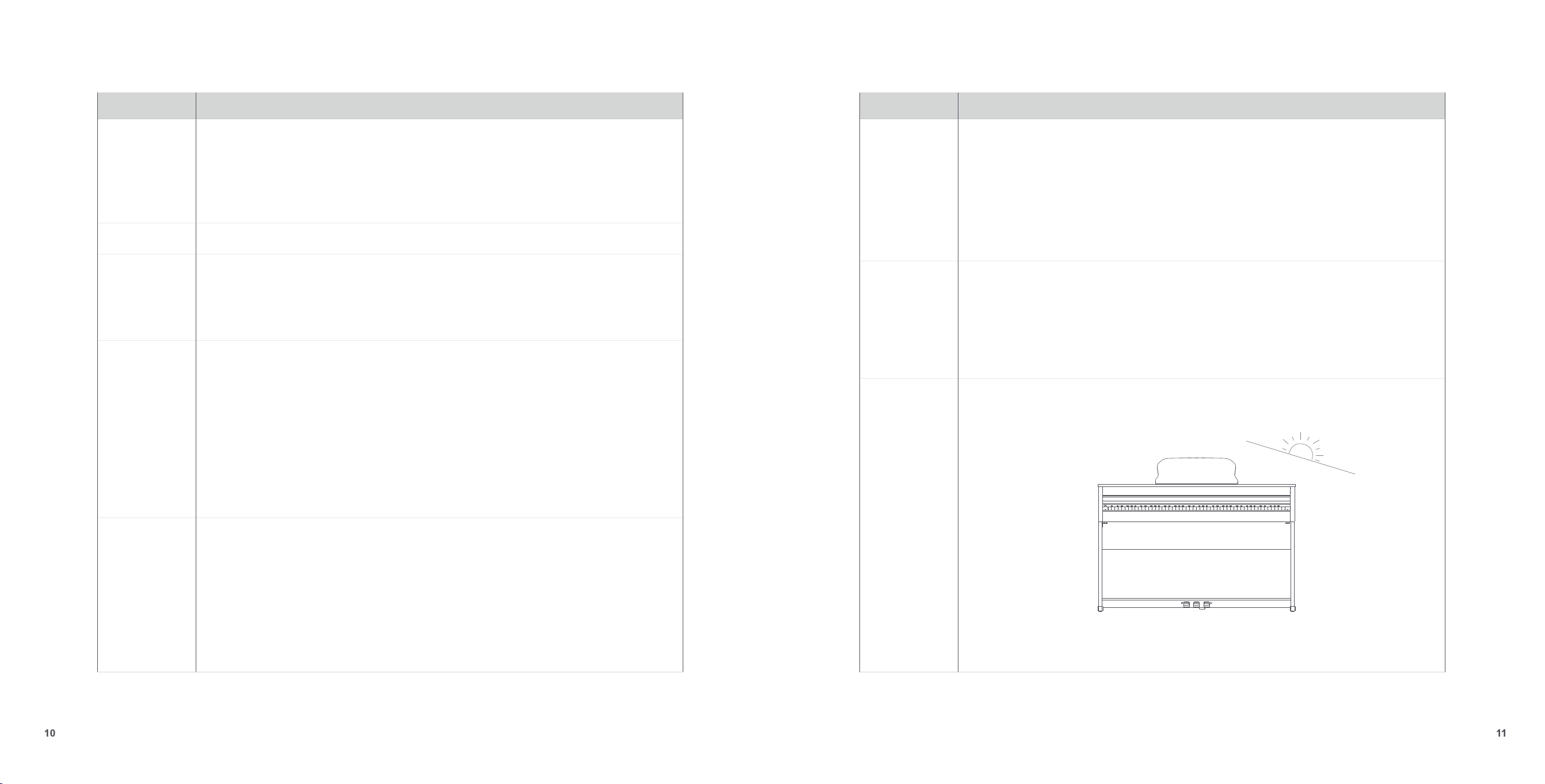
1. Avoid direct sunlight. It will cause damage to the piano.
2. Do not disassemble the piano. Disassembling may cause damages that are not
covered under the warranty.
Specifications
Specifications
Length: 54 Inches
Width: 18 Inches
Height: 35 Inches
Keyboard: 88-key graded hammer action piano keyboard
136.4 lbs
Size
Weight
Devices supported
iOS 10.0+
Phone6/7/8/SE/X/11above
iPad 5th generation above, iPad mini 2 above, iPad Air above, iPad Pro above.
Android 5.0+, support USB Host / OTG
*For more detail information, please contact [email protected]
Keyboard: 88-key graded hammer action ivory imitation standard piano keyboard
Maximum Polyphony: 128-note polyphony
Tones: 128 GM-programmed timbres and 4 drum sets (only the timbre of a grand piano is
available for demo play)
Audio Sampling rate: 44.1KHz
Rated output power: 30W
Sampling Tones: 16-bit stereo
Speaker size: Woofer 6.5’’x2 + Tweeter1.25"x2
Piano Lights: 88 sets of red and blue LED lights
On/Off*: You can set auto power-off
Volume: Adjust the volume of the sound.
Metronome: Optional to use. Turn the knob to adjust the tempo.
Pedals: Three pedals. Soft, Sostenuto, and Sustain respectively from left to right.
Recording Function*:Record music while playing and share with your social network.
Tone Selection*:A variety of timbres to choose from.
(Functions with *: availability varies with the mobile device you’re using The ONE smart piano
application on)
Basic Parameters
Basic Functions
Apple lightning connector).
Keyboard : 88-key graded hammer action piano keyboard2.0
Speaker Size: Tweeter 1.25"*2 + Woofer 6"*2
2.0

Trouble-shooting
Problem
Possible cause and solution
SPECIAL NOTICE
Warning
Functions of the product may be subject to strong
electromagnetic interference. If it happens, simply follow
the user manual to restore the initial settings. When the
product stops working, store it in an unused location.
Do not use the instrument in the vicinity of a TV, radio,
stereo equipment, mobile phone, or other electronic device.
Otherwise, the instrument may generate noise.
Interference with other devices
When cleaning the instrument, use a soft and dry cloth.
Do not use paint thinners, solvents, cleaning fluids, or any
chemical cleaning cloths.
Maintenance
Please make sure that the power adapter is connected to a Power
outlet with the correct voltage.
Do not use a power source with the wrong voltage.
When the device isn’t in use, or during a thunderstorm, disconnect
the power supply.
Power
Do not press too hard on switches or controls.
Avoid getting paper, metal or other materials into the
internal device. If this happens, unplug the device immediately.
Then ask for help from a qualified service personnel to inspect
the equipment.
Caution
Connection
Before connecting the product to another device, first
turn off the power on both devices. This will effectively
prevent equipment breakdowns or possible damage to
the other device.
Do not place the product in the following environments in
order to avoid deformation, discoloration, or other serious damages.
Do
not expose the instrument to excessive dust or vibrations, or
extreme temperatures (such as in direct sunlight or near a heater),
or in a car to prevent panel disfiguration or possible damage to the
internal components.
Do not place vinyl, plastic or rubber objects on the instrument,
since the panel or the keyboard may get discolored.
Location
Before moving the instrument, remove all connected cables.
Before using the product, please read the following instructions
carefully.Please keep this manual for inspection at any time in
the future.
CONTACT US
Email: support@smartpiano.com
Facebook: facebook.com/onesmartpiano
A noise is heard when turning
on or off the piano.
Speakers do not work when
playing the piano
It’s normal to hear some noise when turning the piano on or off. The
noise may be due to interference caused by the use of a mobile
phone in proximity to the instrument. Turn off the mobile phone, or
place it far away from the instrument.
Check if the volume is too low or completely turned off. Then check if
anything is plugged into the earphone socket.
12