SoveeLife
Model:H7129
·
oveeLife
user Manual
sm art Ai r pu rifier 2 pro (se nso r)
Table des mati
res
14
co mposition de I'ensem b le
15
Guide
de
d
marrage pour vo tre pu rific a teur d'a ir
intelligent
Gui d e
de
d
mar r ag e
utilisa t ion de votre purificat eu r d'air intelligent
As soci ation de votr e apparei
,
application
Govee Home
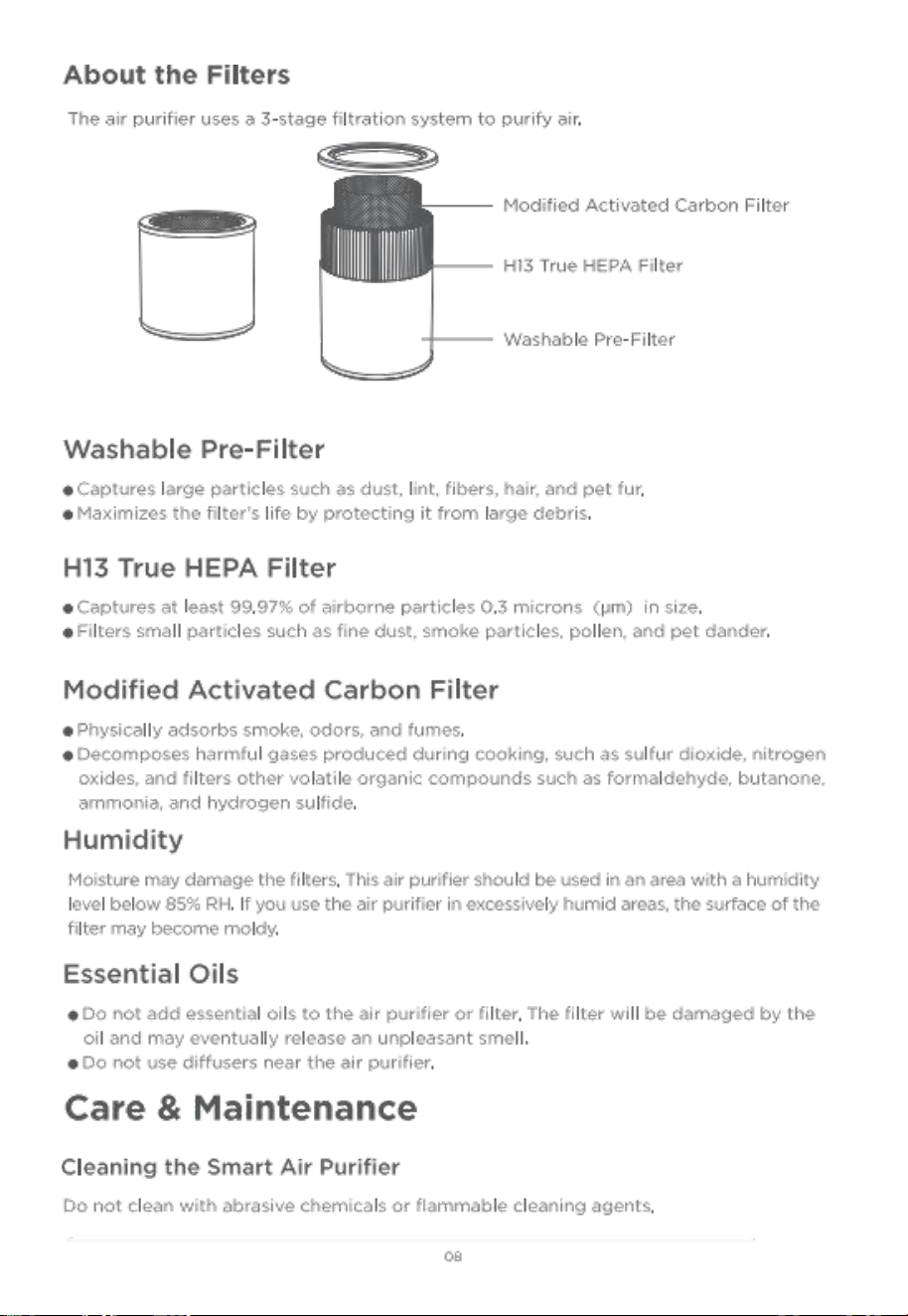
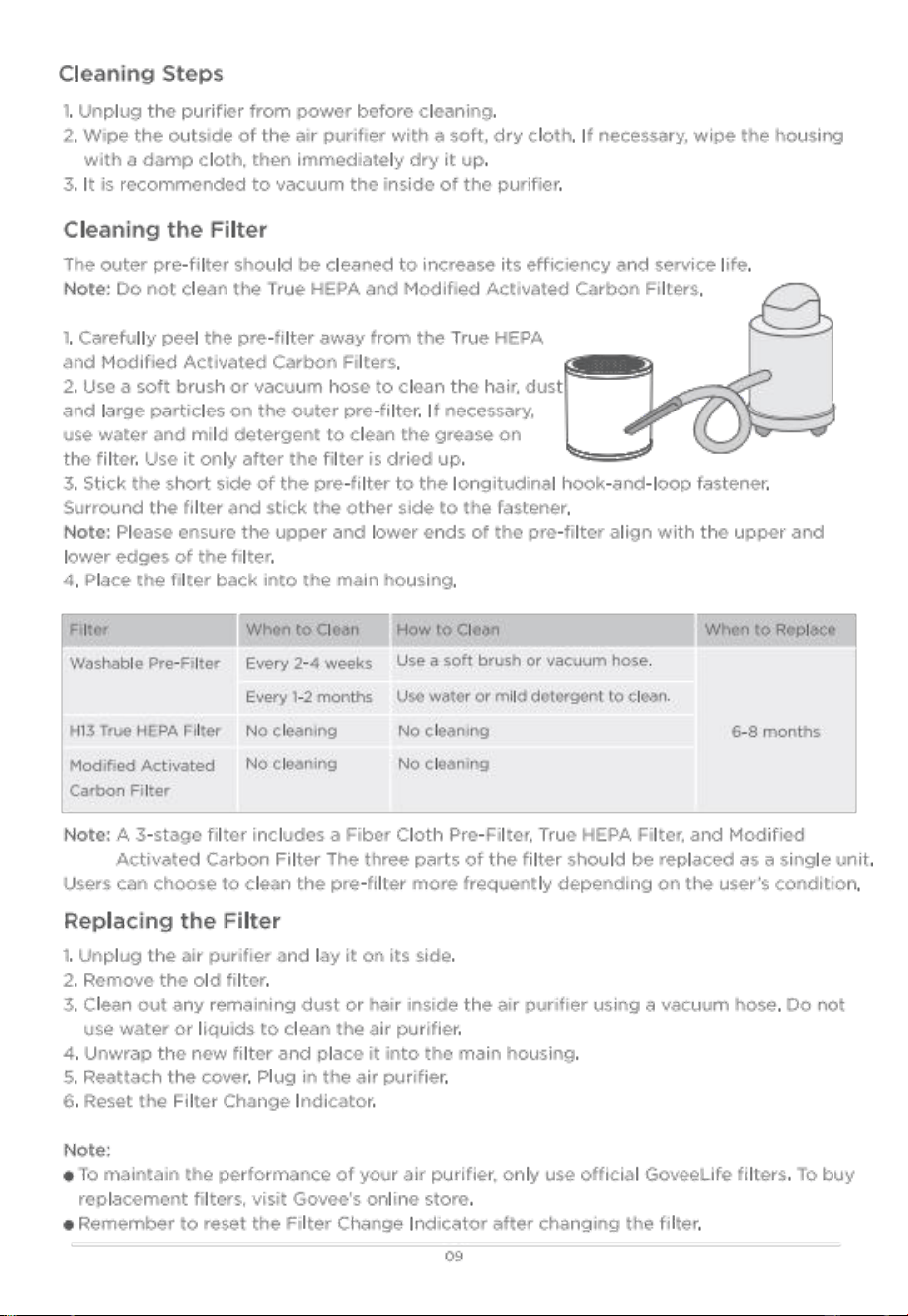
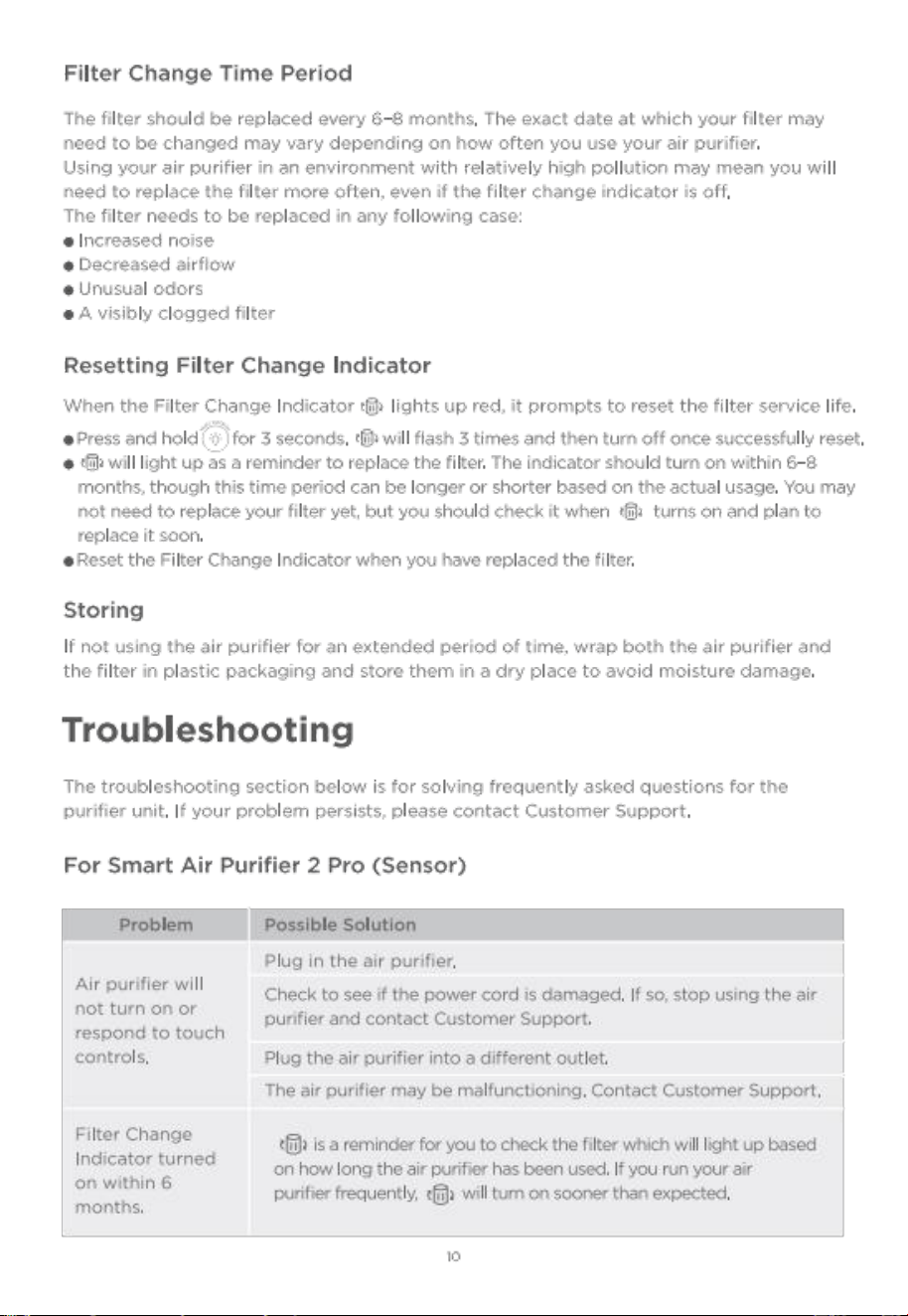
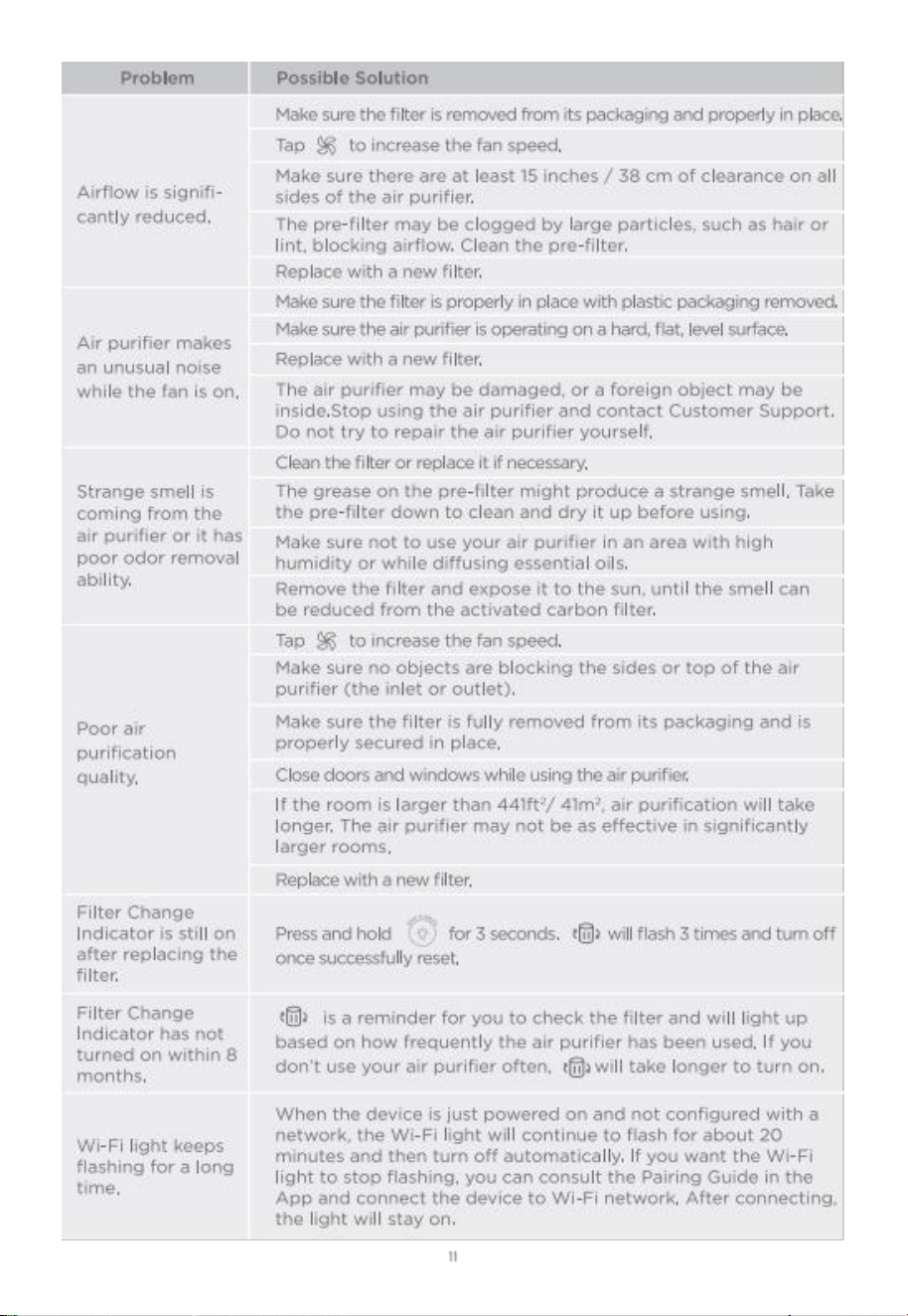
A Propos des filtres
21
23
17
2
21
15
15
Entretien et maintenance
Instructions de S Curit
caract ristiques
D
Pan nage

READ AND SAVE THESE INSTRUCTIONS
safety Inst ruc tions
o only use the smart Air purifier as described in this manual.
o Do not use without removing the plastic wrap from the filter. If not removed, th e air purifier
will not filter air, and may overheat, causing a fire hazard.
o check if the voltage indicated on the appliance corresponds to the local power voltage
before you connect the appliance.
o Do not use the air purifier outdoors.
o Not for commercial use. Household use only.
o keep the air purifier away from water or wet, damp areas. Never place in water or liquid.
o Do not use in excessively humid areas.
o keep the air purifier away from heat sources such as stovetops, ovens, or radiators.
o Do not clean the appliance with water, any other liquid , or a (flammable) detergent, nor let
them enter the appliance, to avoid electric shock and/or a fire hazard.
o keep 5 feet/1 .5m away from where oxygen is being administered.
o supervise children when they are near the air purifier. Do not allow children to play with the
air purifier.
o children should not clean or perform maintenance on the air purifier without supervision.
o Do not place anything into the openings of the air purifier.
o Do not place heavy objects on the air purifier.
Do not block the air inlet and air outlet ·
o keep the inside of the air purifier dry. To prevent moisture build-up, avoid placing in rooms
with major temperature changes or underneath air conditioners.
o Always place and use the appliance on a dry, stable, level , and horizontal surface.
o Always turnoff the air purifier first, then unplug the adapter from the wall outlet, when you
want to move, clean the appliance, replace the filters or carry out other maintenance.
o Do not touch the power plug or power adapter with wet hands.
o Do not use the air purifier if it is damaged or not working correctly, or if the power adapter
cord is damaged. Do not repair yourself. contact customer support.
o only use the power adapter provided with this air purifier.
o only use the original filters specially intended for this appliance. Do not use any other
filters.
o WARN ING : To Red uce The Ris k of Fire or El ect ric shoc k, Do Not us e This Ai r purifier wit h
Any solid-state speed control Device.
o Not for commercial use. Household use only.
package Includes
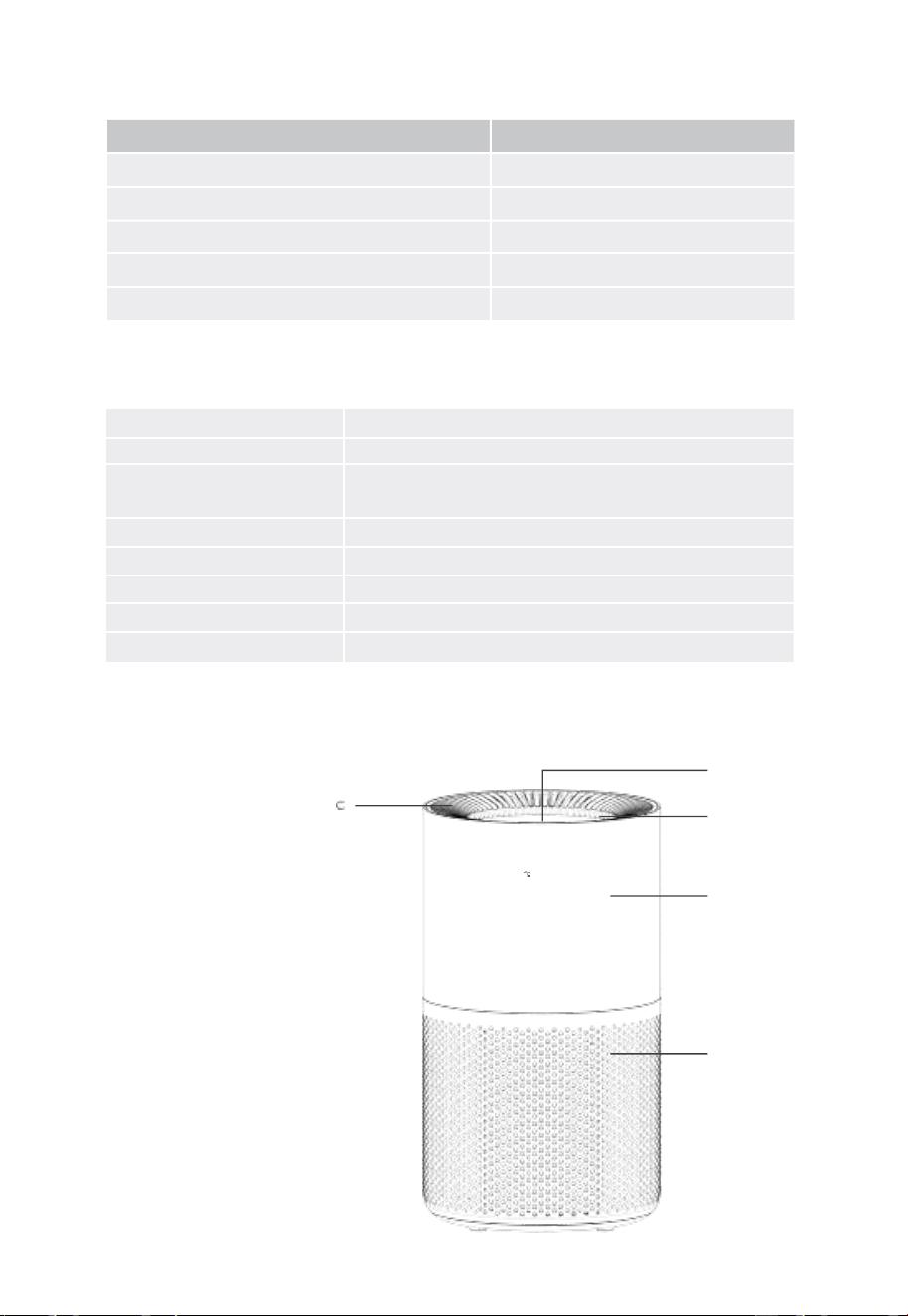
Item
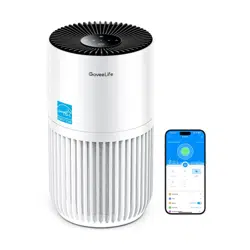
smart Air pur if ier 2 pr o (s en so r)
3 - in-1 True HEPA Filter (pre- Installed)
Quick start Gu ide
user Manual
po wer Ada p ter
Qu a n t ity
1
1
1
1
1
specifications
po w e r supp ly
10O- 240V AC 50/60Hz
Rated pow er
32W
CADR
smoke : 15o cfm Dust : 155 cfm
po l le n : 1 6o c f m P M 2 . 5 : 15 5 c fm
Noise Level
24 to 52dB
Dimensions
8 .7x8 . 7x15 .3in / 22x22x38 . 6cm
Net weig h t
6 . 6lb / 3kg
wo rki n g Te mper t ure
-10c to 4oe c/14oF to 104o F
wo r k ing Humidit y
<85%RH
Gett in g to know your smart Air purifier
a
a . contro l pa nel
b
b. Nig ht Ligh t
c . Air outlet & Build- i
·
oveeLife
d. Main Housing
e. Air Inlet
e
Front
O2
Handle
d
n
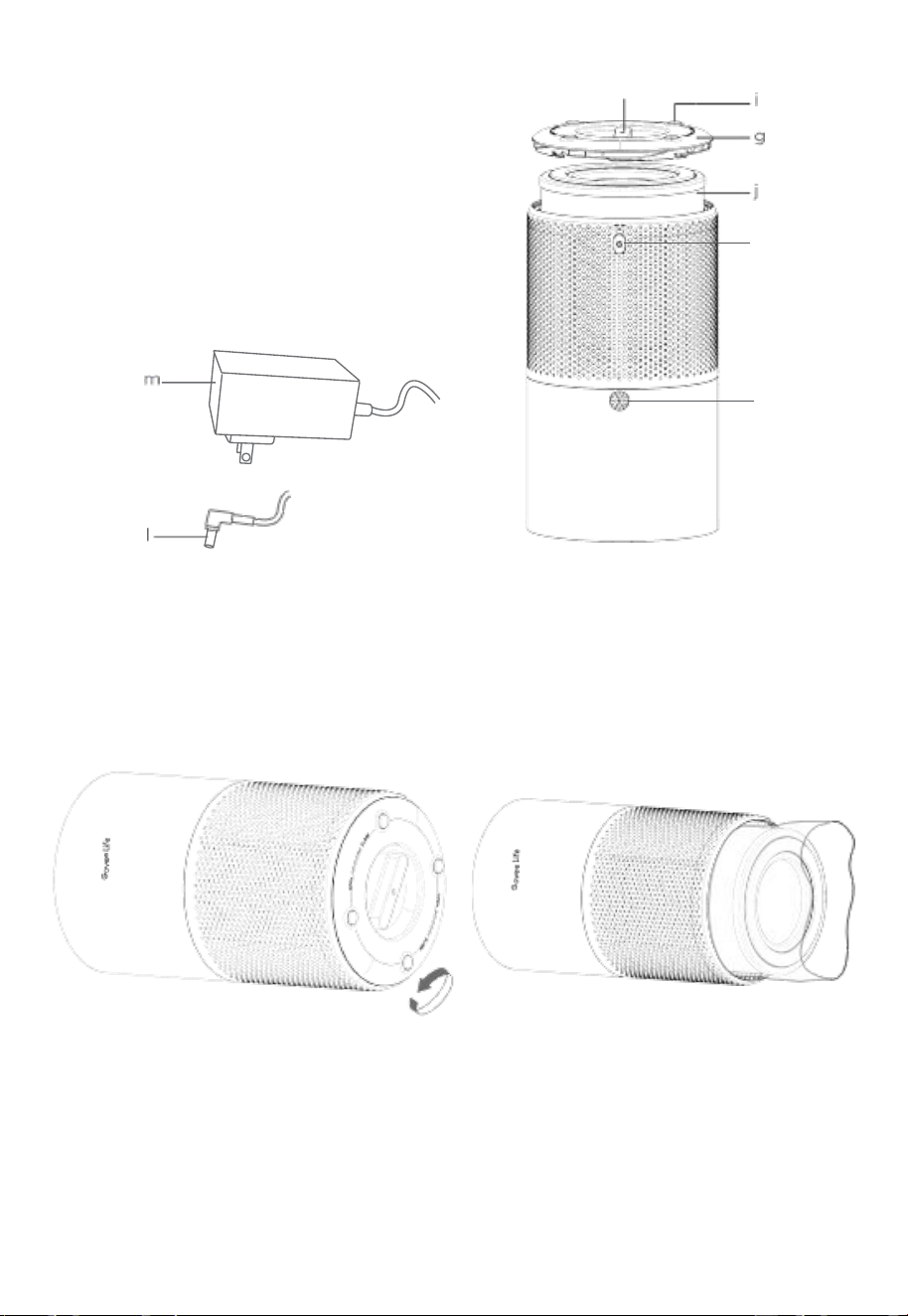
f. Dust sensor
g . Filter cover
h. Filter cover Handle
i . Non-slip pads
j. 3 - in-1 True HEPA Filter
k. DC Input port
I . Ad apt er output ca ble
m . power Adapt er
h
k
f
upside Dow n
Getting started
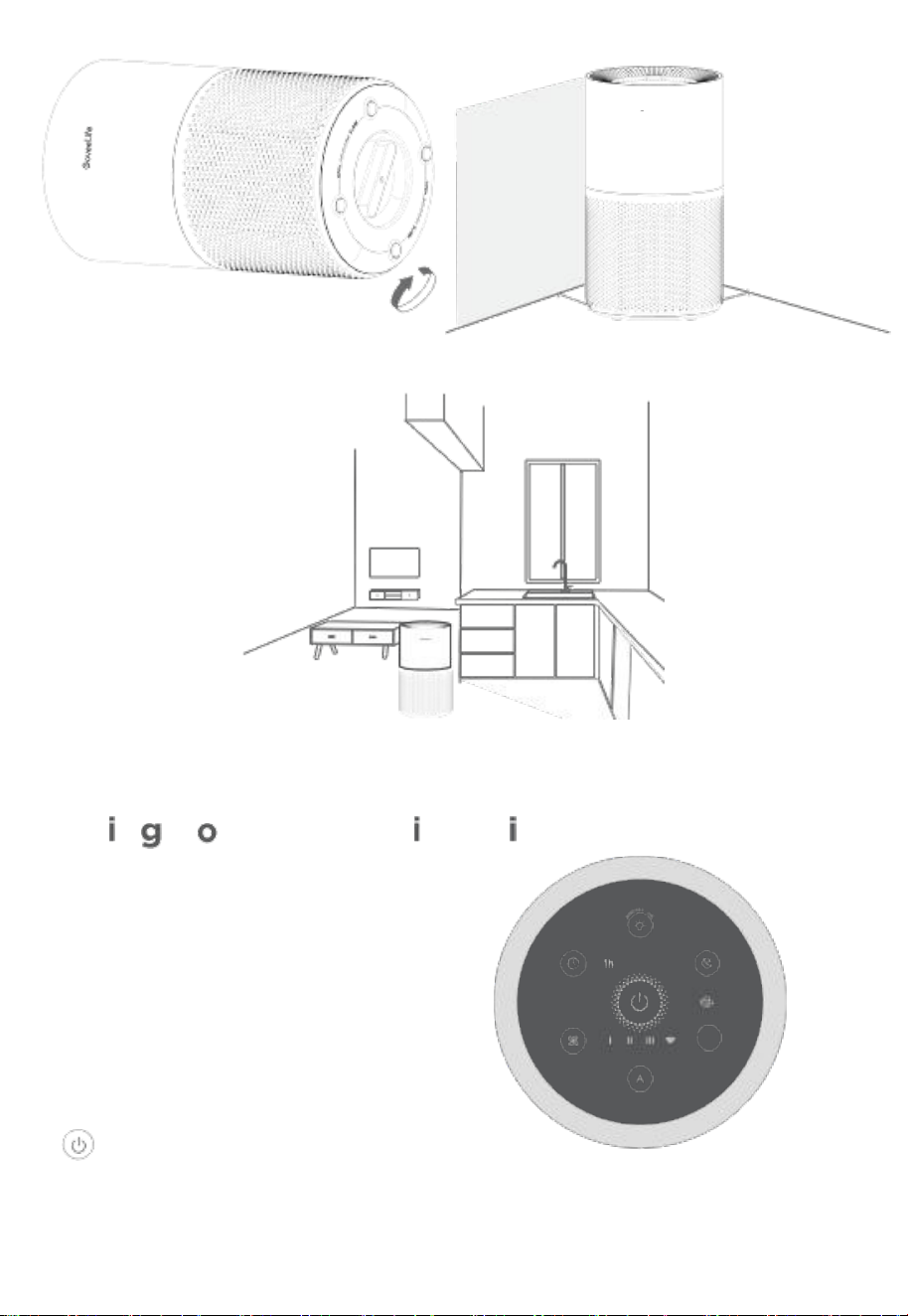
1 . Rotate the bottom filter cover
counterclockwise and take it off.
2 . Remove the plastic packaging from the
filte r and pla ce the filter back into the air
purifier.
3 . Reattach the filter cover and rotate
it clockwise to lock. A Click sound will
indicate the cover is locked in place.
4 . place the air purifier on a flat, stable surface
with the control pane l facing up. keep away
from anything that may block airflow, such as
curtains or cabinets.
O3
e e
5 . This air purifier is not a replacem ent for a proper kitchen ventilator. The purifier can be
placed near a kitchen , but should not be placed directly in the kitchen area .
6 . Insert the adapter output cable into the DC input port, then plug the power adapt er
into a 12ov sock et. your sm art Air purifi er is
ur smart A
You can access additional featur es using
Govee Home APP.
may pee l off the pr otective film
on the control panel before using.
Tur bo
ontrols
on/off Button
press to turn smart Air purifier on/off. press and hold for 3 seconds to
activate wi - Fi , as well as short pressing when reQuested by Govee Home
with the app.
O4
unctio
r pur
ready to use!
fier
APP for
Note: You
1 . F
US
15 inches/38cm
15 inches/38 cm
pairing
Y
short
2h 4h 8h
ns
C
&
n
now
IOV eL if
ER
●

Fan speed Button
press to cycle through fan speeds: I (Iow) , ll (medium) , and lll (high) .
Timer Button
press to cycle through timer options: 1H , 4H and 8H . The purifier will turn off
automati cally when the set timer expires.
sieep Mode Button
pre ss to turn sleep Mod e on or off.when sle ep Mode is on , the air purifier will wor k
at its lowest noise set ting and th e co n trol panel's brig htnes s willdim for mor e
comfortable use at night.
Auto Mode Button
pres s to turn Auto Mode on or off. The purifier will automatically adjust the fan speed
level based on the environmental air auality.
Turbo Mode Button
press to tu rn Turbo Mode on or off. The purifier will operate at its maximum speed ,
delivering powerfu l purification but with a higher noise level .
-
·
· Ni gh t Li gh t & Fi lt er c han g e In di ca to r Bu tto n
sho rt pre ss th is button to turn the night light o n or off. The Filter change Indicator
will light up red when the filter needs to be replace d. After replacing with a new filter,
press and hold the Filt er change Butt on for 3 second , with the indicator flashing 3
times when the reset is complete.
Note:
o After filter reset is complete, usage time will be recalculated.
OThe exchange indicator can also be re set by pressing the Filter change Indicator
Button fo r 3 seconds even if does not light up.
o only us e Go veeLife filters compatible with H7129 smart Air purifier 2 pro (sensor) .
Recovery Button
If the air purifier is not function ing correctly, long press the Recovery Button for 5
seconds until all indicators flash at once to restore the purifier to factory settings.
Note: After restoring the air purifier to factory setting s, 9o to " MY Devices " page on
the app to delete this air purifier first, otherwise it cannot be added to the app aga in.
Me mory Fun ctio n
This air purifier will save its previous settings when powered off (such as speed ,
mode, and wi -Fi connection) , and when it is powered back on , the settings will
resume.
O5
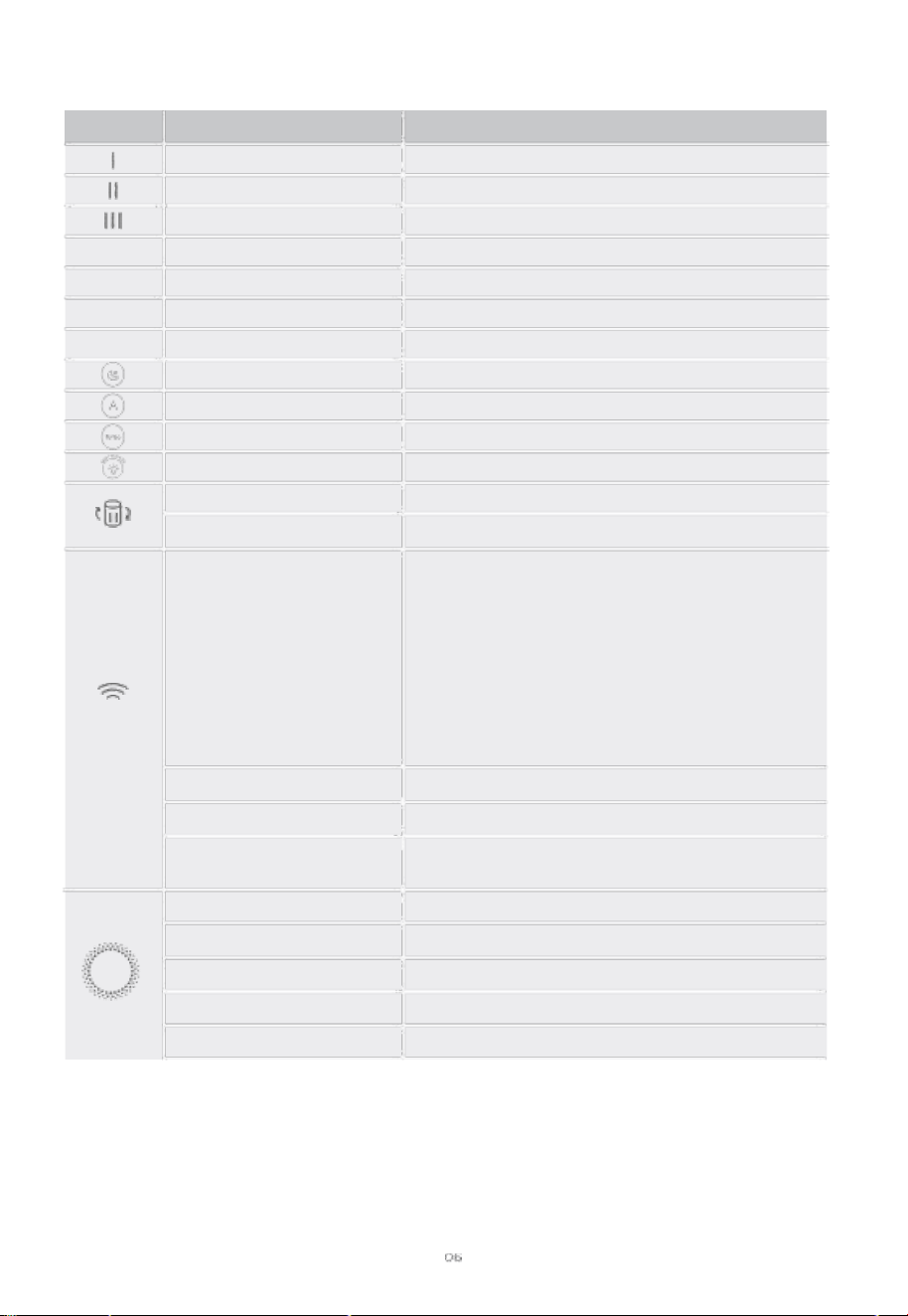
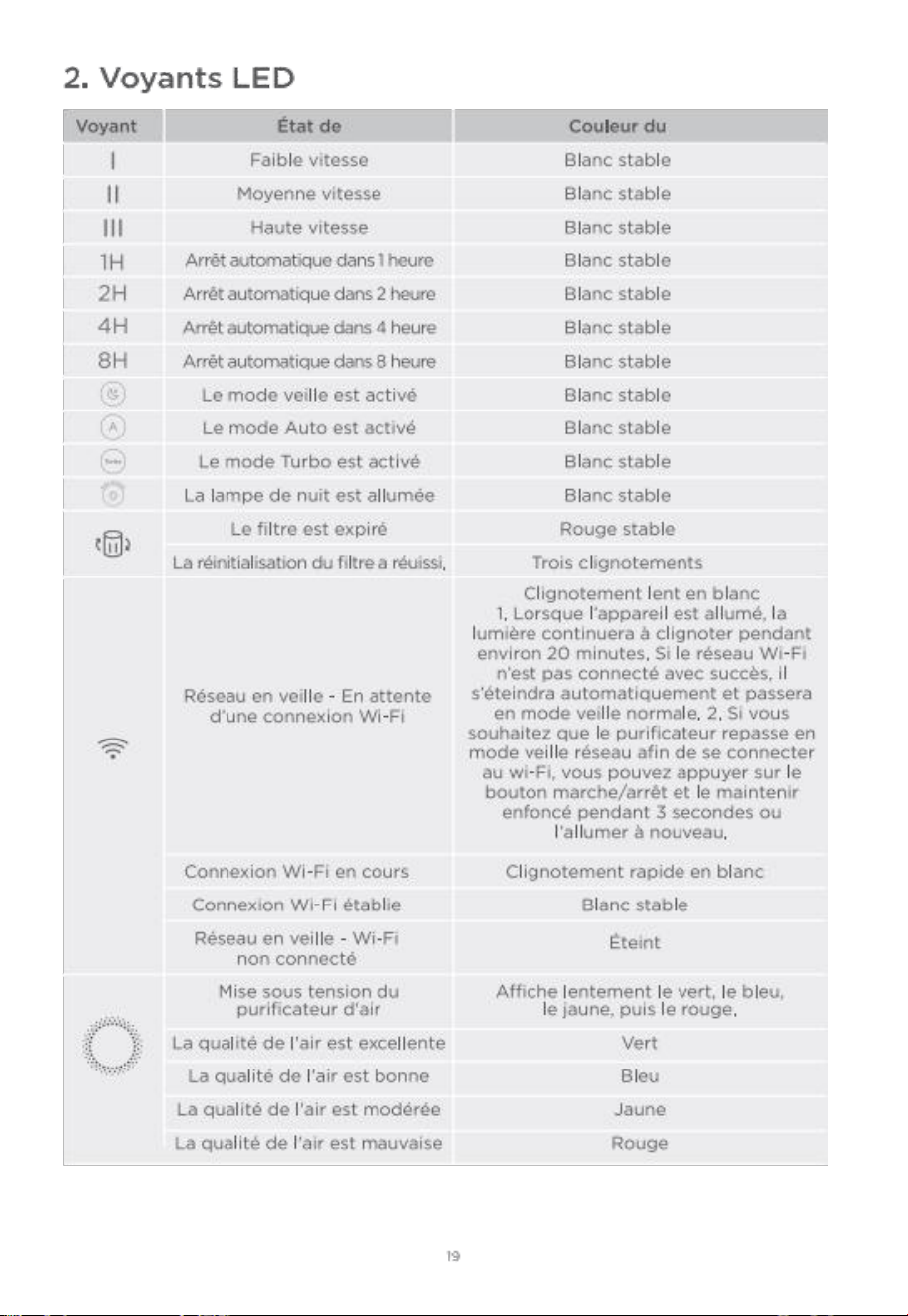
2 . LED Indicators
Working Status
Low Speed
Medium Speed
High Speed
Auto-o仟 in 1 Hour
Auto-o仟 in 2 Hours
Auto-o仟 in 4 Hours
Auto-o仟 in 8 Hours
Sleep Mode is On
Auto Mode is On
Turbo Mode is On
Night Light is On
Filter is Expired
Filter Reset Is Complete
white light fl ashes slowly
Notice:
1 . when the power is turned on , the light will
continue to flash for about 2o minutes. If the
wi - Fi network is not successfully connected
to, it will automatically turn of f and switch to
normal standby mode. 2 . If you wa nt the
purif i er to re -ent e r Net wor k standb y mode
in ord er to connect to wi -Fi , you can press
and ho ld the power butto n for 3 second s or
power on again.
Quickly Flash es whi te
solid white
Lig h t off
slowly breathes with green, blue, yellow, then red.
Green
Blue
yel lo w
Red
wi -Fi is connecting
wi - Fi is connected
Normal st andby - wi -Fi
is not connected
powe rin g on Air pur ifi er
Air Quality is Excellent
Air Quality is Good
Air Quality is Moderate
Air Qual ity is poor
Li ght sta tus
solid white
solid white
solid white
solid white
solid white
solid white
solid white
solid white
solid white
solid white
solid white
solid Red
Flashes 3 Times
Ne t wor k st andb y -
waiting for a wi - Fi
connection
1H
2H
4H
8H
Indicator
●
Govee Home APP
You can access more features using Govee Home APP.
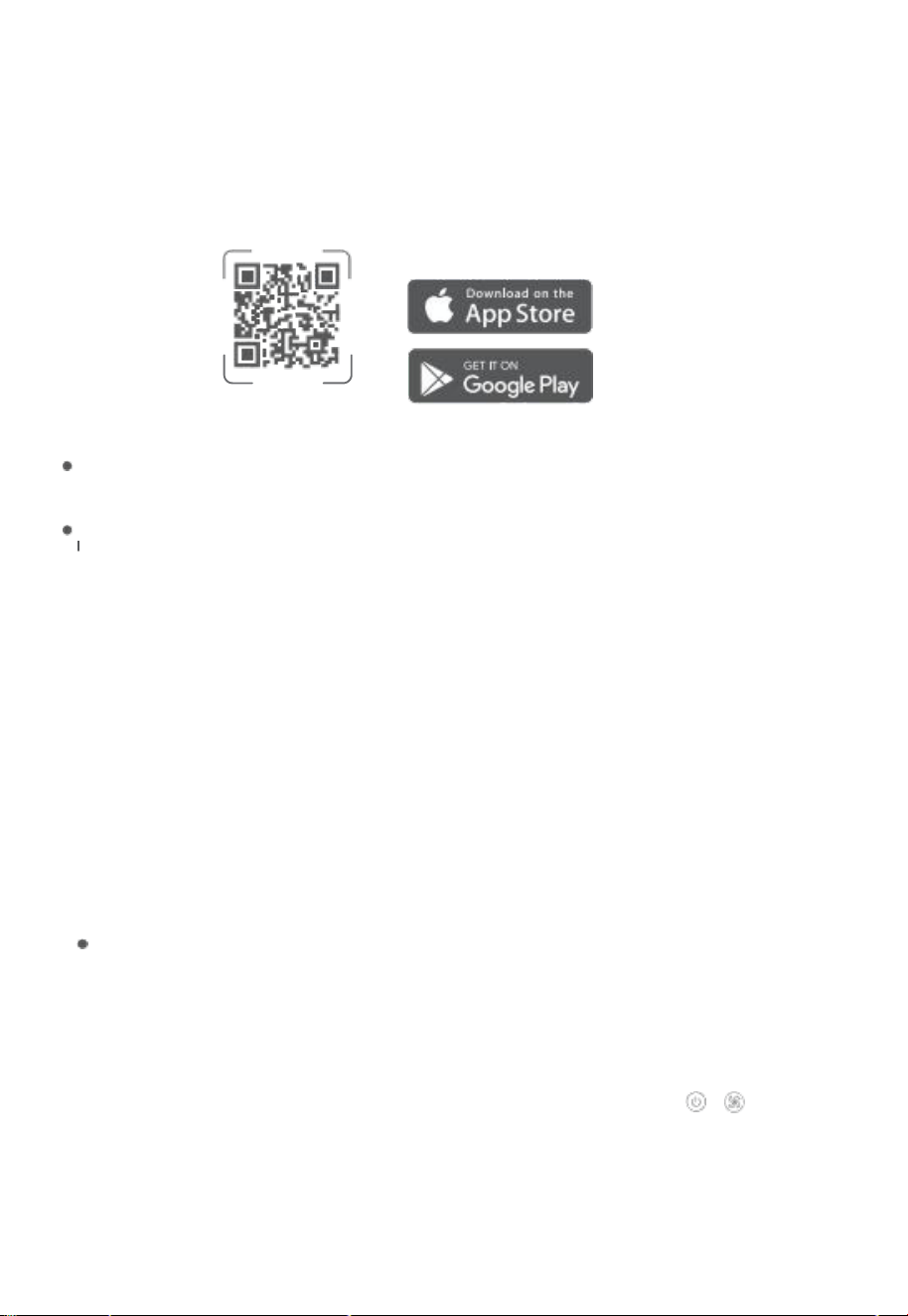
Downloading Go vee Home AP P
To download Govee Home APP, scan the QR Code or search for " Govee " in the Apple
APP St ore ' (ios) or Google play store (A ndro id) .
Govee Home APP
Note:
choose "Allow" to the perm is sio ns requ est ed when opening Gov ee Home APP for the first time.
These permi ssions allow the app's features to func tion norm ally and are not used to record
personal , private information.
Due to ong oing upd ates, Govee Home APP may be slightly diffe rent than shown in this manual .
n case of any differen ces , alway s follow the in-app instructions.
pairing wi t h Gov e e Hom e AP P
1 . Turn on your smartphone's Bluetooth. connect to your wi -Fi router's 2 . 4GHz
network. 5GHz is not supported.
2 . Ensure that the wi - Fi indicator on your purifier is flashing. If the wi - Fi indicator is off,
press and hold the on/off Button for 3 seconds to activate. complete the pairing
within 20 minutes; otherwise, the network funct ions will be disabled , and the wi -Fi
indicator will turn off.
3 . Android users turn on Location services; ios users choose Location - > AIways on in
the pop-up wind ow wh ile adding devices.
Note:
o For ios users , if you chose Location- >Never, it might result in notifications/alert exceptions. It is
recomm ende d to follo w sett ings - > Govee Home - > Locatio n - > Alway s on to obtai n the best
experience.
Govee Home WILL NOT Coll ect, use, or share your location in any way.
4 . open Govee Ho me APP, tap the " + " icon in the top right corner and search for
" H7129 " .
5 . Ta p the device ic on and follow the in-app instruc tions to comple te th e Bluetooth and
wi - Fi connection.
Note:
o Method to turn off Bluetooth and wi - Fi connection: press and hold
+
Button
for 5 seconds to restore the device to factory settings, then go to " MY Devices" page
on the app to delete this puri fier first, otherwise it cannot be added to the app again.
oyo u can use Gov ee Hom e AP P to con nect you r devi ce to Amazon Alexa or Google
Assist ant. Follow the in-app instructions to conne ct to each voice assistant.
o Govee Home APP is being continually updated and its features do expand.
O7

Fo r APP & conn ecti v ity
1 . cannot connect to Govee Home APP.
o Make sure your smartphone is powered on and is not connected to other Bluetooth
devices.
o Ensure that the wi-Fi indicator on the air purifier is slowly flashing. If the wi-Fi indicator is
off ,press and hold for 3 seconds and complete the pairing within 20 minutes.
o Enable the smartphone's Location services.
o Try connecting with another smartphone.
o Make sure your app is the latest version.
o Make sure your wi-Fi router is connected to the 2 . 4GHz network and that
the network is working correctly.
o Make sure the wi-Fi password you entered is correct.
o shorten the distance between the air purifier, wi-Fi router, and the smartphone.
o Make sure your air purifier and the wi-Fi router are located away from
appliances that produce electromagnetic radiation (e. 9 . microwave ovens, refrigerators, etc. ) .
o If you are using a VPN , try turning it off and then connecting the air purifier.
o Disable portal authentication for your wi-Fi network. If portal authentication is enabled ,
this air purifier will not be able to access your wi-Fi network, and the setup will fail. portal
authentication means that you need to sign in to your wi-Fi network through a web page
before you can use the Internet.
2 . cannot find the air purifier in nearby Bluetooth devices list.
o The air purifier may be connected to another smartphone. Disconnect it from
the other smartphone first.
o Ensure that the wi-Fi indicator on the air purifier is slowly flashing.
3 . The air purifier is offl nie.
o Make sure the air purifier is plugged in and powered on, then refresh " Device"
in Govee Home APP by swiping down on the screen.
o Make sure your router is connected to the internet, and your smartphone's network
connection is working.
o If the wi-Fi password has been changed, the air purifier will automatically go offline. Try
connecting it to the network again.
o Delete the offl nie air purifier from Govee Home APP, then add and reconfi gure the air
purifier again in Govee Home APP.
12

customer service
warranty: 24 -Month Limited warranty
support: Lifetime Technical support
Email: support@sovee. com
official website: www govee. com
eGOVEE @Goveelife
@GoveeLife Goveelife.official
13
LIRE ET SAUVEGARDER CES INSTRUCTIONS
Instructions de S Curit
o utilisez uniaueme nt le pu ri fi cateu r d' air inte ll igent comme d
crit dans
ce
man uel.
o Ne pas utiliser l'appareil sans retirer le film plastiaue du filtre. S'il n'est pas retir e purifica-
teur d'air ne filtrera pas d'air et pourrait se surchauffer, provoauant un risaue d ' incendie.
o V
rifiez si la tension in diqu e sur l'app areil corr espon d
a ten sion
ectrique locale avan t
de connecter l'appareil.
o Ne pas utiliser le purific ateur d'air
ext rieur.
o Ne pas utiliser des fins commerciales. usage domestique uniauement.
o Gardez le purificateur d'air loin de I'eau ou des zones humides ou de stagnation d'eau. Ne
jamais placer l'appareil dans I'eau ou dans un liquide.
o Ne pas utiliser dans des zones excessivement humides.
o Gardez le purificateur d'air oign des sources de chaleur telles aue les cuisini res, les fours
ou les radiateurs.
o Ne nettoyez pas I'appareil avec de I'eau , tout autre liquide ou un d tergent (inflammable), et
ne les laissez pas P n trer dans I'appareil , pour viter tout choc ectriaue et/ou risque
d ' incendie.
o Gardez-Vo us 5 pieds /1 , 5 m de I'endroit o
oxy
ne est administr ·
o surveillez les enfants lorsau'ils se trouvent proximit du purifi cateur d'air. Ne laissez pas les
enfants jouer avec le purificateur d'air.
o Les enfants ne doivent pas nettoyer ou entretenir le purifi cateur d'air sans surveillance.
o Ne placez rien dans les ouvertures du purifi cateur d'air.
o Ne placez pas d'objets lourds sur le purificateur d'air.
o Ne bloquez pas I'entr e et la sortie d'air.
o Gardez I ' int rieu r
du
pur ificateur
d'a ir sec. pou r
viter I'acc um ulation d'humidit vitez de le
placer dans des pi
ces
sou mises des changements de temp rature importants ou Sous des
climatiseurs.
o placez et utilisez toujours I'appareil sur une surface S Che, stable, plane et horizontale.
o
teignez et d branchez le purifi cateur d'air avant de d placer, de r parer, de nettoyer, de
remplacer les filtres ou d'effectuer toute autre forme d'entretien.
o Ne touchez pas la fiche d'alimentation ou I'adaptateur secteur avec les mains moui
es.
o N'utilisez pas le purificateur d'air S'il est endomma ou ne fonctionne pas correctement, ou
si le cord on de I' adap tateur se cteur est en do mma · co nt ac te z I'as sistanc e client
et et
n
'
e s s a y e z p a s d' e f f e c t u e r le s r p a r a t i o n s V o u s - m me .
o N'ut ilis ez pas I'appareil si l'ada ptateur, le cordon d'alimen tation ou I'appareil lui-m
me est
endomma
·
o utilisez uniauement I'adaptateur secteur fourni avec ce purificateur d'air.
o utilisez uniquement les filtres d'origine Sp cialement
destin
S Cet appare il. N ' uti lisez aucun
autre filtre.
o AVERT
SSEMENT
: pou r r
duire le risque d'i ncend ie ou de ch oc ectrique , n' utilisez pas ce
purif i ca teur d' ai r av ec to ut di sp os it if de contr
e de vitess e se mi -
co nducte ur s
.
o pas pour un usage commercial. usage domestique uniquement.
14
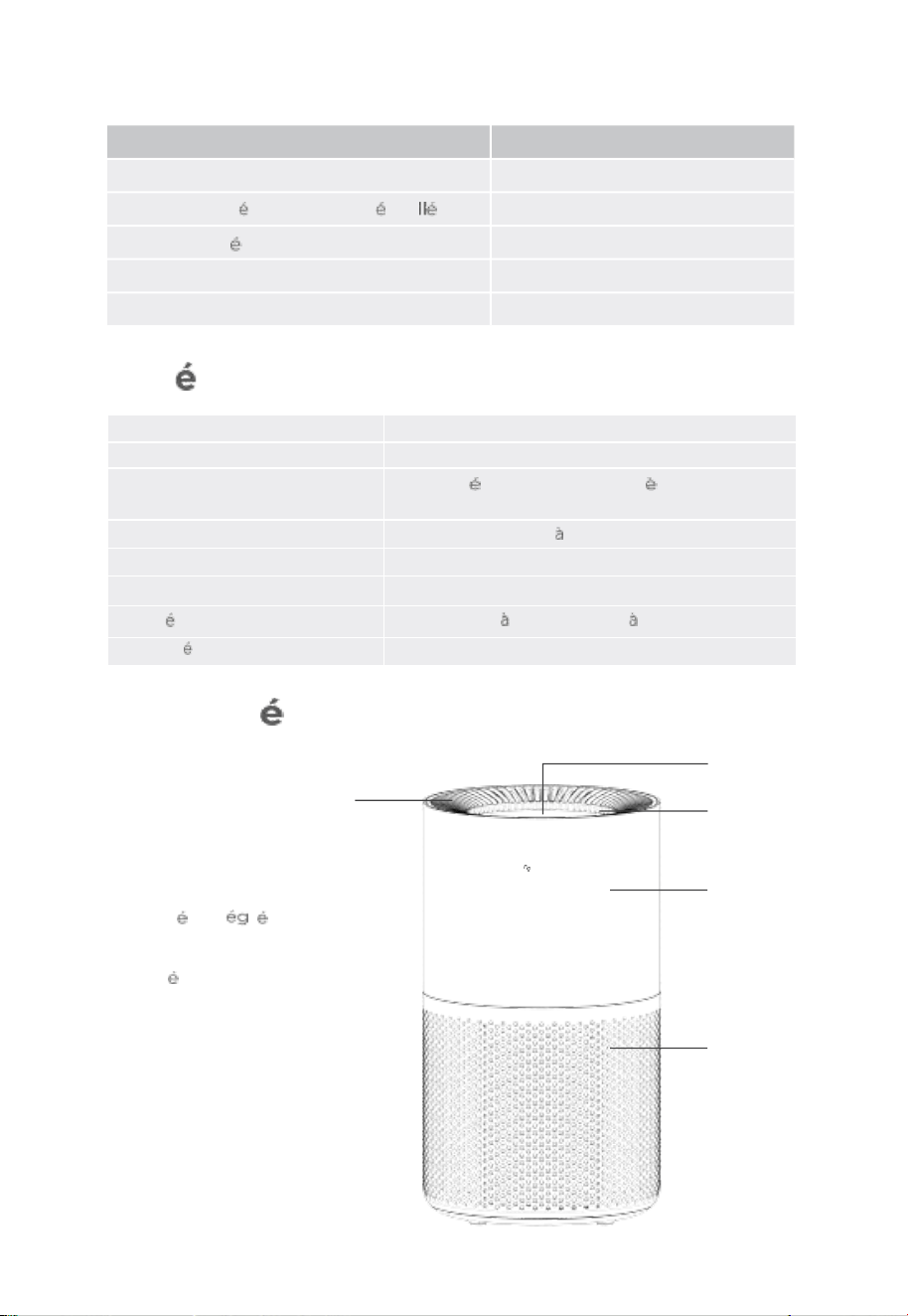
composition de I'ensemble
Article
purificateurd'air intelligent2 pro (capteur)
Filtre HEPA V ritable 3 en 1 (pr insta )
Gui de
de
d
ma r r ag e ra pi d e
Manuel d ' utilisation
1
Qu a n t ity
1
1
1
1
Adap tat eur sect eur
caract ristiques
Alimentation
10O- 240V AC 50/60Hz
pu is sa nc e no mi na l e
32W
CADR
Fum e :15 0 cfm po ussi re :1 55 c fm
pollen :16o cfm PM2, 5 :155c fm
Niveau de bruit
24 52 dB
Dimensions
8, 7 x 8, 7 x 15 , 3 Po / 22 x 22 x 38, 6 cm
poids net
6 . 6lb / 3kg
Temp
rature defonctionnement
-10 o C 40 oc / 14 o F 104 o F
Humidit defonctionnement
< 85 % HR
Guide
de
d
marrage pour votre purifi cateur
d'air in telligent
C
a . panneau
b. Lampe de nuit
C. sortie d'air et
poign e int r e
d . Boitier
e. Entr e d' air
·
oveeLife
Devant
15
a
b
d
e
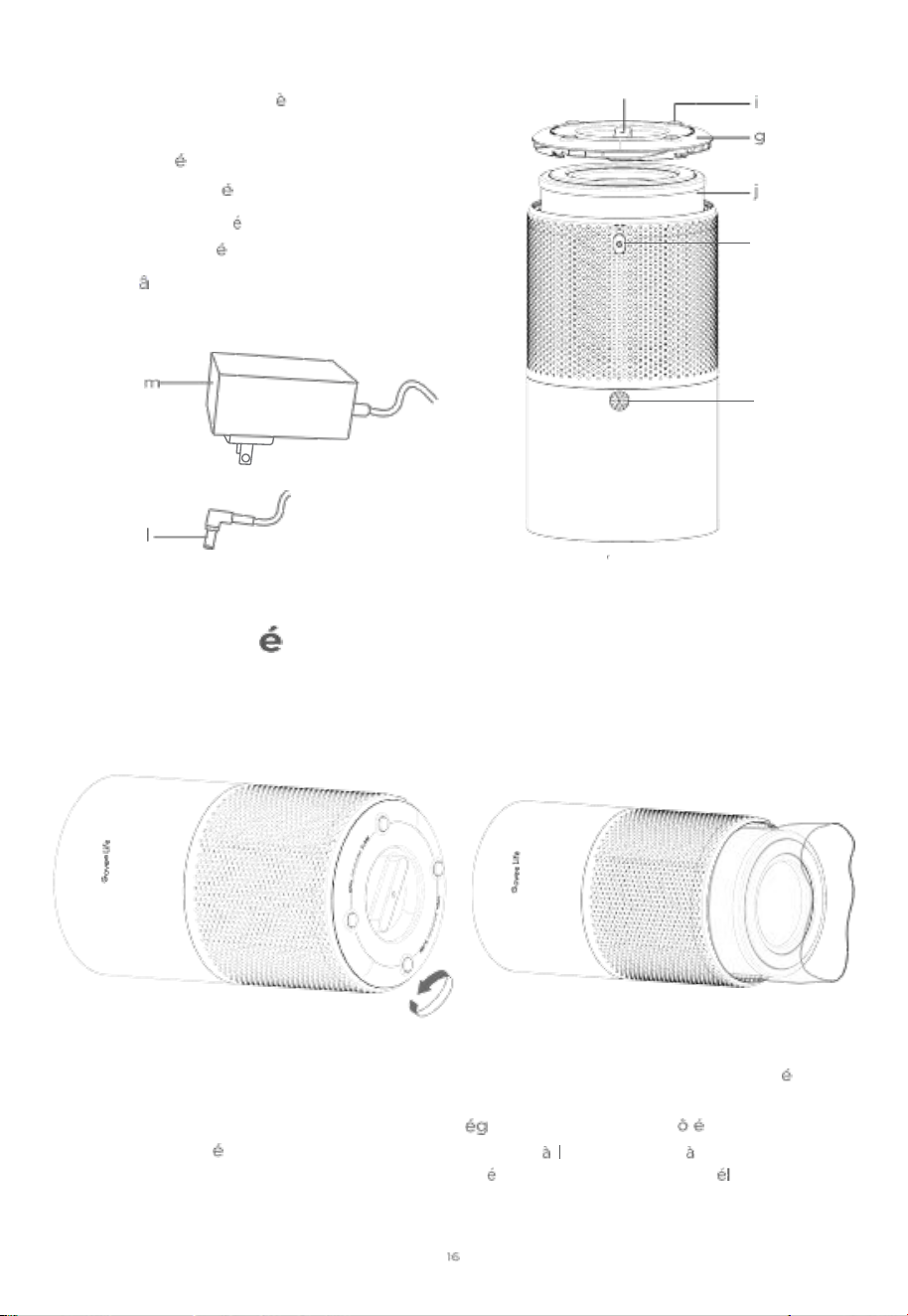
f. capteur de poussi
re
g . couvercle du filtre
h. poign e du couvercle du filtre
i . patins antid rapants
j. Filtre HEPA V ritable 3 en 1
k. port d'entr e Cc
I . C
ble de sorti e ad ap tateur
m . Adaptateur secteur
h
k
f
A I envers
Guide
de
d
marrage
1 . Faites pivoter le couvercle du filtre au
dessous dans le sens inverse des aiguilles
d ' une montre et retirez- le.
2 . Retirez I'emballage en plastique du filtre
et remettez le filtre dans le purificateur d'air.
3 . Remettez le couvercle du filtre en place
et tournez- le dans le sens des aiguilles
d ' une montre pour le verrou iller. Vous
entendrez un son india uant aue le
couvercle est serr
·
4 . placez le purifi cateur d'air sur une surface
pl an e et sta bl e ave c le pann e au orie nt
ve rs le
haut. Laissez au moins 15 po /38 cm de
d agement de tous les c t S afin de
per me ttr e
,
air de passer tra vers les
entr es d ' air sans restreintes , oignez
I ' appareilde tout ce aui bloquerait le flux d'air,
com me les rideaux ou les armoires.
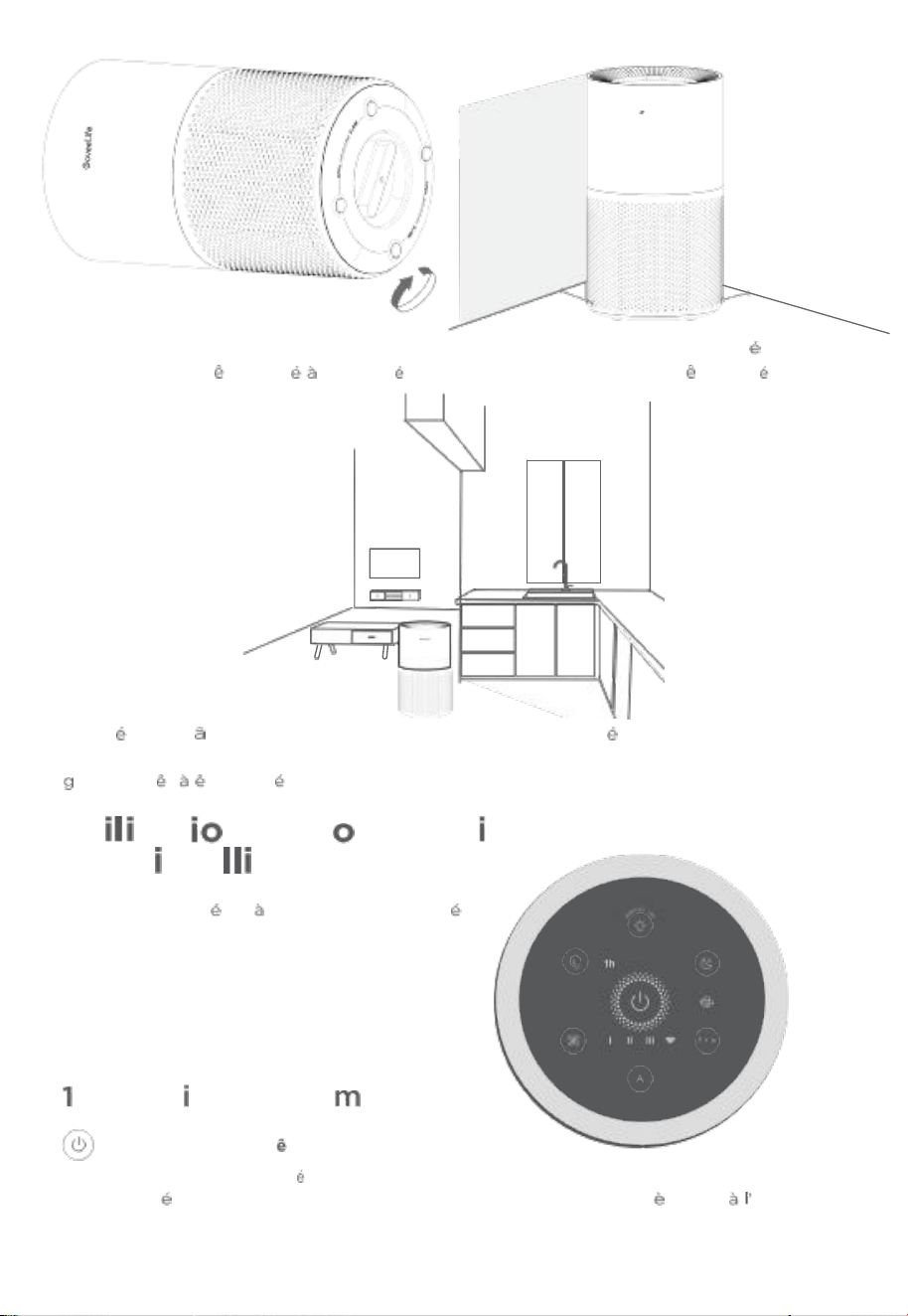
15 in / 38cm
cuisine, mais ne doit pas tre plac
ment dans la cuisine.
6 .
In s
re z le C
bl e de so rtie d e I' adap tat eu r dans le port d'e ntr e Cc, pu is bran c he z
I'ada ptateur secteur dans une Maintenant, votre purifi cateur d'air intell i-
ent
est pr
t tre util is
!
tre pur
2h 4h 8h
Appuyez pour allumer/ teindre le purificateur d'air intelligent. Appuyez et maintenez
en fo n c pen dan t 3 se c ond es pour active r le wi - F,i ou ap puy ez bri ve me nt
invite
de
I'application Govee Home pour l'association avec I'a pplication.
17
Vous
pouvez
acc
der d'autres fo nctionnalit S
sur I'application
15 in / 38cm
peut pas rem placer un
d ' une
protecteur du pann ea u av ant utilisation.
purif icateur peut tre plac proximit
ve ntil a teu r d e cu isi n e appr o pr i
· Le
Remaraue: Vous pouvez en lever le
5 . ce purificateur d'air
ons et Co
n de V
gent
, Fonct
andes
prise de 120 V.
marche/arr t
teur
Govee Home.
nte
sat
air
ut
d'
Bo uton
directe
ca
fi
m
film
ne
oveeLife
●
U b
ER
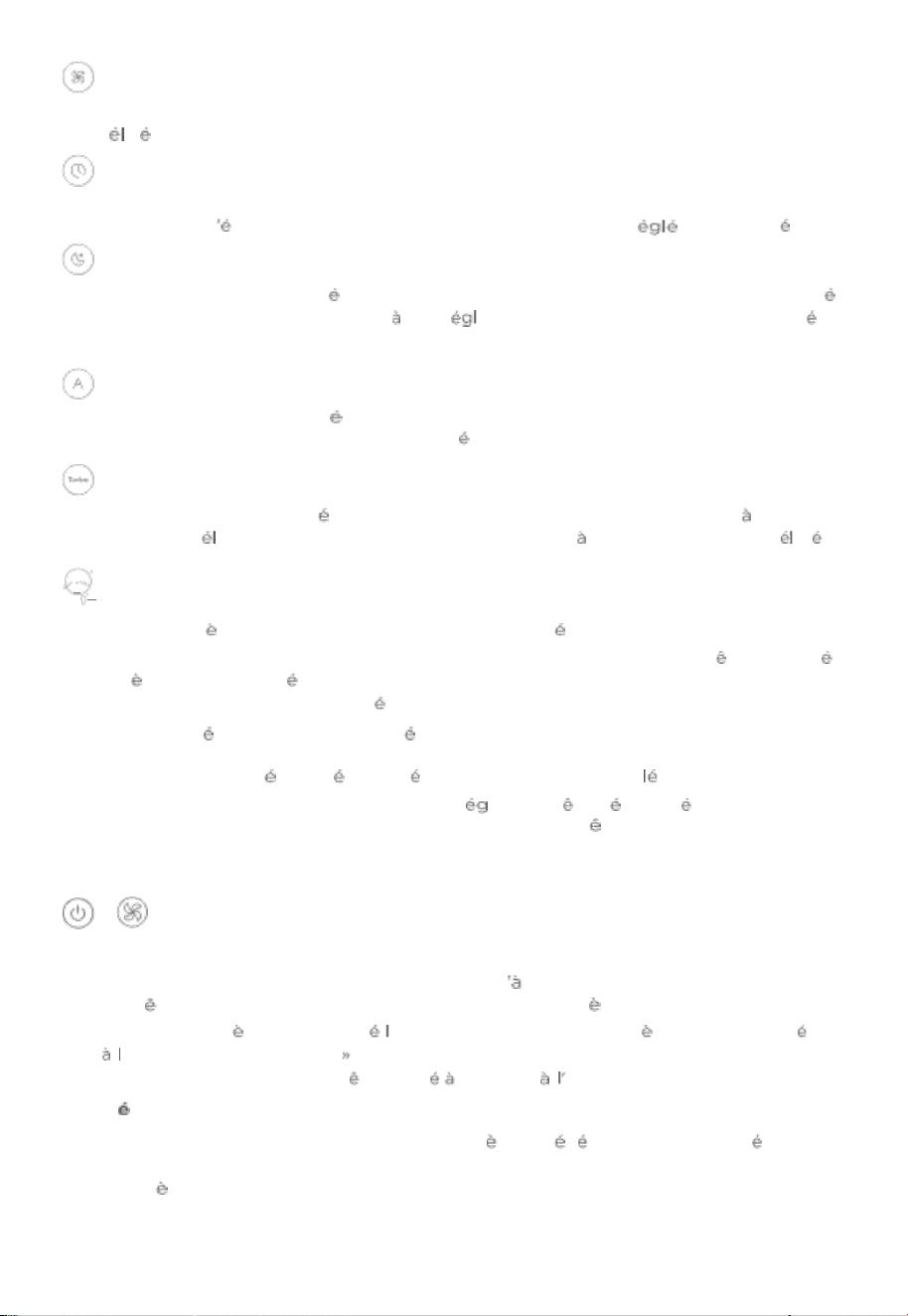
Bouton de vitesse du ventilateur
Appuyez pour faire commuter les vitesses du ventilateur : I (faible) , ll (moyen) et Ill
( ev ) .
Bouton de minuterie
Appuyez pour commuter les options de la minuterie : 1H , 2H , 4H , 8H et annu ler. Le
purificateur S teindra automatiquement lorsaue la minuterie r e aura expir ·
Bouton de mode veile
Appuyez pour activer ou d sactiver le mode veille. Lorsque le mod e veille est activ
,
le pu rif i ca teu r d' air fon cti on nera
so n r
ag e de bru it le plu s bas et la lumino si t
du
panneau diminuera pour une utilisation plus confortable dans la nuit.
Bouton de mode automatique
Appuyez pour activer ou d sactiver le mode automatique. Le purificate ur S'ajustera
automa ti queme nt en foncti on de la auali t
de I' air
ambiant
.
Turbo Bouton Mode
Appuye z
pour
activer
ou d
sactiver le mode Turb o. La machine fo nctionner a sa vitesse
maximale, d ivrant un puissant effet de purification mais un niveau sonore plus
ev
·
·
· B o u t o n p o u r l e r e m p l a c e m e n t d u f i l t r e e t l a la m p e d e n u it
Appuyez bri vement sur ce bouton pour all umer ou teindre la lampe de nuit. Le
voyant de changement du filtre S'all ume en rouge lorsQue le filtre doit tre remplac ·
Apr S I'avoir remplac par un nouveau filtre, appuyez sur le bouton de changem ent
de
fil tr e et mainten ez
- le
enfonc pendant 3 secondes , le voyant clignotant 3 fois
lorsaue la r initialisation est termin e.
Remaraue :
o une fois le filtre r initialis , sa dur e d ' utilisation sera recalcu e.
o Le voyant de change ment de filtre peut alement tre
r
initialis en appu yant sur
le bouton de changement de filtre pendant 3 secondes m me S'il ne S'all ume pas.
o utilisez uniauement des filtres GoveeLife compatibles avec le H7129 purificateur
d'air intelligent 2 pro.
+
Bouton de restauration
si le purifi cateur d'air ne fonctionne pas correctement, appuyez longue ment sur le
bouton de rresta uration po ur 5 secondes jusau ce aue tous les voyants clig notent
en m me temps p o ur r e s ta ure r le pur ific a teu r aux para m
tr es d '
us i ne
.
Remaraue: Apr
S
avoir re staur e purificateur d'air aux param tres d ' usine, acc
dez
a pa g e
《 《
Me s ap p arei l s su r I' a pp l ica t i o n po u r su p pr i mer d' a bo rd c e pu r if i c at e ur
d'air, sinon il ne pourra pas tre ajout nouveau application.
M moire
ce purificateur d'a ir sauvegardera ses param tres pr C dents lorsau ' il est teint (tels
aue la vitesse, le mode et la connexion wi -Fi) . Lorsqu ' il est rem is Sous tension , les
param tres reprennent.
18
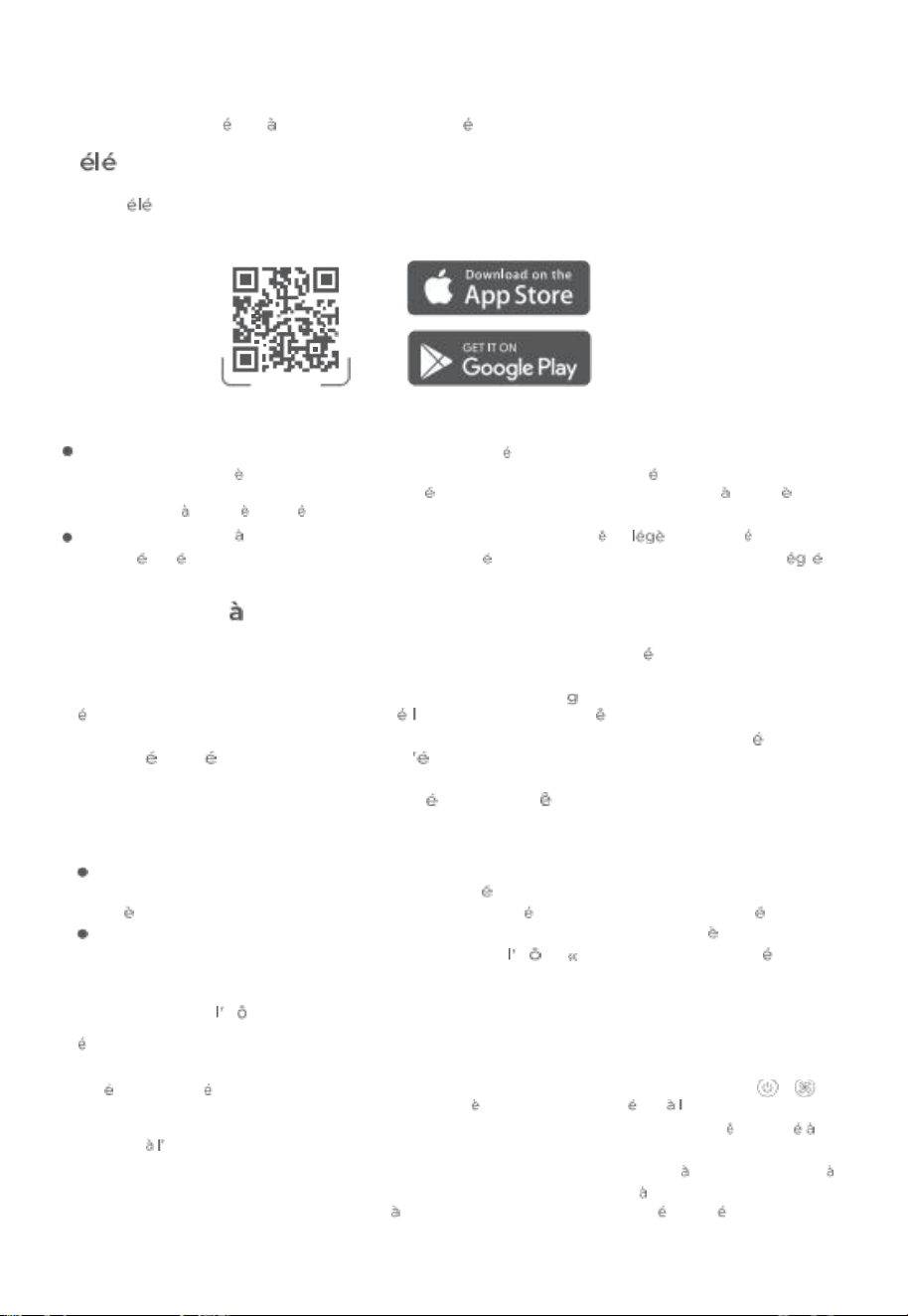
Application Go vee Home
Vo u s p o uvez acc
de r d' a u t r e s
fo n c t i onna l i t S S u r I' A p p licati o n G ove e Ho m e .
T
Chargement de I'applica tion Govee Home
po ur t
ch a rg e r I'a ppl ica tio n Gove e Home , sc a nn ez le co de QR Ou re c he rc h ez
《《
Go vee »
sur App le APP Store' (io s) ou sur Google play sto re (Andro id) .
厂:
.
Govee Home APP
Remar que:
cho is is se z 《《 Aut or is er » po ur les aut or is at io ns d ema nd e s lo rs Qu e Vo us o uvr e z I'A ppl ic at io n G ove e
Home po ur la premi re fois . ces autor isations perme ttent aux fonct ionn alit S de I'a pplicati on de
fonct ionn er normalement et ne sont pas ut ilis es pour en registre r des inform atio ns caract re
personnel et caract re priv ·
En raiso n de mise s jour en cours , I'application Govee Home peut tre reme nt diff rente de
celle pr sent e dans ce manuel . En cas de toute diff rence, suivez toujours les consignes int r es
dans I'application.
As s ociat i o n
i' Ap pl i c a t i o n Gov ee Ho m e
1 . Activez le Bluetooth de votre smartphone. connectez-Vous au r seau 2 , 4 GHz de
votre routeur wi -Fi . La bande 5 GHz n'est pas prise en charge.
2 . A s sure z - V ou s au e le v o ya n t w i - Fi de votr e a pp are i l cli
no te. si l '
in di c ate ur
wi - F i
es t
teint, appuyez et maintenez enfonc e bouton marche/arr t pendant 3 secondes
pour I'activer. Terminez I'appairage dans les 20 minutes ; sinon , les fonctions r seau
seront d sactiv es et le voyant wi - Fi S teindra .
3 . Les utilisateurs d'Android activent les services de localisation ; les utilisateurs d ' ios
choisissent Localisation - >Toujours activ
dans la fen
tre contextuelle lors de I'ajout
d'appareils.
Remarque:
pour les utilisateurs ios, si Vous choisissez Localisation- >Jamais , cela peut entrainer des
exceptions de notifications/alertess. Il est recommand de suivre les instructions su ivantes :
param
tres - >Govee Home - >Localisation - >Toujours activ pour obtenir la meilleure exp rience
.
Govee Home NE Collectera, n'utilisera ni ne partagera votre position de quelque mani re aue ce soit.
4 . ou vre z I'a pp lica ti on Go vee H ome, app uye z su r
ic
ne
+ » da ns le co in Su p
rieu r
dro it e t rec h erc h ez
《《
H7 12 9 » ·
5 . Appuye z sur
ic
ne de I'app areil et suivez les instruction s de I'application pou r
tablir la connexion Bluetooth et wi - Fi .
Remaraue:
o M
thode pour d sactiver la connexion Bluetooth et wi-Fi : Appuyez et maintenez enfonces
+
pendant 5 secondes pour restaur er I' apparei l aux param tres d'usi ne, puis acc
dez
a page 《《 Mes
purificateur » de l'application pour supprimer d'abord ce radiateur, sinon il ne pourra pas tre ajout
nouveau application.
o Vo u s pou ve z ut il ise r I'a pp li ca ti on Go vee Ho me po ur con n ect er vo tr e pu ri fi ca te ur
Ama zo n
Alexa
ou
Google Assistant. suivez les instructions de I'application pour Vous connecter chaQue assistant vocal.
o L' a pp lic a t io n G o ve e H om e es t en m ise j our con sta nte e t ses fon c tio nna lit
S Se d
velo pp ent .
2O
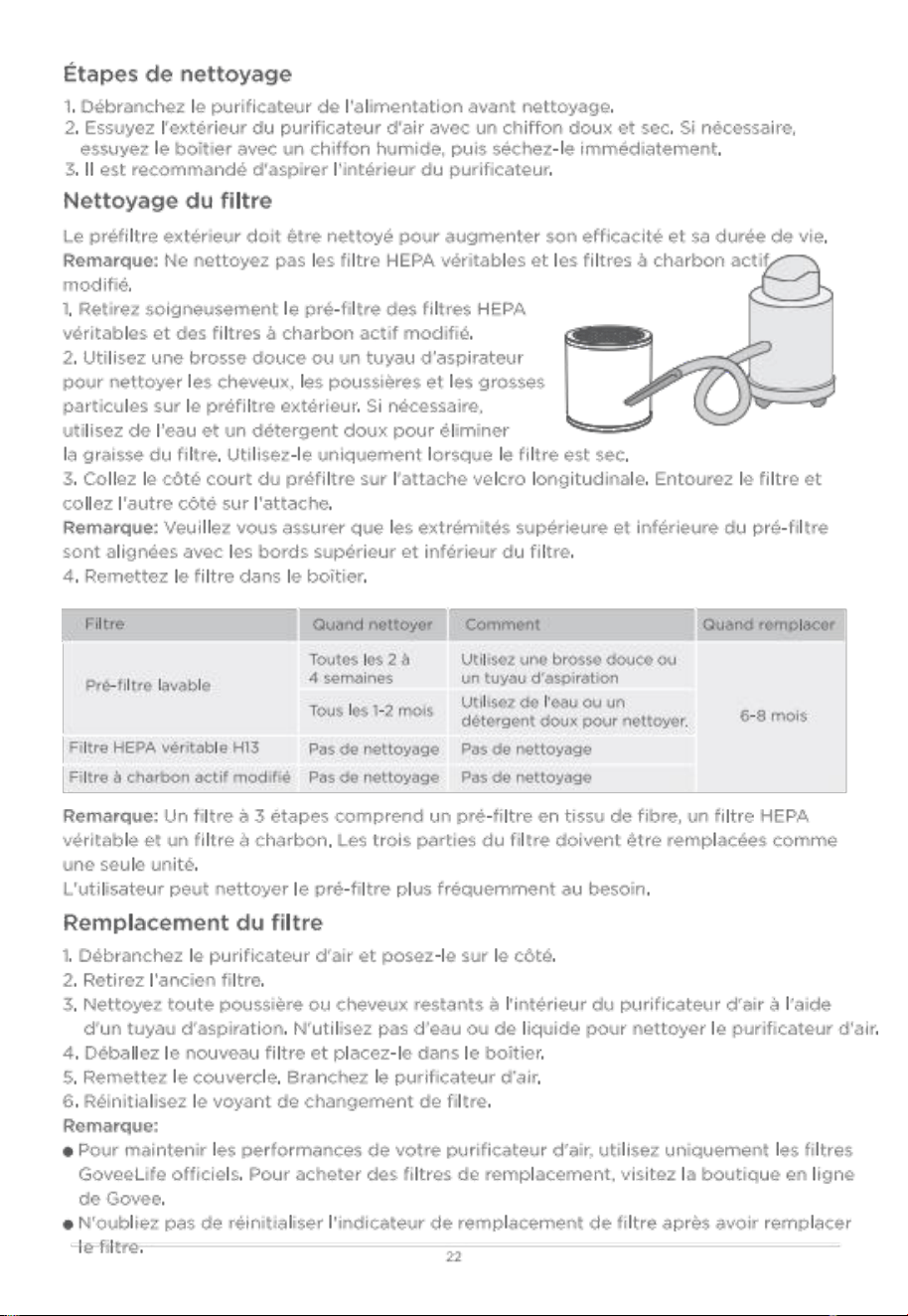
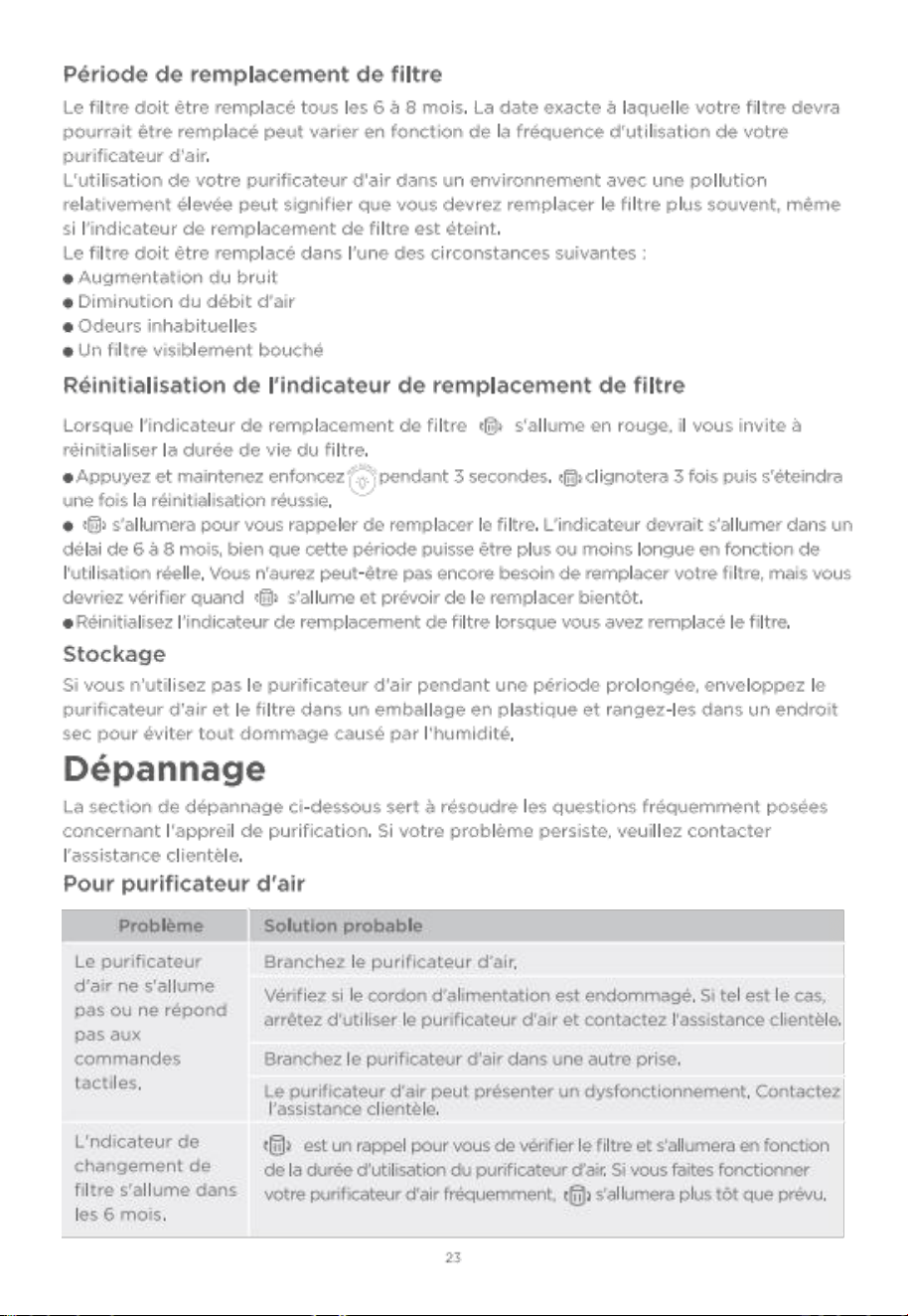
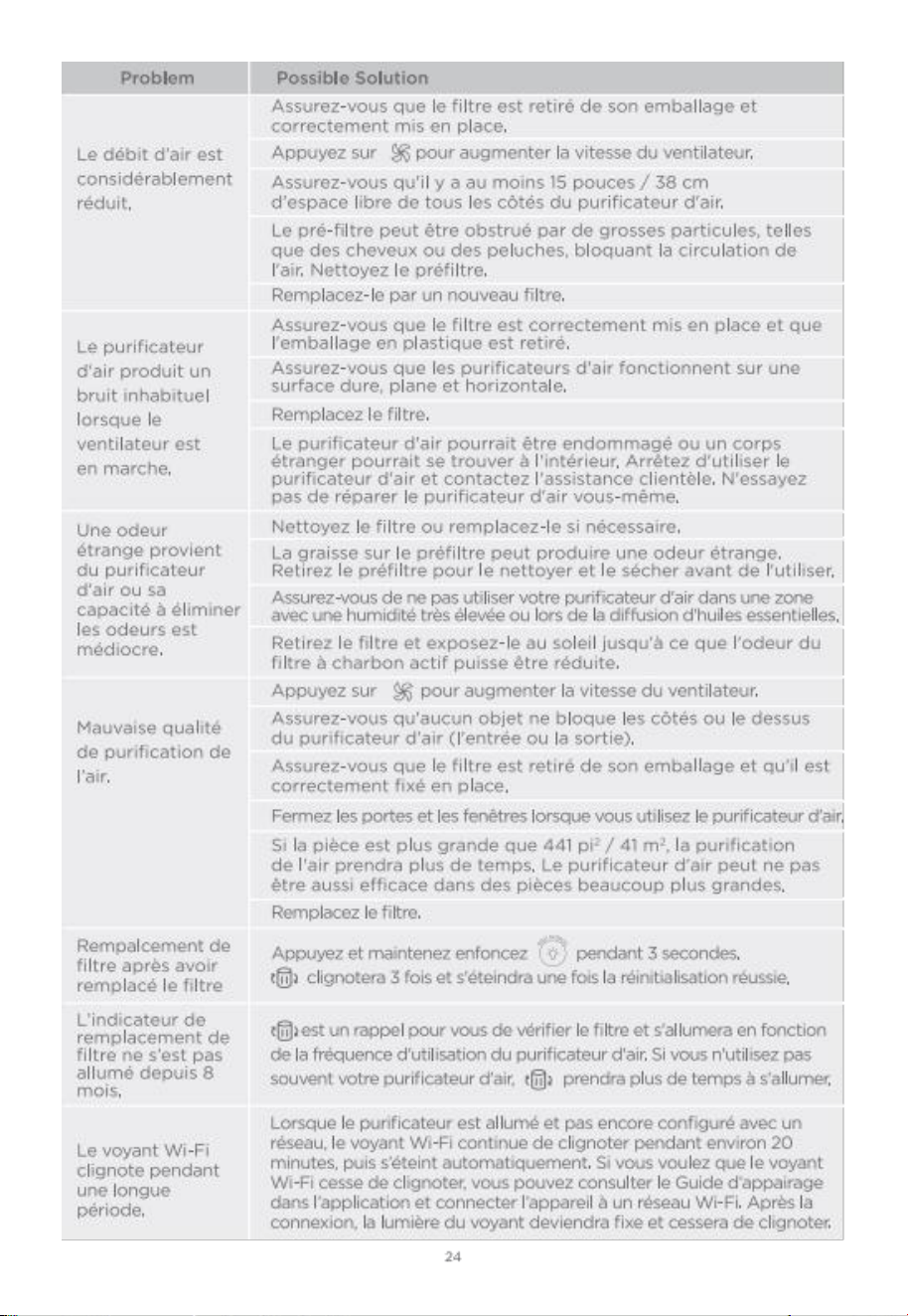

pour I'application et la connectivit
1 . Im p os s ib l e de se co n nec t er
,
ap p li c ati o n Gov e e Hom e.
o Assurez-Vous aue votre smartphone est all um et qu ' il n'est pas connect d'autres appareils
Bluetooth.
o Assurez-Vous aue l ' indicateur wi-Fi du purificateur d'air clignote lentement. si l ' indicateur
wi-Fi est teint, appuyez et maintenez enfonc pendant 3 secondes et terminez
I'appairage dans les 20 minutes.
o Activez les services de localisation du smartphone.
o Essayez de Vous connecter avec un autre smartphone.
o As surez-V ous aue votre applicati on est de la derni
re version.
o Assurez-Vous aue votre routeur wi-Fi est connect au r seau 2,4GHz et aue le
r seau fonctionne correctement.
o Assurez-Vous aue le mot de passe wi-Fi Que Vous avez saisi est correct.
o Raccourcissez la distance entre le purificateur d'air, le routeur wi-Fi et le smartphone.
o Assurez-Vous aue votre purificateur d'air et le routeur wi-Fi sont situ S loin des appareils
produisant des rayonnements ectromagn tiques (par exemple, fours micro-ondes,
r fri rateurs, etc. )
o si Vous utilisez un VPN , essayez de le d activer puis connectez le purificateur.
o D Sactivez I'authentification du portail pour votre r seau wi-Fi. si l'authentification du
portail est ac ti v e, ce purificate ur d' air ne pourra pas acc
der
votre
r seau wi-Fi et la
confi guration chouera. une authentification du portail signifie aue Vous devez Vous
connecter votre r seau wi-Fi travers une page web avant de pouvoir acc der nternet.
2 . Impossible de trouver le purifi cateur d'air dans la liste des appareils Bluetooth proximit ·
o Le puri fic at eur d'a ir pe u t tr e co n ne c t un aut re smar tp ho ne. D Conn ec te z
-le d
'abord
de l'autre smartphone.
o Assurez-Vous que l ' indicateur wi-Fi du purificateur d'air clignote lentement.
3 . Le purifi cateur d'air est hors ligne.
o As s u re z -V o u s au e les pur i fi c ate u rs d 'a i r so n t b ra n ch
S et
al lum S, pu is ac t ual i se z
《《 Me s appar ei ls » dans I' application Go ve e Ho me en fa is an t gli ss er cra n
vers le
bas
.
o Assurez-Vous aue votre routeur est connect nternet et aue la connexion r seau de votre
smartphone fonctionne.
o si le mo t de pas se wi- Fi a
t
modi fi e pu rif ica te u r d'air si teindra au tomatique me nt.
Essayez de le reconnecter au r
seau .
o supprimez le purifi cateur d'air hors ligne de I'application Govee Home, puis ajoutez et
reconfigurez nouveau le purificateur d'air dans I'application Govee Home.
25

service clients
Garantie : Garantie limitée 24 mois
Assistance : Assistance technique à vie
国
E-mail : support@govee.com
Site Web o代ciel : www.govee.com
@ GOVEE
@ GoveeLife
@ Goveelife
@Goveelife.offi cial
Ener gy star
The energy efficiency of this ENERGY STAR Certified model is measured based on a
ratio between the model's CADR for smoke and the electrical energy it consumes, or
CADR/watt.
The trademark GoveeLife has been authorised to shenzhen Qianyan Technology LTD.
copyright o2021 shenzhen Qianya n Technology LTD. AlI Rights Reserved.
The Bl ue t ooth
wo rd ma rk and lo gos are reg ist er e d trademar ks owne d by Bl uet o ot h
S
G, I nc. an d an y us e o f su c h ma r k s by sh e n z hen Qi a n y a n Tech n o l o gy LT D is un d er
license.
26

co m pl i a n c e In f o r m a ti o n
FCC and ISED Canada statement
This device complies with part 15 of the FCC Rules and Industry canada licence-exempt RSS
standard(s) . operation is subject to the following two conditions: (1)This device may not
cause harmful interference, and (2) This device must accept any interference received,
including interference that may cause undesired operation.
warning: changes or modifications not expressly approved by the party responsible
for compliance could void the user's authority to operat e the eauipment.
Le pr sent appareil est conforme aux CNR d ' Industrie canada applicables aux appareils radio
exempts de lic en ce . L'e xp loitat io n est au to ris
e aux de ux conditions
suivantes : (1) I'appareil nedoit pas produire de brouillage, et (2) I'utilisateur de
I'appareil doit accepter tout brouillage radio ectriaue subi , m me si le brouillage est
susceptible d'en com promettre le fonctionnement.
NOTE: This equipment has been tested and found to comply with the limits for a
class B digitaldevice pursuant to part 15 of the FCC Rules. These limits are
designed to provide reasonable protection against harmful interference in a
residential installation. This eauipment generates uses and can radiate radio
freauency energy and, if not installed and used in accordance with the instructions, may
cause harmful interference to radio communications. However, there is no
uarantee that interference will not occur in a particular installation. If this
eauipment does cause harmful interference to rad io or television reception , which
can be determined by turning the equipment off and on, the user is encouraged to
try to correct the interference by one or more of the following measures:
-Reorient or relocate the receiving antenna.
-Increase the separation between the eauipment and receiver.
-connect the eauipment into an outlet on a circuit different from that to which the receiver is
connected.
-consult the dealer or an experienced radio/TV technician for help.
This class B digital apparatus complies with canadian ICES- 003 . cet appareil num rique de
la classe B est conforme Ia norme NMB-Oo3 du canada.
FCC and IC Radiation Exposure statement
This equipment complies with FCC and IC radiation exposure limits set forth for an
uncontrolled environment. This equipment should be installed and operated with
minimum distance 20cm between the radiator & your body.
Lors de I'utilisation du produit, maintenez une distance de 20 cm du corps afin de Vous
conformer aux exigences en mati re d'exposition RF.
Responsible party (this contact information is only for FCC matters) :
Nam e: GO VE E MO ME NT S(US) TRADING LIMITED
Address: 2501 chatham Rd suite R Springfield IL 62704
Email: certification@govee. com
contact information: https://www.govee. com/support