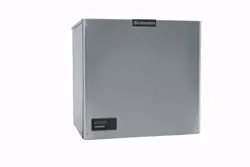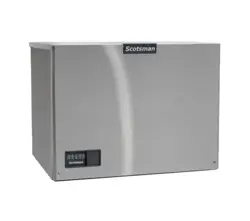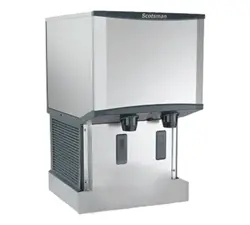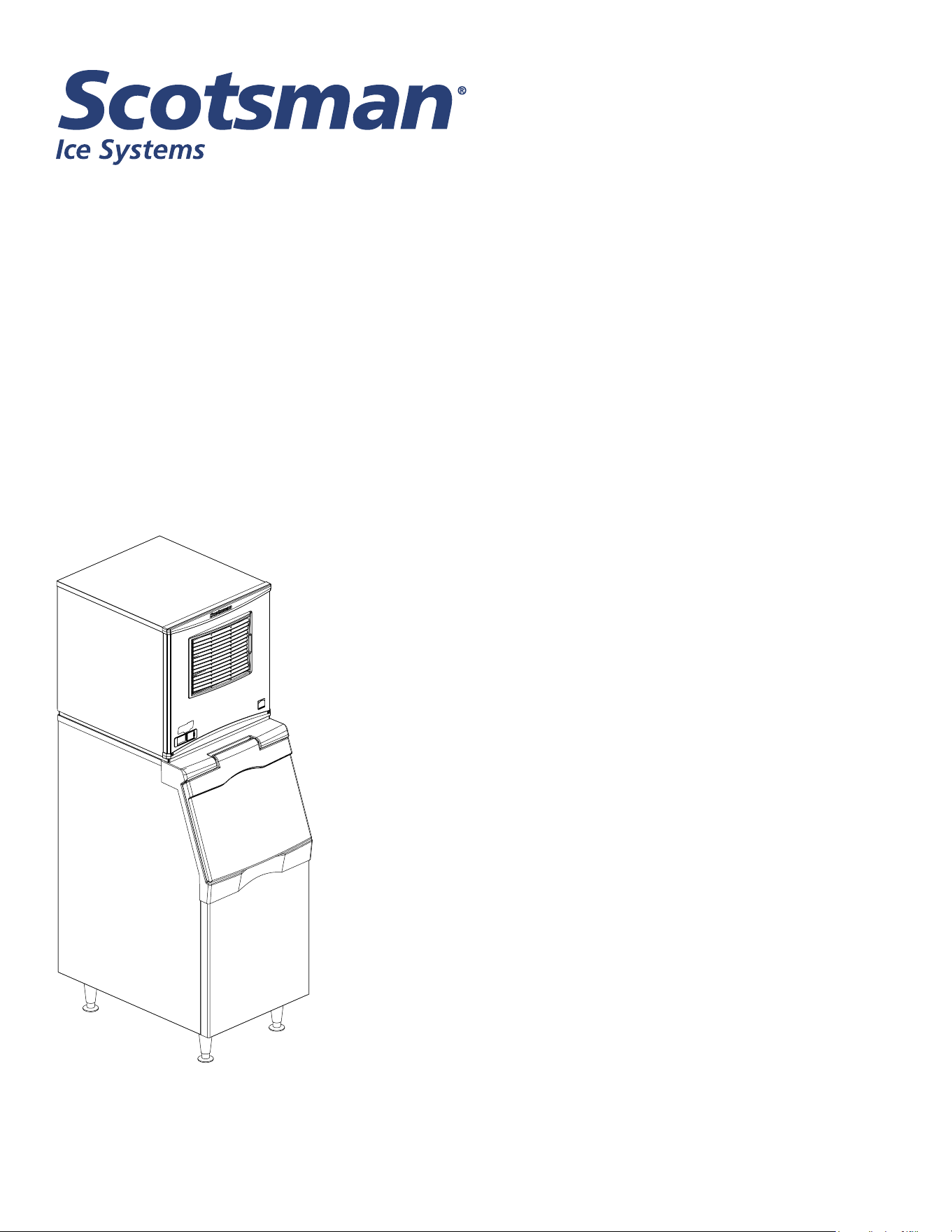
Installation and User’s Manual for
Remote Modular Flake and Nugget Ice Machines
Prodigy Plus A Series Models with R449A
NH0622RX, NS0622RX, NH0922RX, NS0922RX,
FS1222RX, NH1322RX, NS1322RX
Remote Air Cooled
NH0622RX, NS0622RX, NH0922RX, NS0922RX, FS1222RX, NH1322RX, NS1322RX
A Series Remote User Manual
July 2026
Page 1
Introduction
This ice machine is the result of years of experience
with aked and Scotsman Nugget Ice® ice machines.
The latest in electronics has been coupled with the
time tested Scotsman aked ice system to provide
reliable ice making and the features needed by
customers. The features include simple conductivity
water level sensing, evaporator clearing at shut down,
photo-eye sensing bin control and the ability to add
options.
Contents
Installation ...................................................................... 2
Location ........................................................................ 3
NH0622RX, NS0622RX Cabinet Layout ............................................... 4
NH0922RX, NS0922RX, FS1222RX, NH1322RX, NS1322RX Cabinet Layout ................. 5
Unpacking & Install Prep ........................................................... 6
Electrical ....................................................................... 7
Refrigeration .................................................................... 8
Remote Condenser Location: Limits .................................................. 9
For The Installer: Remote Condenser ................................................. 10
Line Set Routing and Brazing ....................................................... 11
Line Set Routing and Brazing ....................................................... 12
Water .......................................................................... 13
Final Check List .................................................................. 14
Initial Start Up and Maintenance ..................................................... 15
Maintenance: Scale Removal and Sanitation ........................................... 16
Maintenance: Scale Removal and Sanitation Continued .................................. 17
Options ........................................................................ 18
What to Do Before Calling for Service ................................................. 19
NH0622RX, NS0622RX, NH0922RX, NS0922RX, FS1222RX, NH1322RX, NS1322RX
A Series Remote User Manual
July 2026
Page 2
Installation
This machine is designed to be used indoors, in a
controlled environment. Operation outside the limits
listed here will void the warranty.
Air temperature limits
Minimum Maximum
Ice maker 50
o
F. 100
o
F.
Remote
condenser
-20
o
F. 120
o
F.
Water temperature limits
Minimum Maximum
All models 40
o
F. 100
o
F.
Water pressure limits (potable)
Maximum Minimum
All models 20 psi 80 psi
Water pressure limit to water cooled condenser is 150
PSI
Voltage limits
Minimum Maximum
115 volt 104 126
208-230 60 Hz 198 253
Minimum conductivity (RO water)
• 10 microSiemens / CM
Water Quality (ice making circuit)
• Potable
The quality of the water supplied to the ice machine
will have an impact on the time between cleanings
and ultimately on the life of the product. Water can
contain impurities either in suspension or in solution.
Suspended solids can be ltered out. In solution
or dissolved solids cannot be ltered, they must be
diluted or treated. Water lters are recommended
to remove suspended solids. Some lters have
treatment in them for dissolved solids.
Check with a water treatment service for a
recommendation.
RO water. This machine can be supplied with Reverse
Osmosis water, but the water conductivity must be no
less than 10 microSiemens/cm.
Potential for Airborne Contamination
Installing an ice machine near a source of yeast
or similar material can result in the need for more
frequent sanitation cleanings due to the tendency of
these materials to contaminate the machine.
Most water lters remove chlorine from the water
supply to the machine which contributes to this
situation. Testing has shown that using a lter that
does not remove chlorine, such as the Scotsman
Aqua Patrol, will greatly improve this situation.
Warranty Information
The warranty statement for this product is provided
separately from this manual. Refer to it for applicable
coverage. In general warranty covers defects
in material or workmanship. It does not cover
maintenance, corrections to installations, or situations
when the machine is operated in circumstances that
exceed the limitations printed above.

NH0622RX, NS0622RX, NH0922RX, NS0922RX, FS1222RX, NH1322RX, NS1322RX
A Series Remote User Manual
July 2026
Page 3
Location
While the machine will operate satisfactorily within the
listed air and water temperature limits, it will produce
more ice when those temperatures are nearer the
lower limits. Avoid locations that are hot, dusty, greasy
or conned.
Options
Ice is made until it lls the bin enough to block an
infrared light beam inside the base of the machine. A
eld installed kit is available to adjust the maintained
ice level lower. The kit number is KVS.
The standard controller has excellent diagnostic
capabilities and communicates to the user through the
AutoAlert light panel, seen through the front panel.
Field installed kits are available that can log data and
provide additional information when the front panel is
removed. The kit numbers are KSBU and KSB-NU.
See page 21.
Bin compatibility
All models have the same footprint: 22 inches wide
by 24 inches deep. Conrm available space when
replacing a prior model.
Bin & adapter list:
• B322S – no adapter needed
• B330P or B530P or B530S – Use KBT27
• B842S – KBT39
• B948S – KBT38 for single unit
• B948S – KBT38-2X for two units side by side
• BL1048S, BL1360S and BL1660S upright bins
include ller panels to accommodate a single 22
inch wide ice machine. No adapter is needed.
Dispenser compatibility
Only nugget ice models may be used with ice
dispensers. Flaked ice is not dispensable.
• IOD150 – use KBT82 and KNUGAGT
• IOD200 – use KBT83 and KNUGAGT and KVS
• IOD250 – use KBT83 and KNUGAGT and KVS
See sales literature for other brand model ice and
beverage dispenser applications.
Other Bins & Applications:
Note the drop zone and ultrasonic sensor locations in
the illustrations on the next pages.
Scotsman ice systems are designed and
manufactured with the highest regard for safety
and performance. Scotsman assumes no liability of
responsibility of any kind for products manufactured
by Scotsman that have been altered in any way,
including the use of any part and/or other components
not specically approved by Scotsman.
Scotsman reserves the right to make design changes
and/or improvements at any time. Specications and
design are subject to change without notice.
NH0622RX, NS0622RX, NH0922RX, NS0922RX, FS1222RX, NH1322RX, NS1322RX
A Series Remote User Manual
July 2026
Page 4
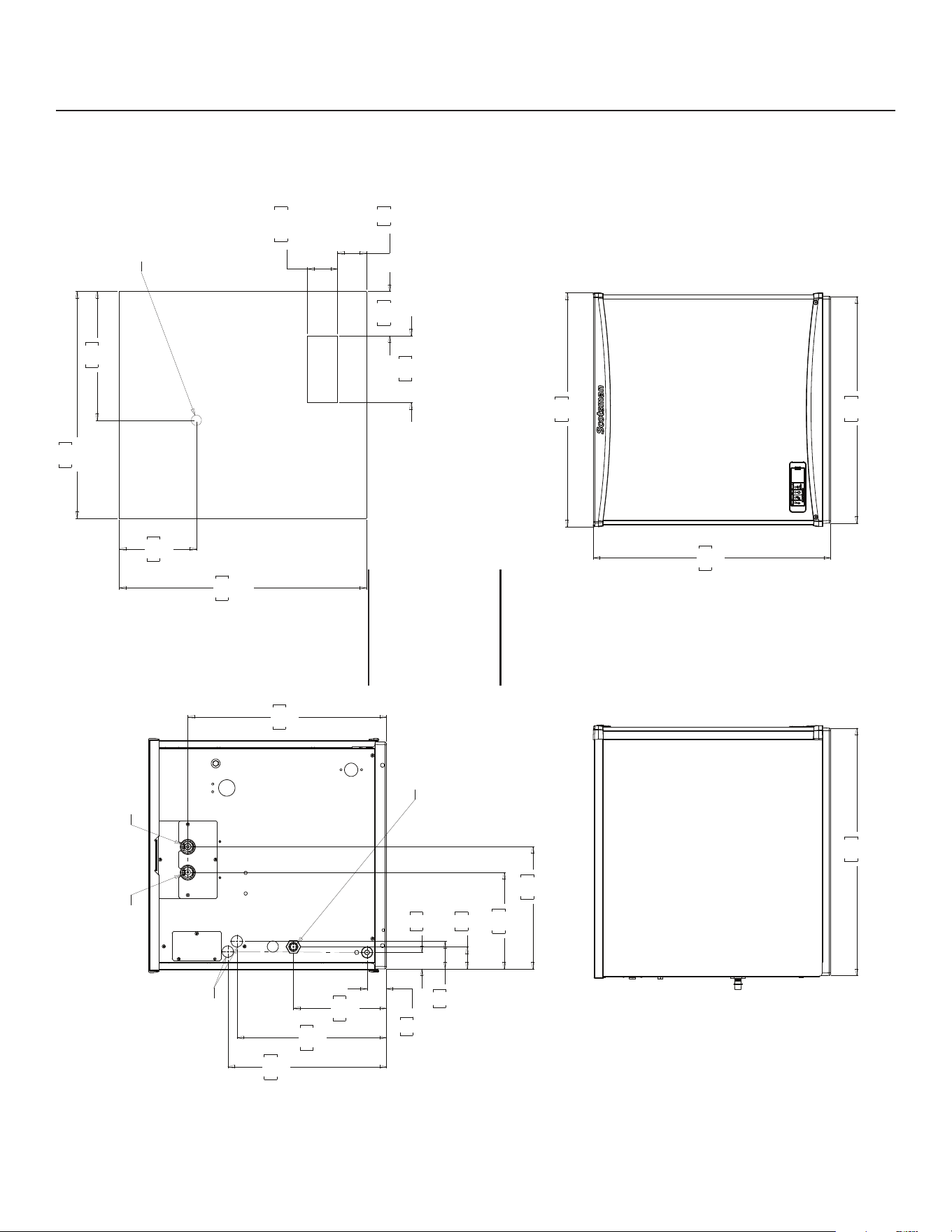
NH0622RX, NS0622RX Cabinet Layout
559
22.00
REF.
610
24.00
REF.
109
4.30
165
6.48
71
2.81
74.17
2.92
318
12.50
191
7.50
489
19.23
WATER INLET
POTABLE
3/8" FLARE
1/2" COPPER
DISCHARGE LINE
REMOTE COND.
BRAZE JOINT
.88" DIA.
ELECTRICAL
CONNECTION
REMOTE COND.
LIQUID LINE
3/8" COPPER
BRAZE JOINT
BACK VIEW
2.67
68
9.37
238
47
1.85
228
8.99
368
14.48
390
15.36
40
1.59
54
2.14
301
11.87
OPENING
FRONT VIEW
ICE DROP
ULTRASONIC
BIN LEVEL
SENSOR
(OPTIONAL)
PLAN VIEW
22.70
577
22.00
559
584
23.00
LEFT SIDE VIEW
610
24.00
Note: Bin Top
Cut-outs for
drop zone
should include
ultrasonic
sensor location
NH0622RX, NS0622RX, NH0922RX, NS0922RX, FS1222RX, NH1322RX, NS1322RX
A Series Remote User Manual
July 2026
Page 5
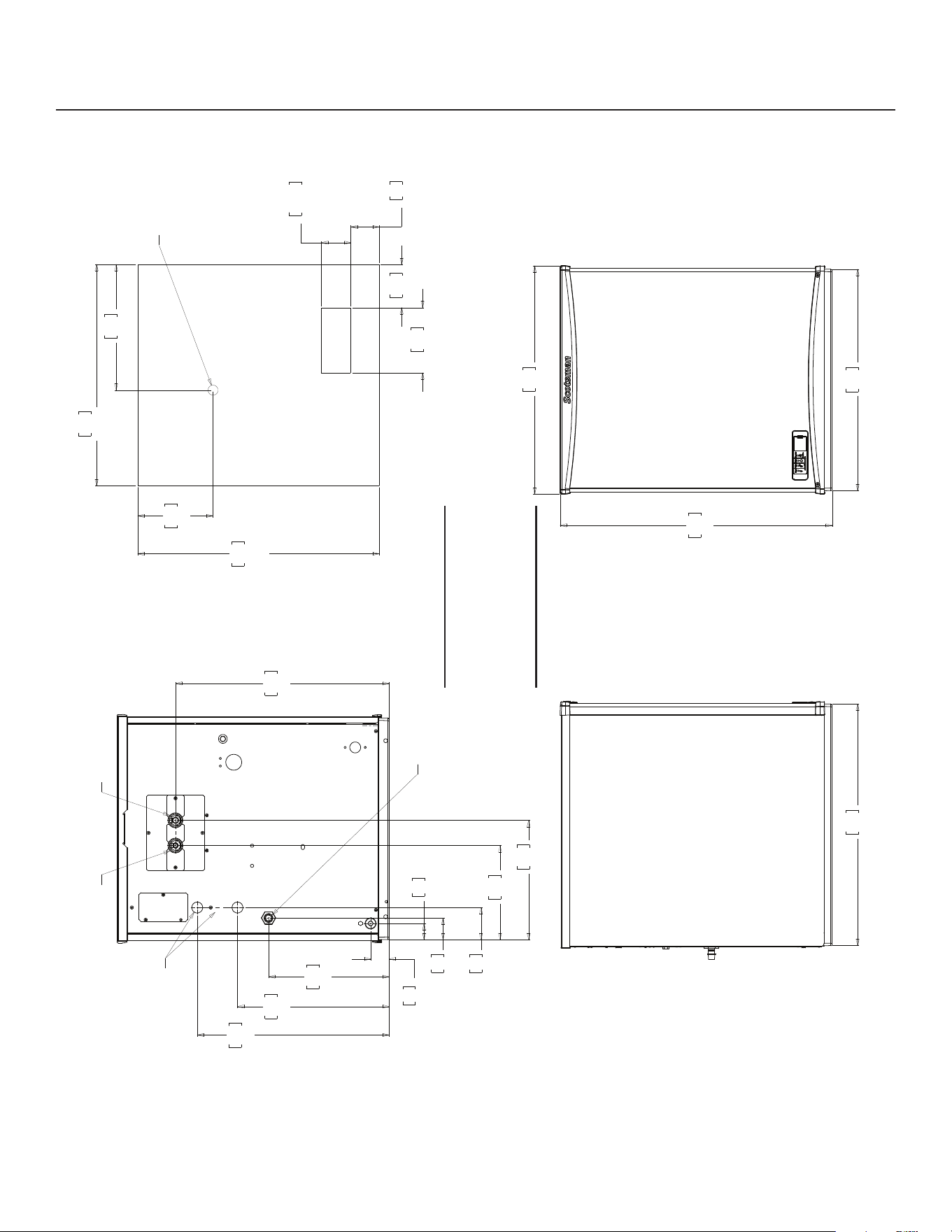
NH0922RX, NS0922RX, FS1222RX, NH1322RX, NS1322RX Cabinet Layout
559
22.00
REF.
610
24.00
REF.
109
4.30
165
6.48
71
2.81
74.17
2.92
318
12.50
191
7.50
FRONT VIEW
ICE DROP
OPENING
ULTRASONIC
BIN LEVEL
SENSOR
(OPTIONAL)
PLAN VIEW
686
27.00
22.00
559
577
22.70
REMOTE COND.
DISCHARGE LINE
WATER INLET
POTABLE
3/8" FLARE
1/2" COPPER
BRAZE JOINT
.88" DIA.
ELECTRICAL
CONNECTION
REMOTE COND.
LIQUID LINE
3/8" COPPER
BRAZE JOINT
BACK VIEW
237
9.34
1.85
47
11.99
305
15.08
383
19.08
485
21.23
539
1.59
40
2.14
54
3.17
81
301
11.84
LEFT SIDE VIEW
610
24.00
Note: Bin Top Cut-outs
for drop zone should
include ultrasonic
sensor location
NH0622RX, NS0622RX, NH0922RX, NS0922RX, FS1222RX, NH1322RX, NS1322RX
A Series Remote User Manual
July 2026
Page 6
Unpacking & Install Prep
Remove the carton from the skid. Check for hidden
freight damage, notify the carrier immediately if any is
found. Retain the carton for the carrier’s inspection.
The machine is not bolted to the skid. If strapped
remove the strap.
Place on Bin or Dispenser
If reusing an existing bin, be sure that the bin is in
good shape and that the gasket tape on the top is
not torn up. Water leaks, not covered by warranty,
could result from a poor sealing surface. When
installing a remote or a remote low side, a new bin
is recommended due to the high cost to the user of
replacing an old bin when a remote system is on top.
Install the correct adapter, following the directions
supplied with that adapter.
Hoist the machine onto the adapter.
Note: The machine is heavy! Use of a mechanical lift
is recommended.
Position the machine on the bin or adapter. Secure
with straps from the hardware bag packed with the
machine, or those supplied with the adapter.
Remove any plastic covering the stainless steel
panels.
Remove any packaging, such as tape or foam blocks,
that may be near the gear reducer or ice chute.
Level the bin and ice machine front to back and left to
right by using the bin leg levelers.
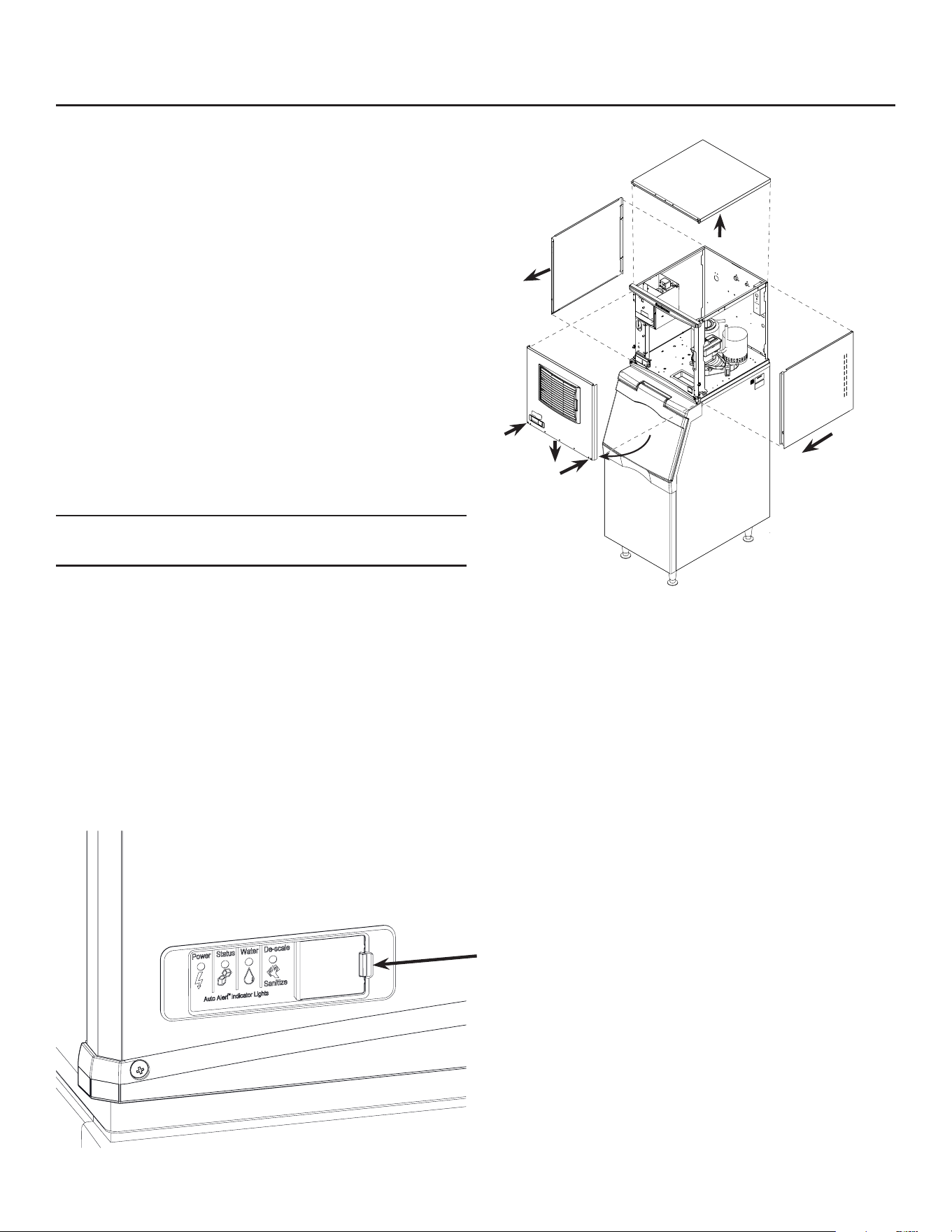
Panel Removal
1. Locate and loosen the two screws at the bottom of
the front panel.
2. Pull the front panel out at the bottom until it clears.
3. Lower the front panel down and o the machine.
4. Remove two screws at the front of the top panel.
Lift up the front of the top panel, push the top panel
back an inch, then lift to remove.
5. Locate and loosen the screw holding each side
panel to the base. Left side panel also has a screw
holding it to the control box.
6. Pull the side panel forward to release it from the
back panel.
Control Panel Door
The door can be moved to allow access to the on and
o switches.
NH0622RX, NS0622RX, NH0922RX, NS0922RX, FS1222RX, NH1322RX, NS1322RX
A Series Remote User Manual
July 2026
Page 7
Electrical
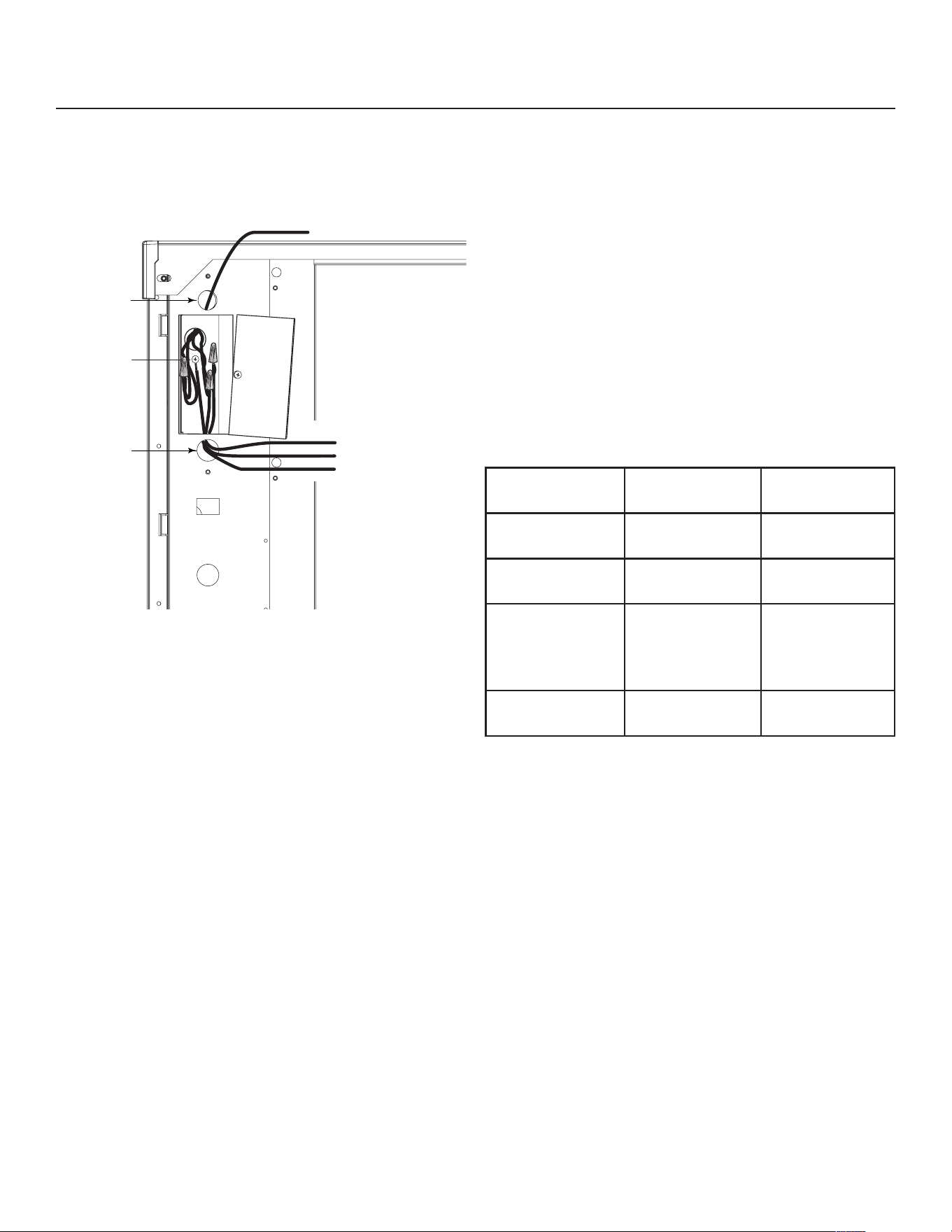
The machine does not include a power cord, one
must be eld supplied or the machine hard wired to
the electrical power supply.
The junction box for the power cord is on the back
panel. See the next page.
Refer to the dataplate on the machine for minimum
circuit ampacity and determine the proper wire size
for the application. The dataplate (on the back of the
cabinet) also includes the maximum fuse size.
Connect electrical power to wires inside the junction
box in the back of the cabinet. Use a strain relief and
connect a ground wire to the ground screw.
All models power the condenser fan motor from
marked leads in the junction box.
Do not use an extension cord. Follow all local and
national codes.
Model Series Dimensions
w” x d” x h”
Voltage
Volts/Hz/Phase
Condenser
Type
Min Circuit
Ampacity
Max Fuse Size or HACR
Type Circuit Breaker
NH0622RX-1 A 22 x 24 x 23 115/60/1 Remote 25.0 40
NS0622RX-1 A 22 x 24 x 23 115/60/1 Remote 25.0 40
NH0922RX-1 A 22 x 24 x 27 115/60/1 Remote 25.0 40
NS0922RX-1 A 22 x 24 x 27 115/60/1 Remote 25.0 40
NH0922RX-32 A 22 x 24 x 27 208-230/60/1 Remote 14.9 25
NS0922RX-32 A 22 x 24 x 27 208-230/60/1 Remote 14.9 25
FS1222RX-32 A 22 x 24 x 27 208-230/60/1 Remote 14.9 25
FS1222RX-3 A 22 x 24 x 27 208-230/60/3 Remote 11.5 15
NH1322RX-32 A 22 x 24 x 27 208-230/60/1 Remote 17.6 30
NS1322RX-32 A 22 x 24 x 27 208-230/60/1 Remote 17.6 30
NH0622RX, NS0622RX, NH0922RX, NS0922RX, FS1222RX, NH1322RX, NS1322RX
A Series Remote User Manual
July 2026
Page 8
The correct remote condenser fan and coil must
be connected to the ice making head. Liquid and
discharge tubing connections are on the back of
the ice machine cabinet. Tubing kits are available in
several lengths to accommodate most installations.
Order the one that just exceeds the length needed for
the installation.
The kit numbers are:
BRTE10, BRTE25, BRTE40, BRTE75
There are limits as to how far away from the ice
machine and where the remote condenser can be
located. See the next page for those limits.
The correct condenser must be used:
Ice Machine
Model
Voltage Condenser
Model
NH0622RX-1
NS0622RX-1
115 ERC111X-1
NH0922RX-1
NS0922RX-1
115 ERC311X-32
NH0922RX-32
NS0922RX-32
FS1222RX-32
FS1222RX-3
208-230 ERC311X-32
NH1322RX-32
NS1322RX-32
208-230 ERC311X-32
Do not reuse condenser coils contaminated with
mineral oil (used with R-502 for example). They will
cause compressor failure and will void the warranty.
A headmaster is required for all remote condenser
systems. If the condenser you are using does not
have a headmaster, it must be replaced with the
appropriate condenser in the table above.
Use of non-Scotsman condensers requires
pre-approval from Scotsman Engineering.
Refrigeration
To Remote
Condenser
Fan Motor
Blue
Ground
Wire
Connection
Black
White
Ground
Power
Supply
Wires
Install
Strain
Relief
Install
Strain
Relief
Junction
Box
Cover
NH0622RX, NS0622RX, NH0922RX, NS0922RX, FS1222RX, NH1322RX, NS1322RX
A Series Remote User Manual
July 2026
Page 9
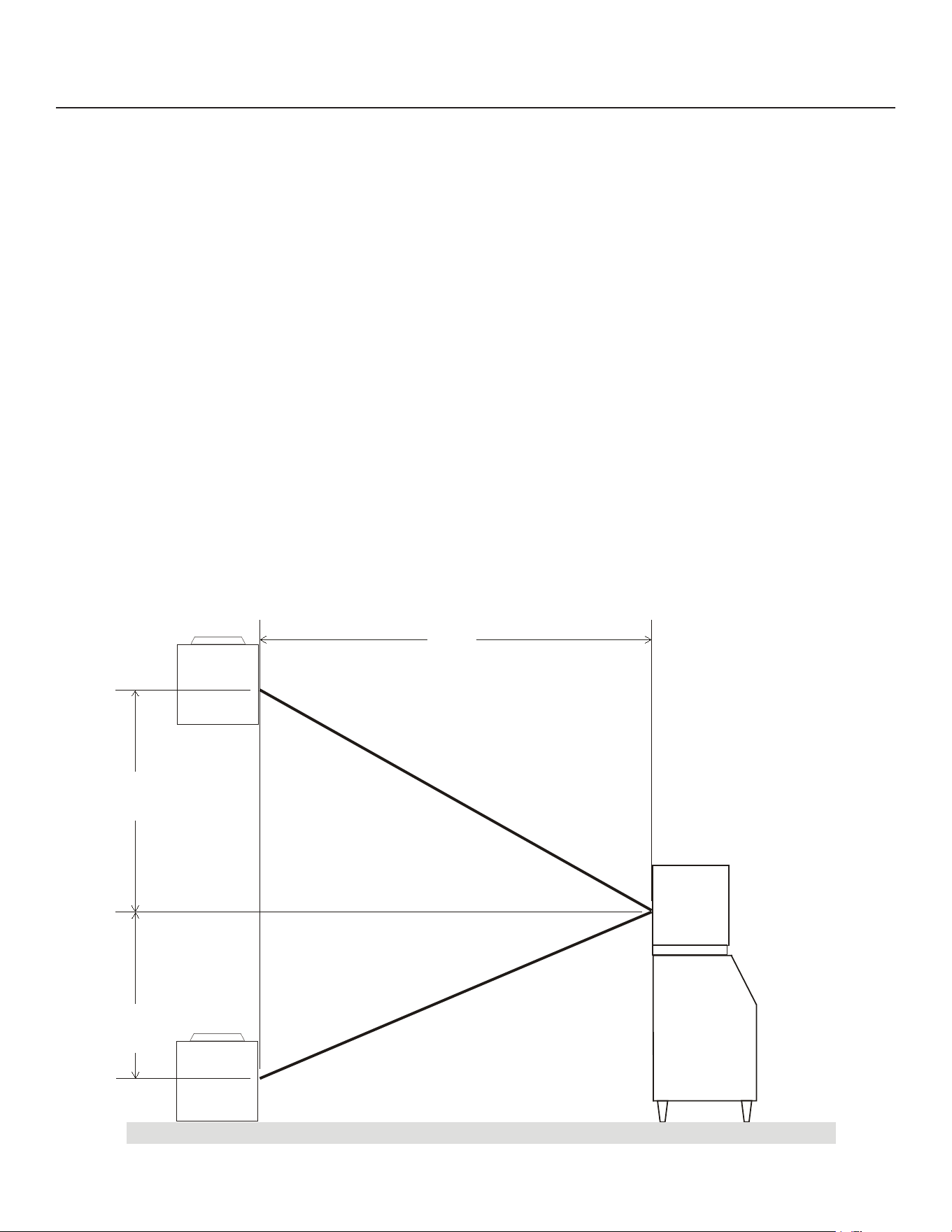
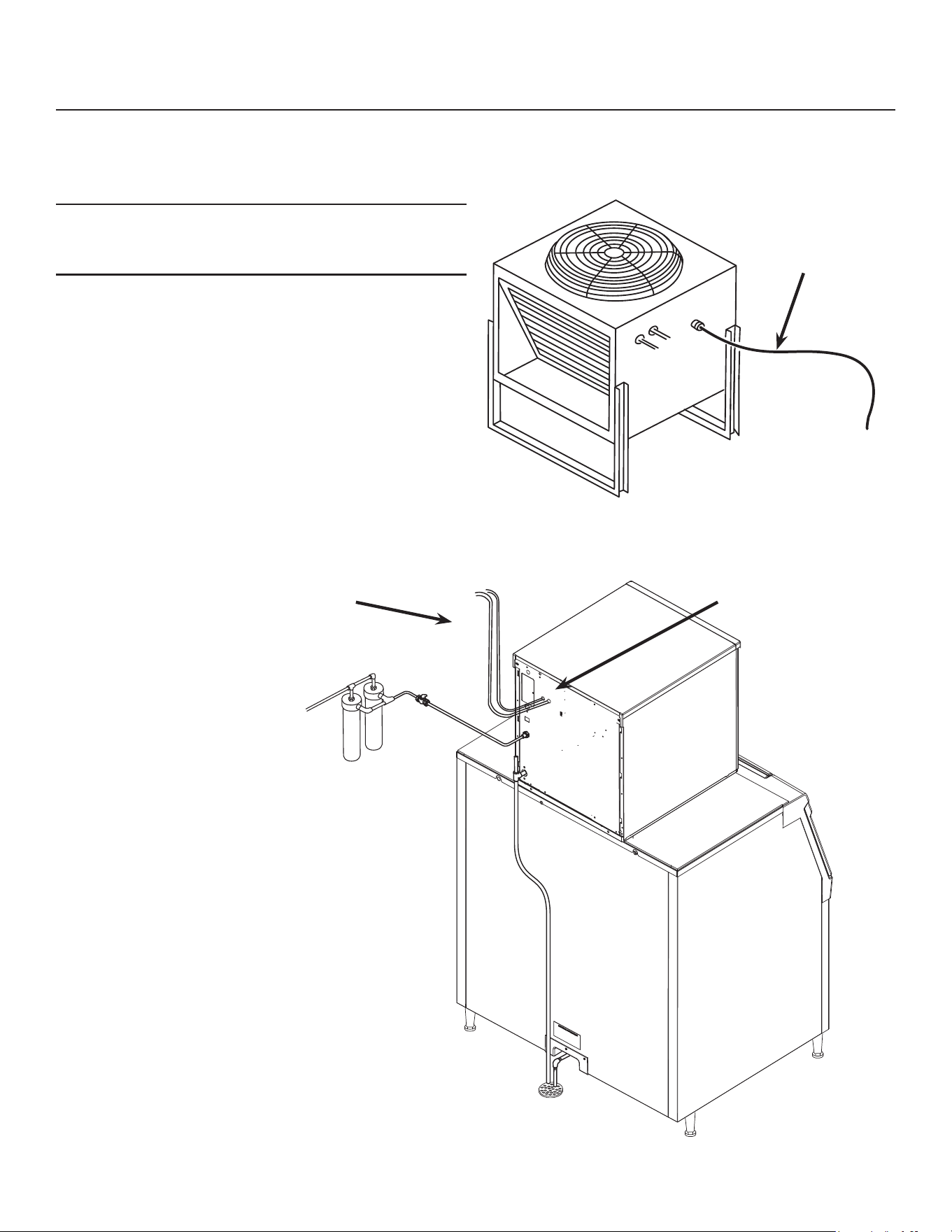
Remote Condenser Location: Limits
Use the following for planning the placement of the
condenser relative to the ice machine
Location Limits - condenser location must not exceed
ANY of the following limits:
• Maximum rise from the ice machine to the
condenser is 35 physical feet
• Maximum drop from the ice machine to the
condenser is 15 physical feet
• Physical line set maximum length is 100 feet.
• Calculated line set length maximum is 150.
Calculation Formula:
• Drop = dd x 6.6 (dd = distance in feet)
• Rise = rd x 1.7 (rd = distance in feet)
• Horizontal Run = hd x 1 (hd = distance in feet)
• Calculation: Drop(s) + Rise(s) + Horizontal
• Run = dd+rd+hd = Calculated Line Length
Congurations that do NOT meet these requirements
must receive prior written authorization from
Scotsman to maintain warranty.
Do NOT:
• Route a line set that rises, then falls, then rises.
• Route a line set that falls, then rises, then falls.
Calculation Example 1:
The condenser is to be located 5 feet below the ice
machine and then 20 feet away horizontally.
5 feet x 6.6 = 33. 33 + 20 = 53. This location would be
acceptable
Calculation Example 2:
The condenser is to be located 35 feet above and
then 100 feet away horizontally. 35 x 1.7 = 59.5.
59.5 +100 = 159.5. 159.5 is greater than the 150
maximum and is NOT acceptable.
Operating a machine with an unacceptable
conguration is misuse and will void the warranty.
22.87"
17.15"
40.35"
rd Max 35 feet
dd Max 15 feet
hd
Remote Condenser located
above ice machine.
Remote Condenser located
below ice machine.
Condenser Distance &
Location Schematic
NH0622RX, NS0622RX, NH0922RX, NS0922RX, FS1222RX, NH1322RX, NS1322RX
A Series Remote User Manual
July 2026
Page 10
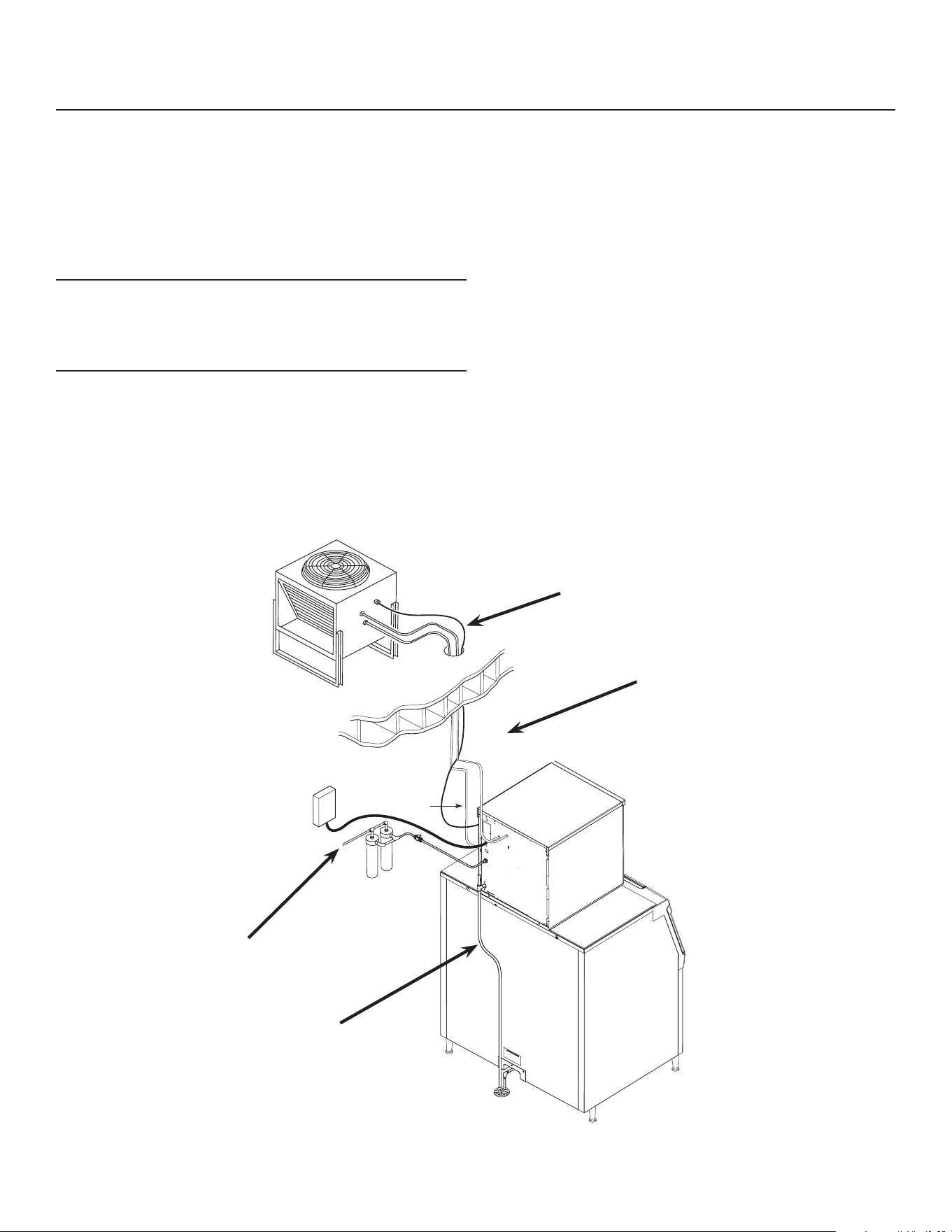
For The Installer: Remote Condenser
Locate the condenser as near as possible to the
interior location of the ice machine. Allow it plenty of
space for air and cleaning: keep it a minimum of two
feet away from a wall or other rooftop unit.
Note: The location of the condenser relative to the ice
machine is LIMITED by the specication on the prior
page.
Roof penetration. In many cases a roong contractor
will need to make and seal the hole in the roof for the
line sets. The suggested hole diameter is 2 inches.
Meet all applicable building codes.
Roof Attachment
Install and attach the remote condenser to the roof
of the building, using the methods and practices of
construction that conform to the local building codes,
including having a roong contractor secure the
condenser to the roof
To Remote Condenser
Power Supply from
Ice Machine
Refrigeration
connections
Brazing required
Refrigeration
Tubing
Remote Condenser
NH0622RX, NS0622RX, NH0922RX, NS0922RX, FS1222RX, NH1322RX, NS1322RX
A Series Remote User Manual
July 2026
Page 11
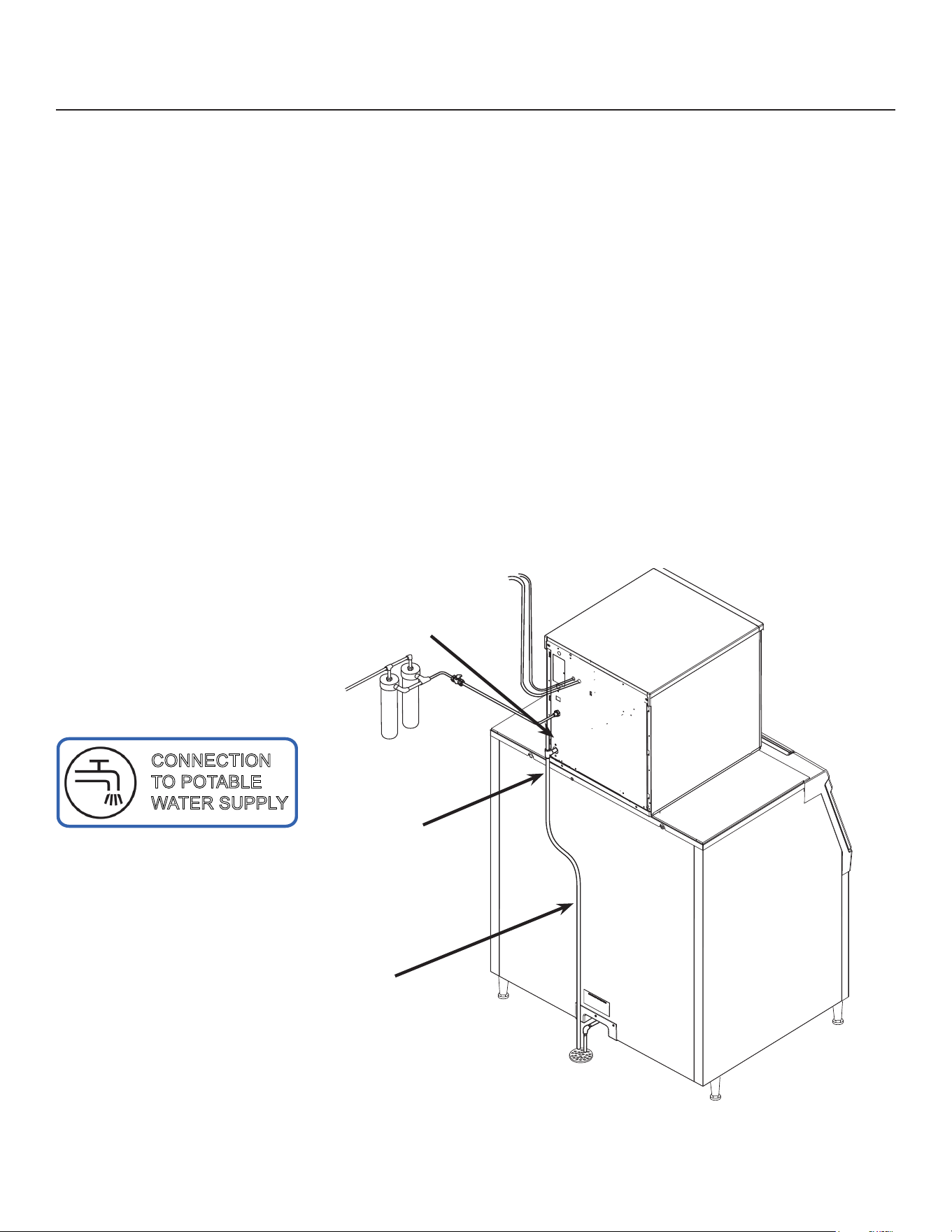
Line Set Routing and Brazing
Do not connect the refrigeration tubing until all routing
and forming of the tubing is complete. See the
Coupling Instructions for nal connections.
1. Each set of tubing lines contains a 3/8” diameter
liquid line, and a 1/2” diameter discharge line.
Both ends of each line are designed for eld
brazed connections.
Note: The openings in the building ceiling or wall,
listed in the next step, are the minimum sizes
recommended for passing the refrigerant lines
through.
2. Have the roong contractor cut a minimum hole
for the refrigerant lines of 2”. Check local codes,
a separate hole may be required for the electrical
power supply to the condenser.
Caution: Do NOT kink the refrigerant tubing while
routing it.
3. Route the refrigerant tubes thru the roof opening.
Follow straight line routing whenever possible.
Excess tubing must be cut to proper length prior to
connecting to the ice maker and condenser.
4. The tubing must be evacuated after connection
to the ice maker or condenser before opening the
ball valve.
5. Have the roong contractor seal the holes in the
roof per local codes
To Remote
Condenser
Fan Motor
Power Supply to Condenser
Refrigeration Tubing
Potable Water
Supply
Condensate Drain

NH0622RX, NS0622RX, NH0922RX, NS0922RX, FS1222RX, NH1322RX, NS1322RX
A Series Remote User Manual
July 2026
Page 12
Line Set Routing and Brazing
Do not connect the refrigerant tubing until all
routing and forming of the tubing is complete.
Final connections requires brazing, steps must
be performed by an EPA certied type II or higher
technician.
The Lineset of tubing contains a 3/8” diameter liquid
line, and a 1/2” diameter discharge line.
Note: The openings in the building ceiling or wall,
listed in the next step, are the minimum sizes
recommended for passing the refrigerant lines
through.
Have the roong contractor cut a minimum hole for
the refrigerant lines of 1 3/4”. Check local codes, a
separate hole may be required for the electrical power
supply to the condenser.
Caution: Do NOT kink the refrigerant tubing while
routing it.
At Condenser:
1. Remove protective plugs from both connections
and vent the nitrogen from the condenser.
2. Remove the tubing access bracket to allow more
room for brazing.
3. Route the lineset tubes to there connection.
4. Clean tubing ends and position into stubs.
Note: Be sure tube and stubs are round, dress with
swage tool if needed.
At Head:
1. Remove the tubing access bracket to allow more
room for brazing.
2. Conrm connection ball valves are fully closed.
3. Remove protective plugs from both connections.
4. Remove caps from access valve connections.
5. Remove cores from access valves.
6. Connect refrigeration hoses to access valves.
7. Connect dry nitrogen source to liquid line
connection.
8. Shorten tubing to correct length, clean ends and
insert them into valve stubs.
Note: Be sure tube and stubs are round, dress with
swage tool if needed.
9. Add heat sink material to ball valve body.
10. Open nitrogen and ow 1 psi nitrogen into liquid
line tube and braze the liquid line and suction line
tubes to the valve stubs.
11. With nitrogen owing braze the liquid and suction
line connections.
At Condenser:
1. Braze the liquid and suction line connections.
At Head:
1. Remove nitrogen source.
2. Return valve cores to access valves.
3. Connect vacuum pump to both access valves and
evacuate the tubing and head to at least a 300
micron level.
4. Remove vacuum pump and add R-449A to all
three tubes to provide a positive pressure.
5. Leak check the all braze connections and repair
any leaks.
6. Open both valves to full open.
Note: The full refrigerant charge is contained in the
receiver of the ice machine.
Note: All site made joints in HERMETICALLY
SEALED SYSTEMS shall be tested for leaks at
a pressure of at least 0.25 x maximum allowable
pressure using detection equipment with a sensitivity
of at least 3g/year of refrigerant.
NH0622RX, NS0622RX, NH0922RX, NS0922RX, FS1222RX, NH1322RX, NS1322RX
A Series Remote User Manual
July 2026
Page 13
Water
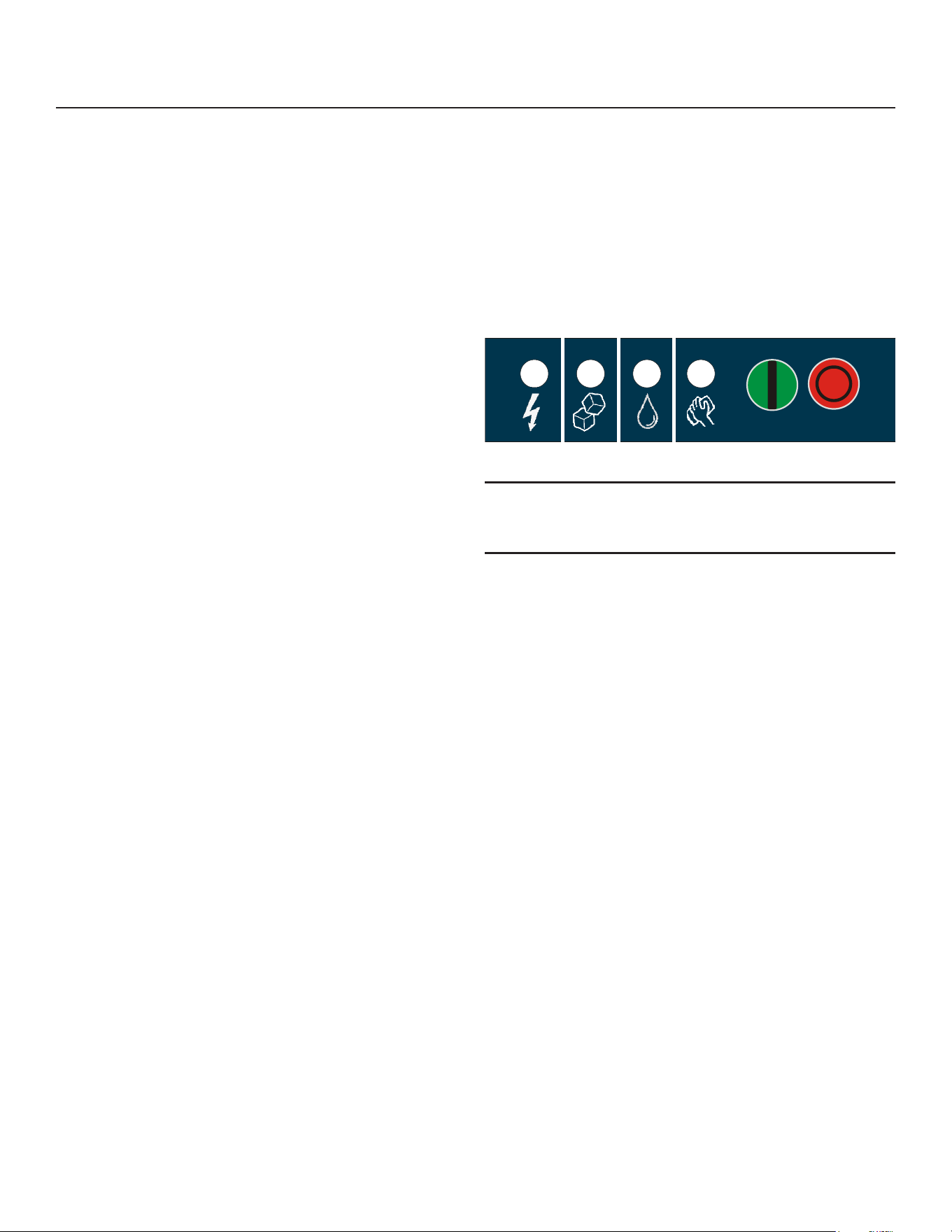
The water supply for ice making must be cold, potable
water. There is a single 3/8” male are potable water
connection on the back panel.
Backow
The design of the oat valve and reservoir prevents
potable water backow by means of a 1" air gap
between the reservoir's maximum water level and the
oat valve water inlet orice.
Drain
There is one 3/4” FPT condensate drain tting at the
back of the cabinet.
Attach Tubing
1. Connect the potable water supply to the potable
water tting, 3/8” OD copper tubing or the
equivalent is recommended.
2. Change the cartridge on the existing water lter (if
any present).
3. Connect the drain tube to
the condensate drain tting.
Use rigid tubing.
4. Vent the drain tubing
between the ice machine
and the building drain.
Do not Tee ice machine drains into the drain tube
from the ice storage bin or dispenser. Back ups
could contaminate and / or melt the ice in the bin or
dispenser. Be sure to vent the bin drain.
Follow all local and national codes for tubing, traps
and air gaps.
To Remote Condenser
Potable Water
Connection
Drain Vent
Condensate Drain
CONNECTION
TO POTABLE
WATER SUPPLY
NH0622RX, NS0622RX, NH0922RX, NS0922RX, FS1222RX, NH1322RX, NS1322RX
A Series Remote User Manual
July 2026
Page 14
Power
Status
No Water
Time to Clean
On
O
Final Check List
After connections:
1. Wash out the bin. If desired, the interior of the bin
could be sanitized.
2. Locate the ice scoop (if supplied) and have it
available for use when needed.
3. Switch on the electrical power to warm up the
compressor. Do not start the machine for 4 hours.
Final Check List:
1. Is the unit located indoors in a controlled
environment?
2. Is the unit located where it can receive adequate
cooling air?
3. Has the correct electrical power been supplied to
the machine?
4. Have all the water supply connections been
made?
5. Have all the drain connections been made?
6. Has the unit been leveled?
7. Have all unpacking materials and tape been
removed?
8. Has the protective covering on the exterior panels
been removed?
9. Is the water pressure adequate?
10. Have the drain connections been checked for
leaks?
11. Has the bin interior been wiped clean or sanitized?
12. Have any water lter cartridges been replaced?
13. Have all required kits and adapters been properly
installed?
Control and Machine Operation
Once started, the ice machine will automatically make
ice until the bin or dispenser is full of ice. When ice
level drops, the ice machine will resume making ice.
Caution: Do not place anything on top of the ice
machine, including the ice scoop. Debris and moisture
from objects on top of the machine can work their way
into the cabinet and cause serious damage. Damage
caused by foreign material is not covered by warranty.
There are four indicator lights at the front of the
machine that provide information on the condition
of the machine: Power, Status, Water, De-scale &
Sanitize.
Note: If the De-Scale & Sanitize light is ON, following
the cleaning process will clear the light for another
cleaning time internal.
Two button switches are at the front – On and O. To
switch the machine OFF, push and release the O
button. The machine will shut o at the end of the next
cycle. To switch the machine ON, push and release
the On button. The machine will go through a start up
process and then resume ice making.
Lower Light and Switch Panel
This user accessible panel provides important
operational information and duplicates the lights and
switches on the controller. It also allows access to the
On and O buttons that operate the ice machine.
Sometimes access to the switches should be limited
to prevent unauthorized operation. For that purpose a
xed panel is shipped in the hardware package. The
xed panel cannot be opened.
To install the xed panel:
1. Remove the front panel and remove the bezel.
2. Spread the bezel frame open and remove original
door, insert xed panel into bezel. Be sure it is in
the closed position.
3. Return bezel to panel and install panel on unit.

NH0622RX, NS0622RX, NH0922RX, NS0922RX, FS1222RX, NH1322RX, NS1322RX
A Series Remote User Manual
September 2026
Page 15
Initial Start Up and Maintenance
1. Turn the water supply on. Open the liquid line
valve.
2. Conrm voltage and switch on electrical power.
3. Push and release the On button. The machine will
start in about two minutes.
4. Soon after starting, the machine will be
discharging warm air from the remote condenser.
After about 5 minutes, ice will begin to drop into
the bin or dispenser.
5. Check the machine for unusual rattles. Tighten
any loose screws, be sure no wires are rubbing
moving parts. Check for tubes that rub. Remote
models check brazed connections for leaks,
retighten as needed.
6. Scan the QR code found behind the front panel
door and complete the warranty registration
online or ll out and mail the included warranty
registration card.
7. Notify the user of the maintenance requirements
and whom to call for service.
Maintenance
This ice machine needs ve types of maintenance:
• Remote models need their condenser coils
cleaned regularly.
• All models need scale removed from the water
system.
• All models require regular sanitization.
• All models require sensor cleaning.
• All models require a top bearing check.
Maintenance Frequency:
Scale removal. To maintain proper machine
performance and sanitary condition, cleaning is
recommended every 6 months. The ice machine
will not maintain a sanitary condition without human
intervention.
The yellow Descale & Sanitize light will switch on
after a set period of 6 months as a reminder to
clean the machine. Some water quality conditions
may necessitate cleanings as frequently as every 3
months.
Sanitizing: Every time the scale is removed or as
often as needed to maintain a sanitary unit.
Sensor Cleaning: Every time the scale is removed.
Top bearing check: At least twice a year or every
time the scale is removed. During the course of
normal operation, some material buildup on top of the
bearing is normal and should be wiped away during
maintenance.
Maintenance: Remote air cooled condenser
The condenser ns will occasionally need to be
cleaned of leaves, grease or other dirt. Check the coil
every time the ice machine is cleaned.
Maintenance: Exterior Panels
The front and side panels are durable stainless steel.
Fingerprints, dust and grease will require cleaning
with a good quality stainless steel cleaner
Note: If using a sanitizer or a cleaner that contains
chlorine on the panels, after use be sure to wash the
panels with clean water to remove chlorine residue.
Maintenance: Water lters
If the machine has been connected to water lters,
check the cartridges for the date they were replaced
or for the pressure on the gauge. Change cartridges
if they’ve been installed more than 6 months or if the
pressure drops too much during ice making.
NH0622RX, NS0622RX, NH0922RX, NS0922RX, FS1222RX, NH1322RX, NS1322RX
A Series Remote User Manual
July 2026
Page 16
Maintenance: Scale Removal and Sanitation
Note: Following this procedure will reset the de-scale
and sanitize light.
Preparing to Clean:
1. Remove both the front and right panels.
2. Push and release the OFF button.
3. Remove ice from bin or dispenser.
4. Remove the ice chute cover.
5. Remove the water reservoir cover.
6. Turn the water supply to the oat valve o by
turning the knob 1/4 turn CCW.
7. Drain the water reservoir and evaporator into a
bucket using the vent tube. Return the vent tube to
it’s original collar bracket.
8. Using a small cup for precise pouring, add hot
(100-120°F) water into the reservoir until water
comes out of the top of the evaporator at the
extruder, about 1qt (varies slightly by model).
9. Let hot water warm evaporator for 2-5 minutes and
then drain the system (refer to step 7)
10. Loosen the thumb screw and raise the water
reservoir from the “Make Ice” position to the
“Clean” position.
Scale Removal:
11. Prepare a solution of 16oz. Scotsman Clear One
scale remover and 16oz. 95-115 °F. potable water.
12. Using a small cup for precise pouring, add the
scale remover solution into the reservoir until the
solution comes out of top of the evaporator at the
extruder, about 1qt (varies slightly by model).
13. Push and release the Clean button: C is displayed
and the Time to Clean light blinks. The auger
will turn and circulate the scale remover for 30
minutes before shutting o. No ice is made during
the cleaning cycle.
14. Lower the water reservoir back to the “Make Ice”
position. Drain the water reservoir and evaporator
into a bucket using the vent tube.
15. Perform a rinse of the system: turn the water
supply to the oat valve back on and allow the
evaporator to ll. Once full, turn the water supply
at the oat valve o and drain the system using
the vent tube. Return the vent tube to it’s original
collar bracket.
Sanitize:
16. Loosen the thumb screw and raise the water
reservoir from the “Make Ice” position to the
“Clean” position.
17. Prepare a solution of sanitizer. Mix 4 oz. of
NuCalgon IMS and 2.5 gallons of 95-115 °F.
potable water to create a 200 ppm solution.
18. Using a small cup for precise pouring, add the
sanitizer solution into the reservoir until the
solution comes out of top of the evaporator at
the extruder, about 1qt (varies slightly by model).
Reserve any excess sanitizer.
19. Allow the sanitizer to soak while steps 20-24 are
completed, or at least 60 seconds.
Continued on next page:
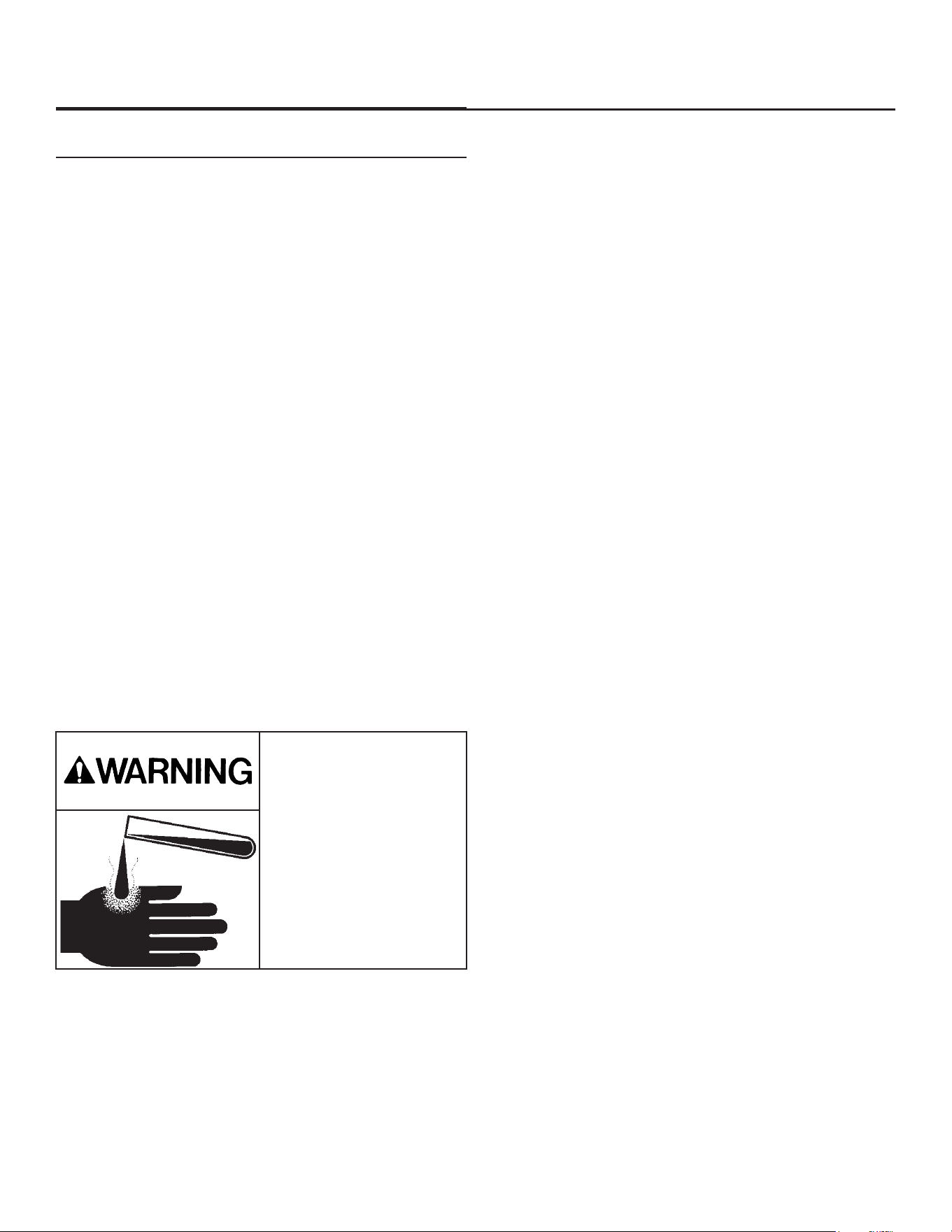
Ice machine scale remover
contains acids. Acids can
cause burns.
If concentrated cleaner
comes in contact with
skin, ush with water. if
swallowed, do NOT induce
vomiting.
Give large amounts of
water or milk. Call Physician
immediately. Keep out of the
reach of children.
NH0622RX, NS0622RX, NH0922RX, NS0922RX, FS1222RX, NH1322RX, NS1322RX
A Series Remote User Manual
September 2026
Page 17
Maintenance: Scale Removal and Sanitation Continued
Remove Internal Parts for Cleaning:
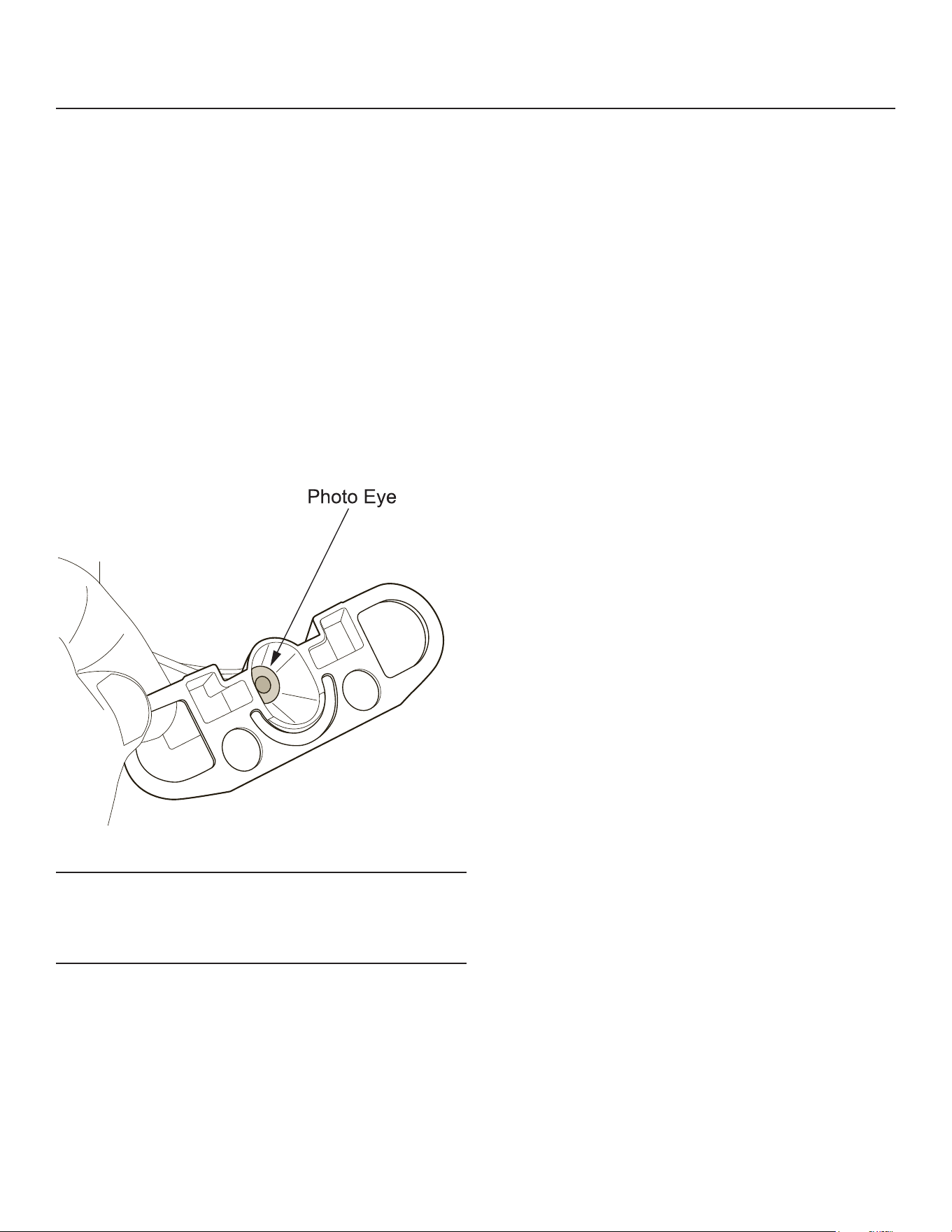
20. Remove the ice sweep, upper ice chute, lower
ice chute, and bin eyes for additional cleaning.
The reservoir cover and chute cover were already
removed and should also be cleaned.
21. Prepare a solution of 4oz. Scotsman Clear One
scale remover and 16oz. 95-115 °F. potable water.
Using a nylon brush, scrub each part with scale
remover and rinse, excluding the bin eyes.
22. Using the leftover sanitizing solution and a nylon
brush, scrub each part, excluding the bin eyes.
23. Gently wipe down the bin eyes with scale remover,
rinse, and dry thoroughly (important).
24. Return all parts to their original position.
Note: Eye holders must be mounted properly. They
snap into a centered position and are properly located
when the wires are routed to the back and the left eye
is the one with 2 wires at the connector.
Finish Cleaning Process:
25. Lower the water reservoir back to the “Make Ice”
position. Drain the water reservoir and evaporator
into a bucket using the vent tube.
26. Perform a rinse of the system: turn the water
supply to the oat valve back on and allow the
evaporator to ll. Once full, turn the water supply
at the oat valve o and drain the system using
the vent tube. Return the vent tube to it’s original
collar bracket.
27. Switch the water supply to the ice machine on and
check for leaks as the system lls.
28. Push and release the ON button.
29. Allow the unit to make ice for at least 5 minutes
while washing the inside of the ice storage bin with
sanitizing solution. Discard or melt all ice made
during this step.
30. Return the right and front panels to their original
position and secure with the original screws.
NH0622RX, NS0622RX, NH0922RX, NS0922RX, FS1222RX, NH1322RX, NS1322RX
A Series Remote User Manual
July 2026
Page 18
Options
Vari-Smart
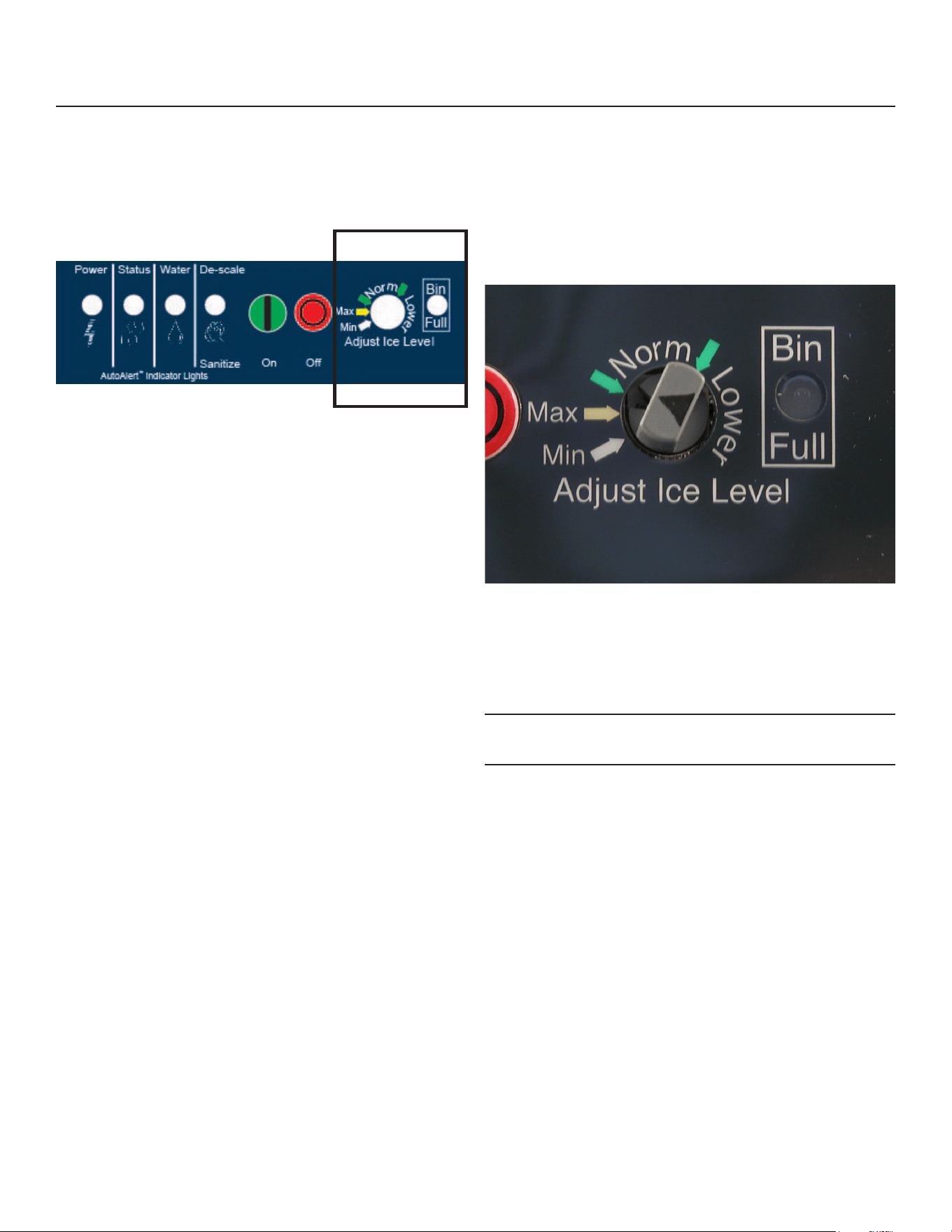
Optional adjustable ice level control (KVS). When
this option is present there is an adjustment post and
an additional indicator light to the right of the four
indicator lights mentioned earlier.
The ultrasonic ice level control allows the user to
control the point that the ice machine will stop making
ice before the bin or dispenser is full.
Reasons for this include:
• Seasonal changes in ice used
• Planning to sanitize the bin
• Faster turnover for fresher ice
• Certain dispenser applications where maximum ice
level is not desired
Use of adjustable ice level control
There are several positions the ice level can be set to,
including O or Max (knob and label indicators lined
up), where it lls the bin until the standard bin control
shuts the machine o. See the kit’s instructions for
complete details including special instructions for
dispenser applications.
Rotate the adjustment post to the desired ice level.
The machine will ll up to that level and when it shuts
o the indicator light next to the adjustment post will
be On.
Note: The maximum ll position is when the arrow on
the knob points to the arrow on the label.
NH0622RX, NS0622RX, NH0922RX, NS0922RX, FS1222RX, NH1322RX, NS1322RX
A Series Remote User Manual
July 2026
Page 19
What to Do Before Calling for Service
Normal Operation:
Ice
The machine will make either aked or nugget ice,
depending upon the model. The ice will be produced
continuously until the bin is full. It is normal for a few
drops of water to occasionally fall with the ice.
Heat
Most heat is exhausted at the remote condenser, the
ice machine should not generate signicant heat.
Noise
The ice machine will make noise when it is in ice
making mode. The compressor and gear reducer will
produce sound. Some ice making noise could also
occur. These noises are all normal for this machine.
Reasons the machine might shut itself o:
• Lack of water.
• Does not make ice
• Auger motor overload
• High discharge pressure.
• Low refrigeration system pressure.
Check the following:
1. Has the water supply to the ice machine or
building been shut o? If yes, the ice machine will
automatically restart within minutes after water begins
to ow to it.
2. Has power been shut o to the ice machine? If yes,
the ice machine will automatically restart when power
is restored.
3. Has someone shut the power o to the remote
condenser while the ice machine still had power? If
yes, the ice machine may need to be manually reset.
To Manually Reset the machine.
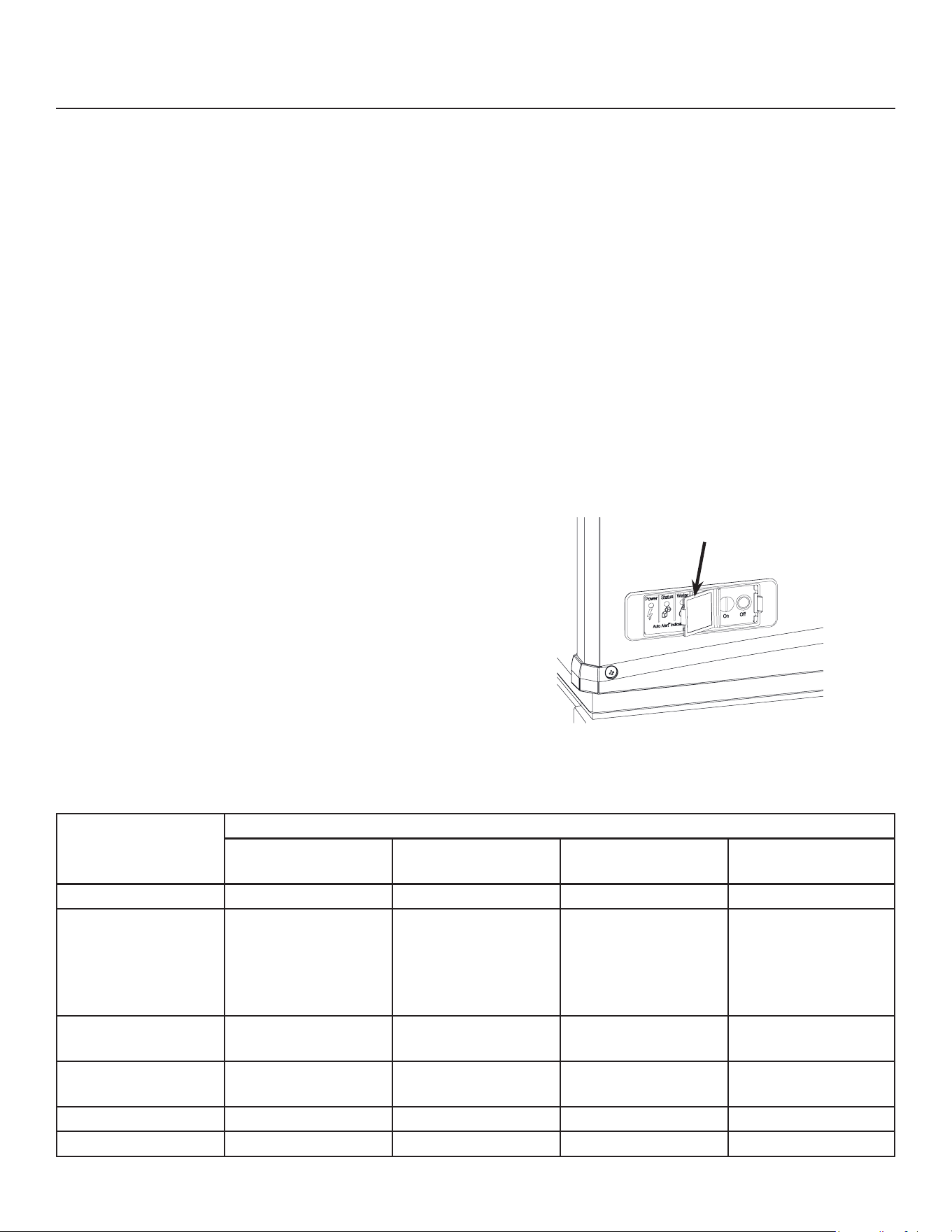
• Open the switch door
• Push and release the O button.
• Push and release the On button.
To Shut the Machine O:
Push and hold the O button for 3 seconds or until the
machine stops.
Indicator Lights & Their Meanings
Power Status Water De-Scale &
Sanitize
Steady Green Normal Normal - -
Blinking Green Self Test Failure Switching on or
o. When Smart-
Board used,
machine attention
recommended.
- -
Blinking Red - Diagnostic shut
down
Lack of water -
Yellow - - - Time to descale and
sanitize
Blinking Yellow - - - In Cleaning Mode
Light O No power Switched to O Normal Normal
Open Switch Door

NH0622RX, NS0622RX, NH0922RX, NS0922RX, FS1222RX, NH1322RX, NS1322RX
A Series Remote User Manual
July 2026
Page 20
SCOTSMAN ICE SYSTEMS
101 Corporate Woods Parkway
Vernon Hills, IL 60061
800-726-8762
www.scotsman-ice.com
17-3951-01 Rev.A