

aus Table of contents
Table of contentsTable of contents
1Safety ............................................ 3
1.1 Definition of the signal
words ............................................. 3
1.2 General information .................... 3
1.3 Intended use ................................ 3
1.4 Restriction on user group .......... 4
1.5 Safe installation ........................... 4
1.6 Safe use ........................................ 6
1.7 Damaged appliance ................... 7
1.8 Risk to children ........................... 8
2Preventing material damage ...... 9
2.1 Safe installation ........................... 9
2.2 Safe use ........................................ 9
3Environmental protection and
saving energy ............................ 10
3.1 Disposing of packaging ........... 10
3.2 Saving energy ............................ 10
3.3 Aqua sensor
1
............................ 10
4Installation and connection ...... 10
4.1 Scope of supply ........................ 10
4.2 Installing and connecting the
appliance .................................... 11
4.3 Drainage connection ................ 11
4.4 Drinking water connection ...... 11
4.5 Electrical connection ................ 11
5Familiarising yourself with
your appliance ........................... 12
5.1 Appliance .................................... 12
5.2 Controls ...................................... 13
6Programmes .............................. 15
6.1 Information for test institute ..... 17
7Additional functions .................. 17
8Features ..................................... 18
8.1 Top basket ................................. 18
8.2 Bottom basket ........................... 18
8.3 Cutlery basket ............................ 19
8.4 Etagere ........................................ 19
9Before using for the first time .. 19
9.1 Making settings for initial start-
up ................................................. 19
10 Rinse aid system .................... 19
10.1 Rinse aid .................................. 19
10.2 Setting the amount of rinse
aid .............................................. 20
10.3 Switching rinse aid system
off ............................................... 20
11 Detergent ................................. 21
11.1 Suitable detergents ................ 21
11.2 Unsuitable detergents ............ 22
11.3 Information on detergents ..... 22
11.4 Adding detergent .................... 22
12 Tableware ................................ 23
12.1 Damage to glass and table-
ware ........................................... 23
12.2 Arrange tableware .................. 24
12.3 Removing tableware .............. 25
13 Basic operation ....................... 25
13.1 Switching on the appliance .. 25
13.2 Setting a programme ............. 25
13.3 Setting additional functions .. 25
13.4 Setting timer programming ... 25
13.5 Starting the programme ........ 25
13.6 Interrupting programme ........ 26
13.7 Terminate programme ........... 26
13.8 Switching off appliance ......... 26
14 Basic settings .......................... 26
14.1 Overview of basic settings .... 26
14.2 Changing basic settings ........ 27
15 Cleaning and servicing ........... 27
15.1 Cleaning the tub ..................... 27
15.2 Self-cleaning interior
1
............. 27
15.3 Cleaning products .................. 27
15.4 Tips on appliance care .......... 27
15.5 Machine Care
1
.................. 28
1
Depending on the appliance specifications
2
Safety aus
15.6 Filter system ............................. 28
15.7 Cleaning spray arms .............. 29
16 Troubleshooting ...................... 30
16.1 Clean wastewater pump ........ 41
17 Transportation, storage and
disposal .................................... 41
17.1 Removing the appliance ....... 41
17.2 Protect appliance from
frost ........................................... 41
17.3 Transporting the appliance ... 42
17.4 Disposing of old appliance ... 42
18 Customer Service ................... 42
18.1 Product number (E-Nr.) and
production number (FD) ........ 42
18.2 AQUA-STOP guarantee
1
....... 43
19 Technical specifications ........ 43
Safety 1 Safety
Observe the following safety instructions.
1.1 Definition of the signal words
This is where you can find explanations for the safety signal words
used in this manual.
WARNING
This indicates that death or serious injuries may occur as a result
of non-observance of this warning.
ATTENTION
This indicates that damage to the appliance or other material
damage may occur as a result of non-compliance with this warn-
ing.
Note: This alerts you to important information.
1.2 General information
¡ Read this instruction manual carefully.
¡ Keep the instruction manual and the product information safe
for future reference or for the next owner.
¡ Do not connect the appliance if it has been damaged in transit.
1.3 Intended use
Only use this appliance:
¡ For cleaning household tableware.
1
Depending on the appliance specifications
3

aus Safety
¡ in closed rooms in the home and with similar applications, e.g.:
in canteens in shops, offices and other work environments; in
agricultural businesses; use by customers in hotels, motels and
other typical home environments; in bed and breakfasts.
¡ Up to an altitude of 4000 m above sea level.
1.4 Restriction on user group
This appliance may be used by children aged 8 or over and by
people who have reduced physical, sensory or mental abilities or
inadequate experience and/or knowledge, provided that they are
supervised or have been instructed on how to use the appliance
safely and have understood the resulting dangers.
Do not let children play with the appliance.
Cleaning and user maintenance must not be performed by chil-
dren unless they are being supervised.
Keep children under the age of 8 years away from the appliance
and power cable.
1.5 Safe installation
WARNING‒Risk of injury!
Improper installation may cause injury.
When installing and connecting the appliance, follow the instruc-
tions in the manual and installation instructions.
WARNING‒Risk of electric shock!
Incorrect installation is dangerous.
Connect and operate the appliance only in accordance with the
specifications on the rating plate.
Always use the supplied power cable for the new appliance.
Connect the appliance to a power supply with alternating cur-
rent only via a properly installed socket with earthing.
The protective conductor system of the domestic electrical in-
stallation must be properly installed.
Never equip the appliance with an external switching device,
e.g. a timer or remote control.
When the appliance is installed, the mains plug of the power
cord must be freely accessible. If free access is not possible, an
4

Safety aus
isolating switch must be integrated into the permanent electrical
installation according to the installation regulations.
When installing the appliance, check that the power cable is not
trapped or damaged.
Cutting through the supply hose or immersing the Aqua-Stop
valve in water is dangerous.
Never immerse the plastic housing in water. The plastic housing
on the supply hose contains an electric valve.
Never cut through the supply hose. The supply hose contains
electric power cables.
WARNING‒Risk of fire!
It is dangerous to use an extended power cord and non-approved
adapters.
Do not use extension cables or multiple socket strips.
Only use adapters and power cords approved by the manufac-
turer.
If the power cord is too short and a longer one is not available,
please contact an electrician to have the domestic installation
adapted.
Contact between the appliance and installation lines may lead to a
defect in these lines, e.g. gas pipes and power lines. Gas from a
corroded gas pipe can ignite. A damaged power line can cause a
short circuit.
Check that there is a distance of at least 5cm between the ap-
pliance and installation lines.
WARNING‒Risk of injury!
Hinges move when opening and closing the appliance door and
can cause injury.
If built-under or integrable appliances are not in a cavity so that
one side is accessible, the hinge area must be covered at the
side. Covers are available from Customer Service or specialist
outlets.
WARNING‒Risk of tipping!
Improper installation may cause the appliance to tip up.
Only install built-under or integrable appliances under a continu-
ous worktop that is securely connected to adjacent cabinets.
5
aus Safety
WARNING‒Risk of burns!
If the appliance is not installed properly, this may result in burns.
With free-standing appliances, ensure that they are installed with
the back panel against a wall.
1.6 Safe use
WARNING‒Risk of serious harm to health!
Failure to comply with safety instructions and directions for use on
packagings of detergent and rinse aid products may cause seri-
ous harm to health.
Follow the safety instructions and directions for use on the
packagings of detergent and rinse aid products.
WARNING‒Risk of explosion!
Adding solvents to the interior of the appliance may cause explo-
sions.
Never add solvents to the interior of the appliance.
Highly caustic alkaline or highly acidic cleaning agents in conjunc-
tion with aluminium parts in the interior of the appliance may
cause explosions.
Never use highly caustic alkaline or highly acidic cleaning
agents, in particular commercial or industrial products, in con-
junction with aluminium parts (e.g. grease filters of extractor
hoods or aluminium pans), e.g. for the Machine Care pro-
gramme.
WARNING‒Risk of injury!
Leaving the appliance door open may result in injury.
Only open the appliance door to load or unload tableware in or-
der to prevent accidents, e.g. through tripping.
Do not sit or stand on the appliance door when open.
Knives and utensils with sharp points can cause injuries.
Arrange knives and utensils with sharp points in the cutlery bas-
ket with the points downwards, on the knife shelf or in the cut-
lery drawer.
6

Safety aus
WARNING‒Risk ofscalding!
If you open the appliance door while the programme is running,
hot water may splash out of the appliance.
Open the appliance door carefully if the programme is still run-
ning.
WARNING‒Risk of tipping!
Overfilling the Baskets may cause the appliance to tip up.
Never overfill the Baskets with free-standing appliances.
WARNING‒Risk of electric shock!
An ingress of moisture can cause an electric shock.
Only use the appliance in enclosed spaces.
Never expose the appliance to intense heat or humidity.
Do not use steam- or high-pressure cleaners to clean the appli-
ance.
If the insulation of the power cord is damaged, this is dangerous.
Never let the power cord come into contact with hot appliance
parts or heat sources.
Never let the power cord come into contact with sharp points or
edges.
Never kink, crush or modify the power cord.
1.7 Damaged appliance
WARNING‒Risk of electric shock!
If the appliance or the power cord is damaged, this is dangerous.
Never operate a damaged appliance.
Never operate an appliance with a cracked or fractured surface.
Never pull on the power cord to unplug the appliance. Always
unplug the appliance at the mains.
If the appliance or the power cord is damaged, immediately un-
plug the power cord or switch off the fuse in the fuse box and
turn off the water tap.
Call customer service.
Page42
Improper repairs are dangerous.
Repairs to the appliance should only be carried out by trained
specialist staff.
Only use genuine spare parts when repairing the appliance.
7
aus Safety
If the power cord or the appliance power cable of this appliance
is damaged, it must be replaced with a special power cord or
special appliance power cable, which is available from the man-
ufacturer or its Customer Service.
1.8 Risk to children
WARNING‒Risk of suffocation!
Children may put packaging material over their heads or wrap
themselves up in it and suffocate.
Keep packaging material away from children.
Do not let children play with packaging material.
Children may breathe in or swallow small parts, causing them to
suffocate.
Keep small parts away from children.
Do not let children play with small parts.
Children may become trapped in the appliance and suffocate.
Never let children play with or operate the appliance.
WARNING‒Risk of harm to health!
Children can lock themselves in the appliance, thereby putting
their lives at risk.
With redundant appliances, unplug the power cord. Then cut
through the cord and damage the lock on the appliance door
beyond repair so that the appliance door will no longer close.
WARNING‒Risk of crushing!
With higher-level appliances, children can become crushed
between the appliance door and cabinet doors underneath.
Keep an eye on children when opening and closing the appli-
ance door.
WARNING‒Risk of chemical burns!
Rinse aid and detergent may cause chemical burns to the mouth,
throat and eyes.
Keep children away from detergent and rinse aid products.
Keep children away from the appliance when open. The water in
the interior of the dishwasher is not drinking water. It may con-
tain residues of detergents and rinse aid.
8

Preventing material damage aus
WARNING‒Risk of injury!
Children may get their fingers caught in the slots of the tablet col-
lecting tray and injure themselves.
Keep children away from the appliance when open.
Preventing material damage2 Preventing material
damage
2.1 Safe installation
ATTENTION
Improper installation of the appliance
may cause damage.
If the dishwasher is installed above
or below other domestic appli-
ances, follow the information on in-
stallation in combination with a
dishwasher in the installation in-
structions for the individual appli-
ances.
If there is no information or if the
installation instructions do not in-
clude the relevant information, con-
tact the manufacturer of these ap-
pliances to check that the dish-
washer can be installed above or
below these appliances.
If no information is available from
the manufacturer, the dishwasher
should not be installed above or
below such appliances.
To ensure the safe operation of all
domestic appliances, continue fol-
lowing the installation instructions
for the dishwasher.
Do not install the dishwasher un-
der a hob.
Do not install the dishwasher near
heat sources, e.g. radiators, heat
storage tanks, ovens or other ap-
pliances that generate heat.
Contact between the appliance and
water pipes may lead to corrosion of
these pipes, possibly causing them
to leak.
Check that there is a distance of at
least 5cm between the appliance
and the water pipe. The pipes sup-
plied for the drinking water and
waste water connections are not
affected here.
Modified or damaged water hoses
may result in material damage and
damage to the appliance.
Never kink, crush, modify or cut
through water hoses.
Only use the water hoses supplied
with the appliance or genuine
spare hoses.
Never re-use water hoses that
have been used before.
If the water pressure is too high or
too low, the appliance may not be
able to operate properly.
Make sure that the water pressure
in the water supply system is min.
50kPa (0.5bar) and max.
1000kPa (10bar).
If the water pressure exceeds the
maximum value specified, a pres-
sure-reducing valve must be in-
stalled between the drinking water
connection and the hose set of the
appliance.
2.2 Safe use
ATTENTION
Escaping water vapour can damage
fitted units.
When the programme ends, leave
the appliance to cool down for a
while before opening the door.
9
aus Environmental protection and saving energy
Unsuitable cleaning agents may dam-
age the appliance.
Do not use a steam cleaner.
So as not to scratch the finish on
the appliance, do not use sponges
with a rough surface or abrasive
cleaning agents.
To prevent corrosion, do not use
sponge cloths on dishwashers with
a stainless steel front or rinse such
cloths thoroughly several times be-
fore using them for the first time.
Environmental protection and saving energy3 Environmental protec-
tion and saving energy
3.1 Disposing of packaging
The packaging materials are environ-
mentally compatible and can be re-
cycled.
Sort the individual components by
type and dispose of them separ-
ately.
3.2 Saving energy
If you follow these instructions, your
appliance will use less electricity and
less water.
If you do not have much tableware to
wash, use the additional Half Load
function.
1
The programme will adjust to a
lower load and consumption will
be reduced.
"Additional functions", Page17
3.3 Aqua sensor
1
The aqua sensor is an optical meas-
uring device (light barrier) which
measures the turbidity of the washing
water. You can save water with the
aqua sensor.
Use of the AquaSensor depends on
the programme. If the soiling level is
low, the washing water is used in the
next wash cycle, allowing water con-
sumption to be reduced by 3-6 litres.
If the soiling level is higher, the wash-
ing water is drained off and replaced
with fresh water. In the automatic pro-
grammes the temperature and run-
ning time are additionally adjusted to
the level of soiling.
Installation and connection4 Installation and con-
nection
To ensure proper operation, connect
the appliance to the power and water
supply correctly. Observe the spe-
cified criteria and the installation in-
structions.
4.1 Scope of supply
After unpacking all parts, check for
any damage in transit and complete-
ness of the delivery.
If you have any complaints, contact
the dealer who sold you the appli-
ance or our Customer Service.
Note: The appliance has been tested
at the factory to check it is in working
order. It is possible that water has left
marks on the appliance. These
marks will disappear after the first
wash cycle.
The delivery consists of the following:
Dishwasher
User manual
Installation Instructions
Warranty
1
Installation material
1
Depending on the appliance specifications
10

Installation and connection aus
Steam protection
1
Rubber apron
1
Mains cable
Quick reference guide
1
4.2 Installing and connecting
the appliance
You can position your built-under or
integrable appliance in a fitted kit-
chen between wooden and plastic
walls.
1.
Follow the safety instructions.
Page3
2.
Follow the instructions for electrical
connection.
3.
Check the Scope of supply
Page10
and the condition of the
appliance.
4.
Consult the installation instructions
for the installation dimensions re-
quired.
5.
Make the appliance level using the
height-adjustable feet.
Make sure that the appliance is
standing on the floor securely.
6.
Install the drainage connection.
Page11
7.
Install the drinking water connec-
tion.
Page11
8.
Connect the appliance to the
power supply.
4.3 Drainage connection
Connect your appliance to drainage
connection so dirty water is dis-
charged via the wash cycle.
Installing the drainage connection
1.
Consult the installation instructions
supplied for the steps required
here.
2.
Connect the wastewater hose to
the outlet connection of the siphon
using the enclosed parts.
3.
When doing so, check that the
wastewater hose is not kinked,
crushed or twisted.
4.
Also check that there is no cover
in the drainage system preventing
the wastewater from being dis-
charged.
4.4 Drinking water connection
Connect your appliance to a drinking
water connection.
Installing the drinking water con-
nection
Note: If you are replacing the appli-
ance, you must use a new water sup-
ply hose.
1.
Consult the installation instructions
supplied for the steps required
here.
2.
Connect the appliance to the drink-
ing water connection using the en-
closed parts.
Observe the Technical data.
3.
When doing so, check that the
drinking water connection is not
kinked, crushed or twisted.
4.5 Electrical connection
Connect your appliance to the power
supply.
Connecting the appliance to the
electricity supply
Notes
Follow the Safety instructions
Page4
.
Please note that the water safety
system is only functional if there is
a power supply.
1
Depending on the appliance specifications
11
aus Familiarising yourself with your appliance
1.
Insert the appliance plug of the
power cord into the appliance.
2.
Insert the mains plug of the appli-
ance into a nearby socket.
The connection data of the appli-
ance can be found on the rating
plate.
3.
Check that the mains plug is inser-
ted properly.
Familiarising yourself with your appliance5 Familiarising yourself with your appliance
5.1 Appliance
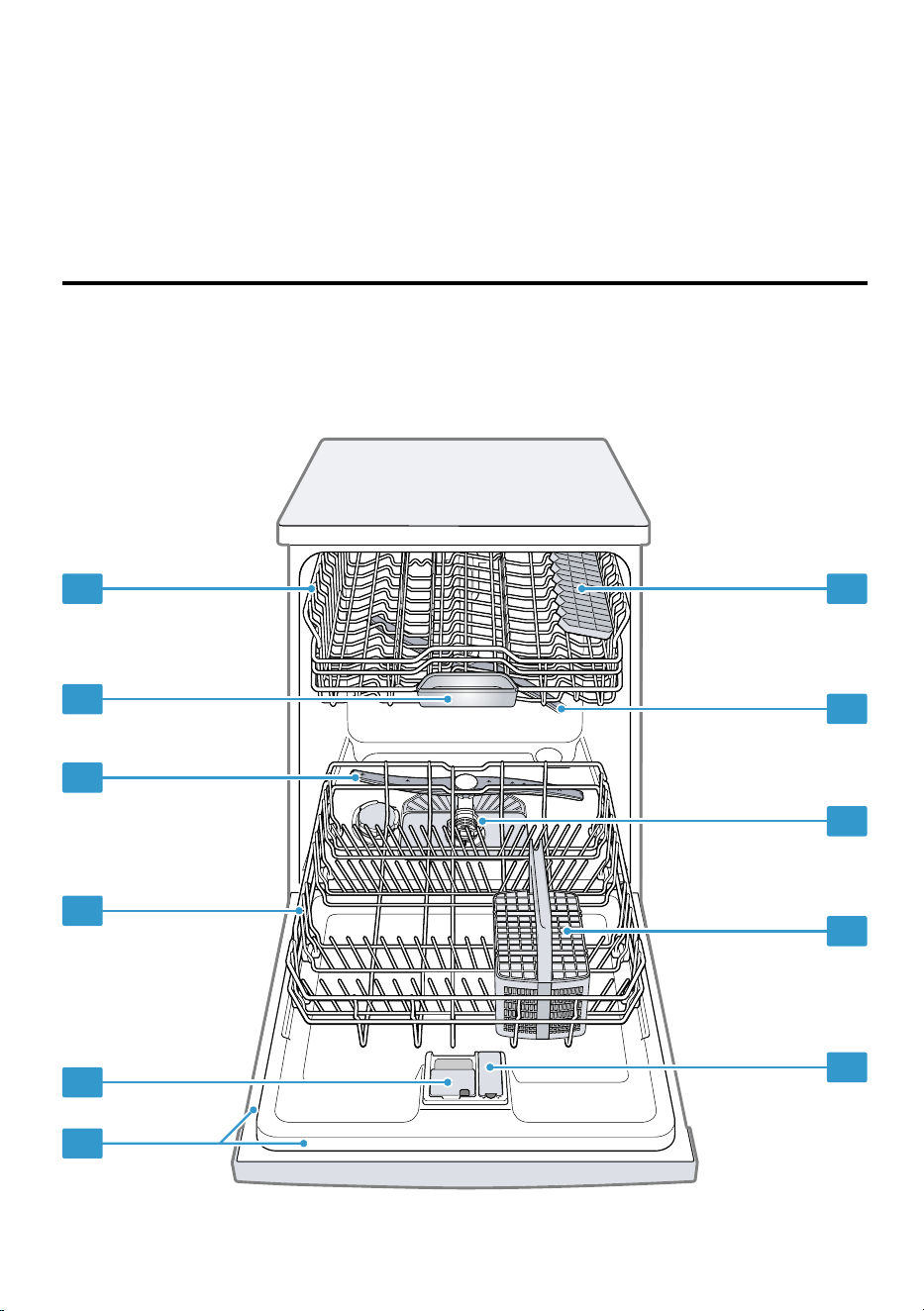
You can find an overview of the parts of your appliance here.
1
2
3
4
5
6 7
8
9
10
11
12
Familiarising yourself with your appliance aus
Rating plate
Rating plate with E number and FD number
Page42
.
The data you need for Customer Service
Page42
.
Detergent dispenser
Add detergent to the detergent dispenser.
"Detergent", Page21
Bottom basket Bottom basket
Page18
Lower spray arm
The lower spray arm washes the tableware
in the bottom basket.
If the tableware has not been washed prop-
erly, clean the spray arms.
"Cleaning spray arms", Page29
Tablet collecting tray
During the wash cycle tablets automatically
fall out of the detergent dispenser into the
tablet collecting tray where they can fully
dissolve.
Top basket Top basket
Page18
Cutlery shelf
1
Cutlery shelf
Page19
Upper spray arm
The upper spray arm washes the tableware
in the top basket.
If the tableware has not been washed prop-
erly, clean the spray arms.
"Cleaning spray arms", Page29
Filter system Filter system
Page28
Cutlery basket
1
Cutlery basket
Page19
Dispenser for rinse aid
Add rinse aid to the dispenser for rinse aid.
"Rinse aid system", Page19
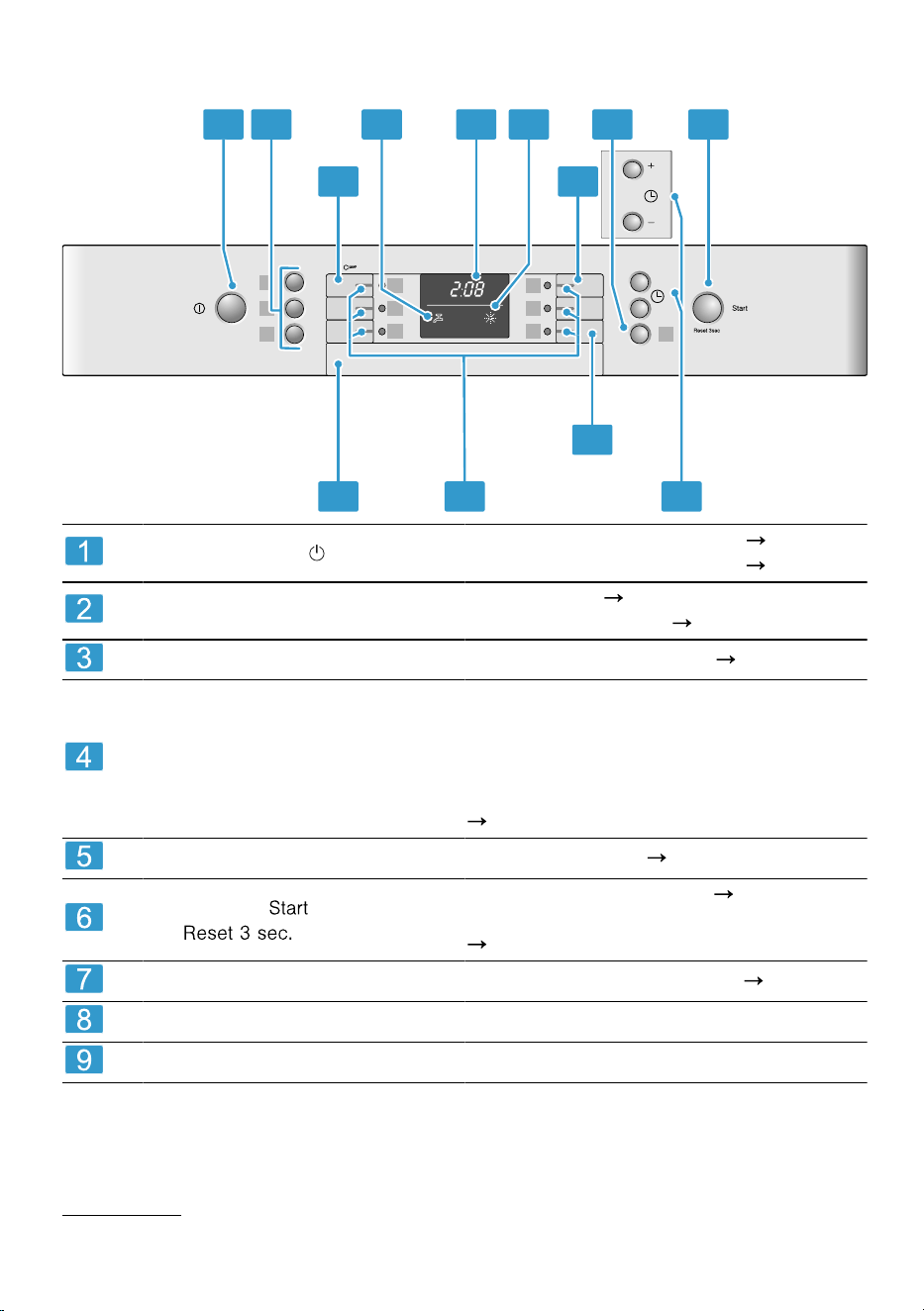
5.2 Controls
You can use the control panel to configure all functions of your appliance and
to obtain information about the operating status.
1
Depending on the appliance specifications
13
aus Familiarising yourself with your appliance
With some buttons you can perform different functions.
h. min.
h.
h.
4
1 3 4 5
B A
7
2 2
C
9 8
6
ON/OFF button
Switching on the appliance
Page25
Switching off the appliance
Page26
Programme buttons and addi-
tional functions
Programmes
Page15
Additional functions
Page17
Water supply display Display for water supply
Page31
Display
The display shows information about
the remaining running time or the basic
settings. You can change the basic set-
tings via the display and the setting
buttons.
"Changing basic settings", Page27
Rinse aid refill indicator Rinse aid system
Page19
Start button and reset but-
ton
Starting the programme
Page25
Terminating the programme
Page26
Timer programming Setting timer programming
Page25
Programme buttons Programmes
Door handle
1
Open the appliance door.
1
Depending on the appliance specifications
14
Programmes aus
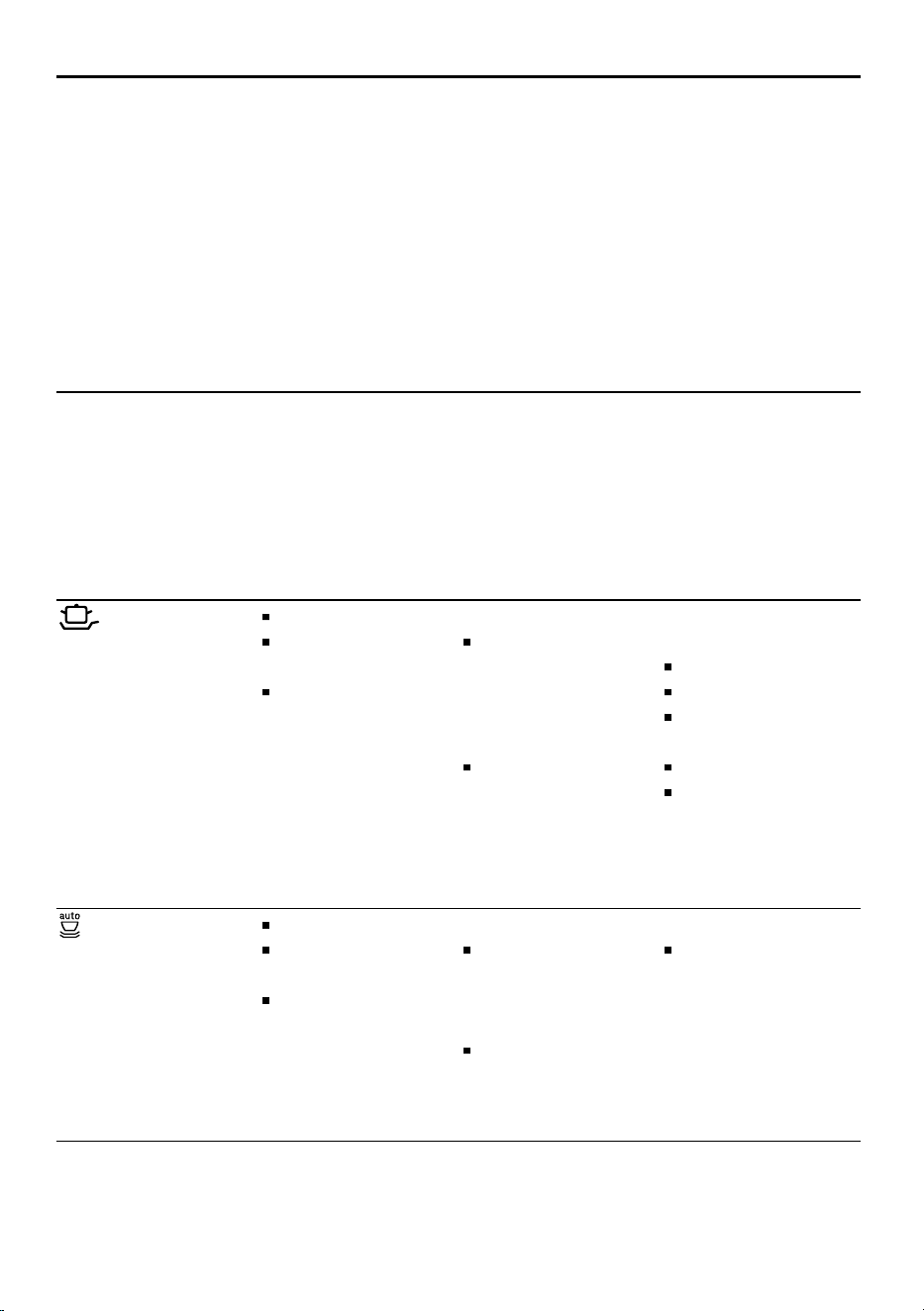
Programmes6 Programmes
You can find an overview of the programmes that can be selected here. Differ-
ent programmes, which can be found on the control panel of your appliance,
are available depending on the appliance configuration.
The running time may vary depending on the programme selected. The running
time depends on the water temperature, the quantity of tableware, the level of
soiling and the Additional function selected. The running time will change if the
rinse aid system is switched off or rinse aid needs to be added.
The programme data is based on values measured in the laboratory according
to AS/NZS 2007. Different influencing factors such as water temperature or
pipe pressure may result in deviations.
Programme Consumption val-
ues
1) Duration in
hrs:mins
2) Energy con-
sumption in kWh
3) Water con-
sumption in litres
Use Programme se-
quence
Pots / Pans
1) 2:05 -2:15
2) 1.450 -
1.500
3) 12.0 -15.0
Tableware:
Pots and pans,
non-fragile
tableware and
cutlery
Level of soiling:
Stubborn
burned or dried-
on food rem-
nants contain-
ing starch and
protein
Intensive, time-op-
timised:
Pre-Rinse
Clean 70°C
Intermediate
rinse
Final rinse 69°C
Drying
Auto Wash
1) 1:35-2:40
2) 1.000-
1.600
3) 9.0-19.0
Tableware:
Mixed table-
ware and cut-
lery
Level of soiling:
Common
household food
remnants lightly
dried on
Sensor-optimised:
Optimised by
sensors depend-
ing on the soil-
ing level of the
washing water
15
aus Programmes
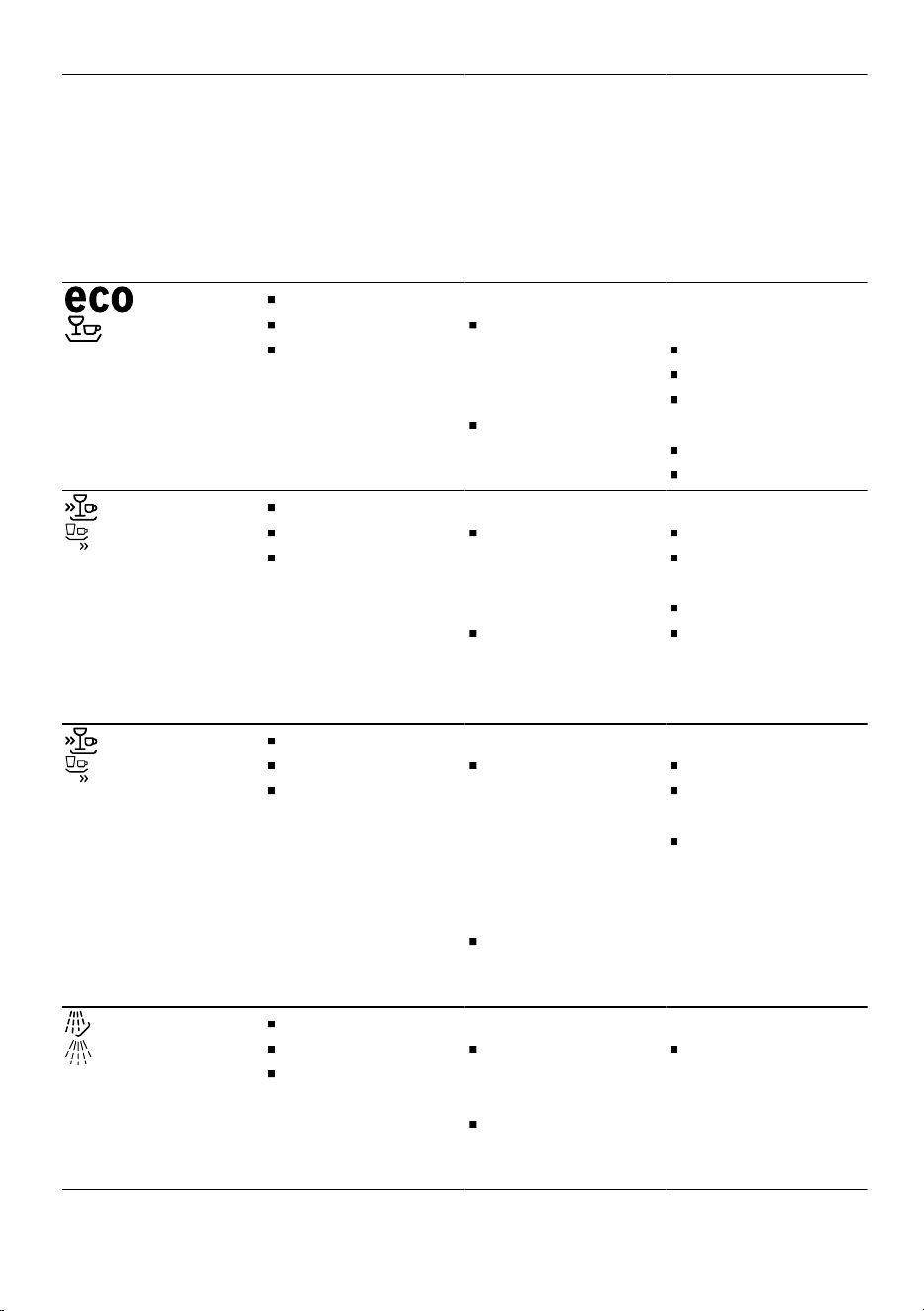
Programme Consumption val-
ues
1) Duration in
hrs:mins
2) Energy con-
sumption in kWh
3) Water con-
sumption in litres
Use Programme se-
quence
Eco Wash
1) 2:20
2) 0.730
3) 13.5
Tableware:
Mixed table-
ware and cut-
lery
Level of soiling:
Normally soiled
load
Most economical
programme:
Pre-Rinse
Clean 50°C
Intermediate
rinse
Final rinse 66°C
Drying
Quick 1h
1) 1:00
2) 1.300
3) 10.0
Tableware:
Mixed table-
ware and cut-
lery
Level of soiling:
Common
household food
remnants lightly
dried on
Time-optimised:
Cleaning 65°C
Intermediate
rinse
Final rinse 70°C
Drying
Express Wash
1) 0:29
2) 0.800
3) 10.0
Tableware:
Delicate table-
ware, cutlery,
temperature-
sensitive
plastics and
glasses
Level of soiling:
Lightly adhering
fresh food rem-
nants
Time-optimised:
Cleaning 45°C
Intermediate
rinse
Final rinse 55°C
PreRinse
1) 0:15
2) 0.050
3) 4.0
Tableware:
All types of
tableware
Level of soiling:
Cold rinsing, in-
termediate
cleaning
Cold rinse:
Pre-Rinse
16
Additional functions aus
Programme Consumption val-
ues
1) Duration in
hrs:mins
2) Energy con-
sumption in kWh
3) Water con-
sumption in litres
Use Programme se-
quence
Machine Care
1) 1:30
2) 1.020
3) 9.5
Use only if appli-
ance is unloaded.
Machine Care
70°C
6.1 Information for test insti-
tute
Test institutes can request the condi-
tions for comparison tests, e.g. ac-
cording to AS/NZS2007, by sending
an e-mail to dishwasher@test-appli-
ances.com.
These are the conditions for conduct-
ing the tests, however not the results
or consumption values.
The product number (E-Nr.) and the
production number (FD) are required
here. They can be found on the rat-
ing plate on the appliance door.
Open ajar using a block of approxim-
ately 100mm upon completion of dry
test.
Additional functions7 Additional functions
You can find an overview of the addi-
tional functions that can be selected
here. Different additional functions,
which can be found on the control
panel of your appliance, are available
depending on the appliance configur-
ation.
Additional
function
Use
SpeedPerfect
The running time is
shortened by 20%
to 50% depending
on the washing pro-
gramme.
Energy and water
consumption are in-
creased.
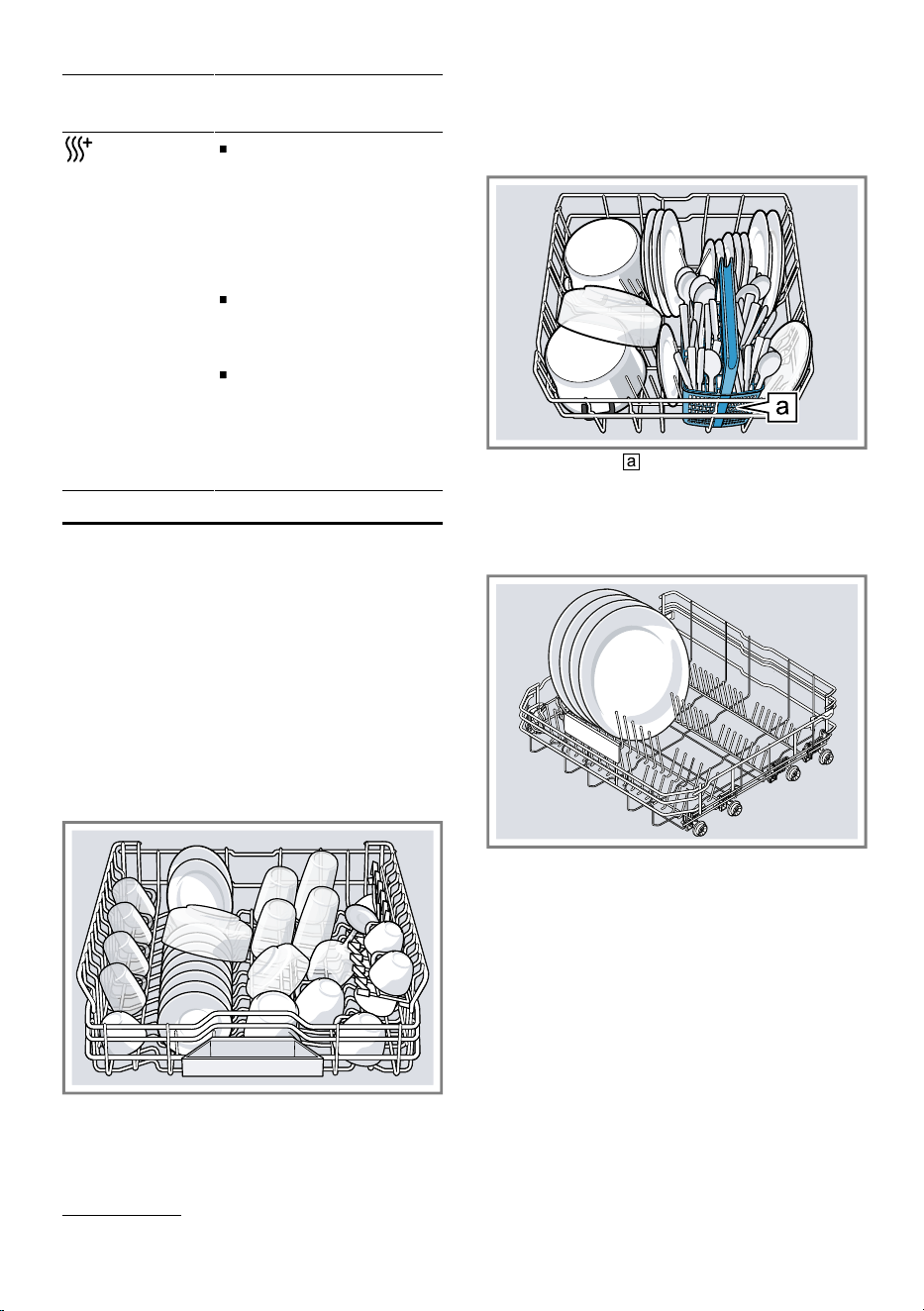
Half Load
Switch on for small
loads.
It is recommended
that less detergent
is added to the de-
tergent dispenser
than for a full ma-
chine load.
The running time is
shortened.
Energy and water
consumption are
reduced.
17
aus Features
Additional
function
Use
Extra Dry
For a better drying
result the final rinse
temperature is in-
creased and the
drying phase exten-
ded.
Especially suitable
for drying plastic
parts.
There is a slight in-
crease in energy
consumption and
the running time is
extended.
Features8 Features
You can find an overview of the pos-
sible features of your appliance and
how to use them here.
These features depend on the model
of your appliance.
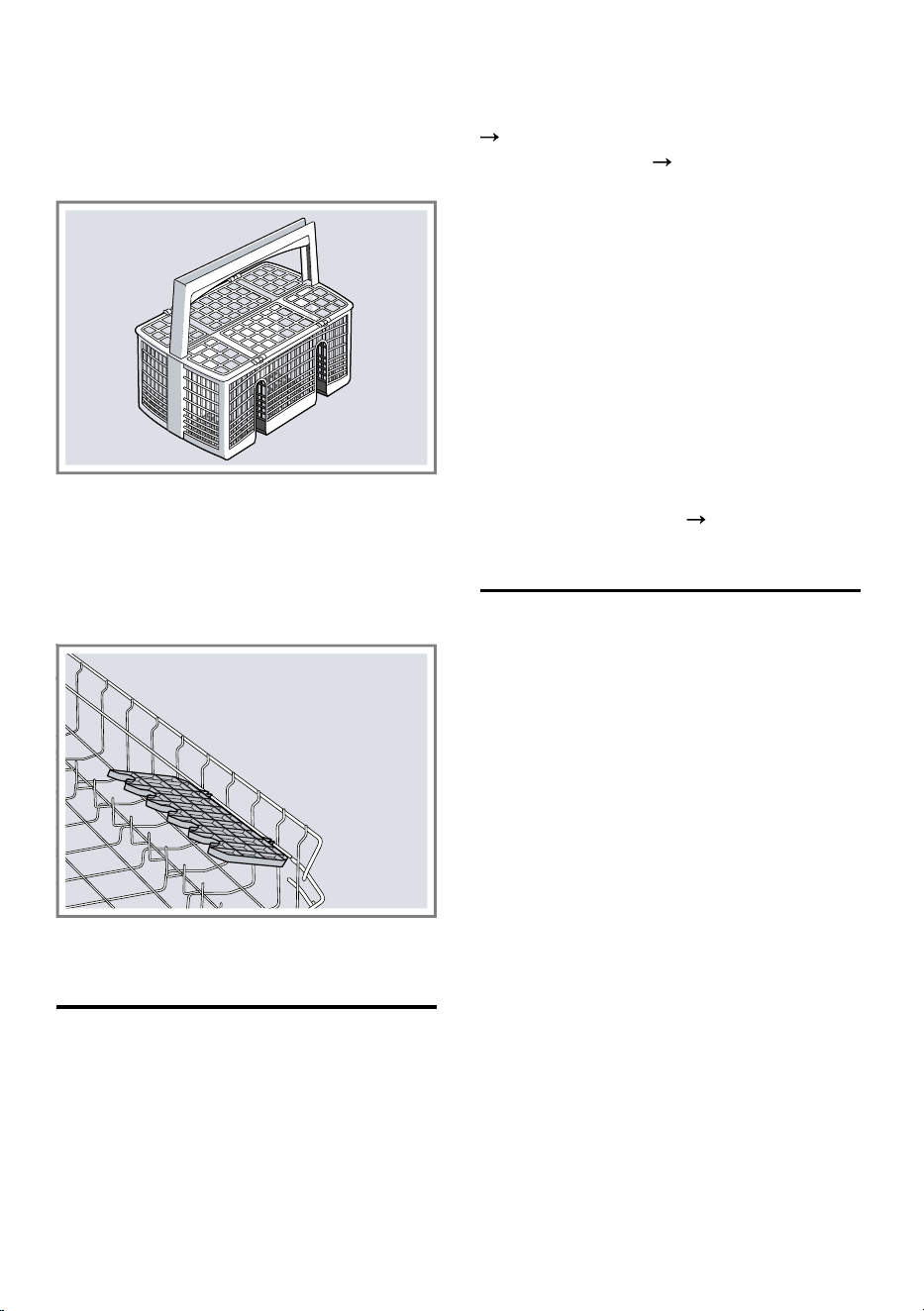
8.1 Top basket
Arrange cups, glasses and small
items of tableware in the top basket.
8.2 Bottom basket
Arrange pans and plates in the bot-
tom basket.
Cutlery basket
1
Large plates up to a diameter of
31/34cm
1
can be arranged as
shown.
1
Depending on the appliance specifications
18
Before using for the first time aus
8.3 Cutlery basket
Arrange cutlery in the cutlery basket,
always without sorting it and with the
sharp points downwards.
8.4 Etagere
Use the cutlery shelf and space un-
derneath for small cups and glasses
or for large items of cutlery, e.g.
cooking spoons or serving cutlery.
If you do not need the cutlery shelf,
you can fold it up.
Before using for the first time9 Before using for the
first time
9.1 Making settings for initial
start-up
On initial start-up or after a reset to
the factory settings, you will need to
make settings.
Requirement: The appliance has
been installed and connected.
Page10
1.
Add rinse aid.
Page19
2.
Switch on the appliance.
3.
Set the amount of rinse aid to be
dispensed.
4.
Add detergent.
5.
Start the Programme with the
highest cleaning temperature
without tableware.
To remove any marks from water
or other residues, we recommend
you operate the appliance without
tableware before using it for the
first time.
Tip: You can change this setting and
other Basic settings
Page26
at
any time again.
Rinse aid system10 Rinse aid system
You can use the rinse aid system
and rinse aid to get tableware and
glasses rinsed perfectly without
marks.
10.1 Rinse aid
For optimum drying results, use rinse
aid.
Only use rinse aid for domestic dish-
washers.
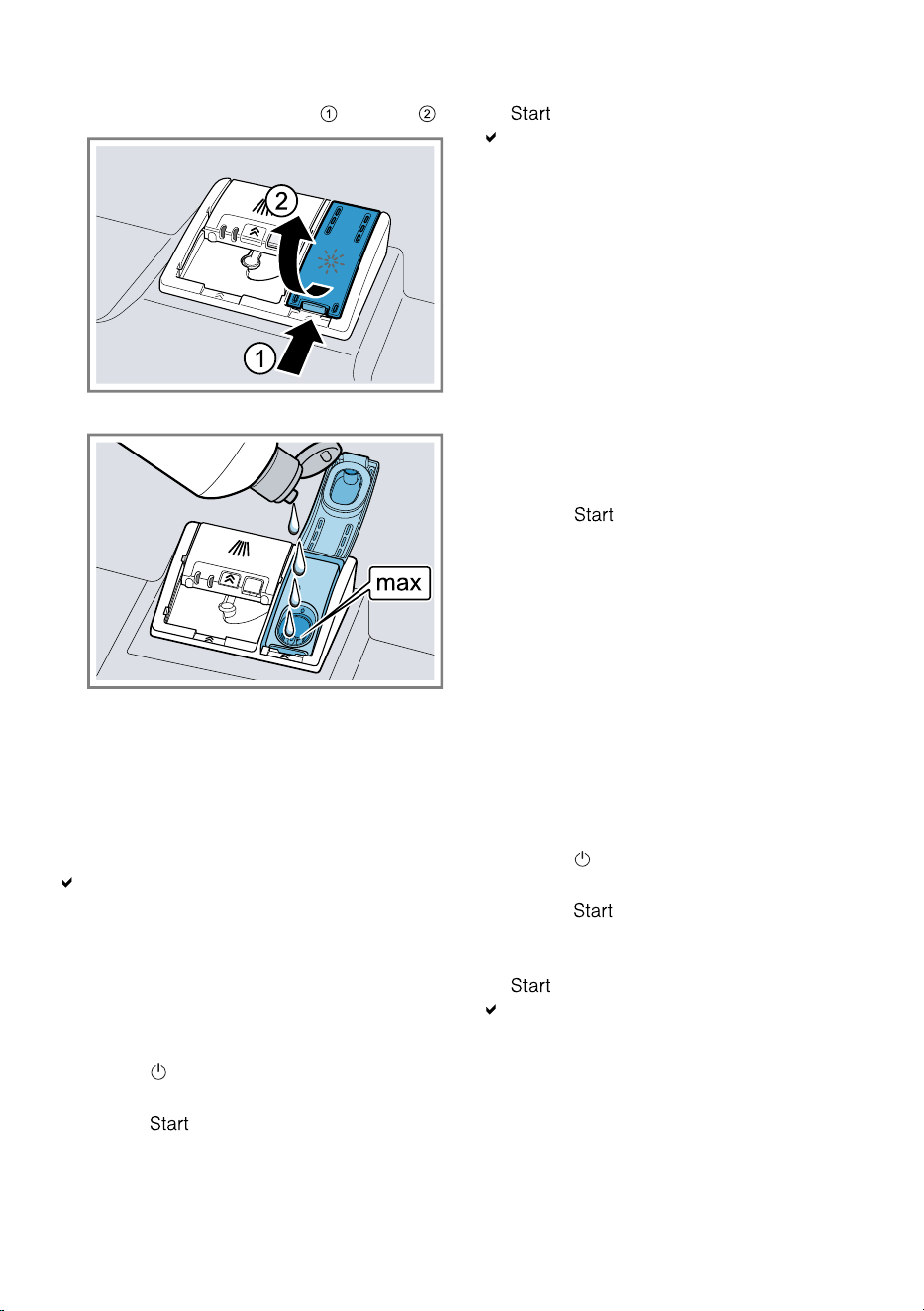
Adding rinse aid
If the rinse aid refill indicator lights
up, top up with rinse aid. Only use
rinse aid for domestic dishwashers.
19
aus Rinse aid system
1.
Press the catch on the lid of the
dispenser for rinse aid and lift .
2.
Add rinse aid up to the max mark.
3.
If rinse aid spills out, remove it
from the tub.
Spilled rinse aid can cause ex-
cessive frothing during the wash
cycle.
4.
Close the lid of the dispenser for
rinse aid.
The lid clicks into position.
10.2 Setting the amount of
rinse aid
If there are streaks or water marks on
tableware, change the amount of
rinse aid.
1.
Press .
2.
Hold programme button A and
press repeatedly until the dis-
play shows H:xx.
3.
Release programme button A and
.
Programme button A flashes and
the display shows H:04.
4.
Press programme button A re-
peatedly until the display shows
the value set at the factory r:05.
5.
Press programme button C re-
peatedly until the right amount of
rinse aid has been set.
– A low setting adds less rinse aid
during the wash cycle and re-
duces streaking on tableware.
– A higher setting adds more
rinse aid during the wash cycle,
reduces water marks and im-
proves the drying result.
6.
Press to save the setting.
10.3 Switching rinse aid sys-
tem off
If you find the rinse aid refill indicator
irritating, e.g. when using combined
detergents with a rinse aid compon-
ent, you can switch the rinse aid sys-
tem off.
Tip: The function of rinse aid is lim-
ited with combined detergents. You
will generally get better results using
rinse aid.
1.
Press .
2.
Hold programme button A and
press repeatedly until the dis-
play shows H:xx.
3.
Release programme button A and
.
Programme button A flashes and
the display shows H:04.
4.
Press programme button A re-
peatedly until the display shows
the value set at the factory r:05.
20
Detergent aus
5.
Press programme button C re-
peatedly until the display shows
r:00.
6.
Press to save the setting.
The rinse aid system is switched
off and the rinse aid refill indicator
is deactivated.
Detergent11 Detergent
11.1 Suitable detergents
Only use detergents that are suitable
for dishwashers. Both separate and
combined detergents are suitable.
For optimum washing and drying res-
ults, use separate detergent together
with Rinse aid.
Modern, powerful detergents mainly
use a low-alkaline formulation with
enzymes. Enzymes break down
starch and remove protein. Oxygen-
based bleaching agents are generally
used to remove coloured stains, e.g.
tea or ketchup.
Note: Follow the manufacturer's in-
structions for each detergent.
Detergent Description
Tabs Tabs are suitable
for all cleaning
functions and do
not need to be
measured out.
With shorter Pro-
grammes tabs
sometimes do not
dissolve entirely
and leave
residues of deter-
gent. This may im-
pair the cleaning
effect.
Powder deter-
gent
Powder detergent
is recommended
for shorter Pro-
Detergent Description
grammes. The
dosage can be
adjusted to the
level of soiling.
Liquid detergent Liquid detergent
works faster and
is recommended
for shorter Pro-
grammes without
PreRinse.
Sometimes liquid
detergent may
leak out despite
the detergent dis-
penser being
closed. This is not
a fault and is non-
critical if you re-
member the fol-
lowing:
Only choose a
programme
without PreR-
inse.
Do not select
timer program-
ming for start-
ing the pro-
gramme.
The dosage can
be adjusted to the
level of soiling.
Tip: Suitable detergents are available
online via our website or from Cus-
tomer Service
Page42
.
Separate detergents
Separate detergents are products
that do not contain components other
than detergent, e.g. powder or liquid
detergent.
With powder and liquid detergent the
dosage can be individually adjusted
21
aus Detergent
to the level of soiling of the table-
ware.
For better washing and drying res-
ults, please also use Rinse aid.
Combined detergents
Besides conventional separate deter-
gents, a number of products are
available with additional functions.
These products not only contain de-
tergent, but also rinse aid and salt re-
placement substances (3in1) and,
depending on the combination (4in1,
5in1,...), additional components such
as glass protection or stainless steel
cleaner.
Note: Follow the manufacturer's in-
structions for each detergent.
If you are using combined detergent,
the washing programme is adjusted
automatically to ensure the best pos-
sible washing and drying result.
11.2 Unsuitable detergents
Do not use detergent which could
cause damage to the appliance or
present a risk to health.
Detergent Description
Hand wash-
ing-up liquid
Hand washing-up li-
quid can cause in-
creased frothing and
damage the appli-
ance.
Detergent
containing
chlorine
Chlorine residue on
tableware may
present a risk to
health.
11.3 Information on detergents
Follow the instructions on detergents
in everyday use.
Detergents marked as "organic" or
"ecological" (environmentally
friendly) generally contain lower
levels of active agents or com-
pletely dispense with certain sub-
stances. The cleaning effect may
be restricted here.
Set the rinse aid system to the
separate or combined detergent in
use.
Follow the manufacturer's instruc-
tions for each detergent.
To prevent sticking, only touch de-
tergents in a water-soluble pouch
with dry hands and only ever place
them in a dry detergent dispenser.
Even if the rinse aid refill indicator
lights up, washing programmes will
still run properly with combined de-
tergents.
The function of rinse aid is limited
with combined detergents. You will
generally get better results using
rinse aid.
Use tablets with a special drying
performance.
11.4 Adding detergent
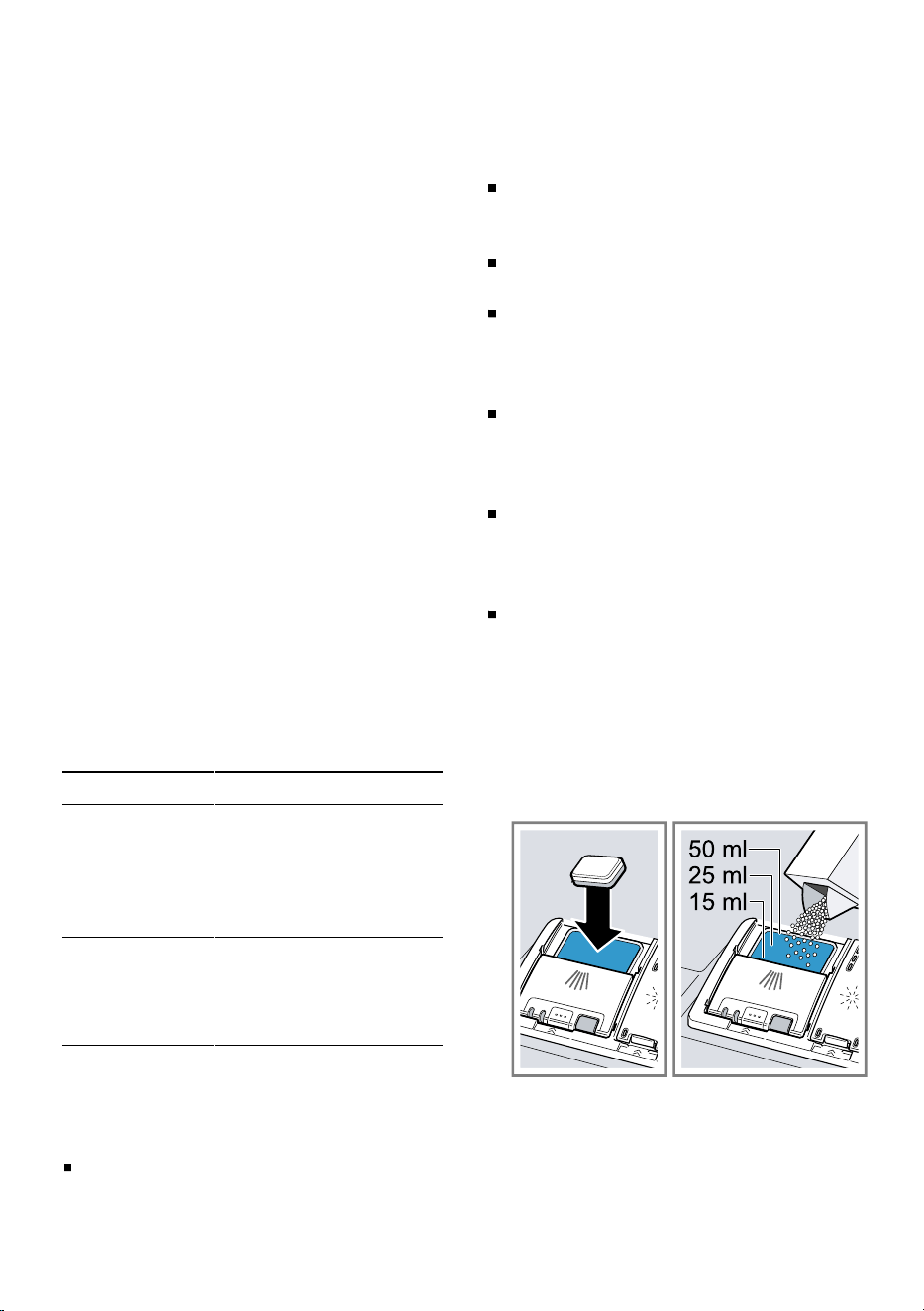
1.
To open the detergent dispenser,
press the locking latch.
2.
Add the detergent to the dry deter-
gent dispenser.
If you are using tablets, one is
enough. Insert the tablets in a hori-
zontal position.
If you are using powder or liquid
detergent, follow the manufac-
turer's instructions and quantities
22
Tableware aus
for dosage in the detergent dis-
penser.
20ml–25ml detergent is suffi-
cient for normal soiling. If table-
ware is only lightly soiled, slightly
less than the amount of detergent
specified is usually sufficient.
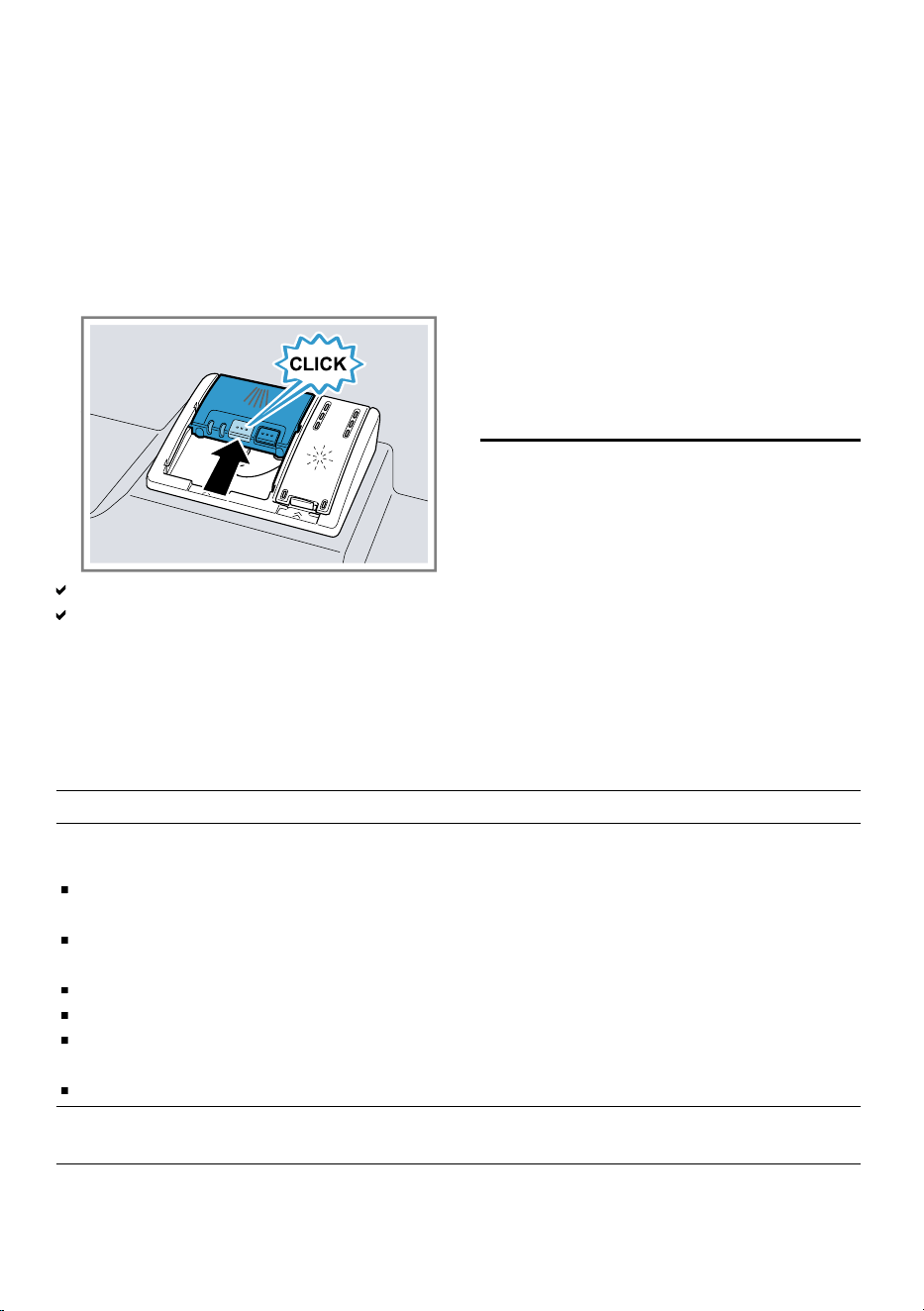
3.
Close the lid of the detergent dis-
penser.
The lid clicks into position.
The detergent dispenser will open
automatically at the optimum time
during the programme. Powder or
liquid detergent will spread around
the washing tank and dissolve
there. Tablets will fall into the tablet
collecting tray and dissolve in the
right dosage. In order to ensure
that tablets can dissolve evenly, do
not place any other objects in the
tablet collecting tray.
Tip: If you use powder detergent and
select a program with pre-rinse, you
can also add a little detergent to the
interior door of the appliance.
Tableware12 Tableware
Only clean tableware that is suitable
for dishwashers.
Note: Decorated glassware and parts
made of aluminium or silver may
fade or discolour with dishwashing.
Delicate types of glass may turn
cloudy after a few washing cycles.
12.1 Damage to glass and tableware
Only put glasses and china in the dishwasher if it is marked as dishwasher-safe
by the manufacturer. Avoid damage to glass and tableware.
Cause Recommendation
The following tableware is not dish-
washer-safe:
Items of cutlery and tableware
made from wood
Decorated glassware, antique and
hand-crafted tableware
Plastic parts not resistant to heat
Tableware made from copper or tin
Tableware soiled with ash, wax, lub-
ricating grease or paint
Very small items of tableware
Only put tableware in the dishwasher if
it is marked as dishwasher-safe by the
manufacturer.
The chemical composition of deter-
gent causes damage.
Use a detergent marked by the manu-
facturer as gentle on tableware.
Highly caustic alkaline or highly acidic
cleaning solutions, in particular com-
mercial or industrial cleaners, are not
If you are using highly caustic alkaline
or highly acidic cleaning agents, in par-
ticular commercial or industrial clean-
23
aus Tableware
Cause Recommendation
safe to use in the dishwasher with alu-
minium.
ing agents, do not put aluminium parts
in the dishwasher interior.
The water temperature of the pro-
gramme is too high.
Select a programme with lower temper-
atures.
After the programme has ended, take
glassware and cutlery out of the appli-
ance without delay.
12.2 Arrange tableware
Arrange tableware correctly to optim-
ise the dishwashing result and pre-
vent damage to both the appliance
and tableware.
Tips
Using the appliance allows you to
save energy and water compared
to washing-up by hand.
See our website for examples of
how to load your appliance effi-
ciently.
To save energy and water, load
the machine with the number of
place settings specified (standard
load with tableware and cutlery).
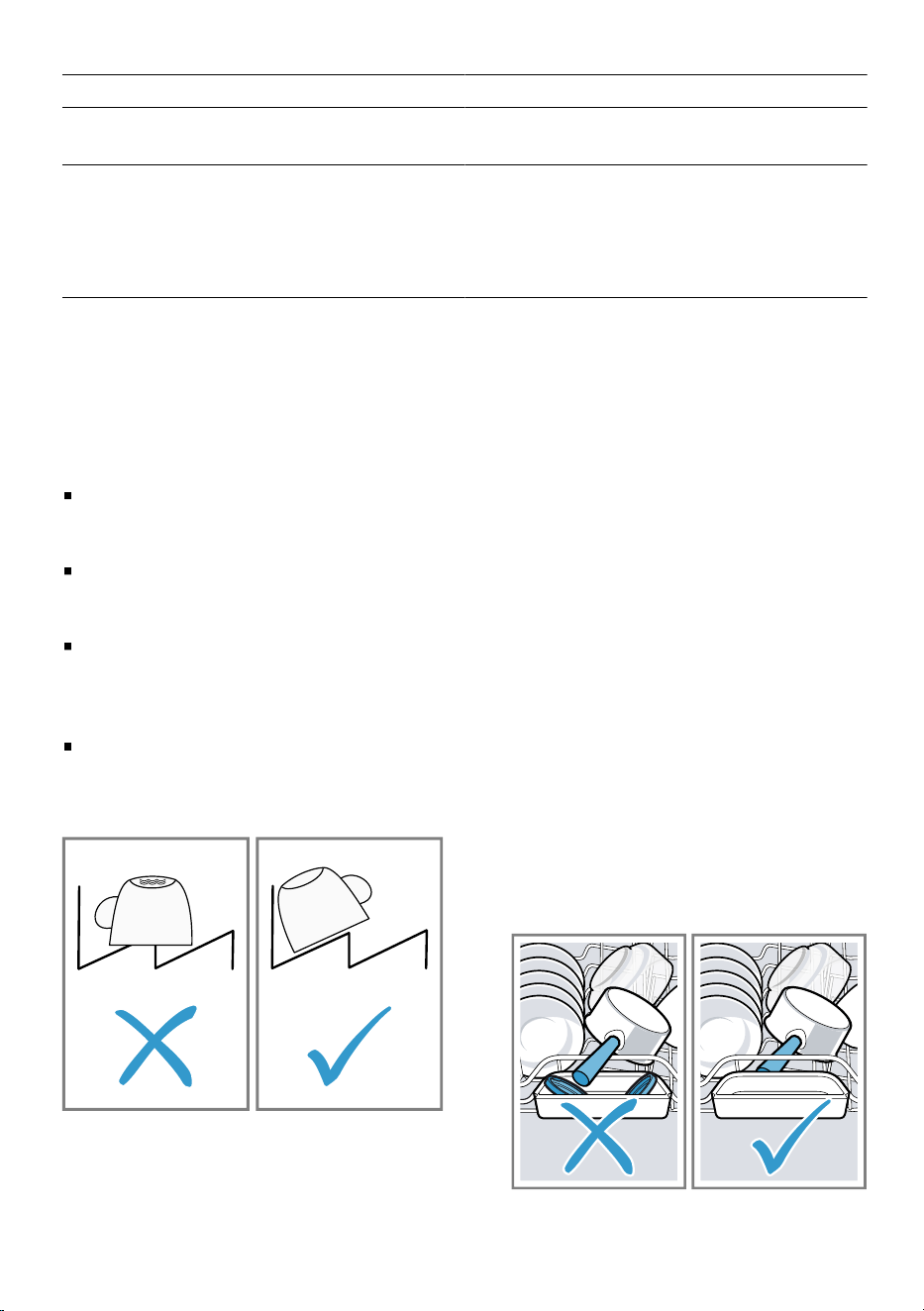
For better washing and drying res-
ults, position items with curves or
recesses at an angle so water can
run off.
1.
Remove large remnants of food
from tableware.
To save resources, do not pre-
rinse tableware under running wa-
ter.
2.
Observe the following when arran-
ging tableware:
– Put heavily soiled tableware in
the bottom basket, e.g. pans.
The more powerful the spray jet,
the better the dishwashing result
will be.
– To prevent damage to table-
ware, arrange it so it is stable
and cannot tip over.
– To prevent injury, arrange cut-
lery with the points and sharp
edges facing down.
– Position containers with the
openings facing down so no wa-
ter can collect in them.
– Do not block the spray arms -
make sure that they can turn
freely.
– Do not place small parts in the
tablet collecting tray and do not
block it with tableware so as not
to obstruct the lid of the deter-
gent dispenser.
24
Basic operation aus
12.3 Removing tableware
WARNING
Risk of injury!
Hot tableware can cause burns to the
skin. When hot, tableware is sensitive
to shock, may crack and can result in
injury.
When the programme has ended,
do not empty the appliance until
the tableware has cooled down for
a while.
1.
To prevent water dripping on the
tableware, unload it starting at the
bottom and working up.
2.
Check the washing tank and ac-
cessories for soiling and clean if
necessary.
"Cleaning and servicing",
Page27
Basic operation13 Basic operation
13.1 Switching on the appli-
ance
Press .
The Eco 50° programme is set by
default.
If you do not perform any actions
on the appliance for 15 minutes,
the appliance will automatically
switch off.
1
13.2 Setting a programme
To adjust the washing programme to
the soiling level of the tableware, se-
lect a suitable programme.
Press the right programme button.
The remaining running time of the
programme appears on the dis-
play.
13.3 Setting additional func-
tions
You can set additional functions to
complete the washing programme
selected.
Note: The additional functions which
can be used depend on the pro-
gramme selected.
Press the button for the relevant
additional function.
"Additional functions", Page17
The additional function is set and
the additional function button
flashes.
13.4 Setting timer program-
ming
You can delay the start of the pro-
gramme by up to 24hours.
1.
Press .
"h:01" appears in the display.
2.
Use or to set the required
start time for the programme.
3.
Press .
This activates timer programming.
Tip: To deactivate timer program-
ming, press or repeatedly until
"h:00" appears in the display.
13.5 Starting the programme
Press .
The programme has ended when
the display shows "0:00".
Notes
If you want to add more tableware
while the appliance is running, do
not use the tablet collecting tray as
a handle for the top basket. You
might touch the partially dissolved
tablet.
1
Depending on the appliance specifications
25
aus Basic settings
You can only change a pro-
gramme when running if you can-
cel it.
"Terminate programme",
Page26
The appliance switches off auto-
matically 1minute after the end of
the programme to save energy. If
you open the appliance door im-
mediately after the programme has
ended, the appliance will switch off
after 4 seconds.
Tip: To assist the drying, we recom-
mend that the door will be partially
opened after the cycle.
13.6 Interrupting programme
Note: When you open the appliance
door once the appliance has heated
up, leave the door slightly ajar for a
few minutes and then close it. This
will help prevent excess pressure
building up in the appliance and stop
the appliance door bursting open.
1.
Press .
The programme is saved and the
appliance switches off.
2.
Press to resume the pro-
gramme.
13.7 Terminate programme
To end a programme early or to
switch from a programme that has
already started, you will need to can-
cel it first.
Press for approx.
3seconds.
The programme is cancelled and
ends after approx. 1minute.
13.8 Switching off appliance
1.
Please note the information on
Safe use
Page9
.
2.
Press .
Tip: If you press during the wash
cycle, the programme currently run-
ning will be interrupted. When you
switch the appliance back on, the
programme continues automatically.
Basic settings14 Basic settings
You can configure the basic settings
for your appliance to meet your
needs.
14.1 Overview of basic settings
The basic settings depend on the features of your appliance.
Basic setting Display text Selection Description
Rinse aid dis-
pensing
r:05
1
r:00 - r:06 Set the amount of rinse aid to
be dispensed.
"Setting the amount of
rinse aid", Page20
Switch the rinse aid system
off with level r:00.
Intensive drying d:00
1
d:00 - d:01 The temperature is increased
during the final rinse, which
improves the drying result.
1
Factory setting (may vary according to model)
26
Cleaning and servicing aus
Basic setting Display text Selection Description
This may increase the run
time slightly.
Note: Not suitable for delicate
items of tableware.
Switch Extra Dry on "d:01" or
off "d:00".
14.2 Changing basic settings
1.
Press .
2.
Hold programme button A and
press repeatedly until the dis-
play shows H:xx.
3.
Release programme button A and
.
Programme button A flashes and
the display shows H:04.
4.
Press programme button A re-
peatedly until the display shows
the required setting.
5.
Press programme button C re-
peatedly until the display shows
the right value.
You can change several settings.
6.
Press to save the setting.
Cleaning and servicing15 Cleaning and servi-
cing
15.1 Cleaning the tub
WARNING
Risk of harm to health!
Using detergents containing chlorine
may result in harm to health.
Never use detergents containing
chlorine.
1.
Remove any coarse soiling in the
interior with a damp cloth.
2.
Add detergent to the detergent dis-
penser.
3.
Select the programme with the
highest temperature.
4.
Start the programme without table-
ware.
Page25
15.2 Self-cleaning interior
1
To remove deposits, the appliance
self-cleans the interior at regular inter-
vals.
The programme sequence is auto-
matically adjusted for self-cleaning,
e.g. the cleaning temperature is
briefly increased. Consumption val-
ues, e.g. water and electricity, may
also increase.
If the interior is no longer self-cleaned
adequately and deposits occur, see
this information: .
"Cleaning the tub", Page27
15.3 Cleaning products
Only use suitable cleaning products
to clean your appliance.
"Safe use", Page9
15.4 Tips on appliance care
Follow the tips on appliance care to
make sure your appliance functions
properly at all times.
Action Benefit
Wipe the door
seals, the front of
the dishwasher
and the control
This ensures the
parts of the appli-
ance will remain
1
Depending on the appliance specifications
27
aus Cleaning and servicing
Action Benefit
panel regularly
using a damp
cloth and wash-
ing-up liquid.
clean and hy-
gienic.
If the appliance
is not going to
be used for a
while, leave the
door slightly ajar.
This will prevent
unpleasant
odours.
15.5 Machine Care
1
Deposits can cause your dishwasher
to malfunction, e.g. due to grease or
limescale. To avoid such faults and
reduce odours, we recommend
cleaning your appliance at regular in-
tervals.
Machine Care combined with com-
mercially available machine care
products is the right programme for
the care of your appliance.
Run Machine Care without tableware
if the indicator for Machine Care
lights up on the control panel or if ad-
vised to do so by the display. Once
you have run the Machine Care pro-
gramme, the indicator goes out. If
your appliance does not have a re-
minder function, follow the directions
for use on the machine care
products.
Performing Machine Care
Run the Machine Care programme if
the indicator for Machine Care lights
up on the control panel or if advised
to do so by the display.
Notes
Run the Machine Care programme
without any tableware in the dish-
washer.
Only use suitable machine care
products specially designed for
dishwashers and not dishwasher
detergent. Observe the manufac-
turer's instructions.
Make sure that there are no alu-
minium parts in the interior of the
appliance.
If you have not run Machine Care
after 3 washing cycles, the indic-
ator for Machine Care will go out
automatically.
Follow the safety instructions and
the directions for use on the pack-
agings of the machine care
products.
1.
Remove any coarse soiling in the
interior with a damp cloth.
2.
Clean filters.
3.
Add the machine care product to
the appliance.
4.
Press .
5.
Press .
The Machine Care programme is
run.
As soon as machine care has fin-
ished, the indicator for Machine
Care goes out.
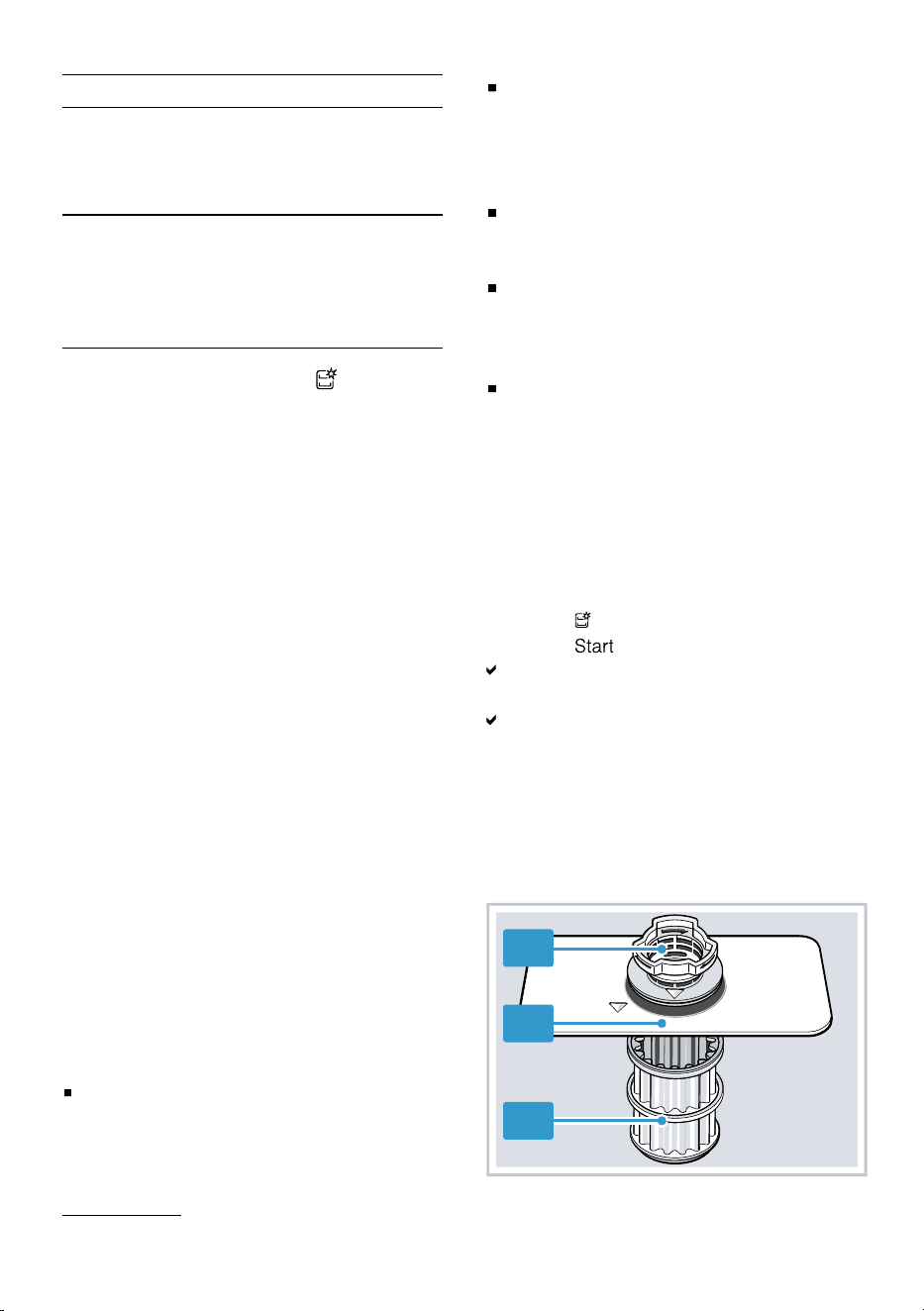
15.6 Filter system
The filter system removes coarse
soiling from the dishwashing cycle.
1
2
3
1
Depending on the appliance specifications
28
Cleaning and servicing aus
Micro filter
Fine filter
Coarse filter
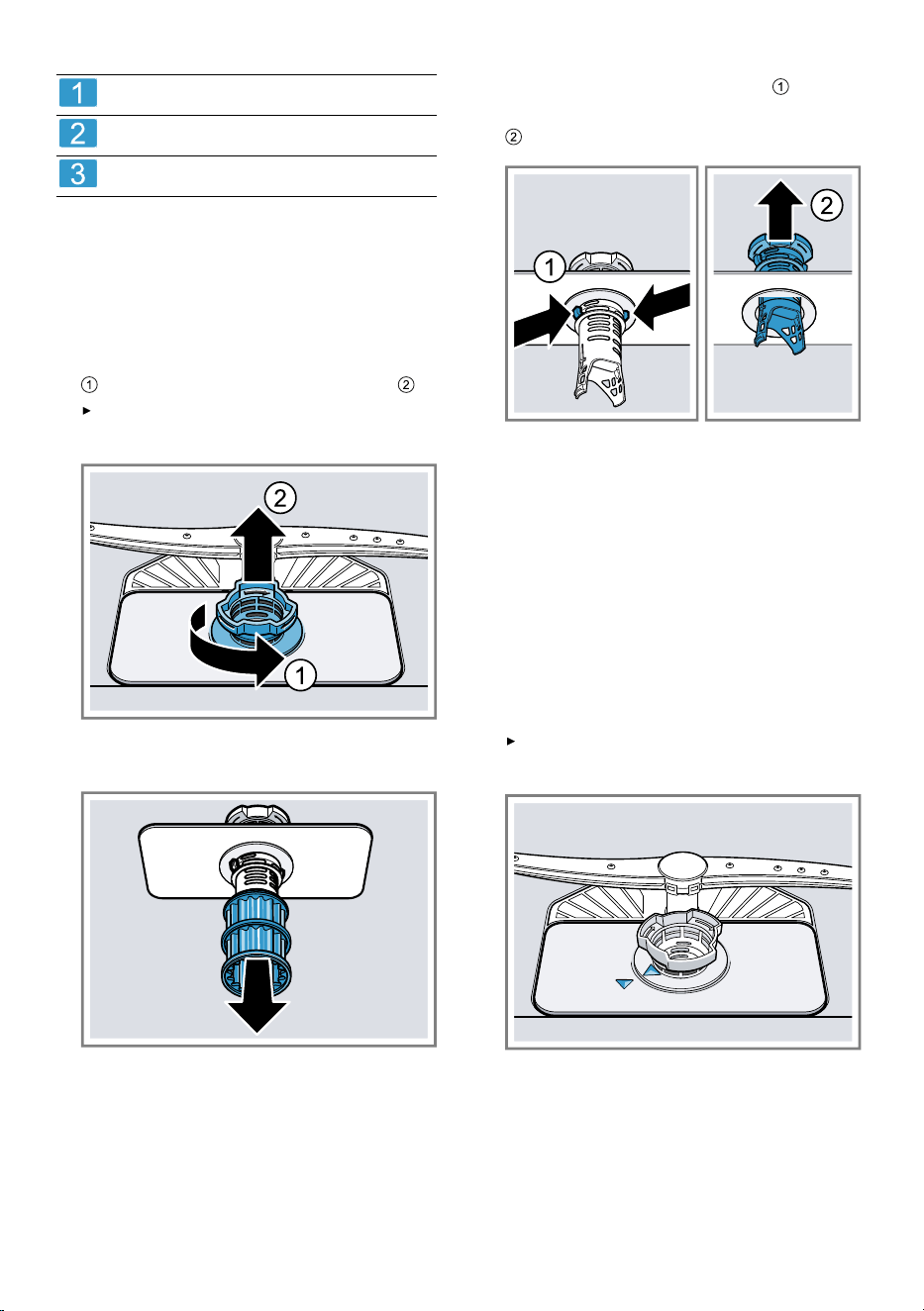
Cleaning filters
Soiling in the dishwashing water may
block the filters.
1.
After each wash check the filters
for residue.
2.
Turn the coarse filter anticlockwise
and remove the filter system .
Check that no foreign objects
fall into the sump.
3.
Pull down the micro filter to re-
move.
4.
Press the locking catches to-
gether and lift the coarse filter out
.
5.
Clean the filter elements under run-
ning water.
Carefully clean the rim of dirt
between the coarse and the fine fil-
ter.
6.
Re-assemble the filter system.
Make sure that the locking catches
on the coarse filter click into posi-
tion.
7.
Insert the filter system into the ap-
pliance and turn the coarse filter
clockwise.
Make sure that the arrow mark-
ings match up.
15.7 Cleaning spray arms
Limescale and soiling in the dish-
washing water may block the nozzles
and bearings on the spray arms.
Clean the spray arms regularly.
29
aus Troubleshooting
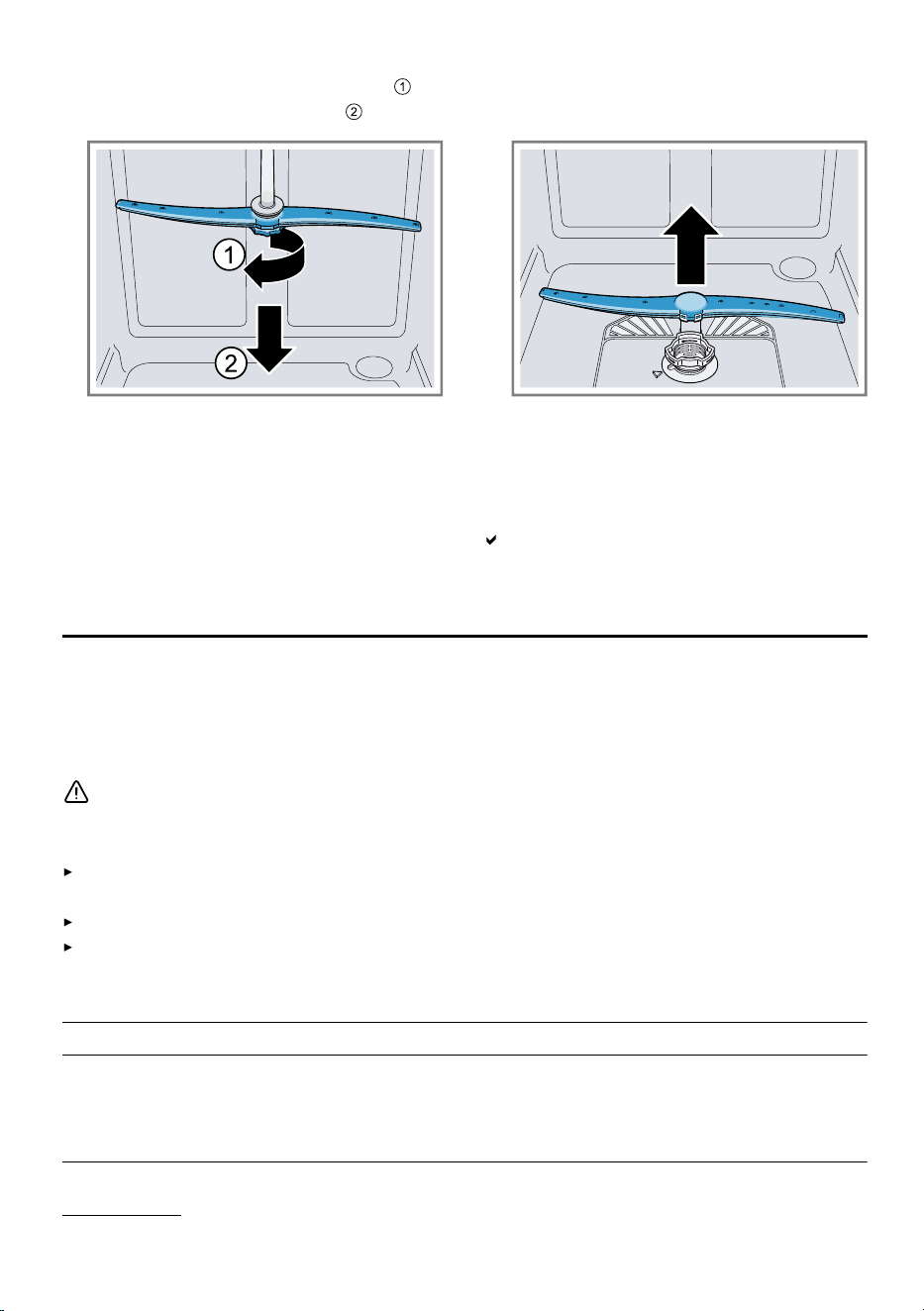
1.
Unscrew the upper spray arm
and pull down to remove .
2.
Pull up the lower spray arm to re-
move.
3.
Check the outlet nozzles on the
spray arms for blockages under
running water and remove any for-
eign objects.
4.
Insert the lower spray arm.
The spray arm clicks into position.
5.
Insert the upper spray arm and
screw it firmly in place.
Troubleshooting16 Troubleshooting
You can rectify minor faults on your appliance yourself. Read the troubleshoot-
ing information before contacting after-sales service. This will avoid unneces-
sary costs.
WARNING
Risk of electric shock!
Improper repairs are dangerous.
Repairs to the appliance should only be carried out by trained specialist
staff.
Only use genuine spare parts when repairing the appliance.
If the power cord or the appliance power cable of this appliance is damaged,
it must be replaced with a special power cord or special appliance power
cable, which is available from the manufacturer or its Customer Service.
Fault Cause and troubleshooting
E:12 lights up. Appliance has detected calcified heating element.
1.
Descale the appliance.
2.
Operate the appliance with the water softening
system.
1
1
Depending on the appliance specifications
30
Troubleshooting aus
Fault Cause and troubleshooting
E:14 lights up. Water protection system is activated.
1.
Turn off the water tap.
2.
Call Customer Service
Page42
.
E:15 lights up. Water protection system is activated.
1.
Turn off the water tap.
2.
Call Customer Service
Page42
.
E:16 lights up. Water is continuously running into the appliance.
1.
Turn off the water tap.
2.
Call Customer Service
Page42
.
E:18 or indicator for
water supply lights up.
Supply hose is kinked.
Install the supply hose without kinks.
Water tap is turned off.
Turn on the water tap.
Water tap is jammed or furred up.
Turn on the water tap.
The flow rate must be at least 10 l/min when the water
supply is open.
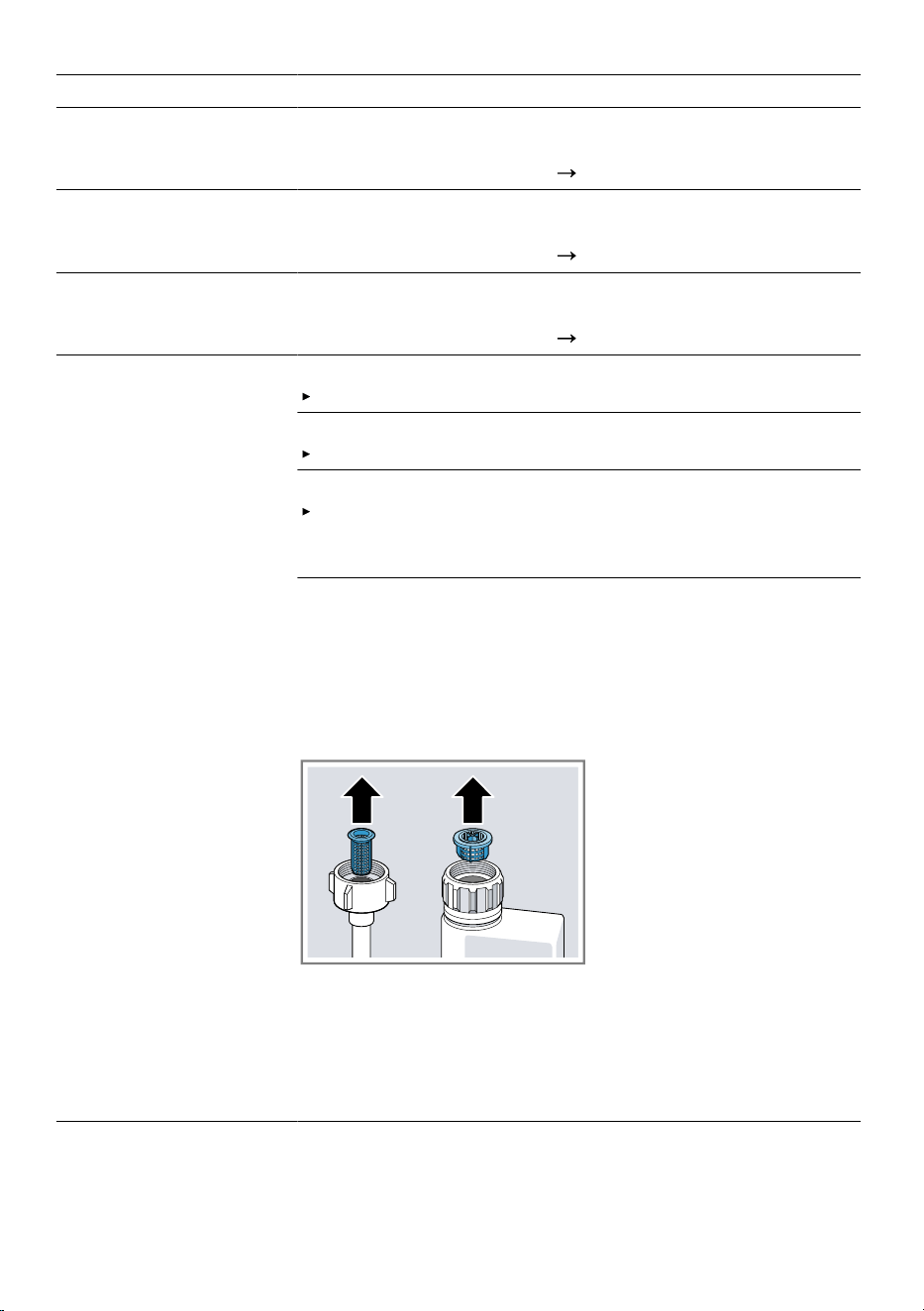
The filters in the water connection of the supply or
AquaStop hose are blocked.
1.
Switch off the appliance.
2.
Pull out the mains plug.
3.
Turn off the water tap.
4.
Unscrew the water connection.
5.
Remove the filter from the supply hose
6.
Clean the filter.
7.
Re-insert the filter in the supply hose.
8.
Screw the water connection back on.
9.
Check the water connection for leaks.
10.
Restore the power supply.
11.
Switch the appliance on.
31
aus Troubleshooting
Fault Cause and troubleshooting
E:22 lights up.
1
Filters are soiled or blocked.
Clean the filters.
"Cleaning filters", Page29
E:24 lights up. Water
is not drained.
Not an appliance fault. Siphon connection is still closed
or the wastewater hose is kinked or blocked.
1.
Check the connection to the siphon and open if ne-
cessary.
2.
Install wastewater hose without kinks.
3.
Remove residues.
Not an appliance fault. Wastewater pump is blocked or
the cover of the wastewater pump is loose.
1.
Clean the wastewater pump.
"Clean wastewater pump", Page41
2.
Secure the cover of the wastewater pump so it clicks
into position.
"Clean wastewater pump", Page41
E:25 lights up. Not an appliance fault. Wastewater pump is blocked or
the cover of the wastewater pump is loose.
1.
Clean the wastewater pump.
"Clean wastewater pump", Page41
2.
Secure the cover of the wastewater pump so it clicks
into position.
"Clean wastewater pump", Page41
E:27 lights up. Mains voltage is too low.
This is not a fault on the appliance.
1.
Contact an electrician.
2.
Have the mains voltage and electrical installation
checked by an electrician.
1
Depending on the appliance specifications
32
Troubleshooting aus
Fault Cause and troubleshooting
Another error code
appears on the dis-
play.
E:01 to E:30
A technical fault is present.
1.
Press .
2.
Unplug the appliance or switch off the fuse.
3.
Wait at least 2minutes.
4.
Insert the mains plug of the appliance in a socket or
switch on the fuse.
5.
Switch the appliance on.
6.
If the problem occurs again:
Press .
Turn off the water tap.
Pull out the mains plug.
Contact Customer Service
Page42
and give the
error code.
Tableware is not dry. No rinse aid used or dosage set too low.
1.
Add Rinse aid
Page19
.
2.
Set the amount of rinse aid to be dispensed.
Programme or programme option has no drying phase,
or the drying phase is too brief.
Select a programme with drying, e.g. intensive,
strong or ECO programme.
Some option buttons decrease the drying result, e.g
varioSpeed.
Water collects in recesses of the tableware or cutlery.
Position tableware at an angle where possible.
The combined detergent used has a poor drying per-
formance.
1.
Use rinse aid to improve drying performance.
2.
Use a different combined detergent with a better dry-
ing performance.
Extra Dry not activated to improve drying performance.
Activate Extra Dry.
Tableware removed too early or drying process not yet
ended.
1.
Wait until the programme ends.
33
aus Troubleshooting
Fault Cause and troubleshooting
Tableware is not dry.
2.
Only remove tableware 30minutes after the pro-
gramme has ended.
Rinse aid used has a limited drying performance.
Use a name-brand rinse aid.
Eco products may have limited effectiveness.
Plastic tableware is
not dry.
Not a fault. As plastic does not store heat so well, it
also does not dry as well.
No remedial action possible.
Cutlery is not dry. Cutlery not arranged properly in the cutlery basket or
cutlery drawer.
Droplets can form on the cutlery contact points.
1.
Arrange cutlery individually where possible.
Page24
2.
Avoid points of contact.
Appliance interior still
wet after wash cycle.
Not a fault. The condensation drying principle causes
water droplets in the tub – they are indeed desirable
here. The moisture in the air condenses on the inside
walls, runs off and is pumped out.
No action required.
Remnants of food on
tableware.
Tableware is placed too close together or basket is
overfilled.
1.
Arrange tableware with sufficient space in between.
The spray jets must reach the surfaces of the table-
ware.
2.
Avoid points of contact.
Spray arm rotation is blocked.
Arrange tableware so that it does not obstruct spray
arm rotation.
Spray arm nozzles are blocked.
Clean the spray arms.
Filters are soiled.
Clean the filters.
"Cleaning filters", Page29
34
Troubleshooting aus
Fault Cause and troubleshooting
Remnants of food on
tableware.
Filters are inserted incorrectly and/or not engaged.
1.
Insert the filters properly.
"Filter system", Page28
2.
Engage the filters.
Washing programme selected too weak.
Select a more intensive washing programme.
Tableware has been precleaned too intensely. The
sensors chose a weaker programme. Stubborn soiling
cannot be entirely removed.
Only remove large remnants of food and do not
prerinse tableware.
Tall narrow receptacles in corner areas are not rinsed
adequately.
Do not position tall narrow receptacles at too great
an angle or in corner areas.
Top baskets on right and left are not set to same
height.
Set the upper basket on the left and right to the
same height.
"Top basket", Page18
Detergent residue in
the appliance
Lid of the detergent dispenser is blocked by items of
tableware parts and will not open.
1.
Arrange tableware in the top basket tableware so
the tab collecting tray is not obstructed by tableware.
"Arrange tableware", Page24
Items of tableware are blocking the dispenser lid.
2.
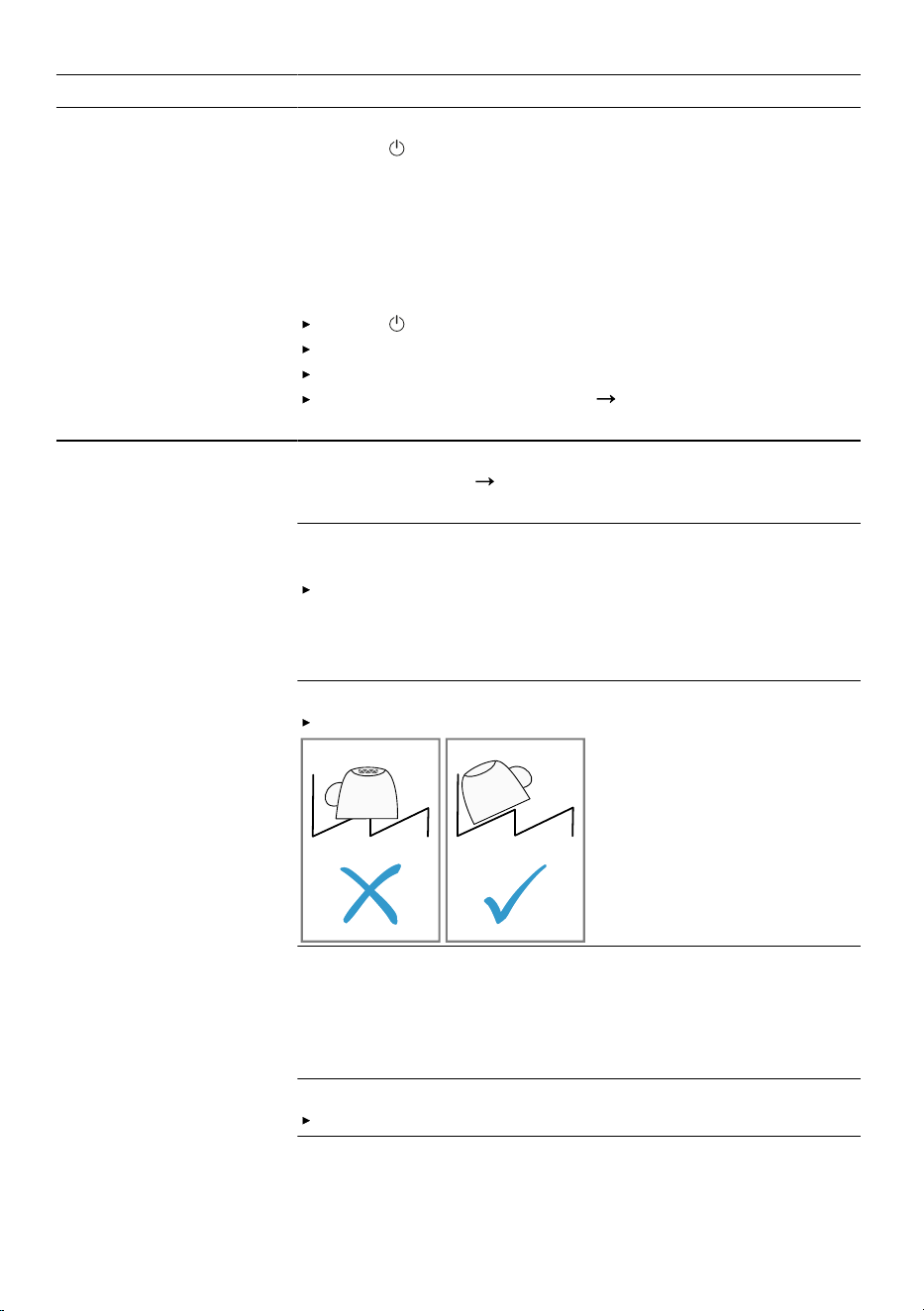
Do not place tableware or fragrance dispensers in
the tablet collecting tray.
The lid of the detergent dispenser is blocked by the tab
and will not open.
Position the tab in the detergent dispenser cross-
wise, not vertically.
Tabs are used in the quick or short programme. Dis-
solving time of the tab is not attained.
Select a more intensive Programme or use Powder
detergent.
35
aus Troubleshooting
Fault Cause and troubleshooting
Detergent residue in
the appliance
Washing effect and dissolving performance are re-
duced after a prolonged storage time or detergent is
very lumpy.
Change your detergent.
Water marks on
plastic parts.
Due to laws of physics droplet formation on plastic sur-
faces is unavoidable. After drying water marks are vis-
ible.
Select a more intensive programme.
Position tableware at an angle.
"Arrange tableware", Page24
Use rinse aid.
"Rinse aid", Page19
Wipeable or water-sol-
uble coatings are
present inside the ap-
pliance or on the
door.
Detergent substances are deposited there. These coat-
ings cannot generally be removed with chemicals.
Change your detergent.
Clean the appliance mechanically.
Stubborn white coat-
ings are present on
tableware, inside the
appliance or the door.
Detergent substances are deposited there. These coat-
ings cannot generally be removed with chemicals.
Change your detergent.
Clean the appliance mechanically.
Too little detergent is being used.
Increase the amount of detergent used or change
Detergent .
Washing programme selected too weak.
Select a more intensive washing programme.
Tea residue or lipstick
marks on tableware.
Washing temperature is too low.
Select a programme with a higher washing temperat-
ure.
Too little detergent is being used or is unsuitable.
Use a suitable Detergent and follow the manufac-
turer's instructions for the amount to be used.
Tableware has been precleaned too intensely. The
sensors chose a weaker programme. Stubborn soiling
cannot be entirely removed.
Only remove large remnants of food and do not
prerinse tableware.
36
Troubleshooting aus
Fault Cause and troubleshooting
Coloured coatings
(blue, yellow, brown)
that are difficult or im-
possible to remove
are present inside the
appliance or on stain-
less steel tableware.
The formation of films is due to substances contained
in vegetables (cabbage, celery, potatoes, noodles, etc.)
or tap water (manganese).
Clean the appliance.
You can remove deposits with Mechanical cleaning
Page27
or a machine cleaning product. It may not
always be possible to completely remove deposits but
they are harmless to health.
The formation of films is due to metal components on
silver or aluminium tableware.
Clean the appliance.
You can remove deposits with Mechanical cleaning
Page27
or a machine cleaning product. It may not
always be possible to completely remove deposits but
they are harmless to health.
Plastic parts inside the
appliance are discol-
oured.
Plastic parts inside the appliance may become discol-
oured during the life of the dishwasher.
Discolouration can come about and will not impair
functioning of the appliance.
Plastic parts are dis-
coloured.
Washing temperature is too low.
Select a programme with a higher washing temperat-
ure.
Tableware has been precleaned too intensely. The
sensors chose a weaker programme. Stubborn soiling
cannot be entirely removed.
Only remove large remnants of food and do not
prerinse tableware.
Removable streaks
are present on
glasses, glassware
with a metallic appear-
ance and cutlery.
Amount of rinse aid to be dispensed is set too high.
Set the rinse aid system to a lower setting.
No rinse aid has been added.
Add rinse aid.
"Adding rinse aid", Page19
Detergent residue is present in the final rinse. Lid of the
detergent dispenser is blocked by tableware items and
will not open fully.
1.
Arrange tableware in the top basket tableware so
the tab collecting tray is not obstructed by tableware.
"Arrange tableware", Page24
Items of tableware are blocking the dispenser lid.
2.
Do not place tableware or fragrance dispensers in
the tablet collecting tray.
37
aus Troubleshooting
Fault Cause and troubleshooting
Removable streaks
are present on
glasses, glassware
with a metallic appear-
ance and cutlery.
Tableware has been precleaned too intensely. The
sensors chose a weaker programme. Stubborn soiling
cannot be entirely removed.
Only remove large remnants of food and do not
prerinse tableware.
Irreversible clouding
of glassware.
Glasses are not dishwasher-proof, only suitable for
dishwashers.
Use dishwasher-proof glasses.
Glasses are usually only suitable for use in a dish-
washer, i.e. long-term wear or long-term changes must
be expected.
Avoid a lengthy steam phase (standing time after
wash cycle ends).
Use a programme with a lower temperature.
Use detergent with a glass protection component.
Rust spots on cutlery. Cutlery is not sufficiently rust-resistant. Knife blades are
often more severely affected.
Use rust-resistant tableware.
Cutlery may also rust if washed together with rusting
items.
Do not wash rusting items.
Detergent residue is
present in the deter-
gent dispenser or the
tablet collecting tray.
Spray arms were blocked by tableware so detergent
was not rinsed out.
Check that the spray arms are not blocked and can
rotate freely.
Detergent dispenser was damp when detergent was
added.
Only add detergent to a detergent dispenser when
dry.
Excessive formation of
foam occurs.
Hand washing-up liquid is present in dispenser for
rinse aid.
Immediately add rinse aid to the dispenser.
"Adding rinse aid", Page19
Rinse aid has been spilled.
Remove the rinse aid with a cloth.
Detergent or appliance care product used causes ex-
cessive foaming.
Change the brand of detergent.
Refill indicator for
rinse aid lights up.
Insufficient rinse aid.
1.
Add Rinse aid
Page19
.
2.
Set the amount of rinse aid to be dispensed.
38
Troubleshooting aus
Fault Cause and troubleshooting
Refill indicator for
rinse aid does not
light up.
Rinse aid system is switched off.
Set the amount of rinse aid to be dispensed.
Display flashes. Appliance door is not closed properly.
Close the appliance door.
Arrange the tableware so that no parts project bey-
ond the basket and prevent the appliance door from
closing properly.
Machine Care indic-
ator lights up.
Machine care is recommended.
Run the Machine Care programme without table-
ware.
Use a special machine care product.
The indicator will go out automatically after 3 wash
cycles whether Machine Care is carried out or not.
Water is left in the ap-
pliance at the end of
the programme.
Filter system or area under the filters is blocked.
1.
Clean the Filters
Page29
.
2.
Clean the Wastewater pump
Page41
.
Programme has not yet ended.
Wait until the programme ends or cancel the pro-
gramme with Reset.
"Terminate programme", Page26
Appliance cannot be
switched on or oper-
ated.
Appliance functions have failed.
1.
Pull out the mains plug or switch off the fuse.
2.
Wait at least 2minutes.
3.
Connect the appliance to the power supply.
4.
Switch the appliance on.
Appliance does not
start.
The mains fuse has tripped.
Check the relevant fuse.
Mains cable is not inserted.
1.
Check whether the socket works.
2.
Check whether the mains cable is properly inserted
in the socket and on the rear of the appliance.
Appliance door is not closed properly.
Close the appliance door.
Programme starts
automatically.
You did not wait until programme ended.
"Terminate programme", Page26
Appliance stops dur-
ing the programme or
cuts out.
Appliance door is not closed properly.
Close the appliance door.
Power and/or water supply has been interrupted.
1.
Check the power supply.
2.
Check the water supply.
39
aus Troubleshooting
Fault Cause and troubleshooting
Appliance stops dur-
ing the programme or
cuts out.
Top basket is pressing against inner door and prevent-
ing appliance door from being closed securely.
Check whether the rear panel of the appliance is be-
ing pressed in by a socket or hose holder that has
not been removed.
Arrange the tableware so that no parts project bey-
ond the basket and prevent the appliance door from
closing properly.
Appliance door can-
not be closed.
Door lock has been activated.
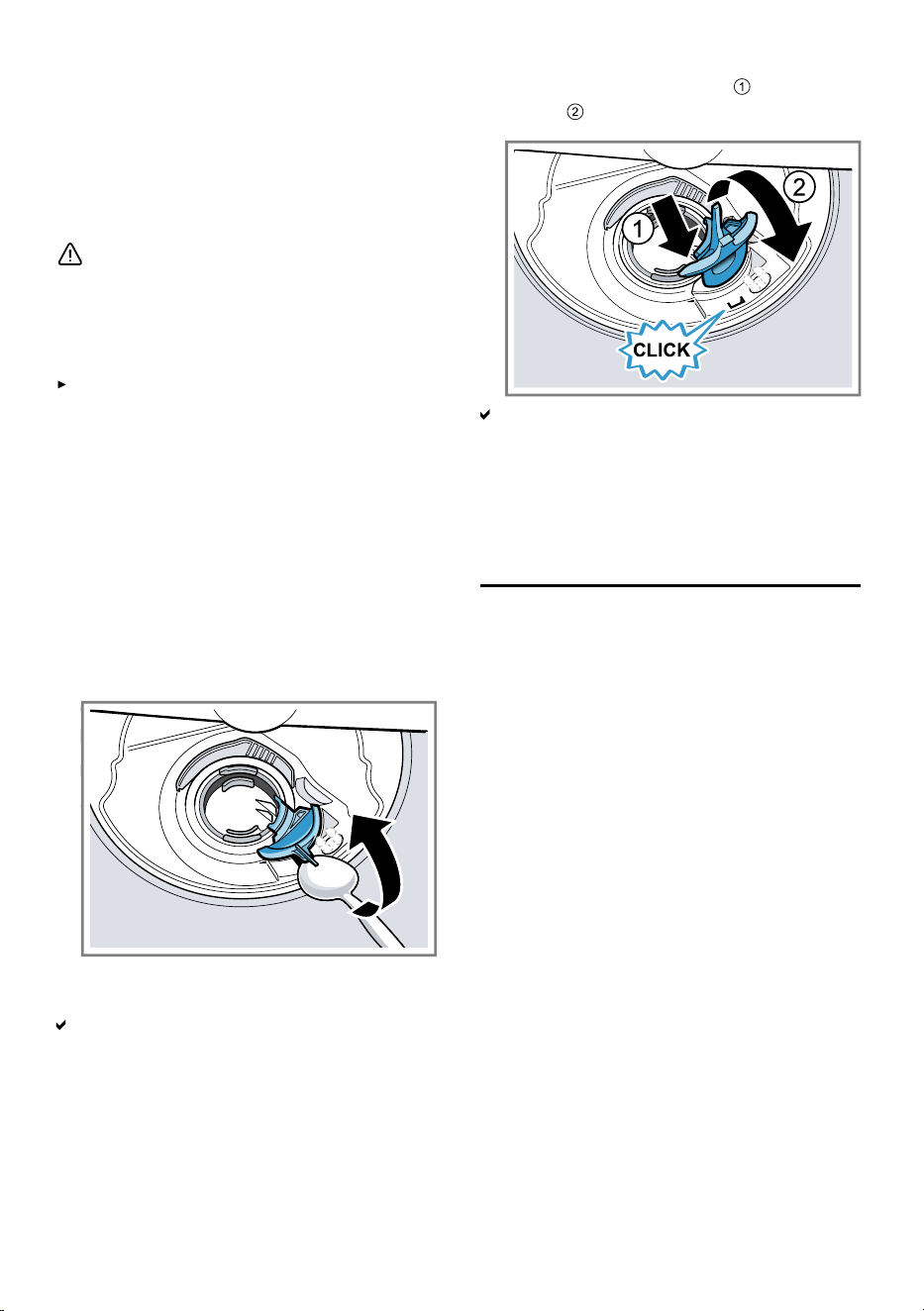
1.
Close the appliance door with greater force.
2.
If the installation conditions prevent quick realign-
ment of the closing system, you can move the door
lock back to the home position using a spoon.
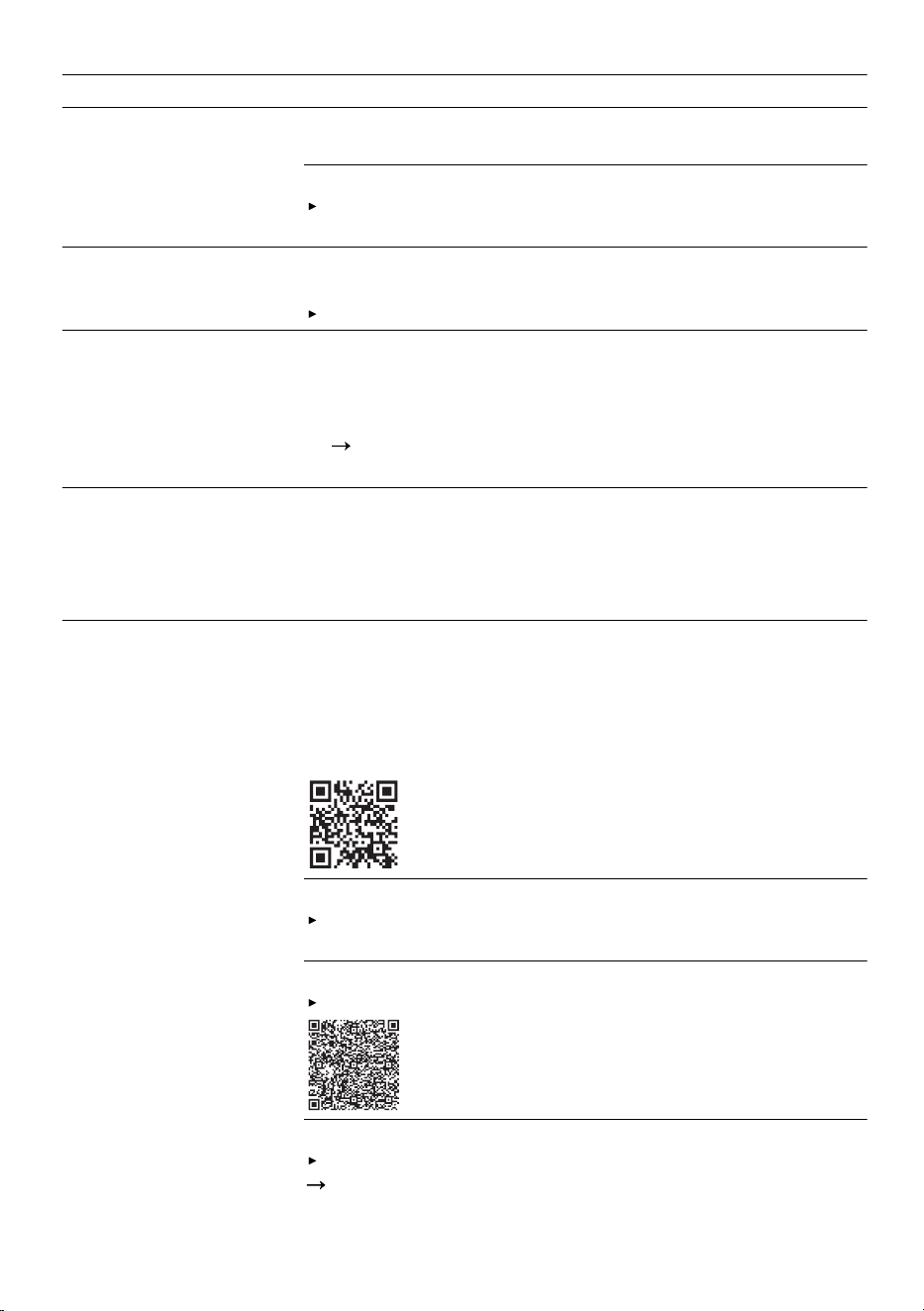
See the animation for how to move the door lock to the
home position.
Door cannot be closed due to installation method.
Check whether the appliance has been installed
properly.
When closed, the appliance door, its decor or attached
parts should not knock against adjacent cabinets or
the worktop.
Lid on the detergent
dispenser cannot be
closed.
Detergent dispenser or lid are blocked by sticky deter-
gent residue.
Remove detergent residue.
Filling valves making
knocking noises.
Caused by the domestic installation. No appliance fault
present. Does not affect functioning of the appliance.
Can only be remedied in the domestic installation.
Knocking or rattling
noise.
Spray arm is striking tableware.
Arrange tableware so that the spray arms do not
strike tableware.
With a small load the water jets directly strike against
the tub.
Distribute the tableware evenly.
Load the appliance with more tableware.
Light items of tableware move about during the wash
cycle.
Position light items of tableware securely.
40
Transportation, storage and disposal aus
16.1 Clean wastewater pump
Large remnants of food or foreign
bodies can block the waste water
pump. As soon as the rinsing water
no longer drains properly, the waste
water pump must be cleaned.
WARNING
Risk of injury!
Sharp and pointed objects or frag-
ments of glass may block the waste
water pump and cause injury.
Remove any foreign bodies care-
fully.
1.
Disconnect the appliance from
mains power supply.
2.
Remove the top and bottom bas-
ket.
3.
Remove the filter system.
4.
Scoop out any water.
Use a sponge if necessary.
5.
Prise off the pump cover using a
spoon and grip it by the
crosspiece.
6.
Lift the pump cover inwards at an
angle and remove.
You can now reach the impeller
with your hand.
7.
Remove any remnants of food and
foreign bodies in the area of the
impeller.
8.
Insert the pump cover and press
down .
The pump cover clicks into posi-
tion.
9.
Install the filter system.
10.
Insert the top and bottom basket.
11.
Connect the appliance to the
mains.
Transportation, storage and disposal17 Transportation, stor-
age and disposal
17.1 Removing the appliance
1.
Disconnect the appliance from the
mains power supply.
2.
Turn off the water tap.
3.
Detach the drainage connection.
4.
Detach the drinking water connec-
tion.
5.
Loosen any screws fastening the
appliance to cabinet parts.
6.
Remove the base panel if fitted.
7.
Pull the appliance out carefully,
along with the hose behind it.
17.2 Protect appliance from
frost
If there is a risk of frost where the ap-
pliance will be standing, e.g. in a holi-
day home, empty the appliance com-
pletely.
41

aus Customer Service
Empty the appliance.
"Transporting the appliance",
Page42
17.3 Transporting the appli-
ance
To avoid damage to the appliance,
empty it before transporting.
Note: Always transport the appliance
upright to prevent residual water get-
ting into the machine's controls and
damaging the appliance.
1.
Remove tableware from the appli-
ance.
2.
Secure loose parts.
3.
Switch on the appliance.
4.
Select the programme with the
highest temperature.
5.
Start the programme.
Page25
6.
To drain the appliance, terminate
the programme after approx.
4minutes.
"Terminate programme",
Page26
7.
Switch off the appliance.
Page26
8.
Turn off the tap.
9.
To empty the residual water out of
the appliance, detach the supply
hose and let the water drain out.
17.4 Disposing of old appli-
ance
Valuable raw materials can be re-
used by recycling.
WARNING
Risk of harm to health!
Children can lock themselves in the
appliance, thereby putting their lives
at risk.
With redundant appliances, unplug
the power cord. Then cut through
the cord and damage the lock on
the appliance door beyond repair
so that the appliance door will no
longer close.
1.
Unplug the appliance from the
mains.
2.
Cut through the power cord.
3.
Dispose of the appliance in an en-
vironmentally friendly manner.
Information about current disposal
methods are available from your
specialist dealer or local authority.
Customer Service18 Customer Service
You can obtain function-relevant and
storable genuine spare parts from
our Customer Service for up to
15years from the date on which your
appliance was placed on the market.
For more information, please contact
our Customer Service team.
Detailed information about the war-
ranty period and the warranty condi-
tions in your country is available via
the QR code on the enclosed docu-
ment on service contacts and war-
ranty conditions, from our customer
service or on our website.
You can find the contact details for
our customer service via the QR
code on the enclosed document on
service contacts and warranty condi-
tions or on our website.
18.1 Product number (E-Nr.)
and production number
(FD)
If you contact Customer Service, you
will require the product number (E-
Nr.) and the production number (FD),
which you can find on the appliance's
rating plate.
The rating plate is located inside the
appliance door.
"Familiarising yourself with your ap-
pliance", Page12
42
Technical specifications aus
Make a note of your appliance's de-
tails and the Customer Service tele-
phone number to find them again
quickly.
18.2 AQUA-STOP guarantee
1
In addition to warranty claims against
the seller under the purchase agree-
ment and in addition to our manufac-
turer's warranty, we will provide a re-
placement under the following condi-
tions.
If our Aqua-Stop system is defect-
ive and causes water damage, we
will make good the damage for
private users. To ensure protection
from water damage, the appliance
must be connected to the power
supply.
The liability guarantee is valid for
the service life of the appliance.
A claim can only be made under
the guarantee if the appliance has
been correctly installed and con-
nected with Aqua-Stop according
to our instructions; this also in-
cludes correctly fitting the Aqua-
Stop extension (genuine access-
ory). Our guarantee does not cover
defective supply lines or fittings up
to the Aqua-Stop connection on
the tap.
If your appliance is fitted with
Aqua-Stop, you can leave your ap-
pliance unattended during opera-
tion and the tap turned on after-
wards. The tap only needs to be
turned off if you are away from
home for a long period, e.g. on
holiday for several weeks.
Technical specifications19 Technical specifications
Weight Max.: 60kg
Voltage 220-240V, 50Hz or 60Hz
Power rating 2000 - 2400W
Fuse 10A
Water pressure min. 50kPa (0.5bar)
max. 1000kPa (10bar)
Inlet rate Min. 10l/min
Water temperature Cold water.
Hot water max.: 60°C
Capacity 13place settings
1
Depending on the appliance specifications
43
Many thanks for choosing a
Bosch home appliance!
Register your new appliance now on MyBosch and benefit directly from:
• Expert advice and tips to make the most of your appliance
• Options for warranty extension
• Discounts on spare parts and accessories
• Digital information for use and all appliance data to hand
• Easy access to Bosch Home Appliance Service
Simple to register, free of charge – including on mobile devices:
www.bosch-home.com/welcome
Need some help?
You can find it here.
Expert advice on your Bosch home appliances, help with problems or repairs by
professionals from Bosch.
Discover all the different ways Bosch can assist you:
www.bosch-home.com/service
The contact details of all countries are listed in the attached service directory.
BSH Hausgeräte GmbH
Carl-Wery-Straße 34
81739 München, GERMANY
www.bosch-home.com
A Bosch Company
*9002046414*
9002046414 (051222) 640 MA
aus