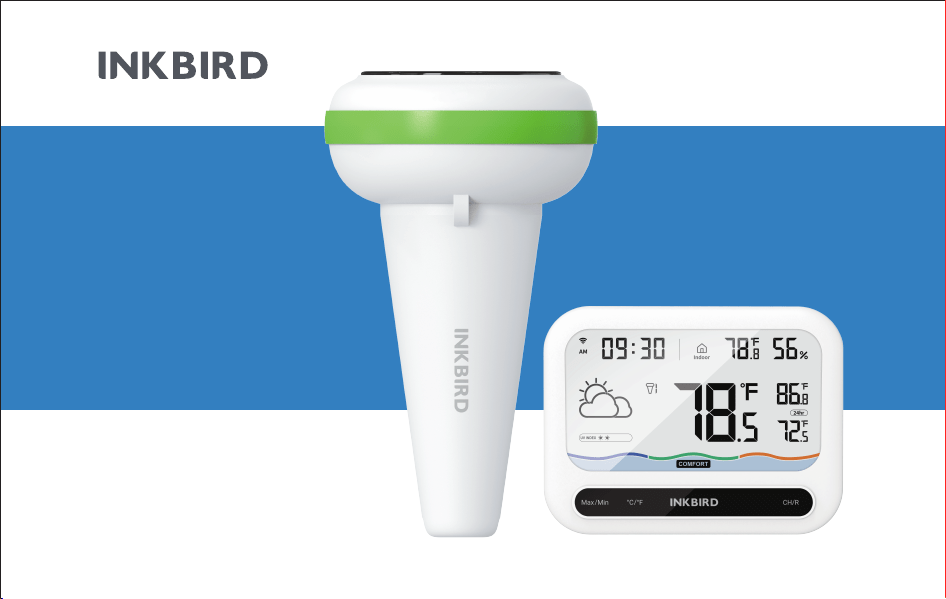
ACCURATE DETECTION
WIRELESS
POOL
THERMOMETER
& WIFI GATEWAY
IBS-P03R
& IM-03-w

Warm tips
To quickly jump to a specific chapter page, click on the relevant
text on the contents page.
You can also use the thumbnail or document outline in the top
left corner to quickly find a specific page.

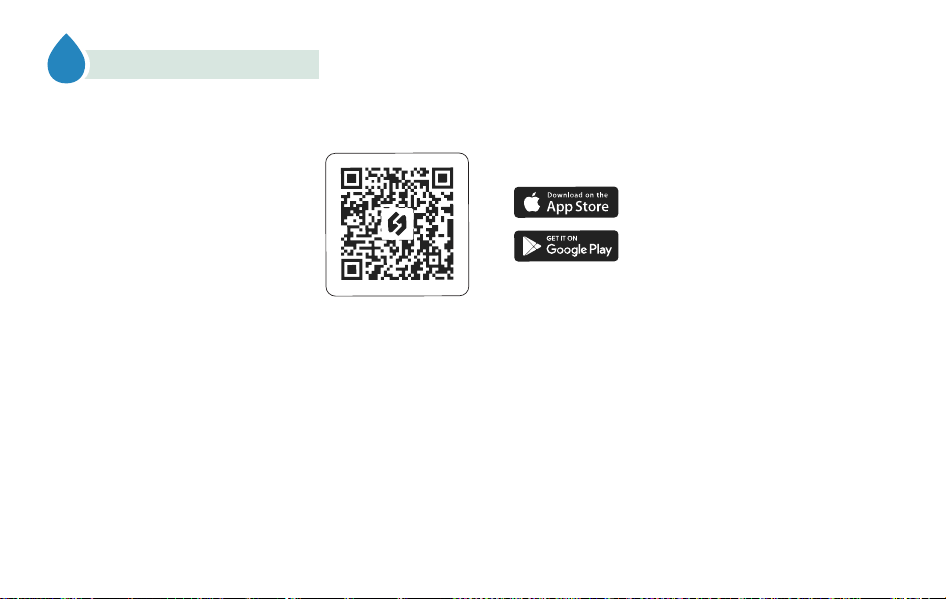
Please keep this manual properly for reference. You can also scan the QR code to visit our official website for product
usage videos. For any usage issues, please feel free to contact us at suppor[email protected].
Wenn Sie eine Bedienungsanleitung in deutscher Sprache benötigen, scannen Sie bitte den QR-Code und besuchen Sie
unsere Website, um sie zu erhalten und ein Video über die Verwendung des Produkts zu sehen.
Se avete bisogno di un manuale di istruzioni in italiano, scansionate il codice QR e visitate il nostro sito web per
ottenerlo e vedere un video su come utilizzare il prodotto.
Si vous avez besoin d'un mode d'emploi en français, veuillez scanner le code QR pour visiter notre site officiel afin
d'obtenir et de visionner la vidéo d'utilisation du produit !
Als je een Nederlandstalige handleiding nodig hebt, scan dan de QR-code om naar onze officiële website te gaan en
bekijk de video over het gebruik van het product!
Si necesita el manual de instrucciones en español, escanee el código QR para ir a nuestro sitio web oficial y ver el vídeo
sobre cómo utilizar el producto.
01
Overview
02
Preparation Before Using
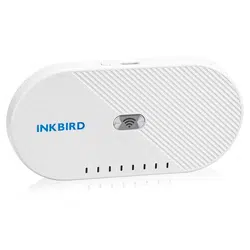
The INKBIRD Solar Powered Wireless Pool Thermometer has high precision sensors for accurate and sensitive
readings. It is environmentally friendly and economical as it can be recharged by solar power, eliminating the need for
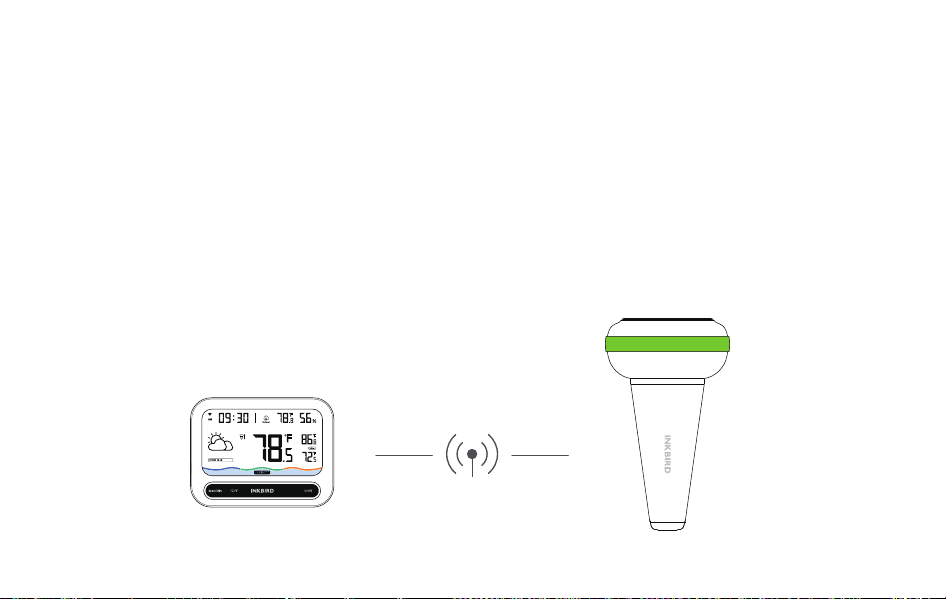
frequent battery changes. It has the highest waterproof rating of IP68. Combined with the IM-03-W WiFi gateway
and indoor monitor, you can monitor pool thermometers within 300 meters (obstacle free) and get weather and UV
information to ensure a healthy swimming experience, while you can view the indoor temperature and humidity to
easily learn about the indoor environment. The IM-03-W WiFi gateway can connect to the INKBIRD app for intelligent
remote monitoring and control.
01
1
2
3
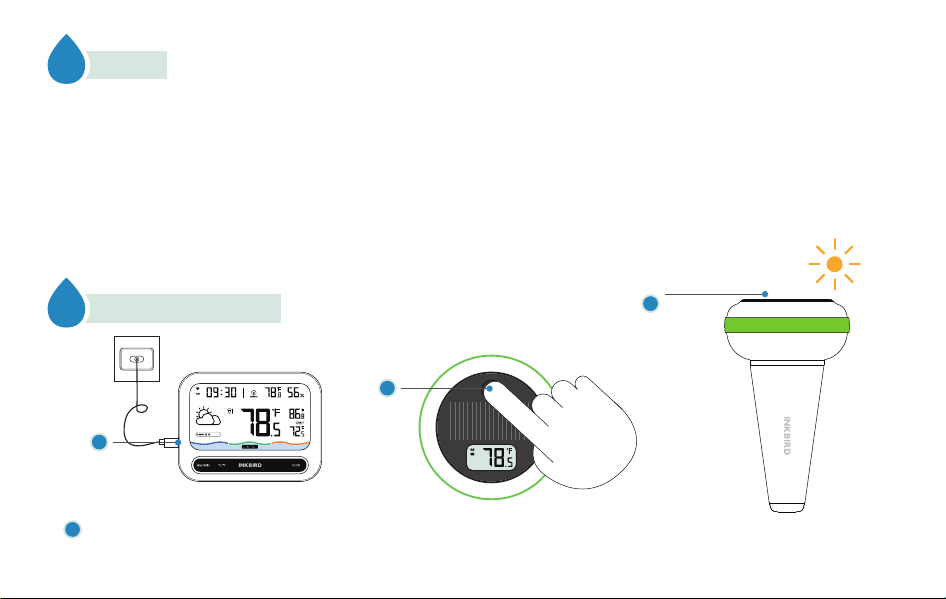
Please use the supplied power adapter and cable to connect the WiFi gateway and indoor monitor to a power source.
1
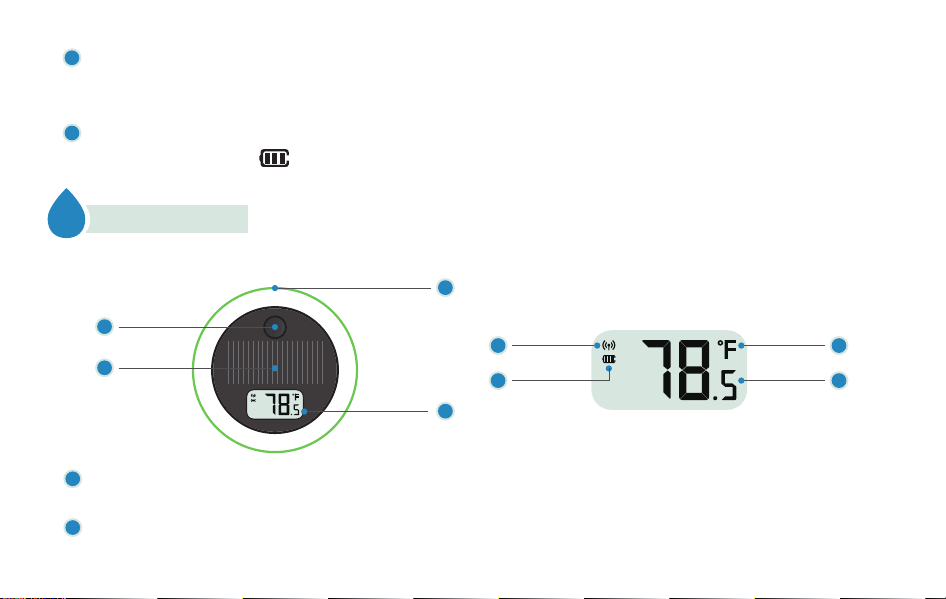
Action Button: To turn on the thermometer, shortly press it; to change the temperature unit, shortly press it after
powering on; to turn off the thermometer, press and hold for 5 seconds.
Solar Panel: Please do not block or cover the solar panel.
03
Product Introduction
A. Pool Thermometer (Transmitter)
3
a
b
c
d
4
1
2
02
2
1
Press the action button on the pool thermometer (Transmitter) to turn it on. After powering on, press the action
button to switch between Celsius (℃) or Fahrenheit (℉). To turn off the thermometer, press and hold the action button
for 5 seconds.
We recommend that you place the pool thermometer in a location exposed to strong sunlight and use it after the
battery reaches three bars ( ). If you plan to use it in the sun for a long time, please ignore this step.
2
3
Wireless icon: flashes once when transferring data.
Battery level icon: The battery capacity is indicated by three bars. If the icon is flashing, it means that
the battery power is too low.
Temperature unit: Press the action button to switch between ℃ and ℉.
Water temperature: The real-time water temperature, with a displaying accuracy of ±0.1℃/℉.
Anti-collision Gasket: This is to protect the product from collisions and reduce the noise caused by collisions.
Screen:
a
3
4
b
c
d
03
B. WiFi Gateway and Indoor Monitor (Receiver)
6
7
8
9
3
1
2
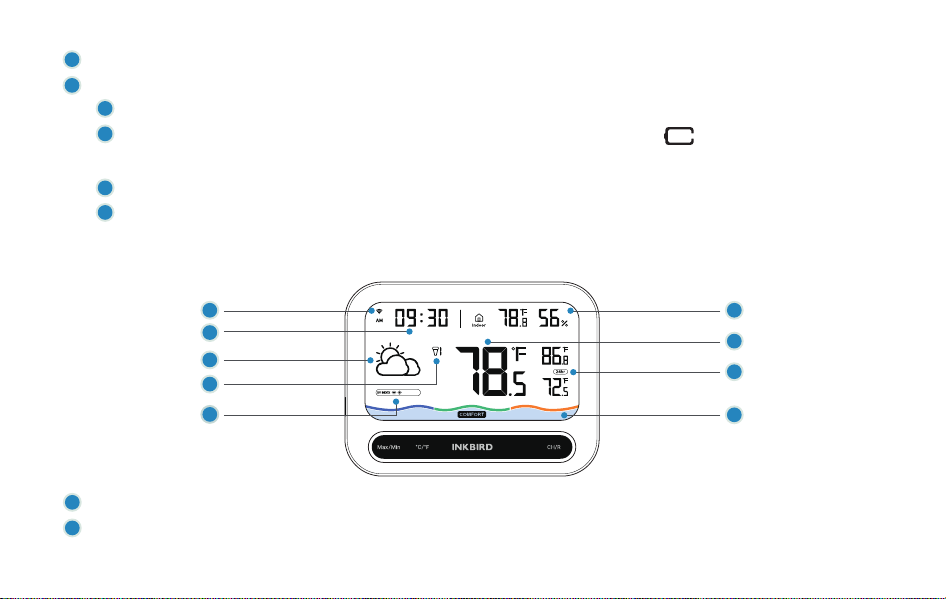
WiFi icon: Flashes when WiFi function is activated; stays lit when WiFi connection is made.
Time: Displays the real-time local time after connecting to WiFi. Time format can be switched between 12 hours
1
2
4
5
and 24 hours in the application.
PS:When the time format is set to 12 hours, the AM on the screen means ante meridiem and PM means post meridiem.
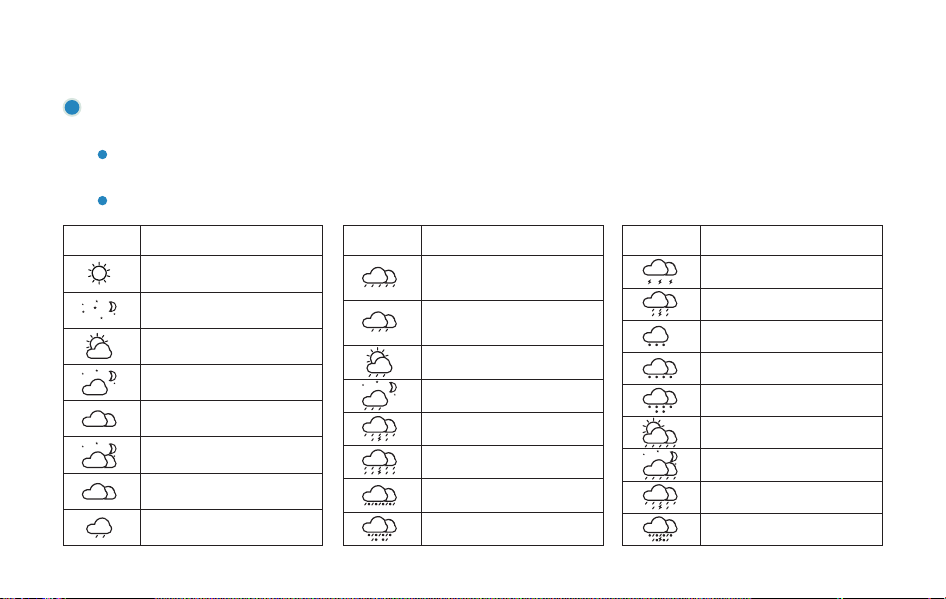
Weather: Displays the current weather and weather forecast, within 24 types of weather. Please avoid swimming
during inclement weather such as rainstorms and lightning.
When you press any button to turn on the backlight, "TMR" appears in the weather display area, indicating that the
weather currently displayed is tomorrow's forecast.
Weather information comes from the world's leading weather data API provider—Weatherbit
04
3
Icon Weather Description
Sunny (day)
Sunny (night)
Partly cloudy (day)
Partly cloudy (night)
Mostly cloudy (day)
Mostly cloudy (night)
Cloudy/Misty
Light rain
Icon Weather Description
Light to moderate in/
Moderate rain
Icon Weather Description
Rainstorm
Sleet/Freezing rain
Hail/Needle ice
Thunderstorm/Thunder
Moderate to heavy rain/
Heavy rain
Showers (day)
Showers (night)
Torrential rain
Thundershower
Light snow/Snow showers
Light to moderate snow
Heavy snow/Blizzard
Scattered showers (day)
Scattered showers (night)
Heavy showers
Thundershower with hail
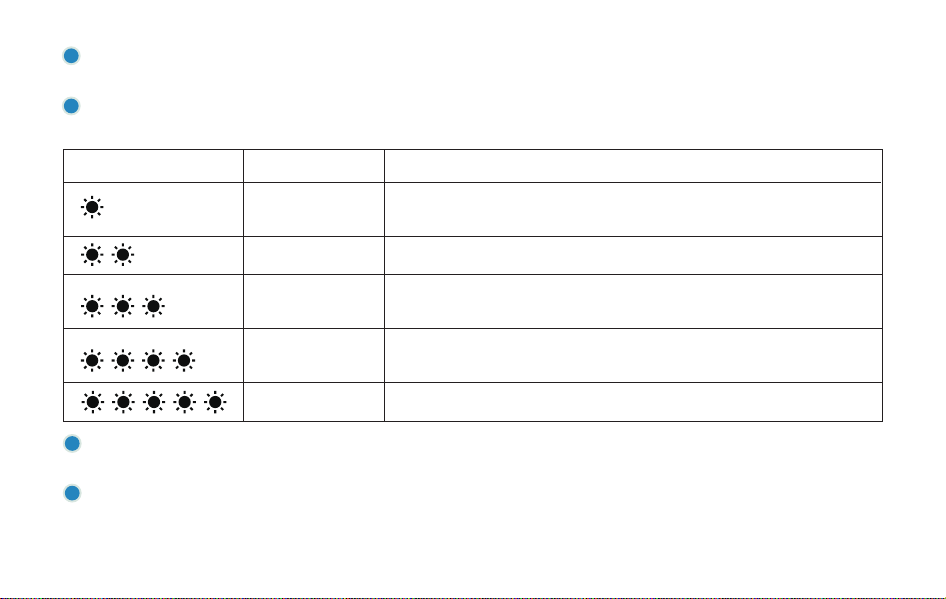
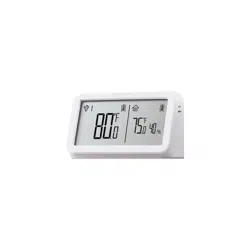
Indoor temperature and humidity: Displays the current ambient temperature and humidity of the indoor monitor
in real time.
Current water temperature: Displays the current water temperature detected by the pool thermometer under the
current channel.
05
Channel number: The current channel number,If you switch to channel 0, each of the linked channels will be dis-
played in turn every 3 seconds.
Ultraviolet light: Helps you to know about the current UV index. If the UV index is in a higher level, please take good
protection measures based on your needs before swimming outdoors.
4
5
Display UV INDEX Recommended measure for protection
0-2(Low)
A UV index reading of 0 to 2 means low danger from the Sun's UV rays for the
average person.
3-5(Moderate)
Wear a Hat and Sunglasses,Use SPF 15+ Sunscreen.
6-7(High)
Wear a Hat and Sunglasses,Use SPF 30+ Sunscreen.Cover the body with
clothing avoid the sun if possible.
8-10(Very high)
Wear a Hat and Sunglasses,Use SPF 30+ Sunscreen.Cover the body with
clothing avoid the sun if possible.
10+(Extreme)
Take all precautions possible.it is advised to stay indoors.
7
6
Note: After resetting records or rebooting, the MAX and MIN values will be recorded over again.
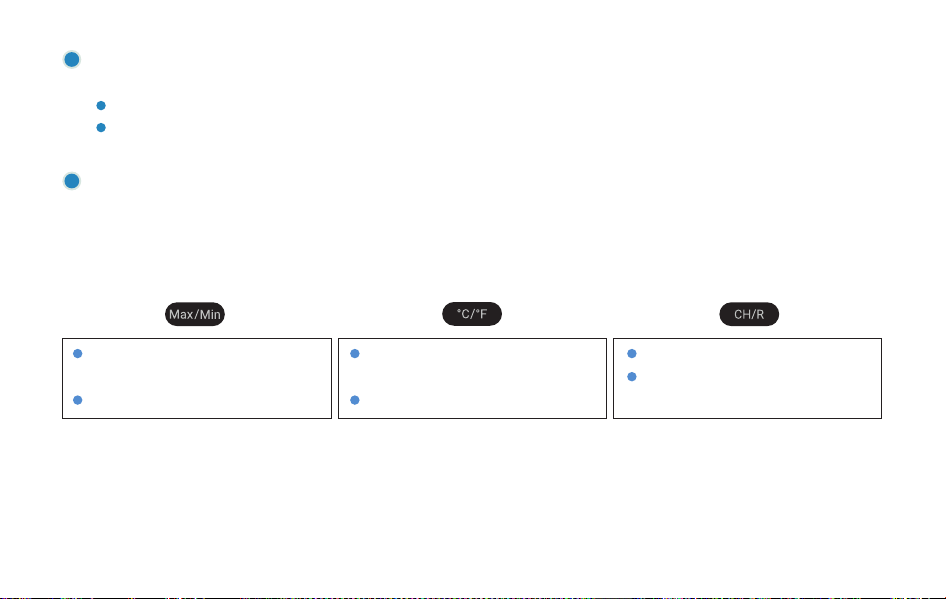
Operation Instruction of Buttons
Press once to select the time display
mode for the max/min values;
Long press to reset the max/min record.
Press once to change the temperature
unit;
Long press to reset the WiFi.
Press once to switch the channel;
Long press to remove all of the paired
pool thermometers.
06
MAX/MIN water temperatures: The MAX and MIN water temperatures for the past 24 hours or all the time, as
measured by the pool thermometer under the current channel.
24H: The displayed MAX and MIN values represent the highest and lowest values recorded in the past 24 hours;
All time: The displayed MAX and MIN values which are the highest and lowest values since starting up or the last
recording reset.
Water temperature comfort level: The current water temperature is shown to be in the cold /comfort / hot state.
The comfort range is set to 78℉ to 86℉ (25.5℃ to 30℃) by default. If you need to customize the water temperature
comfort level, change it on the APP-SET-Comfort Level Plan after connecting to WiFi.
9
8
Temperature display accuracy: 0.1℃ (0.1℉)
Humidity measurement range: 0~99%
Humidity measurement accuracy: ±3%
Humidity display accuracy: 1%
Transmission Distance: up to 300 meters (980ft) in
open space (if there is interference, the transmission distance
will be limited.)
Temperature measurement range: -10℃~60℃ (14℉~140℉)
Temperature measurement accuracy: ±0.3℃ (±0.54℉)
Maximum number of thermometer channels supported at the same time: 9
Temperature measurement range: -40℃~70℃ (-40°F~158℉) Sampling period: 5s
04
Product Specifications
A. Pool Thermometer (Transmitter)
Temperature measurement accuracy: ±1℃ (±1.8℉)
Temperature display accuracy: 0.1℃ (0.1℉)
Power: 3.7V 500mAh 1.85Wh
Waterproof grade: IP68
Warranty: 1 year
B. WiFi Gateway and Indoor Monitor (Receiver)
07
08
05
APP Installation & Connection
5.1 Search the INKBIRD App from Google Play or App Store to get it for free, or you can scan the QR code below to
download it directly.
NOTES:
1. Your iOS devices must be running iOS 12.0 or above to download the app smoothly.
2. Your android devices must be running android 7.1 or above to download the app smoothly.
3. The device supports a 2.4GHz Wi-Fi router only.
4. APP Location Permission Requirement: We need to obtain your location information to discover and add nearby
devices. INKBIRD promises to keep your location information strictly confidential. And your location information will
only be used for the location function of the App and will not be collected, used, or disclosed to any third party. Your
privacy is very important to us. We will abide by relevant laws and regulations and take reasonable security
measures to protect your information security.
09
Step1: Registering an account is necessary before using the INKBIRD app for the first time.
Step2: Open the app, select your Country/Region, and a verification code will be sent to you.
Step3: Enter the verification code to confirm your identity, and the registration is complete.
5.2 Registration
Open the INKBIRD app and click “+” on the top right corner to add a device. Then, follow the app instructions to
complete the WiFi connection. Note that the device should be as close as possible to the smartphone and router
during the connection process.
5.3 How to Connect
5.4 Add Sub-Devices

10
a. Please use the supplied power adapter and cable to connect the WiFi gateway and indoor monitor (Receiver) to a
power source.
b. Secondly, make sure that the pool thermometer (transmitter) is turned on, and place the thermometer as close to the
WiFi gateway and indoor monitor (Receiver) as possible. And press the black button on the thermometer to pair.
c. Once the indoor monitor (receiver) receives the data sent from the pool thermometer (transmitter), the connection
between them is established automatically, and the monitor (receiver) will complete adding a sub-device and display the
channel number of the pool thermometer (transmitter).
Note: If you fail to add sub-devices, please restart the pool thermometer (transmitter), and repeat steps b~c to add the
device.
06
Precautions for Use
a. Please do not disassemble the product if you are not a professional.
b. Be sure that the sensor is not covered with dust as dust may lead to inaccurate measurements.
c. Do not use alcohol to clean the sensor.
d. Do not dispose the product in a fire as it may explode. Please observe local regulations for proper disposal of discarded
electronic products.
e. Remove from pool when not in use or while cleaning the pool so unit is not damaged by skimmers or other devices.
11
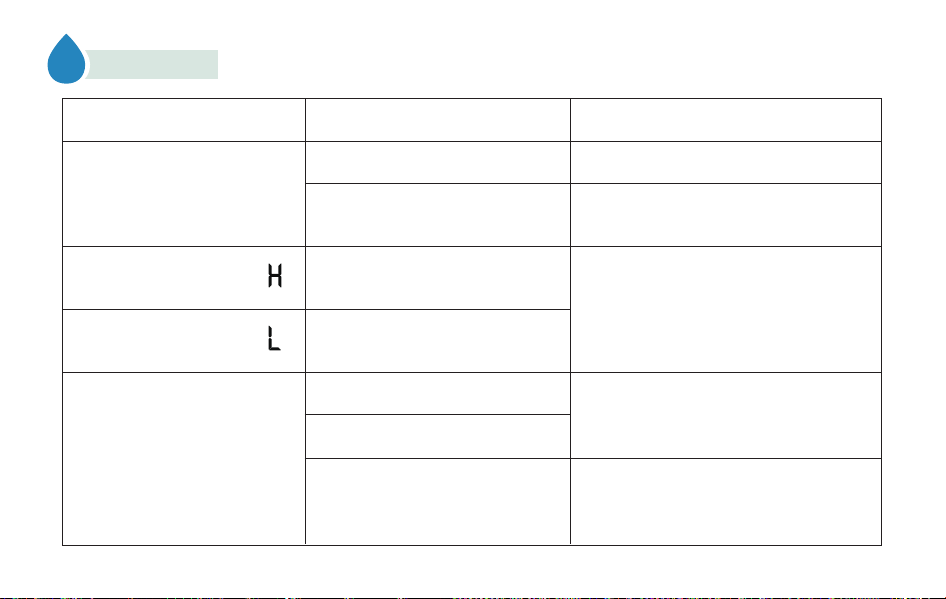
Fault Phenomenon Possible Cause Possible Solution
The air outlet is blocked.
Water has infiltrated the air outlet.
Remove the blockage.
Leave the product in a dry and well-venti-
lated place or wipe it dry using kitchen paper.
The indoor monitor is providing
inaccurate temperature and
humidity readings.
07
Troubleshooting
The pool thermometer(Transmitter)
has run out of power.
Receiver disconnects/loses
connection to pool
thermometer(Transmitter)
The temperature is lower than the
product's measurement range.
No pairing was performed
The distance is too far to disconnect
Place pool Thermometer (Transmitter)
in direct sunlight for 10 hours to fully
charge.
Hold the pool Thermometer (Transmitter)
close to the Receiver and press the black
button on the pool Thermometer (Transmitter).
The temperature is higher than the
product's measurement range.
Please operate within the designated
measurement range of the product.
Transmitter: -40℃~70℃ (-40°F~158°F)
Receiver: -10℃~60℃ (14°F~140°F)
The indoor monitor displays “ ”
The indoor monitor displays “ ”

12
08
FCC Requirement
Changes or modifications not expressly approved by the party responsible for compliance could void the user’s authority to
operate the equipment. This device complies with Part 15 of the FCC Rules. Operation is subject to the following two conditions:
(1) this device may not cause harmful interference, and
(2) this device must accept any interference received, including interference
that may cause undesired operation.
– Reorient or relocate the receiving antenna.
– Increase the separation between the equipment and receiver.
– Connect the equipment into an outlet on a circuit different from that to which the receiver is connected.
– Consult the dealer or an experienced radio/TV technician for help. This equipment complies with FCC radiation exposure
limits set forth for an uncontrolled environment. This equipment should be installed and operated with a minimum distance of
20cm between the radiator & your body. This transmitter must not be co-located or operating in conjunction with any other an-
tenna or transmitter.
Note: This equipment has been tested and found to comply with the limits for a Class B digital device, pursuant to Part 15 of the
FCC Rules. These limits are designed to provide reasonable protection against harmful interference in a residential installation.
This equipment generates, uses, and can radiate radio frequency energy, and if not installed and used in accordance with the
instructions, may cause harmful interference to radio com
munications. However, there is no guarantee that interference will not
occur
in a particular installation. If this equipment does cause harmful interference to radio or television reception, which can
be determined by turning the equipment off and on, the user is encouraged to try to correct the interference by one or more of the
following measures:

13
09
IC Warning
Thisdevicecontainslicence-exempttransmitter(s)/ receiver(s)thatcomplywithInnovation,ScienceandEconomic
DevelopmentCanada’slicence-exemptRSS(s).
Operationissubjecttothefollowingtwoconditions:
(1)Thisdevicemaynotcauseinterference.
(2)Thisdevicemustacceptanyinterference,includinginterferencethatmaycauseundesiredoperationofthedevice.
Thedevicemeetstheexemptionfromtheroutineevaluationlimitsinsection2.5ofRSS102andcompliancewithRSS-102
RFexposure,userscanobtainCanadianinformationonRFexposureand compliance.
Thistransmittermustnotbeco-locatedoroperatinginconjunctionwithanyotherantennaor transmitter.
Thisequipmentshouldbeinstalledandoperatedwithaminimumdistanceof20 centimetersbetweentheradiatorandyour
body.
L'émetteur/récepteurexemptdelicencecontenudansleprésentappareilestconformeauxCNRd'Innovation,Scienceset
DéveloppementéconomiqueCanadaapplicablesauxappareilsradioexemptsdelicence.
L'exploitationestautoriséeauxdeuxconditionssuivantes:
(1)L'appareilnedoitpasproduiredebrouillage;
(2)L'appareildoitacceptertoutbrouillageradioélectriquesubi,mêmesilebrouillageestsusceptibled'encompromettrele
fonctionnement.

14
10
Customer Service
This item carries a 1-year warranty against defects in either components or workmanship. During this period, products
that prove to be defective will, at the discretion of INKBIRD, be either repaired or replaced without charge. For any
problems in use, please feel free to contact us at suppor[email protected]. We will do our best to help you.
Ledispositifrencontrel'exemptiondeslimitescourantesd'évaluationdanslasection2.5deRSS102etlaconformitéà
l'expositiondeRSS-102rf,utilisateurspeutobtenirl'informationcanadiennesurl'expositionetlaconformitéderf.
CetémetteurnedoitpasêtreCo-placéounefonctionnantenmêmetempsqu'aucuneautreantenneouémetteur.
Cetéquipementdevraitêtreinstalléetactionnéavecunedistanceminimumde20centimètresentreleradiateuretvotre
corps.
216-200029
201-171044
MADE IN CHINA
DESIGNED BY INKBIRD
Shenzhen Inkbird Technology Co.,Ltd.
Consignor: Shenzhen Inkbird Technology Co., Ltd.
Office Address: Room 1803, Guowei Building, No.68 Guowei Road, Xianhu Community, Liantang, Luohu District, Shenzhen, China
Manufacturer: Shenzhen Inkbird Technology Co., Ltd.
Factory Address: 6th Floor, Building 713, Pengji Liantang Industrial Area, No.2 Pengxing Road, Luohu District, Shenzhen, China