Introduction
2
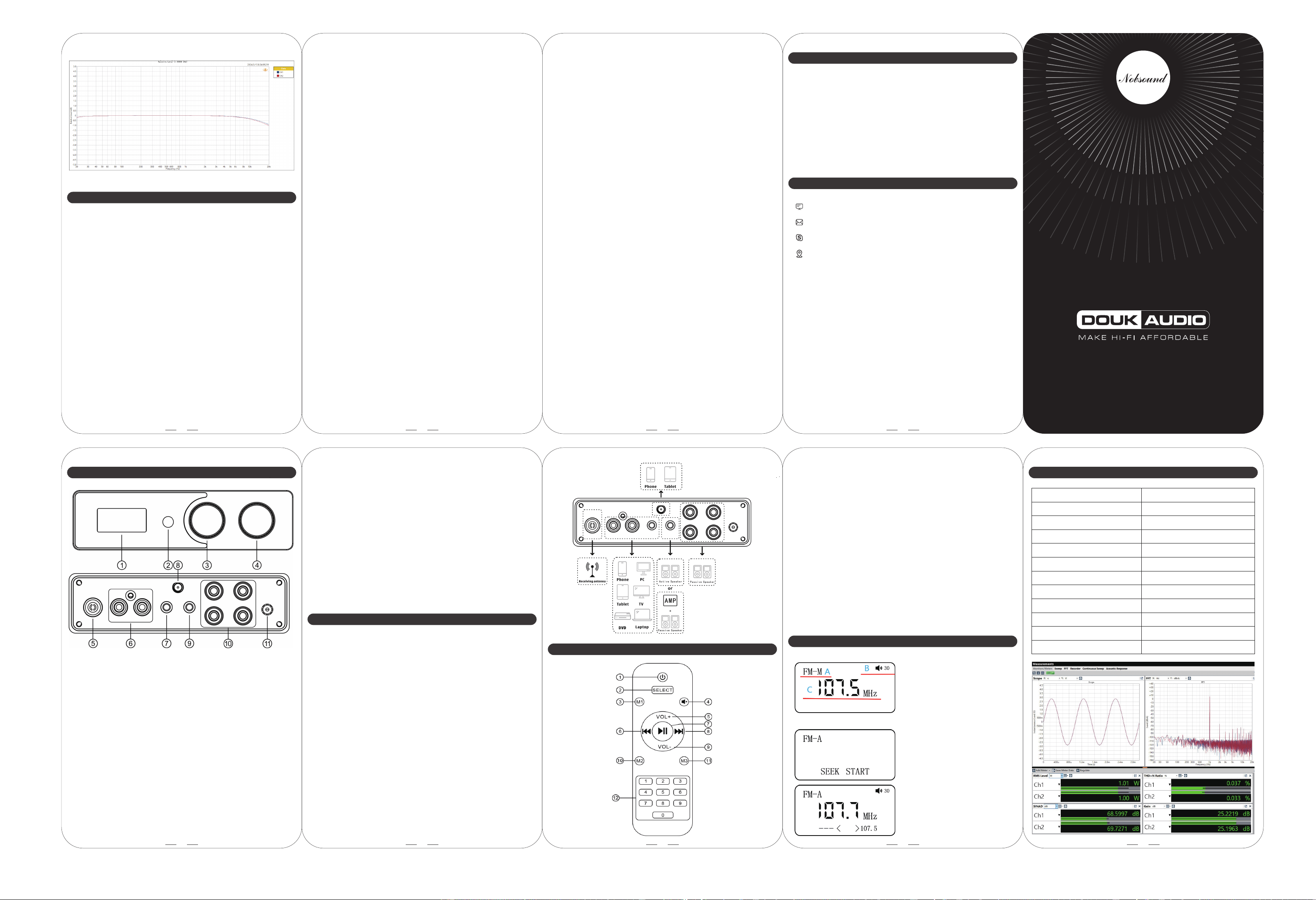
M1 FM front & back panel
Operation steps
1
① Display screen
② Infrared receiving window
③ Bluetooth Mode:
Rotate left to switch to the previous song
Rotate right to switch to the next song
Long press to clear Bluetooth pairing records
FM Mode:
Short press to switch between FM-A and FM-M modes
FM-M mode:
Rotate left and right to switch radio frequencies
Long press to save the selected radio frequency
FM-A mode:
Long press to initiate an automatic search for radio stations
Rotate left and right to switch between found radio frequencies
A...FMM mode
B...Volume value
C...Current radio station frequency
(select other stations via knobs
or remote control)
FM-M:
FM-A:
FMA mode: Long press the
corresponding knob or short press
the corresponding button on the
remote control for automatic search
mode.
Rotate the corresponding knob or
operate the corresponding button
on the remote control to switch the
radio stations automatically found
or saved.
3
FM mode display instructions
4
1. Connect passive speakers to the speaker output of M1-FM, or connect
the active speaker, amplifier to the AUX output of the M1-FM.
2. Wired input
Connect the audio source to the RCA or AUX input of M1-FM, or connect
the FM antenna(if you want FM input mode).
3. Connect the power supply to the M1-FM and then short press the
button to power on, and then short press again to switch to
corresponding input mode.
4. Wireless input
Connect the Bluetooth antenna, short press the button to power on and
then select the Bluetooth mode(the Bluetooth indicator will flash). Turn
on Bluetooth on your device, search and click to connect, the indicator
will be steady on after successful connection.
5. Play music on the audio source, adjust the volume via the volume knob
or remote control according to your preferences and enjoy music.
6. After use, please long press the button to power off first, and then
disconnect the power adapter.
Remote control function description
Parameters
Audio input
Audio output
Rated output power
Bluetooth version
Input sensitivity
THD+N
Frequency response
SNR
Working voltage
AUX Rated output level
Package weight
Package dimensions(W*D*H)
Bluetooth/FM/RCA/AUX
AUX/Banana speaker jacks
50W*2(4Ω)
5.1
0.775V
0.03%
20Hz-20kHz(±1dB)
≥102dB
DC15-24V
1.3V
1.2kg / 2.65lb
230*290*60mm / 9.06*11.42*2.36in
① ON/OFF
② Input channel selection
③ Clear the Bluetooth pairing record
④ Mute
⑤ Volume up
⑥ Previous song/previous radio station frequency
⑦ Bluetooth mode: play/pause;
FMA mode: press to automatically search for radio stations;
FMM mode: press to save radio station
⑧ Next song/next radio station frequency
⑨ Volume down
⑩ Switch FMA/FMM mode
⑪ On/off the screen brightness
⑫ FMM mode broadcast frequency radio station selection (Press “1”
expects a 4-digit frequency e.g., 107.9 MHz. Press “8” or “9” assumes
a 3-digit frequency, adapting to different station ranges.)
5
Q: Why Bluetooth cannot be searched? How to switch to Bluetooth mode?
A: Press the button on the panel or press "SELECT" button on remote control to
switch to BT mode, there will be blue light flashing, then use your phone or
tablet to search for "BT HiFi AUDIO", click and connect it, then play music.
Q: Why does the Bluetooth playback lag or even disconnect? Why is the
Bluetooth background noise/current noise obvious?
A: Please check whether the Bluetooth antenna is installed correctly, whether
there is interference or blocking (such as WiFi router / wireless telephone /
FM radio, etc., since they may be in the same frequency band as Bluetooth,
and inductive loads such as fans/refrigerators/air conditioners will also
cause some interference), whether the Bluetooth is blocked or too far away
from the device (more than 15 meters).
Q: Can the device be connected to my computer via Bluetooth? Why is there
no sound when connected to PC?
A: Compared with phones, computers with poor compatibility and
troublesome operations when using Bluetooth. Need the computer with
Bluetooth function and to update the driver and set the output device to
Bluetooth after connection.
Q: Why is there a thumping sound when switching on/off?
A: Please confirm that the on-off sequence is correct; it should normally follow
the order of signal transmission when turning on: audio source → preamp /
DAC → amplifier → speaker. (The sequence is reversed when switching off.
As the internal capacitors will be discharged for a while after shutdown, if
turn off the preamp firstly and then turn off amplifier, impact sound will be
easily caused which may damage the amplifier or speaker in severe cases.)
FAQ
6
M1 FM
1. Please do not open the shell by yourself, improper operation may cause
a risk of electric shock.
2. Please use regular manufacturers’ switching power supply, otherwise
there will be the risk of damage to the machine.
3. Please do not use M1-FM in a high temperature and humidity environment.
4. Default 24V power supply, can satisfy the needs of most home speakers.
7 8
Website: www.doukaudio.com
Email: nobsound@doukaudio.com
WeChat/Whatsapp: +86-17704028602
Address: Room 1329, Wang Cheng Building, Long Guan East Road,
Long Hua District, Shen Zhen, Guang Dong, China, 518000
Contact information
Warning
9
④ Short press to power on/switch between channels
Rotate left and right to adjust the volume
Double click to mute the audio output
Long press to power off
⑤ FM signal receiving antenna socket
⑥ RCA input (white—left channel, red—right channel)
⑦ AUX input
⑧ Bluetooth antenna socket
⑨ AUX output
⑩ Stereo banana speaker jacks
(Red—positive, black—negative;R—right channel, L—left channel)
⑪ Power interface (DC15V-24V)
Q:Why are all cables connected but there is no sound?
A: 1. Check if M1-FM is powered on, the screen is lighted up, and the correct
input channel is selected.
2. Check if the back-end connection is correct and the volume of M1-FM
is set to minimum.
3. If the above are all normal, please check whether the input signal of
audio source is muted, paused, or the volume is in the minimum state
or not.
Q: Why is the sound distorted?
A: Maybe the input amplitude is too large. If the volume of M1-FM and the
audio source are both adjusted to the maximum state, the distortion easily
occurs. Please turn down the volume of one of them.
Q: Why does the volume of different audio sources (such as changing from
CD player to phone) differ when the volume of M1-FM is unchanged?
A: Different audio devices can output different signal amplitudes, for example,
the phone usually is 0.35V, while CD player is 1V. So it is normal that the
sound differs when different audio sources are used.
Q: Why is there a loud current sound or buzzing sound on the speaker?
A: 1. Please use the original power supply. Many power supplies in the market
have interference which will cause current sound.
2. When using unshielded signal cable in no load, there will be interference
signals. Please use the shielded signal cable or unplug it.
3. If there is still noise after eliminating the above situations, please confirm
the noise is from external or internal. Disconnect all inputs and only retain
power supply and power cable. If the noise disappears, it is from audio
input; if the noise is still there, it is possibly disturbed by power supply or
generated by the internal of M1-FM.
Q: Why is there no sound or very little sound after M1-FM is connected to the
speaker?
A: 1. Please check the audio source has been turned on and the volume is
not at the minimum.
2. Please confirm whether the speaker and M1-FM are matched.
(For example, the speaker is fixed resistance or fixed voltage, whether
the power of speaker is too much over the power of the amplifier etc).
Q: What are the reasons for the unbalanced left and right volume of the
speakers and how to eliminate them?
A: Please check audio source, input cable, volume potentiometer, speaker
cable, speakers (whether the position and the distance is symmetrical)
and other factors.