GEN40 Super Heater-Cooler
User Manual
PLEASE READ AND SAVE THESE INSTRUCTIONS
Model No.: A5964
EdenPURE
®
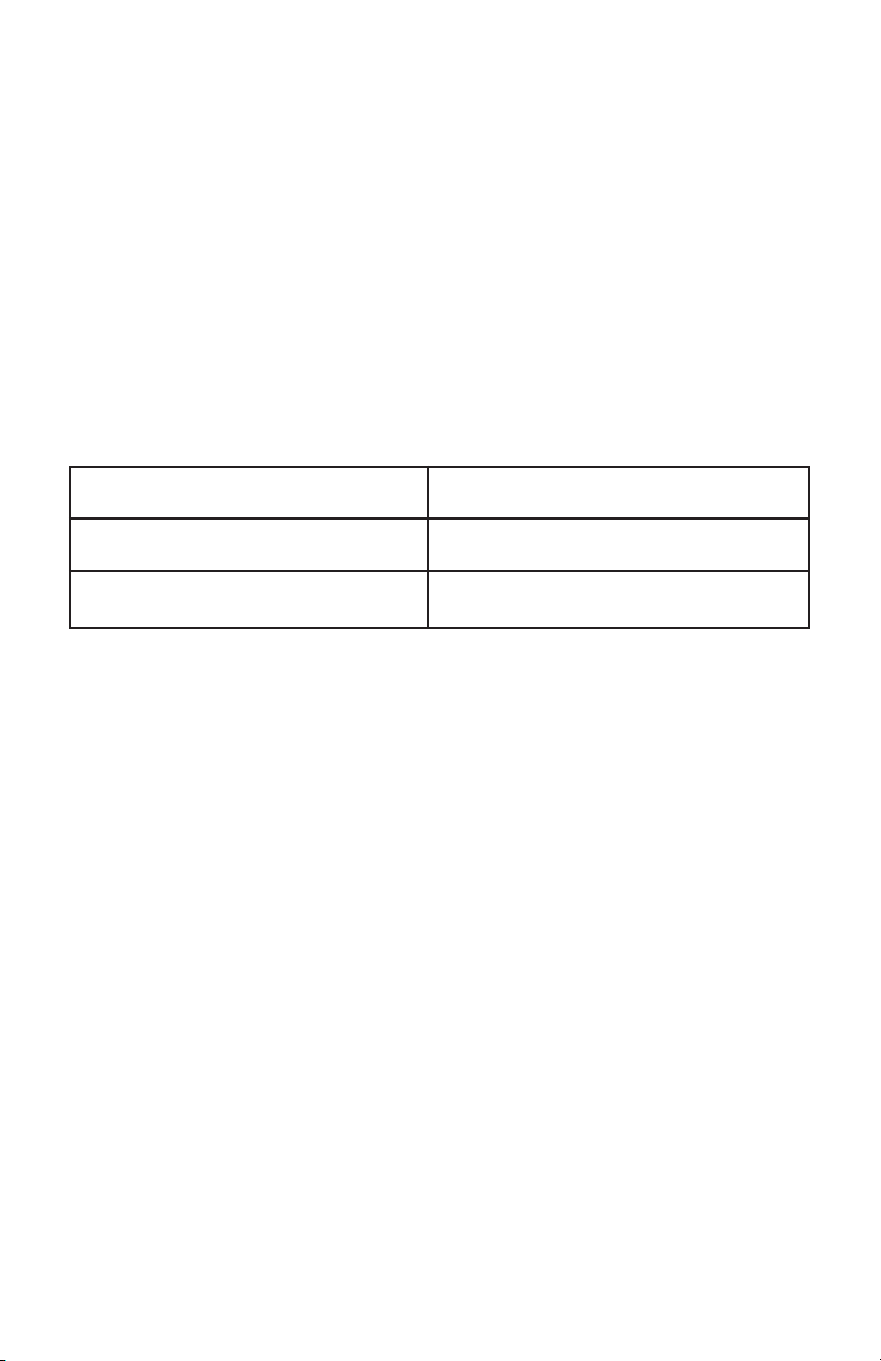
MALFUNCTION
Heater won’t turn on
The heater won’t turn
off
Abnormal noise from
the fan
Indicator light is off
REASONS
The cord isn’t plugged
in to the
outlet
The power button is
not on
Damage to the main
body
Heater is placed on
thick, uneven carpet
Bad connection of
power button
Damage to the main
body
Damage to the circuit
board
Foreign object in the
fan
The indicator light is
damaged
SOLUTION
Check the plug
Check the power
button
Contact the
manufacturer for
maintenance
Place heater on at
solid surface
Check the power
button
Contact the
manufacturer for
maintenance
Clear the foreign
object
Contact the
manufacturer for
maintenance
©2023 EdenPURE® I-5847 BR12290R-1
Troubleshooting
Warranty
This GEN40 comes with a ONE-YEAR LIMITED COMPONENT
WARRANTY. If your unit does not appear to be working properly, please
contact our service center by calling 1-800-225-6595. Prior to your call, we
encourage you to visit our service related website www.edenpuresupport.
com for troubleshooting tips and service instructions if needed.
EdenPURE
®
7800 Whipple Ave. NW
N. Canton, OH 44720
To place an order, call 1-800-360-1070 or visit www.edenpure.com.
5

Welcome
Thanks for choosing the EdenPURE
®
GEN40 Super Heater-Cooler. Before
using, please read the following instructions carefully.
Contents
Introduction ............................................................................................... 1
Specications ............................................................................................ 1
Control Panel ............................................................................................ 2
Instructions ................................................................................................ 2
Warnings ................................................................................................... 3
Notes ......................................................................................................... 3
Maintenance .............................................................................................. 4
Troubleshooting ........................................................................................ 5
Warranty .................................................................................................... 5
4. If you want the unit to oscillate, touch and hold the “ ” button on the
unit for 2 seconds or touch the “ ” button on the remote. The unit
will then oscillate left and right. To turn the oscillation off, touch and
hold the “ ” button on the unit for 2 seconds or touch the “ ” button
on the remote.
5. To have the unit swing back and forth, touch and hold the
“ ” button on the top of the machine for 2 seconds or touch the “ ”
button on the remote. The unit will then swing back and forth. To turn
the swing function off, touch and hold the
“ ” button on the top of the unit for 2 seconds or touch the
“ ” button on the remote.
6. The timer can be set for either 2, 4 or 8 hours. To set the timer, touch
the “ ” button on the top of the unit once for 2 hours, twice for 4
hours and three times for 8 hours. A red light will indicate the amount
of time you’ve selected. Or, touch the “ ” button on the remote to
toggle between 2, 4 and 8 hours.
7. If the unit is set to turn off from the timer function, it will automatically
remember the timer length from the last time it was turned on and will
revert to that time period.
8. The panel on the unit and the remote control can be used
interchangeably, as they are synchronized.
Warnings
Don’t cover the heater to prevent it from overheating.
Don’t touch the protection grill in front of the thermal unit. It may get
warm.
Don’t block air inlets. Keep at least 6 inches of air space between furniture
and the unit.
Notes
1. Before using the unit, please make sure that you have a 110v outlet to
plug the unit into.
2. If the power cord becomes damaged, contact the manufacturer
immediately to have the cord replaced.
3. Don’t put the unit near curtains or anything that can be sucked into the
unit.
4. Make sure the unit is placed on a at stable surface.
5. Don’t use the unit in a ammable environment. Keep it away from
3
Control Panel
Instructions
Please check to make sure all parts are intact before use.
1. Press the on/off switch on the base of the unit. The unit will be in
stand-by mode.
2. Touch the POWER button on the top of the unit or on the remote
control and you will hear a click. The unit will turn on in high heat
mode. The indicator light will be red. Touch the POWER button again
to turn the unit off. It will continue to run for several seconds to purge
the warm air out of it.
3. After turning the unit on, you can change modes by touching the
“MODE” button on the remote. The modes are High Heat, Low Heat
and Fan.
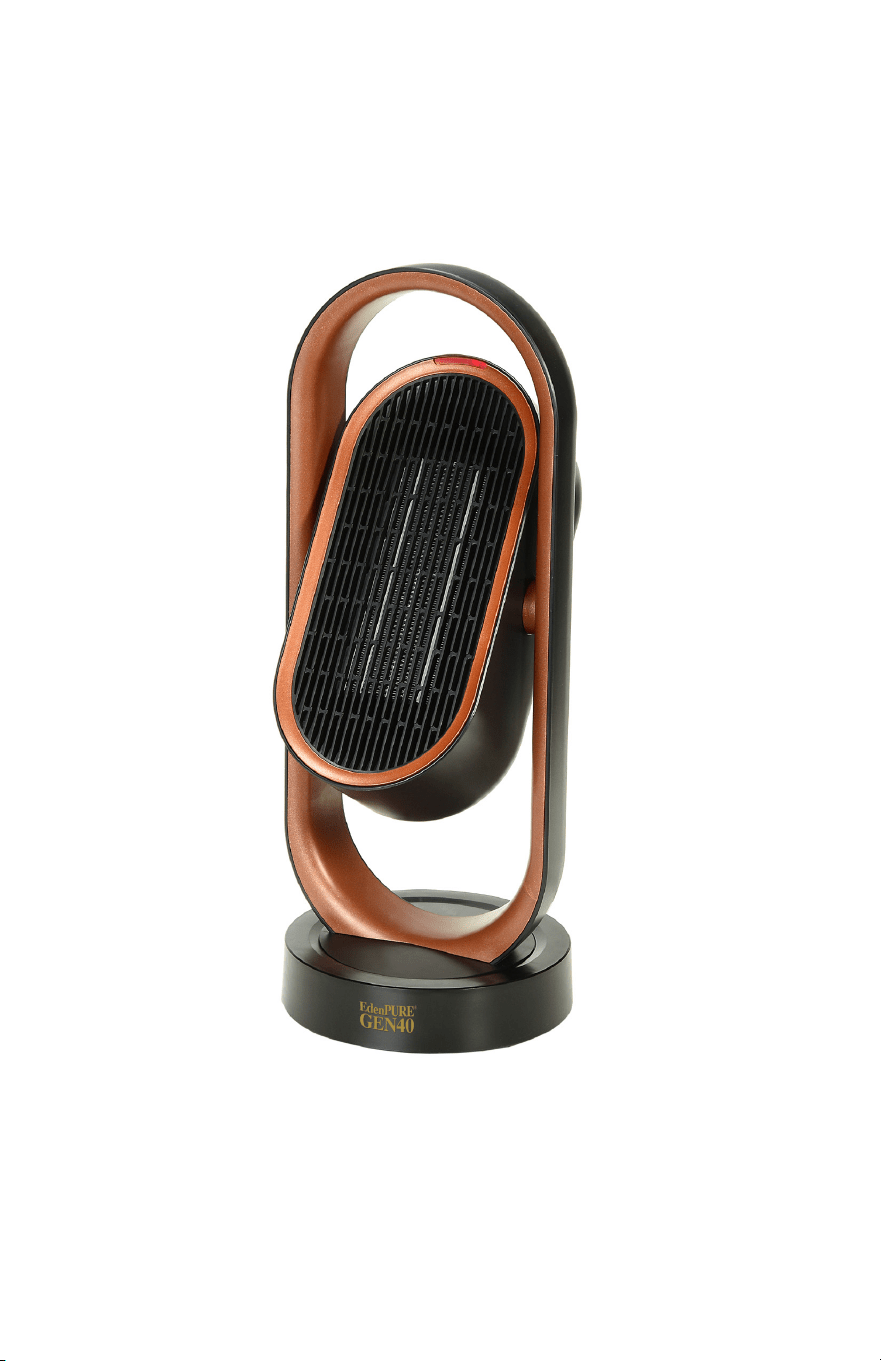
Introduction
The EdenPURE
®
GEN40 comes equipped with easy, touch button opera-
tion on the unit, as well as a remote control. It puts out a lot of air, while
running quietly. It has a tip-over switch, which shuts the unit off if it were
to tip over. The GEN40 can be set to oscillate to provide heating/cooling
over a wide area. It has a carrying handle at the top, so it is portable and
can be moved from room to room.
The GEN40 uses a PTC thermal unit, which heats up quickly but does not
have an open ame, so it is suitable for home and ofce use.
Specications
Name: GEN40 Rated voltage: 120V
Model: A5964 Rated Power: 1500W
Electric shock class: II Rated frequency: 60Hz
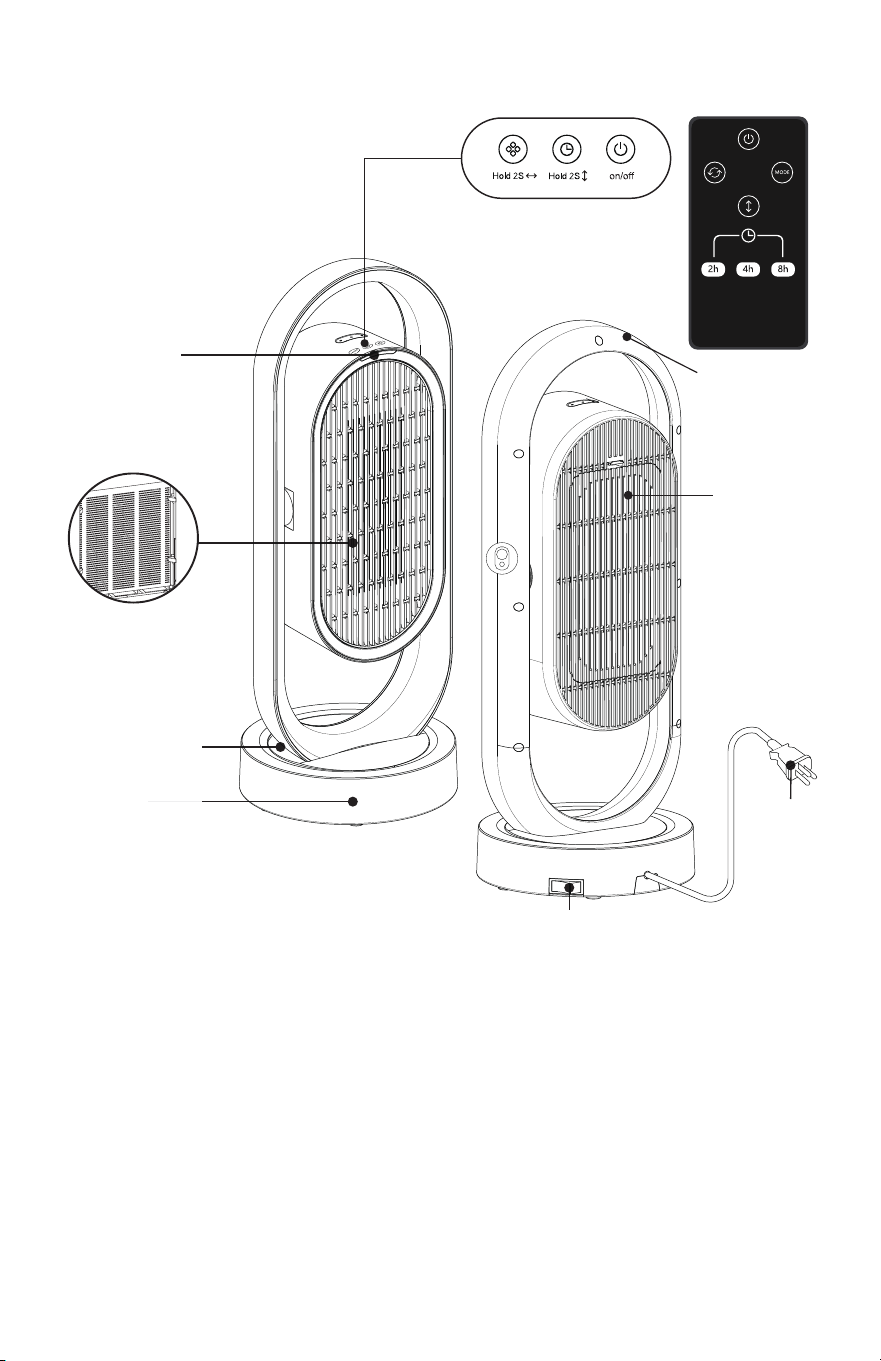
Handle
Remote
Control
Dust
Screen
Indicator
light
Light red light - High heat
Dark red light - Low heat
Blue light - Fan
No light - Off
Turnplate
Base
PTC
Plug
On/Off
1
2
Control Panel
Instructions
Please check to make sure all parts are intact before use.
1. Press the on/off switch on the base of the unit. The unit will be in
stand-by mode.
2. Touch the POWER button on the top of the unit or on the remote
control and you will hear a click. The unit will turn on in high heat
mode. The indicator light will be red. Touch the POWER button again
to turn the unit off. It will continue to run for several seconds to purge
the warm air out of it.
3. After turning the unit on, you can change modes by touching the
“MODE” button on the remote. The modes are High Heat, Low Heat
and Fan.
Introduction
The EdenPURE
®
GEN40 comes equipped with easy, touch button opera-
tion on the unit, as well as a remote control. It puts out a lot of air, while
running quietly. It has a tip-over switch, which shuts the unit off if it were
to tip over. The GEN40 can be set to oscillate to provide heating/cooling
over a wide area. It has a carrying handle at the top, so it is portable and
can be moved from room to room.
The GEN40 uses a PTC thermal unit, which heats up quickly but does not
have an open ame, so it is suitable for home and ofce use.
Specications
Name: GEN40 Rated voltage: 120V
Model: A5964 Rated Power: 1500W
Electric shock class: II Rated frequency: 60Hz
Handle
Remote
Control
Dust
Screen
Indicator
light
Light red light - High heat
Dark red light - Low heat
Blue light - Fan
No light - Off
Turnplate
Base
PTC
Plug
On/Off
1
2

Welcome
Thanks for choosing the EdenPURE
®
GEN40 Super Heater-Cooler. Before
using, please read the following instructions carefully.
Contents
Introduction ............................................................................................... 1
Specications ............................................................................................ 1
Control Panel ............................................................................................ 2
Instructions ................................................................................................ 2
Warnings ................................................................................................... 3
Notes ......................................................................................................... 3
Maintenance .............................................................................................. 4
Troubleshooting ........................................................................................ 5
Warranty .................................................................................................... 5
4. If you want the unit to oscillate, touch and hold the “ ” button on the
unit for 2 seconds or touch the “ ” button on the remote. The unit
will then oscillate left and right. To turn the oscillation off, touch and
hold the “ ” button on the unit for 2 seconds or touch the “ ” button
on the remote.
5. To have the unit swing back and forth, touch and hold the
“ ” button on the top of the machine for 2 seconds or touch the “ ”
button on the remote. The unit will then swing back and forth. To turn
the swing function off, touch and hold the
“ ” button on the top of the unit for 2 seconds or touch the
“ ” button on the remote.
6. The timer can be set for either 2, 4 or 8 hours. To set the timer, touch
the “ ” button on the top of the unit once for 2 hours, twice for 4
hours and three times for 8 hours. A red light will indicate the amount
of time you’ve selected. Or, touch the “ ” button on the remote to
toggle between 2, 4 and 8 hours.
7. If the unit is set to turn off from the timer function, it will automatically
remember the timer length from the last time it was turned on and will
revert to that time period.
8. The panel on the unit and the remote control can be used
interchangeably, as they are synchronized.
Warnings
Don’t cover the heater to prevent it from overheating.
Don’t touch the protection grill in front of the thermal unit. It may get
warm.
Don’t block air inlets. Keep at least 6 inches of air space between furniture
and the unit.
Notes
1. Before using the unit, please make sure that you have a 110v outlet to
plug the unit into.
2. If the power cord becomes damaged, contact the manufacturer
immediately to have the cord replaced.
3. Don’t put the unit near curtains or anything that can be sucked into the
unit.
4. Make sure the unit is placed on a at stable surface.
5. Don’t use the unit in a ammable environment. Keep it away from
3

ammable objects.
6. The protection grill is used to separate the thermal unit from the user.
If the protection grill is damaged, contact the manufacturer to have it
replaced. Do not continue to use the unit.
7. When not using the unit for longer periods of time, make sure it is
turned off and unplugged from the outlet.
8. Make sure you unplug the unit before moving it to another area.
9. Do not twist or pull the cord from the outlet. Remove it holding the
end of the plug.
10. Do not place the unit in a place where it may lean more than 10
degrees and do not lay it on it’s side while using.
11. To avoid getting burned, do not touch the protection panel when the
unit is in use.
12. Turn the power off before unplugging the unit.
13. Don’t unplug the unit with wet hands.
14. Don’t use the unit around water such as in bathtubs, around sinks or
around swimming pools.
15. Don’t put your ngers into the protection grill while the unit is turned
on.
16. Keep out of reach of children.
17. If the unit becomes dirty, turn it off, unplug it and clean it with a soft
cloth and gentle soap. Don’t clean with abrasive substances.
Maintenance
Turn the unit off before performing any type of maintenance.
1. Clean any dirt that may be on the unit immediately. Otherwise it may
fade or damage the unit.
2. Clean only with a soft cloth and gentle soap or detergent.
3. To clean the dust screen, remove the back cover and take it out. Rinse it
and make sure it’s completely dry. Then replace it and the back cover.
4. Only clean the outside of the unit. Never clean the thermal unit. After
cleaning the unit, store it in the box in a dry place.
5. Don’t spray water directly into the unit.
4

GEN40 Super Heater-Cooler
User Manual
PLEASE READ AND SAVE THESE INSTRUCTIONS
Model No.: A5964
EdenPURE
®
MALFUNCTION
Heater won’t turn on
The heater won’t turn
off
Abnormal noise from
the fan
Indicator light is off
REASONS
The cord isn’t plugged
in to the
outlet
The power button is
not on
Damage to the main
body
Heater is placed on
thick, uneven carpet
Bad connection of
power button
Damage to the main
body
Damage to the circuit
board
Foreign object in the
fan
The indicator light is
damaged
SOLUTION
Check the plug
Check the power
button
Contact the
manufacturer for
maintenance
Place heater on at
solid surface
Check the power
button
Contact the
manufacturer for
maintenance
Clear the foreign
object
Contact the
manufacturer for
maintenance
©2023 EdenPURE® I-5847 BR12290R-1
Troubleshooting
Warranty
This GEN40 comes with a ONE-YEAR LIMITED COMPONENT
WARRANTY. If your unit does not appear to be working properly, please
contact our service center by calling 1-800-225-6595. Prior to your call, we
encourage you to visit our service related website www.edenpuresupport.
com for troubleshooting tips and service instructions if needed.
EdenPURE
®
7800 Whipple Ave. NW
N. Canton, OH 44720
To place an order, call 1-800-360-1070 or visit www.edenpure.com.
5