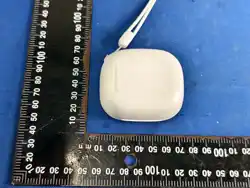

TWS
User Manual
FCC ID: 2BHIM-AI
Warning
Special Note: Before using the earphone for the first time, please put the earphone into the
ordinary charging case once and then remove it. Only then can touch be effective.
Please read the warnings below carefully. Store this manual with product packaging. The safety
precaution manual reduce the risk of fire or injury when correctly complied to.
To reduce the risk of injury :
Keep batteries out of reach of children.
Do not heat, open, or dispose of battery pack in fire.
Do not allow metal objects to touch the battery on the device.
Do not expose battery pack to excessive heat.
Do not use a high current charger, or the charging line will burn out.
Please Charging with a DC 5V adapter (not included in the package)
Product Specification
Bluetooth version: 6.0
Support: A2DP, AVRCP, HSP, HFP
Playing time:6-7hours(High quality music and volume may accelerate battery
consumption)
Effective distance:>10M
Speaker size: 10mm
Sensitivity(horn unit): 105±1.5 dB S.P.L at 1KHz
Speaker impedance(horn unit):32± 15% at 1mW / 1000Hz
Mic sensitivity:-38±1dB
Talk time:5-6 hours
Earphone charging time: about 1H
Charging case charging time: about 2H
Paring
1:Auto Pairing
Taking the earphones out of the charging case, and then the earphones will automatically turn
on, sync together and enter pairing mode.
Open up Bluetooth setting on your smart device and scan for GS_G25 .

2: Syncing your earphones
The headset is not synchronized during use.
1) : Turn off Bluetooth on your device.
2) : Put both headphones back into the headset case and close the charging case.
3) : Remove the headset and wait for pairing.
4) : Open Bluetooth Settings of smart device and scan GS-G25.
Operation
1: Power on/off .
1.) Take the earphones out of the charging case, automatically turn on;
Put the earphones back to the charging case, automatically turn off;
2.) Long press 3 seconds to turn on.
Long press 5 seconds to turn off.
2: Play/Pause music.
When listening to music.
Quickly tap the left earphone twice to play or pause the music.
3: ANC Mode
When taking the earphones out of the charging case, it is regular Bluetooth mode.
Long press left earphones for 2 seconds to enter Transparent mode;
Long press left earphones for 2 seconds to enter regular Bluetooth mode.
Long press right earphones for 2 seconds to enter Noise reduction mode;
Long press right earphones for 2 seconds to enter regular Bluetooth mode.
4:Previous /Next Song
When listening to music.
Quick tap right earphones 3 times to go to previous song.
Quick tap Right earphones twice to go to next song.
5: Volume operation
When listening to music.
Tap the left earphone once to reduce the volume
Tap the right earphone once to increase the volume
6: Answer/Hang up
When there is an incoming call.
Tap the left and right headphones twice to answer the phone.
Tap the left and right earphones twice again to end the call.

This device complies with Part 15 of the FCC Rules. Operation is subject to the following two
conditions:
(1) this device may not cause harmful interference, and
(2) this device must accept any interference received, including interference that may cause
undesired operation
This device has been tested and found to comply with the limits for a Class B digital device,
pursuant to Part 15 of the FCC Rules. These limits are designed to provide reasonable protection
against harmful interference in a residential installation. This device generates, uses and can
radiate radio frequency energy and, if not installed and used in accordance with the instructions,
may cause harmful interference to radio communications.
However, there is no guarantee that interference will not occur in a particular installation. If this
device does cause harmful interference to radio or television reception, which can be
determined by turning the device off and on, the user is encouraged to try to correct the
interference by one or more of the following measures:
--Reorient or relocate the receiving antenna.
--Increase the separation between the device and receiver.
--Connect the device into an outlet on a circuit different from that to which the receiver is
connected.
--Consult the dealer or an experienced radio/TV technician for help
Changes or modifications not expressly approved by the party responsible for compliance could
void the user's authority to operate the equipment
RF warning for portable device:
The device has been evaluated to meet general RF exposure requirement. The device can be
used in portable exposure condition without restriction.