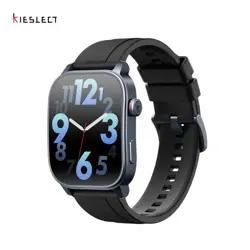

Kieslect Calling Watch
Ks 3 User Manual
Get the manual
in more languages

NOTES:
1. Our Company resees the right to modify the contents of this manual
without prior notice. It is normal that some functions may dier in some
software versions.
2. Please read this manual carefully before using the watch.
3. Before using this watch,you need to connect the APP to synchronize
the time and set your personal information.
4. This product suppos 5ATM level waterproof, suitable for use in
swimming pools and shallow water; not suitable for deep sea diving,
sea swimming or sauna, hot water, tea and other corrosive liquids which
are destructive to the watch, will not be able to enjoy the product
warranty and free repair seice.
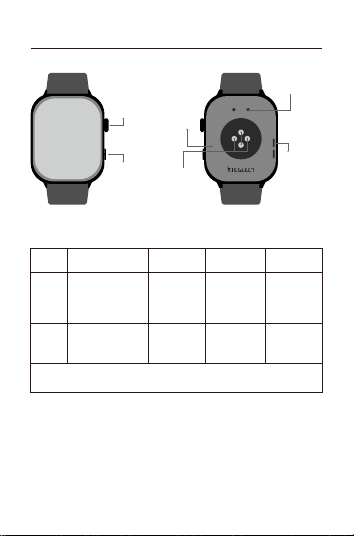
Once Press Double Press Long Press
Tips:
1. Charge for no less than 2 hours before use. Please use the correct
charging adapter of 5V 0.5A or above;
2. If the watch cannot be turned on after a long time,please wipe the
charging contacts of the charging cable clean when using it again to
avoid sweat or water residue.
Revolve
Upper
button
Down
button
Button Functions
Upper
button
Down
button
Microphone
Hea rate
sensor area
Charging
contacts
Speaker
01 Appearance & Charging
Item
Screen on /
Access to the
application list
/
Page Turning /
Changing
watch face
SOS /
* Please scan the QR code on the cover to view the specic button functions.
Calling up
voice assistant
Power on /o
/ Resta /
Turn o power
saving mode
/ Exit spo
Screen on / Calling up
custom applications
(default exercise)

1.With the screen on, press the upper button in the
main dial inteace to enter the application list.
2.With the screen on,in a non-main dial or
non-exercise inteace, click the button to return to the
main dial (allow: timer, stopwatch background).
3.With the screen on, sho press to pause during
exercise With the screen o, click to lighten the screen.
1.Under power on state, long press 5s to call out the
power o/resta inteace.
2.Under power on state, long press for more than 8
seconds to automatically reset and reboot.
3.In the o state, long press 2s to turn on it.
4.Long press the button to end the exercise.
5.Long press in power saving mode to exit.
Upper
button
Function
Sho
press
Long
press
Page turning / volume adjustment
/ brightness adjustment
revolve
1.With the screen o, click to lighten the screen.
2.With the screen lit, click to call up the custom
function (default spo mode).
3.Sho press the physical button twice to call up
the voice assistant.
With the screen on,press and hold for 2 seconds
to call an emergency contact.
Down
button
Function
Sho
press
Long
press
03 Download and Connect APP
03.1 Scan QR code
03.2 Install“KS OS”APP
KS OS
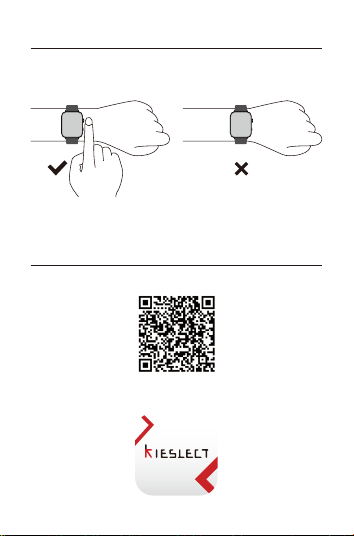
02 How to wear
Please wear the device correctly on your wrist, about one nger from
your wrist bone, and adjust it to a comfoable position.
The pictures below are for reference.
Tip: Incorrect wear may result in inaccurate health test data.
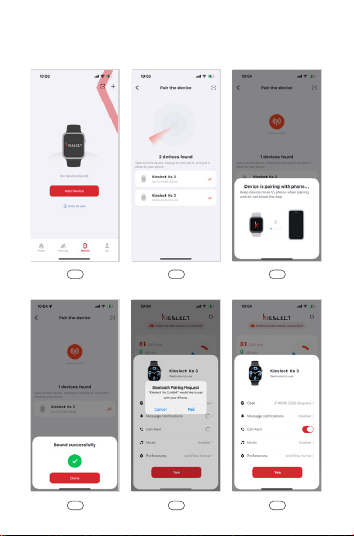
03.3 Open“KS OS”application -> Enable Bluetooth connection on the
phone -> Search for device to pair in the app(or scan the QR code on
the device)-> Complete the binding on the application (or device).
060504
030201
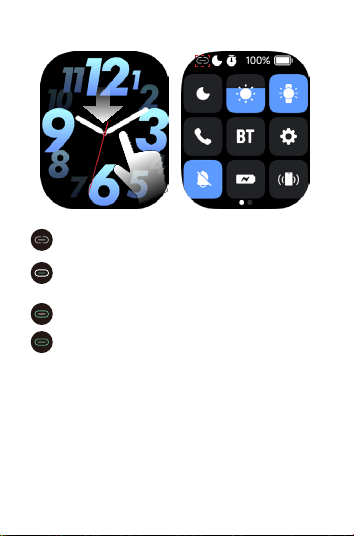
03.4 Check Connection Status
For more information on watch setup and usage, visit:
https://www.kieslect.com/guide/user-manual/
BT/BLE disconnected, please check if the Bluetooth of your cell
phone and the BT switch of your watch are on.
BT disconnected, can't use voice functions such as call/music
/ voice assistant, please check whether the Bluetooth of your
cell phone and the BT switch of your watch are turned on.
BLE disconnect, can't connect APP, please check if your phone's
Bluetooth is on.
BT/BLE connected.
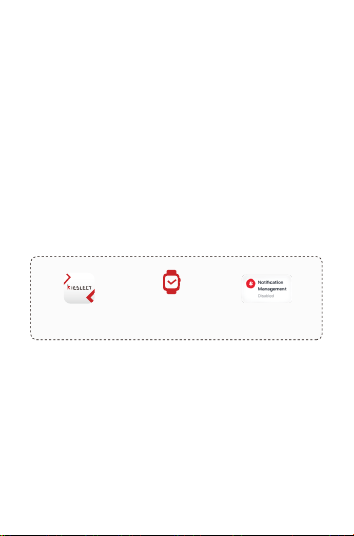
Open“KS OS” Select the “Device”
Device
Click “Disabled”
Tips:
1. Please upgrade the App to the latest version for a better experience.
2. The App is compatible with Andorid 6.0 and iOS 9.0 and above
systems.
3. When connecting to Android for the rst time, a "permission"
reminder will pop up. Please follow the guide and allow the permission
to ensure that all functions are used normally.
4. To connect successfully, open the phone's Bluetooth, GPS, and
network.
5. If the device cannot be searched or connected during use,please
ret after reboot or reset the device.
6. If you need to use functions such as message push, please make sure
the App switch is on. The specic operation is as follows.
04 Operational Instructions
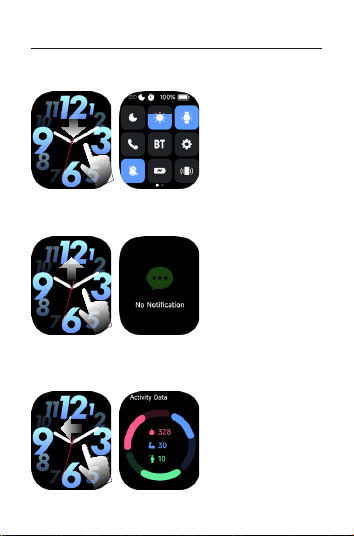
3. Custom Card: Slide from the main dial to the left to display the custom
application card, including activity data, one-key measurement, common
exercise, sleep, weather, and music by default.
2. Message Center: Slide up from the main dial to the message center
and down to return.
1. Control Center: Slide down from the main dial to the control center
and up to return.
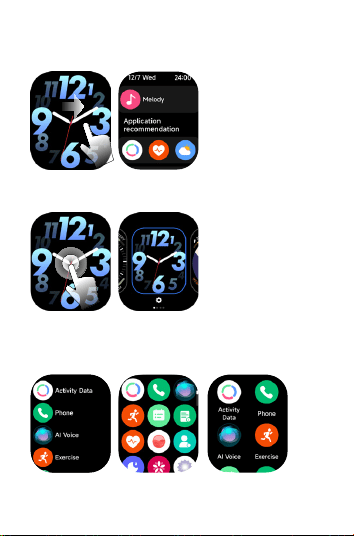
6. Main Menu Page: Click the Upper button to enter the main menu, and
click again to return. You can change the menu style in the setting page.
5. Quick Dial Change: Long press the main dial to enter the selection.
4. Negative Screen: Swipe right from the main dial to access the
negative screen, which displays the data of common functions in the
form of a list, and the user can customize the display content.
05 Function Introduction
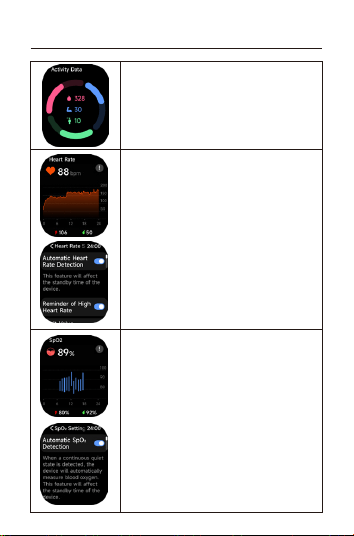
Blood Oxygen
1. Can be set to automatically measure blood
oxygen and remind when it is too low.
2. Whenever you measure blood oxygen, keep
your arm and wrist still and wait patiently for
the measurement to be completed.
3. Click the inteace to view data details.
Exercise Data
1. Exercise data contains: steps、exercise、calories;
2. Click the inteace to view data details.
Hea Rate
1. Can be set to automatically measure hea rate,
too high or too low reminder.
2. Keep your arm and wrist still eve time you
measure your hea rate and wait patiently for
the measurement to be completed.
3. Click the inteace to view data details.
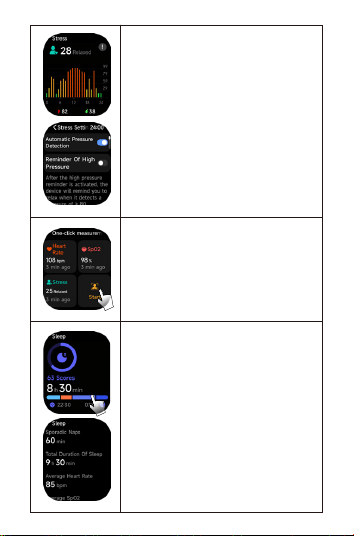
Sleep
Click the inteace to view data details.
One-click Measurement
One-click measurement of hea rate, pressure,
and blood oxygen, with simultaneous hea rate,
pressure, and blood oxygen values within 60
seconds. Click the inteace to view data details.
Pressure
1. Can be set to automatically measure pressure.
2. Each time you measure pressure, keep your
arm and wrist still and wait patiently for the
measurement to complete.
3. Click the inteace to view data details.
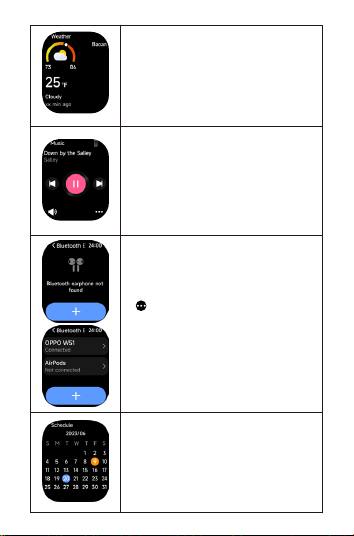
Schedule
1. Setting method: Open and connect
APP--Device--Schedule Reminder--Add. When
the schedule time is up, a notication will pop
up on the watch.
2. For dates with schedules, a blue circle will be
displayed on the watch calendar. Click it to view
all the schedule contents.
Music
1. When the watch is connected to the App, it can
control the music player on the cell phone to
peorm functions.
2. Suppos local music,Operation path: Connect
APP--Device--Music--Add Music (music le
format).
3. Connect Bluetooth headphones to listen to local
music on the watch.
Bluetooth Earphone
1. Connect Bluetooth earphone. Operation path:
Go to the watch's rst-level page "Music" - select
" " - Bluetooth earphone - search for devices
(select the correct earphone name)
2. Compatibility issues (compatible Bluetooth
versions).
3. Bluetooth headsets can only be used when the
watch is answering a call.
Weather
1. Open the APP and the watch will automatically
read the phone's location and weather data.
Operation path: Connect to the APP--Device--More
Settings--Weather Push, you can check the weather
conditions for the next 7 days.
2. When the weather data displays an error, open the
APP to synchronize the weather data.
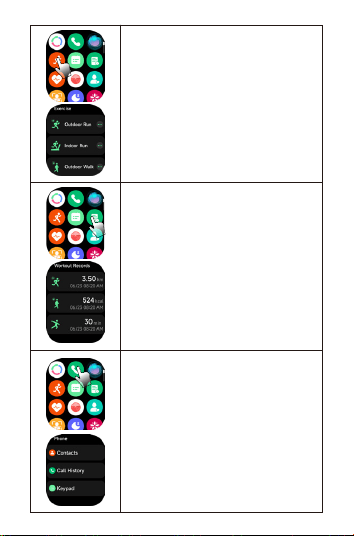
Workout Records
You can view your recent exercise records on the
watch, When the watch is connected to your
phone, you can synchronize the exercise data to
the mobile app, and you can view more detailed
exercise data in the app.
Phone
1. You can add up to 40 contacts to your watch
via mobile app,operation method: Open and
connect APP--Device--Call.
2. You can set a contact as an emergency
contact and long press the down button for 2s
to call the emergency contact.
Exercise
1. Exercise module suppos 100 types of spos.
2. The default 10 spo types in the spo list,
You can freely add, hide and so according to
your own usage habits.
3. Suppos 7 types of spos self-identication,
operation path: Settings--Preferences--Exercise
Settings--Automatic Spos Identication.
4. Suppo voice broadcast.
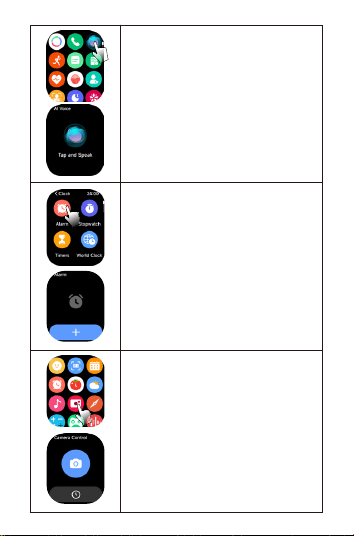
Voice Assistants
Open and connect the APP, double-click the
down button to enter the voice assistant
function, such as: siri, google assitant.
Alarm Clock
1. You can add or delete alarms, or turn on / o
alarms on the watch, or set alarms for the watch
via APP.
2. You can set the delay time and number of
repetitions of the alarm in the APP.
Remote Control To Take Photos
1. Connect the APP and related authorizations,
turn on the phone's camera function, and use
the watch to control the phone's camera to
take pictures.
2. You can set quick gestures to control photo
taking.
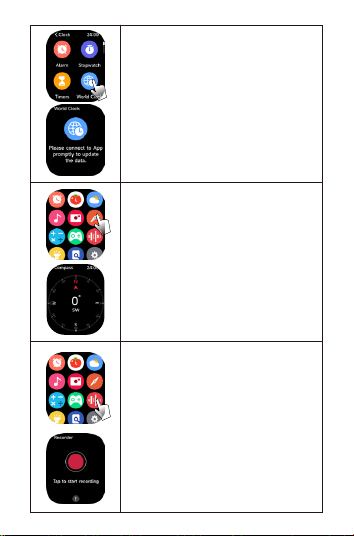
Compass
1. Calibrate the watch according to the
instructions before use.
2. Note: Using a magnetic strap will aect the
normal use of the compass.
World Clock
Check the time of a specied city on the watch.
To set it: Open and connect the app - Device -
More Settings - World Clock - Add.
Sound Recorder
Suppos recording and local playback, the total
recording time shall not exceed 2 hours.
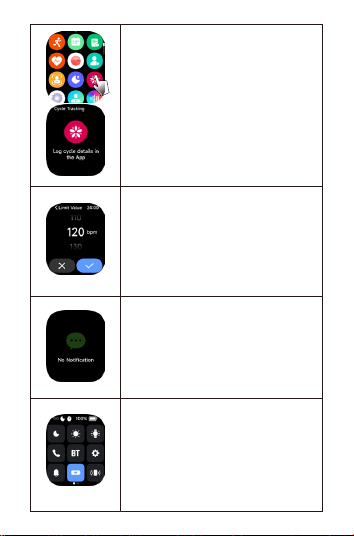
Cycle Tracking
Open and set up menstrual cycle tracking on
the App, and the watch will display menstrual
cycle status and reminders.
Remind
1. Sedenta reminder, hea rate reminder, blood
oxygen reminder, stress reminder, and walking
reminder.
2. Setting method: Open and connect
APP--Device--Health Tracking.
Information Push Inteace
1. Setting method: Open and connect
APP--Device--Notication Management--Sync
mobile phone notications.
2. Note: Peorm the above operations after the
mobile phone authorizes the APP "Notication
Management" permission.
Power Saving Mode
Users can select power saving mode in the
control center. When power saving mode is
enabled, you can only view the time and
remaining batte. Press and hold the upper
button to exit power saving mode.
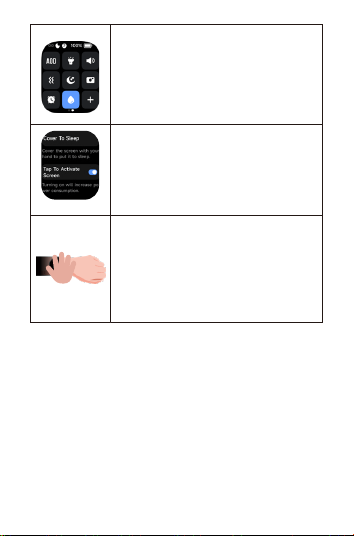
Tap To Light Up The Screen
Operation method: Open the watch settings
--Display and brightness--Turn on the tap to
light up the screen switch.
After turning on this feature, tap the watch
screen to turn it on.
Cover Your Hands To Mute
Operation method: Open watch settings--
Sound and Vibration--Turn on the hand mute
switch.
After turning on this function, the incoming
call reminder and alarm function can be muted
by covering the screen.
Tips:
1. The above health data are for reference only and cannot be used as a
medical basis.
Vibration Drainage
Users can turn on this function in the control
center and follow the instructions of the watch
to drain water.

06 Parameters
07 Warranty
1. The default hardware defect warranty is one year, and the batte and
charging cable are half a year.
2. Defects caused to the following reasons are not free warranty seices:
(1) Self-assemble or disassembly;
(2) Fall and damage during use;
(3) All man-made damage or due to the fault of a third pay, improper use
(such as: sma watch water, external force crushing, scratches in the use
process, etc.);
3. When requiring after-sales seice, please provide the detailed warranty
card;
4. Warranty seices, please contact with the direct dealers;
Please note that all functions of the product are based on physical objects.
BT: 5.3
Screen size: 2.1
Waterproof: 5ATM
Net weight: 30.2g
Batte type: Li-ion
Size: 46.9*18.6*11.9mm
charging voltage: 5V
Batte capacity: 400mAh
Working temperature: 0°C~60°C