
GEARAGON
AeroFrost | Vault
True Wireless Headphones
User Manual

GEARAGON
GEARAGON AeroFrost - Vault True Wireless Stereo Sports Headphones
Engineered for the Slopes | Glove-Friendly Tactical Control
Oversized Physical Buttons
Tactile, clicky physical controls — say goodbye to unresponsive touch sensors in freezing
weather. Easy to operate even while wearing thick winter mittens.
True Wireless Stereo (TWS)
Completely cord-free drop-in design for full freedom of movement. Cold-resistant
magnetic charging case engineered to perform down to -4°F.
Ultra-Slim Helmet Compatibility
A 25% slimmer profile fits seamlessly into compatible helmet ear pads. across all major ski
and snowboard helmet brands,
helping reduce pressure on the ears for all-day riding comfort.
All-Day Mountain Battery
Over 10 hours of continuous playtime on a single charge
— Built to last from first chair to last run.
Slope-Ready Performance
Independent left/right button mapping with rock-solid connection range up to 33 ft (10 m).
Rider-Tested Feedback:
"During our multi-week backcountry tests, the tactile physical buttons never missed a beat
with heavy mittens on—vastly outperforming finicky touch pads."
Forged for Action
GEARAGON
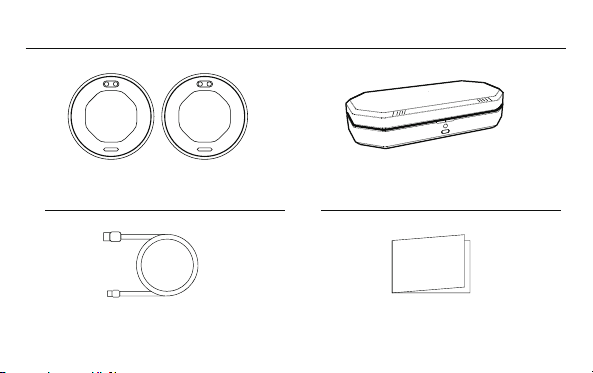
WHAT’S IN THE BOX ?
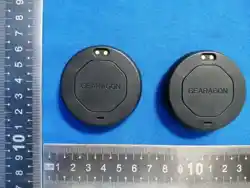
1 × pair of AeroFrost - Vault headphones
1 × rugged charging case
1 x charging cable 1 x user manual
GEARAGON
GEARAGONGEARAGON
QUICK START
1. Open the Lid: Open the charging case lid
(the headphones automatically enter pairing mode).
2. Pairing Status: The LED indicator will flash rapidly, signaling that pairing mode is active.
3. Connect Device: Go to your phone’s Bluetooth settings and select “AeroFrost - Vault”.
4. Connected: The LED indicator will flash slowly, confirming a successful connection.
5. Hit the Slopes: You’re ready to stream audio and take calls hands-free!
GEARAGON
Quick Star

POWER MANAGEMENT
Important Note: The headphones cannot be manually powered off outside the case; return
them to the charging case to power down.
Automatic Power-Off:
To preserve battery life, the headphones will automatically shut down after 30 minutes if:
They are out of the charging case, AND
No active Bluetooth connection is detected.
Battery Care Tips:
Disconnect Bluetooth when not in use.
Always store the headphones inside the case when off the mountain to maintain charge.
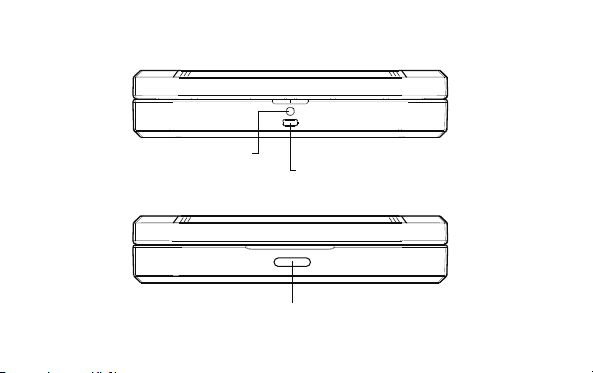
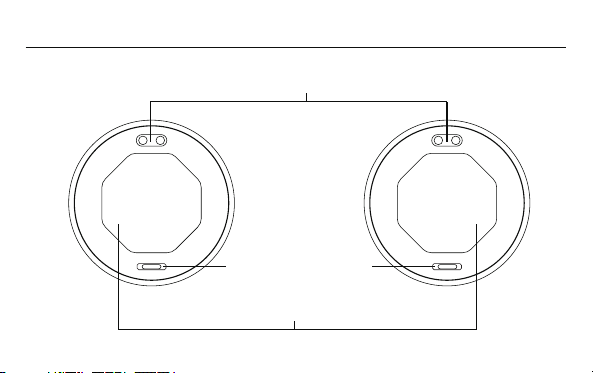
Multi-functional button
Charging input port
Indicator light

Checking Battery Level
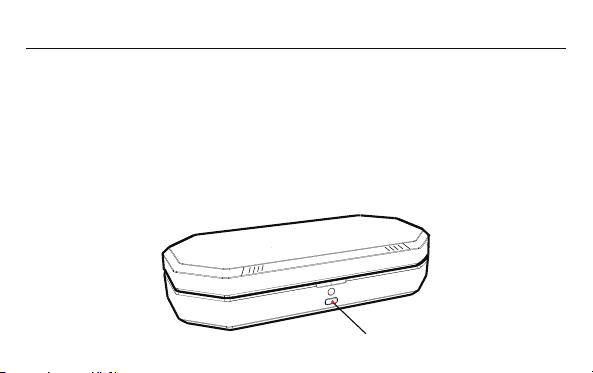
Press the multi-function button on the charging case once.
The LED indicator will show the current battery status:
· Lid Open: Displays the headphones’ battery level.
· Lid Closed: Displays the charging case’s battery level.
Pairing:
With the headphones properly seated in the charging case and the lid open, press and
hold the function button for 5 seconds to clear the current connection and enter pairing
mode for a new device.
Note: Headphones must be properly stored in the charging case for this function.
Indicator Light
Battery Level Status/Action
Solid Red
Solid Orange
Solid Green 70-100%
20-69%
below 20% Low Battery / Charge Immediately
Medium Charge / Recharge Soon
Full Charge / Normal Operation
FUNCTION INSTRUCTIONS
GEARAGONGEARAGON
Call Microphone
Charging Contacts
Button
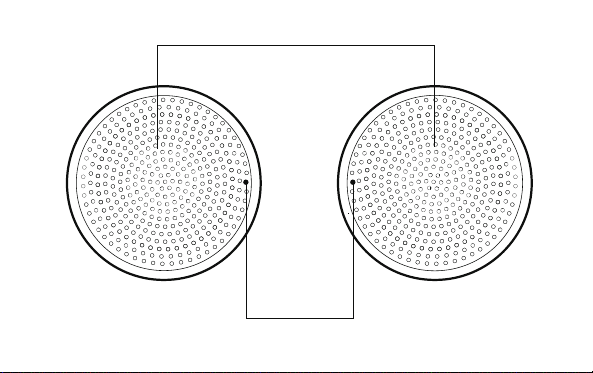
L R
Speaker Output
Indicator Light
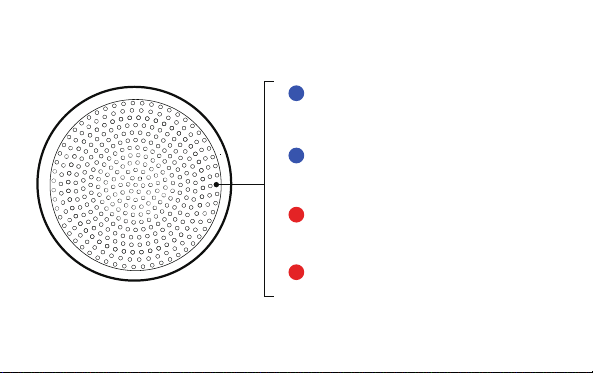
Rapidly Flashing Blue
Rapidly Flashing Red
- Pairing Mode / Searching for Device
Slowly Flashing Blue
- Connected
- Low power
Solid Red
- Charging

POWER ON
Open charging case lid
(or Long Press L/R)
Place in case and close lid
Press Once (L/R)
Double Press Left(L)
Double Press Right (R)
Press and Hold Left(L)
Press and Hold Right (R)
Single Press (L/R)
Double Press (L/R)
Triple Press (L/R)
Single Press (L/R)
Double Press (L/R) End Call
Answer Call
Reject Incoming Call
Activate Voice Assistant
Dismiss Voice Assistant
Play / Pause
Previous Track
Next Track
Volume Down (-)
Volume Up (+)
POWER OFF
POWER ON
POWER OFF
MUSIC PLAYBACK
INCOMING CALL
ACTIVE CALL
VOICE ASSISTANT

HEADPHONES SPECIFICATIONS
F0 ~ 4KHz
32 Ω ± 15%
40mm
205 mAh x 2
3.7V
2H
Driver frequency Range
Driver impedance
Driver size
Reception Range
Charging method
Playback duration
Charging time
Battery capacity
Battery voltage
Contact point
More than 10 hours of single playback on a full charge
11 Yards / 10 Meters.
Operating Temperature -4°F to 113°F (-20°C to 45°C).

CHARGING CASE SPECIFICATIONS
200mA
190mAh
5V
3.7V
About 3.5 hours
Input current
Charging temperature
Input voltage
Battery voltage
Charging time
Battery capacity
Usage temperature 14°F to 140°F (-10°C to 60°C).
32°F to 113°F (0°C to 45°C).
(Including the charging
duration of the headphones.)

GENERAL SAFETY
1. Read and understand all instructions before use. Failure to follow these
instructions mayresult in injury or product damage.
2. Retain this manual for future reference.
3. Observe all warningsand safety markings on the product and in this manual.
4. These headphones do not provide impact protection and are not a substitute for
a certified protective helmet.
PRODUCT USE
1. This device is not waterproof. Do not use near water sources(bathtubs, sinks,
swimming pools, etc.).
2. Avoid exposing the device to:
A. Liquids of anykind.
B. Excessive moisture or humidity.
C. Extremetemperatures(below-20°C / -4°Forabove45°C / 113°F).
D. Direct sunlight forprolonged periods.
E. Open flames or heat sources.
IMPORTANT SAFETY INSTRUCTIONS

BATTERY & CHARGING
1 - Charging case:
A. Use only a compatible 5 V DC power adapter. (included).
B. Do not charge while wearing earphones.
C. Case temperature must not exceed 45°C / 113°F during charging.
2-Storage:
1. Store at 50% charge if not used for extended periods.
2. Keep away from metal objects to prevent short-circuiting.
MAINTENANCE
1. Clean only with a soft, dry, lint-free cloth. Do not use liquid cleaners or aerosol
sprays.
2. Use only manufacturer-approved accessories and attachments. Unauthorized
accessoriesmay void your warranty and compromise safety.
SERVICE & REPAIRS
1. Do not attempt to disassemble, modify, or repair this product. The housing
contains nouser-serviceable parts.

2. Qualified service personnelmust perform all servicing when:
A. The product has been physically damaged.
B. Liquid has entered the product.
C. The product has been exposed to moisture.
D. The product exhibits abnormal performance.
E. The power supply cord or charging case is damaged.
BATTERY & DISPOSAL
WARNING: This product contains lithium-ion batteries and small components.
A. Small components may pose a choking hazard if swallowed.
B. Damaged lithium-ion batteries may present a risk of fire or explosion.
C. Dispose of batteries and electronic components in accordance with local
regulations.
2. If the product housing is damaged:
A. Immediately discontinue use.
B. Keep away from children and pets.
C. Dispose according to local electronic waste regulations.
D. Never dispose of batteries in fire or regular household waste.

WARNINGS & CAUTIONS HEARING SAFETY
To prevent hearing damage:
1. Set device volume to minimum before use.
2. Gradually increase to comfortable listening level.
3. Limit continuous use at high volumes.
4. Follow the 60/60 rule: No more than 60% volume for 60 minutes at a time
· Discontinue use immediately if you experience:
1. Hearing discomfort.
2. Tinnitus (ringing in the ears).
3. Dizziness or disorientation
USAGE ENVIRONMENT
· NEVERuse while:
1. Driving or operating vehicles/machinery.
2. In situations requiring full environmental awareness.
3. Sleeping (risk of entanglement)

·This product is NOTcertified for:
1. Aviation communication.
2. Medical monitoring.
3. Industrial safety applications.
ELECTRICAL SAFETY
·Use only certified power adapters that meet:
1. Input: 100-240VAC, 50/60Hz.
2. Output: 5VDC,≤1A.
3. Regional safety standards (UL/CE/CCC/etc.)
· Charging precautions:
1. Do not wear headphones while charging.
2. Disconnect charger when not in use.
3. Charge in well-ventilated areas.
4. Do not charge overnight unattended.

To prevent hearing damage:
4. Follow the 60/60 rule: No more than 60% volume for 60 minutes at a time
· NEVERuse while:
3. Sleeping (risk of entanglement)
MEDICAL CONSIDERATIONS
· Contains magnets that may interfere with:
1. Pacemakers.
2. Implantable defibrillators.
3. Other medical implants.
·Consult your physician before use if you have:
1. Hearing implants.
2. Other electronic medical devices.
CHILD SAFETY
· Not suitable for children under 3 years of age.
Contains small parts that may:
1. Present choking hazards.
2. Cause intestinal blockage if swallowed
· Keep all components away from young children

FCC Warning
This device complies with Part 15 of the FCC Rules. Operation is subject to the
following two conditions:
(1) This device may not cause harmful interference, and (2) this device must accept
any interference received, including interference that may cause undesired
operation.
NOTE 1: This equipment has been tested and found to comply with the limits for a
Class B digital device, pursuant to part 15 of the FCC Rules. These limits are designed
to provide reasonable protection against harmful interference in a residential
installation. This equipment generates, uses and can radiate radio frequency energy
and, if not installed and used in accordance with the instructions, may cause
harmful interference to radio communications. However, there is no guarantee that
interference will not occur in a particular installation. If this equipment does cause
harmful interference to radio or television reception, which can be determined by
turning the equipment off and on, the user is encouraged to try to correct the
interference by one or more of the following measures:
COMPLIANCE INFORMATION

-Reorient or relocate the receiving antenna.
-Increase the separation between the equipment and receiver.
-Connect the equipment into an outlet on a circuit different from that to which the
receiver is connected.
-Consult the dealer or an experienced radio/TV technician for help.
NOTE 2: Any changes or modifications to this unit not expressly approved by the party
responsible for compliance could void the user's authority to operate the equipment.
The device has been evaluated to meet general RF exposure requirement. The
device can be used in portable exposure condition without restriction.
For full regulatory information and warranty details,visit: https://gearagon.com/
If you experience any safety concerns or product issues, immediately discontinue
use andcontact GEARAGON Customer Support.

HELMET COMPATIBILITY
The AeroFrost - Vault headphones are designed to fit inside the ear pads of most
audio-ready ski and snowboard helmets. Please check the dimensions and
compatibility of your helmet before installation.
WARRANTY INFORMATION
GEARAGON provides a limited 1 year warranty against defects in materials and
workmanship under normal use.
This limited warranty does not cover damage caused by impact, collision, water
exposure, improper installation, misuse, or unauthorized modifications.
For complete warranty terms and conditions, please visit https://gearagon.com or
contact GEARAGON Customer Support.
Note:This limited warranty gives you specific legal rights, and you may also have
other rightswhich vary byjurisdiction.

Product Name: Ski Headphones
Model: AeroFrost - Vault
FCCID:2BYO7-AFV
Manufacturer: Xuzhou Xushan Outdoor Sporting Goods Co., Ltd.
Address: Room 041-2 & 042-2, East China Electromechanical and Auto Parts
Comprehensive Market, Yingbin Avenue, Yunlong District, Xuzhou City, Jiangsu
Province, China
MADE IN CHINA
GEARAGON/AeroFrost - Vault