1
Operation Guide 5750
MA2505-EA
© 2025 CASIO COMPUTER CO., LTD.
Published: 5/2025
To adjust the time setting
When the second hand is at 12 o’clock, pull
the
Crown out to Click 2.
Rotate the Crown to change the time setting.
Push the Crown back in on a time signal to
resume timekeeping.
Note
x Take care that you set the
correct AM or PM time.
x When changing the time,
move the minute hand
four or five minutes past
your final setting, and then
back it up to the setting
you want.
To change the day indicator setting
Pull the Crown out to Click 1.
Rotate the Crown towards you to set the
day.
Push the Crown back in.
Note
x The day indicator setting
uses a 31-day month.
Make adjustments for
months of shorter lengths.
x Avoid changing the day
indicator setting between
the hours of 9:00 p.m.
and 4:00 a.m. Otherwise,
the day indicator may
not change correctly at
midnight.
To change the day of the week indicator
Pull the
Crown
out to Click 1.
Rotate the
Crown
away from you to set the
day of the week.
Push the
Crown
back in.
Note
x Avoid changing the day of
the week indicator setting
between the hours of 9:00
p.m. and 4:00 a.m.
Low Battery Alert
x
The second hand will jump at two-second intervals to alert you when battery power is low.
x
Have the battery replaced as soon as possible after low battery alert is indicated.
Specifications
Accuracy at Normal Temperature: ±20 seconds per month
Power Supply: One silver oxide battery (Type: SR920SW)
Battery nominal voltage: 1.55V
Battery life: Approximately 3 years
Other: Low battery alert
Specifications are subject to change without notice.
x Your watch may differ somewhat from the one shown in the illustration.
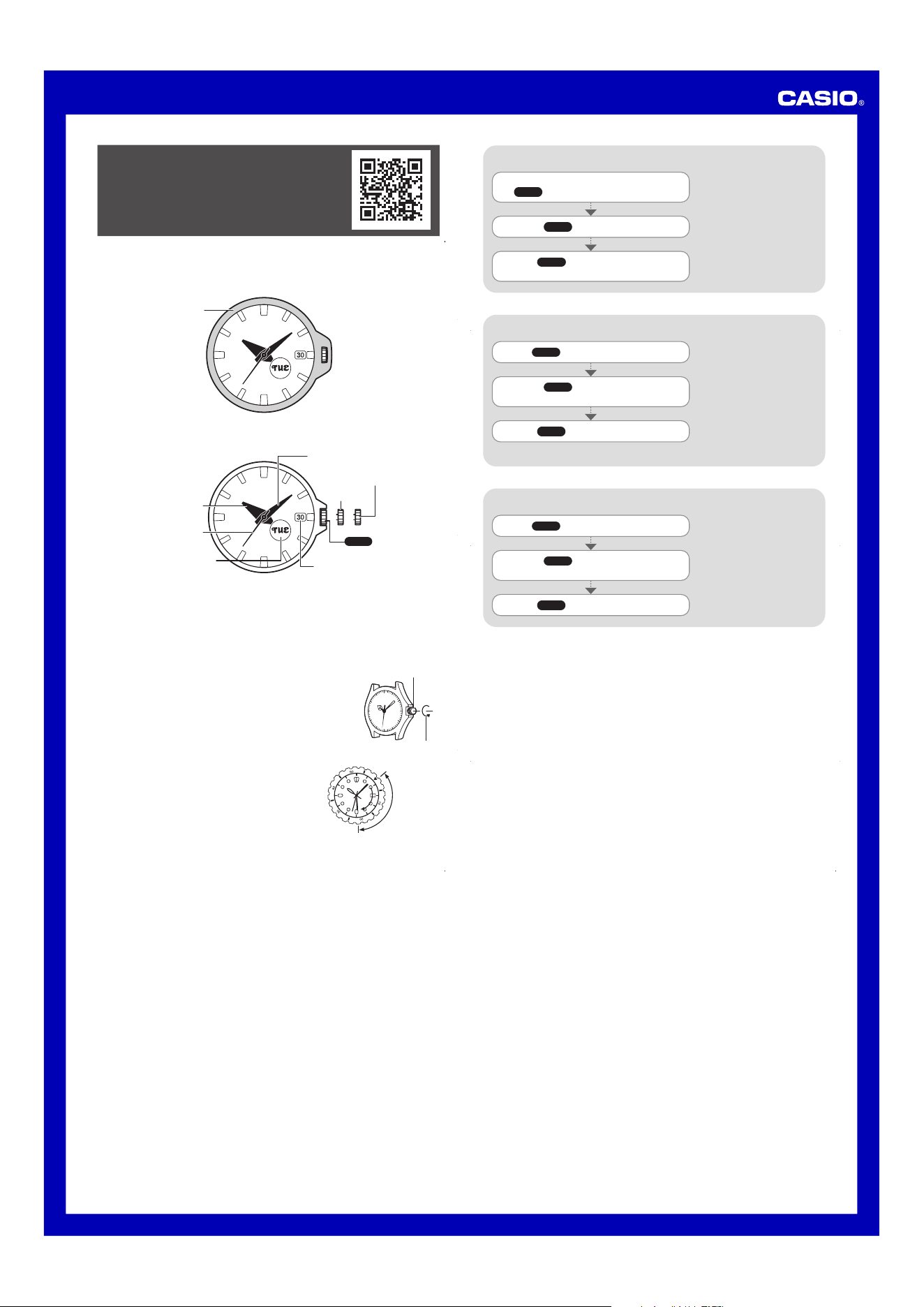
Bezel Attached
x Make sure the crown is fully pushed in before attaching the bezel.
Bezel
Bezel Removed
Hour Hand
Second Hand
Minute Hand
Day Indicator
Click 2
Click 1
Crown
Day of the week indicator
To operate the crown
Remove the bezel.
Be sure to replace the bezel after finishing a crown operation. Insert the bezel hooks into
the watch case.
x The watch is not protected from impact while the bezel is removed.
x Water resistance is not guaranteed while the crown is pulled out.
Crown Operations
Some water-resistant models (10BAR, 20BAR) have a screw-in
crown. When you need to perform a crown operation, rotate
it towards you to unscrew it. Then pull the crown out. Avoid
applying undue force when pulling. The watch loses its water
resistance while the crown is unscrewed. After performing a
crown operation, fully screw the crown back in.
Crown
Loosen
If your watch has a rotary bezel...
You can rotate the bezel to align its
▼
mark with the
minute hand. Then you will be able to tell how much
time has elapsed since aligning the
▼
mark.
Start
Elapsed time
Current
You can also find information about
operational procedures at the CASIO website.
https://s.casio.jp/mw/en/5750/

