V1.0
User manual
EV11000
Wall Mounted-AC EV Charging

FCC ID:2A98M-EV11000
FCC Caution:
This device complies with part 15 of the FCC Rules. Operation is subject to the
following two conditions: (1) this device may not cause harmful interference, and (2)
this device must accept any interference received, including interference that may
cause undesired operation.
Any changes or modifications not expressly approved by the party responsible for
compliance could void the user's authority to operate the equipment.
NOTE: This equipment has been tested and found to comply with the limits for a Class
B digital device, pursuant to Part 15 of the FCC Rules. These limits are designed to
provide reasonable protection against harmful interference in a residential installa-
tion. This equipment generates, uses and can radiate radio frequency energy and, if
not installed and used in accordance with the instructions, may cause harmful
interference to radio communications. However, there is no guarantee that interfer-
ence will not occur in a particular installation.
If this equipment does cause harmful interference to radio or television
reception,which can be determined by turning the equipment off and on, the user is
encouraged to try to correct the interference by one or more of the following
measures:
-- Reorient or relocate the receiving antenna.
-- Increase the separation between the equipment and receiver.
-- Connect the equipment into an outlet on a circuit different
from that to which the receiver is connected.
-- Consult the dealer or an experienced radio/TV technician for help.
To maintain compliance with FCC’s RF Exposure guidelines, This equipment should be
installed and operated with minimum distance 20cm between the radiator and your
body: Use only the supplied antenna.
User Manual
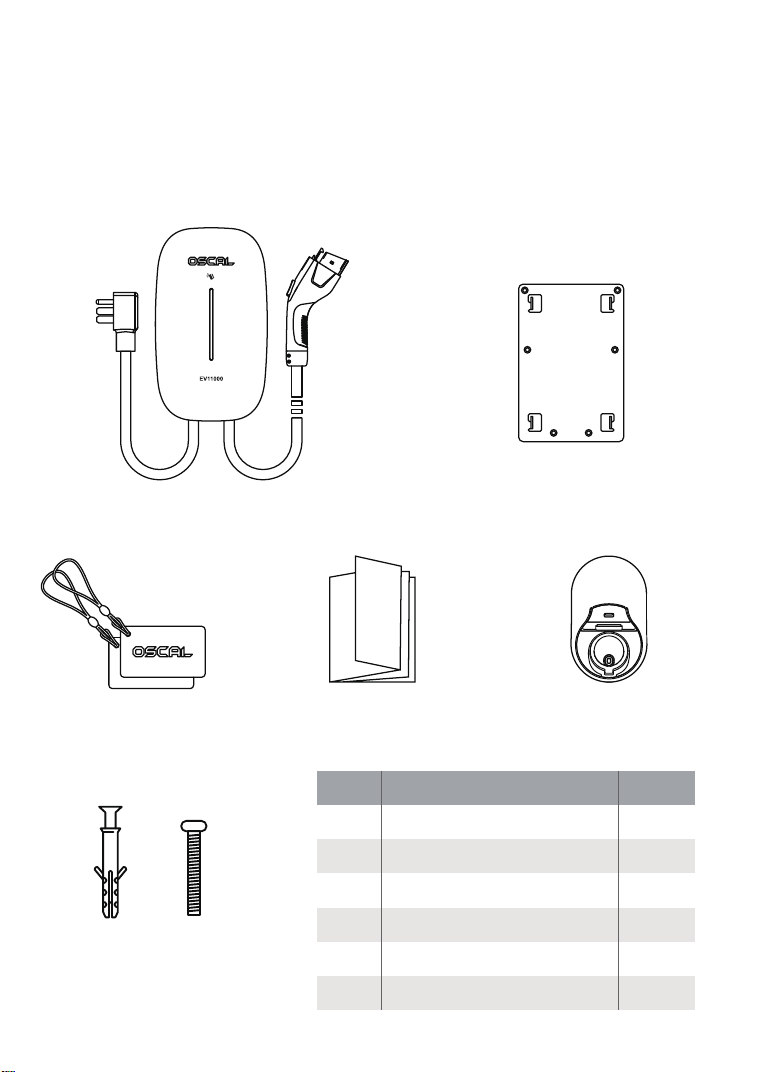
Serial
number
Packaging materials
Quantity
� Main unit + charging gun
�
� External fixing plate
�
� EV charging card
�
� User Manual
�
� Gun seat
�
� Screw
�+�
Gun seat
External
fixing plate
The main unit of the charging
pile + the charging gun
EV charging
cards * �
Screw
� �
Package Contents
After the AC charging pile has been delivered, open the package and
check the following items:
1. Visually inspect the appearance and check whether the AC charging pile was damaged through
impact during transportation. If there is any damage, please immediately notify the carrier.
2. Compare what is present against the following bill of materials, and check whether the models
of the accompanying accessories are complete and correct. If it is found that the accessories are
missing or the models do not match, a field record should be made promptly, and our company's
customer service should be contacted immediately;
Product introduction
5
6
1
2
4
5
3
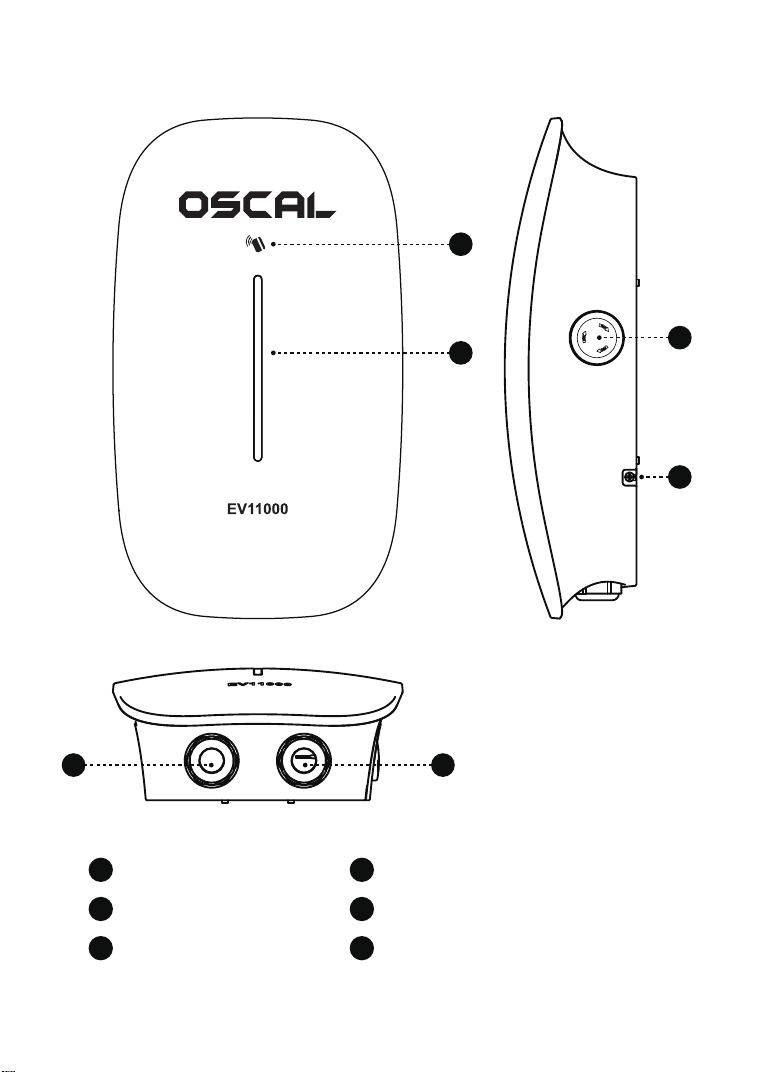
Indicator light
Card swiping area
Power output port
Emergency Stop button
6
Anti-disassembly screwPower input port
1
2
43

Parameter Specifications
Basic Information
Electrical information
Environmental information
Safety design
Product model EV11000
Wall Mounted-AC EV Charging
PC+ABS
L * W * H: 380 * 220 * 100 mm
Wall-mounted
Wall-mounted backplate: (L * W * H) 180 * 120 * 2 mm
Approximately 5.30 kg
5 m
240V AC (L1+L2+PE)
60Hz
11KW Max
240V AC±15% (L1+L2+PE)
48A
Can be used indoors or outdoors
-30°C~50°C
5% - 95% without condensation
≤2000 m
Pile body IP65, gun head IP54, gun head coupling IP55
100,000 hours
UL94-V0
Product name
Case material
Device dimensions
Installation method
Installation components
Net weight of the device
Input frequency
Rated output voltage
Operating temperature
Operating altitude
Flame retardant grade
Emergency stop protection, grounding protection, leakage protection, overvoltage
protection, undervoltage protection, overcurrent protection, overtemperature protection,
Short-circuit protection, lightning protection, rain protection
Length of the charging gun cable
Input voltage
Output power
Rated current
Applicable scenarios
Operating humidity
Protection level
MTBF
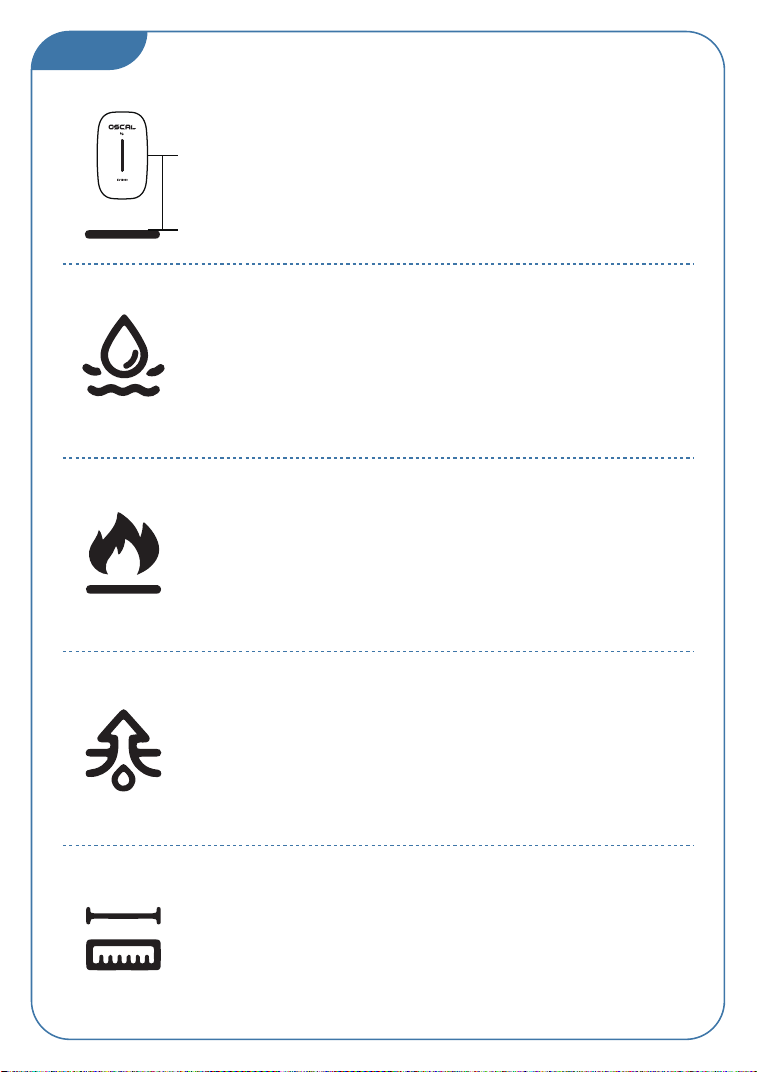
Installation environment and location
01
The Product's input and output cables and the charging
gun should all be stored at a height of 0.5 m to 1.5 m
above the ground;
The charging pile should not be installed in low-lying,
overly damp areas or locations where water accumulation
is likely to occur;
The charging pile should not be installed in areas subject
to intense vibrations or in areas where flammable and
explosive substances are present;
The charging pile should be installed in a clean, tidy,
and well-ventilated area;
The horizontal distance from the installation position of
the charging pile to the parking space > 0.5 m;
0.5 m - 1.5 m
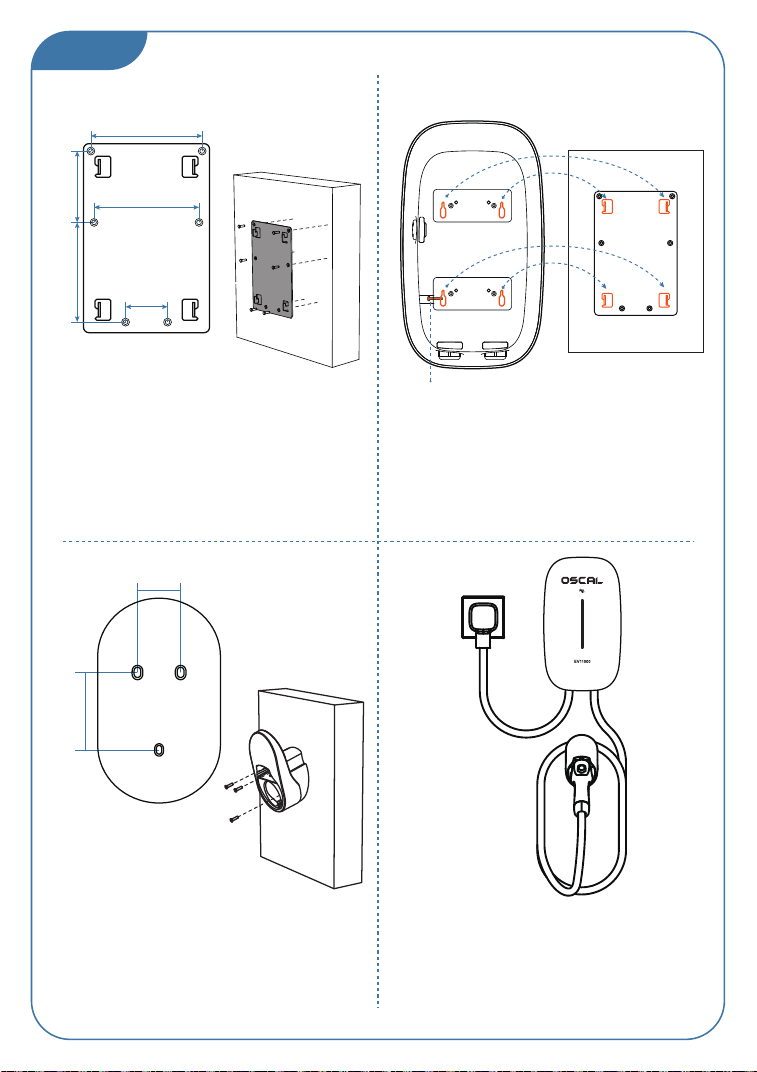
Installation instructions
02
1. Install the wall-mounted fixing plate: Mark
the position on the wall and drill 6
installation holes with a 6 mm drill bit;
Tap the 6 * 60 mm plastic expansion tube
into the installation holes, and fix the
wall-mounted fixing plate on the wall with
the matching M4 screws locked into the
expansion tubes;
2. Secure the charging pile with the installed
sheet metal onto the fixing plate on the wall;
Secure it tightly downward and lock the
anti-disassembly screw from the side;
3. Install the charging gun seat: Confirm the
position of the gun seat, mark the screw hole
positions on the wall with a pen, and drill
holes for installation with a 6 mm drill bit
(The charging gun should be stored at a
height of 1 m to 1.5 m above the ground).
4. Output end: Insert the charging gun into
the gun seat and neatly arrange the cable;
Input end: Connect the input wire to the
lower end of the air switch where the
incoming wire is located;
106 mm
68 mm
95 mm
100 mm
40 mm
Rear view of
the EV11000
Anti-disassembly screw
Fixing plate
hole position
Gun seat hole
position
External
fixing plate
55.6 mm
31 mm
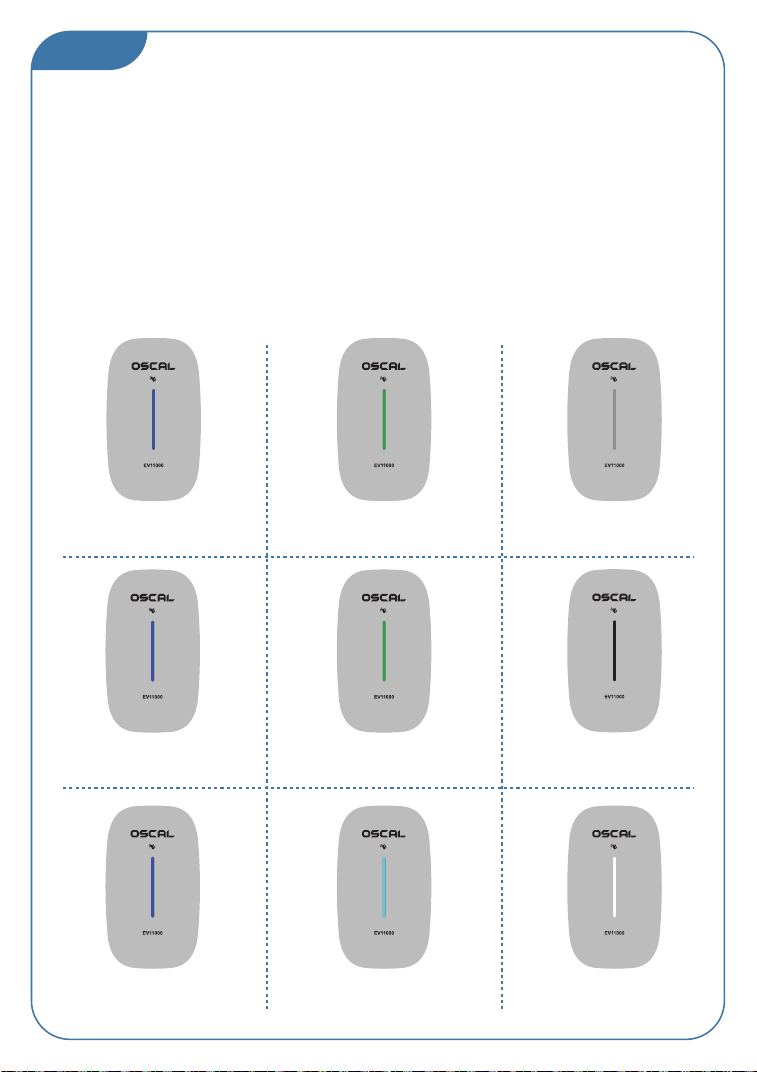
Inspection and debugging after
powering on the device
03
(1) Inspection before operation
Before operation, please carefully check and ensure the following: The AC charging pile is installed in a
location and position that is convenient for operation and maintenance;
The AC charging pile is correctly connected to the accessories and installed securely;
The protective switch selection at the AC inlet terminal is reasonably suited (the use of an air switch
with a rating of more than 40A is recommended);
Input wiring: The ground wiring and live wiring should be connected correctly and not reversed;
(2) Powering on the device
Confirm that all the above pre-operation inspection items meet the requirements;
Close the protective switch at the AC inlet terminal to start powering on;
Powering on the AC charging pile: There is approximately a 5-second power-on self-check time;
After the power-on self-check is completed, observe the status of the LED indicator light;
(3) Indicator light display
Steady blue light
Idle state
Slowly pulsing blue light
The gun is inserted normally or
waiting for a reservation
Slowly pulsing green light
Charging state
Flashing red light
Pile body malfunction
Steady blue light
The APP is connected to the
mobile phone and successfully
connected to the network
Steady cyan light
The APP is connected to the
mobile phone but not connected
to the network
Steady white light
The APP is not connected
to the mobile phone
Power-on self-check
Blue - Green - Blue - Red - Off
Flashing in sequence
Steady green light
Charging completed
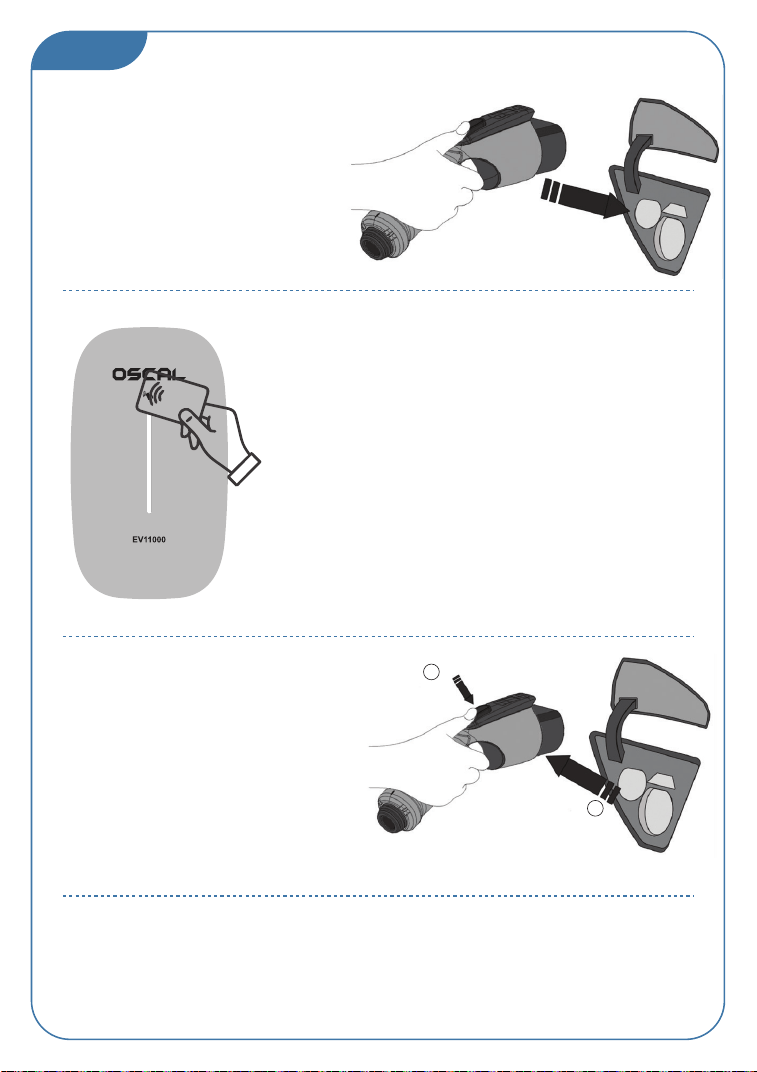
Charging operation
04
(2) Charging control, card swiping
In the card swiping area of the device panel, maintain a
distance between the card and the card swiping area of
less than 2 mm for a period of about 3 seconds to charge
the electric vehicle;
(3) Finished charging
When the charging pile is in a working
state or the charging is finished, you
can press the button on the handle
and directly unplug the gun to end
the charging; Charging the vehicle;
(4) Emergency Stop button use
When you press the Emergency Stop button, the charging pile stops working immediately;
To resume using the charging pile: Unscrew the Emergency Stop button, power off and restart
the charging pile, and the charging pile should return to its normal operational state
(1) Charging connection
After parking the electric vehicle, the
car owner takes the charging gun from
the pile and inserts it into the charging
socket of the electric vehicle. Please
carefully check whether the charging
gun is inserted firmly in place to ensure
a reliable connection;
1
2
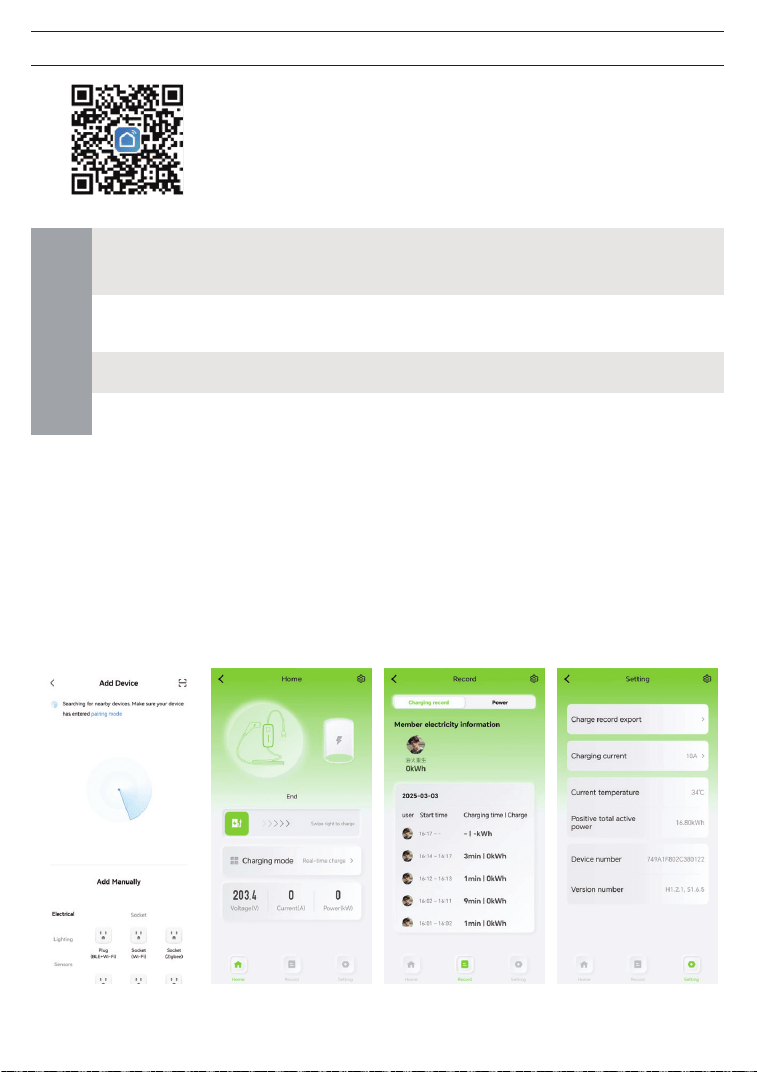
Smart Life APP
Scan the QR code with a mobile device
and download the Smart Life APP
APP
Control Interface: The
interface displays the
current status of the
charging pile and the
operating parameters
of the device. You can
remotely start and
stop the charging.
Connection Interface:
Search for and
connect to the device
through the Smart
Life APP.
Parameter Setting
Interface: Set or view
the maximum
charging current of
the charging pile,
and view information
such as the current
temperature and
power consumption.
Charging Record
Interface: You can
view the historical
charging records of
the charging pile
WIFI
Connecting
the charging
pile
Turn on the mobile device's WIFI → Download and open the "Smart Life"
APP → Turn on the mobile device's Bluetooth → Add a Bluetooth device in
the APP → Search for the charging pile → Select the found charging pile
→ Enter the WIFI password → Complete
Remotely start/stop charging, schedule charging, switch current,
charging capacity, charging duration
Home Page → "Settings" menu in the upper right corner of the interface
→ Device Information → Signal Strength
APP Home Page → "Settings" menu in the upper right corner of the
interface → Remove Device → Disconnect
Disconnecting
the charging
pile
APP
Function
WIFI signal

Safety precautions
1. When installing and using the charging pile, it should be kept away from flammable,
explosive, combustible gas materials or chemicals;
2. Children should not approach or use the charging pile during the charging process to
avoid injury;
3. In case of rainy and thunderous weather, please charge with caution;
4. Use of the charging pile when the charging gun or charging cable has defects, cracks,
wear, breakage, or the charging cable is exposed is strictly prohibited. If any such
situation exists, please notify the staff immediately;
5. Please keep the charging gun head clean and dry. If it is dirty, wipe it with a clean dry
cloth. Touching the charging gun core with your hand during a charge is strictly
prohibited;
6. When an emergency or abnormal situation occurs during use, you can immediately
press the Emergency Stop button to cut the supply of all power;
7. During the charging process, driving the vehicle is prohibited. Charging can only be
carried out when the vehicle is stationary. For hybrid electric vehicles, please turn off
the engine before charging;
8. Do not use the Product outside the temperature range of -30°C to +50°C;
9. The Product must be grounded. If a fault or damage occurs, grounding can provide a
circuit with the minimum resistance needed to reduce the risk of electric shock;
10. Do not attempt to disassemble, repair, or modify the charging pile. If there is a need
for repair or modification, please contact the staff. Improper operation may cause
electric shock to personnel, equipment damage, water leakage, leakage, etc.;
11. The use of adapters or converters is prohibited.
12. The use of extension cords is prohibited.
Can't find EV11000 or can't establish a connection?
1. The device's Bluetooth is turned off, or it is out of the communication range (10 meters).
2. The device is already connected to another device and needs to be forcefully disconnected
from that device. (Push the Emergency Stop button → Place the charging card in the card
swiping area → The charging pile initially responds with three beeps, and then sounds one
beep after a 3-second pause → The disconnection is successful)
Other issues?
1. For APP remote control, it is necessary to ensure that the charging pile is connected to the
network;
2. When resuming charging after having stopped the charging midway through the APP, you
need to manually unplug and plug the charging gun head to resume;
3. When setting the charging current through the APP, you need to first stop the charging;
additionally, the charging current cannot be set during the charging process;
4. The APP can set immediate charging and scheduled charging;

Disclaimer
Before use, please read and fully understand the contents of
the User Manual of the Product to ensure correct use. After
reading, please store the User Manual in a safe place for future
reference. Failure to operate the Product properly may cause
serious injury to yourself or others, or result in damage to the
Product and property damage. By using the Product, you
confirm your understanding, acknowledgment, and
acceptance of all the terms and conditions of this document.
The user bears complete liability for his/her own actions and
all consequences arising therefrom. OSCAL is not liable for any
damages caused by the user's failure to use the Product in
accordance with the User Manual.
Within the scope of laws and regulations, OSCAL reserves the
right to the final interpretation of this document and all
related product documents. The contents of the User Manual
are subject to change, revision, or termination without prior
notice. Please visit OSCAL's official website for the latest
product information.