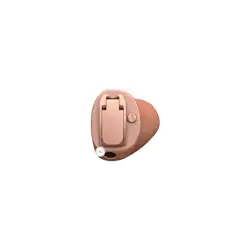
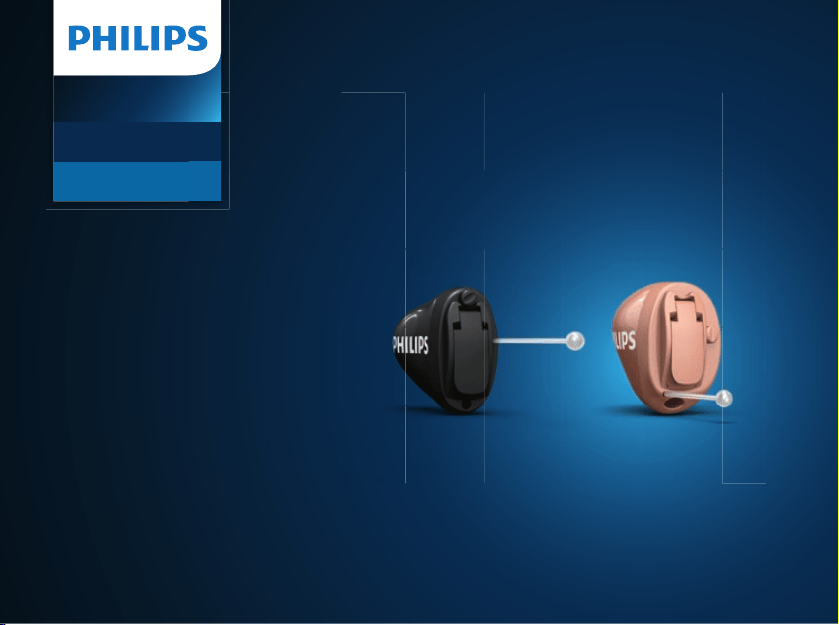
HearLink
In-the-Ear
Hearing Aids
IIC - CIC
Instructions for Use
WARNING: People younger than
18 should go to a doctor before
using this.
People younger than 18 years old need
specialized care, and using this without
a medical evaluation may worsen
impairment or disability. A hearing aid
user who is younger than 18 should
have a recent medical evaluation from
a doctor, preferably an ear-nose-throat
doctor (an ENT). Before using this, a
doctor should determine that the use
of a hearing aid is appropriate.
WARNING to Hearing Aid Dispensers:
You should advise a prospective hearing
aid user to consult promptly with a doctor,
preferably an ear specialist such as an
ENT, before dispensing a hearing aid if
you determine through inquiry, actual
observation, or review of any other available
information concerning the prospective
user, that the prospective user has any of the
following conditions:
• Visible deformity of the ear, either
congenital or traumatic
• Fluid, pus, or blood coming out of the ear
within the previous 6 months
• Pain or discomfort in the ear
• History of excessive ear wax or suspicion
that something is in the ear canal
• Dizziness, either recent or long-standing
• Sudden, quickly worsening, or uctuating
hearing loss within the previous 6 months
• Hearing loss or ringing (tinnitus) only
in one ear or a noticeable dierence in
hearing between ears
• Audiometric air-bone gap equal to or
greater than 15 dB at 500 Hz, 1000 Hz, and
2000 Hz

WARNING to Hearing Aid Dispenser,
Outputs over 132 dB SPL:
You should exercise special care in selecting
and tting a hearing aid with a maximum
output that exceeds 132 dB SPL because it
may impair the remaining hearing of the
hearing aid user.
Caution: This is not hearing protection.
You should remove this device if you
experience overly loud sounds, whether
short or long-lasting. If you’re in a loud place,
you should use the right kind of hearing
protection instead of wearing this device. In
general, if you would use ear plugs in a loud
place, you should remove this device and use
ear plugs.
Caution: The sound output should not
be uncomfortable or painful.
You should turn down the volume or
remove the device if the sound output
is uncomfortably loud or painful. If you
consistently need to turn the volume down,
you may need to further adjust your device.
Caution: You may need medical help if
a piece gets stuck in your ear.
If any part of your hearing aid, like the eartip,
gets stuck in your ear, and you can’t easily
remove it with your ngers, get medical help
as soon as possible. You should not try to use
tweezers or cotton swabs because they can
push the part farther into your ear, injuring
your eardrum or ear canal, possibly seriously.
Note: What you can expect when you start
using a hearing aid
A hearing aid can benet many people with
hearing loss. However, you should know it
will not restore normal hearing, and you
may still have some diculty hearing over
noise. Further, a hearing aid will not prevent
or improve a medical condition that causes
hearing loss.
People who start using hearing aids
sometimes need a few weeks to get used
to them. Similarly, many people nd that
training or counseling can help them get
more out of their devices.

If you have hearing loss in both ears, you
might get more out of using hearing aids in
both, especially in situations that make you
tired from listening —for example, noisy
environments.
Note: Tell FDA about any injuries,
malfunctions, or other adverse events.
To report a problem involving your hearing
aid, you should submit Information to FDA as
soon as possible after the problem. FDA calls
them “adverse events,” and they can include:
skin irritation in your ear, injury from the
device (like cuts or scratches, or burns from
an overheated battery), pieces of the device
getting stuck in your ear, suddenly worsening
hearing loss from using the device, etc.
Instructions for reporting are available at
https://www.fda.gov/Safety/MedWatch, or
call 1-800-FDA-1088. You can also download
a form to mail to FDA.
Note: Hearing loss in people younger than
18
• People younger than 18 should see a
doctor rst, preferably an ear-nose-throat
doctor (an ENT), because they may have
dierent needs than adults.
• The doctor will identify and treat medical
conditions as appropriate.
• The doctor may refer the person to an
audiologist for a separate test, a hearing
aid evaluation.
• The hearing aid evaluation will help the
audiologist select and t the appropriate
hearing aid.
A person younger than 18 years old
with hearing loss should undergo medical
evaluation by a doctor, preferably an ENT,
before buying a hearing aid. The purpose of
a medical evaluation is to identify and treat
medical conditions that may aect hearing
but that a hearing aid won’t treat on its
own.

Following the medical evaluation and if
it is appropriate, the doctor will provide a
written statement that the hearing loss
has been medically evaluated and the person
is a candidate for a hearing aid. The doctor
may refer the person to an audiologist for
a hearing aid evaluation, which is dierent
from the medical evaluation and is intended
to identify the appropriate hearing aid.
The audiologist will conduct a hearing
aid evaluation to assess the person’s ability to
hear with and without a hearing aid.
This will enable the audiologist to select and
t a hearing aid for the person’s individual
needs. An audiologist can also provide
evaluation and rehabilitation since, for
people younger than 18, hearing loss may
cause problems in language development
and educational and social growth. An
audiologist is qualied by training and
experience to assist in the evaluation and
rehabilitation of hearing loss in people
younger than 18.

Model overview
This booklet is valid for the following hearing aid models and styles:
Styles
IIC Invisible-In-the-Canal
CIC Completely-In-the-Canal
Battery
Size 10
1.2
HearLink 9050 GTIN: (01) 05714464146314
(HEI9050), (HEI9051)
HearLink 7050 GTIN: (01) 05714464146321
(HEI7050), (HEI7051)
HearLink 5050 GTIN: (01) 05714464146338
(HEI5050), (HEI5051)
HearLink 3050 GTIN: (01) 05714464146345
(HEI3050), (HEI3051)


Introduction to this booklet
This booklet guides you on how to use and maintain your new hearing
aids. Ensure you read the booklet carefully including the Warnings section.
This will help you get the most benet of your new hearing aid.
Warnings
Text marked with a warning symbol must be read before using the device.
More information is available on www.hearingsolutions.philips.com
Your hearing care professional has adjusted the hearing aid to meet
your needs. If you have additional questions, contact your hearing care
professional.
A hearing care professional* (hearing aid professional, audiologist, ENT
(ear, nose and throat) doctor, and hearing aid dispenser) is a person who
is appropriately educated and has proven competency in professionally
assessing hearing, selecting, tting, and delivering hearing instruments and
rehabilitation care to persons with hearing loss.
*The job title may vary from country to country.

The education of the hearing care professional is in accordance with
national or regional regulations.
For your convenience this booklet contains a navigation bar to help you
navigate easily through the dierent sections.
About Getting started Daily use Options Tinnitus Warnings More info
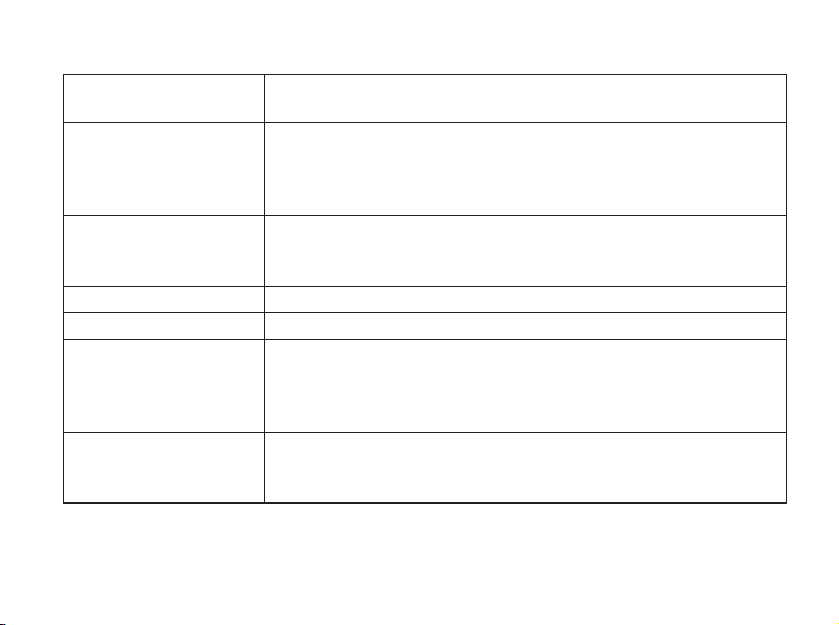
Intended use
Intended use The hearing aid is intended to amplify and transmit sound to
the ear.
Indications for use Bilateral or unilateral impaired hearing of sensorineural,
conductive, or mixed type ranging from a slight (16dBHL*) to
severe (75dBHL*) degree of hearing loss, with an individual
frequency conguration.
Intended user Person with hearing loss using a hearing aid and their
caregivers. Hearing care professional responsible for adjusting
the hearing aid.
Intended user group Adults.
Use environment Indoor and outdoor.
Contraindications Not suitable for infants below 36months.**
Users of active implants must pay special attention when using
the hearing aid. For more information read the Warnings
section.
Clinical benets The hearing aid is designed to provide better speech
understanding to help ease communication with the aim of
improving quality of life.
* AsspeciedbytheAmericanSpeech-Language-HearingAssociation,asha.org,usingpure-toneaverageof
0.5,1and2kHz.
** InaccordancewithcurrentPediatricAmplicationguidelines,customhearingaidsarenottypicallyconsideredfor
childrenofanyage.However,ahearingcareprofessionalmay,inspecialcircumstanceandonacase-by-casebasis,
selectthemforchildrenolderthan36months.
IMPORTANT NOTICE
The hearing aid amplication is uniquely adjusted and optimized to your
personal hearing capabilities during the hearing aid tting performed by your
hearing care professional.

About
Your hearing aid 14
Identify left and right hearing aid 15
MultiTool for handling batteries and cleaning 16
Getting started
Turn the hearing aid ON and OFF 18
Low battery indication 19
How to replace the battery 20
Daily use
Insert the hearing aid 22
Remove your hearing aid 23
Caring for your hearing aid 24
Filter replacement 26
Replace ProWax miniFit lter 27
Replace T-Cap lter 28
Change volume with push-button 29
Change programs 30
Options
Mute the hearing aid 32
Optional features and accessories 33
Table of contents

Tinnitus
TinnitusSoundSupport™ 34
Guidelines for Tinnitus SoundSupport users 35
Limitation on use time 35
Sound options and volume adjustments 36
Warnings related to Tinnitus 38
Warnings
General warnings 39
More info
Water & dust resistant (IP68) 43
Conditions of use 44
Cell phone 46
Technical information 48
International warranty 55
Warranty 56
Your individual hearing aid settings 57
Sound indicators 59
Troubleshooting guide 62
Summary of relevant studies 64
Technical Data 66
14
About Getting started Daily use Options Tinnitus Warnings More info
About
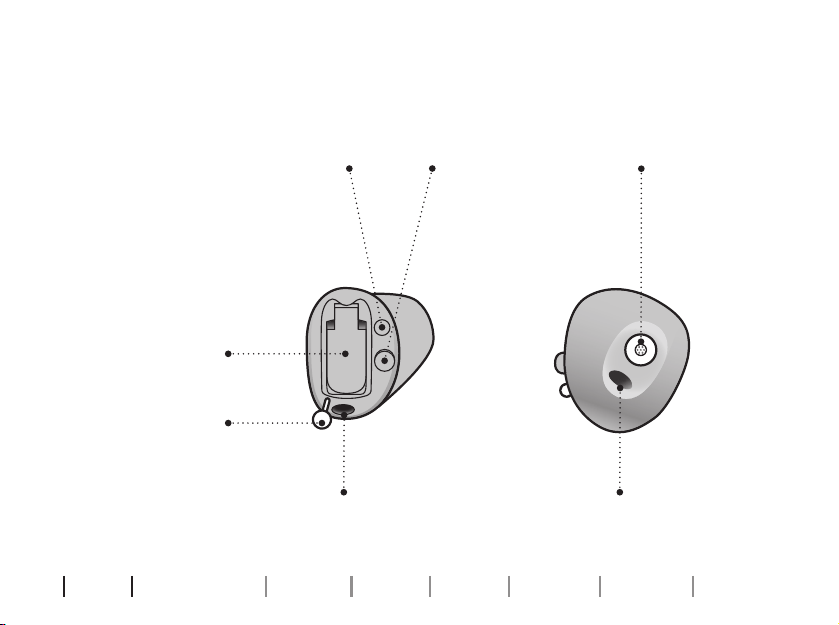
Components may be positioned dierently on your hearing aid.
Your hearing aid
(CIC shown)
What it is and does
Battery drawer
Contains the
battery and
functions as
ON/OFF switch
Pull out string
Pull out the
hearing aid
Sound outlet
Sound out
Vent Vent
Push-button
(Optional - CIC only)
Mute, change
volume and
program
Microphone inlet
Sound in
15
Identify left and right hearing aid
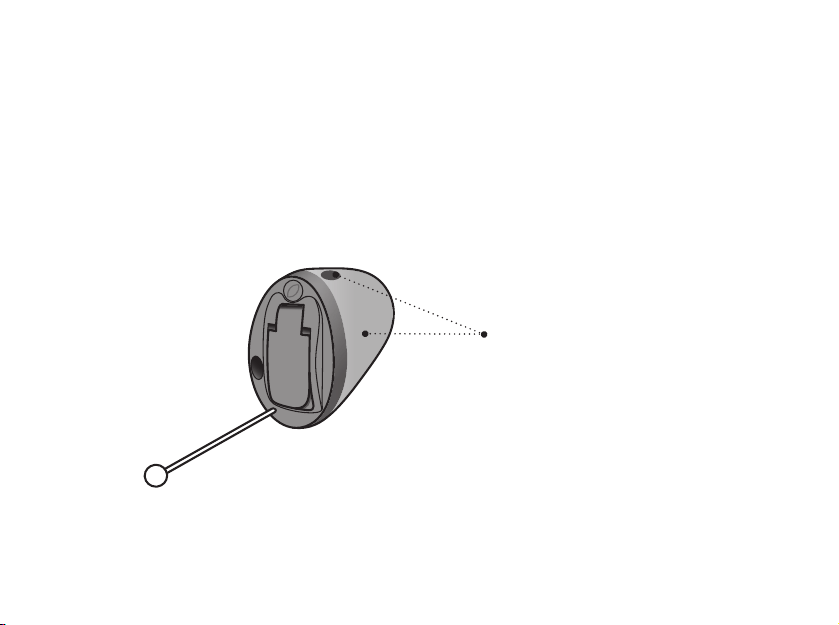
It is important to distinguish between the left and the right hearing aid as
they might be shaped and programmed dierently.
A BLUE shell, dot or text
identies the LEFT hearing aid
A RED shell, dot or text identies
the RIGHT hearing aid
16
About Getting started Daily use Options Tinnitus Warnings More info
MultiTool for handling batteries and cleaning
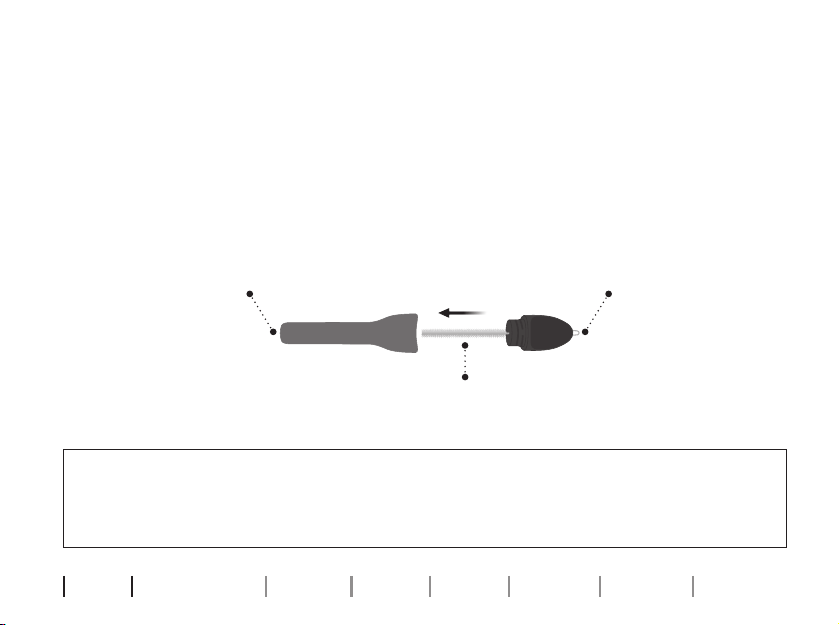
The MultiTool contains a magnet that makes it easier to replace the battery
in the hearing aid. It also contains a brush and a wire loop for cleaning and
removing earwax. If the vent is very small, a special tool may be required. If
you need a new tool please contact your hearing care professional.
IMPORTANT NOTICE
The MultiTool has a built-in magnet. Keep the MultiTool at least 30centimeters
(1foot) away from credit cards and other magnetically sensitive devices.
Brush
Wire loopMagnet

18
About Getting started Daily use Options Tinnitus Warnings More info
Turn the hearing aid ON and OFF
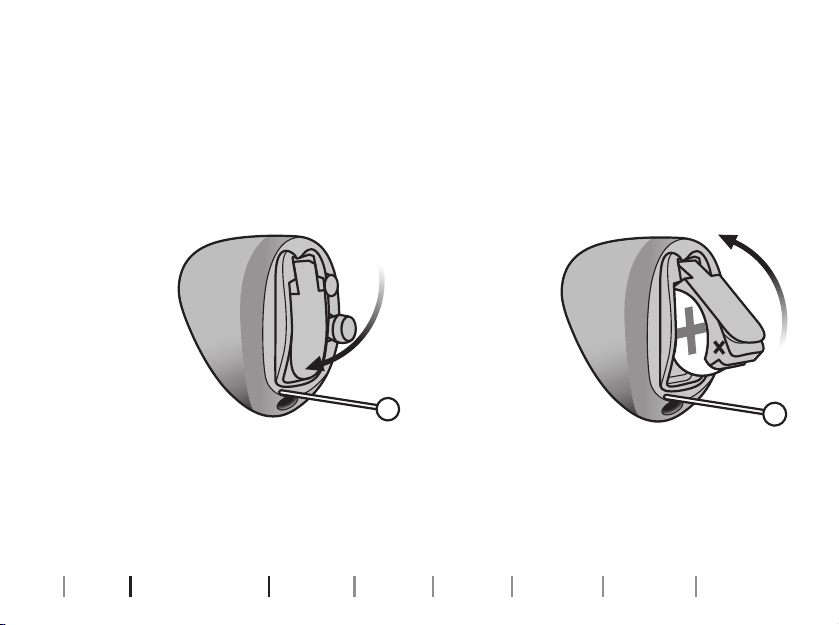
The battery drawer is also used to switch the hearing aid ON and OFF. To
save battery life, make sure your hearing aid is switched OFF when you are
not wearing it. If you wish to return to the standard settings of the hearing
aid, simply open and then close the battery drawer (quick reset).
Turn ON
Close the
battery
drawer
with the
battery in
place.
Turn OFF
Open the
battery
drawer.
Getting started
Note: Open the battery door fully to make sure the hearing aid does not drain the battery fully and to allow air to
circulate whenever you are not using your hearing instrument, especially at night or for longer periods of time.
19
Low battery indication
The low battery indication is repeated periodically until the battery runs
out. Your hearing care professional can set your hearing aids to match your
preferences.
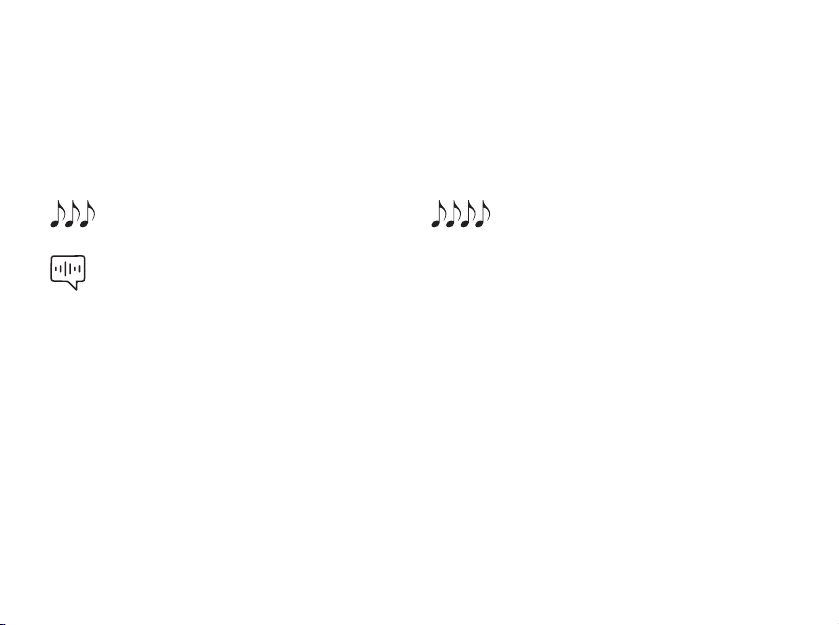
The battery is running low
Three alternate tones
Notify Me
(Optional for select languages)
The battery has run out
Four descending tones
Battery tip
To make sure the hearing aid is always working, bring spare batteries with
you, or replace the battery before you leave home.
20
About Getting started Daily use Options Tinnitus Warnings More info
How to replace the battery
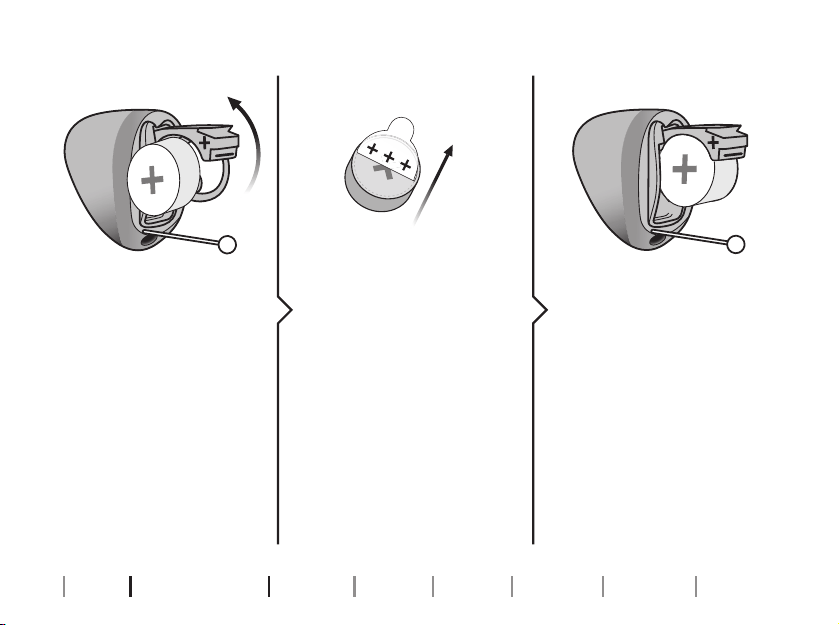
2. Uncover 3. Insert
Fully open the battery
drawer. Remove the
battery.
Remove the sticky label
from the + side of the
new battery.
Tip:
Wait 2minutes so that
the battery can draw
air, to ensure optimal
functioning.
Insert the new battery
into the battery drawer.
Ensure that the + side of
the battery and battery
drawer align.
1. Remove
21
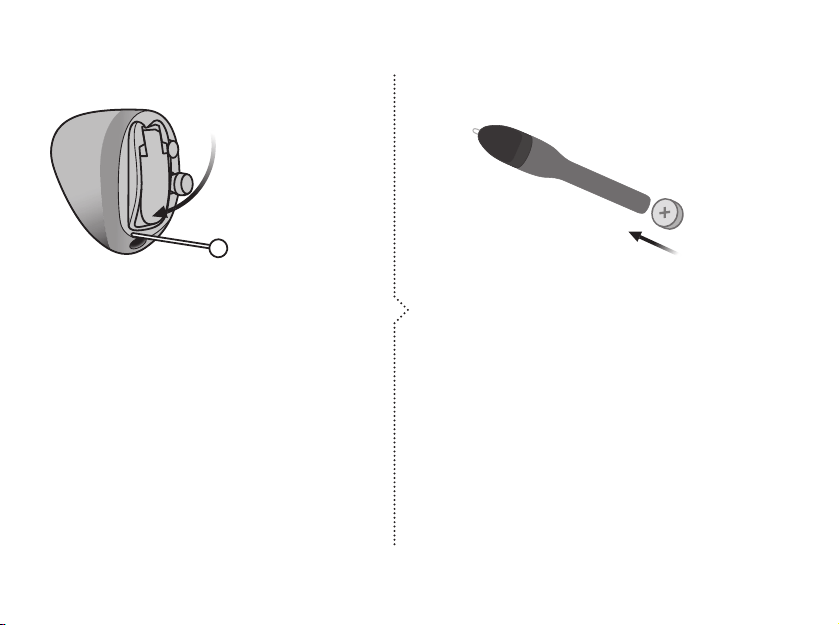
MultiTool
Close the battery drawer. The hearing
aid will play a jingle.
Hold the hearing aid close to your ear
to hear the jingle.
The MultiTool can be used for battery
change. Use the magnetic end to
remove and insert batteries.
4. Close Tip
22
About Getting started Daily use Options Tinnitus Warnings More info
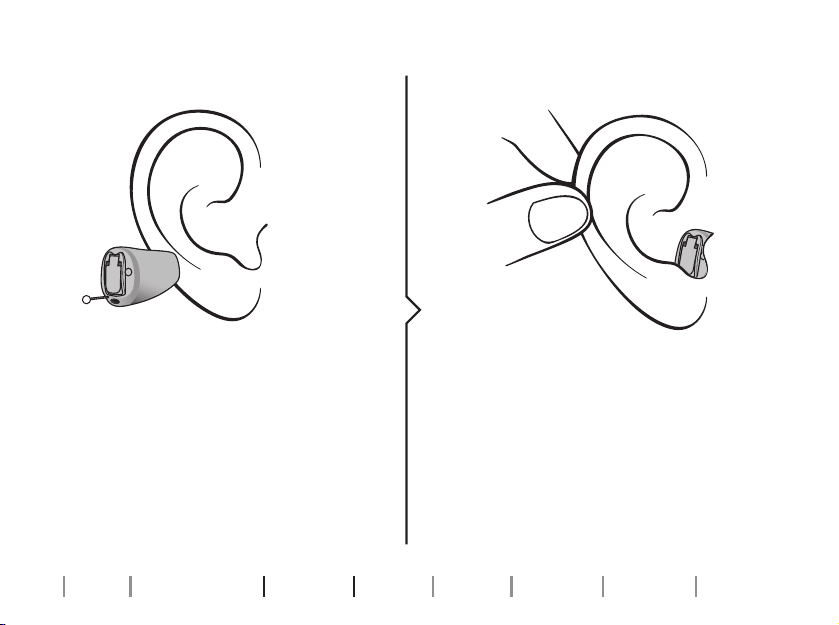
Insert the hearing aid
Place the tip of the hearing aid in your
ear canal.
Gently pull your ear outwards and
push the hearing aid into the ear canal,
twisting slightly if necessary. Follow
the natural contour of the ear canal.
Push the hearing aid to make sure it ts
comfortably in the ear.
Step 1 Step 2
Daily use
23
Remove your hearing aid
Hold the hearing aid by the pull-out string (if available). Gently pull the
hearing aid from the ear canal.
If your hearing aid doesn’t have a pull-out string, you can remove it by
pulling on the edge of the hearing aid.
IMPORTANT NOTICE
DO NOT use the battery door as a handle to insert or remove your hearing aids,
as it is not designed for this purpose.
24
About Getting started Daily use Options Tinnitus Warnings More info
Caring for your hearing aid
When handling your hearing aid, hold it over a soft surface to avoid
damage if you drop it.
Cleaning the hearing aid
Carefully brush away debris from the microphone inlets with a clean brush.
Gently brush the surface. Make sure that the lters do not fall o.
Microphone
inlet
25
IMPORTANT NOTICE
To clean the hearing aids, use a soft, dry cloth. The hearing aids must never be
washed or immersed in water or other liquids.
Vent
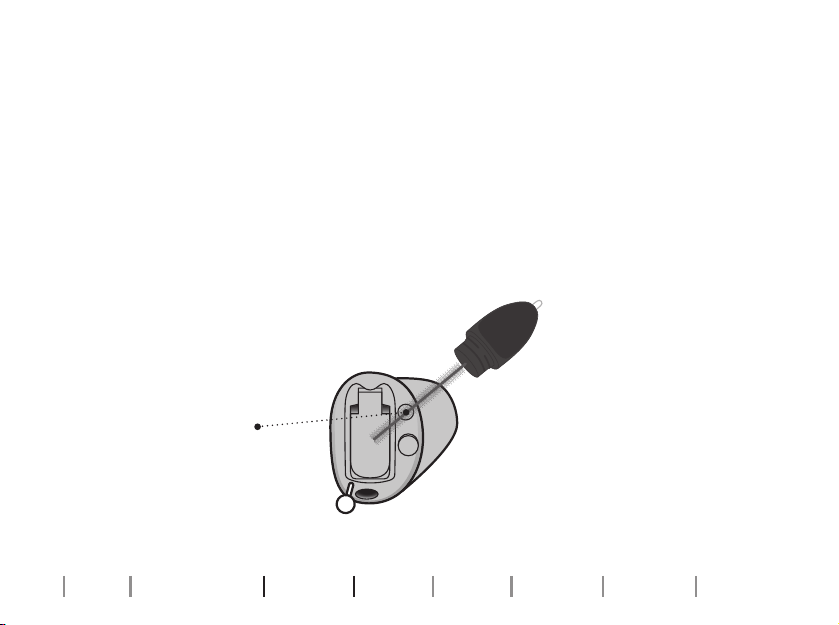
Clean the vent by pressing the brush
through the hole while twisting it slightly.
If the vent is very small, a special
tool may be required. Please
consult your hearing care
professional.
Vent
26
About Getting started Daily use Options Tinnitus Warnings More info
Filter replacement
The lters keep wax and debris from damaging the hearing aid.
If the lters become clogged, please replace the lters or contact your
hearing care professional.
• ProWax miniFit lters protect the sound outlet.
• T-cap lters protect the microphone inlet.
Please refer to the following pages for instructions on how to replace the
appropriate lters.
IMPORTANT NOTICE
Ensure you always use the same type of wax lter as was originally supplied
with the hearing aids.
If you are in doubt about the use or replacement of ProWax miniFit lters,
contact your hearing care professional.
27
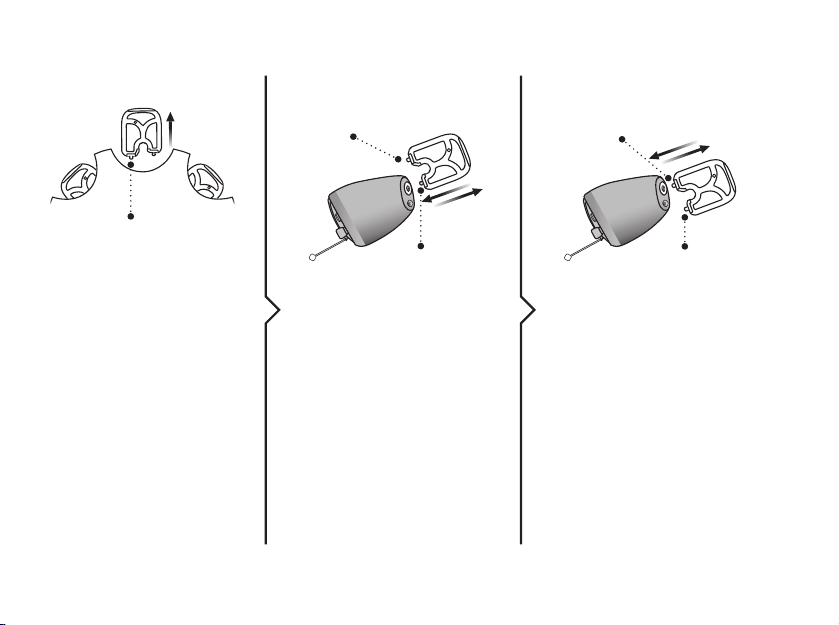
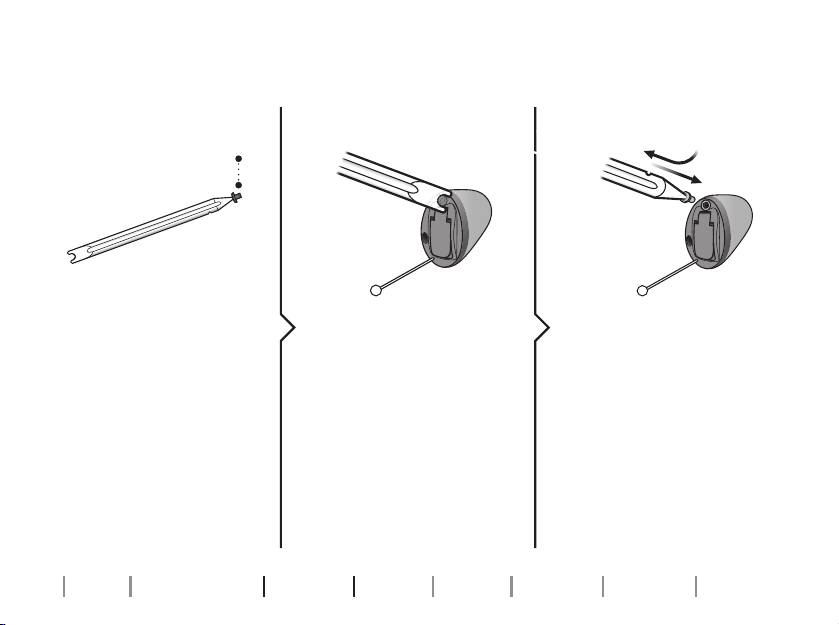
Replace ProWax miniFit lter
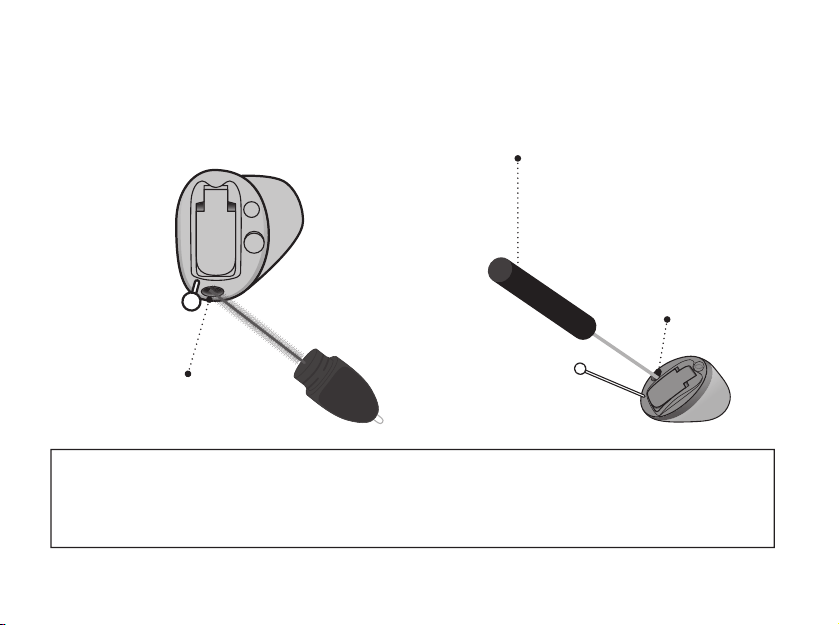
2. Remove 3. Insert
Remove the tool from
the shell. The tool has
two pins, one empty
for removal and one
with the new ProWax
miniFit lter.
Push the empty pin
into the ProWax miniFit
lter in the hearing aid
and pull it out.
Insert the new ProWax
miniFit lter using the
other pin, remove the
tool and throw it out.
1. Tool
New lter
Old lterOld lter
New
lter
New
lter
28
About Getting started Daily use Options Tinnitus Warnings More info
Replace T-Cap lter
2. Remove 3. Insert
Remove the tool from
the packaging. The tool
has two ends, one for
removal and one with
the new T-Cap lter.
Push the tool fork
under the top edge of
the used T-Cap lter
and lift it out.
Insert the new T-Cap
lter and remove the
tool by twisting it
slightly. Throw the tool
out after use.
1. Tool
new lter
29
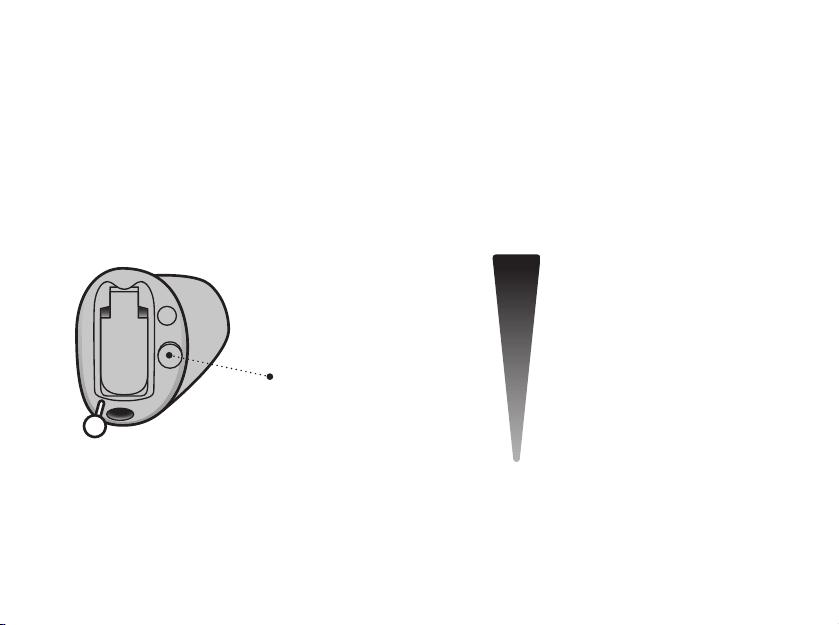
A short press on the
RIGHT hearing aid
increases the volume
A short press on the
LEFT hearing aid
decreases the volume
Change volume with push-button
(Optional - CIC only)
The push-button allows you to adjust the volume.
You may hear a click when you turn the volume up or down.
MAXIMUM
START-UP
VOLUME
MINIMUM
30
About Getting started Daily use Options Tinnitus Warnings More info
Change programs
(Optional - CIC only)
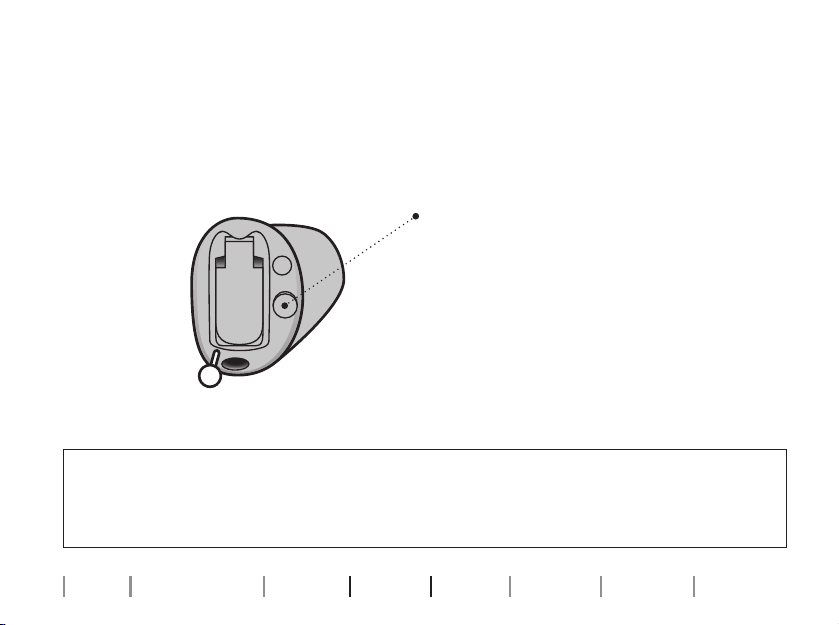
Your hearing aid can have up to four dierent programs. These are
programmed by your hearing care professional. You will hear one to four
tones when you change program depending on the program.
Use a short press to switch between programs.
If Volume control is enabled, use a long press to
switch programs.
If you have two synchronized hearing aids:
The RIGHT hearing aid switches one program
forward, for example program 1 to 2.
The LEFT hearing aid switches one program
backward, for example from program 4 to 3.
If your hearing aids work independently, you
must press the buttons on each hearing aid.

31
For information regarding tones, see the Sound indicators section.
For information regarding button press times see the table General
settings overview for your hearing aid, in the Your individual hearing
aid settings section at the end of this booklet.
32
About Getting started Daily use Options Tinnitus Warnings More info
Options
Mute the hearing aid
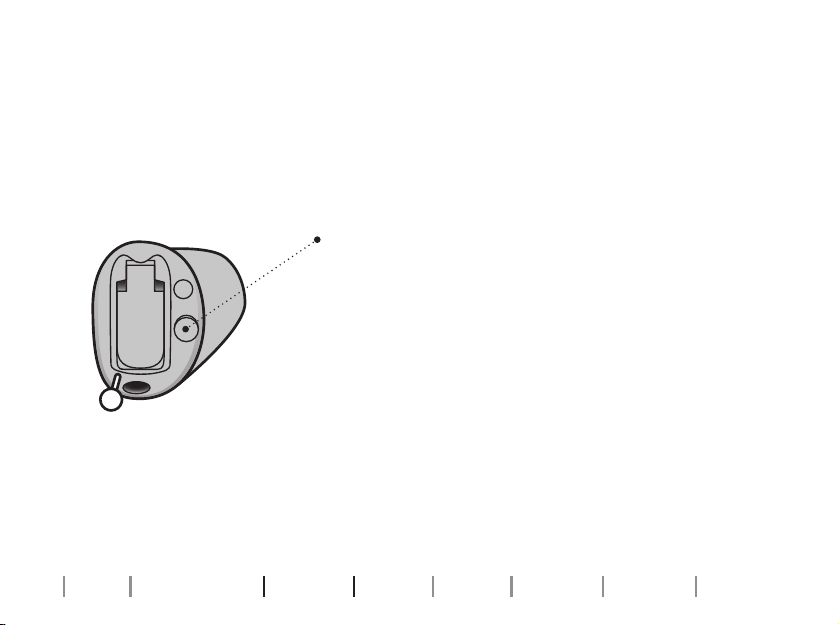
Use the mute function if you need to silence the hearing aid. Only available
for hearing aids with push-button.
IMPORTANT NOTICE
Do not use the mute function as an o switch, as the hearing aids are still using
battery power in this mode.
Press and hold the push-button
for two seconds to mute the
hearing aid.
To unmute, press the push-button.
NOTE: the mute function only mutes the microphone(s) on the hearing aids.

33
Optional features and accessories
The features and accessories described on the following pages are
optional. Please contact your hearing care professional to nd out how
your hearing aid is programmed.
If you experience dicult listening situations, a special program may be
helpful. These are programmed by your hearing care professional.
Writedownanyhearingsituationsinwhichyoumayneedhelp.

34
About Getting started Daily use Options Tinnitus Warnings More info
34
TinnitusSoundSupport™
(Optional - CIC only)
Intended use of Tinnitus SoundSupport
Tinnitus SoundSupport is a tool intended to generate sounds to provide
temporary relief for patients suering from tinnitus as part of a tinnitus
management program.
The target population is the adult population (over 18 years of age).
Tinnitus SoundSupport is targeted to licensed hearing care professionals
(audiologists, hearing aid specialists, or otolaryngologists) who are familiar
with the evaluation and treatment of tinnitus and hearing loss. Fitting
of Tinnitus SoundSupport must be done by a hearing care professional
participating in a tinnitus management program.
Tinnitus

3535
Guidelines for Tinnitus SoundSupport users
Your hearing care professional will be able to oer the appropriate follow-up
care. It is important to follow his/her advice and directions regarding such care.
Limitation on use time
Daily use
The volume levels of Tinnitus SoundSupport can be set to a level which
could lead to permanent hearing damage when used for a prolonged
period of time. Your hearing care professional will advise you of the
maximum amount of time per day you should use Tinnitus SoundSupport.
It should never be used at uncomfortable levels. See the table Tinnitus
SoundSupport: Limitation on use, in the Your individual hearing aid settings
section at the end of this booklet to learn how many hours per day you can
safely use the relief sound in your hearing aid.
Prescription use only
Good health practice requires that a person reporting tinnitus have
a medical evaluation by a licensed ear physician before using a sound
generator. The purpose of such an evaluation is to ensure that any
medically treatable condition that may cause tinnitus is identied and
treated prior to using a sound generator.

36
About Getting started Daily use Options Tinnitus Warnings More info
36
Sound options and volume adjustments
Tinnitus SoundSupport is programmed by your hearing care professional to
match your hearing loss and preferences for tinnitus relief.
Tinnitus SoundSupport programs
The sound generator can be activated in up to four dierent programs.
Mute
If you are in a program for which Tinnitus SoundSupport is activated, the
mute functionality only mutes the environmental sounds, and not the
sound from Tinnitus SoundSupport. For information on how to mute your
hearing aids, see the Mute your hearing aids section.

3737
Volume adjustments with Tinnitus SoundSupport
Your hearing care professional can set the volume control for a hearing
aid program for which Tinnitus SoundSupport is activated.
For more information about volume adjustments with Tinnitus
SoundSupport, see the table Tinnitus SoundSupport settings overview
for your hearing aid in the Your individual hearing aid settings section at
the end of this booklet.

38
About Getting started Daily use Options Tinnitus Warnings More info
38
If your hearing care professional
has activated the sound generator
TinnitusSoundSupport, please pay attention
to the following warnings.
There are some potential concerns
associated with the use of any sound
generated by a tinnitus management device.
Among them are the potential worsening of
tinnitus, and/or a possible change in hearing
thresholds.
Should you experience or notice a change
in hearing or tinnitus, or any dizziness,
nausea, headaches, heart palpitations, or
possible skin irritation at the point of contact
with the device, you should immediately
discontinue use of the device and consult
a medical, audiology, or other hearing care
professional.
As with any device, misuse of the sound
generator feature may cause potentially
harmful eects. Care should be taken to
prevent unauthorized use and to keep the
device out of reach of children and pets.
Maximum wearing time
Always follow the maximum wearing time
per day of the TinnitusSoundSupport
advised by your hearing care professional.
Prolonged use may lead to worsening of
your tinnitus or of your hearing loss.
Warnings related to Tinnitus

39
General warnings
For your personal safety and to ensure
correct usage, you should familiarize yourself
fully with the following general warnings
before using your hearing aids. Consult your
hearing care professional if your hearing
aids exhibit unexpected behavior or you
encounter serious incidents with your
hearing aids. Your hearing care professional
will support you with issue handling and, if
relevant, reporting to the manufacturer and/
or the national authorities.
Note that hearing aids do not restore normal
hearing and do not prevent or improve
hearing impairment resulting from natural
processes such as aging or sickness.
Hearing aids are only a part of hearing
habilitation and may need to be
supplemented by auditory training and
instruction in lipreading.
To achieve the full benet from your hearing
aids, you should use them frequently.
Usage of hearing aids
Hearing aids should only be used as
directed and adjusted by your hearing care
professional. Misuse can result in sudden and
permanent hearing loss.
Never allow others to wear your hearing aid,
as incorrect usage could cause permanent
damage to their hearing.
Choking hazards of swallowing small parts
Keep all small parts (for example, hearing
aids, earpieces, batteries, etc.) out of reach
and sight of children and others who might
swallow these items. Seek emergency
medical treatment immediately if someone
is choking on small parts or batteries are
swallowed.
Warnings
Continues on next page

40
About Getting started Daily use Options Tinnitus Warnings More info
Ifabattery,hearingaidorsmallpartis
swallowed,seeadoctorimmediatelyand
contacttheNationalPoisonCenterat1-800-
222-1222orNationalBatteryIngestion
Hotlineat1-800-498-8666.
Risk of placing batteries in ear or nose
Never place batteries in the ear or the nose.
This can lead to permanent damage due
to burns. Contact a doctor immediately if a
battery is placed in the ear or nose.
Use of replaceable batteries
Only use batteries recommended by your
hearing care professional.
Batteries of low quality may leak and cause
bodily harm.
Never attempt to recharge your replaceable
batteries.
Never dispose of batteries by burning them.
There is a risk that the batteries will explode.
Follow local guidelines for proper and safe
disposal of batteries.
Beware of sudden dysfunction
Your hearing aids may stop working without
notice. For example, if they run out of
battery or if the tubing is blocked. Keep this
in mind especially in situations where you
depend on warning sounds (for example
when in trac).
Use with active medical implants
Your hearing aids have been thoroughly
tested and developed for human health
according to international standards for
human exposure (Specic Absorption Ratio
– SAR), induced electromagnetic power and
voltages into the human body.
The exposure values are well below
international accepted safety limits for
SAR, induced electromagnetic power and
General warnings

41
Continues on next page
voltages into the human body dened in the
standards for human health and coexistence
with active medical implants, such as
pacemakers and heart debrillators.
Accessories with built-in magnets (for
example the Autophone magnet and
the MultiTool) should be kept at least
30centimeters (12inches) away from
any implanted medical device. Follow the
guidelines from the manufacturer of your
implanted medical device regarding their use
with magnets.
If you have an active brain implant, contact
the manufacturer of your implanted device
for information about the use with a hearing
aid.
Remove hearing aids before certain
medical procedures
Remove your hearing aid before medical
procedures such as X-ray examinations, CT/
MR/PET scans, electrotherapy, surgery, etc.
Your hearing aid may be damaged if exposed
to strong magnetic or electromagnetic elds.
Keep away from extreme heat
Never expose your hearing aids to extreme
heat. For example, do not leave your hearing
aids inside a parked car in the sun. Never
use an external heating device to dry your
hearing aids. For example, do not dry your
hearing aids using a hair dryer or in an oven
such as a microwave.
Keep away from chemicals
Remove your hearing aids before applying
products that contain certain chemicals that
can damage your hearing aids. For example,
cosmetics, hairspray, perfume, aftershave
lotion, suntan lotion and insect repellent.
Allow the products time to dry before
putting on your hearing aids.
42
About Getting started Daily use Options Tinnitus Warnings More info
General warnings
Potential side eects
You may produce more earwax when using
hearing aids.
In rare cases, the non-allergenic materials in
the product may cause skin irritation or other
side eects. If you experience any such side
eects, consult your doctor.
Connection to external equipment
The safety of the hearing aids, when
connected to external equipment (with
an auxiliary input cable and/or with USB
cable and/or directly), is determined by the
external signal source. When the hearing aid
is connected to external equipment which is
plugged into a power socket, this equipment
must comply with IEC62368-1 or equivalent
safety standards.
Use of third-party accessories
Only use accessories, cables or transducers
(for example, microphones) supplied by
the manufacturer. Non-original accessories
may result in reduced electromagnetic
compatibility (EMC) of your hearing aid.
Do not modify
Do not make any modications to your
hearing aid not expressly approved by the
manufacturer. This will void the warranty.
Use in elds with electromagnetic
interference
Your hearing aids have been thoroughly
tested for interference according to the most
stringent international standards, including
EN/IEC 60601-1-2 and its amendments.
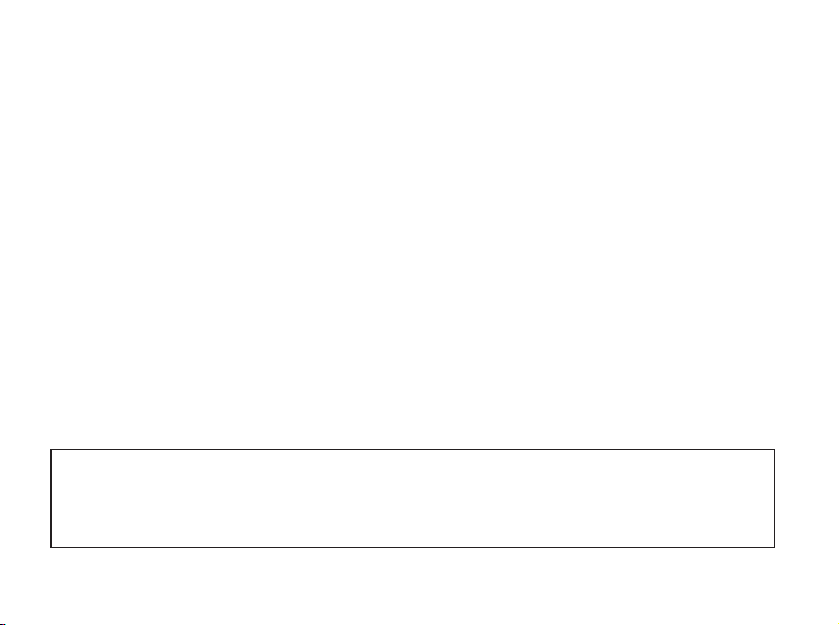
Electromagnetic interference may occur in
the vicinity of equipment that can aect
the performance of your hearing aids such
as mobile phones, Wi-Fi routers or other
equipment with the displayed symbol. If your
hearing aids are aected by interference,
move away from the source.
43
Water & dust resistant (IP68)
Your hearing aid is dust-tight and
protected against ingress of water which
means it is designed to be worn in all daily
life situations. Therefore, you do not have
to worry about humidity or getting wet in
the rain.
Should your hearing aid come into
contact with water and stop working,
gently wipe o any water and let the
hearing aid dry.
IMPORTANT NOTICE
Do not wear your hearing aid while showering or participating in water
activities. Do not immerse your hearing aid in water or other liquids.
More info
44
About Getting started Daily use Options Tinnitus Warnings More info
Conditions of use
Operating Conditions Temperature: +1°C to +40°C (34°F to 104°F)
Humidity: 5% - 93% relative humidity, non-condensing
Atmospheric pressure: 700hPa to 1060hPa
Transportation and
storage conditions
Temperature and humidity shall not exceed the below
limits for extended periods during transportation and
storage:
Temperature: -25°C to + 60°C (-13°F to 140°F)
Humidity: 5% - 93% relative humidity, non-condensing
Atmospheric pressure: 700hPa to 1060hPa

45

46
About Getting started Daily use Options Tinnitus Warnings More info
Cell phone
Some hearing aid users have reported
a buzzing sound in their hearing aid when
using cell phones, indicating that the
cell phone and hearing aid may not be
compatible.
The ANSI C63.19 standard determines
the prediction of compatibility between
a specic hearing aid and a cell phone,
thus hearing aid compliance is tested
according to this standard. However,
demonstrating compliance according
to this standard cannot guarantee that all
users will be satised.
Whereas all hearing aids have acoustic
coupling, only the larger hearing aids
have the physical space for telecoil
(inductive) coupling.
The hearing aid is compliant with
ANSI C63.19 in both microphone
and telecoil mode.

IMPORTANT NOTICE
The performance of individual hearing aids may vary with individual cell
phones. Therefore, ensure you try this hearing aid with your cell phone or, if
you are purchasing a new phone, be sure to try it with your hearing aid prior to
purchase. For additional guidance, please ask your cell phone provider for the
booklet entitled “Hearing Aid Compatibility with Digital Wireless Cell Phones.”

48
About Getting started Daily use Options Tinnitus Warnings More info
Technical information
The hearing aids contain a radio
transceiver using short range magnetic
induction technology operating at
3.84MHz. The magnetic eld strength
of the transmitter is very weak and
always below 15nW (typically below
–15dBμA/m at a distance of 10meters
(–4.6dBμA/ft at a distance of 33feet).
Only use your hearing aids in areas where
wireless transmission is permitted.
The hearing aids comply with
international standards concerning
radio transmitters, electromagnetic
compatibility, and human exposure.
The hearing instrument is designed
to operate in public and residential
environments. It has passed the following
applicable emissions and immunity tests:
Radiated emissions requirements for a
CISPR11 Group 1 Class B device as stated
in table 2 of IEC 60601-1-2.
Radiated emission for communication
devices operating in the ISM 2.4GHz band
as stated in 47 CFR Part15, subpart C, RSS-
247 and EN300328 (only for products
with Bluetooth).
Radiated emission for near eld magnetic
induction communication operating at
3.84MHz as stated in 47CFR Part15,
subpart C, RSS-210 and EN300330.
RF radiated immunity at a eld level of
10V/m between 80MHz and 2.7GHz as
stated in table 4 of IEC60601-1-2 and,
3V/m between 2.7 and 6.0GHz as stated
in CISPR32.

49
RF radiated immunity at a eld level of
up to 28V/m for selected RF wireless
communication bands between 380MHz
and 5.8GHz as stated in table 9 of
IEC60601-1-2.
RF radiated immunity at a eld level of up
to 65A/m for selected proximity magnetic
elds at 30kHz, 134.2kHz and 13.56MHz
as stated in table 11 of IEC60601-1-2
AM1.
RF radiated immunity eld levels at
selected bands stated in IEC60118-13
between 25V/m and 60V/m and, for
proximity-elds from communication
devices held to the ear, stated in
ANSIC63.19.
Immunity to power frequency magnetic
elds at a eld level of 30A/m as stated in
table 4 of IEC60601-1-2 (only for products
with telecoil).
Immunity to ESD levels of +/- 2, 4 and 8kV
conducted discharge and +/- 2, 4, 8 and
15kV air discharge as stated in table 4 of
IEC60601-1-2.
Due to the limited space available on the
hearing aid, relevant approval markings
can be found in this booklet. Additional
information can be found in the Technical
data document on hearingsolutions.
philips.com.

50
About Getting started Daily use Options Tinnitus Warnings More info
CIC
This device contains a radio module
(AM_AU5_KIT10) with the following
certication ID number:
FCC ID: 2ACAHAU5CIC
Radio frequency radiation
exposure information
This device complies with FCC RF exposure
limits set forth for an uncontrolled
environment and has
been tested for portable use.
The device must not be co-located or used
in conjunction with any other antenna or
transmitter.
Use of other accessories not veried
by the manufacturer may not ensure
compliance with FCC RF exposure
guidelines.

51
Note: This device has been
tested and found to comply
with the limits for a Class B digital device,
pursuant to part 15 of the FCC Rules.
These limits are designed to provide
reasonable protection against harmful
interference in a residential installation.
This device generates, uses and can
radiate radio frequency energy and, if
not installed and used in accordance
with the instructions, may cause harmful
interference to radio communications.
However, there is no guarantee that
interference will not occur in a particular
installation. If this device does cause
harmful interference to radio or television
reception, which can be determined
by turning the equipment o and on,
the user is encouraged to try to correct
the interference by one or more of the
following measures:
- Reorient or relocate the receiving
antenna.
- Increase the separation distance
between the equipment and receiver.
- Connect the equipment into an outlet
on a circuit dierent from that to which
the receiver is connected.
- Consult the manufacturer or an
experienced radio/TV technician
for help.
Changes or modications not expressly
approved by the party responsible for
compliance could void the user’s authority
to operate the equipment.
52
About Getting started Daily use Options Tinnitus Warnings More info
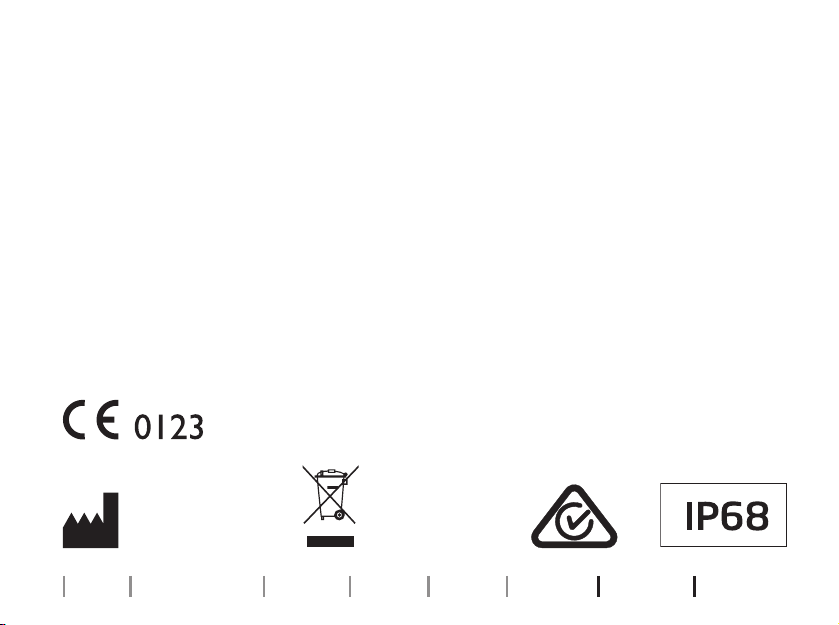
The manufacturer declares that this
hearing aid is in compliance with the
essential requirements and other relevant
provisions of Directive 2014/53/EU.
This medical device complies with Medical
Device Regulation (EU) 2017/745.
Declaration of Conformity is available at
the headquarters.
SBO Hearing A/S
Kongebakken 9
DK-2765 Smørum
Denmark
hearingsolutions.philips.com/doc
Waste from electronic
equipment must be
handled according to
local regulations.
SBO Hearing A/S
Kongebakken 9
DK-2765 Smørum
Denmark
Should your hearing aid require service or replacement, contact your hearing care
professional for assistance. Many repair needs can be handled on-site at your
local hearing care professional’s oce, and they will arrange for service with the
manufacturer if required. You can also contact us at:
580 Howard Ave., Somerset, NJ 08873.
53
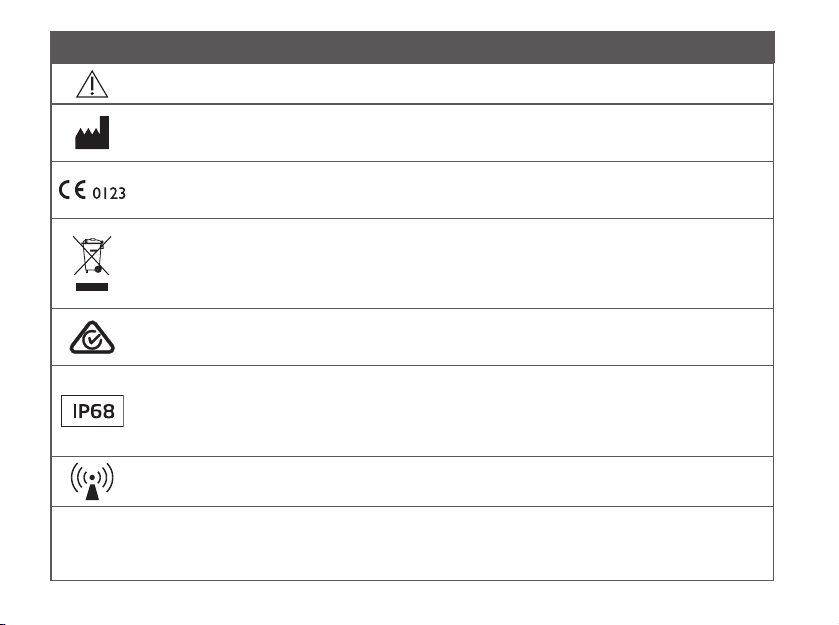
Description of symbols accompanying the product
Warnings
Text marked with a warning symbol must be read before using the device.
Manufacturer
The device is produced by the manufacturer whose name and address are stated next to the
symbol. Indicates the medical device manufacturer, as dened in EU Regulation 2017/745.
CE mark
The device complies with all required EU regulations and directives.
The four digit number indicates the identication of the notied body.
Electronic waste (WEEE)
Recycle hearing aids, accessories or batteries according to local regulations.
Hearing aid users can also return electronic waste to their hearing care professional for
disposal. Electronic equipment covered by Directive 2012/19/EU on waste and electrical
equipment (WEEE).
Regulatory Compliance Mark (RCM)
The device complies with electrical safety, EMC and radio spectrum requirements for devices
supplied to the Australian or New Zealand markets.
IP code
Class of protections against harmful ingress of water and particulate matter according to EN
60529.
IP6X indicates total dust protection. IPX8 indicates the protection against the eects of
continuous immersion in water.
Radio Frequency (RF) transmitter
Your device contains an RF transmitter.
GTIN
Global Trade Item Number
A globally unique 14-digit number used to identify medical device products including medical
device software. GTIN in this booklet is related to medical device rmware (FW). GTIN on
regulatory packaging label is related to medical device hardware.
54
About Getting started Daily use Options Tinnitus Warnings More info
Description of symbols accompanying the product
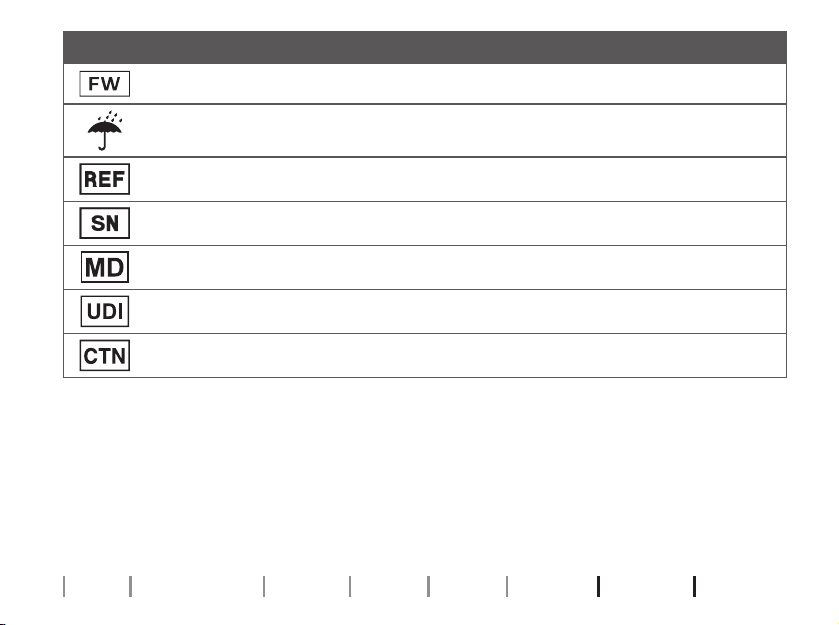
Firmware
Firmware version used in the device.
Keep dry
Indicates a medical device that needs to be protected from moisture.
Catalog number
Indicates the manufacturer’s catalog number so that the medical device can be identied.
Serial number
Indicates the manufacturer’s serial number so that a specic medical device can be identied.
Medical Device
The device is a medical device.
Unique device identier
Indicates a carrier that contains unique device identier information.
CTN
Commercial Trade Number
REACH Declaration
REACH requires Philips Hearing Solutions to provide chemical content information for
Substances of Very High Concern (SVHC) if they are present above 0.1% of the article
weight. Recent information can be found on the website hearingsolutions.philips.com/
REACH.

55
International warranty
Your device is covered by an international
warranty issued by the manufacturer.
This international warranty covers
manufacturing and material defects in the
device itself, but not in accessories such
as batteries, tubing, speakers, earpieces
and lters, etc. Problems arising from
improper/incorrect handling or care,
excessive use, accidents, repairs made
by an unauthorized party, exposure to
corrosive conditions, physical changes
in your ear, damage due to foreign
objects entering the device, or incorrect
adjustments are NOT covered by the
international warranty and may void it.
The above international warranty does
not aect any legal rights that you might
have under applicable national legislation
governing the sale of consumer goods in
the country where you have bought your
device. Your hearing care professional
may also have issued a warranty that goes
beyond the clauses of this international
warranty. Please consult him/her for
further information.
If you need service
Take your device to your hearing care
professional, who may be able to solve
minor problems and adjustments
immediately. Your hearing care
professional may charge a fee for their
services.

56
About Getting started Daily use Options Tinnitus Warnings More info
Warranty
Certicate
Name of owner: _________________________________________________________________
Hearing care professional: _________________________________________________________
Hearing care professional’s address: ________________________________________________
Hearing care professional’s phone: _________________________________________________
Purchase date: ___________________________________________________________________
Warranty period: ___________________ Month: ______________________________________
Model left: _________________________ Serial no.: ____________________________________
Model right: _______________________ Serial no.: ____________________________________
Battery size: _____________________________________________________________________
57
Your individual hearing aid settings
Tobelledoutbyyourhearingcareprofessional.
TinnitusSoundSupport: Limitation on use
n
No limitation on use
Program Start-up volume (Tinnitus) Max volume (Tinnitus)
n
1 Max _______ hours per day Max _______ hours per day
n
2 Max _______ hours per day Max _______ hours per day
n
3 Max _______ hours per day Max _______ hours per day
n
4 Max _______ hours per day Max _______ hours per day
58
About Getting started Daily use Options Tinnitus Warnings More info
Tinnitus SoundSupport settings overview for your hearing aid
Left Right
n
Yes
n
No
Tinnitus SoundSupport
n
Yes
n
No
n
A) How to change Tinnitus SoundSupport volume in each ear separately
To increase or decrease the volume (on one hearing aid only), use a short press on
the push-button repeatedly until you reach your desired level.
n
B) How to change Tinnitus SoundSupport volume in both ears
simultaneously
You can use one hearing aid to increase the volume and the other hearing aid
to decrease the volume.
To increase the volume, use a short press on the push-button repeatedly on
the RIGHT hearing aid.
To decrease the volume, use a short press on the push-button repeatedly on
the LEFT hearing aid.
To be lled out by your hearing care professional.
60
About Getting started Daily use Options Tinnitus Warnings More info
General settings overview for your hearing aid
Left Right
n
Yes
n
No
Change program
n
Yes
n
No
n
Short press
n
Short press
n
Long press
n
Long press
n
Yes
n
No
Change volume
n
Yes
n
No
Volume control indicators
n
On
n
O
Beeps at min/max volume
n
On
n
O
n
On
n
O
Beeps when changing volume
n
On
n
O
n
On
n
O
Beeps at start-up volume
n
On
n
O
Battery indicators
n
On
n
O
Low battery warning
n
On
n
O
To be lled out by your hearing care professional.

62
About Getting started Daily use Options Tinnitus Warnings More info
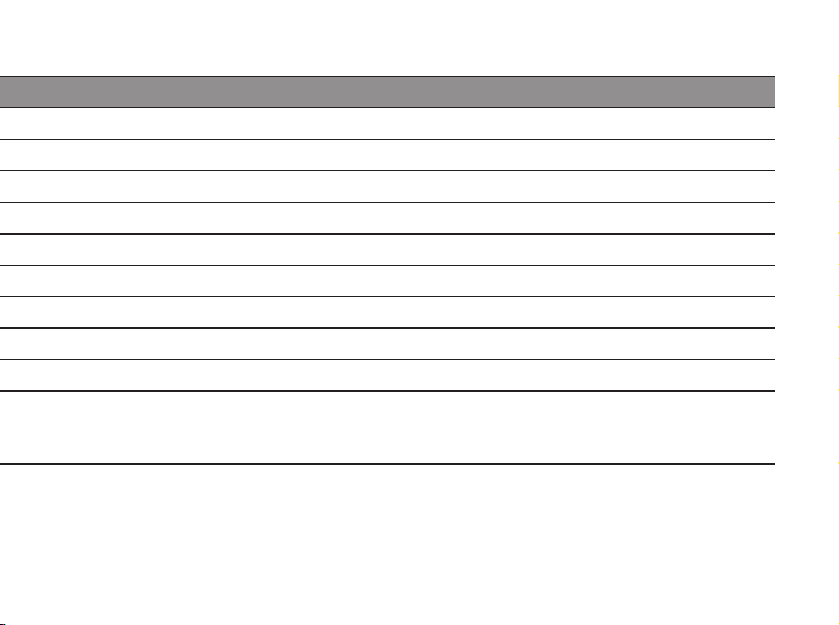
Symptom Possible causes Solutions
No sound
Worn-out battery
Replace the battery
Clogged sound outlet Clean sound outlet* or replace the wax lter
Clogged microphone inlet Clean microphone inlet* or replace lter (T-Cap)
Hearing aid microphone muted Unmute the hearing aid microphone
Intermittent or
reduced sound
Clogged sound outlet
Clean sound outlet or replace the wax lter
Moisture Wipe battery and hearing aid with a dry cloth
Worn-out battery Replace the battery
Squealing noise
Hearing aid not inserted properly
Re-insert the hearing aid
Ear wax accumulated in ear canal Have ear canal examined by your doctor
Service
alert voice
notication
Issue detected by hearing aid
Contact your hearing care professional
Troubleshooting guide
63
Symptom Possible causes Solutions
No sound
Worn-out battery
Replace the battery
Clogged sound outlet Clean sound outlet* or replace the wax lter
Clogged microphone inlet Clean microphone inlet* or replace lter (T-Cap)
Hearing aid microphone muted Unmute the hearing aid microphone
Intermittent or
reduced sound
Clogged sound outlet
Clean sound outlet or replace the wax lter
Moisture Wipe battery and hearing aid with a dry cloth
Worn-out battery Replace the battery
Squealing noise
Hearing aid not inserted properly
Re-insert the hearing aid
Ear wax accumulated in ear canal Have ear canal examined by your doctor
Service
alert voice
notication
Issue detected by hearing aid
Contact your hearing care professional
If none of the above solutions work, consult your hearing care professional for assistance.
* According to guideline in this booklet

64
About Getting started Daily use Options Tinnitus Warnings More info
Summary of relevant studies
Clinical evaluations conducted by or
for the manufacturer provide evidence
to support the intended use and
clinical benets outlined in the IFU and
demonstrate regulatory conformity.
Clinical data is collected, assessed, and
analyzed to support the performance of
the hearing aids by validating that they
provide sucient audibility and hearing
loss compensation based on best-practice
prescriptive tting rationales. The clinical
data also demonstrate improved speech
understanding and success with hearing
aids using validated questionnaires and
surveys.
Non-clinical data supporting the overall
performance of the hearing aids includes
software verication, electroacoustic
verication, electrical and mechanical
safety evaluation, electromagnetic
compatibility (EMC) evaluation, and
documentation of radio properties and
performance. Additional information can
be found in section Technical
Information.

66
About Getting started Daily use Options Tinnitus Warnings More info
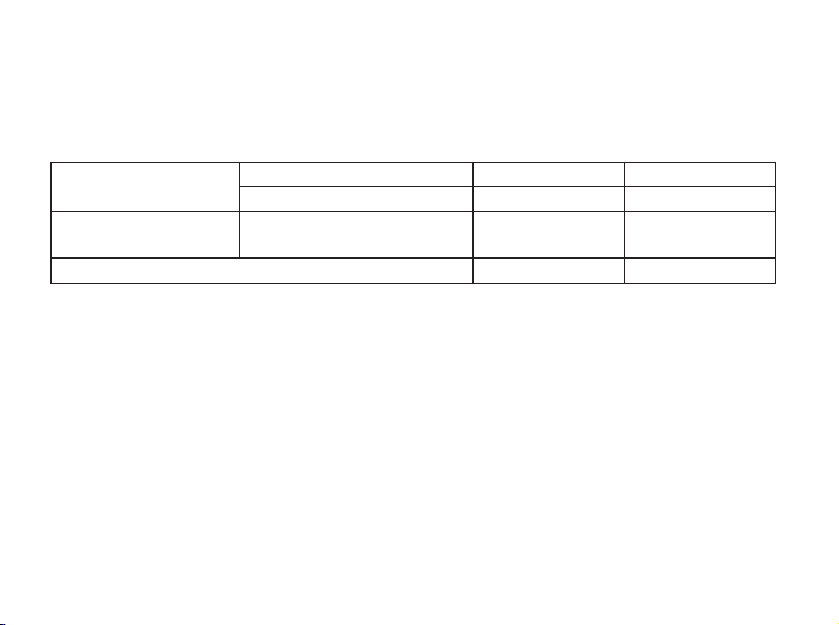
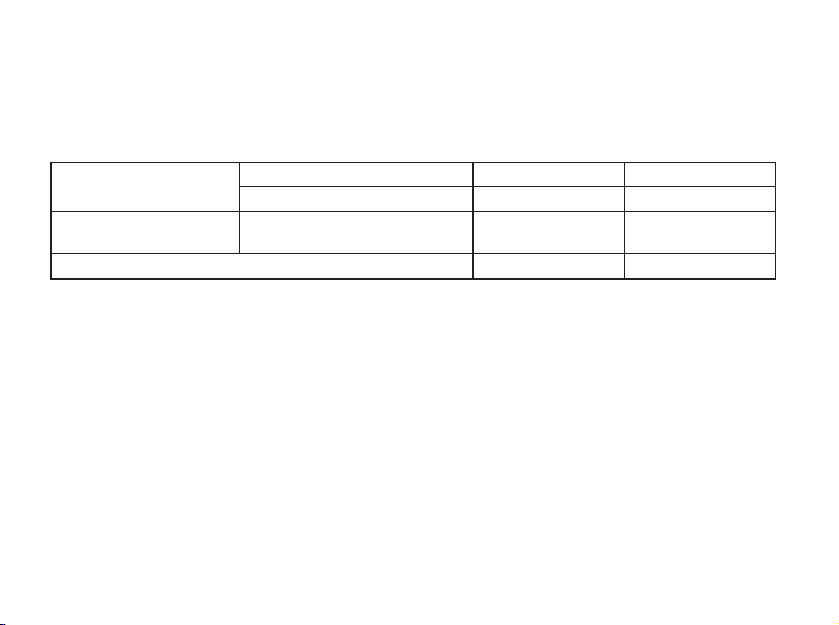
Measured according to American National Standard ANSI S3.22-2014,
IEC 60118-0:2015 and IEC 60318-5:2006
Supply voltage: Zinc-Air
Technical Data
0 dB SPL ref. 20 μPa
HearLink
9050
HearLink
7050,5050,3050
OSPL90
Peak 109 dB SPL 109 dB SPL
HF Average 104 dB SPL 104 dB SPL
Full-on Gain
Peak 42 dB 42 dB
HF Average 38 dB 38 dB
Reference Test Gain 26 dB 26 dB
Frequency Range <100-8300 Hz <100-7500 Hz
Total Harmonic
Distortion
500 Hz <2 % <2 %
800 Hz <2 % <2 %
1600 Hz <2 % <2 %
Equivalent Input Noise
Level
(omni) 20 dB SPL 20 dB SPL
Attack Time 5 ms 5 ms
Release Time 26 ms 26 ms
IIC
68
About Getting started Daily use Options Tinnitus Warnings More info
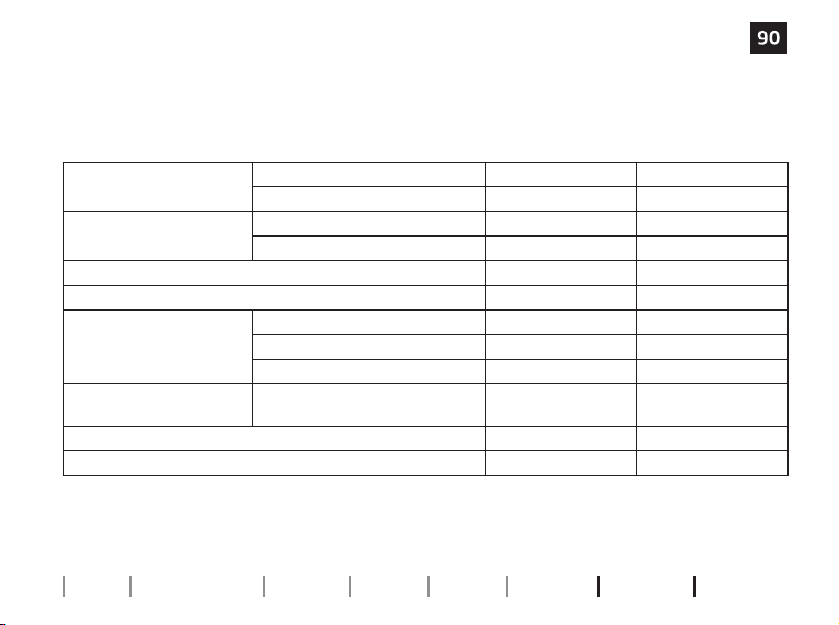
IIC
Measured according to American National Standard ANSI S3.22-2014,
IEC 60118-0:2015 and IEC 60318-5:2006
Supply voltage: Zinc-Air
Technical Data
0 dB SPL ref. 20 μPa
HearLink
9050
HearLink
7050,5050,3050
OSPL90
Peak 119 dB SPL 119 dB SPL
HF Average 116 dB SPL 116 dB SPL
Full-on Gain
Peak 49 dB 49 dB
HF Average 48 dB 48 dB
Reference Test Gain 38 dB 38 dB
Frequency Range <100-7700 Hz <100-7500 Hz
Total Harmonic
Distortion
500 Hz <2 % <2 %
800 Hz <2 % <2 %
1600 Hz <2 % <2 %
Equivalent Input Noise
Level
(omni) 20 dB SPL 20 dB SPL
Attack Time 5 ms 5 ms
Release Time 20 ms 20 ms
70
About Getting started Daily use Options Tinnitus Warnings More info
Measured according to American National Standard ANSI S3.22-2014,
IEC 60118-0:2015 and IEC 60318-5:2006
Supply voltage: Zinc-Air
Technical Data
0 dB SPL ref. 20 μPa
HearLink
9050
HearLink
7050,5050,3050
OSPL90
Peak 109 dB SPL 109 dB SPL
HF Average 104 dB SPL 104 dB SPL
Full-on Gain
Peak 47 dB 47 dB
HF Average 42 dB 42 dB
Reference Test Gain 26 dB 26 dB
Frequency Range <100-6900 Hz <100-6900 Hz
Total Harmonic
Distortion
500 Hz <2 % <2 %
800 Hz <2 % <2 %
1600 Hz <2 % <2 %
Equivalent Input Noise
Level
(omni) 19 dB SPL 19 dB SPL
Attack Time 5 ms 5 ms
Release Time 32 ms 32 ms
CIC
72
About Getting started Daily use Options Tinnitus Warnings More info
CIC
Measured according to American National Standard ANSI S3.22-2014,
IEC 60118-0:2015 and IEC 60318-5:2006
Supply voltage: Zinc-Air
Technical Data
0 dB SPL ref. 20 μPa
HearLink
9050
HearLink
7050,5050,3050
OSPL90
Peak 119 dB SPL 119 dB SPL
HF Average 116 dB SPL 116 dB SPL
Full-on Gain
Peak 55 dB 55 dB
HF Average 52 dB 52 dB
Reference Test Gain 38 dB 38 dB
Frequency Range <100-7500 Hz <100-7500 Hz
Total Harmonic
Distortion
500 Hz <2 % <2 %
800 Hz <2 % <2 %
1600 Hz <2 % <2 %
Equivalent Input Noise
Level
(omni) 19 dB SPL 19 dB SPL
Attack Time 4 ms 4 ms
Release Time 29 ms 29 ms
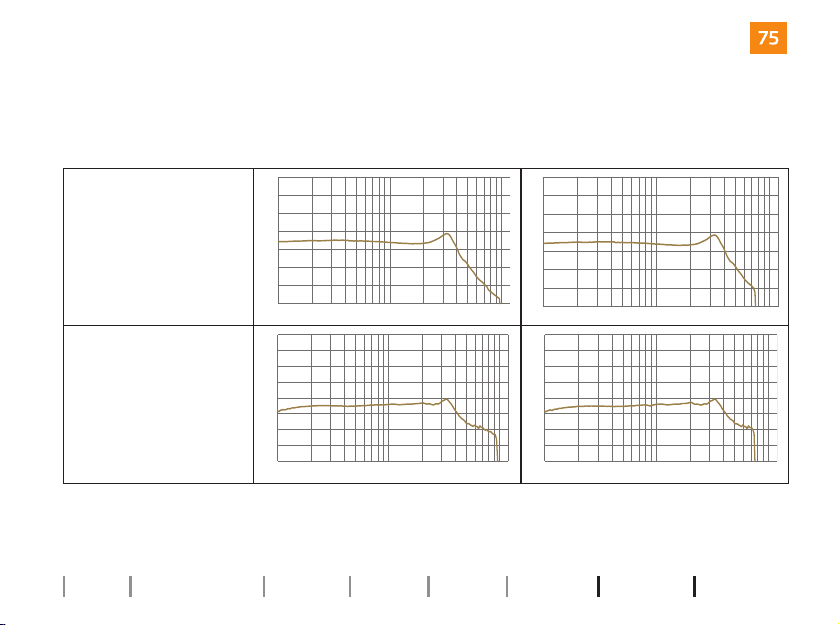
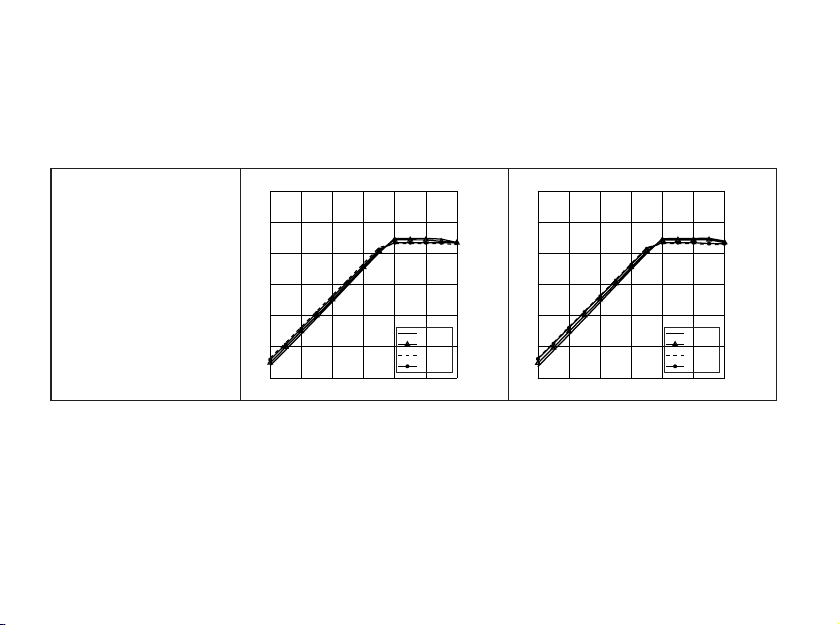
74
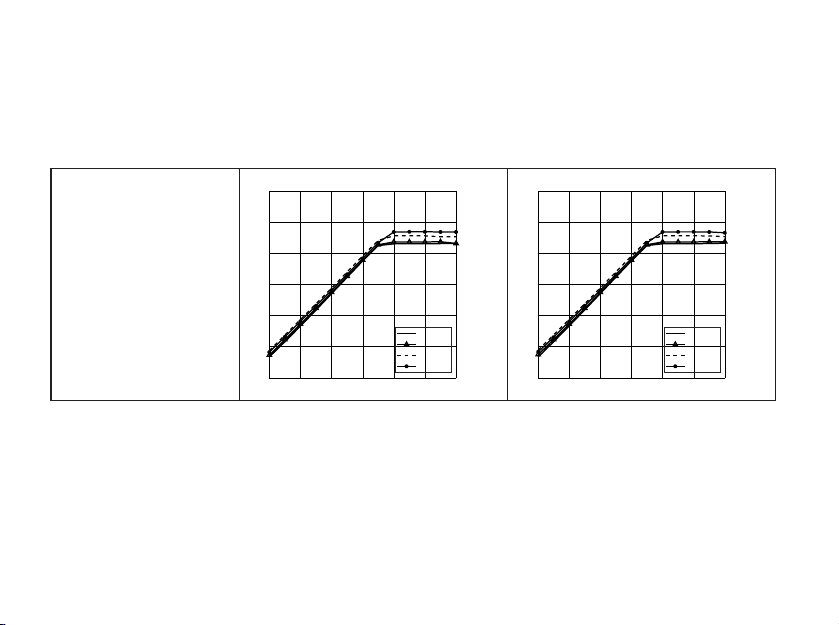
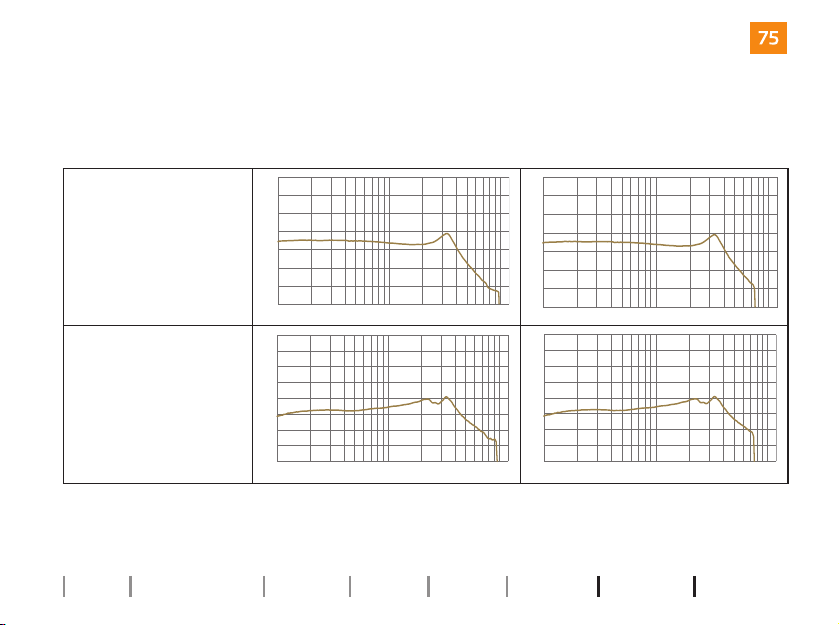
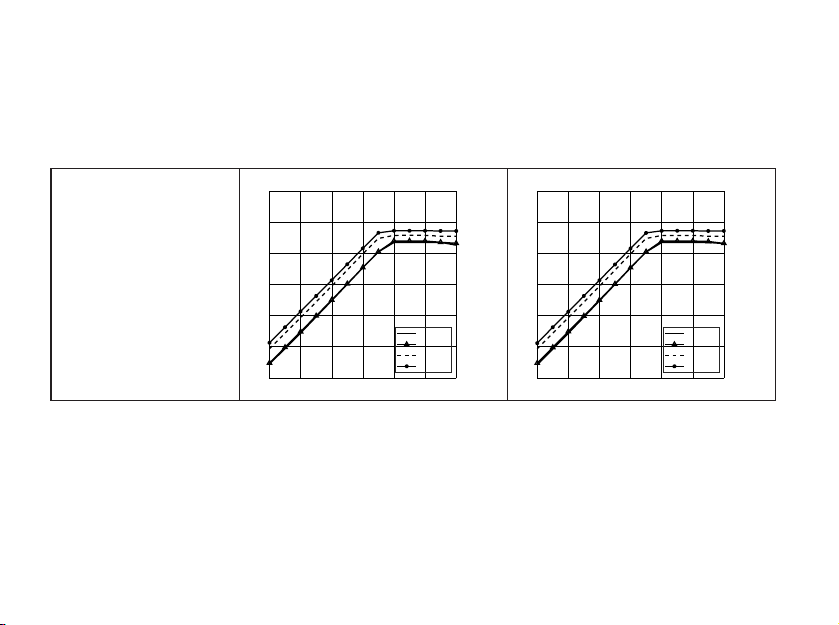
Technical Data IIC
About Getting started Daily use Options Tinnitus Warnings More info
HearLink
9050 HearLink 7050,5050,3050
OSPL90 – Output Sound
Pressure Level (dB SPL)
Input: 90 dB SPL
Technical setting: A0
100 1k
70
80
90
100
110
120
130
140
10k Hz
100 1k
70
80
90
100
110
120
130
140
10k Hz
Frequency
response (dB SPL)
Input: 60 dB SPL
Technical setting: N0
100 1k
50
60
70
80
90
100
110
120
130
10k Hz
100 1k
50
60
70
80
90
100
110
120
130
10k Hz
76
About Getting started Daily use Options Tinnitus Warnings More info
Technical Data
IIC
HearLink
9050 HearLink 7050,5050,3050
OSPL90 – Output Sound
Pressure Level (dB SPL)
Input: 90 dB SPL
Technical setting: A0
100 1k
70
80
90
100
110
120
130
140
10k Hz
100 1k
70
80
90
100
110
120
130
140
10k Hz
Frequency
response (dB SPL)
Input: 60 dB SPL
Technical setting: N0
100 1k 10k Hz
50
60
70
80
90
100
110
120
130
100 1k
50
60
70
80
90
100
110
120
130
10k Hz
78
About Getting started Daily use Options Tinnitus Warnings More info
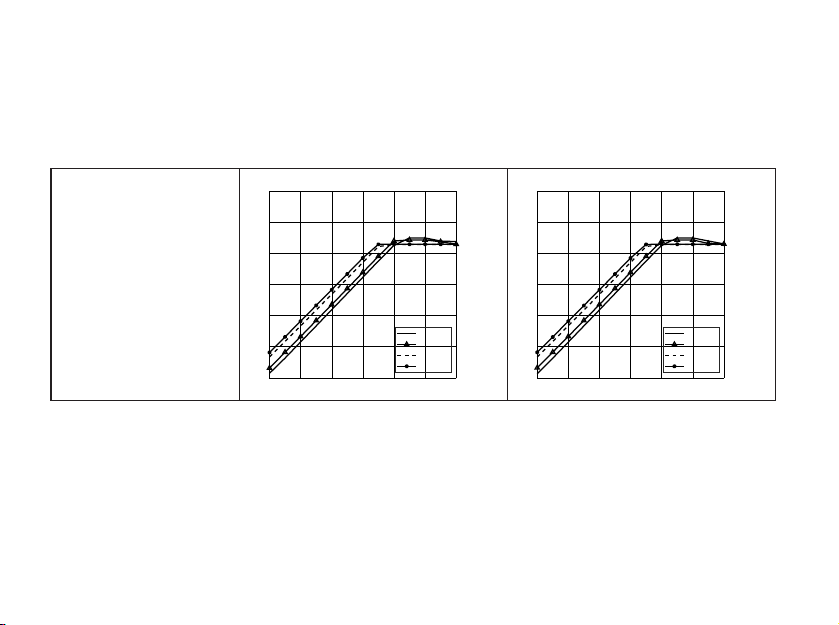
Technical Data CIC
HearLink
9050 HearLink 7050,5050,3050
OSPL90 – Output Sound
Pressure Level (dB SPL)
Input: 90 dB SPL
Technical setting: A0
100 1k
70
80
90
100
110
120
130
140
10k Hz
100 1k
70
80
90
100
110
120
130
140
10k Hz
Frequency
response (dB SPL)
Input: 60 dB SPL
Technical setting: N0
100 1k
50
60
70
80
90
100
110
120
130
10k Hz
100 1k
50
60
70
80
90
100
110
120
130
10k Hz
80
About Getting started Daily use Options Tinnitus Warnings More info
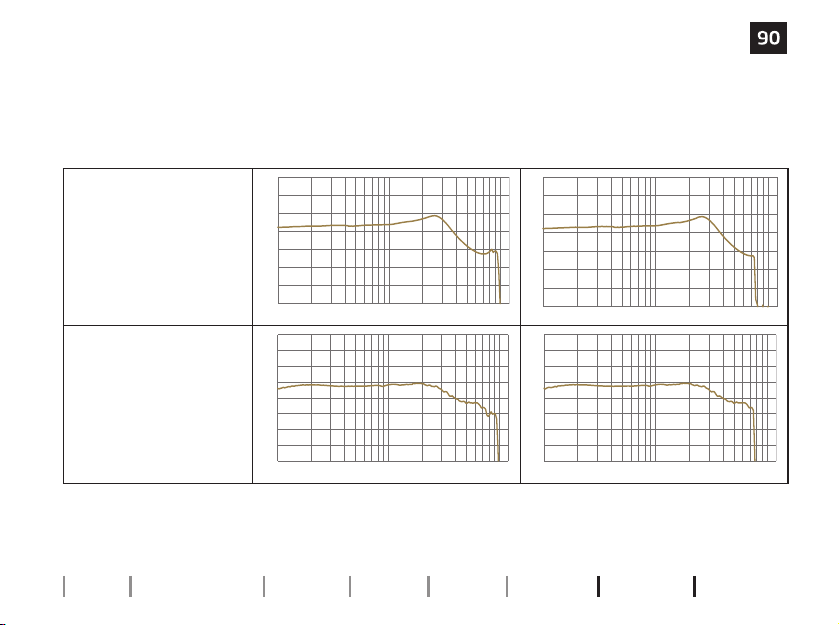
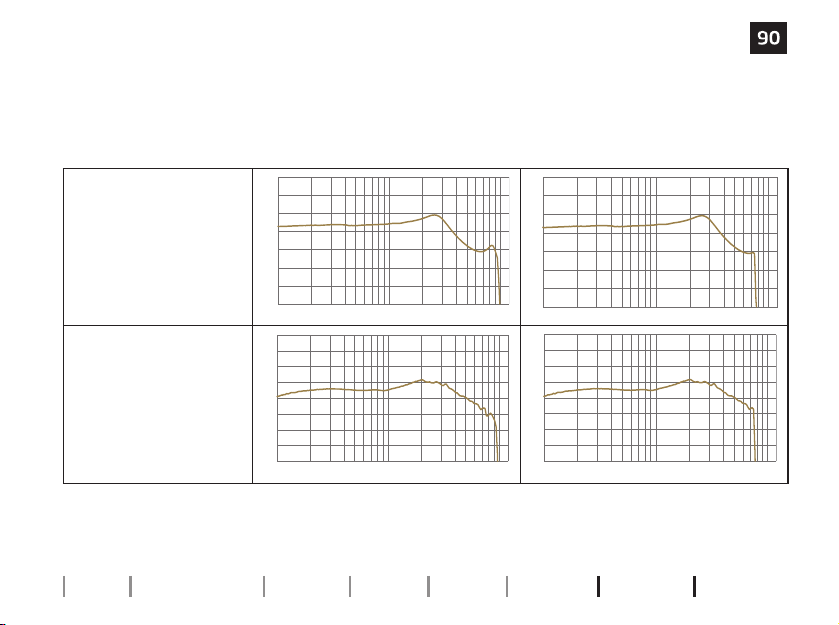
Technical Data
CIC
HearLink
9050 HearLink 7050,5050,3050
OSPL90 – Output Sound
Pressure Level (dB SPL)
Input: 90 dB SPL
Technical setting: A0
100 1k
70
80
90
100
110
120
130
140
10k Hz
100 1k
70
80
90
100
110
120
130
140
10k Hz
Frequency
response (dB SPL)
Input: 60 dB SPL
Technical setting: N0
100 1k
50
60
70
80
90
100
110
120
130
10k Hz
100 1k
50
60
70
80
90
100
110
120
130
10k Hz

280577US | 2025.01.13 | v2

< 15 mm >
< >
8,15 mm
< >
9.0 mm
< 21 mm >
Placeholder
for FSC logo
280577US | 2025.01.13 | v2

hearingsolutions.philips.com
Philips and the Philips Shield Emblem are registered trademarks of
Koninklijke Philips N.V. and are used under license. This product has
been manufactured by or for and is sold under the responsibility of
SBO Hearing A/S, and SBO Hearing A/S is the warrantor in relation to
this product.
280577US | 2025.01.13 | v2
0000280577000001