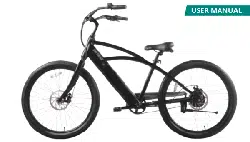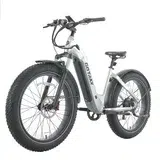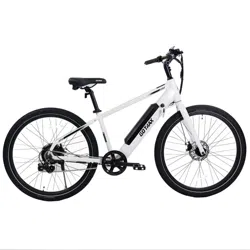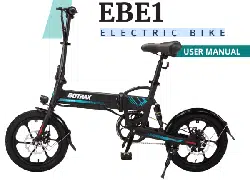
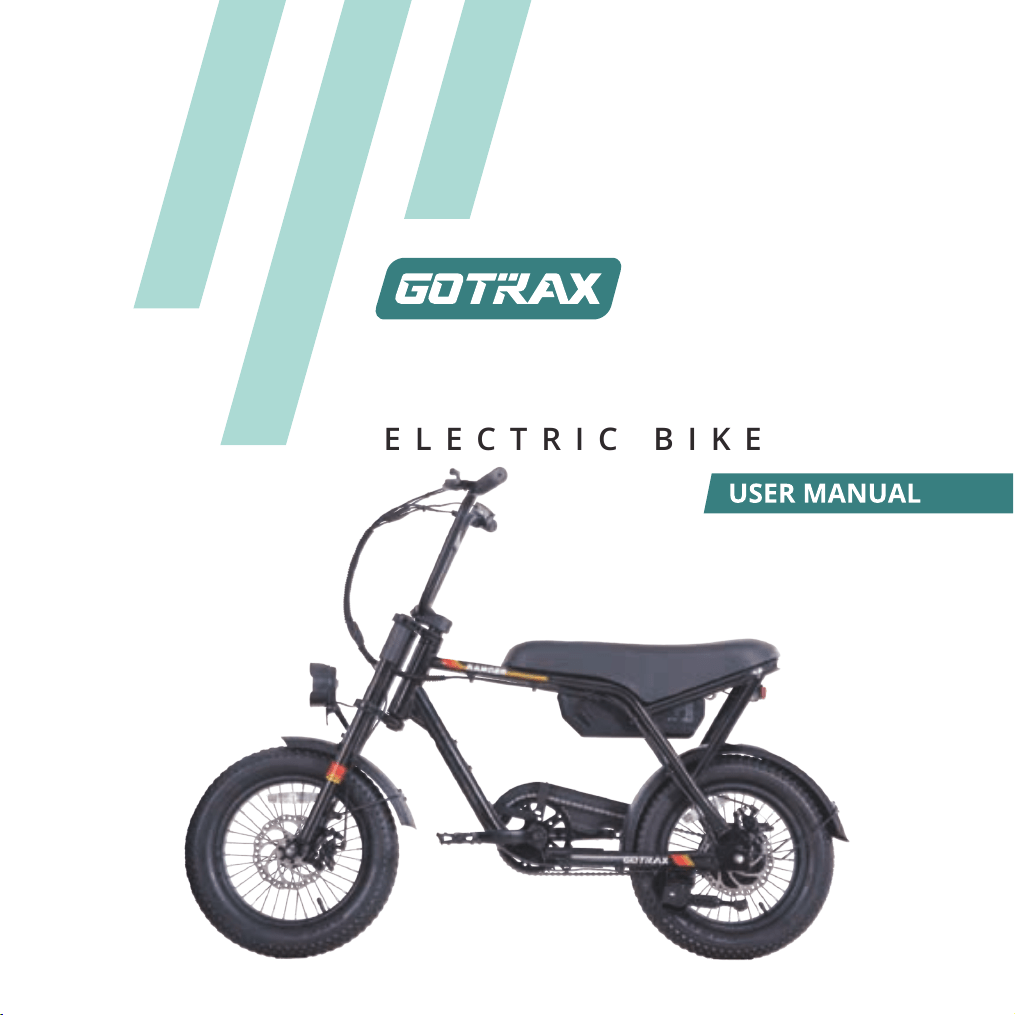
RANGER16
ELECTRIC BIKE

Contents
English ......................................................................................... 01-41
Español ........................................................................................ 42-85
中文 .............................................................................................. 86-125
Русский ...................................................................................... 126-168
Congratulations
on your purchase!
This user manual will help you assemble
and operate your new electric bicycle. Be
sure to read ALL OF THE INFORMATION in
this manual before riding.
NOTE TO ALL RIDERS UNDER THE AGE OF 18:
It’s very important that you get parental
permission before riding your electric
bicycle.
TOOLS INCLUDED: 3mm,4mm, 5mm, 6mm Allen
wrench,8 &10,13 &15 mm open-end wrench, flat
head & Phillips dual-purpose screwdriver.
01
ALWAYS wear a helmet when riding your electric bike.
Make sure your electric bike has a full battery before taking it out to ride.
Always be aware of local road laws, and follow them.
Do not
Always respect pedestrians.
Do not ride under wet conditions. The electric bike may slide from under
your feet, causing injury. Wet conditions may damage the electronics and void
the warranty.
To conserve electricity, use assist mode and avoid zero starting, frequent
braking, driving against the wind, carrying heavy loads (including other
people), and riding with insufficient air pressure.
ride the bike under the influence of drugs or alcohol.
Don’t Ride Until You Read This:
WARNING: Lithium-ion Batteries and/or products that contain
Lithium-ion Batteries can expose you to chemicals including cobalt
lithium nickel oxide, and nickel, which are known to the State of
California to cause cancer and birth defects or other reproductive
harm. For more information, go to www.P65Warnings.ca.gov
02
Warning Message
1. Avoid water - The electric bike is not waterproof. The electronics may be damaged
due to water, and water damage is not covered by our warranty. Riding in wet
conditions is also very dangerous and may result in injury.
2. Avoid prolonged exposure to sun or rain and avoid storage in places with high
temperatures or corrosive gas.
3. Abuse - We do not cover physical damage due to negligent care and extreme riding.
4.
5.
6.
Do not modify the product from the manufacturers original design.
7.
Do not exceed
8.
Avoid touching the charging port directly and do not let it make contact with a
metal object.
9.
Keep hands and all body parts away
from moving parts while operating the
electric bike.
10.
Before riding - be sure to check the electric bike over and make sure that all
components and functions are operating correctly before each use.
11.
Before riding - be sure to check that the braking system is functioning properly;
also, be sure to check that all safety labels are in place and that you understand
the safety warnings.
12.
Before riding - be sure that any and all axle guards, chain guards, or other covers
be sure to check that the tires are in good condition, inflated properly,
and have sufficent tread remaining.
or guards supplied by the manufacturer are in place and in serviceable condition.
Before riding -
the posted speed limit and obey all traffic laws.
Whenever you ride the GOTRAX Electric Bike ,you risk severe injury or even death
from loss of control, collisions, and falls. Use caution and ride at
your own risk.
13. Never exceed the 165lbs (75 kg) maximum load rating.
03
16. Make note that additional insurance may be required to cover situations you
encounter while riding an electric bike. It is recommended that you contact an
insurance company or broker for advice and consultation.
17. To conserve electricity, use assist mode and avoid zero starting, frequent braking,
driving against the wind, carrying heavy loads including other people and riding with
insufficient air pressure.
14. The electric bike should never be used by children under the age of 13.
15. Maximum Speed - Your electric bike reaches a maximum speed of 20 mph(32
km/h).
18. Warning about the danger of damaging the stem to fork assembly and the risk
ofinjury to the rider that can result from overtightening the stem bolt or the
otherclamping device.
04
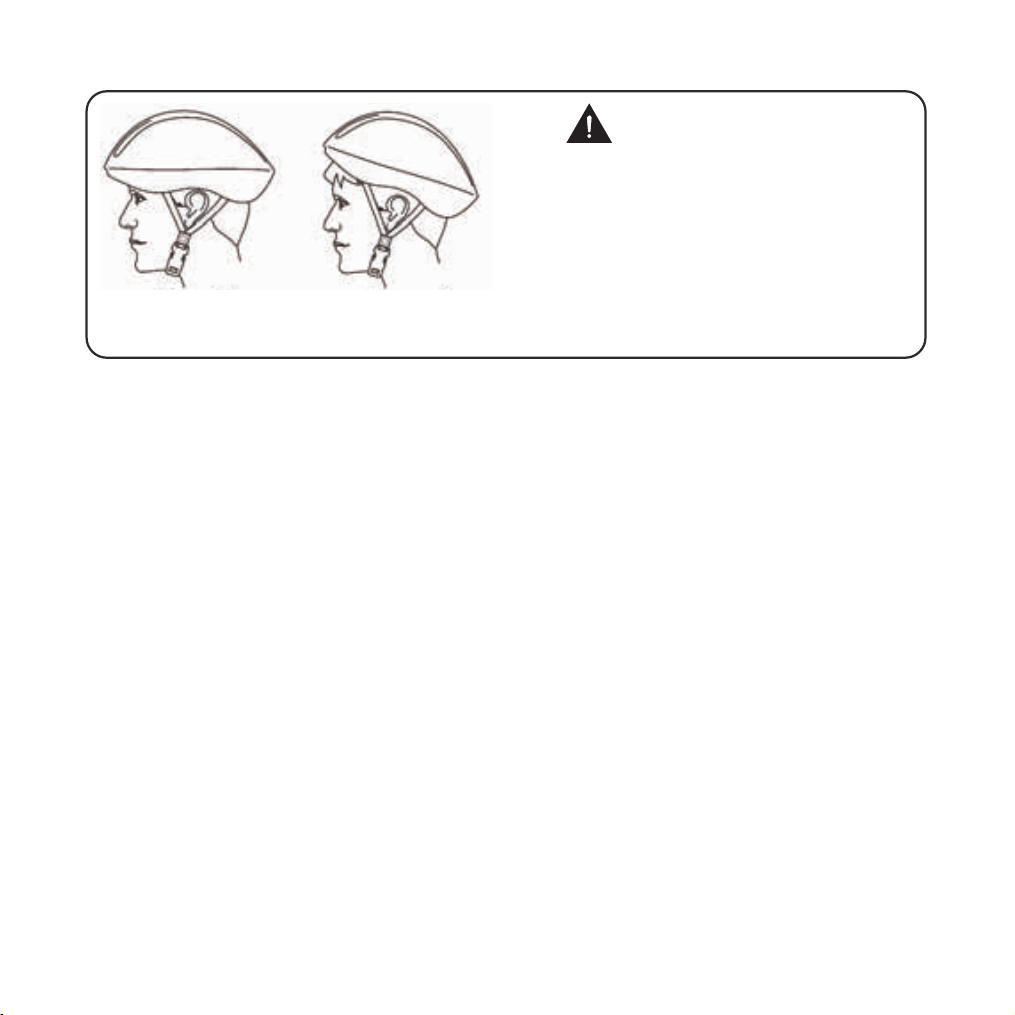
Correct
Forehead covered
Incorrect
ALWAYS WEAR A HELMETIT
COULD SAVE YOUR LIFE!
A properly fitting, CPSC approved, bicycle helmet
should be worn at all times when riding your bicycle.
In addition, if you are carrying a passenger (only use
an approved child safety seat), and remember, the
passenger must also be wearing a helmet.
The correct helmet should:
-be comfortable
-be lightweight
-have good ventilation
-fit correnctly
-cover the forehead
-be securely fastened on the rider.
Forehead exposed
FCC REGULATIONS This device complies with Part 15 of the FCC Rules. Operation
is subject to the following two conditions: (1) this device may not cause harmful
interference, and (2) this device must accept any interference received, including
interference that may cause undesired operation.
Caution: The user is cautioned that changes or modifications not expressly approved
by the party responsible for compliance could void the user's authority to operate
the equipment.
Note: This equipment has been tested and found to comply with the limits for a Class
B digital device, pursuant to part 15 of the FCC Rules. These limits are designed to
provide reasonable protection against harmful interference in a residential installation.
This equipment generates, uses and can radiate radio frequency energy and, if not
installed and used in accordance with the instructions, may cause harmful interference
to radio communications. However, there is no guarantee that interference will not
occur in a particular installation. If this equipment does cause harmful interference to
radio or television reception, which can be determined by turning the equipment off
and on, the user is encouraged to try to correct the interference by one or more of the
05

following measures:
*Reorient or relocate the receiving antenna.
*Increase the separation between the equipment and receiver.
*Connect the equipment into an outlet on a circuit different from that to which the
receiver is connected.
*Consult the dealer or an experienced radio/TV technician for help.
06
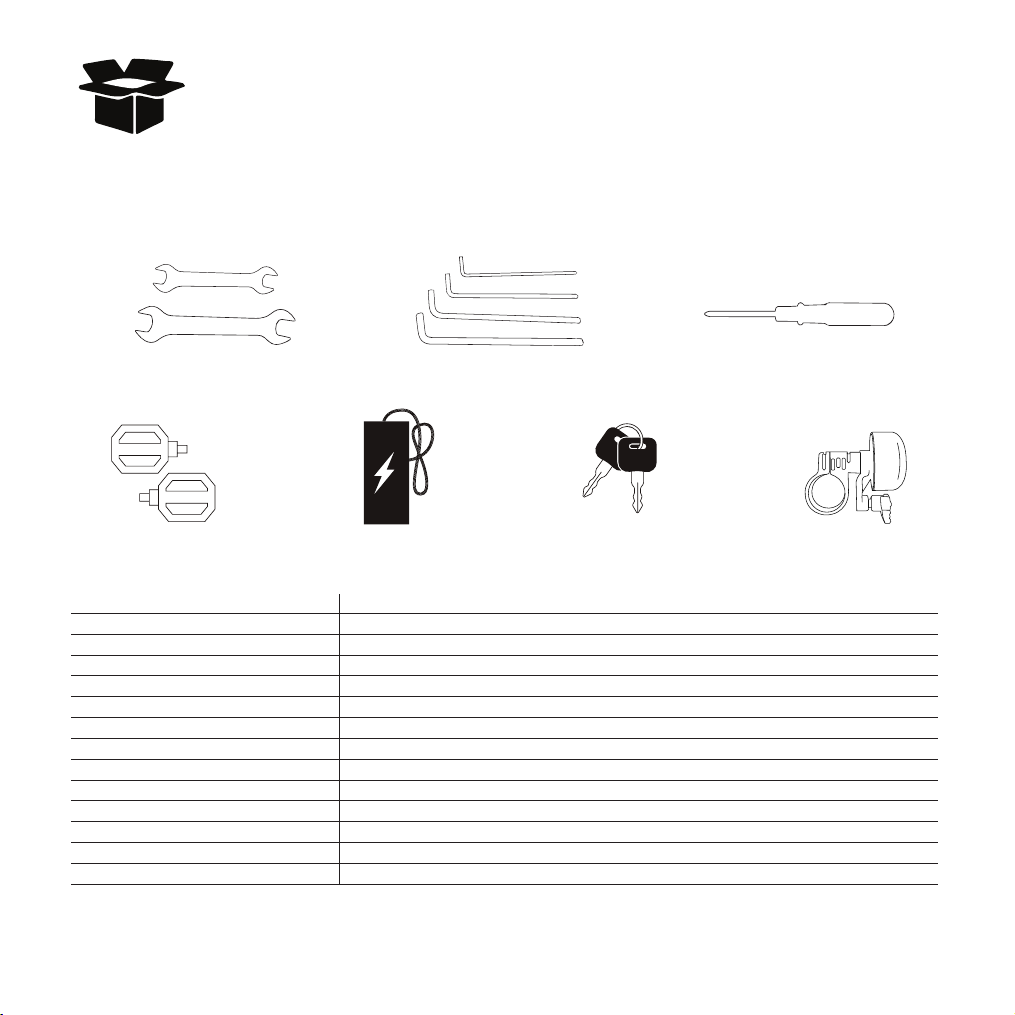
Remove all packaging material, then inspect each item for any accidental damage
that may have occurred during shipping. You should find each of the following
items in your bag:
Unpacking and Product Specs
Pedal Battery Charger Battery Keys
Large wrench Allen wrenches Screwdriver
ITEM SPECIFICATIONS
Model Ranger16
Unfolded Dimensions 1370*630*1020mm(53.94*24.80*40.16inch)
Package Dimensions
1160*310*730mm(45.67*12.20*28.74inch)
Max Load 75kg(165lbs)
Max Speed 32km/h(20mph)
Battery
Battery Specifications
36V 7.8Ah
Max Angle of Climb 10 degrees
Charging Time 5 hours
Tire Pressure 175-310Kpa/25-45psi
Input 100-240V 50/60Hz AC Plug: Output 42Vdc 1.5A
Seat Unadjustable
IP Level IPX4
Bell&Horn Specifications Bell
Small Bell
07
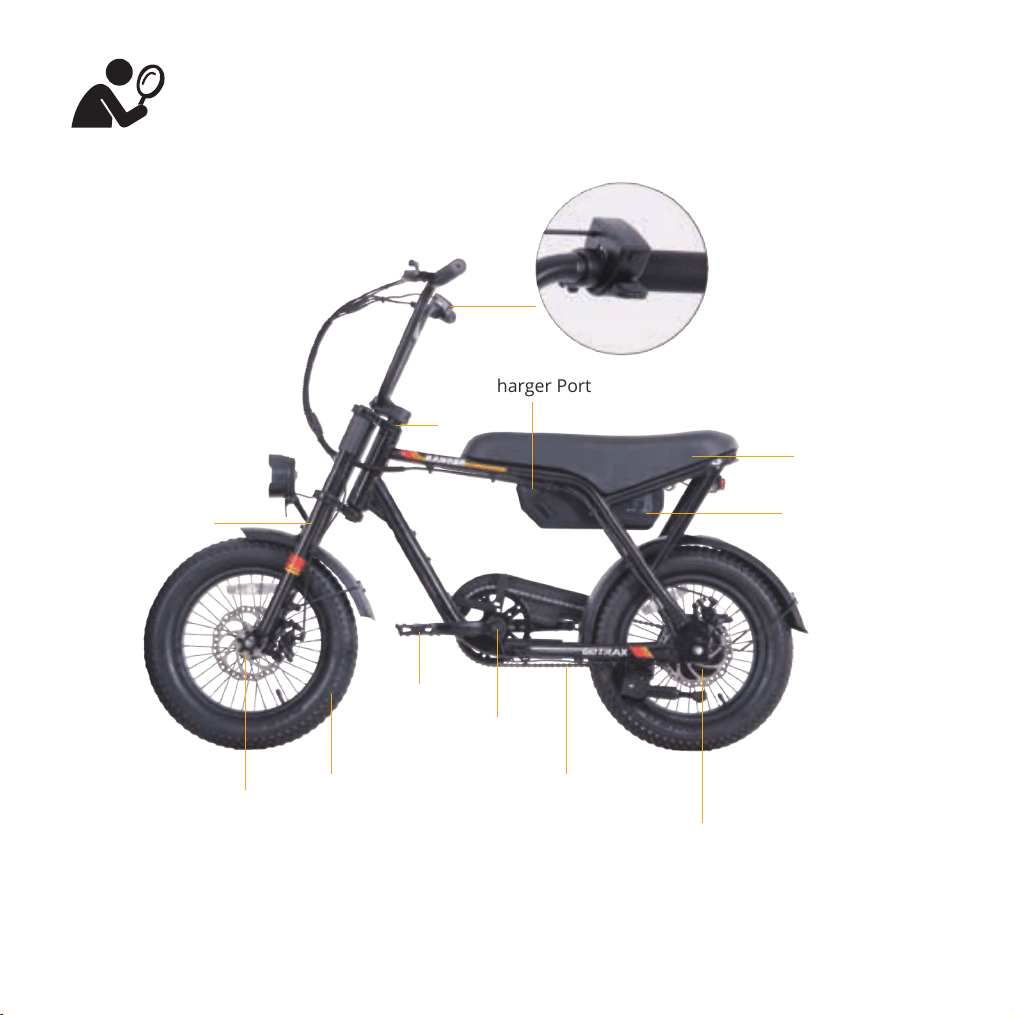
Get To Know Your E-Bike
Saddle
Suspension Fork
Battery
Pedals
Motor
Disc Brake
Chain
Tire
Crankset
Charger Port
Stem
LCD Display
Remove all packaging and take out the included accessories and tools
08
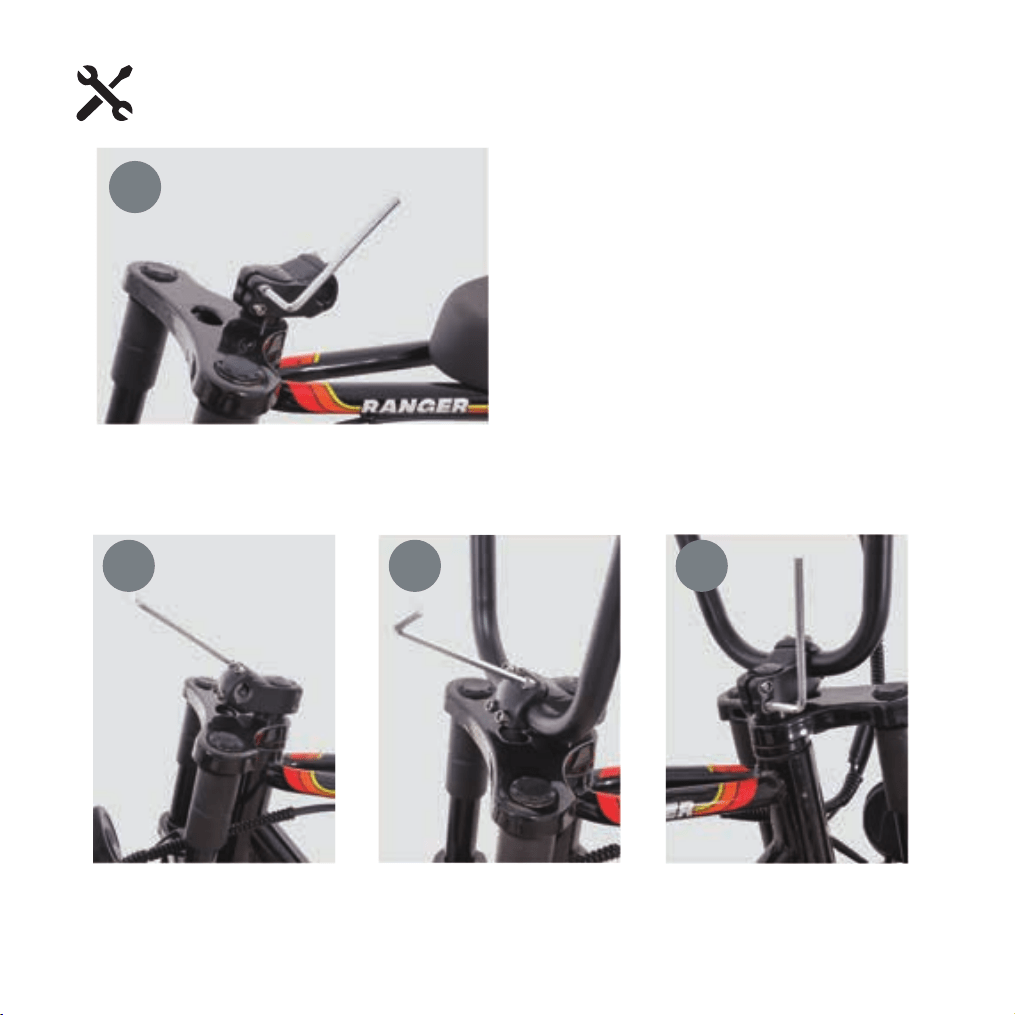
Use the Allen key to slightly loosen the bolt on
the stem. Rotate the stem so the handlebar
clamp faces forward
Use the Allen key to remove the four screws from the handlebar clamp plate on the stem
1
2 3 4
Handlebar Installation
09
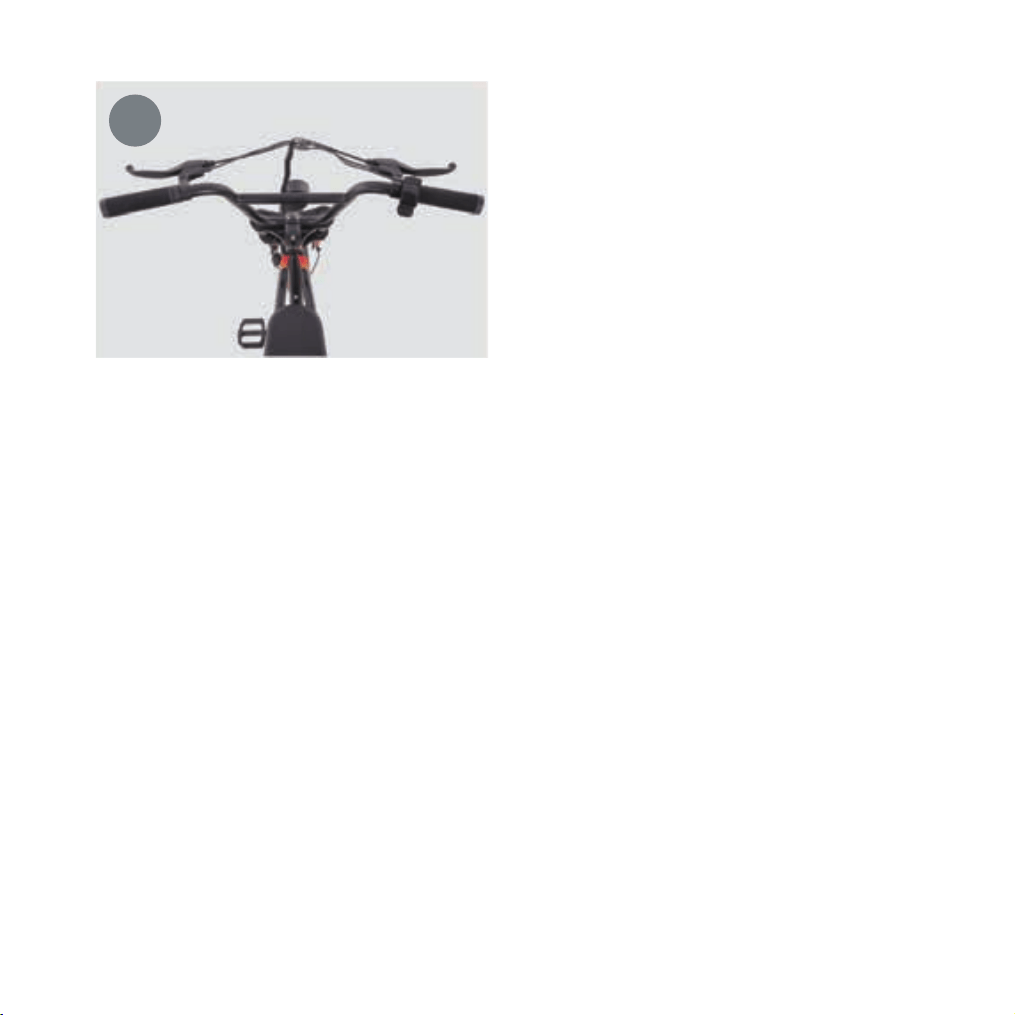
Place the handlebar into the mounting slot on
the stem. Reposition the clamp plate, reinstall
the four screws, and ensure the handlebar is
centered. Finally, tighten all six screws on the
stem securely.
5
10
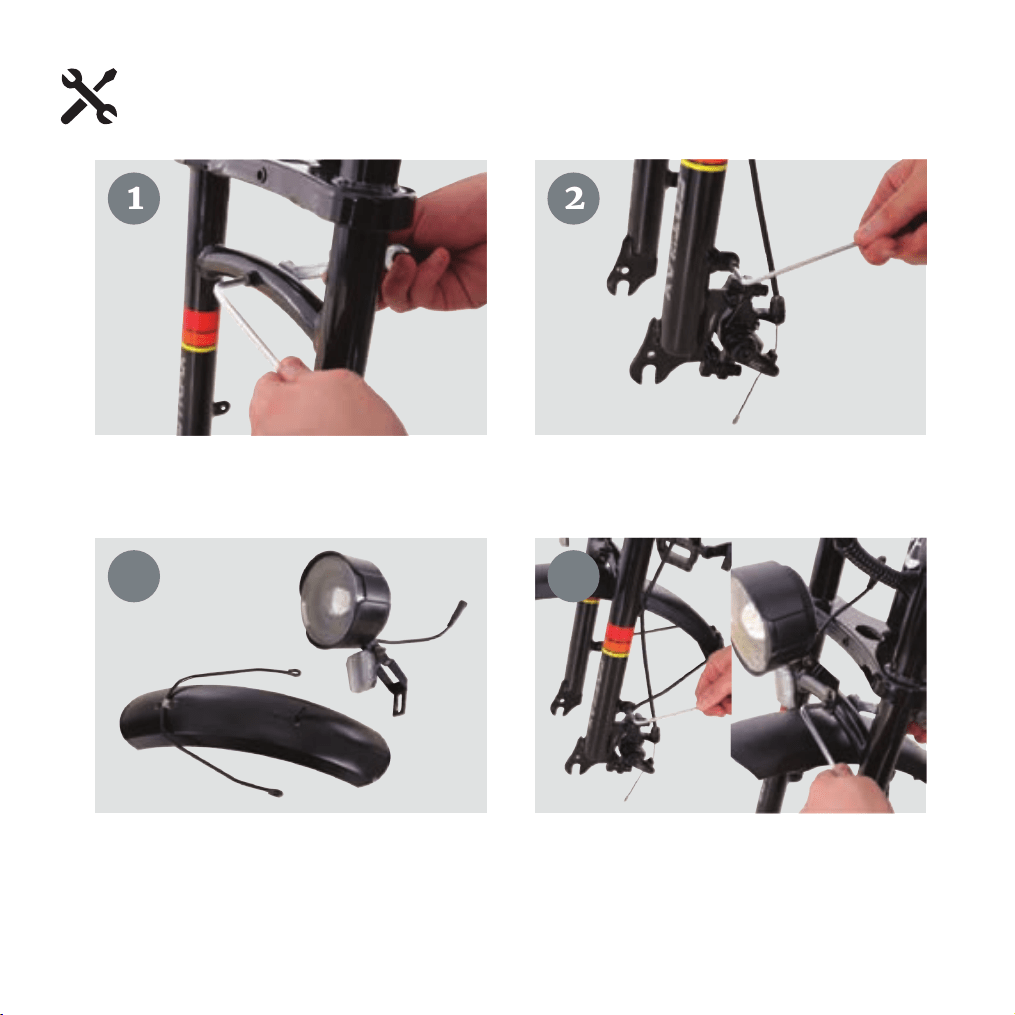
Install front fender and front light
Use a hex wrench and an open-end wrench to remove the front fork linkage rod and the fixing
screws on both sides of the fork legs in order.
Find the front light and front fender assembly in the accessory kit, then use the pre�installed screws
removed from the frame in the previous step to attach and secure them to the front fork.
1
2
3
4
11
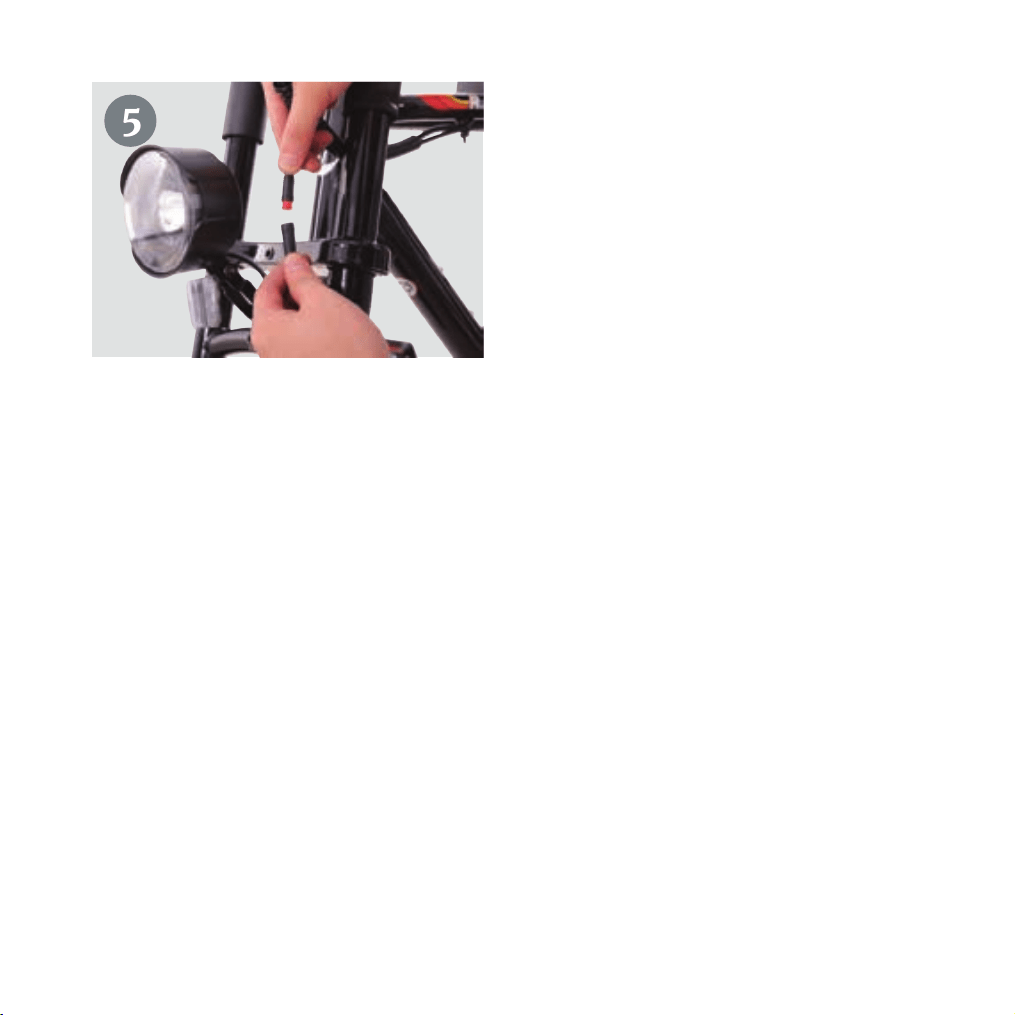
After installation, plug the front light connector
into the reserved port on the main wiring
harness.
5
12
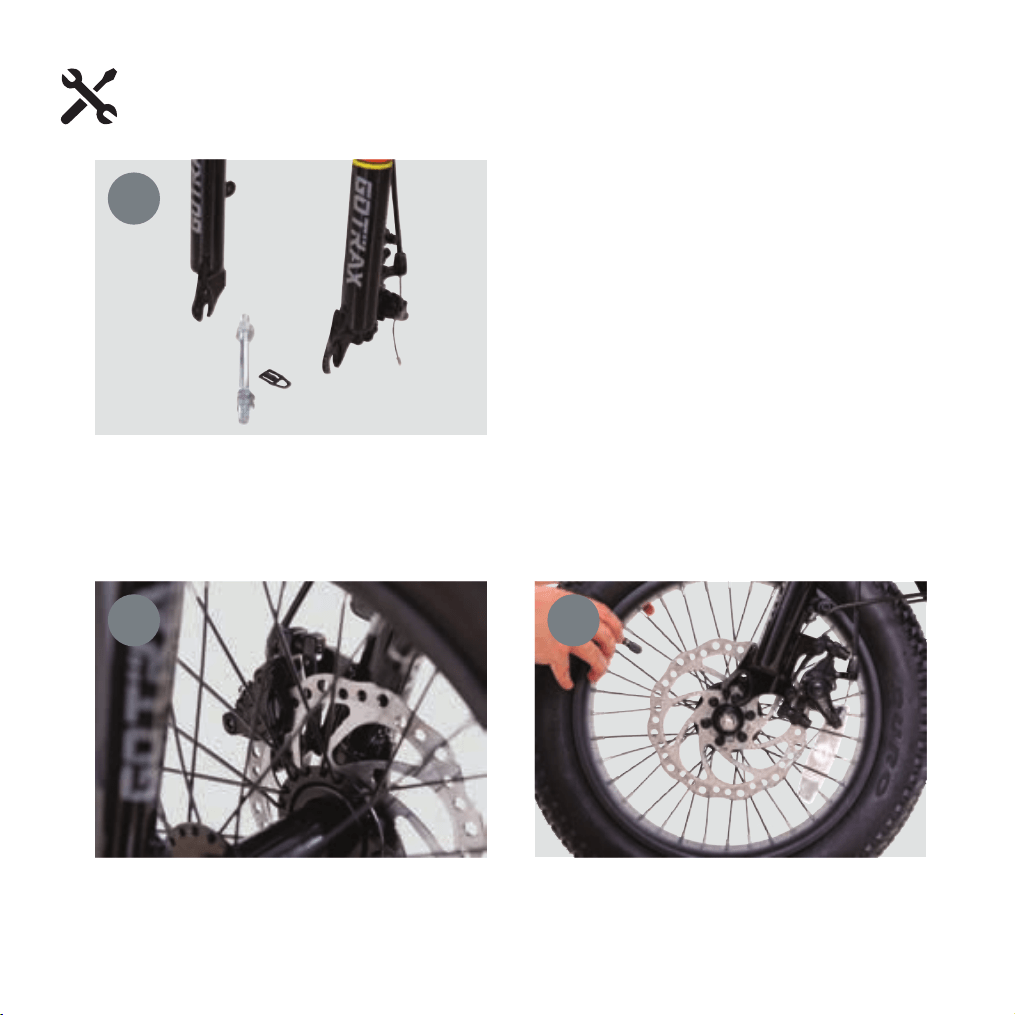
Install front wheel
Remove the plastic protector from the disc
brake and the horizontal support bar on the
front fork (it is recommended to keep the
removed parts for future reuse when taking
off the front wheel).
Align the front wheel’s disc brake rotor with the gap in the front fork’s disc brake caliper, and insert
the front axle into the fork dropouts.
1
2
3
13
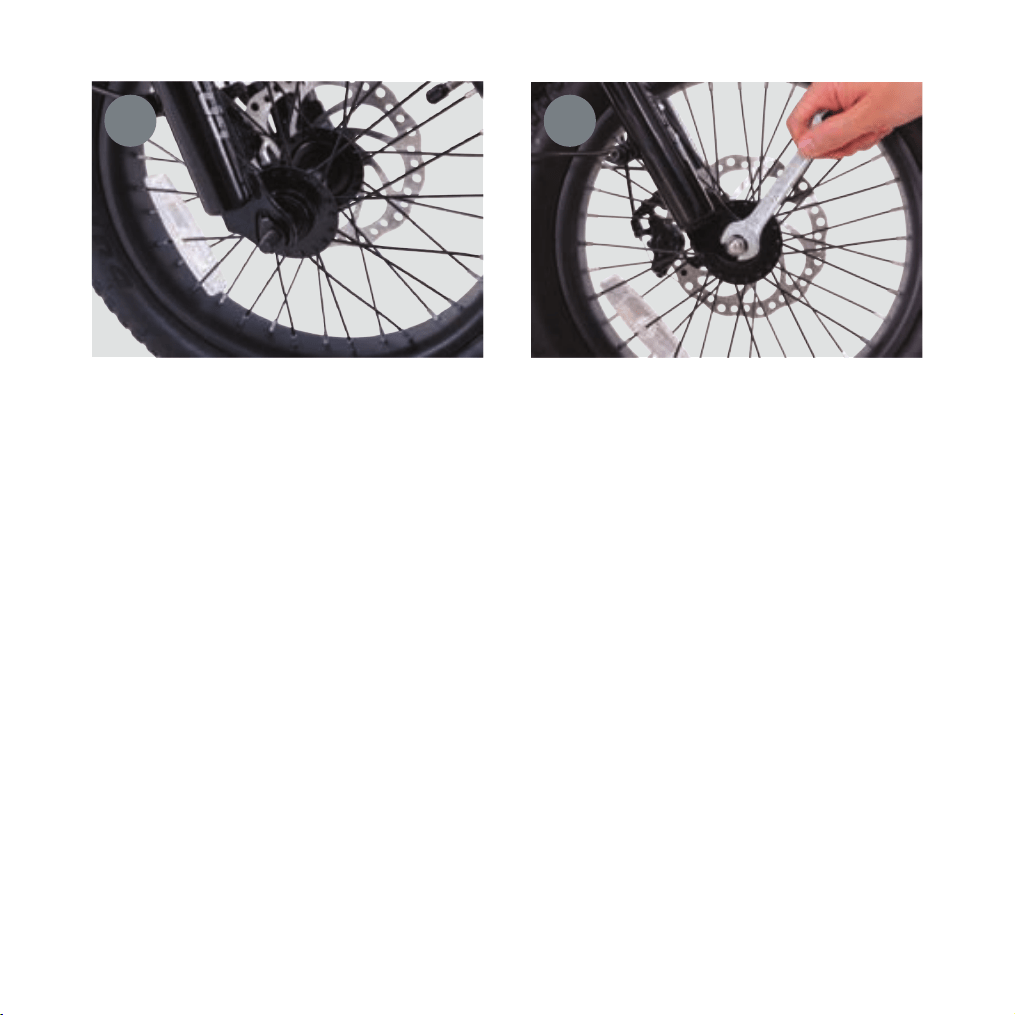
Before tightening the front wheel nuts, insert the torque plates on the front axle into the locating
holes on both sides of the fork dropouts. Finally, tighten the nuts on both sides to secure the wheel.
4 5
14
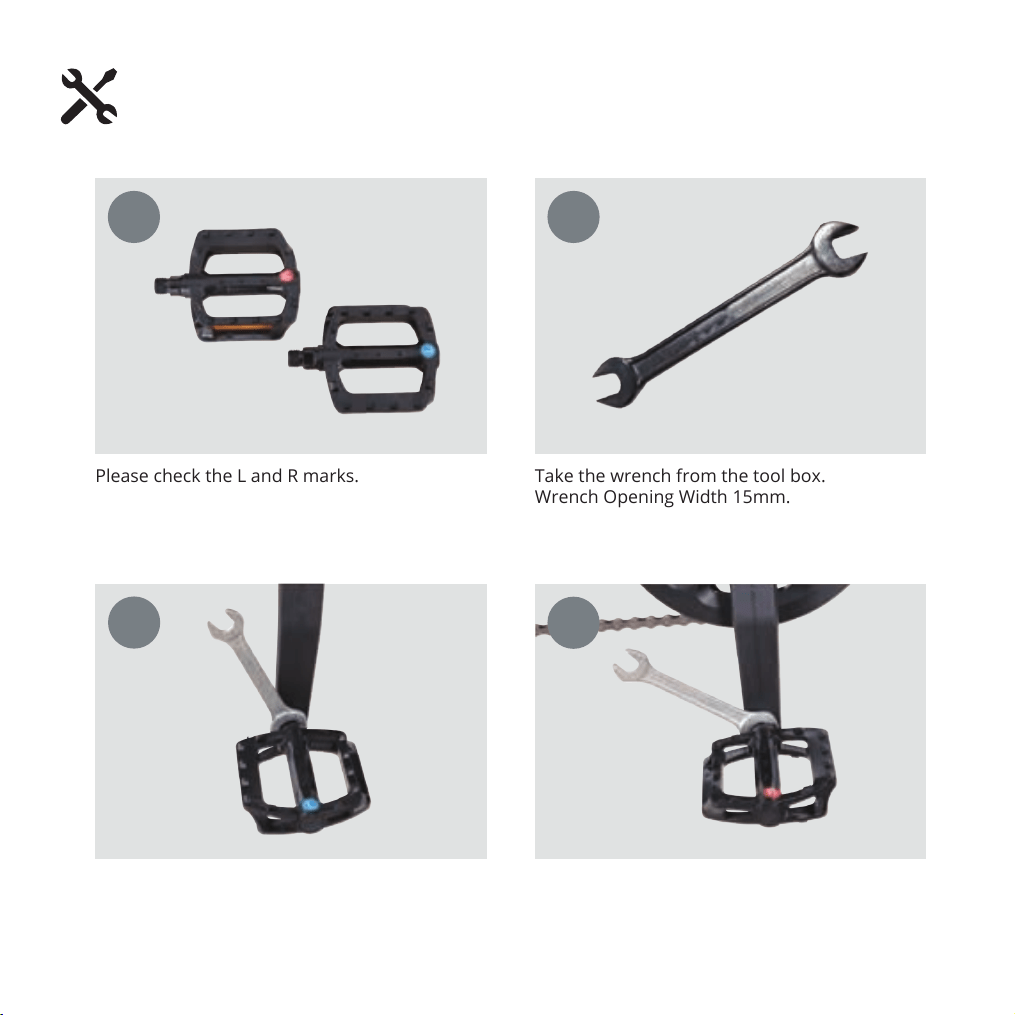
Installing Pedals
Please check the L and R marks.
R logo on the right side, clockwise to install.L logo on the left, counterclockwise to install.
Take the wrench from the tool box.
Wrench Opening Width 15mm.
1
2
3
4
15
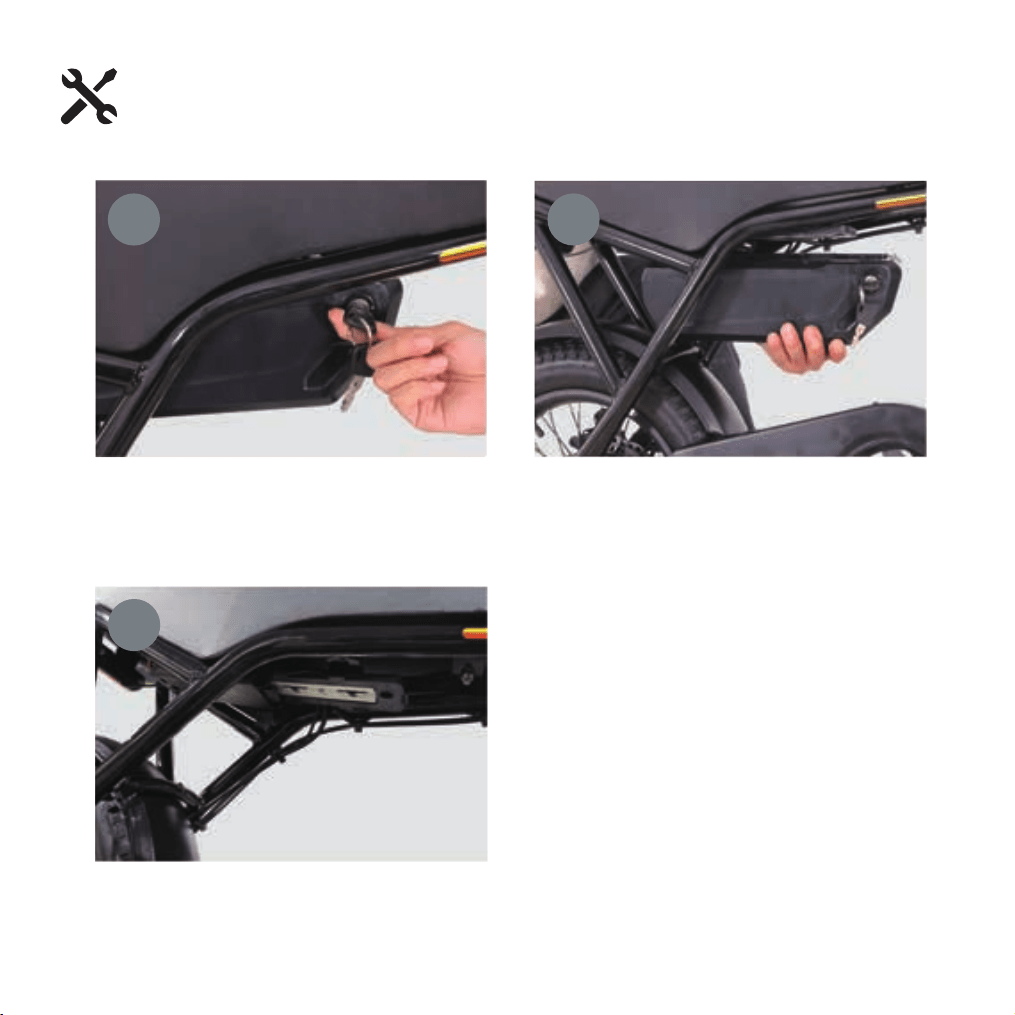
Battery Removal
With one hand, turn the key clockwise and
hold it in position
After removing the battery, inspect the battery
connector for any dirt or damage
With your other hand, support the bottom of
the battery and push it forward. Caution: The
battery may release suddenly
1
2
3
16
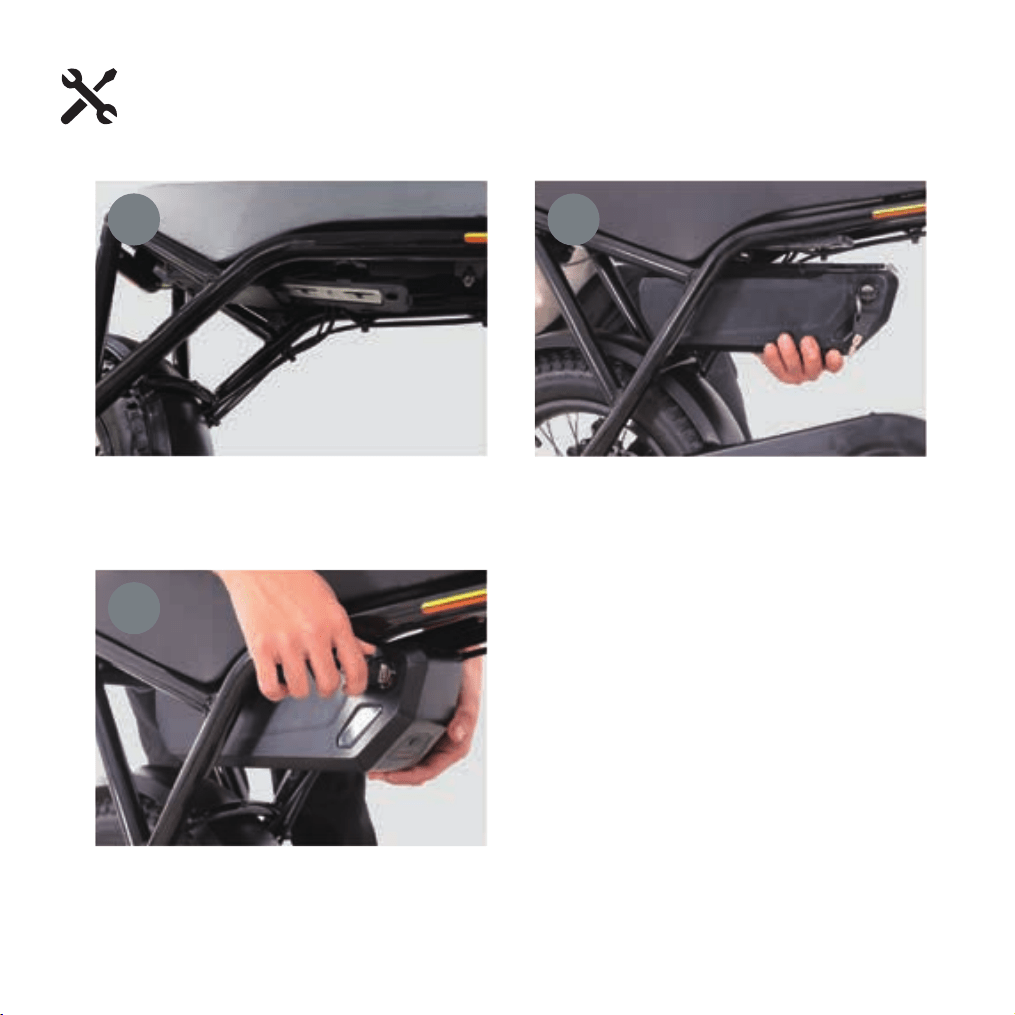
Battery Installation
Before installation, inspect the battery connector for any dirt or damage
First, insert the bottom of the battery into the
battery base. Then, slide the battery horizontally
into the rails of the mounting bracket. The latches
on the bracket and the battery will initially be
offset. Press down firmly on the top of the battery
until the rails fully engage. A distinct "click" sound
confirms the battery is properly installed. Remove
the key
1
2
3
17
BRAKE OPERATION
WARNING !
DISC GETS HOT! SEVERE INJURY COULD REULT FROM CONTACT WITHT THE
HOT DISC. ALLOW DISC TO COOL COMPLETELY BEFORE TOUCHING.
DISC BRAKES
1. Always make sure the brakes are working correctly before you ride the bicycle.Shift
to a harder gear: Press the smaller trigger.
2. Allow brake components to cool before attempting to adjust the brakes.
The calipers and rotor will become hot when the brakes are operated. Do not touch
themwhile riding or immediately after dismounting from the bicycle. You may get burned.
3. If noise occurs when brakes are operated, it may indicate that the brake pads have
worn down to their usage limit. After checking that brake system has cooled down
sufficiently, check the brake pad thickness (0,5mm minimum thickness required).Replace
brake pads if necessary.
4.Be careful not to allow any oil or grease to get onto rotor or brake pads.
5.Check the brake cable for rust and fraying. Replace cable immediately if such
problemsare found. If this is not done,the brakes may not work correctly.
6.WET WEATHER WARNING: Required braking distance will be longer during wet
weather.Reduce your speed and apply the brakes early and gently. If road surface is wet,
tires will skidmore easily.If the tires skid,you may lose control of the bicycle.
CAUTION: Disc brakes have a burn-in period, and the braking force will gradually
increase at the burn-in period progresses. Make sure that you are aware of any such
increase in braking force when using the brakes during the burn-in period. The same
thing will happen when the brake pads or rotor are replaced.
Brake is correctly adjusted when:
The brake pads do not drag on the rotor when the brake is open.
When the brake is applied, the brake pads contact the rim before the brake lever
reaches 1/3 of the way to the handlebar.
18
Brake is correctly adjusted when:
The brake pads do not drag on the rotor when the brake is open.
When the brake is applied, the brake pads contact the rim before the brake lever reaches
about1 /3 of the way to the handlebars
BRAKE ADJUSTMENT (CENTRING THE BRAKE)
First determine if the wheel is centered.Look at the space between the tire and the frame on
either side. If it is not even, loosen the wheel axle nuts and center the wheel, then proceed to
center the brake.
If the brake is not centered, look at the disc brake caliper for centering adjustment screws at
the center of the brake pad on either side. Looking down into the brake where the brake pads
contact the disc rotor determine which side needs to move away or towards the disc.Turn the
centering adjustment screws so that there is about 1 /32 of an inch of clearance on either side
of the disc rotor. Spin the front wheel and listen for any rubbing noise or excess friction.
Repeat the steps until the brake is centered..
19
Tire Inflation Instructions
After assembling your bike, it will be necessary to inflate the tires. Check the sidewall of
the tire for the correct tire pressure (PSI) and inflate tires accordingly with a MANUAL
BICYCLE PUMP. Improper inflation is the biggest cause of tire failure. Due to the
slightly porous nature of bicycle inner tubes, it is normal for your e-bike tires to
lose pressure over time. For this reason it is critically important to maintain the
proper tire inflation on your bike.
1. Your bicycle has been equipped with tires which the bike’s manufacturer felt were
the best balance of performance and value for the use for which the bike was intended.
The tire size and pressure rating are marked on the sidewall of the tire. CAUTION: Pencil
type automtive tire gauges and gas station air hose pressure settings can be inaccutate
and should not be relied upon for consistent, accurate pressure readings. Instead, use a
high quality dial gauge.
WARNING: NEVER INFLATE A TIRE BEYOND THE MAXIMUM PRESSURE
MARKED ON THE TIRE’S SIDEWALL. EXCEEDING THE RECOMMENDED
MAXIMUM PRESSURE MAY BLOW THE TIRE OFF THE RIM, WHICH COULD CAUSE
DAMAGE TO THE BIKE AND INJURY TO THE RIDER AND OTHERS. THE BEST WAY
TO INFLATE A BICYCLE TIRE TO THE CORRECT PRESSURE IS WITH A BICYCLE
PUMP. NEVER USE A SERVICE STATION AIR HOSE TO INFLATE A BICYCLE TIRE. IT
IS DESIGNED FOR LARGER TIRES AND IT CAN EXCEED THE RECOMMENDED
MAXIMUM PRESSURE AND IT MAY BLOW THE TIRE OFF THE RIM.
Tires and Tubes
20
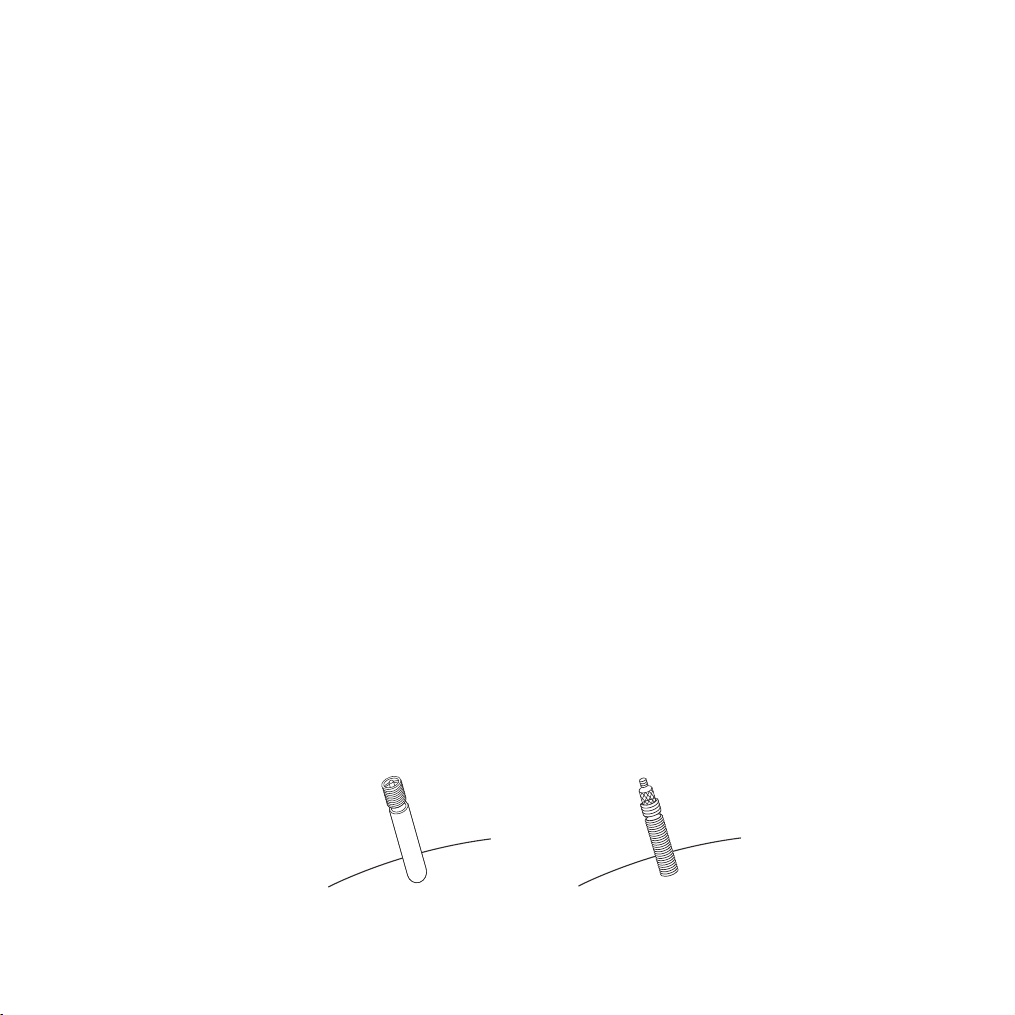
Schraeder Valve Presta Valve
Tire pressure is given either as maximum pressure or as a pressure range. How a tire
performs under different terrain or weather conditions depends largely on tire
pressure. Inflation the tire to near its maximum recommended pressure gives the
lowest rolling resistance; but also produces the harshest ride. High pressures work
best on smooth, dry pavement. Very low pressuures, at the bottom of the recom-
mmended pressure range, give the best performance on smooth, slick terrain such as
hard-packed clay, and on deep, loose surfaces such as deep, dry sand. Tire pressure
that is too low for your weight and the riding conditions can cause a puncture of the
tube by allowing the tire to deform suffciently to pinch the inner tube between the
rim and the riding surface.
Some special high-performance tires have unidirectional treads: their tread pattern is
designed to work better in one direction than in the other. The sidewall marking of a
unidirectional tire will have an arrow showing the correct rotation direction. If your
bike has unidirectional tires, be sure that they are mounted to rotate in the correct
direction.
2. The tire valve allows air to enter the tire’s inner tube under pressure, but doesn’t let
it back out unless you want it to. There are primarily two kinds of bicycle tube valves:
The Schraeder Valve and the Presta Valve. The bicycle pump you use must have the
fitting appropriate to the valve stems on your bicycle. The Schraeder is like the valve
on a car tire, this is the type of valve stem you should have on your bike. To inflate a
Schraeder valve tube, remove the valve cap and push the air hose on you bike. To
inflate a Schraeder valve tube, remove the valve cap and push the air hose or pump
fitting onto the end of the valve stem. To let air out of a Schraeder valve, depress the
pin on the end of the valve stem with the end of a key or other appropriate object.
21
Maintenance & Repair
WARNING: Failure to conduct maintenance on the bicycle may result
in malfunction of a critical part and serious injury or death. Proper
maintenance is critical to the performance and safe operation of the
bicycle.
This section presents important information on maintenance and will assist you in
determining the proper course of action to take if you do have a problem with the
operation of the bicycle. lf you have questions regarding maintenance please call
our customer service, toll free,at 1-844-446-8729 or see a qualified bicycle mechanic.
Do not call the store where the bicycle was purchased.
The recommended intervals and need for lubrication and maintenance may vary
depending on conditions the bicycle is exposed to, Always inspect the bicycle and
conduct necessary maintenance before each use of the bicycle.
Correct routine maintenance of your new bike will ensure a longer life for
your bike and a safer ride for you.
Every time you ride your bike, its condition changes. The more you ride, the more
frequently maintenance will be required. We recommend you spend a little time
on regular maintenance tasks. The following schedules will assist you in knowing
what tasks need to be performed and how often. If you have any doubts about
your abilities to accomplish these tasks, we recommend you task youe bike
to a professional bicycle mechanic periodically to have them done.
Correct routine maintenance of your new bike will ensure:
Smooth running
Longer lasting components
Safer riding
Lower running costs
22

The following procedures will help you maintain your bicycle for years of enjoyable
riding.For painted frames, dust the surface and remove any loose dirt with a dry
cloth. To clean, wipe with a damp cloth soaked in a mild detergent mixture, Dry with
a cloth and polish with car or furniture wax, Use soap and water to clean plastic
parts and rubber tires. Chrome plated bikes should be wiped over with a rust
preventative fluid.
Store your bicycle under shelter. Avoid leaving it in the rain or exposed to corrosive
materials.
Riding on the beach or in coastal areas exposes your bicycle to salt which is very
corrosive. Wash your bicycle frequently and wipe or spray all unpainted parts with
an anti-rust treatment. Make sure wheel rims are dry so braking performance is not
affected. After rain, dry your bicycle and apply anti-rust treatment. lf the hub and
bottom bracket bearings of your bicycle have been submerged in water, they should
be taken out and re-greased. This will prevent accelerated bearing deterioration.
If paint has become scratched or chipped to the metal, use touch up paint to
prevent rust. Clear nail polish can also be used as a preventative measure.
Regularly clean and lubricate all moving parts, tighten components and make
adjustments as required.
BASIC MAINTENANCE
23
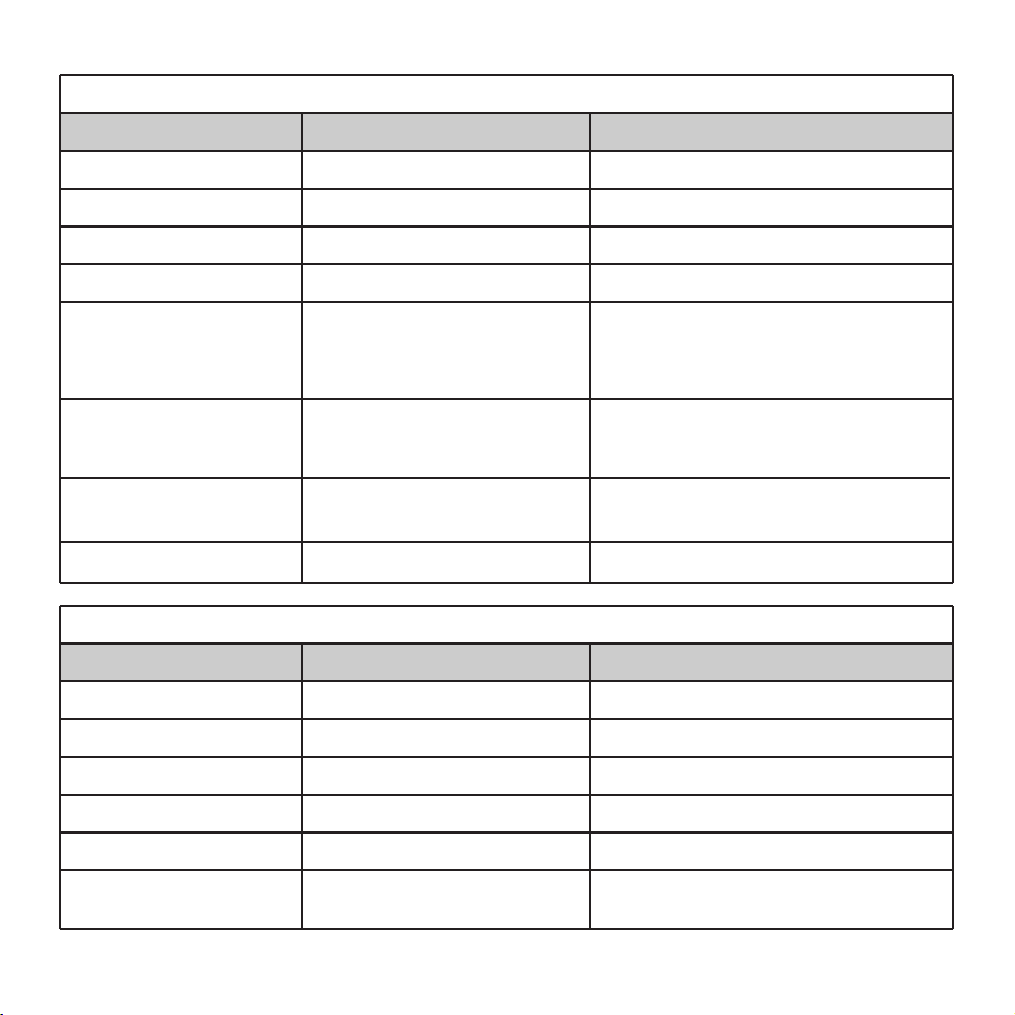
LUBRICATION SCHEDULE
Chains
Weekly
Component
Lubricant
Method
Chain lube or light oil Brush on or squirt
Brake calipers Oil Three drops from oil can
Brake levers Oil Two drops from oil can
Freewheel Oil Two drops from oil can
Derailleur Systems Light oil or grease
All pivot points should be lubricated
(more often in severely rainy or
muddly conditions). wipe off any
excess oil.
Brake cables Lithium based grease
Remove cable from casing. Grease
entire length. wipe off excess
lubrication from other surfaces.
Brake lever and caliper
pivot points
Light oil Two to three drops from oil can
shifting cables Thin layer of grease Clean and grease
Bottom bracket Lithium based grease Disassemble
Pedals Lithium based grease Disassemble
Wheel bearings Lithium based grease Disassemble
Headset Lithium based grease Disassemble
Seat stem Lithium based grease Disassemble
Pedals; that can be
disassembled
Lithium based grease
See bicycle machanic for
maintenance.
Yearly
Component
Lubricant
Method
24
Note:
The frequency of maintenance should increase with use in wet or dusty
conditions. Do not over lubricate-remove excess bubricant to prevent
dirt build up. Never use a degreaser to lubricate your chain (WD-40T™)
PARTS MAINTENANCE
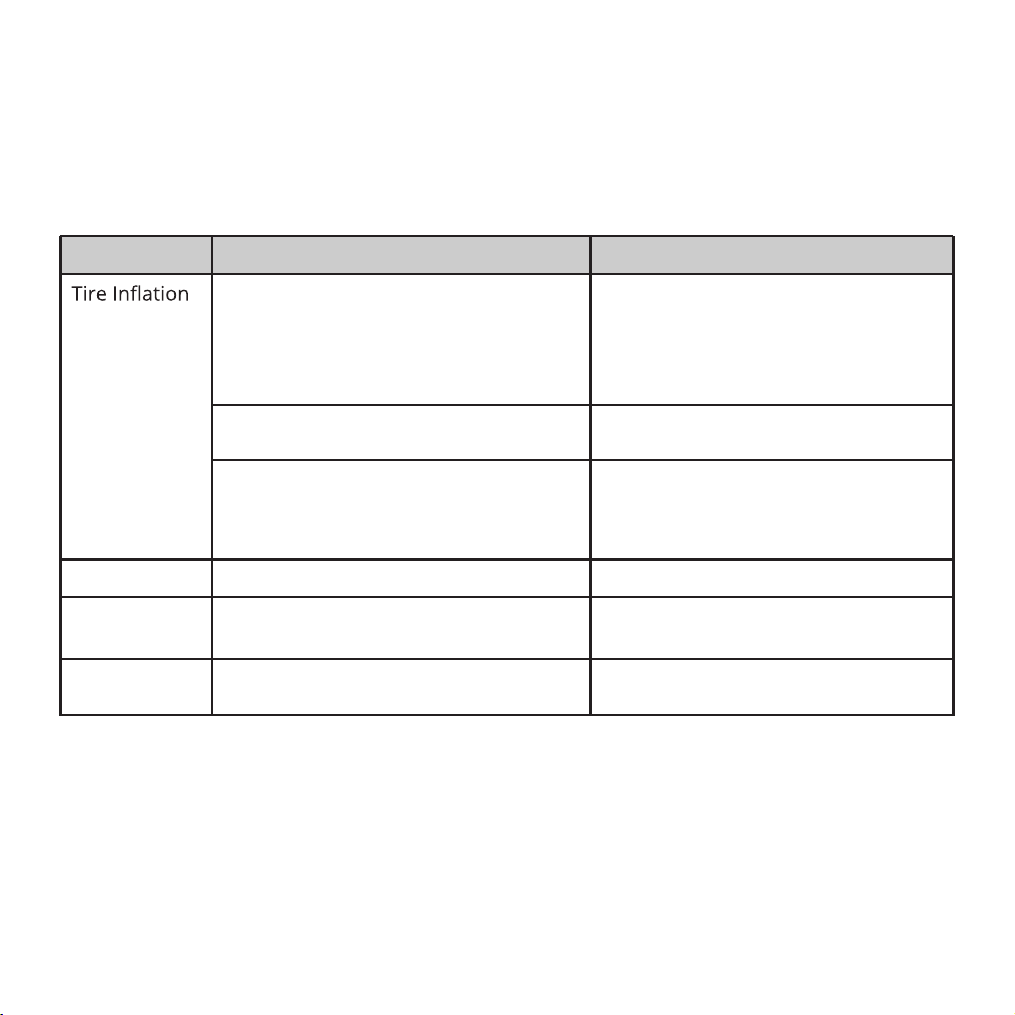
Tires
Frequency: Inspect and maintain at least each use.
Check tire pressure
inflate tire to the pressue indicated
on the tire sidewall. see“inflating
a Tire Tube" for more detail. lf the
tire is flat see “Fixing a Flat Tire" for
more detail
Check the bead is properly seated
While inflating or refitting the tire.
Reduce air pressure in the tube and
re-seat the bead
Spin wheel and check rotation /
alignment is smooth and even.
Loosen axke nut(s) and adjust until
properly seated. If the hub
bearings need repair see a bicycle
mechanic for repair.
Inspect Action Maintenance
Bead Seating
Check broken or loose spokes. See bicycle machanic for repair.
Tread
Inspect for signs of excessive wear,
flat spots or cuts and damage.
Repleace tire.
Valves
Check the value caps are fitted
and free of dirt.
Clean dirt from the valve.
25
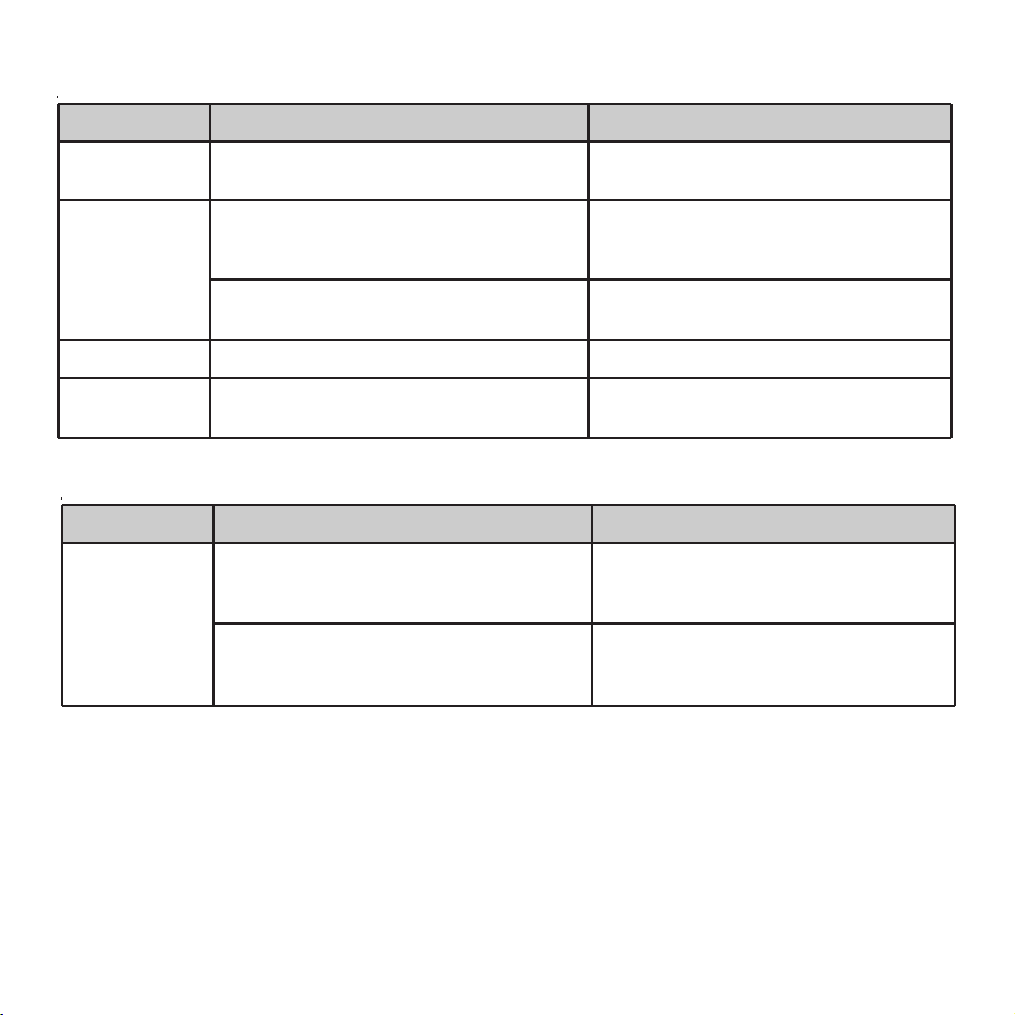
Wheels Frequency: Inspect and maintain at least each use.
Inspect Action Maintenance
Rims
Inspect for dirt and grease.
Use a clean rag or wash with soapy
water, rinse, and air dry.
Spokes
Check for broken or loose spokes. See bicycle machanic for repair.
Hub Bearings
Lift each wheel and see if there is
movement side to side.
See bicycle machanic for repair.
Spin wheel and check rotation /
alignment is true
See bicycle mechanic for repair.
Wheels
Check the wheels are securely
fastened to the bicycle and axle nuts
are tight.
Adjust if necessary and tighten axle
nuts.
Frequency: as noted
Inspect Action Maintenance
Pedals
Drivetrain (pedals, chains, chainwheel, crank set, freewheel)
Every month, check each pedal is
securely set and tighten into the
crank arm.
If necessary, re-set and tighten.
Before each ride, check each front
and rear pedal reflectores are clean
and in place
Clean or replace.
26
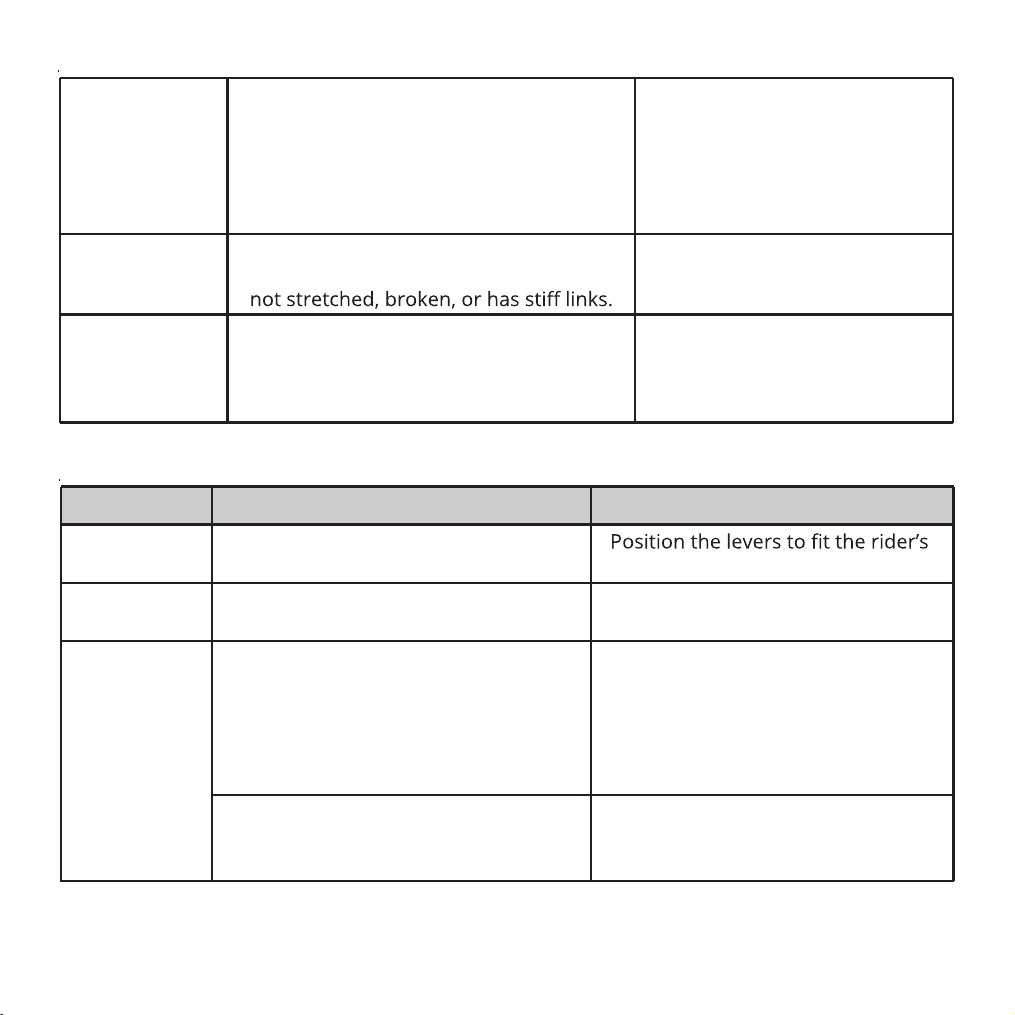
Pedals Bearings
Every ride, check the pedal bearings
are properly adjusted. Move the
pedal up and down, left and right.
If looseness or roughness is detected
adjustment, lubrication or replacement
is required.
See bicycle mechanic for repair.
Chains
Every week, check the chains is clean,
properly lubricated, rust-free, and is
Lubricate if necessary. Replace
if rusted, stretched, or broken.
Crank Set Every month, check the crank set (crank
arms, chain rings, and bottom bracket
axle and bearings) is correctly adjustrd
and tight.
See bicycle mechanic for repair.
Brakes Frequency: Inspect and maintain at least each use.
Inspect Action Maintenance
Levers
Pads
Cables
Check the levers are securely
fastened to the handlebar.
grip and screw tight to handlebar.
Check pad position, gap and
pressure.
See Section 4: Adjusting the Brakes
Check the outer casing for kinks,
stretched coils and damage.
Check cables for kinks, rust, broken
strands or frayed ends.
Check the outer casing for kinks,
stretched coils and damage.
Replace cable.
Check the housing is seated properly
into each cable stop of the bicycle.
It is recommended that the cables
and housing be replaced every
riding season.
27
HUB BEARINGS
Hub bearings reguire special thin wrenches called cone wrenches, if you do not own these
tools, do not attempt hub bearing adiustments, Have a qualified bicycle mechanic perform
the adjustment if you have any doubts.
1.Check to make sure neither lock nut is loose.
2.To adjust, remove wheel from bicycle and loosen the lock nut on one side of the
hub while holding the bearing cone on the same side with a cone wrench.
3.Rotate the adjusting cone as needed to eliminate free play.
4.Re-tighten the lock nut while holding the adjusting cone in position.
5.Re-check that the wheel can turn freely without excessive side play.
Reflectors: For your own safety, do not ride the bicycle if the reflectors are incorrectly
installed, damaged, or missing. Make sure the front and rear reflectors are vertical. Do not
allow the visibility of the reflectors to be blocked by clothing or other articles. Dirty
reflectors do not work well. Clean the reflectors, as necessary, with soap and a damp cloth.
Inspection of reflector plate:
Make yourself more visible to motorists
Wear light-colored or reflective clothing, such as a reflective vest and reflective bands for
your arms and legs.
Use reflective tape on your helmet.
Do not let anything cover the reflectors.
Check whether the reflector is missing. lf it is found missing,contact the after-sales service
immediately to reassemble the reflector of the same specification and model, and the
installation position should be consistent with the original bicycle.Please do not change the
position, modify, disassemble, etc. privately. Before each use, check that the function of the
reflector is normal and the surface of the reflector is kept clean.The Reflector device cannot
be blocked by luggage, children chair, clothes and other objects, otherwise it will cause
potential safety hazards.
WARNING ! Missing, damaged, or dirty reflectors will affect the ability of others
to see and recognize you as a moving bicyclist, increasing the risk of being hit,
serious injury or death. Always check the reflectors are in place and make sure
they are clean, straight,unbroken and securely mounted before riding the bicycle.
NOTICE: Most states require a full set of reflectors. Some state and local laws may require that
your bike be equipped with a warning device, such as a horn or bell and most states require a
iEht, DO NOT RIDE AT NlGHT, Vision is auite limited at dawn, dusk and at night, f you must ride
at night, take extra precautions, use front and rear lights, wear flashers on your arms, wear
light-colored clothing, and plan your route to ride in well lighted areas.
28
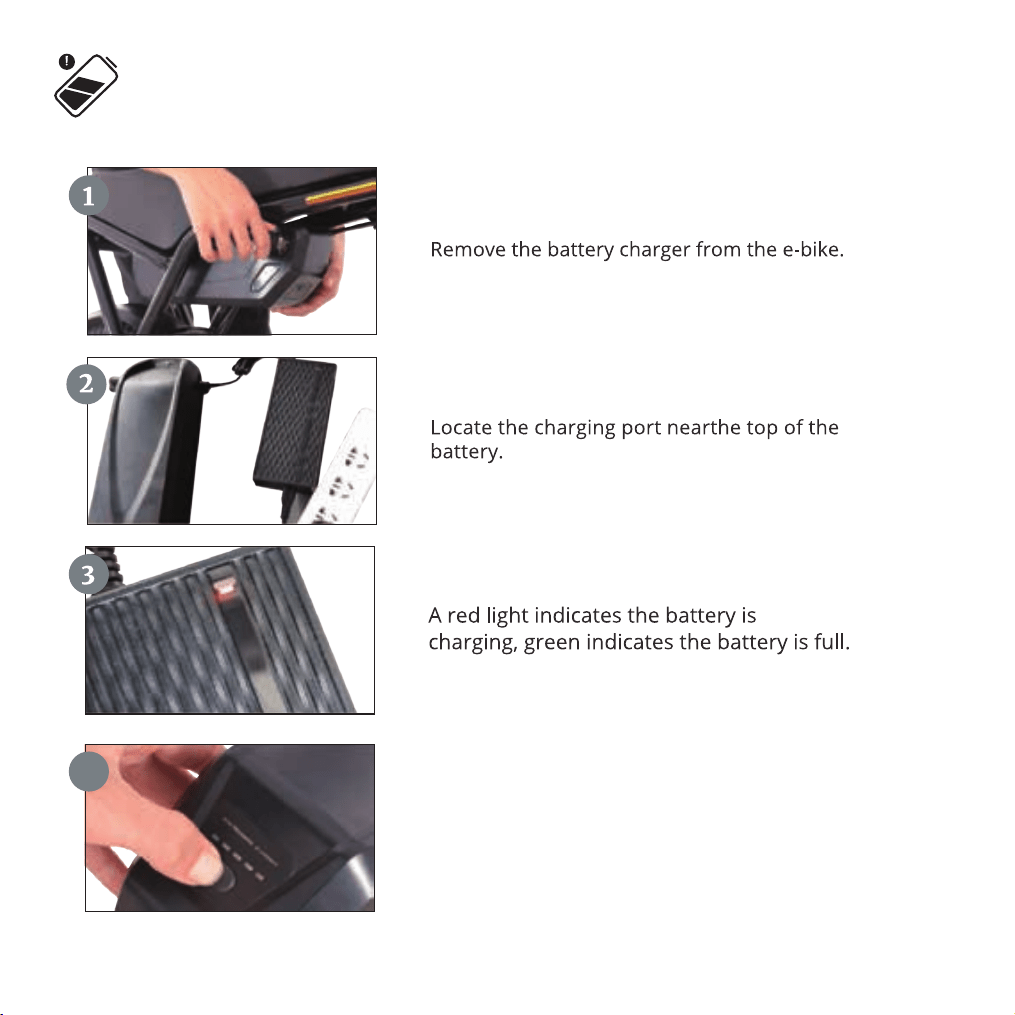
Charge Your Battery
Unplug the charger, press the battery level
indicator switch, and the battery level will be
displayed. If all four lights are on, it indicates
a full charge; if the remaining lights are red,
it indicates low battery.
4
29
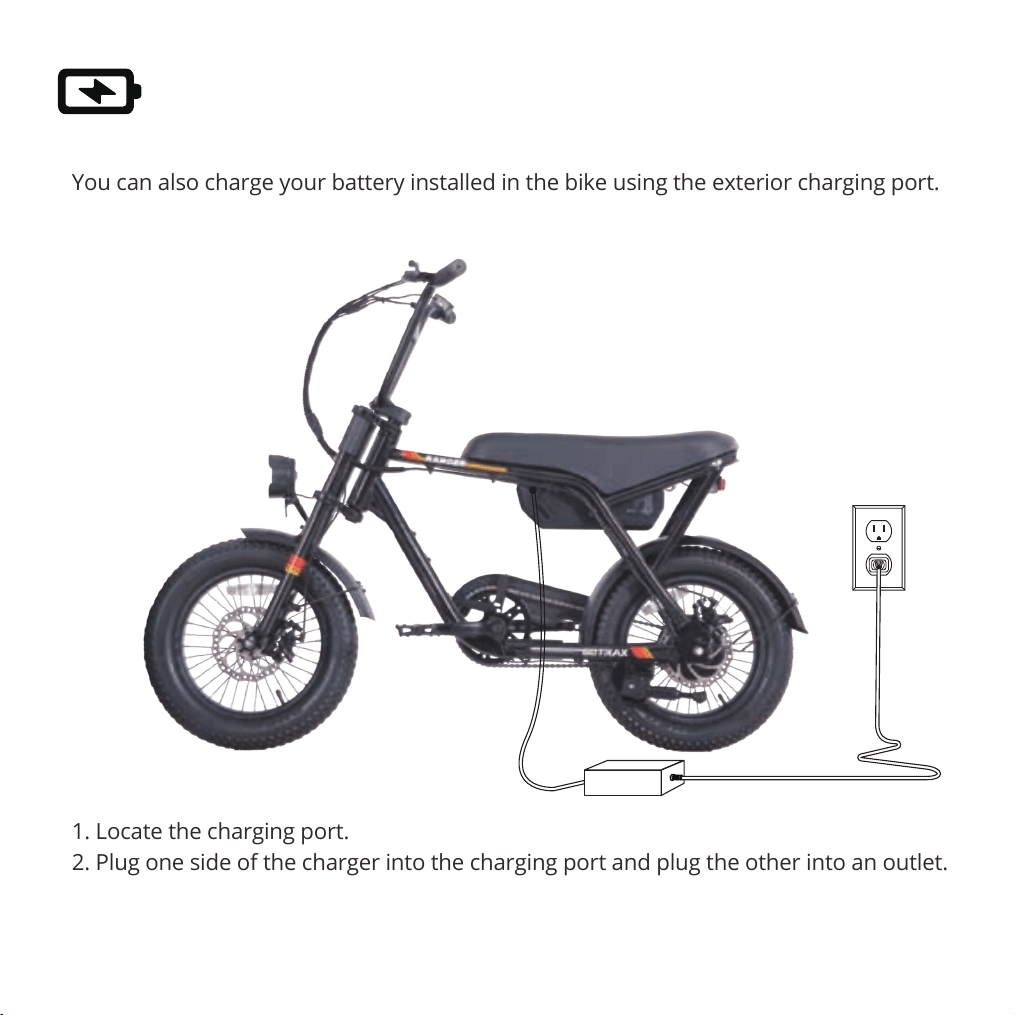
You can also charge your battery installed in the bike using the exterior charging port.
1. Locate the charging port.
2. Plug one side of the charger into the charging port and plug the other into an outlet.
3. A red light indicates the battery is charging, green indicates the battery is full.
4. Charging Time: 5.5 hours.
Charge Your E-Bike
30
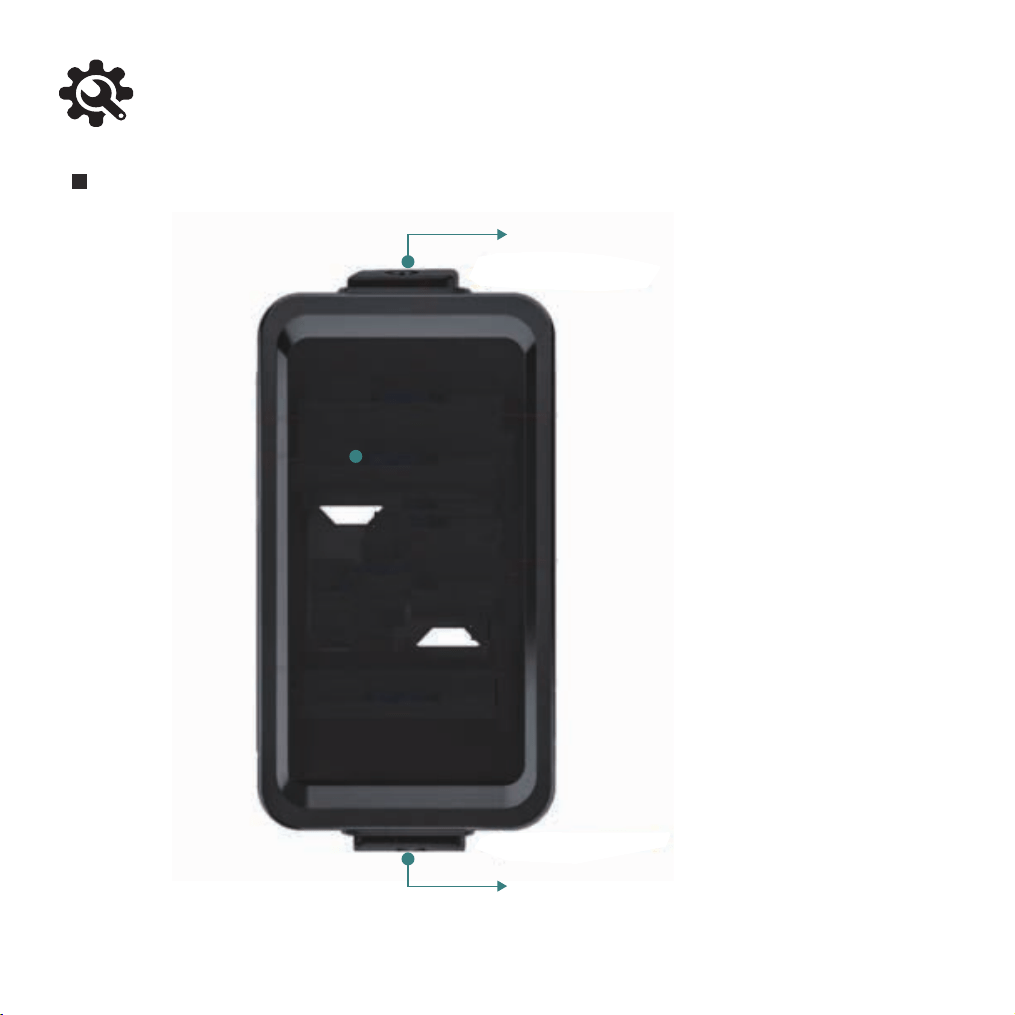
E-Bike Console Functions
Button Location
【 M Button 】
【Power Button 】
31
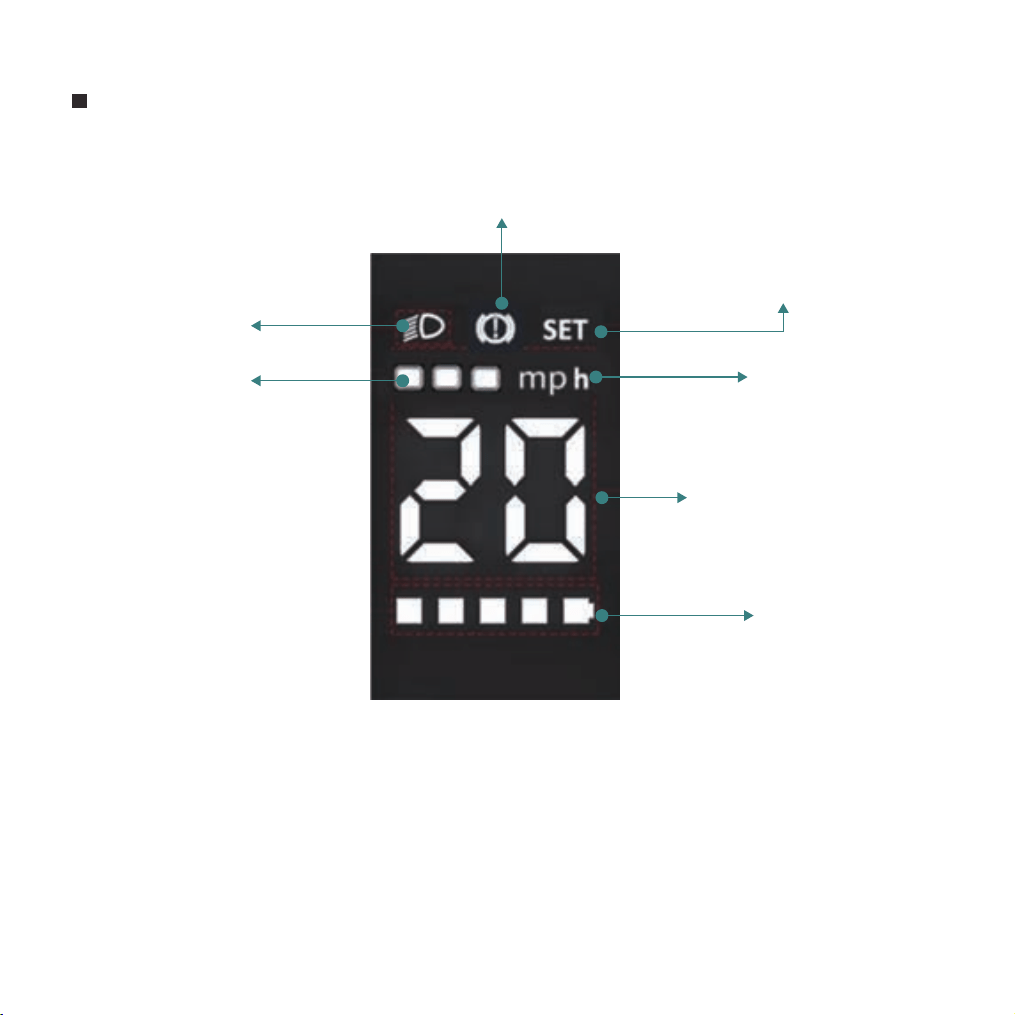
Brake Status Indicator
Speed / Single Trip
Mileage / Error Code
Assist Level
Speed Display
Parameter Setting
Mode Indicator
Speed Unit
Headlight Indicator
Display Content
Note: When only 'mph' is displayed, it indicates the current speed. If not displayed,
it shows the single trip mileage.
32
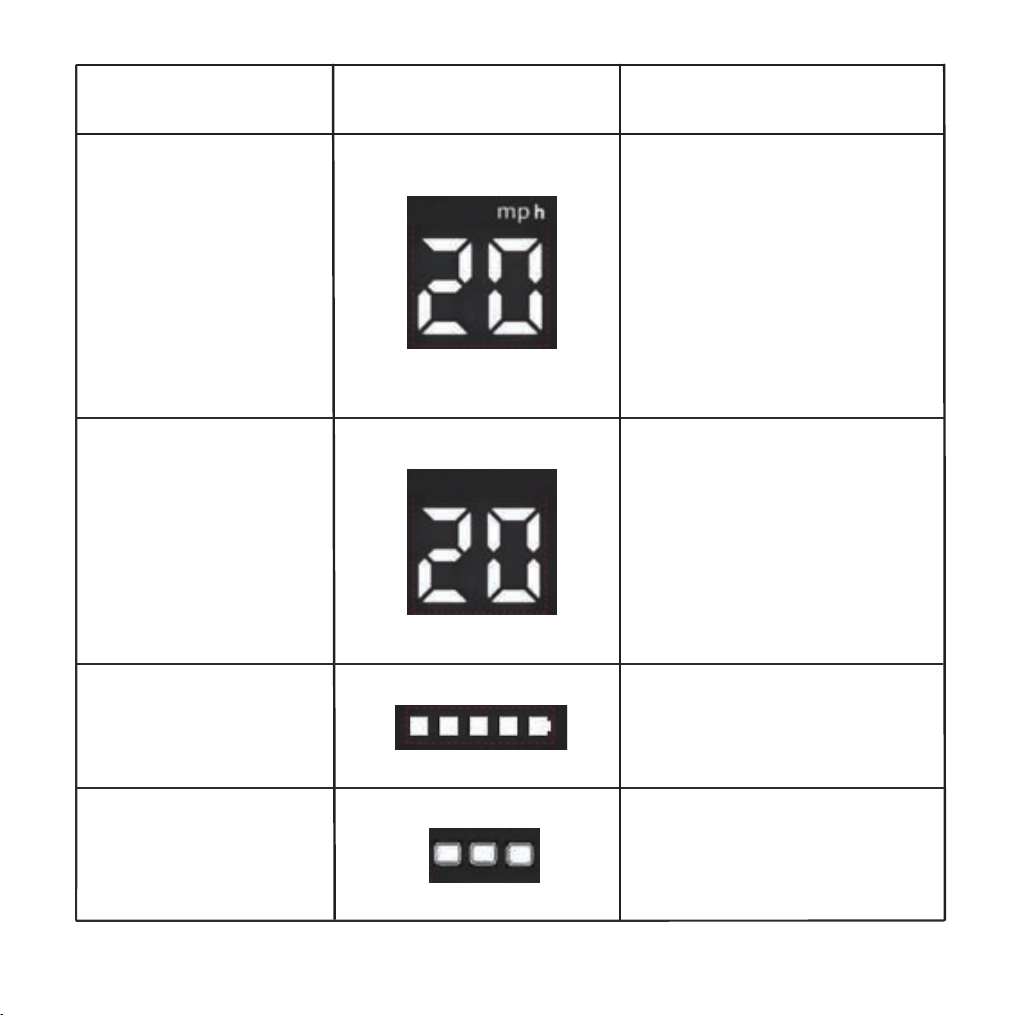
Display Item Content Description
Current Speed
Single Trip Mileage
Battery Level
Assist Level
Displays current speed in km/h.
For miles, replace the sticker.
Speed must change continuously,
not jump
(e.g., from 20km/h directly to
0km/h)
Displays the mileage for the
current ride. No unit is
displayed
Displays battery level
Level 1, 2, 3
Remaining charge indicated by 5
segments. The last segment
flashes when the battery is low
33
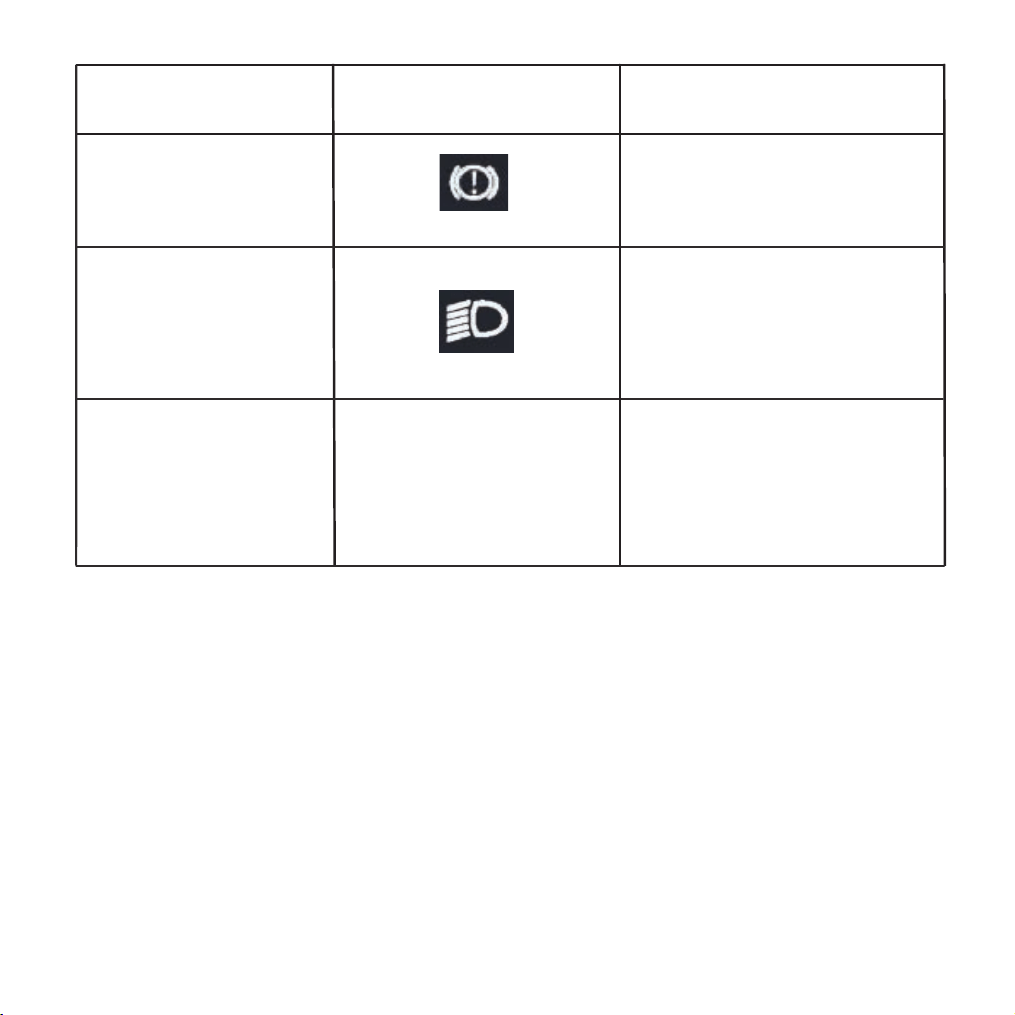
Display Item Content Description
Brake Indicator
Headlight Indicator
Error Code E0-EF
Shows the status of the brake
lever cut-off switch. Displays
when braking
Illuminates when the headlight is
on
Flashes in the speed display area
when a fault is detected
34
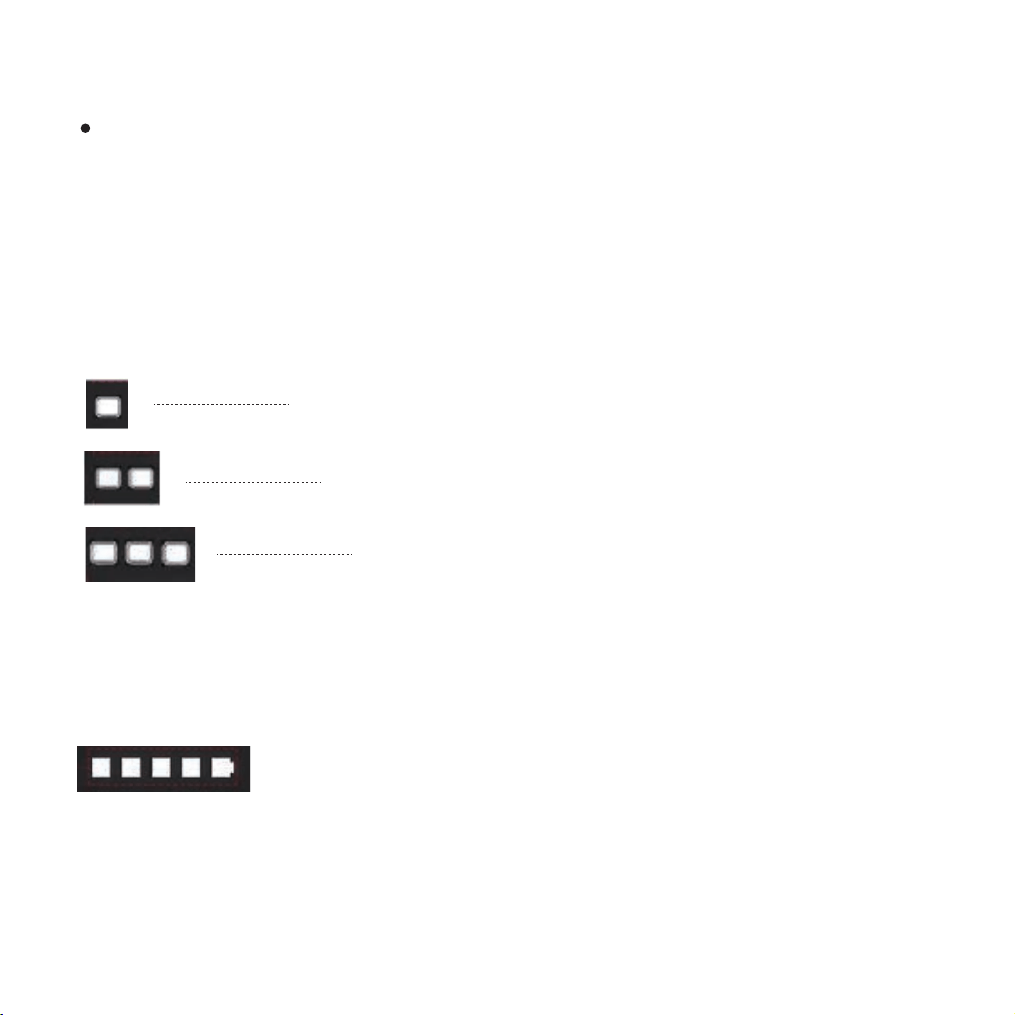
Headlight On/Off: Long press the M button to turn the headlight on or off
Battery Level Indication: Displayed by 5 segments. Segments deplete from right to left.
The last segment flashes during low battery warning
Power On/Off: Long press the Power button to turn the system on or off
Short press the Power button to cycle the speed display area content: Current Speed
-> Single Trip Mileage -> Error Code (if present).
The display automatically switches to the error code if a fault is detected
Short press the M button to cycle through assist levels
1
2
3
Cycling Display Modes
35
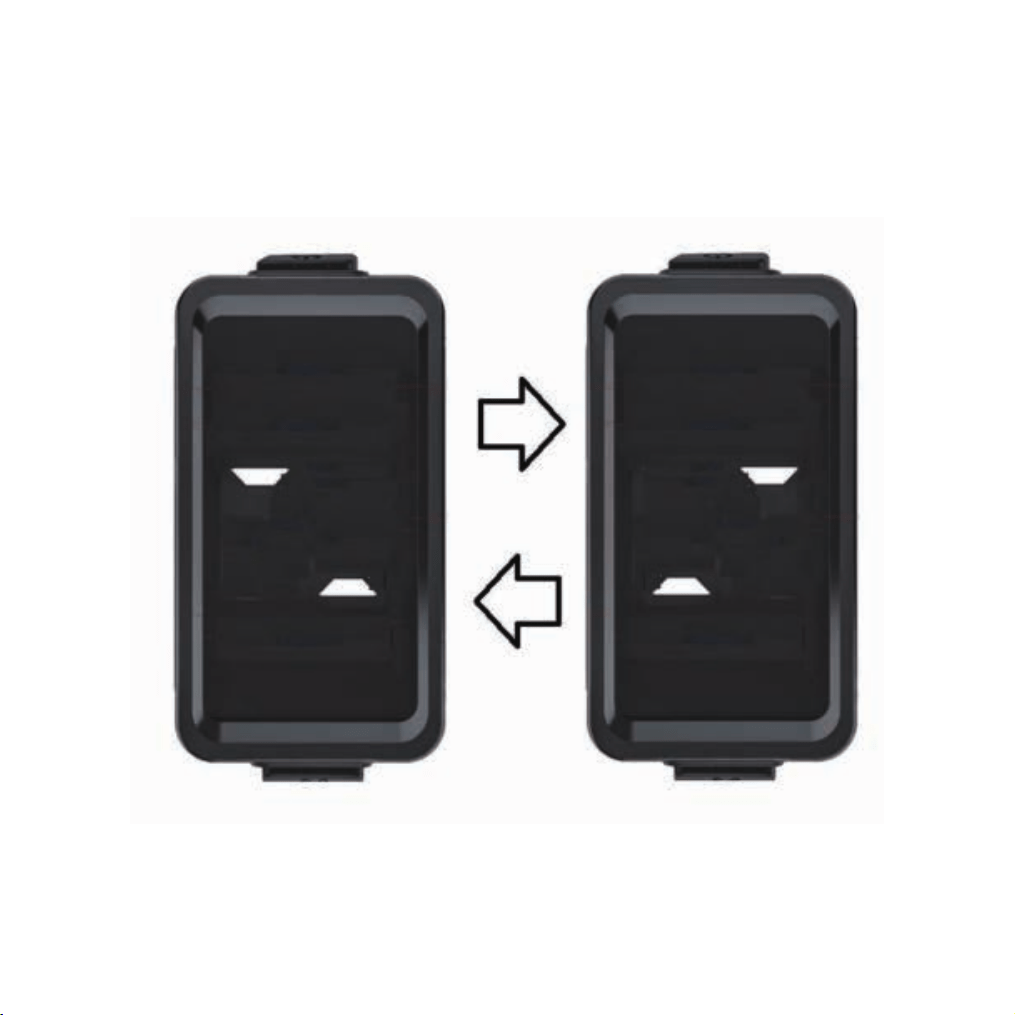
Pre-Shutdown Dynamic Display: Upon shutdown command, the display alternates
between two preset screens 5 times (each switch lasts approximately 0.3 seconds,
adjustable for effect), then turns off completely
36
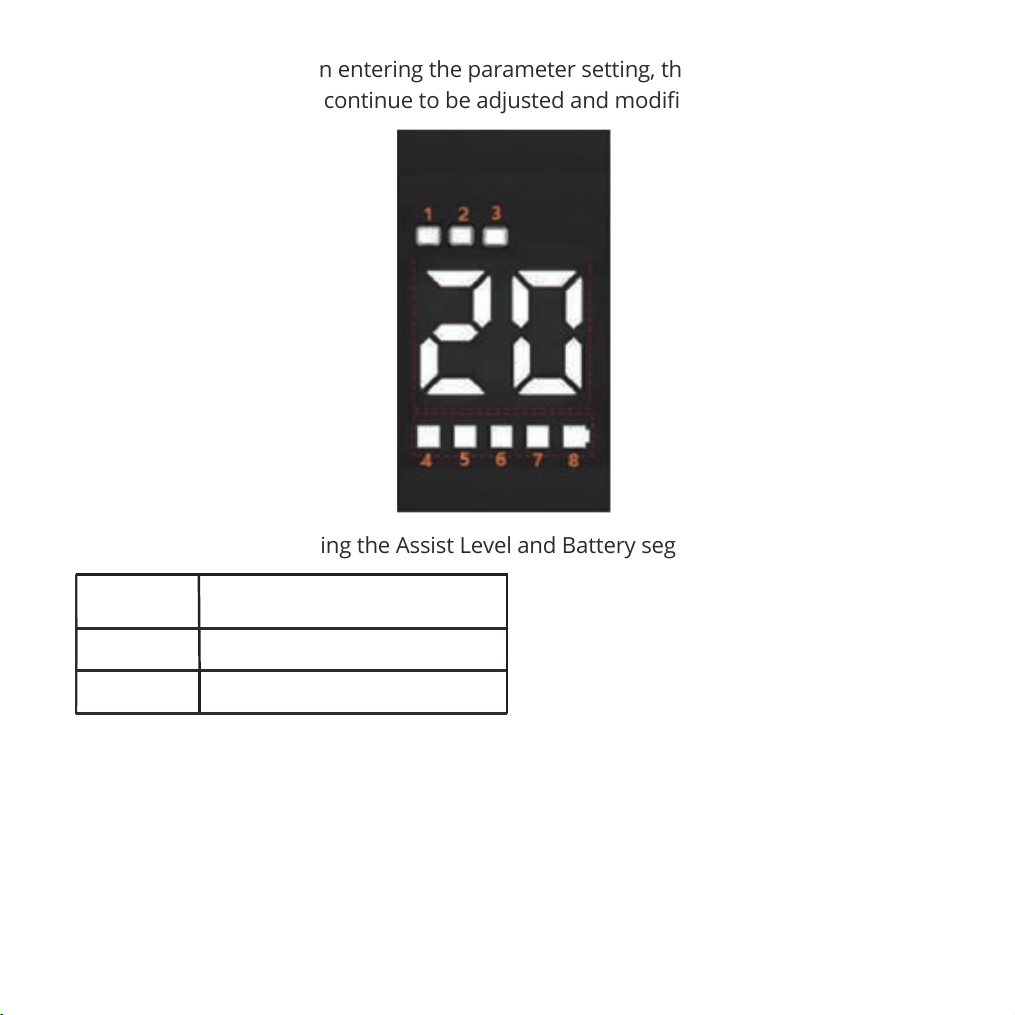
Parameter #
1
2
Function
Display Brightness (Levels 0, 1, 2)
0: Zero Start / 1: Non-Zero Start (selection)
Parameter Setting: When entering the parameter setting, the SET mark is displayed.
Parameters 1 and 2 can continue to be adjusted and modified.
Settings are adjusted using the Assist Level and Battery segment display areas
Parameter modification steps:Long press the power button + M button to enter parameter
setting, short press the power button to switch the parameter number.
Setting item 1: Short press the M button to cycle through brightness levels, long press the
power button + M to save the setting and exit to the riding interface.
Setting item 2: The default is 1 (Non-Zero Start), short press the M button to switch to 0
(Zero Start). Note: After this setting, do not hold the throttle while powering on, otherwise
pressing the power button will cause the vehicle to start accelerating immediately.
37
38
39
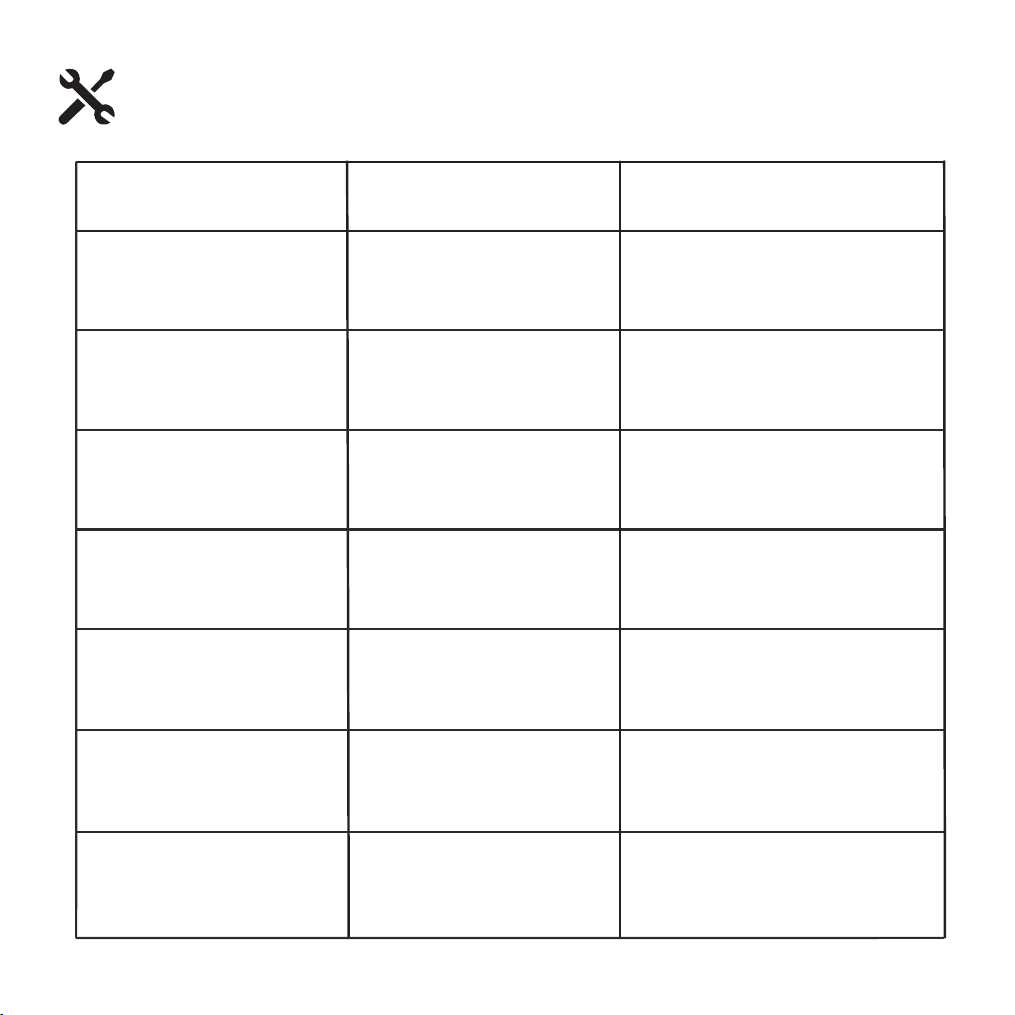
Code Meaning
Troubleshooting
E1
Check the display connection
cable. If intact, replace the
display unit.
Check the brake lever
connection cable. If intact,
replace the brake lever.
Check battery charge level.
Recharge promptly if low
Check the motor connection
cable. If intact, replace the
motor.
Check the throttle connection
cable. If intact, replace the
throttle.
Check all controller
connections. If intact, replace
the controller.
Check the cable between display
and controller. If intact, replace the
display unit.
Display
Communication Fault
Brake Lever Fault
Battery Undervoltage
Motor Fault
Throttle Fault
Controller Fault
Controller-Display
Communication Fault
E2
E3
E4
E5
E6
E7
Error Code Table
40
Warranty
Please contact our customer service team if you are experiencing problems or need
more detailed information.
US team after-sales email: [email protected]
CA team after-sales email: [email protected]
1. Users should operate in accordance with the product manual. In case of any
performance fault caused by production quality, the company shall perform
the obligations of the three guarantees in accordance with the provisions of
relevant laws and regulations of the state.
2. The company is still responsible for the after-sales service of the faults
beyond three guarantees and the major components in the three guarantees,
but there will be a cost for repair.
3. If the battery replacement is over the warranty time, our company will supply
the battery at facto
ry price. To ensure safety, and avoid pollution.
4. We do not cover physical damage due to negligent care and extreme riding.
41
(CA)www.gotraxcanada.com
(US) W W W .G OT R A X . C O M
#RideGOTRAX
(US) GOLABS,INC
GOTRAX.com
2201 Luna Rd.
Carrollton,TX 75006
(CA) Tao Motor Canada Inc.
170 Bartor Road, Unit 1 North York,
Ontario M9M 2W6,
Canada.