
98*140mm 骑马钉
Speaker does not respond:
Press and hold for 8 seconds to reset.
Light modes: press for 1 second to change to the next light mode
Press and hold for 2 seconds to turn off or on the lights.
Source: Bluetooth / U disk / TF / AUX / SD card mode:
press for 1 second to change to the next source
Mobile voice assistant:
Press and hold for 2 seconds to enter or exit voice assistant
Power switch
Light button
Mode Switching
1. Pair and connect to your device
Turn on the speaker and find the speaker name
'OontZ Angle 3XL Gen2'' in the Bluetooth settings on your phone.
Select the device 'OontZ Angle 3XL Gen2'' to connect.
Friendly reminder : If the speaker name doesn't appear in the
Bluetooth settings on your smartphone, make sure the speaker is in
pairing mode. Pairing button should be flashing. If solid, the speaker
is connected to another device, press the Pairing button for 1 second
to disconnect from the other device.
-
-
●
●
●
●
●
●
2. Dual speaker mode
Power on both speakers. Both should have a flashing 'Pairing button'
to indicate in pairing mode .
Press and hold the "Pairing button" on Speaker A for 2 seconds until
the White light starts to flash.
Speaker B will automatically search for and pair with Speaker A.
Once successfully paired together, the 'Pairing button' on Speaker A
will flash White quickly and Speaker B will flash White slowly.
Select Speaker A in the Bluetooth settings on your smartphone.
-
-
-
-
-
Driver Unit:
Mid-high frequency speaker: 2*67mm
Subwoofer: 1*105mm
Power: 70W
Charging time: 4H
Charging support: 5V/3A
Playing time: 10H (affected by volume and sound source)
USB-A Smartphone Charging: 5V/1A
Bluetooth version: V5.3
Frequency response range: 65Hz-20KHz
Product size: 320*132*130mm
Play / Pause
Lighting options
Power On/Off
Charging Indicator
Volume - / Previous song
Refer to Page 4 and 5 for button function details.
Volume + / Next song
Bluetooth / Dual Pairing
Source:
(Bluetooth, USB,TF card, AUX)
3.5mm Aux Cable Type-C Charging Cable
Strap ×2
Package Content
1 2 3 4 5 6 7 8
Bluetooth Pairing
9
Other Functions RF exposure statement
Product Specifications
This speaker is able to charge your smartphone while playing
audio. Connect your smartphone to the Port labeled USB with
a USB-A cable. If there is no audio being played the speaker
will automatically shut off after 30 minutes and will no longer
charge your Smartphone.
USB-A smartphone charging
Connect the speaker to a music device with a 3.5mm audio
cable (included) to play the audio on the speaker from the
music device.
Aux input mode
Insert a card to the speaker and it can play music automatically.
TF/SD card mode
Insert a USB flash drive to the speaker and it can play music
automatically.
USB flash drive mode
Long Press“ ” 8s to reset the speaker, If the reset is successful,
the speaker will automatically shut down
Reset
Button Configuration Port Configuration
Play/Pause: Short press for 1 second
Answer/End call: short press for 1 second
Reject call: Long press for 2 seconds
Play / Pause
Volume up: short press
Next song: Press and hold for 2 seconds
Volume+
Pairing button
Volume down: short press
Previous song: Press and hold for 2 seconds
Bluetooth pairing: If flashing ready to pair to your device. If solid
connected to another device, press for 1 second to disconnect
the other device. Refer to Page 7 - '1. Pair and connect your
device' for pairing and connecting with your smartphone.
Dual speaker mode: Connect two speakers together to play in
dual stereo. Press for 2 seconds to enter or exit Dual speaker
mode. Refer to Page 7 - '2. Dual speaker mode' for pairing and
connecting two speakers together.
Volume-
Power on/off: long press for 2 seconds
EQ Mode: Audio prompt
Press once to switch between Indoor Mode and Outdoor Mode
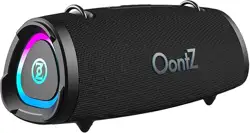
OontZ Angle 3XL Gen2
My device
BT
Settings Bluetooth
Automatic shutdown
1 . If the speaker is not paired with a device or if there is no audio
playback when paired to a device, the speaker will automatically
turn off after 30 minutes.
2 . When the speaker battery is too low, the speaker will automatically
shut off.
Button Function Details
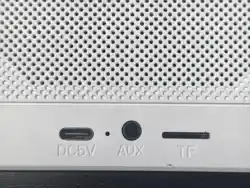
Type C charging
USB flash drive /
USB-A Smartphone Charging
Aux input
TF card slot
User Guide
User Guide
Angle 3XL Gen2
This equipment complies with the FCC radiation exposure limits
set forth for an uncontrolled environment. This transmitter must
not be co-located or operating in conjunction with any other
antenna or transmitter.
FCC Warning
This device complies with Part 15 of the FCC Rules. Operation is
subject to the following two conditions:
(1) This device may not cause harmful interference, and (2) this
device must accept any interference received, including interfer-
ence that may cause undesired operation.
Note: This equipment has been tested and found to comply with
the limits for a Class B digital device, pursuant to part 15 of the
FCC Rules. These limits are designed to provide reasonable
protection against harmful interference in a residential installation.
This equipment generates, uses and can radiate radio frequency
energy and, if not installed and used in accordance with the
instructions, may cause harmful interference to radio communica-
tions. However, there is no guarantee that interference will not
occur in a particular installation. If this equipment does cause
harmful interference to radio or television reception, which can be
determined by turning the equipment off and on, the user is
encouraged to try to correct the interference by one or more of the
following measures:
- Reorient or relocate the receiving antenna.
- Increase the separation between the equipment and receiver.
- Connect the equipment into an outlet on a circuit different from
that to which the receiver is connected.
- Consult the dealer or an experienced radio/TV technician for
help.
Note 2: Any changes or modifications to this unit not expressly
approved by the party responsible for compliance could void the
user's authority to operate the equipment.
3 Gen2