MUDDY
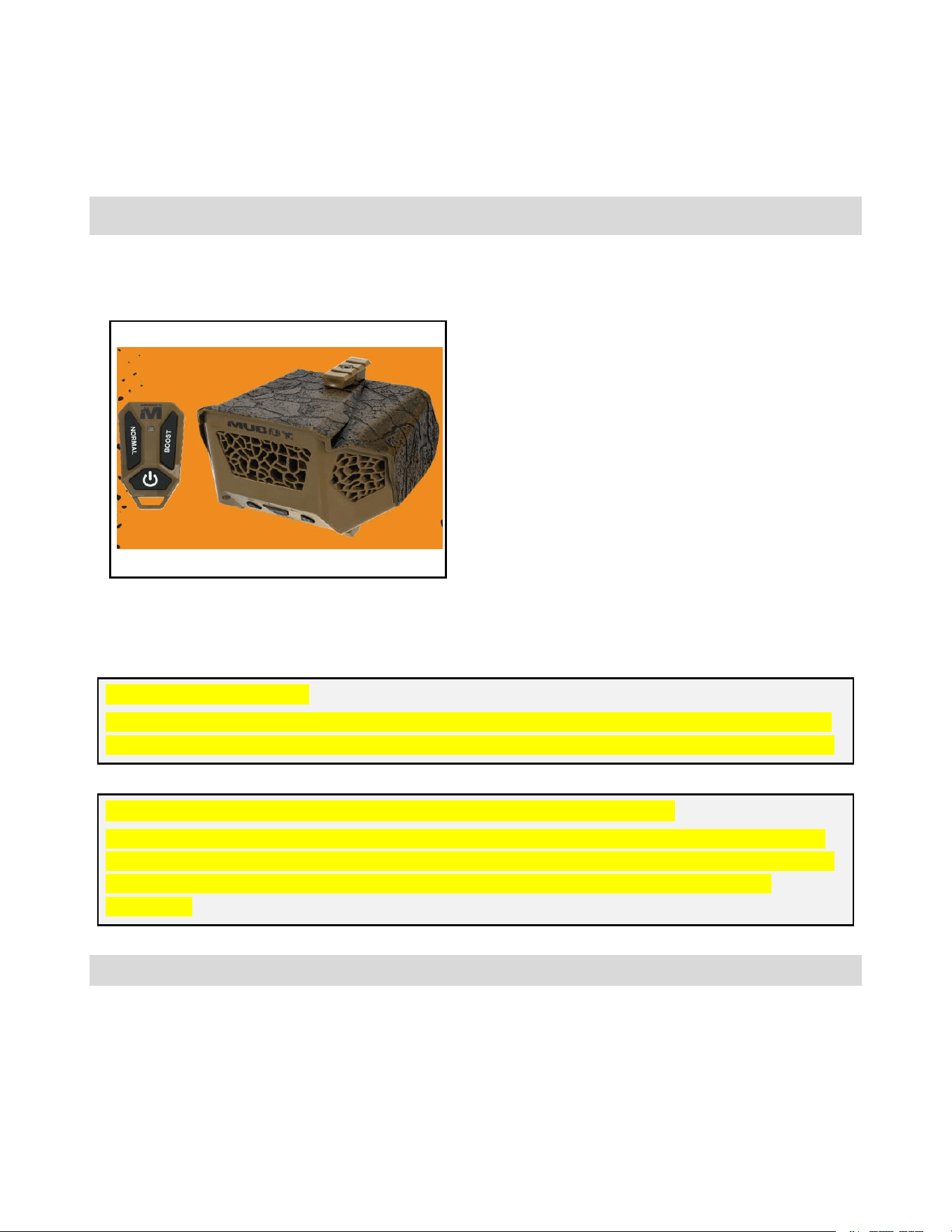
Muddy Ozone Generator 500
USER MANUAL PRE-FINAL DRAFT
ENGLISH VERSION
• 200 mg/h standard output
• 300 mg/h boost 1 output
• 500 mg/h boost 2 output
• 10-minute clean cycle with auto shutoff
• 12 V / 5000 mAh rechargeable battery
• USB-C battery charging
• 3-button remote control with pairing mode
• Multi-position mounting system
READ ALL INSTRUCTIONS BEFORE OPERATING
OZONE IS A POWERFUL OXIDIZER AND MUST BE USED WITH CARE
CRITICAL DRAFT NOTE
This manual intentionally highlights missing information, unresolved items, and source conflicts.
Those sections must be completed and approved before this document is released to end users.
OZONE EXPOSURE WARNING - INCOMPLETE SOURCE PACKAGE
The source specification documents confirm that this product generates ozone, but they do not
include a complete consumer-facing warning block for exposure limits, re-entry timing, occupied-
space restrictions, or medical cautions. A final safety statement must be inserted before
publication.
OPERATOR MUST READ AND UNDERSTAND THIS MANUAL BEFORE USE
INTRODUCTION AND BOX CONTENTS
Thank you for choosing the Muddy Ozone Generator 500. This device is designed to help reduce odor by drawing in
ambient oxygen, converting it to ozone through an internal corona-discharge process, and dispersing it with an internal
fan. The product documentation also indicates intended mounting above the user position and use with prevailing airflow.
Box contents
• Main unit
• Instruction manual
• Warranty information
• Rechargeable Battery
• Mounting accessories based on final packaged configuration
• Remote
Product controls and indicators
Control / Indicator
Function
Power button
Press and hold to power on. Press again to power off.
Mode button
Cycles Standard -> Boost 1 -> Boost 2 -> Clean.
Battery button
Press and hold to display battery level on battery
LEDs.
Green LED
Indicates Standard, boost 1, Clean modes.
Blue LED
Indicates Boost 2 mode.
Remote POWER
Toggles power on / off.
Remote NORMAL
Short press sets Normal mode. Press and hold to
start pairing mode.
Remote BOOST
If not already in Boost, enters Boost 1. If already in
Boost, toggles Boost 1 / Boost 2.
Output modes
Mode
Output / Behavior
Standard
200 mg/h nominal output
Boost 1
300 mg/h nominal output
Boost 2
500 mg/h nominal output
Clean
200 mg/h for 10 minutes, then automatic shutoff
GENERAL OPERATING INSTRUCTIONS
Initial setup
• Remove the product and accessories from the package.
• Inspect the unit, battery pack, and mounting hardware for visible damage.
• Install the battery in the battery compartment. The compartment uses a drop-down door design for easier access while
mounted overhead.
• Charge the battery if needed using the USB-C charging port on the battery pack.
• Mount the unit using the 1/4"-20 brass insert, snap-fit dovetail attachment point, and the applicable bracket or adapter for the
final package configuration.
Main unit operation
• Press POWER to turn the unit on.
• Press MODE to cycle through Standard, Boost 1, Boost 2, and Clean.
• Use Standard for routine operation.
• Use Boost 1 or Boost 2 for higher output in open-air environments.
• Use Clean in enclosed areas to quickly clean equipment. The unit will run for 10 minutes and then shut off automatically.
Remote pairing
• Turn the main unit on.
• Press and hold the NORMAL button on the remote to send the pairing command.
• If pairing mode is accepted, the three mode indicator LEDs on the main unit flash slowly at the same time.
• Pairing mode remains active for 30 seconds.
• During that 30-second window, briefly press the NORMAL button once to save the remote ID and enter remote control mode.
• If a button other than NORMAL is pressed during pairing, pairing fails and must be repeated.
• If no remote command is received within 30 seconds, pairing mode times out, exits, and clears the previously paired remote ID.
Remote operation
• Short press NORMAL to place the main unit in Normal mode.
• Short press BOOST: if the unit is not already in Boost mode, it enters Boost 1.
• Short press BOOST again while already in Boost mode to toggle between Boost 1 and Boost 2.
• Short press POWER to switch the main unit between power on and power off.
Battery level indication
LEDs shown
Approximate charge state
4 LEDs
100% / approx. 11.54 V
3 LEDs
75% / approx. 11.26 V
2 LEDs
50% / approx. 10.66 V
1 LED
25% / approx. 9.60 V
WARNING — OZONE IS A POWERFUL OXIDIZER
This product generates ozone. Exposure controls, occupied-space restrictions, re-entry timing, medical
warnings, and any maximum treatment duration must be finalized by the product owner, regulatory team, or
safety reviewer before this manual is released
.
OPEN ITEM — FINAL SAFETY LANGUAGE STILL MISSING
This draft should not be treated as the final consumer safety section. At minimum, the final
release still requires ozone exposure statement, intended-use environment, prohibited-use
environment, re-entry guidance, child safety statement, battery disposal warning, and any
region-specific chemical or Proposition 65 text.
SAFETY PRECAUTIONS
General safety
•
Read and understand this manual before operating the product.
•
Use only the specified rechargeable battery approved for this unit.
•
Do not modify, disassemble, puncture, crush, or attempt to repair the product or battery.
• Do not use the unit if the housing, battery, charging port, or mounting hardware is damaged.
• Keep all fan openings and airflow paths free of obstruction.
• Do not expose the unit or battery to fire, excessive heat, or water immersion.
• Do not continue use if abnormal odor, overheating, or visible damage is observed.
Battery and electrical safety
• Charge the battery only through the intended USB-C charging interface on the approved battery pack.
• Do not use damaged charging cables, damaged adapters, or visibly damaged batteries.
• Do not short battery terminals or substitute non-approved power sources.
Use limitations
•
Do not open the generator housing.
• Do not block the air outlet or fan intake.
• Do not immerse the product in water.
•
Do not leave the unit installed insecurely where it can fall from height.
BATTERY, MAINTENANCE, AND TROUBLESHOOTING
Basic maintenance
• Turn the unit off before cleaning or inspection.
• Keep air inlets and outlets free of debris.
•
Clean exterior surfaces with a soft dry cloth or a lightly dampened cloth.
• Do not use solvents, abrasive cleaners, or aggressive chemicals.
•
Periodically inspect mounting hardware and battery condition.
Quick troubleshooting
Problem
Possible cause
Direct action
Unit does not turn on
Battery is discharged or not installed
correctly
Charge battery, reinstall it, and try
again.
Unit shuts off by itself
Clean mode completed its timed cycle
This is normal behavior in Clean
mode.
Mode does not change
Unit is off or Mode was not actuated
correctly
Turn the unit on and press Mode again.
Key specifications
Item
Current draft value
Product name
Muddy Ozone Generator 300
Power source
12 V rechargeable lithium battery
Battery capacity
5000 mAh
Operating current
< 850 mA
Standby current
< 10 uA
Expected runtime
10 hours in Standard mode
Operating temperature
-20 °C to 60 °C
Regulatory and disposal status
Item
Status in source package
FCC
Referenced
ISED / IC
Referenced
UN38.3
Referenced for battery
IP rating
Listed only as IPXX — not final
California Proposition 65
Referenced
RoHS
Not marked approved in the draft
Item
Status in source package
WEEE
Not marked approved in the draft
Muddy Ozone Generator 500 - PREFINAL DRAFT
MANUAL
Page 6
REGULATORY AND RELEASE GAPS
Compliance status reported in source draft
SOURCE CONFLICT
UN38.3 is not checked in the early compliance checklist, but it is listed later as the certification for
lithium batteries. Verify final battery compliance status.
INFORMATION REQUIRED
IP rating is still shown as IPXX, not a final protection level. Do not publish a final water / dust
claim until IP testing is closed.
Pre-release completion checklist
• Insert approved ozone exposure warning language.
• Confirm exact retail box contents and mounting hardware list.
• Confirm remote specifications: range, battery, environmental rating, and pairing limits.
• Confirm final IP rating and compliance declarations.
• Close out battery transportation and recycling language.
• Add final warranty, customer support, and disposal text.

Muddy Ozone Generator 500 - PREFINAL DRAFT
MANUAL
Page 7
FCC STATEMENT
1. This device complies with Part 15 of the FCC Rules. Operation is subject to the following
twoconditions:
(1) This device may not cause harmful interference,and
(2) This device must accept any interference received, including interference that may causeundesired
operation.
2. Changes or modifications not expressly approved by the party responsible for compliancecould void
the user's authority to operate the equipment.
NOTE: This equipment has been tested and found to comply with the limits for a Class B digitaldevice,
pursuant to Part 15 of the FCC Rules. These limits are designed to provide reasonableprotection
against harmful interference in a residential installation.
This equipment generates, uses and can radiate radio frequency energy and, if not installed andused in
accordance with the instructions, may cause harmful interference to radiocommunications. However,
there is no guarantee that interference will not occur in a particularinstallation. If this equipment does
cause harmful interference to radio or television reception,which can be determined by turning the
equipment off and on, the user is encouraged to try tocorrect the interference by one or more of the
following measures:
Reorient or relocate the receiving antenna.
Increase the separation between the equipment and receiver.
Connect the equipment into an outlet on a circuit different from that to which the receiver isconnected.
Consult the dealer or an experienced radio/TV technician for help.
IC warning
- English:
This device contains licence-exempt transmitter(s)/receiver(s) that comply with Innovation,Science and
Economic Development Canada’s licence-exempt RSS(s). Operation is subject to thefollowing two
conditions:
(1) This device may not cause interference; and
(2) This device must accept any interference, including interference that may cause undesiredoperation
of the device.
- French:
Cet appareil contient des émetteurs / récepteurs exemptés de licence conformes aux RSS
(RSS)d'Innovation, Sciences et Développement économique Canada. L'exploitation est autorisée
auxdeux conditions suivantes :
(1) l'appareil ne doit pas produire de brouillage, et
(2) l'utilisateur de l'appareil doit accepter tout brouillage radio électrique subi, même si le brouillage est
susceptible d'en compromettre le fonctionnement."