User Manual
EN DE
FR
ES
NL
PL
IT
Model: TW10
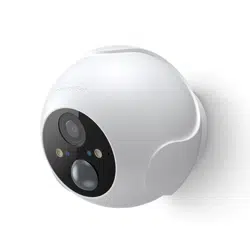
Wireless Outdoor
Cam
TW10

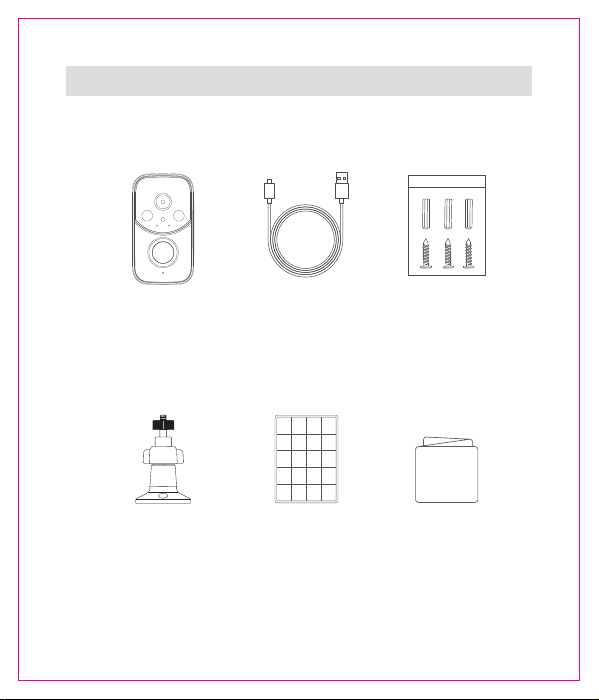
Wireless Cam
Camera Mount Solar Panel
Charging Cable Mounting Screw
User Manual
User Manual
Packing List
1
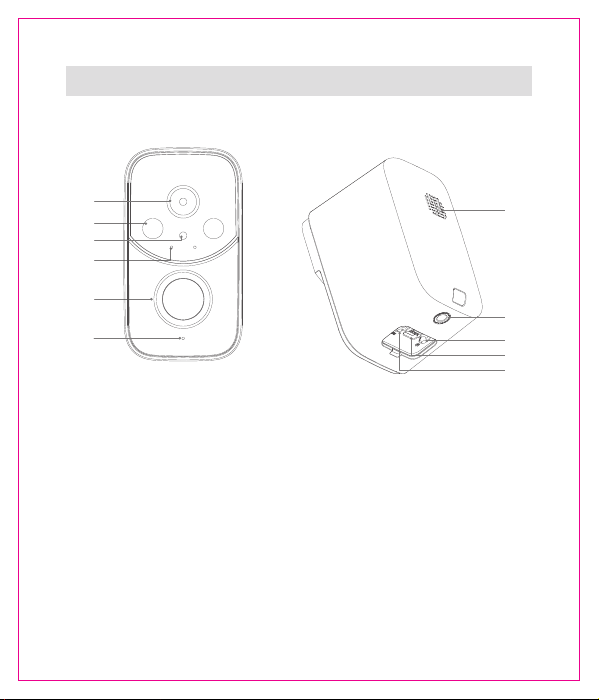
• The power button, reset button, and charging port are located under the silicone
cover.
• C
amera Power on/off: Press and hold the "power button" for 5 seconds until you
hear the voice prompt.
• Camera Reset: Press
and hold
the "reset button" for 5 seconds until you hear the
voice prompt.
Product Diagram
①
②
③
④
Lens
Spotlight
Light sensor
Indicator light
⑨
⑩
⑪
Power button
USB charging port
Reset button
⑥
⑤
①
②
③
④
⑦
⑧
⑨
⑩
⑪
PIR motion sensor
Microphone
Speaker
Screw mount
⑤
⑥
⑦
⑧
2
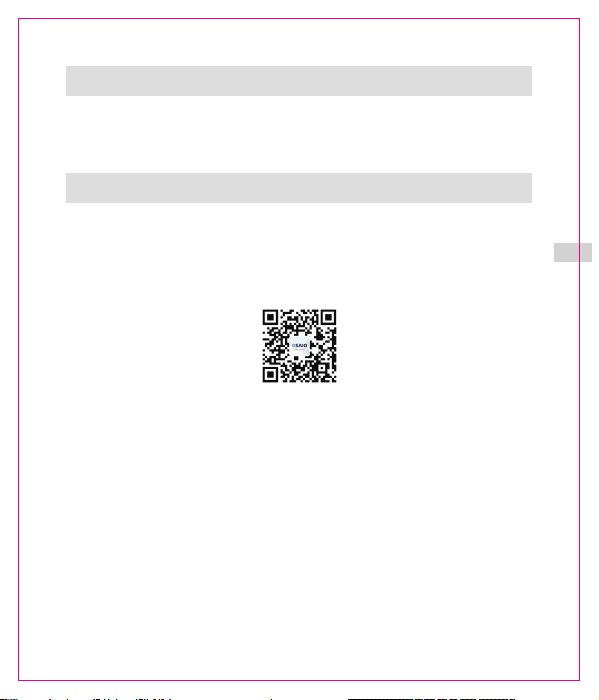
Osaio App
Please search "Osaio" on Google Play / App Store, or scanning the QR code to
download the App. Osaio is our trusted cloud service partner, delivering secure
and seamless video experiences for Nkccnur users. All data is stored on local
servers in accordance with regional regulations, ensuring privacy and peace of
mind.
Android / iOS
Warranty
30 days return policy and 12 months limited warranty
Timely customer service via [email protected]
3
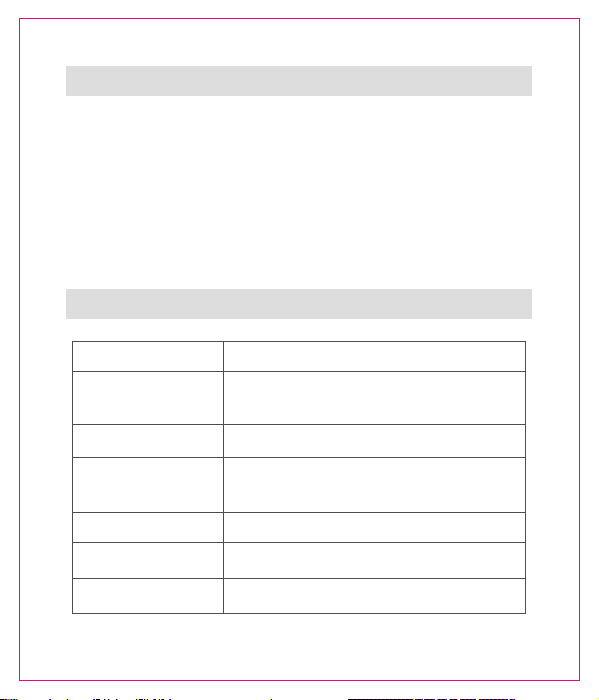
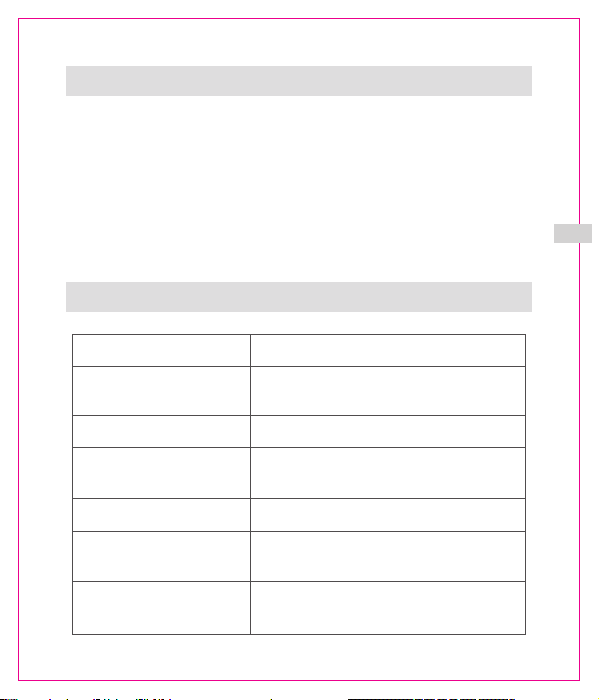
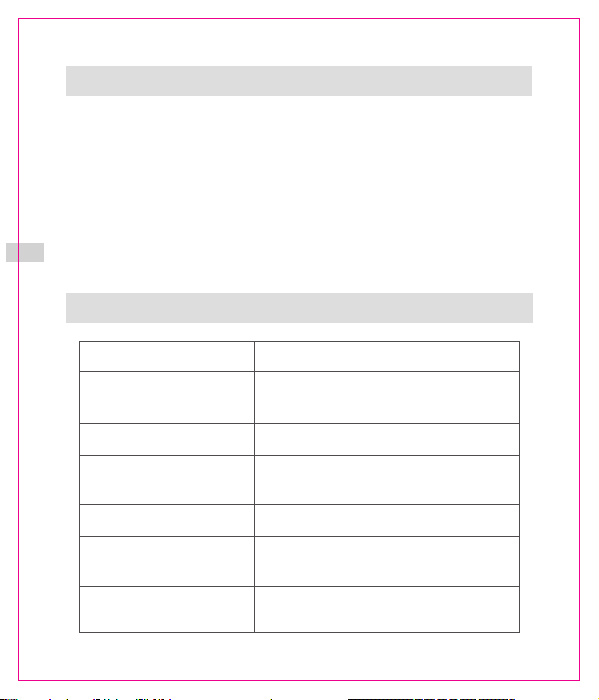
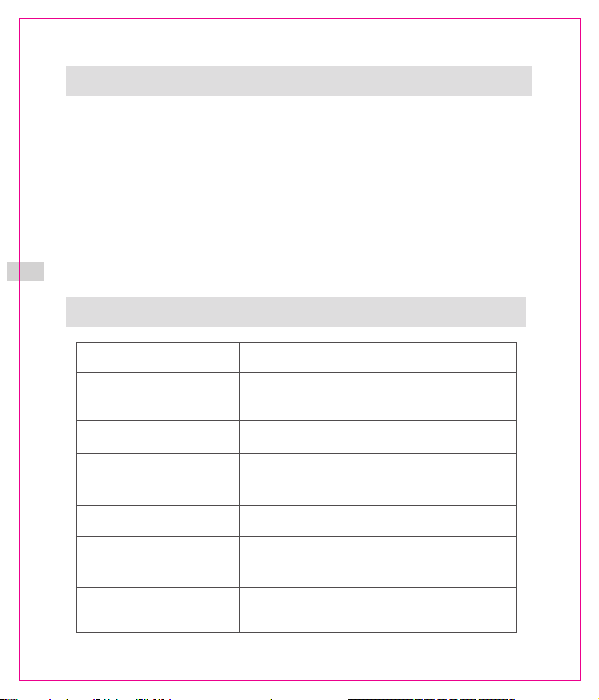
Indicator light
1.Search for "Osaio" on Google Play or the App Store to download the
Osaio app;
2.Plug in your camera and wait until the indicator light flashes red;
3.Connect your phone to a 2.4 GHz Wi-Fi network, log in to the Osaio app,
and tap "+" to add your camera;
4.Follow the on-screen instructions to complete the setup.
Solid red light
Flashing red light
Flashing green light
The device is ready to connect
Connection is in progress
Status
Wi-Fi account or password is wrong, please
reconnect
The device is powered on and initializing or
is charging
Solid green light
Indicator light o
The device detects motion or is fully charged
The device is in sleep mode or not powered on
Flashing between
green and red
LED Indicator
How to set up
4

• The recommended temperature range for devices and accessories is 0 °C to 45°C (0
°F to 113 °F).
• Unless specically indicated that it is safe to do so in the user guide or instruction
manual, do not use the device in an environment that exceeds the recommended
low or high temperature.
• Unless specically indicated that it is safe to do so in the user guide, or instruction
manual, never expose the device to strong sunshine or a too-wet environment.
• For pluggable equipment, the socket outlet should be easily accessible.
Child Safety
• THIS DEVICE IS NOT A TOY.
• Choking Hazard: This product contains (or comes with) small parts, plastic
elements, cables, and parts that may cause choking hazards. Keep your camera
and its accessories out of the reach of small children. Consult a physician
immediately if small parts are swallowed.
• Strangulation Hazard: Children get strangled in cords. Keep cords out of the reach
of children (more than 3 ft / 0.9 m away)
Important Safety Instructions
5
Osaio App
Android / iOS
Garantie
30 Tage Rickgaberecht und 12 Monate eingeschrankte Garantie Rechtzeitiger
Kundenservice über [email protected]
Bitte laden Sie die App herunter, indem Sie nach "Osaio" suchen oder den
folgenden QR-Code scannen. Osaio ist unser zuverlässiger Cloud-Service-Partner
und bietet Nkccnur-Nutzern sichere und nahtlose Videoerlebnisse. Alle Daten
werden gemäß den regionalen Vorschriften auf lokalen Servern gespeichert, um
Datenschutz und Sicherheit zu gewährleisten.
DE
6
7
1.Suchen Sie bei Google Play oder im App Store nach „Osaio“, um die
Osaio-App herunterzuladen;
2.Schließen Sie Ihre Kamera an und warten Sie, bis die Kontrollleuchte rot
blinkt;
3.Verbinden Sie Ihr Telefon mit einem 2,4-GHz-WLAN, melden Sie sich in
der Osaio-App an und tippen Sie auf „+“, um Ihre Kamera hinzuzufügen;
4.Folgen Sie den Anweisungen in der App, um die Einrichtung abzuschließen.
LED-Anzeige
Kontrollleuchte
Rotes Dauerlicht
Blinkendes rotes Licht
Blinkt zwischen grün
und rot
Das Gerät ist bereit für die Verbindung
Wi-Fi-Konto oder Passwort ist falsch, bitte
erneut verbinden
Status
Das Gerät erkennt Bewegung oder ist
vollständig geladen.
Das Gerät ist eingeschaltet und initialisiert
sich oder wird geladen
Grünes Dauerlicht
Das Gerät bendet sich im Ruhezustand
oder ist nicht eingeschaltet
Anzeigelampe aus
Grünes Blinklicht
Verbindung ist in Arbeit
Wie einrichten
DE
• Der empfohlene Temperaturbereich für Geräte und Zubehör beträgt 0 °C bis 45 °C
(0 °F bis 113 °F).
• Verwenden Sie das Gerät nicht in einer Umgebung, in der die empfohlene niedrige
oder hohe Temperatur überschritten wird, es sei denn, dies ist in der Bedienung-
sanleitung oder im Benutzerhandbuch ausdrücklich als sicher angegeben.
• Sofern in der Bedienungsanleitung oder im Handbuch nicht ausdrücklich darauf
hingewiesen wird, dass dies sicher ist, dürfen Sie das Gerät niemals starker
Sonneneinstrahlung oder einer zu feuchten Umgebung aussetzen.
• Bei steckbaren Geräten sollte die Steckdose leicht zugänglich sein.
Kindersicherheit
• DIESES GERÄT IST KEIN SPIELZEUG.
• Erstickungsgefahr: Dieses Produkt enthält (oder wird mit) Kleinteilen, Kunststoele-
menten, Kabeln und Teilen geliefert, die Erstickungsgefahr verursachen können.
Bewahren Sie Ihre Kamera und deren Zubehör außerhalb der Reichweite von
kleinen Kindern auf. Suchen Sie sofort einen Arzt auf, wenn kleine Teile verschluckt
wurden.
• Strangulationsgefahr: Kinder können sich in Kabeln strangulieren. Bewahren Sie
Kabel außerhalb der Reichweite von Kindern auf (mehr als 0,9 m entfernt).
Wichtige Sicherheitshinweise
DE
8
Osaio App
Scarica l'app cercando "Osaio" o scansionando il codice QR qui sotto. Osaio è il
nostro partner di ducia per i servizi cloud e ore esperienze video sicure e uide
agli utenti Nkccnur. Tutti i dati vengono archiviati su server locali, in conformità
con le normative regionali, garantendo privacy e tranquillità.
Android / iOS
Garanzia
Politica di restituzione di 30 giorni e garanzia limitata di 12 mesi Servizio clienti
tempestivo tramite [email protected]
IT
9
Indicatore LED
Indicatori luminosi
Luce rossa ssa
Luce verde ssa
Indicatore luminoso spento
Luce rossa lampeggiante
Luce verde lampeggiante
Il dispositivo è pronto per la connessione
Stato
L'account o la password del Wi-Fi sono
errati, ricollegarsi.
La connessione è in corso
Il dispositivo è acceso e in fase di
inizializzazione o è in carica.
Il dispositivo rileva un movimento o è
completamente carico.
Il dispositivo è in modalità di sospensione
o non è acceso.
Lampeggia tra il verde
e il rosso
Come configurare
1.Cerca "Osaio" su Google Play o sull'App Store per scaricare l'app Osaio;
2.Collega la fotocamera e attendi che l'indicatore lampeggi in rosso;
3.Connetti il telefono a una rete Wi-Fi a 2,4 GHz, accedi all'app Osaio e
clicca su "+" per aggiungere la fotocamera;
4.Segui le istruzioni nell'app per completare la configurazione.
IT
10
IT
• L'intervallo di temperatura consigliato per dispositivi e accessori è compreso tra 0
°C e 45 °C (0 °F e 113 °F).
• A meno che non sia specicamente indicato che è sicuro farlo nella guida per
l'utente o nel manuale di istruzioni, non utilizzare il dispositivo in un ambiente che
superi la temperatura bassa o alta consigliata.
• A meno che non sia specicamente indicato nel manuale d'uso o nelle istruzioni che
ne consentono l'uso in sicurezza, non esporre mai il dispositivo alla luce solare
diretta o a un ambiente troppo umido.
• Per le apparecchiature collegabili, la presa di corrente deve essere facilmente
accessibile.
Sicurezza dei bambini
• QUESTO DISPOSITIVO NON È UN GIOCATTOLO.
• Rischio di soocamento: questo prodotto contiene (o viene fornito con) piccole
parti, elementi in plastica, cavi e parti che possono causare rischi di soocamento.
Tenere la fotocamera e i suoi accessori fuori dalla portata dei bambini piccoli.
Consultare immediatamente un medico in caso di ingestione di piccole parti.
• Rischio di strangolamento: i bambini possono rimanere strangolati nei cavi. Tenere
i cavi fuori dalla portata dei bambini (a più di 3 piedi/0,9 m di distanza)
Importanti istruzioni di sicurezza
11
FR
Osaio App
Android / iOS
Garantie
Politique de retour de 30 jours et garantie limitee de 12 mois Service client en
temps opportun via [email protected]
Veuillez telecharger I' application en recherchant "Osaio" ou en scannant le code QR
ci-dessous. Osaio est notre partenaire de conance pour les services cloud, orant des
expériences vidéo sécurisées et uides aux utilisateurs du Nkccnur. Toutes les données
sont stockées sur des serveurs locaux, conformément à la réglementation régionale,
garantissant condentialité et tranquillité d'esprit.
12
FR
13
L'appareil est prêt à être connecté
La connexion est en cours
Statut
Le compte ou le mot de passe Wi-Fi est
erroné, veuillez vous reconnecter
L'appareil est sous tension et en cours
d'initialisation ou de chargement.
L'appareil détecte un mouvement ou est
complètement chargé.
L'appareil est en mode veille ou n'est pas
sous tension
Indicateur LED
Voyant
Lumière rouge fixe
Lumière rouge clignotante
Lumière vert clignotante
Lumière vert fixe
Voyant lumineux éteint
Clignotant entre vert
et rouge
Comment configurer
1.Recherchez "Osaio" sur Google Play ou l'App Store pour télécharger
l'application Osaio;
2.Branchez votre caméra et attendez que le voyant clignote en rouge;
3.Connectez votre téléphone à un réseau Wi-Fi 2,4 GHz, connectez-vous à
l'application Osaio et cliquez sur "+" pour ajouter votre caméra;
4.Suivez les instructions de l'application pour terminer la configuration.
FR
Consignes de sécurité importantes
• La plage de température recommandée pour les appareils et accessoires est de 0 °C
à 45 °C (0 °F à 113 °F).
• Sauf indication spécique dans le guide d'utilisation ou le manuel d'instructions,
n'utilisez pas l'appareil dans un environnement qui dépasse la température basse ou
élevée recommandée.
• Sauf indication contraire spécique dans le guide d’utilisation ou le manuel
d’instructions, n’exposez jamais l’appareil à un fort ensoleillement ou à un
environnement trop humide.
• Pour les équipements enchables, la prise de courant doit être facilement
accessible.
Sécurité des enfants
• CET APPAREIL N'EST PAS UN JOUET.
• Risque d'étouement: ce produit contient (ou est livré avec) des petites pièces, des
éléments en plastique, des câbles et des pièces qui peuvent entraîner des risques
d'étouement. Gardez votre appareil photo et ses accessoires hors de portée des
jeunes enfants. Consultez immédiatement un médecin en cas d'ingestion de
petites pièces.
• Risque d'étranglement: les enfants peuvent s'étrangler avec les cordons. Gardez les
cordons hors de portée des enfants (à plus de 0,9 m)
14
Osaio App
Descargue la App buscando "Osaio"o escaneando el codigo QR a continuacion. Osaio es
nuestro socio de conanza en servicios en la nube, que ofrece experiencias de video
seguras y uidas a los usuarios de Nkccnur. Todos los datos se almacenan en servidores
locales de acuerdo con la normativa regional, lo que garantiza la privacidad y la
tranquilidad.
Android / iOS
Garantia
Politica de devolucion de 30 dias y garantia limitada de 12 meses Servicio al cliente
oportuno a traves de [email protected]
ES
15
Indicador LED
Luz Indicador
Luz roja fija
Luz verde fija
Luz roja parpadeada
Luz verde parpadeada
El dispositivo está listo para conectarse
El dispositivo detecta movimiento o está
completamente cargado.
Estado
La cuenta Wi-Fi o la contraseña son incorrectas,
por favor, vuelva a conectarse
El dispositivo está encendido e inicializándose
o se está cargando
El dispositivo está en modo de reposo o no
está encendido
El parpadeo entre la
luz verde y roja
Conexión en curso
Luz verde intermitente
Cómo configurar
1.Busque "Osaio" en Google Play o App Store para descargar la aplicación
Osaio;
2.Enchufe su cámara y espere hasta que el indicador parpadee en rojo;
3.Conecte su teléfono a una red Wi-Fi de 2,4 GHz, inicie sesión en la
aplicación Osaio y haga clic en "+" para añadir su cámara;
4.Siga las instrucciones de la aplicación para completar la configuración.
ES
16
• El rango de temperatura recomendado para dispositivos y accesorios es de 0 °C a
45 °C (0 °F a 113 °F).
• A menos que se indique especícamente que es seguro hacerlo en la guía del
usuario o el manual de instrucciones, no use el dispositivo en un entorno que
exceda la temperatura alta o baja recomendada.
• A menos que se indique especícamente que es seguro hacerlo en la guía del
usuario o el manual de instrucciones, nunca exponga el dispositivo a la luz solar
intensa ni a un entorno demasiado húmedo.
• Para equipos enchufables, la toma de corriente debe ser de fácil acceso.
Seguridad infantil
• ESTE DISPOSITIVO NO ES UN JUGUETE.
• Peligro de asxia: Este producto contiene (o viene con) piezas pequeñas,
elementos plásticos, cables y piezas que pueden causar peligro de asxia.
Mantenga la cámara y sus accesorios fuera del alcance de los niños pequeños.
Consulte a un médico inmediatamente si se tragan piezas pequeñas.
• Peligro de estrangulamiento: los niños pueden estrangularse con los cables.
Mantenga los cables fuera del alcance de los niños (a más de 3 pies/0,9 m de
distancia)
Instrucciones de seguridad importantes
ES
17
NL
• Het aanbevolen temperatuurbereik voor apparaten en accessoires is 0 °C tot 45 °C
(0 °F tot 113 °F).
• Tenzij speciek aangegeven dat het veilig is om dit te doen in de gebruikershan-
dleiding of instructiehandleiding, mag u het apparaat niet gebruiken in een
omgeving die de aanbevolen lage of hoge temperatuur overschrijdt.
• Tenzij in de gebruikershandleiding of instructiehandleiding speciek staat
aangegeven dat dit veilig is, mag u het apparaat nooit blootstellen aan fel zonlicht
of een te vochtige omgeving.
• Voor apparatuur met een stekker moet het stopcontact gemakkelijk toegankelijk
zijn.
Veiligheid voor kinderen
• DIT APPARAAT IS GEEN SPEELGOED.
• Verstikkingsgevaar: Dit product bevat (of wordt geleverd met) kleine onderdelen,
plastic elementen, kabels en onderdelen die verstikkingsgevaar kunnen
veroorzaken. Houd uw camera en de bijbehorende accessoires buiten bereik van
kleine kinderen. Raadpleeg onmiddellijk een arts als kleine onderdelen worden
ingeslikt.
• Wurgingsgevaar: Kinderen raken verstrikt in snoeren. Houd snoeren buiten bereik
van kinderen (meer dan 3 ft / 0,9 m afstand)
Belangrijke veiligheidsinstructies
18
PL
•
Zalecany zakres temperatur dla urządzeń i akcesoriów wynosi od 0°C do 45 °C (od 0 °F
do 113 °F).
• O ile w instrukcji obsługi lub podręczniku użytkownika nie wskazano, że jest to
bezpieczne, nie używaj urządzenia w środowisku, w którym temperatura
przekracza zalecaną niską lub wysoką.
• O ile w instrukcji obsługi lub podręczniku użytkownika nie wskazano, że jest to
bezpieczne, unikaj wystawiania urządzenia na bezpośrednie działanie promieni
słonecznych lub nadmiernie wilgotne środowisko.
• W przypadku urządzeń podłączanych do gniazdka, gniazdko powinno być łatwo
dostępne.
Bezpieczeństwo dzieci
• TO URZĄDZENIE NIE JEST ZABAWKĄ.
• Ryzyko zadławienia: Ten produkt zawiera (lub jest dostarczany z) małe części,
elementy plastikowe, kable i części, które mogą powodować ryzyko zadławienia.
Trzymaj aparat i jego akcesoria poza zasięgiem małych dzieci. W przypadku
połknięcia małych części natychmiast skonsultuj się z lekarzem.
• Ryzyko uduszenia: Dzieci mogą udusić się przewodami. Trzymaj przewody poza
zasięgiem dzieci (w odległości większej niż 3 stopy / 0,9 m)
Ważne instrukcje bezpieczeństwa
19

Note: This equipment has been tested and found to comply with the
limits for a Class B digital device, pursuant to Part 15 of the FCC Rules.
These limits are designed to provide reasonable protection against
harmful interference in a residential installation. This equipment
generates uses and can radiate radio frequency energy and, if not
installed and used in accordance with the instructions, may cause
harmful interference to radio communications. However, there is no
guarantee that interference will not occur in a particular installation.
If this equipment does cause harmful interference to radio or television
reception, which can be determined by turning the equipment o and
on, the user is encouraged to try to correct the interference by one or
more of the following measures:
• Reorient or relocate the receiving antenna.
• Increase the separation between the equipment and receiver.
• Connect the equipment into an outlet on a circuit dierent from that
to which the receiver is connected.
• Consult the dealer or an experienced radio/TV technician for help.
Important: Changes or modications not expressly approved by the
party responsible for compliance could void the user’s authority to
operate the equipment.
FCC Warning Statement
20

This device complies with part 15 of the FCC Rules. Operation is
subject to the following two conditions:
(1) This device may not cause harmful interference, and (2) this
device must accept any interference received, including interference
that may cause undesired operation.
RF Exposure Statement
To maintain compliance with FCC's RF Exposure guidelines, This
equipment should be installed and operated with minimum distance
of 20cm the radiator your body. This device and its antenna(s) must
not be co-located or operation in conjunction with any other antenna
or transmitter.
21

This device contains licence-exempt transmitter(s)/receiver(s) that comply with
Innovation, Science and Economic Development Canada’s licence-exempt RSS(s).
Operation is subject to the following two conditions: (1) This device may not cause
interference.(2) This device must accept any interference, including interference that
may cause undesired operation of the device.
L’émetteur/récepteur exempt de licence contenu dans le présent appareil est
conforme aux CNR d’Innovation, Sciences et Développement économique Canada
applicables aux appareils radio exempts de licence. L’exploitation est autorisée aux
deux conditions suivantes: (1) L’appareil ne doit pas produire de brouillage; (2)
L’appareil doit accepter tout brouillage radioélectrique subi, même si le brouillage
est susceptible d’en compromettre le fonctionnement.
IC-ID
22

This product complies with the radio interference requirements of the European
Community.
Declaration of Conformity.
Hereby. Nkccnur declares that this device is in compliance with the essential
requirements and other relevant provisions of Directive 2014/53/EU. For the
declaration of conformity, visit the Web: https://www.gncchome.com/
This product can be used across EU member states.
Due to the used enclosure material, the product shall only be connected to a USB
interface of version 2.0 or higher.
The adapter shall be installed near the equipment and shall be easily accessible.
Do not use the Device in an environment at too high or too low a temperature,
never expose the Device to strong sunshine or a too wet environment. The suitable
temperature of the equipment is 0 °C~45 °C.
When charging, please place the device in an environment that has a normal room
temperature and good ventilation. It is recommended to charge the device in an
environment with a temperature that ranges from 0 °C~45 °C.
RF exposure information: The Maximum Permissible Exposure (MPE) level has been
calculated based on a distance of d=20cm between the device and the human body.
To maintain compliance with RF exposure requirement, use product that maintain a
20cm distance between the device and human body.
CE-RED
23


Version 1.0
Made in China
4. 装订方式: 骑马钉
本设计图纸版权归本公司所有,未经本公司书
面同意不得复印.
本图纸应与说明,产品状况,产品结构设计图及有
关图纸协调使用,发现任何差异请立即通知设计师.
图档中所有尺寸比例为1:1.
公差: L(长)*(宽): +1/-1mm,H(高): ±1mm
项目信息
品牌: Nkccnur
立项时间:
大写Osaio首字母
计划时间:
型号: TW10
1. 尺寸: 89*105mm
5. 表面处理: /
2. 材质: 封面/底
120g双胶纸
内页:80g双胶纸
类型: 说明书
版本号: V1.1.9
版本变
更描述:
3. 设计主管审核:
1. 设计师:
1/1
当前页/全部页码
4. 项目经理确认:
2. 销售确认:
日 期
5. 品牌总监审核:
技术要求 设计审核
3. 印刷颜色: K:80
User Manual
EN
DE
FR
ES
NL
PL
IT
Model: TW10
Wireless Outdoor
Cam
TW10
Version 1.0
Made in China