W1
Children's intercom
Before using this product, please read the user manual carefully.
The manual is for reference only.
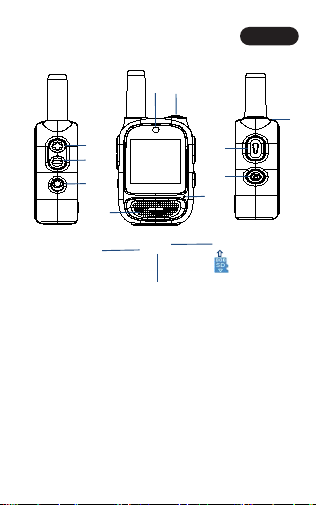
1.Product Appearance and B
utton Function Introduction
English
①
③
④
⑤
⑥
⑦
Note: SD card direction
⑧
⑨
⑩
⑫
⑪
⑬
①
①
①
①
①
①
①
②

English
N
o
t
e
:
I
t
i
s
f
o
r
b
i
d
d
e
n
t
o
p
u
l
l
a
n
d
i
n
s
e
r
t
t
h
e
c
a
r
d
w
h
e
n
w
o
r
k
i
n
g
i
n
v
i
d
e
o
/
p
h
o
t
o
/
p
l
a
y
b
a
c
k
/
m
u
s
i
c
m
o
d
e
!
N
o
t
e
:
I
t
i
s
f
o
r
b
i
d
d
e
n
t
o
p
u
l
l
a
n
d
i
n
s
e
r
t
t
h
e
c
a
r
d
w
h
e
n
w
o
r
k
i
n
g
i
n
v
i
d
e
o
/
p
h
o
t
o
/
p
l
a
y
b
a
c
k
/
m
u
s
i
c
m
o
d
e
!
N
o
t
e
:
I
t
i
s
f
o
r
b
i
d
d
e
n
t
o
p
u
l
l
a
n
d
i
n
s
e
r
t
t
h
e
c
a
r
d
w
h
e
n
w
o
r
k
i
n
g
i
n
v
i
d
e
o
/
p
h
o
t
o
/
p
l
a
y
b
a
c
k
/
m
u
s
i
c
m
o
d
e
!
N
o
t
e
:
I
t
i
s
f
o
r
b
i
d
d
e
n
t
o
p
u
l
l
a
n
d
i
n
s
e
r
t
t
h
e
c
a
r
d
w
h
e
n
w
o
r
k
i
n
g
i
n
v
i
d
e
o
/
p
h
o
t
o
/
p
l
a
y
b
a
c
k
/
m
u
s
i
c
m
o
d
e
!
N
o
t
e
:
I
t
i
s
f
o
r
b
i
d
d
e
n
t
o
p
u
l
l
a
n
d
i
n
s
e
r
t
t
h
e
c
a
r
d
w
h
e
n
w
o
r
k
i
n
g
i
n
v
i
d
e
o
/
p
h
o
t
o
/
p
l
a
y
b
a
c
k
/
m
u
s
i
c
m
o
d
e
!
N
o
t
e
:
I
t
i
s
f
o
r
b
i
d
d
e
n
t
o
p
u
l
l
a
n
d
i
n
s
e
r
t
t
h
e
c
a
r
d
w
h
e
n
w
o
r
k
i
n
g
i
n
v
i
d
e
o
/
p
h
o
t
o
/
p
l
a
y
b
a
c
k
/
m
u
s
i
c
m
o
d
e
!
Note: It is forbidden to pull and insert the card when wo
rking in video/photo/playback/music mode!
N
o
t
e
:
I
t
i
s
f
o
r
b
i
d
d
e
n
t
o
p
u
l
l
a
n
d
i
n
s
e
r
t
t
h
e
c
a
r
d
w
h
e
n
w
o
r
k
i
n
g
i
n
v
i
d
e
o
/
p
h
o
t
o
/
p
l
a
y
b
a
c
k
/
m
u
s
i
c
m
o
d
e
!
2.USB and OTG operating instructions
⑴ In USB mode, after the device is turned on, the walkie-t
alkie is connected to the computer by using a Type-C to
USB cable that supports data transmission. When the d
evice screen displays' camera image', the computer rea
ds the SD card of the walkie-talkie, and the data in the S
D card can be viewed or copied.

OTG functions:
① Android system: use Type-C to Type-C wire that sup
ports data transmission, connect the walkie-talkie with t
he smart device when the walkie-talkie is turned on, and
the smart device will automatically pop up a prompt po
p-up window or drop down the notification bar, click on
the USB connection notification and jump into the USB
flash drive, then you can view/export the machine USB fl
ash drive file; You can also open the "File Management"
of the device, find the external "USB device" icon, and cli
ck to enter the USB flash drive to view/export the machi
ne USB flash drive file.
② Apple System: Open the Device Files App, enter the B
rowse page, find the external Removable Disk icon, and
click Enter U disk to view/export the machine U disk files.
⑵
3.Equipment charging guide
English
(1) Use an adapter with an output of 5V/1A to charge the intercom
equipment, which can be fully charged in about two hours.
4.matters need attention
Please read this manual carefully before use and keep it for future
reference.
⑴Avoid eating by mistake and beating: the internal parts of the e
quipment are precise to prevent children from eating by mistake o
r beating.
⑵ When the machine is charging, the indicator light is red, and whe
n it is full, the light goes out.

English
(3) Pay attention to waterproof when bathing, washing hands or
swimming, and avoid moisture from entering the machine when
cleaning.
(4) Avoid long-term overcharge, prevent the danger of fire and e
xplosion, and do not expose to high temperature.
⑵ Turn off during flight: The walkie-talkie will transmit and recei
ve signals, and it needs to be turned off during flight.

This device complies with part 15 of the FCC Rules. Operation is subject to the
following two conditions: (1) This device may not cause harmful interference, and (2)
this device must accept any interference received, including interference that may cause
undesired operation.
Any Changes or modifications not expressly approved by the party responsible for
compliance could void the user's authority to operate the equipment.
Note: This equipment has been tested and found to comply with the limits for a Class B
digital device, pursuant to part 15 of the FCC Rules. These limits are designed to
provide reasonable protection against harmful interference in a residential installation.
This equipment generates uses and can radiate radio frequency energy and, if not
installed and used in accordance with the instructions, may cause harmful interference
to radio communications. However, there is no guarantee that interference will not
occur in a particular installation. If this equipment does cause harmful interference to
radio or television reception, which can be determined by turning the equipment off and
on, the user is encouraged to try to correct the interference by one or more of the
following measures:
-Reorient or relocate the receiving antenna.
-Increase the separation between the equipment and receiver.
-Connect the equipment into an outlet on a circuit different from that to which the
receiver is connected.
-Consult the dealer or an experienced radio/TV technician for help.
FCC Radiation Exposure statement
The device has been evaluatec to meel general RF exposure requirement. The device
can be used in portable exposure condition without restriction.