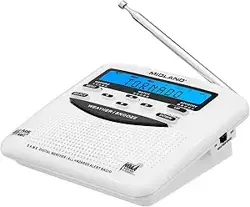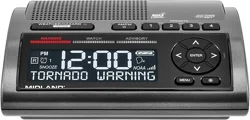
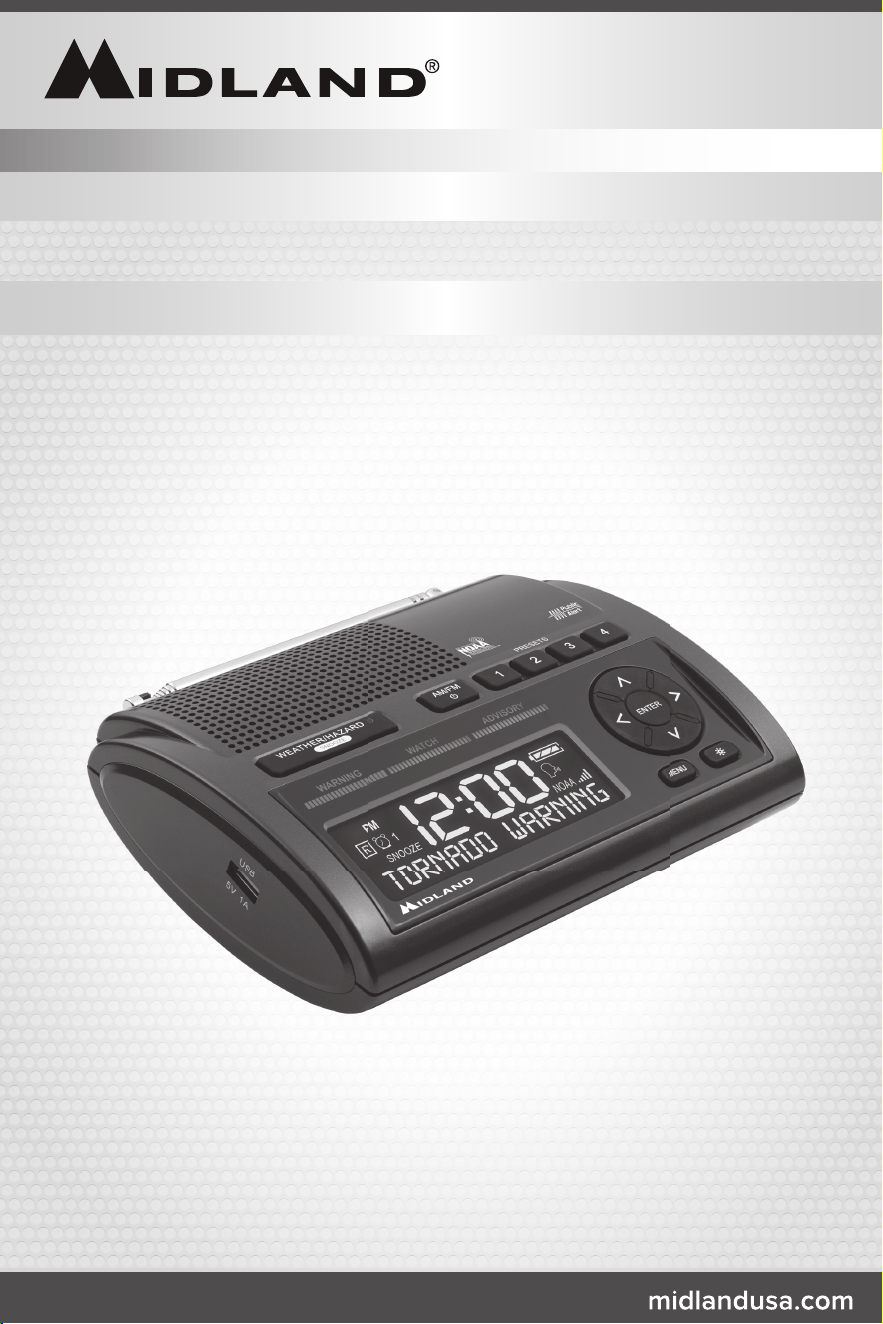
ALL HAZARDS WEATHER ALERT RADIO
WR400

Page 2 midlandusa.com
Model WR400
Quick Start Instructions
Please see page 5 for important controls and functions.
1. Place 4 AA batteries (not included) into the compartment on the underside of the radio (Note:
batteries are important because they provide emergency power for the radio in case of a power
outage).
2. Plug the AC adapter into a standard house outlet. Plug the other end of the adapter (micro
USB) into the DC jack on the back of the radio.
3. WhenpoweredonforthersttimetheWR400willgointothesetupmenu.
a.Setthelanguagebypressing“ENTER.”Selectyourdesiredlanguagebyusingthe“UP”and
“DOWN”arrowsthenpress“ENTER”again.
b.Setyourlocationbypressing“ENTER.”Younowhavetheoptionofchoosingbetween
“ANY,”“MULTIPLE,”and“SINGLE.”Press“ENTER”whenyouhavereachedyourselection.
c.If“ANY”isselectedyouwillbeaskedtoinputthetime.If“MULTIPLE”or“SINGLE”are
selectedthenyouwillbeaskedtoinputyourspeciclocationandthedisplaywillshow“01
EMPTY.”Press“ENTER”toinputyourcountry.Onceyouhaveselectedyourcountrypress
“ENTER”againandyouwillbeaskedforyourstate.Selectyourstate,thenpress“ENTER.”
Youwillnowhavealistofcountiestochoosefrom.Selectyourcountythenpress“ENTER.”
Ifyouselected“SINGLE”foryourlocationthenyouwillnowbeaskedtoinputthetime.If
youselected“MULTIPLE”foryourlocationyouwillbetakentothenextcountyentry
“02EMPTY.”Younowhavetheoptionofselecting“NEARBY.”Thisgivesyoutheoptionof
havingtheradioautomaticallypopulateyourselectedcountyentrywiththenextclosest
countycode.Ifyouwanttomanuallyenteryourcountythenpressthe“UP”or“DOWN”
arrows to select your country and repeat the steps necessary for selecting your county.
Onceyouhaveprogrammedallofyourdesiredcountiespressthe“MENU”buttonto
set the time.
d.When“SETTIME”isdisplayedonthescreen,press“ENTER”tosetthetime.Thedisplay
willshow“SETTINGHOUR.”Pressthe“UP”or“DOWN”buttonstosetthehourthen
pressthe“RIGHT”buttontotoggletosettingtheminutes.Aftersettingtheminutespress
“ENTER.”
e.Nowyouwillbeaskedto“SETCHANNEL.”Pullouttheantennaandextendtoitsfull
lengthabovetheradio.Press“ENTER”andscrolltothedesiredchannelusingthe“UP”
or“DOWN”buttons.Findthechannelforyourareabyvisiting
www.nws.noaa.gov/nwr/coverage/station_listing.html and reviewing the corresponding
frequency and channel for your area. Once you have selected your desired weather channel
press“ENTER.”
f. Yoursettingshavenowbeensavedandtheradioisreadytouse.Youarenowableto
receive weather alerts.
4. Pressthe“WEATHER/HAZARD”buttontolistentotheweatherradio.Thenusethevolume
wheel on the side of the radio to adjust the volume to the desired listening level.
Weather Channel Frequencies
Channel Number Frequency (MHz)
1 162.400
2 162.425
3 162.450
4 162.475
5 162.500
6 162.525
7 162.550
To get the S.A.M.E. code and weather channel for your area, call
1-888-697-7263 or visit
www.nws.noaa.gov/nwr/coverage/county_coverage.html

Page 3midlandusa.com
Model WR400
QuickStartInstructions 2
ProductInformation 4
IconsontheDisplay 4
ControlsandFunctions 5
Setting the Time 6
Setting the Alarm 6
Choosing the Alarm Type 6
Setting the Weather Channel 6
TurningtheWeatherRadioOnandOff 6
ListeningtotheWeatherRadio 6
SettingYourLocation 7
ManuallyEnteringaS.A.M.E.CountyCode 7
Choosing an Alert Type 7
Selectable Alert Option 8
Testing the Alert Siren 8
ReviewingAlerts 8
Test Signals Broadcast by NWS 8
NoReceptionWarning 8
AM/FMRadio 8
TurningtheAM/FMRadioOnandOff 9
TuningtheAM/FMRadio 9
SettingtheAM/FMPresetStations 9
Reception 9
AboutNOAA,NWS,andS.A.M.E.CountyCodes 9
SelectableAlertReferenceChart 10
Button Beeps 12
Backlight Dimmer 12
USB Charge Port 12
LimitedWarranty 13
Troubleshooting 13
Service 14
Other Products 14
Accessories 15
FCC/ICStatement 16
S.A.M.E.CountyCodeRecord 17
Notes 18
Table of Contents
Page 4 midlandusa.com
Model WR400
Product Information
ThankyouforchoosingMidland!YournewWR400weatherradioisthelatestinweatherand
hazardalertmonitoringtechnology,providingyouwiththeinformationneededtohelpkeepyousafe.
YourWR400weatherradiohasaspecialreceiverthattunestothe24/7broadcastissuedbythe
NationalWeatherService.ThecombinedAllHazards/WeatherAlertbroadcastnetworkisthe
single most immediate source for comprehensive weather and emergency information available
to the public.
ThisWR400weatherradiohasaninnovativeautomaticalertsystem.Intheeventofaspecial
warningbroadcast,theradioisautomaticallyactivatedalongwithaloudtone,aashingLED
indicatorandan“alert”messageontheLCD.Emergencyweatherbulletinsincludealertsabout
tornadoes,hurricanes,oods,ice/snowstormsandothersevereweather.Otheremergencies
mightincludeAmberalerts,hazardousexplosions,res,chemicalspillsandothercivilemergencies.
Inaddition,thisWR400weatherradiohasthe“S.A.M.E.DigitalWeather/HazardAlert”feature,
providingyouwithconstantmonitoringofyourlocalizedNWSbroadcast.TheS.A.M.E.decoding
receiverallowsyoutohearonlymessagesforthearea(s)concerningyou.Younowhavea
choice as to what information will be brought to you.
We encourage you to read this owner’s manual thoroughly before operating this
radio. This manual is a valuable part of your new weather radio. See the “Quick Start
Instructions” section of this manual for the initial weather radio setup and programming.
After your new weather radio is programmed and operating properly, store the manual in a
safe place for future reference.
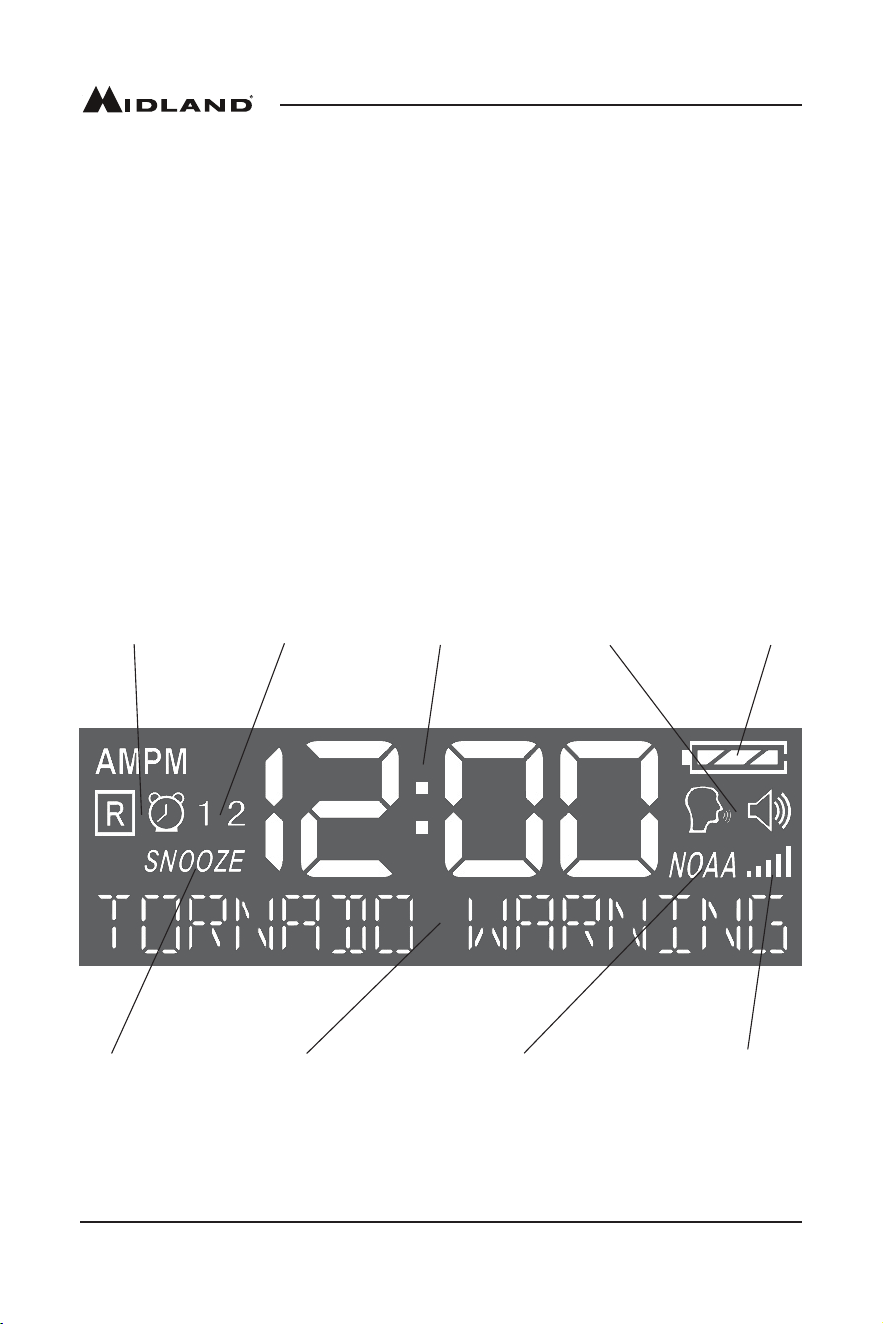
Icons on the Display
Time
Indicator
Alarm Clock
TypeIndicator
Active Alarm
ClockIndicator
Snooze
Indicator
Alphanumeric
Message
Battery
Indicator
Alert Type
Indicator
WeatherRadio
ON/OFFStatus
Signal Strength
Indicator
Page 5midlandusa.com
Model WR400
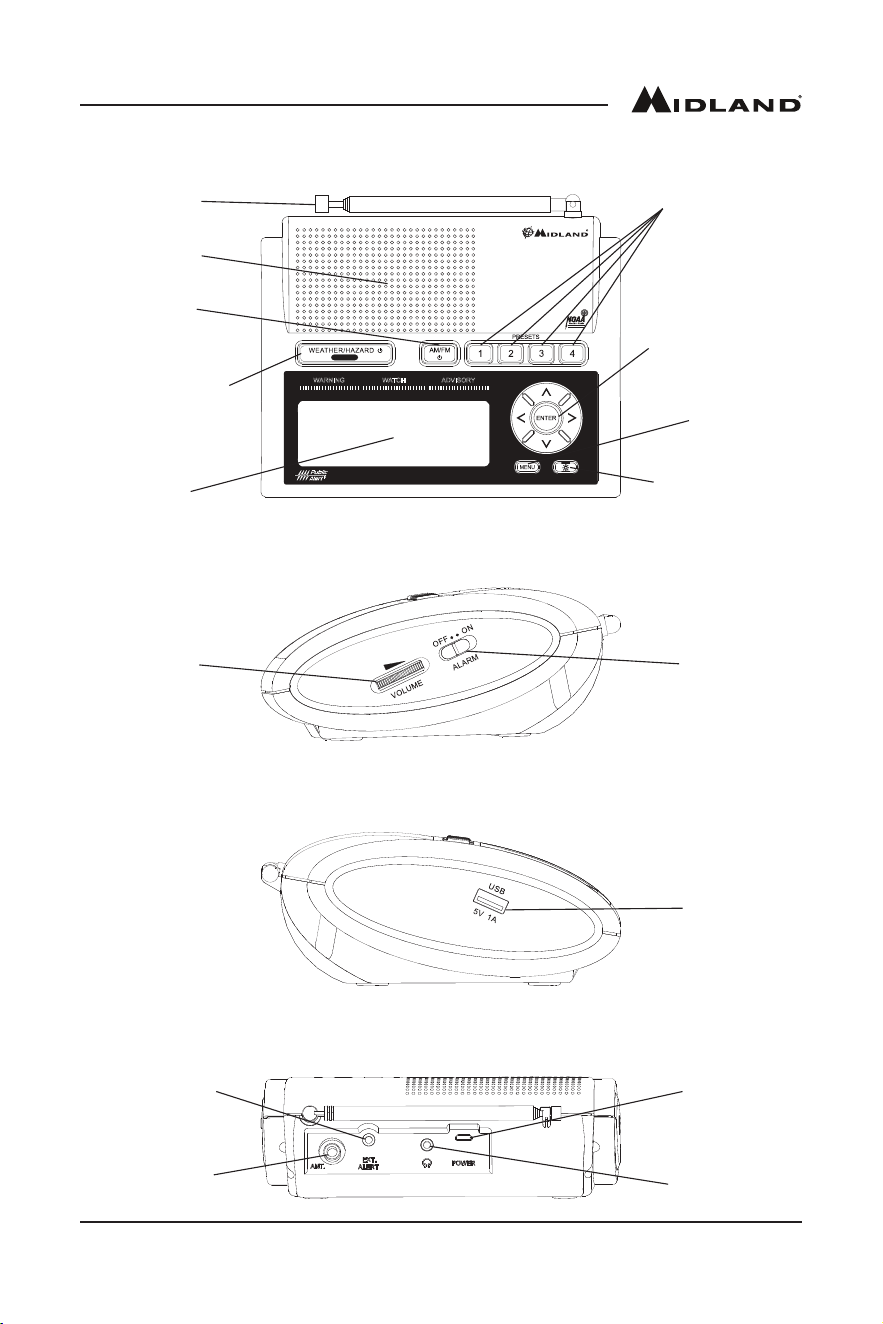
Controls and Functions
Weather/Hazardand
WeatherAlertMode
ON/OFFButton
AM/FMand
Power Button
RadioPreset
Buttons
MenuNavigation
and Channel
Tuning Buttons
Antenna
LCD
Speaker
LCDBacklight
Dimmer Button
Menu
Button
Volume
Wheel
Alarm
Clock
Switch
WATCH ADVISORY
W
ARNI
N
G
SNOOZE
TM
All Hazards
NOAA National Weather Service
s
,
TM
USB
Charge
Port
DC Jack
Headphone
Jack
ExternalAlert
Jack
External
Antenna
Connector
Top
Right Side
Left Side
Back

Page 6 midlandusa.com
Model WR400
Setting the Time
1. Pressthe“MENU”button.
2. Thedisplayshouldshow“SETTIME.”Pressthe“ENTER”button.
3. Thedisplaywillshow“SETTINGHOUR.”Pressthe“UP”or“DOWN”buttonstosetthehour
thenpressthe“RIGHT”buttontotoggletosettingtheminutes.Aftersettingtheminutespress
“ENTER.”
4. Pressthe“MENU”buttontosavethesettingsandexitthemenu.
Setting the Alarm
1. Pressthe“MENU”button.
2. Pressthe“UP”or“DOWN”arrowsuntilthedisplaysays“SETALARM1.”Pressthe“ENTER”
button.
3. Thedisplaywillshow“SETTINGHOUR.”Pressthe“UP”or“DOWN”arrowsuntilthecorrect
hourisset.Notethe“AM”and“PM”iconsintheupperleftcorneroftheLCD.
4. Afteryouhaveselectedyourhour,pressthe“RIGHT”arrowtotoggleto“SETTINGMINUTE.”
Pressthe“UP”or“DOWN”arrowsuntilthecorrectminutesareset.Pressthe“ENTER”button.
5. Nowyouhavetheoptionofchoosingwhetheryouwantthisalarmtobe“ON”or“OFF.”Press
the“UP”or“DOWN”arrowsuntilyougetyourdesiredselection.Pressthe“ENTER”button.
6. Ifyouonlywanttohaveonealarmsetthenpressthe“MENU”buttontosaveyoursettingsand
exitthemenu.Ifyouwanttosetthe2ndalarmthenpressthe“DOWN”arrowuntilyougetto
the“SETALARM2”option.
7. FollowthesameinstructionsforsettingALARM2asyoudidforALARM1.
8. Slidethe“ALARM”switchontherightsideoftheradiotothe“ON”positiontomakeyouralarms
active.
Choosing the Alarm Type
1. Pressthe“MENU”button.
2. Pressthe“UP”or“DOWN”arrowsuntilthedisplaysays“ALARMTYPE.”Pressthe“ENTER”
button.
3. Pressthe“UP”or“DOWN”arrowstoselecteitherwaketo“RADIO”orwaketo“BUZZER.”If
youselectwaketo“RADIO,”thealarmwillcomeontothelastradiostationtunedtoontheAM/
FMband.Afteryouhavemadeyourselectionpressthe“ENTER”button.
4. Pressthe“MENU”buttontosaveyoursettingsandexitthemenu.
Setting the Weather Channel
1. Tondtheweatherchannelforyourareagotowww.nws.noaa.gov.nwr/coverage/station_
listing.html and review the corresponding frequency and channel for your area using the chart
onpage2ofthisOwner’sManual.
2. Pressthe“MENU”button.
3. Pressthe“UP”or“DOWN”arrowsuntilthedisplaysays“SETCHANNEL.”Pressthe“ENTER”
button.
4. Pressthe“UP”or“DOWN”arrowstoscrolltoyourdesiredweatherchannel.
5. Onceyouhaveselectedyourweatherchannelpressthe“ENTER”button.
6. Pressthe“MENU”buttontosaveyoursettingsandexitthemenu.
Turning the Weather Radio On and Off
Whenyouexitthemenutheweatherradiowillautomaticallyturnon.Ifyouwanttoturnitoffpress
andholdthe“WEATHER/HAZARD”buttonuntilthe“NOAA”icondisappearsonthedisplay.Youwill
not be able to listen to the weather radio or receive any alerts with the weather radio turned off. To
turntheweatherradioonpressandholdthe“WEATHER/HAZARD”buttonuntilthe“NOAA”icon
appears on the display.
Listening to the Weather Radio
Ifyourweatherradioisonandyouhaveselectedthecorrectweatherchannelasinstructedin
the“SettingtheWeatherChannel”section,youcanlistentotheweatherradiobypressingthe
“WEATHER/HAZARD”buttonabovethedisplay.Tomutetheweatherradiopressthe“WEATHER/
HAZARD”buttona2ndtime.

Page 7midlandusa.com
Model WR400
Setting Your Location
1. Pressthe“MENU”button.
2. Pressthe“UP”or“DOWN”arrowsuntilthedisplaysays“SETLOCATION.”Pressthe“ENTER”
button.
3. Younowhavetheoptionofchoosingbetween“ANY,”“MULTIPLE,”and“SINGLE.”Pressthe
“UP”or“DOWN”arrowsuntilyouhavereachedyourselectionthenpressthe“ENTER”button.
4. If“ANY”isselectedyourradiowillreceiveallweatheralertsandyouwillbeunabletoselecta
speciccounty.Pressthe“MENU”buttontosaveyoursettingsandexitthemenu.
5. If“MULTIPLE”or“SINGLE”wereselectedthenyouwillbeaskedtoinputyourspeciclocation
andthedisplaywillshow“01EMPTY.”Press“ENTER”toinputyourcountry.Pressthe“UP”
or“DOWN”arrowstoscrolltoyourselectionthenpress“ENTER.”Youwillnowbeaskedfor
yourstate.Pressthe“UP”or“DOWN”arrowstoscrolltoyourselectionthenpress“ENTER.”
Youwillnowhavealistofcountiestochoosefrom.Pressthe“UP”or“DOWN”arrowstoscroll
toyourselectionthenpress“ENTER.”Ifyouselected“SINGLE”foryourlocationpressthe
“MENU”buttontosaveyoursettingsandexitthemenu.
6. Ifyouselected“MULTIPLE”foryourlocationyouwillbetakentothenextcountyentry“02
EMPTY.”Pressthe“ENTER”button.Younowhavetheoptionofselecting“NEARBY.”This
gives you the option of having the radio automatically populate your selected county entry with
thenextclosestcountycode.Ifyouwanttomanuallyenteryourcountythenpressthe“UP”
or“DOWN”arrowstoselectyourcountryandrepeatthestepsnecessaryforselectingyour
county.Pressthe“MENU”buttontosaveyoursettingsandexitthemenu.
Manually Entering a S.A.M.E. County Code
1. TogettheS.A.M.E.codeandweatherchannelforyourarea,call1-888-697-7263orvisit
www.nws.noaa.gov/nwr/coverage/county_coverage.html.
2. Pressthe“MENU”button
3. Pressthe“UP”or“DOWN”arrowsuntilthedisplaysays“SETLOCATION.”Pressthe“ENTER”
button.
4. Younowhavetheoptionofchoosingbetween“ANY,”“MULTIPLE,”and“SINGLE.”Ifyouwant
toprogramasinglecountycodethenselect“SINGLE.”Ifyouwanttoprogrammultiplecounty
codesthenselect“MULTIPLE.”If“ANY”isselectedasyourlocationyourradiowillreceive
allweatheralertsandyouwillbeunabletoprogramaspeciccountycode.Pressthe“UP”or
“DOWN”arrowsuntilyouhavereachedyourselectionthenpressthe“ENTER”button.
5. Ifyouselected“SINGLE”foryourlocationpressthe“MENU”button3timestosaveyour
settingsandexitthemenu.
6. Ifyouselected“MULTIPLE”foryourlocationyoucannowenteradditionalS.A.M.E.codes.
Pressthe“UP”arrowtogotothenextcountycodeprogramminglocationandpressthe
“RIGHT”arrow.YoucannowmanuallyenteryourS.A.M.E.code.Pressthe“UP”arrowtoselect
yourrstdigit.Pressthe“RIGHT”arrowtomovetothenextdigit.Repeatthestepsuntilyou
haveenteredyour6digitS.A.M.E.code.OnceyouaredoneenteringyourS.A.M.E.codepress
“ENTER”.Thereare25countycodeprogramminglocationspossible.
7. Whenyouaredonemanuallyenteringyour“MULTIPLE”S.A.M.E.countycodespressthe
“MENU”button3timestosaveyoursettingsandexitthemenu.
Choosing an Alert Type
1. Pressthe“MENU”button.
2. Pressthe“UP”or“DOWN”arrowsuntilthedisplaysays“ALERTTYPE.”Pressthe“ENTER”
button.
3. Younowhavetheoptionofchoosingbetween“VOICE,”“TONE,”and“DISPLAY.”“VOICE”will
soundanalertfor8secondsfollowedbytheweatherbroadcast.“TONE”willsoundanalert
siren.“DISPLAY”willscrollalerttextonthedisplayandnoaudiblealertsirenwillbeheard.
4. Pressthe“UP”or“DOWN”arrowstomakeyourselectionthenpressthe“ENTER”button.
5. Pressthe“MENU”buttontosaveyoursettingsandexitthemenu.

Page 8 midlandusa.com
Model WR400
Selectable Alert Option
YoucanprogramtheWR400weatherradiotoonlygiveanaudiblealertforcertainemergency
messages. Those messages unimportant to you can be programmed to only display a message on
the display.
1. Pressthe“MENU”button.
2. Pressthe“UP”or“DOWN”arrowsuntilthedisplaysays“SETEVENTS.”Pressthe“ENTER”
button.
3. Younowhavetheoptionofchoosingbetween“ALLON,”“ALLOFF,”or“ALLDEFAULT”as
shownintheSelectableAlertReferenceChart(pages10-12),or“EDITEVENTS.”“ALLON”
willsetalleventstoon,and“ALLOFF”willsetalleventstooffexceptfortheoneswithan
asterisknexttothemintheSelectableAlertReferenceChart.
4. Toeditindividualeventspressthe“UP”or“DOWN”arrowsuntilthedisplaysays“EDIT
EVENTS”andpressthe“ENTER”button.Scrollthroughtheeventsandpressthe“ENTER”
buttonwhenyoureachtheeventyouwanttoedit.Youcanselecteither“ON”or“OFF”then
pressthe“ENTER”button.
5. Pressthe“MENU”buttontwicetosaveyoursettingsandexitthemenu.
Testing the Alert Siren
1. Totestthealertfunctiontoensureitisworking,pressthe“MENU”button.
2. Pressthe“UP”or“DOWN”arrowsuntilthedisplaysays“ALERTTEST.”Pressthe“ENTER”
button. The alert siren will sound.
3. Pressthe“ENTER”buttonagaintosilencethealertsiren.
4. Pressthe“MENU”buttontoexitthemenu.
Reviewing Alerts
TheWR400weatherradiocanstoreupto10differentalertsinitsmemory.Iftheradioreceivesa
newalertwhileapreviousalertisstillineffect,itautomaticallydisplaysthenewalertmessage.To
reviewpastalertsthatarestillineffect,pressthe“DOWN”arrowtoscrollthroughthem.TheAM/FM
radiomustbeofftoreviewalerts.IfyouareinAM/FMmode,pressandholdthe“AM/FM”buttonfor
1secondtoturnitofforpressthe“WEATHER/HAZARD”buttontoswitchtotheweatherband.You
can now review alerts in memory.
Test Signals Broadcast by NWS
AllNationalWeatherServicestationsperiodicallytransmittestsignals.Youcanndoutwhenyour
local NWS station broadcasts test signals by logging onto www.weather.gov/grb/nwrinfo or by
callingtheNOAANationalWeatherServiceForecastOfce(listedunder“Weather”intheFederal
Governmentsectionofthetelephonebook).Duringtheweeklytestsignal,thelocalNWSstationwill
give a list of counties covered by their transmitter. The NWS test signal allows everyone with weather
radio receivers to verify the operation of their equipment.
The following test signals may be sent by the NWS during testing: “REQUIREDWEEkLYTEST,”
“REQUIREDMONTHLYTEST,”“SYSTEMDEMO,”and“NATIONALPERIODICTEST.”
No Reception Warning
Ifnoalertsarereceivedfor10days,thedisplaywillread“CHECkWEATHERRECEPTION”.
Ifthishappens,checkyourchannelsettingsandcountycodesforsettingerrors.Ifyoureceivea
clearsignalfromtheNWS,tryusingthe“ALL”countycodesettingtoreceiveallalertsforallcounties.
Note:Ifyouhavetroublendingreception,pleasemoveyourradioclosertoawindowandaway
fromuorescentlighting.
AM/FM Radio
ThereisanAM/FMradiobuiltintotheWR400thatyoucanlistentowithoutinterruptingtheweather
radiofunctions.Ifanalertisreceived,theWR400automaticallyswitchesfromtheAM/FMradioto
the weather radio alert.

Page 9midlandusa.com
Model WR400
Turning the AM/FM Radio On and Off
ToturntheAM/FMradioon,pressthe“AM/FM”button.Ifyouarelisteningtotheweatherband,you
mustrstmutetheweatherbandbypressingthe“WEATHER/HAZARD”button.ToturntheAM/
FMradiooff,pressandholdthe“AM/FM”buttonfor1second.Pressingthe“AM/FM”buttonwhile
alreadyinAM/FMmodewilltogglebetweentheAMandFMbands.
Tuning the AM/FM Radio
TotunetheAM/FMradioyoucanmanuallytunethestationsbypressingeitherthe“UP”or“DOWN”
arrows.Pressingandholdingthe“UP”or“DOWN”arrowswillquicklyscrollthroughstationsuntil
youreleasethebutton.Toscanautomaticallytothenextstationthathasastrongsignal,pressthe
“LEFT”or“RIGHT”arrow.
Setting the AM/FM Preset Stations
Youcanprogram4AMand4FMradiostationsintotheradio’spresetmemory.Toprogramapreset
station,dothefollowing:
1. TurntheAM/FMradioonandusethetuningbuttonstondyourdesiredstation.
2. Pressandholdthepresetbuttonyouwanttoprogramfor1second.Ifbeepsareenabled,the
radiowillbeepconrmingthestationhasbeensavedtothedesiredpreset.Therewillalsobe
anindicatoronthedisplaythatcorrespondswiththepresetsetting;“P1,”“P2,”“P3,”or“P4.”
Reception
The National Weather Service operates a system of weather and hazard alert broadcasts covering
alargeareaoftheUnitedStates.Currently,onlyafewareasarenotcovered.Typicalbroadcasts
arewithinreceptiondistanceof25-50milesoftheweatherstation.YourWR400weatherradiocan
receivebroadcastsfromupto50milesaway,dependingonyourlocationandconditionslikeweather,
terrain,etc.Ifyoundreceptionisnotgoodinyourarea,trydifferentlocationsinyourhomeorofce
tondaspotofimprovedreception.Placementnearawindowusuallyimprovesreception.
Ifaweatherbroadcastcannotbeheardonanyofthe7channels,contactyourlocalNWSofceand
verify the closest station is on air. Also verify the channel frequencies the station is broadcasting.
IfyourNWSistransmittingandyouarenotreceivingthebroadcasts,youmayneedanexternal
antenna. Please visit our website at www.midlandusa.comtoviewoursuggestedantenna,the
18-259WVHFThrough-GlassAntenna.Thisantennaimprovesreceptionwhenappliedtoawindow.
Pleasenote:Metalstructuresaremoredifculttoreceivereceptionin,becausemetalinterfereswith
thesignal.Ifyouliveinametalstructure,youmayneedanexternalantenna.
About NOAA, NWS, and S.A.M.E. County Codes
In1994,NOAAbeganbroadcastingcodedemergencysignalsthatidentifythespecicgeographic
area(suchasthecountywithinastate)thatisaffectedbyanemergency.Untilthattime,such
specicemergencyweatherinformationwasnotavailabledirectlytothepublic.NOAAtransmits
thecodedemergencysignalsusingatechniquecalledSpecicAreaMessageEncoding(S.A.M.E.).
TheWR400weatherradioisdesignedtoreceivetheseS.A.M.E.countycodetransmissions.The
NationalWeatherServicedividestheUnitedStatesbystateandcounty(orparish)andassignsasix
digitcodenumbercalledaFIPS(FederalInformationProcessingSystem)code,alsoknownasthe
S.A.M.E.countycode.
Youcanprogramtheweatherradiowithupto25S.A.M.E.countycodes.Theweatherradioallows
youtoreceivebroadcastalertsforallcountieswithinyourarea,orforupto25individualselectable
counties. This will eliminate any alerts that are not within your area of interest. When you program
yourS.A.M.E.countycode(s)intotheWR400weatherradio,youeliminateanyalertsthatarenot
withinthosecounties.Warnings,watchesandadvisoriesofweatherandapproximately80otherarea
emergencies,willactivatetheweatherradioforonlyyourprogrammedspecicarea.
TheS.A.M.E.messagetheNWSsendscontainsinformationpertainingtotheperiodforwhichthe
alert is valid. NWS can set the active time of the alert from 15 minutes up to 6 hours. When the
designatedtimehaspassed,theweatherradiodisplaymessageandlightwillautomaticallyresetto
their normal appearance.
Page10 midlandusa.com
Model WR400
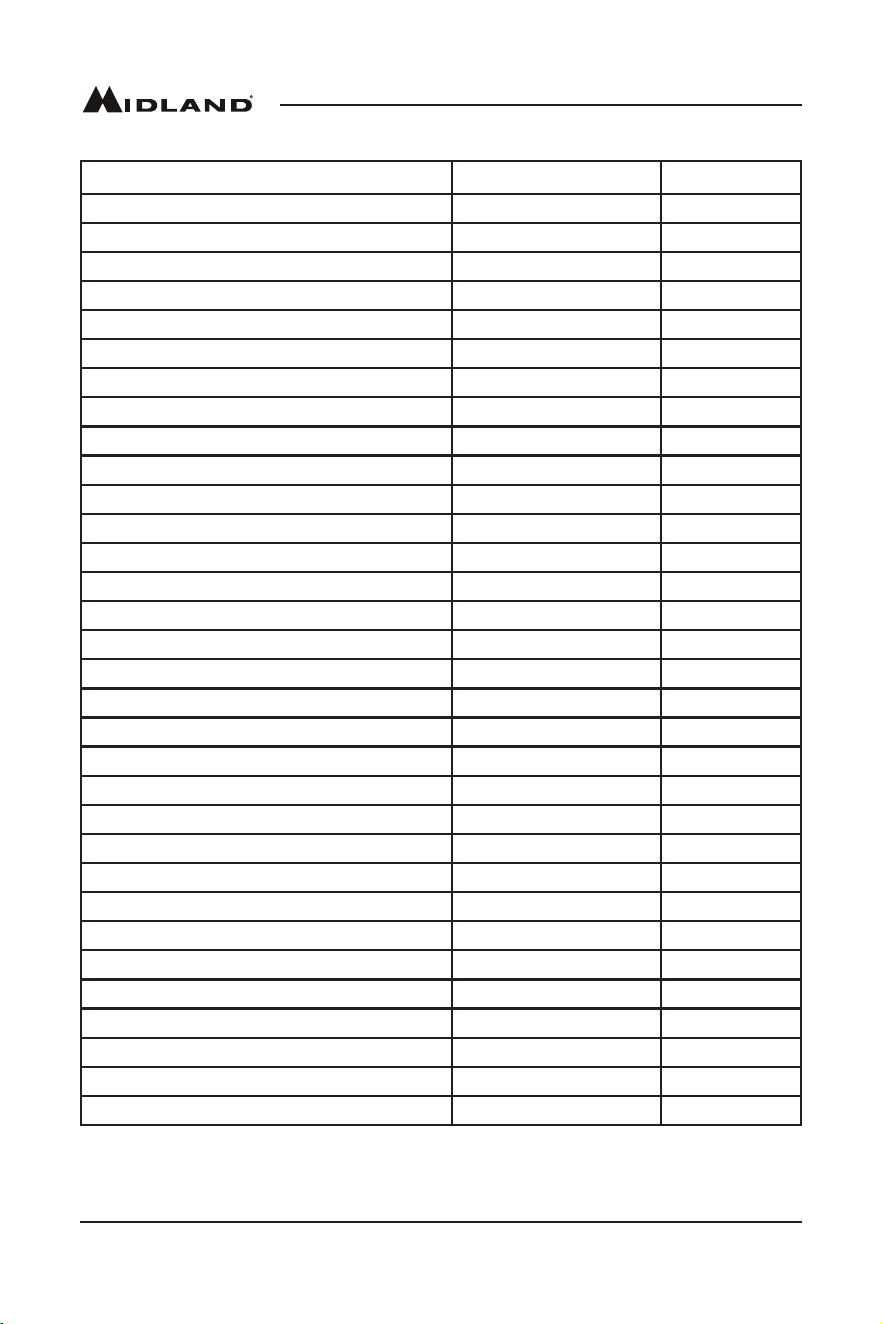
Selectable Alert Reference Chart
Event Code Level Default
AdministrativeMessage Advisory Off
Avalanche Watch Watch On
Avalanche Warning Warning On
BiologicalHazardWarning Warning On*
Boil Water Warning Warning On
Blizzard Warning Warning On
Child Abduction Emergency Advisory On
Civil Danger Warning Warning On*
CivilEmergencyMessage Warning On*
CoastalFloodWatch Watch On
CoastalFloodWarning Warning On
ChemicalHazardWarning Warning On*
Contaminated Water Warning Warning On*
Dam Watch Watch On
Dam Break Warning Warning On
Contagious Disease Warning Warning On
Practice/Demo Advisory Off
Dust Storm Warning Warning On
Emergency Action Notification Warning On*
Emergency Action Termination Advisory On*
Earthquake Warning Warning On*
ImmediateEvacuation Warning On*
Evacuation Watch Watch On
FoodContaminationWarning Warning On*
FlashFloodWatch Watch On
FlashFloodStatement Advisory On
FlashFloodWarning Warning On
FloodWatch Watch On
FloodStatement Advisory On
FloodWarning Warning On
FireWarning Warning On
FlashFreezeWarning Warning On
Page 11midlandusa.com
Model WR400
Event Code Level Default
FreezeWarning Warning On
HurricaneStatement Advisory On
HazardousMaterialsWarning Warning On*
HurricaneWatch Watch On
HurricaneWarning Warning On*
HighWindWatch Watch On
HighWindWarning Warning On
IcebergWarning Warning On
IndustrialFireWarning Warning On*
LocalAreaEmergency Advisory On*
LawEnforcementWarning Warning On*
LandSlideWarning Warning On*
National Audible Test Advisory Off
NationalInformationCenter Advisory Off
NetworkNoticationMessage Advisory Off
National Periodic Test Advisory Off
National Silent Test Advisory Off
Nuclear Power Plant Warning Warning On*
Power Outage Advisory Advisory On
RadiologicalHazardWarning Warning On*
RequiredMonthlyTest Advisory Off
RequiredWeeklyTest Advisory Off
SpecialMarineWarning Warning On
Special Weather Statement Advisory On
ShelterIn-PlaceWarning Warning On*
Severe Thunderstorm Watch Watch On
Severe Thunderstorm Warning Warning On
Severe Weather Statement Advisory On
Tornado Watch Watch On
911 Telephone Outage Emergency Advisory On
Tornado Warning Warning On*
Tropical Storm Watch Watch On
Page 12 midlandusa.com
Model WR400
Event Code Level Default
Tropical Storm Warning Warning On*
Tsunami Watch Watch On*
Tsunami Warning Warning On*
Transmitter Backup On Advisory Off
Transmitter Carrier Off Advisory Off
Transmitter Carrier On Advisory Off
Transmitter Primary On Advisory Off
Volcano Warning Warning On*
WildFireWatch Watch On
WildFireWarning Warning On*
Winter Storm Watch Watch On
Winter Storm Warning Warning On
Unrecognized Watch Watch On
Unrecognized Emergency Advisory On
Unrecognized Statement Advisory On
Unrecognized Warning Warning On
UnrecognizedMessage Warning On*
*The above event codes notated with an asterisk have a default setting to ON that cannot be
disabled. This is the intended functionality and is not an indication that the radio is not working
properly.
Button Beeps
1. Toturnthebuttonbeepsoffpressthe“MENU”button.
2. Pressthe“UP”or“DOWN”arrowsuntilthedisplaysays“BUTTONBEEPS.”Pressthe
“ENTER”button.
3. Younowhavetheoptionofturningthebuttonbeepseither“ON”or“OFF.”Ifyouwantto
disablethebuttonbeepsselect“OFF”thenpressthe“ENTER”button.
4. Pressthe“MENU”buttontosaveyoursettingsandexitthemenu.
Backlight Dimmer
ThebacklightbrightnessontheWR400canbeadjustedinthemenufromlevels1to10with10
being the brightest.
1. Toadjustthebacklightdimmersettingpressthe“MENU”button.
2. Pressthe“UP”or“DOWN”arrowsuntilthedisplaysays“BACkLIGHT.”Pressthe“ENTER”
button.
3. Younowhavetheoptionofselectingbetweenbacklightlevels1to10.Scrolltoyourselection
usingthe“UP”or“DOWN”arrowsthenpressthe“ENTER”button.
4. Pressthe“MENU”buttontosaveyoursettingsandexitthemenu.Nowwhenyoupressthe
backlightdimmerbutton,theLCDbacklightwilldimtoyourchosenbrightnesssetting.
USB Charge Port
TheWR400hasaUSBchargeportthatiscapableofchargingmostportabledevicessuchascell
phones,tablets,andMP3playersatupto1ampofchargecurrent.Tochargeadevice,makesure
theWR400ispluggedintotheACpoweradapterandplugyourdeviceintotheUSBchargeport.
TheUSBchargeportwillnotworkwhentheWR400ispoweredfromtheAAbatteries.
Page 13midlandusa.com
Model WR400
Limited Warranty
Subjecttotheexclusionssetforthbelow,MidlandRadioCorporationwillrepairorreplace,atitsoption
withoutcharge,anyMidlandWR400whichfailsduetoadefectinmaterialorworkmanshipwithinOneYear
followingtheinitialconsumerpurchase.Thiswarrantydoesnotapplytowaterdamage,batteryleak,abuse
ormisuseofunauthorizedaccessories,unauthorizedserviceormodicationoralteredproducts.Accessories
havea90daywarrantyfromdateofpurchase,includinganychargecablesorbatteries.
ANYIMPLIEDWARRANTIES,INCLUDING,WITHOUTLIMITATIONTHEIMPLIEDWARRANTIESOF
MERCHANTABILITYANDFITNESSFORAPARTICULARPURPOSE,SHALLBELIMITEDASSET
FORTHHEREINANDTOTHEDURATIONOFTHELIMITEDWARRANTY,OTHERWISETHEREPAIR
ORREPLACEMENTASPROVIDEDUNDERTHISEXPRESSLIMITEDWARRANTYISTHEEXCLUSIVE
REMEDYOFTHECONSUMERANDISPROVIDEDINLIEUOFALLOTHERWARRANTIES,EXPRESS
ORIMPLIED.INNOEVENTSHALLMIDLANDBELIABLE,WHETHERINCONTRACTORTORT
(INCLUDINGBUTNOTLIMITEDTONEGLIGENCE,GROSSNEGLIGENCE,BODILYINJURY,PROPERTY
DAMAGEANDDEATH)FORDAMAGESINEXCESSOFTHEPURCHASEPRICEOFTHEPRODUCT
ORACCESSORY,ORFORANYINDIRECT,INCIDENTAL,SPECIALORCONSEQUENTIALDAMAGES
OFANYkIND,ORLOSSOFREVENUEORPROFITS,LOSSOFBUSINESS,LOSSOFINFORMATION
ORDATAOROTHERFINANCIALLOSSARISINGOUTOFORINCONNECTIONWITHTHEABILITYOR
INABILITYTOUSETHEPRODUCTSORACCESSORIESTOTHEFULLEXTENTTHESEDAMAGESMAY
BEDISCLAIMEDBYLAW.
ForProductPurchasedinCanada:
Performanceofanyobligationunderthiswarrantymaybeobtainedbyreturningthewarrantedproduct,along
withproofofpurchase,toyourplaceofpurchaseinCanada.Thiswarrantygivesyouspeciedlegalrights.
Additional warranty rights may be provided by law in some areas within Canada.
Thiswarrantygivesyouspeciclegalrights,andyoumayalsohaveotherrights,whichvaryfromstateto
state.
Note: The above warranty applies only to merchandise purchased in the United States of America or any of
theterritoriesorpossessionsthereof,orfromaU.S.Militaryexchange.
ForProductPurchasedintheUSA:
Performanceofanyobligationunderthiswarrantymaybeobtainedbyreturningthewarrantedproduct,
prepaidfreight,alongwithproofofpurchaseto:
MidlandRadioCorporation
Warranty Service Department
5900ParrettaDrive
kansasCity,MO64120
Troubleshooting
Problem Suggestion
No power
MakesuretheACPowerAdapterissecurelypluggedintoboththeDCjack
onthebackoftheweatherradioandintothewalloutlet.Makesurebatteries
are installed in case AC power fails.
No sound ChecktheVOLUMEcontroltoensurevolumeisturneduptoanaudiblelevel.
No weather broadcast
when you press
WEATHER/SNOOZE
button
Ensurethatthetelescopingantennaisupandfullyextended.
Ifyouareusinganexternalantenna,ensurethatitisconnectedproperly.
Ensure that the radio is set to the NWS weather channel in use in your area.
Contact NWS to ensure they are presently broadcasting.
Ifinametalstructure,makesureyouareclosetoawindow.
Ifinaweaksignalarea,youwillneedanexternalantenna.
The radio is not
responding properly
to NWS weather alert
broadcasts
ChecktoseethatyouhaveprogrammedinthecorrectS.A.M.E.County
Code(s).
Check with the NWS that the tower is broadcasting.
Page 14 midlandusa.com
Model WR400
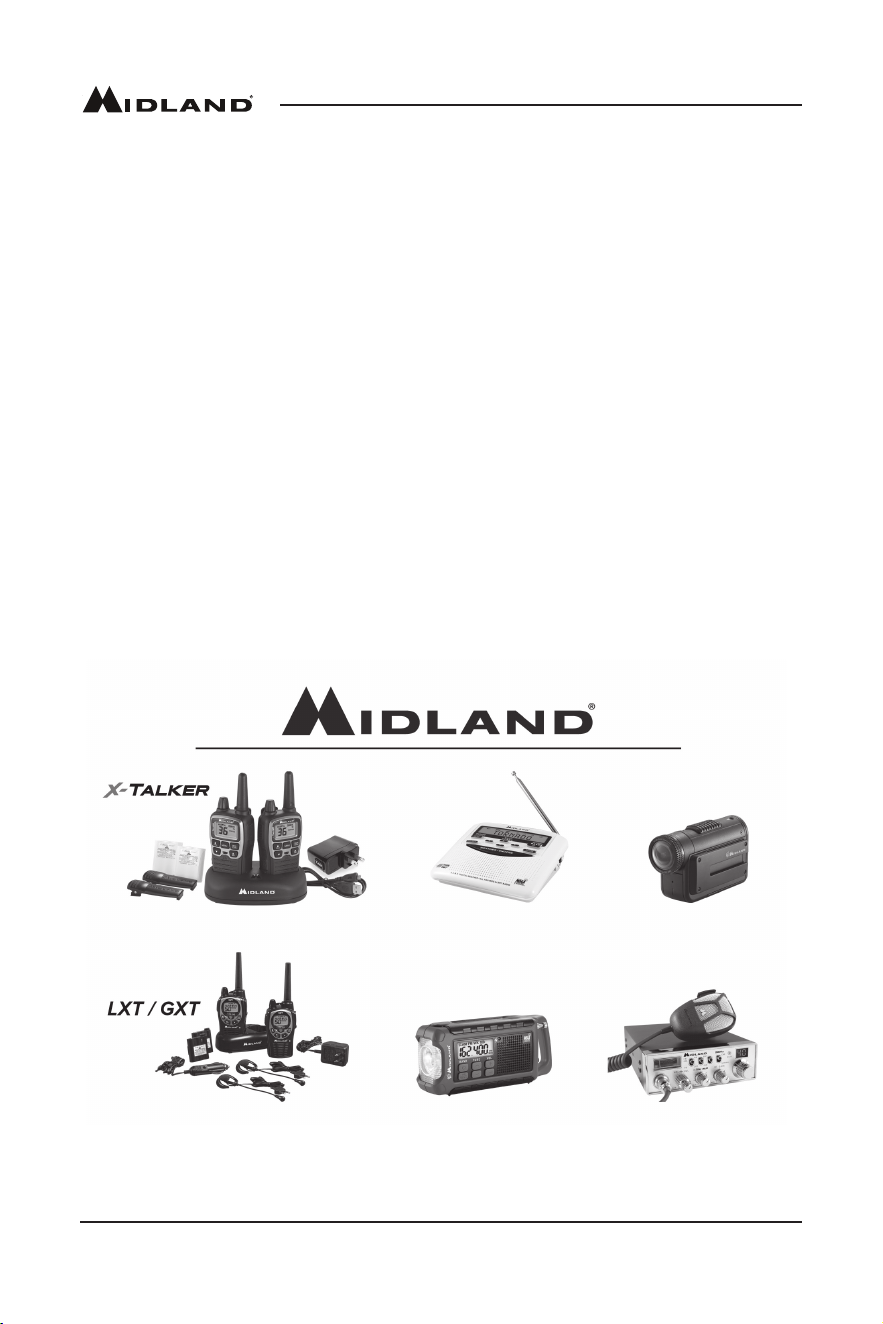
2-Way Radios Weather Radios HD Wearable Video Cameras
2-Way Radios Emergency Crank Radios CB Radios
Service
Ifyouhaveaproblemwhichyoubelieverequiresservice,pleaserstchecktheFAQsectionofthe
website,checkyourowner’smanual,orcallandspeakwithaservicetechnician.Manyproblemscan
beremediedwithoutreturningtheunitforservice.Ifnecessary,returnasfollows:
Packtheunitinitsoriginalboxandpacking.Thenpacktheoriginalboxinasuitableshipping
carton.Caution:Improperpackingmayresultindamageduringshipment.
Includethefollowing:
a.Fulldescriptionofanyproblems
b.Daytimetelephonenumber,name&address
c.Forwarrantyserviceincludeaphotocopyofthebillofsalefromanauthorizeddealerorotherproof
of purchase showing the date of sale.
Youdonotneedtoreturnaccessoryitems(ChargeCable,Batteries,andOwner’sManual)unless
they might be directly related to the problem.
RepairsnotcoveredbywarrantyorunitsthatareoverONEyearoldaresubjecttoarepairfee.
Pleasecallforaquoteonrepairservicecostat816-241-8500.Sendonlycashier’scheck,money
order,MasterCardorVisacardnumber.
MidlandRadioCorporation
5900ParrettaDrive
kansasCity,MO64120
Phone:(816)241-8500
Fax:(816)241-5713
Other Products
Page 15midlandusa.com
Model WR400
Accessories
Accessories can be purchased at www.midlandusa.com
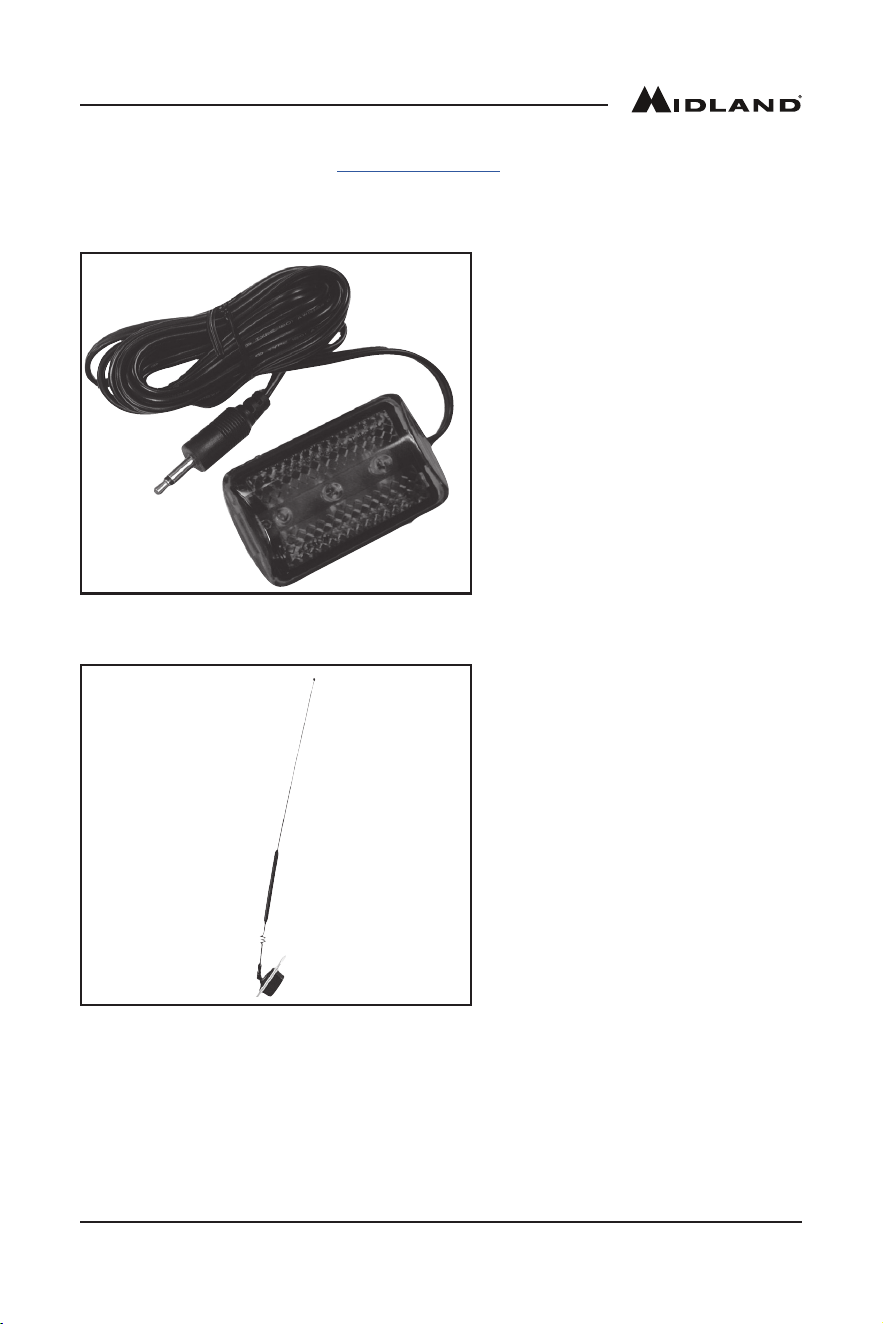
18-STR
External Alert Strobe Light
Easy Connection
HighStrobeVisibility
• $19.99
18-259W
Window Mount All Hazard/
Weather Alert Radio Antenna
ImprovesRangeandReception
17-7StainlessSteelRod
• $24.99

Page 16 midlandusa.com
Model WR400
FCC/IC Statement
Thisdevicecomplieswithpart15oftheFCCRules.Operationissubjecttotheconditionthatthis
device does not cause harmful interference.
NOTE:THEGRANTEEISNOTRESPONSIBLEFORANYCHANGESORMODIFICATIONS
NOTEXPRESSLYAPPROVEDBYTHEPARTYRESPONSIBLEFORCOMPLIANCE.SUCH
MODIFICATIONSCOULDVOIDTHEUSER’SAUTHORITYTOOPERATETHEEQUIPMENT.
ThisdevicecomplieswithRSS-310ofIndustryCanada.Operationissubjectto
condition that this device does not cause harmful interference.
Page 17midlandusa.com
Model WR400
S.A.M.E. County Code Record
County Name S.A.M.E. County Code NWS Channel
Page 18 midlandusa.com
Model WR400
Notes
Page 19midlandusa.com
Model WR400
Notes

5900 Parretta Drive
Kansas City, MO 64120
816.241.8500
We’d love to hear from you! Let us know what you
think of your new Midland product at
Note: Features & Specifications are subject to change without
notice. MIDLAND is not responsible for unintentional errors or
omissions on its packaging.
or by visiting us at
www.midlandusa.com