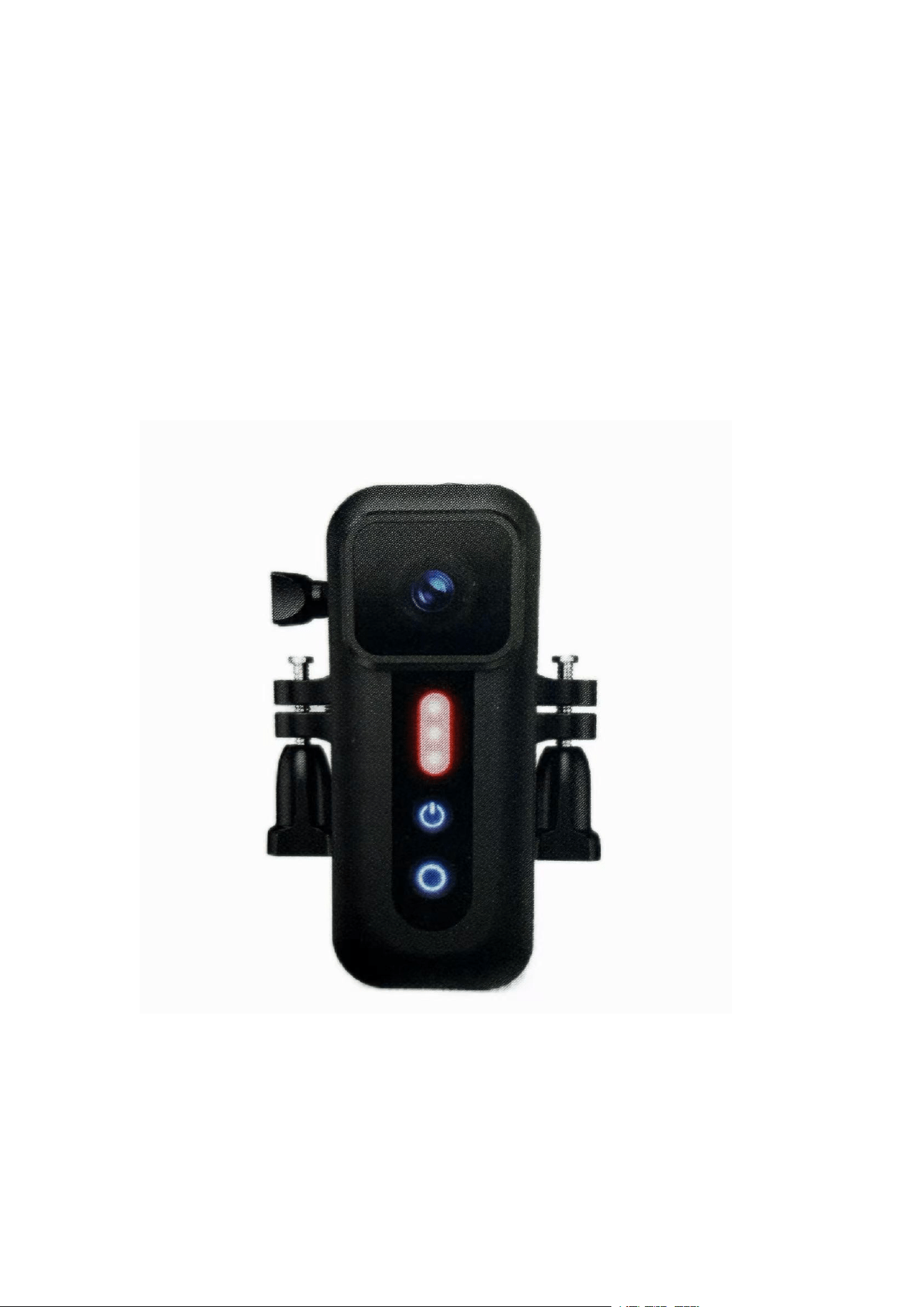
1080P Multi-function Camera
User Manual

Ⅰ. Product Features
This product is a multifunctional portable high-definition recording camera, integrating
shooting, recording and warning lighting. It is suitable for daily wearing, outdoor
sports, bicycle riding and other scenarios, with stable performance and complete
functions.
Core Advantages
:
•
No missing recording: seamless loop recording, no seconds lost between files
• 3-in-1 multifunctional camera: support mini body worn, bicycle recording, helmet
recording
• Diversified installation: equipped with back clip and bike stand, compatible with
full set of GoPro brackets
• HD wide-angle lens, support 1080P high-definition video recording
• Practical warning light: dual-color flash taillight, multiple lighting modes
• Rich configuration: built-in microphone, Wi-Fi vibration motor and large-capacity
battery
•
Humanized design: support charging while recording, Type-C interface, TF
card(Micro SD) expandable storage
Noted:
Because it is a 1080P video recording, you should use a class 10 or above memory
card within 64GB and writing speed ≥10MB/s , and the quality should not be too bad,
otherwise it is easy to get stuck during the video download.
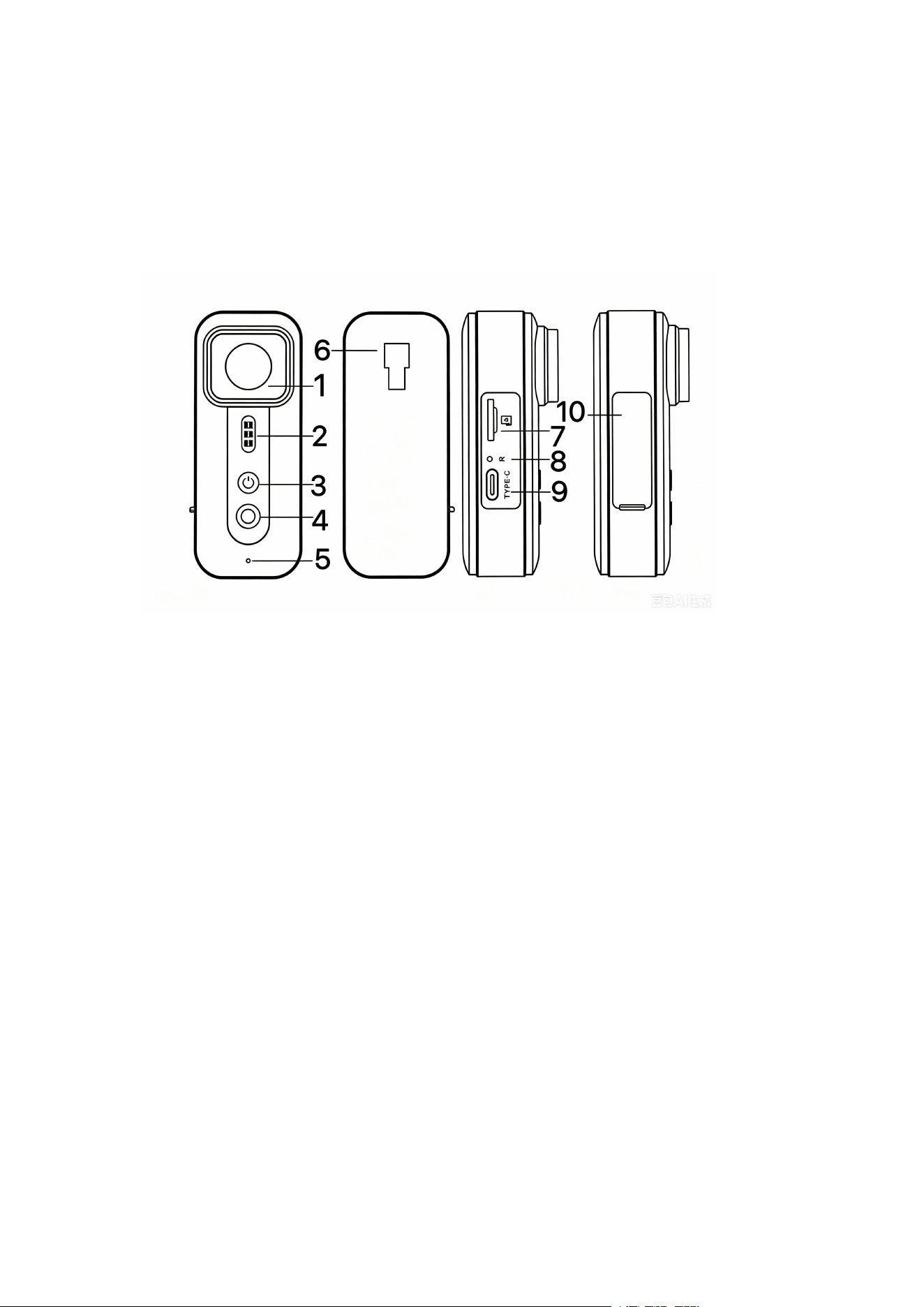
Ⅱ. Product Description
Product Structure:
1) HD Lens 2) 2 colors flash taillight
3) Power /Flashlight On&Off Key 4) Recording/Wi-Fi Key
5) Microphone 6) Bracket buckle position
7) TF card slot 8) Reset Key
9) Type-C interface 10) TPU Waterproof cover

Ⅲ. Key Operation Instructions
3.1 Power Key Button
1. Long press the power key to turn on the device, and the power key indicator lights
up after startup.
2. Short press the power key after startup to turn on the flash light and switch
different flash modes cyclically.
3. Long press the power key again to turn off the device, and the indicator goes out.
3.2 Recording Key Button
1. Single press the recording key to start recording, the key indicator flashes (1s on,
1s off); press again to stop recording.
2. Double-click the recording key to turn on the Wi-Fi function, the indicator flashes
twice and turns off once.
Ⅳ
. Core Function Description
4.1 Wi-Fi & APP Connection Function
1. Download and install the Viidure APP on your mobile phone in advance.
2. Double-click the recording key after the camera is powered on to activate Wi-Fi.
Search for the Wi-Fi signal named TC01_xxxxxx on the mobile phone, the default
connection password is 12345678.
3. After Wi-Fi successful connection, open the APP then automatically bind the
device,you can realize real-time camera preview, parameter setting, video playback,
and local download of device files in the APP.
4. After disconnecting the mobile phone, the device will automatically turn off Wi-Fi
after 3 minutes to save power; double-click the recording key manually to turn off Wi-
Fi in advance.
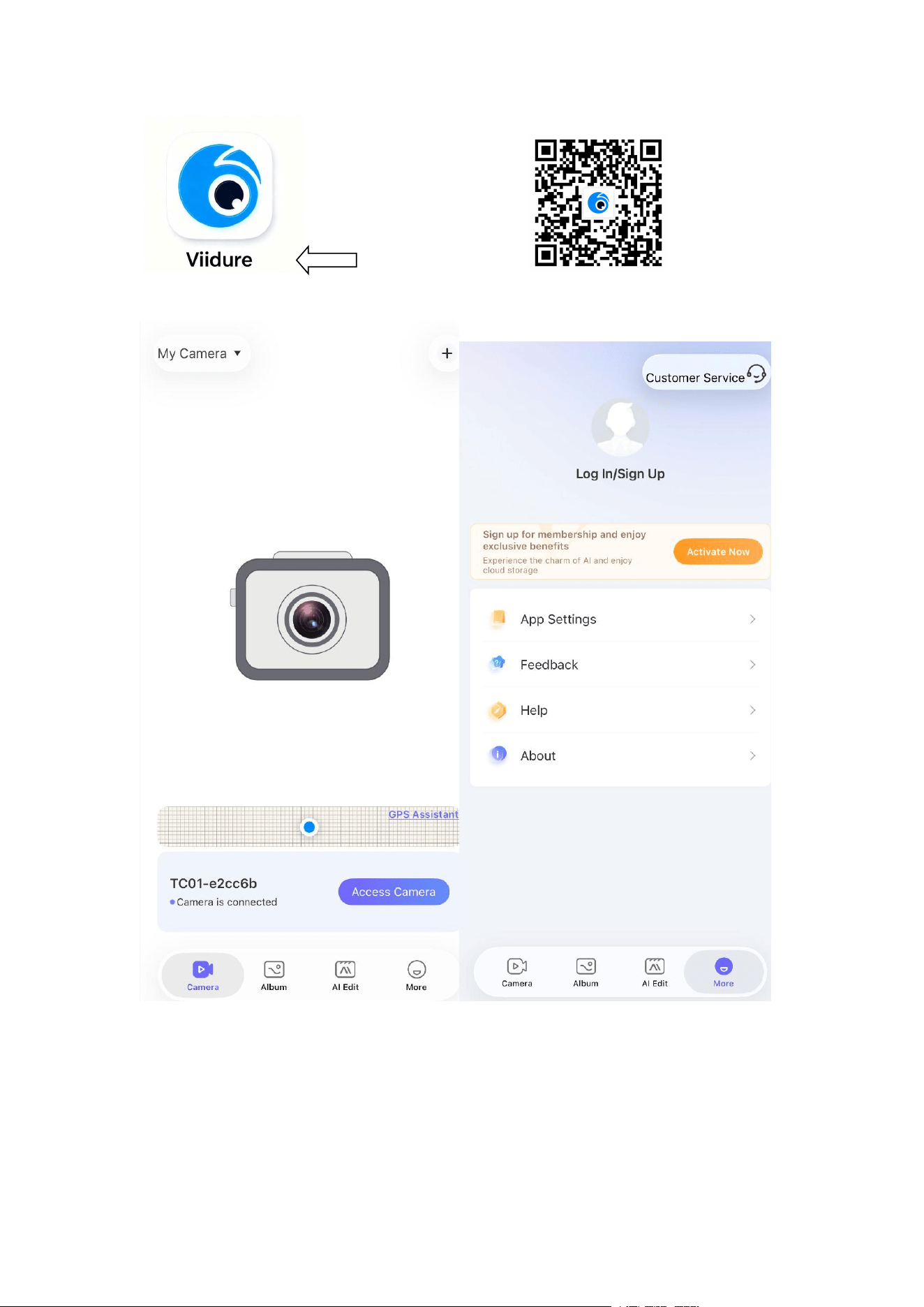
this is APP Name QR CODE

4.2 Vibration Feedback Function
1. The device vibrates once when powered on and powered off.
2. Every valid key operation will trigger a single vibration feedback to avoid
misoperation.
4.3 Dual-color Flash Taillight
1.Press the power key button to turn on / off the flashlight
2.Cycle switching of 4 modes by short pressing the power key: red & blue steady on, ,
slow alternate flashing, fast alternate flashing, light off.
3.It can be used as bicycle warning taillight and daily safety warning light.
4.4 Multi-scene Installation Function
1. Back clip bracket: fixed on clothing neckline or bag for portable wearing shooting.
2. Bicycle bracket: fixed on bicycle seat rod or front fork for riding recording.
3. Neck hanging bracket: fixed on the chest for outdoor sports shooting.
4. Universal interface: compatible with most GoPro series brackets, rich expansion
methods.
4.5 Battery & Charging Description
1.Built-in 800mAh high-capacity polymer battery, full charge in about 2 hours.
2.Continuous recording time up to 3 hours, support charging while working, no need
to stop shooting for charging.

Ⅴ. Product Technical Parameters
Item
Parameter Specification
Product Name
1080P HD Video Recording Camera
Lens
120° wide angle, 4 glass lenses, F2.0
aperture
Video Format
MOV
Video Resolution
1080P@30FPS / 720P@60FPS
Video Coding
H.264, AAC audio coding
Image Color Effect
Standard
Loop Recording
Support
Time Watermark
Support
TF Card Capacity
Max support 64GB high-speed and
class 10 or above card
Photo Parameters
1MP, JPEG format
Microphone
Built-in, synchronous audio recording
Wi-Fi Function
Support Viidure APP connection
GPS Function
Optional support
Light Frequency
50Hz/60Hz adjustable
USB Function
USB disk storage transmission
Interface Type
Type-C
Battery Specification
800mAh built-in polymer battery
Ⅵ
. Troubleshooting
1. Unable to take photos and record videos
Check whether the TF card has sufficient storage space and whether the card is
locked; replace the high-speed TF card if necessary.
2. Automatic stop during recording

Video files occupy large storage space, please use a high-speed TF card with
reading and writing speed ≥10MB/s to avoid file loss and automatic stop.
3. File error prompt during playback
The TF card storage is abnormal and the file is incomplete. Use the device's built-in
formatting function to reformat the TF card.
4. Blurry shooting image
There are stains or fingerprints on the lens. Wipe the lens clean with professional
lens paper before shooting.
5. Horizontal fringe interference on the screen
The light frequency setting is wrong. Adjust the device frequency to 50Hz or 60Hz
according to the local power supply standard.
6. Incorrect video watermark time
Turn on the device Wi-Fi connect to the mobile phone APP, synchronize the mobile
phone local time, and the device will automatically save and update the time.
7. Device crash and stuck
Press the Reset key to force restart the device to restore normal use.
Ⅶ. Packaging Accessories
•
1080P HD Multifunctional Camera ×1
• Back Clip Bracket ×1
•
Bicycle Mount Bracket ×1
• User Manual ×1
•
Type-C Data Charging Cable ×1

FCC STATEMENT :
This device complies with Part 15 of the FCC Rules. Operation is subject to the
following two conditions:
(1) This device may not cause harmful interference, and
(2) This device must accept any interference received, including interference that
may cause undesired operation.
Warning: Changes or modifications not expressly approved by the party responsible
for compliance could void the user's authority to operate the equipment.
NOTE: This equipment has been tested and found to comply with the limits for a
Class B digital device, pursuant to Part 15 of the FCC Rules.
These limits are designed to provide reasonable protection against harmful
interference in a residential installation. This equipment generates, uses, and can
radiate radio frequency energy and, if not installed and used in accordance with the
instructions, may cause harmful interference to radio communications. However,
there is no guarantee that interference will not occur in a particular installation. If this
equipment does cause harmful interference to radio or television reception, which
can be determined by turning the equipment off and on, the user is encouraged to try
to correct the interference by one or more of the
following measures:
Reorient or relocate the receiving antenna.
Increase the separation between the equipment and receiver.
Connect the equipment into an outlet on a circuit different from that to
which the receiver is connected.
Consult the dealer or an experienced radio/TV technician for help.
RF warning statement:
The device has been evaluated to meet general RF exposure requirement. The
device can be used in portable exposure condition without restriction.
IC WARNING:
- English:
This device contains licence-exempt transmitter(s)/receiver(s) that comply with
Innovation, Science and Economic Development Canada's licence-exempt RSS(s).
Operation is subject to the following two conditions:
(1) This device may not cause interference.
(2) This device must accept any interference, including interference that may cause
undesired operation of the device.
- French:
L'émetteur/récepteur exempt de licence contenu dans le présent appareil est
conforme aux CNR d'Innovation, Sciences et Développement économique Canada
applicables aux appareils radio exempts de licence. L’exploitation est autorisée aux
deux conditions suivantes :
1) L
’
appareil ne doit pas produire de brouillage;
2) L’appareil doit accepter tout brouillage radioélectrique subi, même si le brouillage
est susceptible d’en compromettre lefonctionnement.
The device has been evaluated to meet general RF exposure requirement. The
device can be used in portable exposure condition without restriction.