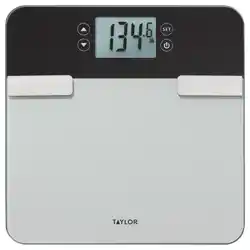
Smart Body Composition Scale
with Body Fat, Body Water, Muscle Mass, BMI, BMR, and
Weight Tracking
INSTRUCTIONS FOR USE
Precision Hub app
1-866-843-3905 (8-5pm MST, M-F)
www.taylorusa.com
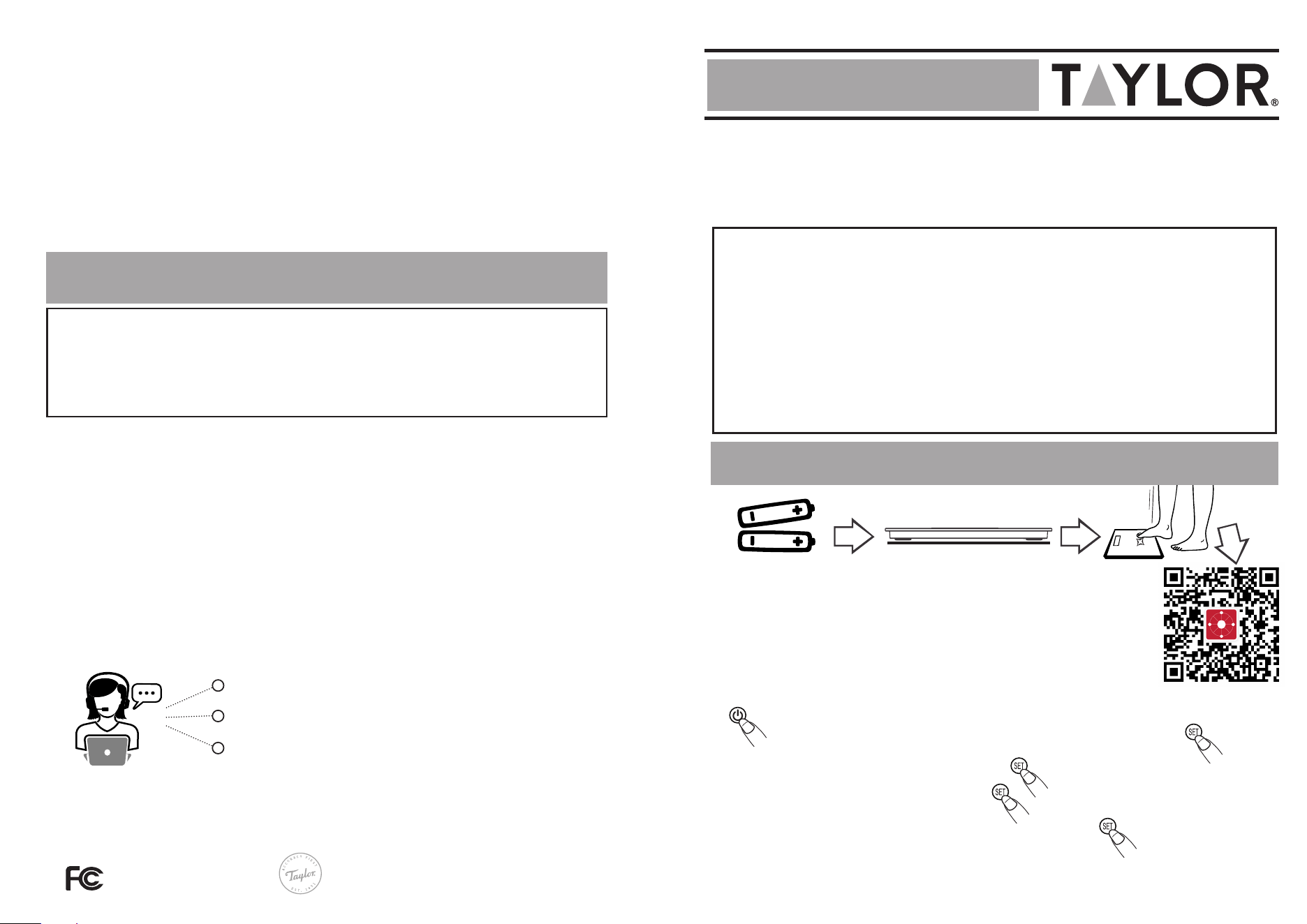
1. Insert 2 AAA (1.5V) batteries (included).
2. Place the scale on a hard, flat surface.
3. Scan QR code and download the free Precision Hub app.
4. Set up your user profile within the Precision Hub app.
5. Non-app user should manually create the user profile
(P1-P8) from the scale before measuring.
Press “
s
” or “
t
”
select a profile number (P1 to P8)
Press “
s
” or “
t
”
select gender/athlete
Press “
s
” or “
t
”
set height
Press “
s
” or “
t
”
set age
6. Scale is ready to weigh.
8
IB5329325A
CP5329325 4.26 WC
©2026 Taylor, a division of Lifetime Brands, Inc. All rights reserved. Oak Brook, IL, 60523
Made in China.
FCC ID: 2AAJ7-5329325
Caution: Changes or modifications not expressly approved by the party responsible for compliance could void the user’s authority to operate the equipment.
Note: This equipment has been tested and found to comply with the limits for a Class B digital device, pursuant to part 15 of the FCC rules. These limits are
designed to provide reasonable protection against harmful interference in a residential installation. This equipment generates, uses, and can radiate radio
frequency energy and, if not installed and used in accordance with the instructions, may cause harmful interference to radio communications. However,
there is no guarantee that interference will not occur in a particular installation. If this equipment does cause harmful interference to radio or television
reception, which can be determined by turning the equipment off and on. The user is encouraged to try to correct the interference by one or more of the
following measures:
- Reorient or relocate the receiving antenna.
- Increase the separation between the equipment and receiver.
- Connect the equipment into an outlet on a circuit different from that to which the receiver is connected.
- Consult the dealer or an experienced radio/TV technician for help.
We declare under our sole responsibility that the above-referenced product has been tested according to FCC requirements, and this device complies
with part 15 of the FCC Rules. Operation is subject to the following two conditions: (1) this device may not cause harmful interference, and (2) this
device must accept any interference received, including interference that may cause undesired operation.
Party issuing Supplier’s Declaration of Conformity & Respon-
sible party – U.S. Contact information:
Taylor division of Lifetime Brands Inc.
2311 W. 22nd Street, Suite 200
Oak Brook, IL 60523
Equipment:
Product Name: Smart Body Composition Scale
Model No.: 5329325
Trade Name: Taylor
FCC INFORMATION
Scale Setup & Calibration
IMPORTANT SAFETY INFORMATION
The TAYLOR Smart Body Composition Scale is intended for home use for weight measurement and estimation
of body composition metrics for informational purposes only. The scale and the associated Precision Hub™
app are designed to be used as tools for tracking changes in body composition over time to support a healthy
lifestyle.
This product is not intended to diagnose, treat, mitigate, or prevent any disease or health condition.
The measurements and data provided by this device are estimates and should not be used as a basis for
medical diagnosis or treatment. The information provided by this scale is not a substitute for professional
medical advice, diagnosis, or treatment. Users should always consult with a qualified healthcare professional
for any health concerns or before making any decisions related to their health. This includes, but is not
limited to, starting a new diet or exercise program. Do not disregard professional medical advice or delay in
seeking it because of something you have read or interpreted from the measurements of this device or the
associated application.
Model# 5329325
FCC Radiation Exposure Stament:
This equipment complies with FCC radiation exposure limits set forth for
an uncontrolled environment. This transmitter must not be co-located or
operating in conjunction with any other antenna or transmitter.
IC Radiation Exposure statement:
This equipment complies with IC RSS-102 radiation exposure limits set forth
for an uncontrolled environment. This transmitter must not be co-located or
operating in conjunction with any other antenna or transmitter.
Not for diagnostic use. Not a medical device.
Not legal for trade.
DURING MEASUREMENT
• Place your feet in the same position every time you weigh yourself. Stand still during
measurement.
• Weigh yourself without clothing whenever possible. Clothes can vary in weight.
• Place the scale where it won’t be bumped while being activated or while in use, as an
inaccurate reading may occur.
• For the most consistent readings, weigh yourself at the same time of day, for the best
results early in the morning, as weight can fluctuate due to food or drink in your system.
• User Type Modes - Standard/Athlete/Baby/Pet can be selected in the Precision Hub App.
See the Helpful Hints guide for app instructions.
Press “
q
” to power on scale
NOTE: This scale can be used with and without the Precision Hub app.
ISED compliance statement:
This device contains license-exempt transmitter(s)/receiver(s) that comply
with Innovation, Science and Economic Development Canada’s license-
exempt RSS(s). Operation is subject to the following two conditions:
(1) This device may not cause interference.
(2) This device must accept any interference, including interference that
may cause undesired operation of the device.
3
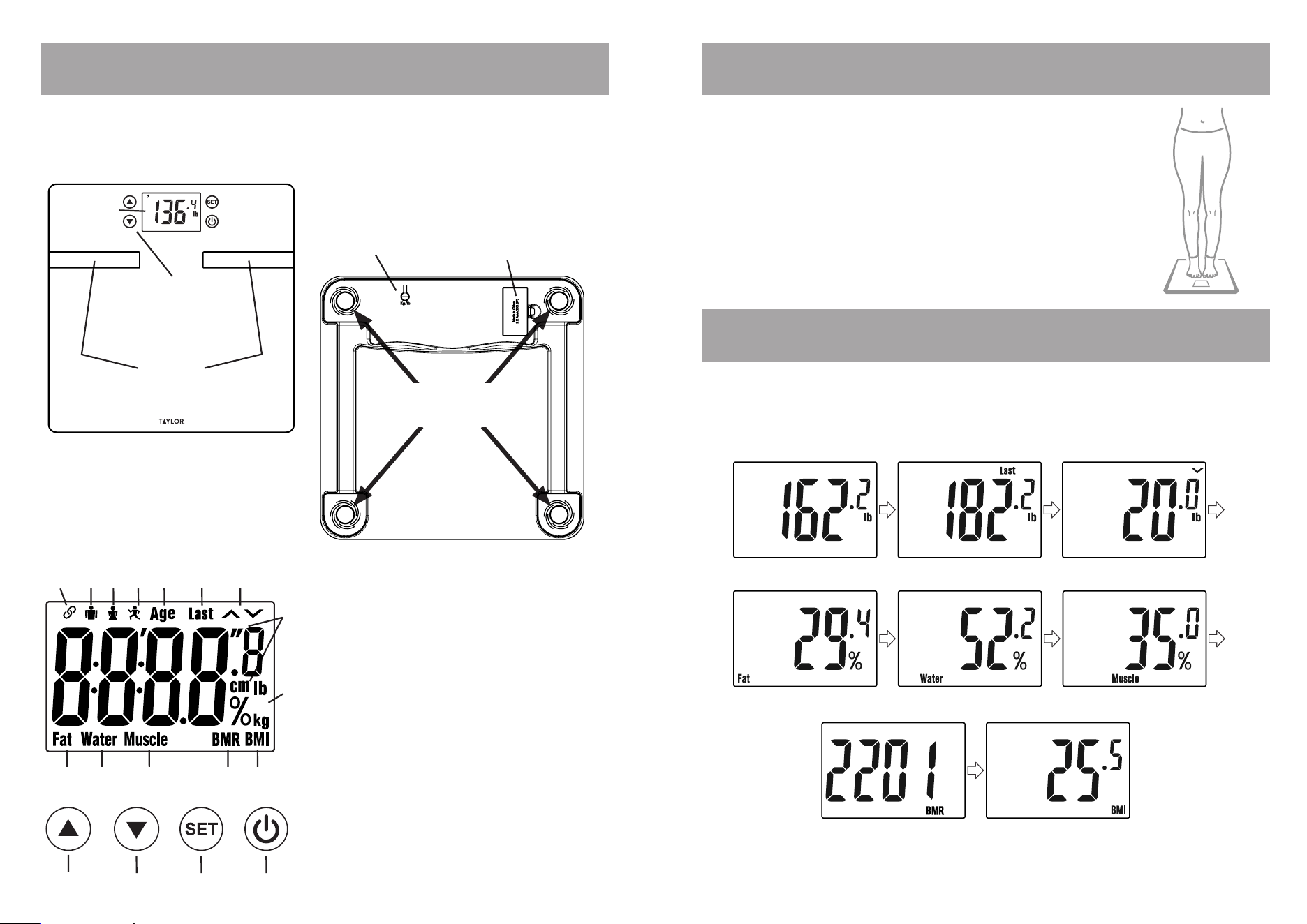
Front & back view of scale
LCD readout description
Getting to know your scale Proper Foot Placement
Stand barefoot on the scale,
ensuring your feet make full
contact with the metal electrodes.
Interpreting body composition readings
If your body fat percentage, for example, is 29.4% and you
need some help understanding these results, please refer
to the app for more detailed information.
Platform
with
Electrodes
Function Keys
[SET], q
t
and
s
Battery
Compartment
Unit Selection
Button
4 High Precision
Strain Gauge Sensors
LCD
Readout
1. Connection Icon
2. Male Icon
3. Female Icon
4. Athlete Mode
5. Age Icon
6. Previous
Measurement
Reading
7. Weight Tracking
Indicators
8. Height Selection
Icon
9. Weight Selection
Icons
10. Body Fat %
Reading
11. Body Water %
Reading
12. Muscle Mass %
Reading
13. Daily Calorie /
Basal Metabolic
Rate (BMR)
14. BMI Icon
15. Forward
Button
16. Back Button
17. ‘SET’ Button
18.
q
Power Button
1
2 3
4 5 6
8
9
10 11 12
15
13 14
16 17 18
7
WEIGHT
LAST WEIGHT
DIFFERENCE
BODY FAT
TOTAL BODY WATER
MUSCLE MASS
DAILY CALORIE ESTIMATES
(BMR)
BMI
5
4
Troubleshooting Common Issues
WARNING INDICATIONS!
If any error messages continue after following the correct actions above, remove the
batteries and then reinsert after 1 minute.
Care & Maintenance
1. The platform will be slippery when it is wet. Keep it dry! However, do not expose to direct
sunlight, extreme hot/cold temperatures, or humidity.
2. This scale is designed to read weights of 440 lb or 200 kg. To prevent damage, do not place
more than 440 lb or 200 kg on it.
3. Treat the scale with care as it is a precise instrument. Always keep your scale in a
horizontal position. Do not store the scale on its side.
4. Clean the scale with a damp cloth and avoid water getting inside the scale.
5. DO NOT use chemical/abrasive cleaning agents.
6. Always keep your scale in a horizontal position.
7. If your scale fails to turn on, check whether batteries are installed or battery power is low.
Insert or replace with new batteries.
8. Do not use for commercial purposes and follow all instructions provided in this manual.
DETAILED INFORMATION ON HOW TO INSERT THE BATTERIES
1. Insert the 2 'AAA' (1.5V) batteries (included).
2. Remove any plastic wrap from the batteries before installing.
3. Open the battery cover on the back of the scale unit.
4. Place the batteries into the battery compartment according to the “+” and “-” polarity
symbols in the battery compartment.
5. Replace the battery compartment cover and screws if applicable.
6. If you do not intend to use the scale for a prolonged period of time, it is advisable to remove
the batteries before storing.
7. Do not mix old and new batteries.
• Always purchase the correct size and grade of battery most suitable for the intended use.
• NOTE: Please recycle or dispose of batteries per local regulations.
• WARNING: Batteries may pose a choking hazard. As with all small items, do not let children handle
batteries. If swallowed, seek medical attention immediately.
• PRECAUTION: Do not dispose of batteries in a fire. Batteries may explode or leak.
• Remove the batteries if the product will not be used for a long period of time. Remove used
batteries promptly.
• Clean the battery contacts and also those of the device prior to battery installation.
• Non-rechargeable batteries are not to be recharged.
• Do not force discharge, recharge, disassemble, heat above 55°C, or incinerate. Doing so may result
in injury due to venting, leakage, or explosion, resulting in chemical burns.”
• Always replace all batteries at the same time; do not mix old and new batteries. Do not mix
alkaline, standard (carbon-zinc), or rechargeable (Ni-Cad, Ni-MH, etc.) batteries.
• When batteries of different brands or types are used together, or new and old batteries are used
together, some batteries may be over-discharged due to a difference of voltage or capacity. This
can result in venting, leakage, and rupture, and may cause personal injury.
Battery Warnings!
1. If the scale does not turn on or no weight is displayed?
Check if the scale is powered up and started up. If not, please refer to the Section “Scale Setup &
Calibration”.
2. If the scale is inaccurate or the weight varies?
Place your feet in the center of the platform and stand still. Allow the weight to lock in before looking down
at the display. Flooring may be a reason for fluctuation. Use the scale on the hardest floor available for
accuracy. Do not move the scale unnecessarily.
3. I have tried all corrective actions, but still can’t solve the problem …
Please contact the Taylor Customer Service Department at 1-866-843-3905 (from 8:00 am to 5:00 pm,
Mountain Standard Time, Monday through Friday) or by email to [email protected].
4. Why do I get a different body fat reading when I use a different brand of body fat scale?
Different body composition scales take estimations around different parts of the body and use different
mathematical algorithms to estimate the percentage of body fat. The best advice is not to make
comparisons from one device to another, but to use the same device each time to monitor any change.
5. Profile Selection When Weights Are Similar
• If two users have weights within ±6.6 lb, the scale will display both profiles (for example, P1 P2). Press the
Up arrow to select P1, or the Down arrow to select P2.
• If the two users are a scale-only user and an app user with similar weights (for example, P1 and A1), the
display will show P1 A1. Press the Up arrow to select P1, or the Down arrow to select A1.
6. Why isn’t the app syncing my offline measurements?
The app will display a “Synchronize Data” button only if your specific scale requires manual offline
measurement transfers. Tap the “Synchronize Data” button and wait for your offline measurements to
upload. When the scale uploads/syncs data to the app, it switches back and forth between ‘oo’ & ‘00’.
7. Issues with device connection?
• The scale can only be connected to one cell phone and app at the same time. If the connection icon is
shown on the scale, it may have been connected to another cell phone.
• If the scale is already connected to another cell phone, you can close the app or temporarily turn off the
connection technology that cell phone. If the connection icon disappears, you can try to connect to the
scale again.
8. Why isn’t my body fat percentage being measured when I connect with the app?
• You are not standing on the scale with bare feet. Wearing shoes or socks can cause the electrodes to fail to
measure body data.
• The scale is not placed on a flat, hard surface. Placing the scale on a carpeted or raised surface will result in
deviations in the data.
• Weighing without standing still. After weighing, wait until the weight stabilizes or the display on the scale
flashes 3 times before the weighing is complete.
• The soles of the feet are not stepping on the electrodes. The soles of your feet need to touch the
electrodes, and stand still to measure.
• Incorrectly setting personal information. When personal information is filled out incorrectly, usually the
age is too young or the height is abnormal, which is beyond the measurement range of the body fat scale,
the body fat percentage will not be measured, only the weight will. Please check if the basic personal
information is incorrect. For example, the user’s height was originally 150cm, but 50cm was selected by
mistake, resulting in the measurement range being exceeded. After modifying 150cm, the measurement is
normal.
• Out of age range. Users younger than 10 years old or older than 99 years old can only measure weight and
BMI data, and will not be able to measure body fat percentage and other body data.
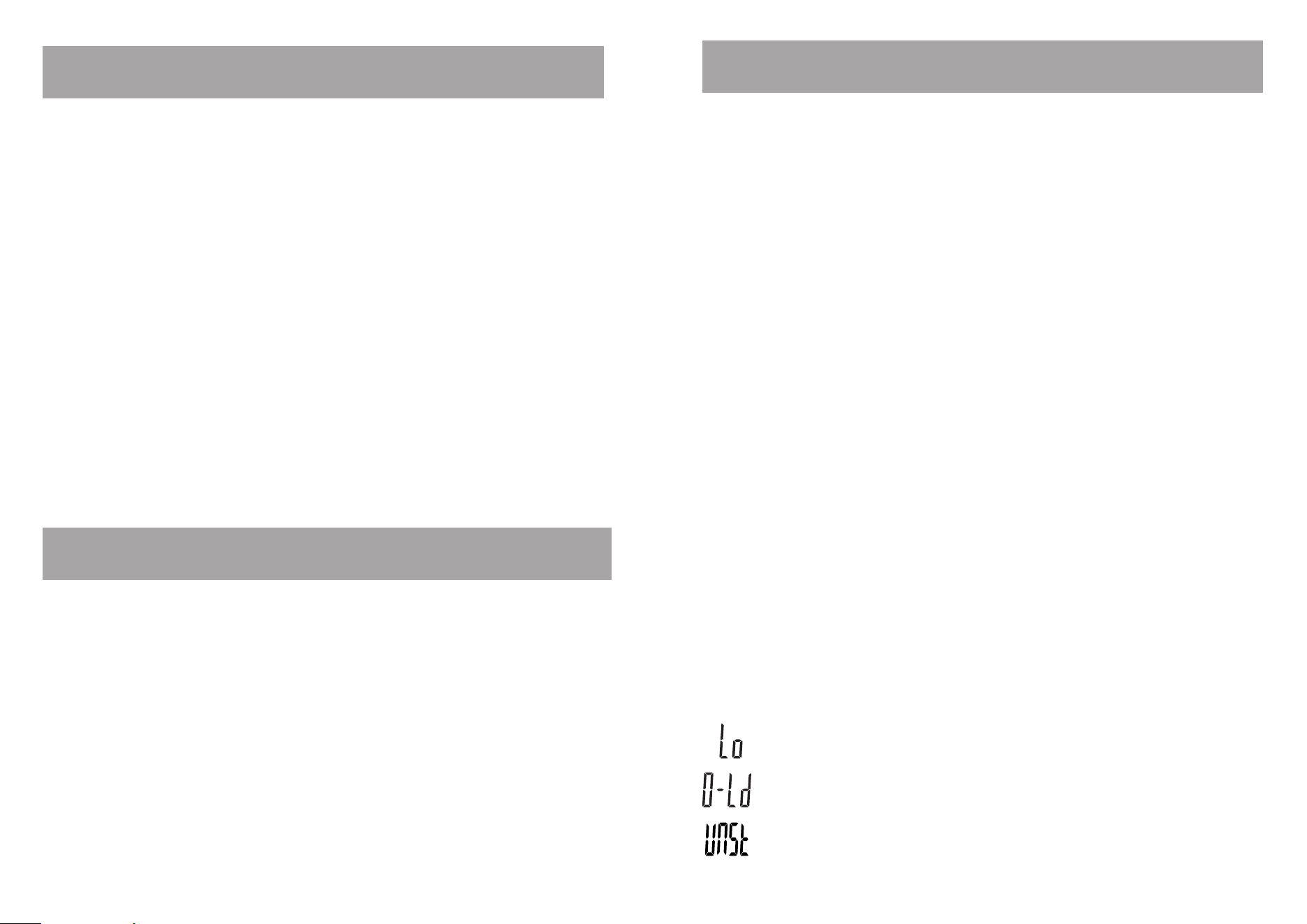
Low Battery Indication:
The Battery is running low. Please replace it with a new battery.
Over-Load warning:
Remove the weight immediately, or damage can be caused.
Calibration Error:
Step off and let the scale turn off. Step on and wait until it shows 0.0. Scale is ready for use
again.
76
SAFETY WARNING
• The warning signs and icons shown appear in order for you to use this product safely and
correctly, as well as to prevent product damage, risk, and injury to you and others.
PRECAUTION NOTICE
• Do not use the scale on people who have body implants such as a pacemaker, artificial
limbs, contraceptive devices, or metal plates or screws. It may cause the device to
malfunction or produce an inaccurate result. When in doubt, consult your physician.
• Do not disassemble the scale as incorrect handling may cause injury.
• Do not step on the scale when your body or feet are wet, especially after bathing or
showering, to prevent slipping.
IMPORTANT NOTICE TO USERS
• This product is intended for humans ages 6 to 99 years of age.
• Make sure to use only the type of battery stated (see Section “Scale Setup & Calibration”).
• The “Athlete” mode is applicable only to people 18 to 70 years of age.
• Body fat percentage estimates will vary with the amount of water in the body, and can be
affected by dehydration or over-hydration due to such factors as alcohol consumption,
menstruation, illness, intense exercise, etc.
• Do not use on pregnant women. The result is inaccurate and the effects on the fetus are
unknown.
• For body fat and body water estimates, always estimate in bare feet.
Product Specifications
One (1) Year Limited Warranty
This scale is warranted against defects in materials of workmanship (excluding batteries) for
one (1) year for the original purchaser from date of retail purchase. It does not cover damages
or wear resulting from accident, misuse, abuse, commercial use, or unauthorized adjustment
and/or repair. Do not return to retailer. Should this scale require review (or replacement at our
option) while under warranty, please contact us for help and troubleshooting. For best service,
please take a photo or note the information on the product label, located on the bottom of the
scale.
Phone:
1-866-843-3905
(8-5pm MST, M-F)
Email: [email protected]
Web: taylorusa.com
There are no express warranties except as listed above. This warranty gives you specific legal
rights, and you may have other rights which vary from state to state. For additional product
information, or warranty information outside the USA, please contact us through
www.taylorusa.com.
1. Bioelectrical Impedance Analysis (BIA) technology for body fat and body water
percentage, muscle mass estimations and daily calorie intake (DCI) estimations.
2. High precision STRAIN GAUGE technology for weight measurement
3. Athlete (for ages 18-70 years) or Normal Mode selection
4. 8 user memory
5. 4 touch buttons
6. Auto-on and auto-off functions
7. Power saving LCD readout
8. Low battery indicator
9. Capacity: 440 lb or 200 kg
10. Graduation: 0.2 lb or 100 g
11. Body fat graduation: 0.1%
12. Body water graduation: 0.1%
13. Muscle mass graduation: 0.1%
14. Age range from 6 to 99 years
15. Height range from 2'7" to 7'3" (80 to 220cm)
16. Body fat range: 5 to 65%
17. Total body water range: 20 to 85%
18. Operates with 2 ‘AAA’ (1.5V) batteries (included)
19. Product dimension: 11.8" x 11.8" x 0.9" (Approx.)
20. Gift box dimension: 13.78" x 1.97" x 13.98" (Approx.)
21. Product weight: 3.1lb (Approx.)
22. Total weight (product & gift box): 4.96lb (Approx.)
23. Output power for Body Fat Analyzer: <0.05W
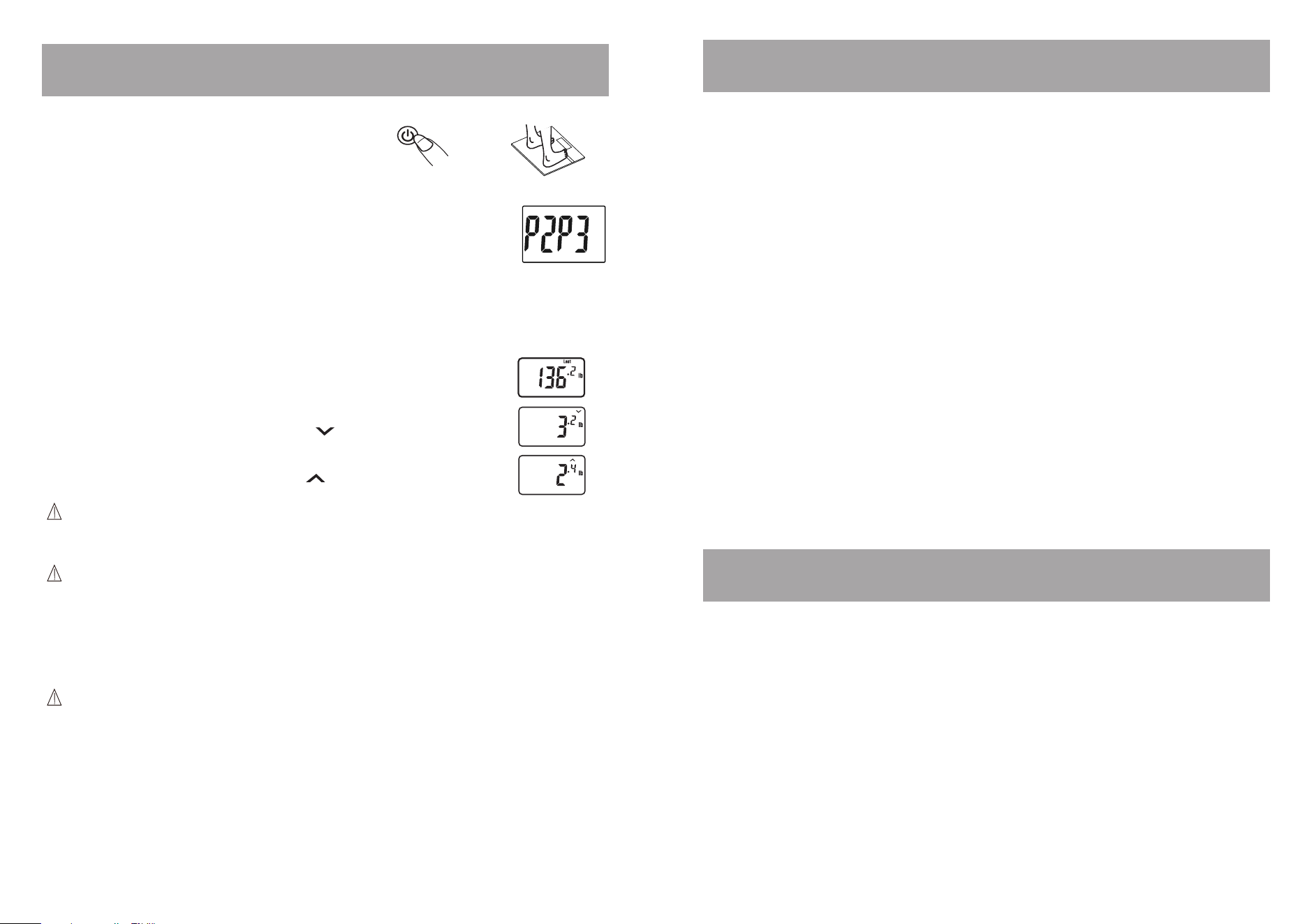
This scale includes a weight tracking feature which shows the amount of weight change
compared to the previously saved measurement.
1. Step on the platform directly with bare feet
or press the [
q
] key to turn on the scale.
Weight Tracking Feature
OR
The previous weight saved and ‘LAST’ will appear on the display
If there has been weight loss since the previously saved reading, the
display will show a downward facing arrow
If there has been weight gain since the previously saved reading, the
display will show an upward facing arrow
2. Press the [
] or [
] key to toggle between memory locations (1-8). The screen will show the
personal data screens, then “0.0”.
3. Step onto the scale and stand still while the weight is being measured. The weight reading
will display. The display will show the previous weight saved and the difference between the
current readings. If there is no change in the weight since the last reading the display will
show “0.0”.
Couple of Reminders: After you have programmed your personal data into
memory, the scale will recognize your profile by your previous weight. If another
profile is within +/- 6.6lbs, you will have to press the [
] or [
] arrow to
select your correct profile. To select your profile, press the up arrow [
] for the
first position and press the down arrow [
] for the second position.