Models:
H02
H02_Pro
Onboarding App
Download the Handy
Onboarding app for
the best experience.
DE Für die beste Benutzererfahrung laden Sie die Handy Onboarding-App
herunter.
FR Téléchargez l’application Handy Onboarding pour une expérience optimale.
ES Descarga la aplicación Handy Onboarding para disfrutar de la mejor
experiencia.
JP 最高の体験を得るには、Handy Onboarding アプ リを ダ ウンロ ードしてく
ださい。
KR 최고의 경험을 위해 Handy Onboarding 앱을 다운로드하세요.
01 05
02 06
03 07
04 08
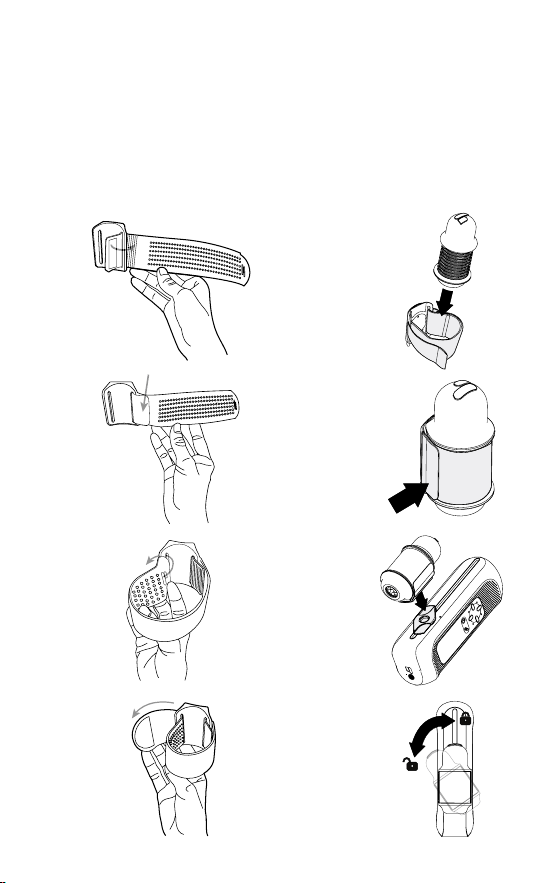
EN Get started with The Handy 2 by assembling your device.
DE Beginnen Sie mit The Handy 2, indem Sie Ihr Gerät zusammenbauen.
FR Commencez avec The Handy 2 en assemblant votre appareil.
ES Empiece a usar The Handy 2 ensamblando su dispositivo.
JP The Handy 2 のご利用は、まずデバイスの組み立てから始めてください。
KR The Handy 2를 사용하려면 기기를 조립하여 시작하세요.
AssemblyOnboarding App
Montage
Assemblage
Ensamblaje
組み立て
조립
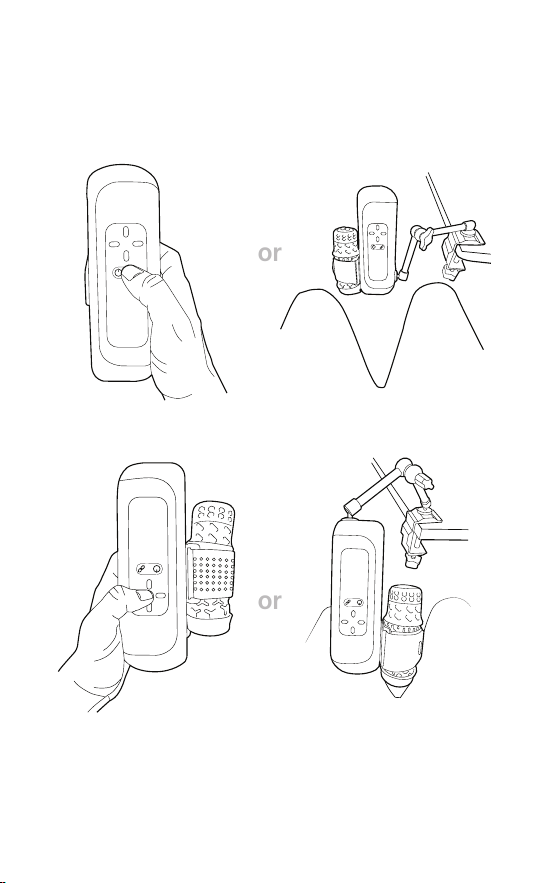
Upright Position
Invert Position
EN Invert the stroke direction, controls, and display via The Onboarding App
DE Die Strichrichtung, die Steuerelemente und die Anzeige können über die Onboarding-
App umgekehrt werden
FR Inversez le sens du trait, les commandes et l’achage via l’application d’accueil
ES Invierte la dirección del trazo, los controles y la pantalla mediante la aplicación de
incorporación
JP オンボーディングアプリでストロークの方向、コントロール、表示を反転します
KR 온보딩 앱을 통해 스트로크 방향, 컨트롤 및 디스플레이를 반전합니다
Positions
Montage
Assemblage
Ensamblaje
組み立て
조립
or
or
G Green / Grün / Vert / Verde / 緑 / 초록
B Blue / Blau / Bleu / Azul / 青 / 파랑
M Magenta / Magenta / Magenta / Magenta / マゼンタ / 마젠타
R Red / Rot / Rouge / Rojo / 赤 / 빨강
K Black / Schwarz / Noir / Negro / 黒 / 검정
W White / Weiß / Blanc / Blanco / 白 / 하양
GG G G
MB
EN On (Ready)
DE Ein (Bereit)
FR Marche (Prêt)
ES Encendido (Listo)
P オン (準備完了)
KR 켜짐 (준비됨)
EN Bluetooth mode
DE Bluetooth-Modus
FR Mode Bluetooth
ES Modo Bluetooth
JP Bluetooth モード
KR 블루투스 모드
EN Calibrating
DE Kalibrierung läuft
FR Calibration en cours
ES Calibrando
JP キャリブレーション中
KR 보정 중
EN Wi-Fi mode
DE WLAN-Modus
FR Mode Wi-Fi
ES Modo Wi-Fi
JP Wi-Fi モード
KR 와이파이 모드
LED Guide
LED-Leitfaden
Guide LED
Guía LED
LED ガイド
LED 가이드
Error Codes & Full Guide / Fehlercodes & Vollständige Anleitung / Codes d'erreur et guide
complet / Códigos de error y guía completa / エラーコードと完全ガイド / 오류 코드 및 전체
가이드
Oine
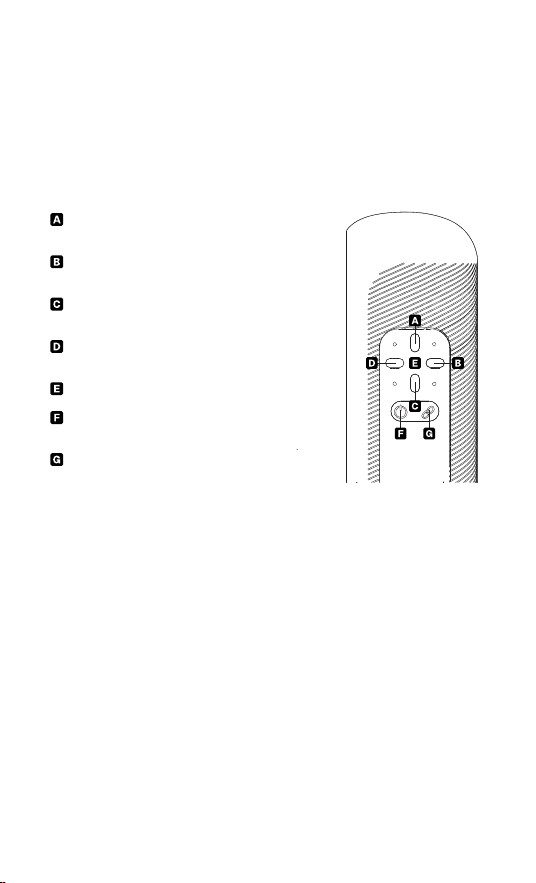
EN Control speed and stroke length with the buttons on the device.
DE Steuern Sie Geschwindigkeit und Hublänge mit den Tasten am Gerät.
FR Contrôlez la vitesse et la longueur de course à l’aide des boutons sur l’appareil.
ES Controle la velocidad y la longitud de recorrido con los botones del dispositivo.
JP 本体のボタンで速度とストローク長を調整できます。
KR 기기 버튼으로 속도와 스트로크 길이를 조절할 수 있습니다.
Haptic Mode
01 Press Action Button to turn on Haptic Mode. / Drücken Sie die Aktionstaste, um den
Haptikmodus zu aktivieren. / Appuyez sur le bouton Action pour activer le mode haptique.
/ Pulse el botón de acción para activar el modo háptico. / アクションボタンを押してハプテ
ィックモードをオンにします / 햅틱 모드를 켜려면 액션 버튼을 누르세요
02 Press Left/Right to cycle through the patterns. / Drücken Sie die Links-/Rechtstasten,
um durch die Muster zu blättern. / Appuyez sur les boutons Gauche/Droite pour parcourir
les motifs. / Pulse los botones izquierda/derecha para alternar entre los patrones. / 左/右
ボタンを押してパターンを切り替えます / 왼쪽/오른쪽 버튼을 눌러 패턴을 순환하세요
03 Press Up/Down to adjust stroke length. / Drücken Sie die Auf-/Ab-Tasten, um die
Hublänge anzupassen. / Appuyez sur les boutons Haut/Bas pour ajuster la longueur de la
course. / Pulse los botones arriba/abajo para ajustar la longitud del trazo. / 上/下ボタンを
押してストロークの長さを調整します / 위/아래 버튼을 눌러 스트로크 길이를 조절하세요
04 Press Power Button to Pause/Start Patterns. / Drücken Sie die Ein-/Aus-Taste, um
die Muster zu pausieren/starten. / Appuyez sur le bouton Marche/Arrêt pour mettre en
pause/démarrer les motifs. / Pulse el botón de encendido para pausar/iniciar los patrones.
/ 電源ボタンを押してパターンを一時停止/開始します / 전원 버튼을 눌러 패턴을 일시 정지/
시작하세요
05 Press Action Button to turn o Haptic Mode. / Drücken Sie die Aktionstaste, um den
Haptikmodus zu deaktivieren. / Appuyez sur le bouton Action pour désactiver le mode
haptique. Pulse el botón de acción para desactivar el modo háptico. / アクションボタンを
押してハプティックモードをオフにします / 햅틱 모드를 끄려면 액션 버튼을 누르세요
Oine
Hors ligne
Sin conexión
オフライン
오프라인
Increase stroke length / Hublänge erhöhen /
Allonger la course / Aumentar carrera / ストローク
長さ増加 / 스트로크 길이 증가
Increase speed / Geschwindigkeit erhöhen /
Augmenter la vitesse / Aumentar velocidad / 速度
増加 / 속도 증가
Decrease stroke length / Hublänge verringern /
Réduire la course / Reducir carrera / ストローク長さ
減少 / 스트로크 길이 감소
Decrease speed / Geschwindigkeit verringern
/ Réduire la vitesse / Reducir velocidad / 速度減
少 / 속도 감소
LED Indicator / LED-Anzeige / Indicateur LED /
Indicador LED / LEDインジケーター / LED 표시등
Power on, Start/Stop / Einschalten, Start/Stopp
/ Allumer, Marche/Arrêt / Encender, Inicio/Paro / 電
源 オ ン 、ス タ ー ト / ス ト ッ プ / 전원 켜기, 시작/정지
Action-button / Aktionstaste / Bouton d’action /
Botón de acción / アクションボタン / 액션 버튼
Online
Online
En ligne
En línea
オンライン
온라인
EN Go online to explore additional features.
DE Gehen Sie online, um weitere Funktionen zu entdecken.
FR Rendez-vous en ligne pour découvrir des fonctionnalités supplémentaires.
ES Conéctese en línea para explorar funciones adicionales.
P 追加機能を利用するにはオンラインにアクセスしてください。
KR 추가 기능을 확인하려면 온라인에 접속하세요.
01 Download the Handy Onboarding app / Handy Onboarding-App herunterladen /
Télécharger l’application Handy Onboarding / Descargue la app Handy Onboarding /
Handy Onboardingアプリをダウンロード / Handy Onboarding 앱 다운로드
02 Follow the instructions / Anweisungen befolgen / Suivez les instructions / Siga las
instrucciones / 指示に従う / 안내를 따르세요
Need Help? Find our Help Articles here / Brauchen Sie Hilfe? / Besoin d’aide ? / ¿Necesitar
ayuda? / ヘルプが必 要ですか? / 도움이 필요하신가요?
Accessories
Zubehör
Accessoires
Accesorios
アクセサリー
액세서리
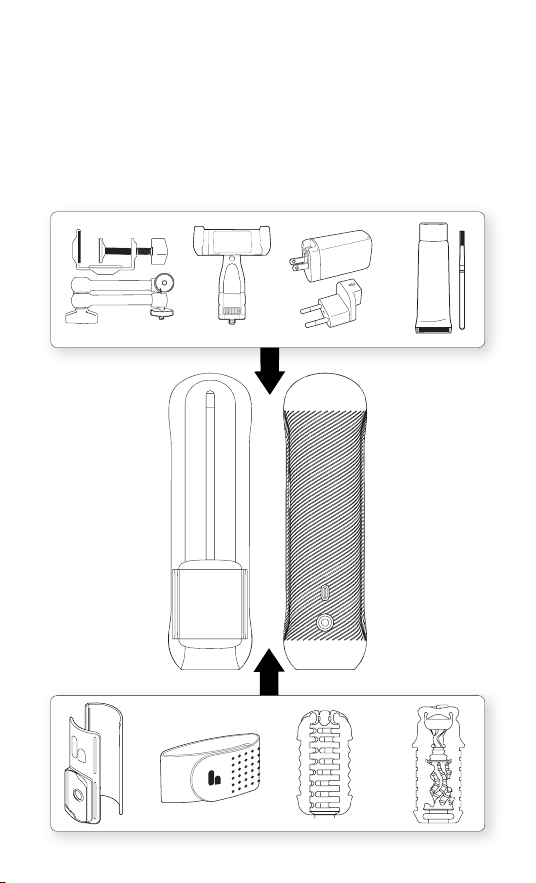
EN Discover and attach new sleeves and accessories.
DE Entdecken und befestigen Sie neue Sleeves und Zubehör.
FR Découvrez et xez de nouveaux manchons et accessoires.
ES Descubra y coloque nuevas fundas y accesorios.
JP 新しいスリーブやアクセサリーを見つけて取り付けましょう。
KR 새로운 슬리브와 액세서리를 발견하고 부착해 보세요.

Charging
Cleaning
Auaden
Chargement
Carga
充電
충전
Reinigung & Pflege
Nettoyage et entretien
Limpieza y cuidado
クリーニングとケア
청소 및 관리
USB-C PD 2.0/3.0, QC 2.0/3.0
5V/9V/12V/15V/20V, 3. 25A
EN You can charge The Handy 2 with any USB-C Cable. A complete charge takes between
1 and 3 hours and you can use the device while it’s plugged in when using an appropriate
charger and cable.
DE Sie können The Handy 2 mit jedem USB-C-Kabel auaden. Mit einem geeigneten
Ladegerät und Kabel dauert eine vollständige Ladung zwischen einer und drei Stunden.
Das Gerät kann während des Ladevorgangs verwendet werden.
FR Vous pouvez recharger le Handy 2 avec n’importe quel câble USB-C. Avec un chargeur
et un câble adaptés, une charge complète prend entre une et trois heures. Vous pouvez
utiliser l’appareil pendant la charge.
ES Puedes cargar el Handy 2 con cualquier cable USB-C. Con un cargador y cable
adecuados, la carga completa tarda entre una y tres horas. Puedes usar el dispositivo
mientras está conectado.
JP The Handy 2はUSB-Cケーブルで充電できます。適切な充電器とケーブルを使用すれ
ば、1~3 時 間でフル 充 電 で きま す。接 続したままデバイスを 使 用 で きま す。
KR The Handy 2는 모든 USB-C 케이블로 충전할 수 있습니다. 적합한 충전기와 케이블을 사용하면
완전히 충전하는 데 1시간에서 3시간 정도 걸립니다. 전원에 연결한 상태에서도 기기를 사용할 수
있습니다.
Cleaning & Care
EN After each use, gently wipe your
The Handy 2 with a soft cloth dampened with warm water and mild soap. Avoid getting
water inside the device. Make sure it is thoroughly dry before storing it in a cool, dry
place. Using a Water-Based Lubricant is recommended. Regularly grease the lead screw
and oil the support rods for optimal performance.
DE Nach jedem Gebrauch wischen Sie Ihr The Handy 2 vorsichtig mit einem weichen
Tuch ab, das mit warmem Wasser und milder Seife angefeuchtet ist. Vermeiden Sie es,
Wasser in das Gerät gelangen zu lassen. Stellen Sie sicher, dass es vollständig trocken
ist, bevor Sie es an einem kühlen, trockenen Ort aufbewahren. Die Verwendung
eines wasserbasierten Schmierstos wird empfohlen. Fetten Sie die Gewindespindel
regelmäßig ein und ölen Sie die Stützstangen, um eine optimale Leistung zu
gewährleisten.
FR Après chaque utilisation, essuyez délicatement votre The Handy 2 avec un chion
doux humidié à l’eau tiède et au savon doux. Évitez de laisser de l’eau pénétrer à
l’intérieur de l’appareil. Assurez-vous qu’il soit bien sec avant de le ranger dans un
endroit frais et sec. L’utilisation d’un lubriant à base d’eau est recommandée. Graissez
régulièrement la vis-mère et huilez les tiges de support pour un fonctionnement
optimal.
ES Después de cada uso, limpie suavemente su The Handy 2 con un paño suave
humedecido con agua tibia y jabón suave. Evite que entre agua en el dispositivo.
Asegúrese de que esté completamente seco antes de guardarlo en un lugar fresco y
seco. Se recomienda usar un lubricante a base de agua. Engrase regularmente el tornillo
de avance y las varillas de soporte para un rendimiento óptimo.
JP ご使用後は毎回、やわらかい布をぬるま湯と中性洗剤で湿らせて、The Handy 2をやさしく拭いてください。
機器 内部 に水が入らないようご 注 意ください。完 全に 乾いていることを確 認してから、涼しく乾 燥した場所に保管
してください。水性潤滑剤のご使用をお勧めします。最適な性能を維持するために、リードスクリューにグリース
を塗布し、サポートロッドにオイルを塗布してください。
KR 사용 후마다 부드러운 천을 미지근한 물과 순한 비누에 적셔 The Handy 2를 부드럽게 닦아주세요. 기기 내부에 물이
들어가지 않도록 주의하세요. 완전히 건조된 것을 확인한 후 서늘하고 건조한 곳에 보관하세요. 수성 윤활제를 사용하는 것이
좋습니다. 최적의 성능을 위해 리드 스크류와 지지봉에 정기적으로 그리스를 바르십시오.

Disposal
Entsorgung
Élimination
Eliminación
廃棄
처분
EN This product should not be disposed of with household waste. Look for the crossed
out bin symbol and bring it to the nearest collection point for recycling of electronic
equipment. MODEL: H02.0##REG-## / H02.##PRO-##. MANUFACTURE DATE: Connect
the Handy online via Handy Onboarding app and click on “Device Info”. To download the
app, scan the QR-code at the front page of this guide.
DE Dieses Produkt darf nicht über den Hausmüll entsorgt werden. Achte auf das
Symbol der durchgestrichenen Mülltonne und bringe das Gerät zur nächstgelegenen
Sammelstelle für die Wiederverwertung von Elektrogeräten. MODELL: H02.##REG-##
H02.##PRO-##. HERSTELLUNGSDATUM: Verbinde The Handy online über die Handy
Onboarding-App und klicke auf „Device Info“. Um die App herunterzuladen, scannen Sie
den QR-Code auf der ersten Seite dieses Handbuchs.
FR Ce produit ne doit pas être jeté avec les ordures ménagères comme indiqué par le
symbole de la poubelle barrée. Déposez-le au point de collecte le plus proche pour le
recyclage des équipements électroniques. MODÈLE: H02.##REG-## H02.##PRO-##.
DATE DE FABRICATION : Connectez le Handy en ligne via l’appli Handy Onboarding et
cliquez sur « Device Info». Pour télécharger l’application, scannez le code QR gurant à la
première page de ce guide.
ES Este producto se no debe desechar con la basura doméstica. Busca el símbolo del
contenedor tachado y llévalo al punto de recolección más cercano para el reciclaje
de equipos electrónicos. MODEL: H02.0##REG-## / H02.##PRO-##. FECHA DE
FABRICACIÓN: Conecta el Handy en línea a través de la aplicación Handy Onboarding y
haz clic en “Device Info”. Para descargar la aplicación, escanee el código QR que aparece
en la portada de esta guía.
JP 本製品は家 庭ごみと一緒に廃棄しないでください。×印の付いたゴミ箱のマークを確
認し、最寄りの電子機器リサイクル回収拠点にお持ちください。モデル: H02.##REG-##
H02.##PRO-##。製造日: Handy OnboardingアプリでHandyをオンラインに接続し、「
デバイス情 報 」をクリックしてください。アプリをダウンロードするには,このガイドの最 初
のページにあるQRコードをスキャンしてください。
KR 모델: H02.##REG-## H02.##PRO-##. 제조일: Handy Onboarding 앱을 통해 Handy를
온라인에 연결하고 “기기 정보”를 클릭하세요. 앱을 다운로드하려면 이 가이드 첫 페이지에 있는 QR
코드를 스캔하세요.