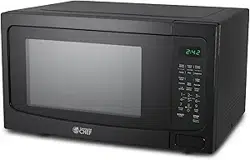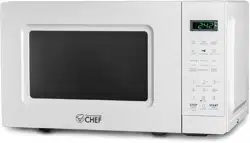

Page 1
User Manual
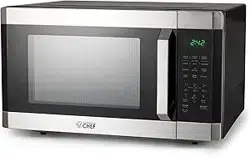
Microwave
Manuel D’utilisateur
Micro-onde
MODEL | MODÈLE:
CHM16MB, CHM16MW, CHM16MS

Page 2

Page 3
CONTENTS
1. READ these instructions carefully before installing and operating the
appliance. Keep them for further reference.
2. Record in the space below the “SERIAL/MODEL NUMBER” found on the back
or bottom of your appliance and retain this information for future reference.
SERIAL NUMBER:
MODEL NUMBER:
DATE OF PURCHASE:
Save and staple your sales receipt to your manual for warranty coverage.
SAFETY INFORMATION
Precautions to Avoid Possible Exposure to Excessive Microwave Energy ..........................................4
A Special Note on Arcing ...................................................................................................................................................4
Addendum ................................................................................................................................................................. 4
Important Safety Instructions ............................................................................................................................ 5
Grounding Instructions ......................................................................................................................................... 7
Utensil Guide for the Microwave ...................................................................................................................8-9
SET UP & USE
Specications ........................................................................................................................................................................... 10
Installation Guide ................................................................................................................................................................... 10
Parts & Features .......................................................................................................................................................................11
Control Panel .............................................................................................................................................................................. 11
Operation ........................................................................................................................................................... 12-18
CLEANING & CARE ............................................................................................................................................20
TROUBLESHOOTING & WARRANTY
Before You Call For Service .............................................................................................................................................21
Customer Service....................................................................................................................................................................21
Troubleshooting .....................................................................................................................................................................22
Limited Warranty .................................................................................................................................................. 23
Page 4
PRECAUTIONS TO AVOID
POSSIBLE EXPOSURE TO
EXCESSIVE MICROWAVE ENERGY
1. Do not attempt to operate this oven with the door open since
open-door operation can result in harmful exposure to microwave energy. It
is important not to defeat or tamper with the safety interlocks.
2. Do not place any object between the oven front face and the door or allow
soil or cleaner residue to accumulate on sealing surfaces.
3. Do not operate the oven if damaged. It is particularly important that the
oven door closes properly and that there is no damage to the:
1. DOOR (bent)
2. HINGES AND LATCHES (broken or loosened)
3. DOOR SEALS AND SEALING SURFACES
4. The oven should not be adjusted or repaired by anyone except properly
qualied service personnel.
A SPECIAL NOTE ON ARCING
“Arcing” refers to the presence of sparks inside the microwave oven.
It can be caused by:
• Metal or foil touching the inside walls
of the oven.
• Foil not closely molded to food, where
edges have been left sticking up.
• Small metal parts such as twist-ties,
poultry pins, or gold-rimmed dishes.
• Recycled paper towels which may
contain small amounts of metal.
ADDENDUM
If this product is not maintained in a good state of cleanliness, its surface
could be degraded. This could affect the lifespan of the product and lead to a
dangerous situation.
DANGER
DANGER - Immediate hazards
which WILL result in severe
personal injury or death
WARNING
WARNING - Hazards or unsafe
practices which COULD result in
severe personal injury or death
CAUTION
CAUTION - Hazards or unsafe
practices which COULD result in
minor personal injury
SAFETY INFORMATION
CAUTION
IF YOU SEE SPARKS IN YOUR
MICROWAVE OVEN,
IMMEDIATELY TURN TIMER TO
OFF, CEASE COOKING AND
CORRECT THE PROBLEM.
Page 5
IMPORTANT SAFETY INSTRUCTIONS
1. Read all instructions before using the appliance.
2. Read carefully and follow the specic “Precautions to avoid possible
exposure to excessive microwave energy”.
3. This appliance must be grounded. Connect only to properly
grounded outlet. See “GROUNDING INSTRUCTIONS”.
4. Install or position this appliance only in accordance with the
provided installation instructions.
5. Some products such as whole eggs and sealed containers -for
example, closed glass jars- can potentially explode and should not
be heated in this oven.
6. Use this appliance only for the intended uses as described in this
manual. This type of oven is specically designed to heat, cook, or
dry food. It is not designed for industrial or laboratory use. Do not
use corrosive chemicals or vapors in this appliance.
7. As with any appliance, close supervision is necessary when used by
children.
8. To reduce the risk of re in the oven cavity;
• Do not overcook food. Carefully tend to the appliance when paper,
plastic, or other combustible materials are placed inside the oven to
facilitate cooking.
• Remove wire twist-ties from paper or plastic bags before placing
bag in oven.
• If materials inside the oven ignite, keep oven door closed, turn oven
off, and disconnect the power cord or shut off power at the fuse or
circuit breaker panel.
• Do not use the cavity for storage purposes. Do not leave paper
products, cooking utensils or food inside the cavity when not in use.
9. Liquids, such as water, coffee, or tea can be overheated beyond
the boiling point without appearing to be boiling due to surface
tension of the liquid. Visible bubbling or boiling when the container is
removed from the microwave oven is not always present. This could
result in very hot liquids suddenly boiling over when a spoon or
other utensil is inserted into the liquid.
10. Do not heat oil or fat for deep-frying. It is difcult to control the
temperature of oil in a microwave oven.
11. Foods with heavy skins such as potatoes, whole squash, apples and
chestnuts should be pierced with a fork or the tip of a sharp knife
before cooking.
WARNING
When using electrical appliances, basic safety
precautions should be followed, including the following
WARNING: To reduce the risk of burns, electric shock, re, and
injury to persons or exposure to excessive microwave energy:
SAFETY INFORMATION

Page 6
FEDERAL COMMUNICATIONS COMMISSION
RADIO FREQUENCY INTERFERENCE STATEMENT
WARNING: This equipment generates and uses ISM frequency energy and if not installed
and used properly, that is in strict accordance with the manufacturer’s instructions, may
cause interference to radio and television reception. It has been type-tested and found
to comply with limits for an ISM Equipment pursuant to part 18 of FCC Rules, which are
designed to provide reasonable protection against such interference in a residential
installation. However, there is no guarantee that interference will not occur in a particular
installation. If this equipment does cause interference to radio or television reception, which
can be determined by turning the equipment off and on, the user is encouraged to try to
correct the interference by one or more of the following:
• Reorient the receiving antenna of radio or television.
• Relocate the Microwave oven with respect to the receiver.
• Move the microwave oven away from the receiver.
• Plug the microwave oven into a different outlet so that microwave oven and receiver are
on different branch circuits.
THE MANUFACTURER is not responsible for any radio or TV interference caused by
UNAUTHORIZED MODIFICATION to this microwave oven. It is the responsibility of the user
to correct such interference.
12. The contents of feeding bottles and baby food jars should be stirred
or shaken and the temperature should be checked before serving in
order to avoid burns.
13. Cooking utensils may become hot because of heat transferred from
the heated food. Pot holders may be needed to handle the utensil.
14. Do not cover or block any openings on the appliance.
15. Do not store or use this appliance outdoors. Do not use this product
near water, for example, near a kitchen sink, in a wet basement, near
a swimming pool, or similar locations.
16. Do not operate this appliance if the cord or plug is damaged, if it is
not working properly, or if it has been damaged or dropped.
17. Do not immerse cord or plug in water. Keep cord away from heated
surfaces. Do not let cord hang over the edge of a table or counter.
18. Use only thermometers, specically designed for use in microwave
ovens.
19. Be certain the glass tray and roller rings are in place before
operating the oven.
20. This appliance should be serviced only by qualied service
personnel. Contact nearest authorized service facility for
examination, repair, or adjustment.
21. When cleaning sealing surfaces of the oven, such as the door jamb,
use only mild, nonabrasive soaps, or mild detergents applied with a
sponge or soft cloth.
SAVE THESE INSTRUCTIONS
HOUSEHOLD USE ONLY
SAFETY INFORMATION
Page 7
GROUNDING INSTRUCTIONS
ELECTRICAL REQUIREMENTS
The electrical requirements are a 120 volt 60 Hz, AC only, 20 amp. It is recommended
that a separate circuit serving only the oven be provided. The oven is equipped
with a 3-wire cord having a 3-prong grounding plug. It must be plugged into a wall
receptacle that is properly installed and grounded.
This appliance must be grounded. In the event of an electrical short circuit,
grounding reduces risk of electric shock by providing an escape wire for the electric
current. The cord provided with this appliance is equipped with a grounding wire and
a grounding plug. The plug must be plugged into an outlet that is properly installed
and grounded. Do not attempt to tamper with this safety feature by modifying the
plug in any way.
Consult a qualied electrician or serviceman if:
1) The grounding instructions are not completely understood.
2) You are unsure that the appliance is properly grounded.
3) You have any questions about the grounding or electrical instructions.
POWER SUPPLY CORD
1. A short power supply cord is provided to reduce the risk of becoming entangled in
or tripping over a longer cord.
2. If the power supply cord is too short, do not use an extension cord. Have a
qualied electrician or serviceman install an outlet near the appliance.
3. If it is absolutely necessary to use longer cord sets or an extension cord, extreme
care must be exercised.
a) Use only a grounding type 3-wire extension cord that has a 3-blade grounding
plug and a 3-slot receptacle that will accept the plug on the appliance.
b) The marked electrical rating of the cord set or extension cord must be equal to
or greater than the electrical rating of the appliance. The longer cord should be
arranged so that it will not drape over the counter top or table top where it can
be pulled on by children or tripped over unintentionally.
NOTE: Neither Commercial Chef nor the dealer can accept any liability for damage to the oven or
personal injury resulting from failure to observe the electrical connection procedures.
WARNING
Improper use of the grounding
plug can result in a risk of electric shock.
SAFETY INFORMATION

Page 8
UTENSIL GUIDE FOR THE MICROWAVE
This section lists which utensils can be used in the microwave, which have limited
use, and which should not be used in the microwave at all.
SAFETY INFORMATION
CAN USE CAN NOT USE LIMITED USE
• Microwave browning
dish: For browning the
exterior of food such
as steaks, chops, or
pancakes. Follow the
directions provided with
your browning dish.
• Microwaveable plastic
wrap: For retaining
steam. Leave a small
opening for some steam
to escape. Avoid placing
it directly on the food.
• Paper towels and
napkins: To absorb
excess moisture and
prevent splattering.
Use for short-
term heating and
covering. Check for
manufacturer’s labels for
any special instructions.
• Oven-proof glass, glass-
ceramic bowls and
dishes: For use in the
microwave oven.
• Paper plates and cups:
For short-term heating
at low temperatures. Do
not use recycled paper,
which may contain
metal and could ignite.
• Glass jars and bottles:
Regular glass is too
thin to be used in a
microwave. It can
shatter, causing damage
and injury.
• Paper bags: These are
a re hazard, they can
absorb heat and burn.
Only use popcorn bags
that are designed for
microwave use.
• Styrofoam plates and
cups: These can melt
and leave a harmful
chemical residue on
food.
• Plastic storage and food
containers: Containers
meant for cold storage,
such as margarine
tubs, can melt in the
microwave.
• Metal utensils: These
can damage your
microwave oven.
Remove all metal from
food and containers
before cooking.
• Parchment paper: Use
as a cover to prevent
splattering or as a wrap
for steaming.
• Aluminum foil: Smooth,
narrow strips of foil
may be used to shield
delicate areas on food
items like drumsticks
and wings to prevent
overcooking. Keep all
aluminum foil at least 1
inch from the side walls
and the door of the
microwave.
• Ceramic, porcelain, and
stoneware: Only if they
are labeled “Microwave
Safe”. If they are not
labeled, test them to
make sure they can be
used safely.
• Plastic: Use only if
labeled “Microwave
Safe”. Use with care
because the plastic can
soften from the heat
of the food and some
plastic can melt.
NOTE: Using too much
foil can damage your oven.
NOTE: Recycled paper may
contain metal which could
ignite so please be careful.

Page 9
SAFETY INFORMATION
CAN USE CAN NOT USE LIMITED USE
• Wax paper: To prevent
splattering.
• Thermometers:
Only those labeled
“Microwave Safe” and
follow all directions.
Check the temperature
of food in several
places. Conventional
thermometers may be
used on microwaved
food once the food has
been removed from the
oven.
• Aluminum tray: May
cause arcing. Avoid
aluminum foil this may
cause arcing.
• Take-out carton with
metal handle: May cause
arcing. Transfer food
to a microwave-safe
container.
• Metal or metal-
trimmed utensils: Metal
cookware, metal trim,
and metallic glazes
may cause arcing. Also
avoid metal skewers and
metal twisties.
• Wood: Wood will dry
out when used in the
microwave oven and
may split or crack.
Wooden bowls, baskets
and board will dry
out and may split or
crack when used in the
microwave.
• Recycled paper towels,
paper plates and cups:
May contain metal and
could ignite.
• Straw, wicker, and
wood: For short-
term heating, such as
warming dinner rolls for
a few seconds. Baskets
and bowls may be
ammable.
NOTE: To test if a dish is
safe for microwaving, place
the empty dish in the oven
and microwave on HIGH for
30 seconds. A dish which
becomes very hot should
not be used.
Page 10
SPECIFICATIONS
• Power Consumption: 120V~60Hz, 1550W
• MWO Power: 1100W
• Operation Frequency: 2450MHz
• Outside Dimensions (H x W x D): 12.9” x 21.8” x 19.2”
• Oven Cavity Dimensions (H x W x D): 10.2” x 17” x 15.5”
• Oven Capacity: 1.6 cubic feet
• Net Weight: Approx. 36 lbs.
INSTALLATION GUIDE
1. Make sure that all the packing materials are removed from the inside of the door.
2. Check the oven for any damage, such as misaligned or bent door, damaged door
seals and sealing surfaces, broken or loose door hinges and latches, and dents
inside the cavity or on the door. If there is any damage, do not operate the oven.
Contact qualied service personnel.
3. This microwave oven must be placed on a at, stable surface capable of
supporting the weight of the oven plus the heaviest food likely to be cooked in the
oven.
4. Do not place the oven where heat, moisture, or high humidity are generated, or
near combustible materials.
5. To function correctly, the oven must have sufcient airow on all sides. Allow 8” of
space above the oven, 4” at back, and 2” at both sides. Do not cover or block any
openings on the appliance. Do not remove feet on which oven stands.
6. Do not operate the oven without glass tray, roller support, and shaft in their proper
positions.
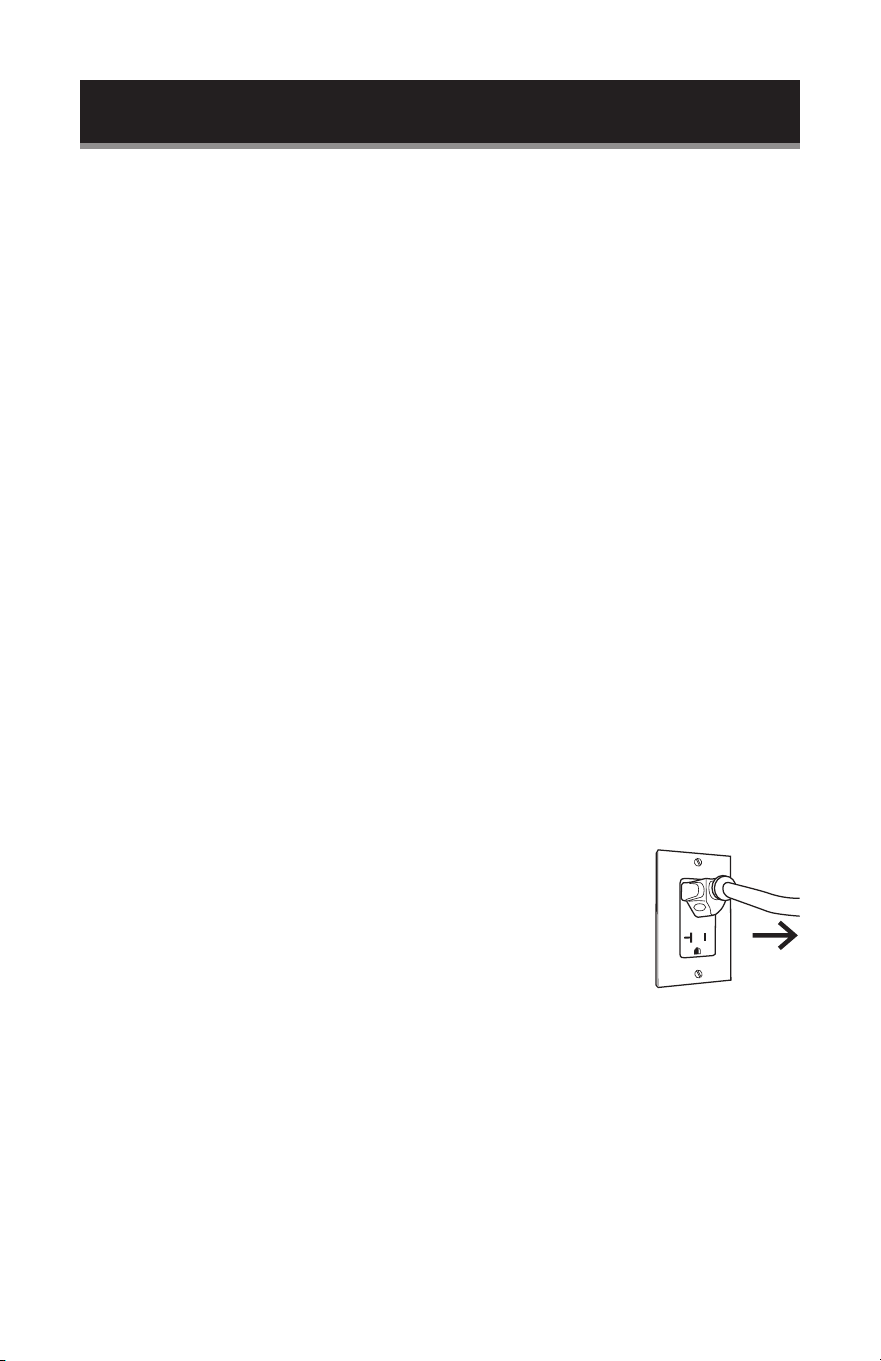
7. Make sure that the power supply cord is undamaged and does
not run under the oven or over any hot or sharp surface.
8. The socket must be readily accessible so that the cord can be
quickly reached and easily unplugged in an emergency.
NOTE: Do not remove the mica plate covering the wave guide in the oven
cavity.
RADIO OR TV INTERFERENCE
If the microwave oven causes interference to your radio or TV,
1. Check that the microwave oven is on a different circuit.
2. Relocate the radio or TV as far away from the oven as possible.
3. Check position and signal of receiving antenna.
4. Clean door and sealing surface.
5. Move the microwave oven far away from the receiver.
SET UP & USE
Page 11
Door Safety
Lock System
Control
Panel
Turntable Roller
Glass Tray Wave Guide
SET UP & USE
PARTS & FEATURES
NOTE: Do not remove the mica plate covering the wave guide in the oven cavity.
A. Never place the glass tray upside down. The glass tray should never be
restricted.
B. Both glass tray and turntable ring assembly must always be used during
cooking.
C. All food and containers of food are always placed on the glass tray for cooking.
D. If glass tray or turntable ring assembly cracks or breaks, contact your nearest
authorized service center.
OPERATION
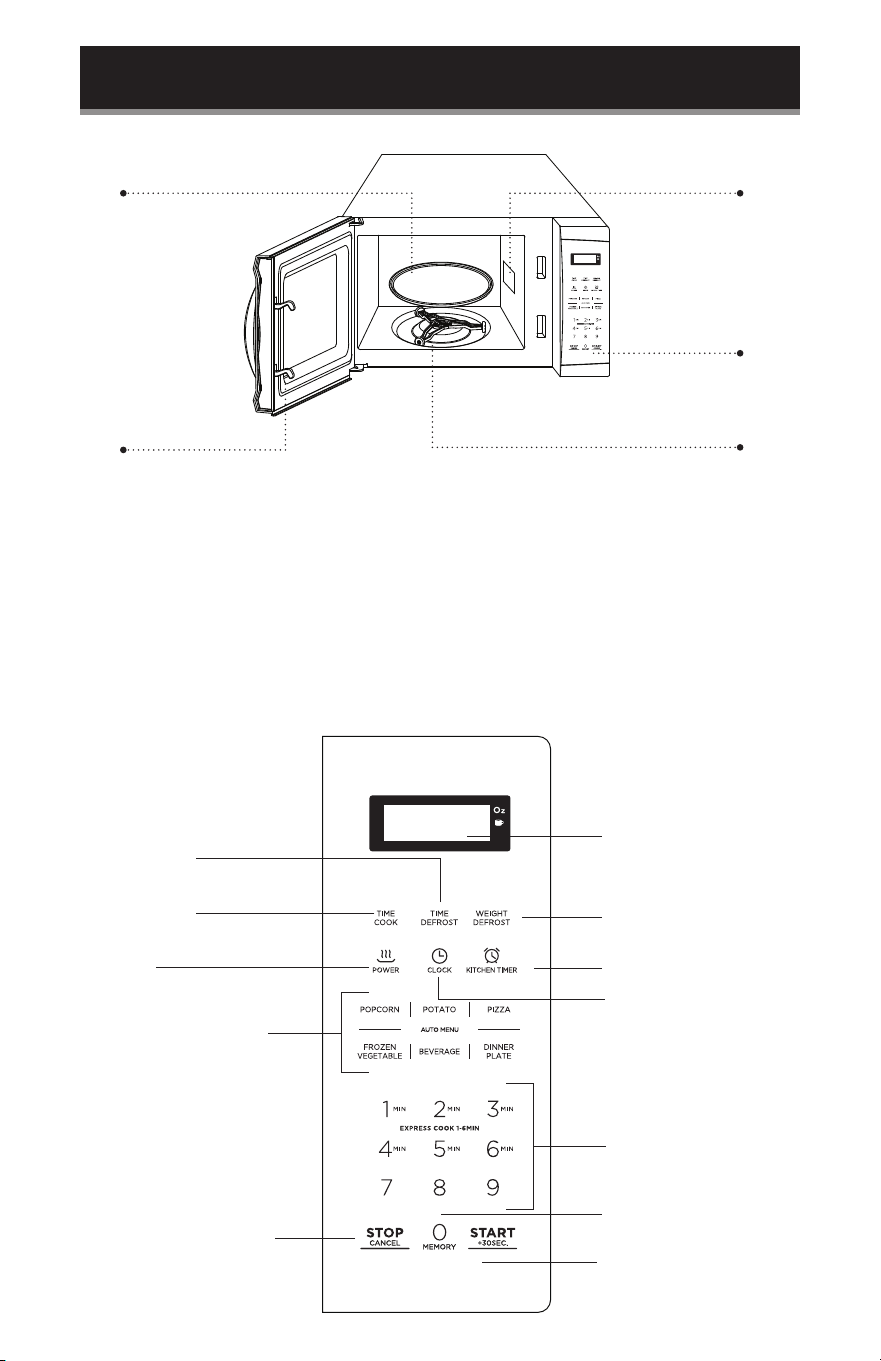
CONTROL PANEL AND FEATURES
Time Defrost
Time Cook
Power
Auto menu: Popcorn,
Potato, Pizza, Frozen
Vegetable, Beverage,
Dinner Plate
Stop/Clear: clears all
previous settings pressed
before cooking starts.
During cooking: press
once to stop oven; twice
to stop and clear all entries.
Display Window
Weight Defrost
Kitchen Timer function
Clock
Number
Buttons: 0-9
0/Memory function
Start/+30Sec
Page 12
SET UP & USE
OPERATION
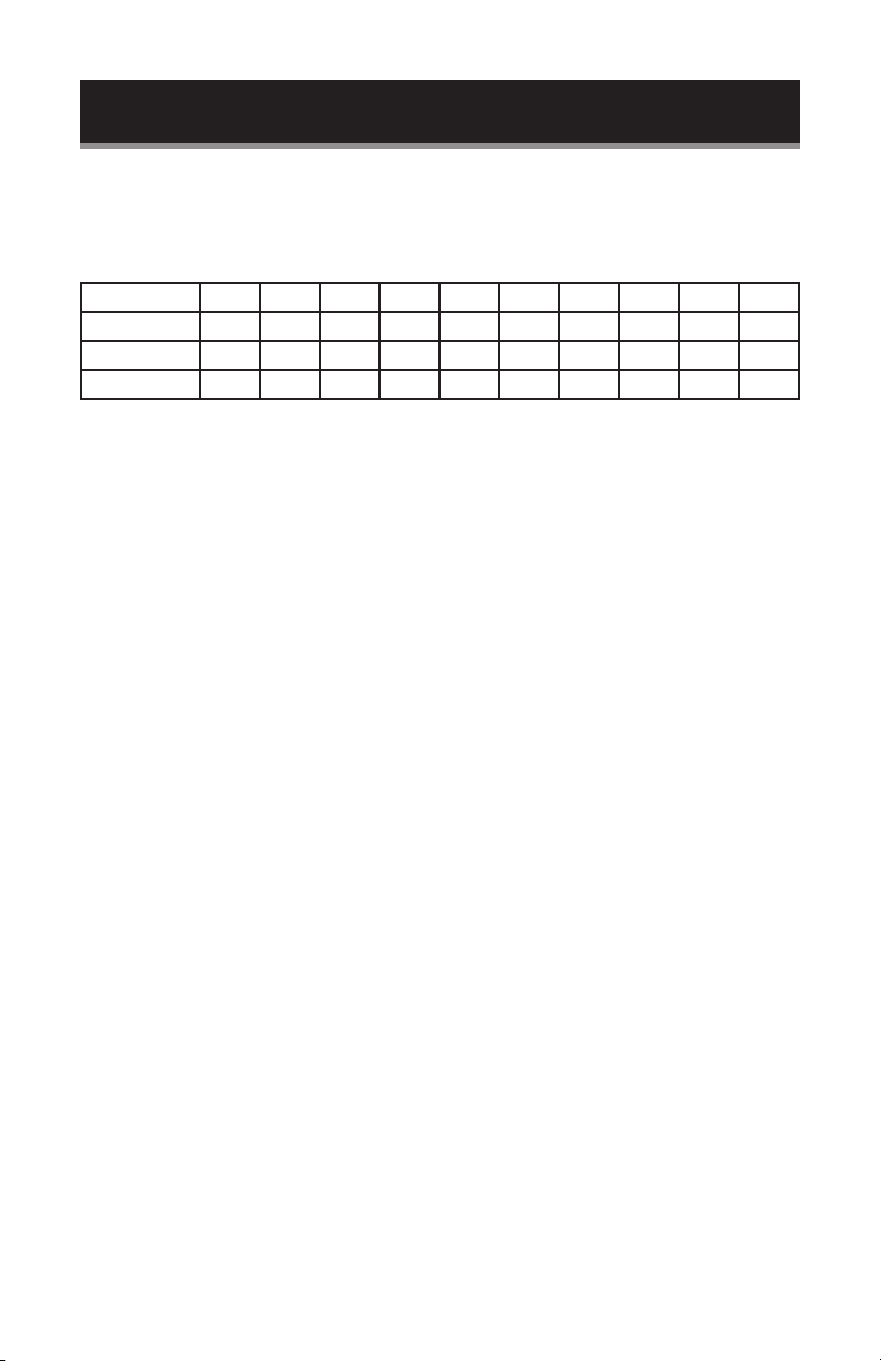
1. Power Level
Ten power levels are available.
Number key 0 9 8 7 6 5 4 3 2 1
Level 10 9 8 7 6 5 4 3 2 1
Power 100% 90% 80% 70% 60% 50% 40% 30% 20% 10%
Display PL10 PL9 PL8 PL7 PL6 PL5 PL4 PL3 PL2 PL1
2. Clock Setting
When the microwave oven is plugged into an outlet, the oven will display “ 0:00 ”
1) Press “ CLOCK ”, the screen will display 00:00. The hour gure will ash; “:” and
other “0” will be lighted.
2) Press the number keys and enter the correct time. For example, time is 10:12 now,
please press “1, 0, 1, 2 ” in turn.
3) Press “ CLOCK ” to nish clock setting. “:” will ash and the clock will be lighted.
4) If the numbers input are not within the range of 1:00--12:59, the setting will be
invalid until valid numbers are input.
NOTE: In the process of clock setting, if the “ STOP/CANCEL ” button is pressed or if
there is no operation within 1 minute, the oven will go back to the former state
automatically.
3. Kitchen Timer
(1) Press “ KITCHEN TIMER ”, the screen will display 00:00.
(2) Press the number keys and enter the correct timer. (The maximum time is 99
minutes and 99 seconds)
(3) Press “ START/+30SEC ”. to conrm setting.
(4) When the kitchen timer has completed, the buzzer will ring 5 times.
If the clock is set (12-hour system), the screen will display the current time.
NOTE: 1) The kitchen time is different from 12-hour system, Kitchen Timer is a timer.
2) During timer process, any program cannot be set. Time cannot be
increased by pressing “ START/+30SEC ”. key.
4. Microwave cook
(1) Press “ COOK TIME ” once, the screen will display “ 00:00 ”.
(2) Press number keys to input the cooking time; the maximum cooking time is 99
minutes and 99 seconds.
(3) Press “ POWER LEVEL” once, the screen will display “PL10”. The default power is
100% power. Now you can press number keys to adjust the power level.
(4) Press “ START/+30SEC ”. to start cooking.

Page 13
SET UP & USE
Example: to cook the food with 50% microwave power for 15 minutes.
A. Press “ COOK TIME ” once. “00:00” displays.
B. Press “1”, “5”, “0”, “0” in order.
C. Press “POWER LEVEL” once, then press “5” to select 50% microwave power.
D. Press “START/+30SEC”. to start cooking.
NOTE: During cooking process, if the “ STOP/CANCEL ” button is pressed or if there
is no operation within 1 minutes, the oven will go back to the former setting
automatically.
5. Speedy Cooking
(1) In waiting state, instant cooking at 100% power level can be started by selecting a
cooking time from 1 to 6 minutes. Press “START/+30SEC”. to increase the cooking
time; the maximum cooking time is 99 minutes and 99 seconds.
(2) In waiting state, instant cooking at 100% power level with 30 seconds’ cooking
time can be started by pressing “ START/+30SEC ”. Each press on the same
button will increase cooking time by 30 seconds. The maximum cooking time is
99 minutes and 99 seconds.
(3) In cooking state, cooking time can be increased by pressing “ START/+30SEC ”.
The maximum cooking time is 99 minutes and 99 seconds.
NOTE: Under microwave and auto menu cooking states, press “ START/+30SEC ”.
button to increase cooking time by 30 seconds.
6. 1 lb. Defrost Function
(1) Press “ 1 lb DEFROST ”, the screen will display “1.0”.
(2) Press “ START/+30SEC” to start defrosting and the cooking time remaining will
be displayed.
7. Sensor Cook
(1) In waiting state, put the food in the oven, press the menu key in the sensor cook.
(2) Press “ START/+30SEC” to start sensor cook function and no need to set time.
(3) When steaming is emanated, the surplus time will display. The buzzer will sound
5 beeps when completed. After completion, the oven will turn back to the waiting
state.
NOTE:
1) When cooking or reheating food, you should do these in order to have the best
effect.
a. The room temperature cannot be over 95 degrees Fahrenheit..
b. The weight of food must be more than 110g (4 Oz).
c. The cavity, glass tray and utensils must be kept dry before putting the food in.
d. The reheated food can be covered with the lid. But the lid must have a venthole in
order to disperse the steam. Sealed utensil is forbidden.

Page 14
SET UP & USE
2) During cooking process, following steps must be followed:
a. Keep the door closed when surplus time is not displayed or the buzzer does not
sound tiwice.
b. When the buzzer sounds twice, the time will count down and display the
surplus time, you can open the door to mix the food up, turn over or replace the
food. And then go on the next operation.
3) Please leave the food rest for a few minutes after cooking have been nished.
4) During sensor cooking process, if the time has not completed, please do not open
the oven door or press “ STOP/CANCEL ” key. Otherwise, the sensor will read an
error.
EXAMPLE: Sensor Reheat Menu
1) In waiting states, put the food into the microwave oven, press “ SENSOR REHEAT ”
“SC-1” is displayed.
2) Press “ START/+30SEC ” to start sensor reheat function and no need to set time.
3) The buzzer will sound 5 beeps when completed. Once completed, the oven will
turn back to the waiting state.
NOTE:1) Food to be avoided in sensor reheating.
a. Bread and other dry food, such as biscuit, cake.
b. For raw or uncooked foods.
c. Beverage and frozen food.
2) The oven cannot cook automatically when the temperature of the oven
cavity is high.
3) The reheated food can be covered with the lid, however, the lid must have
a venthole in order to disperse the steam. Sealed utensil is forbidden.
4) During sensor cooking process, please do not open the oven door or press
“ STOP/CANCEL ” key. Otherwise, the sensor will read an error.
5) The sensor reheat has different steps for different food.
Casseroles - Add 3 to 4 tablespoons of water, cover with lid or vented
plastic wrap.
Stir when time appears in the display window.
Canned foods - Empty contents into casserole dish or serving bowl, cover
dish with lid or vented plastic wrap. After reheating, let stand for a few
minutes.
Plate of food - Arranged food on plate; top with butter, gravy, etc. Cover
with lid or vented plastic wrap. After reheating, let stand for a few minutes.
Page 15
SET UP & USE
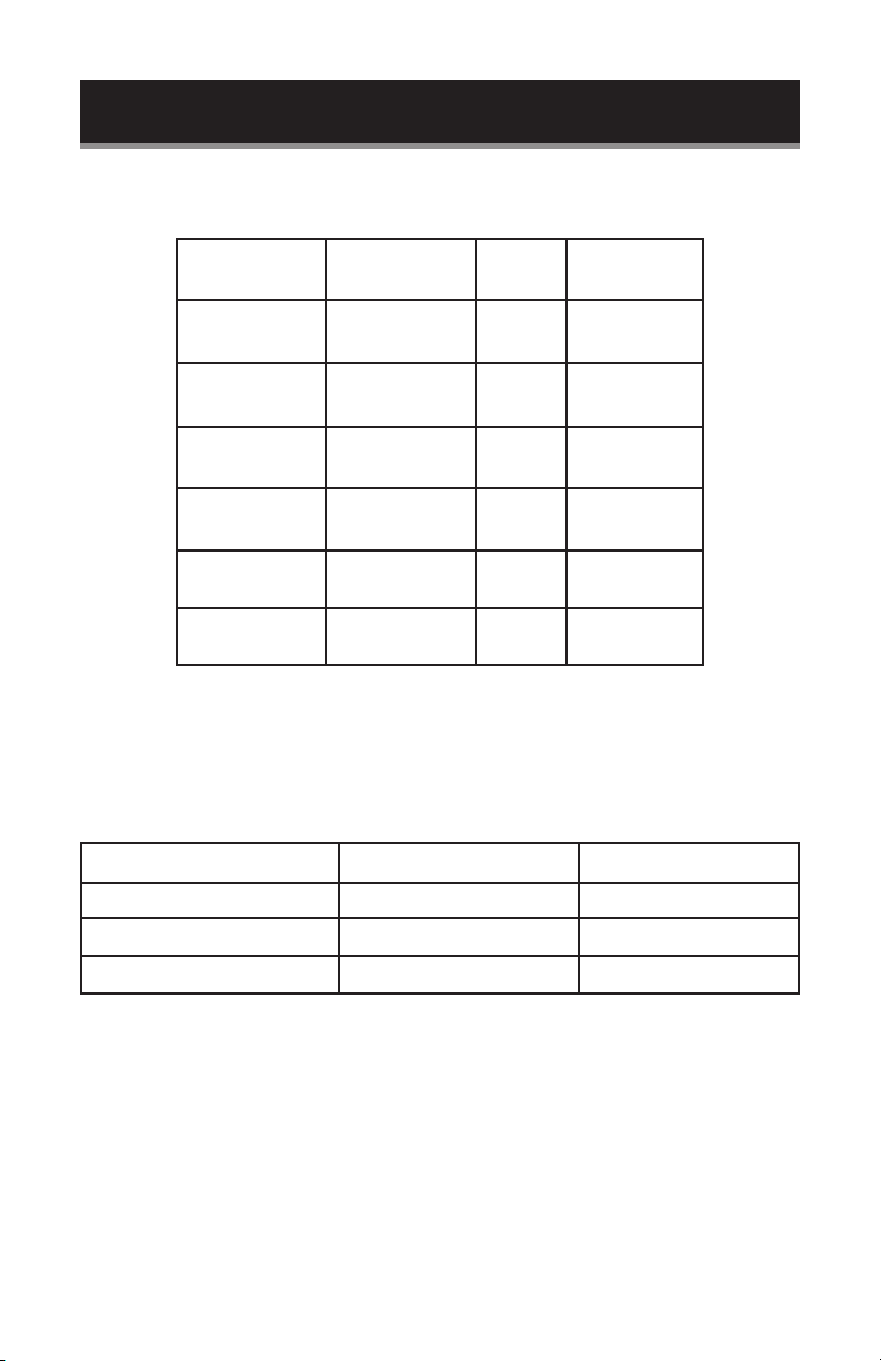
Sensor Cook Chart
Menu button Food
Food
Code
Weight/
Portion
Sensor Reheat Sensor Reheat SC-1 8.0~32.0 oz
Frozen Pizza Frozen Pizza SC-2 6.0~12.0 oz
Frozen Entrée Frozen Entrée SC-3 8.0~32.0 oz
Potato Potato SC-4
1~4 potatoes
10.0 oz each
Rice Rice SC-5
8.0 oz ~
16.0 oz
Vegetable
Fresh/Frozen
Vegetable
SC-6 /
SC-7
4.0~16.0 oz
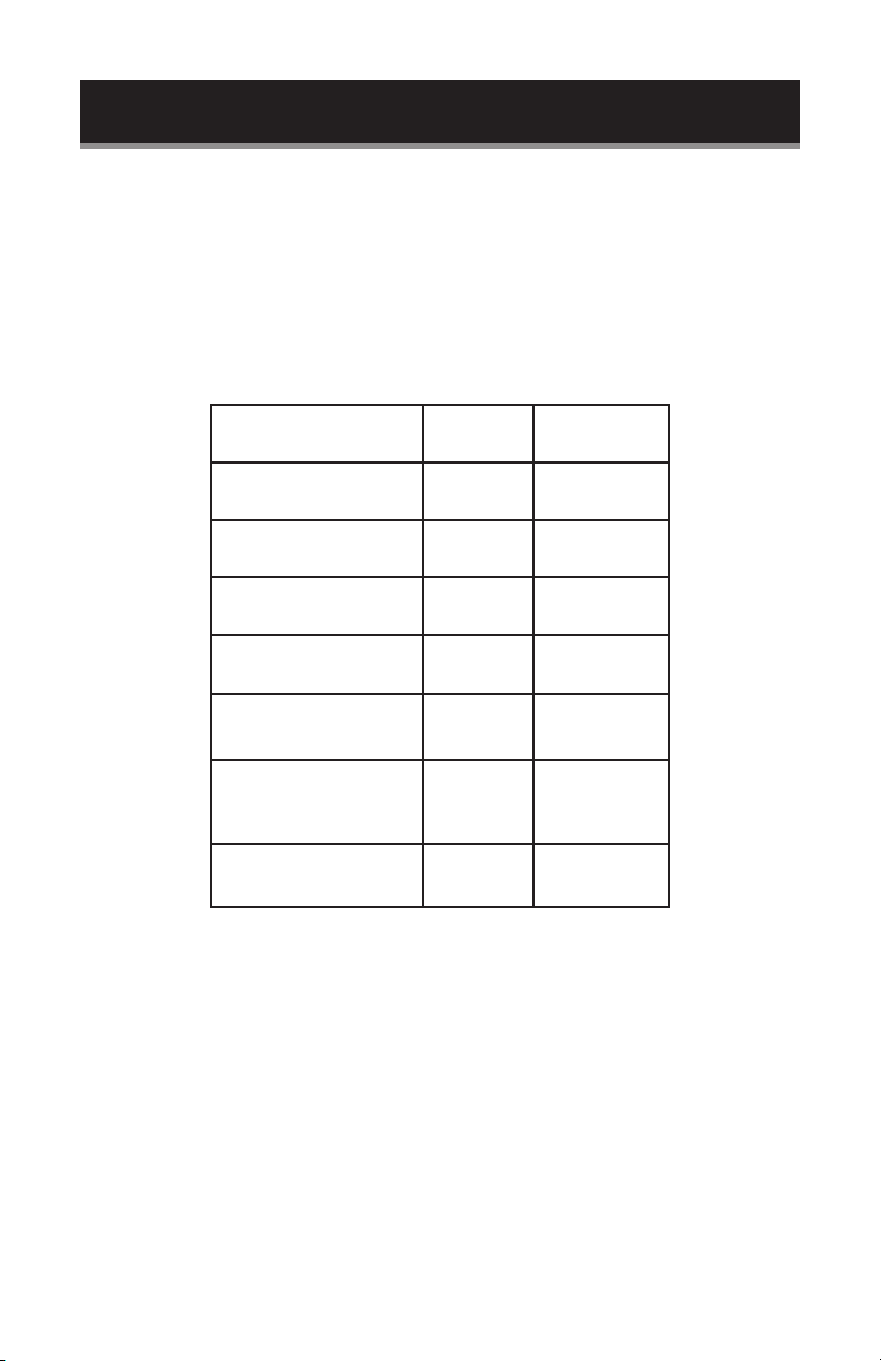
8. POPCORN
1) Press “ POPCORN ” repeatedly until the weight you require appears in the
display, “Oz” light. For example, press “ POPCORN ” once, “1.75” displays.
2) Press “ START/+30SEC ”. to cook, “Oz” disappears.
"POPCORN" Button Presses Weight Display
Once 1.75 Oz 1.75
Twice 3.0 Oz 3.0
Thrice 3.5 Oz 3.5
Page 16
SET UP & USE
9. SOFTEN/MELT
1) Press “ SOFTEN/MELT ” repeatedly until the menu you require appears in the
display.
2) After choosing the menu, press a number pad to select the weight or portion of
the food.
3) Press “ START/+30SEC ”. to cook.
Auto Menu Chart:
Food Display
Weight/
Portion
Melt-Butter/
Margarine
S-1 1-3 STICKS
Melt-Chocolate S-2
4 Oz
8 Oz
Melt-Cheese S-3
8 Oz
16 Oz
Melt-Marshmallows S-4
5 Oz
10 Oz
Soften-Butter S-5 1-3 STICKS
Soften-Ice cream/
Frozen juice
S-6
6 Oz
12 Oz
16 Oz
Soften-Cream cheese S-7
3 Oz
8 Oz
10. MEMORY FUNCTION
1) Press “MEMORY ” to choose memory 1-3 procedure. 1, 2, 3 will display.
2) If the procedure has been set, press “ START/+30SEC” to use it. If not, continue to
set the procedure. Only one or two microwave stages can be set.
3) After nishing the setting, press “ MEMORY” to save the procedure and turn back
to the waiting states. Press “ START/+30SEC ” to save and operate the setting.

Page 17
SET UP & USE
EXAMPLE: Save one program as memory 2. To cook the food with 80% microwave
power for 3 minutes and 20 seconds. Operate the following steps:
a. In waiting state, press “MEMORY” twice, “2” displays.
b. Press “ COOK TIME ”, then input number keys “3”, “2”, “0” to choose the cooking
time.
c. Press “ POWER LEVEL ” once, then press number button “8”, “PL8” displays.
d. Press “ MEMORY ” to save the current setting. If press “ START/+30SEC ”, the
cooking program can be operated and save as memory 2.
e. To run the saved program, in waiting state, press “MEMORY ” twice, “2” displays
and press “ START/+30SEC ”. to run the saved cooking program.
NOTE: Auto menu cannot be set as memory cooking.
11. MULTI-STAGE COOKING
At most 2 stages can be set for cooking. In multi-stage cooking, if one stage is
defrosting, then defrosting shall be placed in the rst section. When the rst stage
nishes, the buzzer will sound once and the next stage will begin cooking.
EXAMPLE: If you want to cook with 80% microwave power for 5 minutes + 60%
microwave power for 10 minutes. The cooking steps are as following.
1) Press “ COOK TIME ” once, then press “5”, “0”, “0” to set 5 minutes.
2) Press “ POWER LEVEL ” once.
3) Press number button “8” to set 80% microwave power.
4) Press “ COOK TIME ” once, then press “1”, “0”, “0”, “0” to set 10 minutes.
5) Press “ POWER LEVEL ” once.
6) Then press press number button “6” to set 60% microwave power.
7) Press “ START/+30SEC ”. to start cooking.
NOTE: Auto menu cannot be set as one of the multi-stages.
12. INQUIRING FUNCTION
1) If the clock has been set, in cooking state, press “ CLOCK ”, the clock will be
displayed for three seconds. After that, the oven will turn back to the clock state.
2) In the microwave cooking state, press “ POWER LEVEL ” to inquire microwave
power level, the the current microwave power will be displayed. After three
seconds, the oven will turn back to the previous state.

Page 18
SET UP & USE
13. CHILD LOCK FUNCTION
Lock: In waiting state, press “ STOP/CANCEL ” for 3 seconds, there will be a long
“beep” denoting entering into the children-lock state; If the clock has been set,
current time will display.
Lock quitting: In locked state, press “ STOP/CANCEL ” for 3 seconds, there will be a
long “beep” denoting that lock is released.
14. COOKING END REMINDER FEATURE
When the cooking is completed, the screen will display “End” and the buzzer sounds
5 “beep” to reminds user the cooking is nished. In order to make the appliance into
the normal operating state, please press “ STOP/CANCEL ” or open the door.
15. OTHER SPECIFICATIONS
1) “ START/+30SEC. ” must be pressed to continue cooking if the door is opened
during cooking;
2) The buzzer sounds once to conrm press, no sound will be emitted if the button
pressed has no response.
16. ENERGY SAVER MODE
(1) In standby mode, press the “ STOP/Cancel ” once (less than 3 seconds to avoid
starting the child lock function) to enter the Energy Saver mode.
(2) In child-locked mode, press the “ STOP/Cancel ” once (less than 3 seconds) and
release to enter the Energy Saver Mode.
(3) Above operation is the only way to start the Energy Saver mode.
(4) The Energy Saver mode works only if the door is closed.
17. TURN ON/OFF THE BUZZER SOUND
Buzzer notication sound is Active by default. To turn off buzzer, press the number 8
for 3 seconds while oven is in waiting state. After 3 seconds, the oven will emit a loud
beep and turn off the buzzer.
When buzzer is inactive, there will NOT be any beeps when buttons are pressed, as
well as, when cooking has been completed.

Page 19
COOKING TECHNIQUES
Your microwave makes cooking easier than conventional cooking, provided you
keep these considerations in mind:
STIRRING
Stir foods such as casseroles and vegetables while cooking to distribute heat evenly. Food at the
outside of the dish absorbs more energy and heats more quickly, so stir from the outside to the
center. The oven will turn off when you open the door to stir your food.
ARRANGEMENT
Arrange unevenly shaped foods, such as chicken pieces or chops, with the thicker, meatier parts
toward the outside of the turntable where they receive more microwave energy. To prevent
overcooking, place delicate areas, such as asparagus tips, toward the center of the turntable
SHIELDING
Shield food with narrow strips of aluminium foil to prevent overcooking. Areas that need shielding
include poultry wing-tips, the ends of poultry legs, and corners of square baking dishes. Use only
small amounts of aluminium foil. Larger amounts can damage your oven.
TURNING
Turn foods over midway through cooking to expose all parts to microwave energy. This is
especially important with large foods such as roasts.
STANDING
Foods cooked in the microwave build up internal heat and continue to cook for a few minutes
after heating stops. Let foods stand to complete cooking, especially foods such as cakes and
whole vegetables. Roasts need this time to complete cooking in the center without overcooking
the outer areas. All liquids, such as soup or hot chocolate, should be shaken or stirred when
cooking is complete. Let liquids stand a moment before serving. When heating baby food, stir
well at removal and test the temperature before serving.
ADDING MOISTURE
Microwave energy is attracted to water molecules. Food that is uneven in moisture content
should be covered or allowed to stand so that the heat disperses evenly. Add a small amount of
water to dry food to help it cook.
SET UP & USE

Page 20
1. When cleaning surfaces of door and front face of oven, use only mild, nonabrasive soaps, or
detergents and apply with a sponge or soft cloth.
2. Turn off the oven and remove the power plug from the wall socket before cleaning.
3. Keep the inside of the oven clean. When food splatters or spilled liquids adhere to oven walls,
wipe with a damp cloth. Mild detergent may be used if the oven gets very dirty. Avoid the use
of spray and other harsh cleaners as they may stain, streak or dull the door surface.
4. The outside surfaces should be cleaned with a damp cloth. To prevent damage to the
operating parts inside the oven, water should not be allowed to sweep into the ventilation
openings.
5. Wipe the window on both sides with a damp cloth to remove any spills or splatters.
6. Do not allow the control panel to become wet. Clean with a soft, damp cloth. When cleaning
the control panel, leave oven door open to prevent oven from accidentally turning on.
7. If steam accumulates inside or around the outside of the oven door, wipe with a soft cloth.
This may occur when the microwave oven is operated under high humidity conditions, this is
normal.
8. It is occasionally necessary to remove the glass tray for cleaning. Wash the tray in warm sudsy
water or in a dishwasher.
9. The roller ring and oven oor should be cleaned regularly to avoid excessive noise. Simply
wipe the bottom surface of the oven with mild detergent. The roller ring may be washed in
mild sudsy water or dishwasher. When removing the roller ring from cavity oor for cleaning,
be sure to replace in the proper position.
10. Remove odors from your oven by combining a cup of water with the juice and skin of one
lemon in a deep bowl, microwave for 5 minutes. Wipe thoroughly and dry with a soft cloth.
11. When it becomes necessary to replace the oven light, please consult a dealer to have it
replaced.
12. Please do not dispose this appliance into the domestic rubbish bin; it should be disposed to
the particular disposal center provided by the municipalities.
13. Do not operate this unit when empty.
CLEANING & CARE

Page 21
TROUBLESHOOTING & WARRANTY
BEFORE YOU CALL FOR SERVICE
IF THE OVEN FAILS TO OPERATE:
A) Check to make sure that the oven is plugged in securely. If it is not, remove the
plug from the outlet, wait 10 seconds and plug it in again securely.
B) Check for a blown circuit fuse or a tripped main circuit breaker. If these seem to
be operating properly, test the outlet with another appliance.
C) Check to make sure the control panel is programmed correctly and the timer is
set.
D) Check to ensure that the door is securely closed engaging the door safety lock
system. Otherwise, the microwave energy will not ow into the oven.
IF NONE OF THE ABOVE SOLVES THE PROBLEM, CONTACT A QUALIFIED TECHNICIAN. DO
NOT TRY TO ADJUST OR REPAIR THE OVEN YOURSELF.
CUSTOMER SERVICE
IMPORTANT
DO NOT RETURN THIS PRODUCT TO THE STORE
If you have a problem with this product, please contact the W
Appliance Co. Customer Satisfaction Center at 1-855-855-0294.
DATED PROOF OF PURCHASE, MODEL # AND SERIAL #
REQUIRED FOR WARRANTY SERVICE

Page 22
TROUBLESHOOTING & WARRANTY
TROUBLESHOOTING
Troubleshoot your problem by using the chart below. If the microwave oven still
does not work properly, contact W Appliance Co. customer service center or the
nearest authorized service center. Customers must never troubleshoot internal
components. Microwaves hold dangerous voltage (5000V) even after power is
removed. Only a certied technician should attempt Microwave repair.
TROUBLE POSSIBLE CAUSE POSSIBLE REMEDY
Oven will not start A. Electrical cord for oven is
not plugged in.
B. Door is open.
C. Wrong operation is set.
A. Plug into the outlet.
B. Close the door and try again.
C. Check instructions.
Arcing or sparking A. Materials to be avoided
in microwave oven, such as
metal, were used.
B. The oven is operated when
empty.
C. Spilled food remains in the
cavity.
A. Use microwave-safe
cookware only.
B. Do not operate with oven
empty.
C. Clean cavity with wet towel.
Unevenly cooked foods A. Materials to be avoided in
microwave oven were used.
B. Food is not defrosted
completely.
C. Cooking time, power level
is not suitable.
D. Food is not turned or
stirred.
A. Use microwave-safe
cookware only.
B. Completely defrost food.
C. Use correct cooking time,
power level.
D. Turn or stir food.
Overcooked foods Cooking time, power level is not
suitable.
Use correct cooking time and
power level.
Under cooked foods A. Materials to be avoided in
microwave oven were used.
B. Food is not defrosted
completely.
C. Oven ventilation ports are
restricted.
D. Cooking time, power level
is not suitable.
A. Use microwave-safe
cookware only.
B. Completely defrost food.
C. Check to see that oven
ventilation ports are not
restricted.
D. Use correct cooking time
and power level.
Improper defrosting A. Materials to be avoided in
microwave oven were used.
B. Cooking time, power level
is not suitable.
C. Food is not turned or stirred.
A. Use microwave-safe
cookware only.
B. Use correct cooking time
and power level.
C. Turn or stir food.

Page 23
TROUBLESHOOTING & WARRANTY
LIMITED WARRANTY
Commercial Chef brand is used under license.
Any repair, replacement, or warranty service,
and all questions about this product should be
directed to W Appliance Co. at 1 (855) 855-
0294 from the USA or Puerto Rico.
W Appliance Co. warrants to the original purchaser
that the product will be free from defects in material,
parts and workmanship for the period designated
for this product. The warranty commences the day
the product is purchased and covers up to a period
of 1 year (12 months) for labor/1 year (12 months)
for parts (manufacturing defects only)/5 years (60
months) magnetron tube for microwave (part only).
W Appliance Co. agrees that it will, at its option,
replace the defective product with either a new
or remanufactured microwave equivalent to your
original purchase during the warranty period. Should
the Part warranty period exceed the Labor warranty
period, W Appliance Co. will supply at no charge
for the remainder of the Part warranty, any new
or remanufactured replacement parts as required
by the product. During this period all labor and
service charges will become the responsibility of the
customer.
Exclusions: This warranty does not apply to the
below:
1. If the appearance or exterior of the product has
been damaged or defaced, altered or modied in
design or construction.
2. If the product original serial number has been
altered or removed or cannot be readily determined.
3. If there is damaged due to power line surge, user
damage to the AC power cord or connection
toimproper voltage source.
4. If damage is due to general misuse, accidents or
acts of God.
5. If repair attempts are done by unauthorized service
agents, use of parts other than genuine parts or
parts obtained from persons other than authorized
service companies.
6. On units that have been transferred from the
original owner.
7. On products that have been purchased as
refurbished, like new, second-hand, in a “As-Is” or
“Final Sale” terms.
8. To products used in a commercial or rental setting.
9. To products used in settings other than ordinary
household use or used other than in accordance
with the provided instructions.
10. To damages for service calls for improper
installations.
11. To damages to decorative trims, nishes of the
appliance or home incurred during installation.
12. To glass or replaceable light bulbs.
13. Transportation and shipping costs.
14. Labor after the initial 12 months.
15. Food loss for loss due to product failure or delay in
service, repair or replacement.
16. To charges occurred for after hour service,
weekend, holiday charges, tolls or mileage expense
for service calls to remote areas.
17. Charges to make product available for service, such
as removal of trim, shelves etc. that are not a part
of the appliance.
18. Service calls to install or correct the installation of
your microwave.
19. Service calls to instruct you how to use your
microwave.
20. Service calls to repair or replace the house fuse,
reset the circuit breaker or correct the wiring in
the house.
REPAIR OR REPLACEMENT AS PROVIDED UNDER
THIS WARRANTY IS THE EXCLUSIVE REMEDY OF
THE CUSTOMER; W Appliance Co. SHALL NOT BE
LIABLE FOR ANY INCIDENTAL OR CONSEQUENTIAL
DAMAGES FOR BREACH OF ANY EXPRESS OR
IMPLIED WARRANTY ON THIS PRODUCT, EXCEPT
TO THE EXTENT PROHIBITED BY APPLICABLE LAW.
ANY IMPLIED WARRANTY OF MERCHANTABILITY
OF FITNESS FOR A PARTICULAR PURPOSE ON THIS
PRODUCT IS LIMITED TO THE DURATION OF THE
WARRANTY.
Some states do not allow the exclusion or limitations
of incidental or consequential damages, or limitations
on how long the warranty lasts. In these cases the
above exclusions or limitations may not apply to you.
This warranty gives you specic legal rights and you
may also have other rights which vary from state to
state.
Obtaining Service: To obtain service, product
literature, supplies or accessories please call
1 (855) 855-0294 to create a ticket for exchange/
repair. Please make sure to provide the date of
purchase, model number and a brief description of the
problem. Our customer service representative
will contact you or send detailed return instructions.
W Appliance Co. does not warrant that the appliance
will work properly in all environmental conditions, and
makes no warranty and representation, either implied
or expressed, with respect to the quality, performance,
merchantability, or tness for a particular purpose
other than the purpose identied within this user’s
manual. W Appliance Co. has made every effort
to ensure that this user’s manual is accurate and
disclaims liability for any inaccuracies or omissions
that may have occurred. Information in this user’s
manual is subject to change without notice and
does not represent a commitment on the part of W
Appliance Co. W Appliance Co. reserves the right to
make improvements to this user’s manual and/or to
the products described in this user’s manual at any
time without notice. If you nd information in this
manual that is incorrect, misleading, or incomplete,
please contact us at 1- 855-855-0294.
W Appliance Co.,
1356 Broadway
New York, NY 10018
Page 24
© 2022 Commercial Chef is a W Appliance Company.
All Rights Reserved.
April 2022