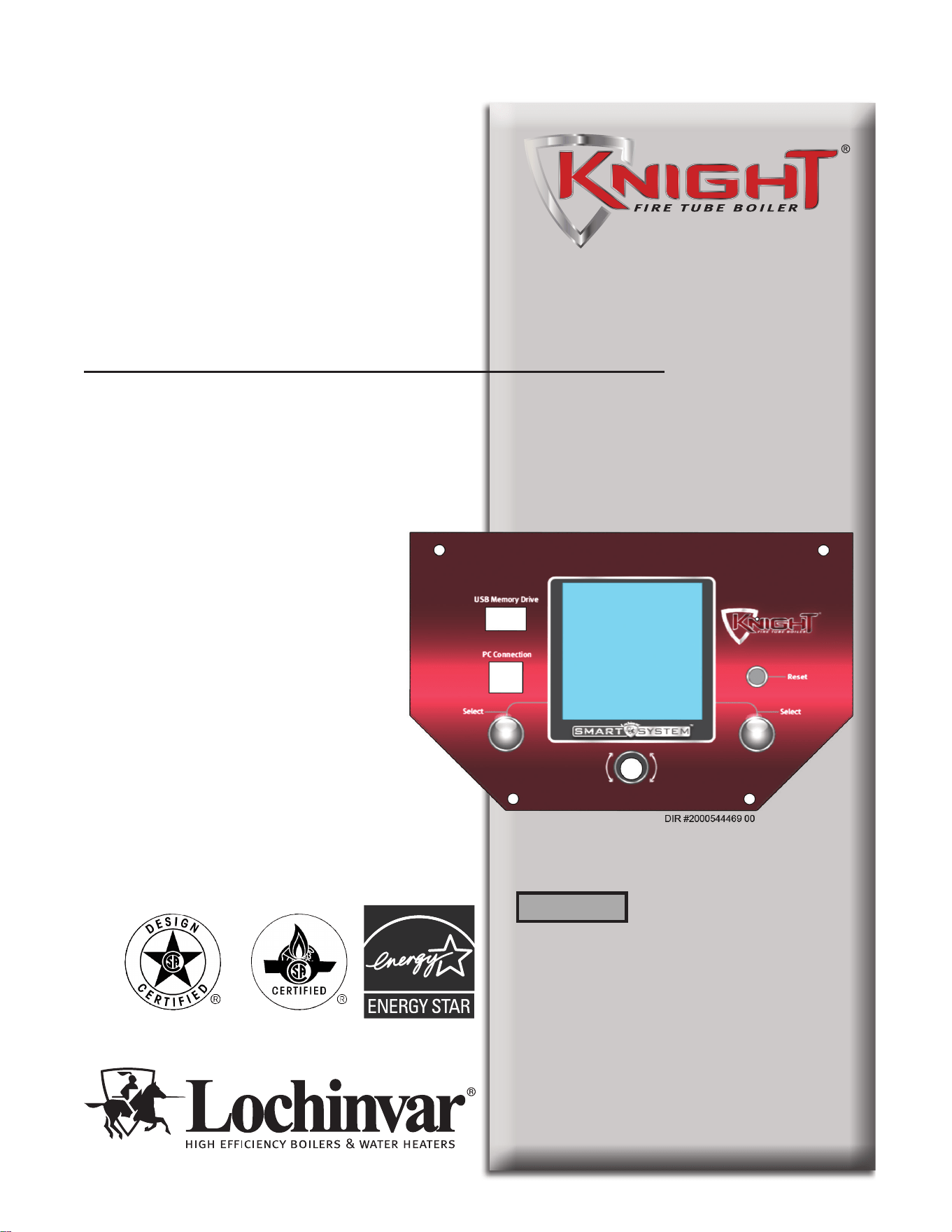
Service Manual
Models: 55 - 399
Series 100-101, 110-111,
& 120-121
This manual must only be used
by a qualified heating installer
/ service technician. Read all
instructions, including this
manual and the Knight Fire Tube
Boiler Installation and Operation
Manual, before installing.
Perform steps in the order given.
Failure to comply could result in
severe personal injury, death, or
substantial property damage.
Save this manual for future reference.
100305187_2000558071_Rev G
⚠WARNING
2
Hazard definitions
The following defined terms are used throughout this manual to bring attention to the presence of hazards of various risk levels or
to important information concerning the life of the product.
CAUTION
NOTICE
DANGER indicates an imminently hazardous situation which, if not avoided, will result in death or serious
injury.
WARNING indicates a potentially hazardous situation which, if not avoided, could result in death or serious
injury.
CAUTION indicates a potentially hazardous situation which, if not avoided, may result in minor or moderate
injury.
CAUTION used without the safety alert symbol indicates a potentially hazardous situation which, if not
avoided, may result in property damage.
NOTICE indicates special instructions on installation, operation, or maintenance that are important but not
related to personal injury or property damage.
CONTENTS ....................................................................... 2
Hazard Definitions .............................................................. 2
PLEASE READ BEFORE PROCEEDING ..................... 3
Handling Ceramic Fiber Materials ...................................... 3
When servicing boiler ................................................... 4
Boiler operation ............................................................ 4
Boiler water ................................................................... 4
Freeze protection fluids ................................................ 4
WHAT IS IN THIS MANUAL ............................................ 5
1. SERVICE
The Knight Fire Tube Boiler Display .................................. 6
Control Inputs ............................................................... 7
Control Outputs ............................................................. 8
Temperature Control and Protection ........................9-10
Parameter Access Modes ........................................... 10
Setup Wizard ............................................................... 10
Changing and Saving Parameters ............................... 10
General Operation ...................................................... 10
Sequence of Operation ............................................... 11-12
Display Panel Menu Access ....................................... 13-15
Display Panel Parameter Access ................................ 14-15
Parameter Table.......................................................... 16-19
Viewable and Changeable Control Parameters .......... 20-31
2. MAINTENANCE
Maintenance and Annual Startup ................................ 32-37
3. TROUBLESHOOTING
Before Troubleshooting .................................................... 38
Check Control Module Fuses .......................................... 38
Table 3-1 - Troubleshooting Chart - No Display .............. 39
Checking Temperature Sensors ...................................... 40
Table 3-3 - Troubleshooting Chart - Noisy System ......... 41
Table 3-4 - Troubleshooting Chart - Fault Messages . 42-48
Combustion Analysis Procedure ...................................... 49
Table 3-5 - Flue Products ................................................ 49
Table 3-6 - Troubleshooting Chart - Combustion Levels 49
Gas Valve Adjustment Procedure .................................... 50
Revision Notes .................................................. Back Cover
Contents
⚠ DANGER
⚠WARNING
⚠CAUTION

Please read before proceeding
Installer – Read all instructions,
including this manual and the Knight Fire
Tube Boiler Installation and Operation
Manual, before installing. Perform steps
in the order given.
User – This manual is for use only by
a qualified heating installer/service
technician. Refer to the Knight Fire
Tube Boiler User’s Information Manual
for your reference.
Have this boiler serviced/inspected by
a qualified service technician at least
annually.
Failure to comply with the above could
result in severe personal injury, death or
substantial property damage.
When calling or writing about the boiler
– Please have the boiler model and serial
number from the boiler rating plate.
Consider piping and installation when
determining boiler location (see the Knight
Fire Tube Boiler Installation and Operation
Manual).
Any claims for damage or shortage in
shipment must be filed immediately
against the transportation company by the
consignee.
3
Handling ceramic fiber materials
REMOVAL OF COMBUSTION CHAMBER LINING
The combustion chamber insulation in this appliance contains ceramic fiber material. Ceramic fibers
can be converted to cristobalite in very high temperature applications. The International Agency for
Research on Cancer (IARC) has concluded, “Crystalline silica inhaled in the form of quartz or cristobalite
from occupational sources is carcinogenic to humans (Group 1).” Normal operating temperatures in this
appliance are below the level to convert ceramic fibers to cristobalite. Abnormal operating conditions
would have to be created to convert the ceramic fibers in this appliance to cristobalite.
The ceramic fiber material used in this appliance is an irritant; when handling or replacing the ceramic
materials it is advisable that the installer follow these safety guidelines.
¢Avoid breathing dust and contact with skin and eyes.
• Use NIOSH certified dust respirator (N95). This type of respirator is based on the OSHA
requirements for cristobalite at the time this document was written. Other types of respirators may
be needed depending on the job site conditions. Current NIOSH recommendations can be found on
the NIOSH website at http://www.cdc.gov/niosh/homepage.html. NIOSH approved respirators,
manufacturers, and phone numbers are also listed on this website.
• Wear long-sleeved, loose fitting clothing, gloves, and eye protection.
¢Apply enough water to the combustion chamber lining to prevent airborne dust.
¢ Remove the combustion chamber lining from the appliance and place it in a plastic bag for disposal.
¢ Wash potentially contaminated clothes separately from other clothing. Rinse clothes washer
thoroughly.
NIOSH stated First Aid.
¢ Eye: Irrigate immediately.
¢ Breathing: Fresh air.
NOTICE
Service Manual
⚠WARNING
⚠WARNING

4
Please read before proceeding
When servicing boiler –
• To avoid electric shock, disconnect electrical supply
before performing maintenance.
• To avoid severe burns, allow boiler to cool before
performing maintenance.
Boiler operation –
• Do not block flow of combustion or ventilation air to
the boiler.
• Should overheating occur or gas supply fail to shut off,
do not turn off or disconnect electrical supply to
circulator. Instead, shut off the gas supply at a location
external to the appliance.
• Do not use this boiler if any part has been under water.
The possible damage to a flooded appliance can be
extensive and present numerous safety hazards. Any
appliance that has been under water must be replaced.
Boiler water –
• Thoroughly flush the system (without boiler
connected) to remove sediment. The high-efficiency
heat exchanger can be damaged by build-up or
corrosion due to sediment.
• Do not use petroleum-based cleaning or sealing
compounds in the boiler system. Gaskets and seals in
the system may be damaged. This can result in
substantial property damage.
• Do not use “homemade cures” or “boiler patent
medicines”. Serious damage to the boiler, personnel,
and/or property may result.
• Continual fresh make-up water will reduce boiler life.
Mineral buildup in the heat exchanger reduces heat
transfer, overheats the stainless steel heat exchanger, and
causes failure. Addition of oxygen carried in by makeup
water can cause internal corrosion. Leaks in boiler
piping must be repaired at once to prevent the
introduction of makeup water.
Freeze protection fluids –
• NEVER use automotive antifreeze. Use only inhibited
propylene glycol solutions which are specifically
formulated for hydronic systems. Ethylene glycol is
toxic and can attack gaskets and seals used in hydronic
systems.
Service Manual

5
What is in this manual?
Service
The Knight Fire Tube Boiler display
• Display panel readout, buttons and their functions
Control module inputs
• Control module inputs and options
Control module outputs
• Control module outputs and options
General
• How the boiler operates
• How the control module operates
• Access modes -- user and installer
• Sequence of operation -- Domestic Hot Water
(DHW)/space heating
Control panel parameter access
• Accessing and changing parameters from the display panel
Quick start information -- parameter
table
• An index of available adjustments and readouts, where to
access them and where to find detailed information.
Knight Fire Tube Boiler parameters
• General
• Temperature Setting
• Data Logging
• Functions
• DHW Settings
• Outdoor Reset
• Anti-cycling
• Control Modes
• Building Management System (BMS)
• Circulation Pumps
• Service Notification
• Basic Setup
• USB
Maintenance
• Service and maintenance schedules
• Address reported problems
• Inspect boiler area and boiler interior
• Clean condensate trap
• Check all piping for leaks
• Check air openings
• Flue vent system and air piping
• Check water system
• Check expansion tank
• Check boiler relief valve
• Inspect ignition electrode
• Check ignition ground wiring
• Check all boiler wiring
• Check control settings
• Perform start-up and checks
• Check burner flame
• Check flame signal
• Check flue gas temperature
• General maintenance
• Review with owner
• Cleaning boiler heat exchanger
Troubleshooting
• Troubleshooting table - No display
• Checking temperature sensors
• Sensor tables
• Troubleshooting table - Fault messages displayed on
boiler interface
• Combustion analysis procedure
• Gas valve adjustment procedure
Service Manual
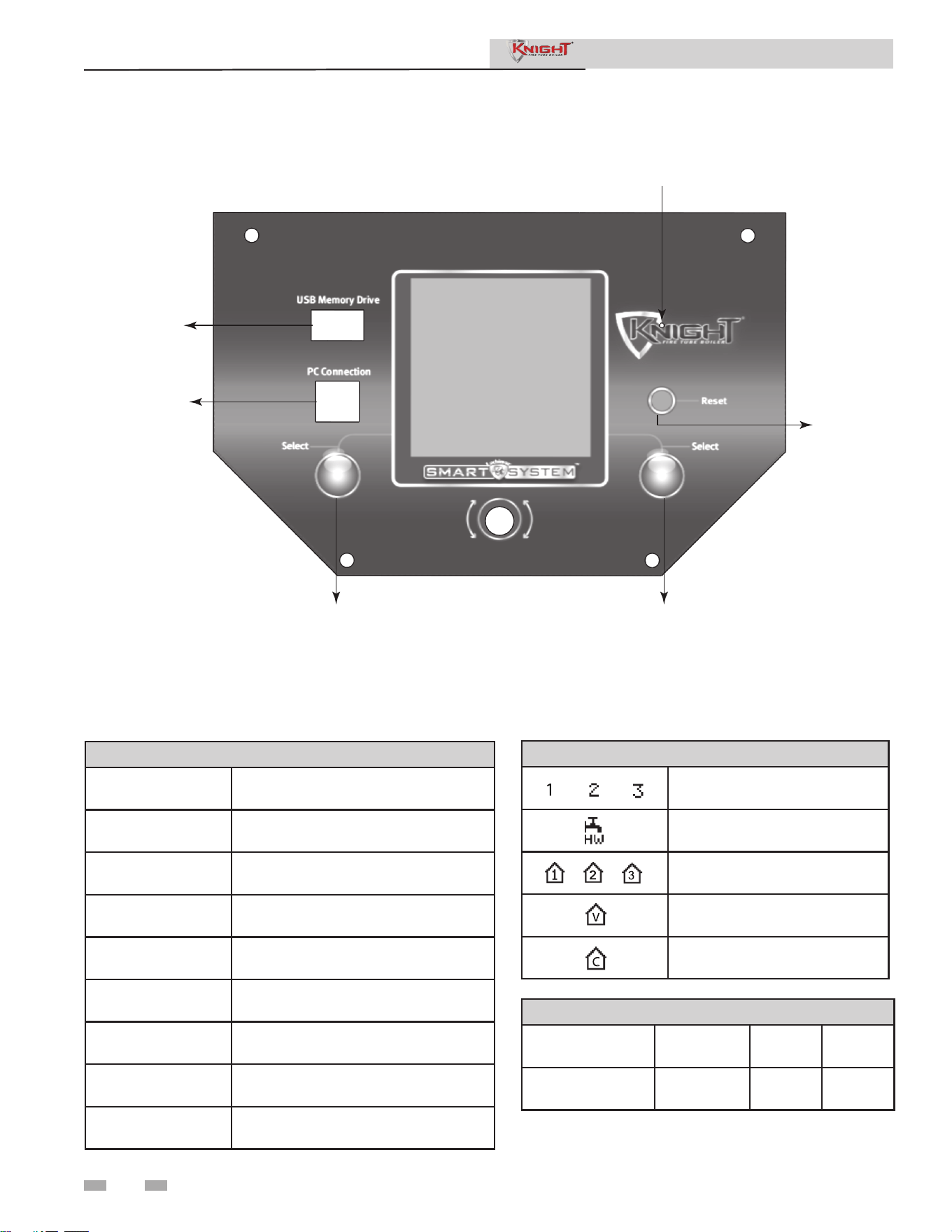
DIR #2000544469 00
USB
PC
CONNECTION
LEFT SELECT KEY
RIGHT SELECT KEY
RESET KE
Y
SERVICE
MODE
BUTTON
6
Service Manual
The Knight Fire Tube Boiler display
Status Screen Functions
Boiler Status Indicators
STANDBY
e unit has not received a thermostat or
DHW call for heat.
START
e unit is checking all safety circuits
before a burn cycle.
PREPURGE
e unit has initiated a prepurge period
on a call for heat.
IGNITION
e unit has begun a spark period to
ignite the main burner.
%
e unit has red and is running at the
displayed percentage.
POSTPURGE
A call for heat has ended and the fan is
running to clear the combustion
SHUTDOWN
e unit has been placed in the OFF
position.
SETPOINT MET
e boiler has exceeded the target set
point temperature and oset.
BLOCKED
e unit has detected a condition that
has interrupted the call for heat.
Call for Heat Indicators
Room ermostat 1-3 has a call
for heat.
DHW tank thermostat or sensor
has a call for heat.
Indicates which room thermostat
demand has priority.
e unit is being controlled by a
0 - 10V BMS signal.
e member unit is supplying
heat while in Cascade Mode.
Operational Information
Details Screen 1
I/O Screen History
Screen
Cascade
Status
Details Screen 2
BMS Screen Last 10
Faults
Night
Setback
1 Service
NAVIGATION Dial Scroll - Operational Information
NAVIGATION Dial Press - Access User Menu
Left SELECT Key (Hold) - Access Installer Menu
Right SELECT Key - Shutdown Boiler
1 Service
7
1 Service (continued)
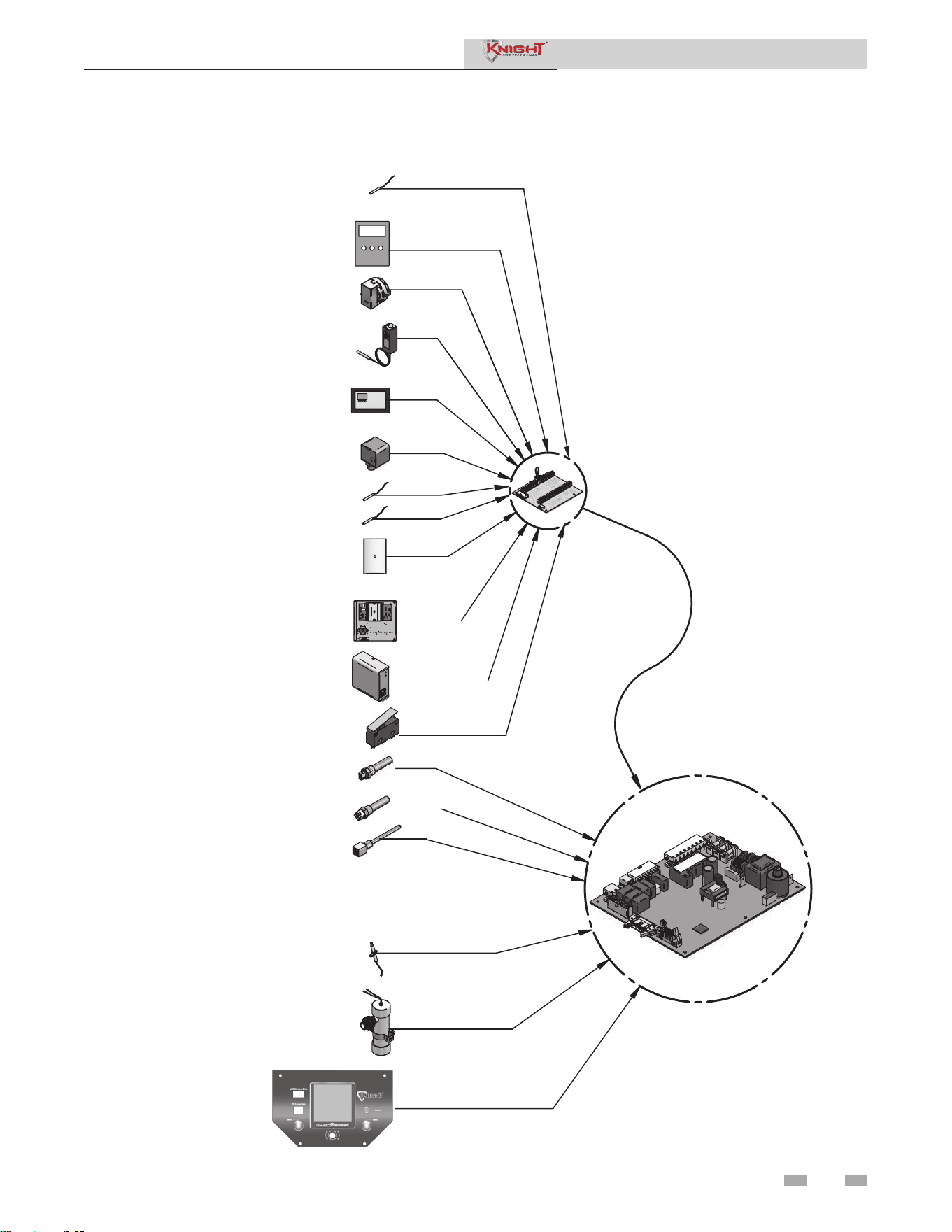
Control inputs
Service Manual
GAS PRESSURE SWITCH
DHW TANK THERMOSTAT
ROOM THERMOSTAT /
ZONE CONTROL
FLOW SWITCH
SYSTEM SUPPLY SENSOR
OUTDOOR SENSOR
SEQUENCER / BUILDING
MANAGEMENT SYSTEM
LOW VOLTAGE
CONNECTION
BOARD
INLET TEMPERATURE
SENSOR
OUTLET TEMPERATURE /
HI-LIMIT SENSOR
FLUE GAS SENSOR
AUX (LOUVER) PROVING SWITCH
FLAME SENSOR
LOW WATER CUTOFF
BLOCKED DRAIN / AIR
PRESSURE SWITCH
DISPLAY PANEL
SMART CONTROL
MODULE
VARIABLE SPEED SYSTEM PUMP
DHW RECIRCULATION SENSOR
DHW TANK SENSOR
1 Service
8
1 Service
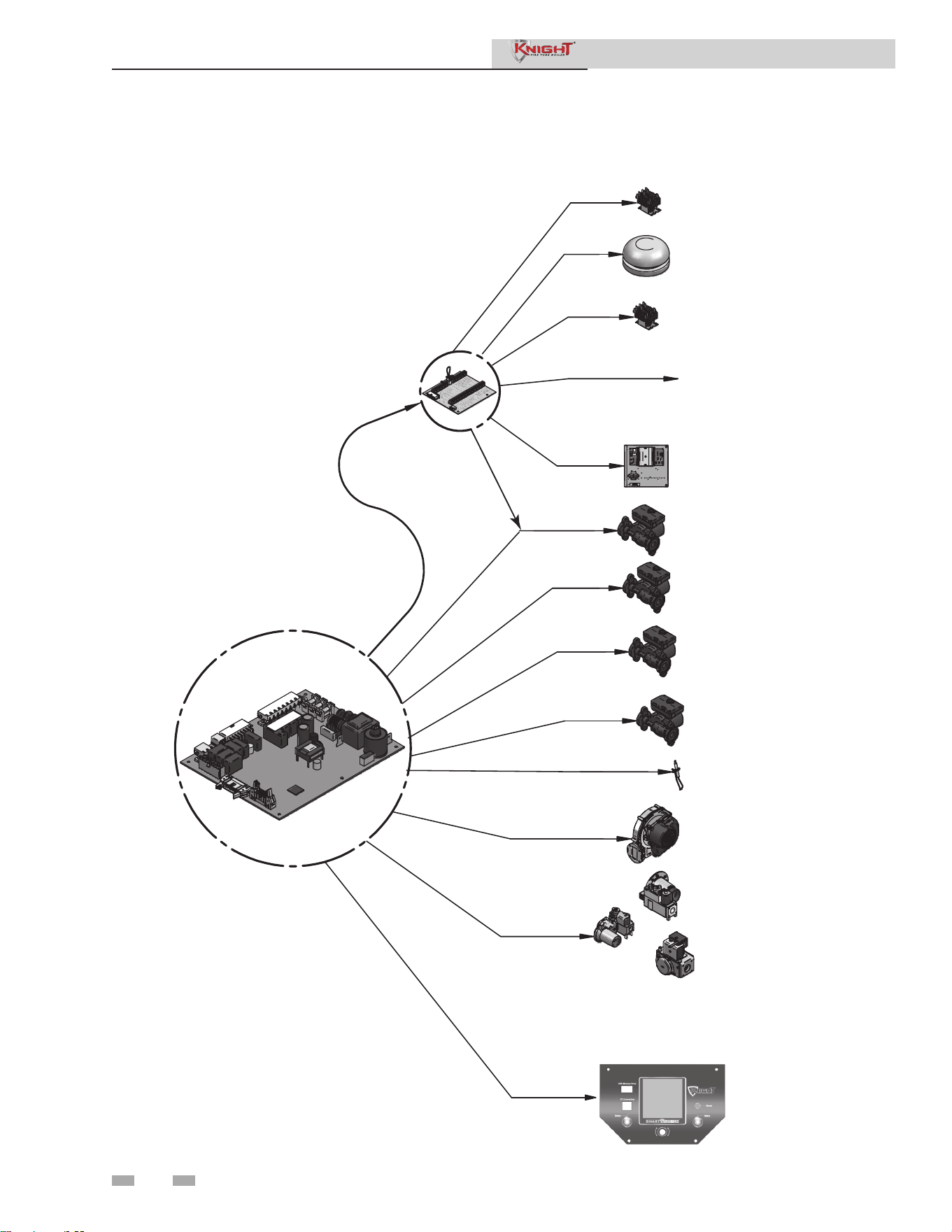
Control outputs
Service Manual
LOW VOLTAGE
CONNECTION
BOARD
SMART CONTROL
MODULE
ALARM BELL
LOUVER RELAY
RUN TIME CONTACTS
BUILDING MANAGEMENT
SYSTEM
BOILER PUMP
SYSTEM PUMP
DHW PUMP
IGNITOR
BLOWER
GAS VALVE
DISPLAY PANEL
DHW RECIRCULATION
PUMP RELAY
DHW RECIRCULATION PUMP

9
Service Manual
1 Service (continued)
Control inputs and outputs
Temperature control and protection
Modulation
The boiler will modulate its firing rate to satisfy heat
demand. The firing rate is dictated by a space heating
or DHW call for heat, the heating load, ramp delay, and
various other temperature limitations.
Target Operating Temperature
The control module regulates the boiler firing rate to
achieve a target temperature set point.
High Limit Operations
The boiler is equipped with adjustable automatic reset
(maximum set point 210°F) high limits. When the outlet
temperature exceeds the automatic reset set point, the
boiler shuts down until the outlet water temperature cools
10° below set point and a 60 second timer has expired. If
the outlet temperature continues to increase to the manual
reset set point, the boiler will shut down until the control
is reset.
Low Water Cutoff Protection
The control uses inlet and outlet water temperature sensors
to monitor flow and temperature rise across the heat
exchanger. If the flow is too low or the outlet temperature
too high, the control will modulate and shut down the
boiler.
Gradient Limiting
If the boiler outlet water temperature is rising too quickly,
the control will reduce its firing rate to the lowest setting.
Flame Current Support
When the boiler is firing at minimum rate, the control will
increase the firing rate if the flame signal drops too low.
Outlet Temperature Limiting
When the outlet temperature exceeds 185°F the control will
reduce the fan speed. If the temperature exceeds 195°F, the
unit will shut down until the temperature drops.
Flue Temperature Limiting
The control will reduce the fan speed if the flue temperature
exceeds 215°F, and shut down if the temperature exceeds
225°F. The boiler will restart once the temperature has
dropped 25°F and the minimum off time has expired.
Temperature Rise Limiting
If the temperature difference between the inlet and outlet
sensor exceeds 55°F, the control will reduce the fan speed.
If the difference exceeds 60°F, the control will shut the
unit down until the difference drops below 55°F and the
minimum off time has expired.
Freeze Protection
The control module provides freeze protection by operating the
boiler and system pump constantly when the water temperature
drops below 45°F. If the temperature drops below 37°F, the
control will fire the boiler until the temperature rises.
Field Wiring
Heat / Loop Demand
Room thermostat connections available for space heating. The
SMART SYSTEM Multi-Temp Loop Control can be used to
control the temperatures of up to three (3) separate loops.
DHW Tank Sensor and Tank Thermostat
The boiler can be programmed for DHW priority when a
DHW thermostat or tank sensor is used. When there is a DHW
and space heating call for heat, the control can be programmed
to cycle between the two demands for a specified time period.
DHW Recirculation Pump Sensor and Relay
Used to control a DHW recirculation pump.
System Sensor
When installed, the control will adjust the boiler firing rate to
maintain the system supply temperature set point.
0-10V System Pump In
When a variable speed system pump is installed in the primary
loop, the control can use a 0-10V signal from the pump speed
control to anticipate changes in building heat load.
0-10V Boiler Pump Out
When connected to a variable speed circulator, the control can
use a 0-10V signal to adjust the speed in order to maintain a
minimum ΔT across the heat exchanger.
Outdoor Air Sensor
The control will adjust boiler set point according to the
outdoor air temperature.
High/Low Gas Pressure Switch
Connect to a pressure switch to detect excessive or low gas
pressure.
Flow Switch
Install at the boiler outlet to verify flow before the boiler fires.
Low water cutoff (LWCO)
Required by some jurisdictions to ensure adequate water flow
through the boiler.
AUX (Louver) Proving Switch
Verifies operation of louvers or auxiliary equipment before
the boiler fires. A custom name can be configured through the
SMART SYSTEM display.

1 Service
10
1 Service
24 VAC Louver Relay Coil
If louvers need to operate when the boiler fires, they can be
controlled by this output.
ModBus / BACnet
An optional ModBus or BACnet interface module can
be used to provide a 0-10V input value for a Building
Management System (BMS) set point or modulation
control.
0-10V BMS In
Boiler set point or firing rate can be controlled using a
BMS 0-10V signal.
0-10V Rate Out
This output provides a 0-10V signal proportional to
the firing rate of the boiler. This may be used by a BMS
controller to monitor the firing rate of the boiler.
Alarm Contacts
The control closes these contacts when the boiler is locked
out or power is turned off. This can be used to turn on an
alarm or signal a Building Management System.
Run Time Contacts
These contacts are closed whenever the boiler is firing.
Typically used by Building Management Systems to verify
the boiler is responding to a call for heat.
Cascade
The heating load may be divided among multiple boilers
when they are wired together in Cascade.
These parameters set operating temperatures and boiler
operating modes. Boiler operation can be based on boiler
outlet water temperature, boiler return water temperature
or system supply temperature, depending on the parameter
setting.
Sequence of operation
Table 1-1 shows control module normal sequences of operation
for space heating and DHW operation. The combined
operation sequence is for a typical application, programmed
to provide DHW priority.
Parameter access modes
User Access
The user can adjust space heating set points, DHW target
temperatures, and high limit settings from the Set Points
Screen. This screen is accessed from the Main Status Screen
by pressing the NAVIGATION dial. The date and time and
the temperature units can also be changed.
Installer Access
Most parameters are available only to the installer, accessible
by entering the password 5309 (see Table 1-2). For installer
menu access, press and hold the LEFT SELECT key [MENU]
key for 5 seconds. Turn the NAVIGATION dial until the first
digit of the password is displayed. Press the NAVIGATION
dial to keep this value and move to the next number. When
the full password (5309) is displayed, press the RIGHT
SELECT [SAVE] key. The screen will now display the installer
parameter menu.
Setup wizard
The Knight Fire Tube boiler control has a Setup Wizard
feature that is automatically accessed the first time the unit is
powered. This feature allows setting of commonly required
parameters without the need to enter the installer password.
Once the Setup Wizard is completed or canceled, it can only
be accessed through the installer menu.
Changing and saving parameters
From the main parameter menu, scroll down to the desired
listing and press the NAVIGATION dial to access the
specific parameter menu (see Table 1-3). Scroll and press
the NAVIGATION dial to adjust parameter settings. Press
the RIGHT SELECT [SAVE] key to retain the settings for
that menu. Once all adjustments for the current menu have
been made, press the LEFT SELECT [EXIT] key to return
to the main parameter menu. Repeat the process for each
menu section as needed. Once all desired changes have been
made, press the LEFT SELECT [HOME] key from the main
parameter menu. This will save all settings to the control.
Service Manual
Please note that the brackets ([]) denote
screen status.
NOTICE
How the boiler operates
The Knight Fire Tube boiler uses an advanced stainless
steel heat exchanger and an electronic control module that
allows fully condensing operation. The blower pulls in gas
and air and pushes flue products out of the boiler through
the heat exchanger and flue piping. The control module
regulates blower speed to control boiler firing rate. The gas
valve senses the amount of air flowing into the boiler and
allows only the right amount of gas to flow.
How the control module operates
The Knight Fire Tube boiler control module receives input
from boiler sensors. The control module activates and
controls the blower and gas valve to regulate heat input
and switches boiler, DHW, DHW recirculation, and system
pumps on and off as needed. The user/installer programs
the module to meet system needs by adjusting control
parameters.
General Operation
1 Service (continued)
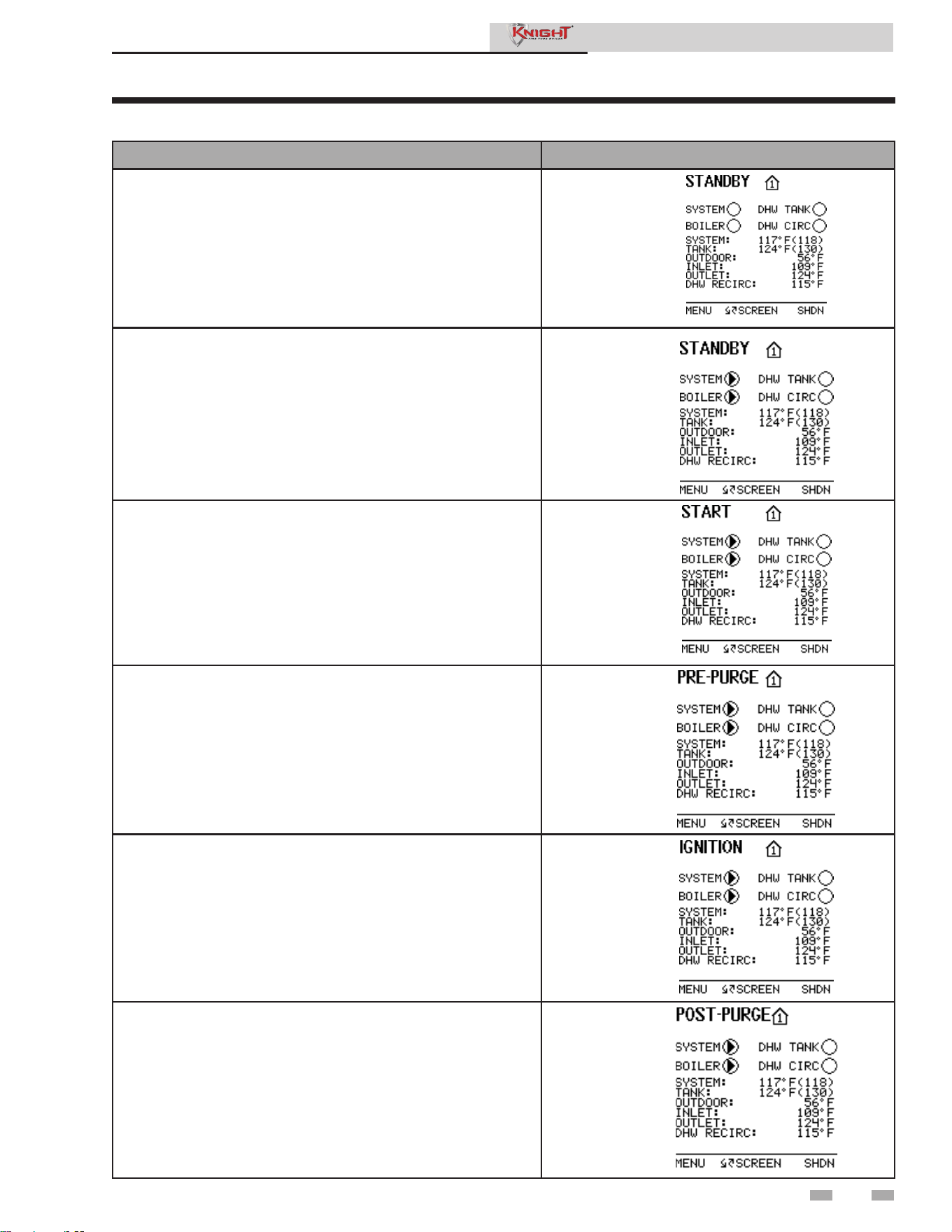
Table 1-1 Sequence of Operation
OPERATION DISPLAY
1. Upon a call for heat, the gas pressure switch(es) must be closed.
2. Once the gas pressure switch(es) are closed, the control turns
on the appropriate pumps (system and boiler pumps for space
heating, DHW pump for DHW). The flow switch and/or LWCO
must close.
3. The control turns on power to the louver relay. The louver
proving switch, and blocked drain switch must close.
4. The control starts a prepurge cycle by starting the blower.
5. The control starts a trial for ignition by firing the spark
electrode and opening the gas valve.
6. If flame is not detected after the sparking ends, the control will
perform a postpurge, then start another prepurge cycle and try
to light the burner again. The control will perform a total of 4
attempts before locking out.
11
Service Manual
1 Service
12
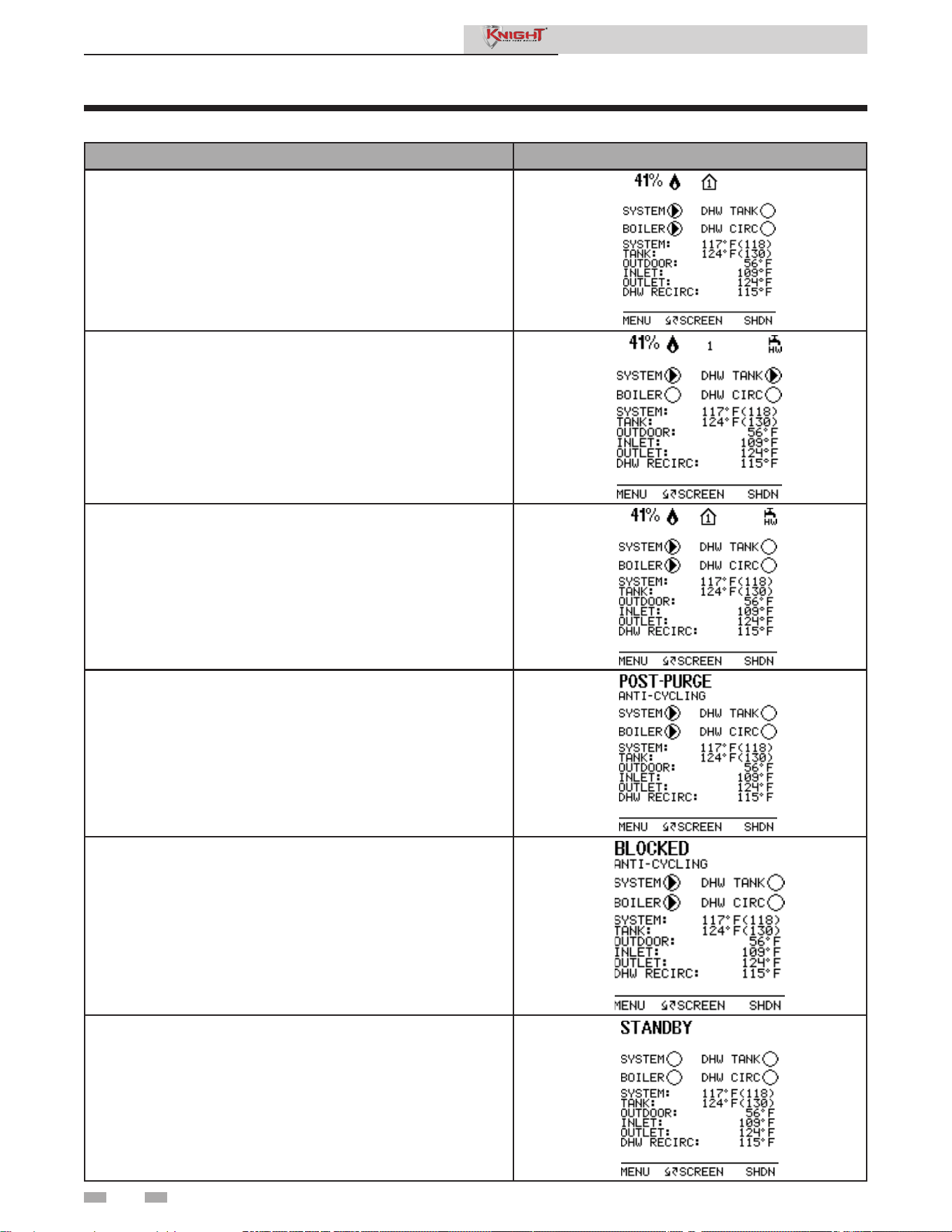
Table 1-1 (continued from previous page) Sequence of Operation
OPERATION DISPLAY
7. If flame is detected, it holds the firing rate steady for a few
seconds to let the flame stabilize, then it begins to modulate the
firing rate based on a set point or some other command (such
as a 0-10V BMS signal).
a
8. If the space heating call for heat is active, and the tank thermostat
or sensor starts a DHW call for heat, the boiler will switch to the
DHW mode. If programmed for normal DHW operation (not as
a zone), the DHW pump will turn on first, then the boiler pump
will turn off (boiler and DHW pump operation briefly overlap to
ensure flow is maintained through the unit). This will divert the
boiler’s outlet water from the heating system and send it to the
tank coil instead. The control will then modulate to maintain the
outlet temperature to the DHW boiler set point.
9. If the boiler is not part of a Cascade, and both the space heating
and DHW calls for heat remain active long enough, the boiler will
switch back and forth between the two heating modes until one
of them is satisfied.
10. Once both calls for heat are satisfied, the control will turn off
the burner. The blower will continue to run during the postpurge
period.
11. Any pumps that are running will continue to run for their
respective pump delay times before turning off, unless
programmed to remain on continuously. A 60 second anti-cycle
period will start, which will delay any new call for heat until it
times out.
12. In Standby, ready to start a new cycle.
Service Manual
1 Service
13
1 Service (continued)
Display panel menu access
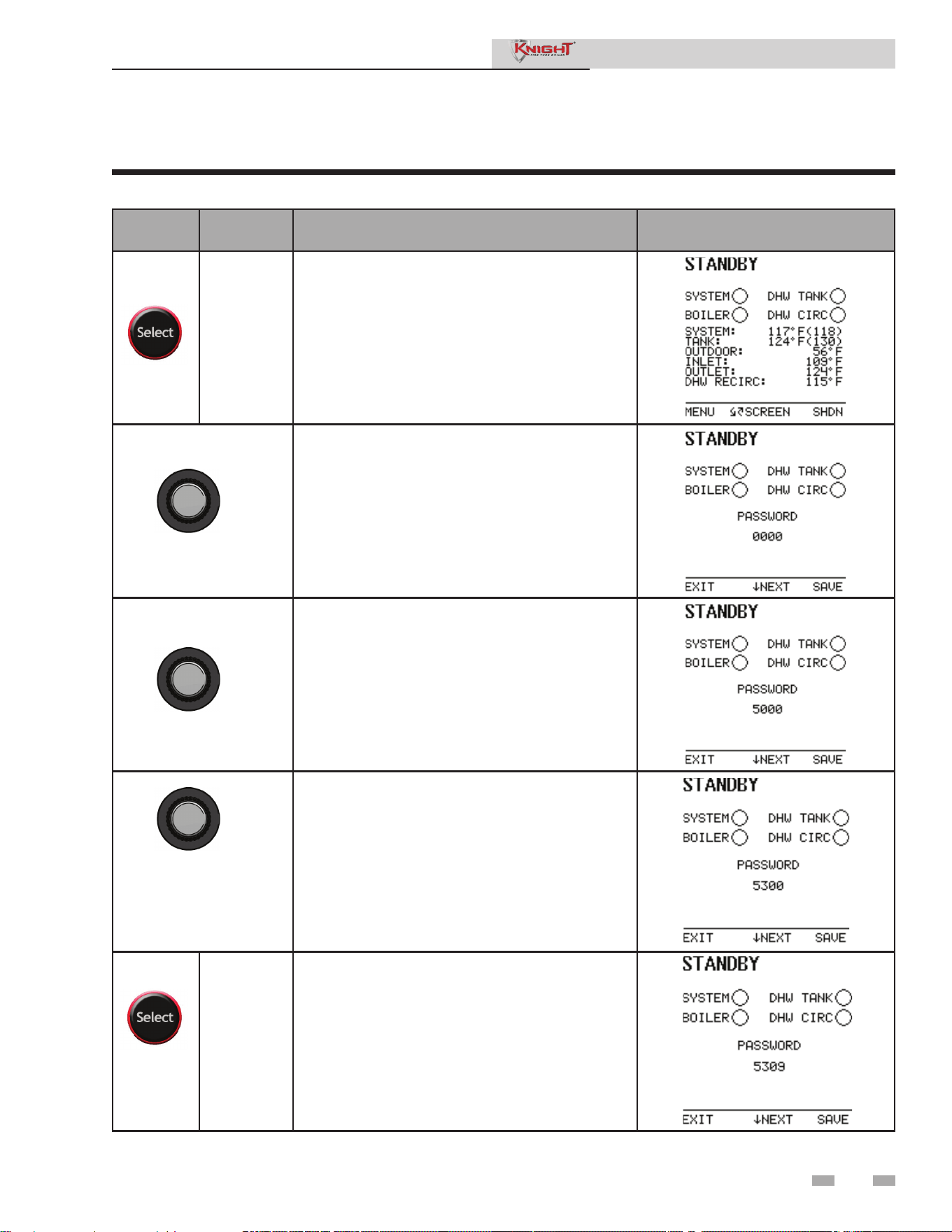
Table 1-2 Use this procedure to access menus from the display panel
BUTTON
SCREEN
STATUS
OPERATION DISPLAY
[MENU]
Press and hold the LEFT SELECT soft key [MENU]
for five (5) seconds.
Rotate the NAVIGATION dial clockwise until 5 is
displayed (first digit on the left).
Press the NAVIGATION dial to select the next digit.
Rotate the NAVIGATION dial clockwise until 3 is
shown in the display.
Press the NAVIGATION dial 2 times to move to the last
digit. Rotate the NAVIGATION dial counterclockwise
until 9 is displayed.
[SAVE] Press the RIGHT SELECT soft key [SAVE].
Service Manual
1 Service
14
1 Service
Display panel parameter access
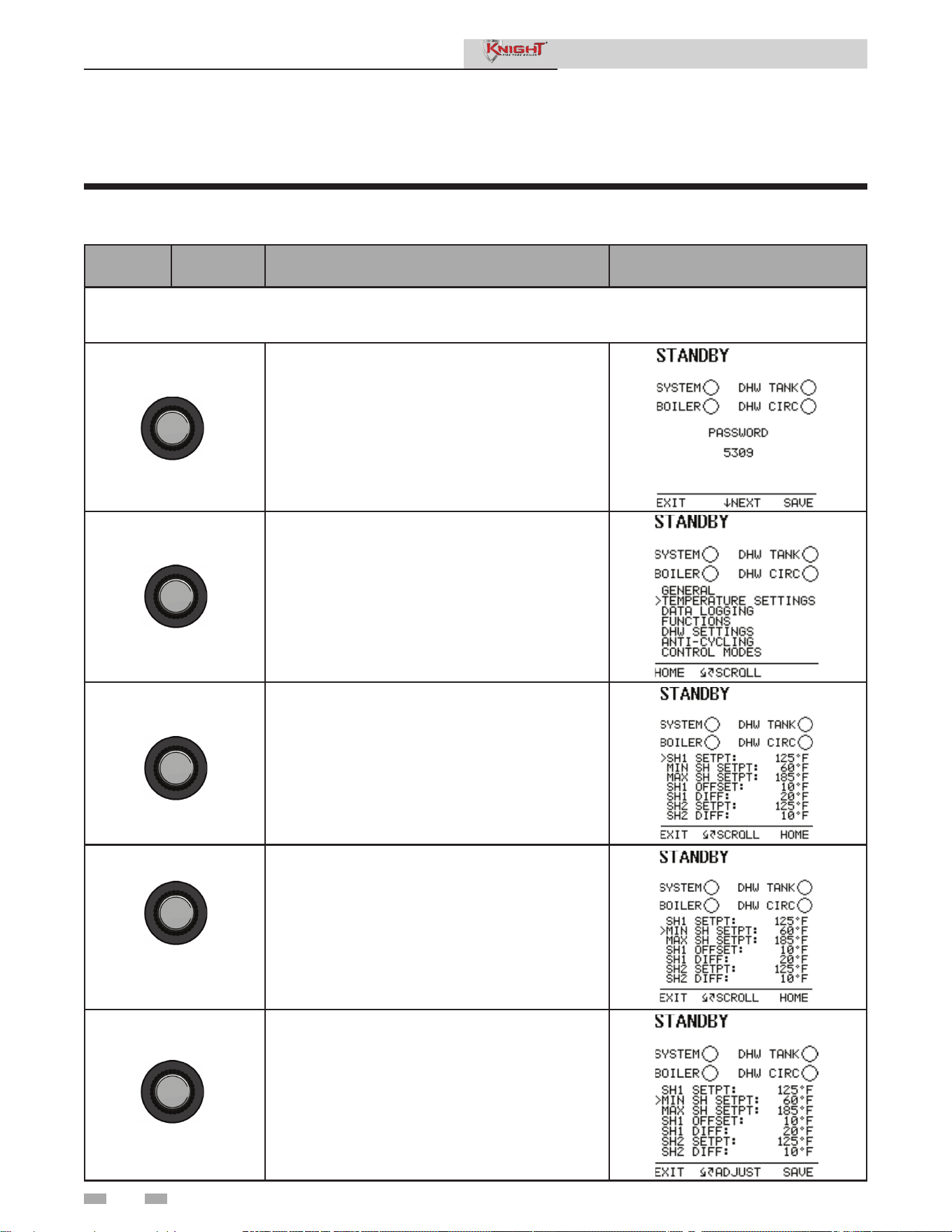
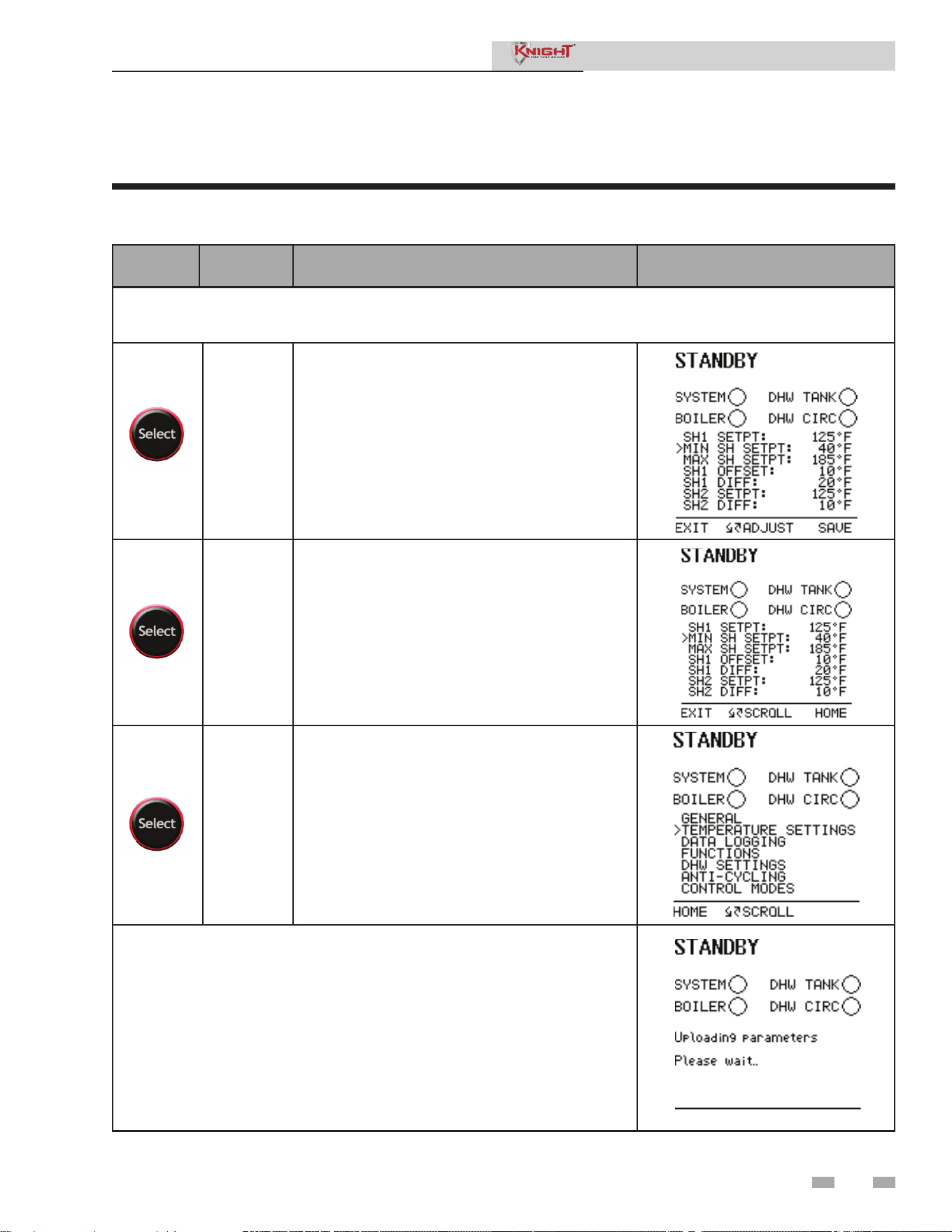
Table 1-3 This is a typical example of accessing a parameter, shown for parameter Temperature Settings, MIN
SH Setpt
BUTTON
SCREEN
STATUS
OPERATION DISPLAY
This example shows how to access parameter Temperature Settings. The first display shown is at the beginning
of the menu listings, after entering the installer access code.
Rotate the NAVIGATION dial counterclockwise until
the arrow (>) is next to TEMPERATURE SETTINGS.
Press the NAVIGATION dial one time.
Rotate the NAVIGATION dial counterclockwise until
the arrow (>) is next to MIN SETPT.
Press the NAVIGATION dial one time.
Rotate the NAVIGATION dial to the desired
temperature.
Service Manual
15
1 Service (continued)
Display panel parameter access (cont.)
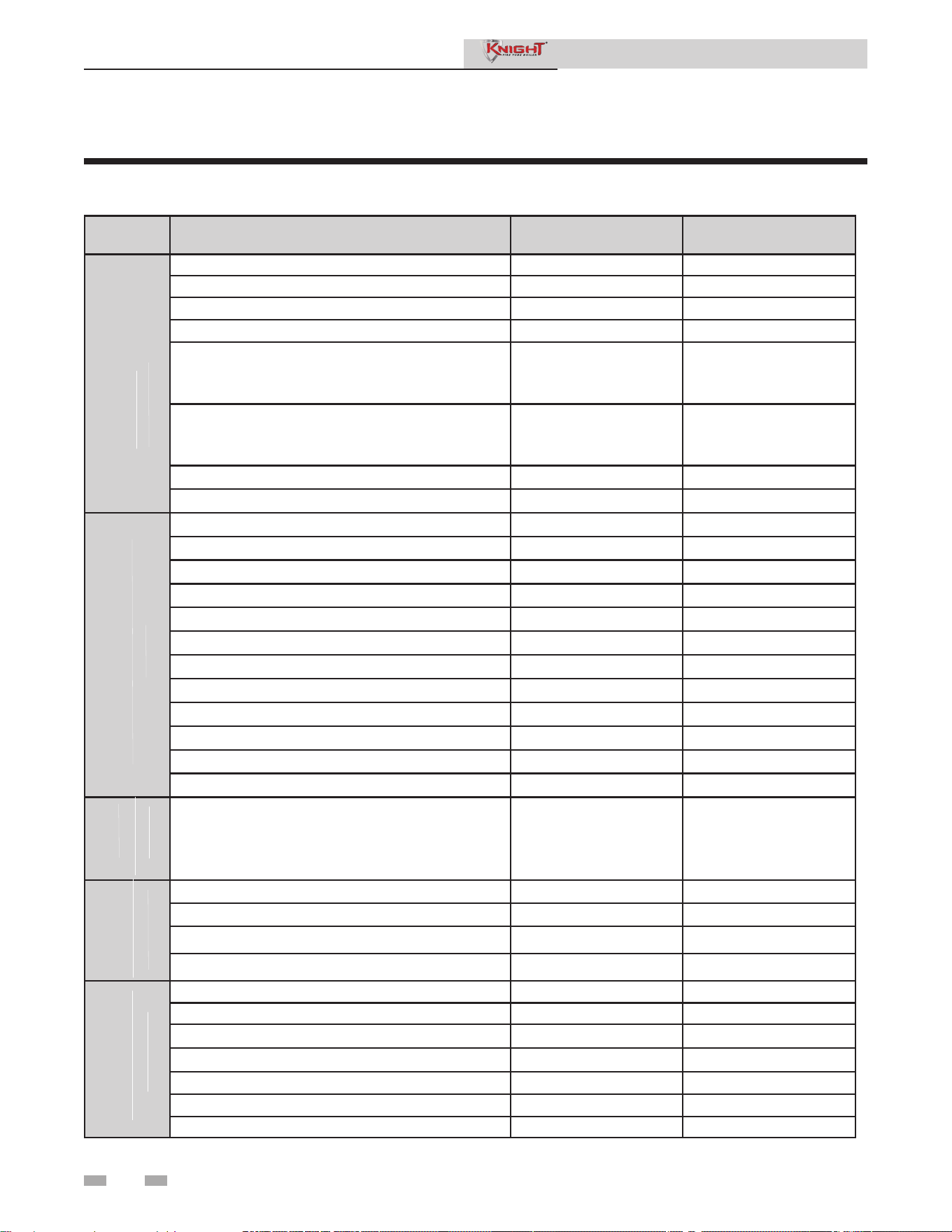
Table 1-3 This is a typical example of accessing a parameter, shown for parameter Temperature Settings, MIN
SH Setpt
BUTTON
SCREEN
STATUS
OPERATION DISPLAY
This example shows how to access parameter Temperature Settings. The first display shown is at the beginning
of the menu listings, after entering the installer access code.
[SAVE]
Press the RIGHT SELECT soft key [SAVE] one time.
[EXIT]
Press the LEFT SELECT soft key [EXIT] if all
desired changes have been made.
[HOME]
Press the LEFT SELECT soft key [HOME].
Wait for the new settings to be saved.
Service Manual
1 Service
16
1 Service
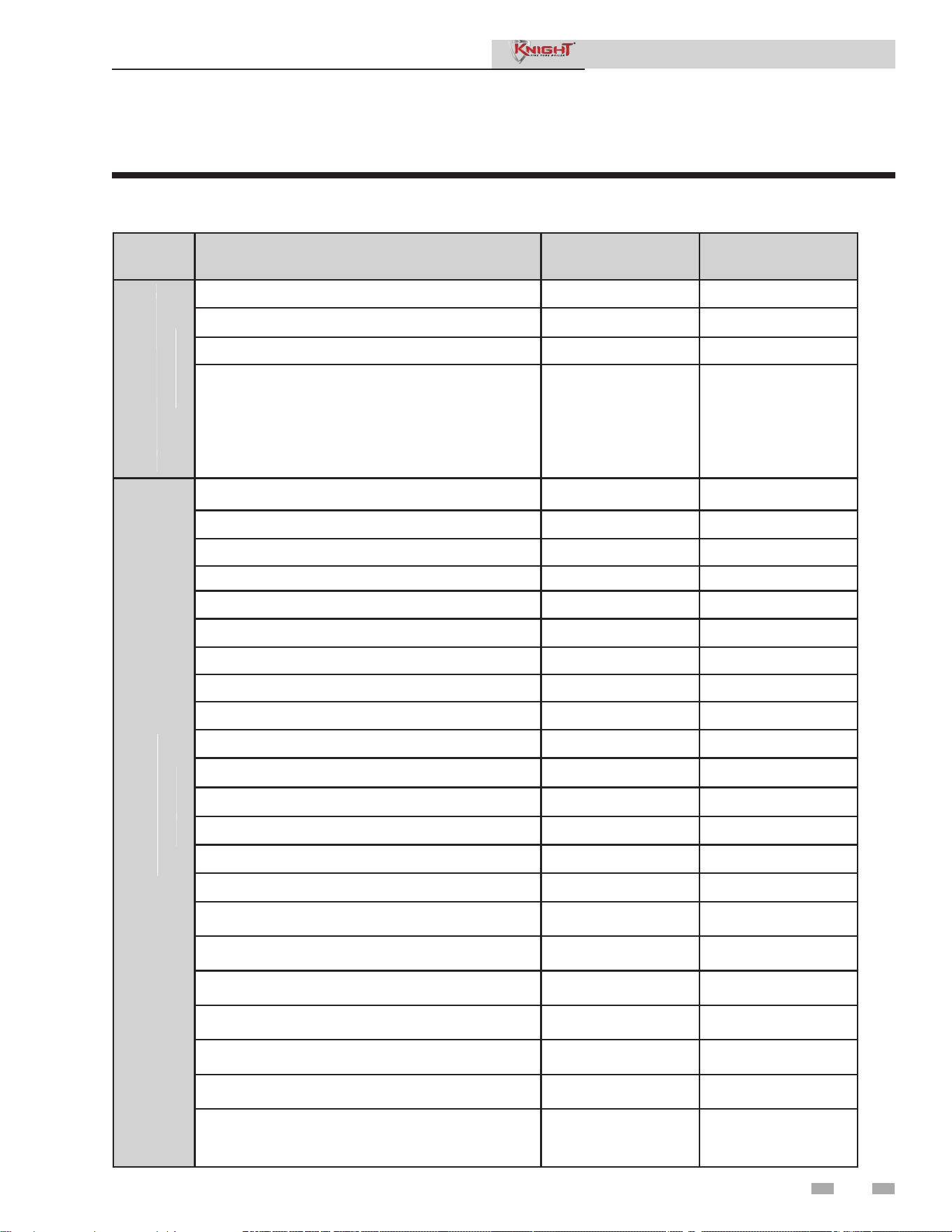
Parameter table
Table 1-4 SMART SYSTEM control module parameters
Note: Parameter selections in BOLD are included in the Smart Setup Wizard.
Menu Description User Access Installer Access
Vacation Mode (On/Off) Yes Yes
Time and Date Yes Yes
Software Version (read only) No Yes
Temperature Units (ºC/ºF) Yes Yes
SH Night Setback Offset > 0°F (0°C)
i. SH Night Setback On Times
ii. SH Night Setback Off Times
No Yes
DHW Night Setback Offset > 0°F (0°C)
i. DHW Night Setback On Times
ii. DHW Night Setback Off Times
No Yes
Display Timeout No Yes
Display Contrast Yes Yes
SH1 Set Point Yes Yes
Minimum SH Set Point No Yes
Maximum SH Set Point No Yes
SH1 Offset Set Point No Yes
SH1 Differential Set Point No Yes
SH2 Set Point Yes Yes
SH2 Offset Set Point No Yes
SH2 Differential Set Point No Yes
SH3 Set Point Yes Yes
SH3 Offset Set Point No Yes
SH3 Differential Set Point No Yes
3-Way Valve Time No Yes
Reset Last 10 Errors No Yes
Service Mode Delay No Yes
Freeze Protection Pump On No Yes
Freeze Protection Burner On No Yes
Freeze Protection Burner Differential No Yes
Tank Set Point Yes Yes
Tank Set Point Differential No Yes
DHW Boiler Set Point No Yes
DHW Boiler Offset No Yes
DHW Boiler Differential No Yes
DHW Recirc Pump Offset No Yes
DHW Recirc Pump Differential No Yes
GENERAL
TEMPERATURE SETTINGS
DATA
LOGGING
FUNCTIONS
DHW SETTINGS
Service Manual
(PAGES 20 - 21)
(PAGE 21)
(PAGE 21)
(PAGES 21 - 22)
(PAGES 22 - 23)
1 Service
17
1 Service (continued)
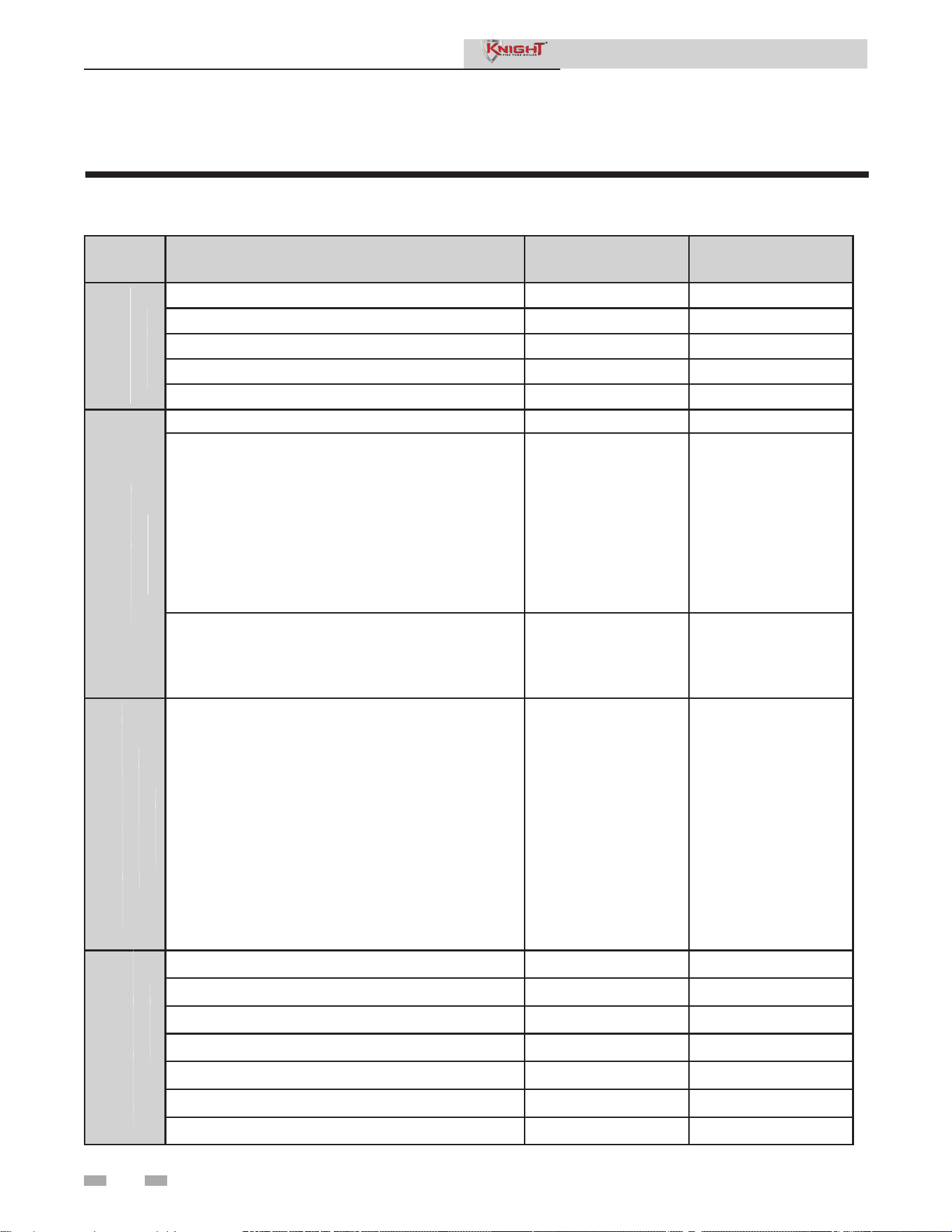
Parameter table
Menu Description User Access Installer Access
Tank Minimum Set Point No Yes
Tank Maximum Set Point No Yes
DHW Max Rate No Yes
DHW Type (NORMAL, ZONE)
i. SH/DHW Switching Time
ii. DHW/SH Switching Time
DHW Type = ZONE
i. DHW Forces Sys Pump (YES/NO)
ii. DHW Blocks Sys Pump (YES/NO)
No Yes
Low Outdoor Temperature 1 No Yes
High Outdoor Temperature 1 No Yes
SH1 Set Point at Low Outdoor Temp No Yes
SH1 Set Point at High Outdoor Temp No Yes
Outdoor Air Shutdown SH1 No Yes
Outdoor Air Shutdown Differential SH1 No Yes
Shift Reset Curve SH1 No Yes
Low Outdoor Temperature 2 No Yes
High Outdoor Temperature 2 No Yes
SH2 Set Point at Low Outdoor Temp No Yes
SH2 Set Point at High Outdoor Temp No Yes
Outdoor Air Shutdown SH2 No Yes
Outdoor Air Shutdown Differential SH2 No Yes
Shift Reset Curve SH2 No Yes
Low Outdoor Temperature 3 No Yes
High Outdoor Temperature 3 No Yes
SH3 Set Point at Low Outdoor Temp No Yes
SH3 Set Point at High Outdoor Temp No Yes
Outdoor Air Shutdown SH3 No Yes
Outdoor Air Shutdown Differential SH3 No Yes
Shift Reset Curve SH3 No Yes
Boost Temperature > 0°F (0°C)
i. Boost Time
No Yes
OUTDOOR RESET
DHW SETTINGS (CONT.)
Service Manual
Table 1-4 (continued from previous page) SMART SYSTEM control module parameters
Note: Parameter selections in BOLD are included in the Smart Setup Wizard.
(PAGES 22 - 23)
(PAGES 23 - 25)
1 Service
18
Parameter table
Menu Description User Access Installer Access
Anti-cycling Time No Yes
Anti-cycling Override Differential No Yes
Ramp Delay (Enable/Disable) No Yes
Modulation Factor No Yes
Ramp Settings No Yes
Controlling Sensor (Outlet/Inlet) No Yes
Cascade Address = 0 (Leader Boiler)
i. Maximum Cascade Outlet Set Point
ii. Cascade Offset
iii. Cascade Differential
iv. Cascade Type (L/L, EFF)
v. Minimum On/Off Time
vi. Minimum Next On Time
vii. Minimum Pumps On
Cascade Adddress = 1 (Member Boiler)
i. Alternate Leader? (YES/NO)
No Yes
Boiler Size
i. Cascade Address (1 - 7)
ii. Type (Condensing / Non-Condensing)
iii. Input (kBtuh)
No Yes
BMS = ACTIVE
i. BMS Type = POWER
1. Rate at Minimum Volts
2. Rate at Maximum Volts
ii. BMS Type = SETPOINT
1. Set Point at Minimum Volts
2. Set Point at Maximum Volts
iii. Volts at Minimum
iv. Volts at Maximum
v. BMS Thermostat Input = INACTIVE
1. On Volts
2. Off Differential Volts
vi. ModBus / BACnet (ACTIVE/INACTIVE)
vii. BAS T/O
No Yes
System Pump Delay No Yes
Boiler Pump Delay No Yes
DHW Pump Delay No Yes
System Pump Anti-Seize Delay No Yes
Boiler Pump Anti-Seize Delay No Yes
DHW Pump Anti-Seize Delay No Yes
System Pump Type (CFH, WWSD) No Yes
ANTI-CYCLING
CONTROL MODES
Service Manual
Table 1-4 SMART SYSTEM control module parameters
Note: Parameter selections in BOLD are included in the Smart Setup Wizard.
(PAGES 25 - 26)
(PAGES 26 - 27)
(PAGES 27 - 28)
BUILDING MANAGEMENT
SYSTEM (BMS)
CIRCULATION PUMPS
(PAGE 29)
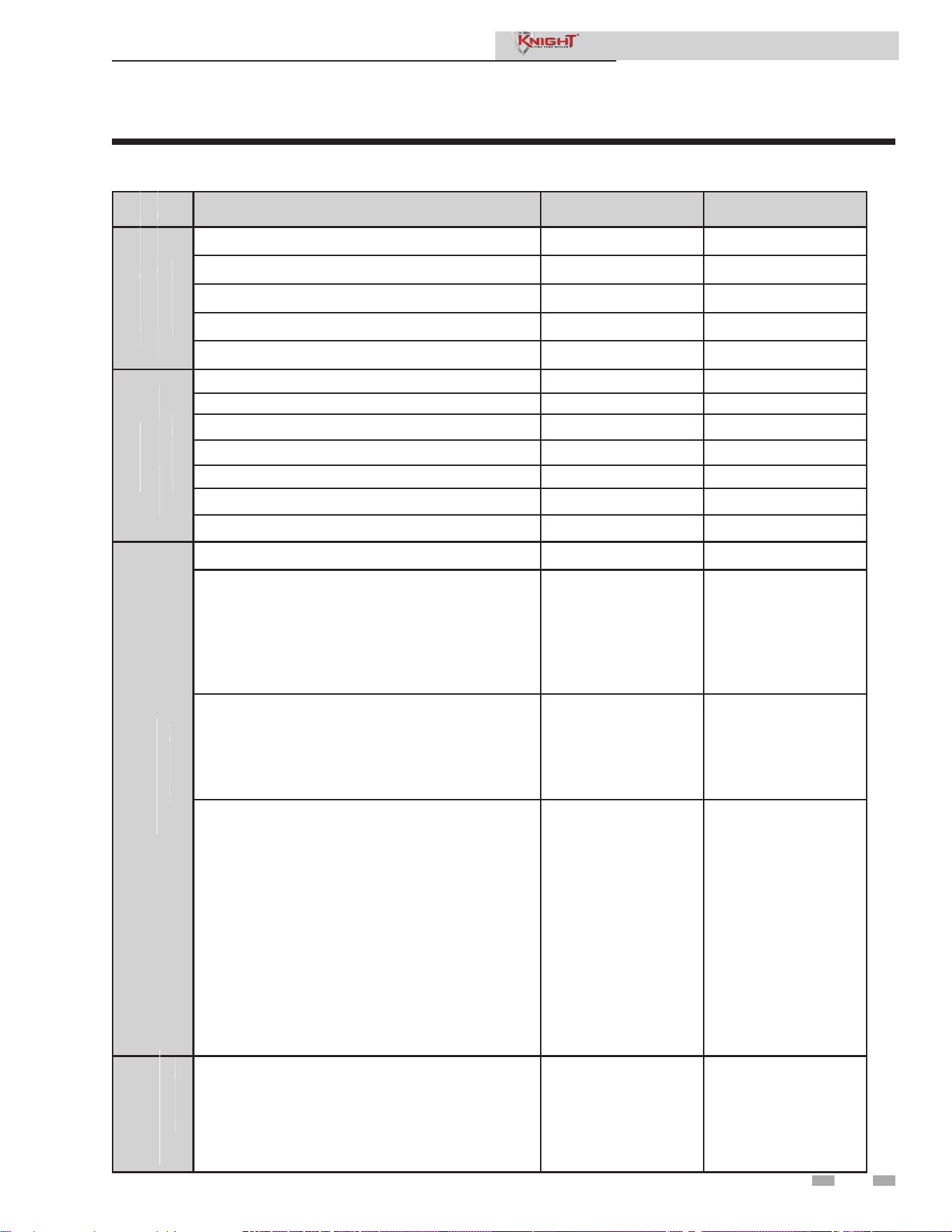
1 Service (continued)
Parameter table
Menu Description User Access
Installer
Access
Boiler Pump Delta T Set Point No Yes
Boiler Pump Minimum Volts No Yes
Boiler Pump Maximum Volts No Yes
Boiler Pump Standby Volt No Yes
Boiler Pump Type No Yes
Service Notification Months No Yes
Service Notification Running Time No Yes
Service Notification Cycles No Yes
Reset Service Reminder No Yes
Installer Name No Yes
Installer Phone Number No Yes
Aux Input Name No Yes
Time & Date No Yes
IF Outdoor Sensor Connected:
i. Low Outdoor Temperature 1
ii. High Outdoor Temperature 1
iii. SH1 Set Point at Low Outdoor Temperature
iv. SH1 Set Point at High Outdoor Temperature
v. Outdoor Air Shutdown SH1
vi. Outdoor Air Shutdown Differential SH1
No Yes
Cascade Address = 0
i. Maximum Cascade Set Point
ii. Cascade Offset
iii. Cascade Differential
iv. Cascade Type
No Yes
BMS (ACTIVE)
i. BMS Type = POWER
1. Rate at Minimum Volts
2. Rate at Maximum Volts
ii. BMS Type = SETPOINT
1. Set Point at Minimum Volts
2. Set Point at Maximum Volts
iii. Volts at Minimum
iv. Volts at Maximum
v. BMS Thermostat Input = INACTIVE
1. On Volts
2. Off Differential Volts
No Yes
Access or Create “Lochinvar” Folder
i. Save Parameters from the Control
ii. Load Parameters to the Control
No Yes
CIRCULATION
SERVICE
BASIC SETUP
NOTIFICATION
Service Manual
Table 1-4 SMART SYSTEM control module parameters
Note: Parameter selections in BOLD are included in the Smart Setup Wizard.
19
(PAGES 29 - 30)
(PAGES 30 - 31)
PUMPS CONT’D
LOCH-N-LINK
(PAGE 31)
(PAGE 31)

1 Service
Viewable and changeable control parameters
General
Vacation Mode
This parameter forces the Space Heating (SH) and DHW set
points to decrease by the amounts programmed in the Night
Setback Offset parameters. It is used to save energy, such
as when the building is unoccupied for an extended period
of time. For this function to work, the Space Heating Night
Setback Offset and/or DHW Night Setback Offset parameters
must be set to a value higher than 0°. The default value of this
parameter is OFF.
Time and Date
The control uses an internal clock for the night setback feature
and for logging of events. For these features to work correctly,
the clock must be set when the boiler is first installed or
anytime the boiler has been powered off for more than four (4)
hours. This parameter must be accessed to set the clock.
The clock is automatically updated whenever a PC is connected
and the Win_Pro-Installer program is started.
Software Version
The software version allows the user to view the software
version in use by the control. This software controls the
operation of the boiler. When a new software version becomes
available, the existing control can be replaced with a new
control to update the software.
Software version is read only.
Temperature units (°C / °F)
The control can be configured to display temperature in either
°C or °F. This parameter can be changed by the user or the
installer by accessing the Temperature Units parameter. The
default is °F.
Space Heating (SH) and Domestic Hot Water (DHW)
Night Setback Offset
Once the unit’s internal clock has been set correctly, the Night
Setback feature can be used to program a lower set point
during unoccupied times. Both the space heating and DHW
can be programmed for night setback. When in night setback,
the control reduces the set point by a fixed amount. For space
heating, it subtracts the space heating night setback offset
from each of the SH user set points (SH1, 2, and 3 Set point
parameters), or the calculated outdoor reset set point (if lower).
For DHW, it subtracts the DHW night setback offset from the
tank set point (Tank Set point parameter).
NOTE: The DHW night setback will not work without a tank
sensor installed.
The installer may adjust the space heating night setback offset
by accessing the SH Night Setback Offset parameter and the
DHW night setback offset by accessing the DHW Night Setback
Offset parameter. The minimum setting is 0°F (0°C) and the
maximum setting is 90°F (50°C).
Space Heating (SH) and Domestic Hot Water (DHW)
Night Setback On and Off Times
These are the times at which the SH Night Setback and DHW
Night Setback Offsets become active and inactive. There are
seven (7) stop times and seven (7) start times each for the SH
and DHW night setback functions. Any start or stop time may
be set to any time during the week. When a start time and a
stop time are programmed for the same day and time, the stop
time has priority (this is how a start time can be disabled).
The installer can adjust the SH Night Setback start and stop
times by accessing the parameter SH NSB On/Off Times. The
installer can access the DHW Night Setback start and stop times
by accessing the DHW NSB On/Off Times parameter. These
settings can be adjusted as follows:
1. When the screen is first accessed, start and stop triggers 1 are
displayed. If a different trigger number is desired, rotate the
NAVIGATION dial until the desired trigger number appears.
Once it is found, press the NAVIGATION dial to adjust the
start and stop times. The day of the week for the start time
will flash.
2. Rotate the NAVIGATION dial to adjust the day of the week
of the start trigger. Once it is set to the desired day of the
week, press the NAVIGATION dial again. The start time
hour will flash.
3. Rotate the NAVIGATION dial to adjust the start time hour
to the desired time. Press the NAVIGATION dial again.
The start time minutes will flash.
4. This process may be continued until the start and stop days
and times are adjusted as desired. When finished with this
set of triggers, press the [SAVE] key.
5. Rotate the NAVIGATION dial to select another set of
start and stop triggers, or press the [EXIT] key to return to
the previous menu.
CAUTION
Before changing parameters, note the
settings or save to USB so that the unit
can be returned to its original operating
parameters.
NOTICE
The internal clock does not adjust for
Daylight Savings Time and therefore, will
require a manual adjustment.
20
Service Manual

1 Service (continued)
21
Temperature Settings
Space Heating (SH1, SH2, SH3) Set Point
There are three (3) individual user set points for better zone
control. These are listed as SH1 Set Point through SH3 Set
Point. If multiple set points are calling for heat the highest
set point has priority. The range is SH Minimum Set point
to SH Maximum Set point. The default is 125°F (52°C).
Space Heating (SH) Minimum Set Point
The SH minimum set point sets the minimum water
temperature set point that can be used for space heating
operation. The user or installer will not be able to program
the control with a lower SH set point. This parameter can
only be changed by the installer by accessing Minimum
SH Set point parameter. The temperature range of this
parameter is 32°F (0°C) to the space heating maximum set
point. The default value is 60°F (16°C).
CAUTION
Mixing valves are required for the
protection of any low temperature
loops.
Night Setback Override
Any Night Setback On trigger currently active or scheduled
within the next seven (7) days can be skipped. To skip a
trigger, go to the Night Setback Status Screen and press
the SKIP button. Rotate the NAVIGATION dial until the
arrow (>) is next to the trigger you wish to skip. Press the
NAVIGATION dial once. “SK” will appear next to that
trigger to indicate that it will be skipped. You can restore
an upcoming trigger by selecting that trigger, and pressing
the NAVIGATION dial again. The “SK” next to that
trigger will disappear.
To save any changes and return to the Home Screen, press
the RIGHT SELECT [HOME] key. To return to the Status
Screen without saving the changes, press the LEFT SELECT
[EXIT] key.
Display Timeout
This is the time in which the display remains illuminated.
The range is 10 seconds to 10 minutes. The default is 10
minutes.
Display Contrast
The contrast of the LCD display can be adjusted to improve
readability. The contrast is adjusted automatically when
the display board is tested at the factory, but different
ambient conditions may warrant changing the setting.
This parameter can be changed by accessing the Display
Contrast setting. The range of this parameter is -10 to +10.
The default setting is 0.
Space Heating (SH) Maximum Set Point
The SH maximum set point sets the maximum water
temperature set point that can be used for space heating. The
user or installer will not be able to program the control with a
higher SH set point. This parameter can only be changed by
the installer by accessing Maximum SH Set point parameter.
The temperature range of this parameter is the space heating
minimum set point to 190°F (88°C). The default value is 185°F
(85°C).
SH1 - SH3 Offset Set Point
The SH offset sets how many degrees above set point the
temperature has to go before the boiler will shut off. This
parameter can only be changed by the installer by accessing
parameters SH1, 2 and 3 Offset Set point parameters. The
temperature range of these parameters is 0°F to 20°F. The
default value is 10°F.
SH1 - SH3 Differential Set Point
The SH differential sets how many degrees below the offset the
temperature has to drop before the boiler turns back on. This
parameter can only be changed by the installer by accessing
the SH1, 2 and 3 Differential Set point parameters. The range
is 0°F to 60°F. The default is 20°F.
3-Way Valve Time
The optional Lochinvar Multi-Temperature Loop Control
Board (MTLC) can be used to control the supply temperature
in up to three (3) sub-loops, corresponding to each of the three
(3) SH set points, through the use of 3-way mixing valves. To
ensure the MTLC will control these temperature properly, it is
necessary to let the control know how much time these mixing
valves require to fully open and close. Program this time into
the 3-Way Valve Time parameter. Since this parameter applies
to all of the mixing valves used, the actual open/close time
must be approximately the same for each one. The minimum
setting is 1 second, and the maximum setting is 255 seconds.
The default setting is 20 seconds.
Data Logging
Reset log errors
The reset log errors function clears the last 10 errors log.
Functions
Service Mode Delay
By pressing the pin button on the front of the display for five
(5) seconds, the control will be placed in Service Mode. This
will override all other heat demands. The Service Mode allows
the installer to set the unit to any firing rate for the purpose
of combustion analysis. The delay sets the length of time
the boiler will stay in the Service Mode if no keys have been
pressed before going back to its original state. This parameter
can only be changed by the installer by accessing the Service
Mode Delay parameter. The time range of this parameter is 1
to 10 minutes. The default value is 10 minutes.
Service Manual

1 Service
DHW Boiler Set Point
When a DHW call for heat becomes active, the control will
use the DHW boiler set point to determine the firing rate of
the boiler based on the boiler outlet water temperature, or
system temperature when DHW is programmed as a zone.
This parameter can be changed by the installer by accessing the
DHW Boiler Set point parameter. The temperature range of this
parameter is 68°F (20°C) to 190°F (88°C). The default value is
180°F (82°C).
DHW Boiler Offset
This parameter reflects the degrees above DHW boiler set point
the temperature has to go before the boiler will shut off. The
range is 0°F (0°C) to 20°F (11°C). The default setting is 10°F
(2.8°C).
DHW Boiler Differential
This parameter reflects the degrees below DHW boiler offset
set point the temperature has to go before the boiler turns back
on. The range is 0°F (0°C) to 60°F (33°C). The default setting
is 20°F (6°C).
DHW Recirculation Pump Offset (Recirculation Pump)
The SMART SYSTEM control will turn the DHW recirculation
pump on when the DHW return water temperature drops
below the DHW Tank Set Point minus the DHW Recirculation
Pump Offset. The range for this parameter is 0° to 54°F (30°C).
The default value is 10°F (5°C).
DHW Recirculation Pump Differential
Once the SMART SYSTEM control turns the DHW recirculation
pump on, the DHW return water temperature must increase by
the DHW Recirculation Pump Differential before the control
turns the DHW recirculation pump back off. The range of this
parameter is 0° to 90°F (50°C). The default value is 5°F (2°C).
Tank Minimum Set Point
This setting controls the minimum tank set point for the tank
temperature. The installer can adjust this by accessing the
Tank Minimum Set point parameter. The minimum setting is
60°F (16°C) and the maximum setting is the maximum tank set
point (Tank Maximum Set point parameter). The default value
is 60° (16°C).
Tank Maximum Set Point
This setting controls the maximum tank set point for the tank
temperature. The installer can adjust this by accessing the Tank
Maximum Set point parameter. The minimum setting is the
minimum tank set point (Tank Minimum Set point parameter)
and the maximum setting is 190°F (88°C). The default value is
140°F (60°C).
Freeze Protection Pump On
The SMART SYSTEM control will turn on the boiler and
system pump outputs whenever the inlet temperature drops
below this setting. This is done to prevent the water in the
heat exchanger from freezing. Certain low-temperature
applications (such as snow melt) can operate at temperatures
around freezing, so this setting needs to be lowered in these
cases. The installer can adjust the temperature at which
the pump outputs are turned on by accessing the Freeze
Protection Pump On parameter. The minimum setting is
-4°F (-20°C), and the maximum setting is 45°F (7.2°C). The
default setting is 45°F (7.2°C).
Freeze Protection Burner On
If running the pumps does not prevent the inlet temperature
from falling closer to freezing, the SMART SYSTEM control
will fire the burner at low fire. The installer can adjust the
temperature at which the burner fires by adjusting the Freeze
Protection Burner On parameter. The minimum setting
is -4°F (-20°C), and the maximum setting is the Freeze
Protection Pump On parameter. The default setting is 37°F
(2.8°C).
Freeze Protection Burner Differential
Once the burner has started firing due to a low inlet
temperature, the inlet temperature must increase by this
amount before the burner turns back off. The installer can
adjust this differential by accessing the Freeze Protection
Burner Differential parameter. The minimum setting is 0°,
and the maximum is 20°F (11°C). The default setting is 5°F
(2.8°C).
DHW Settings
DHW Tank Set Point
By installing a tank sensor, the SMART SYSTEM control can
perform the tank thermostat function. The SMART SYSTEM
control automatically detects the presence of this sensor, and
generates a DHW call for heat when the tank temperature
drops below the tank set point differential (Tank Set point
Differential parameter), and finishes the call for heat when the
tank temperature reaches tank set point. This parameter can
be changed by the installer by accessing the DHW Tank Set
point parameter. The temperature range of this parameter is
from the tank minimum set point to the tank maximum set
point. The default value is 120°F (49°C).
Tank Set Point Differential
When a tank sensor is installed, the tank temperature must
drop this amount below the tank set point (DHW Tank
Set point parameter) before the boiler turns back on. The
installer can adjust this setting by accessing the Tank Set point
Differential parameter. The minimum setting is 0° (0°C), and
the maximum is 40°F (22°C). The default setting is 6°F (3°C).
22
Service Manual

1 Service (continued)
Fan Speed Limiting for Indirect DHW Tank
This parameter determines the maximum fan speed (and
therefore the maximum rate) to be used when heating an
indirect DHW tank. This setting may be used when the tank
is unable to accept all of the BTU’s available from the boiler.
This parameter may be adjusted by the installer by accessing
the Fan Speed Limiting for Indirect DHW Tank parameter.
The default value is the maximum fan speed for that model.
DHW Type
This parameter determines whether the Fire Tube boiler
treats the indirect DHW tank as a separate load, or as a zone
on the primary loop. When programmed as a separate load,
the boiler will turn on the DHW pump and then turn off the
boiler pump when an indirect DHW demand begins. When
programmed as a zone, the boiler will turn on the DHW
pump, leave the boiler pump on and change the system set
point to the DHW boiler set point (DHW Boiler Set point
parameter).
This setting may be changed by the installer by accessing
the DHW Type parameter. The choices are NORMAL and
ZONE. The default setting is NORMAL.
SH/DHW Switching Time
When a boiler has a space heating demand and it receives
a DHW demand, it will immediately switch to the DHW
demand and start a timer. Once the timer has expired, the
boiler will switch back to the space heating demand and start
another timer. Once this other timer expires, it will switch
back to the DHW demand. The installer can adjust the length
of time the boiler will service the space heating demand by
accessing the SH/DHW Switching Time parameter. The
minimum setting is 0 minutes and the maximum setting is 55
minutes. The default time is 30 minutes.
DHW/SH Switching Time
When a boiler has a DHW demand and it receives a space
heating demand, the SMART SYSTEM control will start a
timer. Once the timer expires, it will stop the DHW demand
and service the space heating demand. The installer can adjust
the length of time the boiler will service the DHW demand
by accessing the DHW/SW Switching Time parameter. The
minimum setting is 0 minutes and the maximum setting is 55
minutes. The default setting is 30 minutes.
DHW Forces System Pump
When the indirect DHW tank is connected as a zone on the
primary loop, the DHW Forces Sys Pump parameter tells the
system pump if it must run when there is a DHW demand.
To have the system pump constantly running during a DHW
demand, set the DHW Forces Sys Pump parameter to YES (the
parameter DHW Blocks Sys Pump must be set to NO). If this
parameter and the DHW Blocks Sys Pump parameter are both
set to NO, the system pump operation will be based strictly on
the System Pump Type parameter setting. The default setting
of this parameter is YES.
DHW Blocks System Pump
When the indirect DHW tank is connected as a zone on the
primary loop, the DHW Blocks Sys Pump parameter tells the
system pump if it is allowed to run during a DHW demand.
To force the system pump to turn off during a DHW demand,
set the DHW Blocks Sys Pump parameter to YES. The default
setting is NO.
Outdoor reset
Knight Fire Tube boilers are equipped with outdoor reset,
a feature that saves energy by reducing the boiler water
temperature as the heating load decreases. In accordance with
the United States Energy Policy and Conservation Act, boilers
with inputs less than 300,000 Btu/hr must use either outdoor
air reset or an external energy management system. To use
the outdoor reset feature, the outdoor sensor provided with the
boiler must be properly installed.
For better zone control, three (3) individual outdoor resets for
low outdoor temperatures are available. If multiple zones are
calling for heat, the highest set point has priority. Each curve
is created using four (4) adjustable parameters: low outdoor
air temperature, high outdoor air temperature, set point at
low outdoor air temperature, and set point at high outdoor air
temperature. The set point is calculated using the individual
curve for each zone.
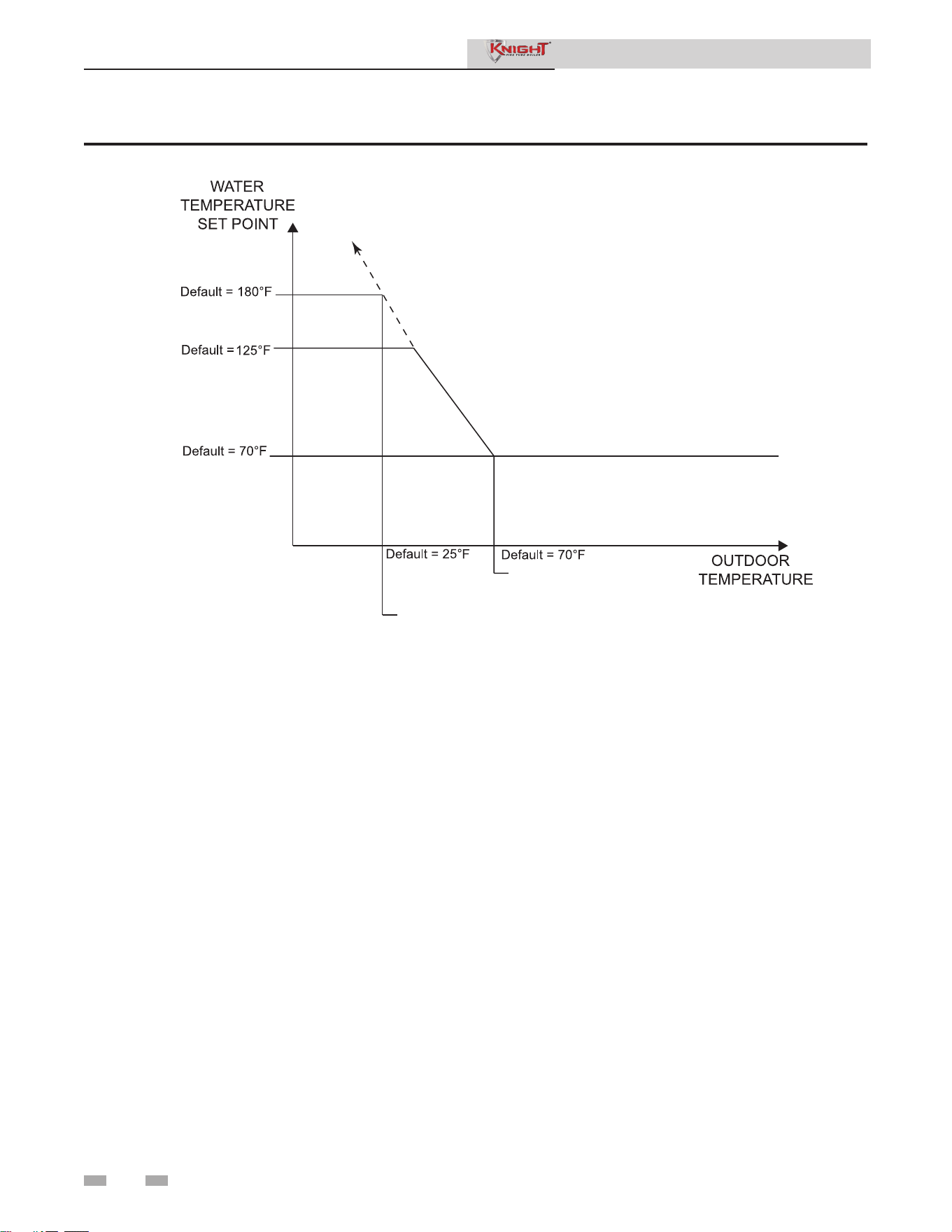
Outdoor (1 - 3) Low
When the outdoor air temperature drops to this point, the
water temperature will be at the Set point 1 at Low Outdoor
Temp 1, Set point 2 at Low Outdoor Temp 2 and Set point 3 at
Low Outdoor Temp 3 parameters (FIG. 1-1). If the outdoor
air temperature drops further, the set point will continue to
increase above this setting. This parameter can be changed by
the installer by accessing the Outdoor (1-3) Low parameter. The
temperature range of this parameter is -39°F (-39°C) to high
outdoor temperature set point. The default value is 25°F (-4°C).
Outdoor (1 - 3) High
When the outdoor air temperature rises to or above this point,
the water temperature will be at the Set point 1 at High Outdoor
Temp 1, Set point 2 at High Outdoor Temp 2 and Set point 3 at
High Outdoor Temp 3 parameters (FIG. 1-1). This parameter
can be changed by the installer by accessing the Outdoor (1-3)
High parameter. The temperature range of this parameter is
low outdoor temperature set point to 104°F (40°C). The default
value is 70°F (21°C).
23
Service Manual
1 Service
SET POINT AT
LOW OUTDOOR
TEMPERATURE
(SH)
SET POINT
SET POINT AT
HIGH OUTDOOR
TEMPERATURE
LOW OUTDOOR
TEMPERATURE
HIGH OUTDOOR
TEMPERATURE
Figure 1-1 Outdoor Air Reset Curve
Set Point (1 - 3) at Low Outdoor Temperature
When the outdoor air temperature drops to the Outdoor
(1 - 3) Low parameters, the calculated set point will be
at this setting (FIG. 1-1). If the outdoor air temperature
drops further, the set point will continue to increase above
this setting. However, if SH1, SH2, and SH3 are set lower,
the water temperature will be limited by these set points
instead. These parameters can be changed by the installer
by accessing the Set point 1 at Low Outdoor Temp 1, Set
point 2 at Low Outdoor Temp 2 and Set point 3 at Low
Outdoor Temp 3 parameters. The temperature range of
this parameter is 68°F (20°C) to 190°F (88°C). The default
value is 180°C (82°C).
Set Point (1 - 3) at High Outdoor Temperature
When the outdoor air temperature rises to or above
Outdoor (1 - 3) High parameters, the calculated set point
will be at this setting (FIG. 1-1). These parameters can
be changed by the installer by accessing the Set point 1 at
High Outdoor Temp 1, Set point 2 at High Outdoor Temp
2 and Set point 3 at High Outdoor Temp 3 parameters. The
temperature range of this parameter is 68°F (20°C) to 190°F
(88°C). The default value is 70°F (21°C).
Outdoor Air Shutdown (SH1 - SH3)
When the outdoor temperature rises above this point, the
control will block the corresponding SH demand (DHW
demands will still be active). These parameters can be changed
by the installer by accessing the Outdoor Air Shutdown SH1,
SH2, and SH3 parameters. The temperature range of this
parameter is 32°F (0°C) to 104°F (40°C). The default value is
70°F (21°C).
Outdoor Air Shutdown Differential (SH1 - SH3)
The outdoor air shutdown differential parameter is the number
of degrees below Outdoor Air Shutdown SH1, SH2, and SH3
parameters the outdoor air temperature must go before the
boiler will respond to the corresponding SH demand. These
parameters can be changed by the installer by accessing
the Outdoor Air Shutdown Differential SH1, SH2, and SH3
parameters The temperature range of this parameter is 0°F
(0°C) to 54°F (30°C). The default value is 10°F (6°C).
Shift Reset Curve (SH1 - SH3)
There is a shift reset parameter for each outdoor reset curve.
The shift reset parameter shifts the actual set point above
or below the calculated set point by the number of degrees
in this parameter. These parameters can be changed by the
installer by accessing the Shift Reset Curve SH1, SH2, and SH3
parameters. The temperature range of this parameter is -18°F
(-10°C) to 18°F (10°C). The default value is 0°F (0°C). This
feature will be active if this parameter is set to anything other
than 0°F (0°C).
24
Service Manual
1 Service (continued)
Anti-cycling
Anti-Cycling Time
Once the burner turns off, a set amount of time must elapse
before the control will respond to a new demand. The control
will block the new heat demand and anti-cycling will be
shown in the display until the time has elapsed or the water
temperature drops below the Anti-Cycling Override Differential
parameter. This parameter can be changed by the installer by
accessing the Anti-Cycling Time parameter. The time range for
this parameter is 1 minute to 10 minutes. The default value is
1 minute.
Anti-Cycling Override Differential
The control will bypass the anti-cycling time if the inlet water
temperature drops too much. The control will use the inlet
water temperature present at the boiler when it shuts off as
the starting point. If the inlet temperature drops below the
temperature parameter the control will abort anti-cycling and
allow the boiler to fire. This parameter can be changed by the
installer by accessing the Anti-Cycling Override Differential
parameter. The temperature range of this parameter is 0°F
(0°C) to 54°F (30°C). The default value is 10°F (6°C).
Ramp Delay (Enable / Disable)
This parameter allows the installer to enable or disable the SH
ramp delay. The default setting is disabled.
Modulation Factor
This parameter allows the installer to reduce the responsiveness
of the temperature control function, for situations where, for
example, redundant heating capacity is installed. The values
that are available are 40, 50, 60, 70, 80, 90, and 100, with 100
being the most responsive. The default value is 100.
Boost Temperature
If a SH demand lasts longer than the programmed time
delay setting and there have been no DHW demands,
the control will increase the water temperature set point
by the amount in this parameter. If the SH demand
continues through another time period, the set point will
be increased again. This will continue until either the SH
demand ends, a maximum of 20 increases has occurred,
or SH1, SH2, SH3 maximum set point has been reached.
Once the SH demand has been satisfied the set point will
revert back to its calculated setting. The boost temperature
can be changed by the installer by accessing the Boost
Temperature parameter. The temperature range of this
parameter is 0°F (0°C) to 25°F (14°C). The default value is
0°F (0°C). This feature will be active if this parameter is set
to anything other than 0°F (0°C).
Boost Time
The boost time parameter sets the amount of time that must
elapse with a SH demand before the water temperature
calculated set point will be increased. This parameter can
be changed by the installer by accessing the Boost Time
parameter. The time range for this parameter is 0 minutes
to 55 minutes. The default value is 0 minutes.
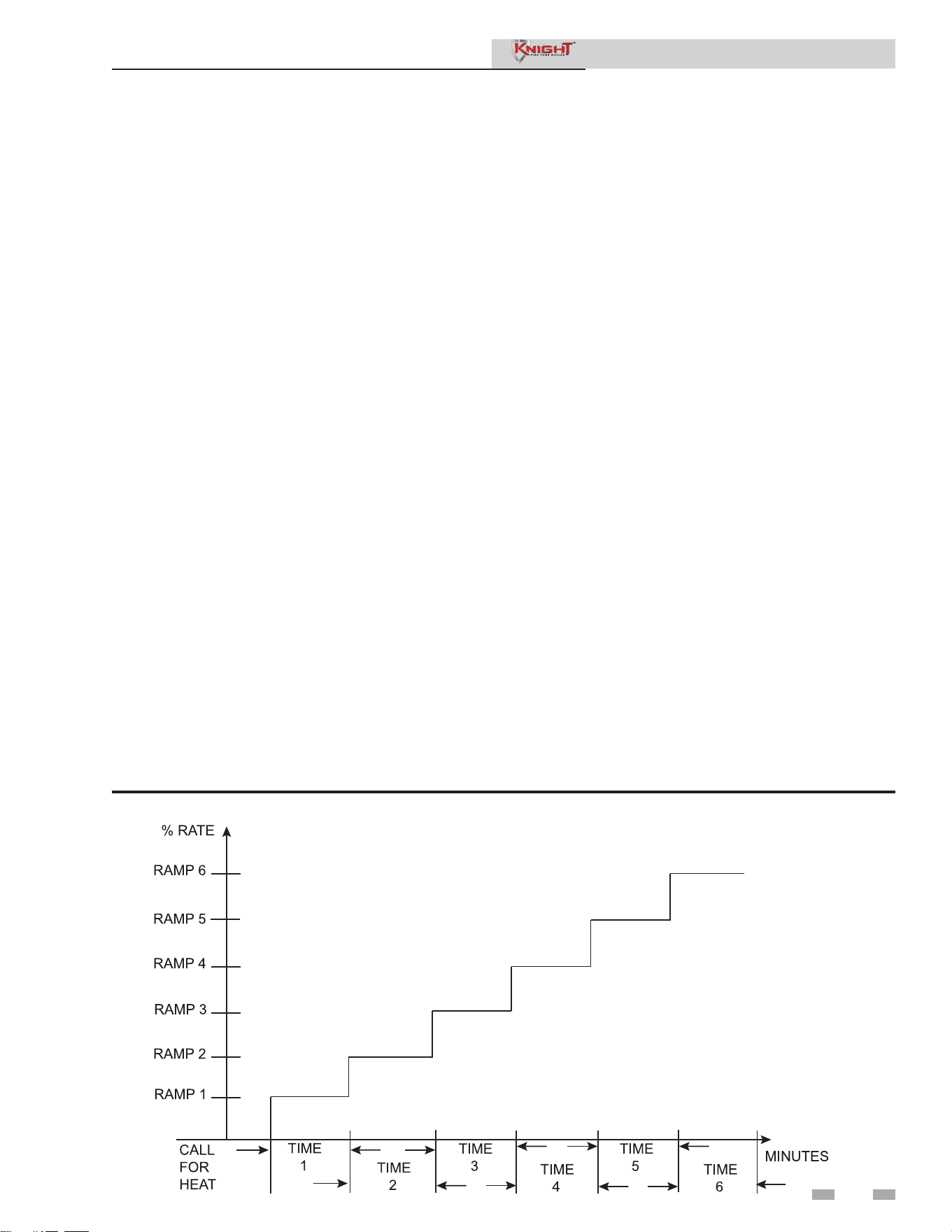
Figure 1-2 Ramp Delay Interval
25
Service Manual

1 Service
Maximum Cascade Set Point
This parameter determines the set point used by the individual
boilers in a Cascade when a system sensor is connected to the
Leader boiler. When a boiler is commanded to fire by the Leader
boiler, it will attempt to achieve this temperature at its outlet.
The Leader boiler will limit the modulation of the boiler(s) in
order to hold the temperature at the system supply sensor to
the user set point. If any of the boiler outlet temperatures reach
the maximum cascade set point, that boiler will then modulate
down on its own in order to keep its outlet temperature within
the maximum cascade set point. Therefore, this parameter can
be used to limit the outlet temperatures of all the boilers in a
Cascade. Note that this parameter does not apply when the
boiler is heating an indirect DHW tank programmed as normal.
This parameter is adjustable by the installer by accessing the
Maximum Cascade Set Point parameter. The temperature
range of this parameter is 32°F (0°C) to 190°F (88°C). The
default maximum cascade set point is 185°F (85°C).
Cascade Offset
This parameter determines how much the temperature must
go above set point before the lead boiler will turn off. This
parameter can be adjusted by the installer by accessing the
Cascade Offset parameter. The temperature range of this
parameter is 0° to 20°F (11°C) The default value is 10°F (6°C).
Cascade Differential
This parameter determines how much the temperature must
go below the turn off temperature (Set point + Offset) before
the lead boiler turns on. This parameter can be adjusted by the
installer by accessing the Cascade Differential parameter. The
temperature range of this parameter is 0°F to 60°F (33°C) The
default value is 20°F (11°C).
Cascade Type (L/L / EFF)
There are two (2) options for the way a Cascade divides the
load between its heaters. The first is Lead/Lag, designated as
L/L in the menu. This method is used when it is desired to
have the least amount of total flow through the boilers. This
method will modulate the last two (2) boilers that are firing.
This provides for smooth transitions when a boiler turns on or
off. When the last boiler reaches 100% and the calculated load
is still increasing, it will start the next boiler at its minimum rate
and reduce the previous boiler to compensate, thus eliminating
the sudden jump in total output of the Cascade. When the
calculated load is decreasing and the last boiler gets down
to minimum rate, it will hold it there and start lowering the
firing rate on the next-to-last boiler. When the next-to-last
boiler reaches minimum rate, it will turn the last boiler off
and raise the rate of the next-to-last boiler to compensate for
the decreased load, thus eliminating the sudden drop in total
output of the Cascade.
When finished, the installer can press the RIGHT SELECT
[SAVE] key to store the new settings, or the LEFT SELECT
[EXIT] key to return to the Anti-Cycling parameter list
without saving the changes. The delay value can be set
between 0 minutes and 40 minutes. The limit value can be set
between 0% and 100%.
Control modes
Controlling Sensor
The SH controlling sensor parameter selects the sensor the
control will use to regulate the boiler firing rate. This
parameter is adjustable by the installer by accessing the
Controlling Sensor parameter. The sensor selections are as
follows: The outlet sensor regulates the firing rate based on
the outlet water temperature of the boiler and the inlet sensor
regulates the firing rate based on the inlet water temperature
of the boiler. If the outlet sensor is selected, and the optional
system supply sensor is connected, the control will regulate the
firing rate based on the system supply sensor temperature. The
default sensor is the Outlet Sensor.
Cascade Address
The boiler designated as the Leader needs to be programmed
with address 0. All the Member boilers require addresses
from 1 to 7, and the addresses must be different for each
Member. The addresses can be in any order, regardless of the
order in which the units are wired together. This parameter
is adjustable by the installer by accessing the Cascade Address
parameter. The outdoor air (if used) and system supply sensor
must be connected to the Leader boiler. The default address
is 1.
Ramp Settings
The SMART SYSTEM control can be programmed to limit
the firing rate for a fixed period of time at the start of a space
heating or BMS set point demand. There are six (6) possible
limits, each with their own time delay. The first limit applies
as soon as the burner starts. Once its time delay expires, the
second limit is applied and its timer begins. The control steps
through these limits until the 6th (sixth) limit expires. Note,
however, that the 6th limit will also limit the rate for the rest of
that heat demand. The installer can adjust the firing limits and
time delays by accessing the Ramp Settings parameter. Once
this parameter is selected, the screen will show the step number,
the time delay for that step and the limit value corresponding
with that step. If the installer wishes to adjust one of the values
in that step, he can press the NAVIGATION dial until the value
he wishes to change is flashing. The installer can then rotate
the NAVIGATION dial to adjust that value. If the installer
presses the RIGHT SELECT [SAVE] key while the limit value
is flashing, the step value will flash again. The installer can
then select the next step and adjust the delay and limit values
corresponding with that step.
Please note that the brackets ([]) denote
screen status.
NOTICE
26
Service Manual

27
1 Service (continued)
The other Cascade divider method is Efficiency
Optimization, designated as EFF in the menu. This method
is used, as the name implies, when it is desired to have the
most efficient system. When the first boiler reaches 100%
rate, it lowers its rate to 50% and turns on the next boiler at
50%. The two (2) boilers then modulate at the same rate.
As the calculated load increases further and both boilers
ramp up to 100%, it lowers the rate of the first two (2)
boilers to 67% and brings the next boiler on at 67%. The
three (3) boilers then modulate together. As the calculated
load decreases, the boilers will reach 20%, at which time
the last boiler (the third in our example) will turn off and
the Cascade will increase the rates of the remaining boilers
to provide the equivalent total output as before ((3 x 20%)
/ 2 = 30% in our example). Efficiency optimization is
automatically selected when boilers of different sizes are
programmed into the Leader control.
Minimum On/Off Time
In order to prevent units in a Cascade from short cycling,
this parameter defines the minimum ON and OFF time for
each unit. The installer can adjust this time by accessing the
Minimum On/Off Time parameter. The minimum setting
is 0 seconds and the maximum setting is 10 minutes. The
default is 30 seconds.
Minimum Next On Time
In order to reduce the risk of temperature overshoot with
a Cascade, this parameter defines the minimum time delay
from starting one unit until the next unit may be started.
The installer can adjust this time delay by accessing the
Minimum Next On Time parameter. The minimum setting
is 0 minutes and the maximum setting is 10 minutes. The
default is 60 seconds.
Minimum Number of Pumps On
When the boiler is a Cascade Leader, it can force a
minimum number of boiler pump outputs to be on
continuously, regardless of how many boilers are firing.
This is normally used when the boilers are piped in a
full-flow configuration, and the boiler pump outputs are
controlling isolation valves. The Leader will force the
boiler pump output on the highest priority boiler to turn
on first, then the boiler pump output on the second highest
priority boiler, and so forth, until the minimum number of
pump outputs are turned on. The range of this parameter
is 0 to 8. The default value is 0.
Alternate Leader
This parameter allows the Member 1 boiler to automatically
assume control of the Cascade should it lose communication
with the Leader boiler. When programmed to YES, it is
recommended that the Member 1 boiler have its own set of
external sensors installed (such as the system supply sensor),
to maintain the same level of temperature control as with the
Leader boiler. Voltage signals (such as the 0 - 10V system
pump speed input) can be connected to both boilers.
DO NOT connect the sensors connected to
the Leader boiler to the Member 1 boiler.
The actual water temperatures will be higher
than expected, which could lead to property
damage, personal injury, or death.
When communication is re-established with the Leader boiler,
Member 1 will automatically relinquish control of the Cascade
to the Leader boiler.
The default value of this parameter is NO.
Boiler Size
When boilers of different sizes are connected together in a
Cascade, the Leader boiler has to know the size of each boiler
in that Cascade. The Knight Fire Tube boiler models are pre-
programmed with their respective sizes. Each Member will send
its input rating to the Leader. There are previous generation
boilers that do not have this capability. When operating in
Cascade with these boilers it may be necessary to input each
member boiler size to the Leader boiler. This may be done by
accessing the Boiler Size parameter (for additional information
reference the Programming Smart System Controls for Multiple
Size Units & Front End Loading Instruction Sheet provided in
the literature package attached to the appliance).
Building Management System (BMS)
BMS
The set point or modulation of the boiler may be controlled
through the 0 - 10V BMS input, BACnet, or ModBus. When
the BMS parameter is set to INACTIVE, the 0 - 10V input will
be ignored. When set to ACTIVE, the set point or modulation
will be controlled by the voltage on the 0 - 10V input (in the
case of 0 - 10V BMS control), or the 0 - 10V input value received
through ModBus or BACnet. The default value is INACTIVE.
BMS Type
When programmed for BMS control through the 0 - 10V BMS
input or through ModBus/BACnet, the 0 - 10V signal can be
interpreted as either a modulation command or a set point.
When the BMS Type parameter is set to POWER, the 0 - 10V
signal will control the modulation. When set to SETPOINT, the
0 - 10V signal will control the SH set point. The default setting
is SETPOINT.
Service Manual
⚠WARNING

BMS Thermostat Input
When controlling the boiler through the 0 - 10V BMS input,
BACnet, or ModBus, the boiler can be enabled one of two
ways. With the BMS Thermostat Input parameter set to
ACTIVE, the boiler will be enabled by closing the Heat/
Loop Demand 1 input. When set to INACTIVE, the boiler
will be enabled by the voltage level on the 0 - 10V input (in
the case of 0 - 10V BMS control), or the 0 - 10V input value
received through BACnet or ModBus. The default value is
INACTIVE.
On Volts
When programmed for BMS control through the 0 -
10V BMS input or through ModBus/BACnet and the
BMS Thermostat Input is set to INACTIVE, the On Volts
parameter determines the 0 - 10V BMS input voltage at
which the boiler is enabled. The minimum value is 0.5V and
the maximum is 10.0V. The default value is 2.0V.
Off Differential Volts
When programmed for BMS control through the 0 - 10V
BMS input or through ModBus/BACnet and the BMS
Thermostat Input is set to INACTIVE, the Off Differential
Volts parameter determines how far below the On Volts
setting the 0 - 10V BMS input voltage must be in order
to disable the boiler. The minimum value is 0.2V and the
maximum is the On Volts setting. The default value is 1.0V.
ModBus/BACnet
When BMS is set to ACTIVE (see BMS Active / Inactive) and
the boiler is being controlled through BACnet or ModBus,
set ModBus/BACnet parameter to ACTIVE. Otherwise, set
the ModBus/BACnet parameter to INACTIVE. Note that
the boiler can still be monitored by ModBus or BACnet
with this parameter set to INACTIVE. The default value is
INACTIVE.
BAS T/O
This is the amount of time the unit controls will wait to
receive a communication string from the BMS controller
before reverting back to its own internal parameters. This
parameter is adjustable by the installer by accessing the BAS
T/O parameter. The adjustment range of this parameter is 5
seconds to 2 minutes. The default value is 10 seconds.
1 Service
Rate at Minimum Volts
When programmed for BMS control through the 0 - 10V
BMS input or through ModBus/BACnet and the BMS Type
is programmed as POWER, the modulation percentage
represented by the Volts at Minimum parameter is set by the
Rate at Minimum Volts parameter. The minimum value is 0%
and the maximum is the Rate at Maximum Volts setting. The
default value is model dependant.
Rate at Maximum Volts
When programmed for BMS control through the 0 - 10V
BMS input or through ModBus/BACnet and the BMS Type
is programmed as POWER, the modulation percentage
represented by the Volts at Maximum parameter is set by the
Rate at Maximum Volts parameter. The minimum value is the
Rate at Minimum Volts setting and the maximum is 100%. The
default value is 100%.
Set Point at Minimum Volts
When programmed for BMS control through the 0 - 10V
BMS input or through ModBus/BACnet and the BMS Type
is programmed as SETPOINT, the set point represented by
the Volts at Minimum parameter is set by the Set Point at
Minimum Volts parameter. The minimum value is 32°F (0°C)
and the maximum is the Set Point at Maximum Volts setting.
The default value is 70°F (21°C).
Set Point at Maximum Volts
When programmed for BMS control through the 0 - 10V
BMS input or through ModBus/BACnet and the BMS Type
is programmed as SETPOINT, the set point represented by
the Volts at Maximum parameter is set by the Set Point at
Maximum Volts parameter. The minimum value is the Set
Point at Minimum Volts setting and the maximum is 190°F
(88°C). The default value is 180°F (82°C).
Volts at Minimum
When programmed for BMS control through the 0 - 10V BMS
input or through ModBus/BACnet, the Volts at Minimum
parameter should be set to the minimum voltage signal sent
to the SMART SYSTEM control. The range of this parameter
is 0.0V to the Volts at Maximum value. The default setting is
2.0V.
Volts at Maximum
When programmed for BMS control through the 0 - 10V BMS
input or through ModBus/BACnet, the Volts at Maximum
parameter should be set to the maximum voltage signal sent
to the SMART SYSTEM control. The range of this parameter
is the Volts at Minimum value to 10.0V. The default value is
10.0V.
28
Service Manual

29
1 Service (continued)
Circulation pumps
System Pump Delay
The system pump delay parameter sets the length of time
the system pump (if connected) will run after a SH demand
has been satisfied or outdoor shutdown has begun. This
parameter is adjustable by the installer by accessing the
System Pump Delay parameter. The time range for this
parameter is 1 second to 40 minutes. The default time is 30
seconds.
Boiler Pump Delay
The SH pump delay parameter sets the length of time the
boiler pump will run after a SH demand has been satisfied.
Setting the delay time to 0 will disable the pump. This
parameter is adjustable by the installer by accessing the Boiler
Pump Delay parameter. The time range for this parameter is
1 second to 40 minutes. The default time is 30 seconds.
DHW Pump Delay
The DHW pump delay parameter sets the length of time the
DHW pump (if connected) will run after a DHW demand has
been satisfied. This parameter is adjustable by the installer by
accessing the DHW Pump Delay parameter. The time range
for this parameter is 10 seconds to 40 minutes. The default
time is 1 minute.
System Pump Anti-Seize Delay
If the boiler pump does not run for 24 hours, it will be
turned on briefly to prevent it from seizing. The length of
time it runs is determined by the System Pump Anti-Seize
Delay parameter. The range of this setting is 0 seconds to 40
minutes. The default setting is 20 seconds.
Boiler Pump Anti-Seize Delay
If the boiler pump does not run for 24 hours, it will be
turned on briefly to prevent it from seizing. The length of
time it runs is determined by the Boiler Pump Anti-Seize
Delay parameter. The range of this setting is 0 seconds to 40
minutes. The default setting is 20 seconds.
DHW Pump Anti-Seize Delay
If the boiler pump does not run for 24 hours, it will be
turned on briefly to prevent it from seizing. The length of
time it runs is determined by the DHW Pump Anti-Seize
Delay parameter. The range of this setting is 0 seconds to 40
minutes. The default setting is 20 seconds.
System Pump Type
The system pump can be programmed to operate in response
to any of the Room Thermostat inputs, or to run continuously
until all three (3) SH demands go into Outdoor Shutdown.
To program the system pump to operate only with a space
heating call for heat, set the System Pump Type parameter to
CFH. To program the system pump to run continuously until
outdoor shutdown starts, set the System Pump Type parameter
to WWSD. The default setting is CFH.
Boiler Pump Type
This parameter determines how the control turns the boiler
circulating pump on and off. The choices are CONSTANT
and VARIABLE. When set to CONSTANT, the control will
use an external relay to cycle power supply to the boiler pump.
The CONSTANT setting can be used with either a fixed or
variable speed circulating pump. When set to VARIABLE and
wired to 0 - 10V BLR PUMP OUT on the low voltage board,
the control will send a standby signal to turn off the pump. The
VARIABLE setting should be used when controlling the ECM
variable speed boiler pump provided by the factory. The default
setting is CONSTANT.
Boiler Pump Delta T Set Point
When using a variable speed boiler pump, and controlling it
by means of the 0 - 10V Boiler Pump Speed Output, the boiler
pump will be controlled in order to maintain a minimum Delta
T across the heat exchanger in the boiler (other factors may
override this target). This feature is to be used with Primary /
Secondary piping systems only. A system supply sensor MUST
be installed. This parameter sets the target minimum Delta T
it will use. The range of this parameter is 15°F (8°C) to 60°F
(33°C). The default value is 20°F (11°C).
Boiler Pump Minimum Voltage
The speed of the boiler pump can be controlled by the SMART
SYSTEM control in order to maintain a minimum DT through
the heat exchanger. Thus, as the firing rate decreases, the speed
of the boiler pump can decrease as well. The SMART SYSTEM
control outputs a 0 - 10V signal to the boiler pump to control
its speed. The Boiler Pump Minimum Voltage parameter
determines the minimum voltage given to the boiler pump,
thereby setting its minimum speed. The range of this setting is
0V to 10V. The default setting is 3V.
Boiler Pump Maximum Voltage
The SMART SYSTEM control outputs a 0 - 10V signal to
control the speed of the boiler circulator. The Boiler Pump
Maximum Voltage parameter sets the maximum voltage signal
to the boiler pump, thereby limiting its maximum speed. The
range of this setting is Boiler Pump Minimum Voltage setting
to 10V. The default setting is 10V.
Service Manual
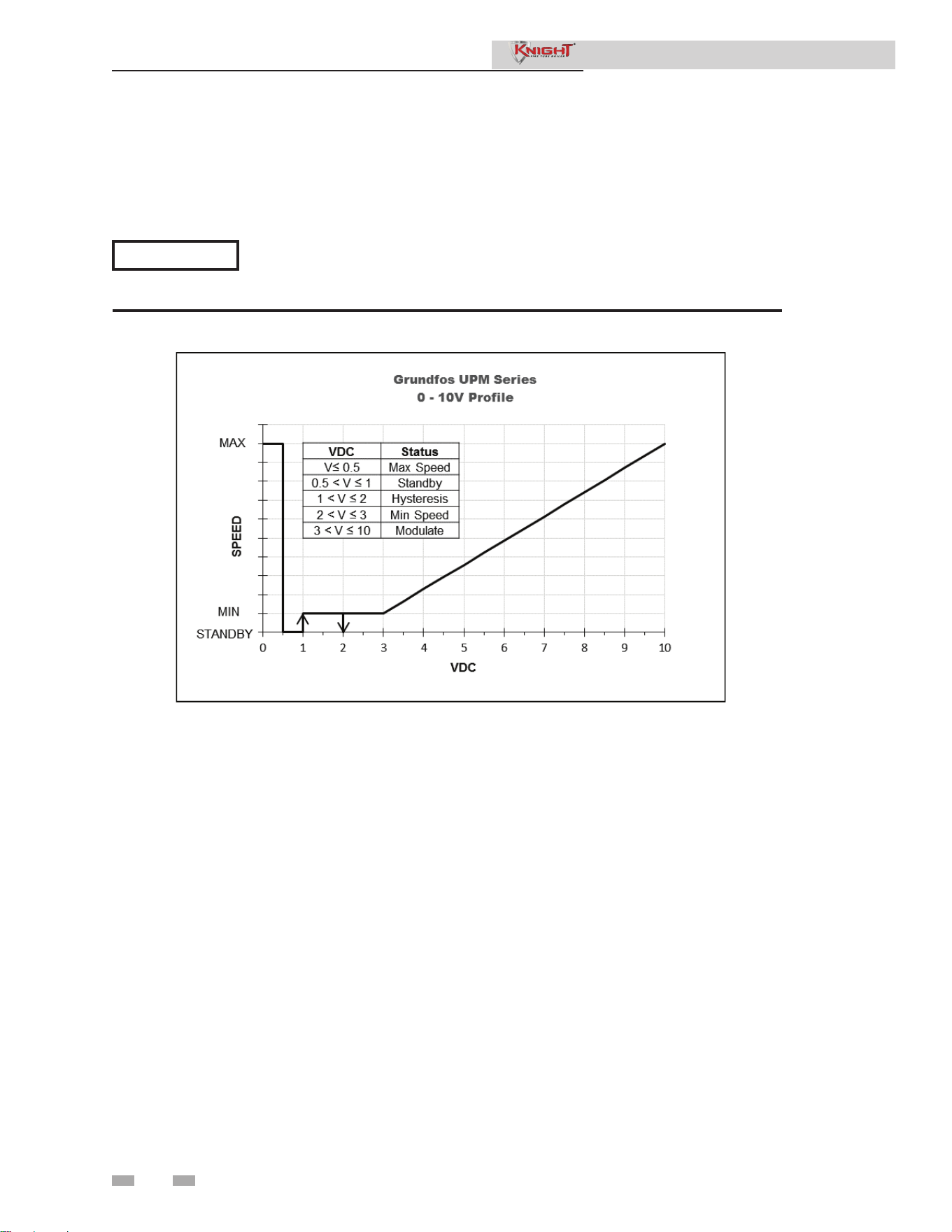
30
Service Manual
Boiler Pump Standby Voltage
When the Boiler Pump Type parameter is set to VARIABLE, the control will turn off the pump in standby conditions using
a 0 – 10V signal. The range of this setting is 0V to Boiler Pump Minimum Voltage setting. To accommodate the 0 – 10V
profile (FIG. 1-3) of the factory supplied circulator, the default setting is 0.9V.
1 Service
Service Notification
Service Notification in Months
When the boiler control determines that a scheduled
service is due based on days of installation, the boiler
display will turn yellow and a new status screen will appear
informing the user that maintenance is required. This
parameter is adjustable by the installer by accessing the
Service Notification in Months parameter. The time range
for this parameter is 0 months to 100 months. The default
time is 13 months.
Service Notification Running Time
When the boiler control determines that a scheduled
service is due based on the hours of actual operation, the
boiler display will turn yellow and a new status screen will
appear informing the user that maintenance is required.
This parameter is adjustable by the installer by accessing
the Service Notification Running Time parameter. The time
range for this parameter is 0 hours to 17,500 hours. The
default time is 8,760 hours.
Figure 1-3 Boiler Pump Voltage Settings
NOTICE
When connected to the low voltage board, the Knight Fire Tube boiler will control the pump via a
0 - 10 VDC signal. In case the pump does not receive a signal from the control (cable break), it will
run at maximum speed.
Service Notification Cycles
When the boiler control determines that a scheduled service is
due based on the number of boiler cycles, the boiler display will
turn yellow and a new status screen will appear informing the
user that maintenance is required. This parameter is adjustable
by the installer by accessing the Service Notification Cycles
parameter. The range for this parameter is 0 cycles to 100,000
cycles. The default is 50,000 cycles.

31
1 Service (continued)
Loch-N-Link™
Parameter files can be copied directly to and from a USB flash
drive. When USB is selected from the Main Menu, the display
will ask you to insert a flash drive into the USB-A (rectangular)
port next to the display. Once a drive is inserted, the display
will search the root directory of this drive for a folder named
“lochinvar”. If it does not find it, the display will ask if you
want it to create this folder? Press either the [YES] or [NO]
key. If you press [NO], no further operations are allowed, so
you must remove the flash drive. If you press [YES], it will
create the folder in the flash drive. If the flash drive contains
a folder named lochinvar, the display will show all of the
parameter files stored in that folder.
If you wish to copy the parameters from the Smart System
control into the flash drive, press the [SAVE] key. The display
will create a file name based on the current date and time
(year-month-date-hours-minutes). If you wish to cancel this
operation, press the [NO] key. If you wish to change the
filename, press the NAVIGATION dial. The first character of
the filename will flash. Rotate the NAVIGATION dial to change
this character. Once it is correct, press the NAVIGATION dial
again, and edit the next character as before. When the new
filename is ready, press the [SAVE] key. The control will save
the parameters to the flash drive, and the new file will appear
in the list of parameter files. Press the [EXIT] key to return to
the Main Menu.
If you wish to copy a parameter file from the flash drive into
the Smart System control, rotate the NAVIGATION dial until
the file you wish to copy is selected. Press the NAVIGATION
dial once. The display will ask you if you want to load the
parameters from the file you selected. You can press [NO] to
cancel the operation, or press [YES] to continue with writing
the parameters into the control. Once the loading process is
complete, the display will return to the Main Status Screen.
Reset Maintenance Reminder
Once servicing has been completed, the service notification
counter should be reset. This parameter can be reset by
the installer by accessing the Reset Maintenance Reminder
parameter. Once accessed, press the RESET key to reset the
service notification counter.
Service Name and Phone Number
When a Maintenance Reminder timer or counter has expired,
a Maintenance Reminder screen will appear on the display.
By programming the installer’s name and phone number,
this information will appear on the Maintenance Reminder
Screen at that time. This can be programmed by accessing
the Service Name and Phone Number parameter. When
selected, another menu will appear with PHONE and NAME.
1. Rotate the NAVIGATION dial to point to the
desired input parameter menu to program and press the
NAVIGATION dial. The screen will now display the
selected item (either PHONE or NAME).
2. Press the NAVIGATION dial again. A cursor will
appear at the bottom of the screen. By rotating the
NAVIGATION dial, various numbers and characters
will appear. When the desired number/character is
found, press the NAVIGATION dial. The cursor will
move to the next position.
3. Repeat this procedure until the entire text is
entered. If you make a mistake and wish to back up
one character, rotate the NAVIGATION dial until
the back arrow (←) character is displayed and press the
NAVIGATION dial.
4. When finished, press the RIGHT SELECT [SAVE] key
to return to the previous menu.
Aux Contact Name
An optional remote proving switch may be wired to the AUX
(LOUVER) PROVING SWITCH contacts on the low voltage
connection board. By accessing the Aux Contact Name
parameter, the installer can enter a custom name, up to 12
characters, to identify the device. In the case of a fault, AUX:
[CUSTOM NAME] will be displayed. The default display
fault is AUX CONTACT.
Basic Setup
The Basic Setup Menu contains the most frequently used
parameters from the list above. See the descriptions above to
set these parameters.
Please note that the brackets ([]) denote
screen status.
NOTICE
Service Manual

2 Maintenance
32
Maintenance and annual startup
Table 2-1 Service and Maintenance Schedules
Service technician
(see the following pages for instructions)
General:
• Address reported problems
• Inspect interior; clean and vacuum if
necessary;
• Clean condensate trap and fill with fresh
water
• Check for leaks (water, gas, flue,
condensate)
• Verify flue and air lines in good condition
and sealed tight
• Check system water pressure/system
piping/expansion tank
• Check fill water meter
• Test boiler water. When test indicates,
clean system water with approved
system restorer following manufacturer’s
information.
• Check control settings
• Check ignition and flame sense
electrodes (sand off any deposits; clean
and reposition)
• Check wiring and connections
• Perform start-up checkout and
performance verification per Section
10 in the Knight Fire Tube Boiler
Installation and Operation Manual.
• Flame inspection (stable, uniform)
• Flame signal (at least 10 microamps at
high fire)
• Clean the heat exchanger if flue
temperature is more than 54°F (30°C)
above return water temperature.
• Test low water flow conditions.
• Check venturi flapper for free motion.
If combustion or performance
indicate need:
• Clean heat exchanger
• Remove and clean burner using
compressed air only
• Clean the blower wheel
ANNUAL START-UP
Owner maintenance
(see the Knight Fire Tube Boiler User’s Information
Manual for instructions)
Daily
• Check boiler area
• Check pressure/temperature
gauge
Monthly
• Check vent piping
• Check air piping
• Check air and vent termination
screens
• Check relief valve
• Check condensate drain system
• Check air vents
Periodically
• Test low water cutoff
• Reset button (low water cutoff)
Every
6 months
• Check boiler piping (gas and
water) for leaks
• Operate relief valve
End
of season
months
• Shut boiler down (unless boiler
used for domestic hot water)
Service Manual
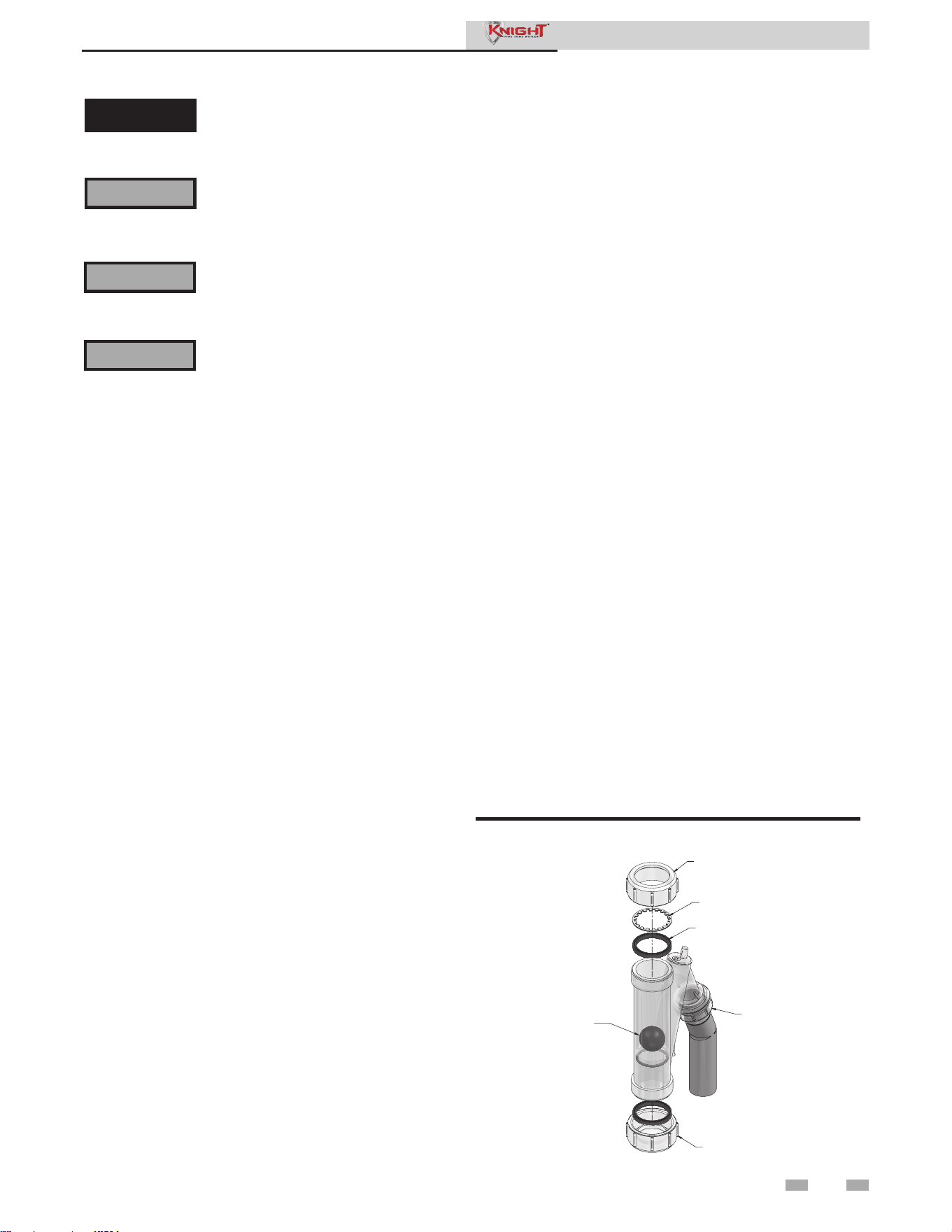
2 Maintenance (continued)
33
Follow the Service and maintenance procedures given throughout this manual and in component literature
shipped with the boiler. Failure to perform the service and maintenance could result in damage to the
boiler or system. Failure to follow the directions in this manual and component literature could result in
severe personal injury, death, or substantial property damage.
The boiler should be inspected annually only by a qualified service technician. In addition, the maintenance
and care of the boiler designated in Table 2-1 and explained on the following pages must be performed
to assure maximum boiler efficiency and reliability. Failure to service and maintain the boiler and system
could result in equipment failure.
Electrical shock hazard – Turn off power to the boiler before any service operation on the boiler except
as noted otherwise in this instruction manual. Failure to turn off electrical power could result in electrical
shock, causing severe personal injury or death.
Address reported problems
1. Inspect any problems reported by the owner and
correct before proceeding.
Inspect boiler area
1. Verify that boiler area is free of any combustible
materials, gasoline and other flammable vapors and
liquids.
2. Verify that air intake area is free of any of the
contaminants listed in Section 1 of the Knight Fire
Tube Boiler Installation and Operation Manual. If any
of these are present in the boiler intake air vicinity, they
must be removed. If they cannot be removed, reinstall
the air and vent lines per this manual and the Knight
Fire Tube Boiler Installation and Operation Manual.
Inspect boiler interior
1. Remove the front access cover and inspect the interior
of the boiler.
2. Vacuum any sediment from inside the boiler and
components. Remove any obstructions.
Service Manual
Inspect condensate trap
1. Inspect the condensate trap and drain line monthly
to ensure it is properly installed and there are no
obstructions in the drain line.
2. Inspect the neutralizing kit (if installed) monthly to
ensure the condensate is draining properly and there is
an adequate amount of neutralizing agent available.
Annual cleaning
1. The condensate trap should be cleaned at least once
annually, or at the end of each heating season. Remove
the clean out cap on the bottom of the trap (FIG. 2-1).
Let the condensate and any debris drain out and clean
out any sediment that exists. Ensure the gasket is
seated in the cap before reinstalling.
Figure 2-1 Condensate Trap
2. To remove the condensate trap from the unit, loosen the
compression fitting located on top of the condensate (FIG.
2-1). Condensate fluid may run out of the heat exchanger.
3. The provided condensate trap is equipped with a ball
that acts as a seal against harmful flue gases escaping in
case there is no condensate in the trap. If this ball is not
present, flue gases may be able to pass through the trap
when there is no condensate present, resulting in an unsafe
environment. It is important to check and make sure the
ball is located in the trap, acting as a seal against flue gases.
4. Fill condensate trap with enough water to make the ball
float (FIG. 2-1).
5. Reinstall the condensate trap onto the condensate drain.
The stainless steel retaining ring, which allows the trap to
be pushed on, but not pulled off, must be installed between
the rubber sealing gasket and the compression fitting. The
compression fitting must be tightened.
6. Ensure condensate tubing slopes down and away from
the boiler into a drain or condensate neutralizing filter (if
installed).
CONDENSATE
DRAIN
REMOVABLE CAP TO
CLEAN OUT TRAP
COMPRESSION
FITTING
FLOAT BALL
IMG00209
GASKET
RETAINING
RING
⚠WARNING
⚠WARNING
⚠WARNING
⚠ DANGER
If this boiler may be frozen, immediately shut off power and gas to the appliance and contact the factory
for further instructions. Operation when the heat exchanger, internal pipes, or pressure relief valves are
frozen, will result in internal pressure build-up and a deadly steam explosion. Neither the Freeze Protection
feature of the boiler control module nor the use of glycol eliminates the possibility of freezing.

2 Maintenance
34
Flue vent system and air piping
1. Visually inspect the entire flue gas venting system and air
piping for blockage, deterioration or leakage. Repair any
joints that show signs of leakage. Verify that air inlet pipe
is connected and properly sealed.
2. Verify that boiler vent discharge and air intake are clean
and free of obstructions.
3. Verify the venturi is freely moving and does not have any
sticky residue on the flapper. If necessary, clean surface
with a non-abrasive bristle brush and alcohol; make sure
to remove any excess alcohol before reinstalling.
Failure to inspect for the above conditions
and have them repaired can result in
severe personal injury or death.
Check boiler relief valve
1. Inspect the relief valve and lift the lever to verify flow.
Before operating any relief valve, ensure that it is piped
with its discharge in a safe area to avoid severe scald
potential. Read Section 6 - Hydronic Piping of the
Knight Fire Tube Boiler Installation and Operation
Manual before proceeding further.
Safety relief valves should be re-inspected
AT LEAST ONCE EVERY THREE
YEARS, by a licensed plumbing contractor
or authorized inspection agency, to ensure
that the product has not been affected
by corrosive water conditions and to
ensure that the valve and discharge line
have not been altered or tampered with
illegally. Certain naturally occurring
conditions may corrode the valve or its
components over time, rendering the
valve inoperative. Such conditions are
not detectable unless the valve and its
components are physically removed and
inspected. This inspection must only
be conducted by a plumbing contractor
or authorized inspection agency – not
by the owner. Failure to re-inspect the
boiler relief valve as directed could result
in unsafe pressure buildup, which can
result in severe personal injury, death, or
substantial property damage.
Following installation, the valve lever
must be operated AT LEAST ONCE
A YEAR to ensure that waterways are
clear. Certain naturally occurring
mineral deposits may adhere to the valve,
rendering it inoperative. When manually
operating the lever, water will discharge
and precautions must be taken to avoid
contact with hot water and to avoid water
damage. Before operating lever, check
to see that a discharge line is connected
to this valve directing the flow of hot
water from the valve to a proper place of
disposal. Otherwise severe personal injury
may result. If no water flows, valve is
inoperative. Shut down the boiler until a
new relief valve has been installed.
2. After following the above warning directions, if the relief
valve weeps or will not seat properly, replace the relief
valve. Ensure that the reason for relief valve weeping is
the valve and not over-pressurization of the system due
to expansion tank waterlogging or undersizing.
Service Manual
Test boiler water
1. Test boiler water. Reference the Knight Fire Tube
Installation and Operation Manual for guidelines. When
test indicates, clean system water with approved system
restorer following the manufacturer’s information.
Check water system
1. Verify all system components are correctly installed and
operational.
2. Check the cold fill pressure for the system. Verify it is
correct (must be a minimum of 12 psi (82.7 kPa)).
3. Watch the system pressure as the boiler heats up (during
testing) to ensure pressure does not rise too high.
Excessive pressure rise indicates expansion tank sizing or
performance problem.
4. Inspect automatic air vents and air separators. Remove
air vent caps and briefly press push valve to flush vent.
Replace caps. Make sure vents do not leak. Replace any
leaking vents.
Check expansion tank
1. Expansion tanks provide space for water to move in
and out as the heating system water expands due to
temperature increase or contracts as the water cools.
Tanks may be open, closed or diaphragm or bladder type.
See Section 6 - Hydronic Piping of the Knight Fire Tube
Boiler Installation and Operation Manual for suggested
best location of expansion tanks and air eliminators.
Check fill water meter
1. Check fill water meter for water usage. If the amount
exceeds 5% of your system volume, you could have a
leak. Have the system checked for leaks and fixed by a
qualified service technician.
Eliminate all system or boiler leaks.
Continual fresh makeup water will
reduce boiler life. Minerals can build
up in sections, reducing heat transfer,
overheating heat exchanger, and causing
heat exchanger failure. Leaking water may
also cause severe property damage.
1. Inspect all water and gas piping and verify to be leak free.
2. Look for signs of leaking lines and correct any problems
found.
3. Check gas line using the procedure found in Section
7 - Gas Connections of the Knight Fire Tube Boiler
Installation and Operation Manual.
Check all piping for leaks
⚠WARNING
⚠WARNING
⚠WARNING
⚠WARNING
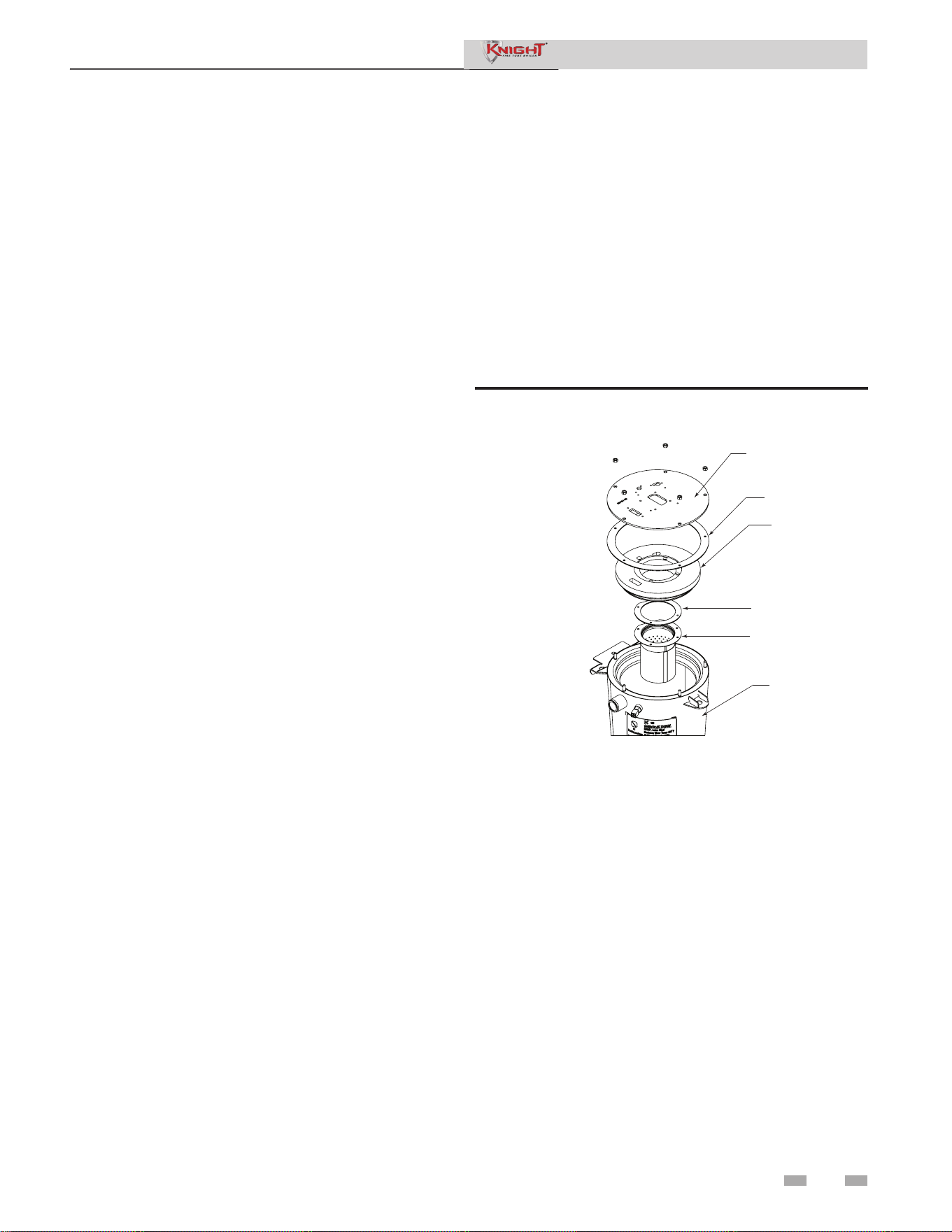
2 Maintenance (continued)
35
Inspect ignition and flame sense
electrodes
1. Remove the ignition and flame sense electrodes from the
boiler heat exchanger access cover.
2. Remove any deposits accumulated on the ignition/flame
sense electrode using sandpaper. If the electrodes cannot
be cleaned satisfactorily, replace with new ones.
3. Replace ignition/flame sense electrode, making sure
gasket is in good condition and correctly positioned.
Check ignition ground wiring
1. Inspect boiler ground wire from the heat exchanger
access cover to ground terminal strip.
2. Verify all wiring is in good condition and securely
attached.
3. Check ground continuity of wiring using continuity
meter.
4. Replace ground wires if ground continuity is not
satisfactory.
Check all boiler wiring
1. Inspect all boiler wiring, making sure wires are in good
condition and securely attached.
Check control settings
1. Set the SMART SYSTEM control module display to
Parameter Mode and check all settings. See Section 1 of
this manual. Adjust settings if necessary. See Section 1
of this manual for adjustment procedures.
2. Check settings of external limit controls (if any) and
adjust if necessary.
Perform start-up and checks
1. Start boiler and perform checks and tests specified in
Section 10 - Start-up of the Knight Fire Tube Boiler
Installation and Operation Manual.
2. Verify cold fill pressure is correct and that operating
pressure does not go too high.
Check burner flame
1. Inspect flame through observation window.
2. If the flame is unsatisfactory at either high fire or low fire,
turn off boiler and allow boiler to cool down. Remove the
burner and clean it thoroughly using a vacuum cleaner or
compressed air. Do not use compressed air to clean burner
if performed inside a building.
3. Remove the burner, reference FIG. 2-2.
4. When replacing the burner, ensure gasket is in good
condition and positioned correctly (FIG. 2-2).
Figure 2-2 Burner Assembly
Service Manual
DIR #2000507916 00
FAN TOP PLATE
GASKET
FIBER BOARD
GASKET
BURNER
HEAT
EXCHANGER

2 Maintenance
36
Check flame signal
1. At high fire the flame signal shown on the display should
be at least 10 microamps.
2. A lower flame signal may indicate a fouled or damaged
flame sense electrode. If cleaning the flame sense electrode
does not improve, ground wiring is in good condition,
and ground continuity is satisfactory, replace the flame
sense electrode.
3. See Section 3 - Troubleshooting in this manual for other
procedures to deal with low flame signal.
Review with owner
1. Review the Knight Fire Tube Boiler User’s Information
Manual with the owner.
2. Emphasize the need to perform the maintenance
schedule specified in the Knight Fire Tube Boiler User’s
Information Manual (and in this manual as well).
3. Remind the owner of the need to call a licensed contractor
should the boiler or system exhibit any unusual behavior.
4. Remind the owner to follow the proper shutdown
procedure and to schedule an annual start-up at the
beginning of the next heating season.
The boiler contains ceramic fiber materials.
Use care when handling these materials
per instructions in this manual. Failure
to comply could result in severe personal
injury.
Service Manual
Cleaning boiler heat exchanger
1. Shut down boiler:
• Follow the “To Turn Off Gas to Appliance” instructions
for the boiler in Section 10 - Startup of the Knight Fire
Tube Installation and Operation Manual.
• Do not drain the boiler unless it will be exposed to
freezing temperatures. If using freeze prevention fluid
in system, do not drain.
2. Allow time for the boiler to cool to room temperature if
it has been firing.
3. Remove the top and front access panels (no tools
required for removal) along with the bezel.
4. Remove the wiring from the ignitor, flame rod, and the
fan. Remove the reference tubing from the air intake.
5. Loosen the band clamp on the air intake coupling using
a field provided 5/16" driver.
6. Remove the 4mm screws holding the fan to the heat
exchanger top plate.
7. Loosen the union on the venturi
8. The fan and the venturi may now be removed from the
unit together by sliding the fan away from the air intake.
9. Remove the 10mm nuts securing the heat exchanger top
plate to gain access to the heat exchanger and set aside.
10. Disconnect the condensate hose from the condensate trap
and route to drain.
11. Use a vacuum cleaner to remove any accumulation on the
boiler heating surfaces. Do not use any solvent.
12. Using a clean cloth dampened with warm water, wipe out
the combustion chamber. Rinse out debris with a low
pressure water supply.
13. Allow the heat exchanger to thoroughly dry.
14. Reassemble the unit in reverse order of component
removal, and re-install the condensate hose.
15. Perform a combustion analysis by following the
instructions in Section 3 - Troubleshooting - Check
Flame and Combustion of this manual.
16. Resume operation.
Damaged gaskets and seals in the
system can result in substantial property
damage. Ensure that damaged or torn
gaskets are replaced.
⚠WARNING
⚠WARNING
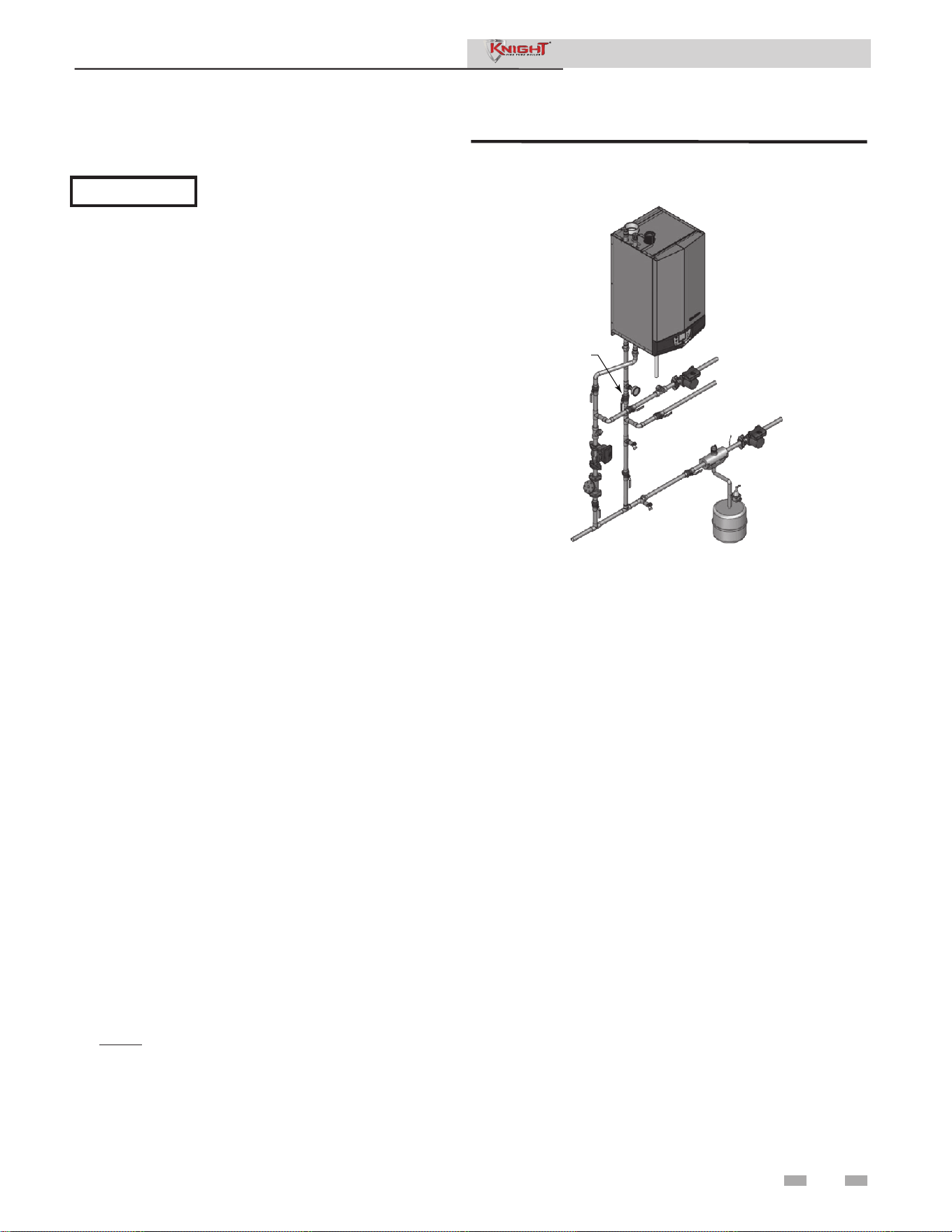
2 Maintenance (continued)
Test low water flow conditions
NOTICE
These tests are to be carried out
once the Knight Fire Tube boiler is
completely piped in with adequate gas
and water flow. Once the low water
cutoff test is completed, ensure that
the isolation valve is opened up to
allow full water flow.
Figure 2-3 Adjust outlet isolation valve
Test procedure - low water cutoff (LWCO)
1. Locate the pinhole button above the RESET button on
the display board. Insert a thin wire (such as a paper clip)
into the hole and press the button once and hold for 5
seconds to place the boiler into Service Mode. In Service
Mode the boiler will fire at ignition speed and will then
modulate up to full fire.
2. Allow the unit to progress through its normal diagnostics
and pre-purge programming.
3. Allow the unit to fire and operate until the temperatures
stabilize. This occurs when the inlet and outlet
temperatures are rising together and the Delta T (△T) is
maintained.
4. When the unit stabilizes, begin to slowly shut off the
isolation valve on the outlet piping of the boiler (see
FIG. 2-3). This will begin to restrict the flow and
simulate a low flow condition.
5. While slowly shutting off the isolation valve, refer to the
Status Screens to watch the behavior of the boiler. These
screens allow you to monitor the inlet temperature,
outlet temperature, and △T.
6. When the △T reaches 55˚F (13°C), the control will
attempt to modulate the firing rate down to protect it
from low flow conditions.
7. When the △T reaches 60°F (16°C), the control module
will turn off the burner. If the control module shuts
down, the test was successful.
8. Completely open the isolation valve on the outlet piping
of the boiler.
9. Resume operation.
NOTE: This lockout is a soft lockout. Once the △T has
decreased to an acceptable level and there is a call for
heat, the unit will fire again to meet the demand.
37
Service Manual
Test procedure - manual reset high limit (MRHL)
1. Follow steps 1 - 3 in the low water cut off test procedure.
2. From the Status Screen, press the NAVIGATION dial to access
the Set Points Screen.
3. Press the LEFT SELECT [LIMITS] key.
4. Select the manual reset high limit (MRHL) by rotating and
pressing the NAVIGATION dial.
5. Decrease the set point of the MRHL to below the current outlet
temperature (or to its minimum setting, whichever is higher).
Press the RIGHT SELECT [SAVE] key.
6. Press the RIGHT SELECT [HOME] key. The new parameter
will upload to the control.
7. If the current outlet temperature is above the new MRHL set
point, the MRHL will function causing boiler lockout.
8. Repeat steps 2 - 7 to adjust the MRHL back to its normal
settings.
DIR #2000543632 00
ADJUST OUTLET
ISOLATION VALVE ONLY
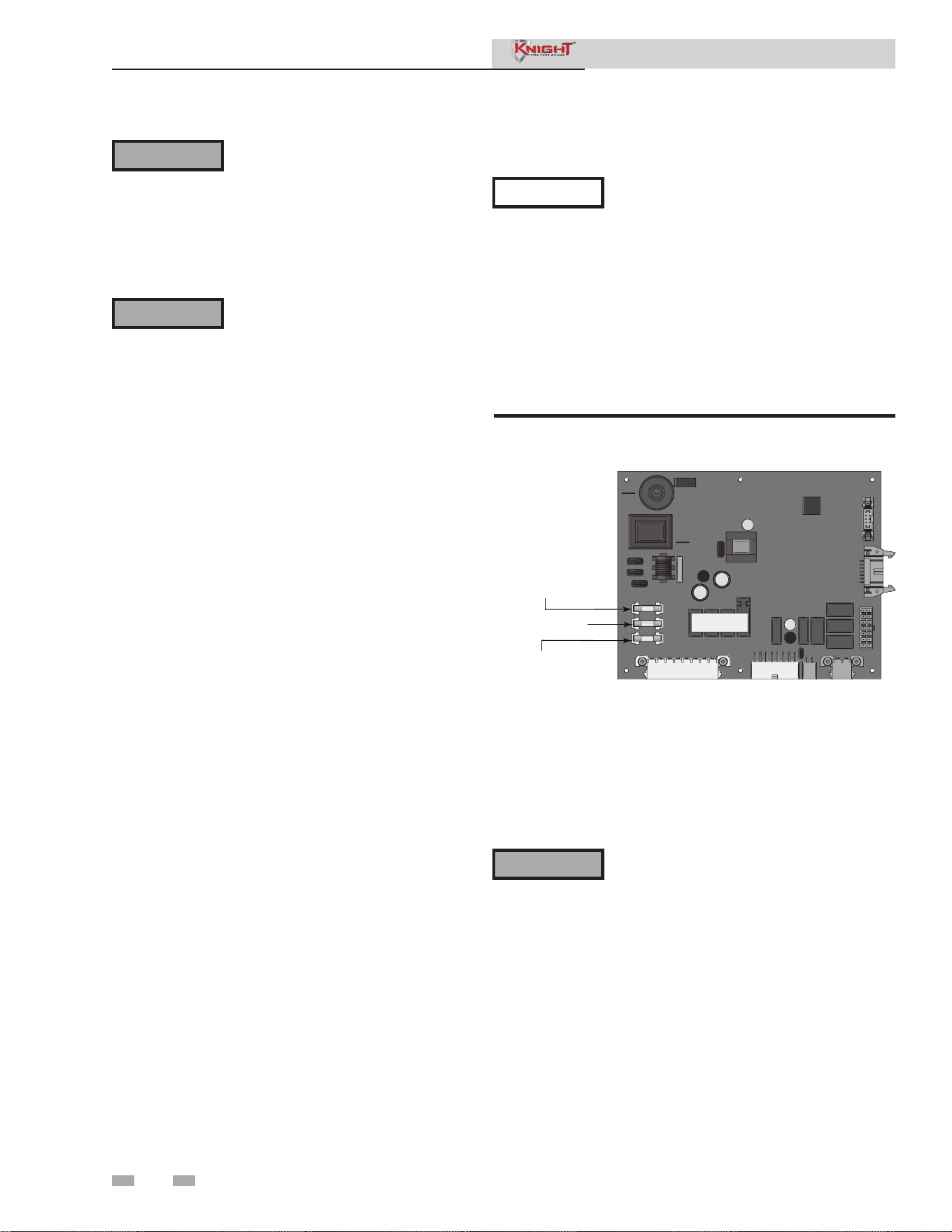
3 Troubleshooting
38
Label all wires prior to disconnection
when servicing controls. Wiring errors
can cause improper and dangerous
operation. Always disconnect power
to the boiler before servicing. Failure
to comply could result in severe
personal injury, death, or substantial
property damage.
Never jumper (bypass) any device
except for momentary testing as
outlined in the Troubleshooting
chart. Severe personal injury, death,
or substantial property damage can
result.
Before troubleshooting:
1. Have the following items:
a. Voltmeter that can check 120 VAC, 24 VAC, and
12 VDC.
b. Continuity checker.
c. Contact thermometer.
2. Check for 120 VAC (minimum 102 VAC to
maximum 132 VAC) to boiler.
3. Make sure thermostat is calling for heat and contacts
(including appropriate zone controls) are closed.
Check for 24 VAC between thermostat wire nuts and
ground.
4. Make sure all external limit controls are installed and
operating.
Check the following:
1. Wire connectors to control module are securely
plugged in at the module and originating control.
2. Gas pressures:
• Maximum: 14 inches w.c. (3.5 kPa) (natural and
LP) with no flow (lockup) or with boiler on
• Minimum: 4 inches w.c. (1.0 kPa) (natural),
8 inches w.c. (2.0 kPa) (LP) with gas flowing (verify
during boiler startup)
Check control module fuses
ALWAYS check control module fuses before
replacing control module or any major
components (blower, etc.). If one of these
fuses is blown, it can prevent the control
module or other components from operating.
1. Turn OFF the power to the boiler at the external line
switch.
2. Remove front access cover.
3. Remove the control module cover.
4. Inspect fuses F1, F2, and F3, see FIG 3-1 below.
F3 - .80 AMP FUSE
24V DC POWER SUPPL
Y
F1 - 6.3 AMP FUSE
PUMPS
F2 - 3.15 AMP FUSE
BLOWER
Figure 3-1 Control Module Fuses
5. The boiler is shipped with three (3) spare fuses in a plastic
bag attached to the control module cover.
6. If necessary, replace open fuse (F3 is .80 amps, F2 is 3.15
amps and F1 is 6.3 amps).
Note: Fuses F1, F2, and F3 are all slow blow fuses.
Do not jumper fuse or replace with any fuse
except as specified. Failure to comply could
result in severe personal injury, death, or
substantial property damage.
7. Install control module cover and front access cover after fuse
inspection.
8. Restore power to the boiler at the external line switch and
verify boiler operation (Section 10 - Start-up in the Knight
Fire Tube Boiler Installation and Operation Manual) after
completing boiler service.
NOTICE
Service Manual
⚠WARNING
⚠WARNING
⚠WARNING
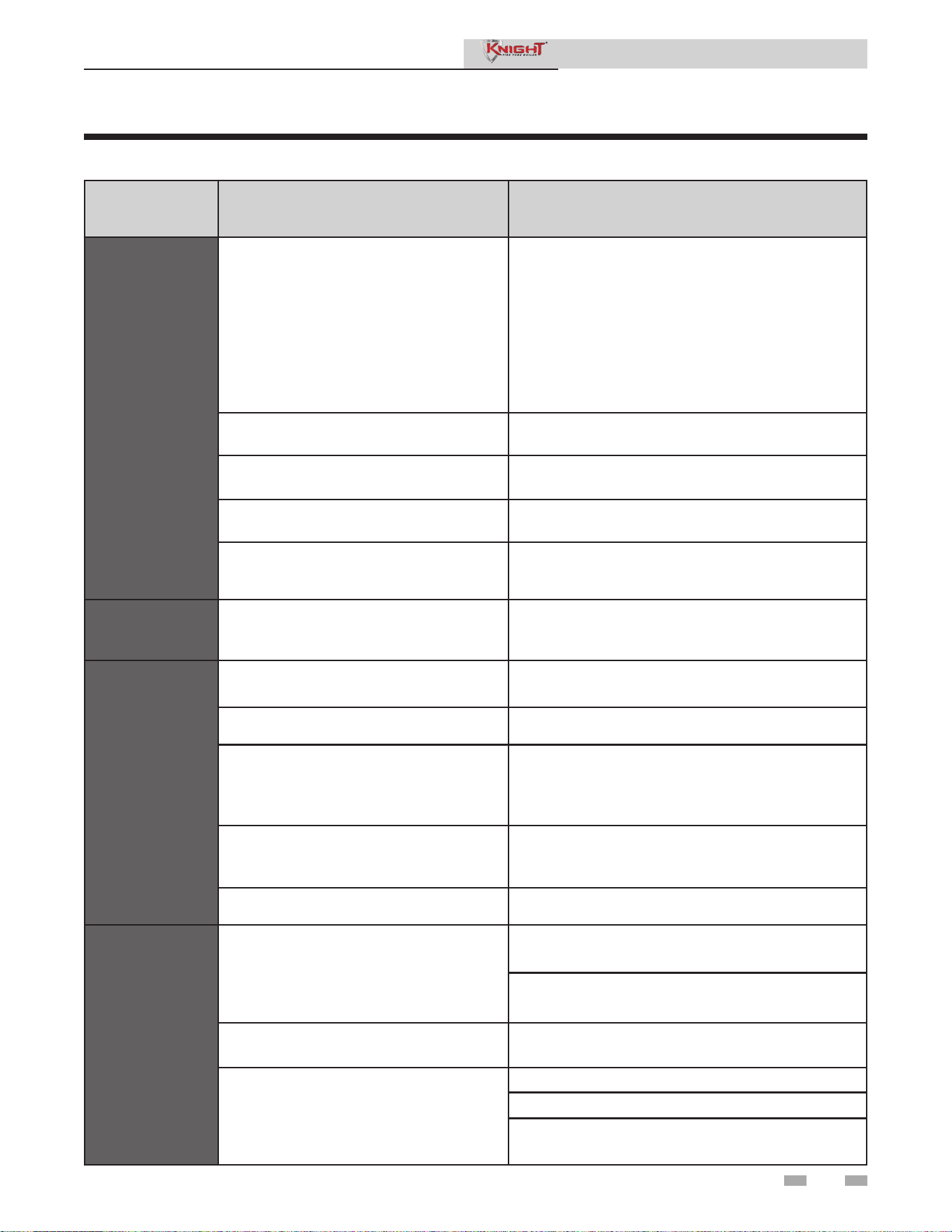
3 Troubleshooting (continued)
39
Table 3-1 Troubleshooting Chart - No Display
FAULT CAUSE CORRECTIVE ACTION
No Display
- No 120 vac supplied to unit.
• Check external line switch, fuse, or breaker.
• Check position of ON/OFF switch. Turn switch to the
ON position.
• Check 120 vac through the ON/OFF switch.
• Check wiring harness connection between display
board and main control board. Connect
harness at both points.
- No voltage through the switch. • Replace switch.
- Bad display board. • Replace board.
- Bad main control board. • Replace the main control board.
- Blown fuse. • Replace fuse F3 on the main control board.
Error SW
Version
Mismatch
- Incorrect control board or display • Verify correct model and number for replacement.
No Burner
Operation
- Main control board temperature set point
satisfied.
• Review temperature setting.
- Remote thermostat satisfied. • Review remote thermostat setting.
- Outside air temperature above Warm
Weather Shutdown (WWSD) set point for
main control board.
• Check location of outside air sensor. Check
resistance of outdoor air sensor and compare to Table
3-2B.
- Unit locked out on fault.
• Consult display for specific fault. Refer to fault
descriptions for corrective actions.
- Unit in Shutdown Mode. • Take unit out of Shutdown Mode.
Unit Does
Not Modulate
Above 50%
- Ramp delay active.
• Check ramp delay parameter settings.
• Turn ramp delay feature off. See the Outdoor Reset
Section of this manual for instructions on how to turn
this feature off.
- Boiler controlled by BMS. • Check BMS parameter settings.
- Flue sensor open.
• Verify that the flue sensor is located in the flue outlet.
• Check wiring connections at the flue sensor.
• Check the resistance of the flue sensor and compare
to Table 3-2D.
Service Manual
3 Troubleshooting
40
Table 3-2A - Inlet Water/System Sensor Resistance vs.
Temperature
Temperature Resistance Temperature Resistance
50 18,780 158 1,990
68 12,263 176 1,458
86 8,194 194 1,084
104 5,592 212 817
122 3,893
140 2,760
Table 3-2B - Outdoor Air Sensor Resistance vs.
Temperature
Temperature Resistance Temperature Resistance
-50 490,813 20 46,218
-40 336,606 30 34,558
-30 234,196 40 26,099
-20 165,180 50 19,900
-10 118,018 60 15,311
0 85,362 70 11,883
10 62,465 80 9,299
Checking temperature sensors
The boiler temperature sensors (inlet water, outlet water, system water, flue, and outdoor air) are all resistance type devices. The
following tables show the correct values for the sensors at various temperatures. Use an ohmmeter to read the resistance of the
sensor at a known temperature. If the resistance of the sensor does not closely match its corresponding table, replace the sensor
It is important to note that the flue and outlet water sensors have two temperature sensing devices in one housing. These devices
are designated as S1a/S1b, outlet sensor and S3a/S3b, flue sensor. Please reference the wiring diagram in the Knight Fire Tube
Boiler Installation and Operation Manual for correct terminal location.
S1a
(Wire Color - R/BK and Y)
S1b
(Wire Color - G and Y)
Temperature Resistance Temperature Resistance Temperature Resistance Temperature Resistance
50 19,553 158 2,004 50 40,030 158 3,478
68 12,690 176 1,464 68 25,030 176 2,492
86 8,406 194 1,084 86 16,090 194 1,816
104 5,715 212 816 104 10,610 212 1,344
122 3,958 122 7,166
140 2,786 140 4,943
Table 3-2C - Outlet Water Sensor Resistance vs. Temperature
S3a
(Wire Color - W/B and Y)
S3b
(Wire Color - PR and Y)
Temperature Resistance Temperature Resistance Temperature Resistance Temperature Resistance
50 40,030 158 3,478 50 258,500 158 16,870
68 25,030 176 2,492 68 125,500 176 12,000
86 16,090 194 1,816 86 80,220 194 8,674
104 10,610 212 1,344 104 52,590 212 6,369
122 7,166 122 35,270
140 4,943 140 24,160
Table 3-2D - Flue Sensor Resistance vs. Temperature
Service Manual
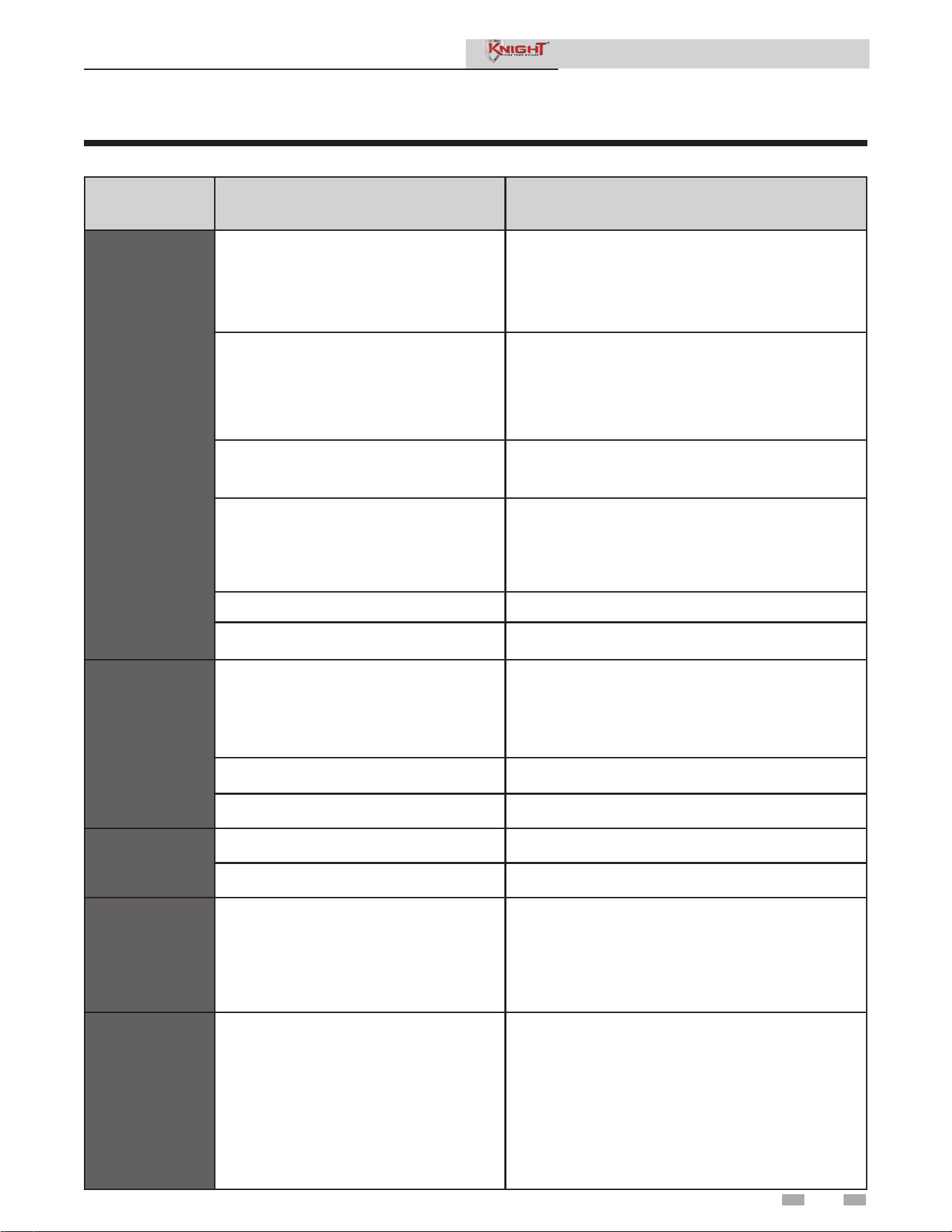
3 Troubleshooting (continued)
41
Table 3-3 Troubleshooting Chart - Noisy System
FAULT CAUSE CORRECTIVE ACTION
Noisy
Operation
- Supply gas problem. Natural gas
pressures should be between 4 inches
w.c. and 14 inches w.c. LP gas pressures
should be between 8 inches w.c. and 14
inches w.c.
• Refer to Section 7 - Gas Connections of the Fire Tube
Boiler Installation and Operation Manual for detailed
information concerning the gas supply.
- Gas/air mixture problem.
• Refer to the Gas Valve Adjustment Procedure of
this manual for the proper gas valve setting.
Verify that the vent/air intake lengths do not exceed the
maximum listed in the General Venting section of the
Knight Fire Tube Boiler Installation and Operation
Manual.
- Dirty/damaged burner.
• Refer to the burner removal and inspection procedure
section of this manual. Clean or replace the burner as
necessary.
- Low water flow through the heat exchanger.
• Refer to Section 6 - Hydronic Piping of the Knight
Fire Tube Boiler Installation and Operation Manual for
minimum flow rates. Verify that the boiler and system
pump are running on a call for heat.
- Air in the piping system. • Properly purge all air from the piping system.
- Low system water pressure. • Verify system pressure is a minimum of 12 psi.
No Pump
Operation -
Boiler Pump
System Pump
or
DHW Pump
- Blown fuse.
• Replace fuse F1 on the control board.
Note: Make sure pump amperage does not exceed
1.8 amps.
- Faulty pump. • Replace pump.
- Internal fault on control board. • Replace main control board.
No Blower
Operation
- Internal fault on control board. • Replace control board.
- Faulty blower. • Replace blower.
Relief Valve
Opening
- System pressure exceeds relief valve
setting.
• Lower the system pressure below the 30 psi rating of
the supplied relief valve or replace the standard relief
valve with a higher rated valve up to the maximum
pressure of the heat exchanger.
• Improperly sized expansion tank.
No Pump
Operation
- DHW
Recirculation
Pump
- Failed external relay.
- Line voltage shut off.
- Faulty pump.
- Faulty DHW recirculation sensor.
- Fault in connection board.
- Fault in control board.
• Check function of external relay.
• Check line voltage to external relay.
• Check recirculation pump.
• Check DHW recirculation sensor.
• Check low voltage connection board.
• Replace control board.
Service Manual
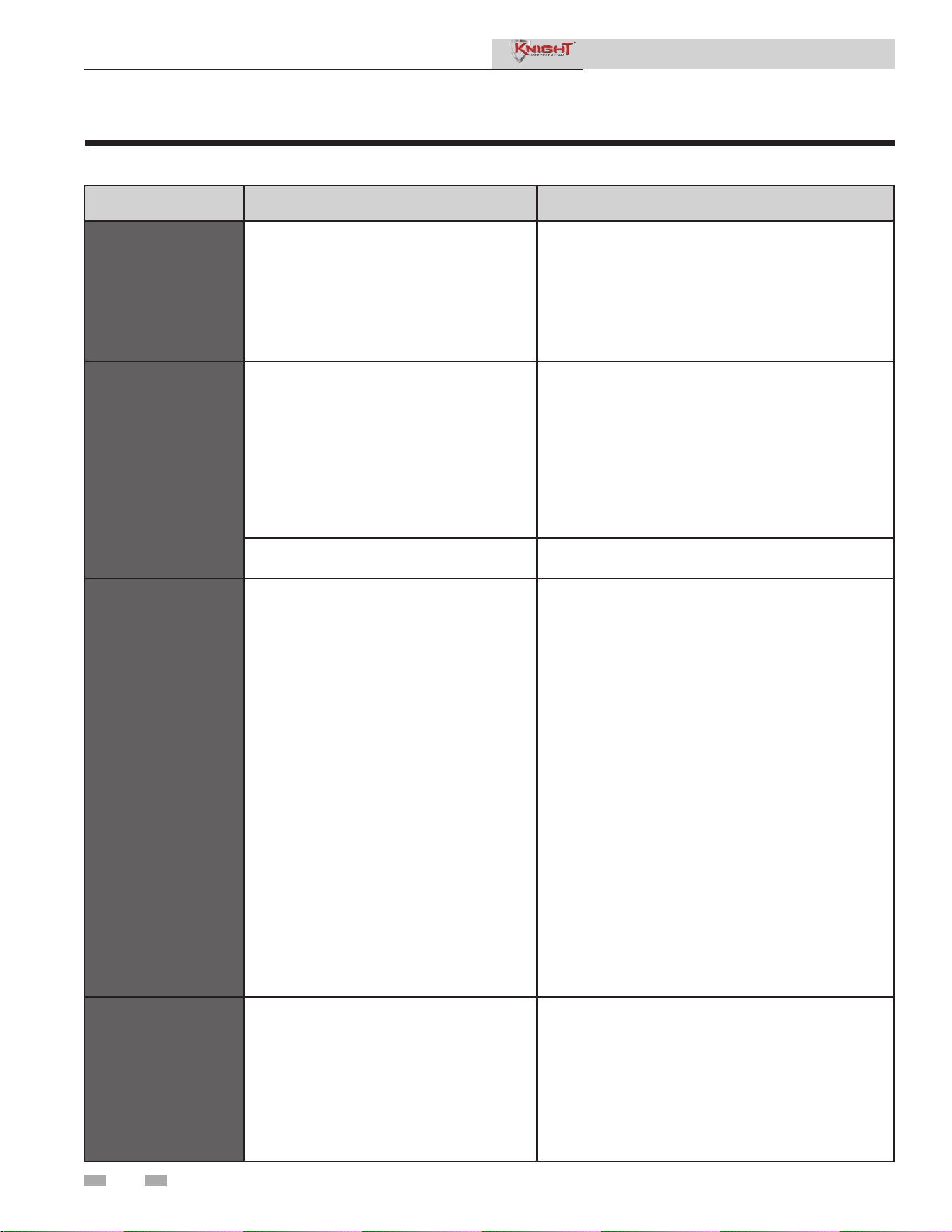
3 Troubleshooting
42
Table 3-4 Troubleshooting Chart - Fault Messages Displayed on Boiler Interface
FAULT DESCRIPTION CORRECTIVE ACTION
Gas Pressure SW
(will require a manual
reset once the condition
has been corrected. Press
the RESET button on the
SMART SYSTEM display
to reset.)
- The gas pressure switch contacts on the
Low Voltage Connection Board are open.
• Check for a loose or misplaced jumper on the Low
Voltage Connection Board.
• Check for the addition of a device wired across the
gas pressure switch terminals on the Low Voltage
Connection Board.
Flow Switch/
LWCO
(will require a manual
reset once condition has
been corrected. Press
the RESET button on the
SMART SYSTEM display
to reset.)
- Either the optional flow switch or the
low water cutoff (LWCO) is not making.
• Check boiler pump operation on a call for heat.
• Check for closed valves or obstructions in the boiler
piping.
• Verify system is full of water and all air has been
purged from the system.
• Check for a loose or misplaced jumper if flow switch
is not installed.
• Replace LWCO.
- Blown fuse. • Replace fuse F3 on the control board.
Air Pressure SW
(will require a manual
reset once condition has
been corrected. Press
the RESET button on the
SMART SYSTEM display
to reset.)
The air pressure switch contacts are open,
• Check the wiring connections to switch. Wires should
be connected to the common and normally closed
terminals.
• Air intake lengths exceed the maximum allowed
lengths. Refer to Section 3 - General Venting of the
Knight Fire Tube Installation and Operation Manual for
proper lengths.
• Check for obstruction or blockage in the air
intake pipes or at terminations.
• Check reference hoses connected to the air pressure
switch for blockage or obstruction.
• Inspect the burner. Reference the Maintenance
Section of this manual for removal and cleaning
procedures. Replace if necessary.
• Inspect the heat exchanger. Reference the
Maintenance Section of this manual for removal and
cleaning procedures. Replace if necessary.
• Faulty air pressure switch. Replace switch.
Too Many
Recyclings
One or more limit switches has opened more
than five (5) times during the last call for heat.
• Check the following limit switches for intermittent
operation:
- Aux Louver Switch
- Air Pressure Switch
- Gas Pressure Switch
• Check harness connections at the control board and
low voltage connection board.
Service Manual
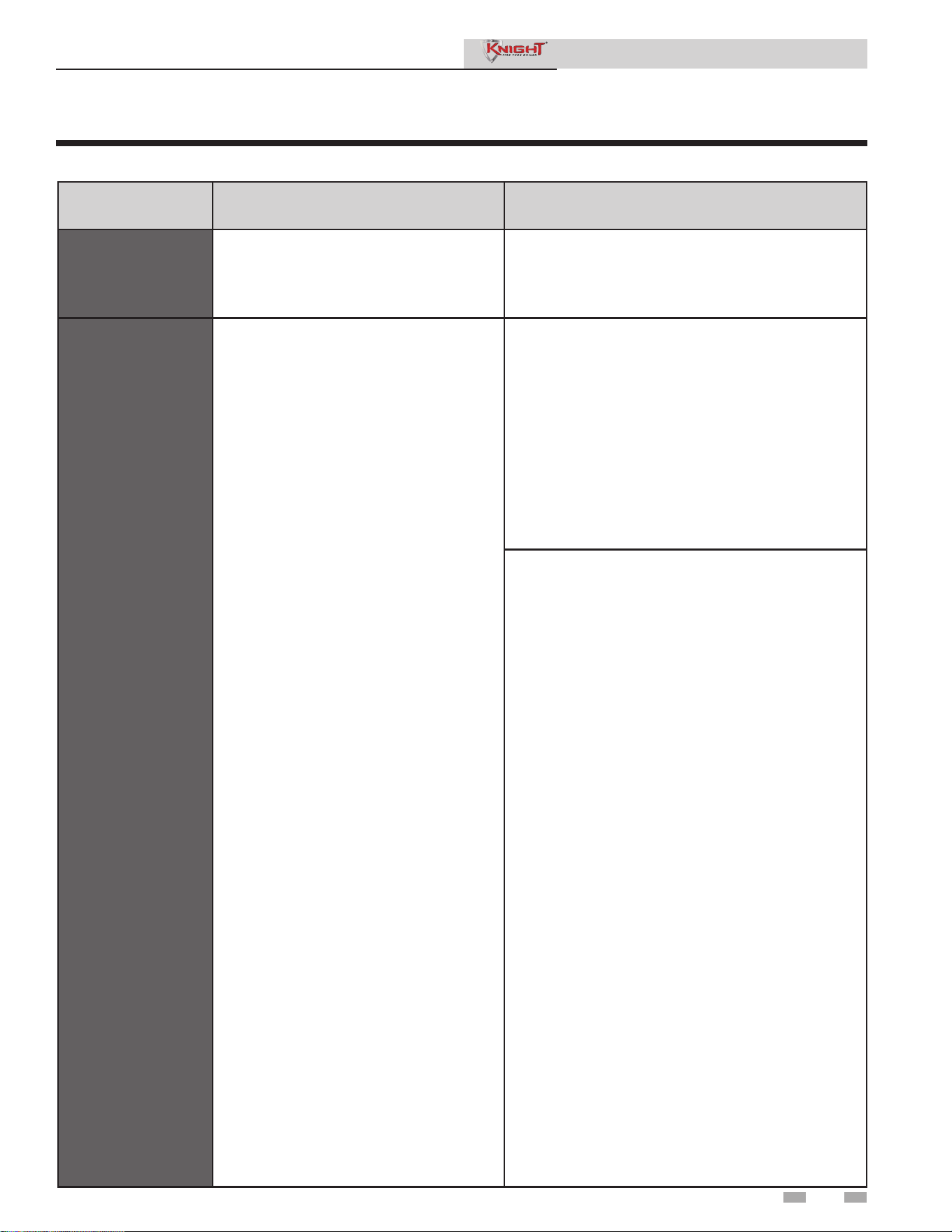
3 Troubleshooting (continued)
43
Table 3-4 (continued from previous page) Troubleshooting Chart - Fault Messages Displayed on Boiler Interface
FAULT DESCRIPTION CORRECTIVE ACTION
Anti-cycling
The burner recently turned off.
• The control board will release the call for heat after a
set time period.
• The control board will release the call for heat if the
outlet temperature drops too quickly.
Flame Fail Ign
(will require a manual
reset once the condition
has been corrected.
Press the RESET button
on the SMART SYSTEM
display to reset.)
The unit has failed to prove main burner
ignition after several attempts.
• Inspect spark electrode and associated wiring for
damage and connection. Reference the Maintenance
Section of this manual for removal and cleaning
procedures. Replace if necessary.
• Check for proper electrical grounding of the unit.
• Check incoming supply gas pressure. Natural gas
pressures should be between 4 - 14 inches w.c. and
LP gas pressures should be between 8 - 14 inches
w.c. Refer to Section 7 - Gas Connections of the
Knight Fire Tube Boiler Installation and Operation
Manual for detailed information concerning the gas
supply.
• Verify that the plastic hose from the gas valve to the air
inlet is connected and is not damaged.
• Verify that the vent/air intake pipes are correctly
installed and that there are no obstructions.
• Check for 24 vac to the gas valve at the 2-pin
connection on the side of the main control board during
the ignition attempt. If no voltage is present, replace
the main control board.
• If 24 vac is present at the main control board, check
the wiring between the main control board and the gas
valve. Replace the wiring if necessary. Do not
disconnect the wiring from the gas valve and attempt to
measure voltage at that point.
• If 24 vac is present, check the outlet of the valve to
ensure the valve is flowing gas. With a manometer
connected to the outlet tap of the gas valve, when the
unit is in the prepurge period, there should be a
negative pressure present. When the valve is
energized a change in pressure should occur. If the
pressure change does not occur, the gas valve is not
opening. Replace the gas valve.
• Inspect flame sensor and associated wiring. Reference
the Maintenance Section of this manual for removal and
cleaning procedures. Replace if necessary.
• Inspect and clean the heat exchanger as necessary.
Reference the Maintenance Section of this manual for
cleaning procedures.
• Inspect the burner. Reference the Maintenance Section
of this manual for removal and cleaning procedures.
Replace if necessary.
• Replace the main control board.
• Verify the venturi is moving freely and does not have
any sticky residue on the flapper. Reference page 34
of this manual for the proper cleaning procedure.
Service Manual

3 Troubleshooting
44
Table 3-4 (continued from previous page) Troubleshooting Chart - Fault Messages Displayed on Boiler Interface
FAULT DESCRIPTION CORRECTIVE ACTION
Flame Sequence
(will require a manual
reset once the condition
has been corrected.
Press the RESET button
on the SMART SYSTEM
display to reset.)
The flame detector circuit is seeing a flame
signal while the gas valve is off.
• Check supply voltage for proper polarity.
• Check external wiring for voltage feedback.
• Check the flame rod and make sure it is clean.
• Check the internal wiring for bad connections.
• Replace main control board.
Outlet ARHL
The outlet water temperature has exceeded
the setting of the automatic reset high limit.
• Adjust the set point of the auto reset limit to a higher
setting up to a maximum of 200°F. Reference
the Knight Fire Tube Boiler Installation and Operation
Manual for adjusting procedures.
• Verify that the system is full of water and that all air
has been properly purged from the system.
• Verify that the boiler is piped properly into the heating
system. Refer to Section 6 - Hydronic Piping of the
Knight Fire Tube Boiler Installation and Operation
Manual for the proper piping methods for the Fire Tube
boiler.
• Check 120 vac to boiler pump motor on a call for
heat. If voltage is not present, check wiring back to
the main control board.
• If 120 vac is present on a call for heat and the boiler
pump is not operating, replace the pump.
• If the system pump is a variable speed pump, ensure
that the system flow is not less than the boiler flow.
• If operating on something other than an outlet sensor,
check temperature setting of the main control board.
• Check resistance of water sensors and compare to
Table 3-2A of this manual. Replace sensor if necessary.
• Replace the main control board if necessary.
Outlet MRHL
(will require a manual
reset once the condition
has been corrected.
Press the RESET button
on the SMART SYSTEM
display to reset.)
The outlet water temperature has exceeded
the setting of the manual reset high limit.
• Adjust the set point of the manual reset limit to a higher
setting up to a maximum of 210°F. Reference the Knight
Fire Tube Boiler Installation and Operation Manual for
adjusting procedures.
• Verify that the system is full of water and that all air
has been properly purged from the system.
• Verify that the boiler is piped properly into the heating
system. Refer to Section 6 - Hydronic Piping of the
Knight Fire Tube Boiler Installation and Operation
Manual for the proper piping methods for the Fire Tube
boiler.
• Check 120 vac to boiler pump motor on a call for
heat. If voltage is not present, check wiring back to
the main control board.
Service Manual

3 Troubleshooting (continued)
45
Table 3-4 (continued from previous page) Troubleshooting Chart - Fault Messages Displayed on Boiler Interface
FAULT DESCRIPTION CORRECTIVE ACTION
Outlet MRHL
(cont’d)
(will require a manual
reset once the condition
has been corrected. Press
the RESET button on the
SMART SYSTEM display
to reset.)
The outlet water temperature has exceeded
the setting of the manual reset high limit.
• If 120 vac is present on a call for heat and the boiler
pump is not operating, replace the pump.
• If the system pump is a variable speed pump, ensure
that the system flow is not less than the boiler flow.
• If operating on something other than an outlet sensor,
check temperature setting of the main control board.
• Check resistance of water sensors and compare to
Table 3-2A of this manual. Replace sensor if
necessary.
• Replace the main control board if necessary.
Fan Speed
(will require a manual
reset once the condition
has been corrected. Press
the RESET button on the
SMART SYSTEM display
to reset.)
The actual fan RPM is 30% lower or higher
than the fan speed target.
• Vent/air intake lengths exceed the maximum allowed
lengths. Refer to Section 3 - General Venting of the
Knight Fire Tube Boiler Installation and Operation
Manual for proper lengths.
• Check for obstruction or blockage in the vent/air
intake pipes or at terminations.
• Check the wiring connections at the fan and at the
main control board.
• Check the fan using the fan test tool.
• Replace the fan.
• Replace the main control board.
Blown fuse. • Replace fuse F2 on the control board.
Inlet, Outlet, or
Flue Sensor Fault
(will require a manual
reset once the condition
has been corrected. Press
the RESET button on the
SMART SYSTEM display
to reset.)
Either the flue, inlet water, or outlet water
temperature sensor has been disconnected
or shorted.
• Check the sensors and their associated wiring.
Repair or replace the sensor or wiring if damaged.
• Measure the resistance of the sensors and compare
the resistance to the tables in the Checking
Temperature Sensors Section of this manual.
• Replace the sensor if necessary.
Service Manual
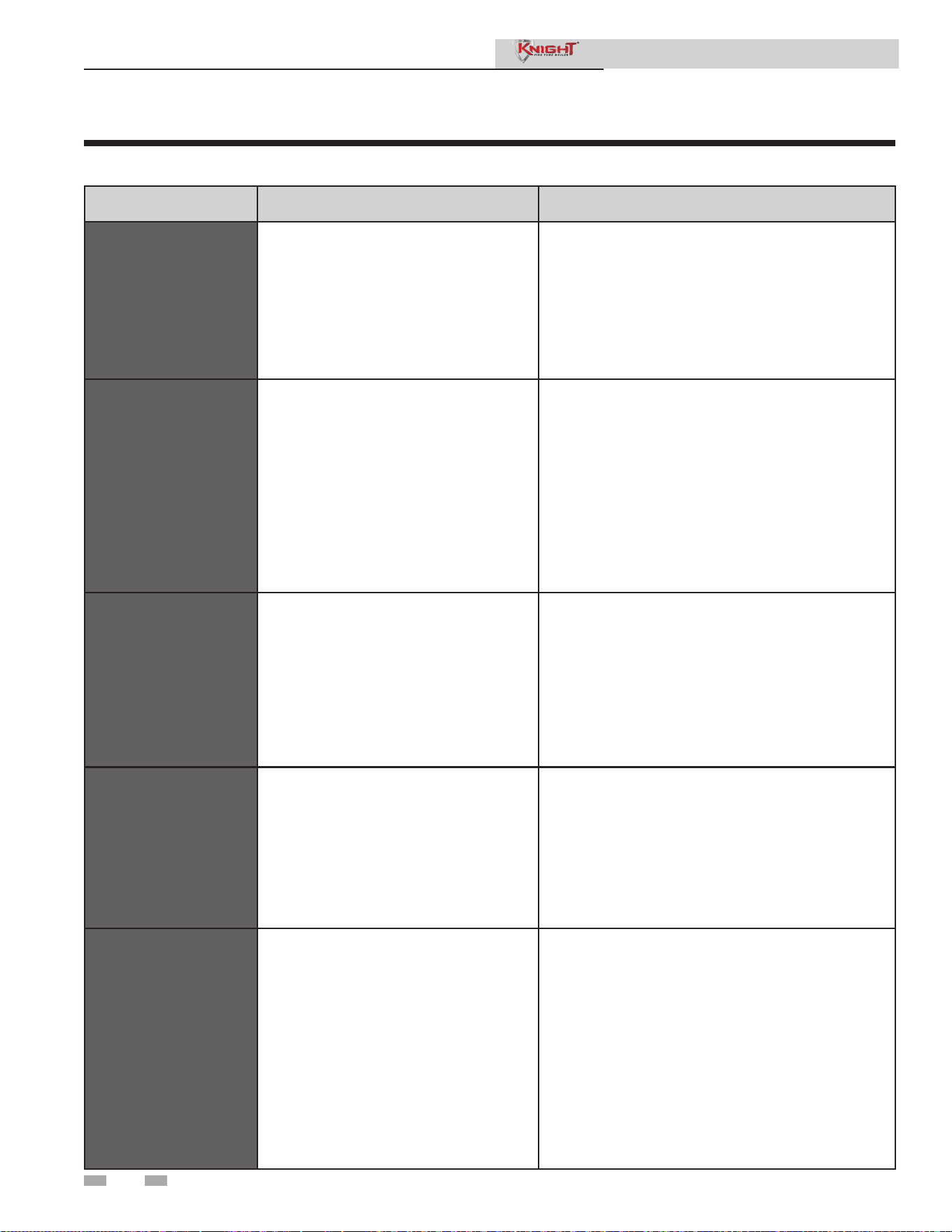
3 Troubleshooting
46
Table 3-4 (continued from previous page) Troubleshooting Chart - Fault Messages Displayed on Boiler Interface
FAULT DESCRIPTION CORRECTIVE ACTION
AUX Contact
Sw
(will require a manual reset
once the condition has been
corrected. Press the RESET
button on the SMART
SYSTEM display to reset.)
An optional remote proving switch is not
making.
• Check function of remote devices.
• Check for loose or misplaced jumper if AUX
contact switch is not connected.
Outlet Temp Diff
(will require a manual reset
once the condition has been
corrected. Press the RESET
button on the SMART
SYSTEM display to reset.)
The temperature difference between the
two (2) outlet sensors is too high.
• Check wiring to sensor. Make sure wiring is
connected and not damaged. Reconnect / repair
wiring if necessary.
• Measure the resistance of the sensor and compare to
the resistance in Table 3-2C of this manual.
Replace sensor if necessary.
• Restore control parameter defaults from optional PC
software.
• Replace control module.
Fatal Error
The control module has detected parameter
settings that are corrupted.
• Restore the parameter defaults from the optional PC
software.
• Replace control module.
Memory Error
A lockout occurs at the same time as a
power outage.
• Reset control module.
Flue Temp High /
Flue Temp Limit
The stack temperature has exceeded the
set parameters for the boiler.
• Inspect the heat exchanger. Reference the
Maintenance Section of this manual for the procedure
on how to clean the flue side of the heat exchanger.
• Inspect the flue sensor and associated wiring.
Measure the resistance of the flue sensor and compare
to Table 3-2D of this manual. Replace the sensor if
necessary.
• Verify that the vent/air intake pipes are properly
installed and that there are no obstructions.
• Replace the main control board.
Service Manual

3 Troubleshooting (continued)
47
Table 3-4 (continued from previous page) Troubleshooting Chart - Fault Messages Displayed on Boiler Interface
FAULT DESCRIPTION CORRECTIVE ACTION
Delta T High /
Delta T Limit
The temperature rise across the heat
exchanger has exceeded the set parameters
for the boiler.
• Verify that the system is full of water and that all air
has been properly purged from the system.
• Verify that the boiler is piped properly into the heating
system. Refer to Section 6 - Hydronic Piping of the
Knight Fire Tube Boiler Installation and Operation
Manual for the proper piping methods for the Fire Tube
boiler.
• Check for 120 vac to the boiler pump motor on a call
for heat. If voltage is not present, check the wiring
back to the main control board. Replace the main
control board if necessary.
• If 120 vac is present on a call for heat and the boiler
pump is not operating, replace the pump.
• Verify that the boiler pump is set to the proper speed
or that the pump is the proper size. Reference
Section 6 - Hydronic Piping of the Knight Fire Tube
Boiler Installation and Operation Manual for boiler
pump specifications.
Outlet Temp
High / Outlet
Temp Limit
Outlet water temperature has exceeded the
maximum outlet water temperature.
• Verify that the system is full of water and that all air
has been properly purged from the system.
• Verify that the boiler is piped properly into the heating
system. Refer to Section 6 - Hydronic Piping of the
Knight Fire Tube Boiler Installation and Operation
Manual for the proper piping methods for the Fire Tube
boiler.
• Check for 120 vac to the boiler pump motor on a call
for heat. If voltage is not present, check wiring back
to the main control board. Replace the main control
board if necessary.
• If 120 vac is present on a call for heat and the boiler
pump is not operating, replace the pump.
• Verify that the boiler pump is set to the proper speed
or that the boiler pump is the proper size. Reference
Section 6 - Hydronic Piping of the Knight Fire Tube
Boiler Installation and Operation Manual for boiler
pump specifications.
• Replace the main control board.
Service Manual
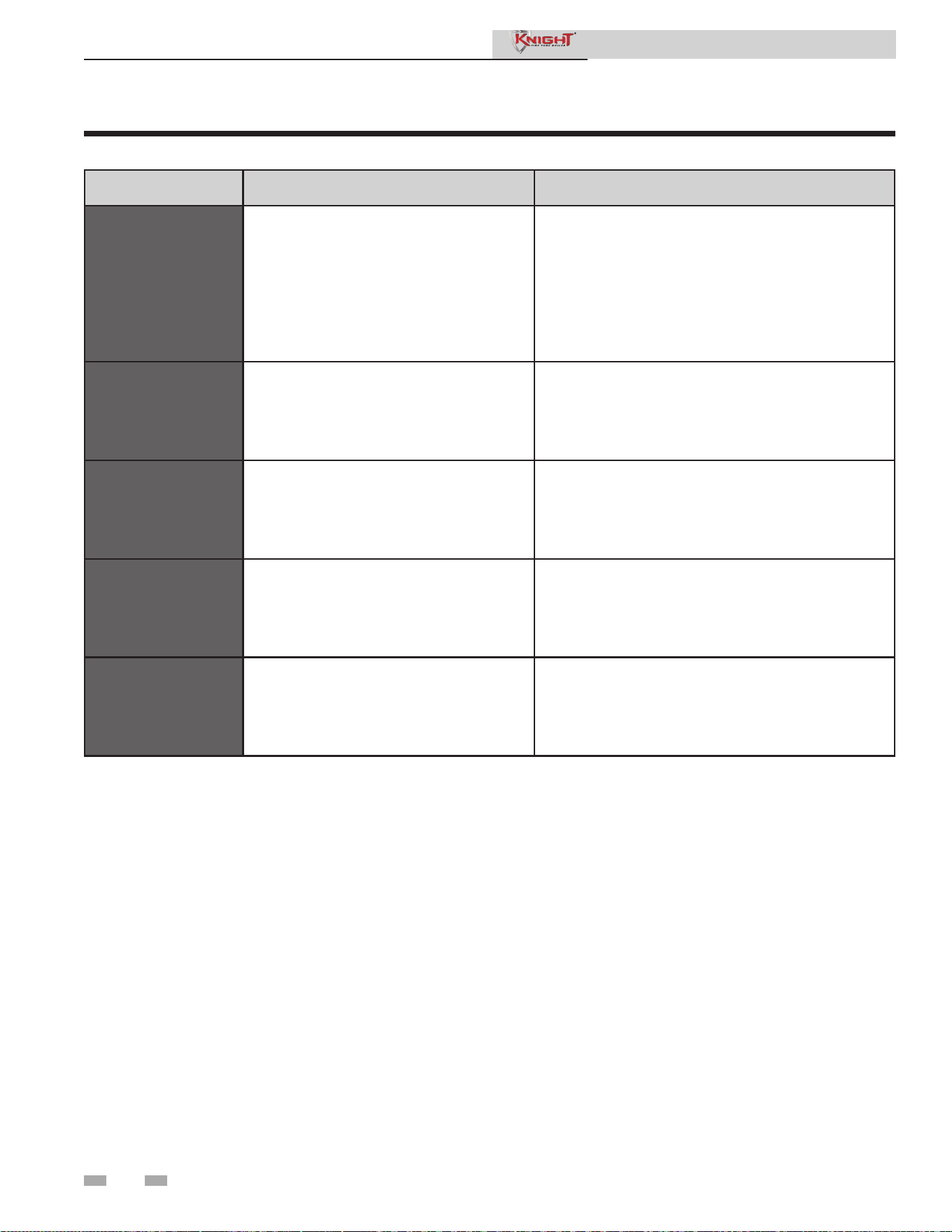
3 Troubleshooting
48
Table 3-4 (continued from previous page) Troubleshooting Chart - Fault Messages Displayed on Boiler Interface
FAULT DESCRIPTION CORRECTIVE ACTION
Low 24 vac
120 vac input to the main control board has
dropped below 80 vac.
• Check 120 vac supply to the transformer.
• Check wiring connections at the low voltage terminal
strip.
• Check the wire size/length to remote devices.
• Replace the transformer.
Watch Dog Error
The main control board has detected an
internal fault.
• Cycle power to the boiler.
• Replace the main control board.
Write EEProm
The main control board has detected an
internal fault.
• Cycle power to the boiler.
• Replace the main control board.
CRC Parameters
The main control board has detected an
internal fault.
• Cycle power to the boiler.
• Replace the main control board.
No Error Stored
The particular lockout information has been
lost.
• Press the RESET button.
• Replace the main control board.
Service Manual
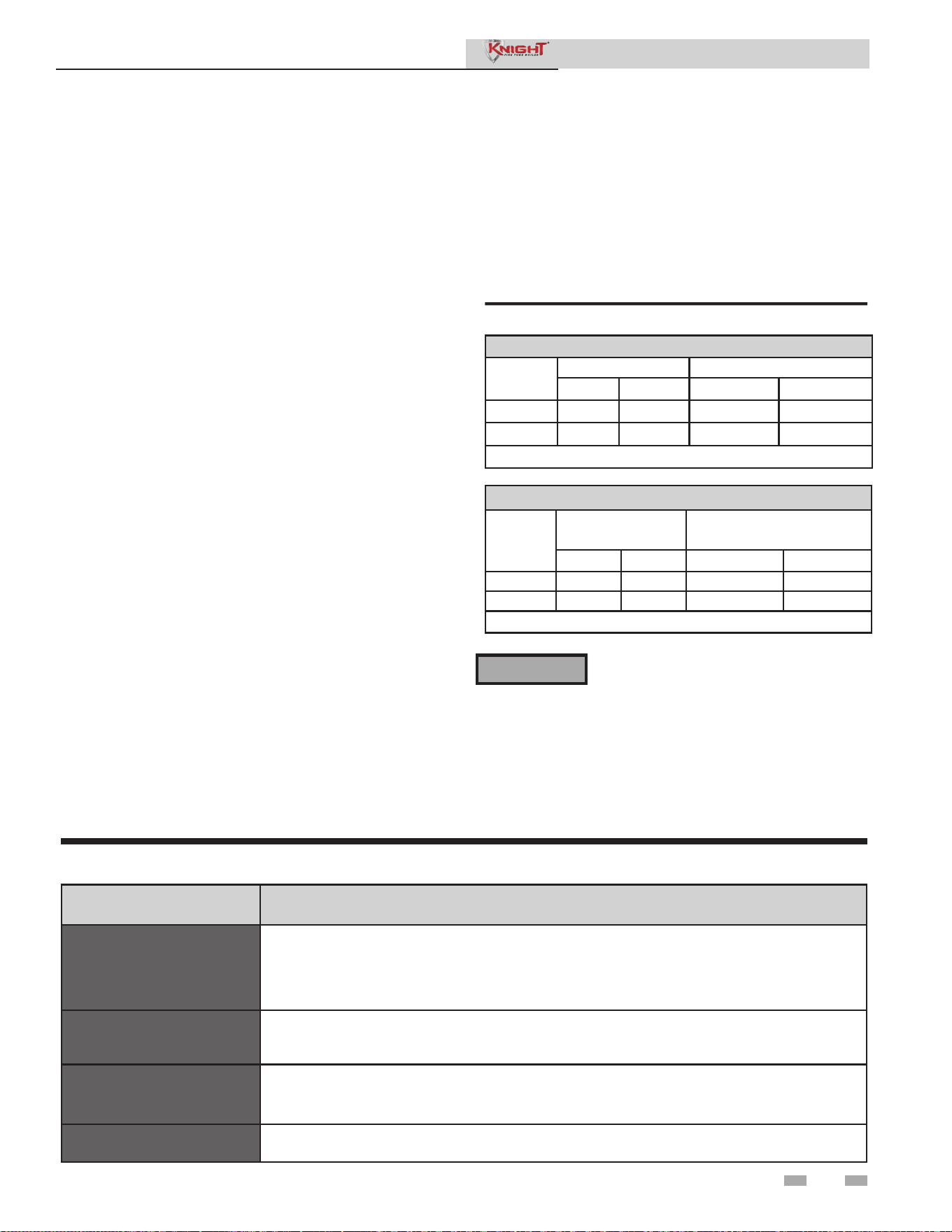
3 Troubleshooting (continued)
49
Table 3-6 Troubleshooting Chart - Combustion Levels
POSSIBLE CAUSE CORRECTIVE ACTION
Vent/Air Intake Length
or Obstruction
• Refer to Section 3 - General Venting of the Knight Fire Tube Boiler Installation and Operation
Manual for the proper venting and air intake methods for the Fire Tube Boiler.
• Check for obstructions at the vent/air intake terminals.
Gas Supply Pressure
• Refer to Section 7 - Gas Connections of the Knight Fire Tube Boiler Installation and Operation
Manual for the proper gas supply for the Fire Tube boiler.
Dirty/Damaged Burner
• Refer to the Maintenance Section of this manual for burner removal and cleaning procedures.
• Replace burner if necessary.
Gas Valve Adjustment
• Refer to the Troubleshooting Section of this manual for the gas valve adjustment procedure.
Service Manual
Table 3-5 Flue Products Chart
You must replace the combustion plug
in the vent connector to prevent flue gas
spillage into the room. Failure to comply
could result in severe personal injury, death,
or substantial property damage.
Natural Gas
Input
Rate
Target Range
CO
2
O
2
CO
2
O
2
High Fire
9.2% 4.5% 9.0% - 10.5% 2.1% - 4.8%
Low Fire
9.0% 4.8% 8.8% - 9.5% 3.9% - 5.2%
CO levels should be less than 200 ppm.
Propane
Input
Rate
Target Range
CO
2
O
2
CO
2
O
2
High Fire
10.8% 4.5% 10.5% - 11.5% 3.5% - 5.0%
Low Fire
10.5% 5.0% 10.0% - 11.0% 4.2% - 5.8%
CO levels should be less than 200 ppm.
Combustion Analysis Procedure
1. Turn the main power off to the boiler by placing the “On/
Off” switch in the OFF position.
2. Remove the combustion plug from the vent connector
provided on the unit. Insert the probe from a combustion
analyzer into the opening on the vent connector. Note:
Combustion measurements will be made at this point.
3. Turn the main power on to the boiler by placing the “On/
Off” switch in the ON position. Place the boiler into the
active position by pressing the RIGHT SELECT [ON]
key (see the Knight Fire Tube Boiler Display in Section 1
of this manual). Note: The brackets ([]) denote screen
status.
4. Locate the pinhole button above the RESET button on
the display board. Insert a thin wire (such as a paper
clip) into the hole and press the button once and hold for
5 seconds to place the boiler into Service Mode.
NOTE: In Service Mode, the boiler will fire at normal
ignition speed and will then modulate up to full fire. You
can switch between high fire and low fire by pressing the
Right Arrow Key (>).
5. Once the boiler has modulated up to full fire, measure the
combustion. The values should be in the range listed in
Table 3-5. The CO levels should be less than 200 ppm for
a properly installed unit.
If the combustion is not within the specified range,
reference the Troubleshooting Section of this manual for
possible causes and corrective actions.
6. Once the combustion analysis is complete, re-install the
plug in the vent connector.
Test the safety shutoff device by switching the manual
shutoff switch to the OFF position and ensuring that the
boiler shuts down and registers an alarm. Turn the
manual shutoff switch to the ON position and reset the
control. Place the boiler back into normal operation.
⚠WARNING
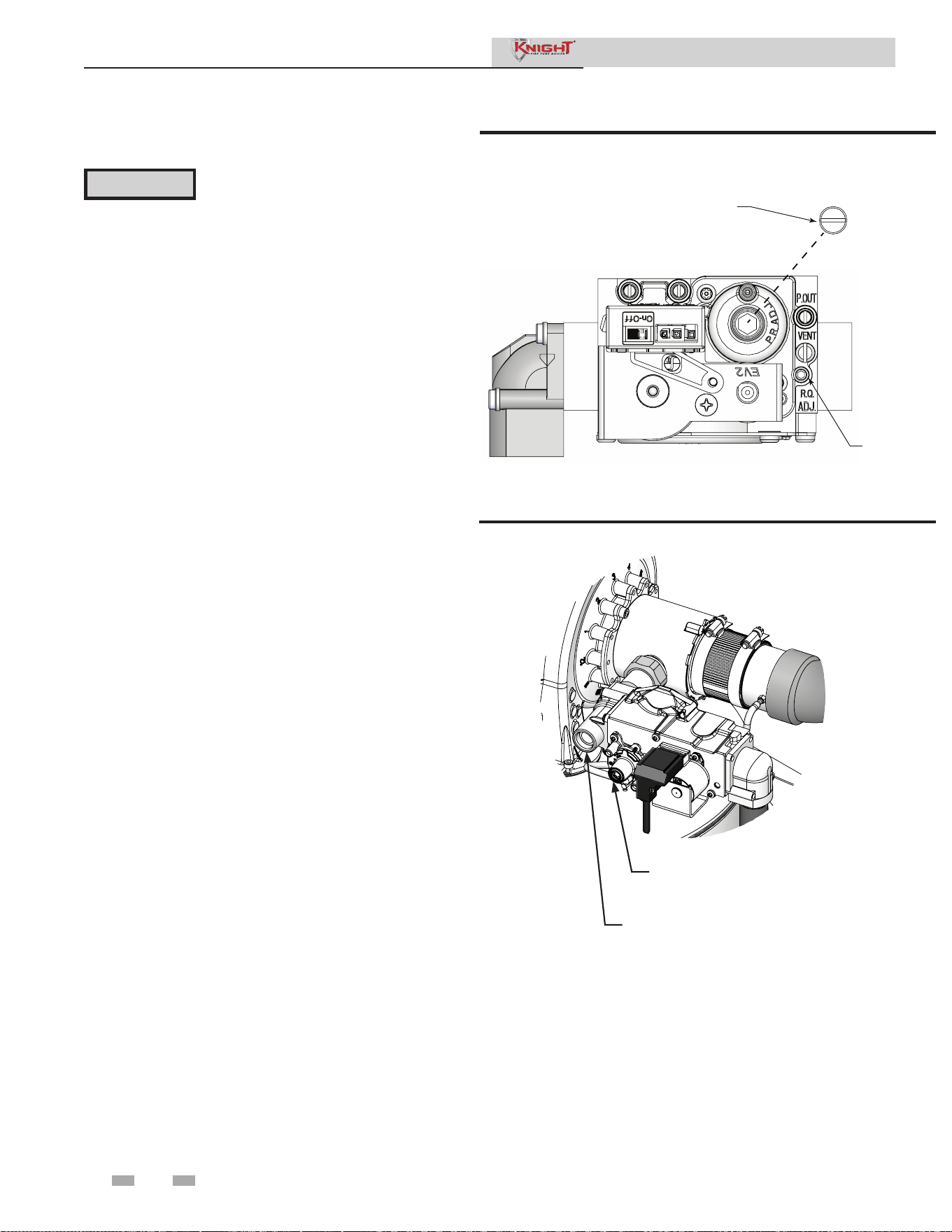
50
3 Troubleshooting
Gas valve adjustment procedure
Service Manual
If adjustment of the gas valve is deemed necessary, use the
following procedure:
CAUTION
This gas valve is factory set. Under
normal operating conditions this valve
should not need adjusting.
DIR #2000577164 00
THROTTLE
ADJUSTMENT
SCREW
(REQUIRES 2.5 MM
HEX KEY)
SCREW CAP MUST BE REMOVED
TO ACCESS BIAS/OFFSET
ADJUSTMENT SCREW
Figure 3-3A Gas Valve Adjustment - Models 55-285
High Fire
Locate the throttle adjustment screw on the gas valve (FIG.
3-3A & 3-3B). Using a 2.5 mm hex-key wrench, turn
the screw 1/10 to 1/8 turn counterclockwise to increase
CO
2
levels or 1/10 to 1/8 turn clockwise to decrease CO₂
levels. After one adjustment on the valve, follow the
Combustion Analysis Procedure of this manual to measure
the combustion.
Low Fire
Locate the bias/offset adjustment screw on the gas valve
(FIG. 3-3A & 3-3B). Using a 4 mm hex-key wrench,
turn the screw 1/10 to 1/8 turn clockwise to increase CO₂
levels or 1/10 to 1/8 turn counterclockwise to decrease
CO₂ levels. After one adjustment on the valve, follow the
Combustion Analysis Procedure of this manual to measure
the combustion.
NOTE: The low fire adjustment responds very slowly.
Make extremely small adjustments and allow the boiler to
run for a couple of minutes between adjustments. Use a
combustion analyzer to check the adjustment effects.
If combustion is still not within the specified range,
repeat the procedure. This procedure SHOULD NOT
be performed more than four (4) times. If after four (4)
adjustments and the combustion is still not within the
specified range, revisit the possible causes in Table 3-6 and
call Technical Support before replacing the gas valve.
Figure 3-3B Gas Valve Adjustment - Model 399
2000594842 01
BIAS - LOW FIRE ADJUSTMENT
UNDER 4mm TORQUE CAP
THROTTLE - HIGH FIRE ADJUSTMENT
(4mm TORQUE) UNDER BLACK

51
Service Manual
Notes

Revision Notes: Revision A (PCP# 3000024795 / CN# 500014734)
initial release.
Revision B (PCP #3000034309 / CN #500022970) reflects an update to
the gas valve adjustment procedure.
Revision C (PCP #3000041475 / CN #500029402) reflects the addition
of the gas valve adjustment image for the 399 models.
Revision D (PCP #3000042716 / CN #500030589) reflects a new
boiler pump voltage chart on page 30, along with venturi cleaning and
troubleshooting additions.
Revision E (PCP #3000049060 / CN #500036184) reflects changes
to the table on page 39 and a new image for Figure 3-3B on page 50.
Revision F (PCP #3000052201 / CN #500041738) reflects the addition
of series 110-111 and 120-121.
Revision G (PCP #3000067405 / CN #500052923) reflects added
callouts to figure 3-3B.
100305187_2000558071_Rev G
07/25