INSTRUCTIONS FOR USE
STEAM OVEN
We thank you for your trust and the purchase of our appliance.
This detailed instruction manual is supplied to make the use of this product easier. The
instructions should allow you to learn about your new appliance as quickly as possible.
Make sure you have received an undamaged appliance. If you do find transport damage,
please contact the seller from which you purchased the appliance, or the regional
warehouse from which it was supplied. The telephone number can be found on the
invoice or on the delivery note.
Instructions for installation and connection are supplied on a separate sheet.
Carefully read the instructions for use before connecting the appliance. Repair or any
warranty claim resulting from incorrect connection or use of the appliance shall not be
covered by the warranty.
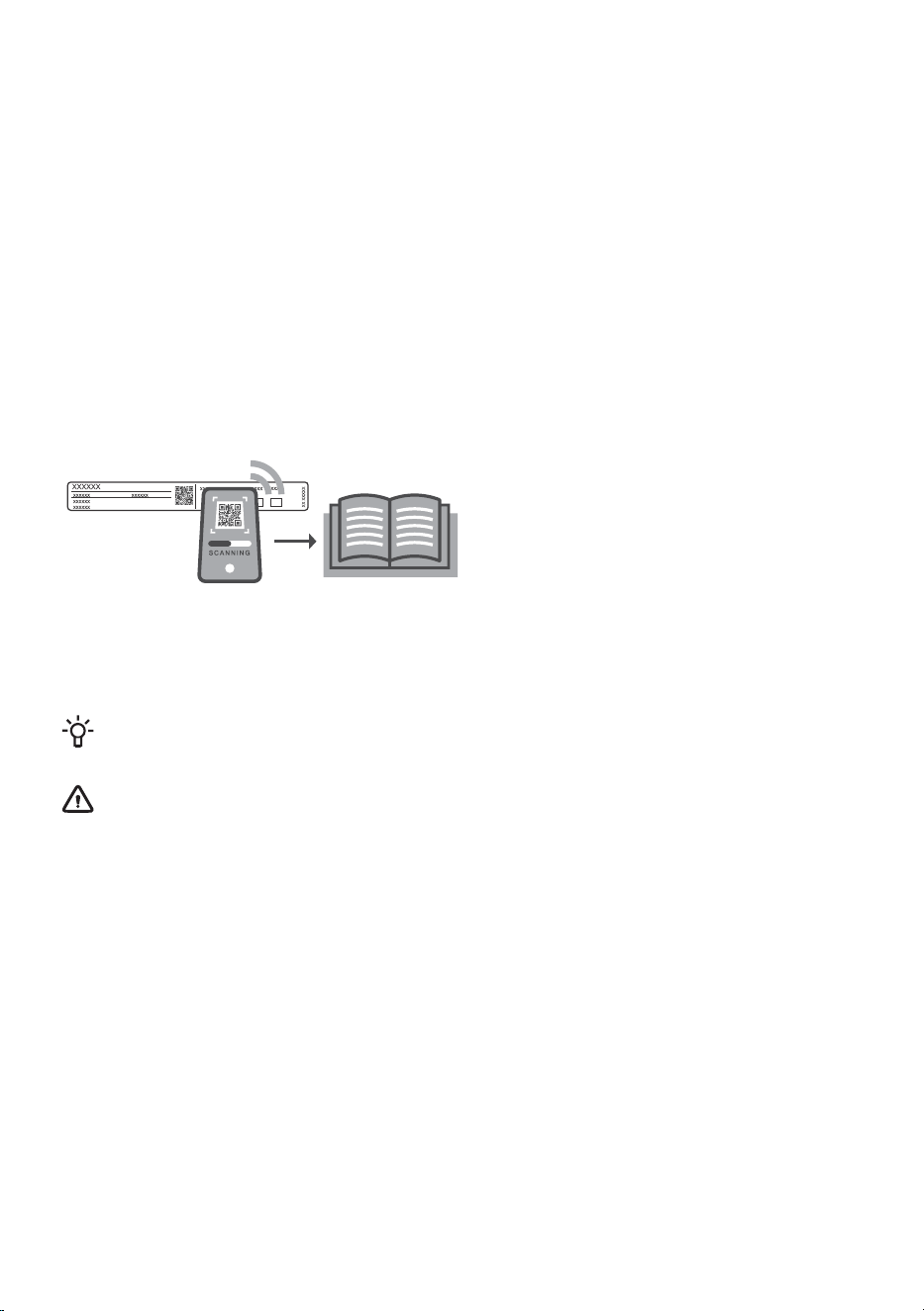
For more detailed instructions and tips, please visit http://www.gorenje.com or scan the QR code on
the rating plate.
The following symbols are used throughout the manual and they have the following meanings:
INFORMATION!
Information, advice, tip, or recommendation
WARNING!
Warning – general danger

Contents
51. Safety precautions ..........................................................................................................
62. Other important safety warnings ...................................................................................
83. Appliance description .....................................................................................................
83.1 Appliance equipment ......................................................................................................
103.2 Control panel ...................................................................................................................
114. Before first use ................................................................................................................
114.1 Switching on for the first time .........................................................................................
135. Using the oven – selecting the baking settings ............................................................
145.1 Main menu - Manual .......................................................................................................
175.2 Timer - Timer functions ...................................................................................................
195.3 Cooking by steps ( + menu) ............................................................................................
205.4 Cooking with steam .........................................................................................................
215.5 Steam injection during the baking process .....................................................................
225.6 Filling the water tank .......................................................................................................
235.7 Automatic menu ..............................................................................................................
235.8 Extra ................................................................................................................................
256. Starting the cooking process .........................................................................................
257. End of cooking by touching ...........................................................................................
267.1 Gratin ( + menu) ...............................................................................................................
277.2 Crispy bottom ..................................................................................................................
287.3 Favourites - save your own settings ...............................................................................
298. General settings ..............................................................................................................
308.1 Display lock (+ menu) ......................................................................................................
309. ConnectLife ......................................................................................................................
3110. Wi-Fi management ..........................................................................................................
3110.1 Using Wi-Fi ......................................................................................................................
3210.2 Managing the oven remote control .................................................................................
3411. General tips and advice for baking ................................................................................
3511.1 Cooking table ..................................................................................................................
4111.2 Cooking with a Temperature Probe ...............................................................................
4412. Cleaning and maintenance .............................................................................................
4412.1 Cleaning with steam ........................................................................................................
4512.2 Cleaning the water tank and filter foam ..........................................................................
4612.3 Cleaning the steam system .............................................................................................
4712.4 Removing wire and fixed pull-out (extendible) guides ....................................................
4812.5 Removing and replacing the oven door and glass panes ...............................................
4912.6 Replacing the bulb ..........................................................................................................
5013. Troubleshooting ..............................................................................................................
5013.1 Troubleshooting table .....................................................................................................
5113.2 Label – appliance information .........................................................................................
5114. Compliance information .................................................................................................
3


1. Safety precautions
IMPORTANT SAFETY PRECAUTIONS – CAREFULLY READ
THE INSTRUCTIONS AND SAVE THEM FOR FUTURE
REFERENCE.
The appliance may only be connected to the power mains by
an authorized service technician or expert. Tampering with the
appliance or nonprofessional repair thereof may result in risk
of severe injury or damage to the product.
Appliance must be connected to fixed wiring which has
incorporated means of disconnection. Fixed wiring must be
made in accordance with the wiring rules.
For stationary appliances permanently connected to the fixed
wiring, compliance with this requirement is deemed to be met
if the disconnection instruction incorporated into the fixed wiring
complies with AS/NZS 3000 (Australia only).
The appliance must not be installed behind a decorative door
in order to avoid overheating.
WARNING: A damaged power cord should only be replaced
by the manufacturer or by an authorised repairer or other
qualified person, otherwise it may be dangerous.
This appliance can be used by children aged 8 years and above,
and by persons with reduced physical, sensory or mental
capabilities or lack of experience and knowledge, if they have
been given supervision or instruction concerning the use of the
appliance in a safe way, and if they understand the hazards
involved. Children shall not play with the appliance. Cleaning
and user maintenance shall not be done by children without
supervision.
5

WARNING: The appliance and its accessible parts become hot
during use; avoid contact with heating elements. Children under
8 years of age must be kept away unless continuously
supervised.
The appliance is not intended to be controlled by external timers
or separate remote control system.
Only use the food probe recommended for use in this oven.
Do not use harsh abrasive cleaners or sharp metal scrapers to
clean the oven door glass/ the glass of hinged lids of the hob
(as appropriate), since they can scratch the surface, which may
result in shattering of the glass.
Do not use steam cleaners or high-pressure cleaners to clean
the appliance as this may result in an electric shock.
Never pour water directly on the bottom of the oven cavity.
Temperature differences could result in damage to the enamel
coating.
2. Other important safety warnings
The appliance is intended for household use. Do not use it for any other purpose, such as room heating,
drying of pets or other animals, paper, fabrics, herbs etc. As this may lead to injury or fire hazard.
The appliance may only be connected to the power mains by an authorized service technician or
expert. Tampering with the appliance or nonprofessional repair thereof may result in risk of severe
injury or damage to the product.
We recommend that (due to appliance weight) at least two persons carry and install the appliance.
Do not lift the appliance by holding it by the door handle.
Oven door hinges may be damaged when under excessive load. Do not stand or sit on the open oven
door, and do not lean against it. Also, do not place any heavy objects onto the oven door.
If the power cords of other appliances located in the vicinity of the oven become entangled in the
oven door, they may get damaged, which may cause a short circuit. Therefore, make sure that the
power cords of other appliances are at a safe distance.
Make sure the vents are never covered or obstructed in any other way.
6

Do not line the oven walls with aluminium foil and do not place baking trays or other containers on
the bottom of the oven. This would reduce air circulation in the oven, obstruct and slow down the
baking process and destroy the enamel coating.
We recommend you avoid opening the oven door during baking, as this increases power consumption
and condensate accumulation.
At the end of the baking process, and during baking, be careful when opening the oven door, as there
is danger of scalding.
To prevent limescale accumulation, leave the oven door open after baking or using the oven, to allow
the oven cavity to cool down to room temperature.
Clean the oven when it has completely cooled down.
Eventual mismatches in colour shades between different appliances or components within a single
design line may occur due to various factors, such as different angles under which the appliances are
observed, different coloured backgrounds, materials, and room illumination.
Do not use the appliance if it is damaged. Unplug the appliance from the power mains and call an
authorized service centre.
The oven can be safely used with or without baking pan guides.
Do not store items in the oven, which could cause danger when the oven is switched on.
Before connecting the appliance to the power mains, leave it at room temperature for some time to
allow all components to adapt to room temperature. If the oven was stored at a temperature close to
freezing point or below it, this could be hazardous to some components, particularly the pump.
Do not operate the appliance in an environment colder than 5 °C. If the appliance is switched on in
such conditions, the pump could be damaged.
Do not use distilled water, tap water with high chlorine content, or other similar liquids.
When baking with steam injection, always fully open the oven door when the baking process is
completed. If you do not do so, the steam rising from the oven cavity could affect the operation of
the control unit.
Peel off the adhesive tape from the control unit after installing the appliance into the cabinet. Failure
to do so may result in a tank failure.
WARNING!
Carefully read the instructions for use before connecting the appliance. Repair or any
warranty claim resulting from incorrect connection or use of the appliance shall not be
covered by the warranty.
7
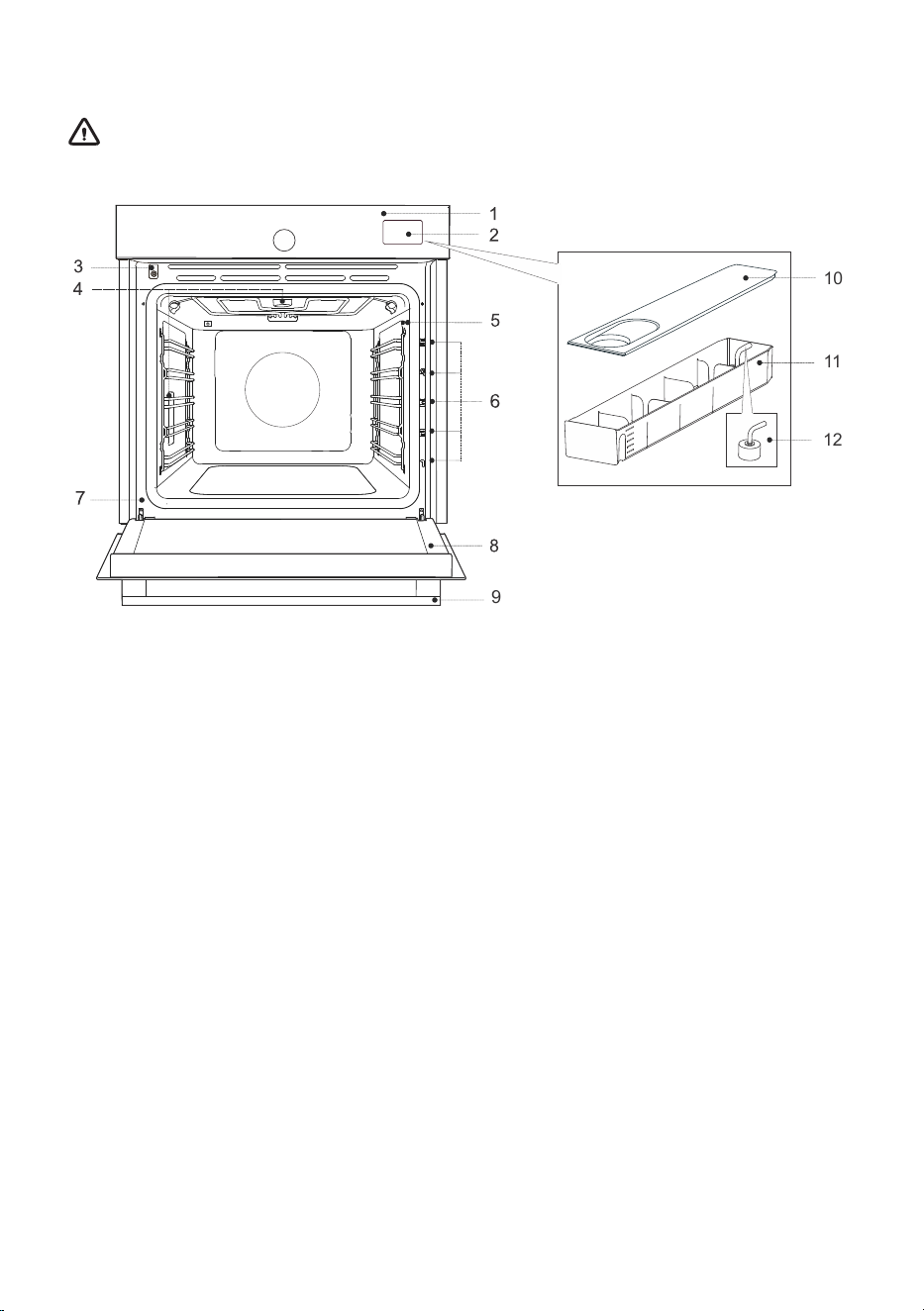
3. Appliance description
WARNING!
Appliance functions and equipment depend on the model.
9
10
11
12
10. Container cover1. Control panel
11. Tank container2. Water tank
12. Filter foam3. Door sensor
4. Lighting
5. Food probe socket
6. Guides – rack levels
7. Label
8. Oven door
9. Door handle
3.1 Appliance equipment
Oven door switch
The switch switches off the operation of the heaters and the ventilation in the oven room when the
oven door is opened during operation.
Guides
Wire guides – always insert the wire rack and baking tray into the guide.
Fixed pull-out guides– place the equipment on the guide. On the same guide, you can place the rack
together with the drip pan.
NOTE: Guides – rack levels are counted from the bottom up.
8
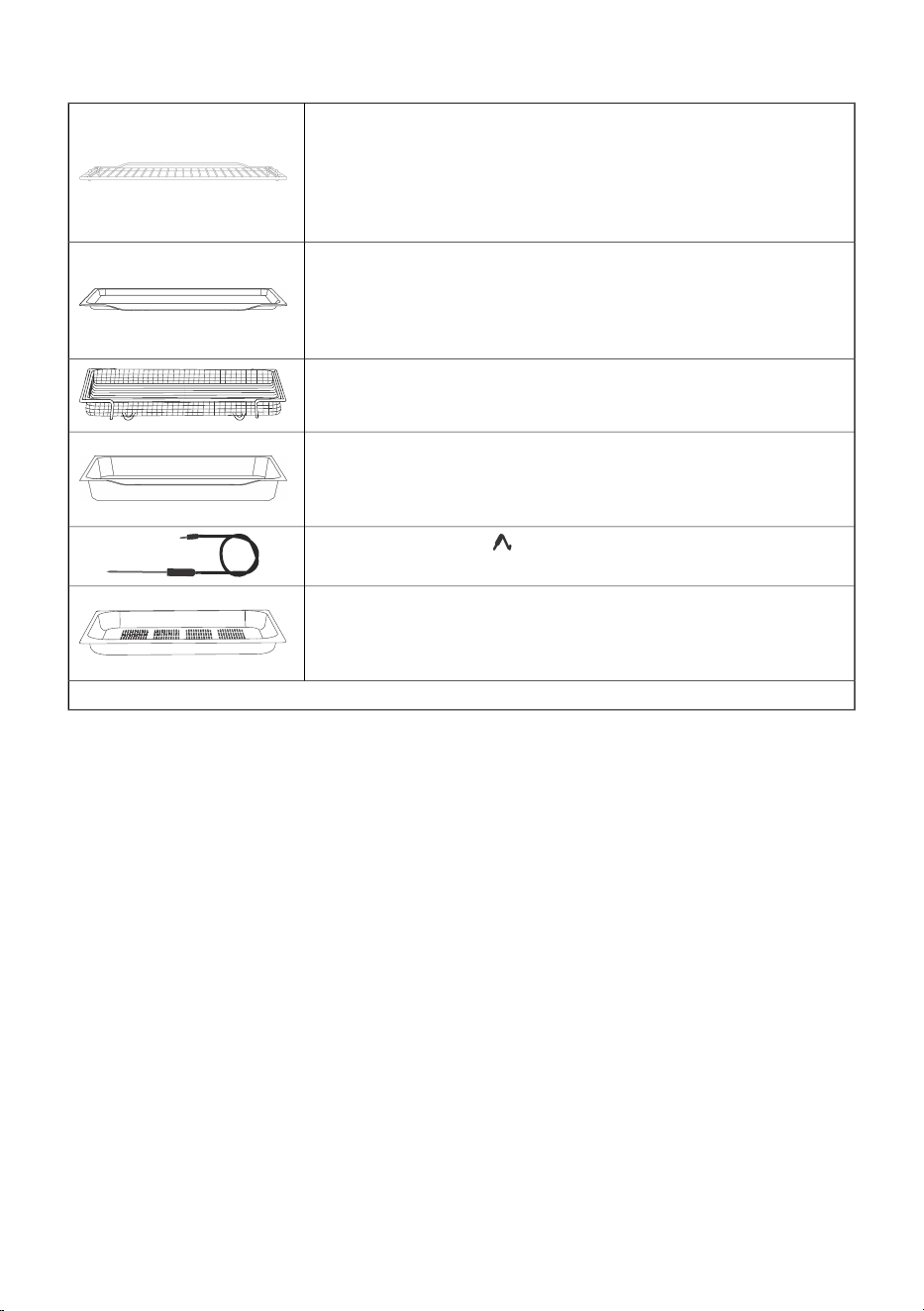
Oven equipment and accessories
Wire rack– used for grilling/broiling or as support for a pan, baking
tray or baking dish.
NOTE: When inserting the wire rack into the guide, always make sure
its elevated part is at the back and on the top side.
There is a safety latch on the wire rack. Therefore, the wire rack has
to be lifted slightly at the front when pulling it out from the oven.
Drip tray – used for flatbreads and small cakes. It can also be used
as a collecting tray.
NOTE: A shallow baking tray may become deformed when heated in
the oven. When it cools down, it returns to its original state. The
deformation does not affect its functionality.
Airfry grid tray – (baking tray with holes) used for cooking with
systems that feature steam injection and for air frying. The holes allow
for better air flow around the food and contribute to greater crispness.
Deep baking tray – used for baking vegetables and moist pastries.
It can also be used as a drip tray.
NOTE: Never insert the deep all-purpose (or universal) baking tray
into the first guide when baking.
Temperature probe - ( BAKESENSOR)
Perforated shallow baking tray (STAINLESS STEEL) - (baking tray
with holes) is intended for cooking vegetables, fish and meat with
steam or when using the sous vide function. It ensures even steam
circulation and optimal cooking results.
NOTE: Additional equipment can be purchased from an authorised service center.
9
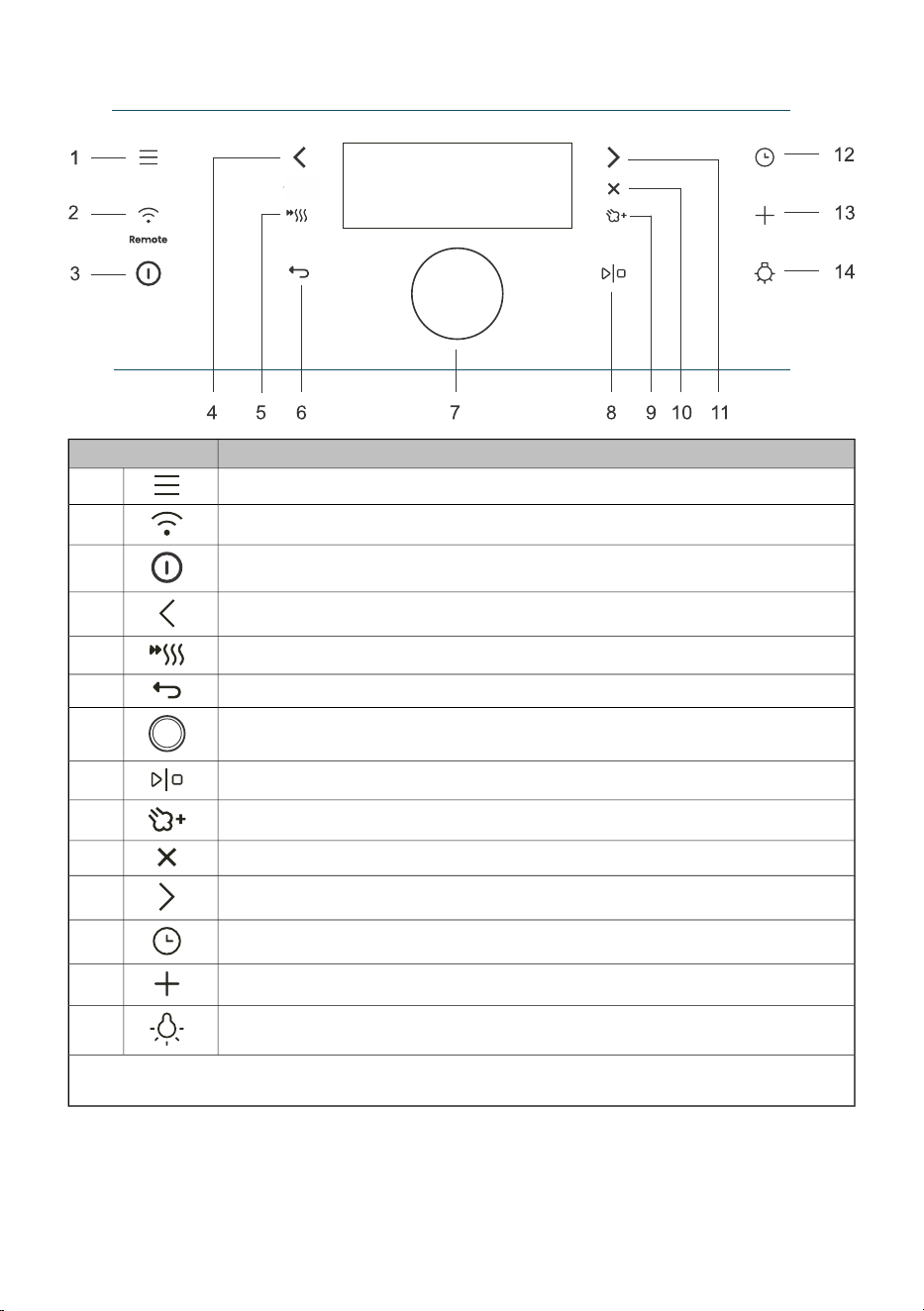
3.2 Control panel
UseKey
Selection of basic menus1.
Wi-Fi connectivity settings (Remote)2.
Switching the oven on and off
3.
Left selector key
4.
Switching the fast preheat on and off5.
Exit the current state without saving6.
Button for selecting and confirming settings7.
Starting and stopping the operation8.
Addition of steam
9.
Cancel the current setting, delete the function
10.
Right selector key
11.
Selection of time functions
12.
Advanced settings
13.
Switching the oven light on and off
14.
NOTE: Only the keys that are enabled in the current menu are illuminated (fully or partially) on the
control panel.
10
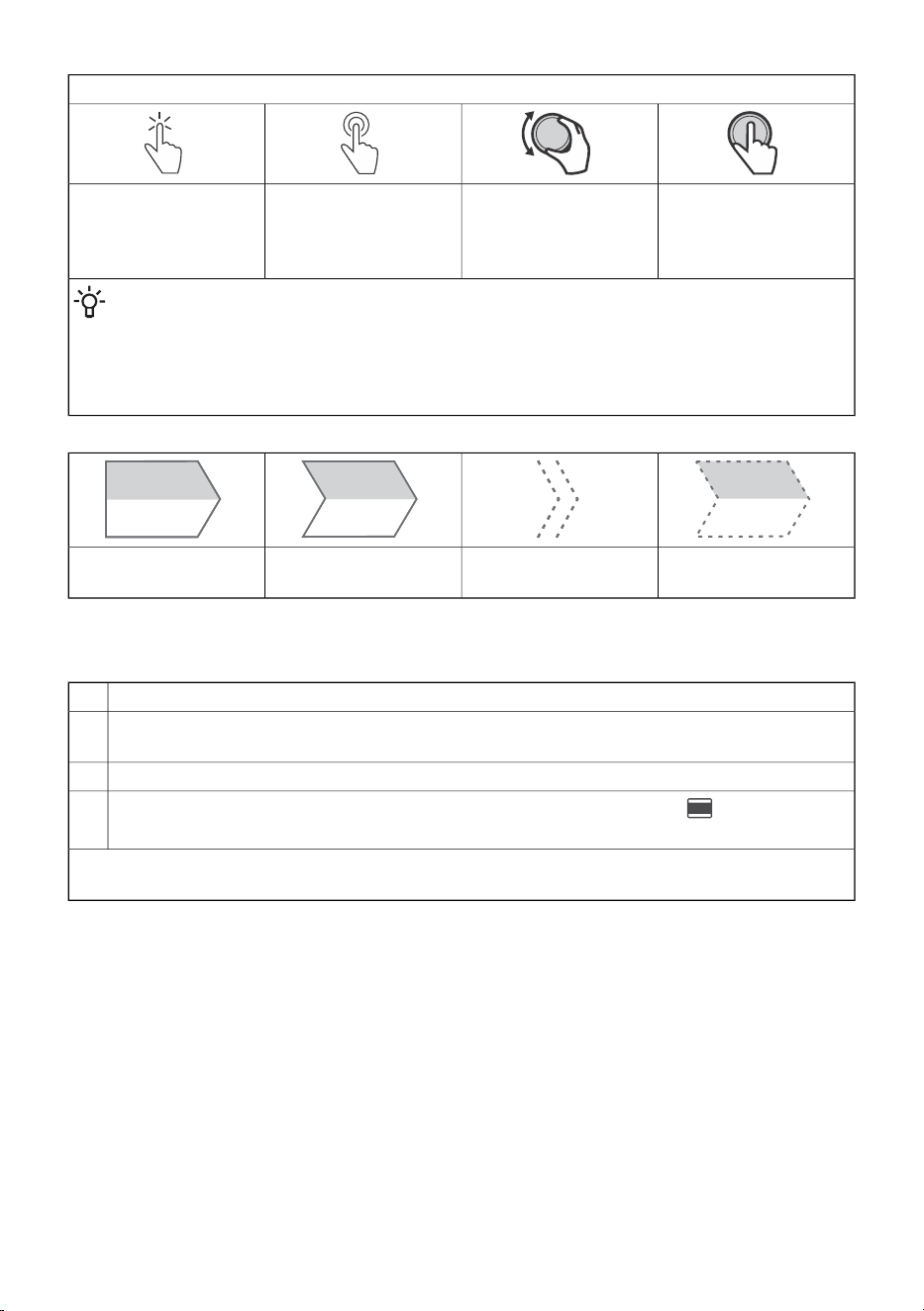
Explanation of shortcuts in the manual:
Press the button – to
confirm your selection.
Rotate – to switch
between settings.
Long press – 5 sec –
for additional settings
or fast increase of
setting
Short press –
for basic selections
INFORMATION!
The settings are controlled by the keys and the knob.
For better key responsiveness, try touching them with as much of your fingertip as possible.
Each time you press a key, this will be acknowledged by an audible signal (when this function
is available).
Optional step
Passed time (exp. oven
is operational)
Intermediate stepFirst step
4. Before first use
Remove oven utensils and any packaging (cardboard, polystyrene foam, plastic) from the oven.1.
Wipe the utensils, the inside of the oven and the tank container with a damp cloth. Do not use
rough cloths or cleaners.
2.
Switch on the oven (see chapter 4.1 Switching on for the first time).3.
Preheat the oven with the top and bottom heater system for about one hour at a temperature
of 230 °C (see chapter Manual cooking mode).
4.
NOTE: During heating, the characteristic "new smell" is released, so ventilate the room thoroughly
during this time.
4.1 Switching on for the first time
After connecting the appliance to the mains for the first time or after a prolonged power outage, you
will need to set the language, time and hardness of the water.
11
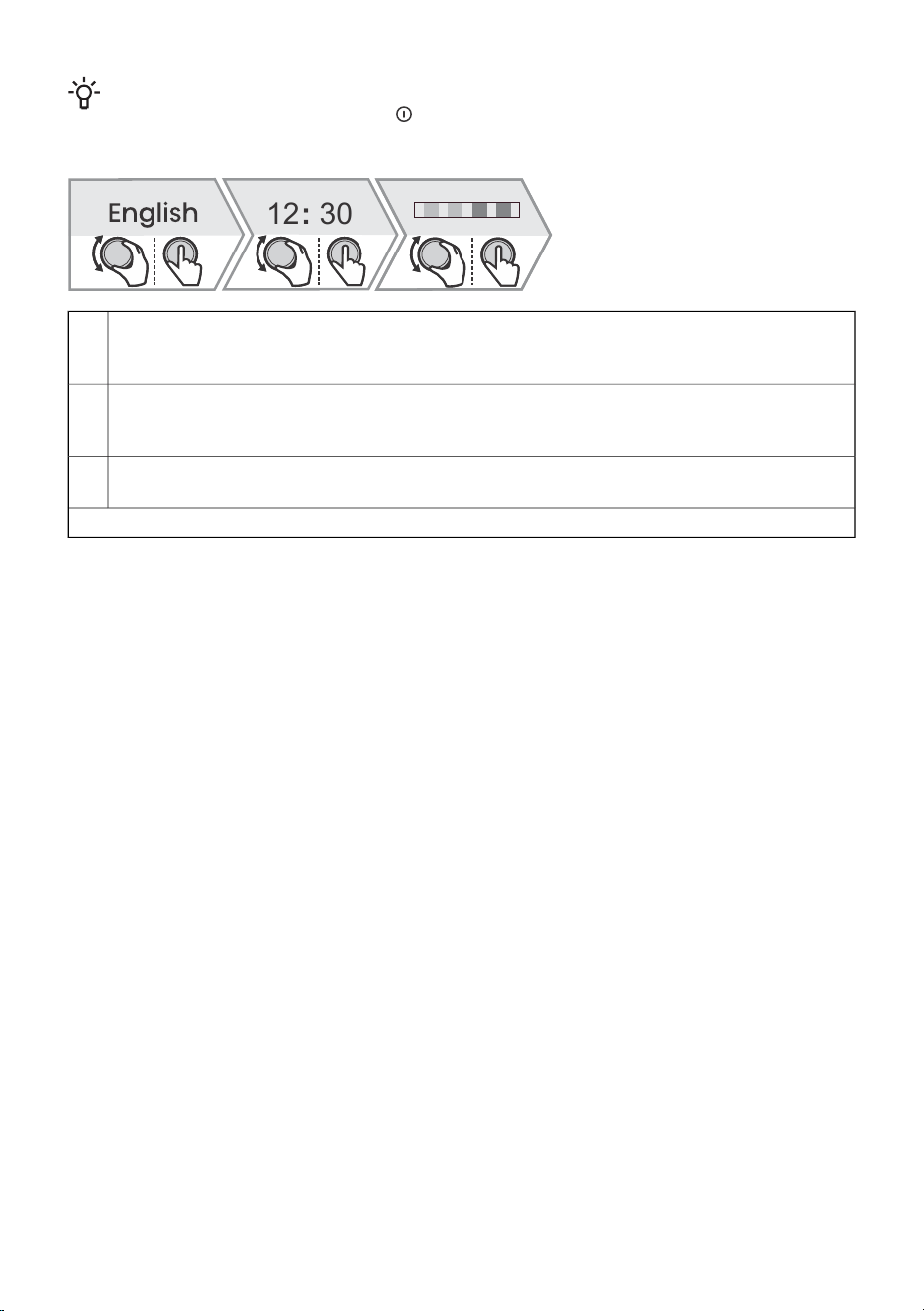
INFORMATION!
If you do not want to set this, press . The default settings will be saved. You can change the
settings at any time (see chapter8. General settings).
12 30:
Setting the language:
The display shows the default language (English). Rotate the KNOB to change the language.
Confirm by pressing the KNOB.
1.
Setting the exact time:
You can set the exact time of day by rotating the KNOB. Confirm the selection by pressing the
KNOB.
2.
Setting the water hardness:
Rotate the KNOB to set the water hardness. Confirm the selection by pressing the KNOB.
3.
All initial settings are set and the appliance is in standby mode.
12
5. Using the oven – selecting the baking settings
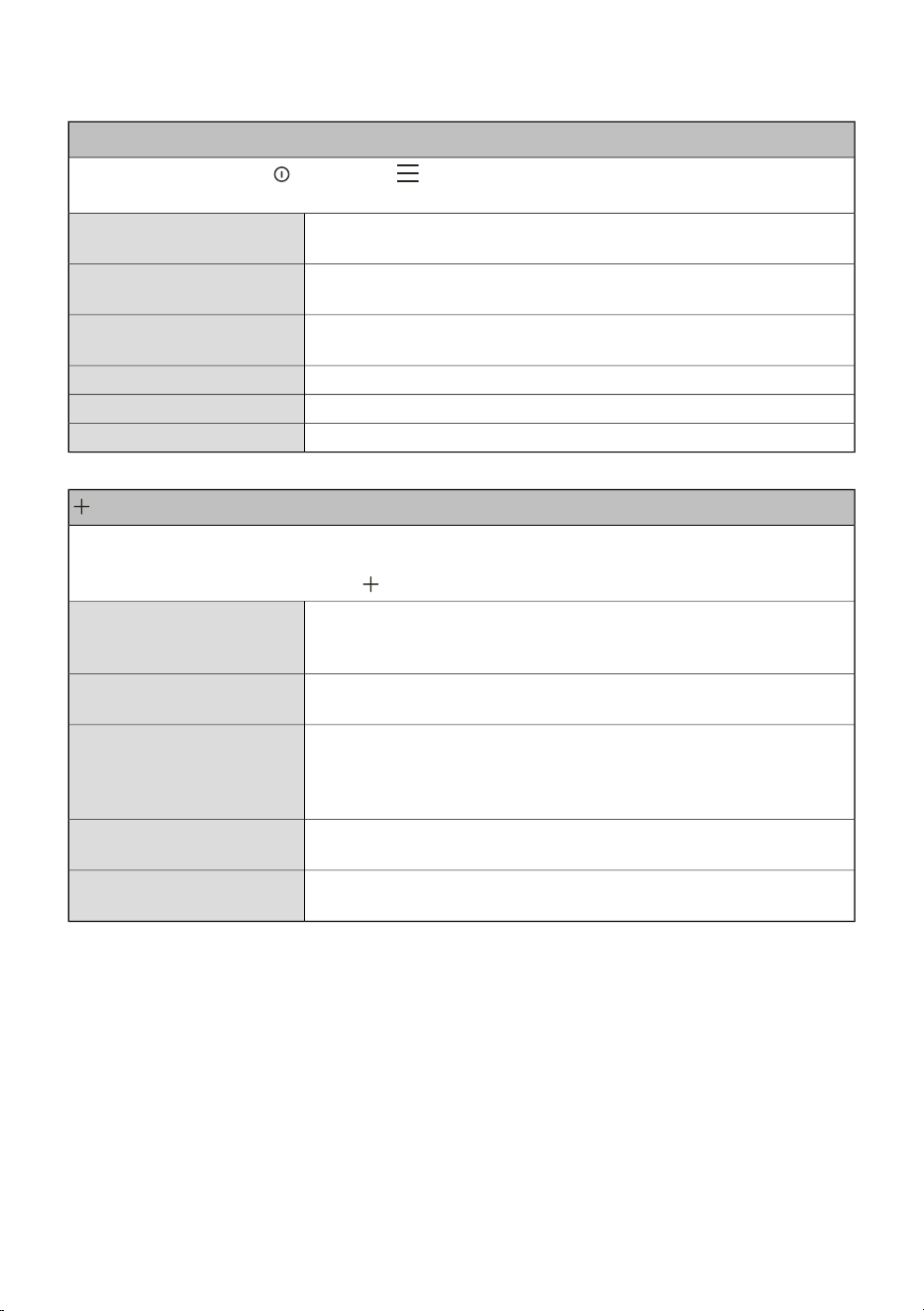
Home menu
Switch on the appliance and select . By rotating the KNOB you can choose from different
menus:
Allows you to arbitrarily set the cooking parameters with preset values
that can be changed (see chapter 5.1 Main menu - Manual).
Manual
Allows a large selection of preset programmes depending on the
selected dish (see chapter 5.7 Automatic menu).
My modes
This mode allows you to select your own programmes that you have
previously saved (see chapter 7.3 Favourites - save your own settings).
Favourites
Selection of additional programmes (see chapter 5.8 Extra).Extra
Oven cleaning programmes.Cleaning
General oven settings (see chapter 8. General settings).Settings
menu - additional settings
The function provides additional setting options. Menu content varies depending on the control
options available at that time.
To select additional settings, touch .
Three-step cooking setting with different parameters (see chapter 5.3
Cooking by steps ( + menu)). The function can be selected after setting
the cooking time.
Step bake
Detailed information on the programmes and function of the oven
systems.
Information
It is used for dishes to which you add dressing/topping or you want
to additionally bake its surface at the end. The function can be
selected after 10 minutes of cooking or at the end of cooking (see
chapter 6. Starting the cooking process).
Gratin
Saving selected custom settings (see chapter 7.3 Favourites - save
your own settings).
Favourites
Activating / deactivating the safety key lock to protect the oven from
accidental use (see chapter 8.1 Display lock (+ menu)).
Display lock
13
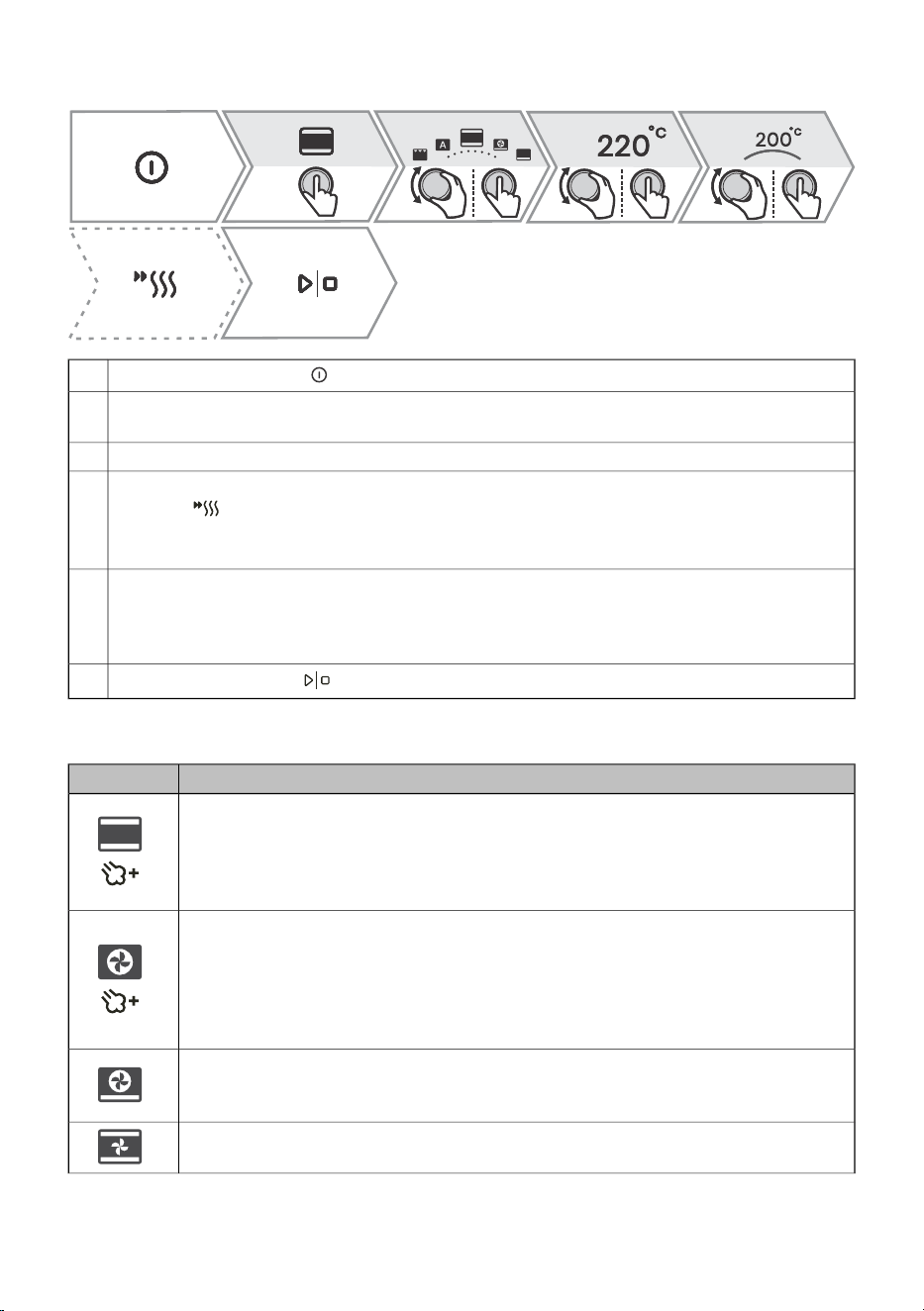
5.1 Main menu - Manual
Switch on the appliance .
1.
You can select the cooking system by turning the KNOB (see table Selection of cooking
systems). Confirm the selection by pressing the KNOB.
2.
Rotate the KNOB to set the temperature to confirm the selection.3.
Use quick preheating to bring the oven to the desired temperature as quickly as possible. By
pressing the symbol will light up fully. When the set temperature is reached, an acoustic
signal sounds. The display will show Insert the dish. Open the door and insert the dish. The
programme automatically resumes cooking with the selected settings.
4.
Additionally, you can set:
- Timer (see chapter 5.2 Timer - Timer functions)
- Cooking by steps (see chapter 5.3 Cooking by steps ( + menu))
- Steam injection during cooking (see chapter 5.5 Steam injection during the baking process)
5.
To start cooking, touch .
6.
Choosing the baking system
UseSymbol
Bottom + Top heater + Steam
For conventional cooking on a single rack, making soufflés, and cooking at low
temperatures (slow cooking).
Use the addition of steam if you want the surface of the food to cook more and create
more crispness.
Hot air + Steam
Hot air allows for better air circulation around the dish. In this way, it dries its surface
more and creates a thicker crust. For roasting meat, baking cakes, cooking vegetables
and for drying food on one or more racks at the same time.
Use the addition of steam if you want the surface of the food to cook more and create
more crispness.
Hot air + Bottom heater
Perfect for making pizza and pastries with a higher water content. For cooking on
one level when you want your dishes cooked and crisp as quickly as possible.
Bottom + Top heater + Fan
For even cooking of dishes on one level and making souffles.
14
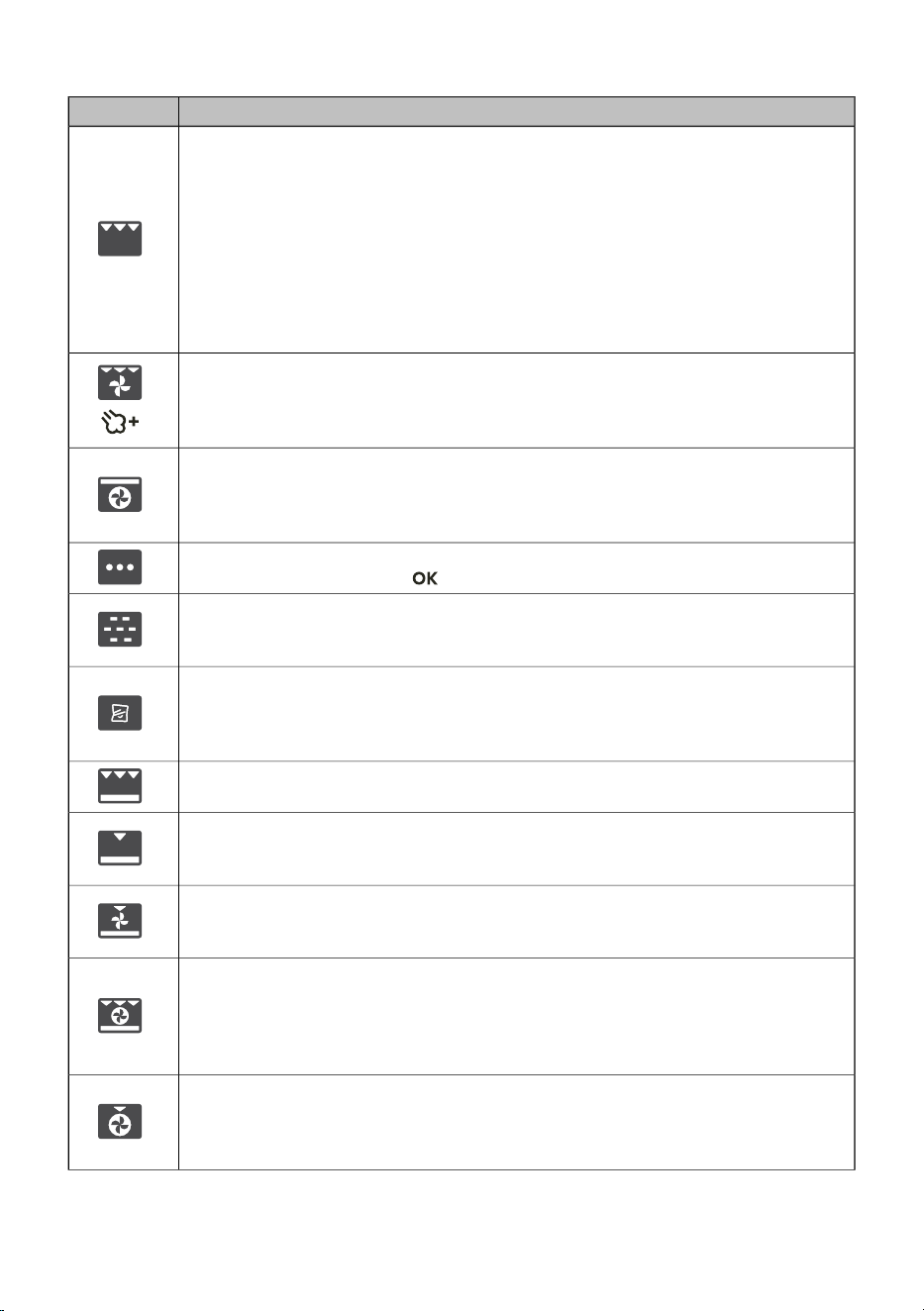
Table continued from last page
UseSymbol
Large grill
For cooking large quantities of flat foods, such as toasted bread, canapees, grill
sausages, steaks, fish, skewers, as well as for gratinating and achieving a nice crispy
crust. The heaters mounted on the top of the oven cavity heat the entire surface
evenly.
Low level - suitable for cooking fish fillets, whole fish, frying cheese.
Medium level - suitable for cooking small pieces of meat, fish cutlets, vegetables,
canapees, skewers.
High level - suitable for cooking steaks, burgers, grill sausages, toast and cooking
au gratin.
Large grill + Fan + Steam
For roasting poultry and grilling large pieces of meat.
Use the addition of steam if you want the surface of the food to cook more and create
more crispness.
Hot air + Top heater
This cooking method gives the food a crispy crust, without added fat. It is a healthy
version of "fast food" with a lower calorie content. Suitable for small cuts of meat,
fish, vegetables and pre-cooked frozen products (fries, chicken medallions).
More systems
Confirm your selection with . Additional systems will be displayed.
Steam
It is used for cooking all kinds of vegetables, small pieces of meat, fruits and side
dishes (rice, pasta).
Sous vide
It is a process of slow cooking in a vacuum, at a precisely defined and maintained
temperature. Sous vide is suitable for preparing meat, fish and vegetables. The food
prepared in this way is juicy and develops a fuller taste.
Large grill + Bottom heater
For faster cooking of dishes on one level and for a crispy pastry crust.
Bottom heater + Grill
For gentle and controlled slow cooking of delicate food (soft cuts of meat) and baking
pastry with a crunchy bottom.
Bottom heater + Grill + Fan
For optimal preparation of yeast-leavened bakery products and all types of bread and
for preservation.
Large grill + Bottom heater + Hot air
For dishes where even crispiness from all sides is desirable. The function is also
suitable as a first step of multi-step roasting of meat, as it allows for quick searing of
the surface in the initial phase and slow roasting in the second phase. The meat will
be juicy and the crust nicely browned.
Hot Air + Grill
Hot air allows for better air circulation around the dish. This will dry out the surface
more. In combination with the grill heater this will also result in a more intensive colour.
For faster cooking of meat and vegetables.
15

Table continued from last page
UseSymbol
ECO Hot air
1)
For gentle, slow and even cooking of meat, fish and pastries on one level. This way
of cooking retains a higher proportion of water in the meat, which leaves it juicier and
softer, while the pastry becomes evenly browned/baked. The used temperature range
is between 140 °C and 220 °C. It is the most energy-saving program.
Auto
Shortcut to the Auto menu (see chapter Auto menu)
1)
This function is used to determine the energy efficiency class according to EN 60350-1.
16
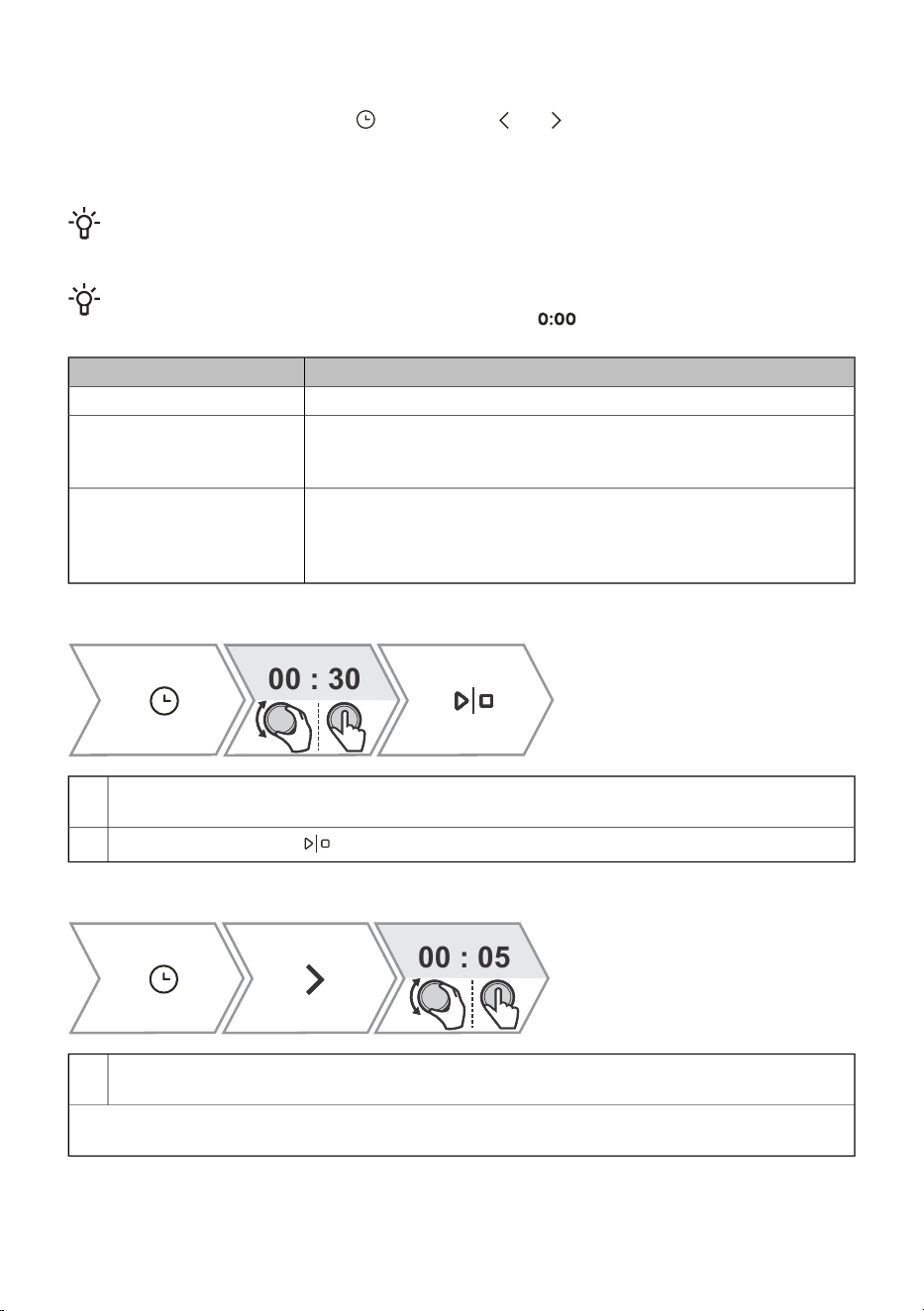
5.2 Timer - Timer functions
To select the timer functions, touch . By pressing or you can select the time function you
want to set.
The time function can be set before and during cooking.
INFORMATION!
The clock must be set to day time.
INFORMATION!
You can reset the selected time function by touching .
UseDescription / time function
In this mode, you can specify the duration of operation for the oven.Duration
The independent alarm operates independently of the oven operation.
After the set time has expired, the appliance does not turn on or off
automatically.
Egg timer
Use this mode when you want the food in the oven to start cooking
with a time delay. Enter the duration and desired end time of cooking.
The appliance starts automatically and ends its operation at the
desired time.
End baking at
Setting duration
00 : 30
Rotate the KNOB to set the desired cooking time. Confirm the selection by pressing the KNOB.
The selected oven operating time will appear on the display unit.
1.
To start cooking, touch .
2.
Setting the timer
00 : 05
Rotate the KNOB to set the timer duration.
Confirm the selection by pressing the KNOB.
1.
The maximum possible setting is 24 hours.
NOTE: If the appliance is switched off, the timer is still active.
17
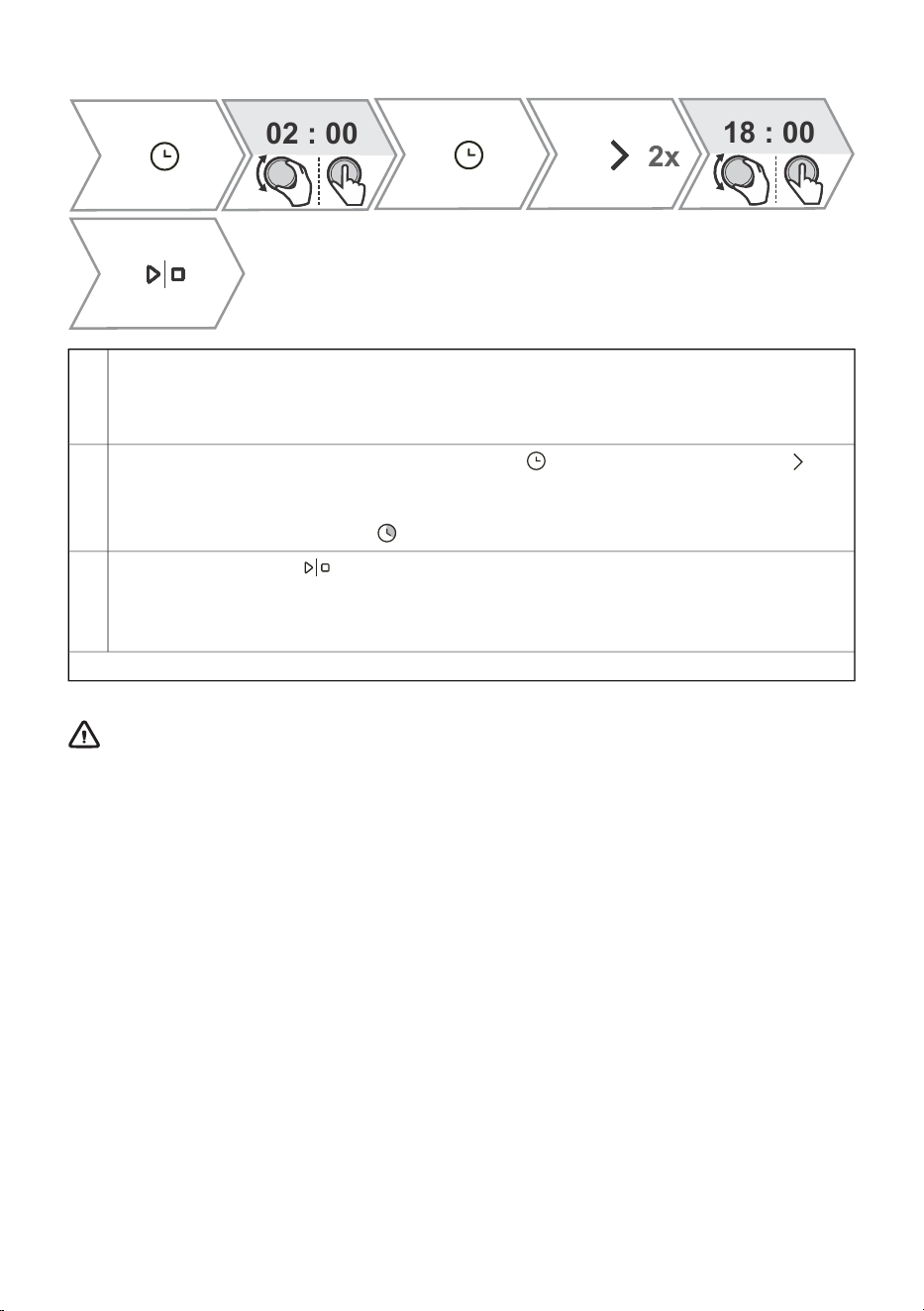
Setting the End baking at
02 : 00
18 : 00
2x
First set the cooking time. Rotate the KNOB to set the desired cooking time. Confirm the
selection by pressing the KNOB. The selected oven operating time will appear on the display
unit.
Example: cooking time is 2 hours
1.
Delayed cooking switch-off is selected by pressing and then double-clicking on .
Rotate the KNOB to set the time at which you want the dish to be ready. Confirm the selection
by pressing the KNOB. The desired end time is shown on the display.
Example: cooking ends at 18:00
2.
To start cooking, touch .
3.
The oven switches to partial standby mode while waiting for switch-on. The selected settings
are automatically switched on and off at the selected time.
Example: cooking starts at 16:00, cooking ends at 18:00
After the set time has expired, the oven stops working automatically. A short beep will be emitted.
WARNING!
This function is not suitable for food that requires quick preheating.
Perishable food should not be kept in the oven for a long time. Before using this mode,
check whether the clock on the appliance is accurately set.
18
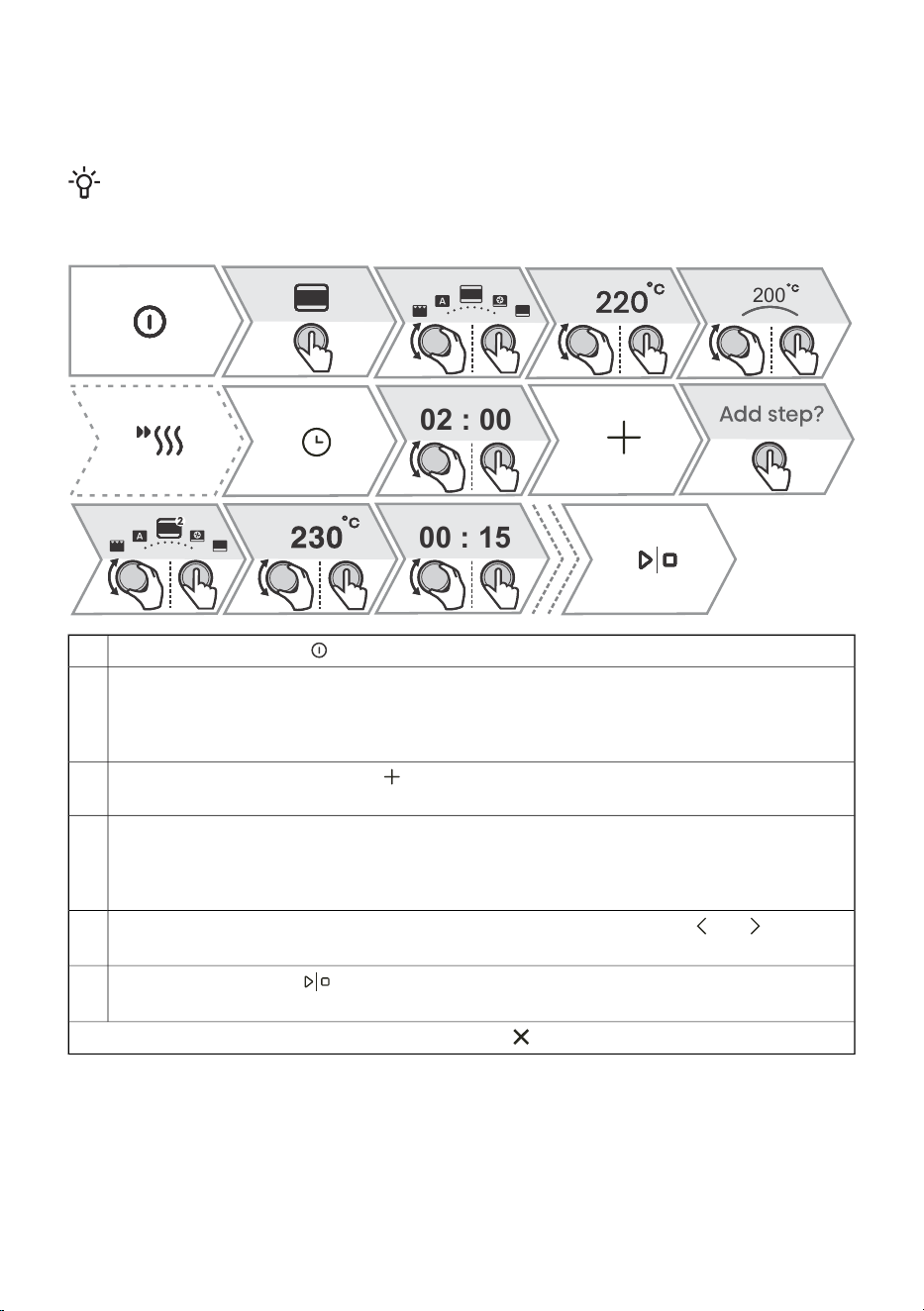
5.3 Cooking by steps ( + menu)
This function allows you to set the cooking in three steps (combine three consecutive cooking steps
in one cooking process).
INFORMATION!
The function can be set in the Main Menu - manual cooking mode (see chapter 5.1 Main menu
- Manual).
02 : 00
00 : 15
200
Switch on the appliance .
1.
Step 1
By turning the KNOB, you can select the cooking system, temperature and cooking duration
as the first step. Confirm the selection by pressing the KNOB. You can also choose quick
preheating.
2.
Select additional settings. Touch . The display will show Add step. Confirm by pressing
the KNOB.
3.
Step 2
Select the settings for the second cooking step (see setting under point 2). Confirm the selection
by pressing the KNOB.
NOTE: Do the same for Step 3.
4.
You can also change all three steps before starting cooking. By pressing or you can
select the step you want to change.
5.
To start cooking, touch .
The oven first starts working with the settings for the first step.
6.
NOTE: You can remove an individual step by touching .
19
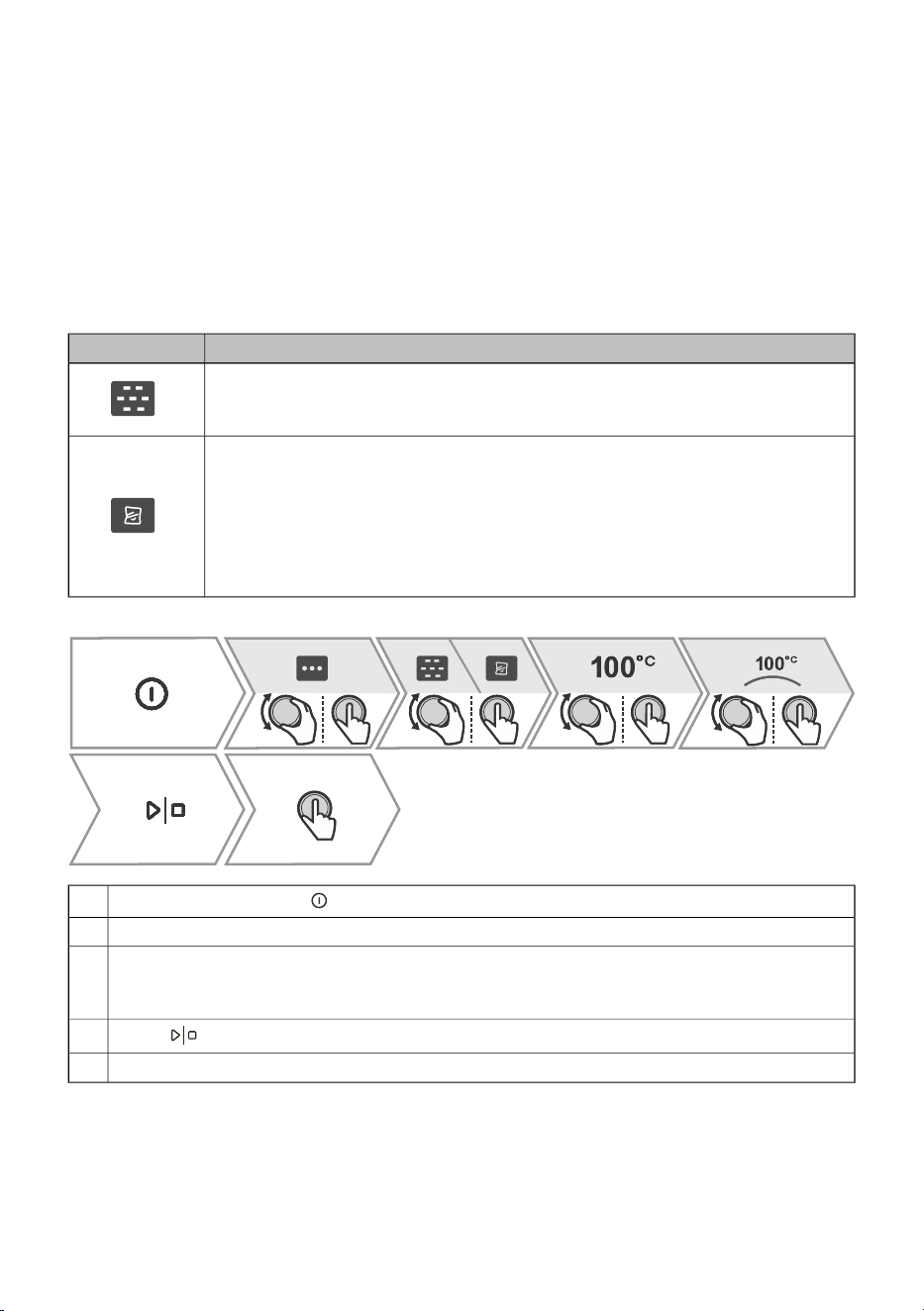
5.4 Cooking with steam
Cooking with steam is a healthy way to prepare food that preserves the nutrients, texture and taste
of food. It is suitable for vegetables, fish and meat.
The food does not require any added grease. Steam preserves the taste of food, does not add odours,
the taste of the grill or the taste of the dish or baking tray. It also does not take away the flavours, as
they do not dissolve in water. The steam does not spread taste or smell, so you can cook meat, fish
or vegetables together. The steam is also suitable for blanching, defrosting and reheating and for
keeping your food warm.
When cooking with steam, there are 2 systems available; full steam and sous vide.
UseSymbol
Steam
It is used for cooking all kinds of vegetables, small pieces of meat, fruits and side
dishes (rice, pasta) - cooking at 100 °C
Sous vide
It is a process of slow cooking in a vacuum, at a precisely defined and maintained
temperature. Sous vide is suitable for preparing meat, fish and vegetables. The
food prepared in this way is juicy and develops a fuller taste. Season the food and
pack it in a dedicated plastic bag that is suitable for vacuuming and cooking. Place
the packaged food on a perforated baking tray and place on the middle level of
the oven. Cooking 45 °C - 95 °C
Switch on the appliance .
1.
By rotating and pressing the KNOB, select the system.2.
With the sous vide system, turn the knob to set the desired temperature between 45 - 95 °C.
With the steam system, the temperature is preset at 100 °C and cannot be changed.
3.
Confirm the selection by pressing the KNOB.
Press and fill the water tank (see chapter Filling the water tank below).
4.
To start cooking, press the KNOB.5.
20
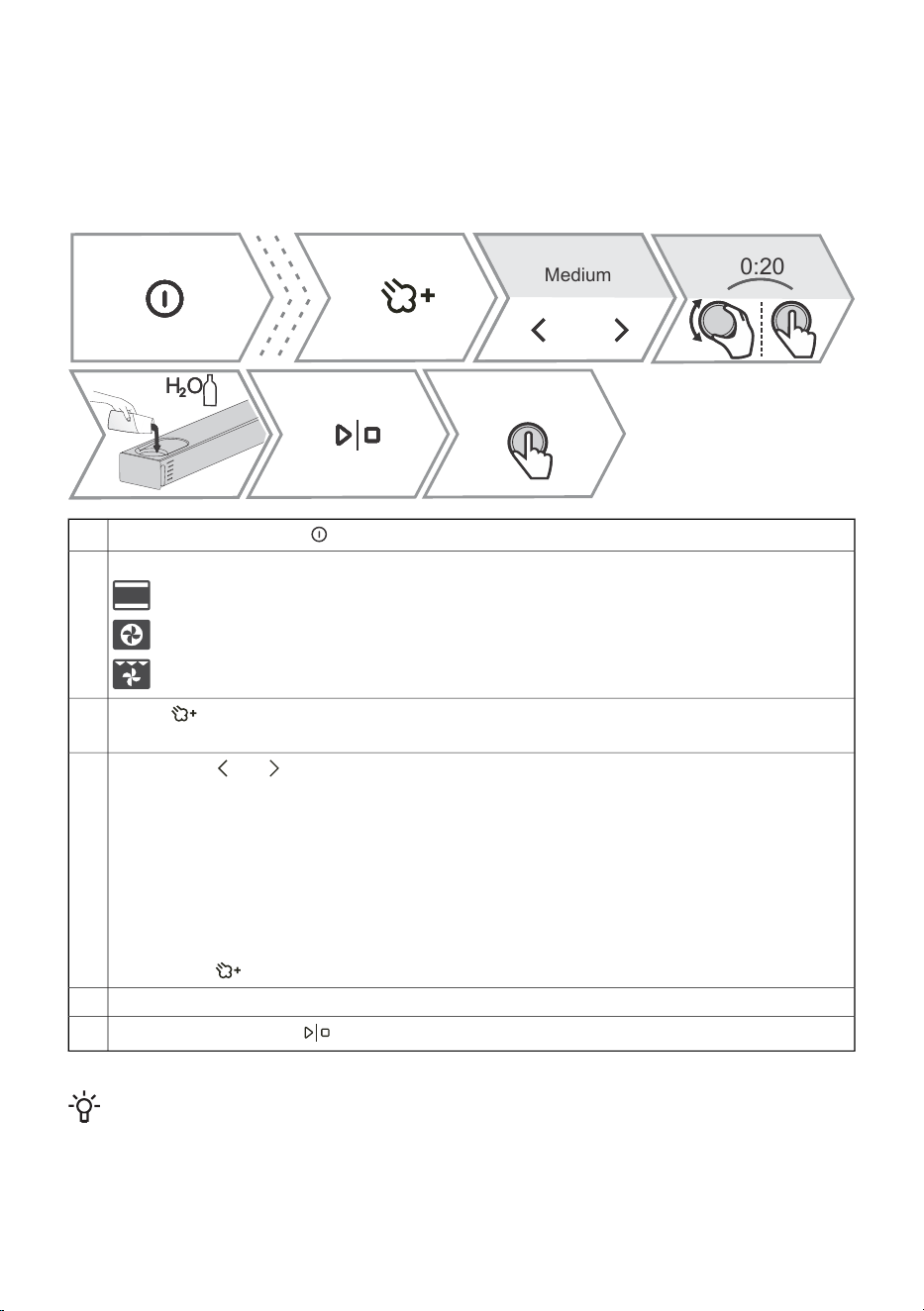
5.5 Steam injection during the baking process
The addition of steam roasts the food surface more and creates greater crispness.
Just the right amount of steam created during this process cooks the surface of the food better and
improves its crispness, while the inside of the food remains soft and fluffy. It is recommended to use
the steam addition system when baking goods such as bread, fresh rolls, sponge rolls and cakes,
and when cooking small pieces of poultry and vegetables.
H O
2
H OH O
2
0:20
Medium
Switch on the appliance .
1.
Rotate the KNOB to select the system.2.
Top heater + Bottom heater
Hot air
Large grill + Fan
Press to add steam during cooking.
3.
The addition of steam is only possible with the above three systems.
By pressing or you select the steam intensity level, and you select the steam operating
time by rotating the KNOB.
4.
Low level - suitable for cooking large pieces of meat, raising dough, fish.
Medium level - suitable for baking fresh buns, sponge cakes, soufflés and cooking poultry.
High level - suitable for baking bread.
For cooking fish, baking bread and cakes and cooking chicken we recommend adding steam
in the initial phase of cooking, in the first 10-15 minutes.
Set the duration of steam addition (max. 2 hours)
Confirm the selection by pressing the KNOB.
The symbol lights up fully, which means that the steam addition is successfully activated.
Fill the water tank (see chapter Filling the water tank).5.
To start cooking, touch .
6.
INFORMATION!
The addition of steam can also be switched on or off during the cooking process.
21
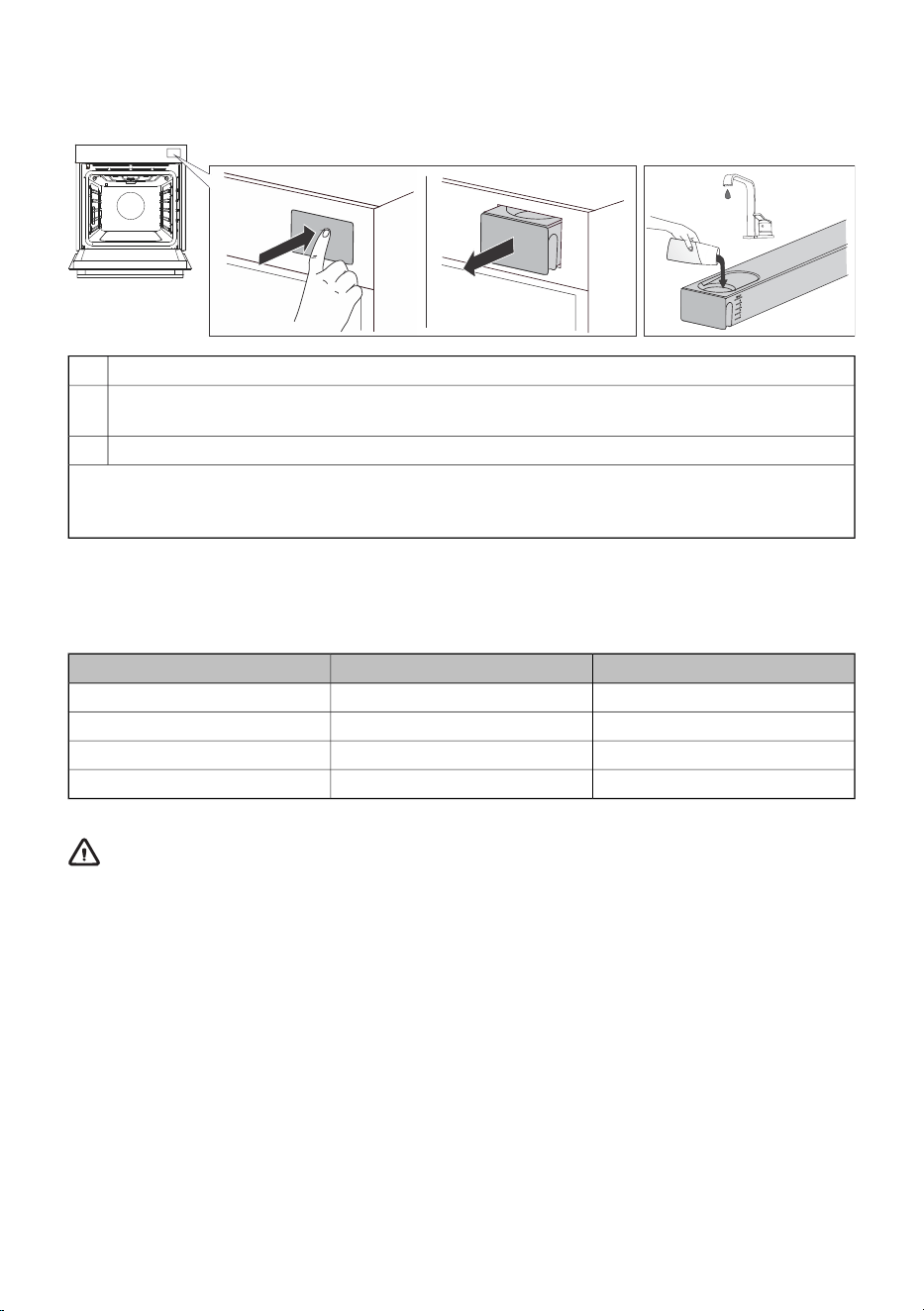
5.6 Filling the water tank
The water tank allows for independent feeding of water into the oven.
Remove the water tank from the housing by pressing on the door.1.
Open the cover. Clean the tank with water.2.
Assemble the tank and pour in fresh water.
Push the tank back into the housing to the end position.3.
NOTE: After cooking, the remaining water in the steam system is pumped into the water tank. The
cover and the water tank can be cleaned with conventional liquid cleaners that do not contain
abrasives.
The table below shows the levels marked on the water tank and the approximate water consumption
for one cycle for different choices of systems with the addition of steam. If water in the water tank
runs out, top it up.
60 min30 minLevel
Level 2Level 1Low
Level 2Level 2Medium
Level 3Level 2High
MAX levelLevel 3Steam
WARNING!
If you do not observe the MAX indicator and pour too much water into the tank, excess
water might spill onto the ground through the gap between the tank cover and the tank.
The water that is poured into the tank must have a room temperature of about 20 °C (+/–
10 °C). Do not use distilled water, tap water with high chlorine content, or other similar
liquids. Use only fresh tap water, softened water or non-carbonated mineral water.
22
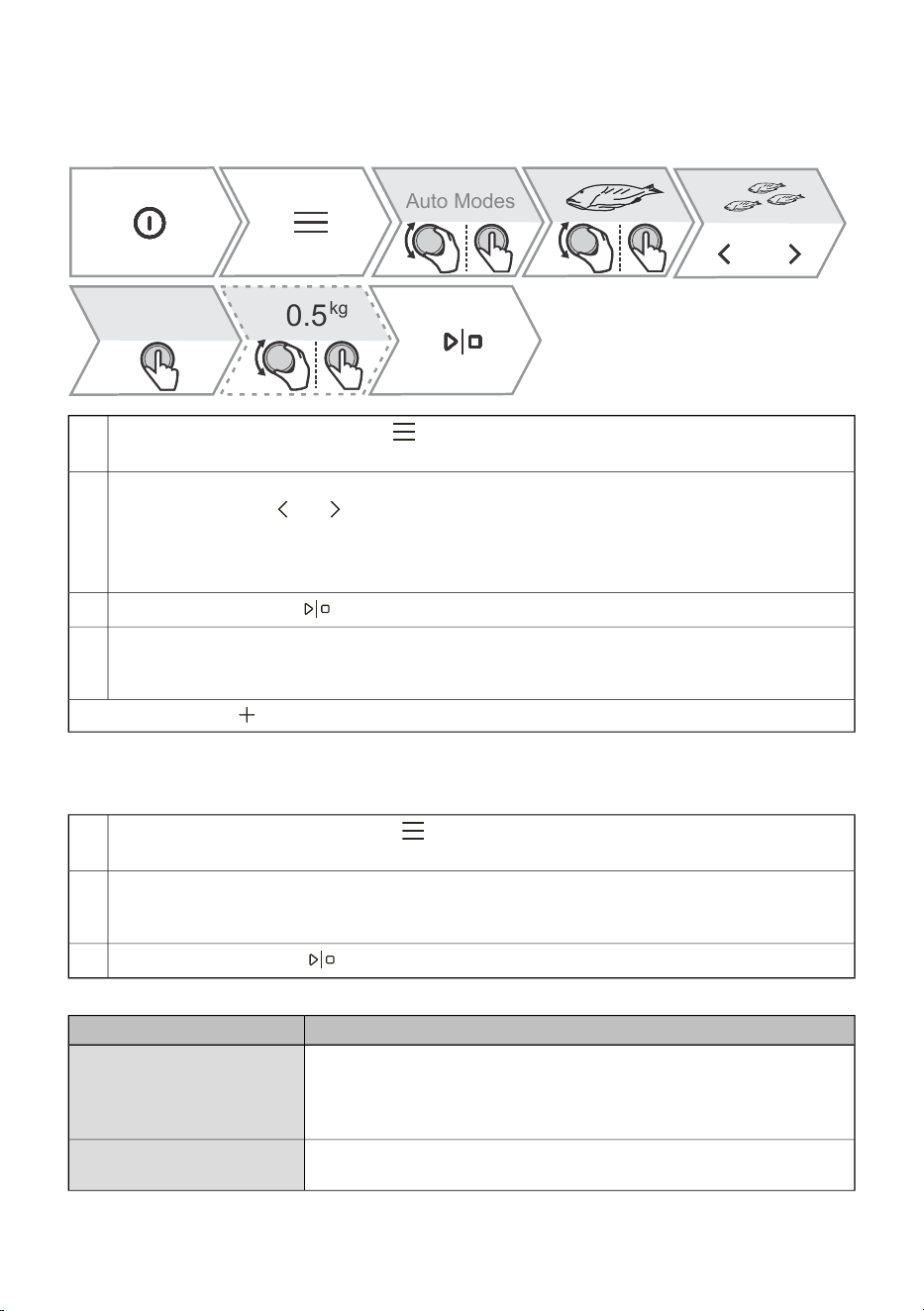
5.7 Automatic menu
The programme offers you a large selection of preset recipes that were approved by chefs and
nutritionists.
0.5
kg
Auto Modes
Switch on the appliance and select . Rotate the KNOB to select Auto. Confirm by pressing
the KNOB to enter the submenu.
1.
Rotate the KNOB to select the desired category and confirm the selection by pressing the
KNOB. By pressing or select a subcategory, then rotate the KNOB to specify the type
of dish and confirm the selection by pressing the KNOB again.
The recipes have a predetermined system, temperature and cooking time.
2.
NOTE: For some dishes, you can change the weight and degree of cooking.
To start cooking, touch .
3.
Some dishes also include the quick preheating function. When the set temperature is reached,
an acoustic signal will sound. The display will show Insert the dish. Open the door and insert
the dish. The programme automatically resumes cooking with the selected settings.
4.
NOTE: By touching you can see a detailed description of the current selection.
5.8 Extra
Switch on the appliance and select . By pressing the KNOB, select Extra. By pressing
the KNOB again, confirm the selection to enter the submenu.
1.
Rotate the KNOB to select a function (see table below). Confirm by pressing the KNOB.
Preset values are displayed. Some functions allow you to set the temperature and cooking
duration.
2.
To start cooking, touch .
3.
UseProgramme
Frying food with hot air, without added fat. Faster and healthier version
of "fast food". This cooking method gives the food a crispy crust,
without added fat. It is a healthy version of "fast food" with a lower
calorie content.
Air Fry
The dough will rise faster and more evenly without drying out the
surface. While the dough is rising, do not open the door.
Proofing
23
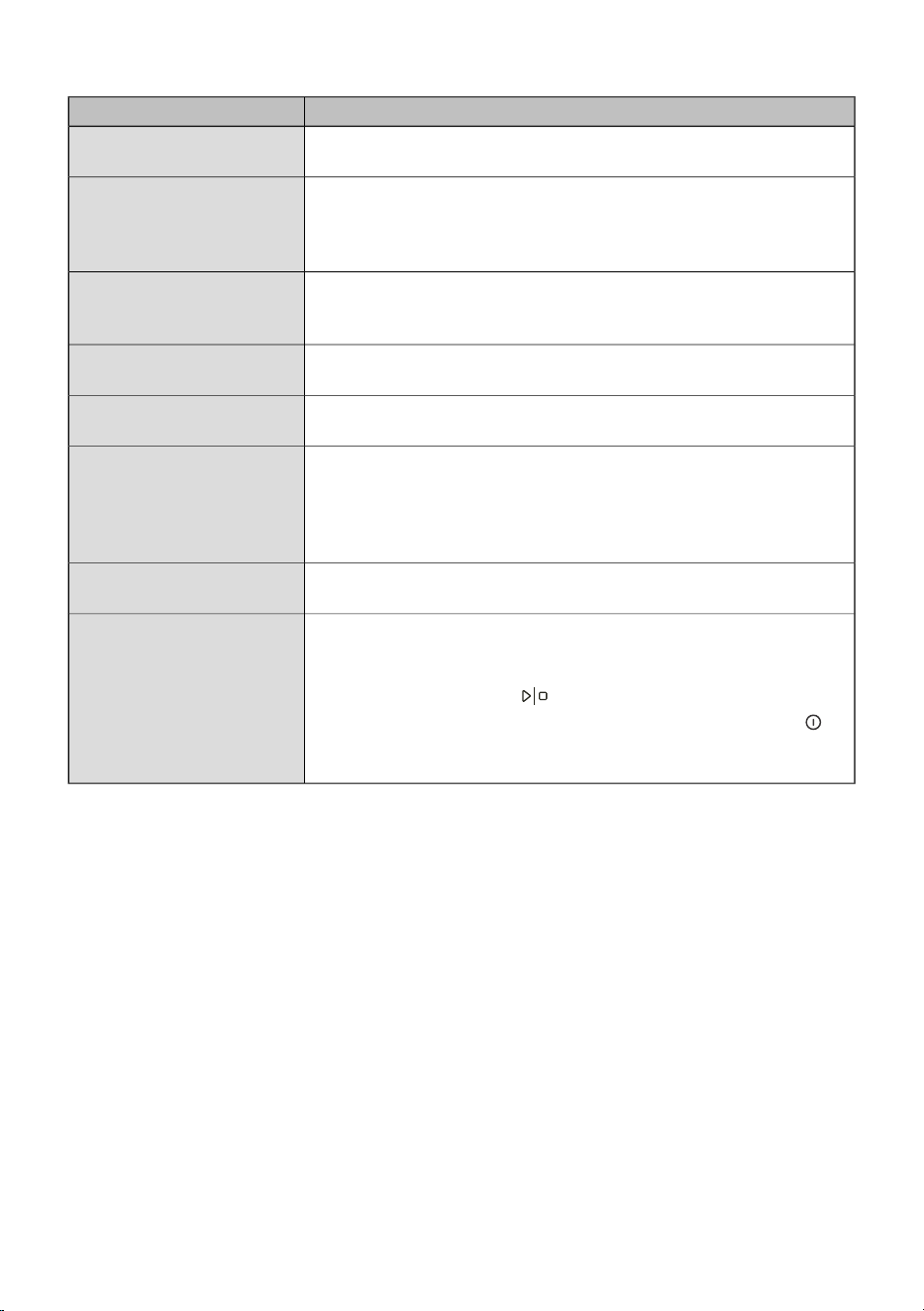
Table continued from last page
UseProgramme
With the help of air, you reduce the amount of moisture in the food
and thus prolong its durability.
Dehydrate
Used for the slow defrosting of frozen food (cakes, pastries, bread
and fruit).
Halfway through defrosting, turn the food over and separate the pieces
if they are stuck to each other.
Defrost
This mode allows you to gently reheat ready-made dishes with hot
air and steam. Steam prevents food from drying out by preserving
the juiciness, taste and texture of the food.
Reheating with steam
It is used to keep already prepared dishes warm. Do not open the
door during operation.
Keep warm
Useful if you want to preheat the plates or cups so that the food stays
warm for a long time. You can set the temperature range.
Plate warming
The process by which we prolong the durability of the food. Use jars
with a rubber sealing ring and lid. Do not use jars with threaded or
metal caps or metal tins. Pour 1 litre of hot water (approximately 70
°C) into the deep tray and place 6 identical jars into the tray. Place
the baking tray in the oven on the second guide.
Preserving
Suitable for sterilisation of all types of bottles. Sterilisation is a process
that destroys all types of microorganisms.
Sterilise bottles
The Sabbath function allows the food in the oven to stay warm without
having to turn the oven on and off.
Set the duration of operation (between 24 and 72 hours) and
temperature. By pressing , the countdown begins.
All sounds and operations are switched off except for the key .
Sabbath
NOTE: In case of a power outage, Sabbath mode will be deactivated
and the oven will return to its initial state.
24
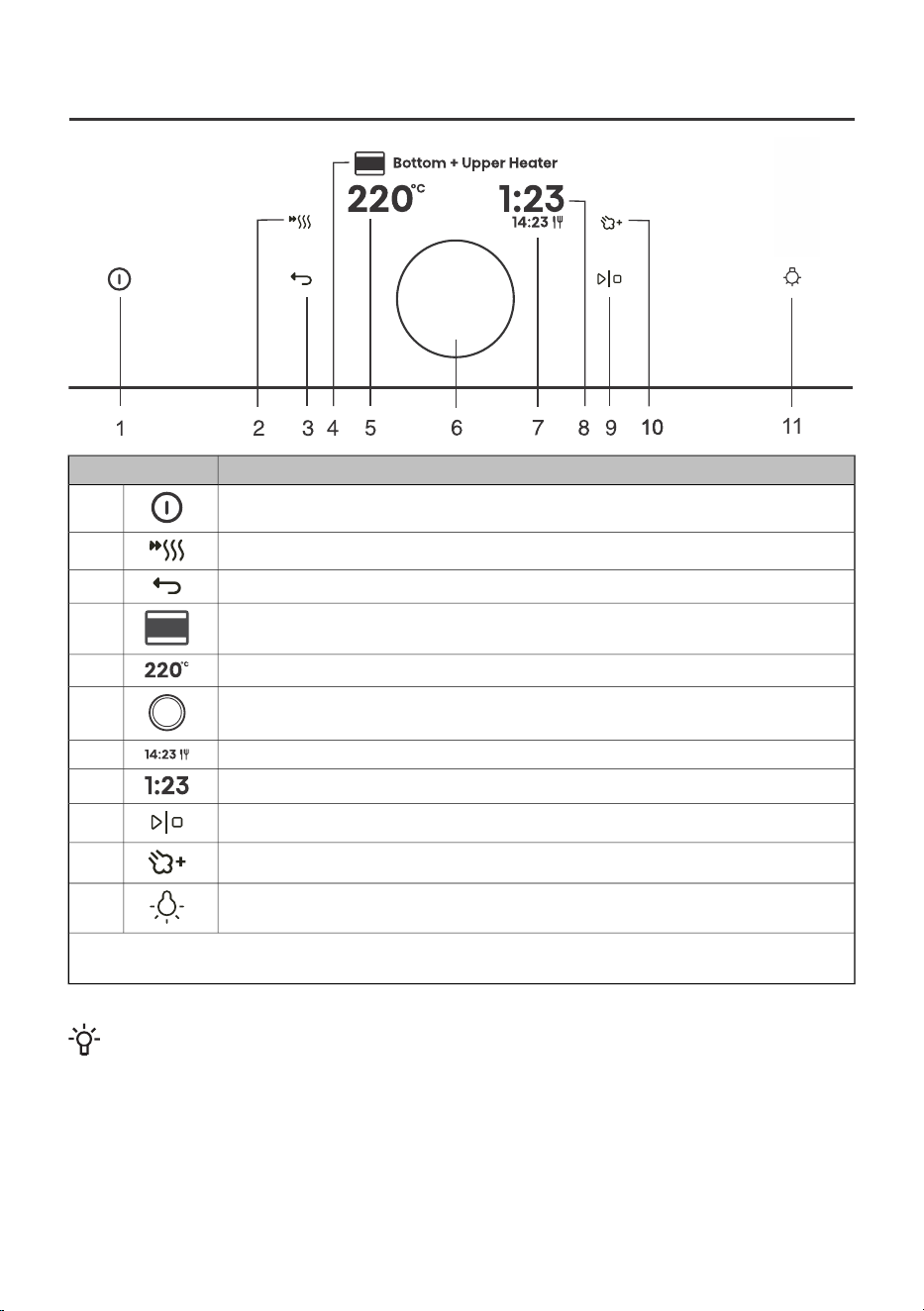
6. Starting the cooking process
11
UseKey
Switching the oven on and off1.
Switching the fast preheat on and off2.
Exit the current state without saving3.
Selected cooking system4.
Selecting the temperature5.
Button for selecting and confirming settings6.
End time7.
Elapsed cooking time8.
Starting and stopping the operation9.
Addition of steam10.
Switching the oven light on and off11.
NOTE: Only the keys that are enabled in the current menu are illuminated (fully or partially) on the
control panel.
INFORMATION!
During the cooking process, you can change the system, temperature and timer functions.
7. End of cooking by touching
After cooking is completed, the display shows Baking finished.
25
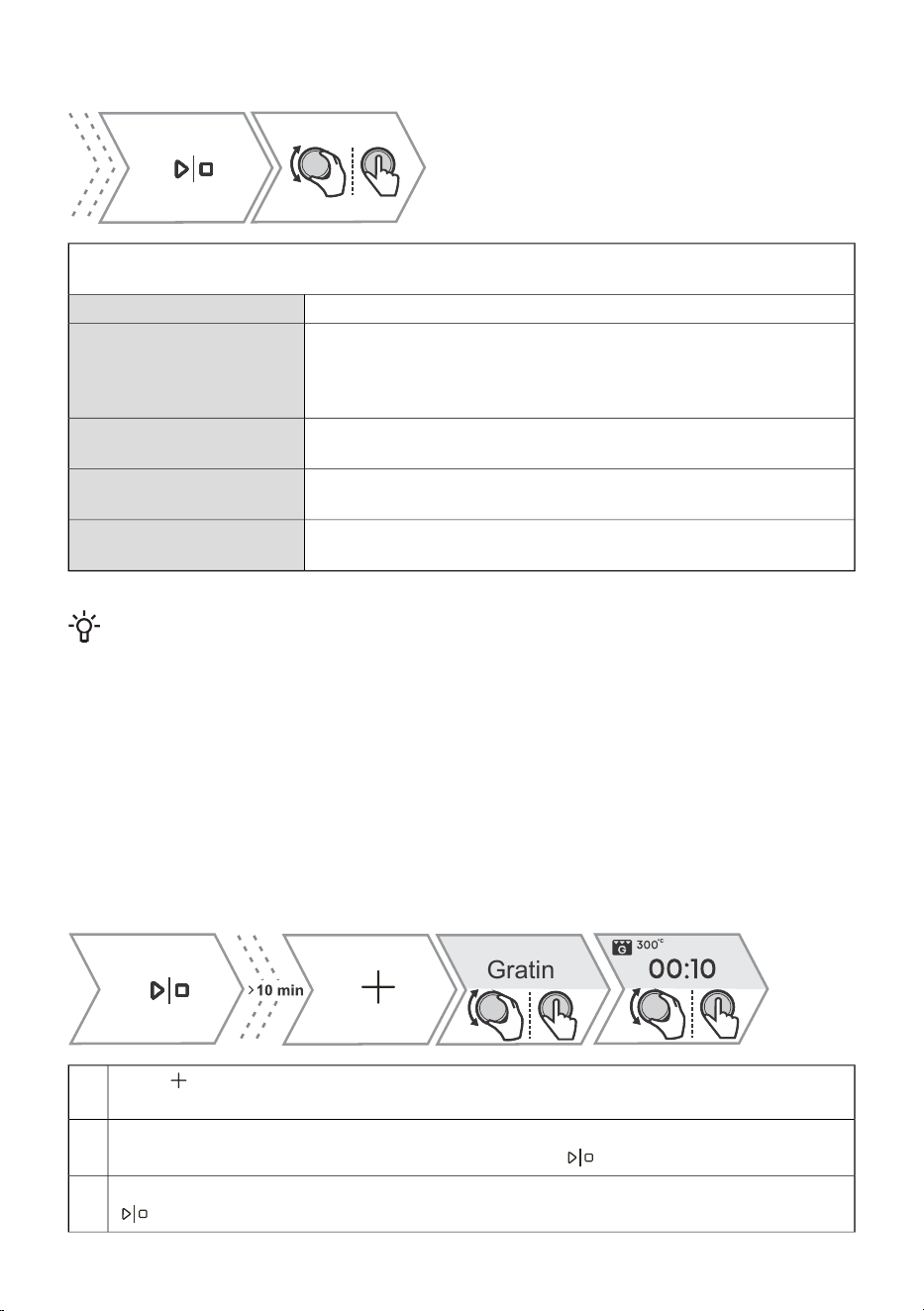
You can also stop the operation by touching Baking finished.
By turning the KNOB, you can select a new setting. Confirm by pressing the KNOB.
Menu content varies depending on the control options available at that time.
Select End to finish cooking. The main menu appears on the display.Baking finished
By selecting this, you extend the cooking with the same system and
temperature settings.
NOTE: If you had a cooking duration set, the time is counted forward
from where it was stopped.
Add extra time
Select to cook the top of the dish even more (see chapter 7.1 Gratin
( + menu)).
Gratin
Select to further brown the underside of the dish (see chapter 7.2
Crispy bottom).
Crispy bottom
Thise mode allows you to save the selected settings to your favourites
and use them again later (7.3 Favourites - save your own settings).
Add to favorite?
INFORMATION!
After the operation is completed, all timer settings are also stopped and deleted, except for the
egg timer. Time of day (clock) will be displayed. The cooling fan will continue to operate for a
while.
After the use of the oven, some water may be left in the condensate channel (underneath the
door). Wipe the channel with a sponge or a cloth.
7.1 Gratin ( + menu)
This function is used in the last phase of cooking, when we add dressing/topping to the dish or we
want to crispen its surface. When using the gratin function, a crispy golden yellow crust is formed on
the dish, which protects it from drying, and at the same time gives the dish a nicer appearance and
better taste.
Gratin
Press and rotate the KNOB to select Au gratin. The function is available after 10 minutes
of operation.
1.
The display shows the preset system (large grill) and the temperature 230 °C. Set the operating
time (max 10 min) and confirm the selection by touching .
2.
The function can also be switched off during operation. Switch off the cooking by touching
.
3.
26
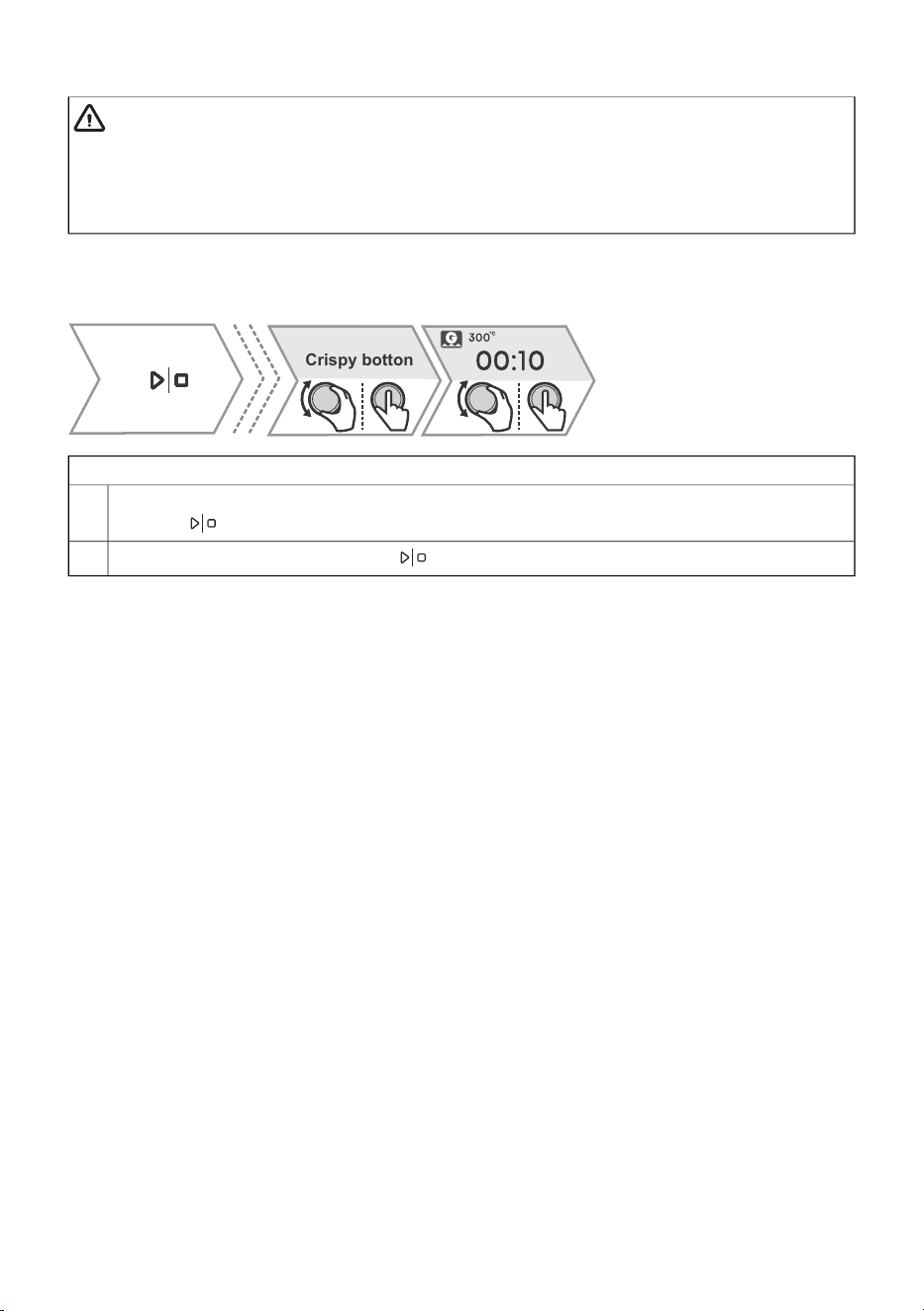
Table continued from last page
WARNING!
Control the cooking. When using the au gratin function, the oven reaches high
temperatures.
The au gratin function works for a maximum of 10 minutes, then the oven switches off
automatically.
7.2 Crispy bottom
Crispy botton
This function is available only at the end of cooking and can be activated for 10 min.
In the final menu, rotate the KNOB to select Crispy bottom. Confirm your selection by
touching .
1.
Switch off the cooking by touching .
2.
27
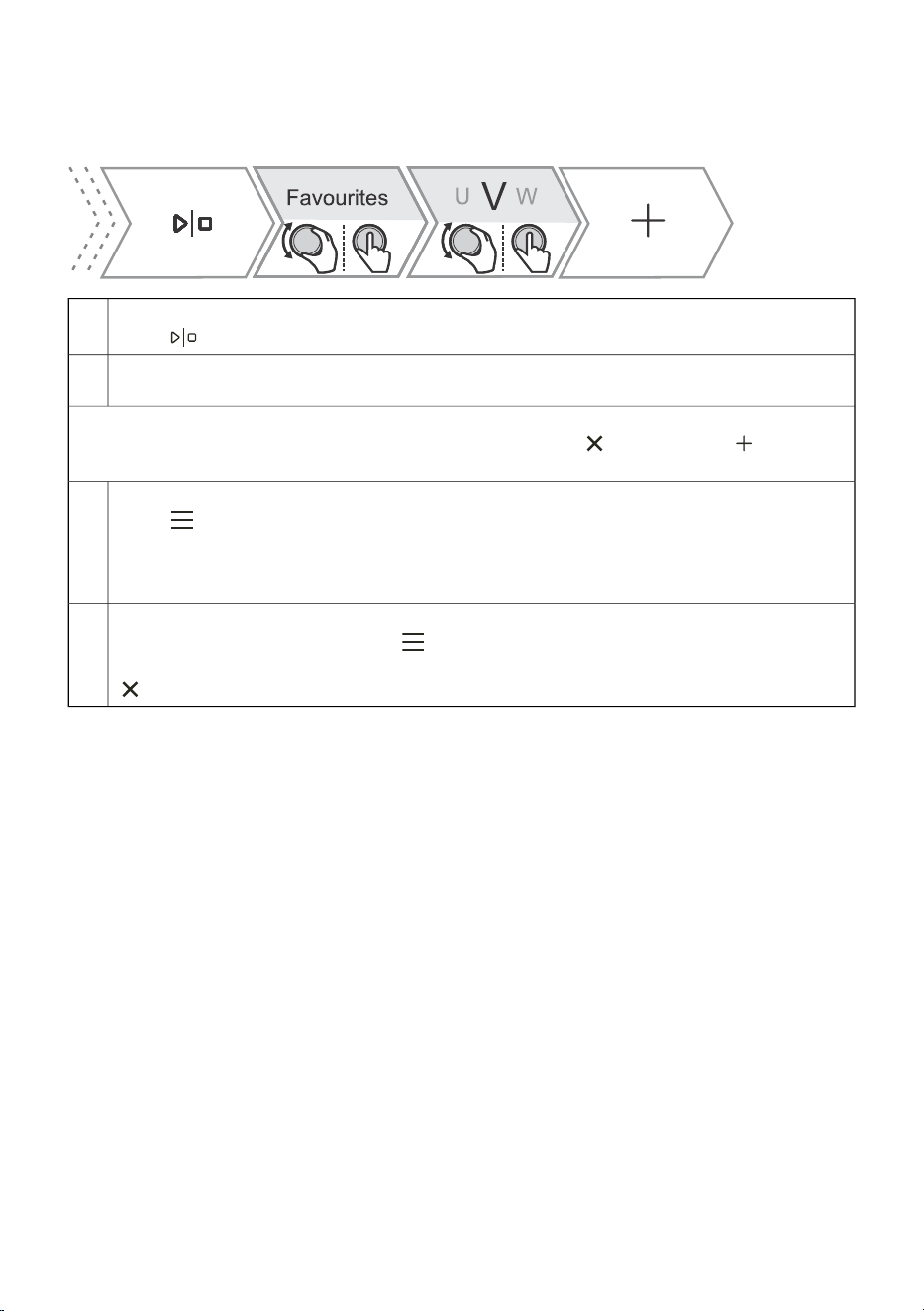
7.3 Favourites - save your own settings
Add to favourites is a feature that allows you to save your favourite and most frequently used settings
and use them again in the future. Up to 12 recipes can be stored.
Saving recipes in settings.1.
Press and rotate the KNOB to select Add to favorite?. Confirm by pressing the KNOB.
Saving the setting after cooking is completed.
2.
In the final menu, rotate the KNOB to select Add to favorite?. Confirm by pressing the KNOB.
You can also change the name of a saved setting. Rotate the KNOB to select the letter and confirm
it by pressing the KNOB. If necessary, delete the character with . Confirm with to save
your favourite recipe.
Displaying already saved recipes.3.
Press . Rotate the KNOB to select My modes. Confirm by pressing the KNOB to enter
the submenu. Saved recipes are displayed.
NOTE: You can also change the preset values for already saved recipes and save them under
a new name after cooking.
Deleting already saved recipes4.
Switch on the appliance and select . Rotate the KNOB to select My modes. Confirm by
pressing the KNOB to display already saved recipes. Select a recipe and delete it by pressing
.
28
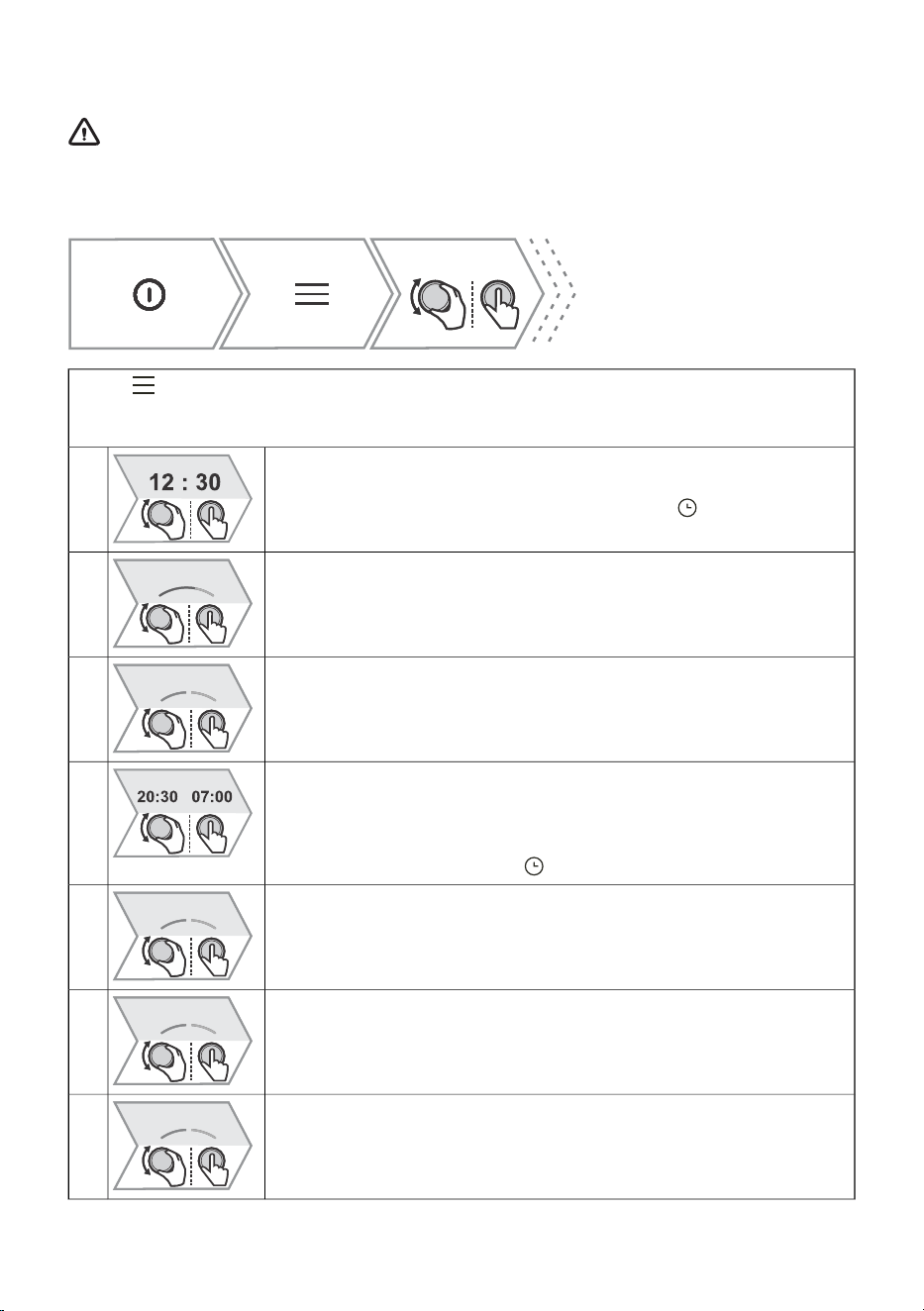
8. General settings
WARNING!
After a power outage or after the appliance is switched off, additional function settings
will remain stored for no more than a few minutes. Then, all settings, except for the acoustic
signal volume and display dimmer will be reset to factory defaults.
Press . Rotate the KNOB to select Settings. Confirm by pressing the KNOB to enter the
submenu.
Rotate the KNOB to edit the individual settings. Confirm the selection by pressing the KNOB.
Clock
Set the hours and minutes.
1.
You can select the 12h or 24h display by touching .
Volume
You can choose between four levels of volume (no sound, low, medium,
high).
2.
Touch Sound
Enable or disable key sound.
3.
Night mode
This feature automatically reduces display brightness between 19:00 and
7:00 and turns off the clock display as well as the acoustic signals. To
activate night mode, specify the start time and end time of operation. Turn
off the night mode by pressing .
4.
Display
The function allows you to turn the daytime display on or off. It is
deactivated by default (OFF). If the function is turned on (ON), electricity
consumption may increase.
5.
Fast preheat settings
The function activates automatic preheating to cooking systems that allow
it.
Turn it on (ON) or off (OFF).
6.
Heating systems
The function activates the display of all cooking systems on the display
unit.
Turn it on (ON) or off (OFF).
7.
29
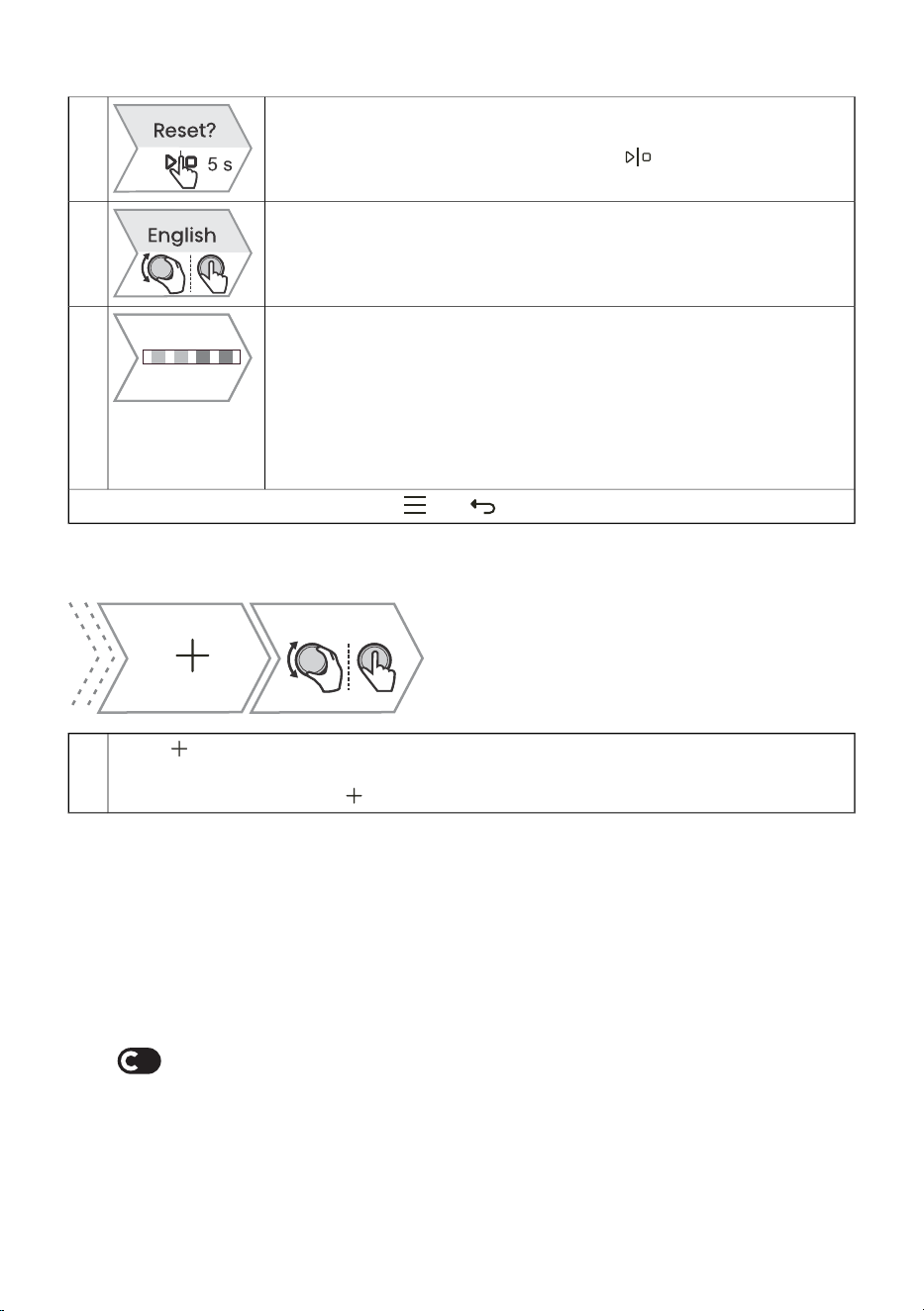
Table continued from last page
Resets - Factory reset
This function resets the appliance to factory settings. The display will show
Reset, which is confirmed by long pressing .
8.
Language
The display shows the default language (English). If the language in which
the texts are displayed on the display does not suit you, choose another
one.
9.
Water hardness
You can choose between five water hardness levels. The default setting
is level 3 - medium hard water.
Cleaning of the steam system depends on both frequency of baking with
steam injection and on the hardness of the water used.
The hardness of the water must be adjusted before the first use. If the
water is softer or harder than the default setting, you can change the set
hardness level.
10.
To exit the general settings menu, touch or
8.1 Display lock (+ menu)
Press and rotate the KNOB to select Display locked. Confirm the selection by pressing
the KNOB. The screen is now locked.
To unlock the screen, touch .
1.
• If the lock is activated with no timer function engaged (only clock is displayed), then the oven will
not operate.
• If the lock is activated after a timer function has been set, then the oven will operate normally;
however, it will not be possible to change the settings.
• When the keys are locked, you cannot change the cooking systems or additional functions. You
can only turn off the cooking.
• The keys remain locked even after the oven is switched off. To select a new system, you must
deactivate the lock.
9. ConnectLife
Connecting the appliance to the ConnectLife application
ConnectLife is a smart home platform that connects people, devices and services. The ConnectLife
application includes advanced digital services and carefree solutions that allow users to monitor and
control appliances, receive notifications from a smartphone, and update software (supported features
may vary depending on your appliance and the region/country in which you are located).
30
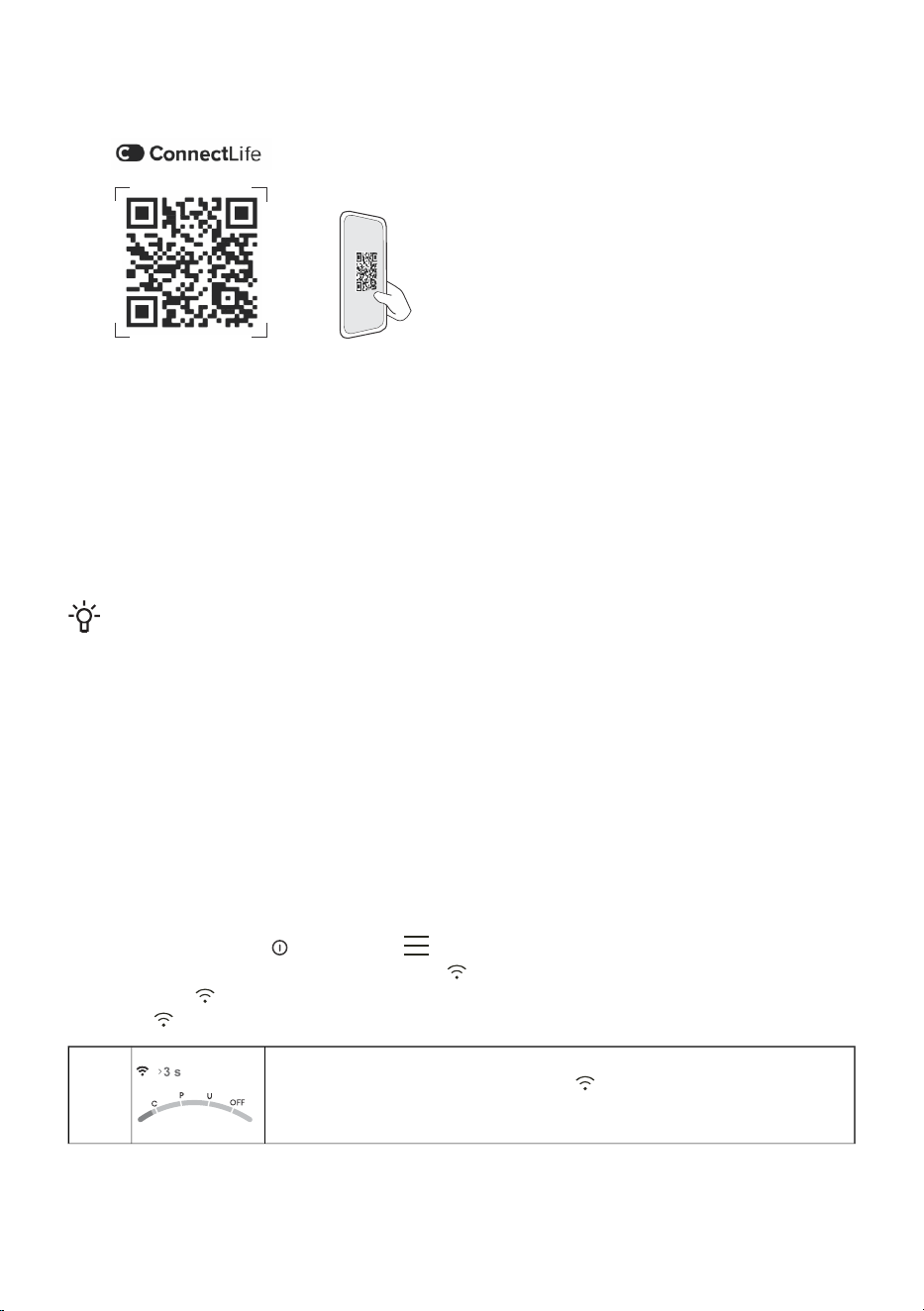
To connect your smart device, you need a home Wi-Fi network (only 2.4 GHz networks are supported)
and a smartphone equipped with the application ConnectLife.
To download the ConnectLife, application, scan
the QR code or search for ConnectLife in your
favourite app store.
1. Install the ConnectLife application and create an account.
2. In the ConnectLife application, go to the "Add device" menu and select the appropriate type of
device. Then scan the QR code (it can be found on the nameplate of the appliance; you can also
enter the AUID/MV number manually).
3. The application then guides you through the entire process of connecting the appliance to your
smartphone.
4. After a successful connection, the appliance can be operated remotely via the mobile application.
10. Wi-Fi management
INFORMATION!
If this setting is not available, then your oven is not fitted with a Wi-Fi module and does not
support internet connectivity.
When the Wi-Fi module is enabled and connections are successfully set up and synchronized, then
the oven can be controlled and operated via a mobile device and the ConnectLife app.
The Wi-Fi connection works in the same frequency range as some other devices (e.g. microwave
ovens and remote-controlled toys). Consequently, temporary or permanent disruption of the connection
is possible. In such cases, the availability of the offered functions cannot be guaranteed.
Ensuring the quality of the functions offered depends heavily on the signal strength. If the router is far
away from the appliance, there may be problems with the reliability of the connection.
10.1 Using Wi-Fi
Switch on the appliance , then press to activate the Wi-Fi function settings.
To enter different Wi-Fi module settings, press .
If you touched inadvertently, the setting can be cancelled by repeatedly long tapping (for 18
seconds) .
Switching on the Wi-Fi module:
After long-pressing (up to 3 seconds) , the display will show Wifi On
to indicate that the module is switched on. The symbol Wifi On will start
blinking.
1.
31
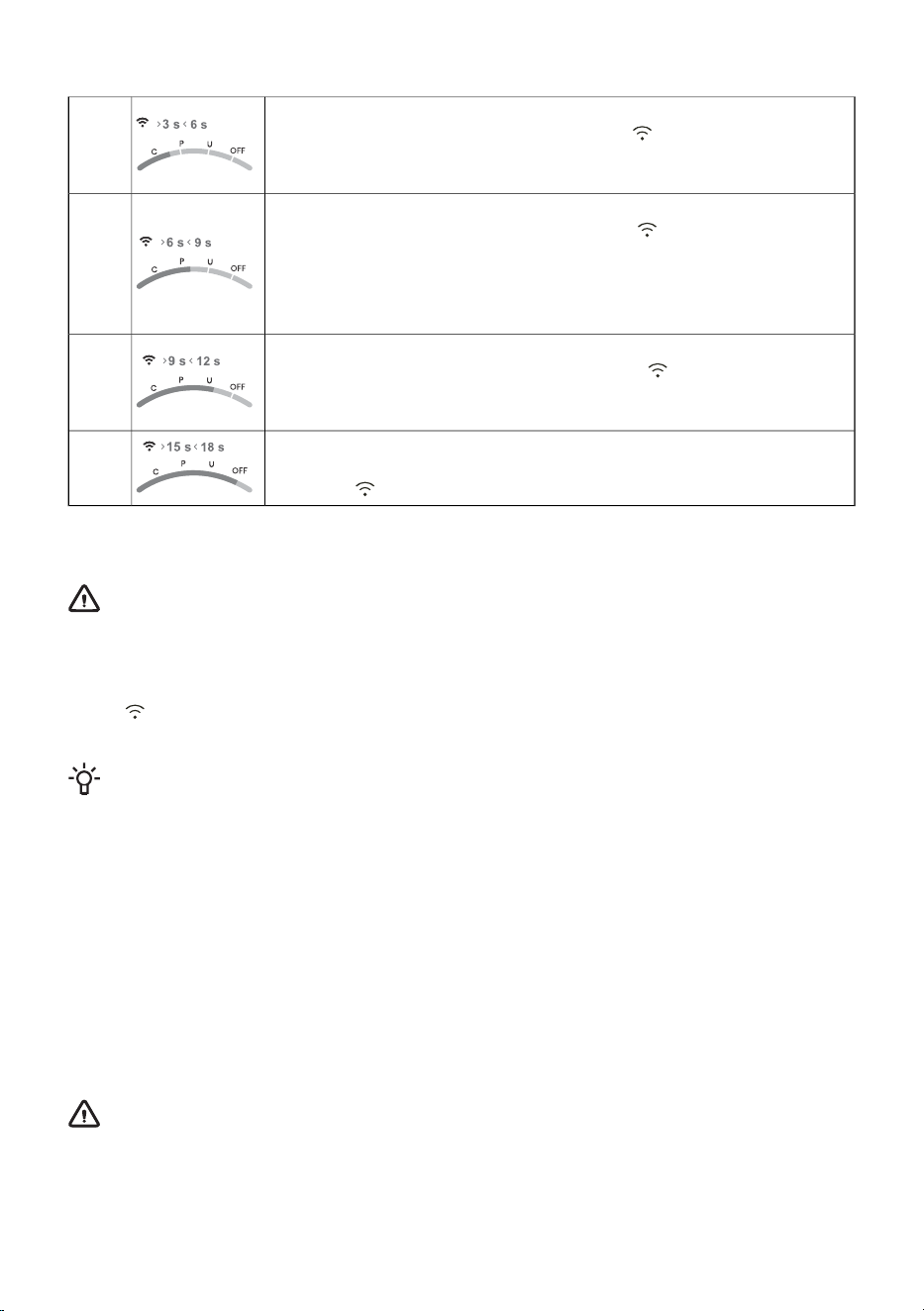
Table continued from last page
Connecting the appliance:
After long-pressing (between 3 to 6 seconds) , the display will show
Connection setup.
NOTE: For further settings, follow the instructions in the ConnectLife app..
2.
Connecting additional users:
After long-pressing (between 6 to 9 seconds) , the display will show
Pairing.
Use this setting to connect additional users to the appliance using the
ConnectLife app..
NOTE: For further settings, follow the instructions in the ConnectLife app..
3.
Removing all connected users:
After long-pressing (between 9 and 12 seconds) , the display will show
Unpair all.
Use this setting to remove all connected users from the ConnectLife app..
4.
Switching off the Wi-Fi module:
Switch off the Wi-Fi connection by long tapping (between 15 and 18
seconds) . The display will show Wifi Off.
5.
10.2 Managing the oven remote control
WARNING!
The remote monitoring function via a mobile device should not be used to replace direct
personal supervision of the cooking process in the oven. Always regularly check, in person,
what is actually going on in the oven.
Press . The display shows Remote to indicate the possibility of remote control via the ConnectLife
app.,
INFORMATION!
For safety reasons, some functions are not available via remote access.
• If the oven is in standby mode and you open the oven door, the remote control option has
to be enabled again.
• If oven door is opened during the baking process, the remote control option on the oven is
disabled.
• Any user activity on the control unit will automatically disable the remote control option on
the oven.
• Cancellation or completion of the baking program or process is the only option that remains
available regardless of whether remote control is enabled or not.
• Remote control is disabled when using a microwave system (not applicable to combined
microwave systems).
•
WARNING!
Always make sure the oven is used correctly and in compliance with the instructions,
especially when using remote control. Do not run the oven via remote access unless you
are certain about what exactly is in the oven.
32

Wi-Fi symbol on the display unitWi-Fi status
Wi-Fi is constantly dimly lit.Wi-Fi is disabled.
The Wi-Fi symbol is constantly fully lit.Wi-Fi is enabled and it is successfully connected
to the server.
Wi-Fi icon is fully lit and flashes.Wi-Fi is enabled and:
• a connection to the server is being
established,
• is in the state of setting up or establishing
connections,
• there is no connection to the server.
REMOTE symbol is not lit on the display unit.Remote control of the oven is not enabled.
REMOTE sign is fully lit on the display unit.Remote control of the oven is enabled.
33

11. General tips and advice for baking
Equipment:
• Use equipment made of heat-resistant non-reflective materials (supplied baking trays and dishes,
enamel-coated cookware, tempered glass cookware). Bright-coloured materials (stainless steel
or aluminium) materials reflect heat. As a result, thermal processing of food in them is less effective.
• Always insert the baking sheets and trays to the end of the guides. When baking on the wire rack,
place the baking dishes or trays in the middle of the rack.
• Do not place the baking trays directly onto the oven cavity bottom.
• Do not use the all-purpose deep baking tray on the 1st guide level while the appliance is operating.
• Do not cover the oven cavity bottom or the wire rack with aluminium foil.
• Always place the baking dishes onto the wire rack.
• When cooking on several levels at the same time, insert the deep all-purpose baking tray into the
lower level.
• If you are using parchment paper, make sure it is resistant to high-temperatures. Always trim it
accordingly. Parchment paper prevents the food from sticking to the baking tray and makes it
easier to remove the food from the baking tray.
• When baking directly on the wire rack, insert the all-purpose deep tray one level lower to serve
as a drip tray.
Food preparation:
• For optimum food preparation, we recommend observing the guidelines specified in the cooking
table. Choose the lower specified temperature and the shortest specified cooking time. When this
time expires, check the results and then adjust the settings as necessary.
• When cooking according to recipes from older cookbooks, use the bottom and top heater system
(as in conventional ovens) and set the temperature 10 °C lower than specified in the recipe.
• When cooking larger cuts of meat or pastry with higher water content, a lot of steam will be
generated inside the oven, which in turn may condense on the oven door. This is a normal
phenomenon which will not affect the operation of the appliance. After the cooking process, wipe
the door and the door glass dry.
Efficient use of energy
• Preheat the oven only if indicated in the recipe or in the tables in this instruction manual. If you
are using quick preheating, do not put food in the oven until the oven is fully heated, unless
otherwise recommended. When heating an empty oven, a lot of energy is consumed, so if possible,
we recommend that you prepare several dishes in a row or several dishes at the same time.
• Remove all unnecessary equipment from the oven during baking
• Unless it is absolutely necessary, do not open the oven door during baking.
• With longer cooking programs, you can switch off the oven approximately 10 minutes before the
end of cooking time to make use of the accumulated heat.
34
11.1 Cooking table
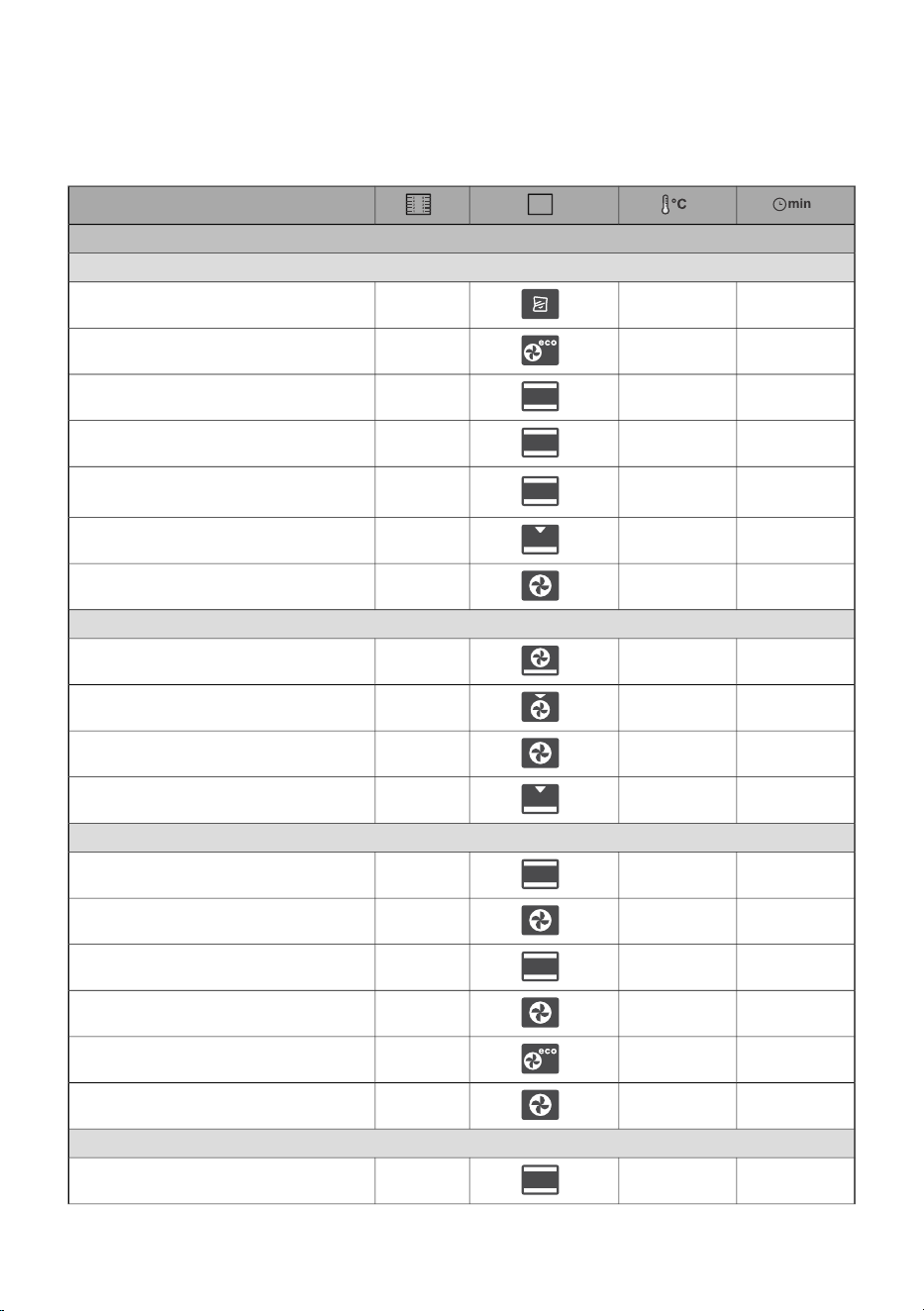
NOTE: Dishes requiring a fully pre-heated oven are indicated with a single asterisk in the table. *
Dishes that only require a 5-minute preheating of the oven are indicated with two asterisks. ** . In
this case, do not use the quick preheating mode.
Dish
PASTRY AND BAKERY PRODUCTS
pastry/cakes in moulds
35-50
95
3creme caramel (sous vide)
60-70
200-220
3sponge cake
60-70
180
2pie with filling
50-60
170-180
2marble cake
45-55
170-180
2
cake with leavened dough, Gugelhupf
(Bundt cake, pound cake)
35-45
170-180
3open pie, tart
30-35
170-180
2brownies
pastry on baking trays and dishes
60-70180-1902strudel
34-45200-2102strudel, frozen
13-18170-180*3sponge roll
30-40180-1902buchteln
biscuits, cookies
25-35160 *3cupcakes
30-40155-165 *2, 4cupcakes, 2 levels
17-22180 *2yeast-leavened small pastry
18-25160 *2, 4yeast-leavened small pastry, 2 levels
30-45200-2203puff pastry
25-30170 *2, 4puff pastry, 2 levels
cookies/biscuits
30-40150 *3piped cookies
35
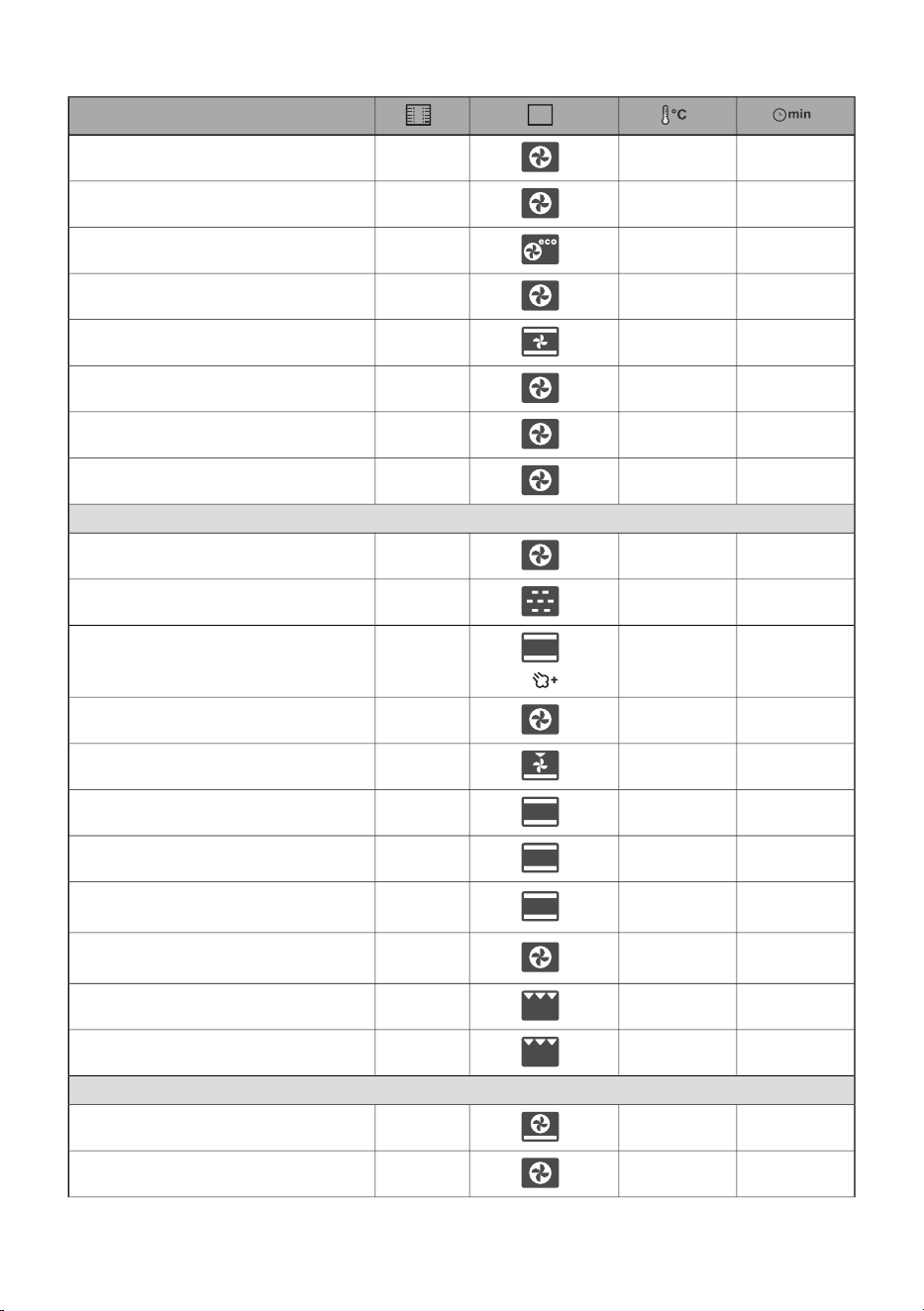
Table continued from last page
Dish
30-40150 *2, 4piped cookies, 2 levels
40-50145 *1, 3, 5piped cookies, 3 levels
40-50160-1803cookies/biscuits
20-25150-160 *2, 4biscuits, 2 levels
120-15080-100 *3meringue
120-15080-100 *2, 4meringue, 2 levels
15-20130-140 *3macarons
15-20130-140 *2, 4macarons, 2 levels
bread
30-4540-452rising and proofing
10-20
100
3bao buns
40-55190-2002bread on a baking tray
40-55190-200 *2, 4bread on a baking tray, 2 levels
30-45190-2003bread in a tin
30-45200-2102, 4bread in a tin, 2 levels
20-302302flatbread (focaccia)
20-30180-2003
fresh bread rolls (Semmel/morning
rolls)
15-20200-210 *2, 4
fresh bread rolls (Semmel/morning
rolls), 2 levels
4-6High5toast
5-8Medium5open sandwiches
pizza and other dishes
10-20230 *1homemade pizza
25-30210-220 *2, 4homemade pizza, 2 rack levels
36
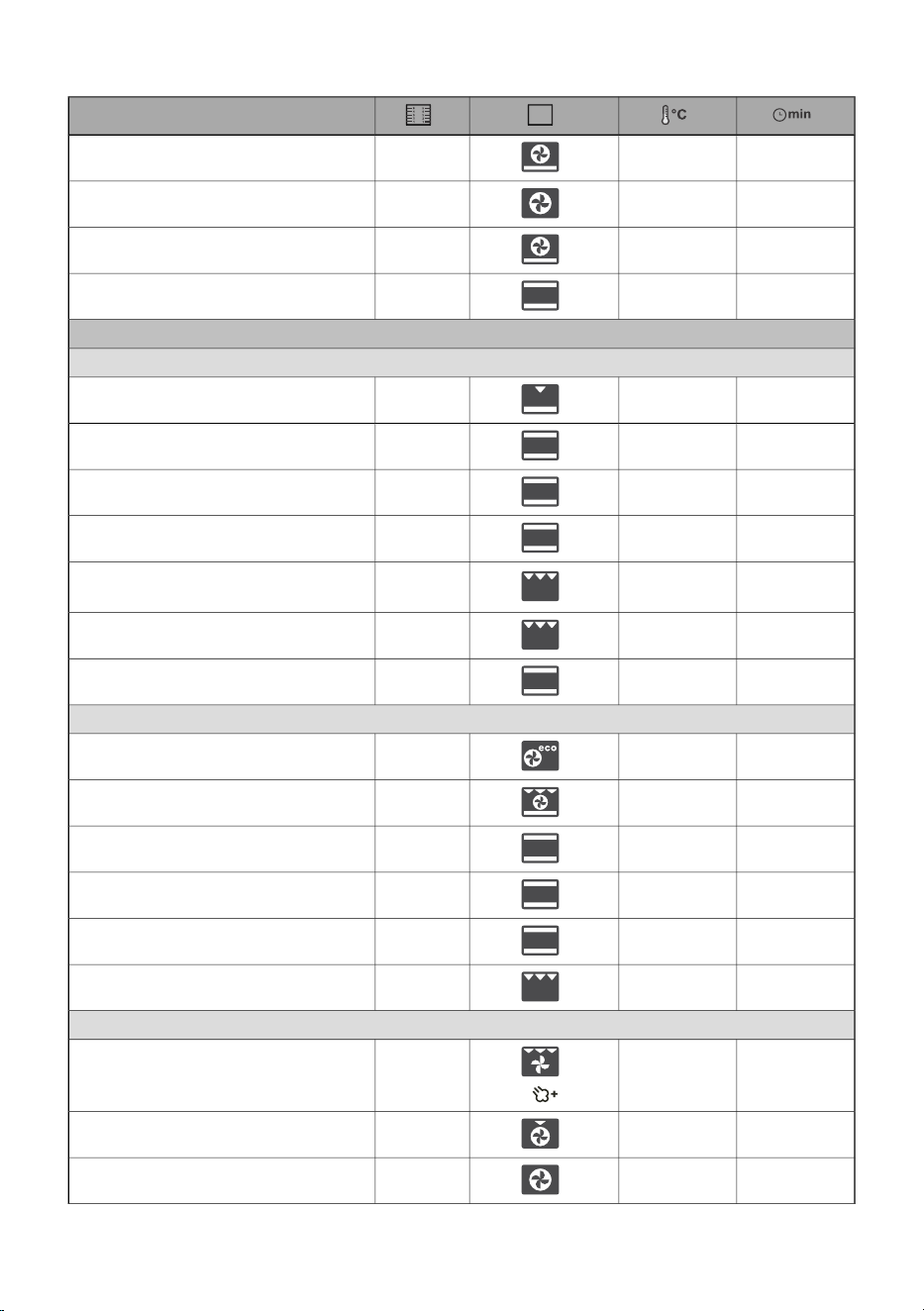
Table continued from last page
Dish
10-20200-2202frozen pizza
10-25200-2202, 4frozen pizza, 2 levels
50-60190-2002savoury pie, quiche
40-50180-1902burek
MEAT
beef and veal
130-160160-1702beef roast (loin, rump), 1.5 kg
90-120200-2102braised beef, 1.5 kg
40-60170-190 *2sirloin, medium done, 1 kg
250-300120-140 *2beef roast, slow cooked
25-30High4
beef steaks, well done, thickness
4 cm
25-35High4burgers, thickness 3 cm
120-150160-1702veal roast, 1.5 kg
pork
100-200200-2203pork roast, rump, 1.5 kg
90-120180-1903pork roast, shoulder, 1.5 kg
80-10080-100 *2pork fillet, slow cooking, 400 g
200-230100-120 *2pork roast, slow cooked
210-240120-140 *2pork ribs, slow cooked
20-25Medium4pork chops, thickness 3 cm
poultry
60-80200-2202poultry, 1.2–2.0 kg
70-90170-1802poultry with stuffing, 1.5 kg
45-60170-1802poultry, breast
37
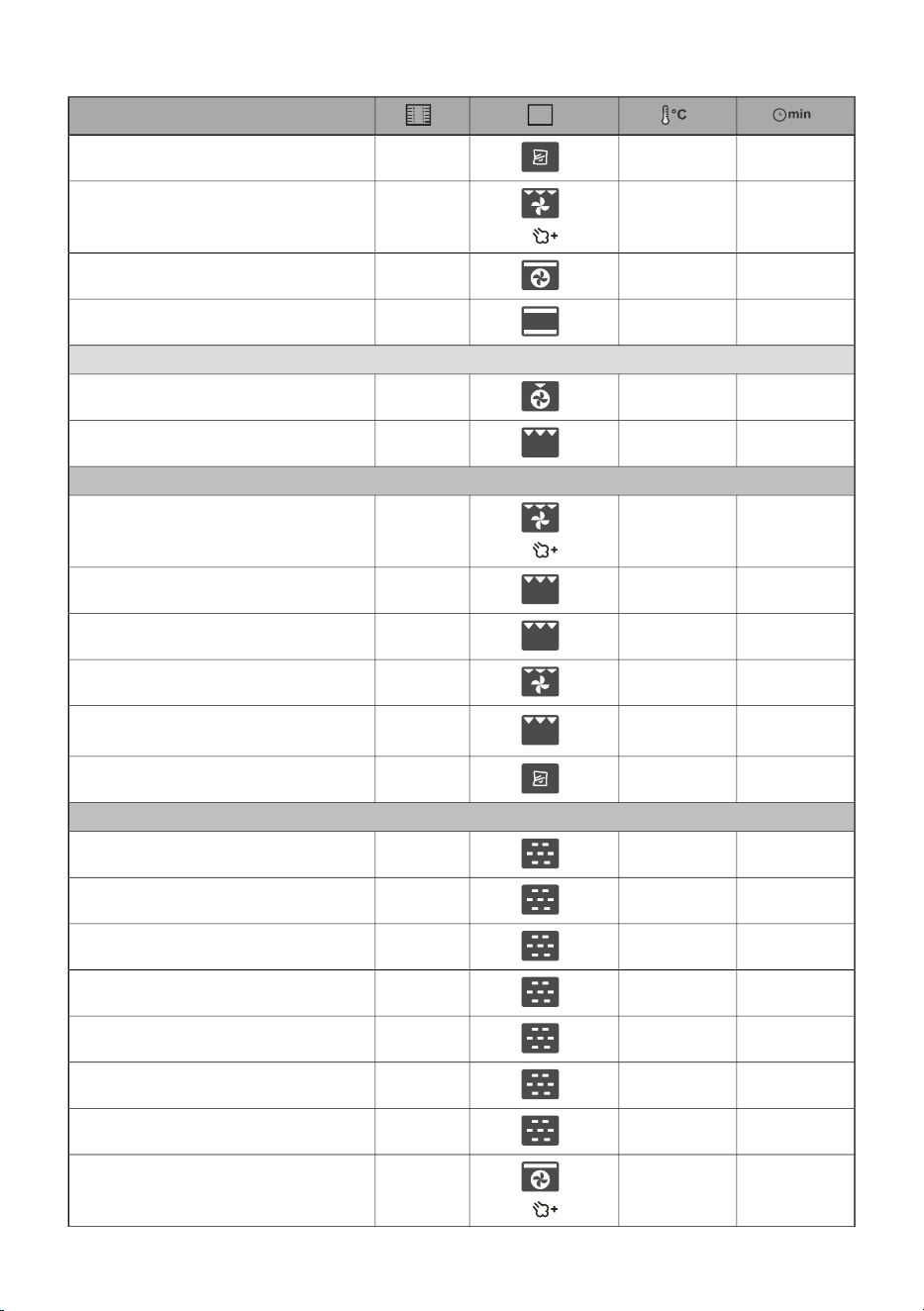
Table continued from last page
Dish
90-120
65
2poultry, chicken breast (sous-vide)
25-40210-2203chicken thighs
25-40
210-220
4chicken wings
60-90100-120 *3poultry, breast, slow cooked
meat dishes
60-70170-1802meat loaf, 1 kg
8-15High4grill sausages, bratwurst
FISH AND SEAFOOD
12-20230-2404whole fish, 350 g
8-12Low4fish fillet, thickness 1 cm
10-15Medium4fish steak, thickness 2cm
5-10230 *4scallops
3-10
Low4shrimps
l
180-240
85
3octopus, squid tentacles (sous vide)
VEGETABLES
15-25100
3broccoli, whole, 500 g
12-18100
3broccoli, blossoms, 5300 g - 1200 g
30-40100
3peas, 2.5 kg
15-20100
3cauliflower, blossoms, 500 g
25-35100
3carrots, whole, 500 g
25-35100
3squash, wedges, 500 g
15-30100
3asparagus, 500 g
30-40210-220 *3baked potatoes, wedges
38
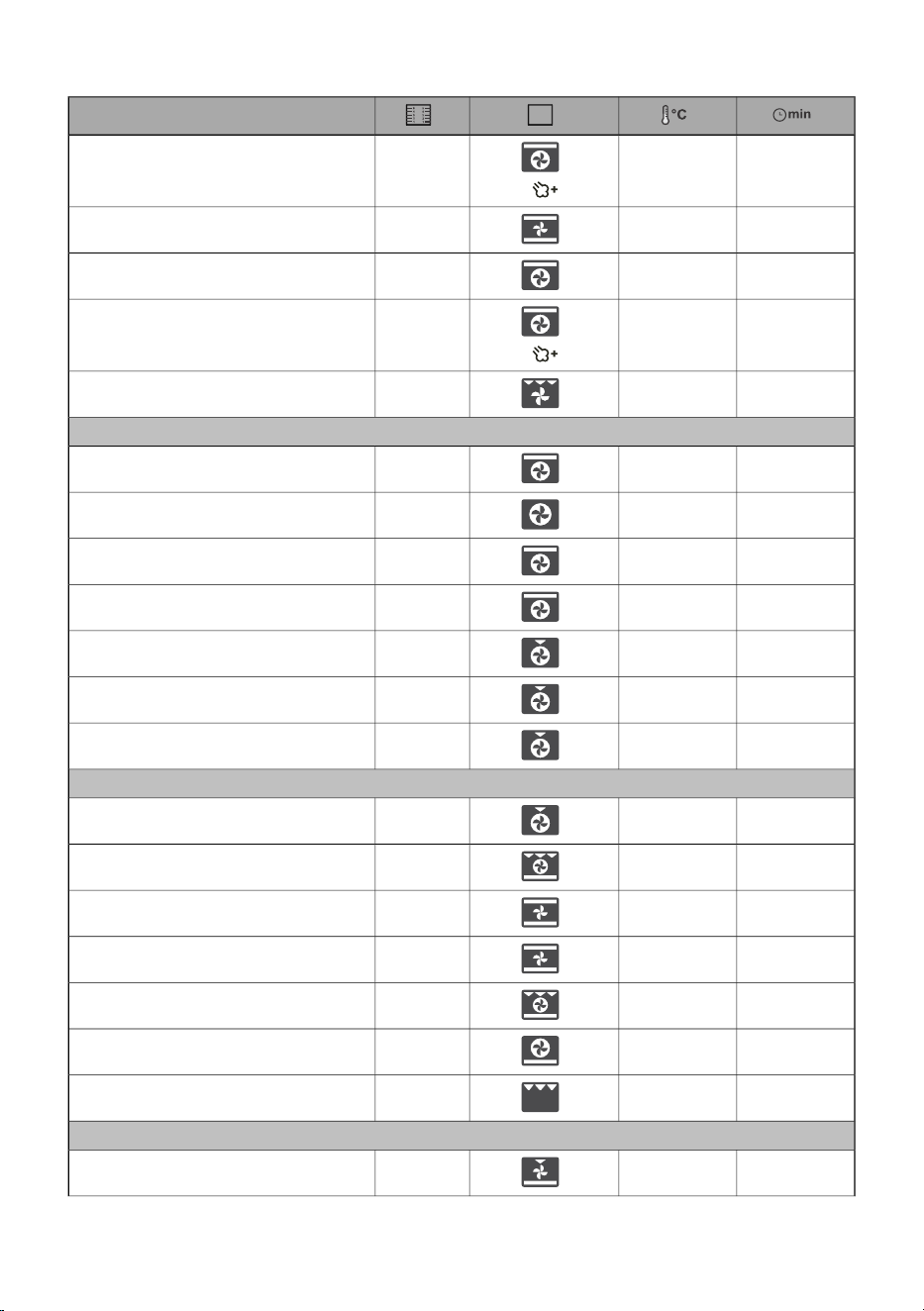
Table continued from last page
Dish
40-50200-210 *3baked potatoes, halved
30-40190-2003stuffed potato (jacket potato)
20-30210-220 *4French fries, home-made
30-40190-2003mixed vegetables, wedges
30-40190-2003stuffed vegetables
CONVENTIONAL PRODUCTS – FROZEN
20-25210-2203French fries
30-40190-2102, 4french fries, 2 levels
12-17210-220 *4chicken medallions
15-20210-2202fish fingers
30-40200-2102lasagne, 400 g
20-30190-2002diced vegetables
18-23170-1803croissants
BAKED PUDDINGS, SOUFFLÉS AND DISHES AU GRATIN
35-45180-1902potato moussaka
35-45180-1902lasagne
40-60160-1802sweet baked pudding
35-45160-180 *2sweet soufflé
30-45170-1903dishes au gratin
20-35180-2002stuffed tortillas, enchiladas
10-12High**4grilling cheese
OTHER
301802preservation
39

Table continued from last page
Dish
301253sterilization
/150-170 *2cooking in a bain-marie (double boiler)
/60-953reheating
15752plate warming
40
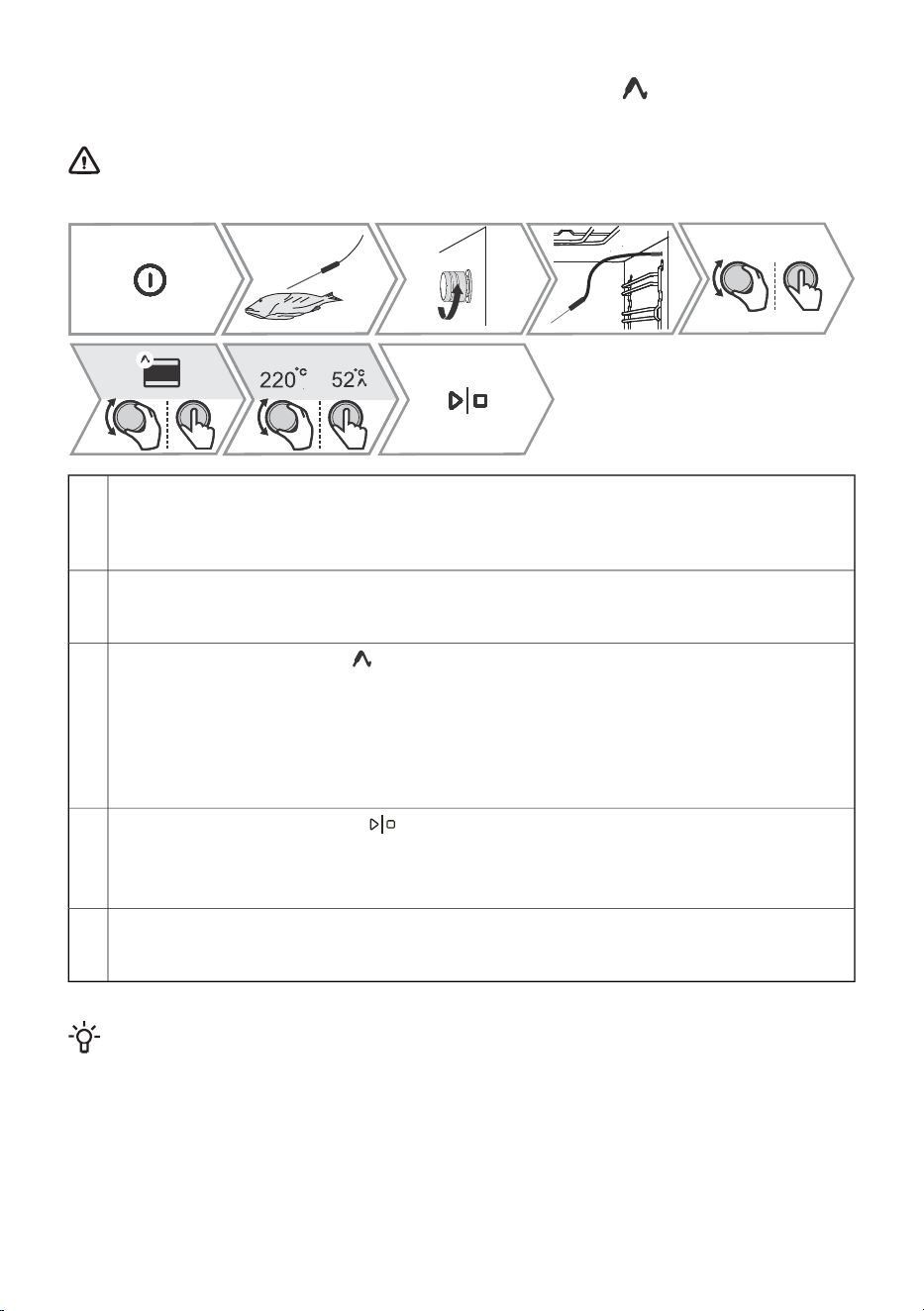
11.2 Cooking with a Temperature Probe ( BAKESENSOR)
The food probe allows for accurate monitoring of the core temperature of the food during cooking.
WARNING!
The food probe should not be in direct vicinity of the heating elements.
Stick the metal end of the probe into the thickest part of the food.
NOTE: To start cooking with the temperature probe, the current cooking process must first be
interrupted and then the temperature probe must be connected to the socket. By inserting the
probe into the socket, the preset functions on the oven are deleted.
1.
Unscrew the socket cover in the front right upper corner of the oven (see figure) and plug the
probe into the socket.
Rotate the KNOB to select auto or manual setting. Confirm the selection by pressing the KNOB.
2.
- In manual mode, the symbol will appear next to the system on the display unit, together
with the preset cooking temperature (in the temperature range up to 210 °C), which can be
changed. Also determine the core temperature of the food (in the temperature range from 30
to 99 °C). The use of manual mode is shown in the picture above.
3.
- In auto mode rotate the KNOB to select the dish. The recipes have a predetermined system,
temperature and cooking time. You can change the degree of browning
NOTE: When using the probe, setting the cooking time is not possible.
Confirm the setting by touching .
During cooking, the set temperature and current temperature of the foodstuff are alternated
on the display. If desired, you can change the cooking temperature or the desired core
temperature of the foodstuff during operation.
4.
When the set core temperature is reached, the oven will stop operating. The display will show
Baking finished. An acoustic signal will be heard which you may turn off with any key. After
one minute, the acoustic signal will be switched off automatically.
5.
INFORMATION!
The use of a temperature probe enables automatic cooking selection mode.
Correct use of the probe, by type of food:
• poultry: stick the probe in the thickest part of the breast;
• red meat: stick the probe into a lean part that is not marbled with fat;
• smaller chunks with bone: stick them into an area along the bone;
• fish: stick the probe behind the head, towards the spine.
41
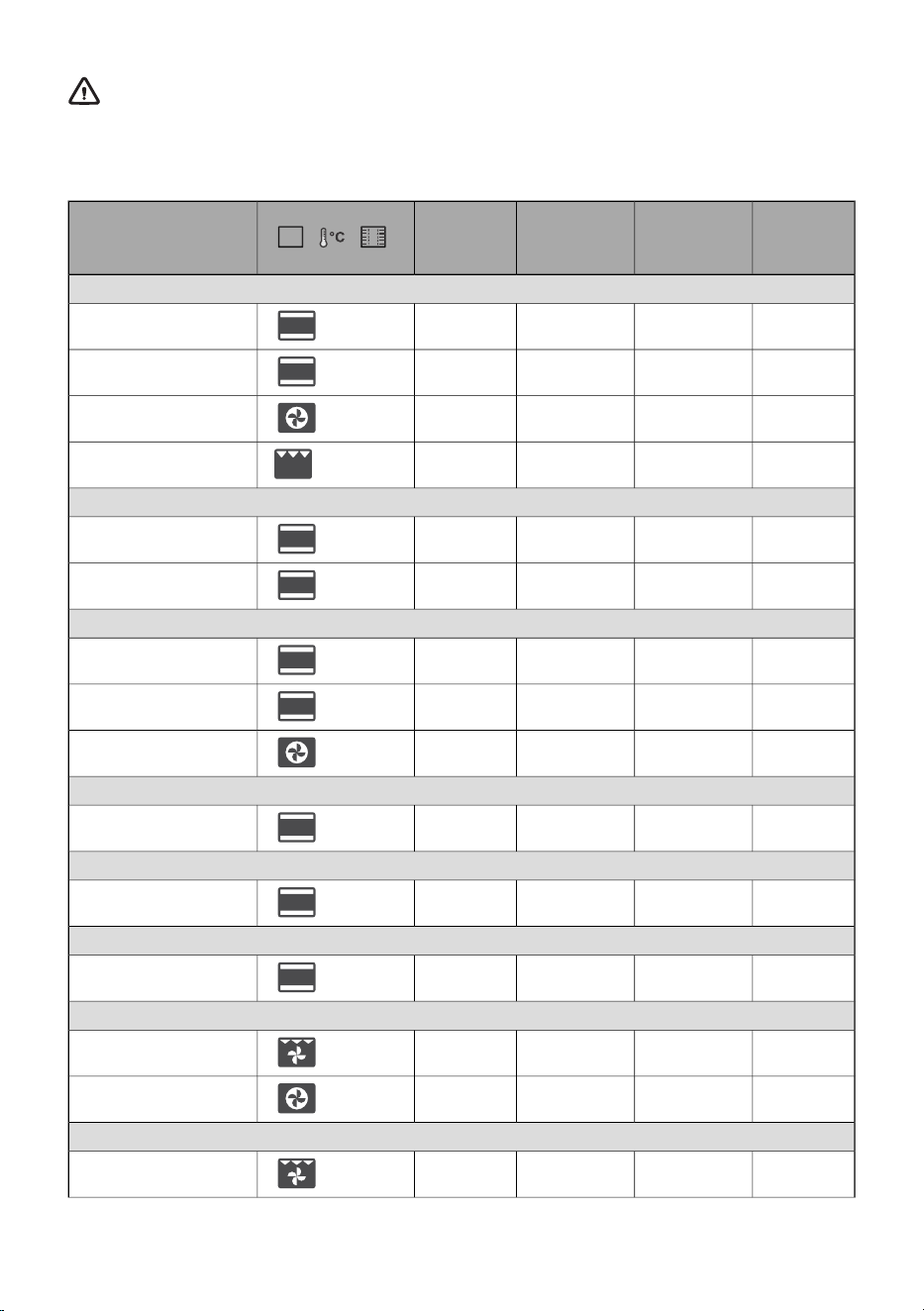
WARNING!
After use, carefully remove the probe from the food and socket, clean it, and tighten the
socket cover.
Recommended doneness levels for different types of meat
well done
[°C]
medium
well
[°C]
medium
[°C]
medium
rare
[°C]
/ /
Type of food
BEEF
68-7359-6553-5848-52
/ 170 / 2
beef, roast
63-6658-6254-5749-53
/ 140 / 2
beef, sirloin
63-6658-6254-5749-53
/ 160 / 3
roast beef/rump steak
71-7466-6860-6354-57
/ High / 4
burgers
VEAL
63-6658-6254-5749-53
/ 140 / 2
veal, sirloin
63-6658-6254-5749-53
/ 160 / 2
veal, rump
PORK
75-8565-70//
/ 170 / 3
roast, neck
/60-69//
/ 140 / 2
pork, loin
80-85///
/ 170 / 2
meat loaf
LAMB
77-8072-7666-7160-65
/ 170 / 3
lamb
MUTTON
77-8072-7666-7160-65
/ 170 / 3
mutton
GOAT MEAT
77-8072-7666-7160-65
/ 170 / 3
goat
POULTRY
82-90///
/ 210 / 2
poultry, whole
62-65///
/ 170 / 2
poultry, breast
FISH AND SEAFOOD
/62-65//
/ 210 / 4
trout
42

Table continued from last page
well done
[°C]
medium
well
[°C]
medium
[°C]
medium
rare
[°C]
/ /
Type of food
/55-60//
/ Medium / 4
tuna
/52-55//
/ Medium / 4
salmon
43
12. Cleaning and maintenance
WARNING!
Before manual cleaning, unplug the appliance from the power mains and wait for it to cool
down.
Children should not clean the appliance or perform maintenance tasks without proper
supervision.
• For easier cleaning, oven cavity and baking tray are coated with special enamel for a smooth and
resistant surface.
• Regularly clean the appliance and use warm water and hand dishwashing liquid to remove larger
impurities and limescale. Use a clean soft cloth or sponge cloth.
• Never use aggressive or abrasive cleaners and accessories (abrasive sponges and detergents,
stain and rust removers, scrapers for glass ceramic plates).
• Food residue (fat, sugar, protein) can ignite during the use of the appliance. Therefore, remove
larger chunks of dirt from the oven interior and accessories before each use.
• Oven equipment is dishwasher-safe. Pull-out guides are not suitable for this type of cleaning.
Use hot soapy water and a soft cloth to remove impurities and wipe
the surfaces dry.
Exterior of the appliance
For stubborn dirt or grime, use conventional oven cleaners. After
using such agents, wipe the appliance thoroughly with a wet cloth to
remove any residual cleaning agents.
Interior of the appliance
Clean with hot soapy water and a damp cloth. In case of persistent
dirt, we recommend prior soaking and the use of a brush.
Utensils and guides
If the cleaning results are not satisfactory, repeat the cleaning process.
WARNING!
Do not use corrosive, abrasive, or aggressive cleaning agents when cleaning the oven's front
panel. Such agents may damage the surface, cause scratches, or permanently alter its appearance.
12.1 Cleaning with steam
This program makes it easier to remove any stains from inside the oven.
The function is the most effective if used regularly, after each use.
Before running the cleaning program, remove all large visible chunks of dirt and food residues from
the oven cavity.
44
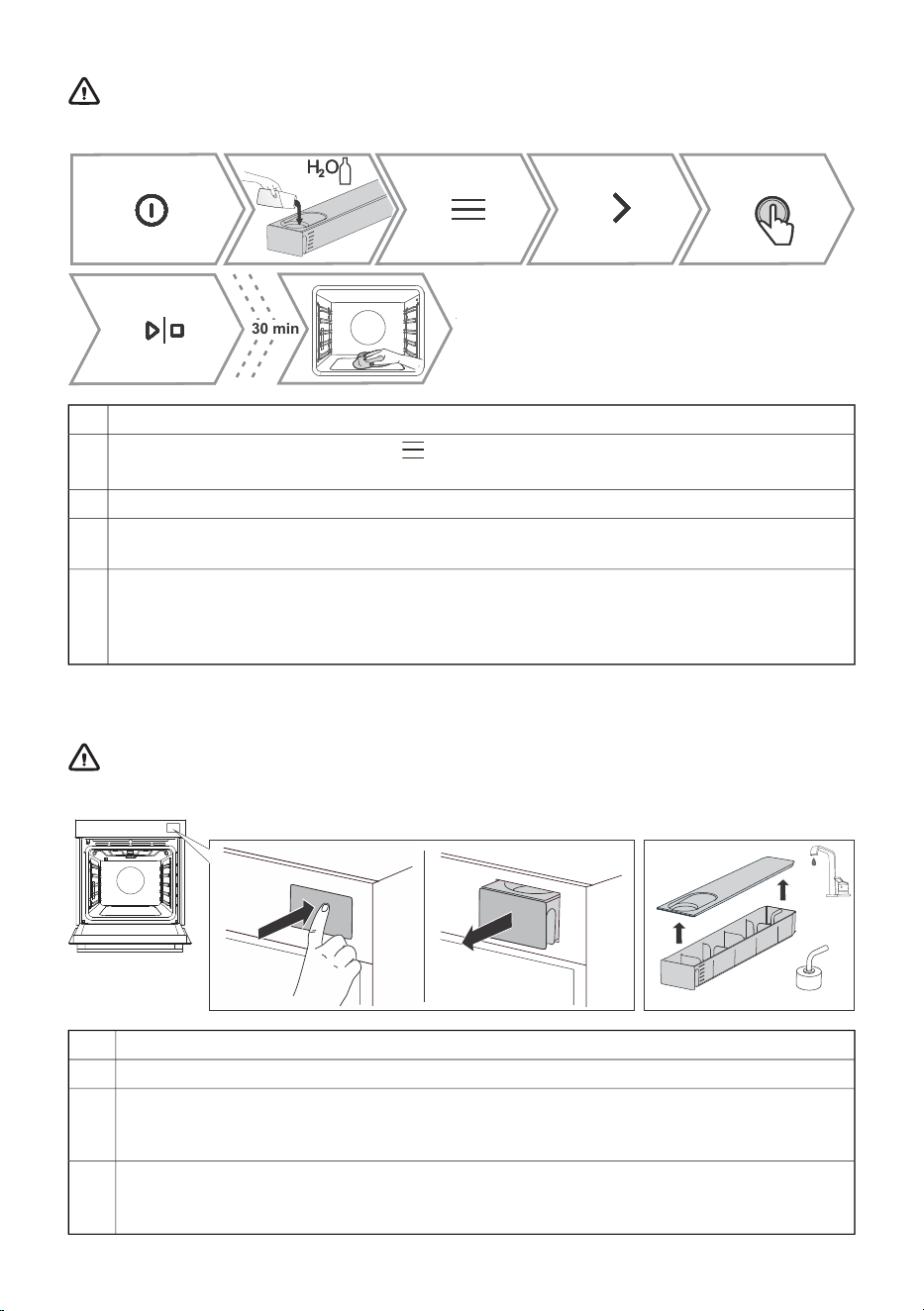
WARNING!
Use the Steam clean pro system when the oven has fully cooled down.
10 min8 min30 min
H O
2
H OH O
2
Fill the water tank.1.
Switch on the appliance and select . Rotate the KNOB to select Cleaning. Confirm by
pressing the KNOB to enter the submenu.
2.
Rotate the KNOB to select Steam clean pro. Confirm by pressing the KNOB.3.
The program will operate for 30 minutes. When the program is complete, End will appear on
the display unit.
4.
When the programme is completed, wipe the stains with a wet cloth and soapy water. After
cleaning, wipe the appliance thoroughly with a damp cloth to remove any residual cleaning
agents.
5.
If the cleaning process is not successful (in case of particularly stubborn dirt), repeat it.
12.2 Cleaning the water tank and filter foam
WARNING!
Clean the filter foam every time you clean the water tank and descale it.
Remove the water tank from the housing by pressing on the door.1.
Open the cover. Clean the tank with water.2.
The cover and the water tank can be cleaned with conventional liquid cleaners that do not
contain abrasives.
3.
WARNING: The tank is not dishwasher-safe.
Clean the inlet pipe with the filter foam under running water. Rinse the foam clean so that
there is no visible dirt on it.
4.
After cleaning, push the tank back into the housing to the end position.
45
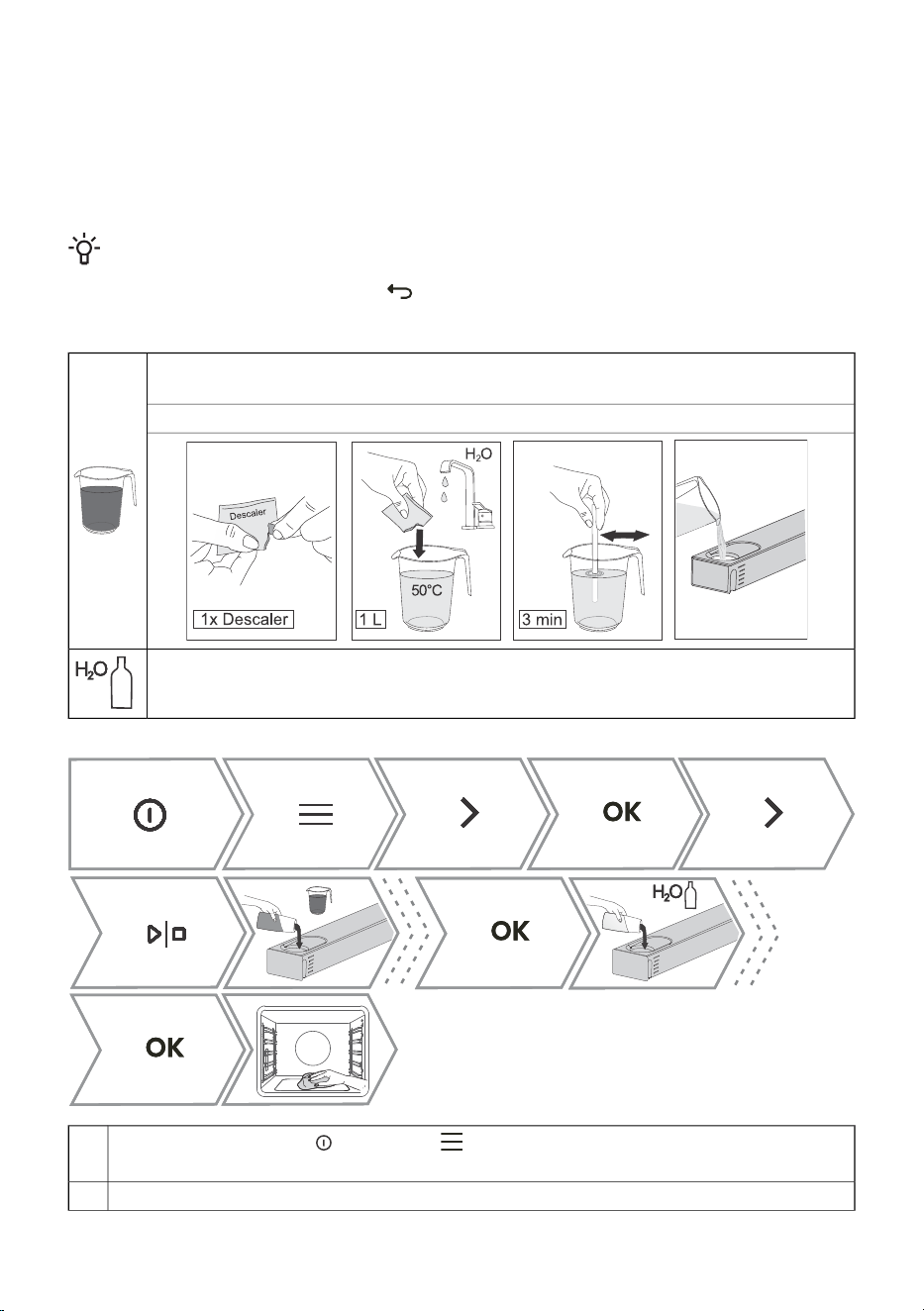
12.3 Cleaning the steam system
Cleaning depends on both frequency of cooking with steam injection and on the hardness of the water
used.
You can carry out the procedure yourself, otherwise the display will alert you.
Regular descaling is absolutely necessary, otherwise the device may stop working; in addition, it
prolongs the life of the appliance and improves the cooking results.
INFORMATION!
If you do not want to perform the cleaning of the steam system when the oven prompts you to,
you can interrupt this by touching . Cleaning can be cancelled up to three times, then the
oven disables the steam function until the procedure is carried out.
Decalcifying agent
Prepare it by mixing the supplied descaler with 1 L of warm water (approx. 50 °C).
Dissolve the descaler in water by stirring. Pour the prepared descaling agent into the tank.
Fresh water
Switch on the appliance and select . Rotate the KNOB to select Cleaning. Confirm
by pressing the KNOB to enter the submenu.
1.
Rotate the KNOB to select Descaling. Confirm by pressing the KNOB.2.
46
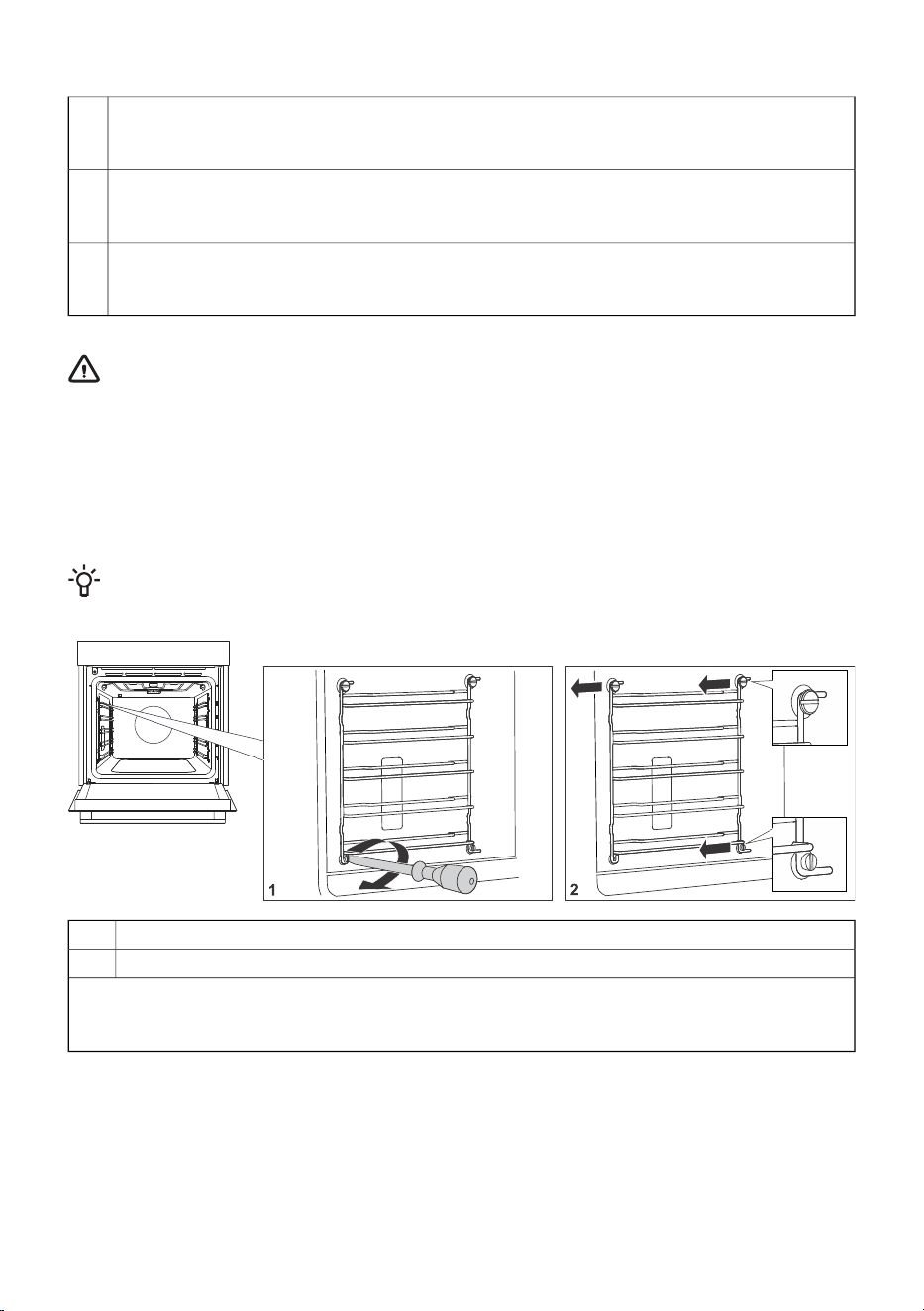
Table continued from last page
Fill the tank with 1 L of descaler.3.
Confirm by pressing the KNOB,
Descaling in progress.
When the descaling process is complete, a mandatory rinsing step will follow.
Empty the container with descaling agent and be sure to pour in fresh water to start the system
rinsing process.
4.
After the rinsing process is completed, the display shows that the rinsing process has been
completed.
5.
Now you can clean the water tank and oven.
WARNING!
Only use the supplied descaler to ensure optimum efficiency and long life of the appliance.
One pouch is enough for one cleaning process. You can purchase it through the service
department or in the maintainlife.com online store. The use of other products does not
guarantee complete cleaning, which may adversely affect the steam function and shorten
the service life of the appliance.
12.4 Removing wire and fixed pull-out (extendible) guides
INFORMATION!
When removing the guides, take care not to damage the enamel coating.
Undo the screw on the bottom front. Use a screwdriver.1.
Grasp the guide and pull it out of the oven.2.
NOTE: The screw on the guides must be tightened again firmly with a screwdriver after cleaning.
When replacing the guides, make sure you mount them on the same side they were installed on
prior to removal.
47
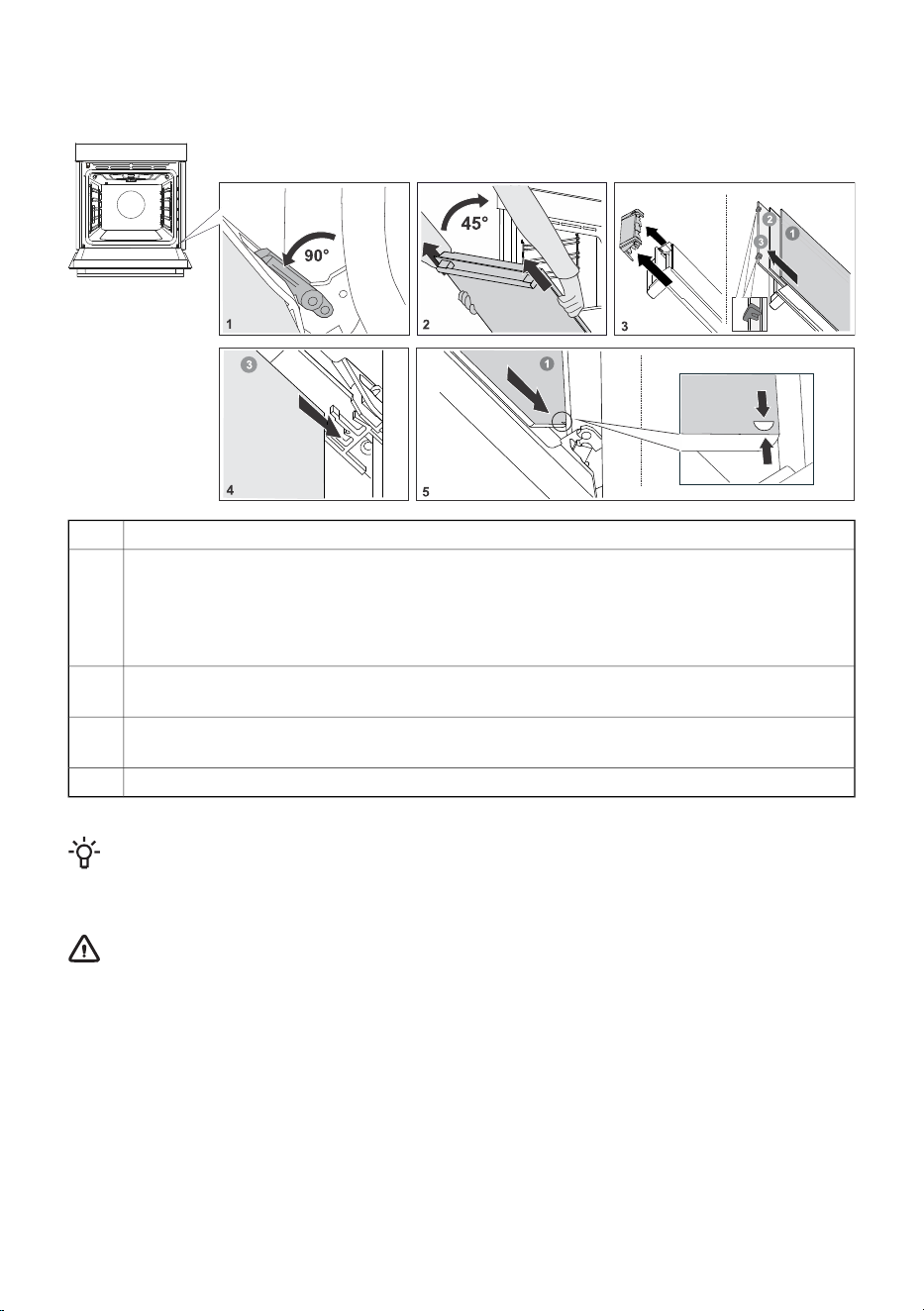
12.5 Removing and replacing the oven door and glass
panes
First, fully open the door (as far as it will go).1.
Oven door is attached to the hinges with special supports that also include safety levers.
Rotate the safety levers towards the door by 90°. Slowly close the door to a 45° angle (relative
to the position of the fully closed door); then, lift the door and pull it out.
2.
The oven door glass can be cleaned from the inside, but it has to be removed from the
appliance door first. First do as described in point 2, but do not remove it.
Remove the air guide. Hold it on the left- and right-hand side of the door with your hands.
Remove it by slightly pulling it towards you.
3.
Hold the door glass at the upper edge and remove it. To the same for the second and third
glass pane (depending on the model).
4.
To replace the glass panes, observe the reverse order.5.
INFORMATION!
To replace the door, follow the reverse order. If the door does not open or close properly, make
sure the notches on the hinges are aligned with the hinge beds.
WARNING!
The oven door hinge can close with considerable force. Therefore, always rotate both
safety levers to the support when fitting or removing the appliance door.
Soft door closing and opening
(depending on the model)
Oven door is fitted with a system that dampens the door closing force, starting at the a 75°angle. It
allows simple, quiet, and gentle opening and closing of the door. A gentle push (to a 15° angle relative
to the closed door position) is enough for the door to close automatically and softly.
48
WARNING!
If the force applied to close the door is too strong, the effect of the system is reduced and
the safety mechanism effect is decreased.
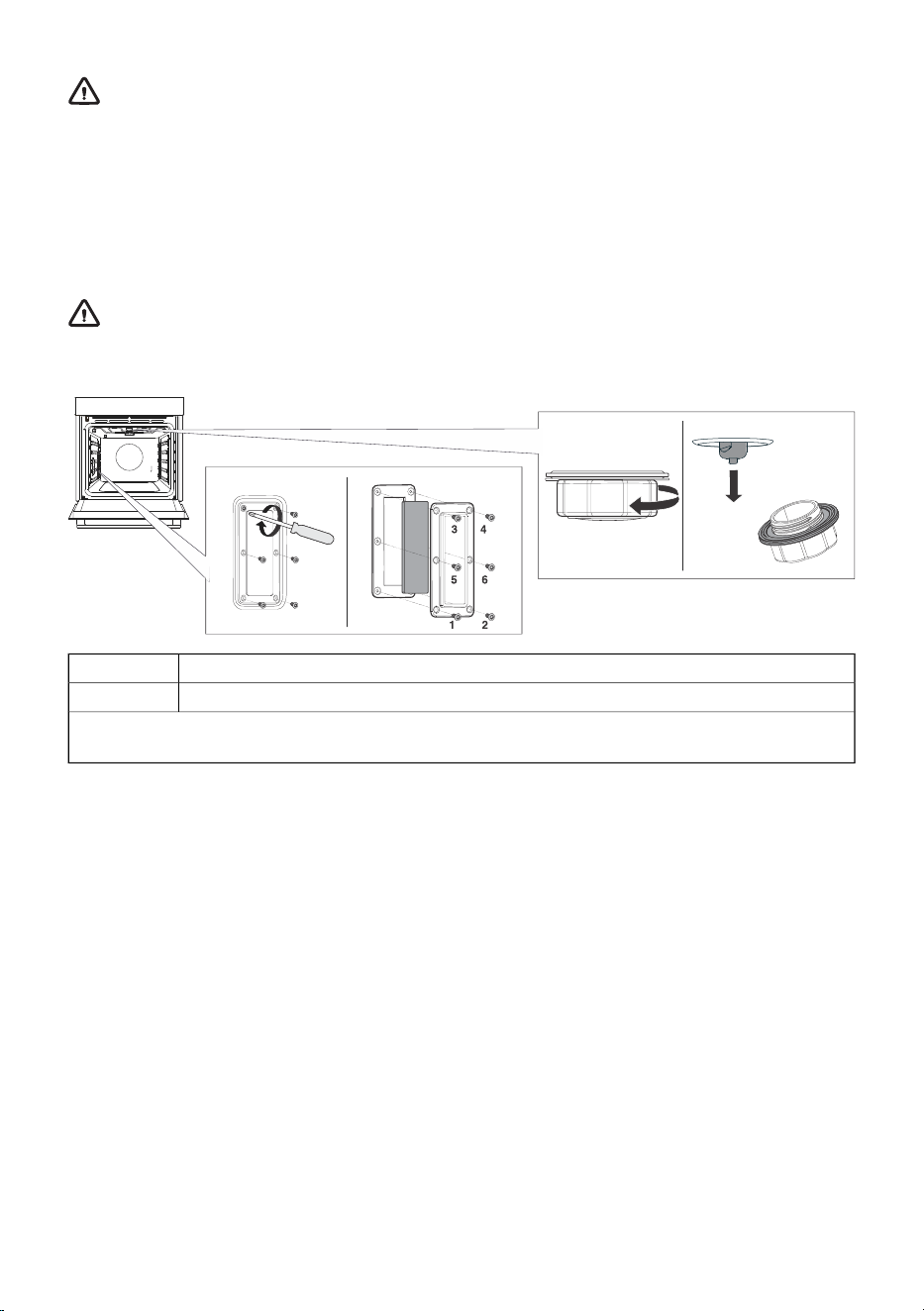
12.6 Replacing the bulb
The light bulb is a consumable and is not covered by warranty. Before changing the bulb, remove any
utensils from the oven.
Halogen bulb: G9, 230 V, side bulb - 25W and ceiling bulb - 40W.
WARNING!
Only replace the light bulb when the appliance is disconnected from the power supply.
Be careful not to damage the enamel. Use protection to avoid burns.
Unscrew the six screws. Remove the cover and the glass.1.
Remove the halogen light bulb and replace it with a new one.2.
NOTE: There is a gasket on the lid that should not be removed from the lid. The gasket must fit on
the wall of the oven space.
49

13. Troubleshooting
During the warranty period, only a service center authorized by the manufacturer may carry out
any repairs.
• Before making any repairs, make sure the appliance is disconnected from the power mains either
by removing the fuse or by disconnecting the power plug from the wall outlet.
• Any unauthorized repairs of the appliance may result in electric shock and short circuit hazard;
therefore, do not perform them. Leave such work to an expert or a service technician.
• In case of minor problems with appliance operation, check this manual to see if you can fix the
problem yourself.
• If the appliance is not operating properly or at all due to inappropriate operation or handling, a
visit from a service technician shall not be free of charge, even during the warranty period.
• Save the instructions for future reference and pass them on to any subsequent owners or users
of the appliance.
• Following is some advice on rectifying some common problems.
13.1 Troubleshooting table
CauseProblem/error
Call a service technician.The main fuse in your home trips often.
The process of changing the light bulb in the oven is
described in the chapter Replacing the bulb.
The oven lighting does not work.
Disconnect the appliance from the power mains for a
few minutes (undo the fuse or switch off the main
switch); then, reconnect the appliance and switch it
on.
Control unit is not responding, the
screen is frozen.
There is an error in the electronic module operation.
Disconnect the appliance from the power mains for a
few minutes.
The display shows the error Err X.
In case of a double-digit error code, the
display will show Err XX.
If the error is still indicated, call a service technician.
Clean the socket.
Try to connect and disconnect the food probe several
times in succession.
The display shows Cooking with meat
probe, but the temperature probe is not
connected.
Check that the door seal is properly positioned in the
door groove. Install it properly in case it is not.
Steam leaks at the oven door.
Make sure that the correct cooking programme has
been selected.
Insufficient roasting on the bottom side.
Open the oven door completely, do not keep it
somewhat closed.
Steam accumulating on the display when
opening the door.
Certain foods contain a lot of water, so a large amount
of steam is normal.
Large amount of steam when cooking.
The cause of the error may be drops or dirt in the
socket of the meat probe. We recommend inserting
and removing the meat probe several times to clean
the socket.
Meat probe appears on the screen,
although it is not in use.
If the problems persist despite observing the above advice, call an authorized service technician.
Repair or any warranty claim resulting from incorrect connection or use of the appliance shall not
be covered by the warranty. In this case, the user will cover the cost of repair.
50
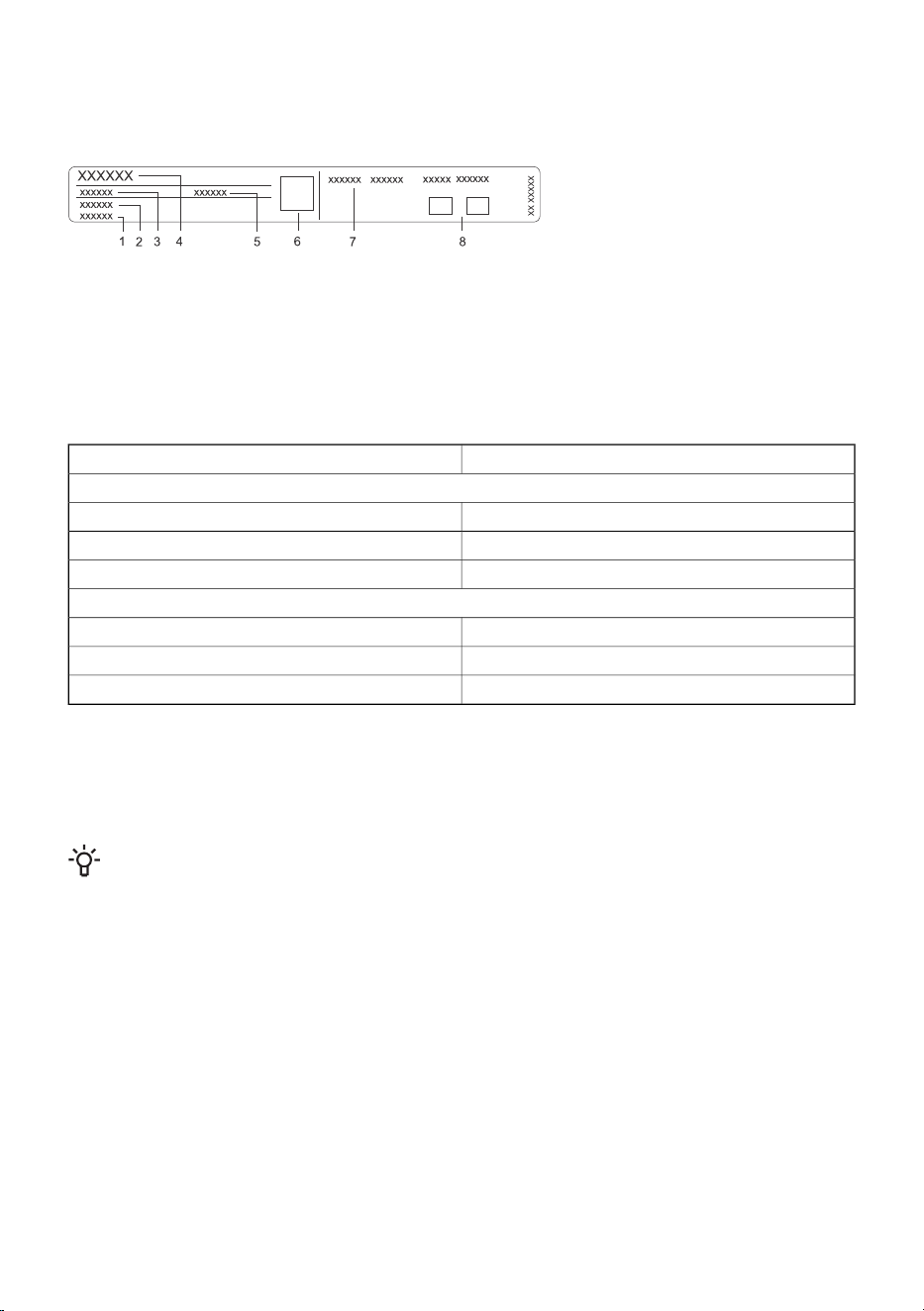
13.2 Label – appliance information
A rating plate with basic information about the appliance is attached to the edge of the oven. Precise
information on appliance type and model can also be found on the warranty sheet.
5. ID/code
6. QR code
7. Technical information
8. Compliance labels/symbols
1. Serial number
2. Model
3. Type
4. Brand
14. Compliance information
Built-in WiFi/BLE moduleRadio equipment type:
Wi-Fi indicator
2412 ~ 2472 MHzOperating frequency range:
19.99 dBm EIRPMaximum output power:
3.26 dBiMaximum antenna gain:
Bluetooth indicator
2402 ~ 2480 MHzFrequency range:
10.00 dBmCarrier Output:
F1DEmission type:
The company declares that the device with the function Connectlife complies with the essential
requirements and other relevant provisions of Directive 2014/53/EU. The detailed Declaration of
Conformity can be found at the web address https://auid.connectlife.io on the page of your device
among the additional documents.
INFORMATION!
The project uses the LVGL graphics library as its graphical user interface.
51

15. Environment protection
Our product packaging is made of environmentally friendly materials that
can be recycled, disposed of, or destroyed without any hazard to the
environment. To this end, packaging materials are labelled appropriately.
The symbol on the product or its packaging indicates that the product
should not be treated as normal household waste. Take the product to
an authorized collection centre for waste electric and electronic
equipment processing.
Correct disposal of the product will help prevent any negative effects
on the environment and health of people, which could occur in case of
incorrect product removal. For detailed information on removal and
processing of the product, please contact the relevant municipal body
in charge of waste management, your waste disposal service, or the
store where you bought the product.
We reserve the right to any changes and errors in the instructions for use.
52
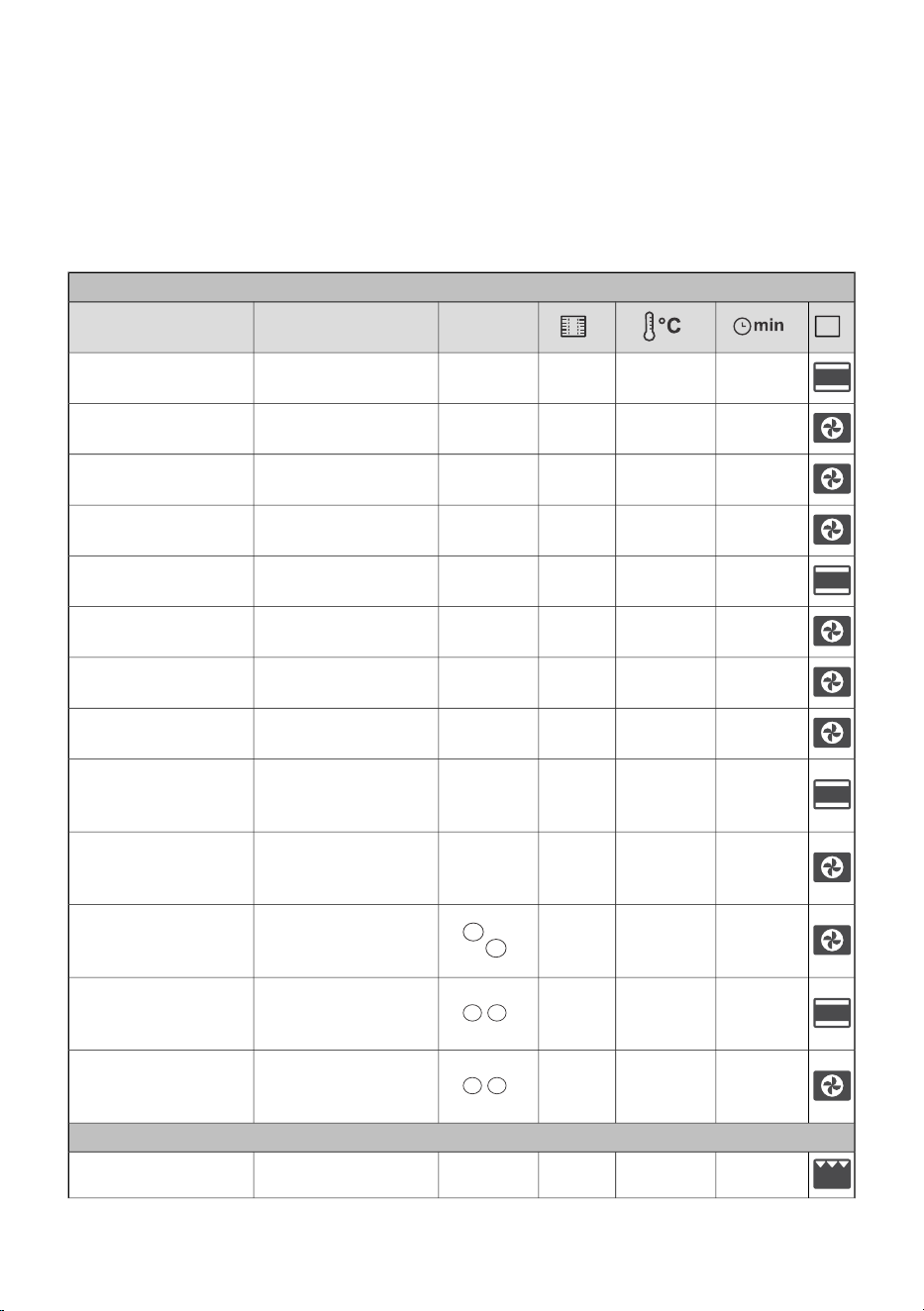
16. Cooking test
EN60350-1: Only use equipment supplied by the manufacturer.
Always insert the baking tray all the way to the end position on the wire guide. Place pastry or cakes
baked in moulds as shown in the image.
* Preheat the appliance to desired temperature. Do not use the rapid preheat mode.
** Preheat the appliance for 10 minutes. Do not use the rapid preheat mode.
*** Turn after 2/3 of cooking time.
BAKING
mould
placement
EquipmentDish
25-401503shallow baking tray
shortbread – single
rack
35-50135 **3shallow baking tray
shortbread – single
rack
25-45140 **2, 4shallow baking tray
shortbread – two
racks/levels
45-601351, 4, 5shallow baking tray
shortbread – three
racks/levels
20-30160-170 **3shallow baking tray
small cakes – single
rack
20-30155-160 **3shallow baking tray
small cakes – single
rack
30-45140-150 **1,5shallow baking tray
small cakes – two
racks/levels
30-50140-1501, 3, 5shallow baking tray
small cakes – three
racks/levels
30-451703
round metal mould,
diameter 26 cm/wire
rack
sponge cake
45-551602
round metal mould,
diameter 26 cm/wire
rack
sponge cake
45-55170 *2, 4
2 × round metal
mould, diameter
26cm/wire rack
sponge cake – two
racks/levels
70-120160 **2
2 × round metal
mould, diameter
20cm/wire rack
apple pie
70-1201602
2 × round metal
mould, diameter
20cm/wire rack
apple pie
BROILING
4-7High5wire racktoast
53
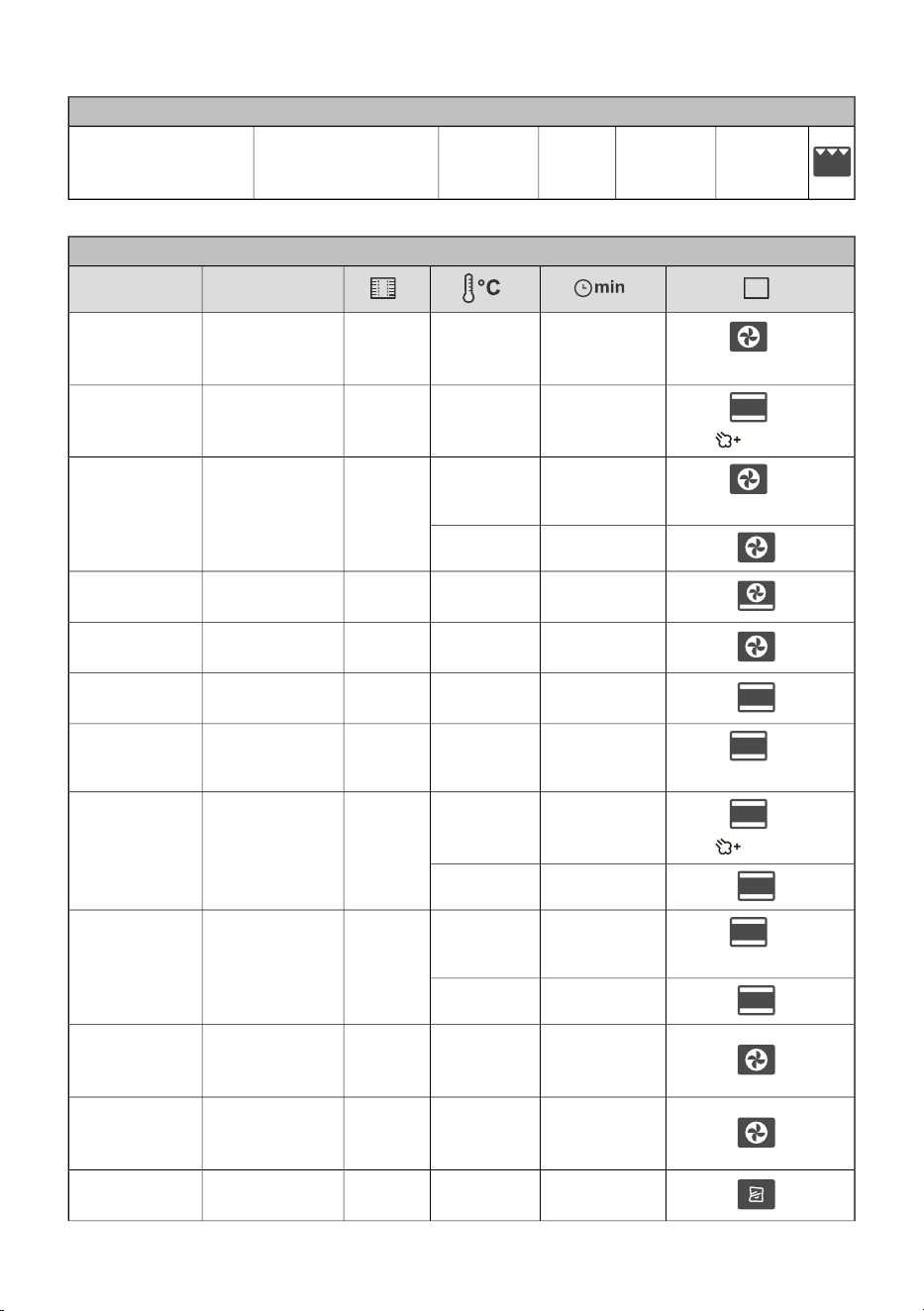
Table continued from last page
BAKING
25-40High5
wire rack + shallow
baking sheet as drip
tray
beef burgers
COOKING WITH STEAM
EquipmentDish
+
30-401702
round metal
mould, diameter
26 cm/wire rack
cake
(Low)
+
20-30180-2003
shallow baking
tray
buns
(high)
+
10-15220
3
shallow baking
tray
bread
(Medium)
30-45190
4-10300*1
shallow baking
tray
fresh pizza
10-20200-2202 + 4
shallow baking
tray
frozen pizza
15-20200-2202
shallow baking
tray
frozen pizza
+
35-45190-2002
Wire grid +
mould
bread - bread
mixture
(Low)
+
10-15220
3
Wire grid +
mould
sunflower seed
bread
(high)
30-40190
+
10-15170
3
shallow baking
tray
puff pastry
rolls
(Low)
10-20170
70-902002
wire rack +
shallow baking
sheet
chicken
20-35***210-2204
wire rack +
shallow baking
sheet
wings airfry
40-50953wire rack
creme caramel
(sous vide)
54

Table continued from last page
COOKING WITH STEAM
15-251003
Perforated
baking tray
Broccoli, fresh;
single baking
tray
13-171003
Perforated
baking tray
Broccoli, fresh;
300 g
30-451003
Perforated
baking tray
Peas, frozen;
2.5 kg
55

941030-a10