20190553
Before using the TV, please read this guide thoroughly and
retain it for future reference.
English
55S7SAU
65S7SAU
A
Accessories List
The following accessories are included with TV:
Quick Setup Guide × 1 Base Stand × 2 Power Cord × 1 Remote Control × 1
Frame Assembly × 2 Cable Clamp × 8 Wall Mount Assembly × 1
Screw × 4(attach the TV stand)
NOTE
• Theaccessoriesmaybedierentfromthelistaboveduetodierentmodels,countries/regions.
Please refer to the actual accessory bag.
• The power cord included with this TV is not rated for in-wall use. It is designed for standard use and
should not be installed within walls.
Contents
Installation ....................................................................................................................................... 1
Appearance and Connection ........................................................................................................... 7
Remote Control ............................................................................................................................... 9
Specifications ................................................................................................................................ 11
Other Information........................................................................................................................... 12
This TV is equipped with a quick setup guide and embedded E-Manual (
Settings > Support >
E-Manual
).
Find the E-Manual
E-Manual support functions
Find the help you are looking
for.
Search
Go directly to the function
page and try it.
Try Now
Scan to open the E-Manual
onyourmobiledevice.
QR Code
Figures and illustrations in this manual are provided for reference only and may differ from
actual product appearance.
Parts of the software function changes with the system upgrade.
If you encountered difficulty when setting up your TV, we suggest you refer to the
troubleshooting tips in the User Manual or the E-Manual.
Declaration
Anycontentandserviceaccessedthroughthis
device,whileonlyintendedforindividualnon-
commercial use, shall be the property of the
applicable third party and subject to protection by
regulations and laws on copyright, patent, trademark
and other intellectual property rights. No part of such
contentandservicemaybemodified,duplicated,
published, uploaded, distributed, translated,
marketed, or used to make and distribute products
derivedfromitwithoutthepriorpermissionofthe
contentownerorserviceprovider.
You acknowledge and agree explicitly that you will
solely bear the risk associated with the use of this
device,andfurtheryouwillsolelybearanyrisk
related to satisfactory quality, performance and
accuracyforanycontentandserviceaccessed
throughthisdevice.Tothemaximumextentpermitted
byapplicablelaw,thisdeviceandanythirdparty’s
contentandserviceisprovidedasitiswithoutany
guarantee, express or implied.
Manufacturer hereby declare explicitly that
Manufacturer shall not be held liable for any guarantee
and conditions, express or implied, related to this
deviceandanycontentandservice,includingbut
not limited to warranty on marketability, satisfactory
quality, fitness for a particular purpose, accuracy,
quietuseandnon-violationofanythirdparty’srights;
to the maximum extent permitted by applicable law,
Manufacturergivesnoguaranteeontheaccuracy,
validity,timeliness,legitimacyandcompletenessof
anycontentorserviceprovidedthroughthisdevice,
orthefitnessofsuchdevice,contentorservicefor
your particular requirement, or the protection from
interruptionanderrorduringoperationofsuchdevice,
contentorservice;tothemaximumextentpermittedby
applicable law, in any case, including fault or neglect,
Manufacturer shall not be held liable for legal actions
or indemnity obligation arising from any consequence
as a result of or related to any information loaded in
thisdeviceoruseofsuchdevice,contentorserviceby
you or any third party.
B
Warning
Stability Hazard
Atelevisionsetmayfall,causingseriouspersonal
injury or death. Many injuries, particularly to children,
canbeavoidedbytakingsimpleprecautionssuch
as:
ALWAYS use cabinets or stands or mounting
methods recommended by the manufacturer of
thetelevisionset.
ALWAYS use furniture that can safely support
thetelevisionset.
ALWAYSensurethetelevisionsetisnot
overhangingtheedgeofthesupportingfurniture.
ALWAYS educate children about the dangers of
climbingonfurnituretoreachthetelevisionset
or its controls.
ALWAYS route cords and cables connected to
yourtelevisionsotheycannotbetrippedover,
pulled or grabbed.
NEVERplaceatelevisionsetinanunstable
location.
NEVERplacethetelevisionsetontallfurniture
(for example, cupboards or bookcases) without
anchoringboththefurnitureandtelevisionsetto
a suitable support.
Safeguards
Please read the following safeguards for your TV and
retain for future reference.
Always follow all warnings and instructions marked
onthetelevision.
1. A note about safety and operating instructions
Read and follow all safety and operating instructions,
and retain them safely for future reference.
2. Heed Warnings
Adhere to all warnings on the appliance and in the
operating instructions.
3. Cleaning
Unplug the TV from the wall outlet before cleaning.
Donotuseliquid,abrasive,oraerosolcleaners.
Cleaners can permanently damage the cabinet and
screen. Use a lightly dampened cloth for cleaning.
4. Wall Mount Bracket
Wallmountbracketisonlyavailableforsomemodels.
If wall mount bracket is not supplied with this product,
you can buy it at the local market.
Please refer to the Installing the Wall Mount Bracket
page for dimensions.
5. Water and Moisture
Avoiddripping or splashing ofliquidsontothe
product.Objectsfilledwithliquids,suchasvases,
shouldnotbeplacedabovetheproduct.
6. Setting
Do not place this TV on an unstable cart, stand or
table. Placing the TV on an unstable base can cause
the TV to fall, resulting in serious personal injuries
as well as damage to the TV. Use only a cart, stand,
bracket or table recommended by the manufacturer
or salesperson.
7. Ventilation
Slotsandopeningsinthecabinetareprovidedfor
ventilation,toensurereliableoperationoftheTV
andtoprotectitfromoverheating.Do not cover
theventilationopeningsinthecabinetandnever
place the set in a confined space such as built-in
cabinetunlessproperventilationisprovided.Leavea
minimum 10cm gap all around the unit, the rear of the
TV should be 6cm away from the wall.
8. Power Source
This TV should be operated only from the type of
power source indicated on the marking label. If you
are not sure of the type of power supplied to your
home, consult your appliance dealer or local power
company.
Anycontentandserviceprovidedasitistogetherwith
thisdeviceshallbethepropertyoftheapplicablethird
party,thereforeManufacturergivesnodeclarationor
warranty on modification, suspension, cancellation,
termination or abortion thereof, and shall not be held
liable for legal actions or indemnity obligation arising
thereof.
Manufacturerreservestherightstorestricttheuseor
accessofcertaincontentorservice.Asthecontent
andservicearetransmittedthroughthirdparty’s
network and transmission facilities, Manufacturer
undertakesnocustomerservicethereoforthe
obligationforsuchcustomerservice.
NEVERplacethetelevisionsetonclothorother
materials that may be located between the
televisionsetandsupportingfurniture.
NEVER place items that might tempt children
to climb, such as toys and remote controls, on
thetopofthetelevisionorfurnitureonwhichthe
televisionisplaced.
Ifyourexistingtelevisionsetisbeingretainedor
relocated,thesameconsiderationsasaboveshould
be applied.
This symbol alerts user about the presence
ofadangerousvoltagenotisolatedinside
the product which can be sufficiently
powerful to constitute a risk of electrocution.
This symbol alerts user about the presence
of important operating instructions and
maintenance in the document enclosed in
the package.
ATTENTION
RISK OF ELECTRIC
SHOCK
Donotopenthebackcover.
In no case the user is allowed to operate inside
the TV set. Only a qualified technician is entitled
to operate.
C
To fully disconnect theTV,removepower
plugfromwallsocket.Besuretohave
the wall socket and power plug readily
accessible.
Do not mix and use new batteries with old
batteries, or batteries with different types. Do
not expose batteries to heat such as direct
sunlight or fire. Make sure the batteries'
positiveandnegativeendsarefacingthe
correct direction.
Thedeviceshouldnotbeexposedto
dripping and spraying and it cannot be
placed under objects filled with liquids.
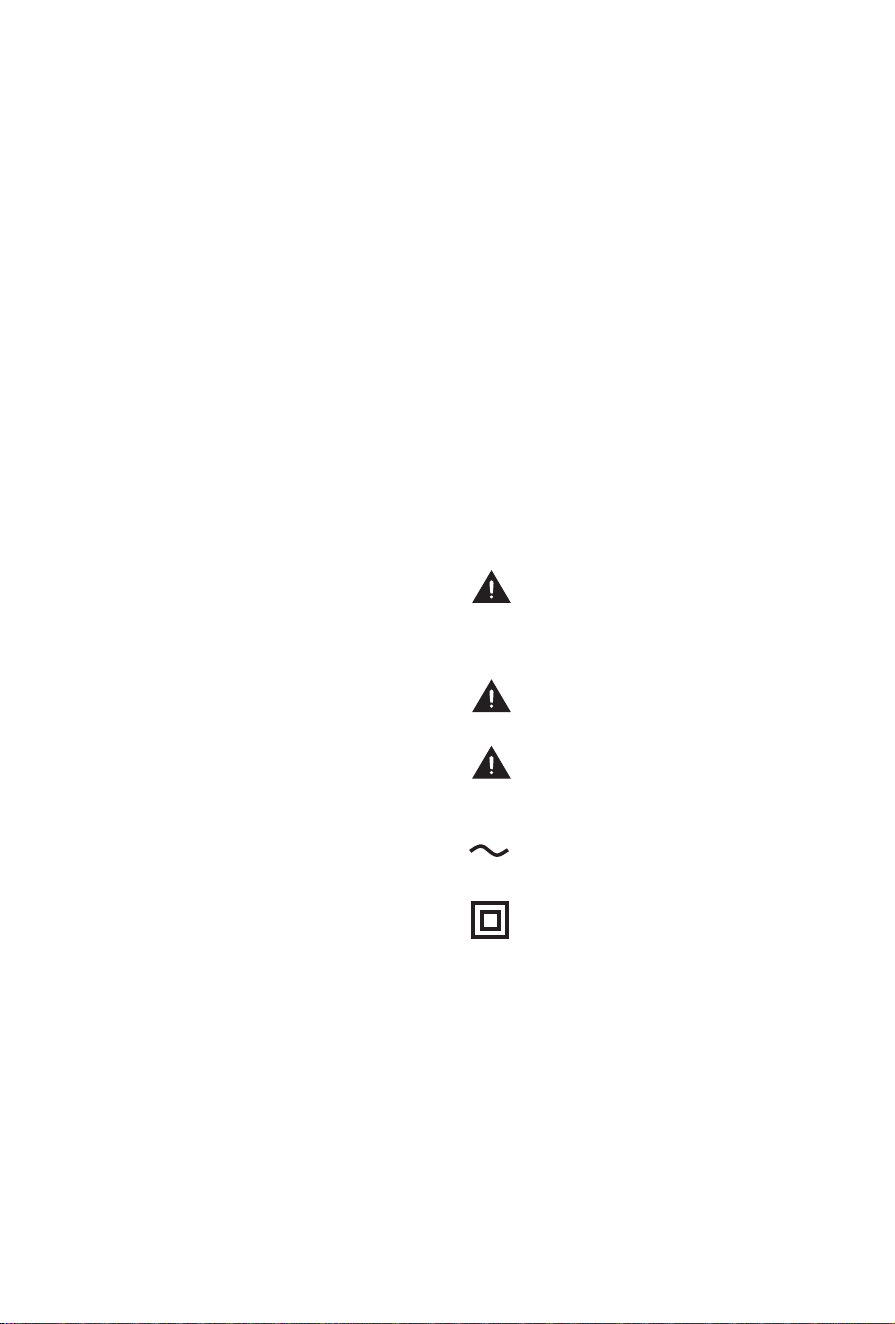
Class II product: This symbol indicates that
it does not require a safety connection of
protectiveearthing(ground).
ACvoltage:This symbol indicates that the
ratedvoltagemarkedwiththesymbolisAC
voltage.
9. Power-Cord Protection
Power- supply cords should be routed so that they
are not likely to be walked on or pinched by items
placed upon or against them, paying particular
attention to cords at plug, wall outlets, and the point
where they exit from the TV. MAIN plug on the power
cordisusedasthedisconnectdevice,thedisconnect
deviceandsocket-outletshallbeeasilyaccessible.
10. Lightning
For added protection for this TV during a lightning
storm, or when it is left unattended and unused for
long periods of time, unplug it from the wall outlet
and disconnect the antenna or cable system. This will
preventdamagetotheTVduetolightningorpower-
line surge.
11. Power Lines
An outside antenna system should not be located in
thevicinityofoverheadpowerlinesor other electric
light or power circuits, or where it can fall into such
power lines or circuits. Where installing an outside
antenna system, extreme care should be taken to
keep from touching such power lines or circuits as
contact with them might be fatal.
12. Overloading
Donotoverloadwalloutletsandextensioncords as
this can result in a risk of fire or electric shock.
13. Object and Liquid Entry
Neverpushobjectsofanykindinto thisTVthrough
openingsastheymaytouchdangerousvoltage
points or short-out parts that could result in fire or
electricshock.Neverspillliquidofanykindonorinto
the TV.
14. Outdoor Antenna Grounding
If an outside antenna or cable system is connected
to the TV, be sure the antenna or cable system is
groundedsoastoprovidesomeprotectionagainst
voltagesurgesandbuilt-upstaticcharges.
15. Servicing
DonotattempttoservicethisTVyourselfasopening
orremovingcoversmayexposeyoutodangerous
voltageorotherhazards.Referallservicingto
qualifiedservicepersonnel.
16. Damage Requiring Service
UnplugtheTVfromthewalloutletandreferservicing
toqualifiedservicepersonnelunderthefollowing
conditions:
(a) When the power - supply cord or plug is
damaged.
(b) Ifliquidhasbeenspilled,orobjects have fallen
into the TV.
(c) If the TV has been exposed to rain or water.
(d) If the TV does not operate normally by following
the operating instructions. Adjust only those
controlsthatarecoveredbytheoperating
instructions as an improper adjustment of other
controls may result in damage and will often
requireextensiveworkbyaqualifiedtechnician
to restore the TV to its normal operation.
(e) If the TV has been dropped or the cabinet has
been damaged.
(f) When the TV exhibits a distinct change in
performance-thisindicatesaneedforservice.
17. Replacement Parts
When replacement parts are required, be sure the
servicetechnicianhasusedreplacementparts
specifiedbythemanufacturerorhavethesame
characteristicsastheoriginalpart.Unauthorized
substitutions may result in fire, electric shock or other
hazards.
18. Safety Check
UponcompletionofanyserviceorrepairtotheTV,
asktheservicetechniciantoperformsafetychecksto
determine that the TV is in safe operating condition.
19. Heat
The product should be situated away from heat
sourcessuchasradiators,heatregisters, stoves,
or other products (including amplifiers) that produce
heat.
20. Fire
The product should be situated away from naked
flame sources such as lighted candle.
21. Off-gassing
The TV smells of plastic is normal and will dissipate
overtime.
1
CAUTION
Be sure to disconnect the AC power cord before installing a stand or wall mount brackets.
The display on your TV is fragile. Make sure the TV screen is not scratched or damaged by hard
objectsorfrompressure.PleasedonottouchtheTVscreenwithyourhandstoavoidmaking
the screen dirty.
After the stand or mount installation is completed, make sure the TV is steady on a table or
firmlyattachedtoawallmount,beforeremovingallprotectivefilm,ifany.Iftheprotectivefilm
wasnotremoved,theinstallationoftheframewillbeaffected.
Before installing the frame, please install the TV stand or the wall mount.
Installation
Installing the stand
Follow the illustrations and textual instructions below to complete the installation steps:
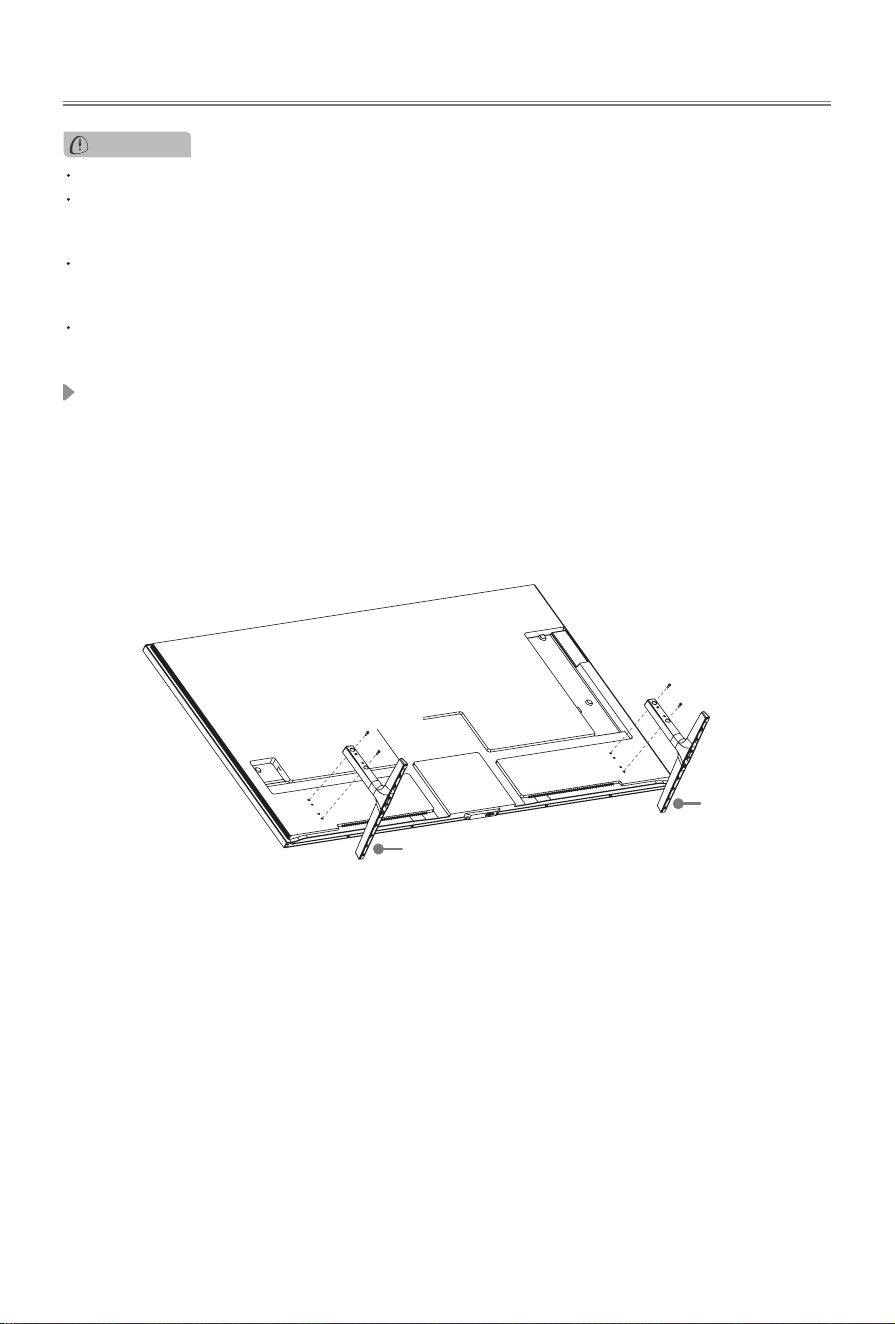
1. CarefullyplaceyourTVonasoft,flatsurfacetopreventdamagetotheTVorscratchingtothe
screen.
2. Take out the 2 stands from the accessory bag and then insert the stands into the bottom slots
of the TV.
3. Secure the stands to the TV with the 4 screws in accessory tightly.
Base Stand
Base Stand
Screws:
M4×12(55")
M5×16(65")
Screws:
M4×12(55")
M5×16(65")
2
Fig.1
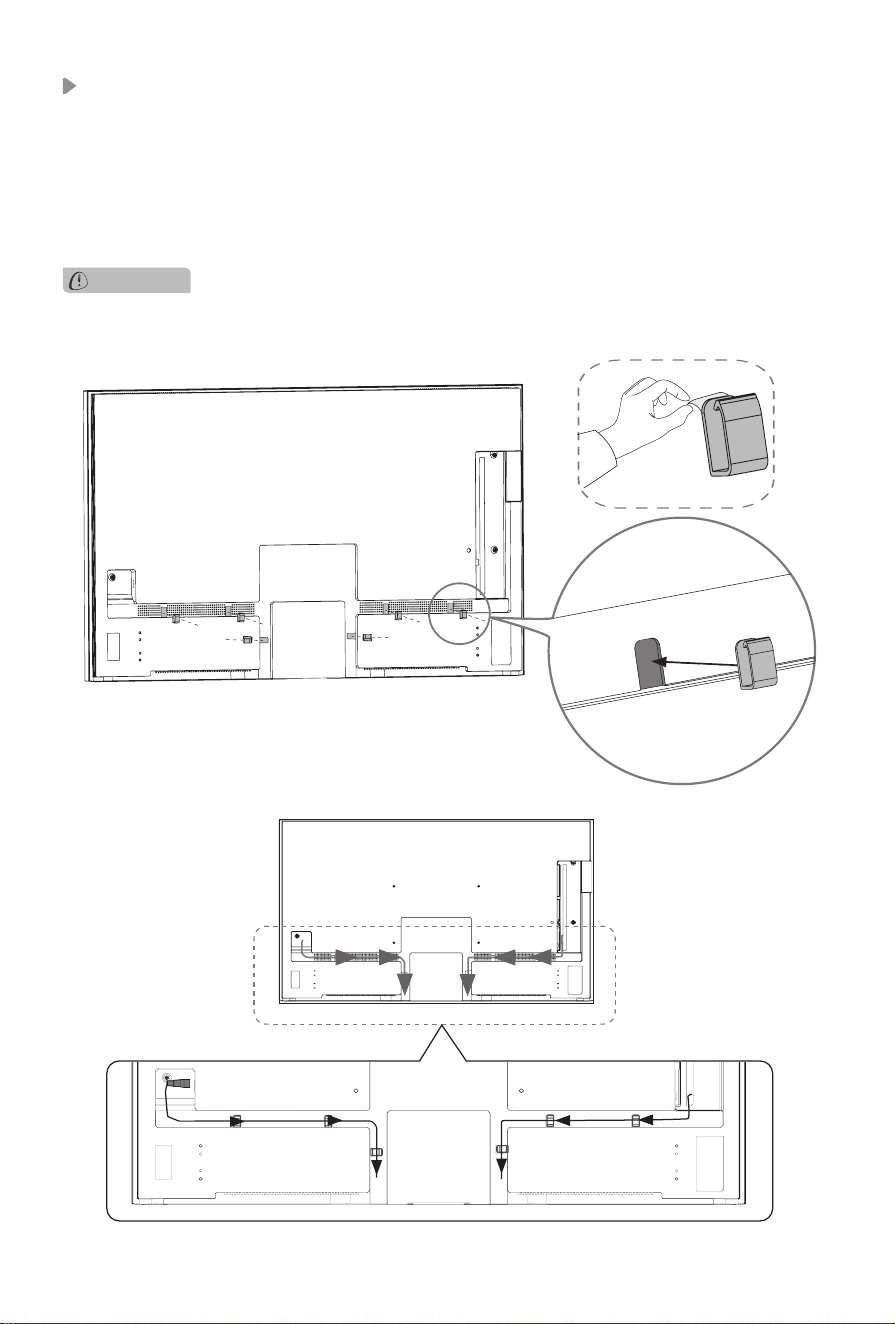
Installing cable clamps and managing cable
Beforeinstallingthewallmountonthewall,makesurethatyouhaveconnectedandmanagedpower
cord and all cables you need.
CAUTION
1. Tear off the sticker at the back of cable clamps, paste cable clamps into the holes in the cable
raceway. (See Fig.1)
NOTE:
• Make sure the open-ended part of the cable clamp is positioned at the middle of cable
raceway.
• The picture is only for reference, please refer to the actual product.
2. Manage cables and power cord with cable clamps. (See Fig.2)
Fig.2
3
Installing the Wall Mount Bracket (included)
Followinstructionsprovidedwiththewallmountbracket.Ifitisnotcorrectlymounted,theTVmay
fall and cause property damage or personal injury.
NOTE:
Before wall-mount installation, if there are screws in the bracket holes on the TV back
cover,pleaseremovethemfirst.Theremovedscrewscannotbeusedforattachingthewallmount.
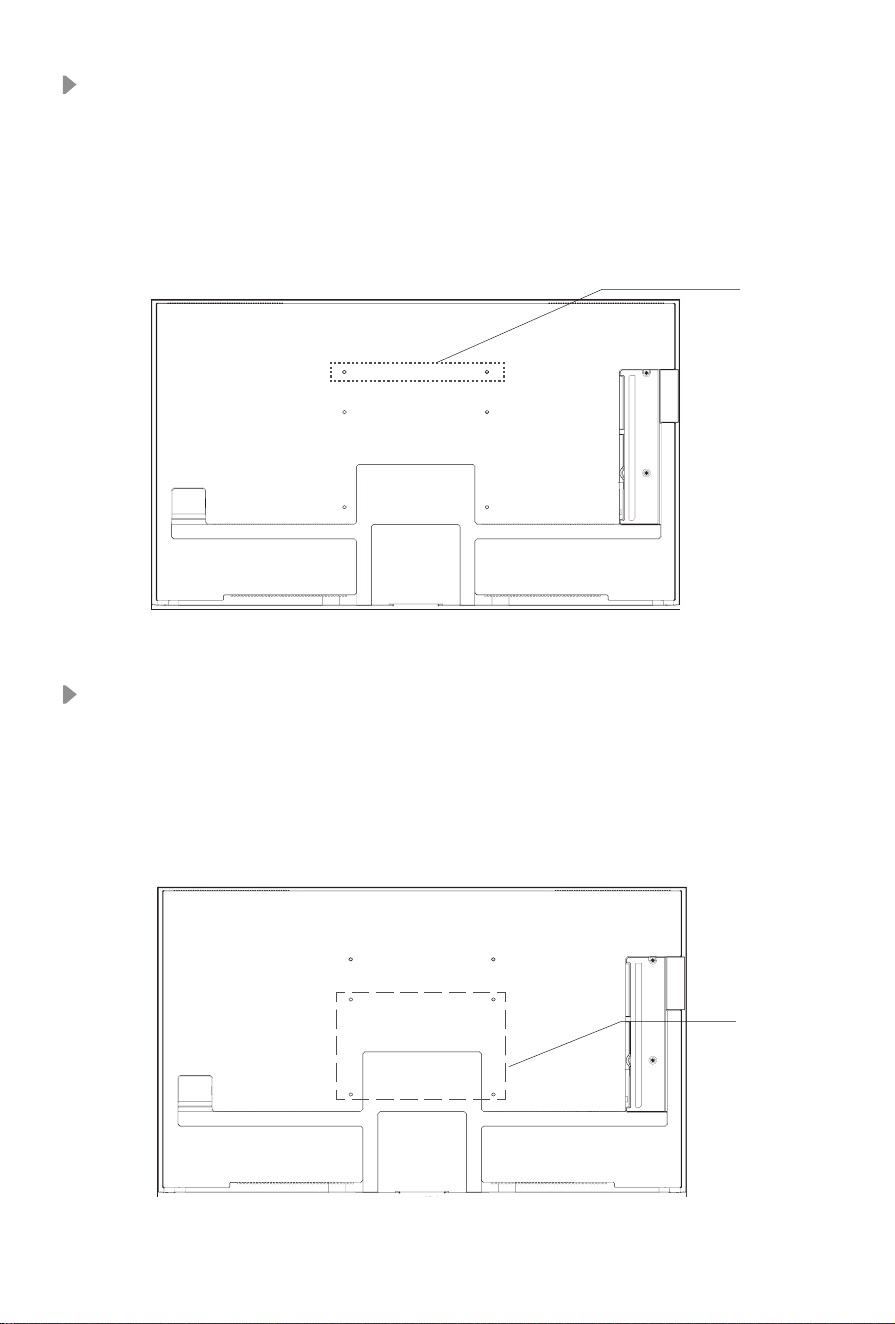
Wall mounting solution I
: Use bracket holes A1, A2 and use standard wall bracket. The screws
and wall bracket are in the wall mount assembly.
Installing the Wall Mount Bracket (not included)
A1 A2
I
B1 B2
C1 C2
II
Followinstructionsprovidedwiththewallmountbracket.Ifitisnotcorrectlymounted,theTVmay
fall and cause property damage or personal injury.
NOTE:
Before wall-mount installation, if there are screws in the bracket holes on the TV back
cover,pleaseremovethemfirst.Theremovedscrewscannotbeusedforattachingthewallmount.
Wall mounting solution II
: Use bracket holes B1, B2, C1, C2. It is compatible with 300×200
(55")/300×400 (65") VESA wall mount, M6 screws, the screw length is 9.5 - 11.5 mm.
4
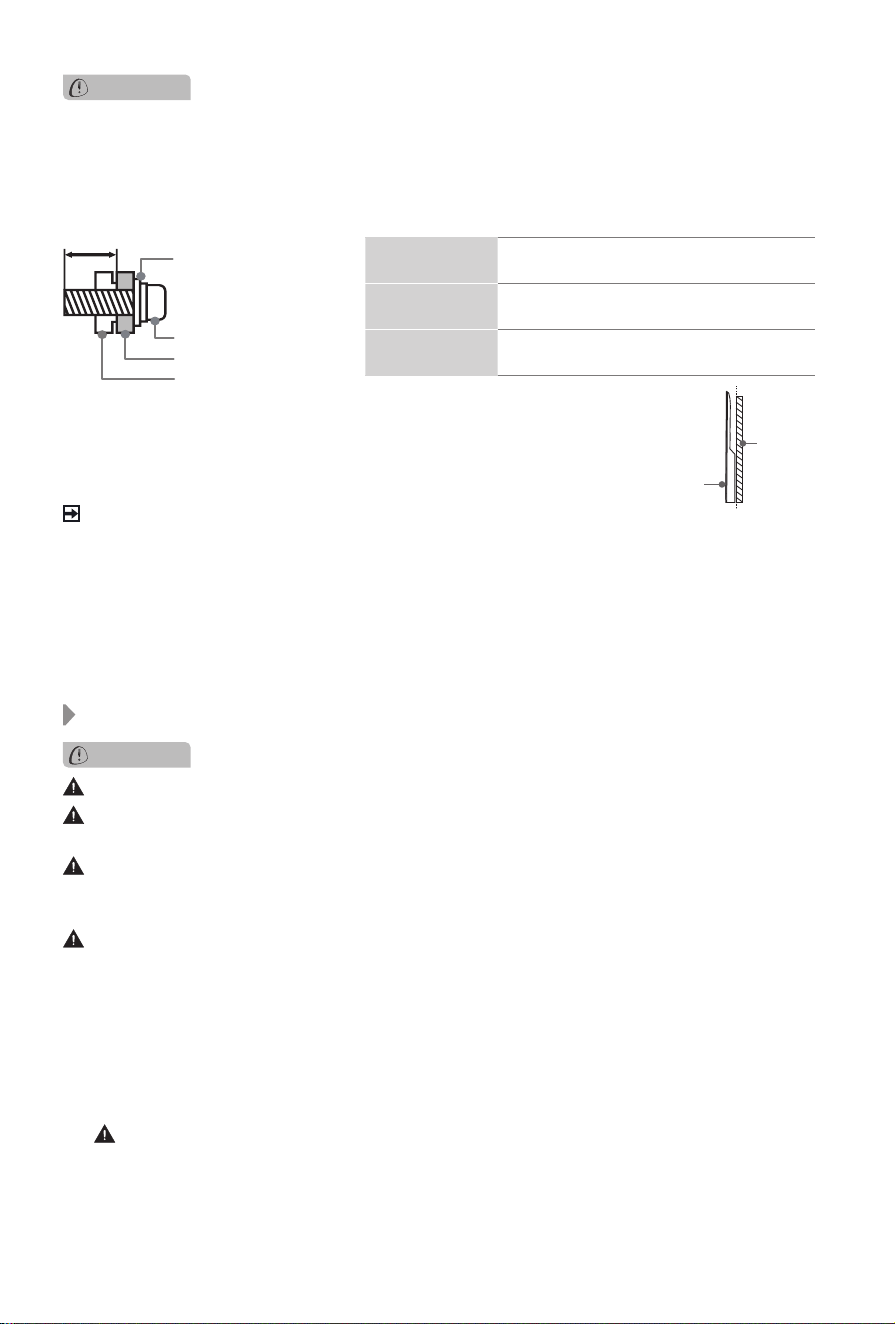
CAUTION
• Followinstructionsprovidedwiththewallmountbracket.Ifitisnotcorrectlymounted,theTV
may fall and cause property damage or personal injury.
• TopreventinternaldamagetotheTVandtoensureitismountedsecurely,besuretouse
fixing screws (not included) that are 9.5 - 11.5 mm in length when measured from the attaching
surfaceoftherearcover.
9.5 - 11.5 mm
Wall mount bracket
Screw
Spacer
RearcoveroftheTV
Wall mount hole
pattern(mm)
300 × 200 (Wall mounting solution II) (55")
300 × 400 (Wall mounting solution II) (65")
Wall mount
screwsize
M6
Number of wall
mount screw
4
Don’tmovetheTVwiththeframe.
After installing each frame, do not strongly pull or shock it. Failing to do so may cause it fall off
the TV.
Before installing the frame, please install the TV stand or the wall mount. If you want to
removetheTVstandorthewallmountthathasbeeninstalled,pleaseremovetheframes
first.
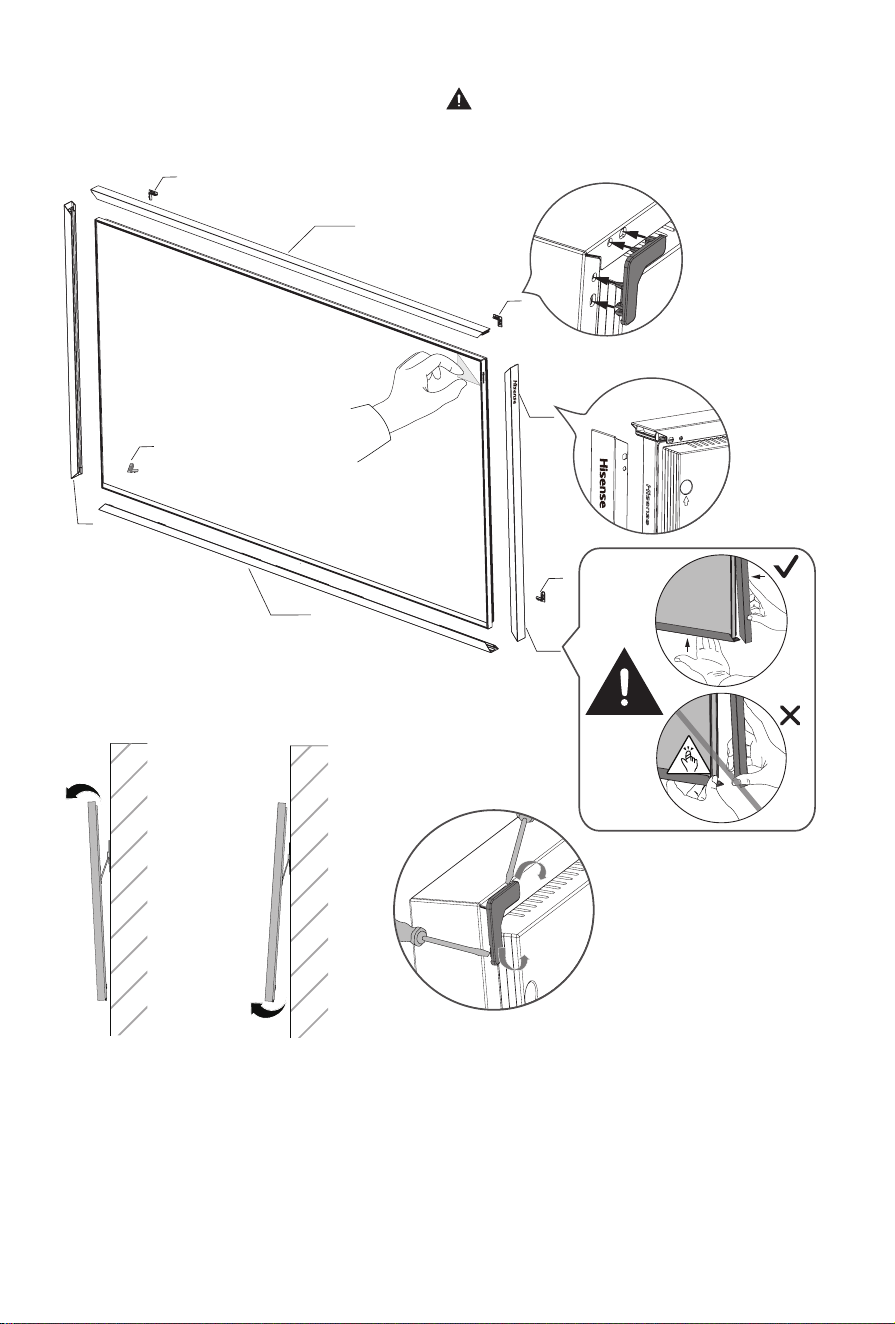
Before installing frames, remove the protective film first.
Iftheprotectivefilmwasnot
removed,theinstallationoftheframewillbeaffected.
After the TV stand or the wall mount installation, attach the frame to your TV. You can choose the
frameprovidedintheaccessories.
1. Install the upper frame.
2. Install the lower frame which is with holes.
3.Installtheleftandrightsideframesintothegroovesonboth sidesoftheupperframe,then
push the bottom part of the side frames to match the lower frame.
(
CAUTION: Avoid nger pinching during assembly!
)
4. Install the four plastic clips from the back of the TV.
NOTE:
IfyouhaveinstalledtheTVonthewall,twoormorepeopleare neededtolifttheTVup
slightlysothatyoucaninstallthefourplasticclipsconveniently.(SeeFig.3,Fig.4)
Installing the frame
• We do not recommend hanging the TV on a slanted wall, and when
wallmountingmakesureyourtelevisionremainsparalleltothewall
and does not lean forward.
NOTE
• Ifinstalledonaceilingorslantedwall,orthetelevisioninstalledisnotparalleltothewall,the
televisionmayfallandresultinpropertydamageorseverepersonalinjury.
• Ifyouhaveadditionalquestions,pleasecontactthewallmountmanufacturerortheretailer
from which you purchased the TV.
• The diameter and length of the screws differ depending on the wall mount bracket model.
TV
screen
Vertical
surface
CAUTION
5
NOTE:
•
WhileremovingtheframesfromtheTV,removetheminthereverseorderoftheassembly.Usea
at-headscrewdriverorothersuitabletoolstoprytheplasticclipsupalongthegroove.(See Fig.5)
Fig.3 Fig.4 Fig.5
1
3
3
2
4
4
4
4
3
Warning:
When installing the frames, please be sure to install the
plastic clips on all four corners of the back of the frame.
Failure to install these clips may cause gaps, misalignment,
or instability of the frame.
6
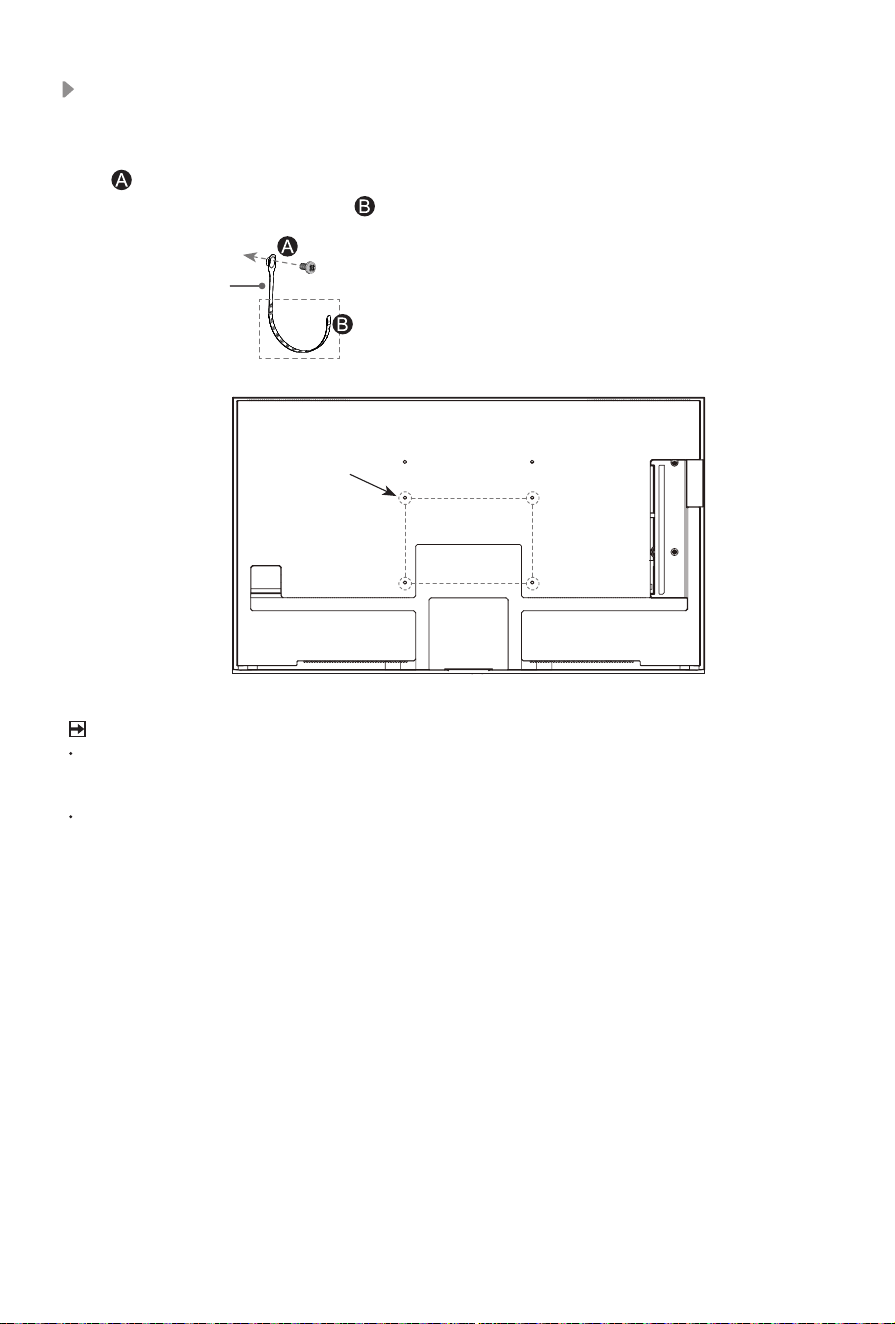
PleaseplacetheTVonahorizontallystablesurface,andthenuseP-CliptoconnecttheTVand
the wall or pillar. (Marked in the illustration below.)
NOTE
Insecure installation may cause the tilt or falling of the product, and further lead to personal
injuriesorproductdamages.Ifthemethodabovecannotfixtheproduct,pleaseconsultthe
manufacturers.
P-clip and corresponding screws may not included with TV set, please purchase them by your-
self if necessary.
Installing the P-Clip
Select a suitable screw hole
based on the actual situation.
Screw: M6×12
P-Clip
1. Fix part of P-Clip to the screw hole on the back of TV set with a M6×12 screw.
2. Select a suitable hole of P-Clip on part and fix it to the wall or pillar with a ST4×25 screw.
screw hole
7
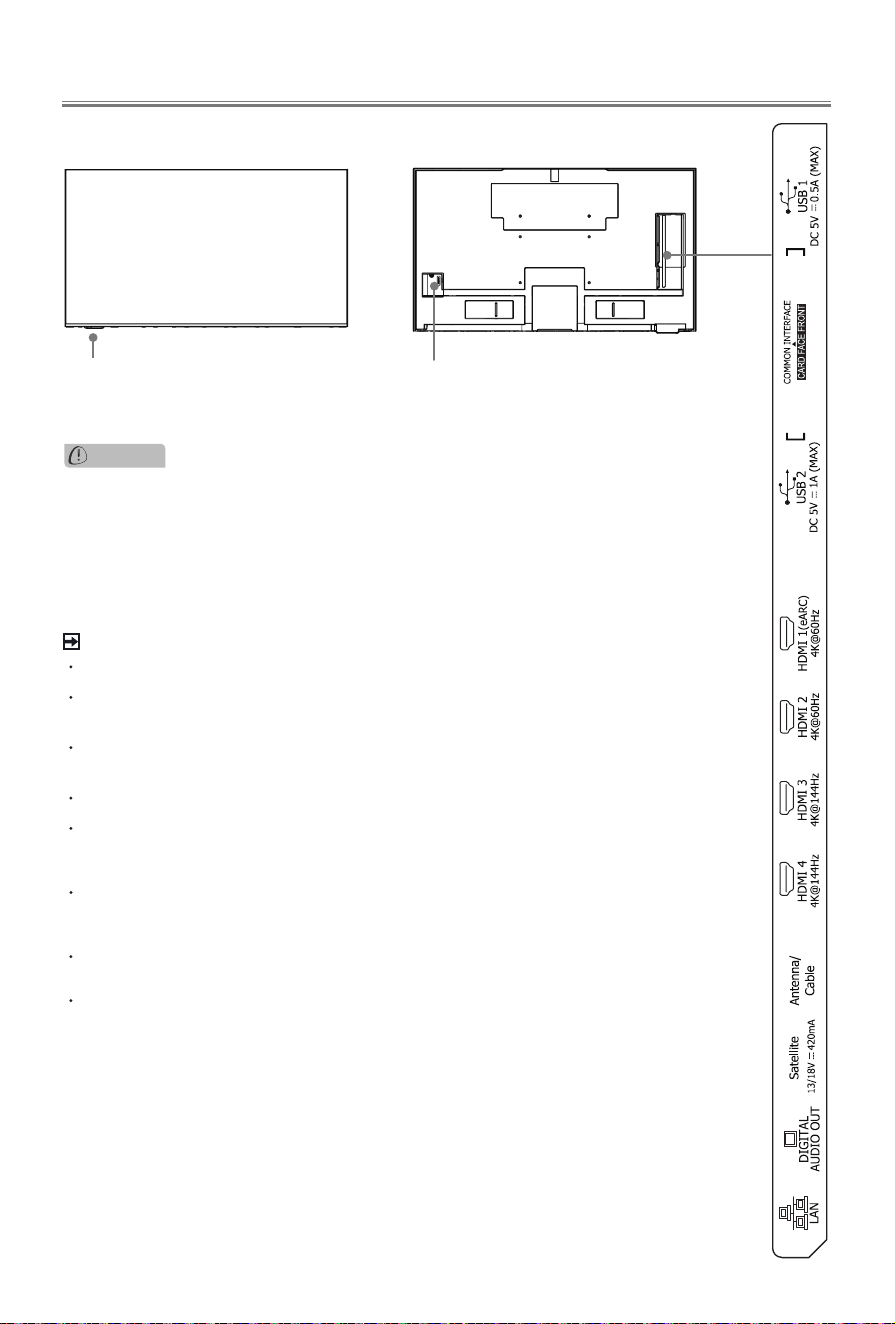
Appearance and Connection
NOTE
Satellitesupportspowersupplyforsatelliteantenna(13/18V,420mAmax).
Antenna/CableandSatellitejacksmaynotbeapplicableinsomecountries/
regions.
PoweringontheTVrequiresseveralsecondstoloadprogrammes.Donot
rapidly turn the TV off as it may cause the TV work abnormally.
The Picture is Only for Reference.
Check the jacks for position and type before making any connections. Loose
connections can result in image or colour problems. Make sure that all
connections are tight and secure.
NotallA/Vdeviceshavetheabilitytoconnect toaTV, please refer to
theuser’smanualofyourA/Vdeviceforcompatibilityandconnections
procedure.
Beforeconnectingexternalequipment,removethemainsplugfromthewall
socket. Otherwise, it may cause electric shock.
Thelocationand namesoftheterminals ontheTVmayvaryaccording to
TVmodel,andnotallterminalsavailableonallmodels.
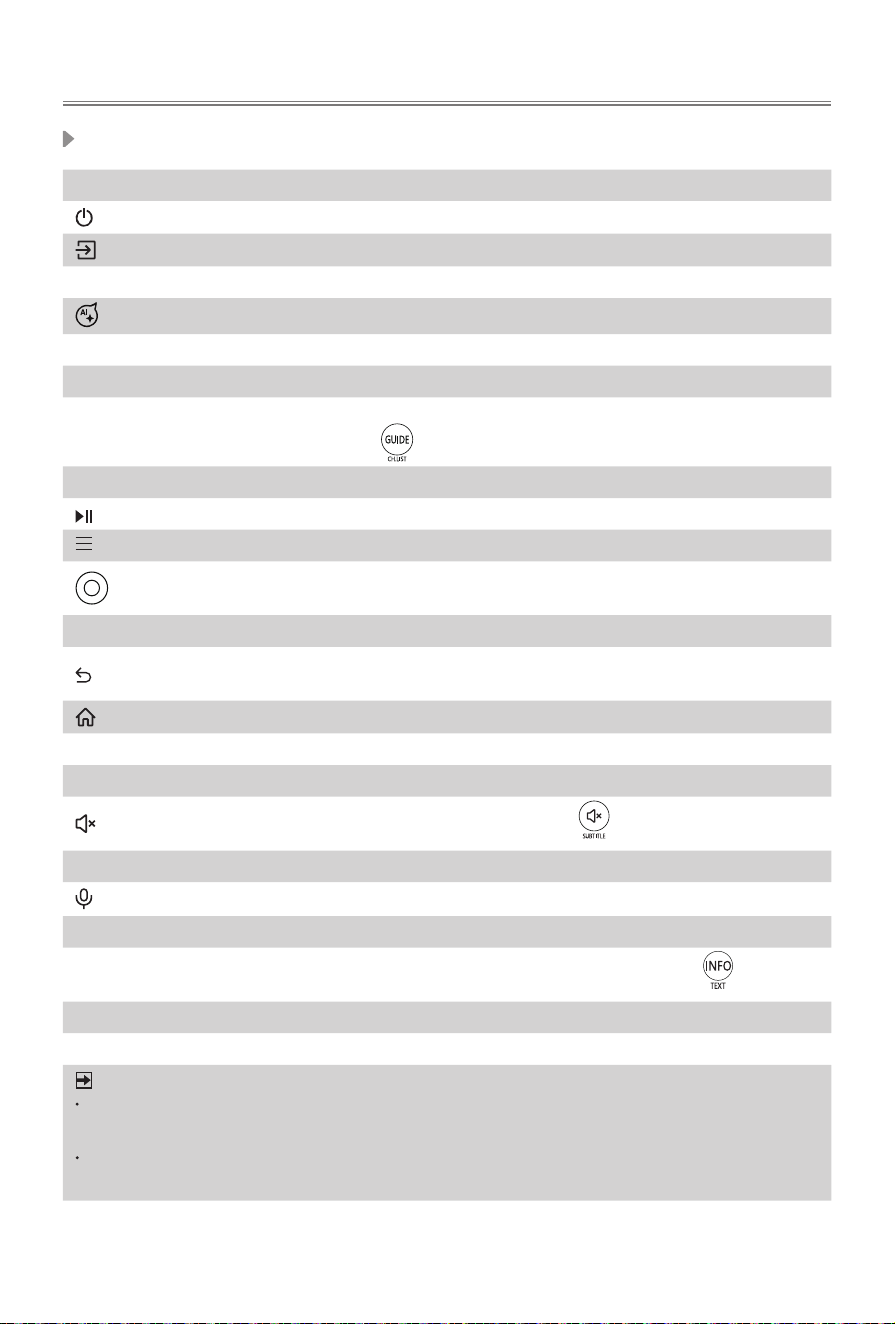
AC INPUT
• Power indicator
• Powerbutton(Standby/Source)
• Light sensor
• Motion detector
• Do not block the detector, otherwise
the motion detector and the brightness
can be affected.
CAUTION
8
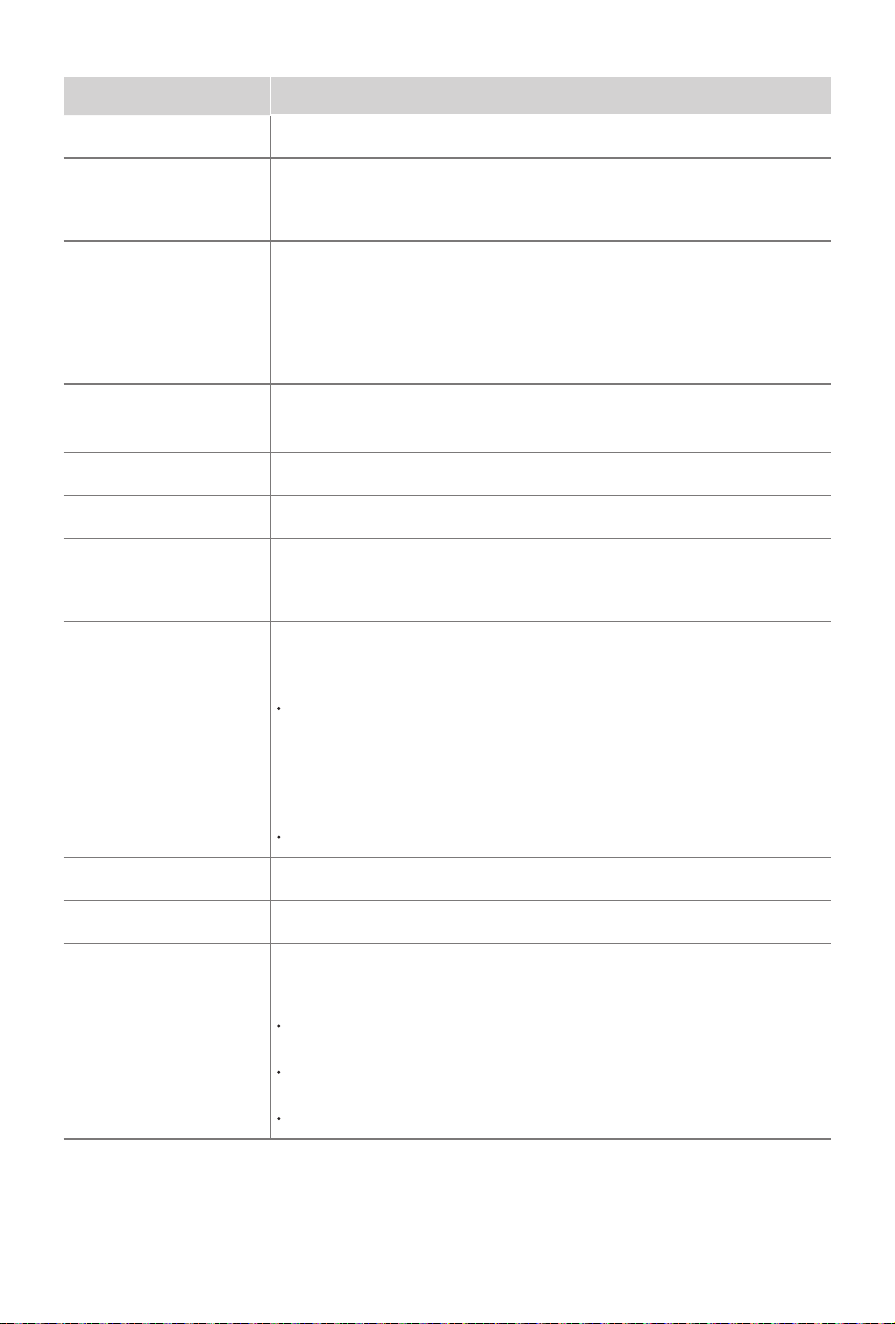
Item Description
Power indicator
The light is white in standby mode.
Power button
(Standby / Source)
Press the button to turn the TV on. Press it again to bring up the
controlmenuandmovethefocusbetweendifferentinputs.Long
press the button to make a selection.
Light sensor
The light-sensing function automatically adjusts the TV's backlight
brightnesstomatchtheambientlightlevelsintheroom,providingan
optimisedviewingexperience.Toenableordisablelightsensor,please
go to
Settings
>
Picture
>
Picture Mode Settings
>
Advanced
Settings
>
Brightness
>
Light Sensor settings
, and toggle on or off
Automatic Light Sensor
as needed.
Antenna/
Cable
ConnectanoutdoorVHF/UHFantennaorcable.
Satellite
Connect an outdoor Satellite antenna.
HDMI
Connect an HDMI cable from an external equipment.
HDMI
(eARC)
Connect an HDMI cable from an external digital audio system.
Please note that it works only when the TV is connected to the audio
receiverthatsupportstheeARCfunction.
USB
ConnectaUSBdeviceforbrowsingphotos,listeningtomusicand
watchingmovies.
Note:
When connecting a hard disk or a USB hub, always connect the
mainsadapteroftheconnecteddevicetothepowersupply.Ifa
USB1.1orUSB2.0 devicerequiresmorethan500mAor 5V,the
USBdevicemaynotbesupported.MaxsupportedcurrentforUSB
3.0deviceis1A (only for some models). Exceeding the max
supported current may result in damage or data loss.
Certain digital cameras may not be compatible with the TV.
DIGITAL AUDIO OUT
Connect an optical cable from an external digital audio system.
LAN
Connect an Ethernet cable to access a network or the Internet.
COMMON INTERFACE
InserttheCI+moduleforwatchingscrambledserviceslikepay-tv
channels or some HD channels.
Note:
DonotrepeatedlyinsertorremovetheCommonAccessModuleas
this may damage the interface and cause a malfunction.
YoumustobtainaCI+moduleandcardfromtheserviceproviderof
the channels you want to watch.
CI+ is not supported in some countries and regions.
9
Remote Control
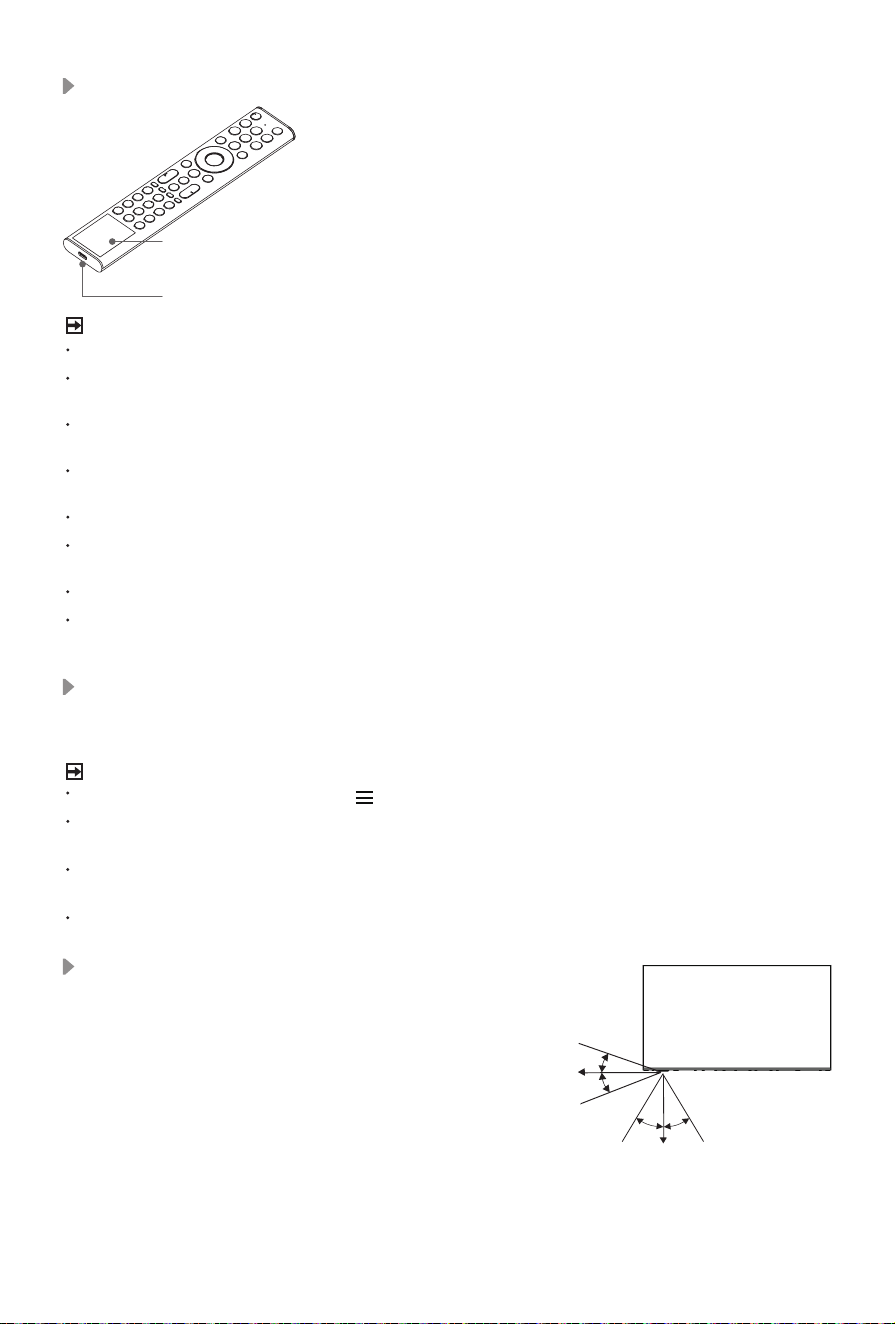
Buttons of remote control
BUTTON DESCRIPTION
Poweron/Standby
Select input sources
HomeOS Open HomeOS experience
ActivateAIassistant.Thisfeaturecannotbeenabledinsomescenarios.
Number button Select a channel or input numbers
Four colour buttons Special function buttons
GUIDE
DisplaytheElectronicProgramGuide;
for models with button, long press to be used as CH.LIST
CH.LIST Display the Channel List on the screen
Playpad keys
Press to enter Menu
(˄
/
˅
/
˂
/
˃)
D-pad(up/down/left/rightnavigationbuttons);whenwatchingTVprogrammes,
press left or right button to display the current programme information
OK Conrmationbutton
UndertheMenuorApp,returntothepreviousplace
;forsomemodels,
long press to be used as EXIT
Display the Home screen
VOL Volume(up/down)
CH Channel(up/down)
Muteandrestoresound;formodelswith button, long press to be
used as SUBTITLE
EXIT Exit the menu or exit the application
Activatethemicrophone
APP buttons Quick access buttons to APP
INFO
Displaythecurrentprograminformation;for models with button, long
press to be used as TEXT
TEXT Turnon/otheteletextfunction
SUBTITLE Activateordeactivatethesubtitlemode
NOTE
Theincludedremotecontrolwillvarydependingonmodel,country/region.Checkinformation
according to the actual remote control in the accessory bag.
Buttonslistedhereareforreferenceonly.Actualremotecontrolmayvarydependingonmodel,
country/region.
10
Disposal of this unit
Product should not be damaged, dismantled or thrown in municipal waste.
Itshouldbepackedandhandedovertoauthorisedre-cycler.
Remote Control Operation Range
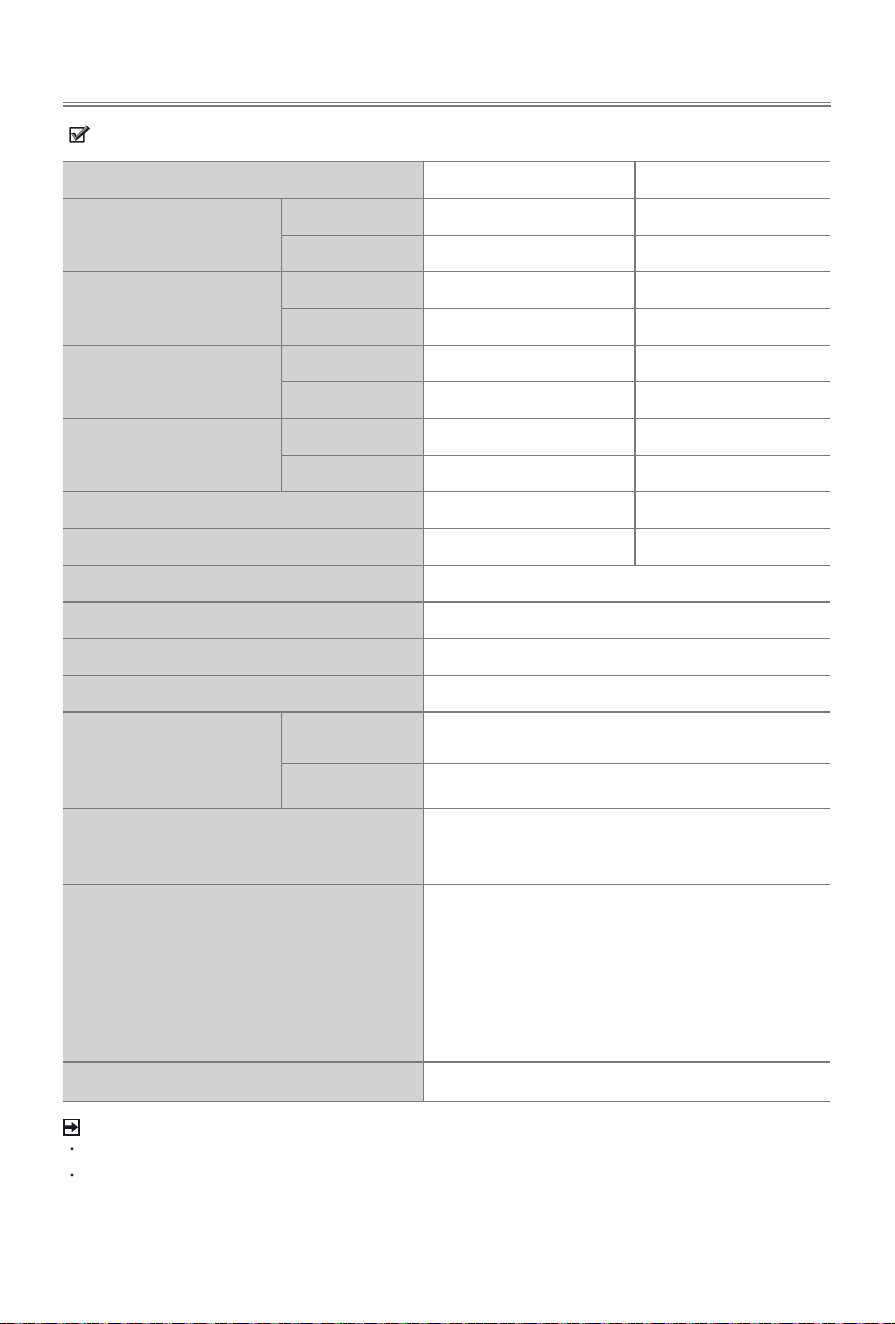
1. The remote control can work at a distance of up to 8
metres in
front of the TV set.
2. The remote control angle: taking the remote sensor as
anapex,6metresaway,itscontrolledhorizontalangleis
within±30°,whiletheverticalangleiswithin±15°.
3. Theoperatingdistancemayvarydependingonthe
brightness of the room.
Pairing the Remote Control (only for Bluetooth remote control)
Pair the remote to the TV after you power it on. Keep the remote control within 3 metres from the
TV. Press any button (except power and mic button) to pair.
NOTE
In special cases, press and hold [ ] button to pair.
Ifanunknownerroroccurredwiththeremote,thenitcouldhavebeencausedbyinterference.
Trytoremovewhat'scausingtheinterferenceandpairitagain.
Ifanunknownerroroccurredintheremotecontrol,pleaserechargeandactivatetheremote
control.
The remote cannot be paired to the TV while the TV is in standby mode.
You can charge the remote by exposing the solar cell to
light or using a USB
type-Ccable(notprovided).
The type-C port is used for quick charging. When charging
by type-C port, the red indicator will blink. When fully
charged, the indicator will stop blinking first and then turn off.
solar cell
type-C port
(5V,
≥
500mA)
NOTE
Productimageisonlyforreference,actualproductmayvaryinappearance.
Thebatteryisnotuserreplaceable.Donot trytoremoveorchangetheinternalbatteryby
yourself,causeitmaycausedamagetothebattery/device,personalinjury,fireorexplosion.
When you do not use the remote control, place it face up to make the solar cell expose to
light. This will extend the remote control's operating time.
Leavingabatteryinanextremelyhightemperaturesurroundingenvironmentthatcanresult
in an explosion or the leakage of flammable liquid or gas.
Battery chemicals can cause a rash. If chemicals touch your skin, wash immediately.
Disposalofabatteryintofireorahotoven,ormechanicallycrushingorcuttingofabattery,
that can result in an explosion.
Placetheremotecontrolcorrectlytopreventitfromfallingdown.
A battery subjected to extremely low air pressure that may result in an explosion or the
leakage of flammable liquid or gas.
Charging the Remote Control (for solar powered remote)
6m
8m
6m
6m
8m
6m
30° 30°
15°
15°
11
Features, appearance and specifications are subject to change without notice.
Specications
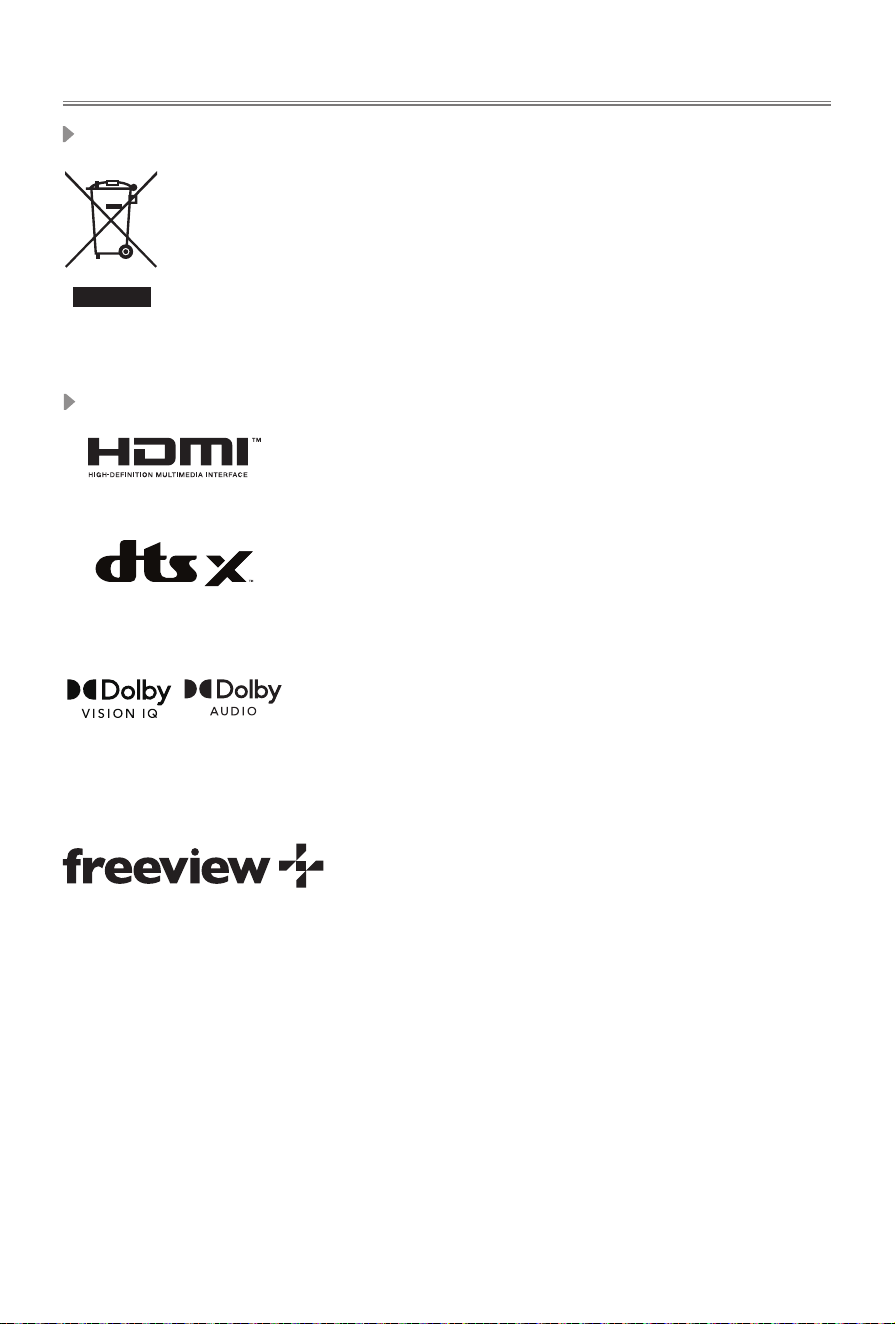
Item
55" 65"
Dimension (mm)
(W×H×D)(without frame)
Without Stand
1231 × 719 × 30 1450 × 841 × 30
With Stand
1231 × 781 × 298 1450 × 893 × 381
Dimension (mm)
(W×H×D)(with frame)
Without Stand
1250 × 728 × 34 1469 × 851 × 34
With Stand
1250 × 791 × 298 1469 × 902 × 381
Weight (kg)
(without frame)
Without Stand
14.4 21.5
With Stand
14.5 22.0
Weight (kg)
(with frame)
Without Stand
15.4 22.7
With Stand
15.5 23.2
Active Screen Size(Diagonal) (cm)
139 164
Audio power
10W × 2 + 8W × 2 10W × 2 + 8W × 2
Power consumption
Please refer to the rating label.
Power supply
Please refer to the rating label.
Standby Power
0.5W
Screen resolution
3840 × 2160
Receiving systems
Analog
PAL-D/K,B/G,I,SECAM-D/K,B/G
Digital
DVB-T/T2,DVB-C,DVB-S/S2
Environmental conditions
Temperature: 5°C - 40°C
Humidity: 20% - 80% RH
Atmospheric pressure: 86 kPa - 106 kPa
HDMI Input
RGB/60Hz(640×480,800×600,1024×768)
YUV/60Hz(480i,480p,720p,1080i,1080p)
YUV/50Hz(576i,576p,720p,1080i,1080p)
24Hz25Hz30Hz50Hz60Hz(3840×2160)
forHDMI4K@144Hz:
120Hz144Hz(3840×2160,2560×1440,1920×1080)
240Hz(1920×1080)
288Hz(
2560×1440,
1920×1080)
Wireless LAN Standards
IEEE
802.11a/b/g/n/ac
NOTE
"Receivingsystems"maydierdependingonyourmodel/country/region.
CertainmodelsmaynotbeavailableforsaleinAustralia.
12
ThetermsHDMI,HDMIHigh-DenitionMultimediaInterface,HDMITrade
dress and the HDMI Logos are trademarks or registered trademarks of
HDMI Licensing Administrator, Inc.
Other Information
Packaging and electrical goods should be recycled appropriately, and not treated as household
waste. Please dispose of this equipment at your applicable collection point for the recycling of
electrical & electronic equipment waste. By ensuring the correct disposal of this product, you
willhelppreventpotentiallyhazardoustotheenvironmentandtohumanhealth,whichcould
otherwise be caused by unsuitable waste handling of this product. The recycling of materials
willhelpconservenaturalresources.Pleasedonotthereforedisposeofyouroldelectricaland
electronic equipment with your household waste. For more detailed information about recycling
ofthisproduct,pleasecontactyourlocalcityoffice,yourhouseholdwastedisposalserviceor
the shop where you purchased the product.
Disposal of Used Electrical & Electronic Equipment
License
Dolby, Dolby Vision, and the double-D symbol are registered trademarks of
Dolby Laboratories Licensing Corporation. Dolby Vision IQ and Dolby Audio
are trademarks of Dolby Laboratories Licensing Corporation. Manufactured
underlicensefromDolbyLaboratories.Condentialunpublishedworks.
Copyright©1992-2024DolbyLaboratories.Allrightsreserved.
ManufacturedunderlicensefromDTS,Inc.and/oritsaliates.Forpatents,
seehttps://xperi.com/dts-patents/.DTS,theDTSlogo,DTS:X,theDTS:X
logo, Virtual:X, and the DTS Virtual:X logo are trademarks or registered
trademarksofDTS,Inc.and/oritsaliatesintheU.S.and/orother
countries.©DTS,Inc.and/oritsaliates.Allrightsreserved.
What is Freeview Plus?
FreeviewPlusisanewtelevisionservicedeliveredvia broadband providing a stateoftheartElectronic
Program Guide (EPG) and seamless access to catch-up TV across the free-to-air networks with the simple
press of a button.
How does it work?
FirstensuretheTVisconnectedtointernetandanantennasystem.Thenwhenyou’rewatchingTV,you’ll
brieyseeapromptatthetopleftofthescreen.Pressthe‘Green’buttononyourremotetolaunchFreeview
Plus.MoreinformationaboutFreeviewPluscanbefoundonhttp://www.freeview.com.au/