
SapphireAppliances.com | 1.866.754.6672
Adapting to Your Environment
Ice Maker • Wine Cellar • Refrigerator • Beverage Center • Drawer Refrigerator
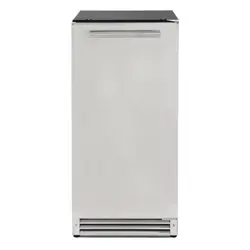
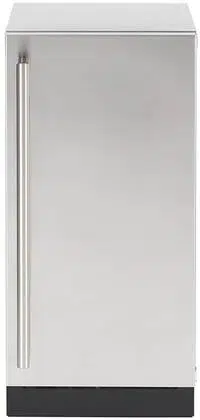
Sapphire Series 5
15'' Nugget Ice Maker
Operator’s Manual
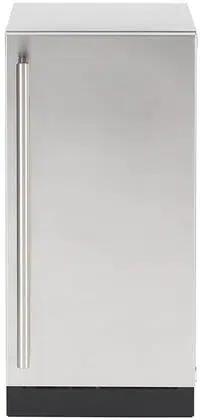
SNIM155PSS Indoor Model
SNIM155PPR Indoor Model
SNIM155OD Indoor&Outdoor Model
Congratulations on your new SAPPHIRE Ice Machine. To ensure proper operation, please read this
Operator’s Manual carefully before using this product. Keep this manual in a safe place for
future reference.
PRODUCT REGISTRATION INFORMATION
Please record your model’s information. You will need to know this information whenever you call to request information or
service. The model’s information appears on a serial number plate.
Model Number:
Serial Number:
You can register your appliance at:
SapphireAppliances.com
Or
Fill out the provided Warranty Registration Car and mail in.
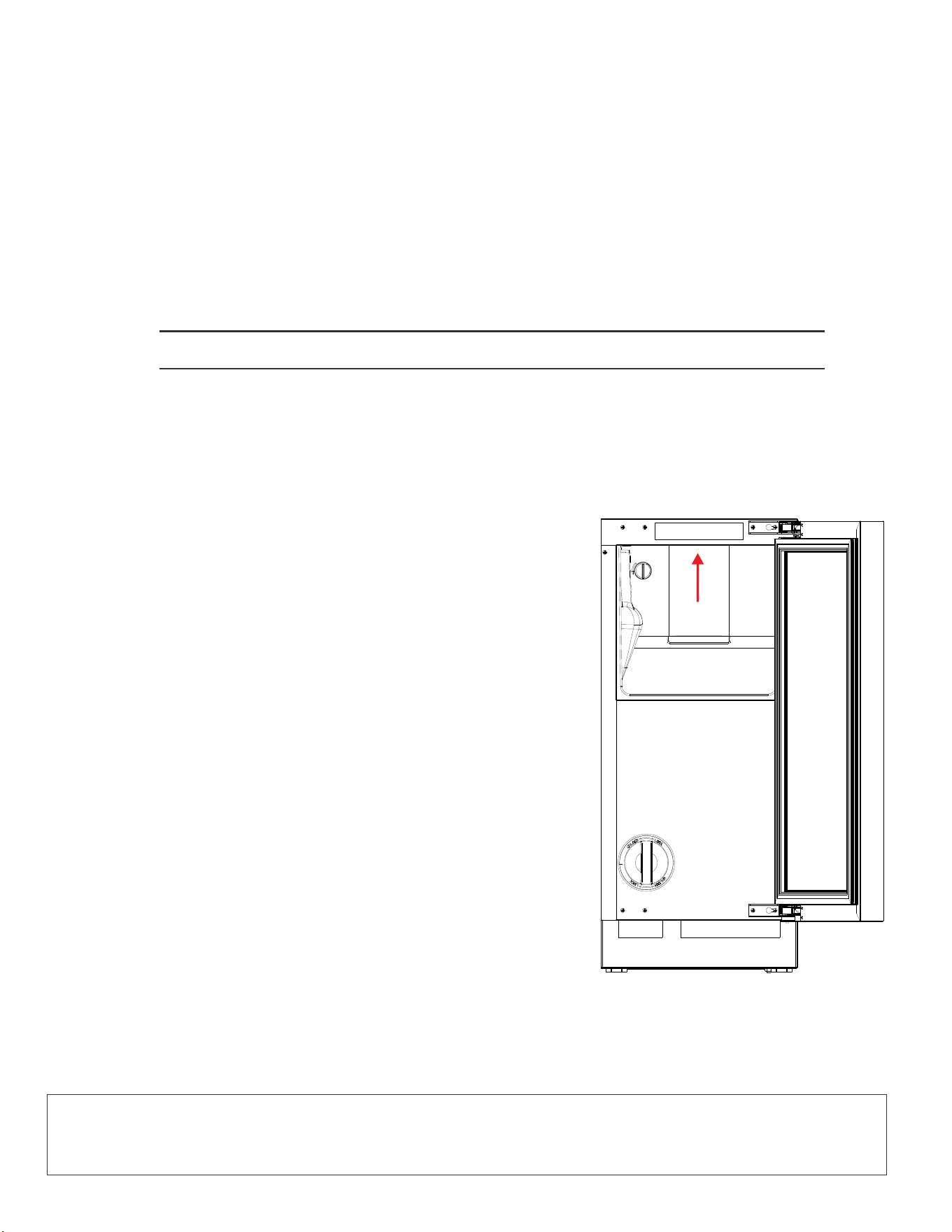
Your Serial Tag is located on the top, inside of your Sapphire
appliance. We recommend using your cellphone to take a
picture of the Serial Tag so you can record the Model and Serial
numbers here and for any future reference.

SAPPHIRE Ice Machine Operator’s Manual
1
© 2025 SAPPHIRE
TABLE OF CONTENTS
SAFETY .................................................................................................................................... 5
SAFETY DEFINITIONS ............................................................................................................5
SAFETY PRECAUTIONS ........................................................................................................5
SPECIFICATIONS .................................................................................................................. 7
SAPPHIRE 15-INCH INDOOR NUGGET ICE MACHINE........................................................ 7
SAPPHIRE 15-INCH OUTDOOR NUGGET ICE MACHINE ..................................................7
INSTALLING THE UNIT ........................................................................................................8
REQUIRED CABINET OPENING .......................................................................................10
BUILT-IN CABINET DIMENSIONS .....................................................................................10
SAPPHIRE 15-Inch Indoor&Outdoor Built-In Cabinet Dimensions ...................................10
ELECTRICAL CONNECTION ..............................................................................................12
AVOIDING USE OF EXTENSION CORDS ......................................................................... 13
CONNECTING THE WATER SUPPLY ...............................................................................13
LEVELING THE UNIT ........................................................................................................... 14
REVERSING THE DOOR .....................................................................................................15
CUSTOM DOOR PANEL .......................................................................................................17
15-
Inch Indoor Solid Integrated Panel...............................................................................17
15-
Inch Indoor Framed Integrated Panel .......................................................................... 18
Installing the Custom Door Panel...................................................................................... 18
ANTI-TIP SYSTEM .................................................................................................................19
INTEGRATED GRILL/PLINTH ................................................................................................20
OPERATING THE UNIT ......................................................................................................... 21
Important: Ensuring Ice Freshness and Quality .................................................................21

TABLE OF CONTENTS
2
© 2025 SAPPHIRE
SAPPHIRE Ice Machine Operator’s Manual
OTHER OPERATING TIPS .................................................................................................... 21
Ice Machine Production.....................................................................................................21
USING THE CONTROLS ....................................................................................................... 22
Turning the Unit On ...........................................................................................................22
Turning the Unit Off ...........................................................................................................23
Enter the display of Menu items ........................................................................................23
Running the Clean Ice Machine Cycle ..............................................................................25
Setting Quiet Mode 4 Hours ..............................................................................................27
Exiting or Stopping Quiet Mode 4 Hours ........................................................................... 28
Setting Schedule Quiet Mode ...........................................................................................29
TDS Indicator....................................................................................................................37
Enter Sabbath Mode ......................................................................................................... 39
Exiting or Cancelling Sabbath Mode .................................................................................40
Exiting the Menu ............................................................................................................... 40
Clean Alert indicator .......................................................................................................... 41
Filter Alert Indicator ........................................................................................................... 42
Clearing Simple Error Codes ............................................................................................43
Error Codes That Require Contacting Customer Service ................................................. 43
EXPECTING NORMAL SOUNDS ..........................................................................................46
DEALING WITH POWER FAILURE .......................................................................................46
CARE AND MAINTENANCE .................................................................................................47
REPLACING WATER FILTER - ICE MACHINES ..................................................................47
CLEANING AND MAINTAINING THE UNIT ..........................................................................49
Cleaning the Unit’s Exterior .............................................................................................. 49
Cleaning the Unit’s Interior ................................................................................................ 49
Extended Periods of Non-Use...........................................................................................50
Recommissioning the Unit ................................................................................................50
Starting Up the Unit ........................................................................................................... 50
Cleaning the Condenser ...................................................................................................51
Complete Winterization of the Unit ..................................................................................51
Water Filter Reminder ...................................................................................................... 36

TABLE OF CONTENTS
SAPPHIRE Ice Machine Operator’s Manual
3
© 2025 SAPPHIRE
TROUBLESHOOTING ...........................................................................................................53
DISPOSING THE UNIT ..........................................................................................................55
WARRANTY ...........................................................................................................................56
Start-Up After Long Term Storage..................................................................................... 52

TABLE OF CONTENTS
4
© 2025 SAPPHIRE
SAPPHIRE Ice Machine Operator’s Manual
NOTES

SAPPHIRE Ice Machine Operator’s Manual
5
© 2025 SAPPHIRE
SAFETY
1
SAFETY DEFINITIONS
The words DANGER, WARNING, CAUTION and NOTICE are used throughout this manual to
highlight important information. Be certain that the meanings of these alerts are known to all who
operate and install the appliance.
!
DANGER
Indicates a hazardous situation that, if not avoided, will result in death or serious injury.
!
WARNING
Indicates a hazardous situation that, if not avoided, could result in death or serious injury.
!
CAUTION
Indicates a hazardous situation that, if not avoided, could result in minor or moderate
injury.
NOTICE
Indicates a situation that can cause damage to the appliance and/or the environment, or cause the
appliance to operate improperly.
SAFETY PRECAUTIONS
POWER CORD PRECAUTIONS
• Do not use the appliance if the power cord is damaged. If the power cord is damaged, have a
qualified electrician replace the power cord.
• Never lift, carry or drag the appliance by the power cord.
• Do not connect or disconnect the electric plug when your hands are wet.
• Never unplug the appliance by pulling on the power cord, Always grip the plug firmly and pull
straight out from the outlet.

SAFETY
6
© 2025 SAPPHIRE
SAPPHIRE Ice Machine Operator’s Manual
MOVING PRECAUTIONS
• When moving the appliance, do not turn it upside-down and do not unlevel it more than 45
degrees.
• Do not move the appliance without emptying it and securing the door in the closed position.
INSTALLING PRECAUTION
• Connect to potable water supply only.
OTHER PRECAUTIONS
• To ensure proper ventilation for the appliance, keep obstructions away from the front of the unit.
• Keep fingers out of the “pinch point” areas. Clearance between the door and cabinet are
necessarily small. Be careful closing the door when children are in the area.
• Do not touch the evaporator with your hand when the appliance is operating.
• Do not attempt to repair or replace any part of your appliance unless this manual specifically
recommends it. Have a qualifi ed technician perform all other service on the unit.
• Children 8 years of age and older and people with reduced physical, sensory or mental
capabilities or lack of experience and knowledge can use this appliance if they have been given
supervision or instruction concerning use of the appliance in a safe way and they understand the
hazards involved.
• Never allow children to operate, play with or crawl inside the appliance.
• Never allow children to clean and maintain the machine without supervision.
• Do not use the appliance other than for its intended purpose.
• Do not touch the condenser surfaces. They are sharp and can be easily damaged.
CLEANING AND MAINTENANCE PRECAUTIONS
• Never clean the appliance parts with flammable fluids. Do not store or use gasoline or other
flammable vapors and liquids in the vicinity of this appliance or any other appliances. The fumes
can create a fire hazard or explosion.
• Do not use solvent-based cleaning agents or abrasives on the interior. These cleaners may
transmit taste to the ice cubes, or damage or discolor the interior.
• If the appliance will not be used for a long time, thoroughly clean it before the next use. Carefully
follow any instructions provided for cleaning or the use of sanitizing solution. Do not leave any
solution inside the appliance after cleaning.
THE MANUFACTURER DISCLAIMS ANY RESPONSIBILITY IF THE ABOVE INSTRUCTIONS ARE
NOT FOLLOWED.
SAPPHIRE Ice Machine Operator’s Manual
7
© 2025 SAPPHIRE
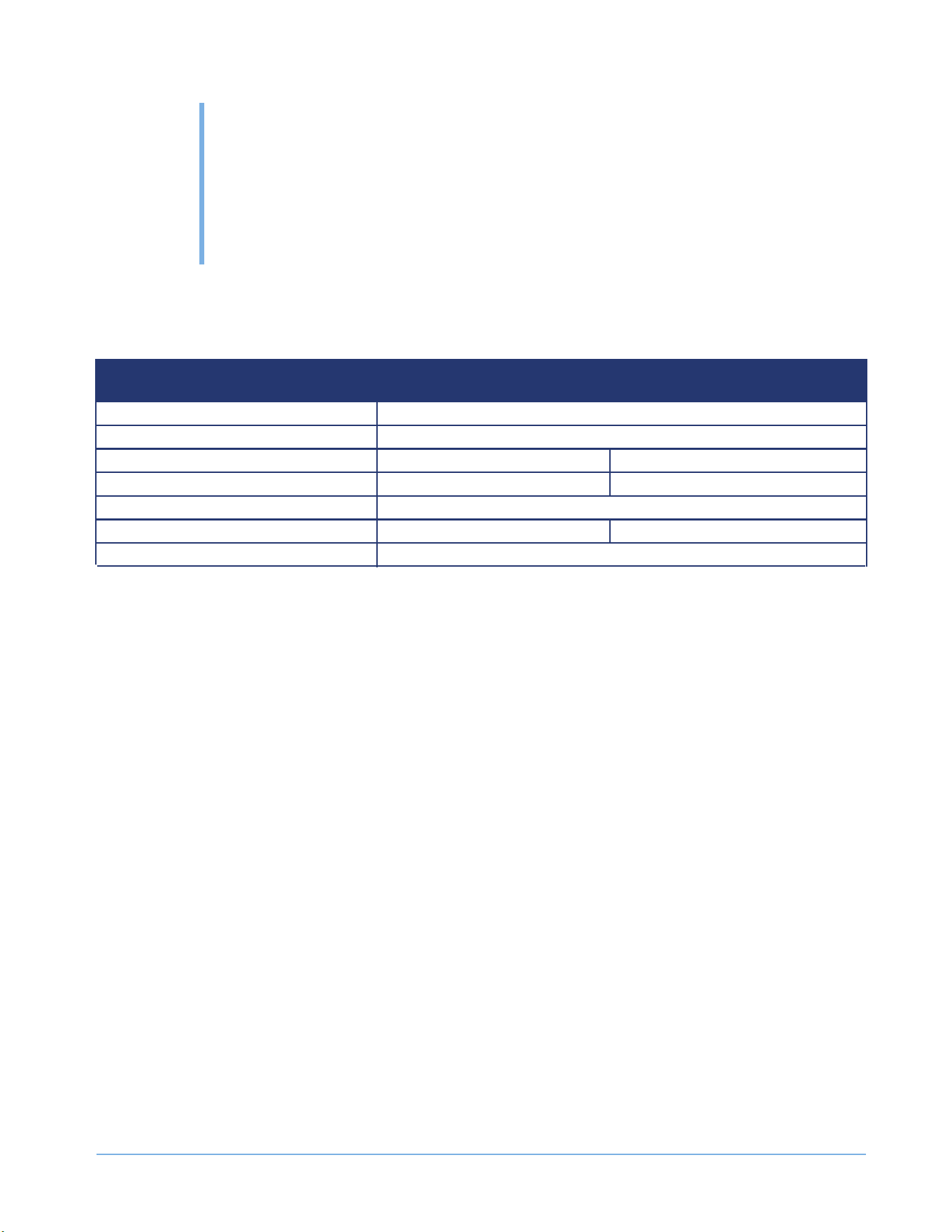
SPECIFICATIONSSPECIFICATIONS
2
SAPPHIRE 15-INCH NUGGET ICE
FEATURES
15-INCH INDOOR
NUGGET ICE MACHINE
15-INCH OUTDOOR
NUGGET ICE MACHINE
Electrical Requirement 115V/60Hz
Maximum Amp Fuse 15 amp
Power Consumption
7.9kWh/100 lbs (45.4 kg)
8.2kWh/100 lbs (45.4 kg)
Rated Current
1.8 amp
Max Ice Production Capacity
80 lbs
(36kg) per Day
80 lbs (36kg) per Day
Ice Storage
30 lbs (14 kg)
Ambient Operating Range
50~100°F (10°C~38°C)
50~110°F (10°C~43°C)

8
© 2025 SAPPHIRE
SAPPHIRE Ice Machine Operator’s Manual
INSTALLING
THE UNIT
3
!
WARNING
Fire/Explosion Hazard
DO NOT install in spaces containing gasoline engines, fuel tanks or fuel line fi ttings. This
device does not meet federal requirement for ignition protection.
IMPORTANT:
Plumbing and Electrical Tips
• A licensed plumber must install this appliance.
• This appliance must be installed with all electrical and water connections in accordance with state
and local codes.
• This unit requires a standard electrical supply properly grounded in accordance with National
Electrical Code and local codes and ordinances.
• The fuse (or circuit breaker) size should be 15 amperes for 115V.
• The manufacturer recommends that you provide a separate circuit that services only your
appliance. Use receptacles that cannot be turned off by a switch or pull chain.
• Plug the appliance into a grounded three-prong outlet. Do not remove the grounding prong, do not
use an adapter, and do not use an extension cord.
• Do not kink, pinch or damage the power supply cord between the ice machine and wall or cabinet.
• Before connecting the ice machine to the power source, let it stand upright for approximately 4
hours. Following this step will reduce the possibility of a malfunction in the cooling system brought
on by handling during transportation.
• Make sure to install on level surface and ensure drain line and waterline are not kinked.
• Before Installation of Nugget Ice Machine please perform a TDS test of the water supply to
determine water filtration needs.
• If TDS is above 400 an anti-scale in-line filter will be required for proper operation. Warranty will
be void if in line filter is Not installed prior to installation.
• TLC-2200S-SAPSTRK is a water filter kit that includes a manifold and filter cartridge and bypass
filter cartridge required for proper operation.
Water Examination
INSTALLING THE UNIT
SAPPHIRE Ice Machine Operator’s Manual
9
© 2025 SAPPHIRE
Tips on Moving and Setting up the Unit
!
CAUTION
Tip Hazard
Be sure to use caution when working around an uninstalled unit. The unit is capable of
tipping over if it is not installed and properly anchored.
• Use two or more people to move and install the appliance. Failure to do so can result in back or
other injury.
• Remove the packing materials and clean the appliance before using it.
Factors Affecting the Unit
• Install this unit in an area protected from the elements (for example, wind, rain, water spray or
drips).
Do not use an ice machine intended for indoor use outside. Only use an ice machine that is intended for
use outdoors.
• The ambient operational temperature should be between 50°F (10°C) and 110°F (43°C). The
input water temperature should be between 41°F (5°C) and 90°F (32°C). Operating the machine
outside these temperatures may result in lowered production or other adverse effects.
• Never keep the appliance next to ovens, grills or other high-heat resources.
• Keep the appliance on a hard, level surface that can support the unit when the unit is full. Keep
the ice machine level to help ensure it works properly. Keeping an ice machine on an unlevel
surface may cause water to fl ow improperly through the evaporator (ice mold) and will reduce ice
production. You may need to make several adjustments to level the unit. If necessary, adjust the
height of the ice machine by turning the feet. See “Leveling the Unit” on page 14.
• To ensure proper service access and ventilation, all Sapphire units should not have the grill
openings covered. There are no additional requirements for venting at the top, side or rear of the
unit.
• These units are to be installed under a counter. Follow the recommended spacing dimensions
listed in this manual. Place all electrical and water supplies and drain fi xtures in the
recommended locations.
Water Supply Tips
• The ice machine requires a continuous water supply with a minimum pressure of 20 psi (0.14
MPa) and a static pressure not to exceed 80 psi (0.55 MPa).
• The manufacturer recommends filtering the water. A water filter helps remove taste, odors and
particles. Using softened water may result in white, mushy ice that stick together. Avoid using
deionized water.
• Ensure that the water supply hose is not pinched, kinked or damaged during installation.
• Check for leaks after connecting the water line.
NOTE:
INSTALLING THE UNIT
10
© 2025 SAPPHIRE
SAPPHIRE Ice Machine Operator’s Manual
REQUIRED CABINET OPENING
!
WARNING
Fire/Explosion Hazard
DO NOT install in spaces containing gasoline engines, fuel tanks or fuel line fi ttings. This
device does not meet federal requirement for ignition protection. Failure to comply could
result in injury or death.
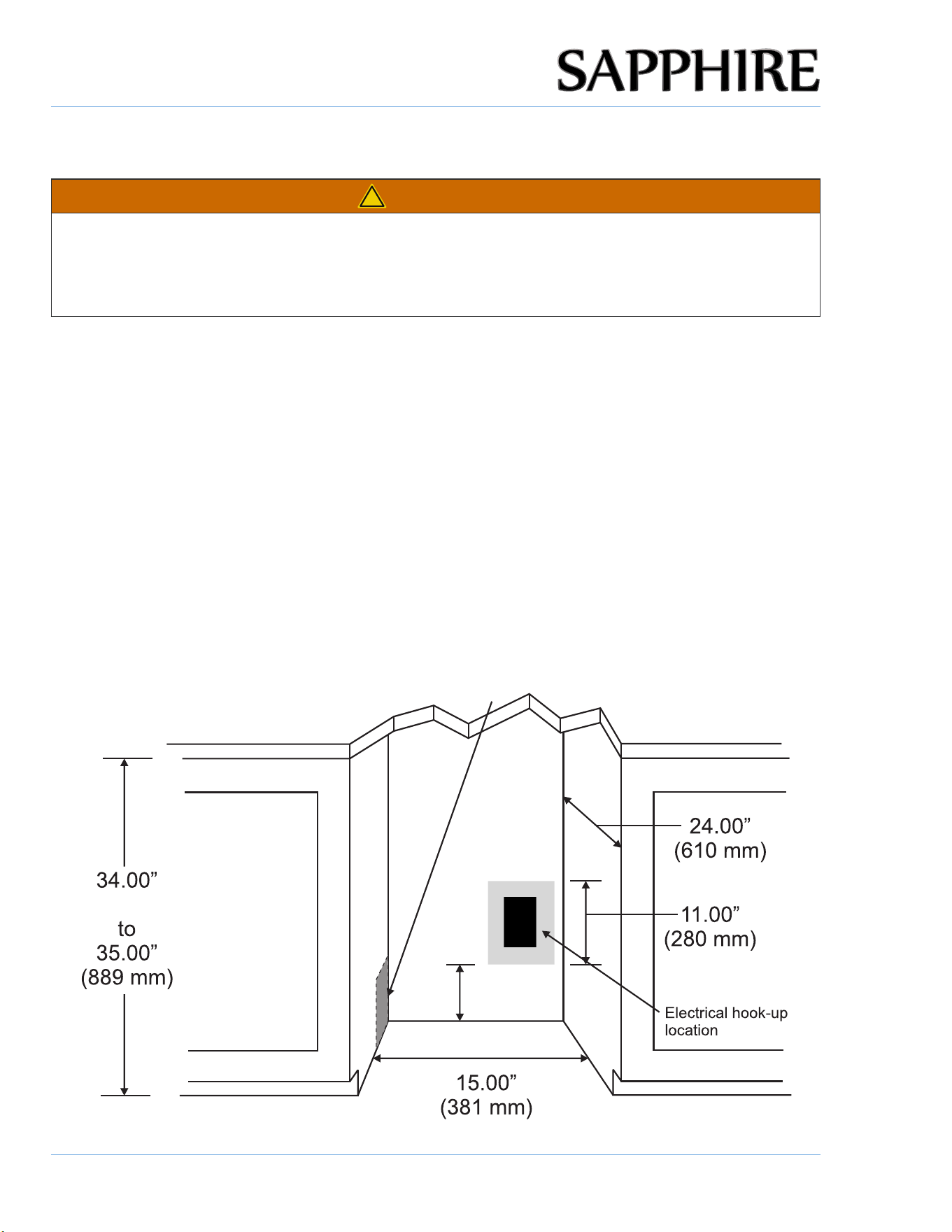
A built-in installation will allow you to install the ice machine under a counter or in a kitchen cabinet if
you respect the required clearance space around the Nugget Ice machine. The appliance must be
located to allow clearance for water, drain and electrical connections in the rear of the unit.
BUILT-IN CABINET DIMENSIONS
A built-in installation requires for a water line and plug clearance for proper operation. A built-in unit is
designed for zero clearance at the top and each side of the unit. The unit uses fan-forced condenser
cooling, which requires air circulation through the lower section of the unit.
To ensure proper service access and ventilation, all SAPPHIRE units should not have the grill openings
covered. There are no additional requirements for venting at the top, side or rear of the unit.
SAPPHIRE 15-INCH INDOOR&OUTDOOR BUILT-IN CABINET DIMENSIONS
Recommended location for waterline, drain line,
and electrical connection in either adjacent cabinet.
7.00"
(177 mm)
(864 mm)
NOTE:
INSTALLING THE UNIT
11
© 2025 SAPPHIRE
SAPPHIRE Ice Machine Operator’s Manual
NOTICE
• If you remove the rubber feet from the bottom of the unit, reinstall the mounting screws into the
bottom of the cabinet to avoid damage to components mounted to the base pan.
• Ensure that the air path for the grill remains unrestricted. Any restriction of air flow through the
grill will disrupt normal operation of the unit, resulting in damage to components, and voids
warranty.
• Connect the unit to a potable water supply only.
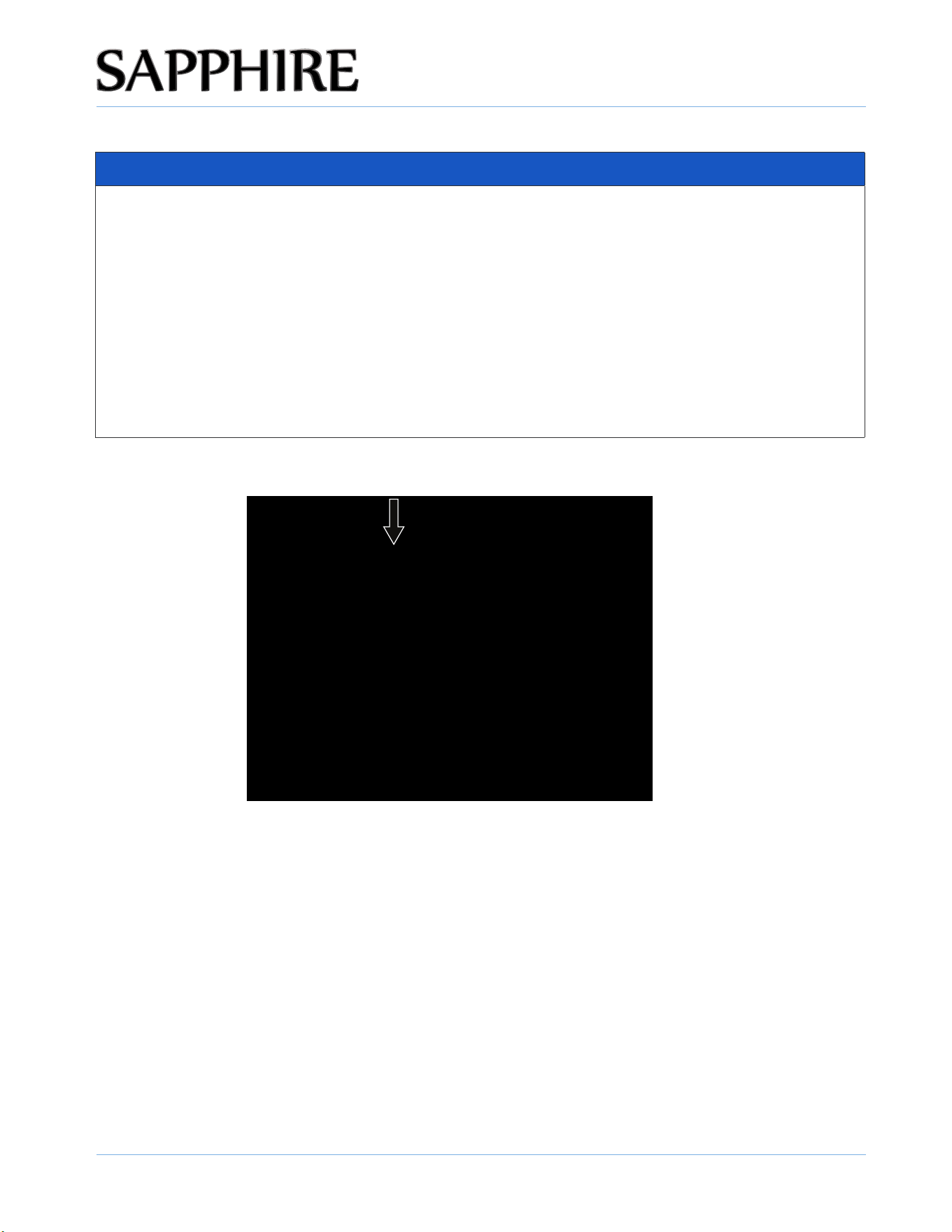
• The minimum distance the unit needs to be installed when adjacent to a wall is 7.5” (190mm) is
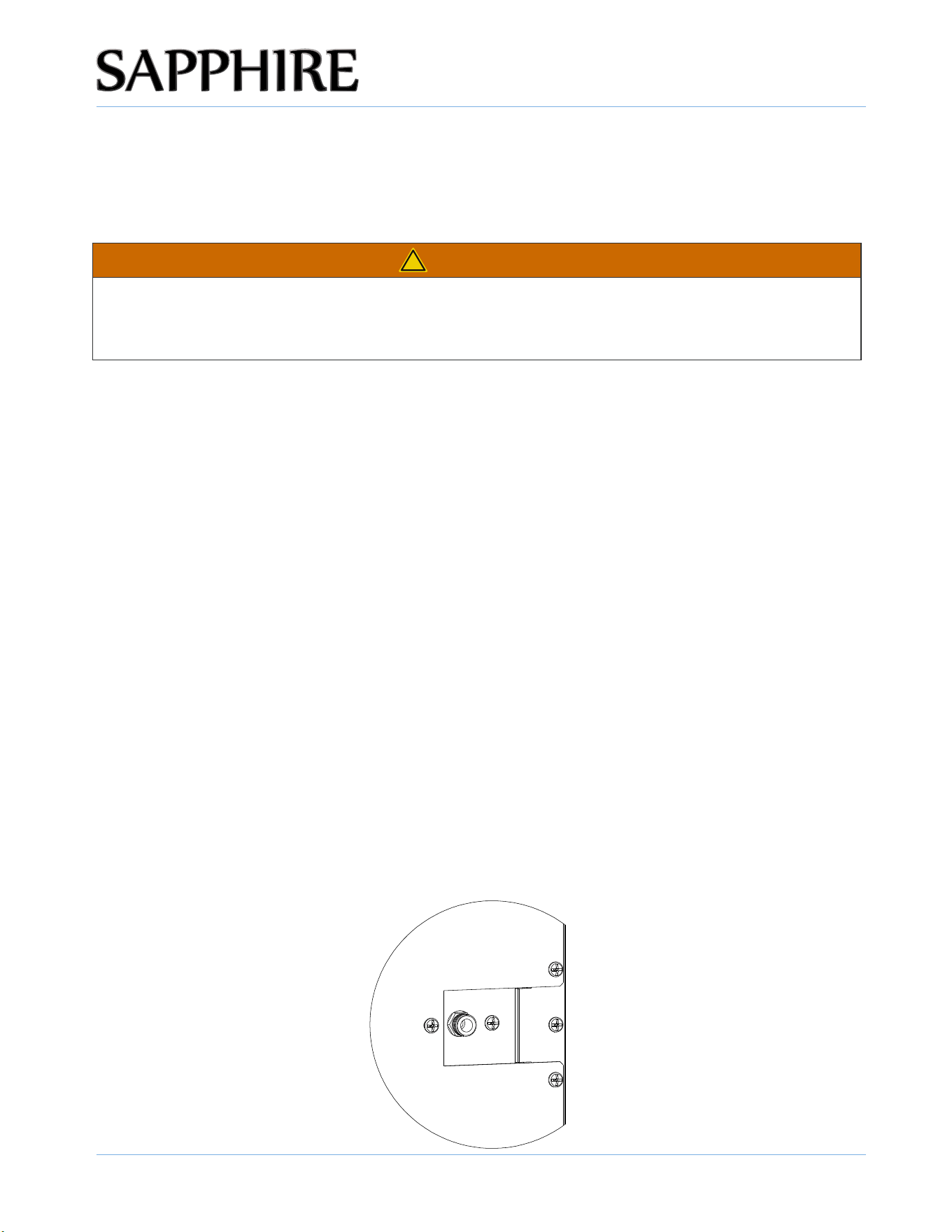
required to obtain full swing (115°) of the door and 2.75 in. (70 mm) when using the 90°
K pin (provided) to restrict the swing of the door. The two distances can make sure the handle
does not hit the wall or adjacent cabinetry.
90 degree limiting K pin shown inserted below

INSTALLING THE UNIT
12
© 2025 SAPPHIRE
SAPPHIRE Ice Machine Operator’s Manual
ELECTRICAL CONNECTION
Do not, under any circumstances, cut or remove the third (ground) prong from the power cord.
For personal safety, you must properly ground this appliance. The power cord of this appliance
features a three-prong grounding plug that mates with a standard three-prong grounding wall outlet to
minimize the possibility of electric shock hazard from the appliance. Have a qualified electrician check
the wall outlet and circuit to make sure the outlet is properly grounded. It is your responsibility and
obligation to have a standard two-prong wall outlet replaced with a properly grounded three-prong
wall outlet.
Always plug the appliance into its own individual electrical outlet. The voltage rating of the outlet must
match the rating label on the appliance. This match provides the best performance and also prevents
overloading the electrical circuits, which could cause a fire hazard from overheated wires.
Never unplug your appliance by pulling on the power cord. Always grip the plug firmly and pull straight
out from the outlet.
Repair or replace immediately all power cords that have become frayed or damaged. Do not use a
cord that shows cracks or abrasion damage along its length or at either end.
When moving the appliance, take care not to damage the power cord.
If the supply cord suff ers damage, have the manufacturer, its service agent, or similarly qualifi ed
persons replace the supply cord to avoid a hazard.
INSTALLING THE UNIT
13
© 2025 SAPPHIRE
SAPPHIRE Ice Machine Operator’s Manual
AVOIDING USE OF EXTENSION CORDS
Because of potential safety hazards under certain conditions, the manufacturer strongly recommends
that you do not use an extension cord with this appliance.
!
WARNING
Follow these steps to test the operation of the drain pump before fi nal installation:
1. Check the power cord and make sure it is not plugged into the outlet.
2. Place the drain hose into a suitable container that can hold at least one gallon.
3. Pour one gallon of water into the ice storage bin.
4. Plug the power cord into a properly grounded, polarized electrical outlet.
5. The drain pump should start and pump the water into the container.
6. Unplug the power cord.
CONNECTING THE WATER SUPPLY
1. Turn off the main water supply. Turn on the nearest faucet long enough to clear a line of water.
2. Find a 1/2" to 3/4" vertical cold-water pipe near the installation location. The distance should be
less than 9 feet.
3. Install a shut-off valve to the main water supply. If the water pipe has a plain piece of copper
tubing, attach a 1/4" O.D. compression union to the tubing and remove the nut.
4. Thread the nuts of the supplied water supply hose to the tap and water inlet valve. Access to the
water inlet valve is through the opening in the rear panel. Tighten firmly by hand, then one-half
turn with a wrench.
5. Turn on the main water supply and tap. Check for leaks in the water supply connection. Tighten
all connections.
Electrical Shock Hazard
Be sure the fl oor surfaces surrounding the appliance are dry before plugging in and
removing the power cord to the outlet to prevent electrical shock.

INSTALLING THE UNIT
14
© 2025 SAPPHIRE
SAPPHIRE Ice Machine Operator’s Manual
LEVELING THE UNIT
The appliance requires leveling before it can work properly. If necessary, raise or lower the unit by
turning the four leveling feet on the bottom. The manufacturer recommends using a carpenter’s level
to check the appliance.
NOTICE
It is extremely important that the ice machine is level. If it is not level, production of uneven ice
will occur.
Adjust all four leveling feet evenly so that the top of the appliance is at the desired installation height
and is level.
1. On a level surface, place a carpenter’s level on top of the appliance to see if it is level from front
to back and side to side.
2. Adjust the height of the leveling feet as follows:
• Turn the leveling feet to the right to lower that side of the appliance.
• Turn the leveling feet to the left to raise that side of the appliance.
INSTALLING THE UNIT
15
© 2025 SAPPHIRE
SAPPHIRE Ice Machine Operator’s Manual
REVERSING THE DOOR
This appliance has the capability of the door opening from either the left or right side. The appliance is delivered
to you with the door opening from the left side. Follow these instructions should you desire to reverse the opening
direction: (NOTE: THE HANDLE DOES NOT NEED TO BE REMOVED TO REVERSE THE DOOR)
1. Check the power cord and make sure it is not plugged into the outlet.
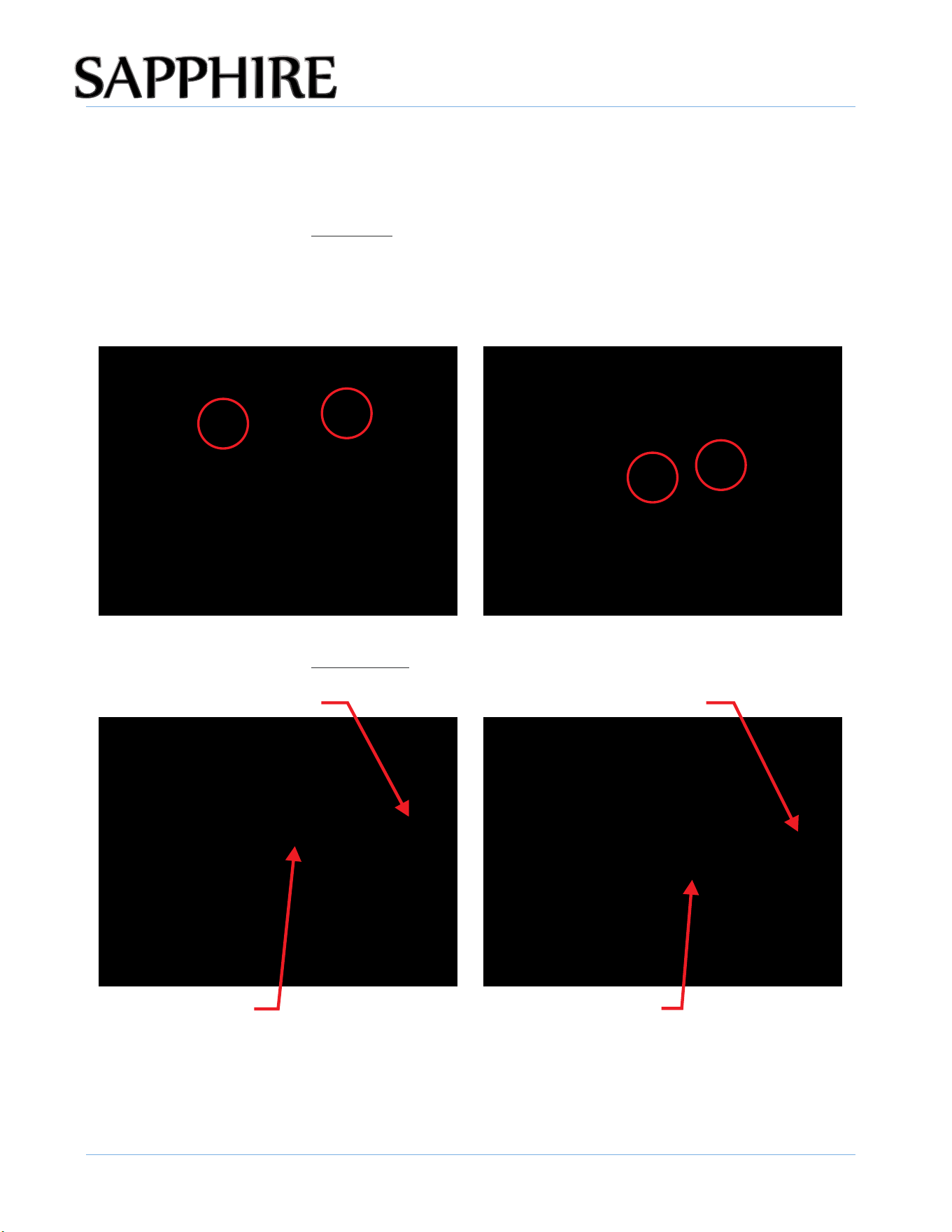
2. With the door open, carefully remove the 4 plugs at the top and bottom of the left side of the appliance cabinet
3. Loosen (as shown below) but do not remove the outer top and bottom screws on the right-side hinges.
4. Completely remove the inner top and bottom screw on the right-side.
face (pictured below). Save the plugs to reinstall once the door reversal is complete.
Outer top hinge screw Outer bottom hinge screw
Inner top hinge screw Inner bottom hinge screw
INSTALLING THE UNIT
16
© 2025 SAPPHIRE
SAPPHIRE Ice Machine Operator’s Manual
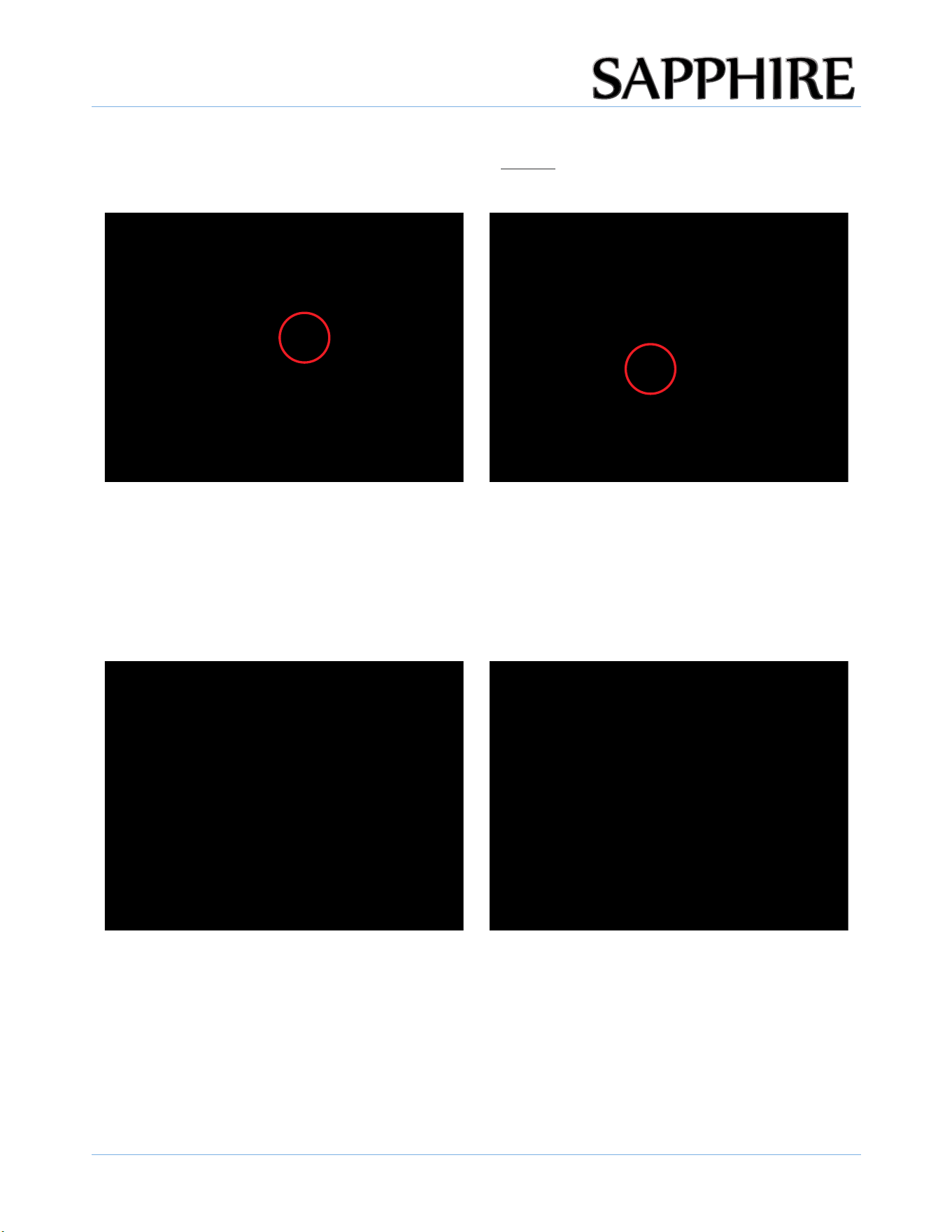
7. Carefully turn/rotate the door 180 degrees and reposition the hinges on the 2 partially installed left-side
6. Carefully slide and lift the door off of the 2 remaining screws on the right-side.
screws.
8. Remove the outer top and bottom screws from the right-side hinges and install them in the open inner
holes in the left-side hinge location. Tighten all screws.
10. Install the plugs into the four open holes on the right side.
5. Install the 2 removed screws about three turns into the left-side outer top and bottom screw locations
where the plugs were removed (as pictured below)
9. Close the door and check for good alignment with the cabinet. If needed, loosen the 4 screws enough to
slide the door a bit to fine tune the alignment, then re-tighten all 4 screws.
11. Remove the magnetic Sapphire badge from the front of the door, rotate it 180 degrees and reinstall the badge
for proper positioning.
INSTALLING THE UNIT
17
© 2025 SAPPHIRE
SAPPHIRE Ice Machine Operator’s Manual
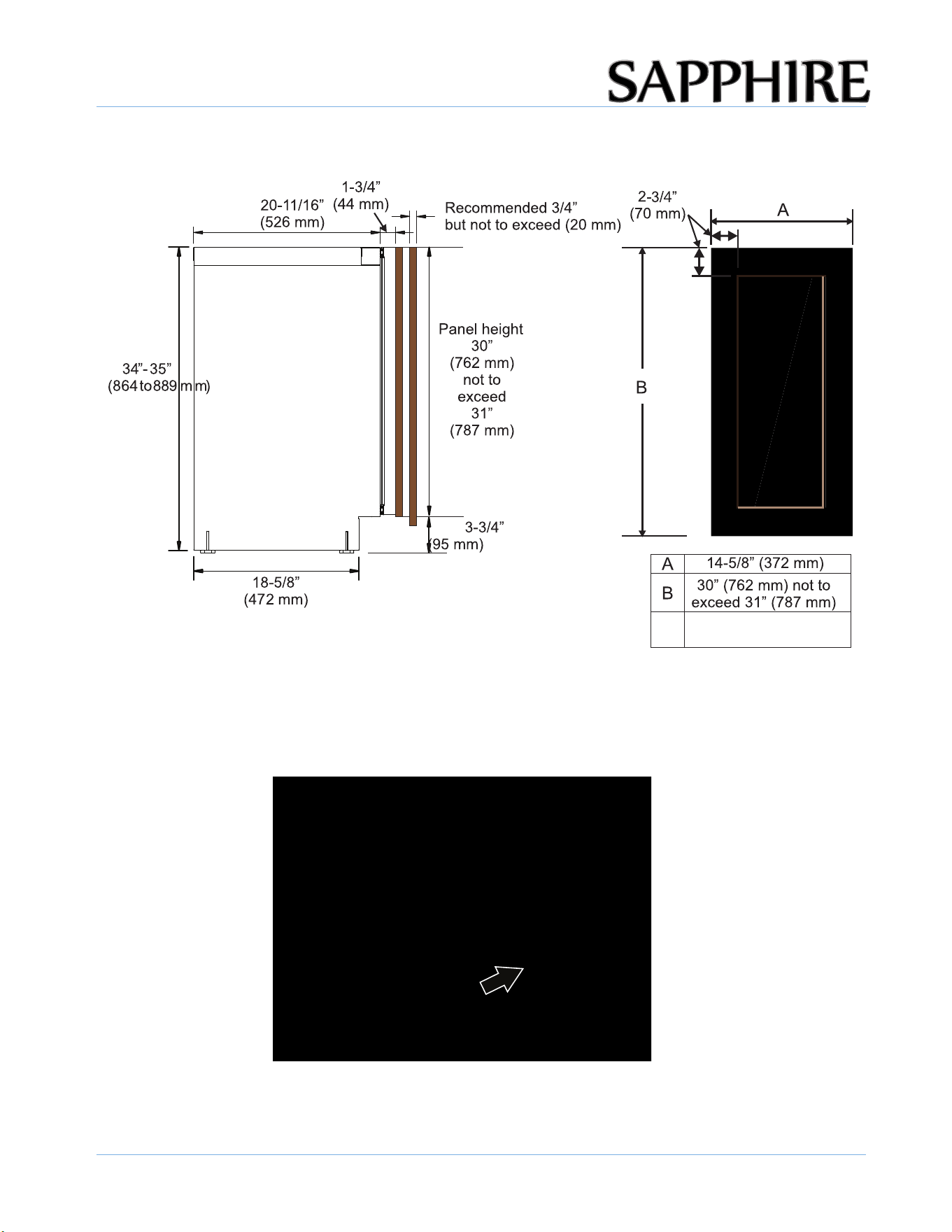
15-INCH INDOOR SOLID INTEGRATED PANEL
"
" "
"
"
"
"
"
"
"
"
"
P
CUSTOM DOOR PANEL
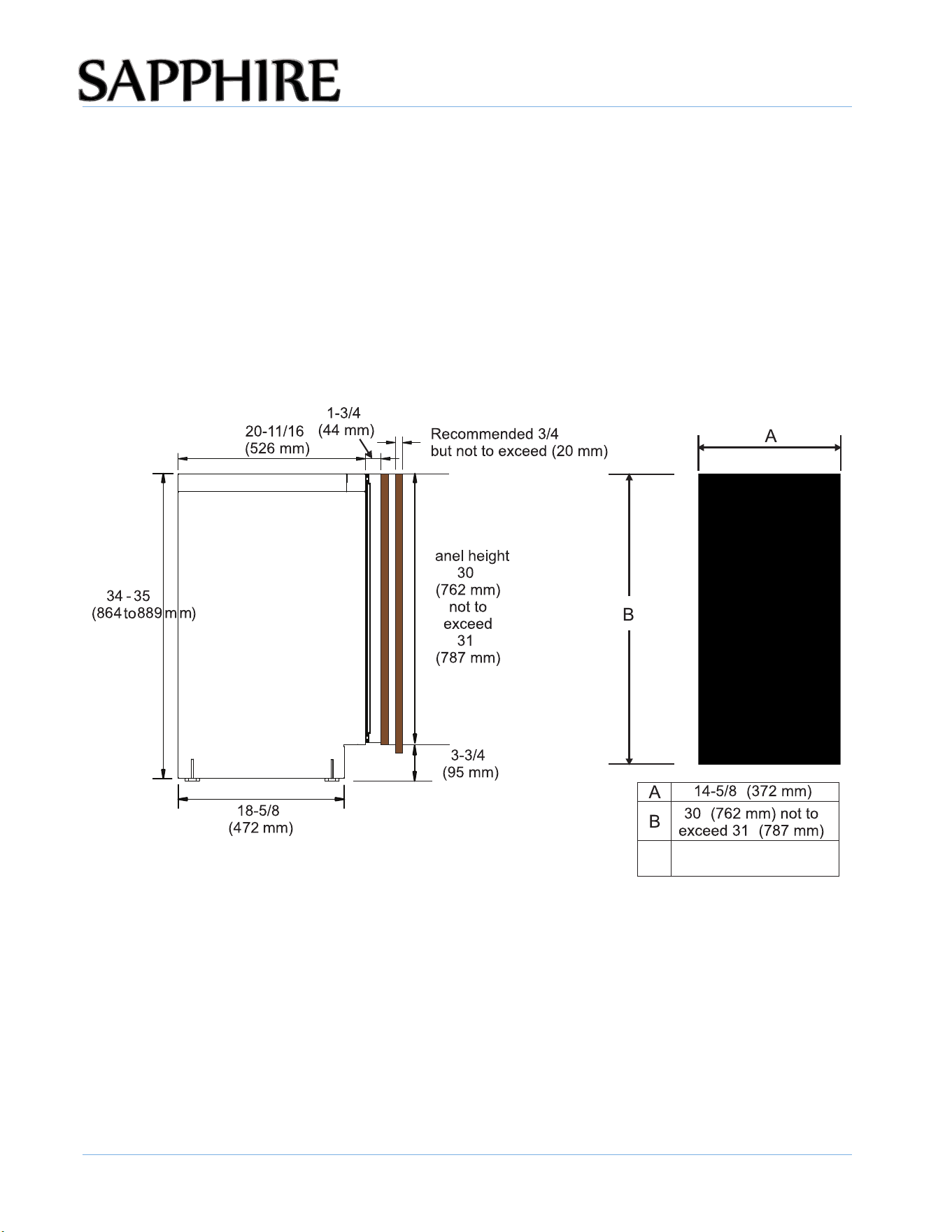
A custom door panel/frame can be fabricated for the appliance. Handle hardware must also be
provided, if needed.
Finish all sides of the custom panel. They may be visible when the door is open.
Maximum Panel
Weight = 25 lbs.
INSTALLING THE UNIT
18
© 2025 SAPPHIRE
SAPPHIRE Ice Machine Operator’s Manual
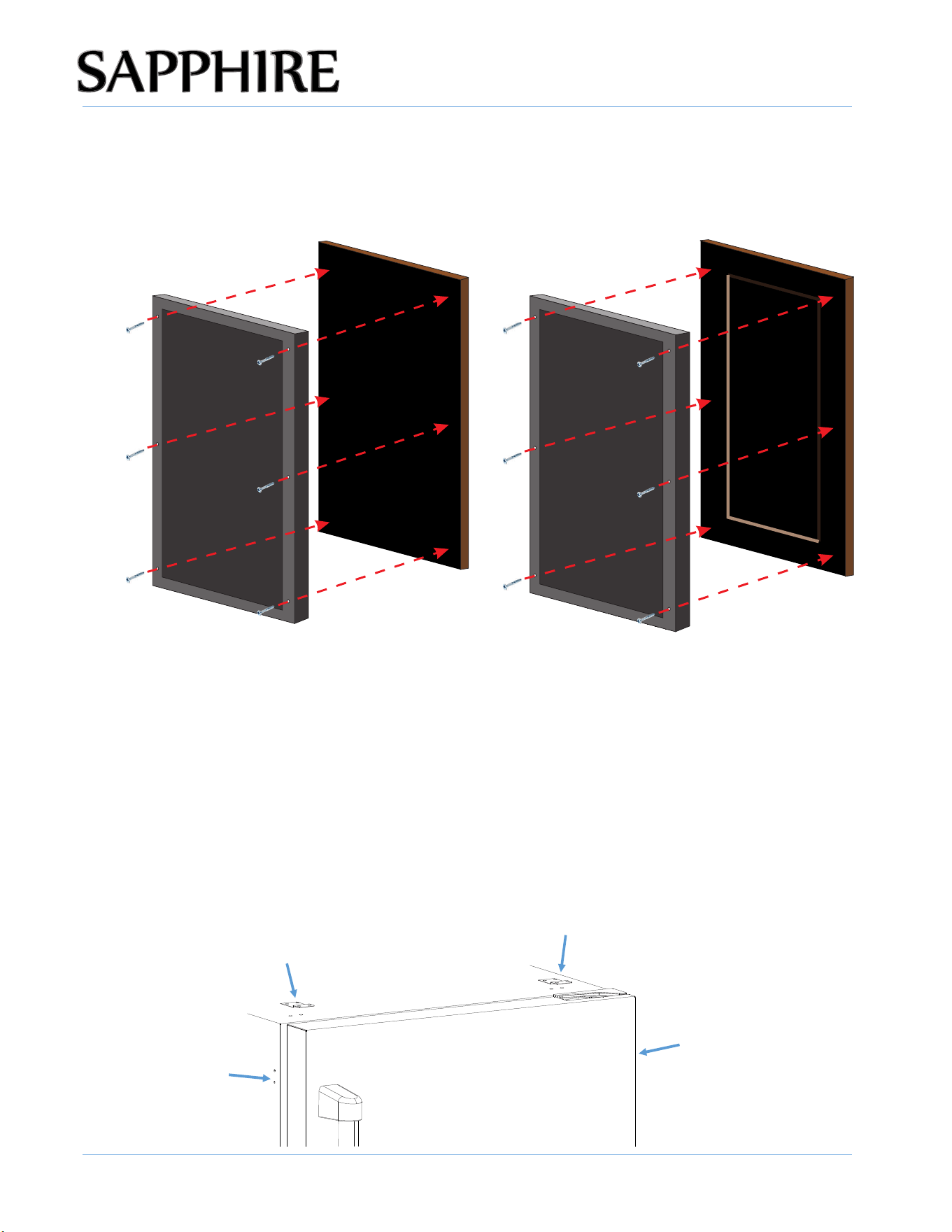
15-INCH INDOOR FRAMED INTEGRATED PANEL
Maximum Panel
Weight = 25 lbs.
INSTALLING THE CUSTOM DOOR PANEL
1. Remove the door from the unit.
2. Remove the door seal to gain access to the custom door panel mounting holes.
INSTALLING THE UNIT
19
© 2025 SAPPHIRE
SAPPHIRE Ice Machine Operator’s Manual
3. Align the top of the custom door panel flush with the top of the door.
4. Adjust the overlap of the custom door panel so it is equal on both sides of the door.
5. Secure the custom door panel to the door using six wood screws (provided).
6. Reinstall the door seal. Be sure the seal is properly seated.
7. Reinstall the door to the unit.
ANTI-TIP SYSTEM
To reduce the risk of tipping the unit by abnormal usage or improper loading, the appliance must
be secured by properly installing the anti-tip device packed with the appliance.
ALL units has 2 sets of anti-tip brackets for top and bottom mounting.
• once the appliance is in place and leveled, secure the two anti-tip brackets underneath the
counter-top using the two provided screws.
• If the brackets for the anti-tip system cannot be secured above the appliance and no wood is
available, relocate the brackets for the anti-tip system to the side of the appliance for
securing into an adjacent cabinet.
INSTALLING THE UNIT
20
© 2025 SAPPHIRE
SAPPHIRE Ice Machine Operator’s Manual
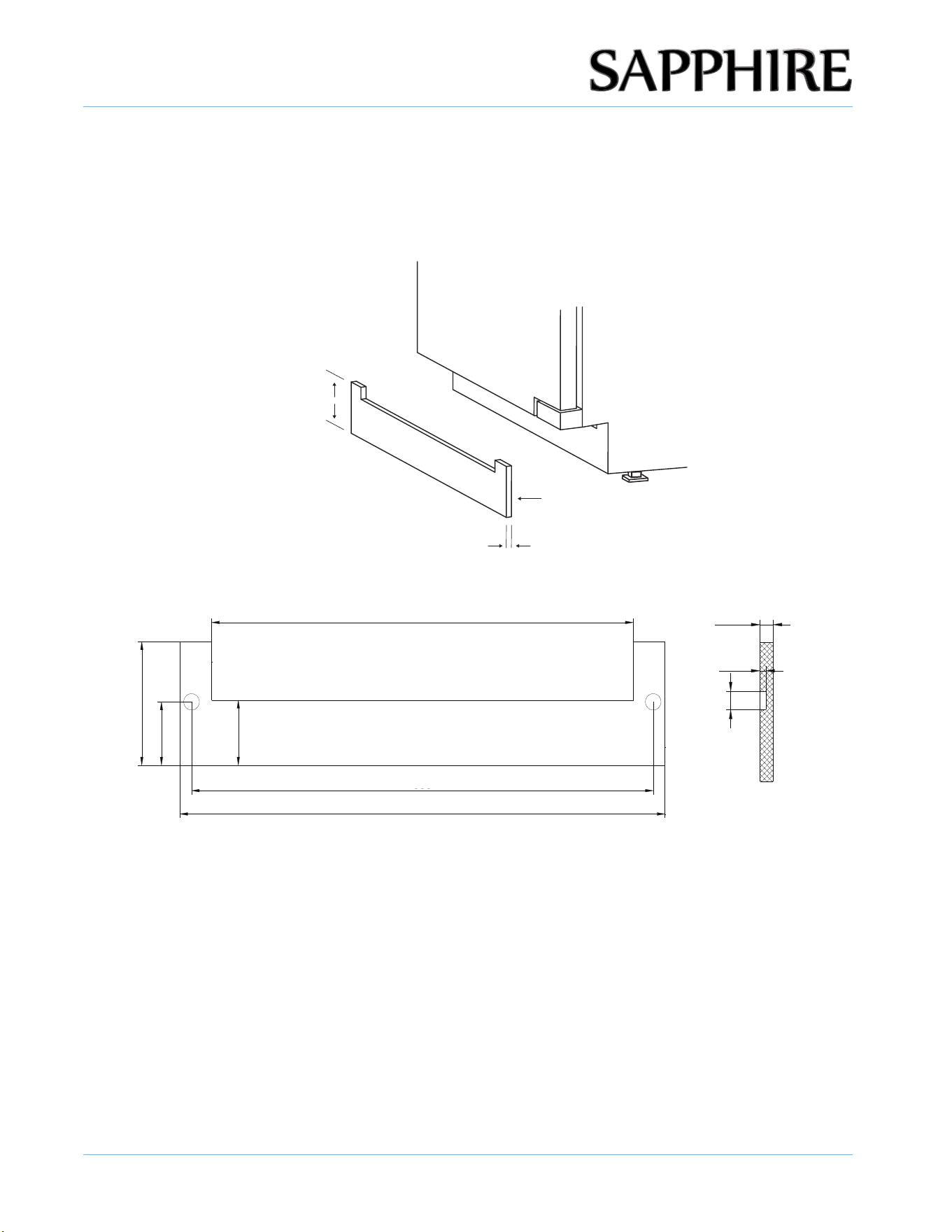
INTEGRATED GRILL/PLINTH
An integrated grill/plinth can be fabricated if desired. The thickness of the panel should be between
¼ in. to 3/8 in. (6 mm to 9 mm) and the height will vary between 3-5/16 in to 4-5/16 in. (84 mm to 110
mm) depending on you grill grille/plinth height.
1/4 - 3/8 in.
3-5/16 - 4-5/16 in.
(84-110 mm)
Double-Sided Tape
(Back Side)
NOTE: When finishing the grill/plinth, be sure to stain front, back and all edges to prevent warping.
Apply double-sided tape to the surrounding edges of the integrated grill/plinth as shown in
fi
gure.
Remove the backing paper from the double-sided or hook and looptape. Carefully align the grill/plinth
over the integrated grill/plinth and press into position.
12 13/16" (325 mm)
3 9/16" (91 mm)
1 7/8" (47 mm)
1 7/8"
(48 mm)
14 " (356 mm)
mm)14 3/4" (374
1/4~3/8" (6~9 mm)
1/8~3/16"
(3~4 mm)
1/2"
(12 mm)
(6-9 mm)

21
© 2025 SAPPHIRE
SAPPHIRE Ice Machine Operator’s Manual
OPERATING
THE UNIT
4
IMPORTANT: ENSURING ICE FRESHNESS AND QUALITY
• Although the unit has been tested and cleaned at the factory, discard the first batch of ice cubes
due to long-term transit and storage.
• If you do not use the ice machine regularly, the manufacturer recommends emptying the ice bin
periodically to ensure ice freshness.
• The ice machine produces ice in layers resulting in a Nugget Ice. The ice may appear wet when
first produced. Ice in the bin may develop surface frost which appears when the cube in placed
in liquid.
OTHER OPERATING TIPS
• Keep the air intake and exhaust free of dust and lint to allow free air flow.
• Clean the ice machine when “clean ice machine” message appears on the control panel. In
areas with hard water, cleaning may have to be more frequent.
• Never touch the evaporator when the unit is running.
• Keep the door closed to reduce ice melting and to promote proper ice formation. Open the door
only when taking ice from the appliance.
• Turn on the water supply tap before switching on the ice machine. Never turn the water supply
tap off when the ice machine is working.
ICE MACHINE PRODUCTION
• The nugget ice machine will continuously be making ice.
• Dropping nugget cubes into the bin at random rates is normal operation.
• The ice production process will only stop when the bin is full and or the user stops production.
• Quiet Mode will stop production for 4 hours once activated and reduce daily production
capacities.
• Scheduled Quiet Mode will also stop production and reduce daily production capacities.
Nugget Ice
OPERATING THE UNIT
22
© 2025 SAPPHIRE
SAPPHIRE Ice Machine Operator’s Manual
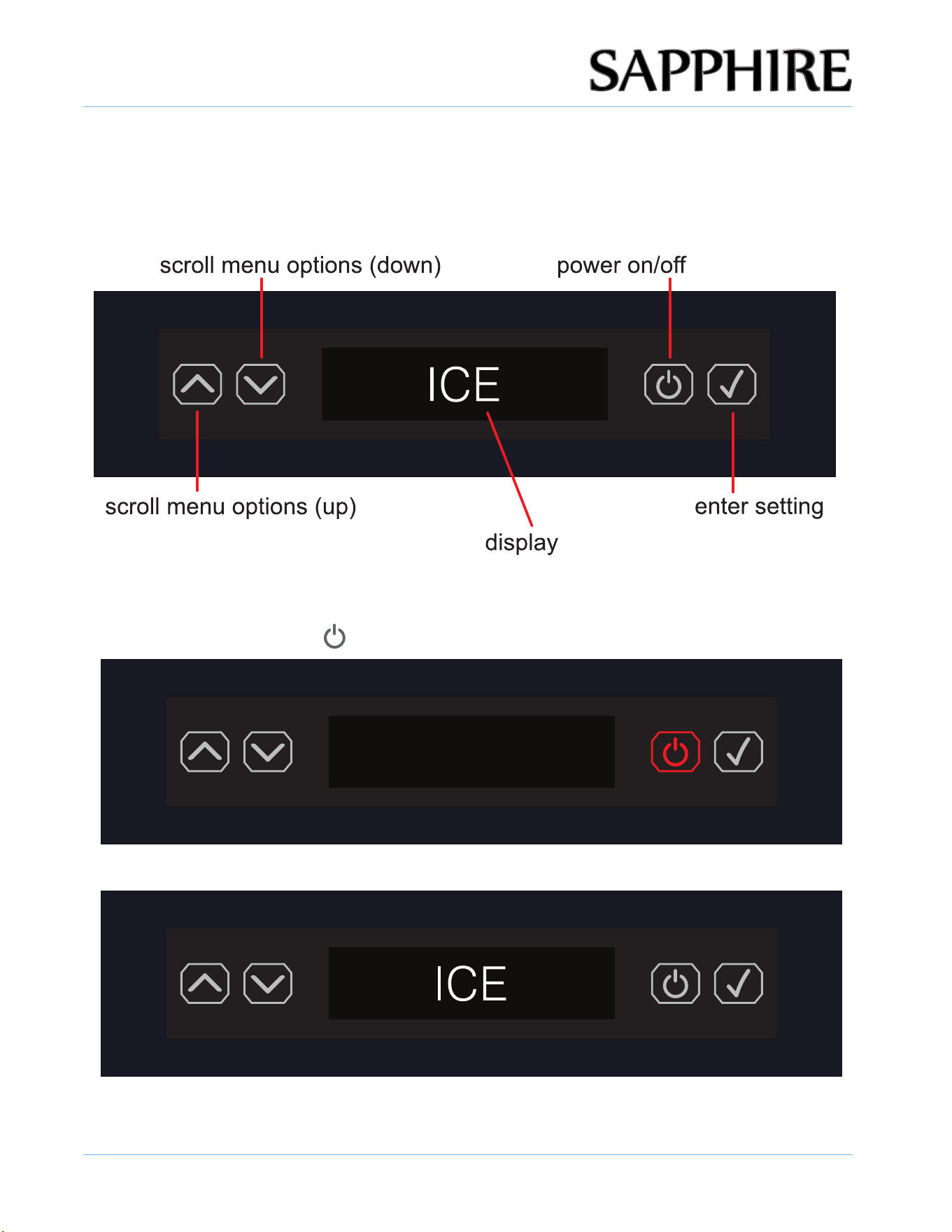
USING THE CONTROLS
The control panel is located at the top of the appliance.
NOTE: You have 30 seconds to make a control change before the display reverts to the default screen.
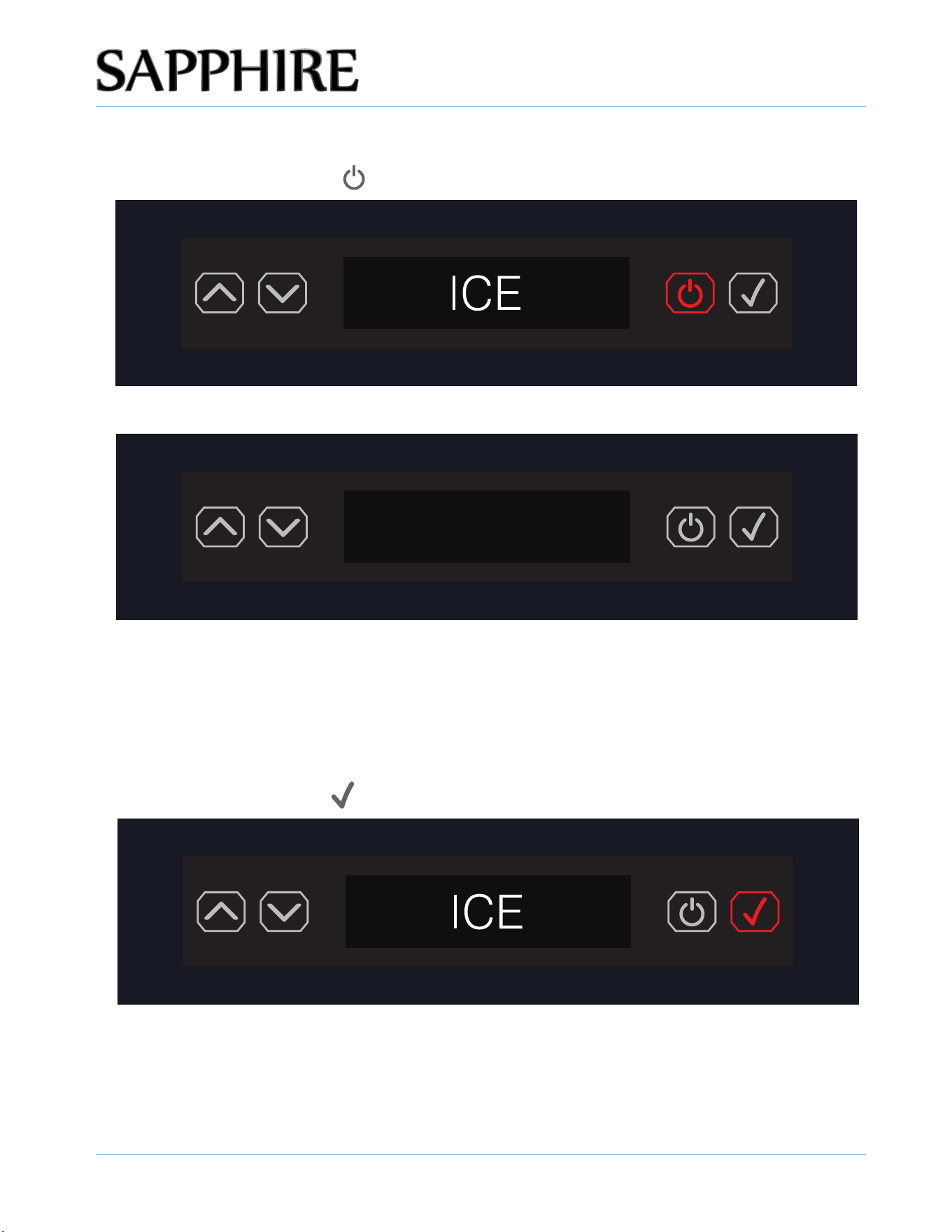
TURNING THE UNIT ON
1. Press the ON/OFF button ( ).
2. The ice machine powers up and displays ICE and TDS.
TDS:XXXppm
OPERATING THE UNIT
23
© 2025 SAPPHIRE
SAPPHIRE Ice Machine Operator’s Manual
TURNING THE UNIT OFF
1. Press the ON/OFF button ( ) and hold for 3 seconds.
TDS:XXXppm
2. The ice machine turns off and standby.
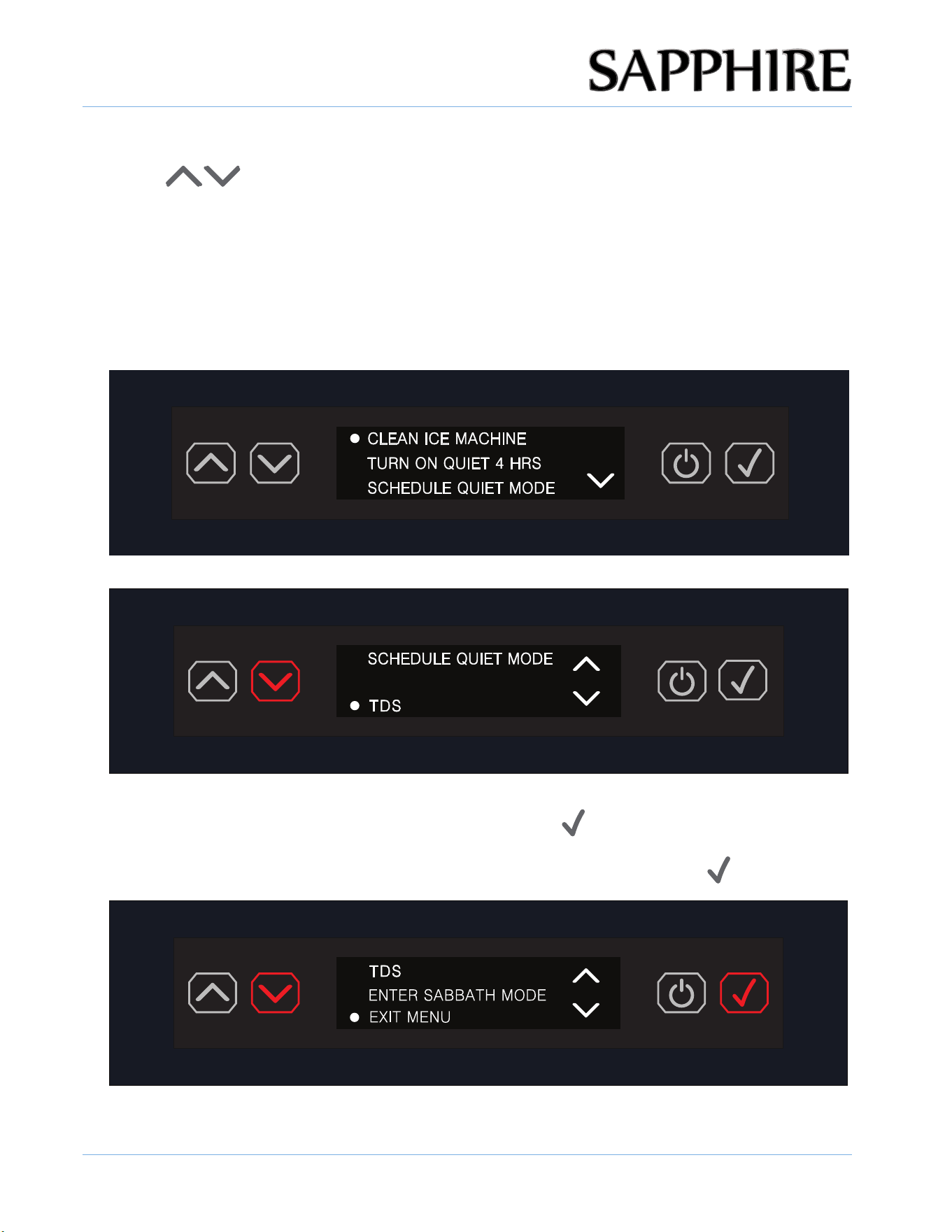
ENTER THE DISPLAY OF MENU ITEMS
1. Press the ENTER button ( ).
TDS:XXXppm
OPERATING THE UNIT
24
© 2025 SAPPHIRE
SAPPHIRE Ice Machine Operator’s Manual
2. The screen will display the function menu, scroll down or up by pressing the DOWN or UP arrow
buttons ( ) to choose from :
WATER FILTER REMINDER
CLEAN ICE MACHINE
TURN ON QUIET 4 HRS
SCHEDULE QUIET MODE
WATER FILTER REMINDER
TDS
ENTER SABBATH MODE
EXIT MENU
3. Select the desired setting by pressing the ENTER button ( ).
Once a menu item is selected, it takes the user directly to the particular setting.
To exit the menu, scroll down to EXIT MENU, then press the ENTER button ( ) .
OPERATING THE UNIT
25
© 2025 SAPPHIRE
SAPPHIRE Ice Machine Operator’s Manual
2. Turn ON the unit and then press the ENTER button (
) to enter the menu.
Cleaner Solution
magnet
TDS
:
XXXppm
RUNNING THE CLEAN ICE MACHINE CYCLE
Minerals that are removed from the water during the freezing cycle will eventually form a hard, scaly
deposit in the water system and cleaning the system regularly helps remove the mineral scale
buildup.
How often to clean the system depends upon how hard your water is or how effective a water
filtration system may be. With hard water of 15 to 20 grains/gal, you may need to clean the system
more often. Normal timing will range from 3 to 6 months depending on water, use and
environment.
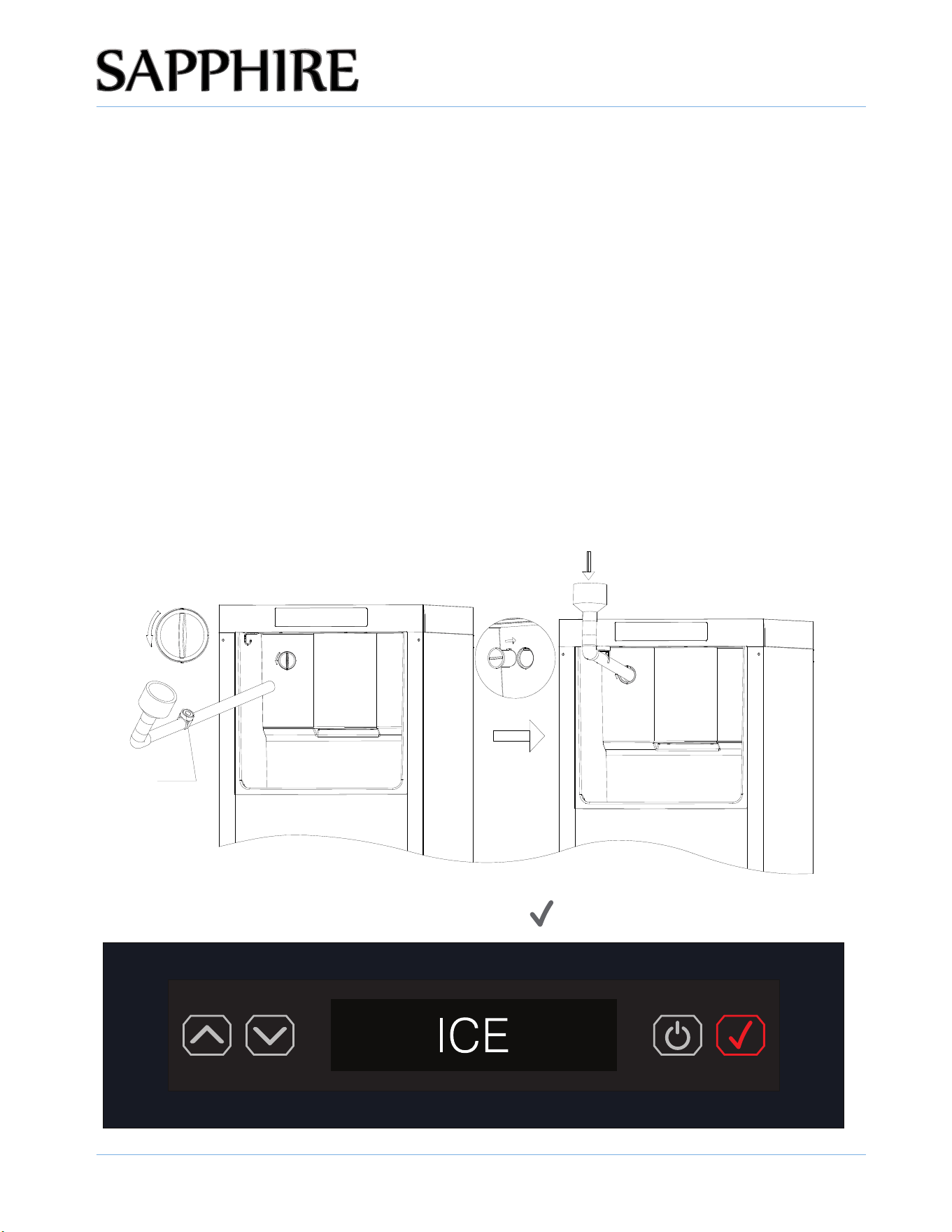
1. Prepare Before Run The CLEAN Program
Turn the unit OFF by press the ON/OFF button over 3 seconds and then remove all ice from the
cabinet. And also give the unit at least 4 minute to drain out the remain water.
Get to the knob located at the up-left of the cabinet, turn 90 degree counter-clockwise and pull it
out. Insert the cleaner inject tube to the inlet hole, and fix it with the magnet.
Prepare the nickle safe ice machine cleaner but DO NOT FILL IN NOW.
Note: The total volume of cleaner required is approx 0.13 gal, for cleaner / water mix ratio, please
refer to the cleaner instruction.
OPERATING THE UNIT
26
© 2025 SAPPHIRE
SAPPHIRE Ice Machine Operator’s Manual
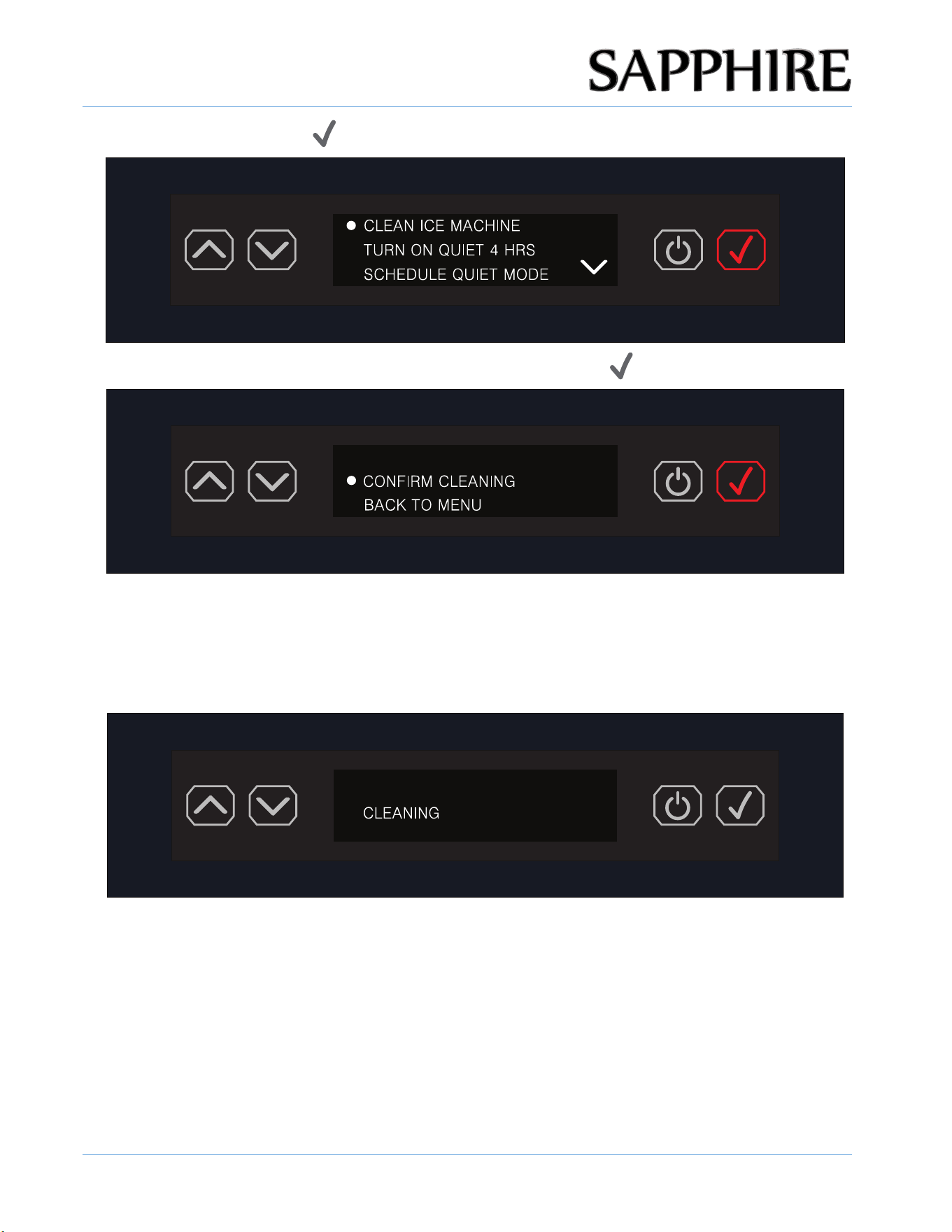
3. Press the ENTER button ( ) to select CLEAN ICE MACHINE.
4. To CONFIRM the CLEANING function, press the ENTER button ( ) again.
6. After the CLEAN program complete, take away the inject tube and install the knob back to the
NOTE: Once the CLEAN cycle has completed the display reverts back to the default ICE screen.
inlet hole.
5. The display shows CLEANING and counter down timer, the "Please add detergent" reminder will
be also flashing for 3 minutes.
Hold the inject tube carefully and fill in with nickle safe ice machine cleaner and then let the
unit operates till the cleaning complete.
Please add detergent
30: 00
OPERATING THE UNIT
27
© 2025 SAPPHIRE
SAPPHIRE Ice Machine Operator’s Manual
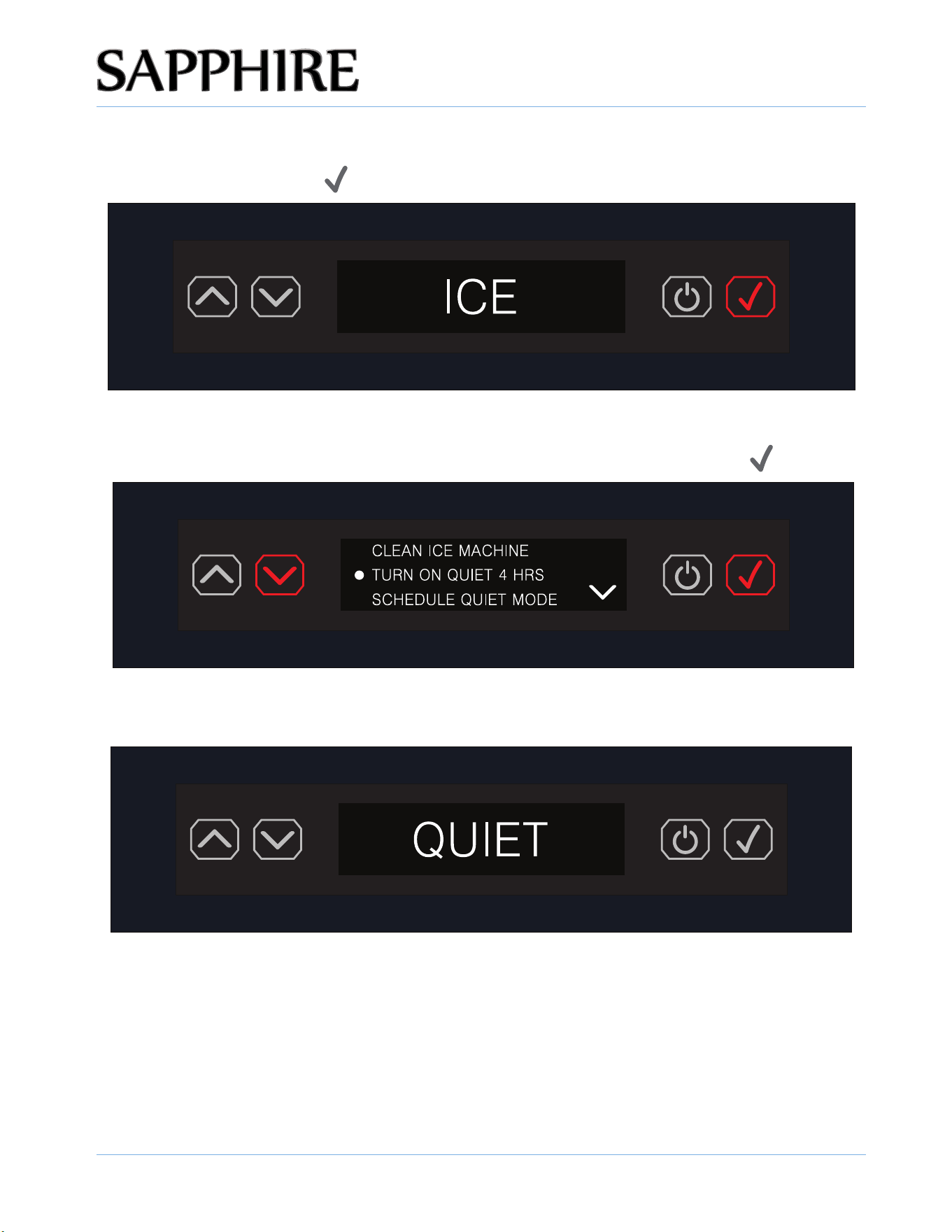
SETTING QUIET MODE 4 HOURS
1. Press the ENTER button ( ) to enter the menu.
2. Scroll down to TURN ON QUIET 4 HOURS setting and press the ENTER button ( ).
3. QUIET MODE is set and new ice production is now suspended for 4 hours.
N
OOTE: QUIET MODE 4 HOURS suspends ice production for 4 hours and otherwise functions normally.
TDS:XXXppm
OPERATING THE UNIT
28
© 2025 SAPPHIRE
SAPPHIRE Ice Machine Operator’s Manual
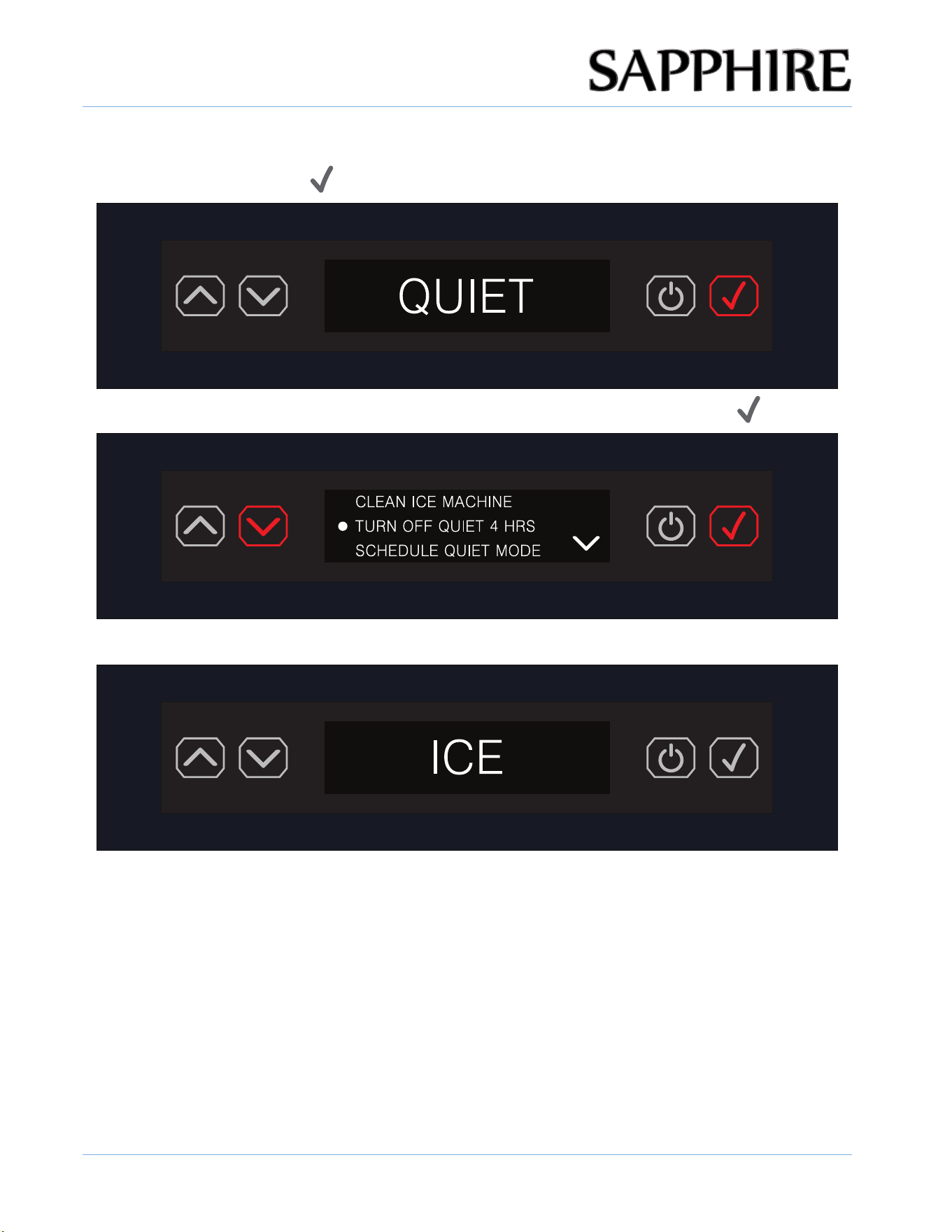
EXITING OR STOPPING QUIET MODE 4 HOURS
1. Press the ENTER button ( ) to enter the menu.
2. Scroll down to TURN OFF QUIET 4 HOURS setting and press the ENTER button ( ).
3. The display reverts back to the default ICE screen and is no longer in QUIET mode.
TDS:XXXppm
OPERATING THE UNIT
29
© 2025 SAPPHIRE
SAPPHIRE Ice Machine Operator’s Manual
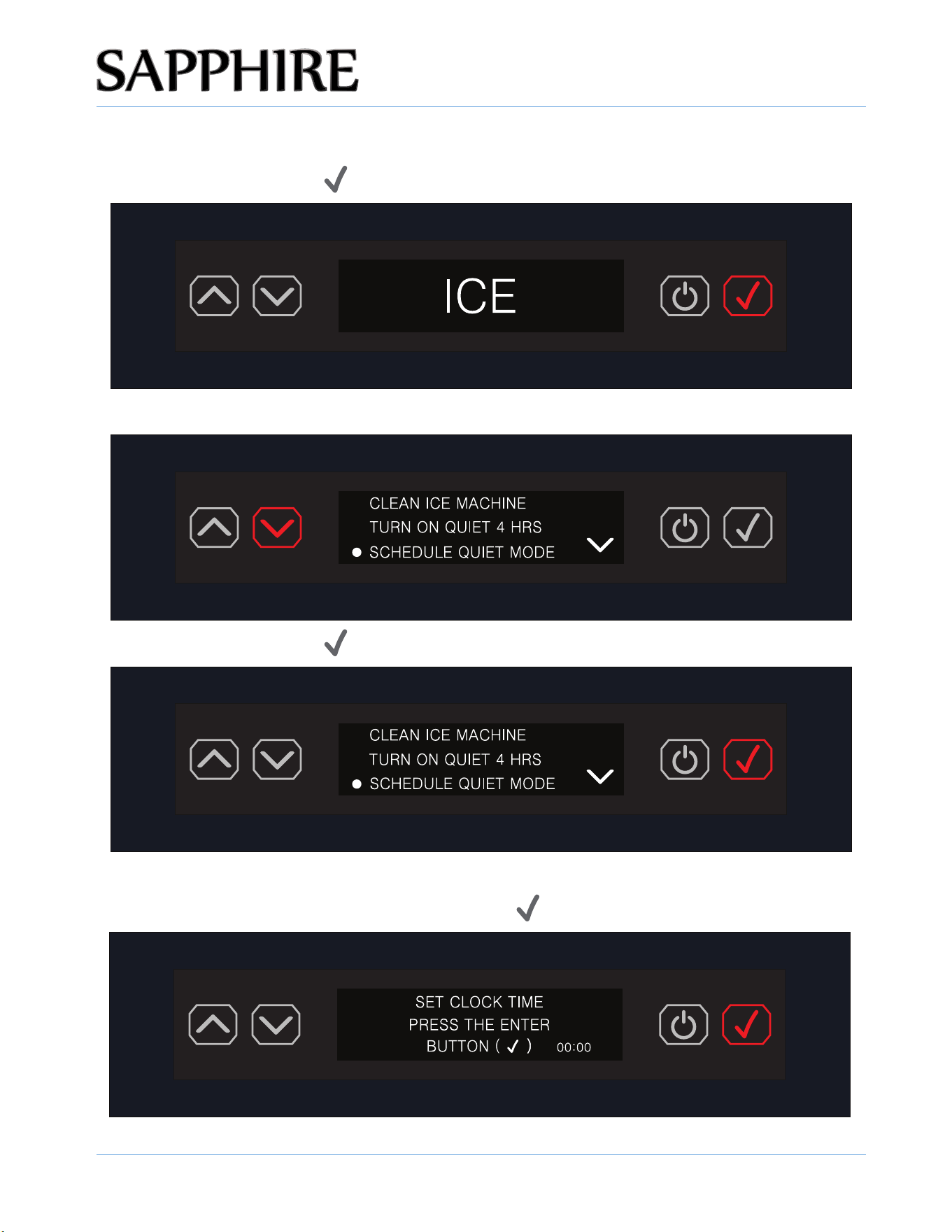
SETTING SCHEDULE QUIET MODE
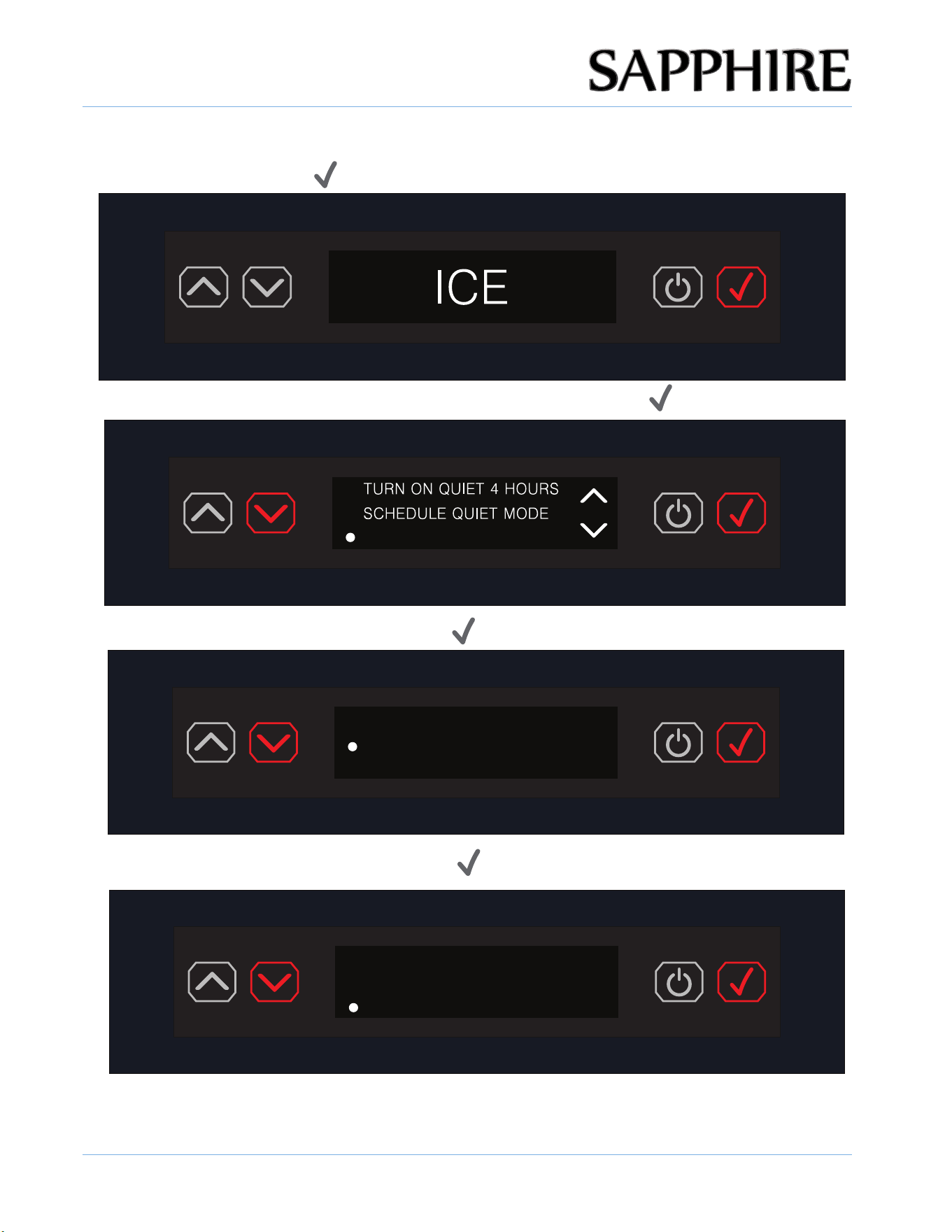
1. Press the ENTER button ( ) to enter the menu.
2. Scroll down to the SCHEDULE QUIET MODE setting.
3. Press the ENTER button ( ).
TDS:XXXppm
QUIET MODE setting, pressing the ENTER button (
).
4. The user is then prompted to set the clock time first, prior to setting the desired SCHEDULE
OPERATING THE UNIT
30
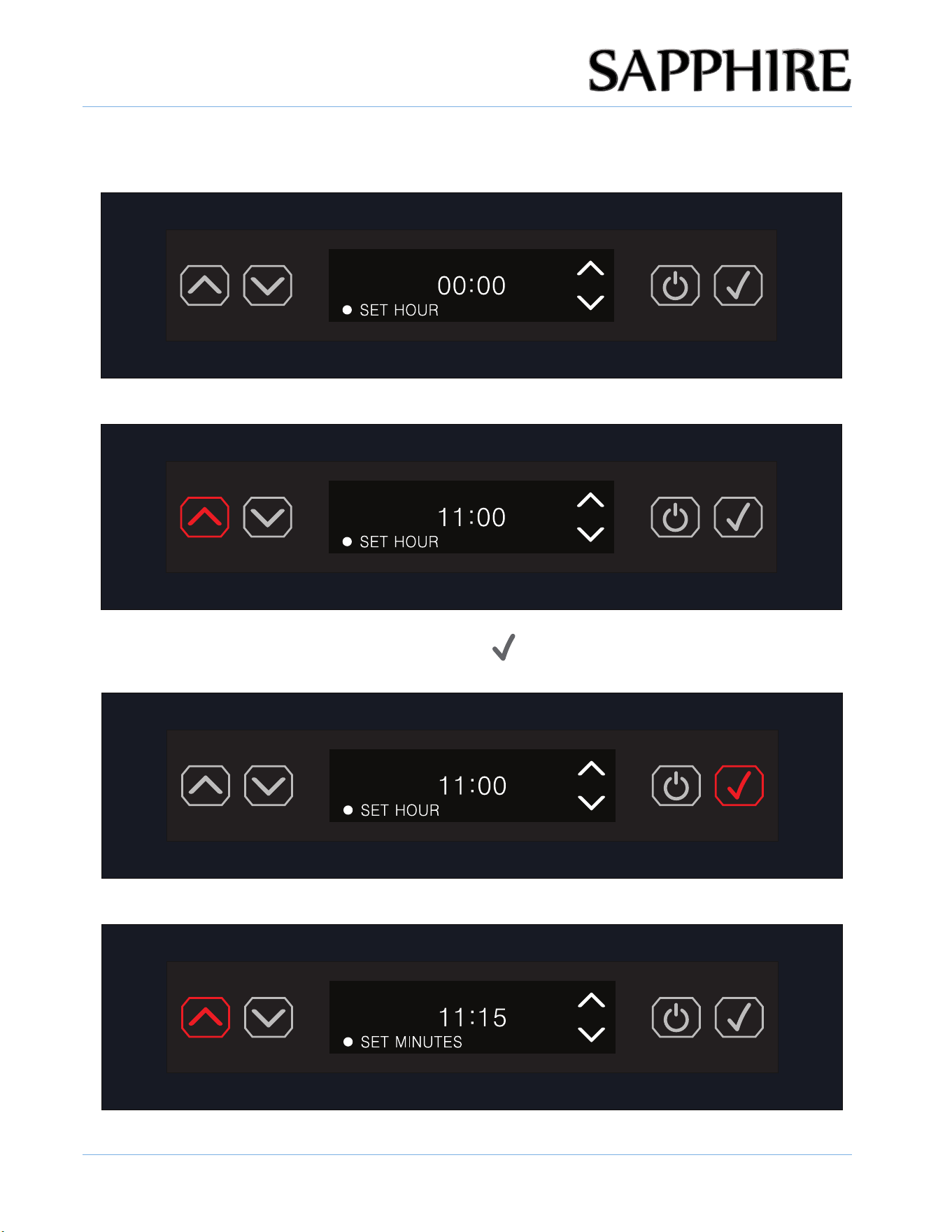
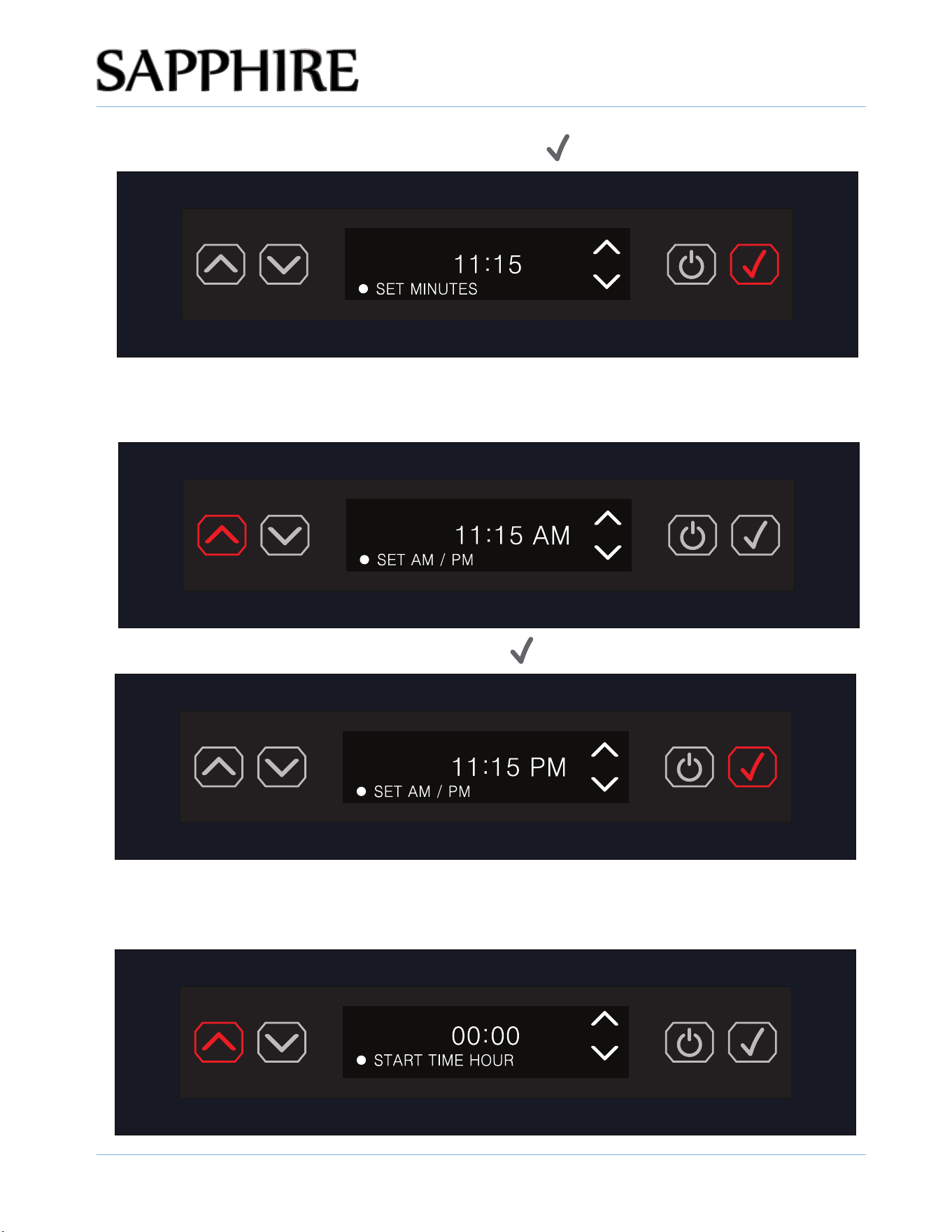
5. The display will show the clock at 00:00 and prompt the user to set the hour with the hour position
flashing the 00.
6. Using the UP / DOWN arrow button set the HOUR.
SAPPHIRE Ice Machine Operator’s Manual
© 2025 SAPPHIRE
7. Once the HOUR is set, press the ENTER button ( ) and the display will show the minutes
position flashing the 00.
8. Using the UP / DOWN arrow button set the MINUTES.
OPERATING THE UNIT
31
© 2025 SAPPHIRE
SAPPHIRE Ice Machine Operator’s Manual
9. Once the MINUTES are set, press the ENTER button ( ).
makes the selection.
10. Using the UP / DOWN arrow button select AM or PM and the AM / PM will flash until the user
11. Once the AM/PM is set, press the ENTER button ( ).
12. Once the time is properly set, the display prompts the user to set the START TIME HOUR for the
SCHEDULE QUIET MODE pressing the UP or DOWN arrow and the display will show the hour
section fl ashing 00.
OPERATING THE UNIT
32
© 2025 SAPPHIRE
SAPPHIRE Ice Machine Operator’s Manual
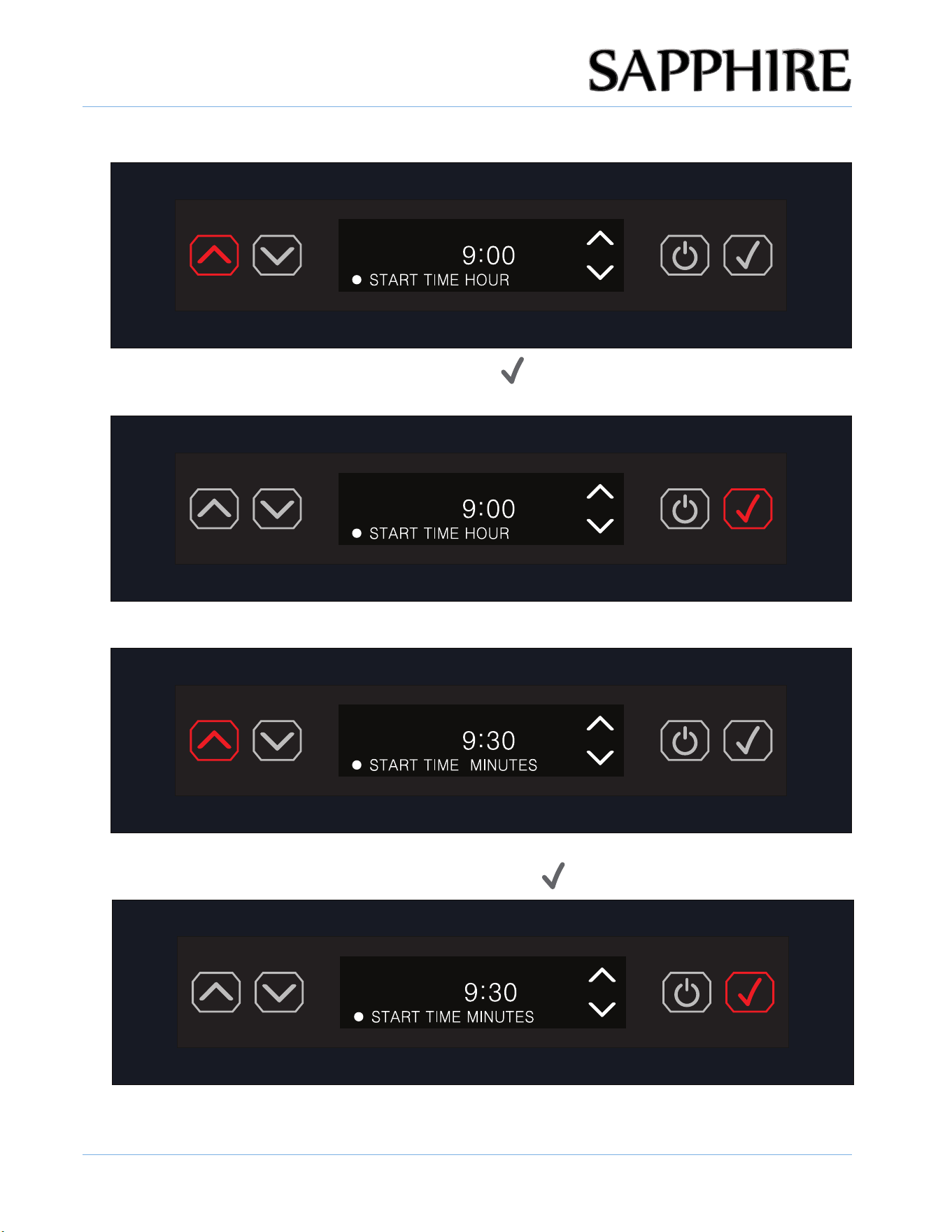
13. Using the UP / DOWN arrow button set the START TIME HOUR.
14. Once the HOUR is set, press the ENTER button ( ) and the display will show the minutes
section fl ashing 00.
15. Using the UP / DOWN arrow button set the START TIME MINUTES.
16. Once the MINUTES are set, press the ENTER button (
).
OPERATING THE UNIT
33
© 2025 SAPPHIRE
SAPPHIRE Ice Machine Operator’s Manual
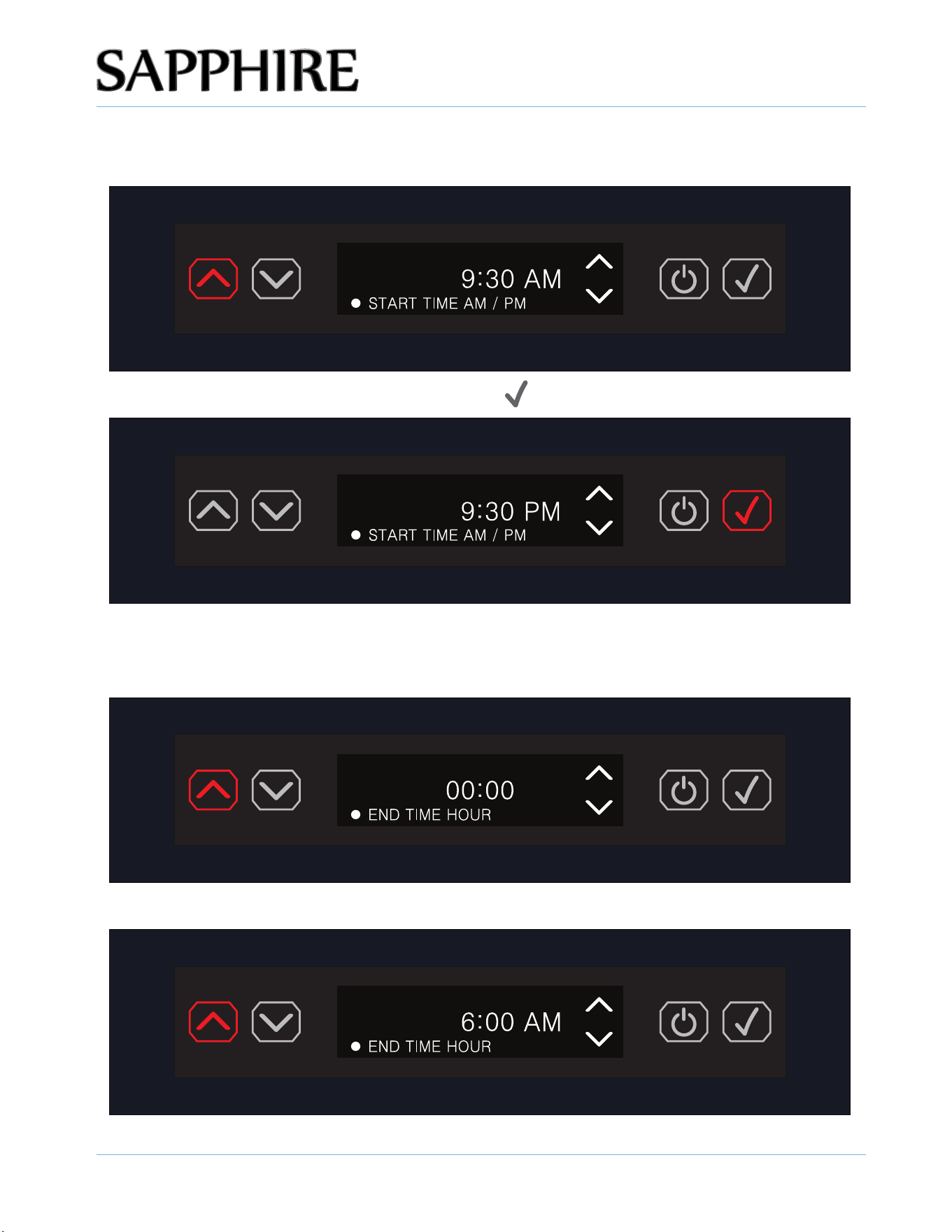
17. Using the UP / DOWN arrow button select START TIME AM or PM and the AM / PM will fl ash until
the user makes a selection.
18. Once the AM/PM is set, press the ENTER button ( ).
19. Once the START TIME is properly set, the display prompts the user to set the END TIME HOUR
for the SCHEDULE QUIET MODE pressing the UP or DOWN arrow and the display will show the
hours section fl ashing 00.
20. Using the UP / DOWN arrow button select the END TIME HOUR.
OPERATING THE UNIT
34
© 2025 SAPPHIRE
SAPPHIRE Ice Machine Operator’s Manual
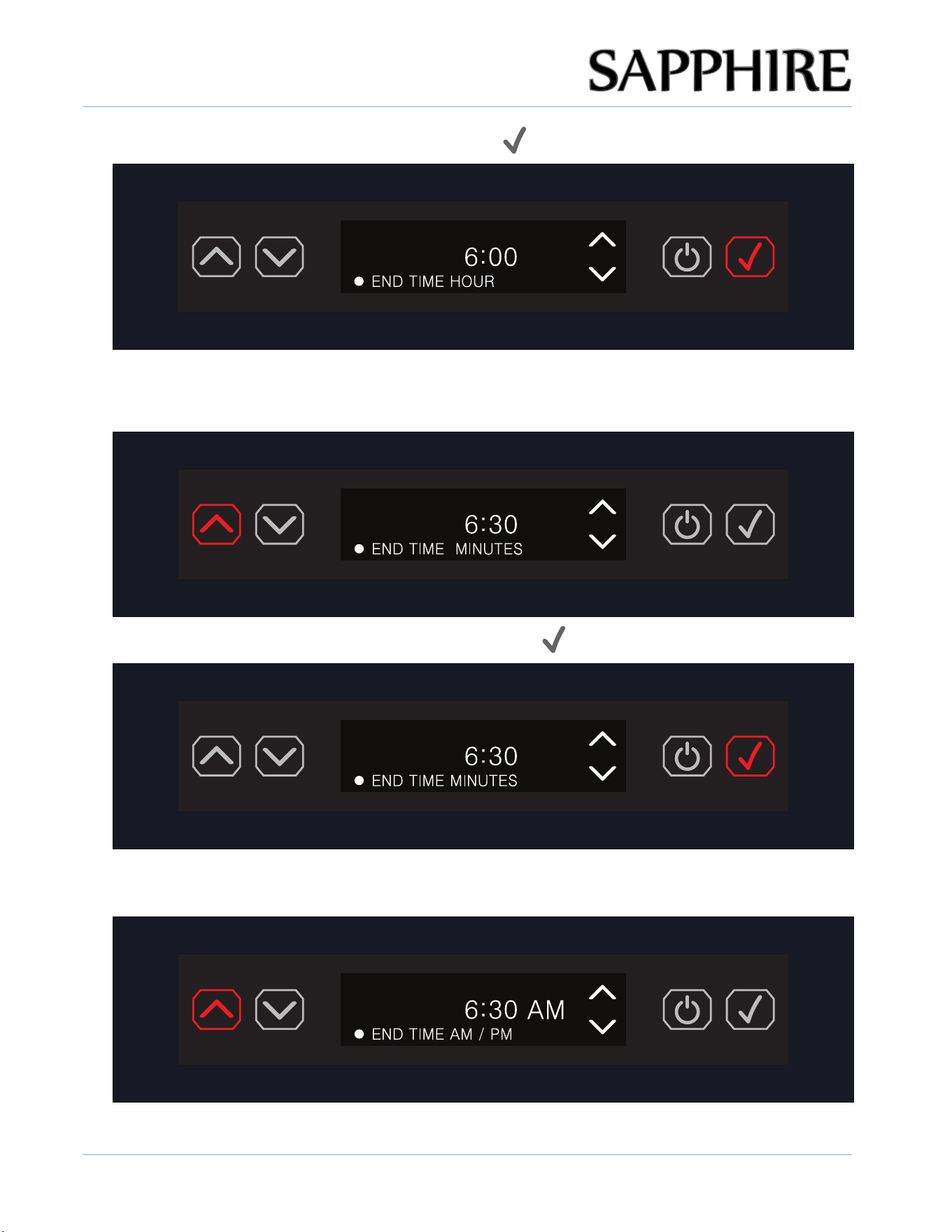
21. Once the HOUR is set, press the ENTER button ( ).
22. Using the UP / DOWN arrow button set the END TIME MINUTES and the display will show the
minutes section flashing 00.
23. Once the MINUTES are set, press the ENTER button ( ).
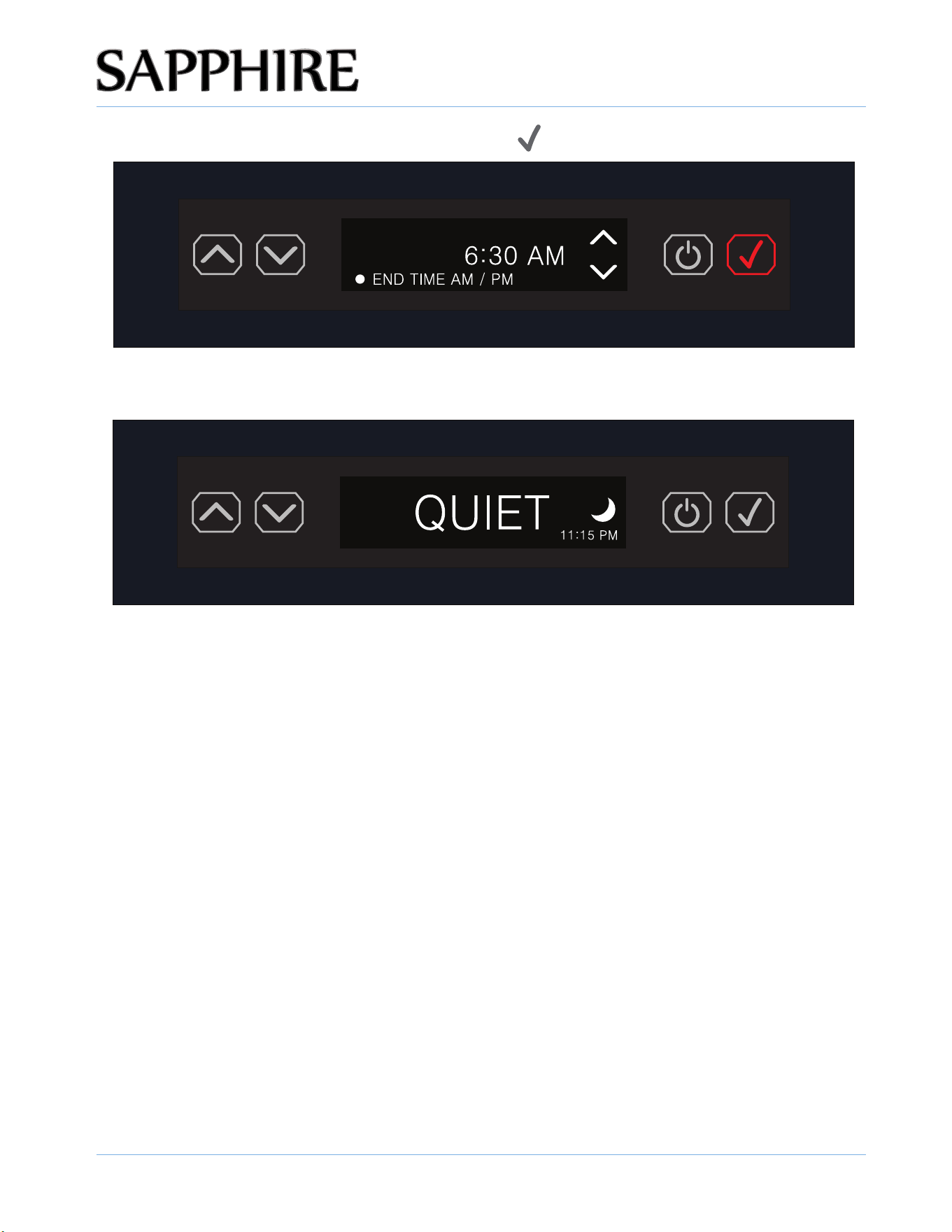
24. Using the UP / DOWN arrow button select END TIME AM or PM and the AM / PM will fl ash until
the user makes a selection.
OPERATING THE UNIT
35
© 2025 SAPPHIRE
SAPPHIRE Ice Machine Operator’s Manual
25. Once the AM/PM is set, press the ENTER button ( ).
26. SCHEDULE QUIET MODE is now set and new ice production is suspended for the scheduled
duration. The display will show QUIET, the crescent moon icon and the time set.
NOTE: QUIET will display ONLY during the set duration of QUIET MODE. Otherwise the
display will show the default ICE screen. Additionally, the crescent moon icon will display ONLY
when in SCHEDULED QUIET MODE.
OPERATING THE UNIT
36
© 2025 SAPPHIRE
SAPPHIRE Ice Machine Operator’s Manual
TDS
:
XXXppm
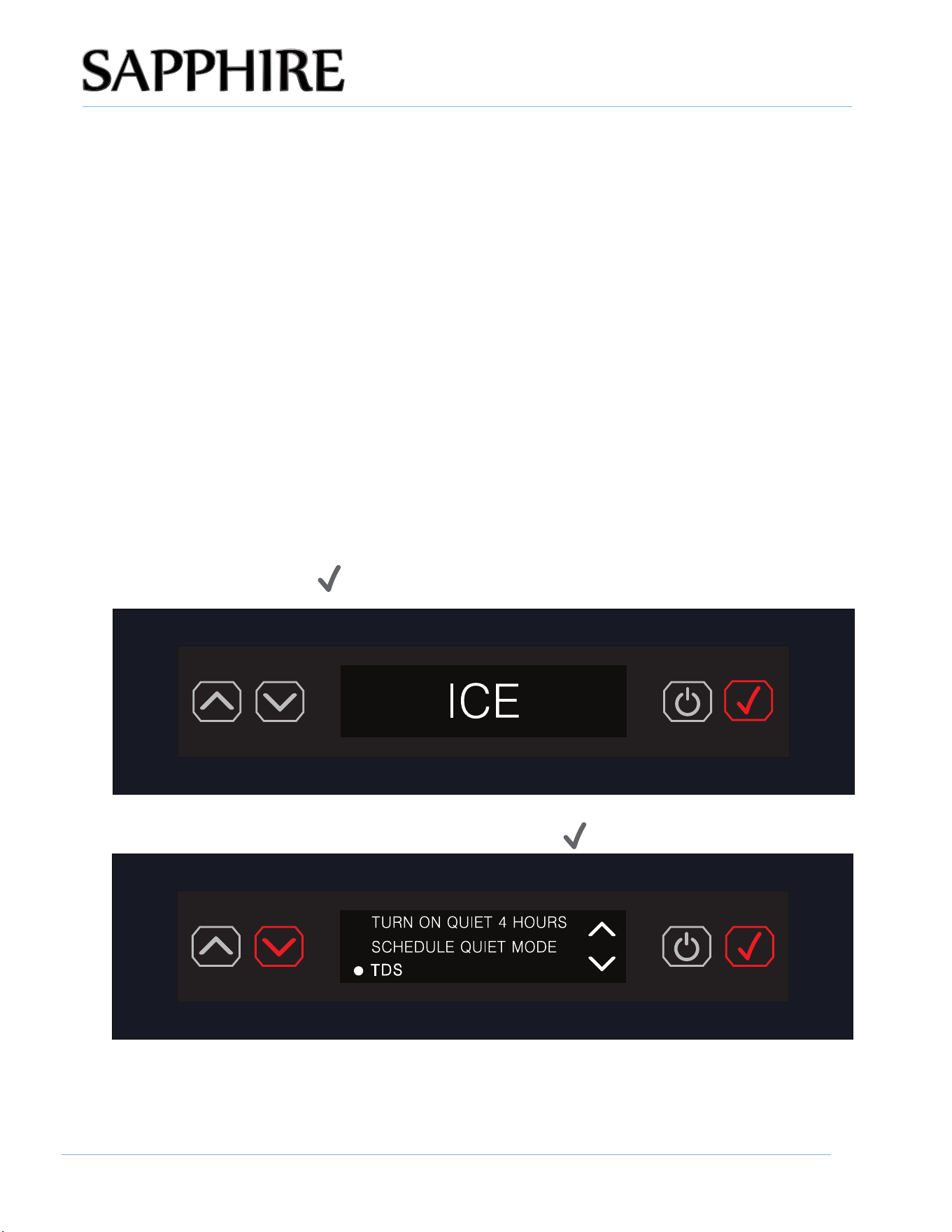
2. Scroll to WATER FILTER REMINDER and press the ENTER button ( ).
WATER FILTER REMINDER
WATER FILTER REMINDER
1. Press the ENTER button ( ).
3. Scroll to ON and press the ENTER button ( ).The filter replace reminder is enabled.
WATER FILTER SELECTION
ON
OFF
4. Scroll to OFF and press the ENTER button ( ).The filter replace reminder is disabled.
WATER FILTER SELECTION
ON
OFF
OPERATING THE UNIT
© 2025 SAPPHIRE
SAPPHIRE Ice Machine Operator’s Manual
TDS:XXXppm
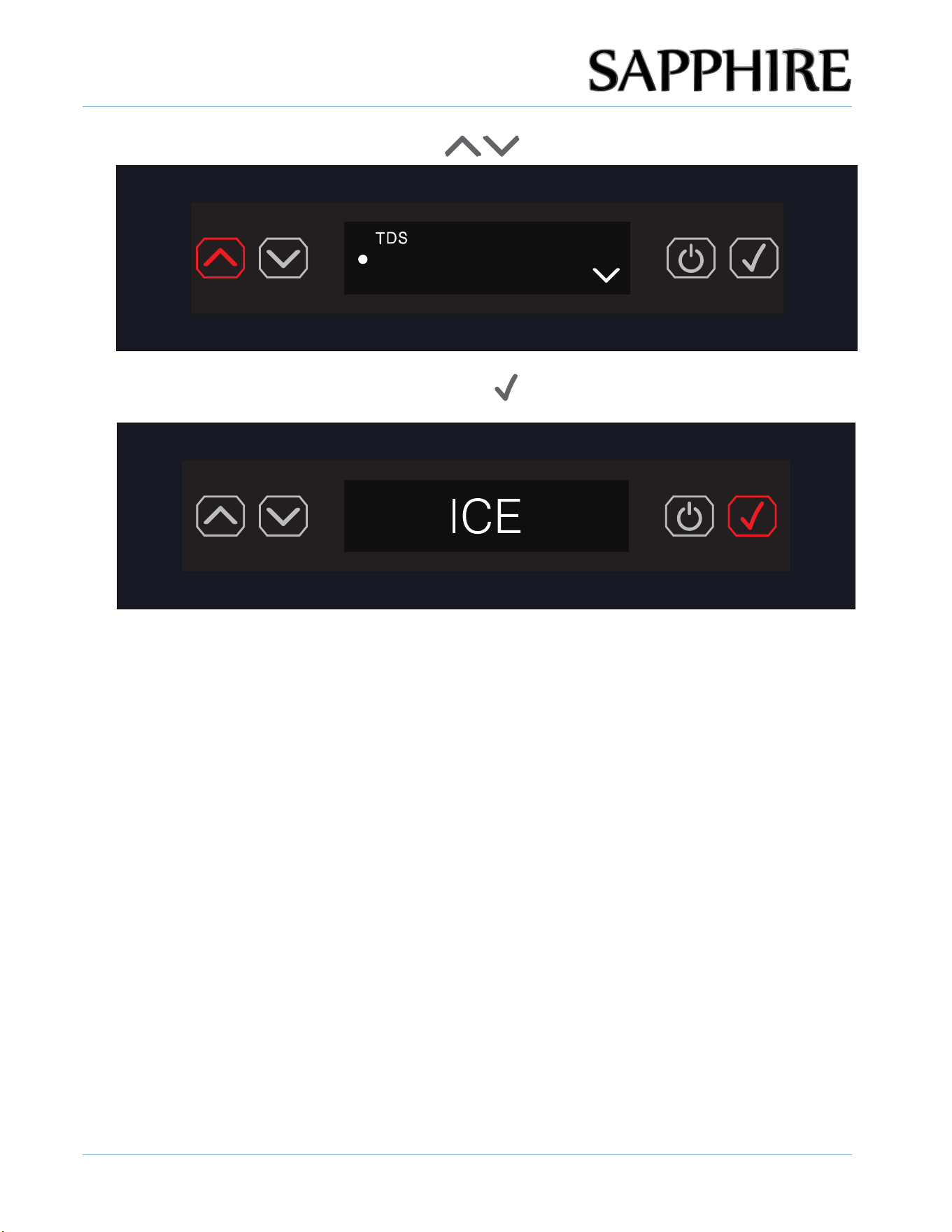
2. Scroll down to TDS setting and press the ENTER button ( ).
37
TDS INDICATOR
TDS stands for Total Dissolved Solids. It refers to the total amount of dissolved organic and
inorganic matter in a volume of water. Essentially, TDS includes everything in the water besides
the H2O molecules. The higher the TDS level, the more materials are dissolved in the water.
The scale could buildup in appliance High mineral content in your water can lead to problems,
scale buildup in your appliance, stains and lime-scale will gradually deposits, restricting water flow
and pressure, shortening their lifespan and effectiveness, even damage the appliances.
The unit is monitoring the TDS by default, if the TDS is high, to filter calcium and magnesium
and prevent scale buildup, an anti-scale in-line filter or water softener is a must!
TLC-2200S-SAPSTRK is a water filter kit that includes a manifold and filter cartridge and bypass
filter cartridge required for proper operation.
Note: The TDS number displayed might slightly different to other TDS meter due to water
temperature difference. And the display can be manually turned OFF if not needed.
1. Press the ENTER button ( ) to enter the menu.
OPERATING THE UNIT
38
© 2025 SAPPHIRE
SAPPHIRE Ice Machine Operator’s Manual
6. Choose OFF and Press the ENTER button ( ) , TDS indicator will turn OFF.
3. Press the UP or DOWN ARROW button (
) to set ON or OFF.
DISPLAY
ON
OFF
OPERATING THE UNIT
39
© 2025 SAPPHIRE
SAPPHIRE Ice Machine Operator’s Manual
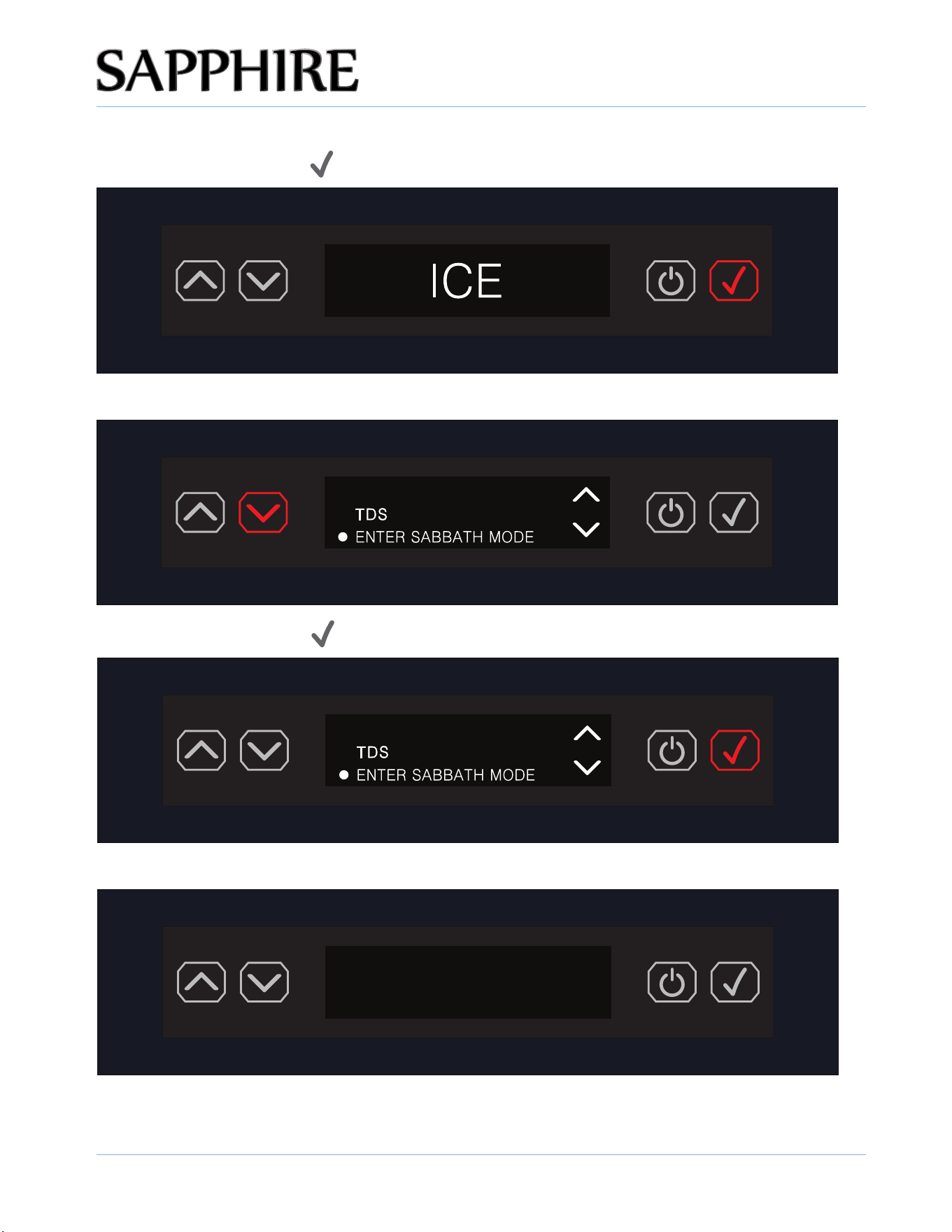
ENTER SABBATH MODE
1. Press the ENTER button ( ) to enter the menu.
2. Scroll down to the ENTER SABBATH MODE setting.
3. Press the ENTER button ( ) .
4. The display shows nothing but is still running and in SABBATH MODE.
Sabbath mode suspends ice production during the setting and the interior light does not come on when
the door is opened.
NOTE:
WATER FILTER REMINDER
WATER FILTER REMINDER
TDS:XXXppm
OPERATING THE UNIT
40
© 2025 SAPPHIRE
SAPPHIRE Ice Machine Operator’s Manual
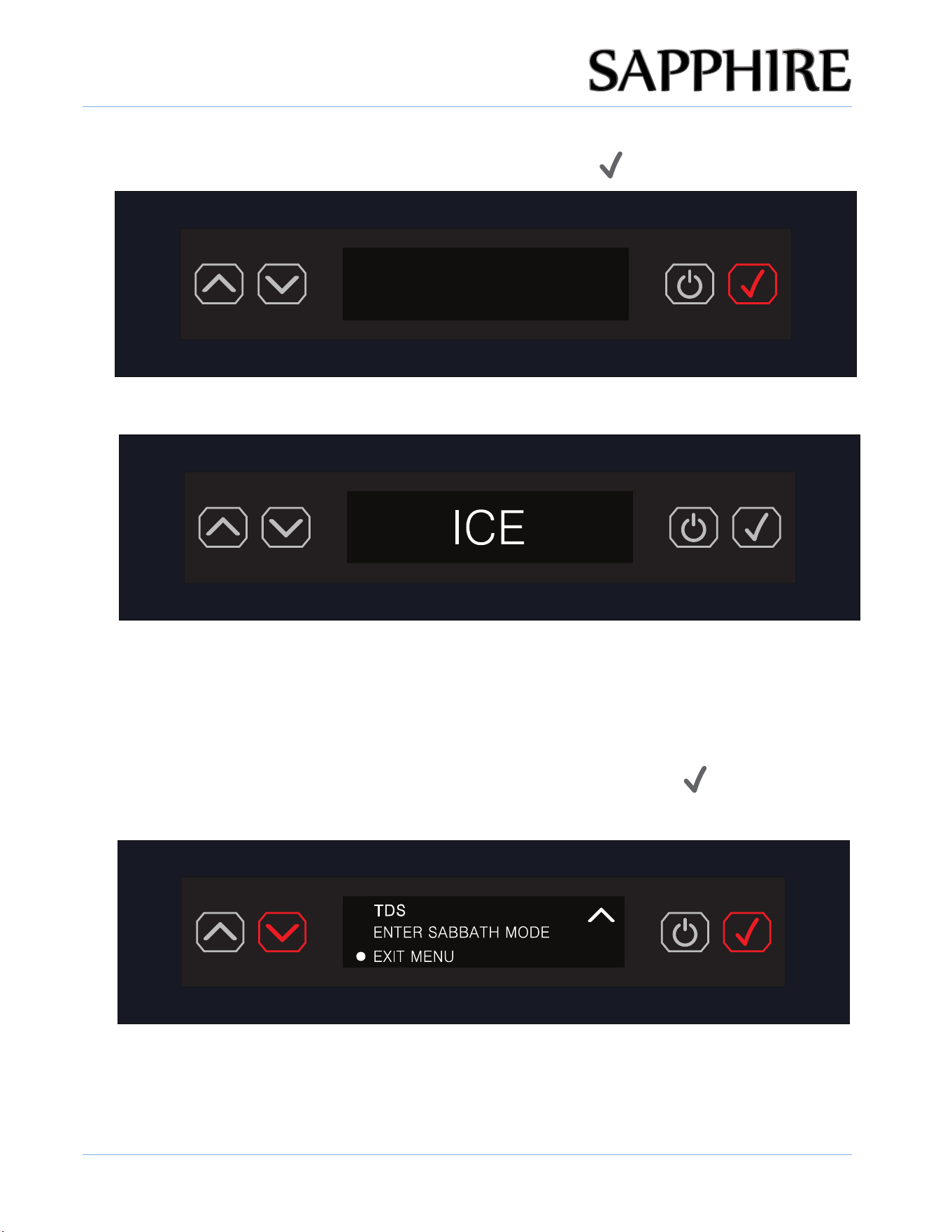
EXITING OR CANCELLING SABBATH MODE
1. To exit or cancel SABBATH MODE, press the ENTER button ( ).
2. The display reverts to the default ICE screen.
N
OTE:
In the event of a power failure during Sabbath mode, Sabbath mode remains in effect and does not need
to be reset.
TDS:XXXppm
EXITING THE MENU
To exit the menu, scroll down to EXIT MENU, then press the ENTER button ( ).
NOTE:
Once the MENU is exited, user programmed changes are saved.
OPERATING THE UNIT
41
© 2025 SAPPHIRE
SAPPHIRE Ice Machine Operator’s Manual
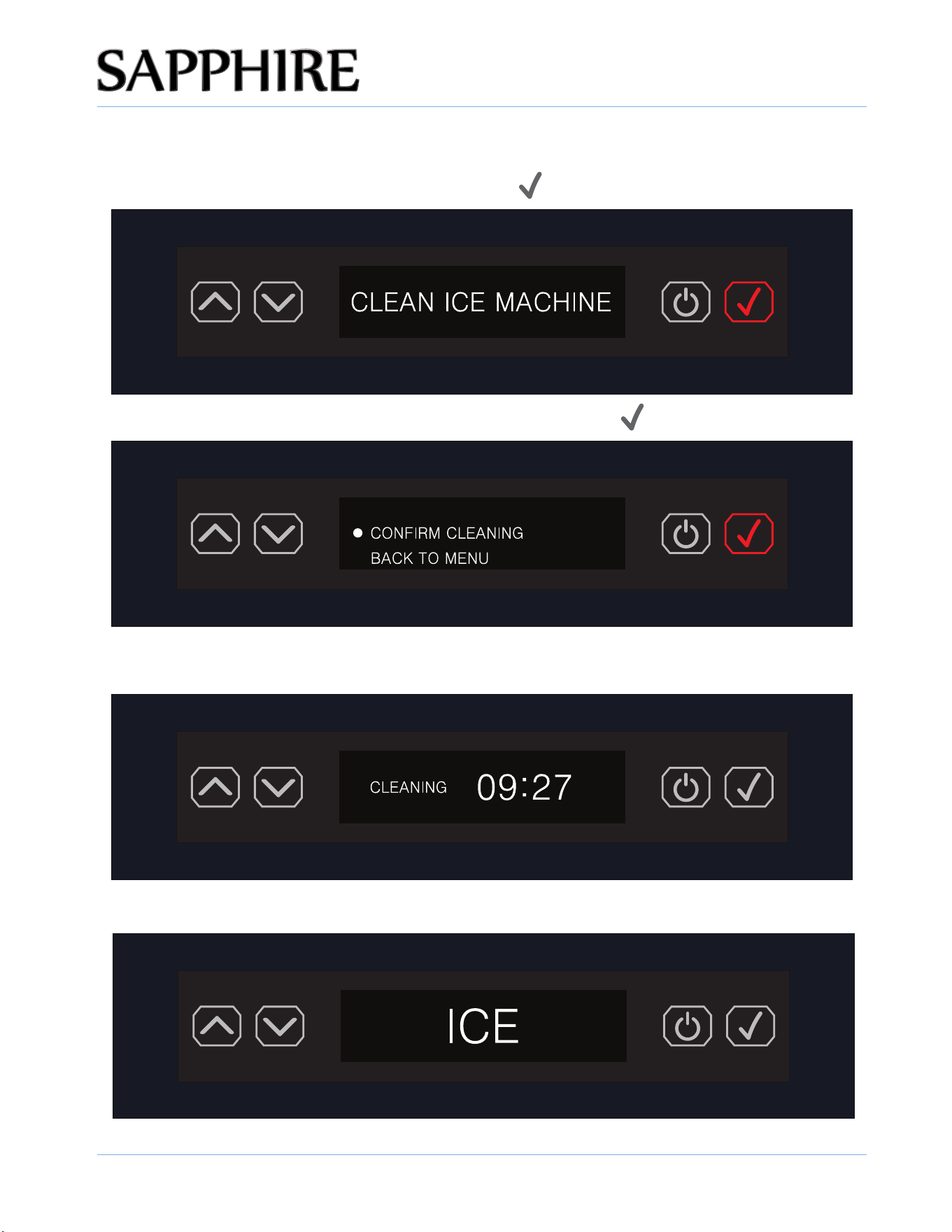
CLEAN ALERT INDICATOR
1. When the ice machine recognizes that cleaning is needed, CLEAN ICE MACHINE will be
displayed. The user must press the ENTER button (
).
2. To CONFIRM the CLEANING function, press the ENTER button ( ) again.
3. The display shows CLEANING and the time remaining for the CLEAN ICE MACHINE cycle
to complete.
4. When the ice machine has completed the CLEAN cycle, the default ICE screen will display.
TDS:XXXppm
OPERATING THE UNIT
42
© 2025 SAPPHIRE
SAPPHIRE Ice Machine Operator’s Manual
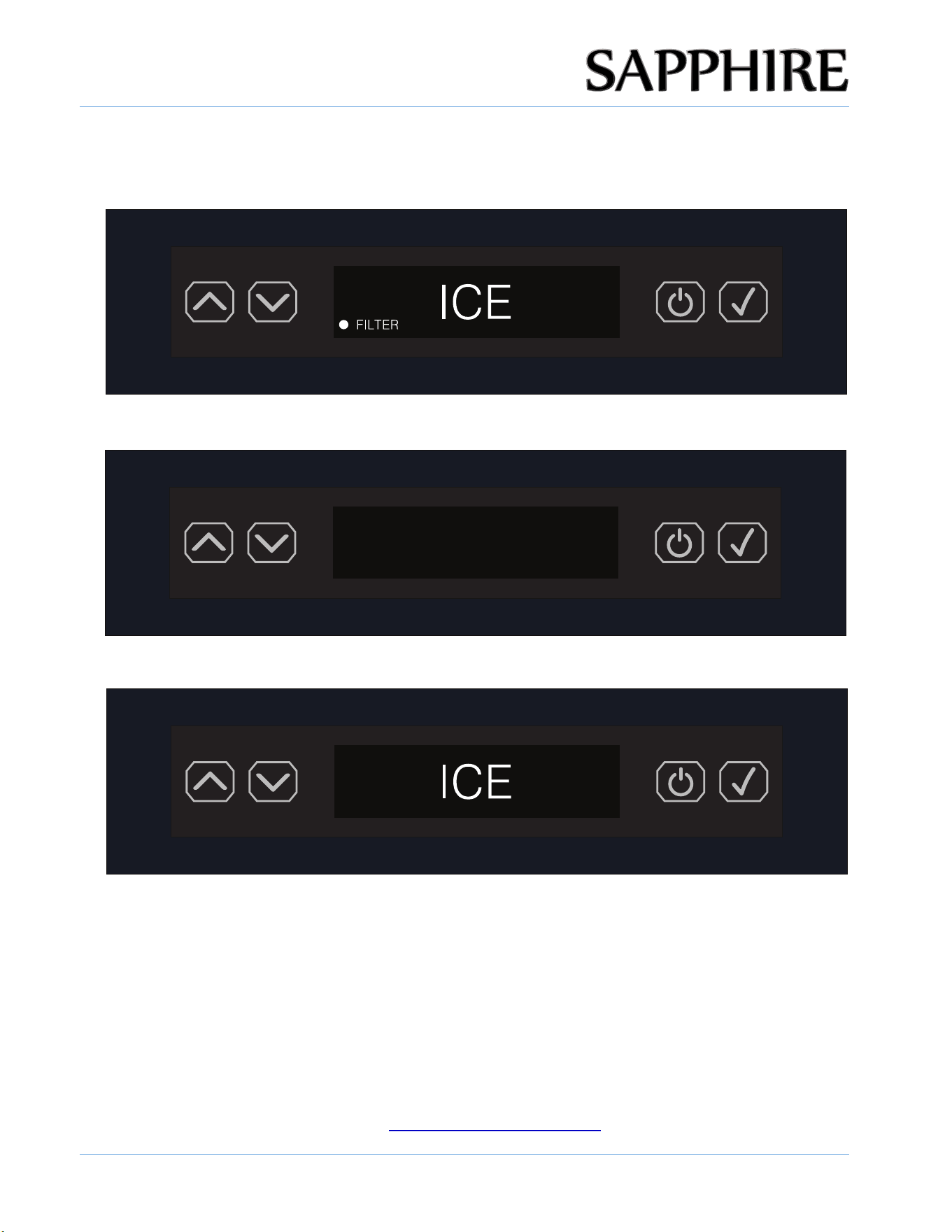
FILTER ALERT INDICATOR
1. When the ice machine recognizes that the filter needs to be replaced, the FILTER indicator LED
will automatically light.
2. If the filter is not properly installed, unit will display "water filter not installed".
WATER FILTER NOT INSTALLED
3. Once the FILTER is replaced, the FILTER LED indicator will no longer be lit.
TDS:XXXppm
WATER FILTER NOT INSTALLED REMINDER: WATER FILTER NOT INSTALLED is displayed as an
alarm.
NOTE: If water filter is NOT installed, the unit will not get water and will not make ice. A water filter or
water filter bypass cartridge (Part Number: 651014) MUST be installed for the Ice Machine to operate
properly.
The water filter should be changed every 6 months. At 6 months of use, a reminder prompt to change
the filter will display. If not changed, eventually the filter will fail to work properly and the unit will alarm.
Replacement Filter Part Number: 651008
To purchase a new filter, email [email protected] or call 480-282-6404
OPERATING THE UNIT
43
© 2025 SAPPHIRE
SAPPHIRE Ice Machine Operator’s Manual
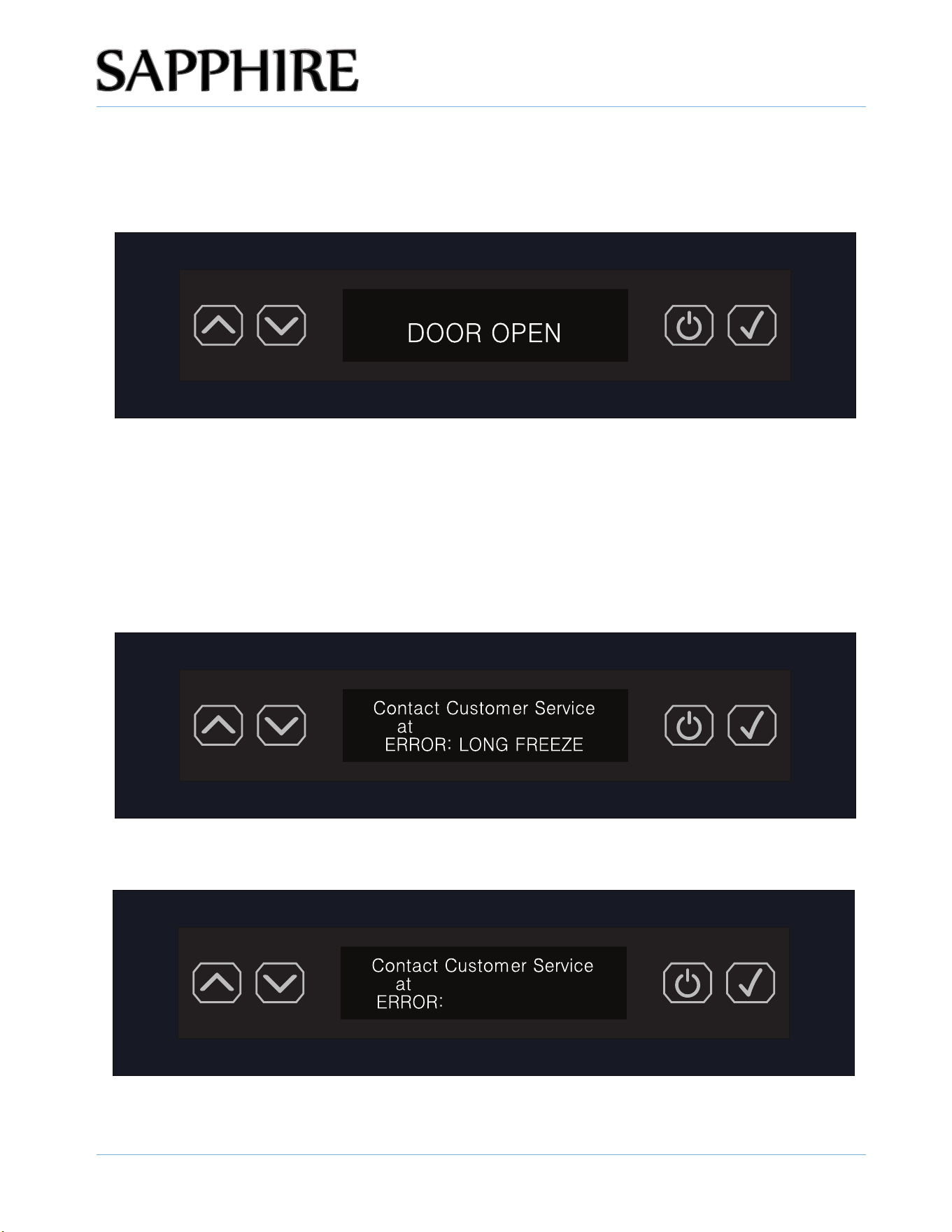
CLEARING SIMPLE ERROR CODES
DOOR OPEN alert is an audible alert and shows DOOR OPEN in the display and the alert
automatically clears when the door is closed.
NOTE: If the door remains open for longer than 2 minutes, an alarm will continuously sound until the door
is closed again. This methodology applies to any error or alert that requires an audible alert.
ERROR CODES THAT REQUIRE CONTACTING CUSTOMER SERVICE
1-866-754-6672
MOTOR FAULT ALARM: MOTOR FAULT is displayed as an ERROR CODE.
1-866-754-6672
MOTOR FAULT
EXTRA LONG ICE MAKING ALARM: LONG FREEZE is displayed as an ERROR CODE.
OPERATING THE UNIT
44
© 2025 SAPPHIRE
SAPPHIRE Ice Machine Operator’s Manual
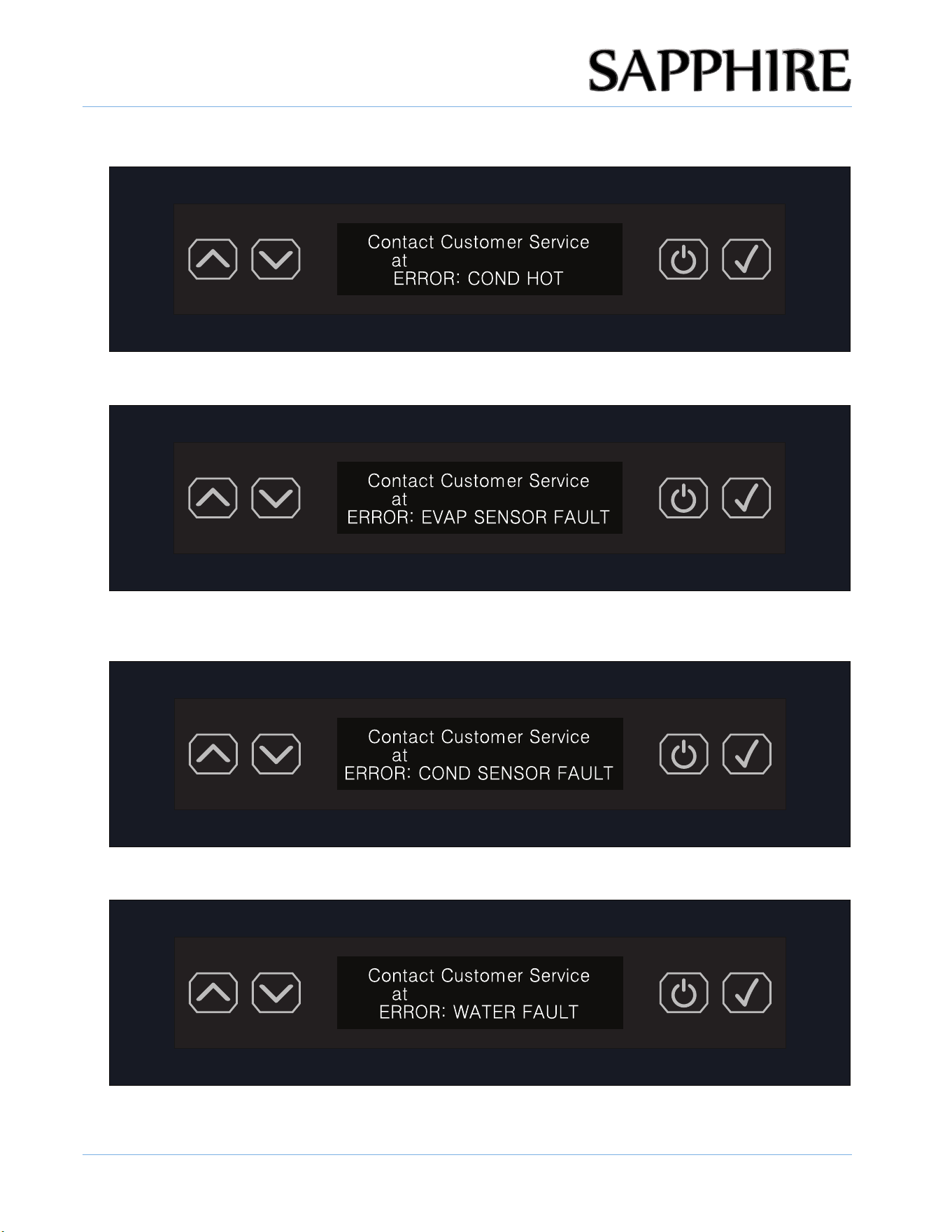
HIGH TEMPERATURE ALARM: COND HOT is displayed as an ERROR CODE.
1-
866-754-6672
EV
APORA
T
OR SENSOR
ALARM: EV
AP
SENSOR F
AUL
T
is displayed as an ERROR CODE.
1-866-754-6672
CONDENSER SENSOR ALARM: COND SENSOR FAULT is displayed as an ERROR CODE.
1-866-754-6672
WATER SHORTAGE ALARM: WATER FAULT is displayed as an ERROR CODE.
1-866-754-6672
OPERATING THE UNIT
45
© 2025 SAPPHIRE
SAPPHIRE Ice Machine Operator’s Manual
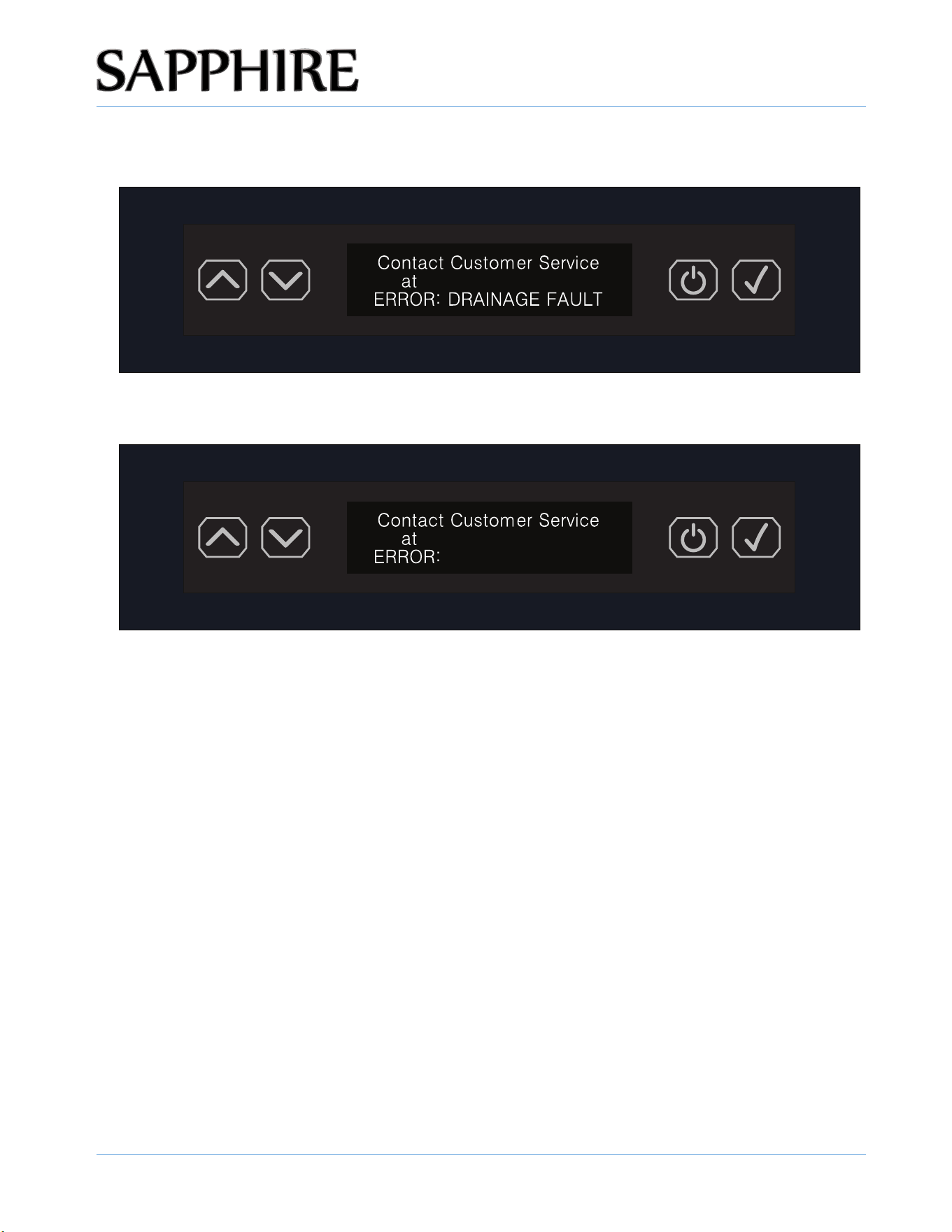
DRAINAGE FAULT ALARM: DRAINAGE FAULT is displayed as an ERROR CODE.
1-866-754-6672
BIN SENSOR FAULT ALARM: BIN SENSOR FAULT is displayed as an ERROR CODE.
1-866-754-6672
BIN SENSOR FAULT
OPERATING THE UNIT
46
© 2025 SAPPHIRE
SAPPHIRE Ice Machine Operator’s Manual
EXPECTING NORMAL SOUNDS
Your new ice machine may make sounds that are not familiar to you. Hard surfaces like the fl oor and
walls can make the sounds seem louder than they actually are. The following describes the kinds of
sounds that might be new to you and the source of those sounds:
the ice machine can also make noises.
• The high-effi ciency compressor may make a pulsating or high-pitched sound.
• Water running from the evaporator to the water reservoir may make a splashing sound.
• As each cycle ends, you may hear a gurgling sound due to the refrigerant flowing in your ice
• Rattling noises may come from the flow of the refrigerant or the water line. Items store on top of
machine.
• You may hear the sound of the condenser fan forcing air over the condenser.
• During the harvest cycle, you may hear the sound of ice cubes falling into the ice bin.
DEALING WITH POWER FAILURE
Most power failures are corrected within a few hours and should not aff ect the temperature of your ice
machine if you minimize the number of times you open the ice machine door. If the power is going to
be off for a longer period of time, take the proper steps to disconnect your appliance.
!
WARNING
Failure to unplug the ice machine could result in electrical shock or personal injury.
When the ice machine is operating, the evaporator is only component that is cold to make ice. A power
failure will only impact the machine making ice. The ice in the bin would slowly melt as normal.
NOTE:

47
© 2025 SAPPHIRE
SAPPHIRE Ice Machine Operator’s Manual
CARE AND
MAINTENANCE
5
!
WARNING
Electrical Shock Hazard
Always disconnect power at the source before working on the unit. Failure to unplug the
Nugget Ice machine could result in electrical shock or personal injury.
• Do not touch the power plug when your hands are wet.
• Never unplug the unit by pulling on the cord. Grasp the plug and pull ou
t
firmly.
NOTE: If water filter is NOT installed, the unit will not get water and will not make ice. A water filter or
water filter bypass cartridge (Part Number: 651014) MUST be installed for the Ice Machine to operate
properly.
The water filter should be changed every 6 months. At 6 months of use, a reminder prompt to change
the filter will display. If not changed, eventually the filter will fail to work properly and the unit will alarm.
Replacement Filter Part Number: 651008
To purchase a new filter, email [email protected] or call 480-282-6404
REPLACING WATER FILTER - ICE MACHINES
Ice machines feature a water filter that requires replacement when the filter indicator on the
control panel is lit, to replace the water filter:
1. Rotate the water filter cover 90 degrees counterclockwise. Remove the cover.

CARE AND MAINTENANCE
48
© 2025 SAPPHIRE
SAPPHIRE Ice Machine Operator’s Manual
3. Pull the water filter out of the machine.
4. Using a new water filter, insert the filter into the machine aligning tabs on the filter with slots in the
water filter head.
5. Rotate the water filter clockwise until it locks into place.
6. Install the water filter cover by rotating the cover 90 degrees clockwise.
2. Grasp the base of the water filter. Rotate the filter counterclockwise until it feels loose.
Bypass Water Filter Cartridge
If the unit is connected to a well filtered water source. You can bypass the Internal water
filter by replacing it with a bypass water filter cartridge (Part Number: 651014).
If bypass cartridge is installed the water filter reminder must be turned off. (Page 36)

CARE AND MAINTENANCE
49
© 2025 SAPPHIRE
SAPPHIRE Ice Machine Operator’s Manual
CLEANING THE UNIT’S EXTERIOR
Clean the door and cabinet with a mild detergent and warm-water solution, such as 1oz. (28g) of
Cleaner Solution mixed with 2 gallons of warm water. Do not use solvent-based or abrasive
cleaners. Use a soft sponge and rinse the unit with clean water. Wipe the unit with a soft, clean towel
to prevent water spotting.
Clean stainless steel with a mild detergent, a warm-water solution and a damp cloth. Never use an
abrasive cleaning agent.
CLEANING THE UNIT’S INTERIOR
When necessary, defrost and thoroughly clean the inside of the unit with mild soap and water.
When leaving the unit turned off , leave the door open. Leaving the door open allows air to dry the
inside of the cabinet, reducing the chance for mildew and damage to the mold mechanism’s
components.
Interior cleaning is required before first-time use or start up from long- term storage. Also, Monthly
cleaning is recommended.
CLEANING AND MAINTAINING THE UNIT
Perform periodic cleaning and proper maintenance to ensure efficiency, top performance, and long
life. The maintenance intervals listed in this manual are based on normal conditions. You may want
to shorten the intervals if you have pets or if you have other special considerations.
• Periodically vacuum dust and dirt from the condenser, which is located behind the grill at the
bottom front of the unit.
• Regularly inspect plumbing connections to ensure that no leaks exist.
• Disconnect the water supply hose if the ice machine will not be used for a long period of time.
• Never keep anything in the ice storage bin that is not ice. Objects such as wine and beer bottles
are not sanitary.
CARE AND MAINTENANCE
50
© 2025 SAPPHIRE
SAPPHIRE Ice Machine Operator’s Manual
EXTENDED PERIODS OF NON-USE
!
WARNING
Electrical Shock Hazard
Always disconnect power at the source before working on the unit.
Do not winterize this unit with ANY type of anti-freeze; damage to the mold coating will occur,
invalidating the product’s Limited Warranty and creating potential health hazard.
1. Turn off the water at the main water source.
2. Disconnect the water supply line from the water inlet of the ice machine.
3. Turn off the electric supply at the main power source. Remove the power cord from the electrical
outlet.
4. Remove any remaining ice from the storage bin.
5. Press and hold the UP and DOWN buttons together for at least 3 seconds to open the drain valve,
or enter the service menu to open the drain valve and then drain all water in the water trough.
Press and hold the UP and DOWN buttons together for at least 3 seconds again or turn the unit
off to close the drain valve.
6. Leave the door open to allow for circulation and prevent mold and mildew.
7. Leave the water supply line disconnected and the power cord unplugged until ready to use.
NOTICE
Never pull on the power cord to unplugged the appliance form the electrical outlet. Grasp the plug
of the power cord and pull out fi rmly.
RECOMMISSIONING THE UNIT
1. Connect the water supply lines, turn on the water, check for leaks, and then restore power to the
unit.
2. Once water has filled the trough, ice making cycles will commence.
NOTE:
STARTING UP THE UNIT
1. Turn on the water, check for leaks, and then turn on power.
2. Turn on the unit by pressing the power button.
3. The water supply valve will turn on immediately to supply water to the unit. The water pump and
compressor will turn on later (approximately 5 minutes) to initiate the ice making cycle. If the
machine was shut-off while in the ice-harvesting cycle, make sure the ice is harvested before
starting up the unit.
4. After the unit purges air from the lines, normal harvesting and refilling occur every 40 minutes or
less, under normal conditions.
CARE AND MAINTENANCE
51
© 2025 SAPPHIRE
SAPPHIRE Ice Machine Operator’s Manual
CLEANING THE CONDENSER
!
WARNING
Electrical Shock Hazard
Always disconnect the power at the source before working on the unit.
!
CAUTION
Sharp Object Hazard
DO NOT touch the condenser surface. The condenser has sharp edges and can be easily
damaged.
A dirty or clogged condenser prevents proper airfl ow, reduces ice-making capacity, and causes
higher-than-recommended operating temperatures that may lead to component failure. Clean the
condenser or have it cleaned at least once every six months.
1. Unplug the appliance or disconnect power.
2. Remove the two screws under the front of the unit. Gently pull on the grill and remove it.
3. Remove dirt and lint from the condenser and the unit compartment with the brush attachment of a
vacuum cleaner.
4. Position the grill on the unit and secure it with the two screws.
5. Plug in the ice machine or reconnect power.
COMPLETE WINTERIZATION OF THE UNIT
If the outdoor ice machine will be exposed to temperatures of 40°F (4.4°C) or less, perform below
steps to winterize your ice machine that will keep it in good condition while facing the winter
elements. It is important to clean and dry this appliance to prevent severe mold and mildew growth
from engulfing the unit's interior.
1. Perform the cleaning and sanitizing procedure on page 41 and 48 to prevent mildew
growth.
2. Remove all ice from the storage bin of ice machine.
3. Turn off the water at the main water source.
4. Disconnect the water supply line from the water inlet of the ice machine.
5. Press and hold the UP and DOWN buttons together for at least 3 seconds to open the drain
valve, or enter the service menu to open the drain valve and then drain all water in the water
trough. Press and hold the UP and DOWN buttons together for at least 3 seconds again or
turn the unit off to close the drain valve.
6. Press the ON/OFF button to turn the ice machine on.
7. Blow out the water supply line and the internal water circuit. Note: This procedure is
necessary to protect the Ice Maker from freezing up at subfreezing temperature.

CARE AND MAINTENANCE
52
© 2025 SAPPHIRE
SAPPHIRE Ice Machine Operator’s Manual
START-UP AFTER LONG TERM STORAGE
8. Drain pump models should have about 1/2 gallon of RV antifreeze (propylene glycol)
poured into the ice storage bin drain. Note: Automotive antifreeze must NOT be used.
9. Switch off and unplug the machine. It is also recommended that the power to the outlet
be turned-off if the circuit is not required for other items during the Winter season.
10. Place all cords in a small bag or tie them together with a piece of scrap cloth.
11. If necessary, move the unit so you can gain access to the rear of the product.
12. Remove the front toe kick, and use a brush and vacuum to clean dirt and debris from
beneath the unit. Thoroughly clean the toe kick and re-install on the unit.
13. Remove the rear access cover, and use a brush and vacuum to clean dirt and debris
from the machine compartment.
14. Thoroughly clean the rear access cover and re-install on the unit.
15. Clean the exterior and interior of the ice machine thoroughly. Wipe down and dry the ice
machine with rags or paper towels after it has been cleaned. Ensure all water has been
removed from the unit.
16. Leave the door open to prevent formation of mold and mildew. Open door a minimum of
2" (50 mm) to provide the necessary ventilation.
17. Kindly advise no cover on the unit, as this can trap condensation. If you are concerned
about exposure to the elements, use a synthetic cover that will not hold moisture to
protect the appliance, though the door should remain open as much as possible.
18. After completion of the above, you may choose to store the unit indoors, although this is
not required
1. If stored outside, it is recommended that the unit again be thoroughly inspected per the
storage instructions above to address any dirt or debris from the weather and/or
animals/insects.
2. Connect the water supply lines, turn on the water, check for leaks.
3. Reconnect drain tubing if removed.
4. Plug in the power cord to a wall outlet and turn the ice machine on.
5. Check drain pump (if equipped) operation by pouring approximately two (2) quarts of
water into the ice storage bin. The drain pump should activate and discharge water.
Check for water leaks at all hose connections.
6. Perform the cleaning and sanitizing procedure on page 25 and 49.
7. Install a new water filter (if equipped) in the unit.
8. Press the power button to start ice making.
9. Discard the first batch of ice.

53
© 2025 SAPPHIRE
SAPPHIRE Ice Machine Operator’s Manual
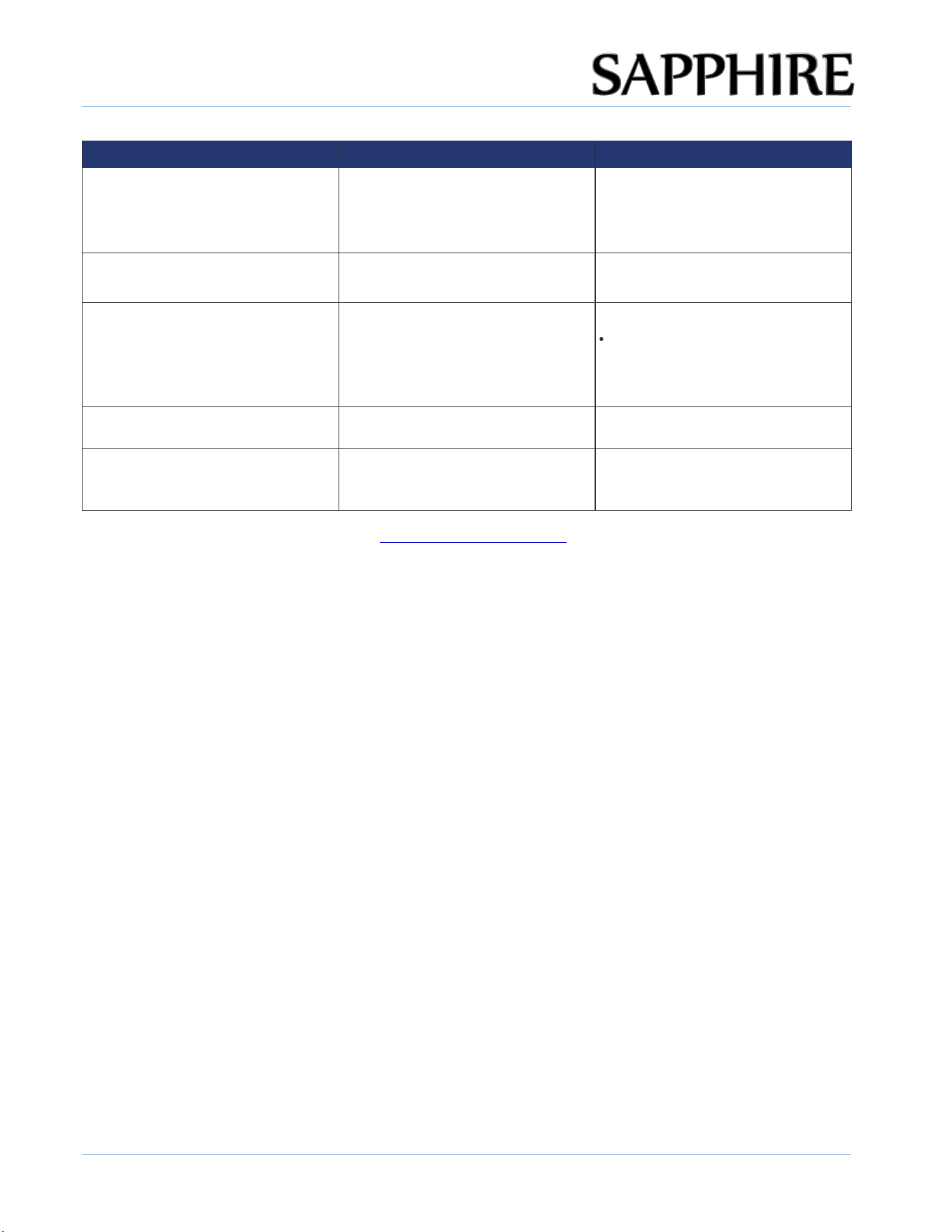
TROUBLESHOOTING
6
PROBLEM POSSIBLE CAUSES SOLUTIONS
• The machine won't operate. • The ice machine is unplugged.
• The ice machine power switch is
OFF
.
• The ice storage bin is full of ice.
• Plug the ice machine in.
• Verify that the control unit is
properly programmed.
• Take away some ice cubes; make
sure the “ice full” probe is free of
ice.
• The compressor works
abnormally with a buzzing noise.
• The voltage is lower than
recommended.
• Stop the ice machine and do not
restart until the voltage is normal.
• The water doesn't feed in after
the ice machine starts.
• The water supply tap is turned
of .f.
• The water supply pipe is not
properly connected.
• The water filter is not installed
or not installed correctly.
• Turn on the water supply tap.
• Reconnect the water supply pipe.
• Check that the water fi lter is
installed correctly.
• Machine makes ice, but bin does
not fill up with ice.
• The condenser may be dirty.
• The air flow to the ice machine
may be obstructed.
• The ambient temperature and
water temperature are high, or it
is near with some heat source.
• Clean the condenser.
• Check the installation.
• Run the unit for a longer period
of time.
• Water is leaking out of the unit. • A few water droplets are on the
door.
• The water supply connection is
leaking.
• Under some conditions, humidity
may condense on the door.
Consider moving the unit or just
be more careful when you open
the door.
• Tighten water supply hosefi tting.
• The machine makes ice, but at
a very slow rate.
• The condenser may be dirty.
Scale formation in water system,
will lower the ice production
• The ambient temperature and
water temperature are high, or
unit is near some heat source.
• Clean the condenser and water
system.
• Check the installation to ensure
the ambient temperature is in the
proper range.
• Noise during operation. • The feet are not leveled.
• Certain sounds are normal.
• Level the feet. See “Leveling the
Unit” on page 14.
• See “Expecting Normal Sounds”
on page 46.
TROUBLESHOOTING
54
© 2025 SAPPHIRE
SAPPHIRE Ice Machine Operator’s Manual
PROBLEM POSSIBLE CAUSES SOLUTIONS
• The ice is melting quickly.
• The door gasket does not seal
properly.
• The ambient temperature is high,
or the unit is near a heat source.
• Close the door.
• Conditions for ice-making cycle
are right but no ice is made.
• The refrigerant leaks and/or the
sealed system is blocked.
• Contact Sapphire Service
Department.
• The ice machine stops suddenly
while making ice.
• The electricity is off. .
• The room temperature is out of
the stated range.
• Reconnect the power supply line.
Cut off the electricity and let the
ice machine stop working until
the temperature returns within the
stated range.
• The body of the ice machine is
electrifi ed.
• The ground line is not in the
sockets.
• Use the correct plug and outlet.
• Scale builds up quickly inside the
machine.
• The calcium level in the water is
too high.
• Use a water-softening apparatus
installed in front of the water inlet
valve.
• Check the installation to ensure
the ambient temperature is in the
proper range.

55
© 2025 SAPPHIRE
SAPPHIRE Ice Machine Operator’s Manual
DISPOSING
THE UNIT
7
This symbol on the product or its packaging indicates that you cannot treat this product as normal
domestic trash; you must hand it in to a collection point for recycling electric and electronic
appliances. Your contribution to the correct disposal of this product protects the environment.
Contact your local municipal authority if you need more information about recycling this product.
!
DANGER
Always remove the door and keep the shelves in place when discarding this appliance so
children may not become entrapped.

WARRANTY
LIMITED WARRANTY COVERAGE
The Legacy Companies, warrants to the original purchaser of its Sapphire products that they will be
free from defects in materials and workmanship for the following time periods from the date of
purchase shown on the sales receipt:
WARRANTY EXCLUSIONS
NO CONSEQUENTIAL DAMAGES: SAPPHIRE and The Legacy Companies are not responsible for any
economic loss or special, indirect or consequential damages including without limitation; loss of
revenue and loss or damage arising from food or product spoilage claims.
WARRANTY IS NOT TRANSFERABLE: This warranty is not transferable or assignable and applies only
to the original verified purchaser.
NO IMPLIED WARRANTY OF MERCHANTABILITY OR FITNESS FOR PARTICULAR SERVICE:
There are no other warranties statutory, express, or implied. This Limited Warranty is the exclusive
warranty and made in lieu of all other warranties including any implied warranties or any warranties
of merchantability or fitness for a particular purpose.
FILING WARRANTY CLAIMS: All warranty claims for SAPPHIRE products must be made directly
through The Legacy Company’s Technical Service Department. All claims should include model and
serial number, proof of purchase, date of installation, location purchased, and all pertinent
information supporting the existence of the claim.
IMPROPER ELECTRICAL AND WATER CONNECTIONS: SAPPHIRE and The Legacy Companies are not
responsible for the repair or replacement of any failed or damaged components resulting from
electrical power failure, the use of extension cords, low voltage or voltage spikes to the unit.
Likewise, repair or replacement attributable to low water pressure, high water pressure or
contaminated water are not covered by this Limited Warranty.
Two (2) year parts & on-site labor
+ Three (3) additional years, parts only on the compressor
56
© 2025 SAPPHIRE
SAPPHIRE Ice Machine Operator’s Manual

WARRANTY
Durning installation the included TDS tester must be used to determine if a filter designed to
remove TDS is required. If The TDS tester shows more than 400 The special filter must be
installed for machine to operate properly. Failure to install specialty filter will deem unit not
covered by this limited warranty.
IMPROPER USAGE: Neither SAPPHIRE nor The Legacy Companies assumes liability for parts
or labor coverage for component failure or other damages resulting from improper usage or
installation or failure to clean and/or maintain the product as set forth in the owner’s manual
provided.
ADJUSTMENTS & CALIBRATIONS: Adjustments including calibrations, leveling, tightening of
fasteners, or utility connections normally associated with the original installation are the
responsibility of the reseller, installer or the end user and not the responsibility of SAPPHIRE or
The Legacy Companies and will not be considered warranty issues for this Limited Warranty.
CONSEQUENTIAL DAMAGES: This warranty does not cover any defect due to, or resulting from,
ordinary wear and tear, handling, abuse, misuse, or harsh chemical action, nor shall it extend to
any product from which the serial number has been removed or altered, or modifications made
by unauthorized service personnel or damage by flood, fire, earthquake or other Acts of God.
OUTSIDE U.S. & CANADA: This warranty does not apply to, and SAPPHIRE and The Legacy
Companies are not responsible for any warranty claims made on products sold or used outside
of the United States and Canada or any territories of the United States of America.
ALL REPAIRS AND SERVICE MUST BE MADE BY A SAPPHIRE AUTHORIZED TECHNICIAN
Customer Service: 1.866.754.6672
SAPPHIRE Appliances | The Legacy Companies
3355 Enterprise Avenue, Suite 160, Weston, FL 33331
[email protected] | SapphireAppliances.com
57
© 2025 SAPPHIRE
SAPPHIRE Ice Machine Operator’s Manual
PN:1866842302

SapphireAppliances.com 1.866.754.6672
SAPPHIRE Appliances | The Legacy Companies 3355
Enterprise Avenue, Suite 160, Weston, FL 33331
The Beautiful & Adaptable
Sapphire-bellied Hummingbird
Lepidopyga lilliae
© 2025
P/N 15IM 1-25
“Sapphire”
Rev 1.010625