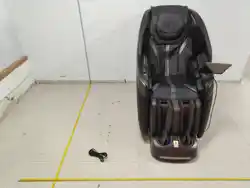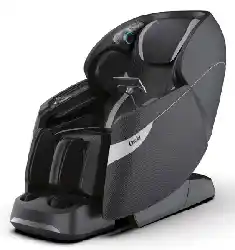
1SP7JWBOU%


Thank you for purchasing this product.
Please read this manual carefully and thoroughly before using.
Please keep this Instruction Manual properly on hand for future reference.
This product is designed for home use.
Important Safety Instructions ....................................................
Grounding Instructions ..............................................................
About Chair...................................................................................
Knob Screen Control & Side Panel Control Instructions.........
How to Use the Knob Screen Control........................................
Things To Do And Know Before Use .........................................
Airbags Position & Numbers .....................................................
Adjust The Headrest ....................................................................
Tablet Interface & Operations ....................................................
After Massage...............................................................................
Storage Instructions ...................................................................
Maintenance Instructions............................................................
Frequently Asked Questions(FAQ) ............................................
Troubleshooting .........................................................................
Product Specifications ...............................................................
FCC Radiation Exposure Statement .........................................
Industry Canada Notice ..............................................................
'"2*NQPSUBOU/PUFT
$BSF.BJOUFOBODF
$IBJS0QFSBUJPO(VJEF
#FGPSF6TF
EN 4
EN 9
EN 10
EN 13
EN 14
EN 15
EN 17
EN 21
EN 24
EN 53
EN 54
EN 54
EN 56
EN 57
EN 59
EN 60
EN 61
EN 3
IMPORTANT SAFETY INSTRUCTIONS
When using this product, basic precautions should always be followed, including the following:
Read all instructions before using (this product).
DANGER-To reduce the risk of electric shock:
• Always unplug this product from the electrical outlet after using and before cleaning.
• Never use unauthorized parts or hardware for this chair. No modifications are allowed.
• Carefully examine the covering before each use. Carefully examine the upholstery from top to
bottom. If there are any signs of cracking, blistering, rethreading or tearing, stop using the
product and contact the manufacturer for a replacement or further instructions. Please unplug
the chair from the power outlet.
• This product must be kept in a climate-controlled area. 60-85 degrees Fahrenheit with very low
moisture at ALL times.
WARNING-To reduce the risks of burns, fire, electric shock or injury to persons:
• An appliance should never be left unattended when plugged in. Unplug from outlet when not in
use and before any authorized installs or alterations are being made.
• Close supervision is required if you have any pets, children in the area when chair is being used.
• Use this product only for its intended use as described in this manual. Do not use attachments
not recommended by the manufacturer.
• Never operate this product if it has a damaged cord or plug, if it is not working properly, if it has
been dropped, damaged or dropped into water. Contact the manufacturer for examination and
repair.
• Keep the cord away from heat source like a vent or a humid area like a bathroom.
• Never pull on any cables wire on this product.
• If any of the air hoses are plugged stop using the chair and contact the manufacturer and
unplug power from the outlet.
• Never allow for any object to fall into the chair or cracks of the chair.
• This product is for indoor use only in a dry climate controlled area.
• Do not operate where aerosol (spray) products are being used or where oxygen is being
administered.
• To disconnect, turn controls off then remove plug from outlet.
• Keep children away from this product as working parts can seriously injure a child or pet.
• Connect this appliance to a properly grounded outlet only. See Grounding Instructions.
• Carefully Monitor the heating areas of the chair. If there is any abnormality or discomfort, turn off
the chair, unplug the power from the outlet and contact the manufacturer.
• Do not operate this product using a blanket or pillow. Excessive heating can occur and causing
fire, electric shock or injury to persons.
• Any elderly, disabled person, children (under 18) or with any person with a medical must consult
with a doctor if this product can be used.
Any person with an implanted medical device or medical condition or under any
treatment must get approval from your medical doctor before using this device.
SAVE THESE INSTRUCTIONS
Important Safety Instructions
EN 4
are
If you feel unwell while using or after using the chair, stop immediately and contact your doctor.
Do not use the chair again unless approved by your doctor.
Any person with a pacemaker cannot use this
product. The chair may cause an electronic
malfunction to the medical device;
Persons with any injuries should not use
this product.
Persons with higher or lower regular body
temperature, fever, inflammation, cold
symptoms, high blood pressure or any poor
health conditions should consult a
physician before using this product;
Person unable to feel or insensitive to heat
on their skin such as a diabetic patient;
Pregnant women or ones that have just
given birth;
Patients with malignant tumors;
Patients with heart disease;
Persons with poor blood circulation such as
a diabetic patient;
Otherwise discomfort or even physical injuries may occur.
Any one with spinal or nerve conditions;
Avoid falling asleep in this chair;
Persons with protrusion of intervertebral
disc;
Keep long hair away from moving massage
mechanism while in use.
Do not wear loose clothing or jewelry as it
might get caught with massage
mechanism;
Osteoporosis patients, spinal fracture
patients or persons with acute painful
disease or injuries such as joint sprains or
muscle strains;
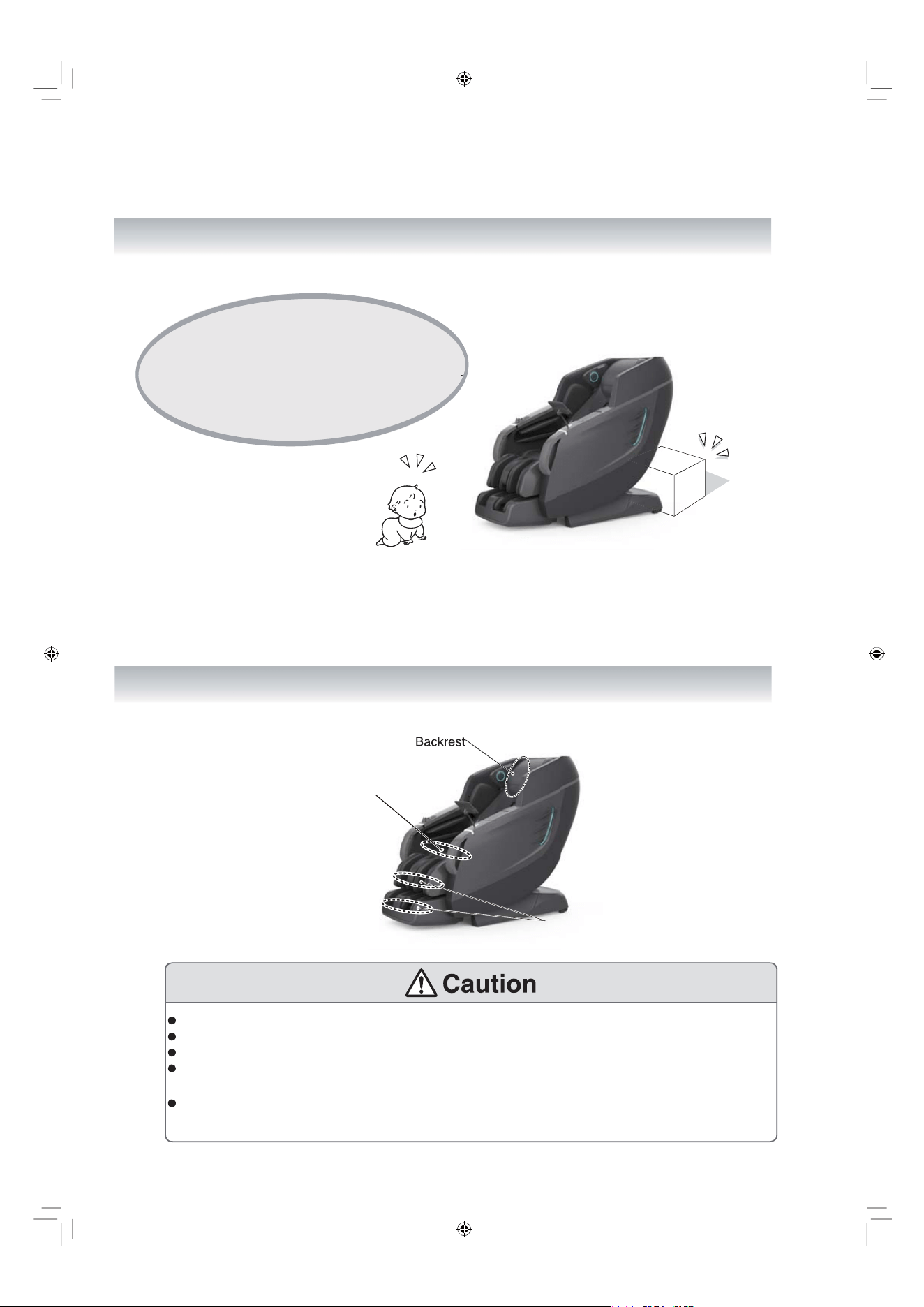
Before operating or adjusting the chair, be sure that there are no obstructions that can cause
damage to your chair. No pets or persons, near, in front or under the chair to avoid serious injury.
Before using the chair, look behind the backrest pad and inspect the area where the massage
rollers move up and down for any tearing or abnormal wear. Be sure the middle nylon cover is not
unzipped and has no signs of damage or tear caused by the roller heads. Using the chair while the
roller heads are exposed could cause physical injury, electrical shock or breakage.
When using the chair for the first time, it is recommended that you select the “Demo” mode to get
familiar with various massage features of the chair.
Do not use the chair for more than 30 minutes each time.
Do not massage a single part of your body for more than 5 minutes.
After using the chair, it is recommended that the chair is unplugged from the power outlet to avoid
any surges caused by outages. It is HIGHLY ADVISABLE TO ALWAYS USE A SURGE PROTEC-
TOR. Keep children or minors from using the chair without supervision to avoid misuse that could
result in serious injuries.
Follow the local code and regulations about use of electrical products.
Use a 110V-120V, 60Hz power supply.
(Do not use the chair in a country that this product is not designed for or connect it with a
It may lead to electrical shock, product failure or internal components overheating
causing fire
hazard.
Make sure the power cable is firmly plugged into the outlet to avoid power surges, short and
electrical shocks. Electrical shocks may cause internal component overheating causing fire
hazard.
In the case of any abnormality with functions of the chair, stop using the chair immediately and
pull out the power plug to avoid smoke, fires and electric shocks.
Abnormality and fault examples are:
If the chair is plugged in and the power switch is in the “ON” position and if the chair is not
responding.
When the chair is turned off but still operating.
If you detect any burning smell or abnormal sounds.
If you detect any parts of the upholstery that seemed to have melted due to over heating.
In any of these listed issues have occurred STOP using the product and unplug from the power
outlet. Have the product inspected by an authorized service center.
Wipe and clean the power plug regularly with dry cloth to avoid dirt or moisture built up.
Do not put any cushions or obstructions between the backrest pad and the backrest. This may
damage the mechanism and result in personal injury.
When moving or handling the chair, be sure to hold onto the recommended supported area. Other-
wise parts of the chair may break resulting in serious injury.
Failing to follow these instructions, discomfort or even physical injuries may occur.
EN 5
transformer.)
People with the following health issues should NOT use this chair:
Persons for whom massage is not advisable by doctors. Such as persons with thrombosis,
serious aneurysm, acute venous aneurysm, various skin inflammations (such as subcutaneous
tissue inflammation) or various skin infections.
Otherwise it may aggravate or cause serious injury.
Do not put hands, arms or feet into the traveling massage mechanism while the chair is operating.
Keep small children away from the chair. Climbing could result in falls that could lead to serious
injuries.
Do not climb onto the backrest or the armrests.
Do not apply excessive pressure leaning back on the backrest.
Keep your head away from reachable areas of the backrest and the back cover.
Young persons or persons with physical disabilities that can not operate the chair on their own,
should not use this product or without supervision. Anyone with weaken physical conditions
should consult a doctor before using the chair.
When massaging the neck area, pay attention to the intensity of the massage and make sure it
does not hurt the neck muscles or nerves.
Anyone with physical injuries or poor health should NOT use this product.
Persons with acute lumbago, protrusion of intervertebral disc or displacement of a lumbar
vertebra.
Otherwise it may aggravate or cause serious injury.
Do not damage the power cord.
Do not damage, alter, bend, twist or use it with any extension cords. Do not place the power cord
close to a heater.
A damaged power cord may result in electric shocks, short circuit or fires.
Please consult with the retailer/dealer from which you bought the product or a designated autho-
rized service center about maintaining your power cord.
When engaging the heat function of massage wheels, avoid prolong contact with the skin in one
position. Otherwise low-heat burns may occur.
Even if the temperature is relatively lower at 104 F~140 F, low-heat burns may happen in spite of
no obvious hot or painful sensation.
Do not insert or pull out the power plug when your hands are wet. Otherwise electric shocks may
happen.
Do not refit, disassemble or repair the product without the help of an authorized service provider.
Otherwise fires, abnormal movements or personal injuries may happen.
EN 6
The following persons (even if they are physically healthy at present) should consult a physician
before using the product.
(1) Persons with muscular atrophy;
(2) Persons with any spinal or back pain or spinal condition;
(3) Persons suffer from sprains or bruising easily;
(4) Persons with motion sicknesss;
(5) Persons who received a heart operation or another vascular operation.
It may cause serious injury if not addressed properly.
Otherwise, it may cause serious injury.
Before sitting on the product, make sure there is no foreign objects obstructing any part of the
chair.
Before sitting on the seat, make sure the massage wheels are in the retracted positions.
Turn off the massage function before you get off the chair.
When the lower leg/foot massage section is not retracting after the massage, retract the footrest
with the remote button.
When unplugging the chair, hold onto the head of the to plug and not the cord to avoid damaging
to the power cord. Damaged cord could result in electric shock and serious injuries.
Before moving the chair, be sure the backrest is in the upright position and the footrest is
retracted in default positions.
Otherwise, injuries may happen or damage to the chair.
When moving the product by dolly, lay mats on the floor to avoid markings or damage to the floor.
Do not roll the chair on engineered wood or soft wood floorings. Otherwise marks and damage
may occur.
Keep the safety lock key.
Keep children away the remote control.
Before moving the chair, make sure there are no obstructions around. If lifting is required, make
sure to lift from the steel frame of the chair. Be sure to keep the chair in the upright position when
lifting the chair when moving.
Symptoms such as skin inflammation, itching or swelling when using the chair, stop the using the
product immediately and consult a physician.
Do not use the product with other electrical devices at the same time, such as a heating blanket.
Do not place your hands, arms, feet or any parts of your body to massage area that are not
designed for the body parts to avoid discomfort or injuries.
Do not put the knees between the calf massager. This may cause serious injury.
Do not fall asleep while using the product.
Do not use the product after drinking alcohol.
If the airbag on the seat is not completely deflated, do NOT attempt to deflate the air bag by force
or using any tools. Contact the manufacturer to resolve the matter.
(Make sure there are no foreign objects on the back cover, the backrest, the seat surface, the lower
leg/foot massage section or inside surface of the back cushion.)
Otherwise, accidents or injuries from product failure may cause serious injury.
EN 7
Do not put hands or feet between footrest and seat base.
Do not put hands or feet between footrest and side panel.
Do not put hands or feet between seat base and side panel.
Do not put hands or feet between the upper and the lower part of the footrest.
Do not put hands or feet in the gap of seat base.
Do not put pets on the massage chair.
Do not pull out the power plug or turn off the power switch suddenly during massage operation.
Do not stand or sit on the backrest. This may lead to serious injury and damage to the product.
Do not stand or sit on the armrests.
Do not stand or sit on the lower leg/foot massage section or the footrest.
Do not drag or push the product after it is installed.
Do not move the product while there is a person sitting on it.
Do not use the product with other heating devices such as electric blankets.
Otherwise fires may occur due to overheating.
Do not leave the remote controller on the seat, always return it to its holder.
If there are any foreign objects between the backrest and the backrest pad, stop using the chair and
turn off. Remove the foreign object and make sure the chair is operating properly before using
again.
Do not place this chair in locations with high humidity such as the bathroom. Moisture will destroy
electrical components resulting in product failure or worst, electrical shock and other serious
injuries.
Do not use any liquid aerosol sprays around the chair. Otherwise, electric shocks, fire, short circuit
or product failure may happen.
Before cleaning or maintaining the product, always unplug the power cord.
In the case of a power failure, pull out the power plug at once. It is highly recommended to
plug chair into a surge protector to protect the chair from shorting during outages.
When the product is not in used, pull out the power plug.
EN 8
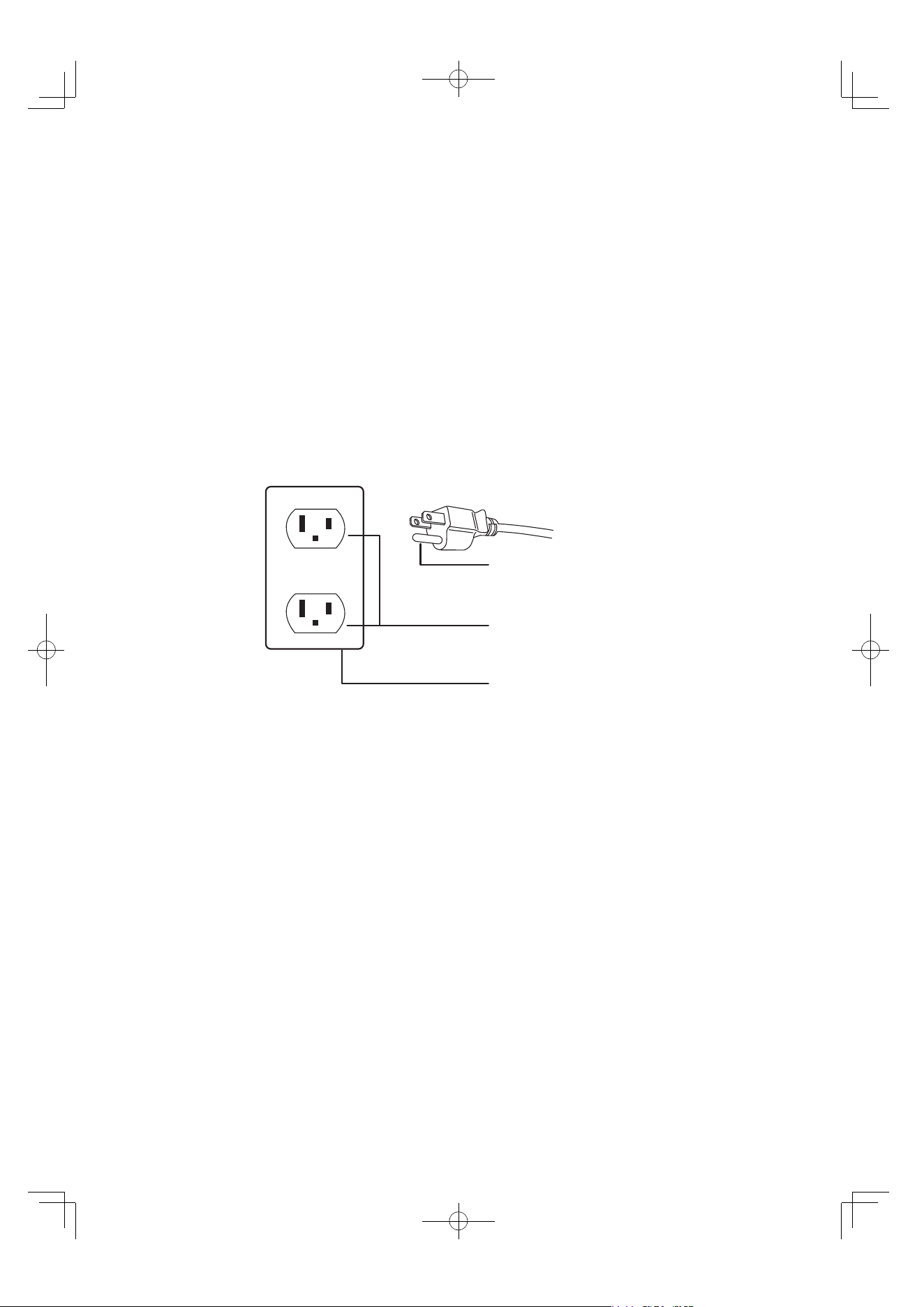
Warning:
When using the massage chair, the
arm should not be placed on the
wireless charger. The minimum
distance between the arm and
the wireless charger is 80mm(3.15").
3OTSS
7
GROUNDING INSTRUCTIONS
This product must be grounded. If it should malfunction or break down, grounding
provides a path of least resistance for the electric current to reduce the risk of
electric shock. This product is equipped with a cord with an equipment-grounding
conductor and a grounding plug. The plug must be plugged into an appropriate outlet
that is properly installed and grounded in accordance with all local codes and ordinances.
Danger-Improper connection of the equipment-grounding conductor can result in a risk
of electric shock. Check with a qualified electrician or serviceman if you are in doubt as
to whether the product is properly grounded. Do not modify the plug provided with the
product – if it will not fit the outlet, have a proper outlet installed by a qualified electrician.
Grounding Pin
Grounded Outlet
Grounded Outlet Box
EN 9
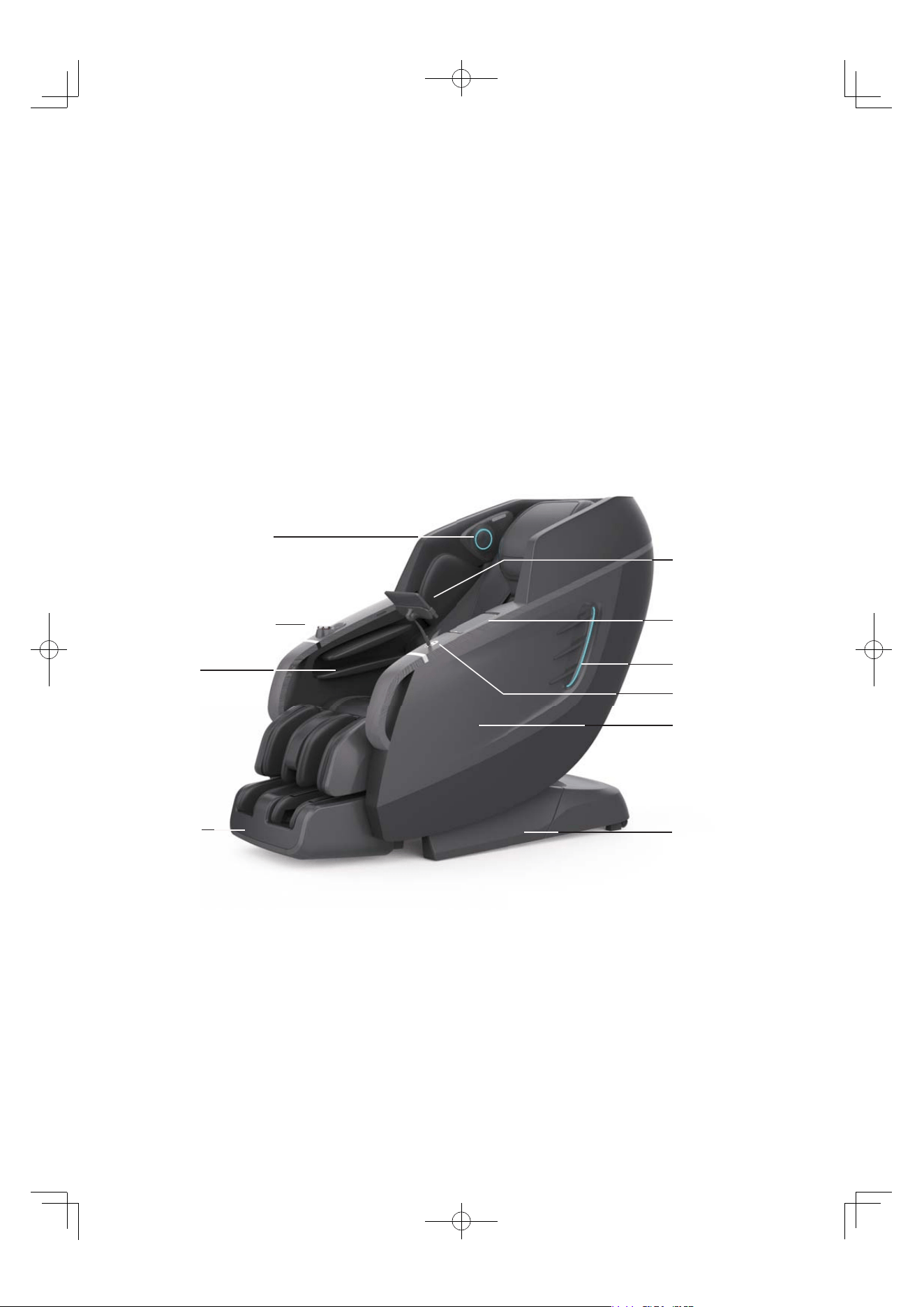
About Chair
EN 10
External Side Structure 1
Monster Speaker
Knob Screen Control &
Side Panel Control
Armrest
Footrest
7” Touchscreen
Tablet
Side Panel
Side Panel LED
Type C Port
Wireless Charger
Base
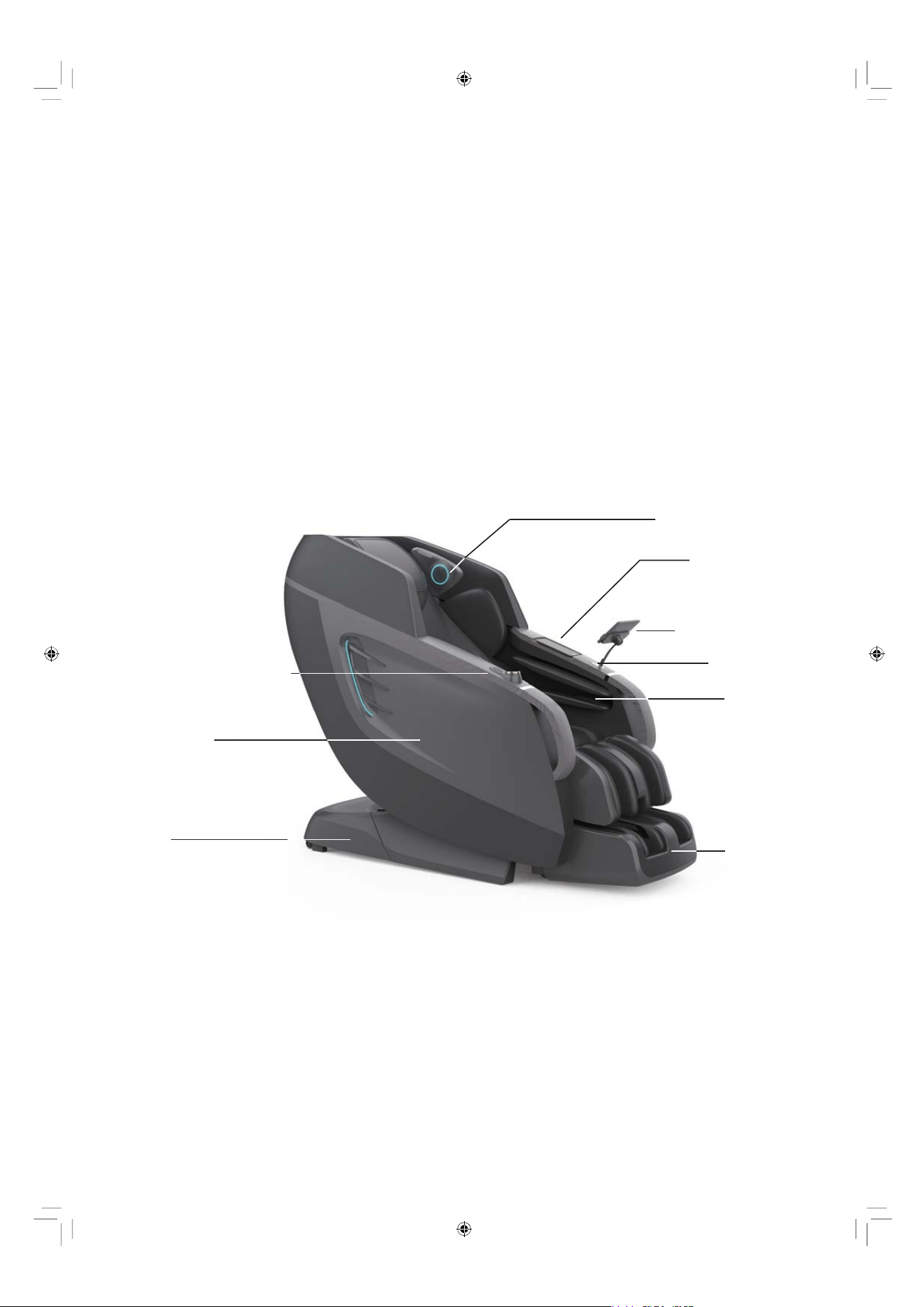
External Side Structure 2
EN 11
Monster Speaker
A.I. Health
Monitor
Touchscreen
Tablet Controller
Type C Port
Wireless
Charger
Footrest
Side Panel
Base
Knob Screen Control
& Side Panel Control
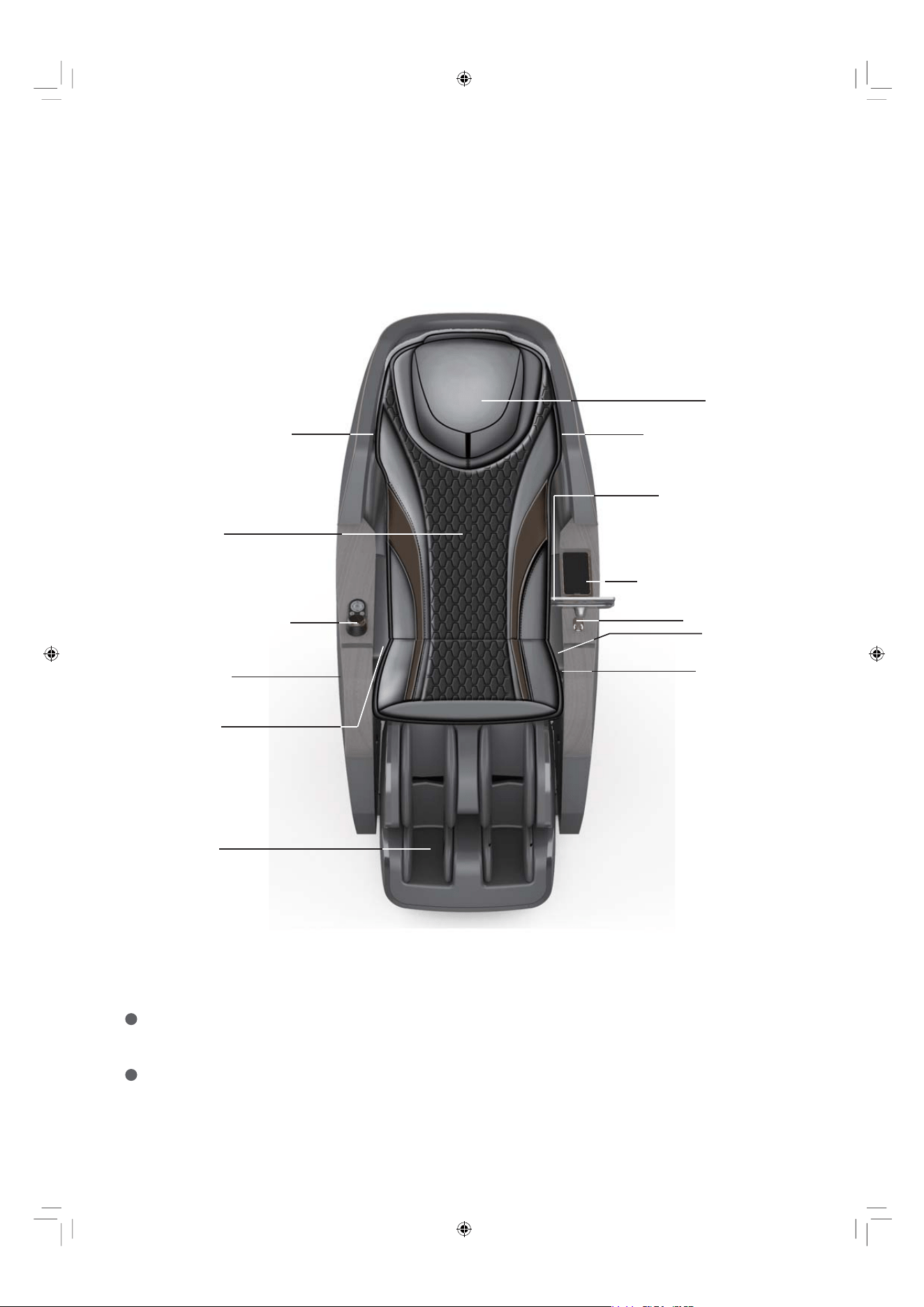
EN 12
External Side Structure 3
Note: The Monster speakers will only function when the massage chair is in use.
To play music through your massage chair's speakers, please connect your smartphone,
tablet, or other compatible electronic device to your chair via Bluetooth. Please note that
the Bluetooth connection code is "Vivant 5D".
And please make sure you disconnect the Bluetooth after using so the next user can
connect it.
Headrest
Monster SpeakerMonster Speaker
7” Touchscreen
Controller
Wireless Charger
Type C Port
A.I. Health
Monitor
Armrest
Back Pad
Side Panel
Footrest
Armrest
Knob Screen Control &
Side Panel Control
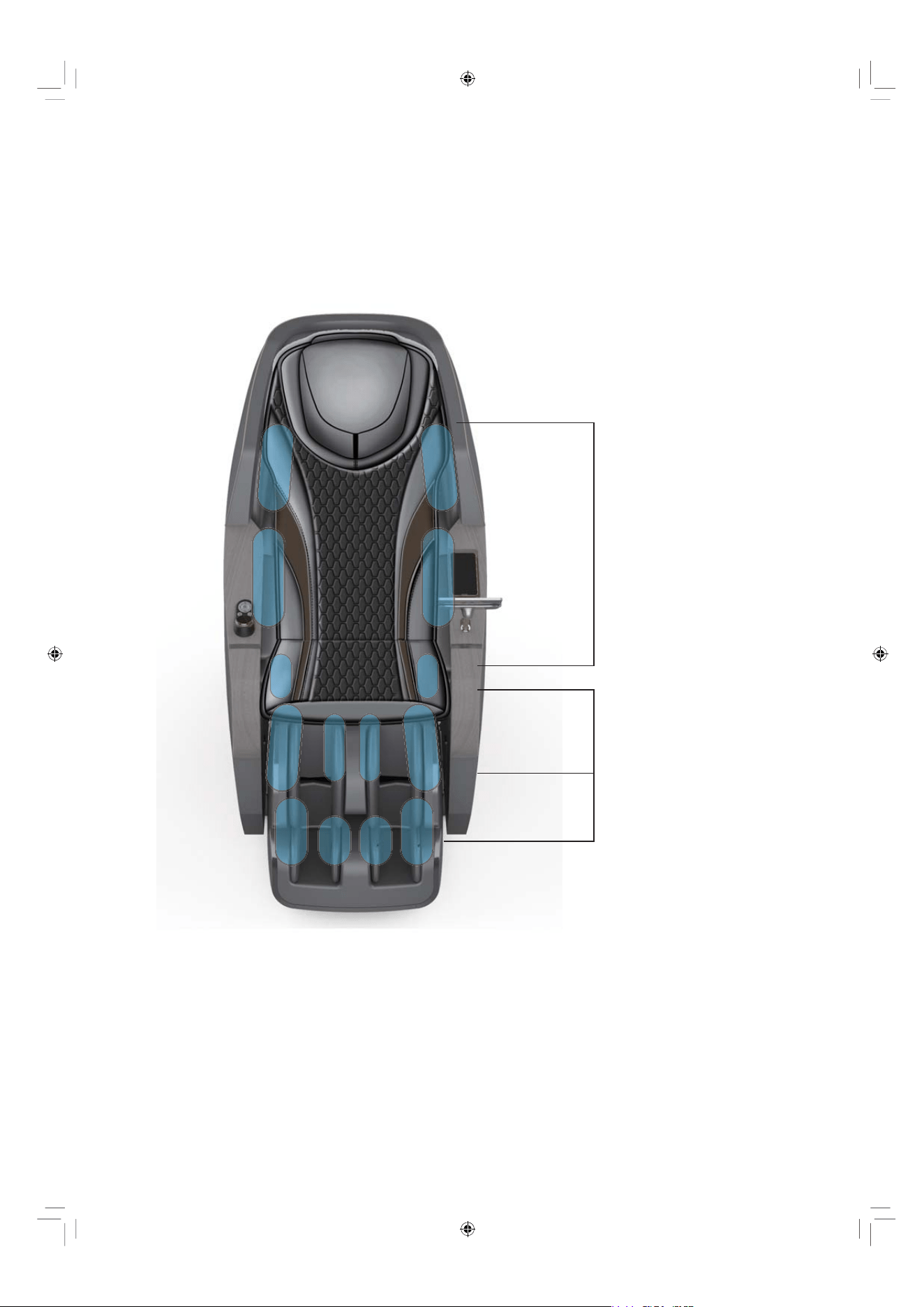
22 Airbags -
Shoulders 6
Seatside 4
Armrests 12
Calves - 10 Airbags
Feet - 20 Airbags
EN 13
Airbags Position & Numbers
EN 14
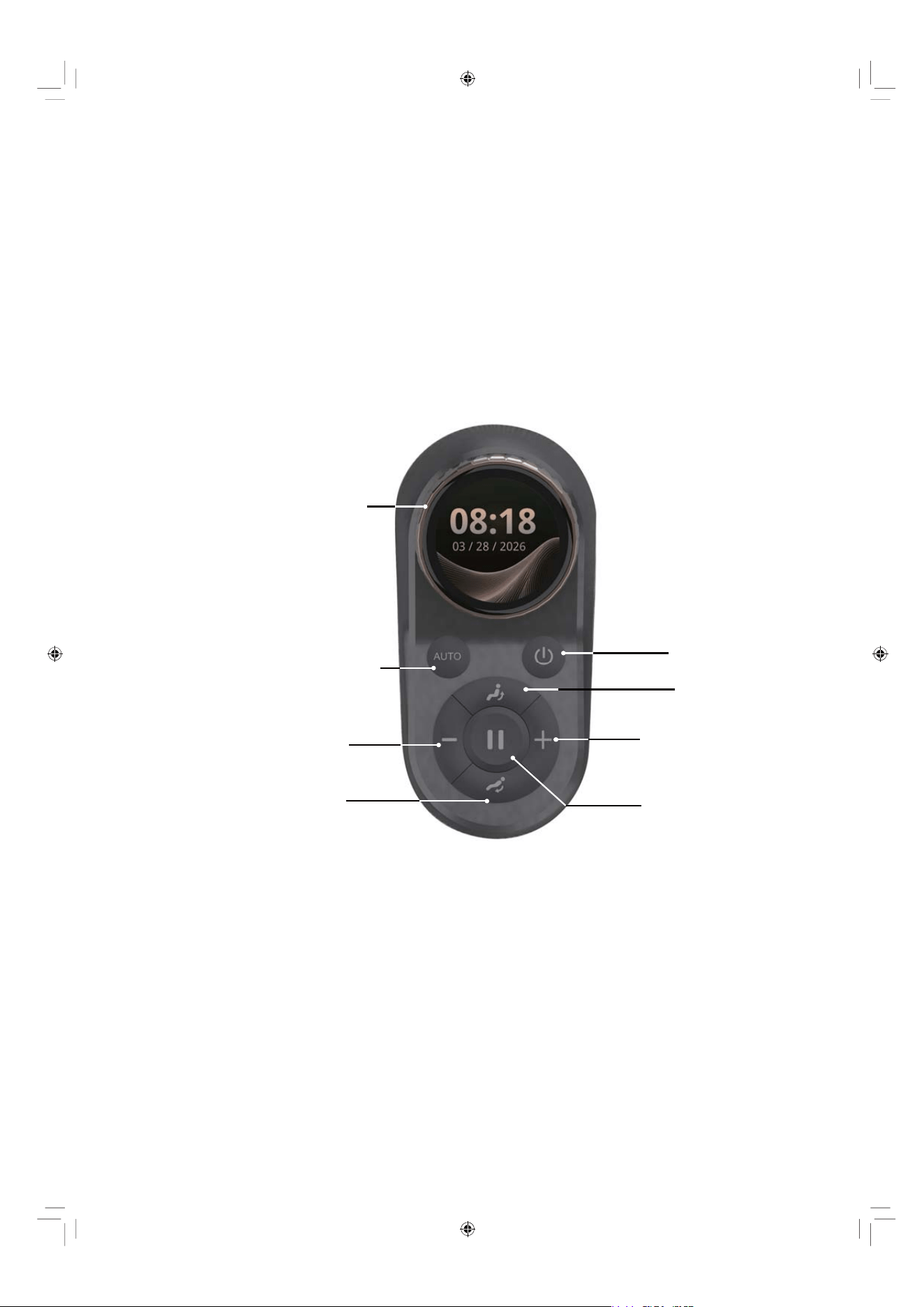
Knob Screen Control &
Side Panel Control Instructions
Auto Massage Button
Decrease Intensity
Button
Backrest Down
Button
Knob Screen Control
Power Button
Increase Intensity
Button
Pause Massage
Button
Backrest Up
Button
How to Use the Knob Screen Control
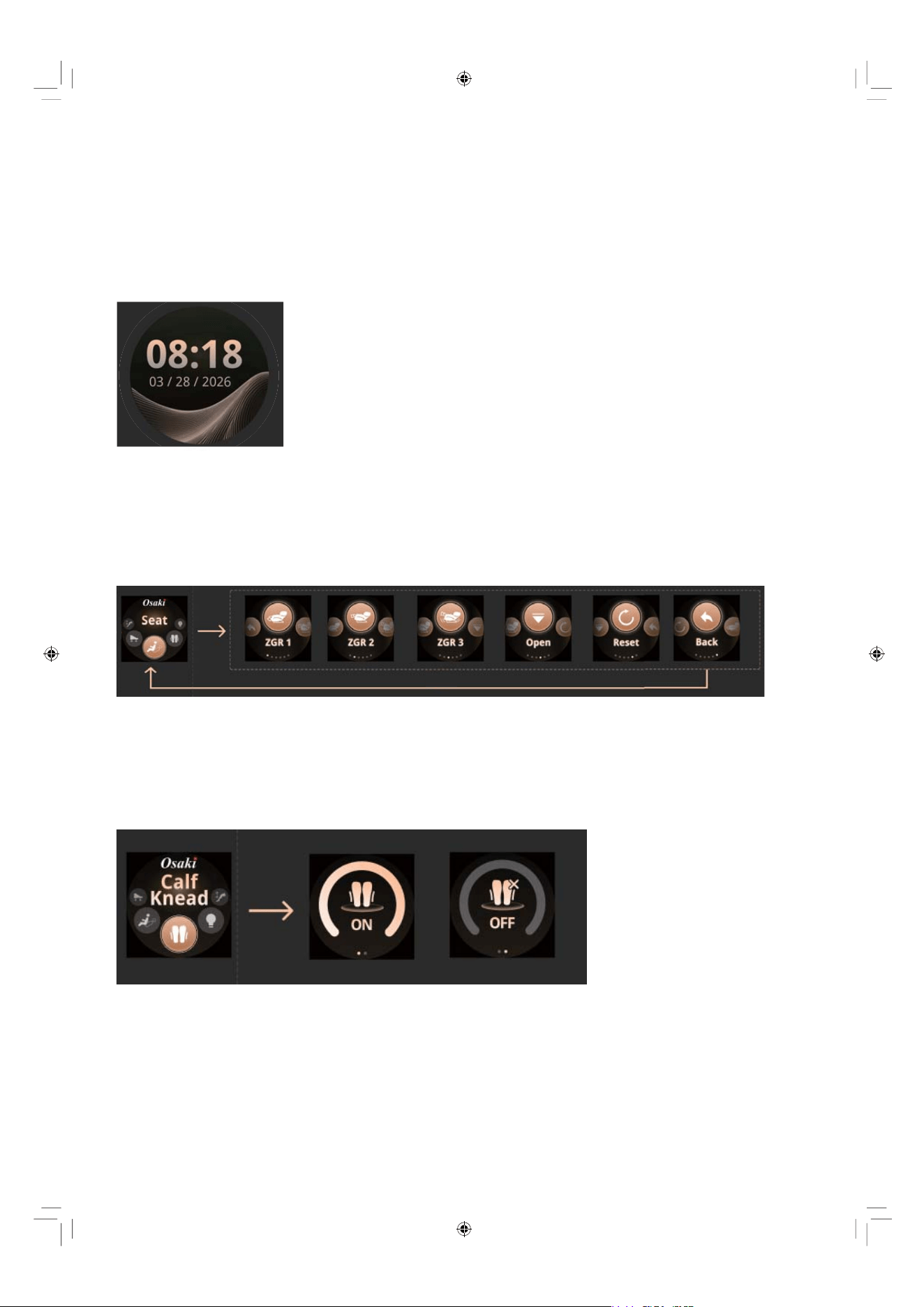
The knob screen combines a physical rotary knob with a digital display for intuitive control. Rotate to
navigate, press to confirm or back to the previous menu.
1.Turn the knob to “Seat”.
2. Press to enter seat adjustment.
3. Press to select your desired position (e.g., ZRG1, ZGR2, ZGR3, Open, Reset).
4. Press “Back” to return to the previous menu.
EN 15
Idle Display: Date & Time
Seat Adjustment
1.Turn the knob to "Calf Knead".
2. Press the knob to activate the calf kneading function.
3. Turn the switch to "ON" to start the function, and to "OFF" to deactivate it.
Calf Kneading
p
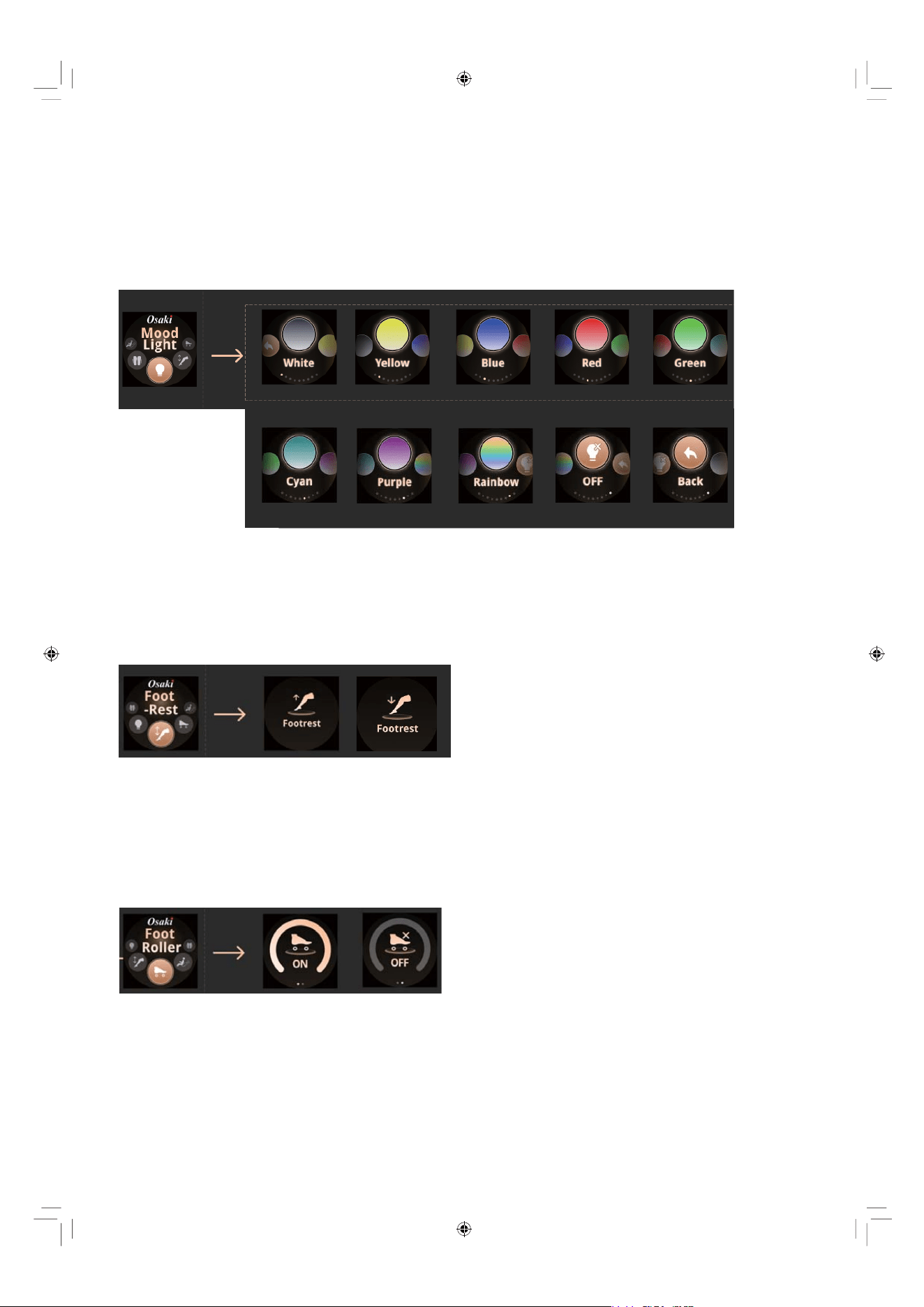
1.Turn the knob to “Mood Light”.
2. Press to enter the light color selection.
3. Press to select the preferred light color(e.g., white, yellow, blue, red).
4. Press “OFF” to turn off the light.
5. Press “Back” to return to the previous menu.
Mood Light
1.Turn the knob to “Footrest”.
2. Press to enter the footrest adjustment.
3. Press to up the footrest or down the footrest.
Footrest Adjustment
1.Turn the knob to "Foot Roller".
2. Press the knob to activate the foot rollers’ function.
3. Turn the switch to "ON" to start the function, and to "OFF" to deactivate it.
Footrest Adjustment
EN 16
Things To Do And Know Before Use
Place Position
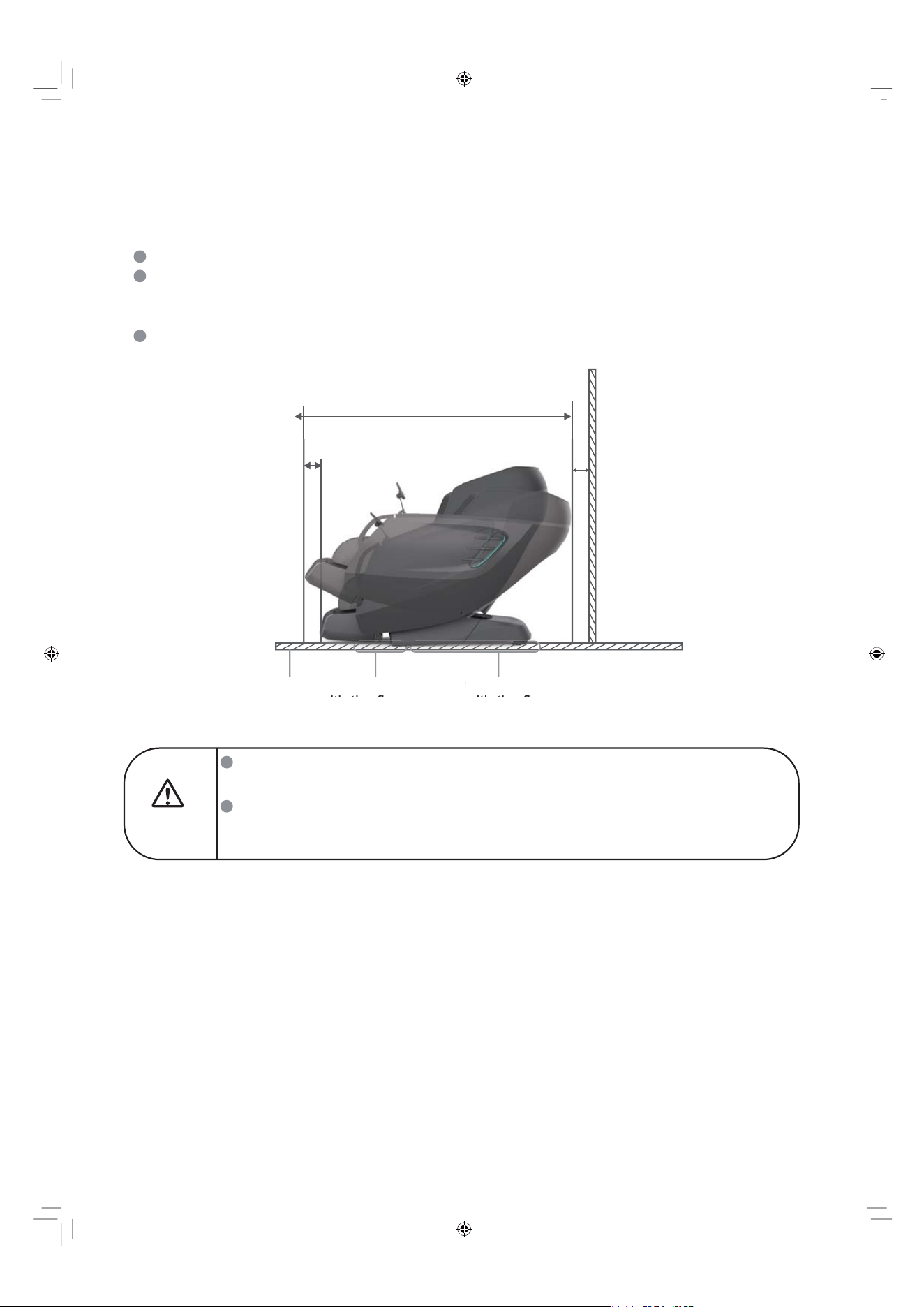
Please place the chair in desired flat location nearing to the power outlet.
Please keep 7.9” clearance for the recline of the backrest and 24.2” clearance for the
extension of footrest and make sure enough room for the user to get in and out of the chair
freely.
It is recommended to place a sacrificial pad or mat under the product to protect the floor.
The suggested dimension of the pad or mat is 63”x31.5”.
EN 17
Warning
Do not place the massage chair in high moisture environment such as near
a swimming pool or bathroom to prevent electric shock accident.
Do not place the massage chair directly under the sunlight or near the heated
surfaces to prevent fabric fading, discoloration, hardening deterioration or fire
hazard to damage to the product.
Approx. 74.02”
Approx. 24.2”
7.9”
Footrest in contact
with the floor
Mat Chair base in contact
with the floor
A
pprox.
24.
2”
7.9”
F
ootrest
i
n contact
ith th fl
M
a
t
C
hair base in contact
ith th fl
Things to Check Before Use
Check all around the chair to make sure
there are no children, pets or any other objects
near the footrest and the back area of the chair.
Otherwise, the chair may not function
properly.
Check All Around The Chair
Leg/Footrest Mech
Seat Surface
Make Sure No Foreign Objects Inside or in the
Gaps between the Chair
2
1
EN 18
Do not put hands, feet or any other foreign objects between the footrest and the seat base.
Do not put hands, feet or any other forgeign objects between the footrest and the side panel.
Do not put hands, feet or any other foreign objects between the seat base and the side panel.
Do not put hands, feet or any other foreign objects between the upper and the lower part
of the footrest.
Do not put hands, feet or any other foreign objects in the gaps of the chair.
Otherwise, injuries may occur.
.
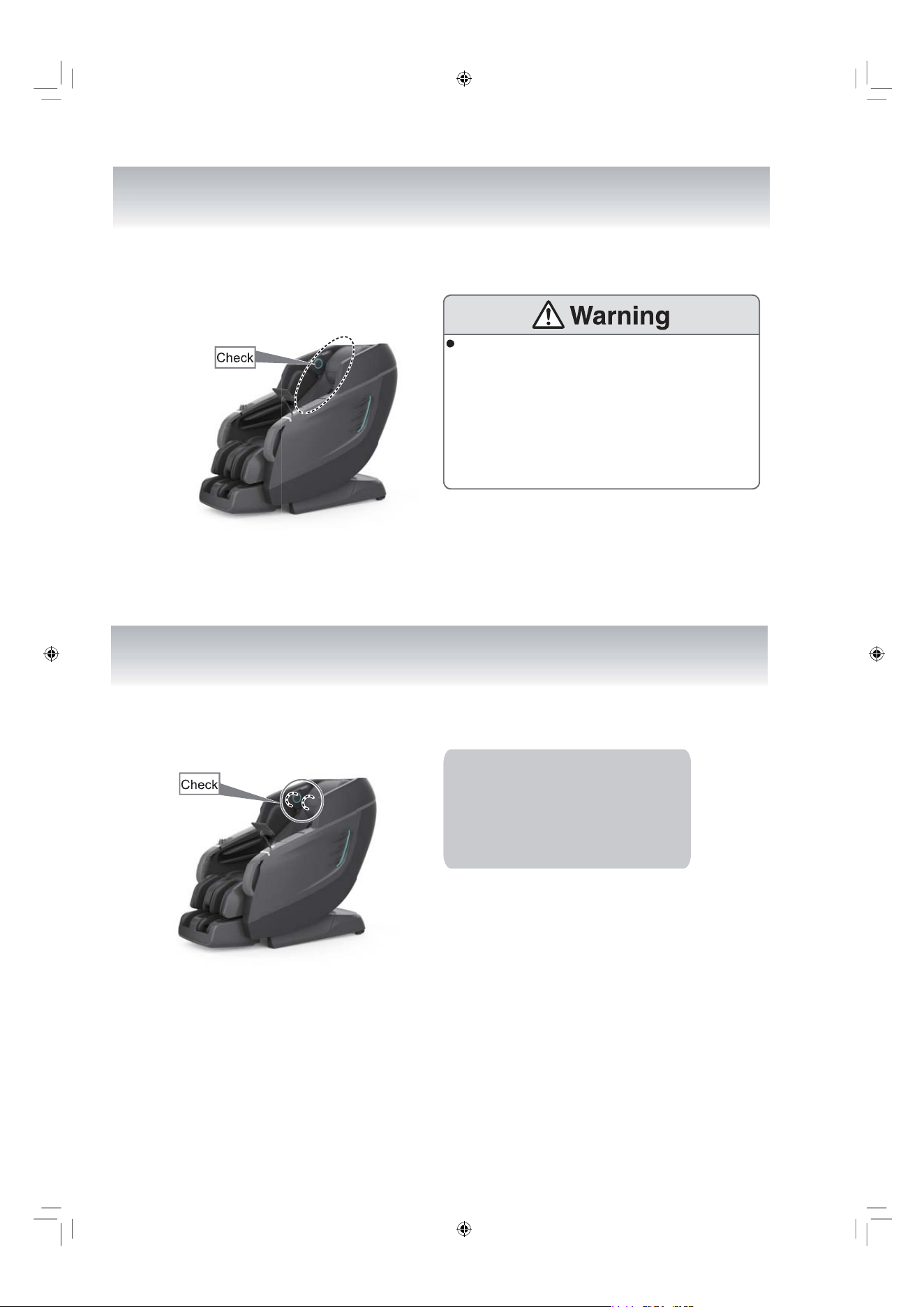
Make Sure The Fabric Is In Good Condition, With No
Damage, Tears, Or Cracks
Ensure That The Massage Rollers Are Positioned
Correctly
Before using, please check and ensure
that the rollers are positioned correctly at
the top of the backrest as shown in the
picture. If the rollers are incorrectly
positioned, please press the power switch
to reset them to the default position.
Focus on inspecting the fabric where the massage
wheels on the backrest move.
4
3
EN 19
Before use, please raise the back pad and
inspect the fabric highlighted in the diagram to
ensure it’s not damaged. In the event of any
fabric damage, even minor, discontinue use of
the product immediately. Unplug the power cord
and contact the local service department to
request a replacement. Using the product with
damaged fabric may result in injury or electrical
shock.
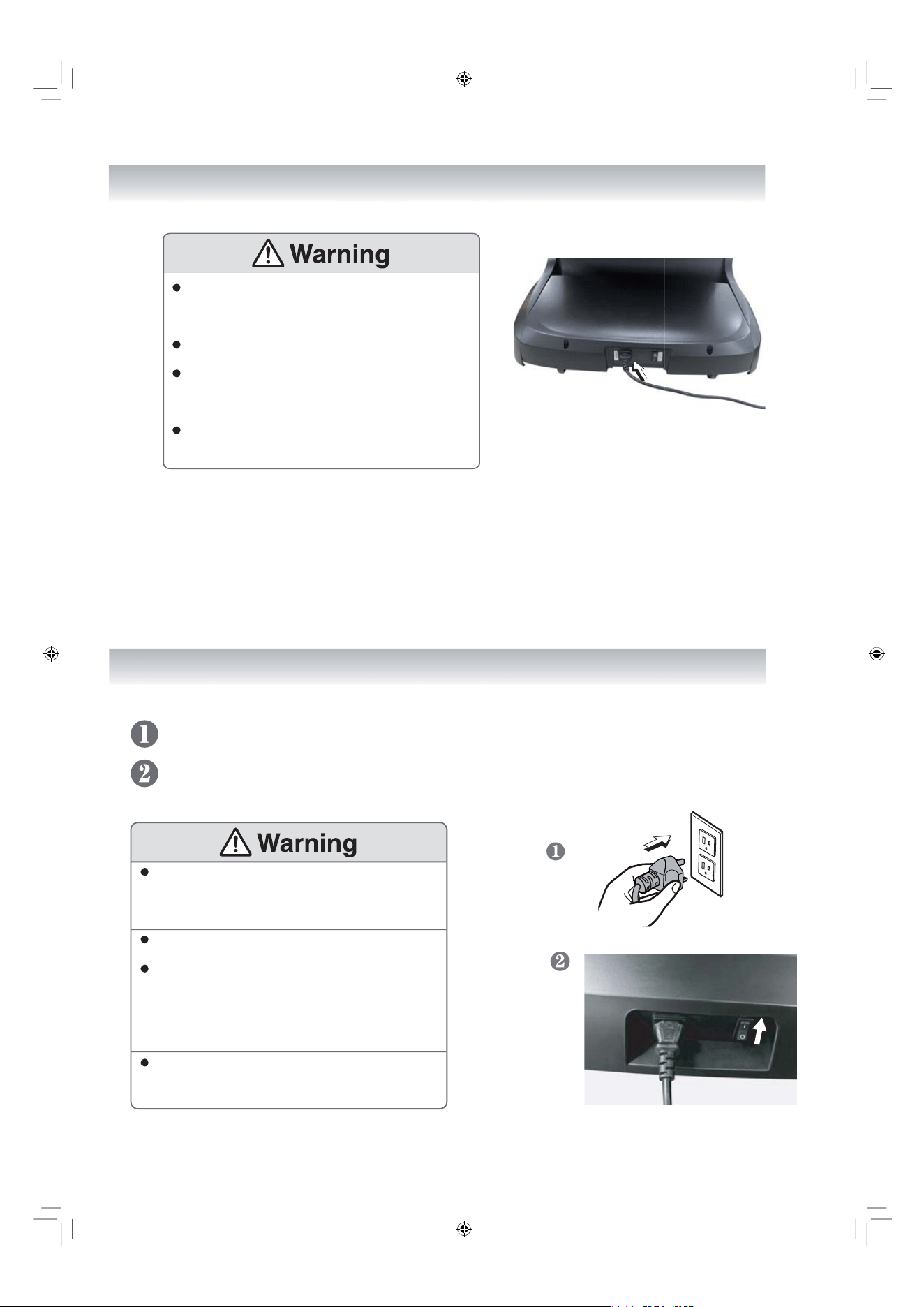
Inspect the power cord for dirt and dust, which can
cause electrical fires. Keep it clean and
damage-free; wipe the plug with a dry cloth.
Avoid damaging, bending, or twisting the cord.
Never place it under heavy objects or near heat
sources. Damaged cords can lead to shocks, short
circuits, or fires.
For maintenance, consult the store where you
bought the product or an authorized service center.
Ensure that the plug is fully inserted
into the chair's port, and keep the
power cord untangled to avoid any
potential damage.
Plug the power cord into the electrical outlet.
Turn the switch to the "I" position to turn the chair on.
Carefully Inspect The Power Cord & The Power Plug
How To Power on the Chair
6
5
EN 20
Ensure the power cord is securely plugged into the
outlet to prevent overheating, shorts, shocks,
or fires.
Adhere strictly to socket and wiring regulations,
using a 110-120V~, 60Hz power supply.
Do not use the product overseas or with
unauthorized transformers to avoid shocks,
malfunctions, or fires.
Never plug or unplug with wet hands to prevent
electric shock.
EN 21
Chair Operation Guide
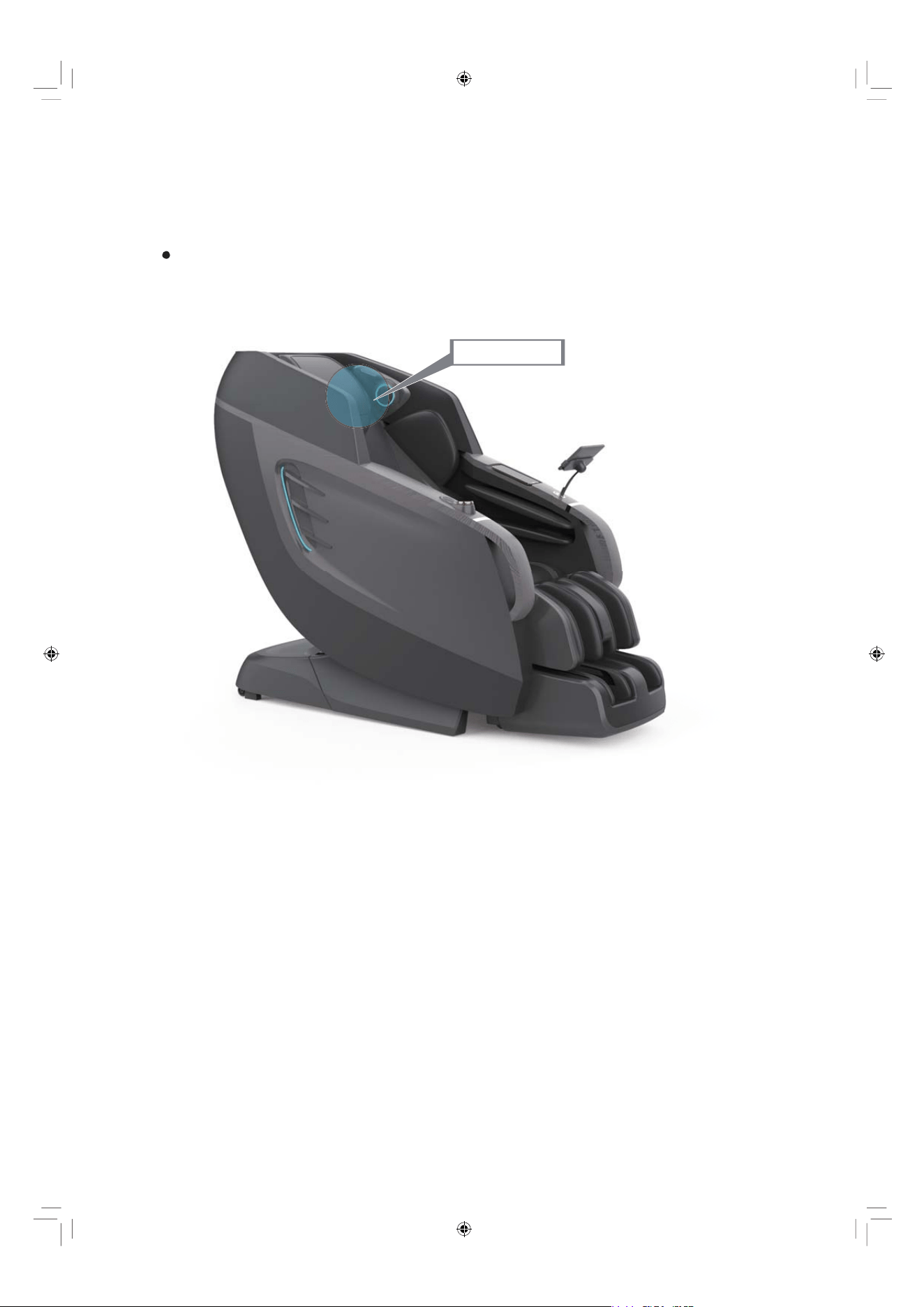
Adjust The Headrest
Sit as far back as you can in the chair and take note of where the headrest
rests on your neck. Adjust the headrest so that it rests comfortably in the
arch of your neck, flip it up out of the way, or use the zipper to remove it
all together.
Headrest
Activate The Massage Chair
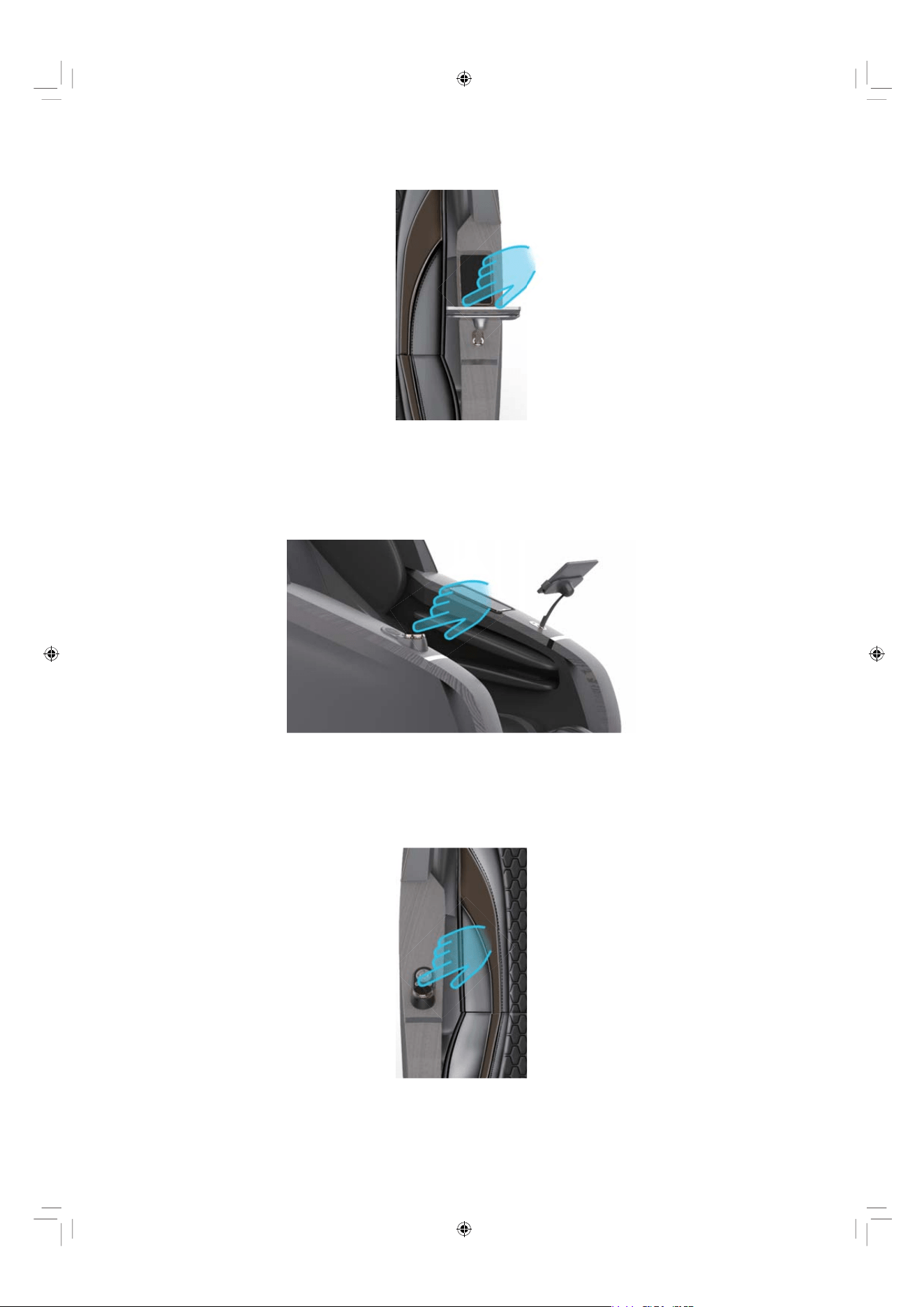
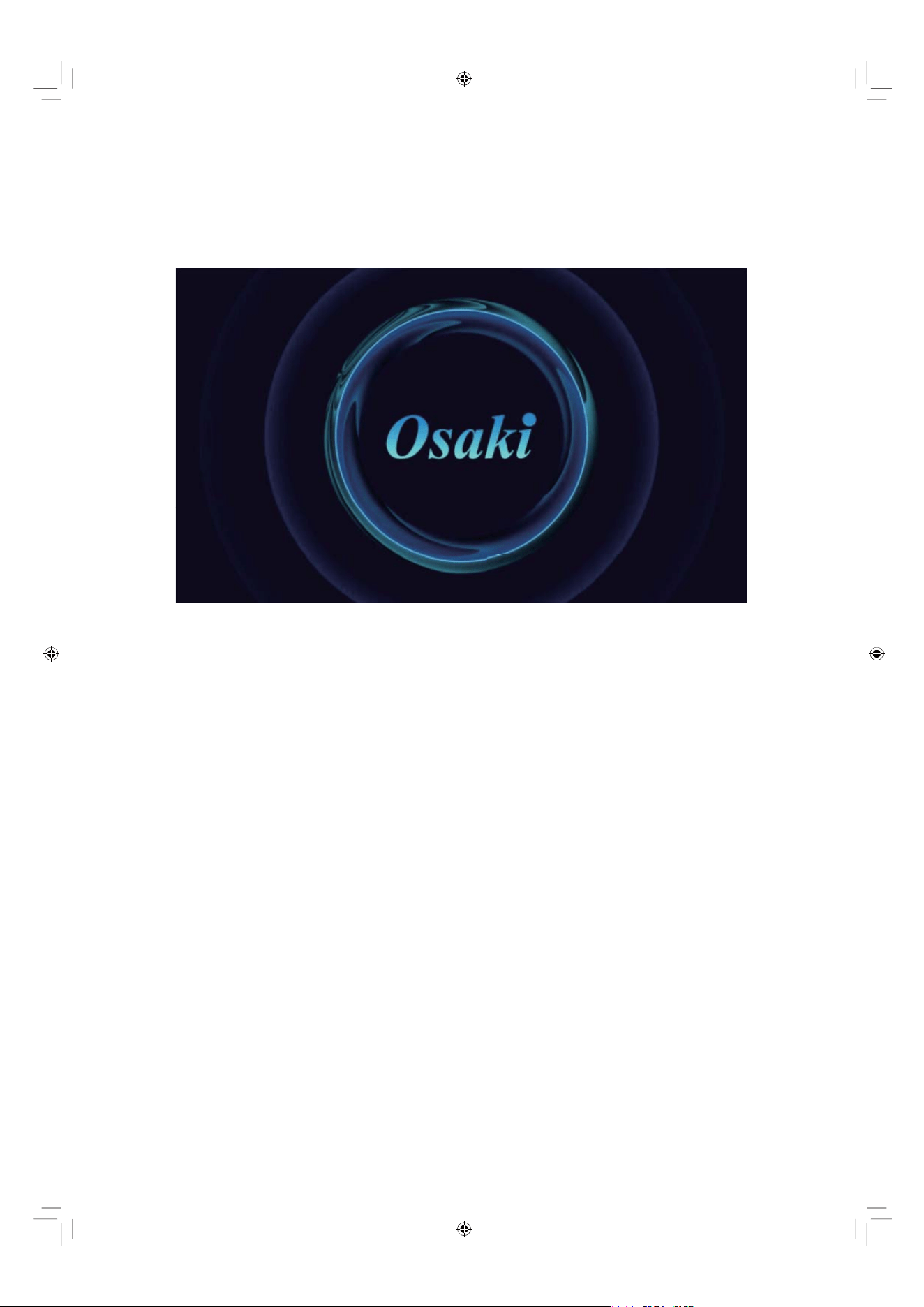
You can use the below 3 ways to turn on the chair.
EN 22
1. Method 1
2. Method 2
2. Method 2
By pressing the switch button the tablet controller.
By pressing the power button on the dial knob-screen control.
By pressing the power button on the side panel control panel.
EN 23
When turning on the chair, you will see the chair brand “Osaki” showing up
in the screen.
EN 24
Tablet Interface & Operations
Wi-Fi Setup (Recommended for First Use)
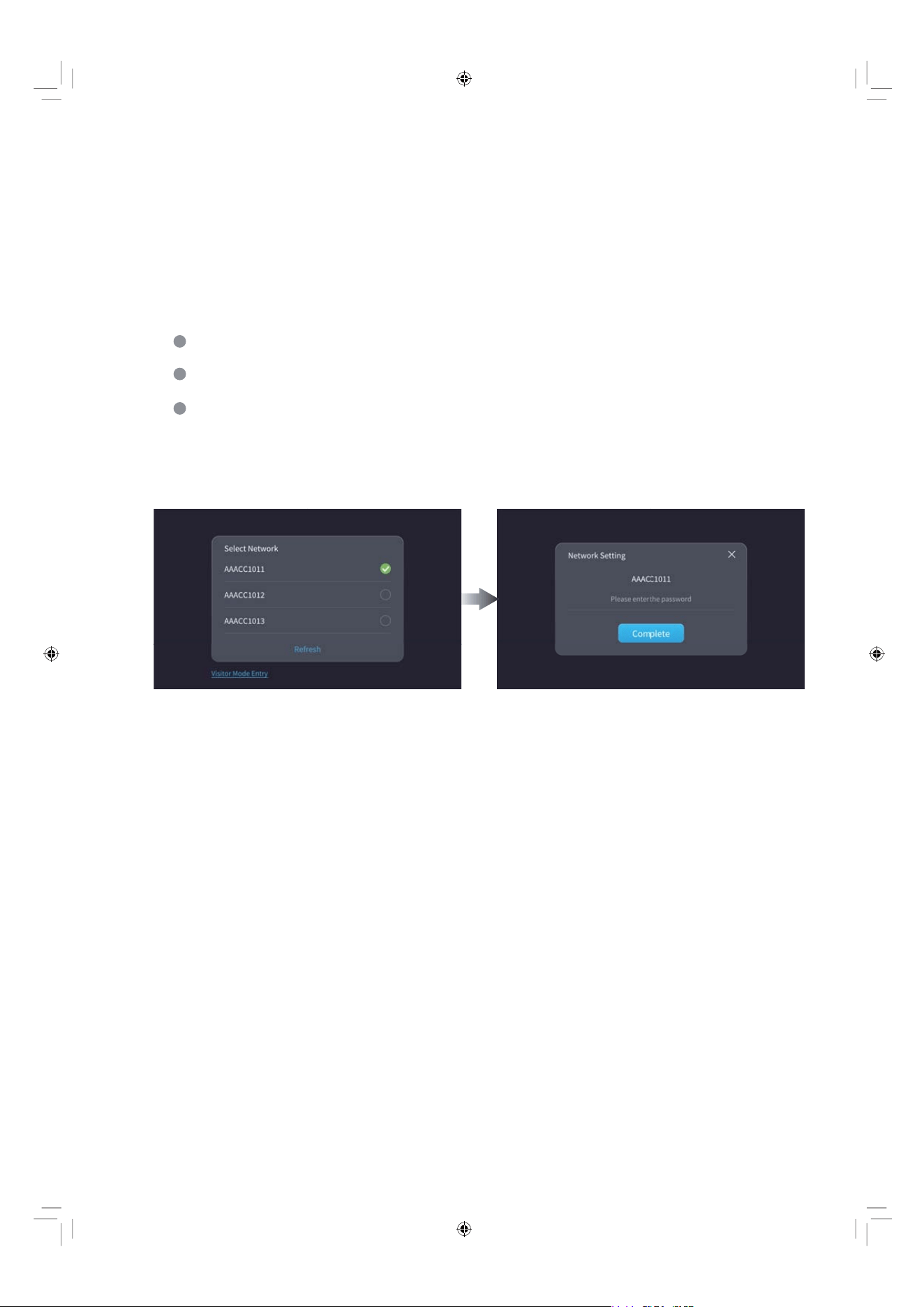
We recommend connecting your massage chair to Wi-Fi during initial setup.
This allows you to:
If you choose not to connect, select “Visitor Mode Entry” to use the chair
immediately. Note that no user data or preferences will be stored in this mode.
Create and log into your personal account;
Automatically save your massage programs and preferences;
Retain your usage history across sessions.
EN 25
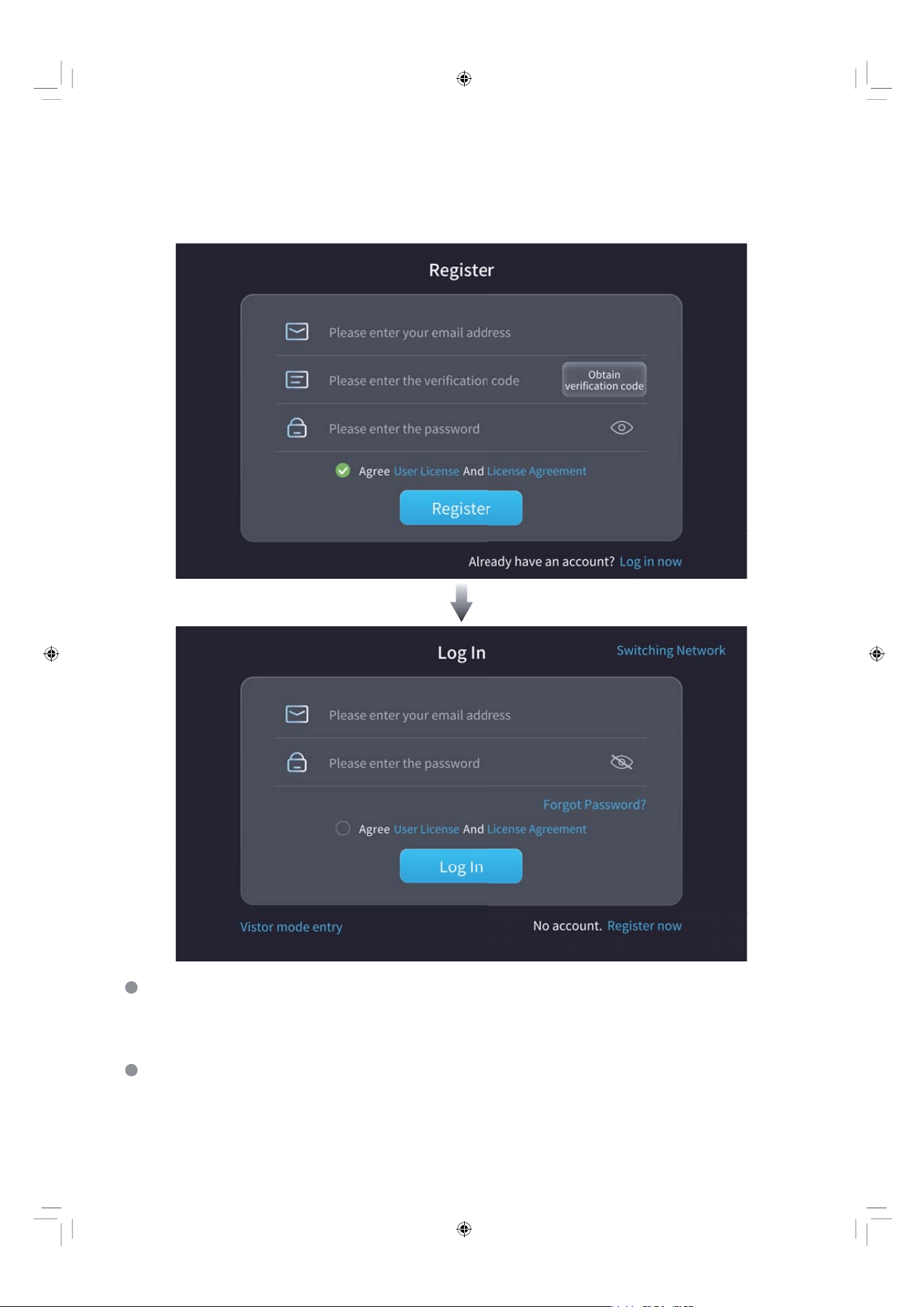
Register to become a user and then login securely to enjoy a consistent and
tailored relaxation experience every time.
User Registration & Login
To register, enter your email and the code you receive. Create a password and
agree to the User Agreement, then tap "Register".
Register
Go to Login, enter your email and password. Tap "Log In" to start. If you forgot
your password, tap "Forgot Password?" to reset it. Already registered?
Go straight to Login.
Log In
EN 26
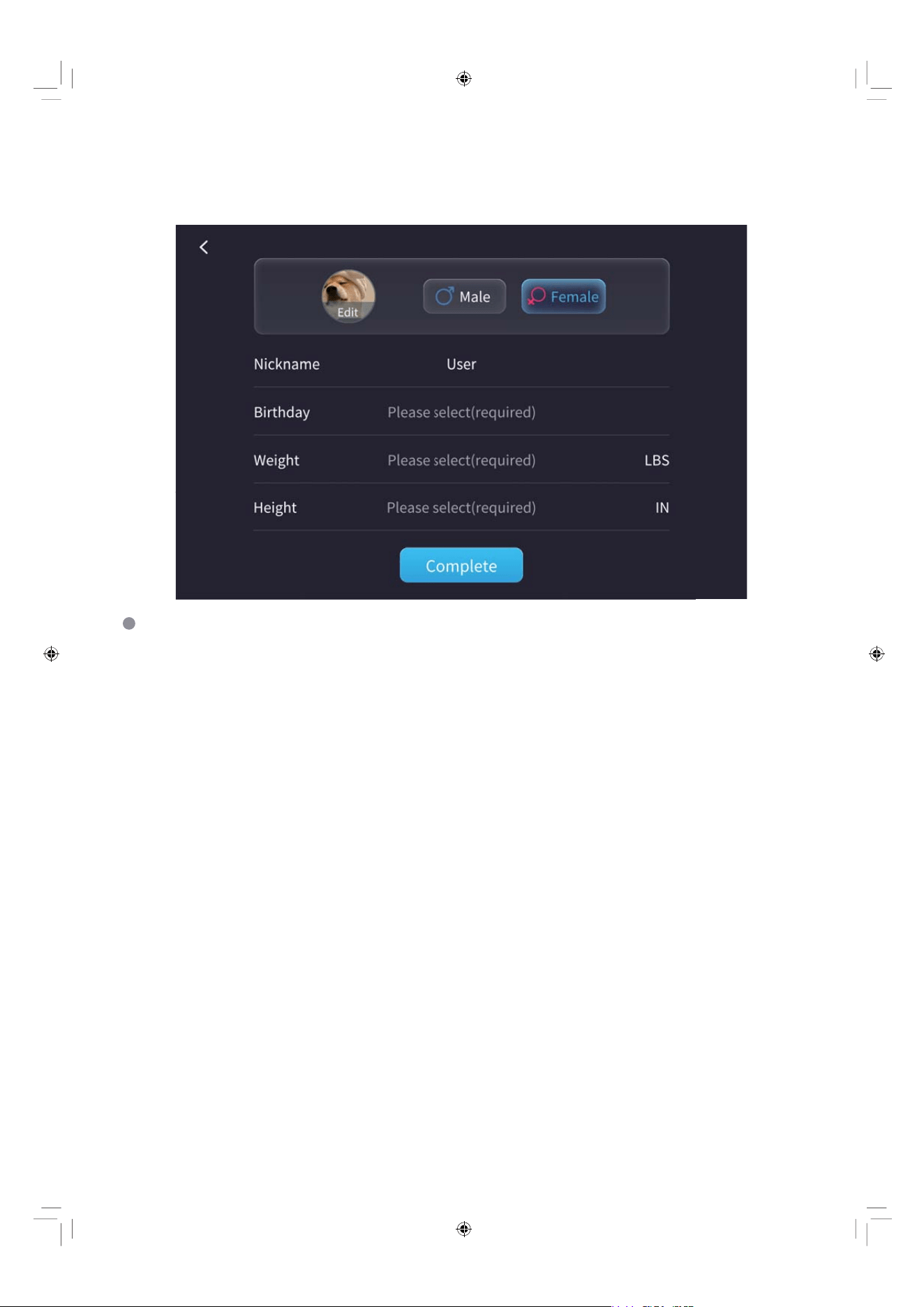
Personal Information Setup
Fill in personal information to let the chair tailor services to your body type.
Select a profile picture. Input your nickname and choose your gender. Then fill
in other details such as name, birthday, height, and weight.
EN 27
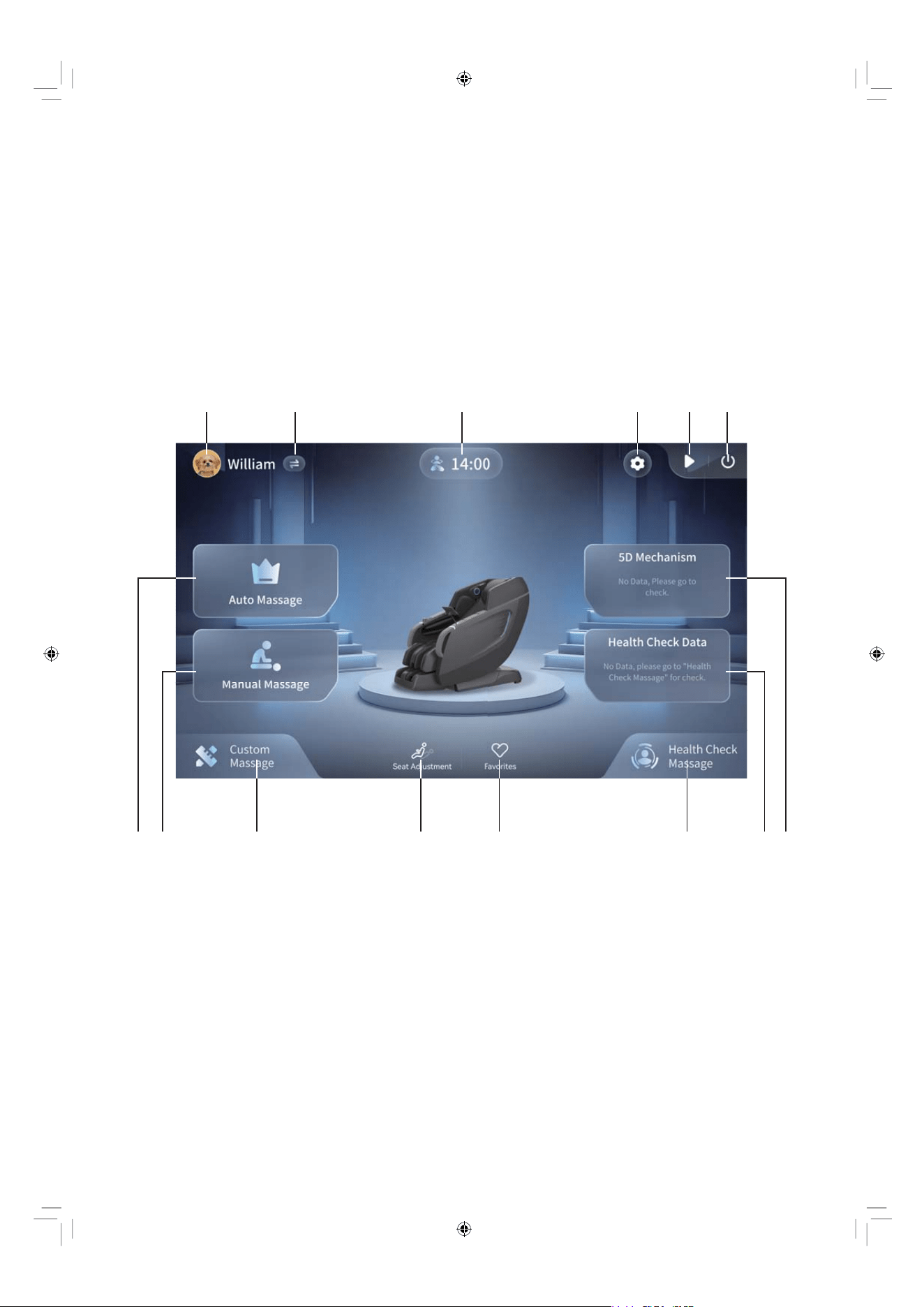
Home Page
This is the initial screen that will appear on the tablet controller. From this
screen, you can access all the menu options. Just tap the screen with your
finger to make a selection. For each item on the home page, please see
the detailed definitions below.
1
2. Switch or Add User
1. User Account
3. Settings
4. Pause or Continue Massage Button
5. Power Off Button
6. Auto Massage Programs
7. Manual Massage Programs
8. Custom Massage Programs
9. 5D Mechanism Data
10. User’s Health Check Data
11. Customized Health Check Massage
Programs
12. Chair Position and Angle Adjustment
13. Collected Favorite Massage Programs
14. Ongoing Massage Program
8
12 13 116 7 10 9
2
14
345
EN 28
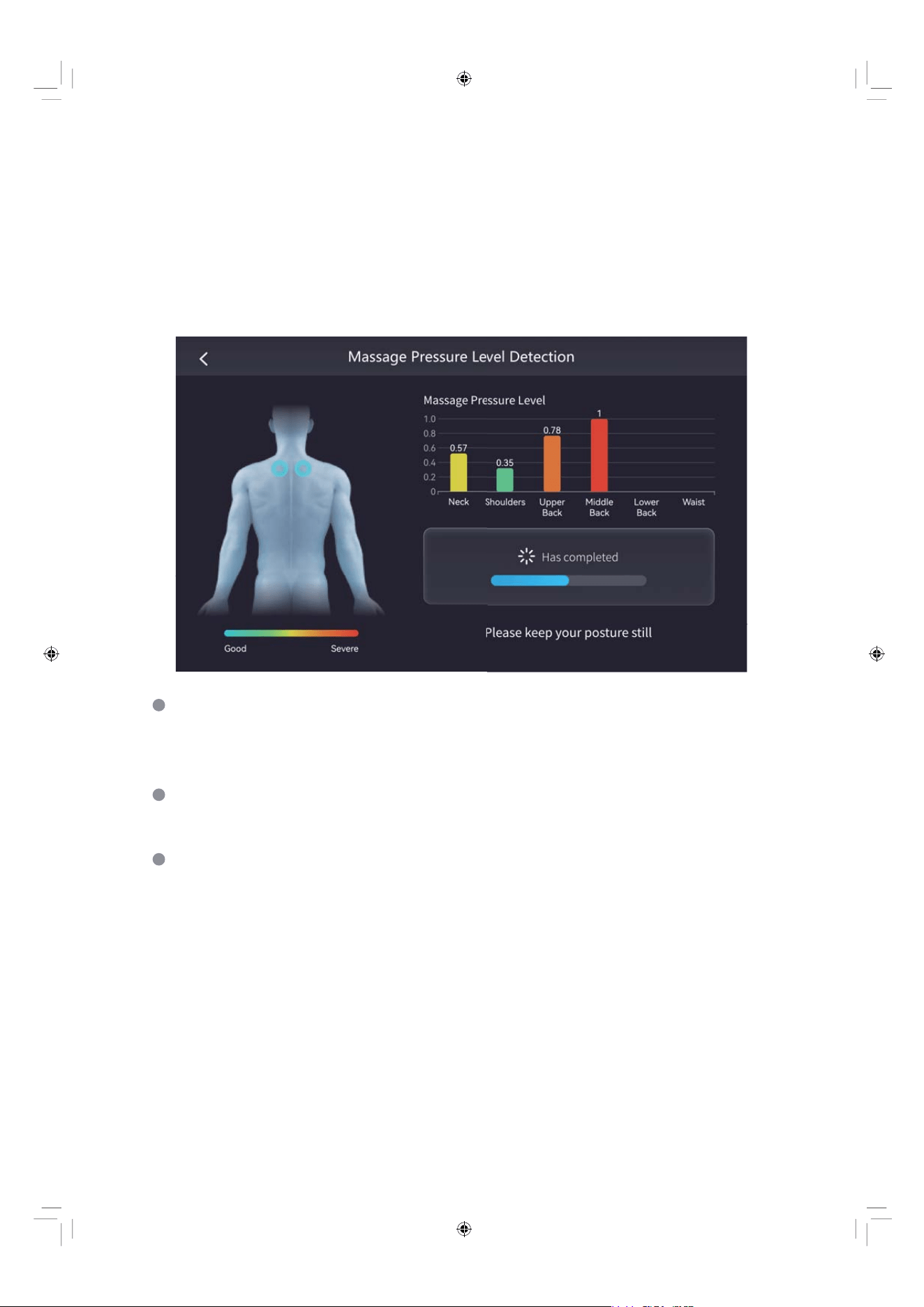
Auto Massage Pressure Level Detection
When you turn on the chair for the first time, an auto massage pressure level
detection will be advised whenever you tap any massage program.
During the process, the chair can automatically detect the massage
pressure level of six parts of your body, including neck, shoulders,
upper back, middle back, lower back and waist.
At the same time, please keep your posture still without lifting your head
to get a better and accurate shoulder detection.
When the detection is complete, adjust your shoulder position as prompted.
If no adjustment is needed, the chair will enter the massage program
screen in 10 seconds.
Note:
During the detecting, if you are wearing an outerwear clothing, the massage
pressure level may not be the most accurate. So it is recommended to
take off any outerwear before the detection.
EN 29
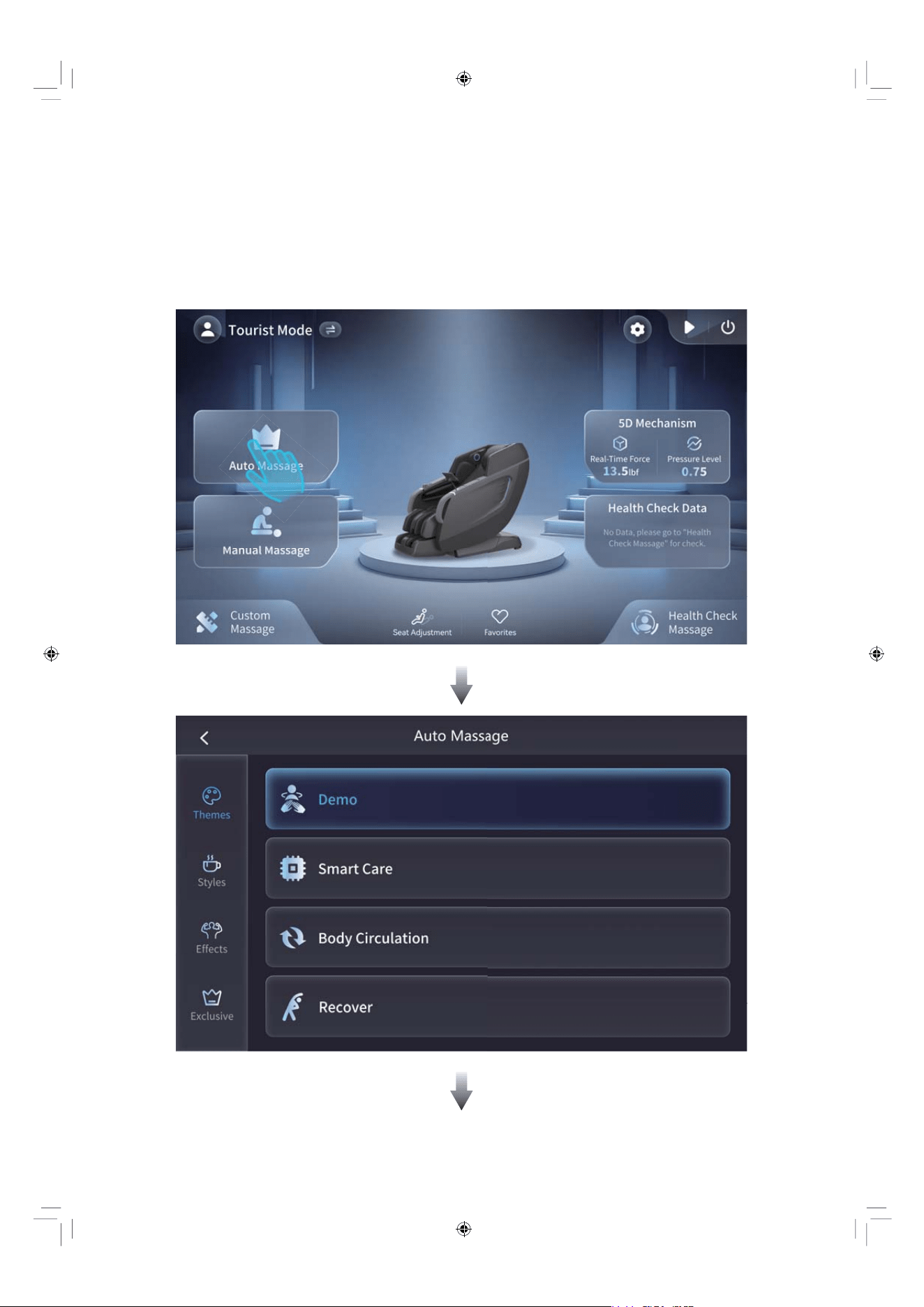
Auto Massage
The chair is equipped with 16 auto massage programs organized into 4 main
categories. Each category features 4 dedicated programs, providing diverse
massage experiences tailored to different relaxation needs.
EN 30
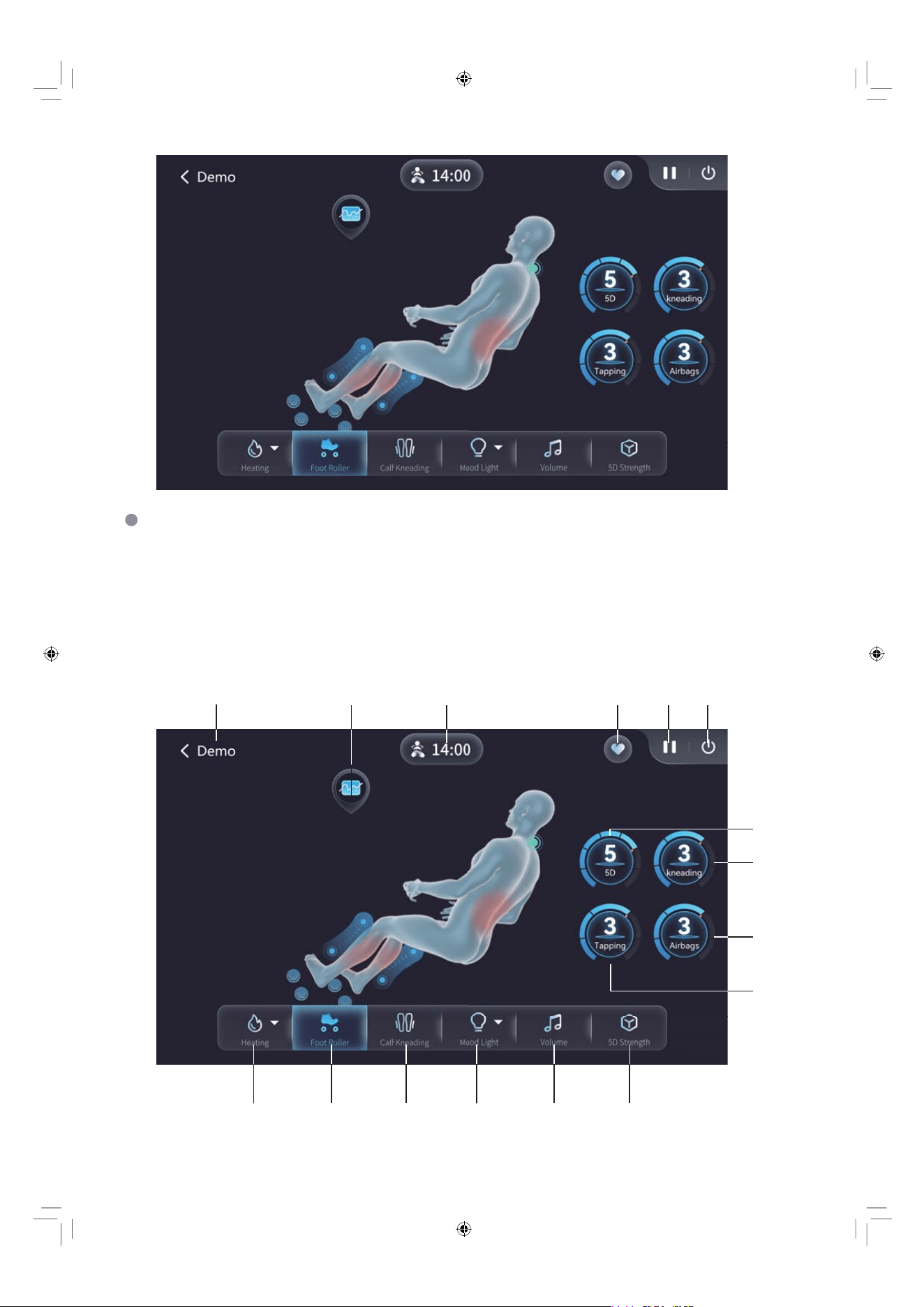
Function Definitions
First, select an automatic massage program. Then, you can customize your
session by adding features such as heat, foot roller, calf kneading, or ambient
lighting. Finally, to complete your setup, adjust the volume on the Monster
speakers and enter the “5D Strength” menu to fine-tune the massage intensity.
14
1
23
4 5 6
7
8
10
9
111516 13 12

EN 31
2. Pressure curve chart: displays real-time pressure levels across six body zones,
along with the target pressure range. The applied pressure will gradually
adjust to match your preferred intensity.
1. Current program display: shows the name of the active massage program.
3. Program time: indicates the elapsed and remaining time for the current
massage session.
4. Save to favorites: tap to save the current program to your favorites list.
5. Pause/Resume: tap to pause or resume the massage program.
6. End massage: tap to confirm and stop the massage session.
7. Intensity control: adjust the overall mechanism intensity. (5 levels available)
8. Kneading intensity: adjust the kneading strength when the chair is in kneading
mode. (5 levels available)
9.Tapping speed: adjust the tapping speed when the chair is in tapping mode.
(5 levels available)
10. Airbag intensity: adjust the compression strength of the airbags.
(5 levels available)
11. 5D strength settings: enter the 5D strength adjustment page to customize
intensity for individual body areas or all areas at once.
12. Volume control: adjust the audio volume.
13. Light settings: enter the lighting menu to choose your preferred LED color.
14. Calf kneading: toggle the calf kneading function on or off.
15. Foot rollers: toggle the foot roller function on or off.
16. Heating settings: enter the heating menu to select heating for the back rollers,
shawl, lumbar area, or calves.
EN 32
Auto Massage Programs’ Descriptions
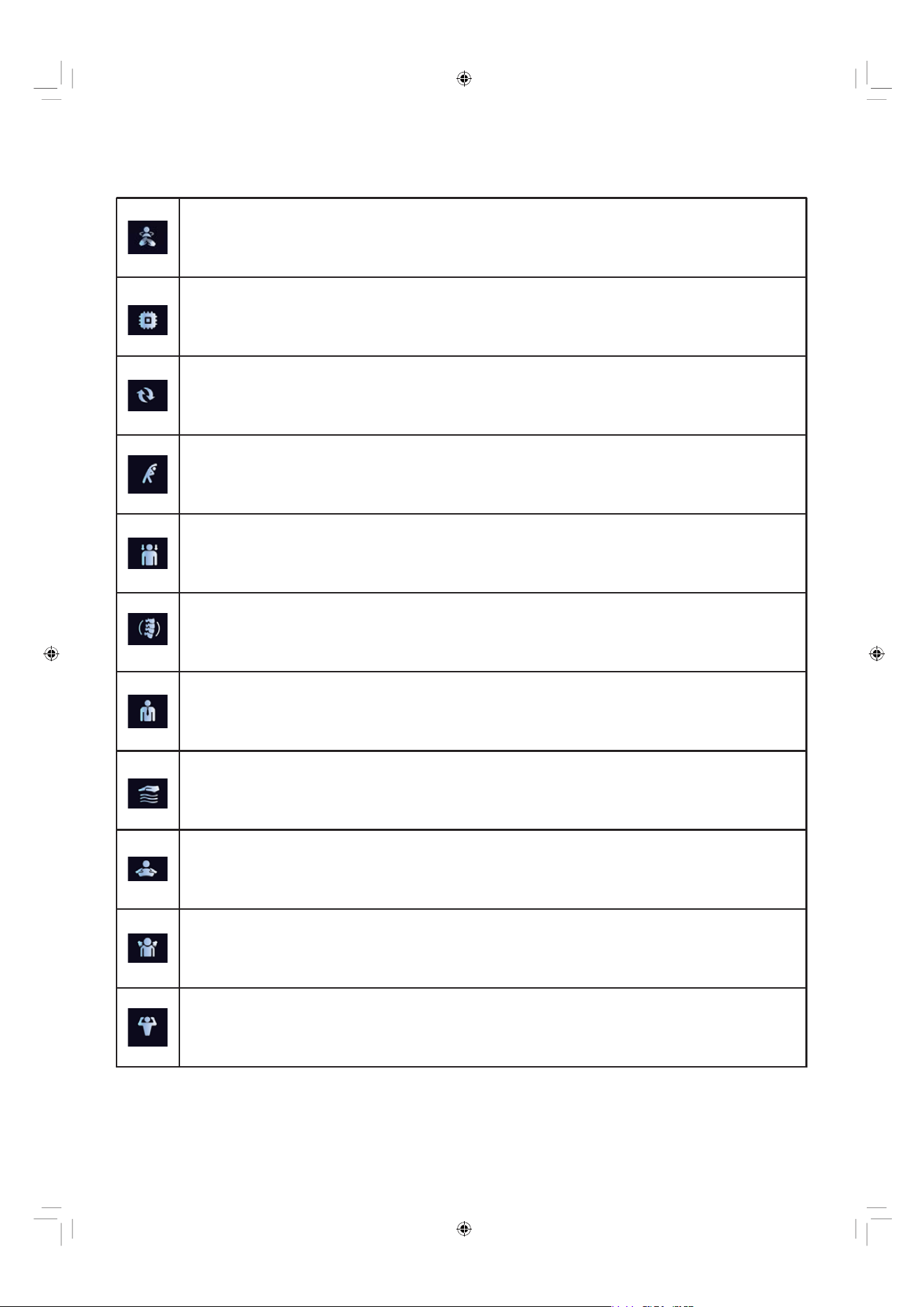
Morning Care
• A preset massage program with various techniques to ease morning muscle stiffness, improve circulation,
and boost your mood for a fresh start.
Lumbar Care
• Delivers concentrated massage to the lower back to ease stiffness and discomfort.
Gentle
• Offers a light, soothing massage ideal for relaxation or sensitive users.
Deep Tissue
• Applies firm, slow-paced pressure to release chronic muscle tightness.
Care
• Provides a balanced, moderate-intensity massage for overall well-being.
Calm
• Uses slow, flowing movements and gentle pressure to promote mental relaxation.
Fatigue
• Designed to relieve general body tiredness with rhythmic kneading and stretching.
Demo
• Offers a guided sample of key massage techniques to demonstrate the chair’s core capabilities.
Smart Care
• Delivers a fully automated, personalized massage experience by intelligently adapting techniques and intensity
in real-time based on your body's response.
Body Circulation
• Uses gentle kneading and tapping to promote blood flow throughout the body.
Recover
• Focuses on deep muscle relief to aid recovery after physical activity or strain.
EN 33
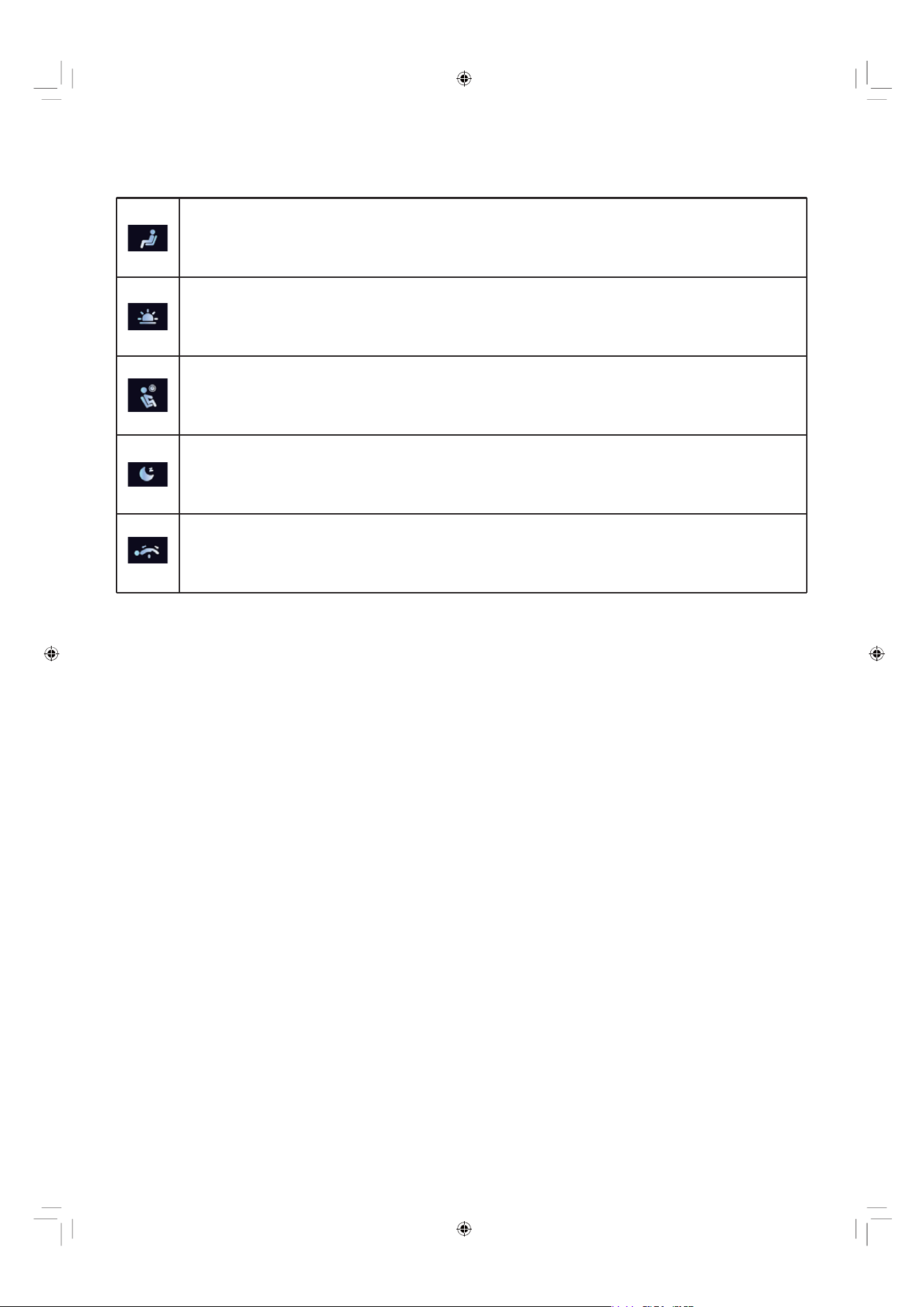
Relax
• Combines smooth rolling and light compression to induce a state of deep relaxation.
Energetic Morning
• Features invigorating techniques to help refresh the body and mind.
Revitalize
• Incorporates stimulating motions to restore energy and improve circulation.
Sweet Dreams
• Employs gentle, rhythmic patterns to prepare the body for restful sleep.
Thai Stretch
• Mimics traditional Thai stretching techniques to enhance flexibility and release tension.
EN 34
Manual Massage
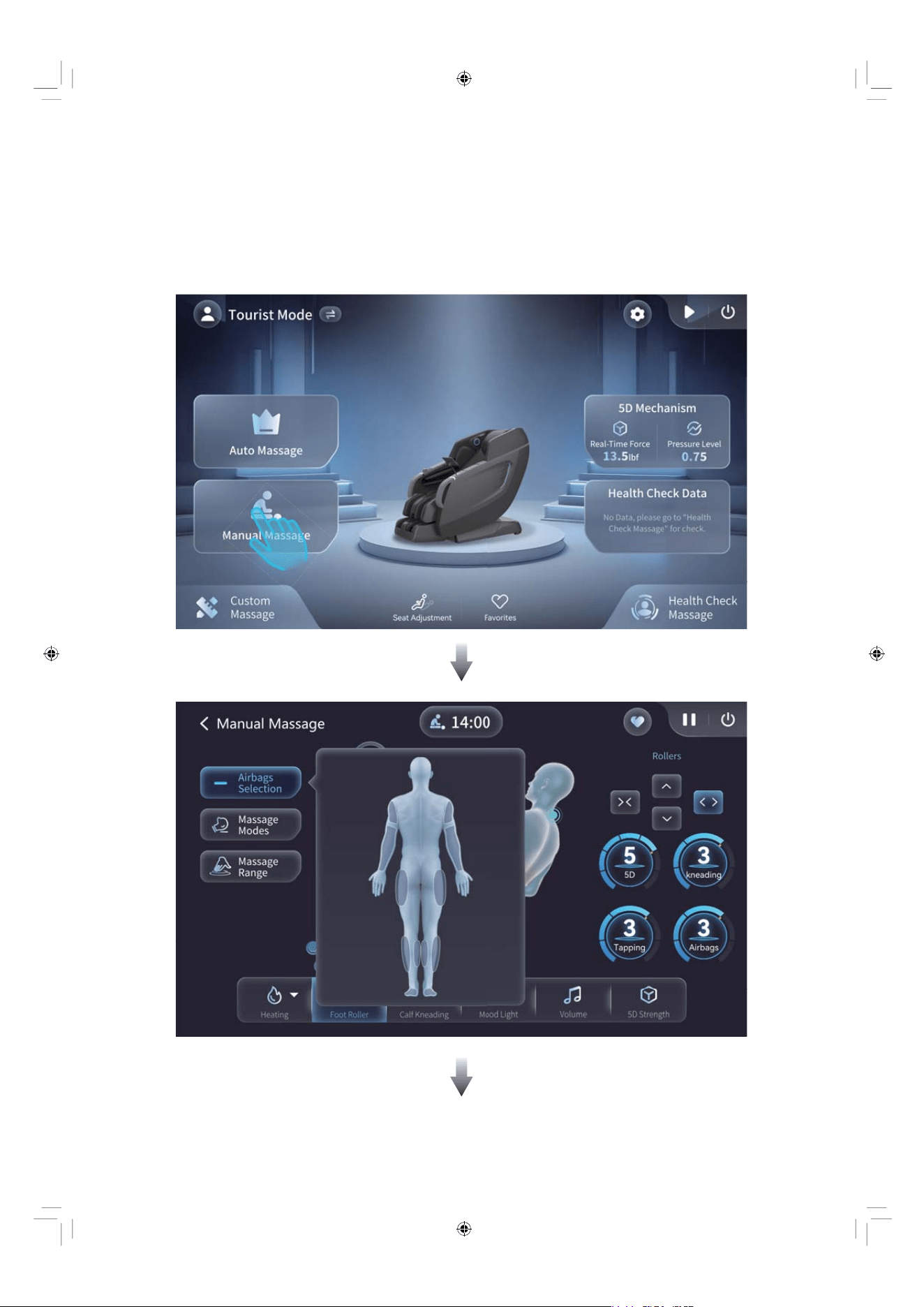
This chair not only provides you with preset auto massage programs, but also
offers a rich variety of massage techniques that you can manually select from
the mechanism to enhance your massage experience.
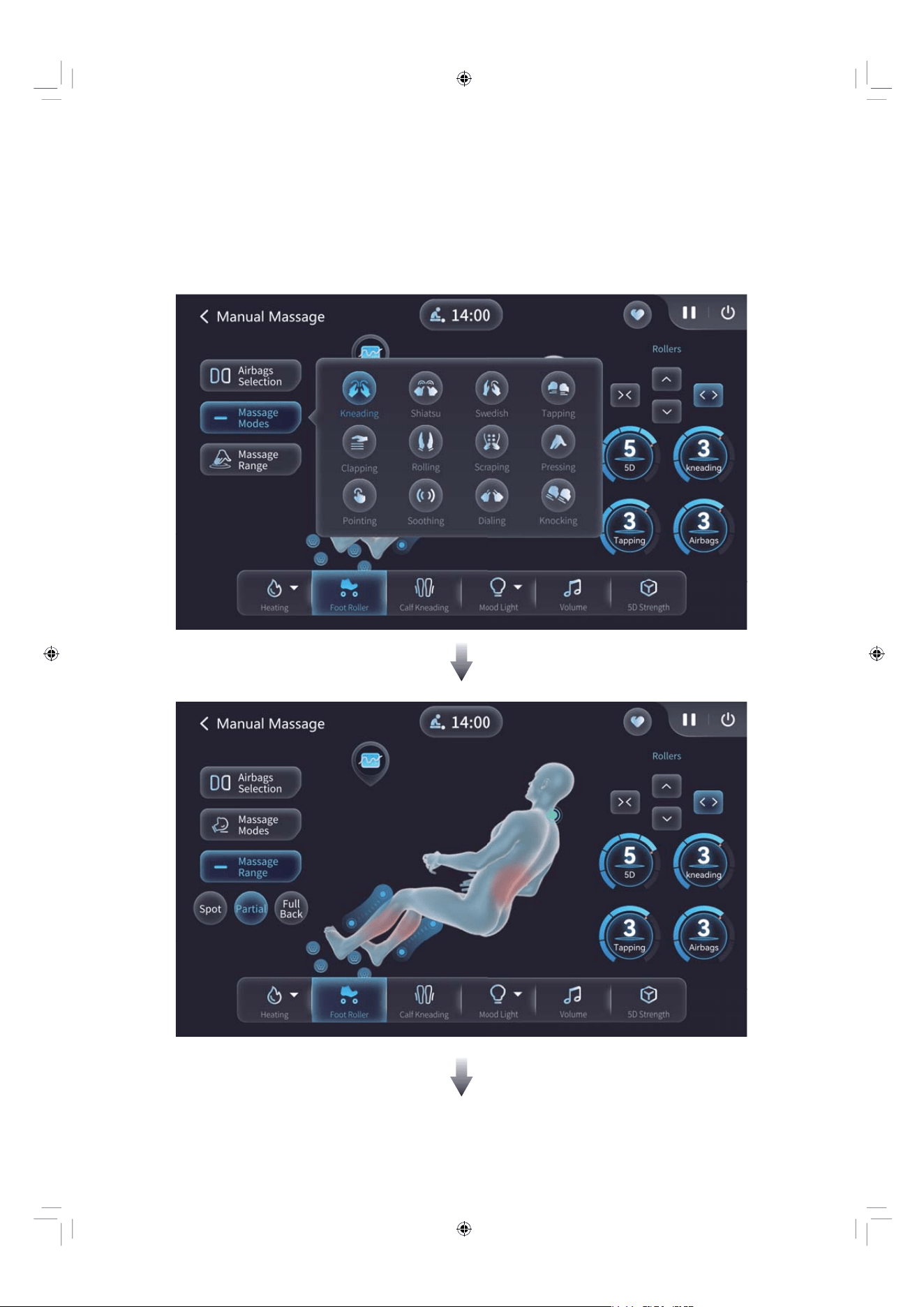
EN 35
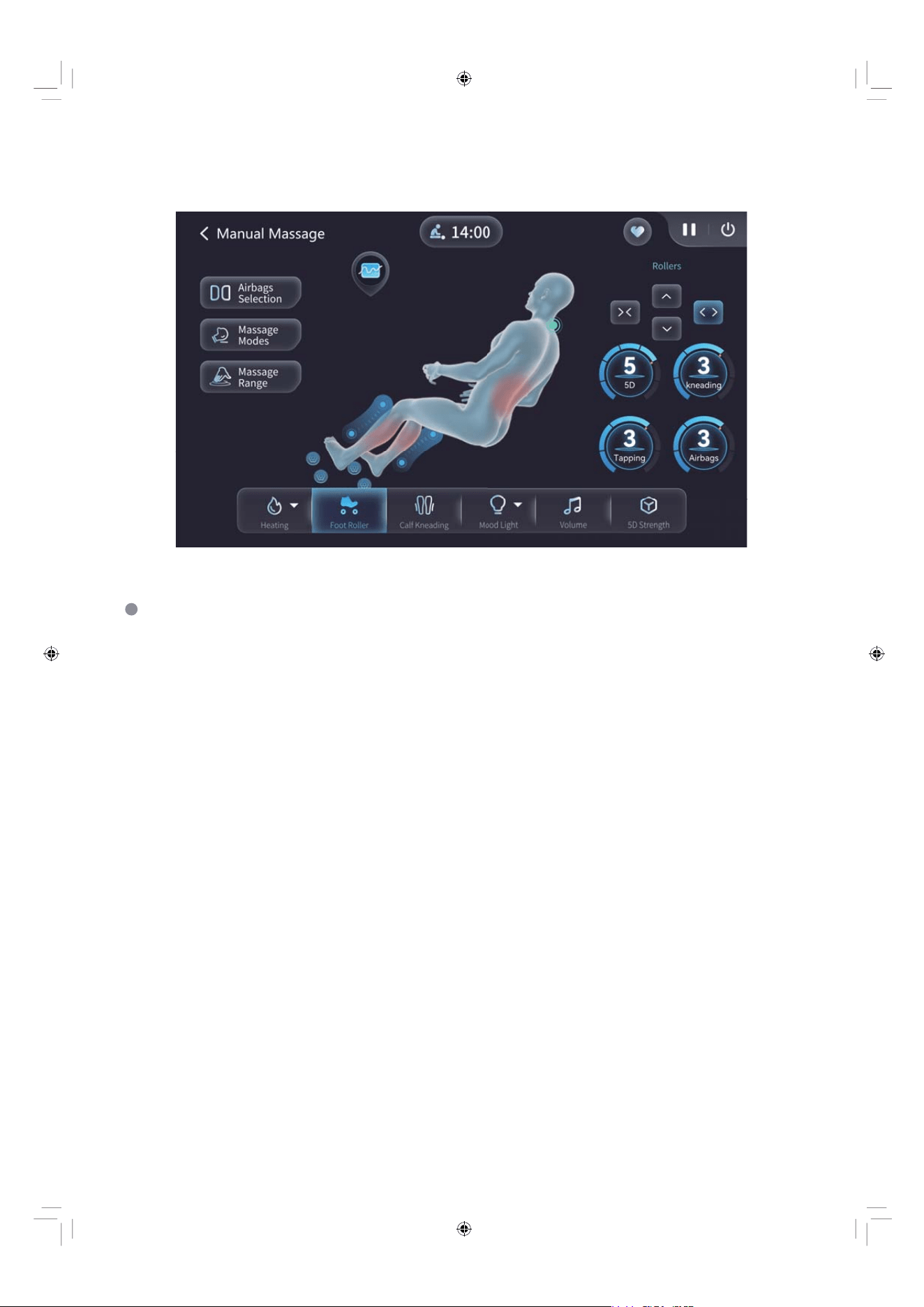
EN 36
For definitions of other massage functions within the ongoing manual
massage programs, please refer to the Function Definitions mentioned in
the auto massage programs.
EN 37
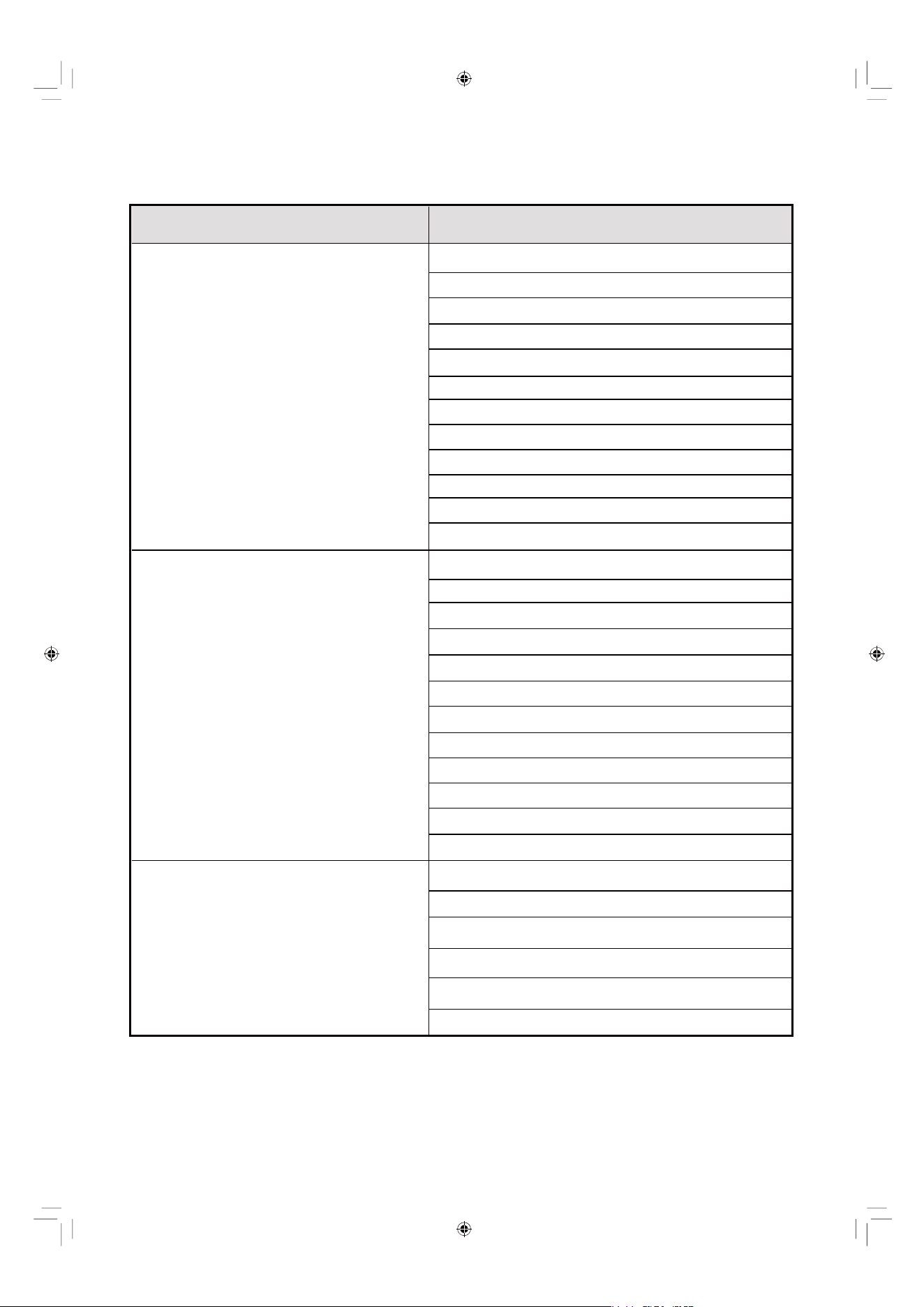
Manual Massage Modes
Kneading 1, 2
Scraping 1, 2
Clapping 1, 2
Shiatsu 1, 2
Tapping 1, 2
Swedish 1, 2
Rolling 1, 2
Pressing 1
Pointing 1
Soothing 1
Dialing 1
Knocking 1
Kneading 1, 2 & Clapping 1, 2
Kneading 1, 2 & Shiatsu 1, 2
Kneading 1, 2 & Tapping 1, 2
Kneading 1, 2 & Rolling 1, 2
Scraping 1, 2 & Clapping 1, 2
Scraping 1, 2 & Shiatsu 1, 2
Scraping 1, 2 & Tapping 1, 2
Scraping 1, 2 & Rolling 1, 2
Clapping 1, 2 & Rolling 1, 2
Shiatsu 1, 2 & Rolling 1, 2
Tapping 1,
2 & Rolling 1, 2
Swedish 1, 2 & Rolling 1, 2
Kneading 1, 2 & Clapping 1, 2 & Rolling 1, 2
Kneading 1, 2 & Shiatsu 1, 2 & Rolling 1, 2
Kneading 1, 2 &
Category
Massage Mode
19 Single Massage Modes
48 Double Combined Massage Modes
48 Three-combined Massage Modes
Tapping 1, 2 & Rolling 1, 2
Scraping 1, 2 & Clapping 1, 2 & Rolling 1, 2
Scraping 1, 2 & Shiatsu 1, 2 & Rolling 1, 2
Scraping 1, 2 & Tapping 1, 2 & Rolling 1,
2
EN 38
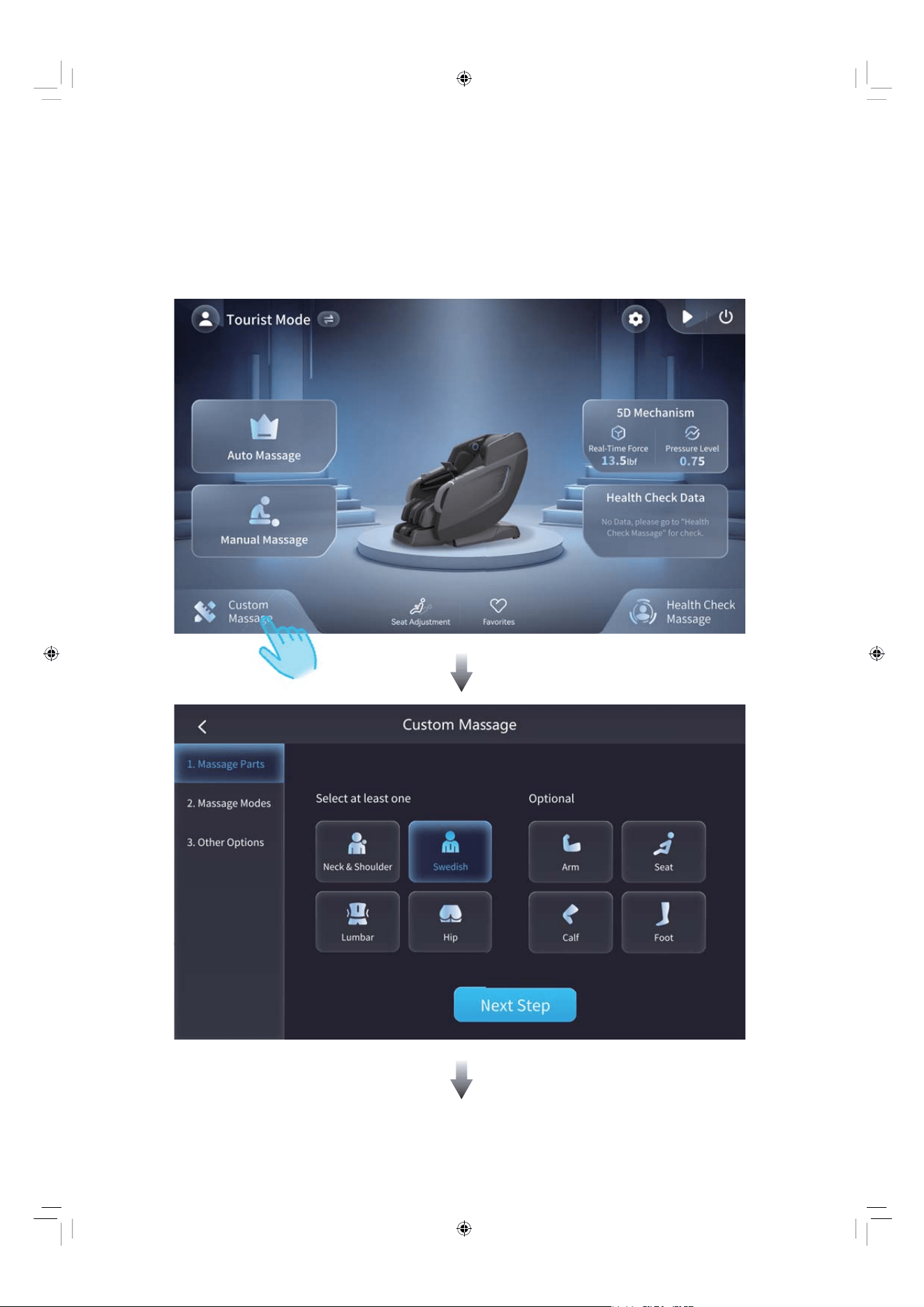
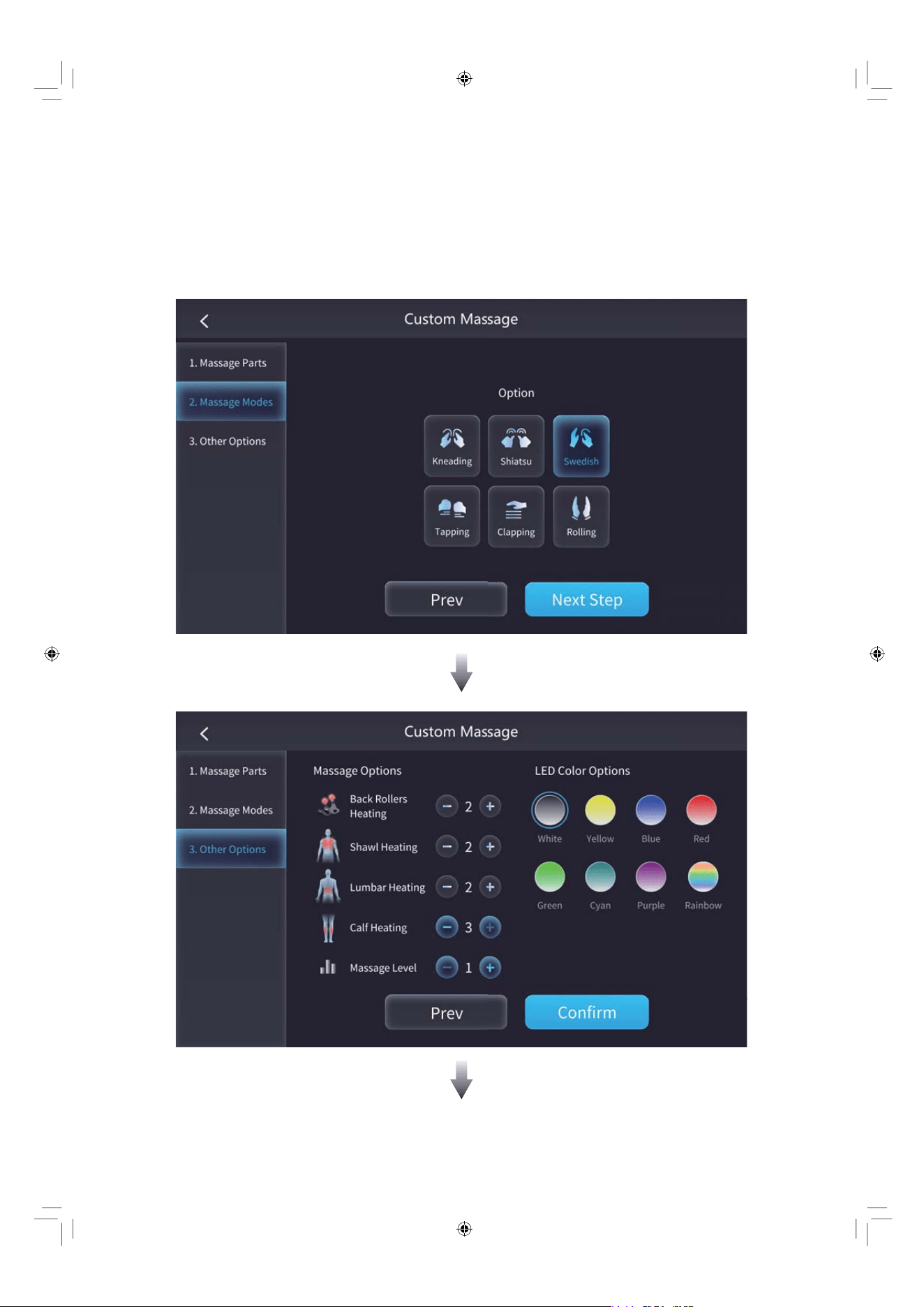
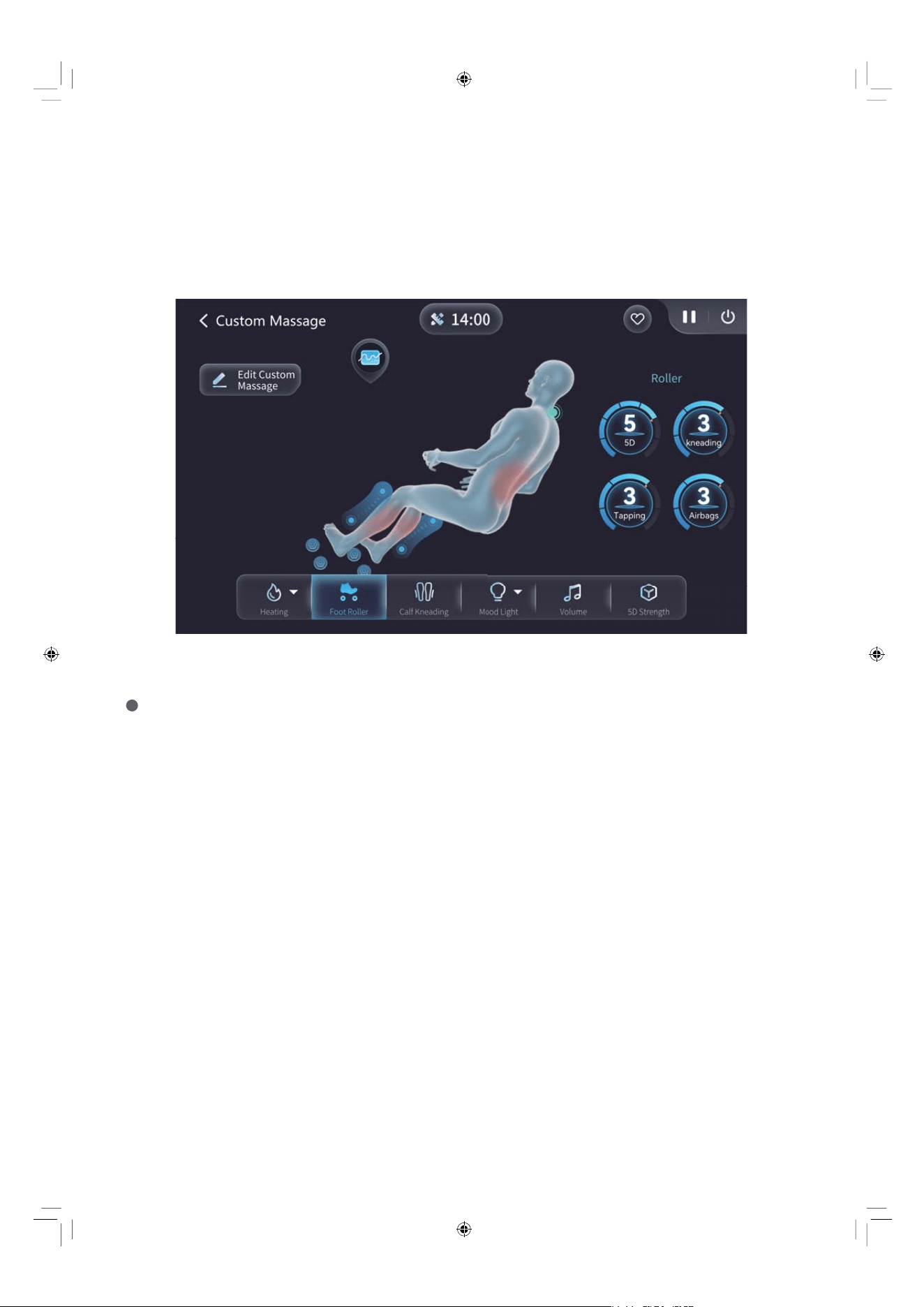
The chair designs Custom Massage for every unique individual. You can
customize your own exclusive massage program according to your needs.
Custom Massage
EN 39
EN 40
According to the screen guidance, tap on the parts where you want to
have a massage, and select the massage modes of the mechanism.
Tap "Next Step" to go to the next interface, select other functions and
LED lighting options, then tap “Confirm”, and a custom massage
program will be generated.
EN 41
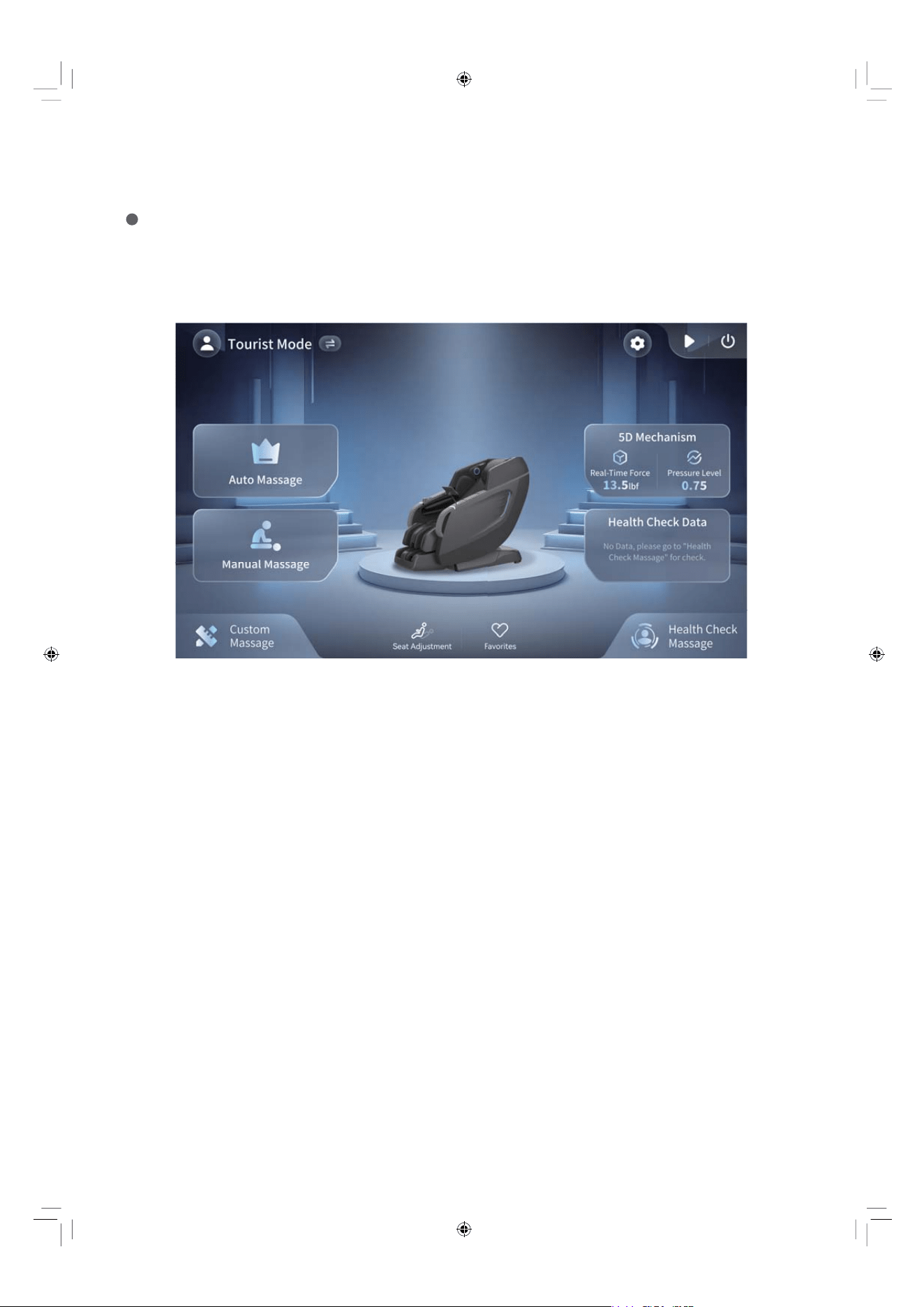
Upon initial use, the massage chair will automatically detect your body
pressure profile and calibrate the massage intensity for optimal comfort.
Real-time pressure feedback is displayed during the session for your
reference.
5D Mechanism
EN 42
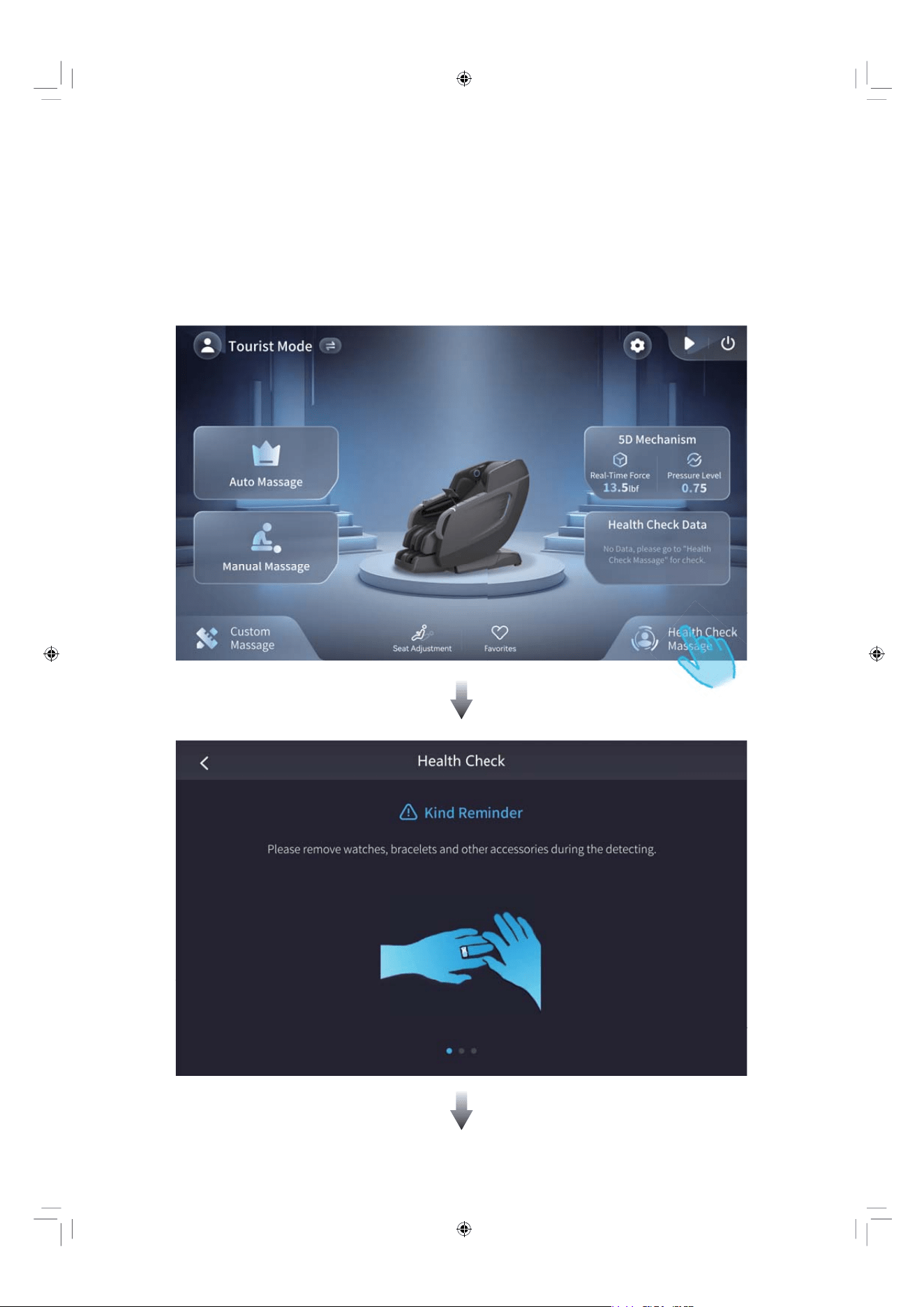
Health Check Massage
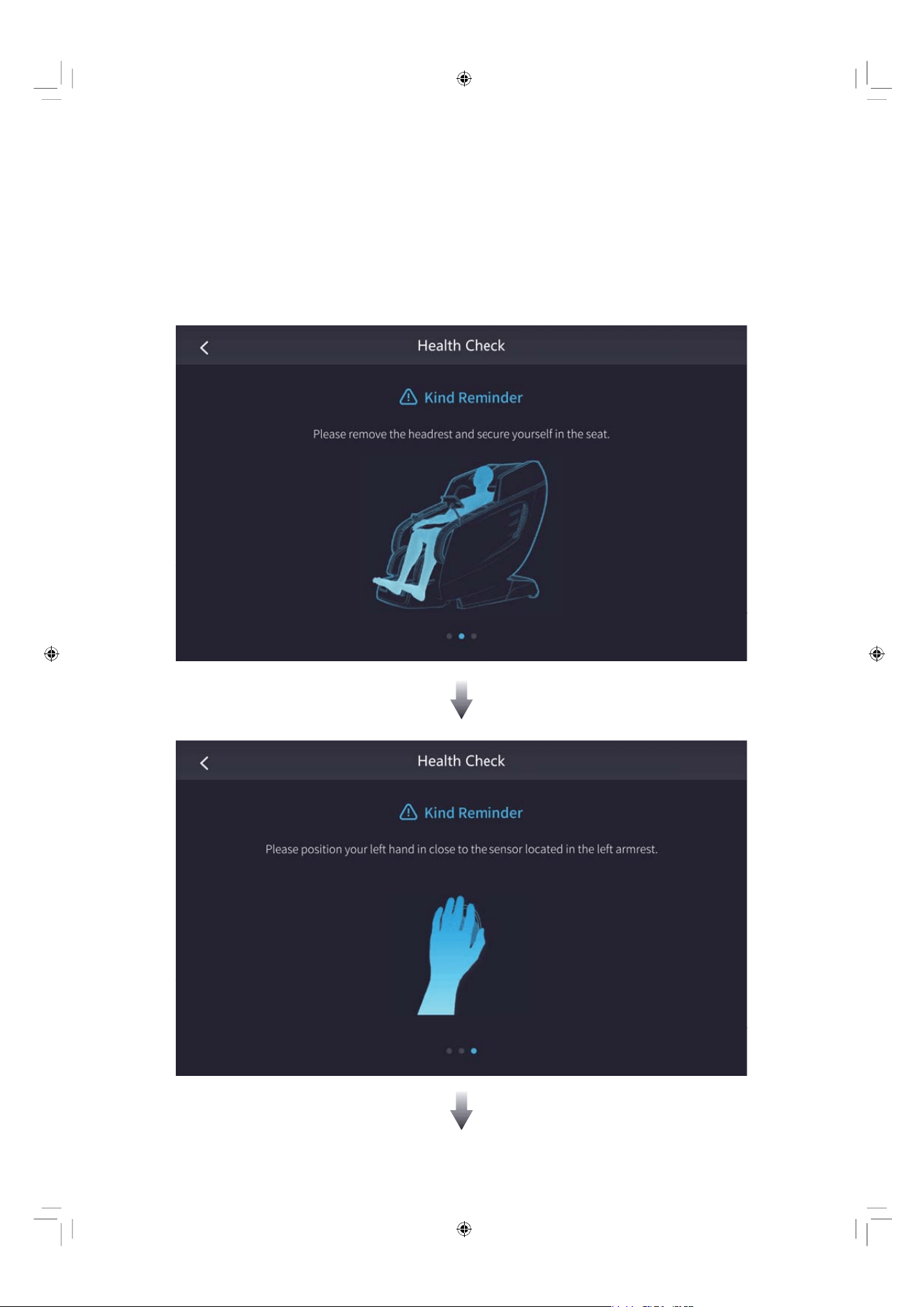
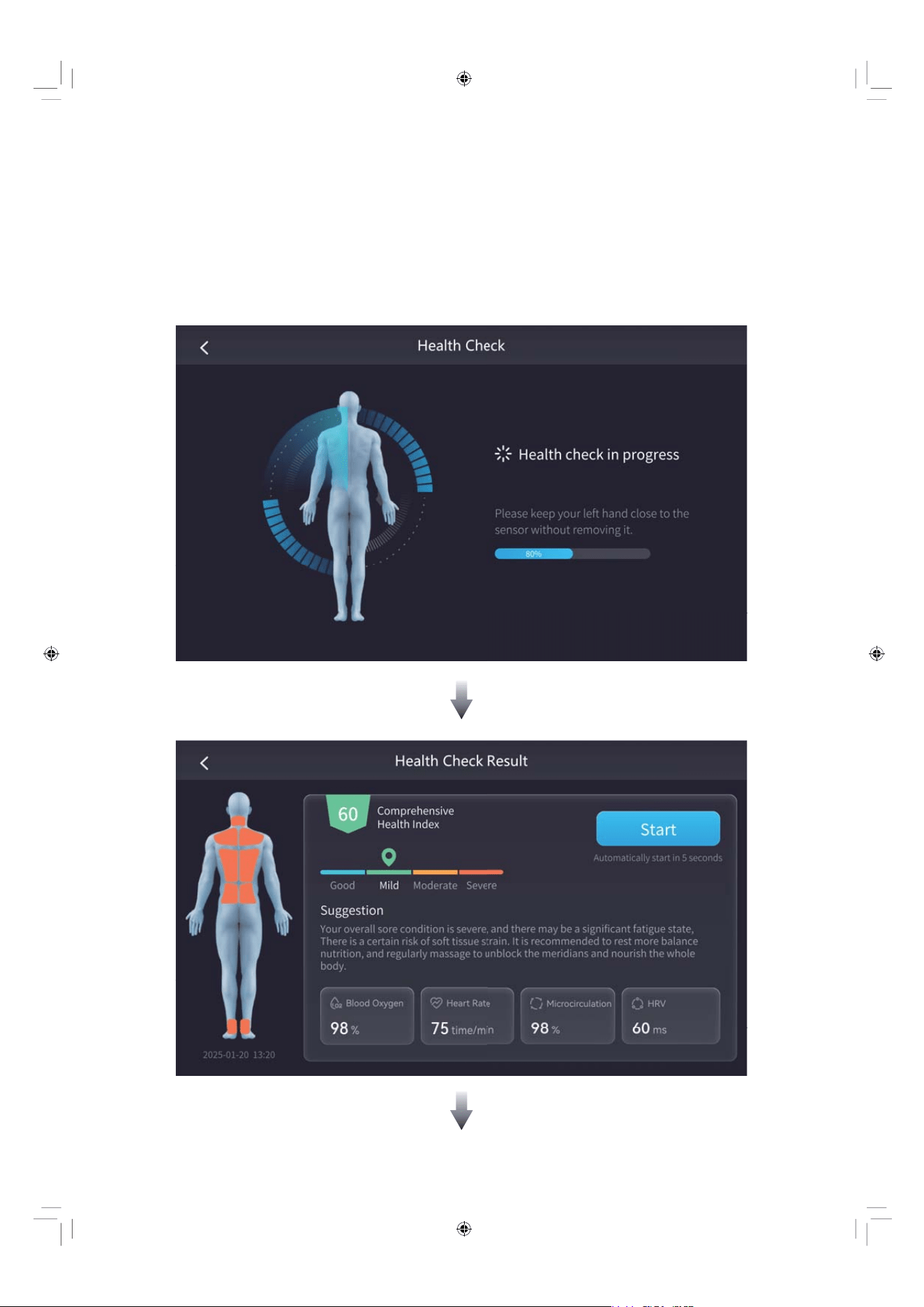
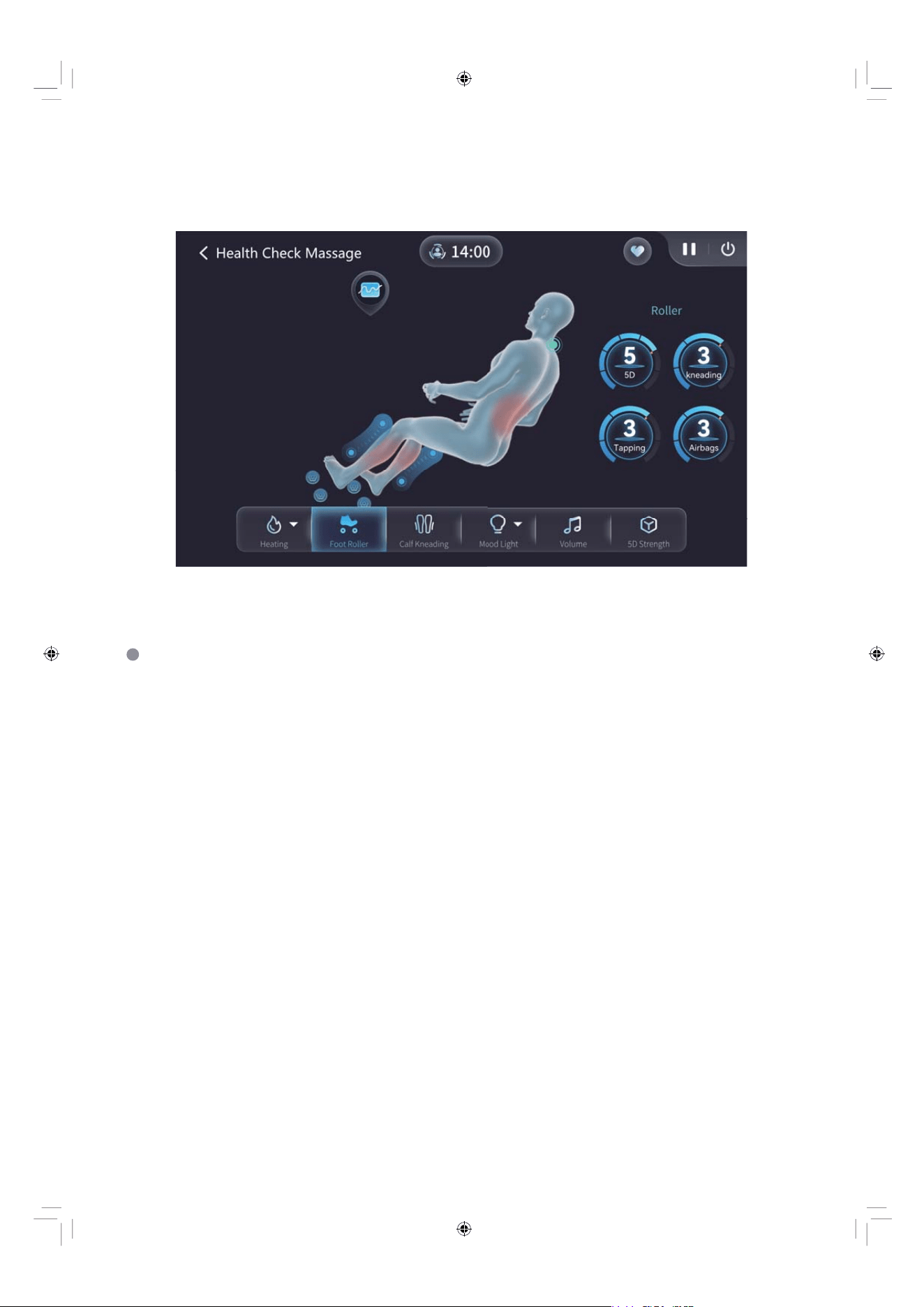
The chair provides you with A.I. health check detection, including comprehensive
health index, blood oxygen, microcirculation, heart rate and HRV. And it can
customize an exclusive health massage program for you based on your personal
health condition.
EN 43
EN 44
EN 45
Please follow the prompts on the screen to perform the health check detection,
ensuring that your left hand remains tightly pressed against the health monitor
and hold still, so as to complete the health check detection.
Note: The detection data is for reference only. If you feel unwell, it is
recommended to consult your doctor.
EN 46
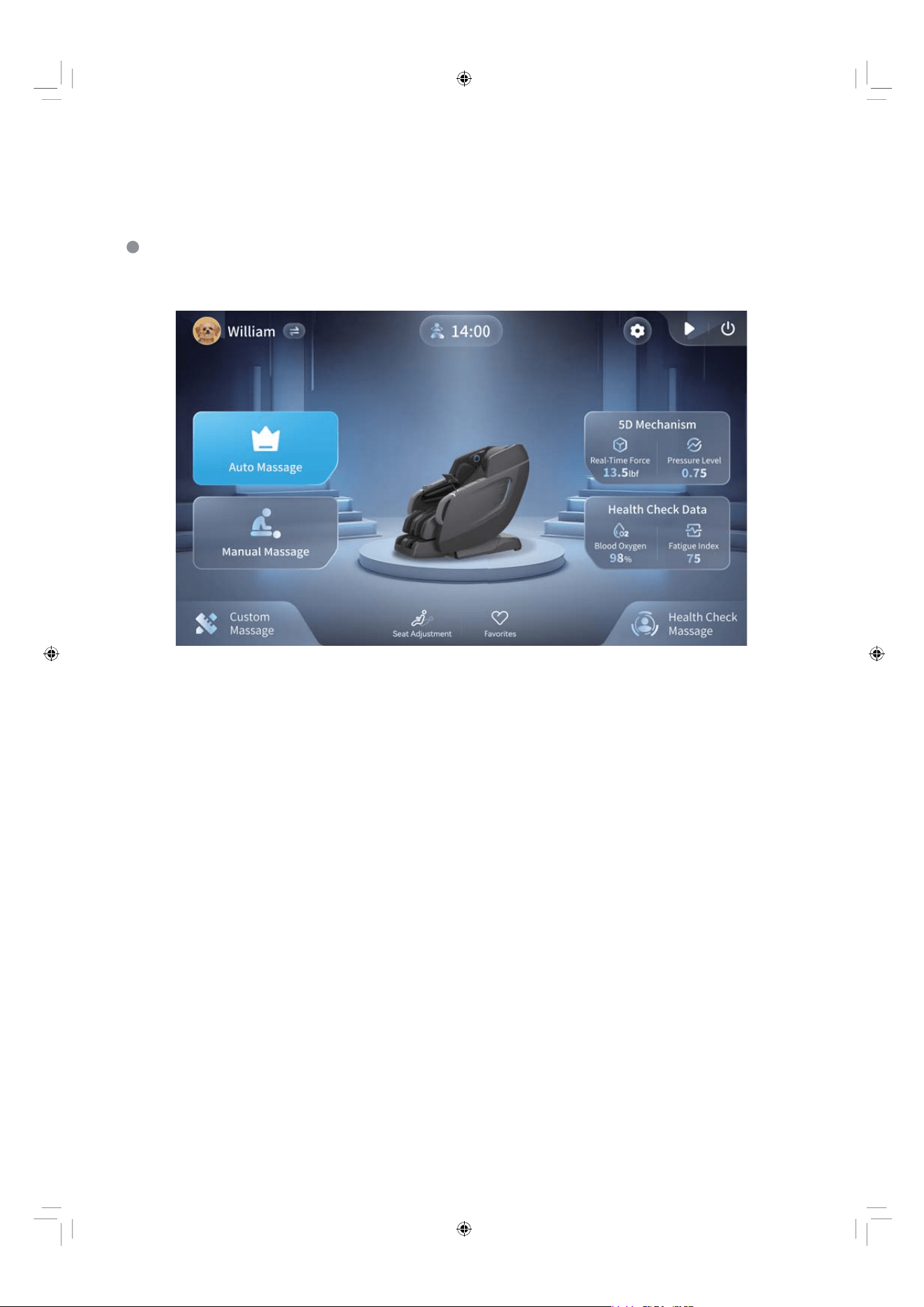
To help you easily track your wellness, a dedicated section has been designed
to display your personal daily health check data directly on the home screen.
Health Check Data
EN 47
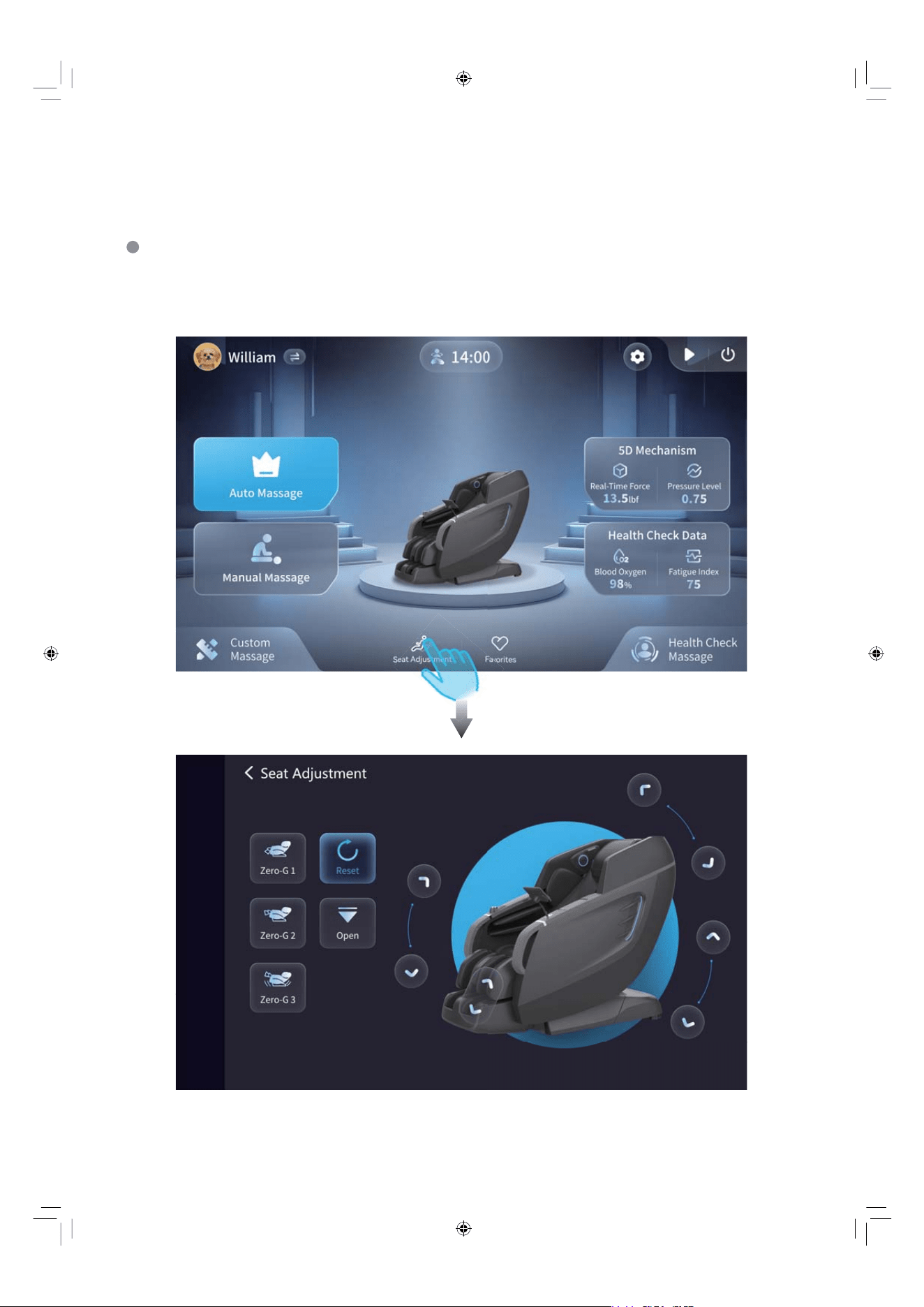
Seat Adjustment
For optimal posture and massage comfort, you can enter the adjustment interface
to customize the chair's position according to your preference.
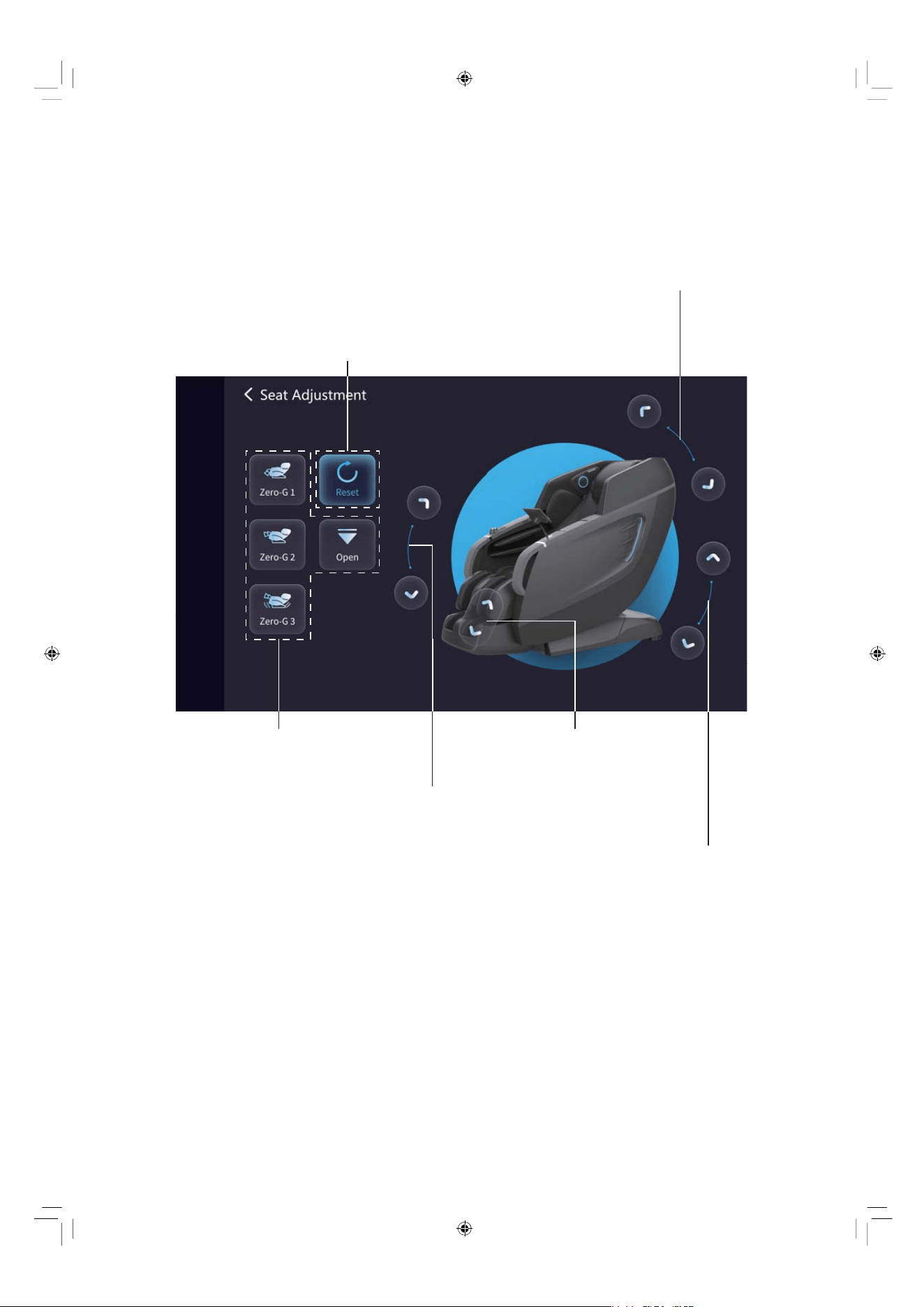
EN 48
Seat Adjustment Guide
Note: When you are having a stretching action, you can't adjust the seat
of the chair.
Chair reset to the original position
Recline or incline the backrest actuator
4 Zero Gravity Modes
Lift or lower the footrest
Extend or retract the footrest
Recline or incline the zero gravity actuator
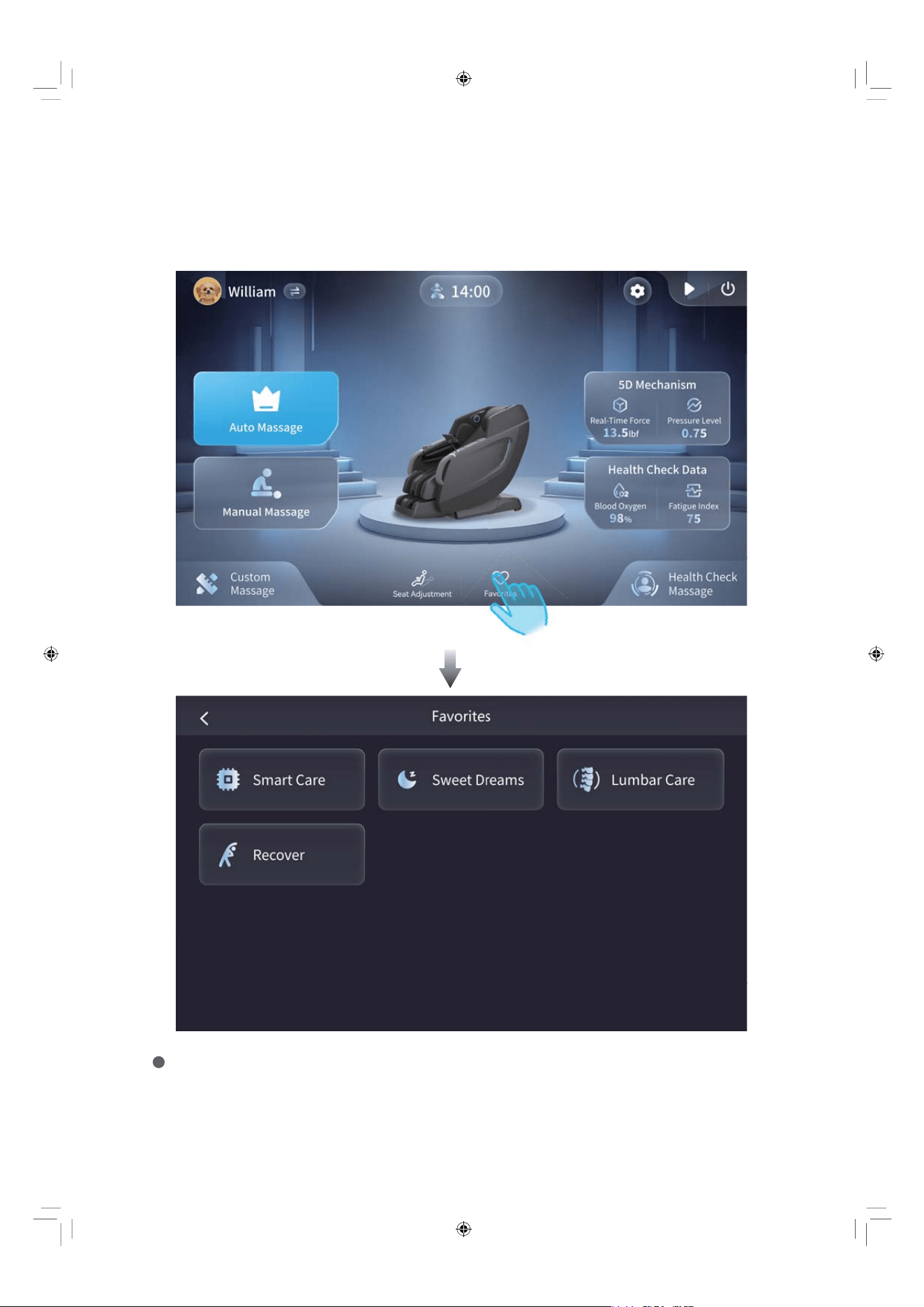
EN 49
Tap a saved program to start your massage instantly. To remove a program
you don't like, long-press it to delete.
Favorites
Save your favorite massage programs to the Favorites for quick access and
simply tap to start your massage.
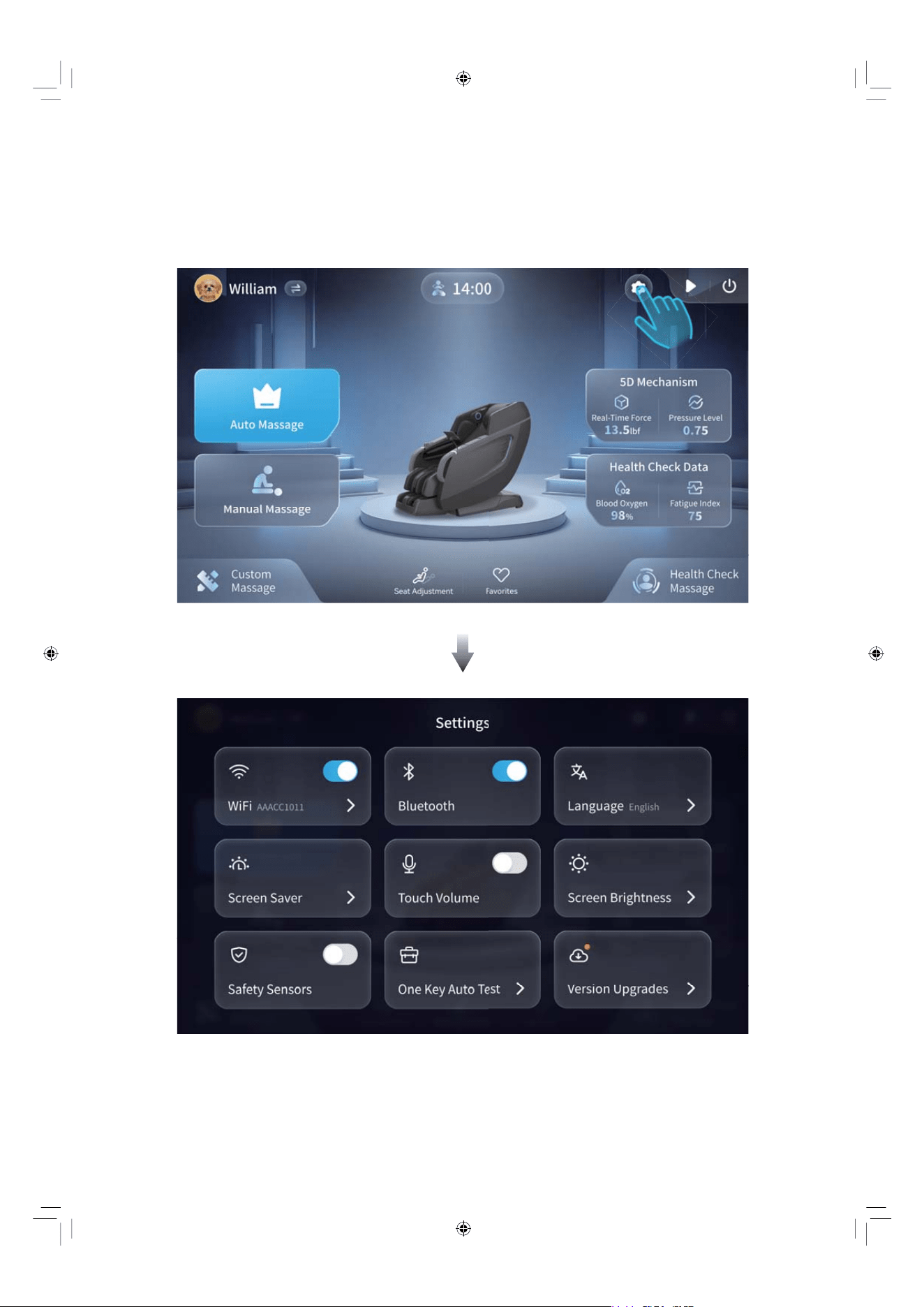
EN 50
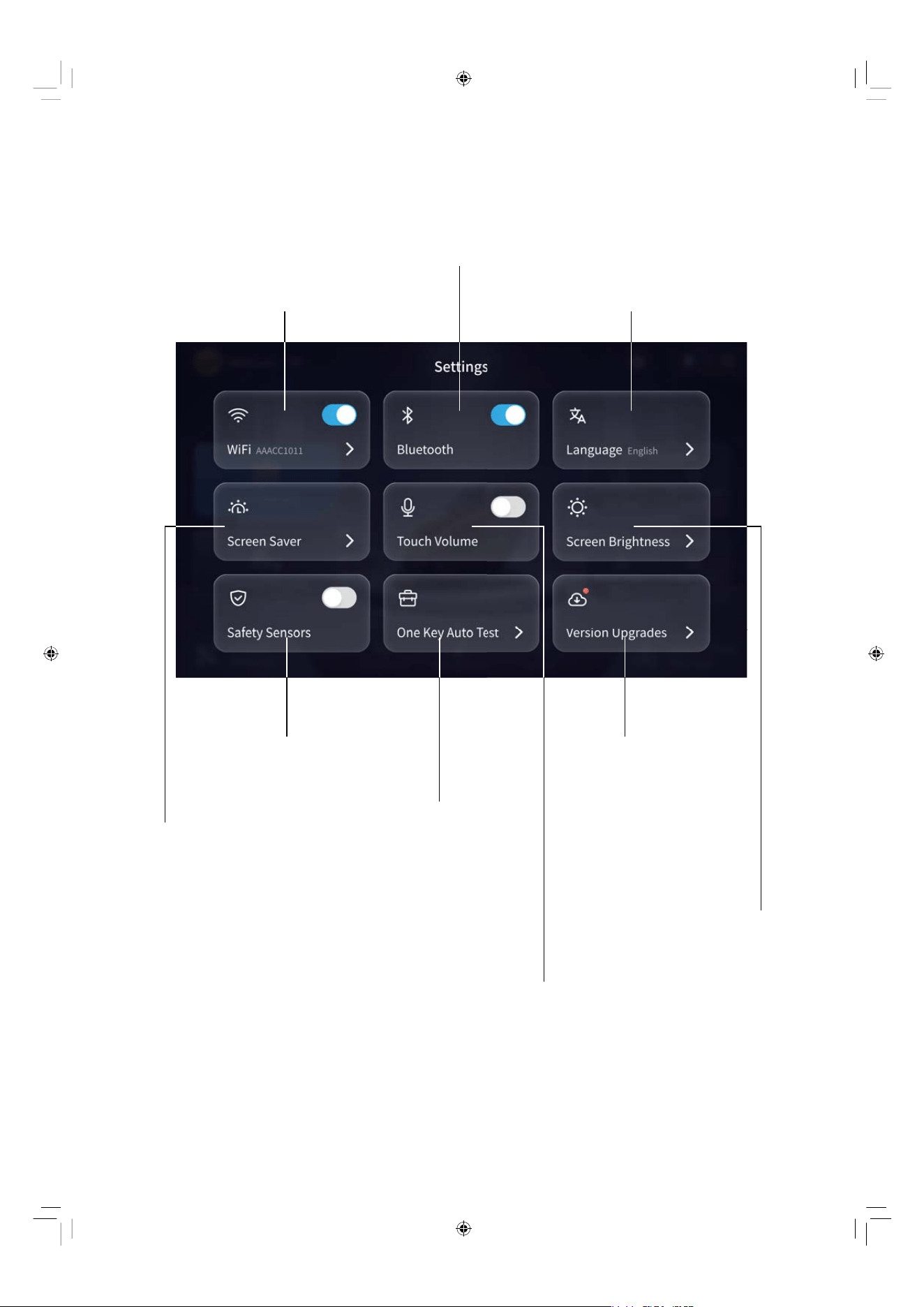
Settings
For other chair settings, simply tap to configure them.
EN 51
Network Settings
Safety Sensors
Control Button
Screen Saver
Control Button
Version Upgrades
Screen Brightness
Adjustment
One Key Auto Test
for Chair’s Functions
Touch Volume Control Button
Bluetooth Settings
Language Settings
EN 52
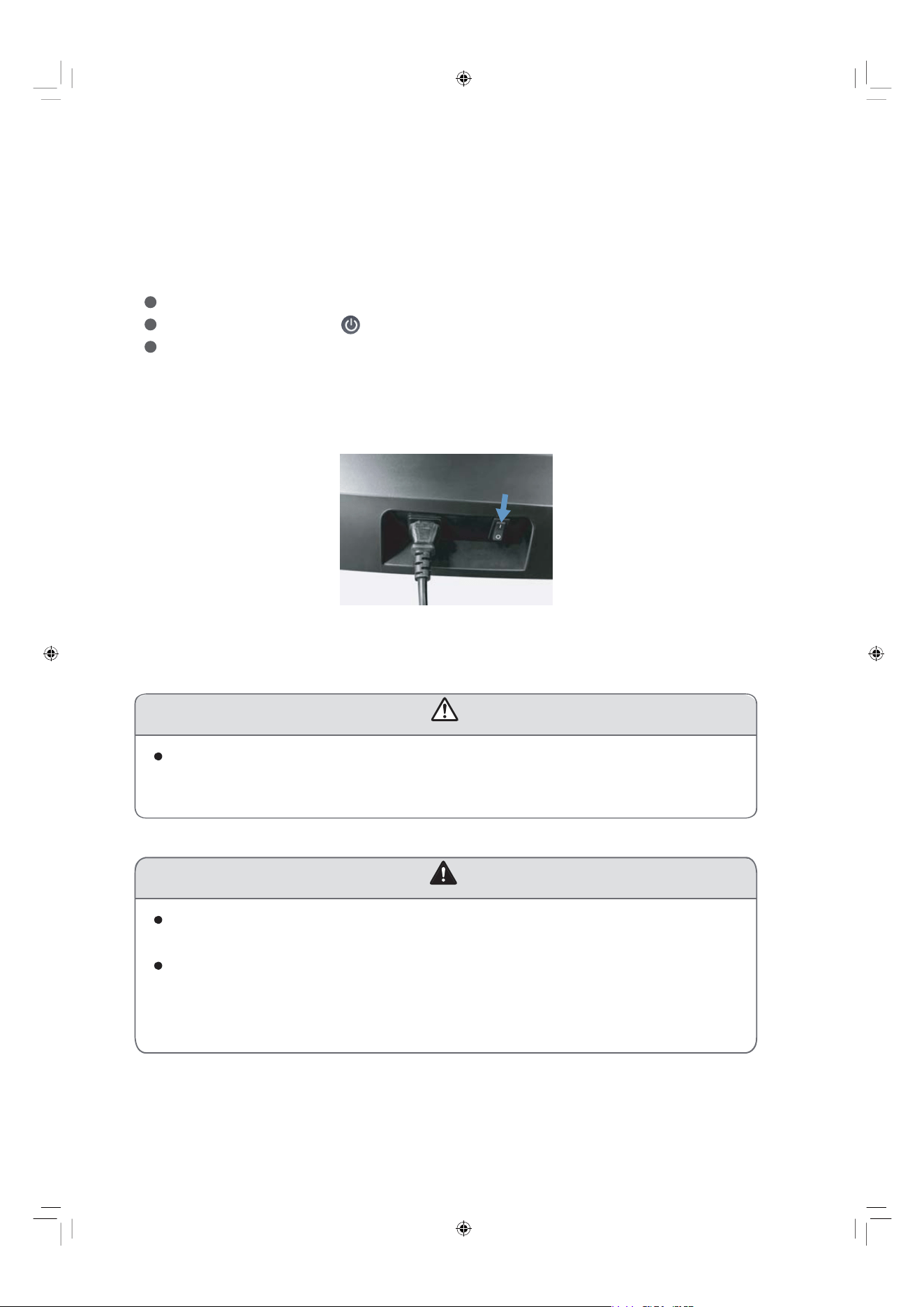
Safety Sensors
The chair is equipped with safety sensors. If there’s something detected around
the footrest and the back area of the chair, a warning message will pop-up like
below.
Please check and clear the area. Tap “OK” to select a massage program
to continue.
1. First double check to make sure there are no people or any other things around
the chair, such as a child, a pet or any other object.
2. Power off the chair by using the below 3 operating ways.
Press the power switch on the right top of the touchscreen controller.
Tap the power button on the screen and select “Power Off”.
Press the power switch button on the side panel quick access panel to
turn it off.
3. Switch off the power from “I” position to “O” position.
4. Unplug the electricity from the outlet to avoid any unexpected hurt to children
or pets.
EN 53
After Massage
$"65*0/
DO NOT walk outside of the chair directly and immediately when the chair
is still running.
Otherwise it may cause accidents and injuries.
DO NOT step on the footrest after use when you get up.
Make sure you have pressed the power switch to the OFF position and
pulled out the power plug.
Otherwise the footrest may be damaged.
Otherwise accidents and injuries may happen when children play
with the chair.
8"3/*/(
EN 54
Care & Maintenance
Storage Instructions
When the chair is not in use, please ensure it is powered off and unplugged
from the wall outlet to prevent accidental activation by children.
If the chair is not to be used for an extended period, disconnect the controller
and store the chair safely.
Do not attempt to dismantle any part of the chair, including the chain hooks.
Keep the massage chair free from dust by regularly wiping it down or
covering it with a dust-free cloth.
Avoid storing the chair in hot, humid, damp environments, or in direct sunlight
or heat, as this may damage the chair.
Similarly, do not store the chair in overly cold places, as extreme
temperatures can adversely affect its performance and lifespan.
Maintenance Instructions
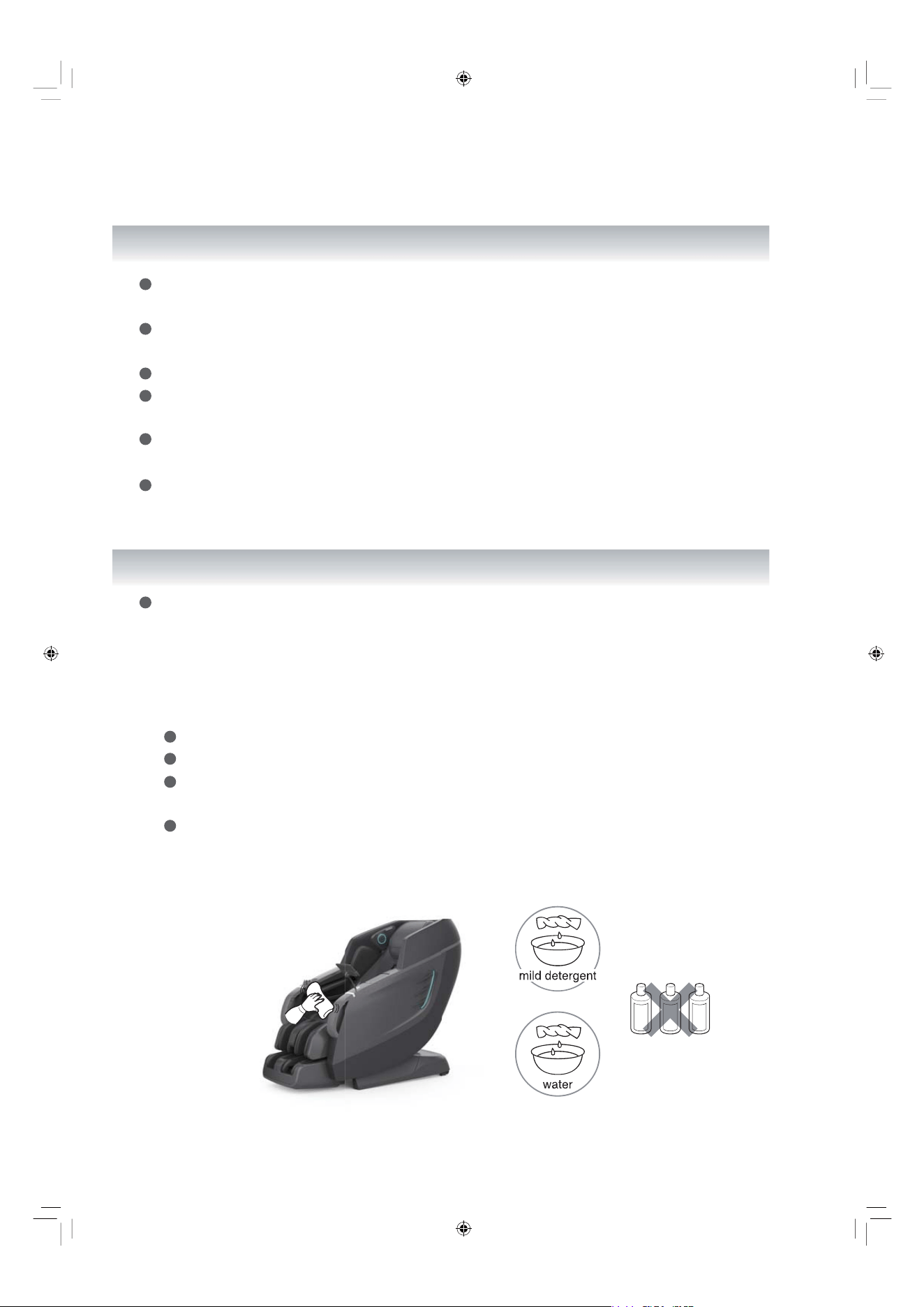
Before cleaning, ensure the chair is unplugged from the electrical source to
prevent electrical shock.
About Synthetic Leather
General Cleaning
Clean with a tidy, soft and dry cloth.
Avoid using chemicals like thinners, gasoline or alcohol.
Before using any leather cleaner, ensure it is safe for the synthetic leather
by reading the label.
Before fully applying any cleaning solution, test it on a small section of the
synthetic leather to avoid potential discoloration.
gasoline
alcohol
thinner
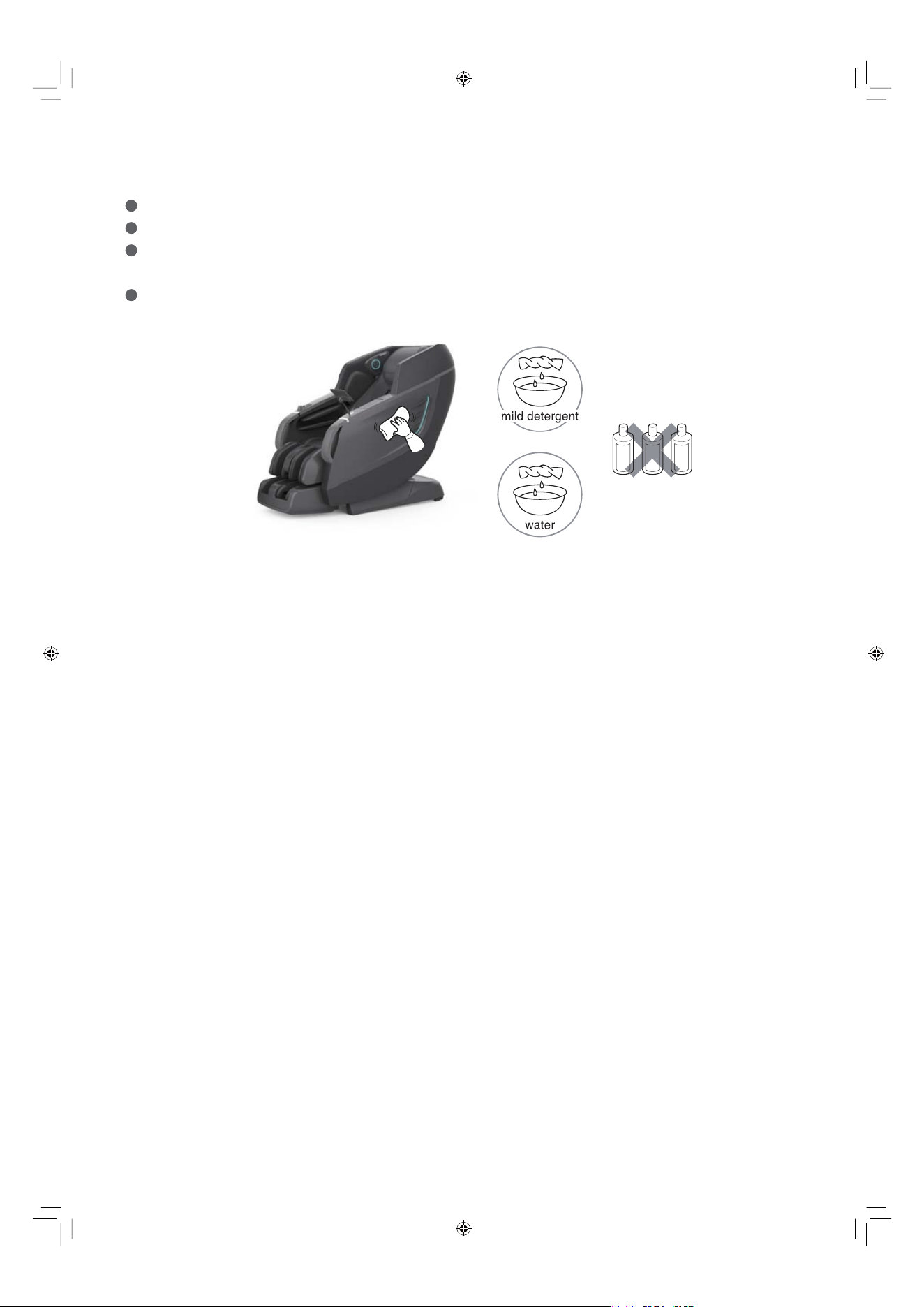
EN 55
gasoline
alcohol
thinner
About Plastic Parts
Dip cloth into mild neutral detergent, squeeze it and clean the plastic parts.
Avoid using chemicals like thinners, gasoline or alcohol.
Wipe with a damp microcloth or soft cloth wrung out in clean water. Ensure no
water is dripping.
Allow the plastic parts to dry naturally.
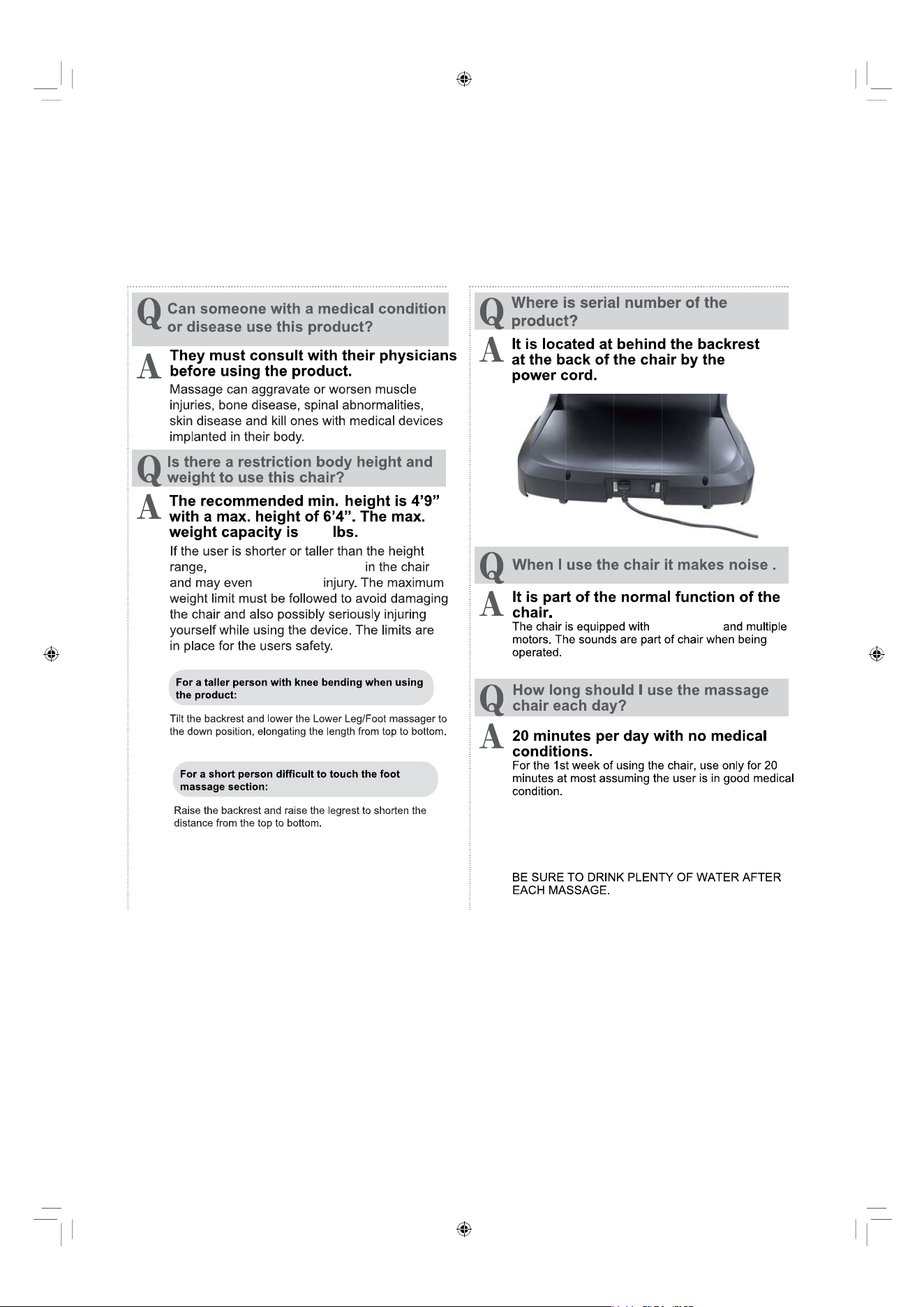
Frequently Asked Questions(FAQ)
They will not fit comfortably
an air pump
If there is any discomfort, stop using and
consult with your doctor. In the first few days of using,
you may experience mild soreness. Be sure to monitor
the pain levels and if the soreness does not diminish
before using again.
after the following days, consult with your doctor
experience
EN 56
280
FAQ/Important Notes
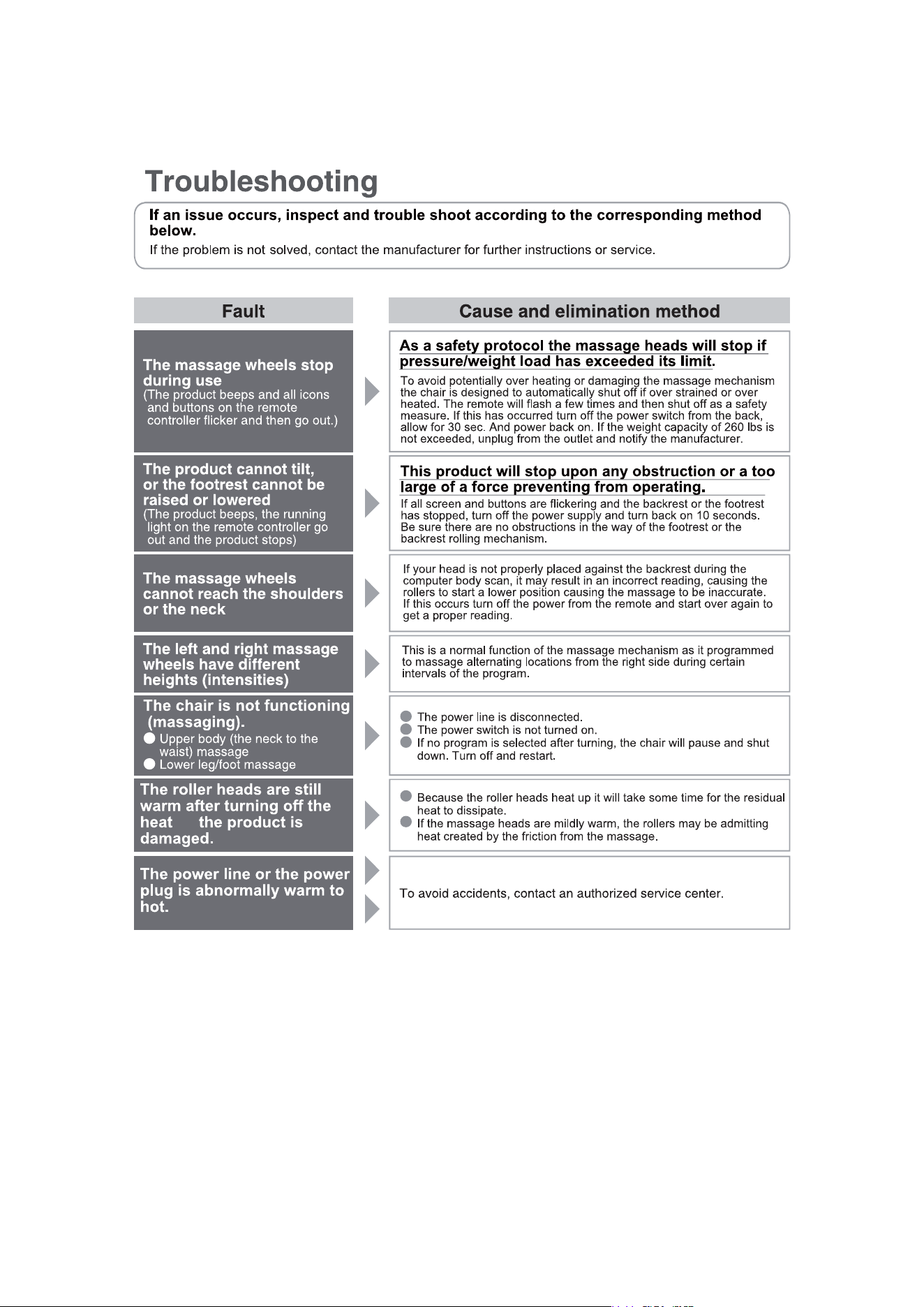
or
If above solutions are not applicable, kindly refer to “Product Warranty Card” and contact service
center.
EN 57
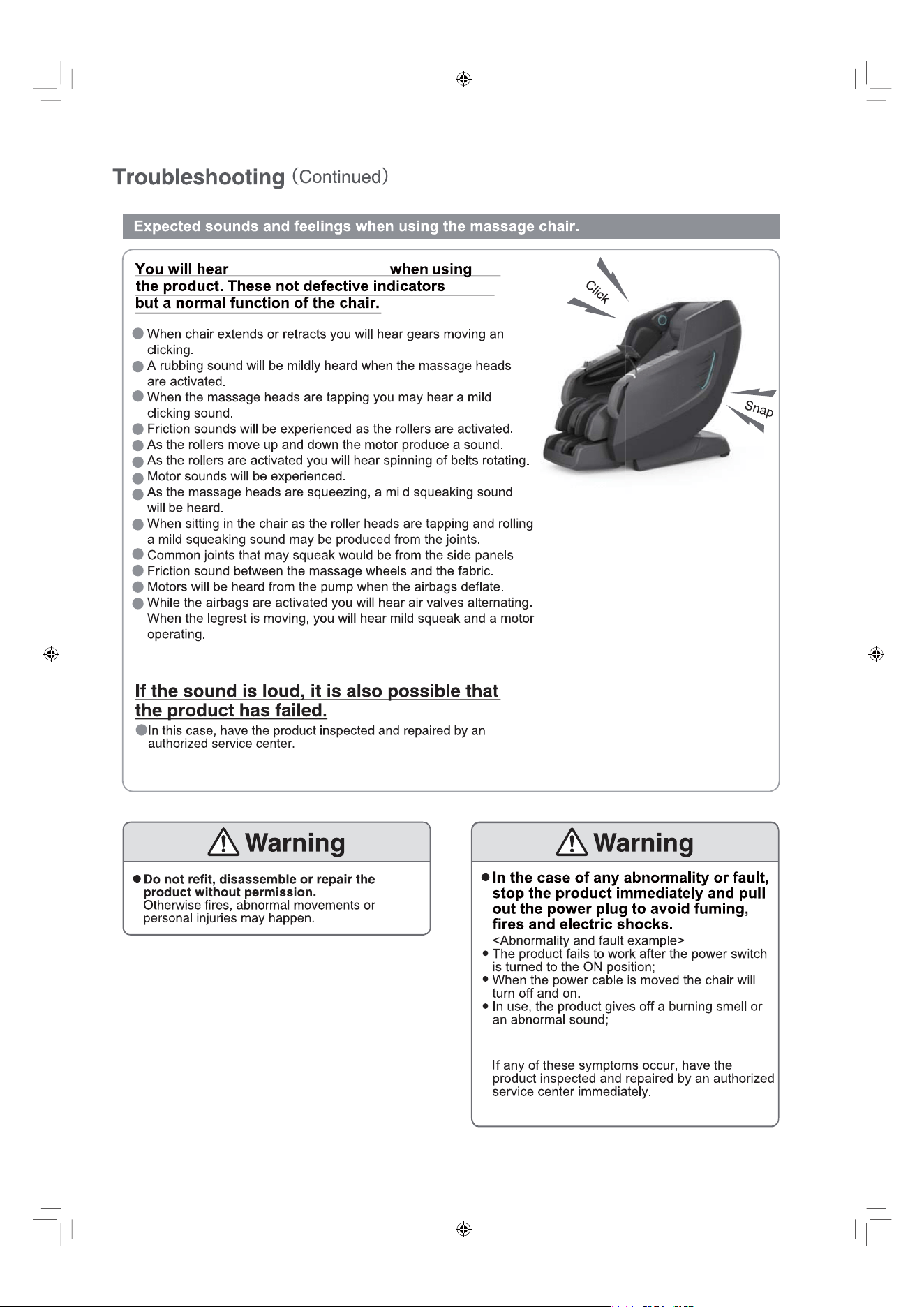
The product upholstery is deformed or abnormally
hot.
these specific sounds
EN 58
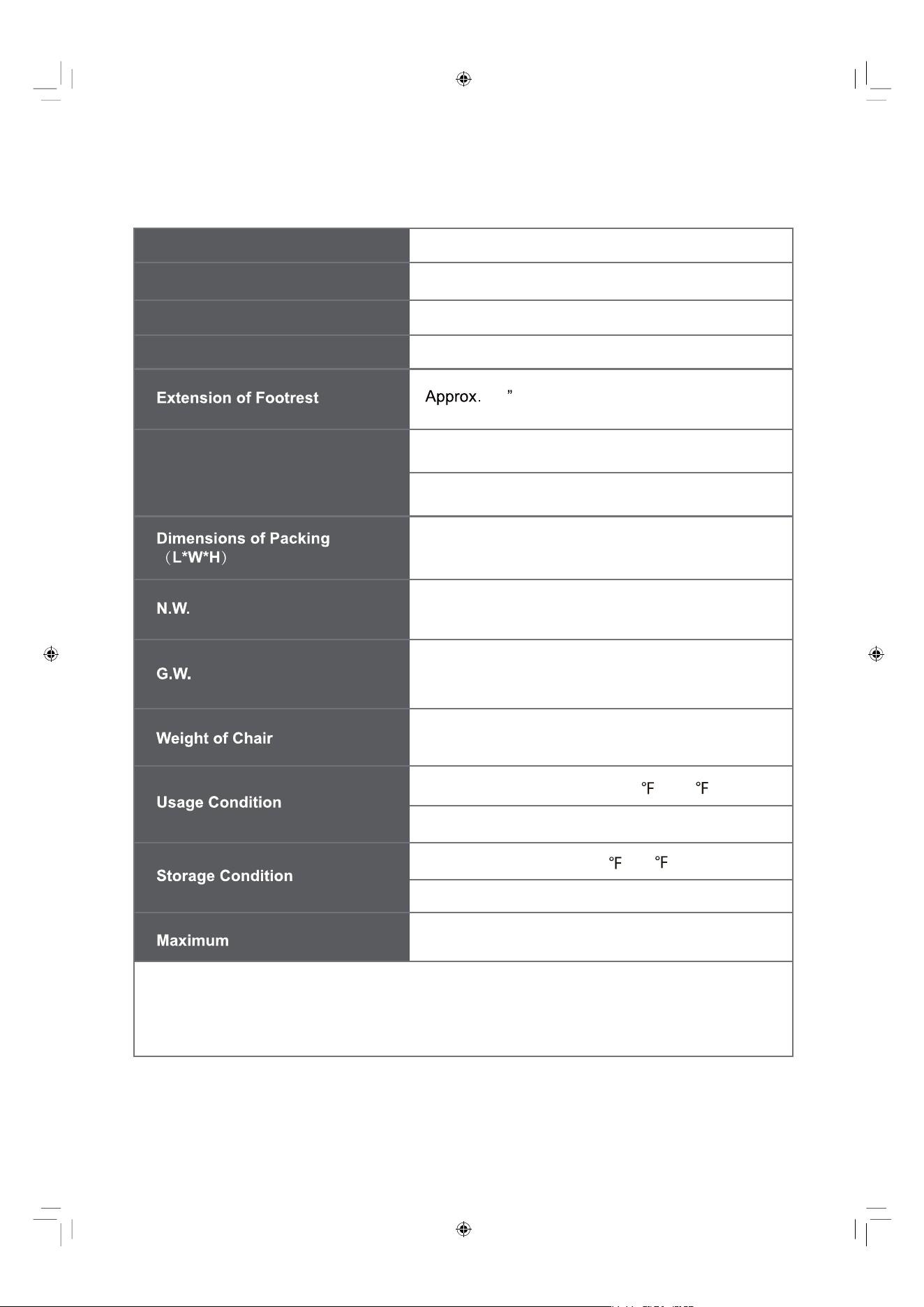
Pro Vivant 5D
Product Name
Rated Input
1.9A
7.9
110 - 120V~ 60Hz
Rated Current
Working Time
Box : 57.87”x 33.47”x 49.61”
Upright: 63.0”x 30.7”x 47.6”
Recline: 74.0”x 30.7”x 43.3”
288.8 lbs
249.1 lbs
Approx. 249.1 lbs
EN 59
Weight of User
Dimension (L x W x H)
This equipment contains a certified radio transmission module:
FCC ID: YMX-ATS2853
IC: 7284A-ATS2853
Product Specifications
Environment Temperature: 32
- 104
Contrasting Humidity: 20% - 80%RH
Storage Temperature: 23 - 95
Storage Humidity: 20% - 80%RH
280 lbs
Min. 5 minutes Max. 30 minutes
EN 60
80mm(3.15")
EN 61