-raaal..-rxa
Wireless headphones
User's Manual
Please read this manual
before using the product
Thanl< you for choosing the TREBLAB C7-Pro!
Our headphones provide superior sound quality and
mobility thanks to their light-weight construction and
convenient hands-free wireless operation. Before using this
product, please read this manual.
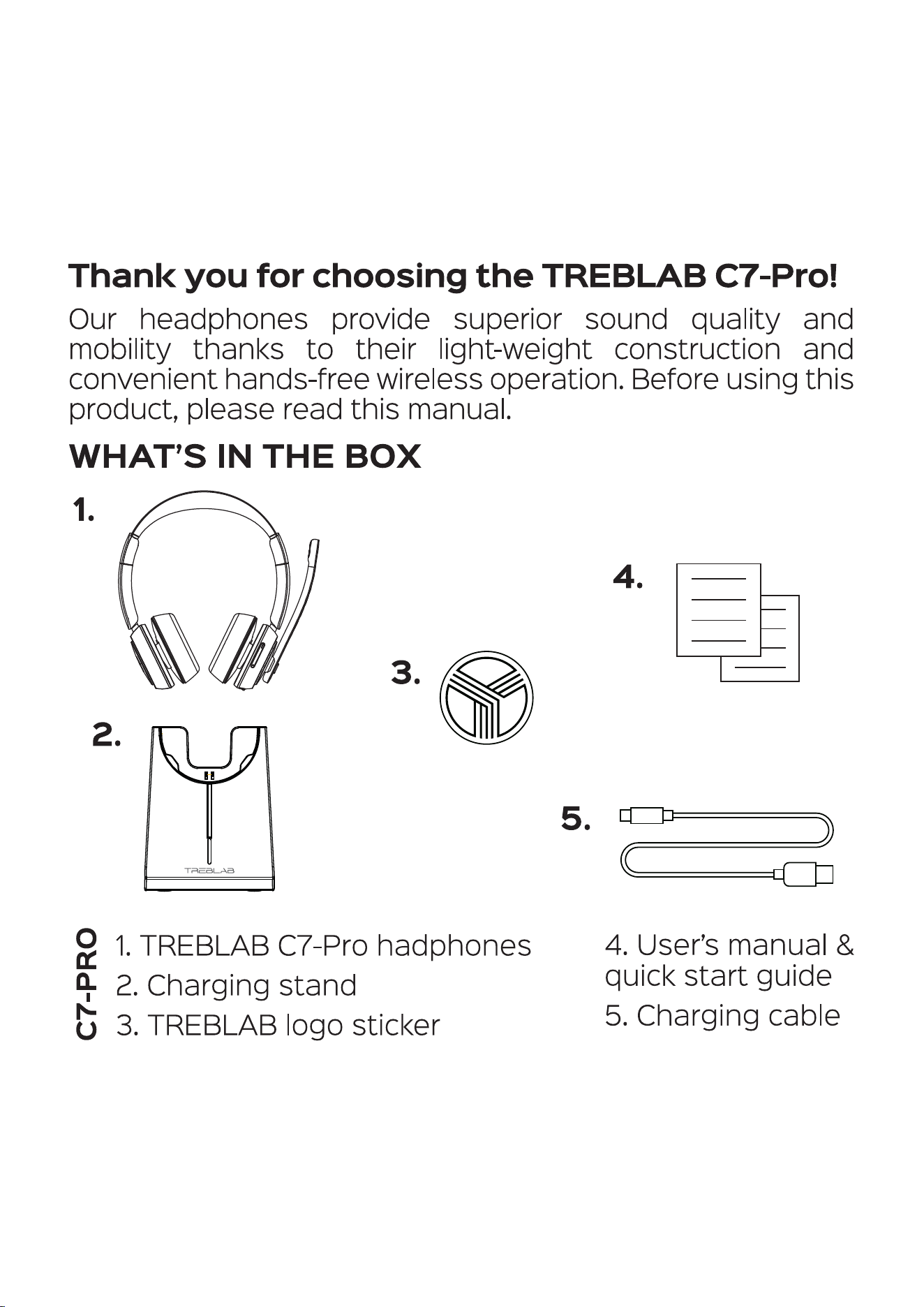
WHAT'S IN THE BOX
1.
2.
4.
3.
5.
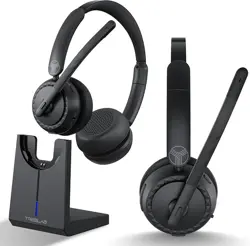
l. TREBLAB C7-Pro hadphones
2. Charging stand
3. TREBLAB logo sticker
4. User's manual &
quick start guide
5. Charging cable
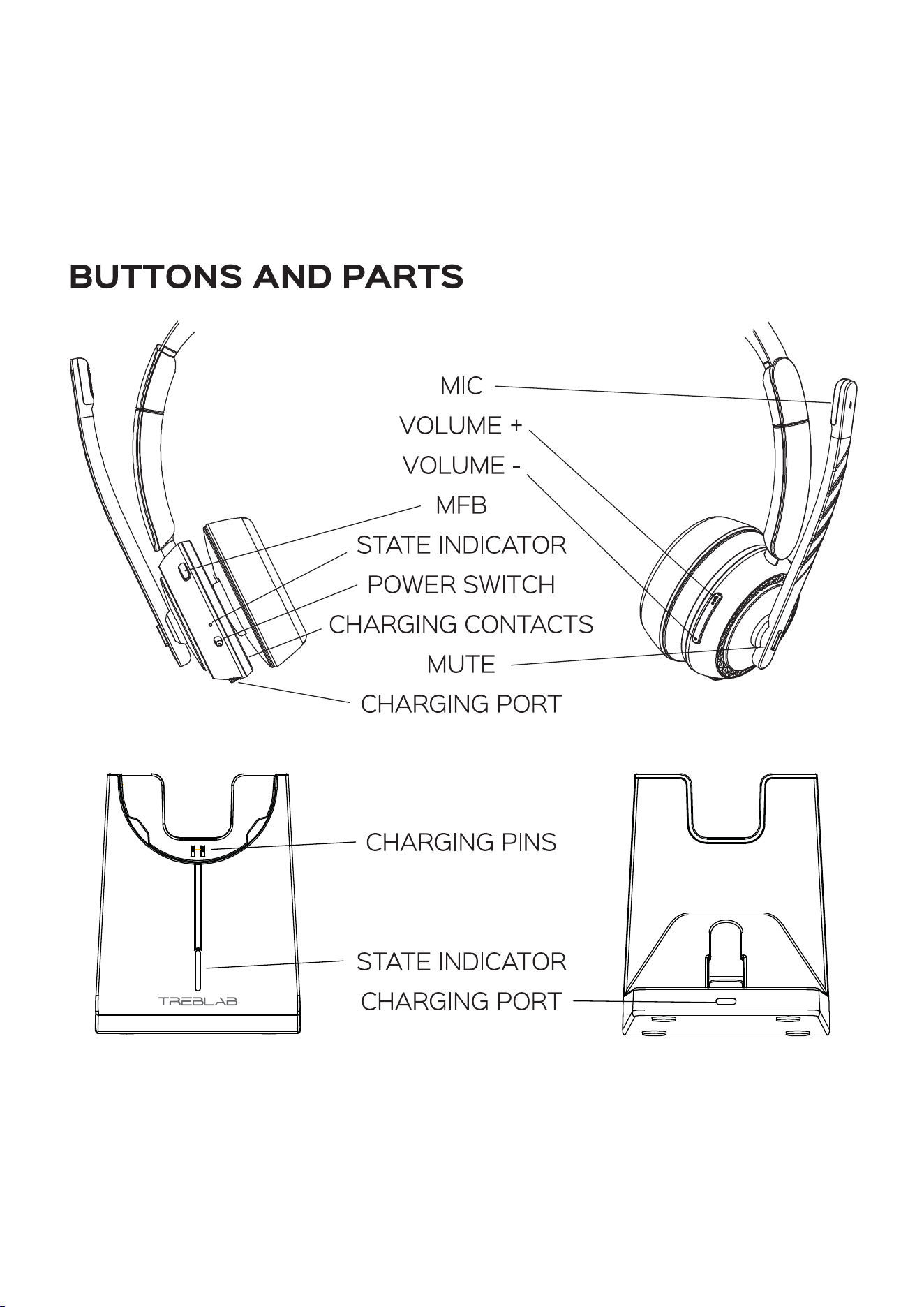
BUTTONS AND PARTS
MIC
VOLUME +
VOLUME
MFB
STATE INDICATOR
POWER SWITCH
CHARGING CONTACTS
MUTE
CHARGING PORT
CHARGING PINS
STATE INDICATOR
CHARGING PORT
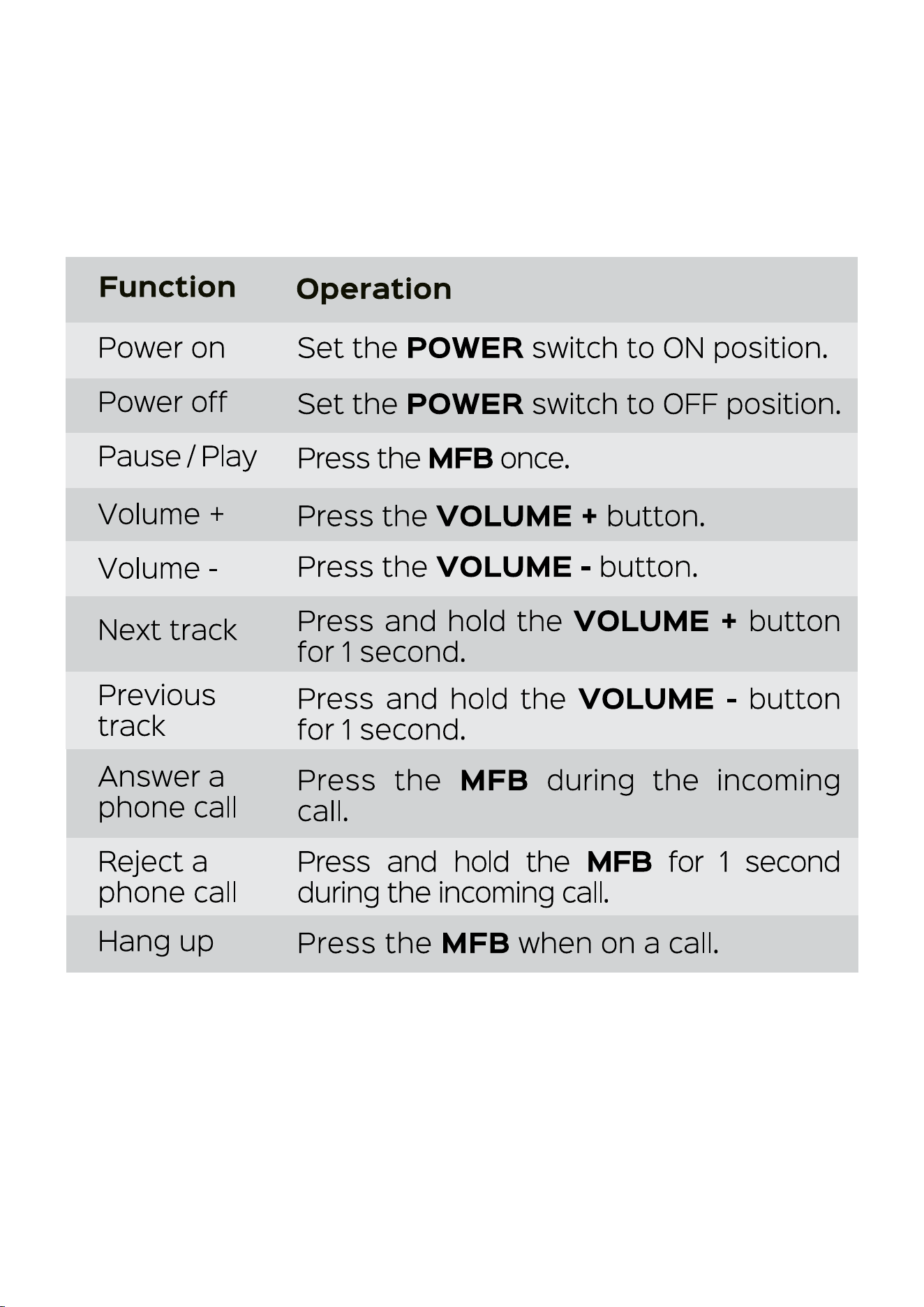
Function
Power on
Power off
Pause / Play
Volume +
Volume
Next track
Previous
track
Answer a
phone call
Reject a
phone call
Hang up
Operation
Set the POWER switch to ON position.
Set the POWER switch to OFF position.
Press the MFB once.
Press the VOLUME + button.
Press the VOLUME - button.
Press and hold the VOLUME + button
for 1 second.
Press and hold the VOLUME - button
for 1 second.
Press the MFB during the incoming
call.
Press and hold the MFB for 1 second
during the incoming call.
Press the MFB when on a call.
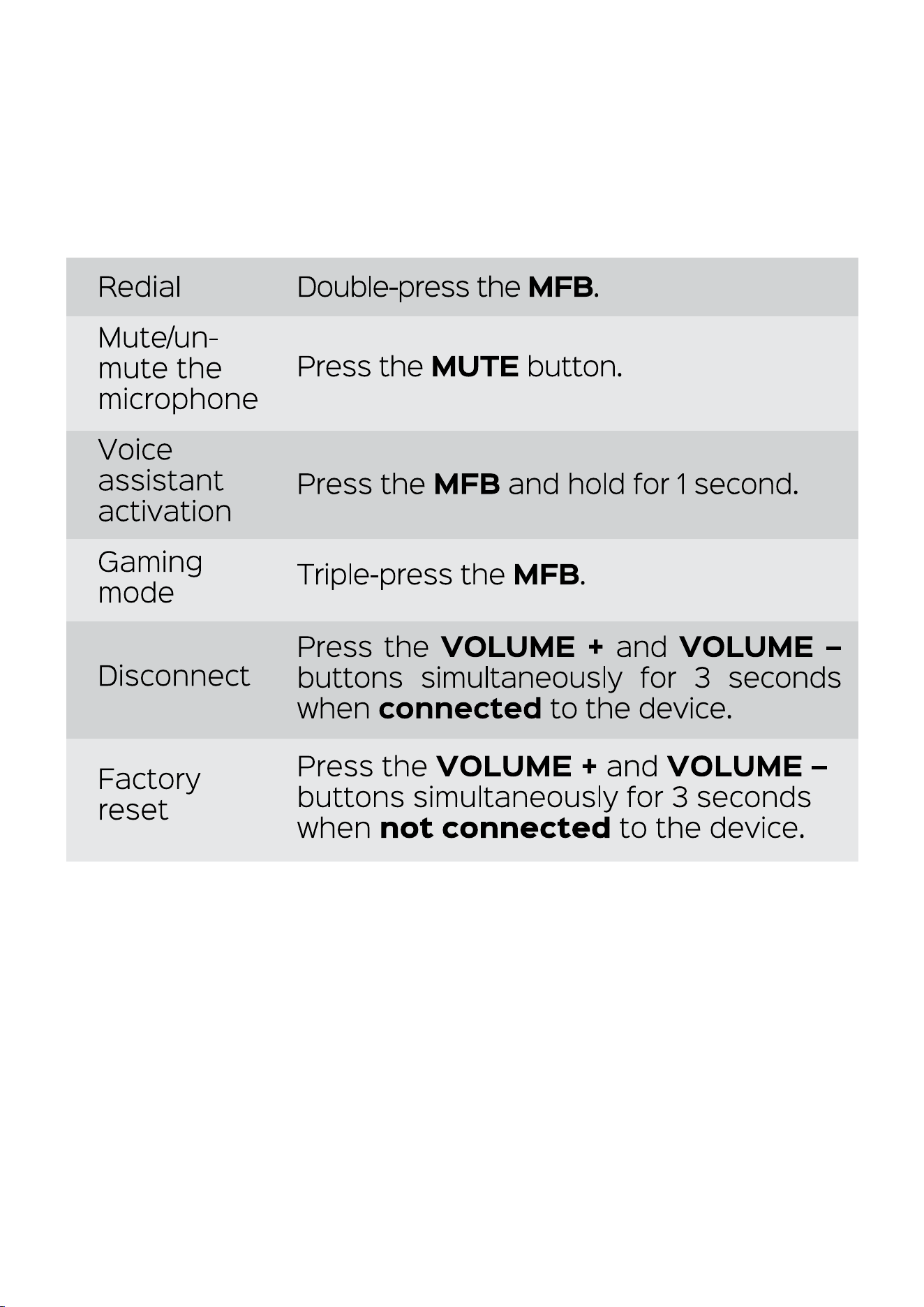
Redial
Mute/un-
mute the
microphone
Voice
assistant
activation
Gaming
mode
Disconnect
Factory
reset
Double-press the MFB.
Press the MUTE button.
Press the MFB and hold for 1 second.
Triple-press the MFB.
Press the VOLUME + and VOLUME -
buttons simultaneously for 3 seconds
when connected to the device.
Press the VOLUME + and VOLUME -
buttons simultaneously for 3 seconds
when not connected to the device.
SETTING UP YOUR TREBLAB C7-Pro
To turn on the headphones
Set the POWER switch to ON position. You will hear two
sound prompts, the state indicator on the headphones
will start flashing blue and, a few seconds later, blue/red
indicating that the headphones are on and ready to pair.
To turn off the headphones
Set the POWER switch to OFF position. You will hear the
sound prompt, the state indicator will flash red several
times and will go off.
PAIRING
Mal<e sure that the TREBLAB C7-Pro headphones are
charged.
1. Set the POWER switch to ON position. You will hear two
sound prompts, the state indicator on the headphones
will start flashing blue and, a few seconds later, blue/red.
2. Activate the wireless communication function on your
smart device, scan/search for TREBLAB C7-Pro, and
click CONNECT.
3. If prompted by your device to connect, select Yes.
4. You will hear the sound prompt indicating that the
headphones are connected. The state indicator will go
off.
When you turn the headphones on, they will try to
reconnect with the recently connected device. If the
reconnection does not happen automatically, the
headphones will try to find the next device in the pairing
list. You can only connect and play audio from one
device at a time. But you can save up to 6 connected
GAMING MODE
TREBLAB C7-Pro headphones support the gaming
mode to reduce the audio latency up to 60ms. This
allows to achieve better video / audio synchronization and
improve your gaming and video-watching experience.
1. To enable the gaming mode, triple-press the MFB. You
will hear the ascending sound prompt and feel the lower
latency while gaming / watching videos.
2. To disable the gaming mode, triple-press the MFB
again. You will hear the descending sound prompt and
the latency will go back to the standard 200ms.
NOTE In the gaming mode, the connection range is much
shorter than in standard one, so, if you are experiencing some
connection issues or drops, please make sure to disable the
gaming mode.
AUDIO PLAYBACK
To pause and resume the playback, press the MFB once.
To change tracl<s on C7-Pro, press and hold the VOLUME +
button for 1 second to play the next track and press and
hold the VOLUME - button for 1second to play the previous
track.
To adjust the volume, the VOLUME + button once to
increase the volume and press the VOLUME - button once
to decrease the volume.
PHONE CALLS MANAGEMENT
The TREBLAB C7-Pro were specifically designed for the
phone/conference calls. Note that the audio playback
will be paused during calls.
To answer
a call:
To reject
a call:
Press the MFB during the incoming call.
Press and hold the MFB for 1 second
during the incoming call.
To end
a call:
Redial:
Mute/un-
mute mic:
Press the MFB when on a call.
Double-press the MFB.
Press the MUTE button once.
VOICE ASSISTANTS SUPPORT
TREBLAB C7-Pro headphones are compatible with the
most of the voice assistants. To use a voice assistant,
press and hold the MFB for 1 second.
CHARGING
When the headphones' battery is running low, you will hear
the sound prompt reminding a busy tone.
To charge the C7-Pro headphones, you have two options:
1. Plug the supplied cable into the Type-C charging port on
the back of the supplied charging stand and the other
end of the charging cord into a standard USB port. The
blue state indicator will light up on the charging stand.
Put the headphones onto the charging stand matching
the contact contacts on the left earcup with the pins on
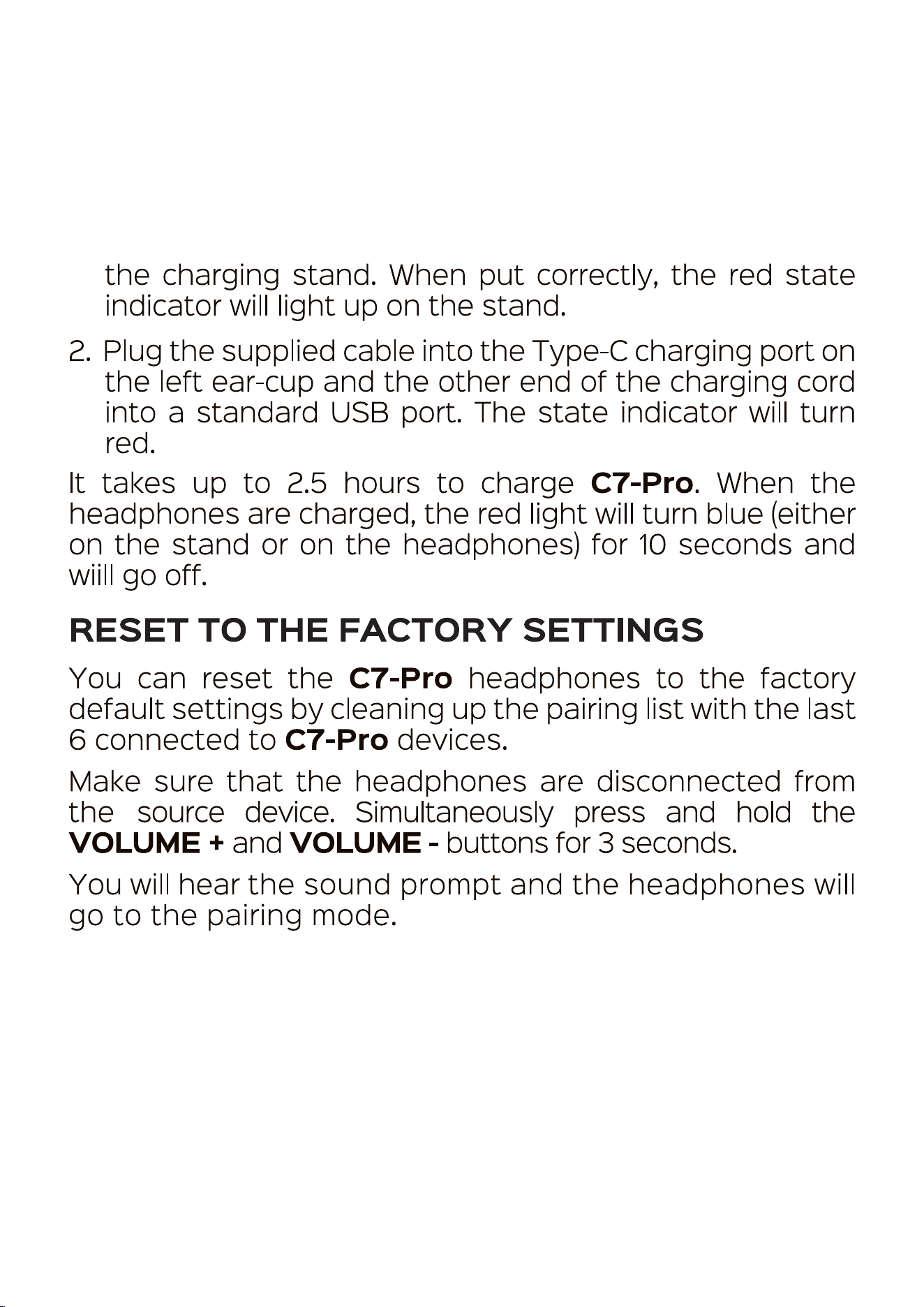
the charging stand. When put correctly, the red state
indicator will light up on the stand.
2. Plug the supplied cable into the Type-C charging port on
the left ear-cup and the other end of the charging cord
into a standard USB port. The state indicator will turn
red.
It tal<es up to 2.5 hours to charge C7-Pro. When the
headphones are charged, the red light will turn blue (either
on the stand or on the headphones) for 10 seconds and
wiill go off.
RESET TO THE FACTORY SETTINGS
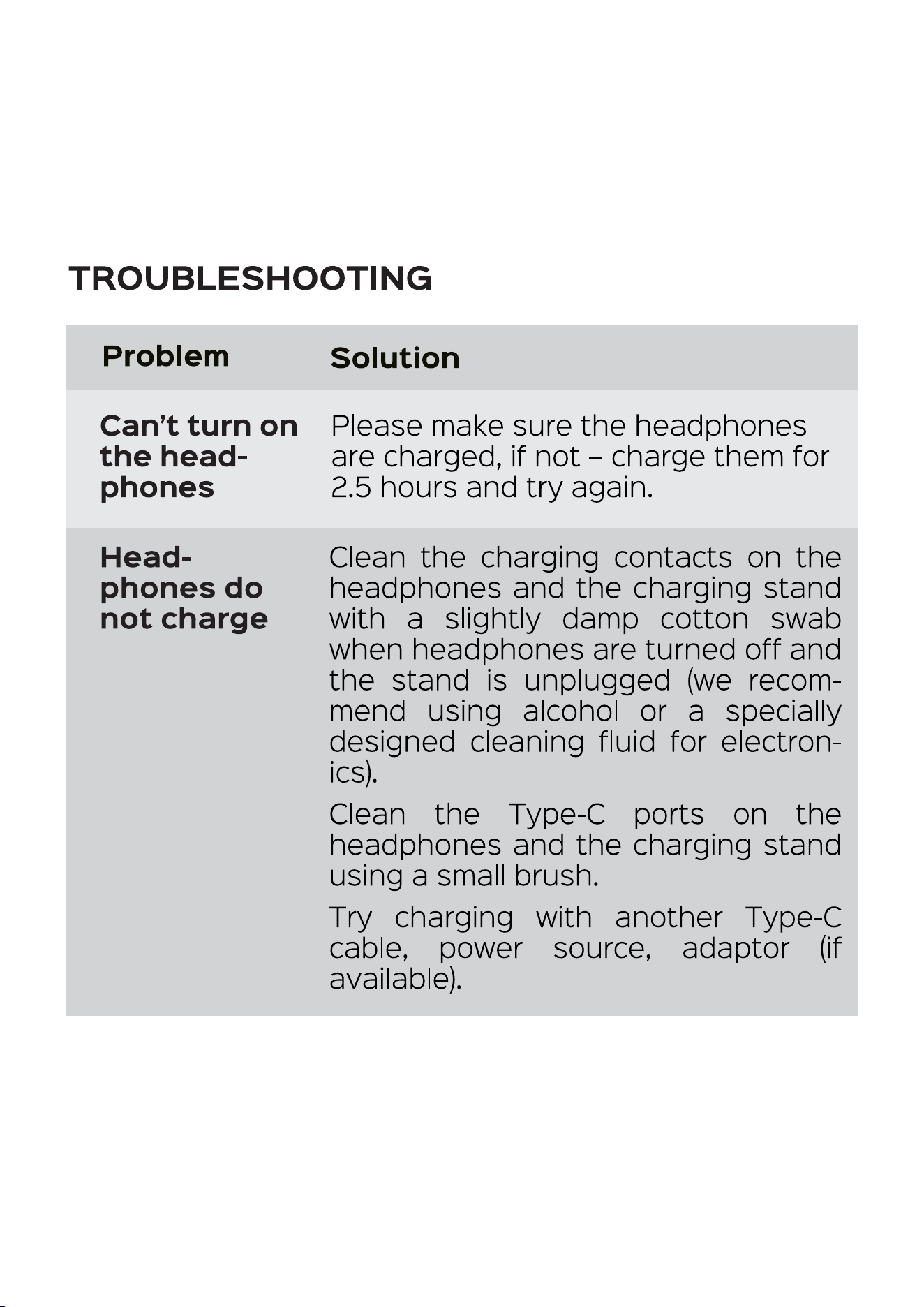
You can reset the C7-Pro headphones to the factory
default settings by cleaning up the pairing list with the last
6 connected to C7-Pro devices.
Mal<e sure that the headphones are disconnected from
the source device. Simultaneously press and hold the
VOLUME + and VOLUME - buttons for 3 seconds.
You will hear the sound prompt and the headphones will
go to the pairing mode.
TROUBLESHOOTING
Problem
Can't turn on
the head-
phones
Head-
phones do
not charge
Solution
Please make sure the headphones
are charged, if not - charge them for
2.5 hours and try again.
Clean the charging contacts on the
headphones and the charging stand
with a slightly damp cotton swab
when headphones are turned off and
the stand is unplugged (we recom
mend using alcohol or a specially
designed cleaning fluid for electron
ics).
Clean the Type-C ports on the
headphones and the charging stand
using a small brush.
Try charging with another Type-C
cable, power source, adaptor (if
available).
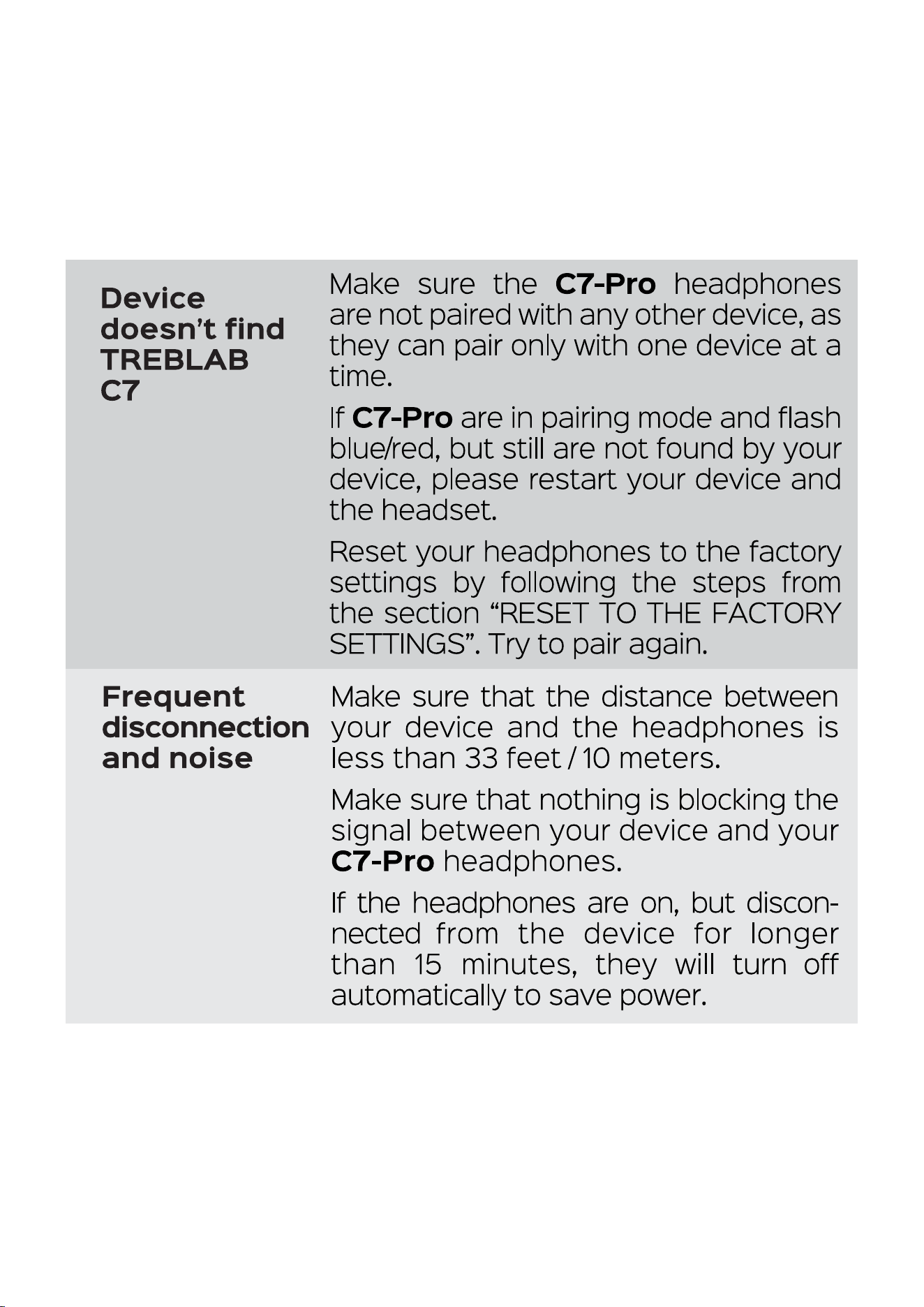
Device
doesn't find
TREBLAB
Frequent
Mal<e sure the C7-Pro headphones
are not paired with any other device, as
they can pair only with one device at a
time.
If C7-Pro are in pairing mode and flash
blue/red, but still are not found by your
device, please restart your device and
the headset.
Reset your headphones to the factory
settings by following the steps from
the section "RESET TO THE FACTORY
SETTINGS". Try to pair again.
Make sure that the distance between
disconnection your device and the headphones is
and noise less than 33 feet/ 10 meters.
Make sure that nothing is blocking the
signal between your device and your
C7-Pro headphones.
If the headphones are on, but discon-
nected fro rn the device for longer
than 15 minutes, they will turn off
automatically to save power.
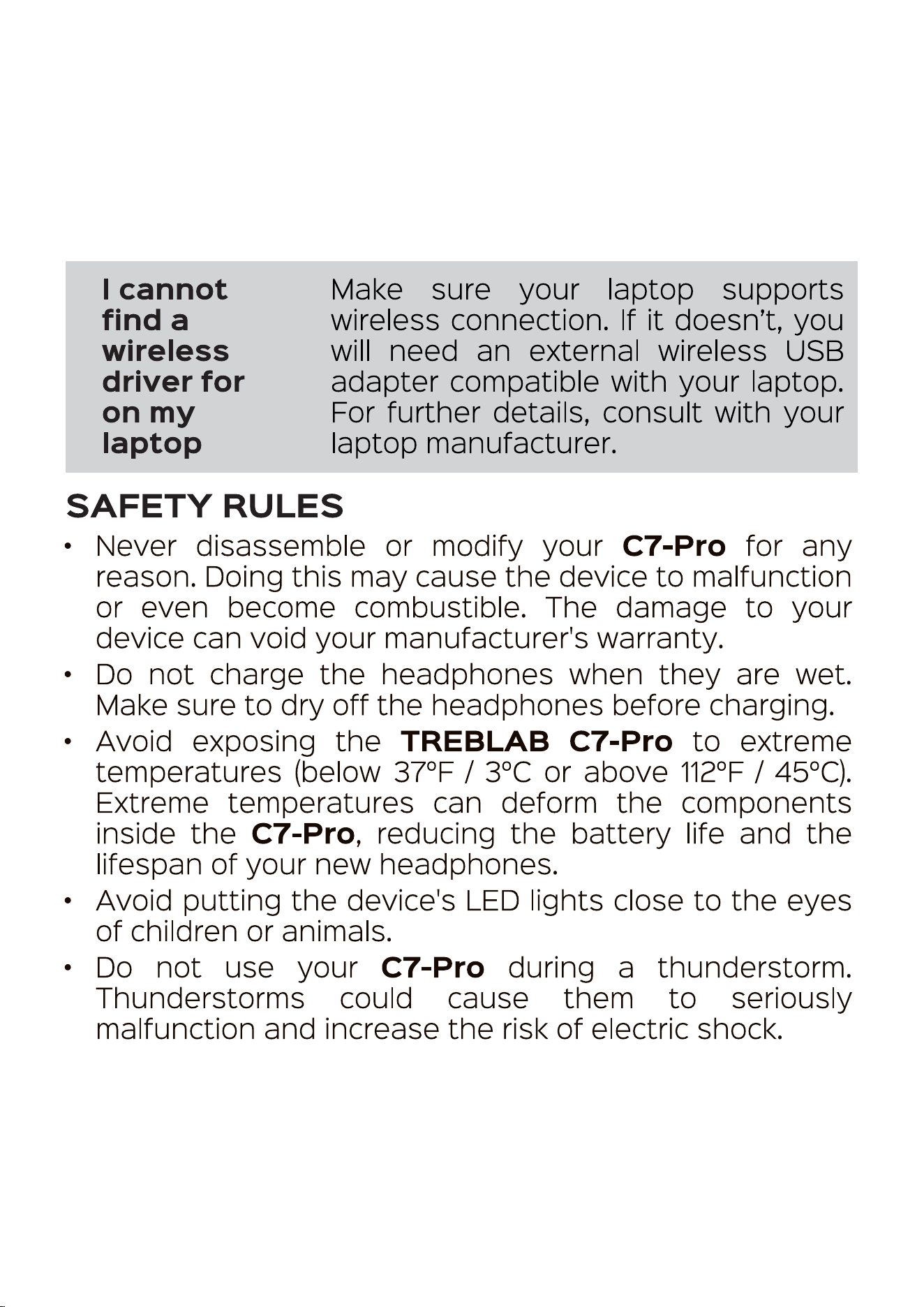
I cannot
find a
wireless
driver for
on my
laptop
Make sure your laptop supports
wireless connection. If it doesn't, you
will need an external wireless USB
adapter compatible with your laptop.
For further details, consult with your
laptop manufacturer.
SAFETY RULES
Never disassemble or modify your C7-Pro for any
reason. Doing this may cause the device to malfunction
or even become combustible. The damage to your
device can void your manufacturer's warranty.
Do not charge the headphones when they are wet.
Make sure to dry off the headphones before charging.
• Avoid exposing the TREBLAB C7-Pro to extreme
temperatures (below 37OF/ 30C or above 1120F/ 450C).
Extreme temperatures can deform the components
inside the C7-Pro, reducing the battery life and the
lifespan of your new headphones.
Avoid putting the device's LED lights close to the eyes
of children or animals.
Do not use your C7-Pro during a thunderstorm.
Thunderstorms could cause them to seriously
malfunction and increase the risk of electric shock.
FCC STATEMENTS
FCC Compliance Statement - Part 15
This device complies with Part 15 of the FCC Rules.
Operation is subject to the following two conditions:
1. This device may not cause harmful interference, and
2. This device must accept any interference received,
including interference that may cause undesired
operation.
Any changes or modifications not expressly approved by
the party responsible for compliance could void the user's
authority to operate the equipment.
FCC Interference Statement - Part 15
This equipment has been tested and found to comply with
the limits for a Class B digital device, pursuant to Part 15 of
the FCC Rules. These limits are designed to provide
reasonable protection against harmful interference in a
residential installation. This equipment generates, uses
and can radiate radio frequency energy and, if not
installed and used in accordance with the instructions,
may cause harmful interference to radio communications.
However, there is no guarantee that interference will not
occur in a particular installation. If this equipment does
cause harmful interference to radio or television reception,
which can be determined by turning the equipment off
and on, the user is encouraged to try to correct the
interference by one of the following measures:
Reorient or relocate the receiving antenna.
Increase the separation between the equipment and
receiver.
Consult the dealer or an experienced radio/TV
technician for help.
BATTERY INFORMATION
Your device is powered by rechargeable battery.
Unplug the headphones from the power source when
fully charged.
If left unused, a fully charged battery will lose its charge
over time.
• We recommend that you fully charge your headphones
twice a month to ensure the battery's integrity.
Please do not leave the headphones in hot or cold
places, such as inside a closed car in the summer or
winter as this will reduce the capacity and life of the
battery.
Do not expose the battery to fire as it may explode.
Batteriy may also explode if damaged.
RECYCLING
Your damaged or brol<en earphones can be recycled and we
encourage you to do so to keep our planet clean. Where
can you go to do this?
In the US, there are a couple of options:
https://www.ca112recycIe.org
https://search.earth911.com
https://recyclenation.com/find
https•J/www.cta.tech/Consumer-Resources/Greener-Gadgets
In Canada, please visit the links below:
https://thinkreuse.net
https: //www.ca112recycIe.ca
In the UI<, please visit the links below:
https://www.recycle-more.co.uld
https://www.recyclenow.com/local-recycling
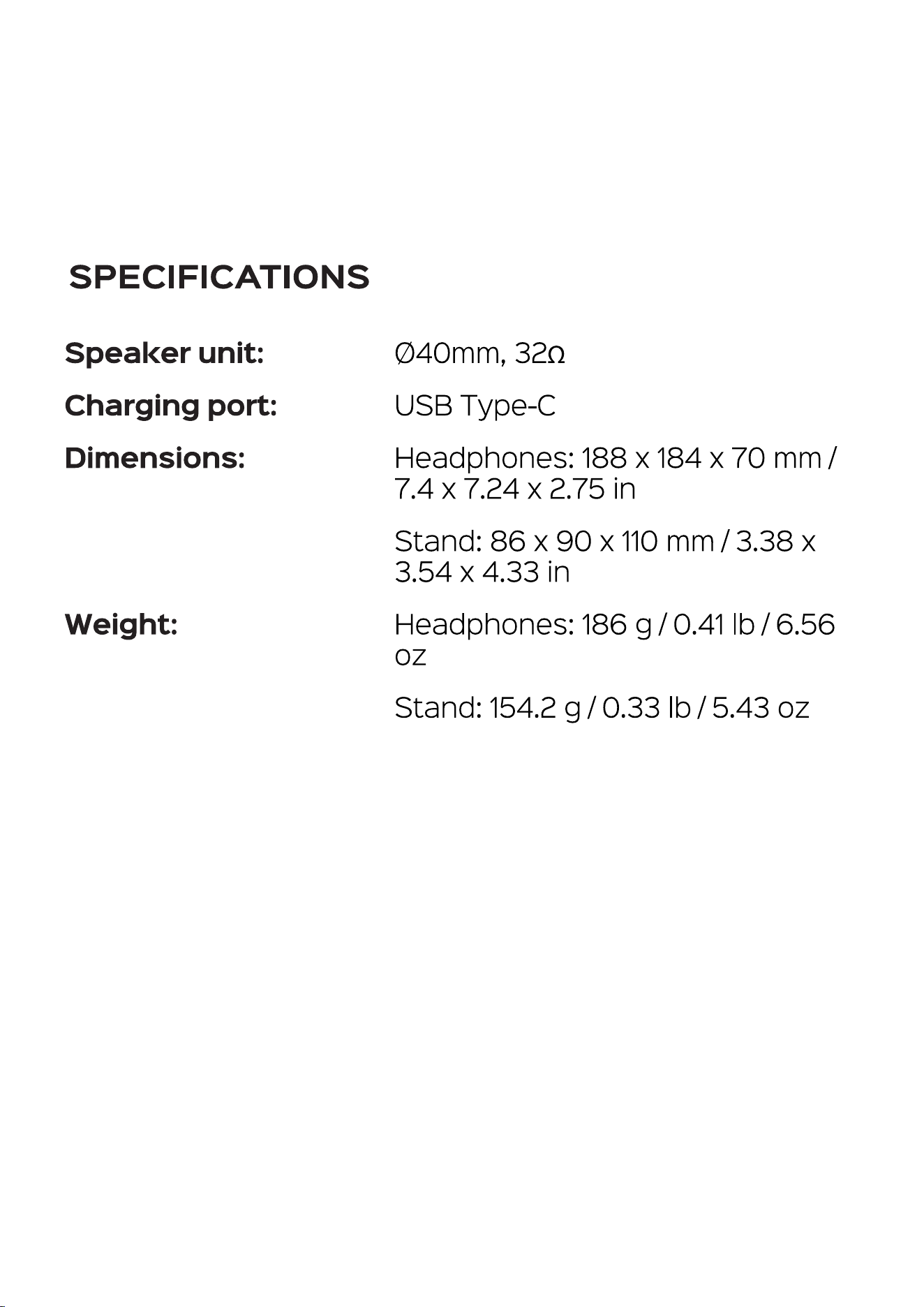
SPECIFICATIONS
Speal<er unit:
Charging port:
Dimensions:
Weight:
Ø40mm, 320
USB Type-C
Headphones: 188 x 184 x 70 mm /
7.4 x 7.24 x 2.75 in
Stand: 86 x 90 x 110 mm / 3.38 x
3.54 x 4.33 in
Headphones: 186 g/ 0.41 lb/ 6.56
oz
Stand: 154.2 g/ 0.33 lb / 5.43 oz

THANK YOU
We truly appreciate that you chose TREBLAB as your
trusted brand of wireless earphones. Our team sincerely
hopes that you enjoy the great sound and seamless
usability the TREBLAB C7-Pro provides.
We love making our customers happy by providing true
value with our products. If for any reason you are not
completely satisfied with your purchase or have any
questions, please let us know by contacting us at
http://treblab.com/contact_us.
We care about our customers above all and are always here
to serve you.

-raaal...-rxa
1 YEAR WARRANTY
Parts and Labor Warranty.
Please visit www.treblab.com to register
YOUR product.
Designed by Productech in the U.S.
Wireless headphones
c 7-P«-o
Made in China
1 1
WARNING: This product can expose you to Bisphenol A, which is known
to the State of California to cause cancer. For more information, go to
www.P65Warnings.ca.gov