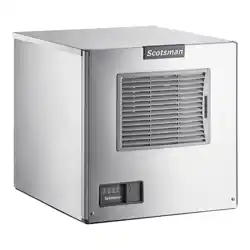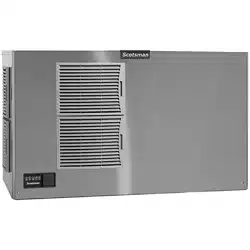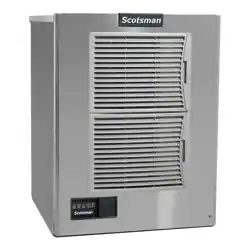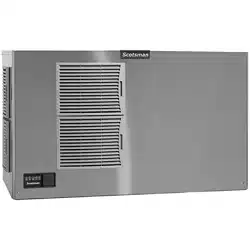
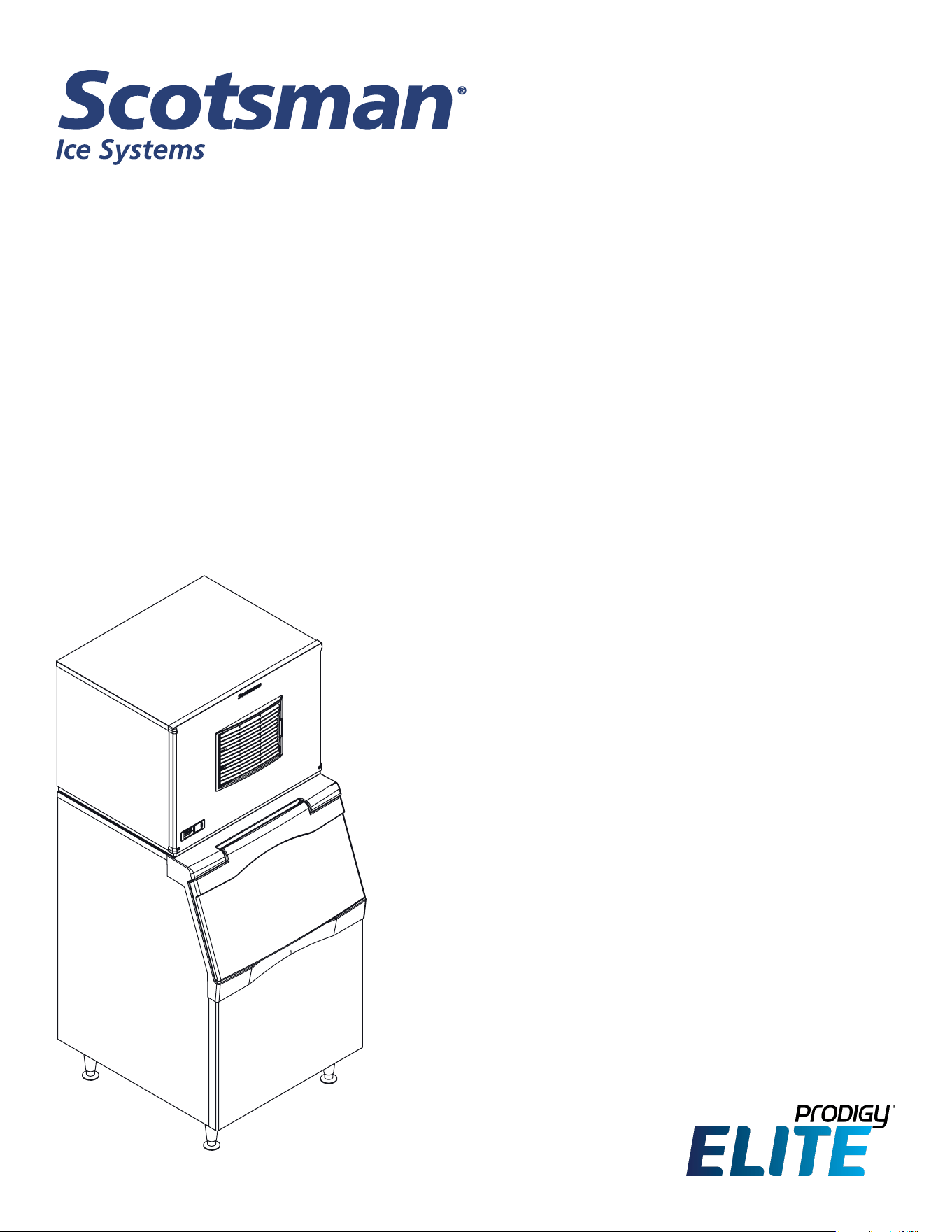
Installation and User’s Manual for
Air and Water Cooled Modular Cuber
Prodigy Elite® A Series Models MC0322X,
MC0522X, MC0722X, MC0330X, MC0530X,
MC0630X, MC0830X, MC1030X
Air Cooled and Water Cooled
Safety Information
Important Safety Information. Make sure to read
through fully to avoid severe injury or death.
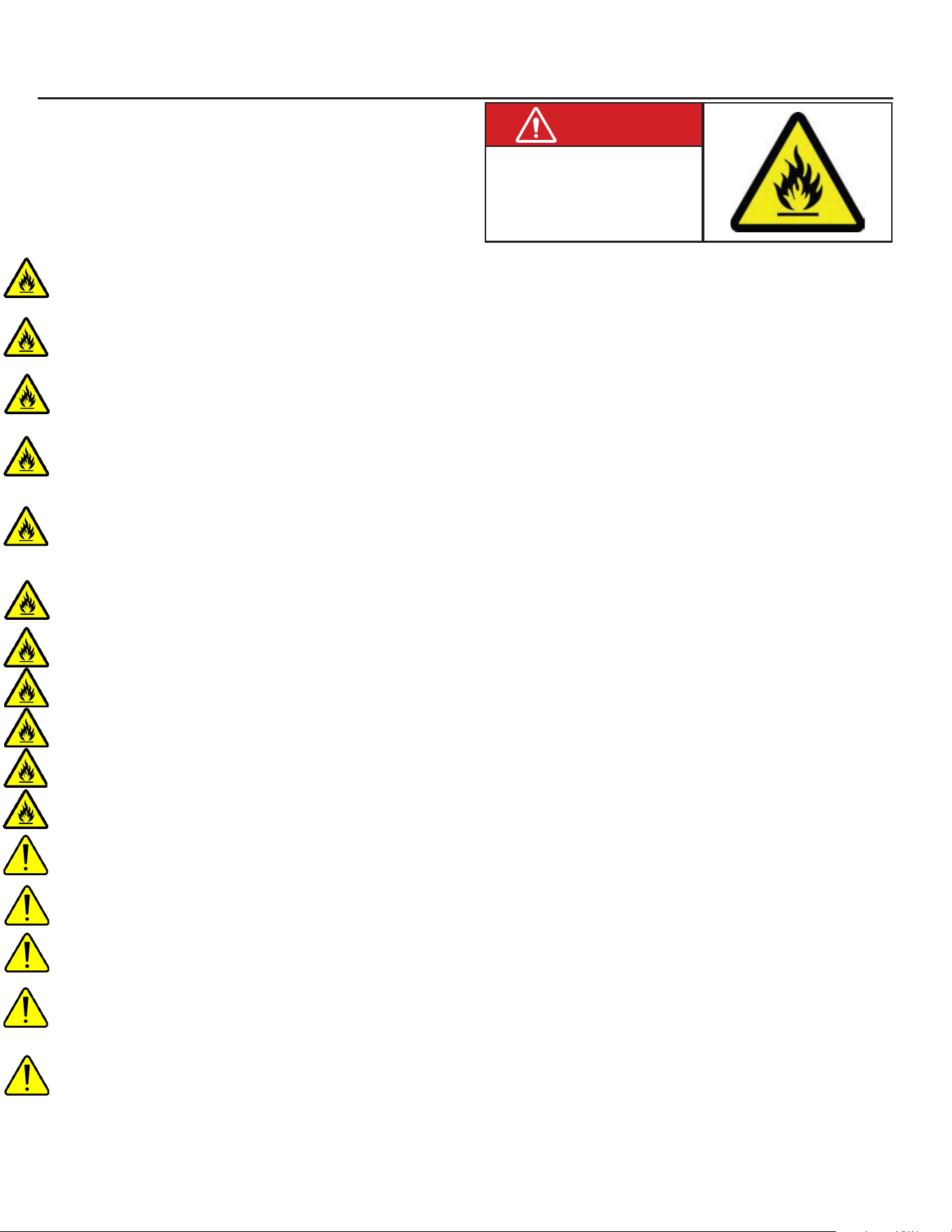
This ice machine contains FLAMMABLE refrigerant and improper use can result in re or explosion. Do not
use cigarettes, vapes, or cellphones near pipes or cables, as it can be a source of ignition or spark.
This ice machine must not be installed next to equipment with an open ignition source (ie. open flames, an
operating gas appliance, or electric heater).
Do not store explosive substances such as aerosol cans with a ammable propellant in this appliance.
WARNING: Do not use electrical appliances inside the food/ice storage compartments unless they are of the
type recommended by the manufacturer.
WARNING: In order to reduce ammability hazards the installation of this appliance must only be carried out
by a suitably qualied person.
This appliance must be installed according to the safety standard for refrigeration systems presented in ANSI/
ASHRAE 15.
Do not install next to anything that continuously vibrates, avoiding excessive vibrations or pulsations.
Install in a well ventilated environment and ensure ventilation and outlets are not obstructed.
Properly secure electrical wiring and cabling for the machine to minimize wear and vibrations.
Keep re extinguisher nearby in case of emergencies.
WARNING: Do not damage the refrigerating circuit
Use a Scotsman recommended technician certied to repair R290 equipment.
Install ONLY Scotsman factory service parts. Use of non-OEM parts can be dangerous due to the design
changes needed to safely use R290 refrigerant.
WARNING: Cancer and Reproductive Harm. Visit www.P65Warnings.ca.gov for details.
This appliance is not intended for use by persons (including children) with reduced physical, sensory or mental
capabilities, or lack of experience and knowledge, unless they have been given supervision or instruction
concerning the use of the appliance by a person responsible for their safety.
Children should be supervised to ensure that they do not play with the appliance.
R290 Refrigerant is
Flammable.
Flame can cause burns or
property damage
Keep away from sources of re
WARNING

MC0322X through MC1030X
Air and Water Cooled User Manual
December 2024
Page 1
Introduction
The design of this modular cuber is the result of years
of experience and testing. Standard features include
front accessible indicator lights and on-o switches
that provide the user with fast access to critical
information and easy operational control. In addition,
the Scotsman ICELINQ® app allows users to connect
to the machine via Bluetooth® to monitor, control, and
maintain the ice machine. Keep this manual for future
reference.
This installation and user manual is divided into
three main sections: Installation, which provides
the trade person with the information needed to set
up and install this product; Use and Operation,
which provides the user with the information to use
the product; and Maintenance, which provides the
user with the information needed keep it operating
eciently.
Contents
Installation: Product Specications . . . . . . . . . . . . . . . . . . . . . . . . . . . . . . . . . . Page 2
Model Number Description . . . . . . . . . . . . . . . . . . . . . . . . . . . . . . . . . . . . . . Page 3
Product Description & Electrical Requirements . . . . . . . . . . . . . . . . . . . . . . . . . . . . Page 4
MC0322X and MC0522X Cabinet Layout . . . . . . . . . . . . . . . . . . . . . . . . . . . . . . . Page 6
MC0722X Cabinet Layout . . . . . . . . . . . . . . . . . . . . . . . . . . . . . . . . . . . . . . . Page 7
MC0330X, MC0530X, MC0630X Cabinet Layout . . . . . . . . . . . . . . . . . . . . . . . . . . . Page 8
MC0830X and MC1030X Cabinet Layout . . . . . . . . . . . . . . . . . . . . . . . . . . . . . . . Page 9
Water . . . . . . . . . . . . . . . . . . . . . . . . . . . . . . . . . . . . . . . . . . . . . . . . . Page 10
Panel Removal . . . . . . . . . . . . . . . . . . . . . . . . . . . . . . . . . . . . . . . . . . . . Page 11
Plumbing Requirements . . . . . . . . . . . . . . . . . . . . . . . . . . . . . . . . . . . . . . . . Page 12
Electrical . . . . . . . . . . . . . . . . . . . . . . . . . . . . . . . . . . . . . . . . . . . . . . . . Page 13
Final Check List . . . . . . . . . . . . . . . . . . . . . . . . . . . . . . . . . . . . . . . . . . . . Page 14
Initial Start Up . . . . . . . . . . . . . . . . . . . . . . . . . . . . . . . . . . . . . . . . . . . . . Page 15
Adjustments . . . . . . . . . . . . . . . . . . . . . . . . . . . . . . . . . . . . . . . . . . . . . . Page 16
Use and Operation . . . . . . . . . . . . . . . . . . . . . . . . . . . . . . . . . . . . . . . . . . Page 17
Control Switches. . . . . . . . . . . . . . . . . . . . . . . . . . . . . . . . . . . . . . . . . . . . Page 18
Cleaning, Sanitation and Maintenance . . . . . . . . . . . . . . . . . . . . . . . . . . . . . . . . Page 19
Cleaning, Sanitation and Maintenance Continued . . . . . . . . . . . . . . . . . . . . . . . . . . Page 20
What to do before calling for service . . . . . . . . . . . . . . . . . . . . . . . . . . . . . . . . . Page 21
For the Service Tech - R290 . . . . . . . . . . . . . . . . . . . . . . . . . . . . . . . . . . . . . . Page 22
Decommissioning . . . . . . . . . . . . . . . . . . . . . . . . . . . . . . . . . . . . . . . . . . . Page 23
Agency Approvals:
Their marks appear on the dataplate or serial tag, located in the inside and back. The dataplate also
contains the model and serial numbers as well as electrical requirements on the back plate.
MC0322X through MC1030X R290X
Air and Water Cooled User Manual
December 2024
Page 2
Installation: Product Specications
Location Limitations:
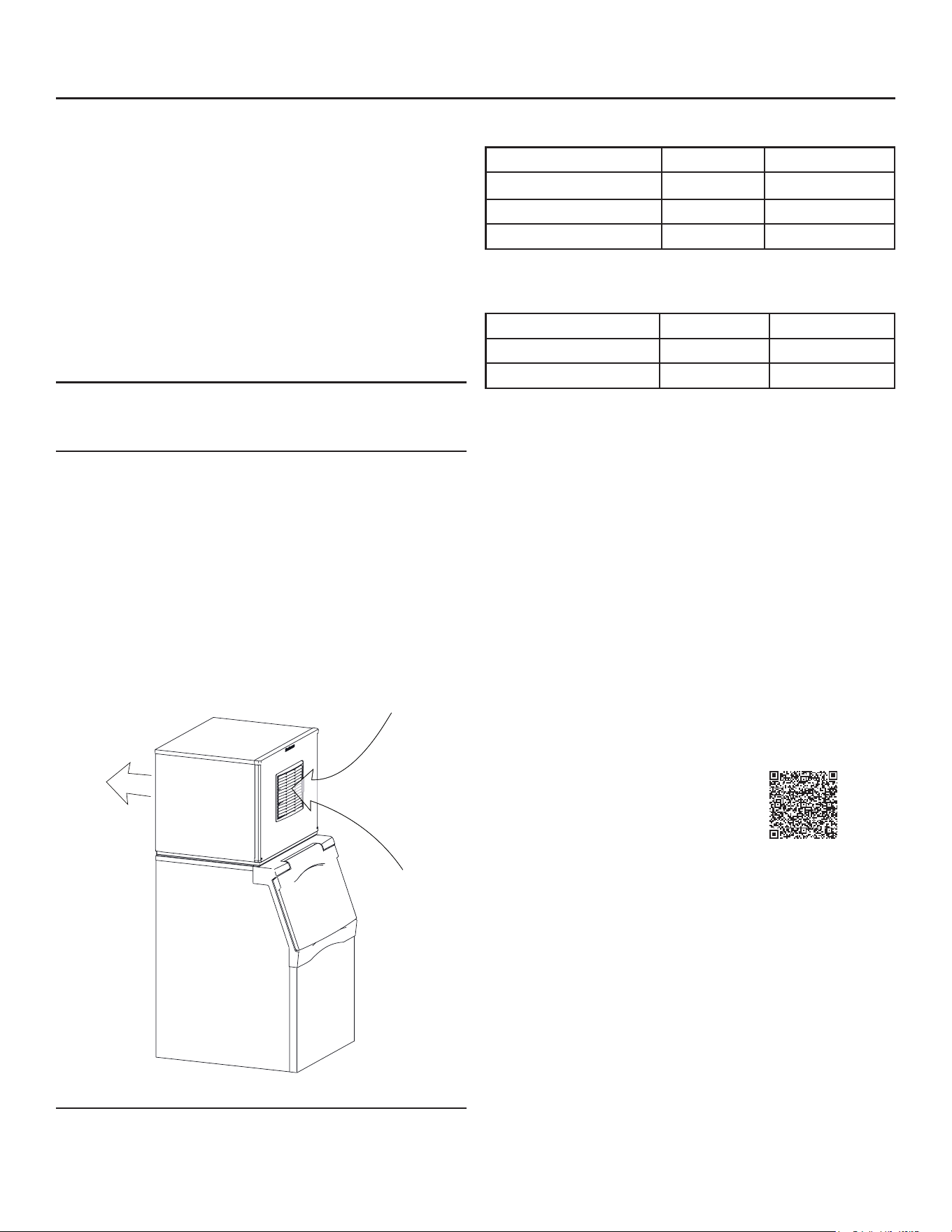
The product is designed to be installed indoors, in a
controlled environment. Air cooled models discharge
very warm air into the room out of the back of the
machine. Space must be allowed at the sides
and back for air discharge. Water cooled models
discharge warm water into the building’s drain.
Space needs to be provided on both sides and above
for service access.
Space Limitations
Note: Although the machine will function, ice capacity
of air cooled machines will be signicantly reduced
with minimal clearance at the sides, back and top.
Some space is recommended for service and
maintenance purposes on all models. 6" of space
at the sides and back are required for adequate
operation. To get the most capacity, locate the
machine away from heat producing appliances and
heating ducts, and allow 12-18 inches of space at
the sides and top for good air ow.
Air ows through the front and out the back of the
machine. Attach a bae kit to the back when an air
cooled unit is installed with minimal side and top
clearance. See the next page for kit numbers.
Environmental Limitations
Minimum Maximum
Air temperature 50
o
F 100
o
F
Water temperature 40
o
F 100
o
F
Water pressure 20 psi 80 psi
Power supply – acceptable voltage ranges
Minimum Maximum
115 volt model 104 volts 126 volts
208-230 volt model 198 volts 253 volts
Warranty Information
The warranty statement for this product is provided
separately from this manual. Refer to it for applicable
coverage. In general, the warranty covers defects
in material or workmanship. It does not cover
maintenance, corrections to installations, or situations
when the machine is operated in circumstances that
exceed the limitations printed above.
This is a commercial model. If installed in a residence,
some commercial service companies may not be able
to service it on site.
Fill out the Warranty Registration by using the
attached warranty and mailing it in, or scan the QR
code to be taken to the Scotsman warranty website:
Product Information
This product is a modular cuber. This type of machine
is designed to be placed on an ice storage bin or
an ice dispenser. Many installations only require the
matching bin, but some also require an adapter to
be placed between the bin and the cuber or between
the dispenser and the cuber. This product cannot
be stacked. See the chart on the next page for
application information.
Air Flow
MC0322X through MC1030X
Air and Water Cooled User Manual
December 2024
Page 3
Model Number Description
Example:
• MC0322SAX-1A
• MC= modular cuber
• 03= nominal ice capacity in 100s of pounds
• 22= nominal width of cabinet
• S= Cube size. S=small or half dice cube.
M=medium or full dice cube
• A=Condenser type. A=air cooled. W=water cooled
• X=R290 Refrigerant (ammable refrigerant)
• -1=115 60 Hz, -32=208-230 60 Hz, -3= 208-230 3
phase 60 Hz
• A=Series revision code.
Note: Listed model numbers typically include only the
rst ve characters of the model number.
Options:
There are several eld-installed options that can be
installed at initial start up or later. They include:
• KVS, Vari-Smart Adjustable ice level system.
• KBILC, Basic Ice Level Control
• KSBU, SmartBoard Advanced feature board.
• Side Air Flow Kits:
• PPSA223 (MC0322X, MC0522X)
• KPPSA22, (MC0722X)
• KPPSA323 (MC0330X, MC0530X, MC0630X)
• KPPSA329 (MC0830X, MC1030X)
• Some installations require bin or dispenser
adapters, see following tables for specic
applications.
Standard Bin Applications - Adapter information.
Model B322 B330P B530P
B530S
B842S B948S
MC0322X
MC0522X
MC0722X
Direct
t
KBT27 KBT27 KBT39 KBT38 or
KBT38-2x
(two units)
MC0330X
MC0530X
MC0630X
N/A Direct
t
Direct
t
KBT29 KBT22B
MC0830X
MC1030X
N/A N/A Direct
t
KBT29 KBT22B
Hotel Dispensers
The HD22 and HD30 are compatible with this ice
machine, no adapters are needed. Some typical
combinations include:
• HD22 – use with MC0322X or MC0522X
• HD30 – use with MC0330X or MC0530X
Ice and Beverage Dispensers – Adapter
information
Model IOD150 IOD200 or IOD250
MC0322X
MC0522X
MC0722X
KBT82
KBT83
MC0330X
MC0530X
MC0630X
MC0830X
MC1030X
Does not t
KBT84
Other Bins & Applications:
Note the drop zone and ice level control sensor
locations in the illustrations on the next pages. A bin
or dispenser top must accommodate their locations.
See sales literature for additional applications and
specialized kits.
Scotsman Ice Systems are designed and
manufactured with the highest regard for safety and
performance. They meet or exceed UL60335-2-89.
Scotsman assumes no liability of responsibility of
any kind for products manufactured by Scotsman
that have been altered in any way, including the use
of any part and/or other components not specically
approved by Scotsman.
Scotsman reserves the right to make design changes
and/or improvements at any time. Specications and
design are subject to change without notice.
MC0322X through MC1030X R290X
Air and Water Cooled User Manual
December 2024
Page 4
Product Description & Electrical Requirements
Dimensions
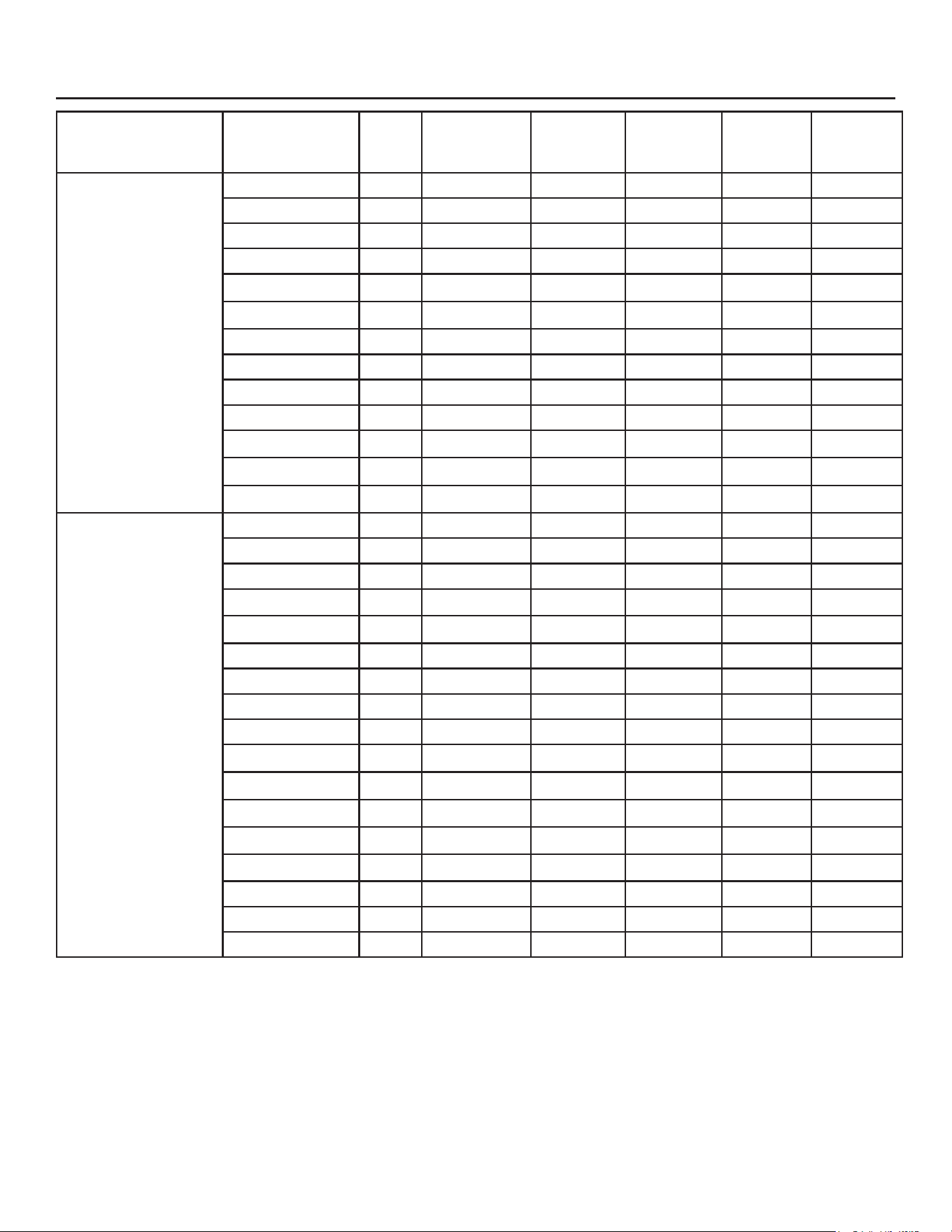
w" x d" x h"
Model Series
Electrical
volts/Hz/
phase
Condenser
Refrigerant
Type
Minimum
Circuit
Ampacity
Maximum
Fuse Size*
22.6** x 24 x 23
MC0322SAX-1 A 115/60/1 Air R290 10.3 15
MC0322MAX-1 A 115/60/1 Air R290 10.3 15
MC0322SWX-1 A 115/60/1 Water R290 9.5 15
MC0322MWX-1 A 115/60/1 Water R290 9.5 15
MC0322MAX-32 A 208-230/60/1 Air R290 5.5 15
MC0322SWX-32 A 208-230/60/1 Water R290 5.0 15
MC0522SAX-1 A 115/60/1 Air R290 11.1 15
MC0522MAX-1 A 115/60/1 Air R290 11.1 15
MC0522SWX-1 A 115/60/1 Water R290 9.5 15
MC0522MWX-1 A 115/60/1 Water R290 9.5 15
MC0522SAX-32 A 208-230/60/1 Air R290 5.9 15
MC0522MAX-32 A 208-230/60/1 Air R290 5.9 15
MC0522SWX-32 A 208-230/60/1 Water R290 5.0 15
30.6** x 24 x 23
MC0330SAX-1 A 115/60/1 Air R290 10.3 15
MC0330MAX-1 A 115/60/1 Air R290 10.3 15
MC0330SWX-1 A 115/60/1 Water R290 9.5 15
MC0330MWX-1 A 115/60/1 Water R290 9.5 15
MC0330MAX-32 A 208-230/60/1 Air R290 5.5 15
MC0530SAX-1 A 115/60/1 Air R290 11.1 15
MC0530MAX-1 A 115/60/1 Air R290 11.1 15
MC0530SWX-1 A 115/60/1 Water R290 9.5 15
MC0530MWX-1 A 115/60/1 Water R290 9.5 15
MC0530SAX-32 A 208-230/60/1 Air R290 5.9 15
MC0530MAX-32 A 208-230/60/1 Air R290 5.9 15
MC0630MAX-1 A 115/60/1 Air R290 18.3 20
MC0630SAX-1 A 115/60/1 Air R290 18.3 20
MC0630SAX-32 A 208-230/60/1 Air R290 9.5 15
MC0630MAX-32 A 208-230/60/1 Air R290 9.5 15
MC0630SWX-32 A 208-230/60/1 Water R290 8.6 15
MC0630MWX-32 A 208-230/60/1 Water R290 8.6 15
* Or HACR type circuit breakers.
** Maximum width at top panel.
MC0322X through MC1030X
Air and Water Cooled User Manual
December 2024
Page 5
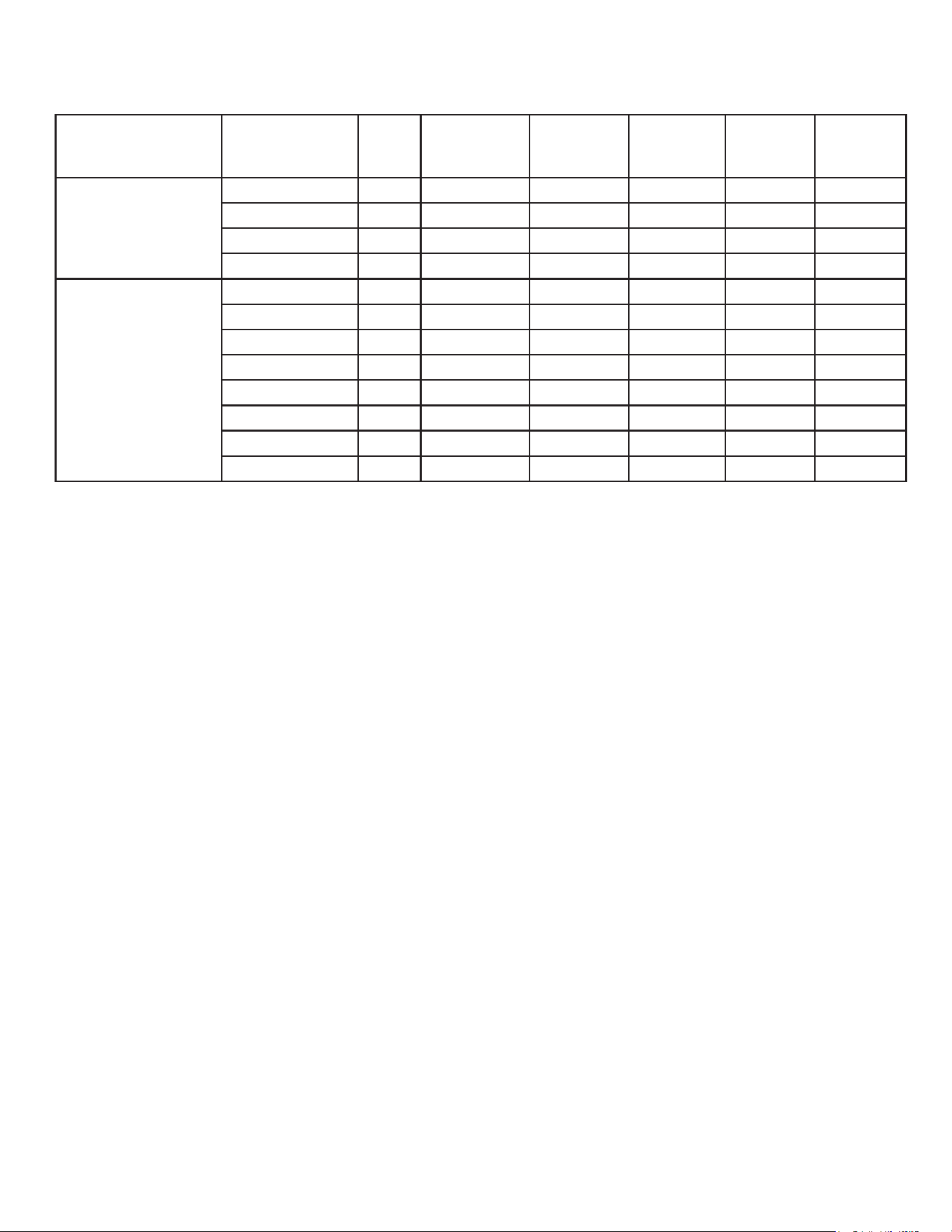
Dimensions
w” x d” x h”
Model Series
Electrical
volts/Hz/
phase
Condenser
Refrigerant
Type
Minimum
Circuit
Ampacity
Maximum
Fuse
Size*
22.6** x 24 x 29
MC0722SAX-1 A 115/60/1 Air R290 18.8 20
MC0722MAX-1 A 115/60/1 Air R290 18.8 20
MC0722SAX-32 A 208-230/60/1 Air R290 9.7 15
MC0722MAX-32 A 208-230/60/1 Air R290 9.7 15
30.6** x 24 x 29
MC0830SAX-32 A 208-230/60/1 Air R290 12.9 15
MC0830MAX-32 A 208-230/60/1 Air R290 12.9 15
MC0830SWX-32 A 208-230/60/1 Water R290 11.7 15
MC0830MWX-32 A 208-230/60/1 Water R290 11.7 15
MC1030SAX-32 A 208-230/60/1 Air R290 14.2 15
MC1030MAX-32 A 208-230/60/1 Air R290 14.2 15
MC1030SWX-32 A 208-230/60/1 Water R290 13.0 15
MC1030MWX-32 A 208-230/60/1 Water R290 13.0 15
* Or HACR type circuit breakers.
** Maximum width at top panel.
MC0322X through MC1030X R290X
Air and Water Cooled User Manual
December 2024
Page 6
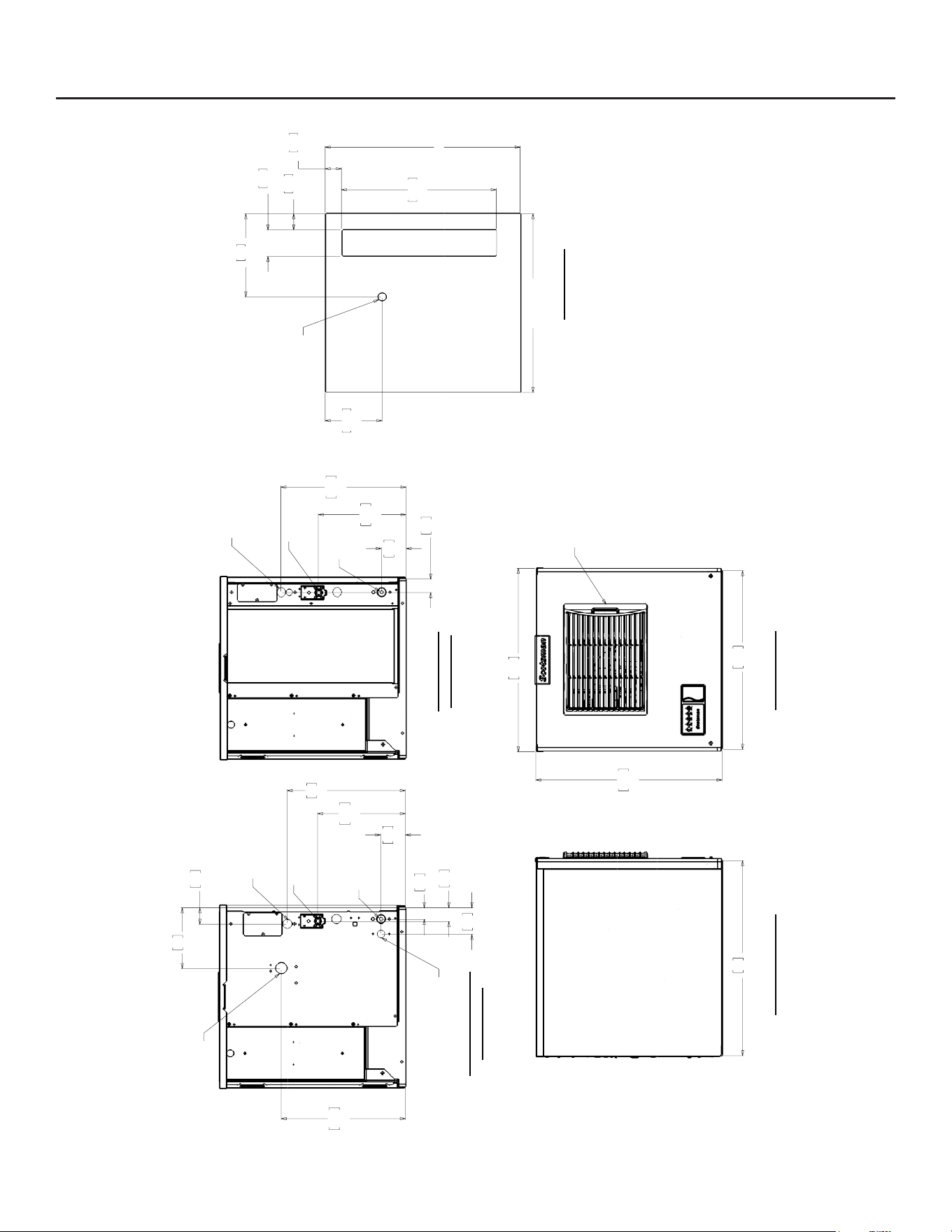
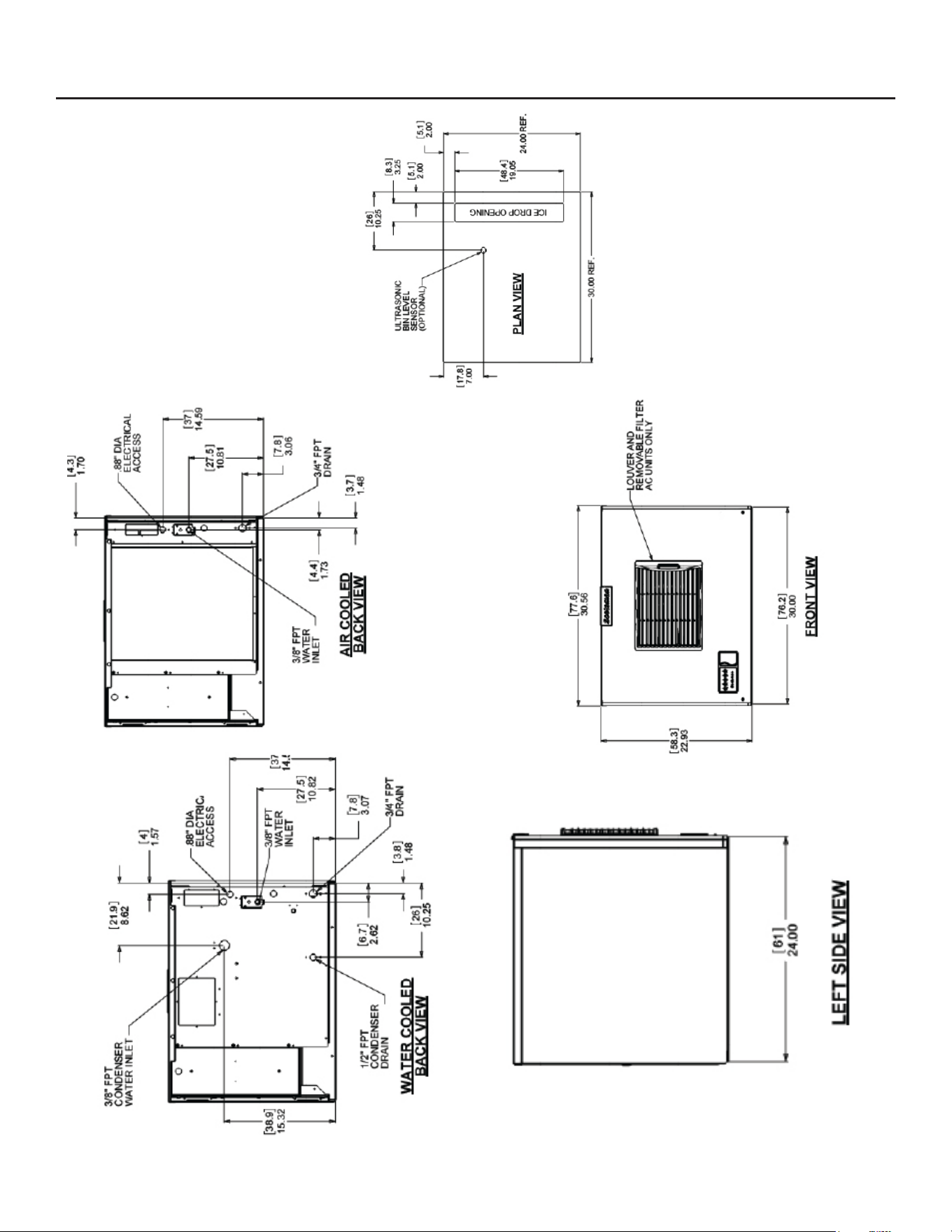
MC0322X and MC0522X Cabinet Layout
57.4
22.58
55.9
22.00
58.2
22.93
LOUVER AND
REMOVABLE FILTER
AC UNITS ONLY
4.2
1.66
7.7
3.04
27.4
10.81
39.1
15.41
3/4" FPT
DRAIN
3/8" FPT
WATER
INLET
.88" DIA
ELECTRICAL
ACCESS
4.3
1.69
3.6
1.44
8.3
3.27
5.1
2.03
38.8
15.29
19
7.48
7.7
3.04
27.4
10.81
37
14.56
3/4" FPT
DRAIN
3/8" FPT
WATER
INLET
.88" DIA
ELECTRICAL
ACCESS
1/2" FPT
CONDENSER
DRAIN
3/8" FPT
CONDENSER
WATER INLET
24.00
REF.
22.00
REF.
2.00
5.1
2.00
5.1
19.05
48.4
3.25
8.3
10.25
26
7.00
17.8
ICE DROP OPENING
ULTRASONIC
BIN LEVEL
SENSOR
(OPTIONAL)
61
24.00
AIR COOLED
BACK VIEW
LEFT SIDE VIEW
FRONT VIEW
WATER COOLED
BACK VIEW
PLAN VIEW
MC0322X through MC1030X
Air and Water Cooled User Manual
December 2024
Page 7
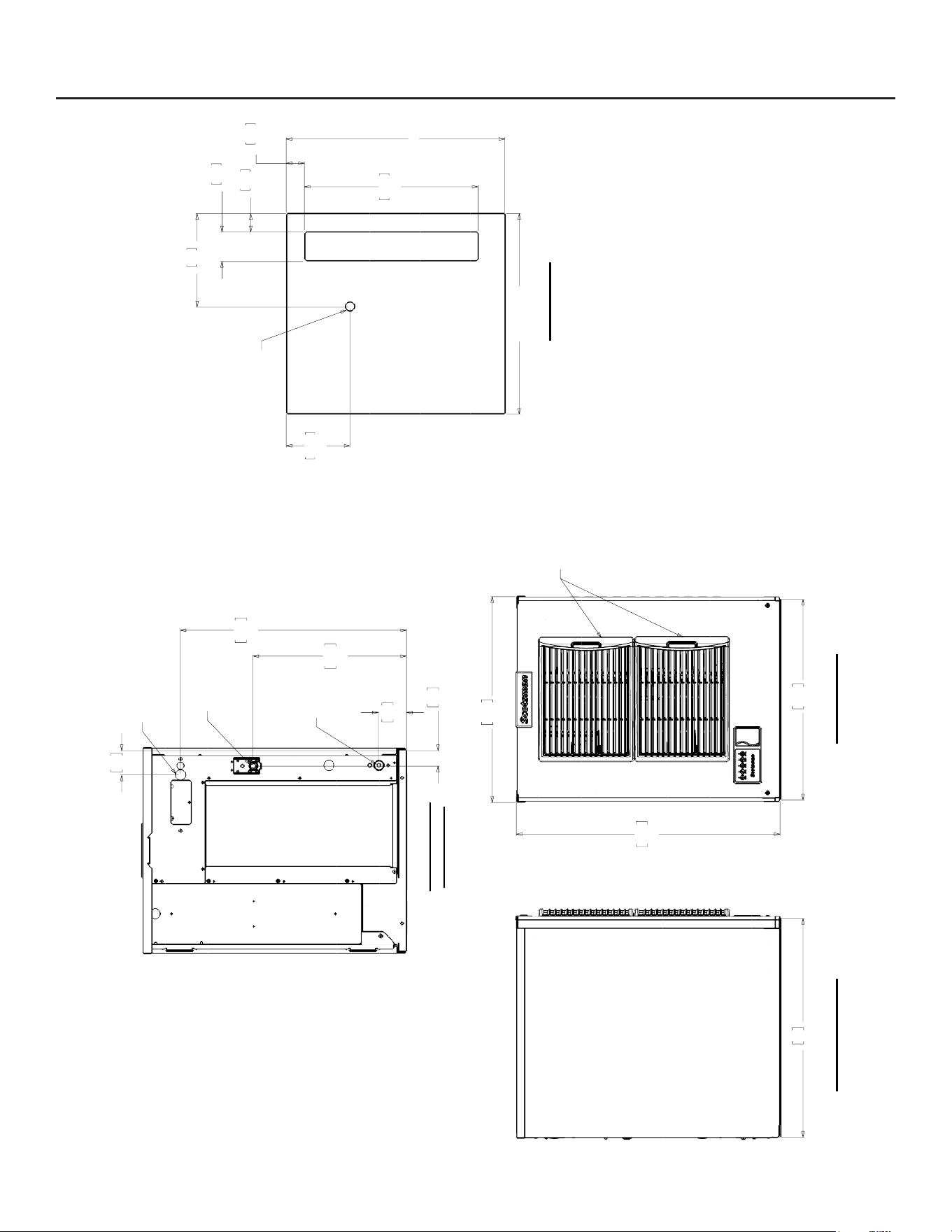
MC0722X Cabinet Layout
57.4
22.58
55.9
22.00
73.5
28.93
LOUVER AND
REMOVABLE FILTERS
AC UNITS ONLY
4.3
1.71
42.8
16.85
63.1
24.83
7.8
3.08
6.8
2.68
3/4" FPT
DRAIN
3/8" FPT
WATER
INLET
.88" DIA
ELECTRICAL
ACCESS
24.00
REF.
22.00
REF.
2.00
5.1
2.00
5.1
19.05
48.4
3.25
8.3
10.25
26
7.00
17.8
ICE DROP OPENING
ULTRASONIC
BIN LEVEL
SENSOR
(OPTIONAL)
61
24.00
AIR COOLED
BACK VIEW
LEFT SIDE VIEW
FRONT VIEW
PLAN VIEW
MC0322X through MC1030X R290X
Air and Water Cooled User Manual
December 2024
Page 8
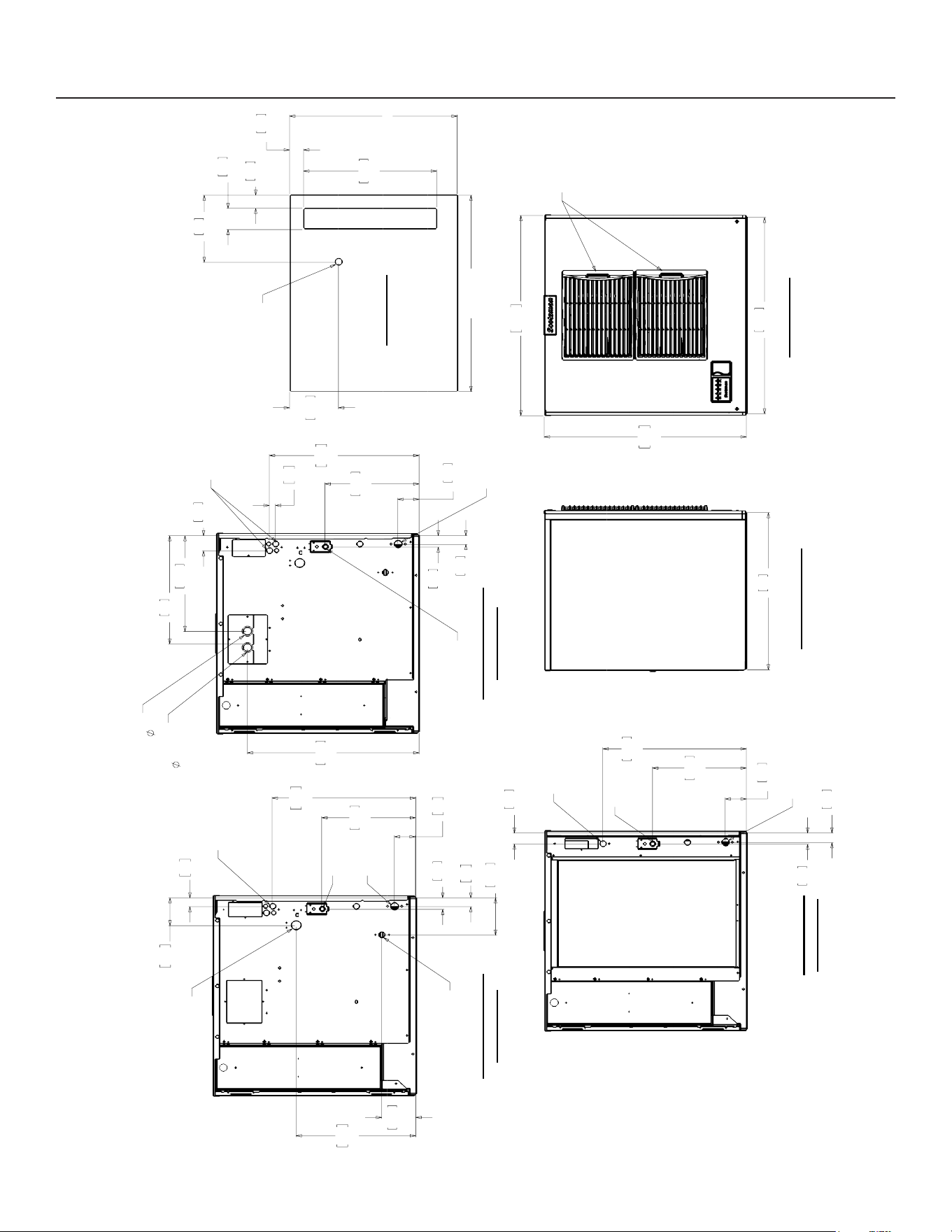
MC0330X, MC0530X, MC0630X Cabinet Layout
MC0322X through MC1030X
Air and Water Cooled User Manual
December 2024
Page 9
24.00
REF.
30.00
REF.
2.00
5.1
2.00
5.1
19.05
48.4
3.25
8.3
10.25
26
7.00
17.8
ICE DROP OPENING
ULTRASONIC
BIN LEVEL
SENSOR
(OPTIONAL)
30.00
76.2
77.67
30.58
73.5
28.93
LOUVERS AND
REMOVABLE FILTERS
AC UNITS ONLY
24.00
61
3.7
1.73
4.4
1.70
4.3
3.06
7.8
13.44
34.1
20.56
52.2
3/8" FPT
WATER
INLET
3/4" FPT
DRAIN
.88" DIA
ELECTRICAL
ACCESS
4.87
12.4
1.75
4.4
5.69
14.4
13.47
34.2
3.4
1.35
7.6
3.01
43.5
17.14
52.2
20.56
3.4
1.34
10.8
4.24
3/8" FPT
WATER
INLET
3/4" FPT
DRAIN
.88" DIA
ELECTRICAL
ACCESS
3/8" FPT
CONDENSER
WATER INLET
1/2" FPT
CONDENSER
DRAIN
24.60
62.5
16.54
42
14.63
37.1
2.34
5.9
3.07
7.8
13.47
34.2
1.48
3.8
1.75
4.4
2.2
.88
54.4
21.44
3/8" FPT
WATER
INLET
3/4" FPT
DRAIN
REMOTE CONDENSER
LIQUID LINE
3/8
REMOTE CONDENSER
DISCHARGE LINE
1/2
.88" DIA
ELECTRICAL
ACCESS (2)
AIR COOLED
BACK VIEW
LEFT SIDE VIEW
FRONT VIEW
WATER COOLED
BACK VIEW
REMOTE COOLED
BACK VIEW
PLAN VIEW
MC0830X and MC1030X Cabinet Layout

MC0322X through MC1030X R290X
Air and Water Cooled User Manual
December 2024
Page 10
Water
The quality of the water supplied to the ice machine
will have an impact on the time between cleanings
and ultimately on the life of the product. Water can
contain impurities either in suspension or in solution.
Suspended solids can be ltered out. In solution
or dissolved solids cannot be ltered, they must be
diluted or treated. Water lters are recommended
to remove suspended solids. Some lters have
treatment in them for suspended solids. Check with a
water treatment service for a recommendation.
RO Water
This machine can be supplied with Reverse Osmosis
water, but the water conductivity must be no less than
10 microsiemens/cm.
Potential for Airborne Contamination
Installing an ice machine near a source of yeast
or similar material can result in the need for more
frequent sanitation cleanings due to the tendency of
these materials to contaminate the machine.
Most water lters remove chlorine from the water
supply to the machine which contributes to this
situation. Testing has shown that using a lter that
does not remove chlorine, such as the Scotsman
AquaPatrol™, will greatly improve this situation, while
the ice making process itself will remove the chlorine
from the ice, resulting in no taste or odor impact.
Additionally, devices intended to enhance ice machine
sanitation, such as the Scotsman AquaBullet®, can
be placed in the machine to keep it cleaner between
manual cleanings.
Water purge
Cube ice machines use more water than what ends
up in the bin as ice. While most water is used during
ice making, a portion is designed to be drained out
every cycle to reduce the amount of hard water scale
in the machine. That’s known as water purge, and
an eective purge can increase the time between
needed water system cleaning. In addition, this
product has the capability to automatically vary the
amount of water purged based on the purity of the
water supplied to it. The water purge rate can also be
set manually. Adjustments of purge due to local water
conditions are not covered by warranty.
MC0322X through MC1030X
Air and Water Cooled User Manual
December 2024
Page 11
Panel Removal
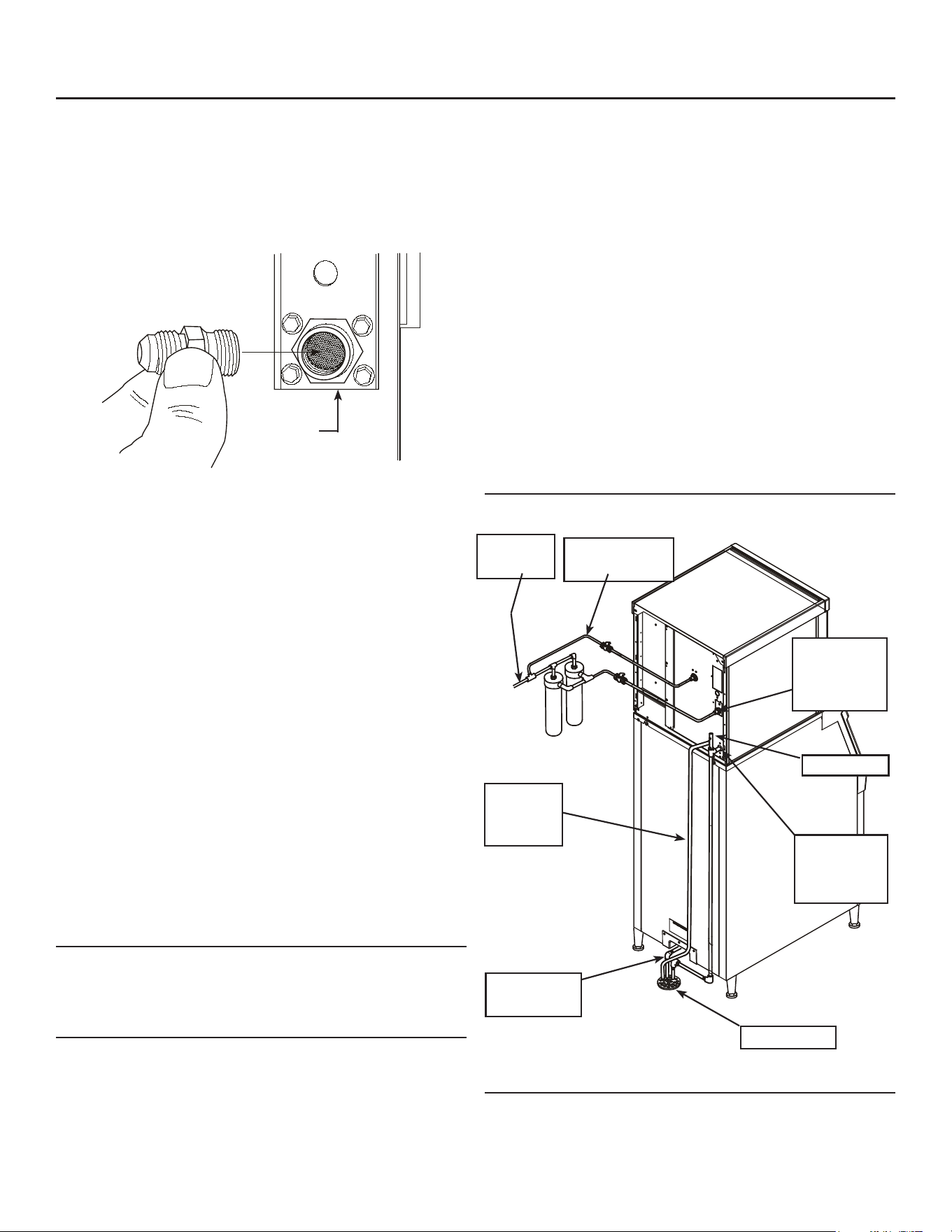
1. Locate and disengage the two quarter turn
captured screws at the bottom of the front panel.
2. Pull the front panel out at the bottom.
3. Lift the front panel up and o the machine.
4. Remove two screws at the front of the top panel.
Lift up the front of the top panel, push the top
panel back an inch, then lift to remove.
5. Locate and loosen the screws holding each side
panel to the base. The left side panel also has a
screw holding it to the control box.
6. Pull the side panels forward to release them from
the back panel.
Model and Serial Numbers
This manual covers several models. The model
number on the product is located in two places, on the
back dataplate and on the model and serial number
tag, located behind the front panel. See the illustration
for the dataplate and serial tag locations.
Write the model and serial number of this product
here:
________________________________________
Write the day, month and year of initial start up here:
________________________________________
Switch Door
All models ship with the indicator lights visible at
the lower left front. The On and O buttons and the
Bluetooth® button are covered by a door to the right
of those lights. The on and o buttons and indicator
lights duplicate what is on the controller.
Uncrate and Set Up
Begin with unpacking the ice storage bin. Remove the
carton, and using part of the carton as a cushion, tip
the bin on its back to remove the skid and attach the
legs or casters.
Return the bin to an upright position. Check the bin
top gasket for gaps and tears, ll any in with food
grade sealant prior to placing the ice machine on the
bin.
Install the bin top adapter or ice dispenser adapter, if
one is required for the application.
If the ice machine has not been unpacked, do so now.
Remove the carton from the skid. Lift the ice machine
o the skid directly onto the bin.
Note: The machine is heavy! Use a mechanical hoist
if necessary.
Secure the ice machine to the bin with the hardware
provided (two metal straps and 4 bolts).
Place the bin and ice machine in the selected location
and level it by adjusting the bin leg levelers.
Remove the white plastic covering the panels.
Dataplate
Location
5. Remove
Screws
2
6
4
6
3
1. Disengage
1/4 Turn
Screws
Dataplate Location and Panel Removal
MC0322X through MC1030X R290X
Air and Water Cooled User Manual
December 2024
Page 12
Plumbing Requirements
All models require a connection to cold, potable water.
A hand actuated valve within sight of the machine
is required. Air cooled models have a single 3/8”
FPT inlet water connection; a 3/8” FPT to 3/8” male
are adapter is available from the local Scotsman
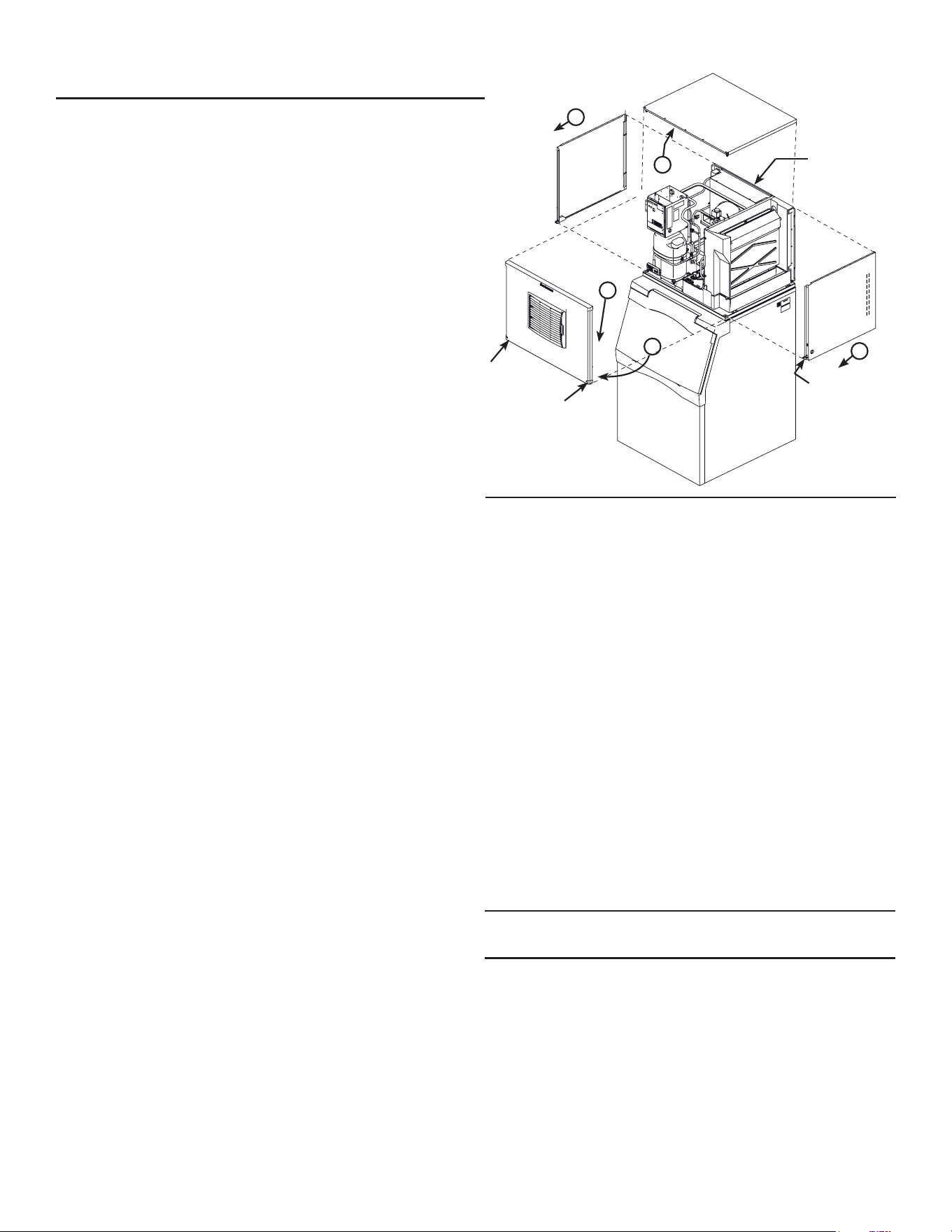
distributor or from a hardware store.
Water cooled models have a 1/2" FPT drain tting
plus an additional 3/8” FPT condenser inlet water
connection.
Water Filters
If connecting to water ltration, lter only the water
to the reservoir, not to the condenser. Install a new
cartridge if the lters were used with a prior machine.
All models require drain tubing to be attached to
them. Air cooled models have a single 3/4” FPT drain
tting in the back of the cabinet. Water cooled models
have the same tting plus an additional 1/2” FPT drain
tting in the back of the cabinet.
Install new tubing when replacing a prior ice machine,
as the tubing will have been sized for the old model
and might not be correct for this one.
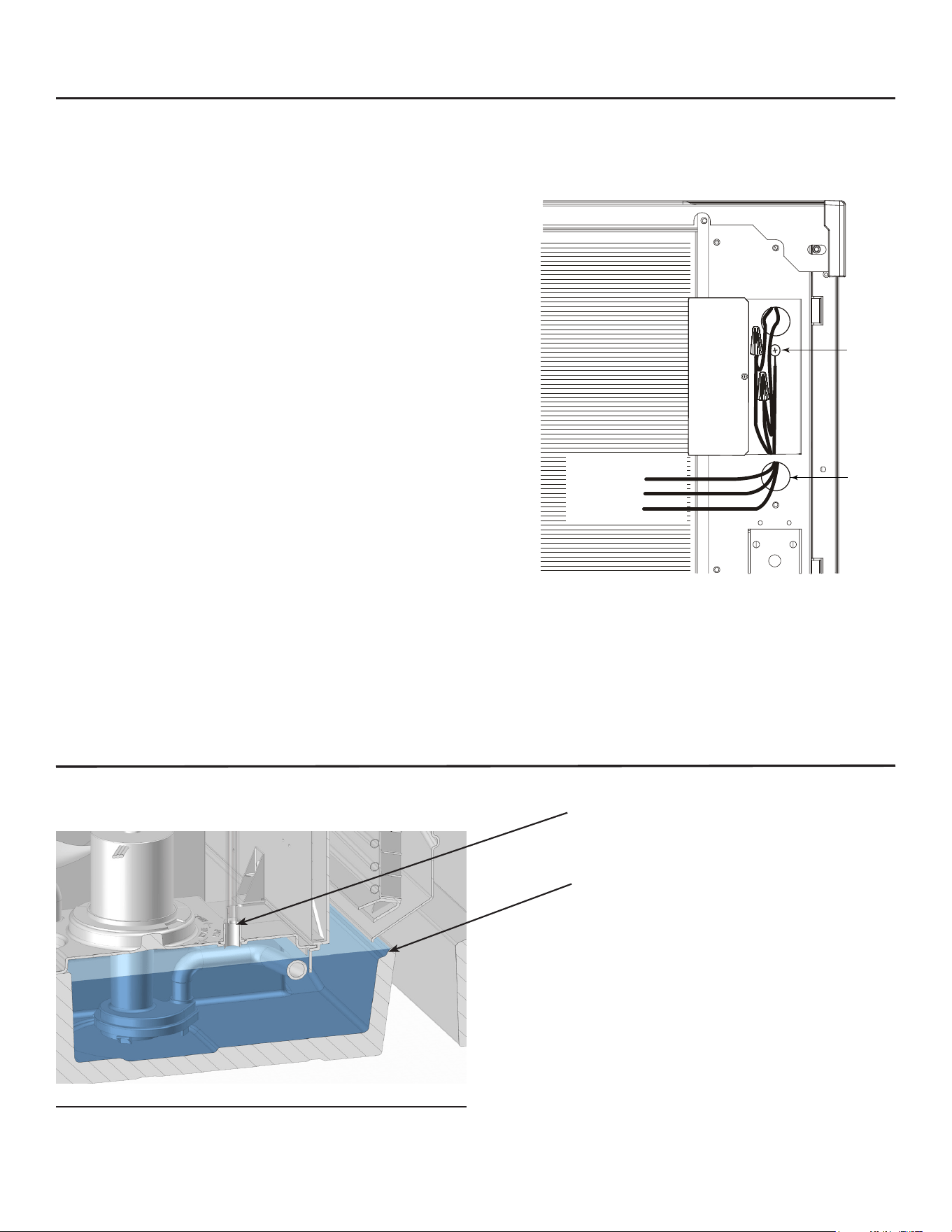
1. Connect water supply to water inlet ttings. 3/8" OD
tubing is recommended.
Note: This NSF listed model has a 1" anti-back ow
air break between the water inlet tube end and the
highest possible reservoir water level, no back ow
device is required for the potable water inlet.
2. Connect drain tubing to drain ttings.
3. Route the drain tubing to building drain. Follow
local codes for air gap to drain receptacle.
Drain Tubing:
Use rigid drain tubes and route them separately – do
not tee into the bin’s drain and, if water cooled,do not
tee the condenser drain into the reservoir or bin drain.
Vent the reservoir drain. A vertical vent at the back of
the drain, extended about 8 - 10”, will allow the gravity
drain to empty and also keep any surges during
draining from discharging water out of the vent.
Insulate drain tubing if in a humid environment.
Horizontal runs of drain tubing need a 1/4” fall per foot
of run for proper draining.
Follow all applicable codes.
Water Fitting
Plumbing Connections
Water Cooled Shown, Air Cooled Similar
Inlet Water
Connection
Water
Supply
Water Cooled
Supply
Water
Cooled
Drain
Floor Drain
Potable
Water
Connection
Drain Vent
Reservoir
Drain
Connection
Bin Drain
Connection
MC0322X through MC1030X
Air and Water Cooled User Manual
December 2024
Page 13
Electrical
The machine is not supplied with a power cord as the
machine is designed to be permanently connected.
The dataplate on the back of the cabinet details
the power requirements, including voltage, phase,
minimum circuit ampacity and maximum fuse size.
HACR type circuit breakers may be used in place of
fuses. Extension cords are not permitted. Use of a
licensed electrician is recommended.
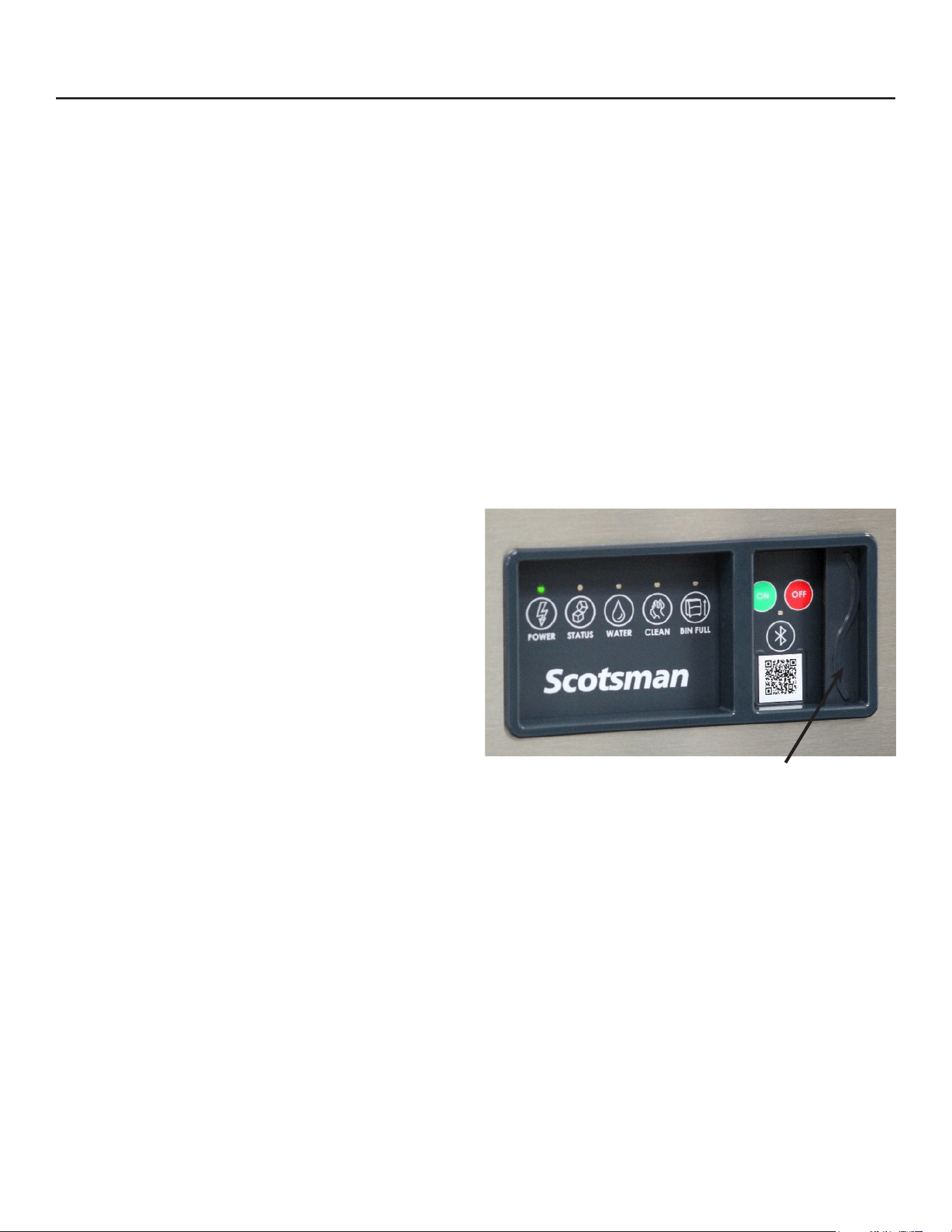
Electrical connections are made inside the junction
box in the back panel of the ice machine.
1. Remove the junction box cover and route the
electrical supply cable through the access hole
and properly attach the power supply wires to the
leads in the junction box.
2. Install a eld supplied strain relief per code. Attach
a ground wire to the ground connection in the
junction box.
3. Check voltage when complete.
4. Return the junction box cover to its original
position and secure with the original screws.
The electrical disconnect switch with fuse protection
must be a two pole type with a minimum of 3 mm
between open contacts.
Follow all applicable local, state and national codes.
Ground Wire
Connection
Install
Strain
Relief
Power
Supply
Wires
Junction
Box
Cover
Cutaway View of Water Reservoir
Air Vent at Water Inlet Connection
Maximum Water Level in Reservoir
The air break is created by the gap between the
maximum water level in the reservoir (additional water
will spill out) and the water inlet connection. Reservoir
water cannot contact the water inlet connection and
in case of negative pressure, only air can enter the
water supply hose.
Air Break
MC0322X through MC1030X R290X
Air and Water Cooled User Manual
December 2024
Page 14
Final Check List
This unit must be on a separate power supply. Check
the dataplate for the voltage, ampacity and maximum
fuse size and per the dataplate use fuses or HACR
circuit breakers.
This ice machine should be installed on a dedicated
circuit with a properly sized HACR-rated breaker
or fuse. No other devices or appliances should be
connected to the same circuit with the ice machine.
Installing a unit on a shared circuit can cause product
malfunctions or damage to the unit. The proper circuit
size can be found on the unit data tag listed as “MAX
FUSE OR HACR TYPE CIRCUIT BREAKER”. Never
allow the fuse size to exceed the maximum fuse size
listed on the data tag.
The use of a ground fault circuit interrupter (GFCI)
or arc-fault circuit interrupter (ARCI) can lead to
nuisance trips and is not recommended for use on
most appliances including our equipment.
If local codes or other specications require the use
of ground fault circuit interrupters, a properly rated
HACR GFCI or ARCI circuit breaker should be used.
An outlet type GFCI or ARCI is not recommended for
ice machines and other refrigeration equipment due to
more frequent nuisance trips of the GFCI or ARCI.
Always check with your local electrical inspector about
the specic code requirements in your area for GFCI
or ARCI breakers and GFCI or ARCI receptacles.
After connections,
1. Wash out the bin. If desired, the interior of the bin
could be sanitized.
2. Locate the ice scoop (if supplied) and have it
available for use when needed.
Final Check List:
1. Is the unit located indoors in a controlled
environment?
2. Is the unit located where it can receive adequate
cooling air?
3. Has the correct electrical power been supplied to
the machine?
4. Have all the water supply connections been
made?
5. Have all the drain connections been made?
6. Has the unit been leveled?
7. Have all unpacking materials and tape been
removed?
8. Is the water pressure adequate?
9. Have the drain connections been checked for
leaks?
10. Has the bin interior been wiped clean or sanitized?
11. Have any water lter cartridges been replaced?
12. Have all required kits and adapters been properly
installed?
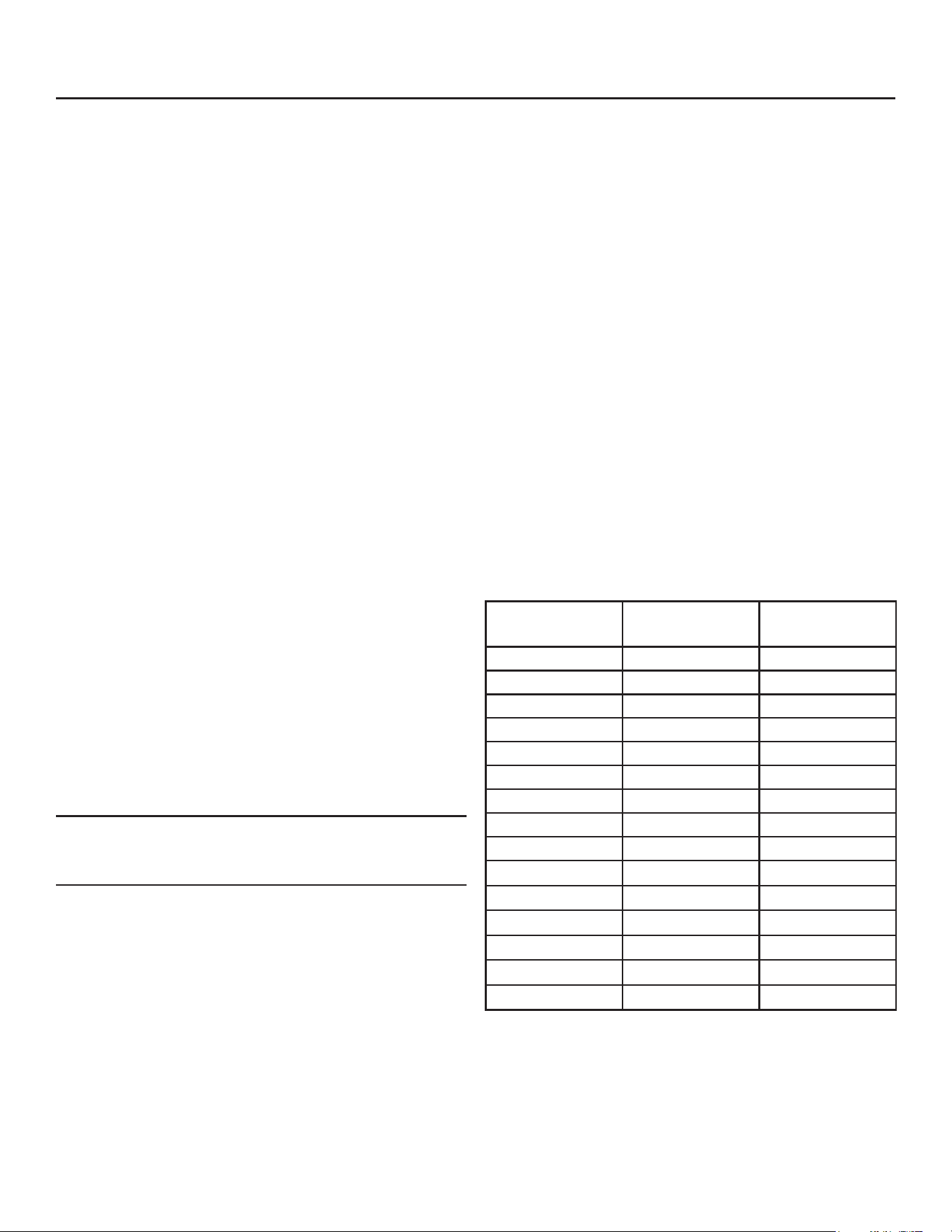
Lower Light and Switch Panel
This user accessible panel provides important
operational information and duplicates the lights and
switches on the controller. It also allows access to the
On and O buttons that operate the ice machine.
Sometimes access to the switches should be limited
to prevent unauthorized operation. For that purpose a
xed panel is shipped in the hardware package. The
xed panel cannot be opened.
To install the xed panel:
1. Remove the front panel.
2. From the back side of the panel, slide the door
to left while spreading the clips to remove the
original door from the bezel.
3. Slide the xed panel into bezel until it snaps into
place.
4. Reinstall front panel.
Open door to access On
and O switch buttons.
MC0322X through MC1030X
Air and Water Cooled User Manual
December 2024
Page 15
Initial Start Up
1. Remove front panel and evaporator cover. Check
machine for any packing or wires rubbing moving parts.
2. Switch on the electrical power to the machine. Observe
that some of the control’s indicator lights glow and its
display shows O.
3. Open the water supply valve.
4. Locate lower light and switch panel. Push and release
the ON button on that panel. The code display will
begin to blink F.
The purge valve opens, the water pump starts and the inlet
water valve opens to add water to the reservoir. In a few
seconds the purge valve closes and the water pump stops.
Water will ow into the machine until the reservoir is full.
The hot gas valve and harvest assist device will activate,
then the compressor and water pump will start. If it’s an
air cooled model, the fan motor(s) will begin to turn a few
moments after the compressor starts. The display will show
a continuous F. Five seconds later the hot gas valve will
close and the harvest assist device will return to its standby
position. Warm air will be discharged from air cooled
models.
5. Observe the Ready for Harvest indicator light. It may
blink early in the cycle, that is normal. The control will
ignore that signal for the rst 6 minutes of freeze.
6. During the Freeze cycle move the curtain and observe
that the SW1 or SW2 light on the control board blinks
On when the curtain moves away from the evaporator
and O when returned to its normal position.
Note: Moving the curtain during the Freeze cycle has no
aect on control function, but will cause water to ow into
the cube chute/bin.
7. When enough ice has frozen, the Ready for Harvest
indicator light will be on steady. After it’s been on
steady for a few seconds Harvest will begin.
8. The display shows an H.
The hot gas valve opens, the air cooled fan motor(s) shut
o and the harvest assist mechanism is activated. The
purge valve opens to drain some water, when it does the
inlet water valve opens to rell the reservoir. After a few
seconds the purge valve closes but the inlet water valve
continues to ll the reservoir. Harvest continues until the ice
is released as a unit and forces the curtain to open. When
the curtain opens it signals the controller which returns the
unit to a freeze cycle.
9. Check the ice harvested for proper bridge thickness.
The ice bridge is factory set at 1/8 inch. If needed,
adjust bridge thickness. Do NOT make it too thin.
10. Return the front panel and evaporator cover to their
normal positions and secure to the machine.
11. Give the owner/user the user manual, instruct him/her
in the operation and maintenance requirements of the
unit. Make sure they know who to call for service.
12. Have the customer ll out the Customer Evaluation and
Warranty Registration form, and mail it in to Scotsman
or register the unit at Scotsman’s website (www.
scotsman-ice.com) or scan the QR code.
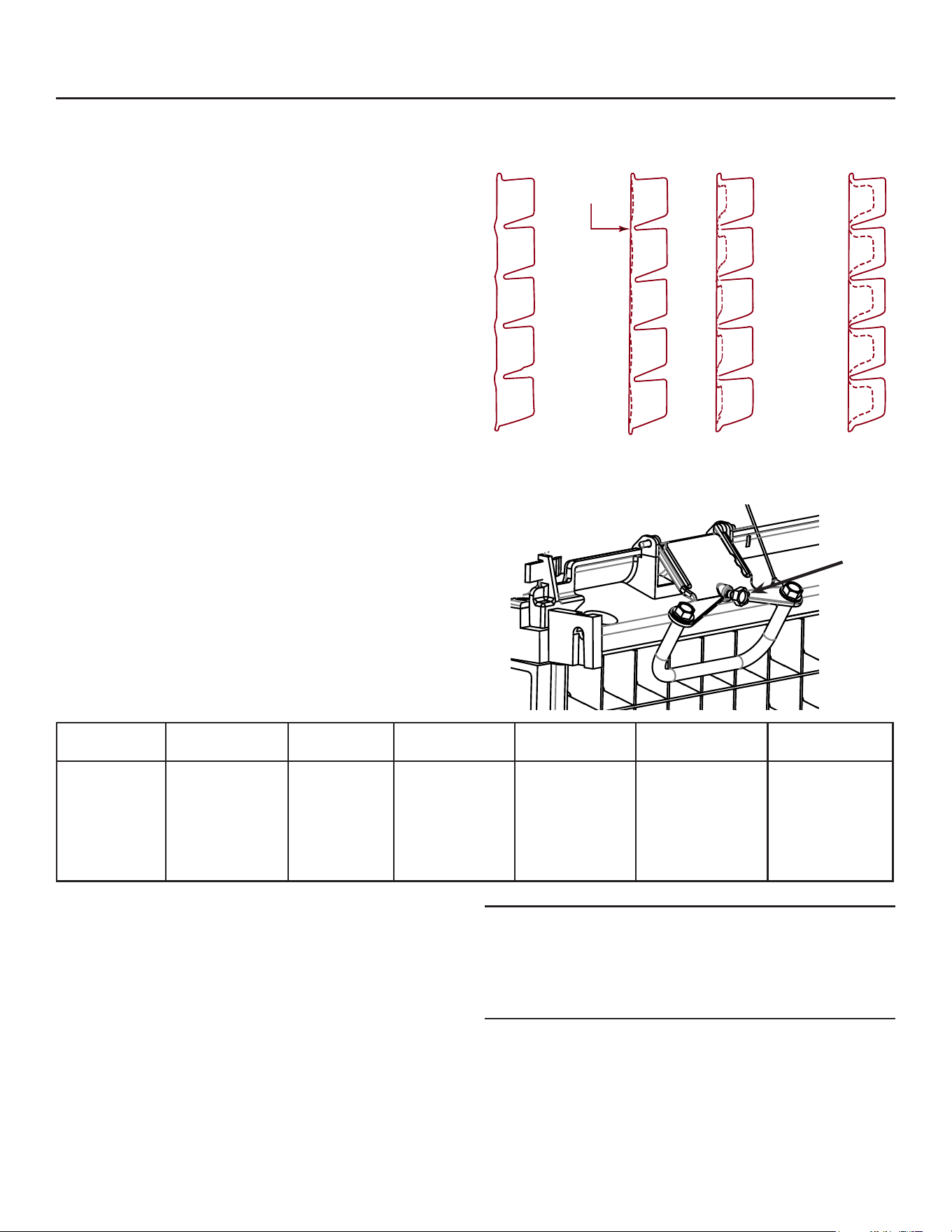
Typical Ice Making Cycle Times (minutes).
Listed times are for clean machines in proper installations.
Cycle length at startup will be longer until the system
stabilizes.
Model 70
o
F air / 50
o
F.
water
90
o
F. air / 70
o
F.
water
MC0322AX 10-12 14-16
MC0322WX 9-11 10-12
MC0522AX 11-13 16-18
MC0522WX 13-15 13-15
MC0330AX 9-11 12-14
MC0330WX 8-10 9-11
MC0530AX 12-14 16-18
MC0530WX 10-12 11-13
MC0630AX 9-11 11-13
MC0630WX
7-9
10-12
MC0722AX
13-15
19-22
MC0830AX
11-13
13-15
MC0830WX
11-13
13-15
MC1030AX
10-12
13-15
MC1030WX
11-13
12-14
MC0322X through MC1030X R290X
Air and Water Cooled User Manual
December 2024
Page 16
Adjustments
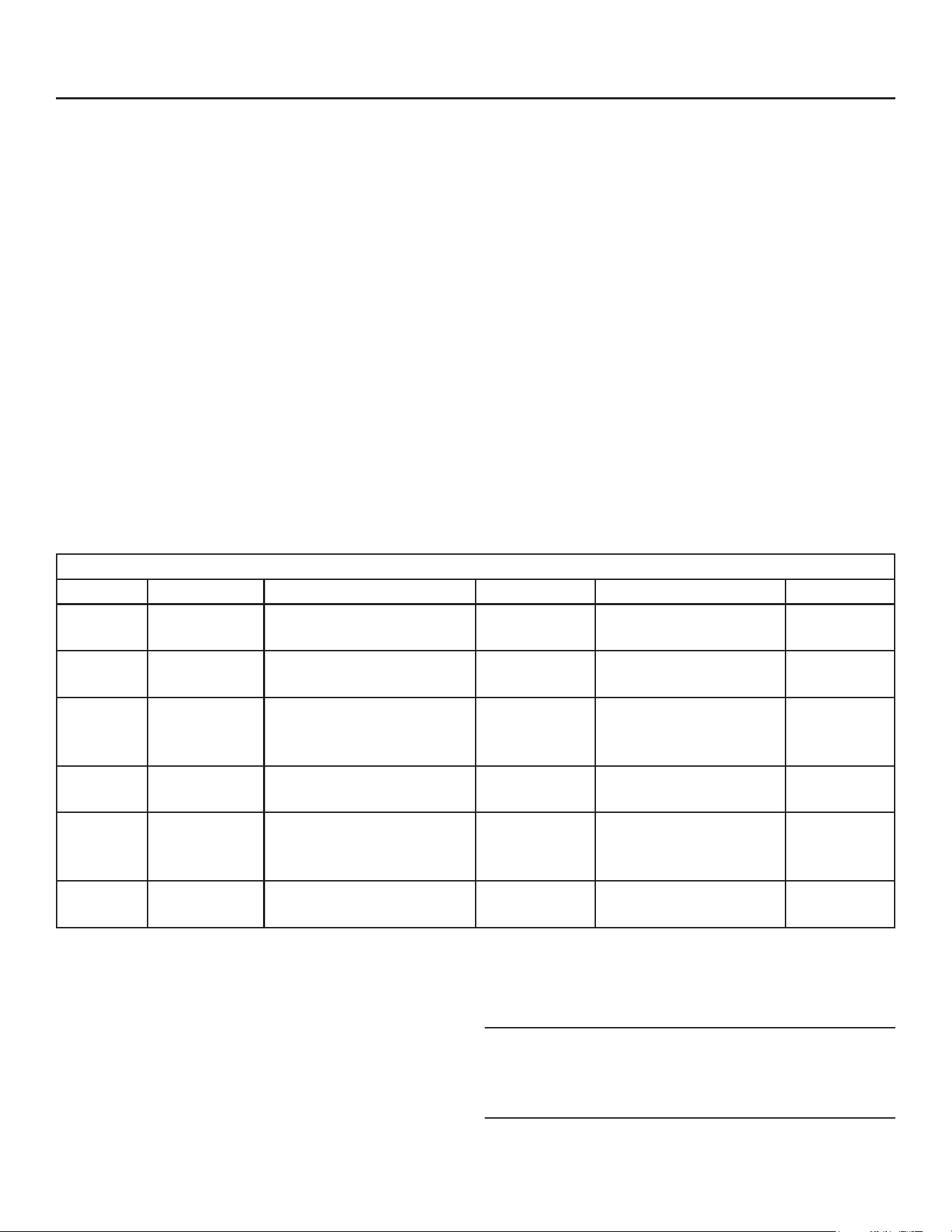
Bridge Thickness - For the Service Tech Only
1. Push and hold O till the machine stops.
2. Remove evaporator cover.
3. Remove curtain.
4. Use a hex wrench and rotate the bridge thickness
adjustment screw in 1/8” turn increments
clockwise to increase bridge thickness.
5. Rotate counter clockwise to decrease bridge
thickness.
Caution: Do not make the bridge too thin or the
machine will not harvest properly. Bridge thickness
adjustments are not covered by warranty.
6. Return curtain and evaporator cover to their
normal positions.
7. Push and release the On button. Check next
harvest of ice. Repeat steps 1-6 if needed.
Water Purge Setting
The water purge is factory set to the automatic
position, suitable for most water conditions. The
setting can be changed to one of 5 manual settings or
left on automatic.
Purge setting 1 - Minimum 2 - Moderate 3 - Standard 4 - Heavy 5 - Maximum A - Automatic
Water Type RO water or
equivalent
Low TDS
non - RO
water
Use for typical
water
High TDS
water
Very High TDS
water
Any with
conductivity not
less than 10
microSiemens/
cm
To set:
1. Switch the machine OFF by holding the O button
in until a number or the letter A shows on the
display.
2. Press and release the On button repeatedly until
the number on the display corresponds to the
desired setting.
3. Press and release the O switch again to return to
the normal control state.
Bridge Thickness Adjustment Mechanism
Note: Water cooled models- the refrigeration system
discharge pressure is factory set at 180 PSIG,
which should yield a freeze cycle discharge water
temperature of about 105-110 degrees F. Adjust if
necessary.
Note: Indentations may be deeper on MC0322 and MC0330
Ice Bridge Thickness Measurement
Adjustment
Screw
1/8-3/16”
bridge
Too Big
Just Right
Too Small
MC0322X through MC1030X
Air and Water Cooled User Manual
December 2024
Page 17
Use and Operation
Once started, the ice machine will automatically make
ice until the bin or dispenser is full of ice. When ice
level drops, the ice machine will resume making ice.
Caution: Do not place anything on top of the ice
machine, including the ice scoop. Debris and moisture
from objects on top of the machine can work their way
into the cabinet and cause serious damage. Damage
caused by foreign material is not covered by warranty.
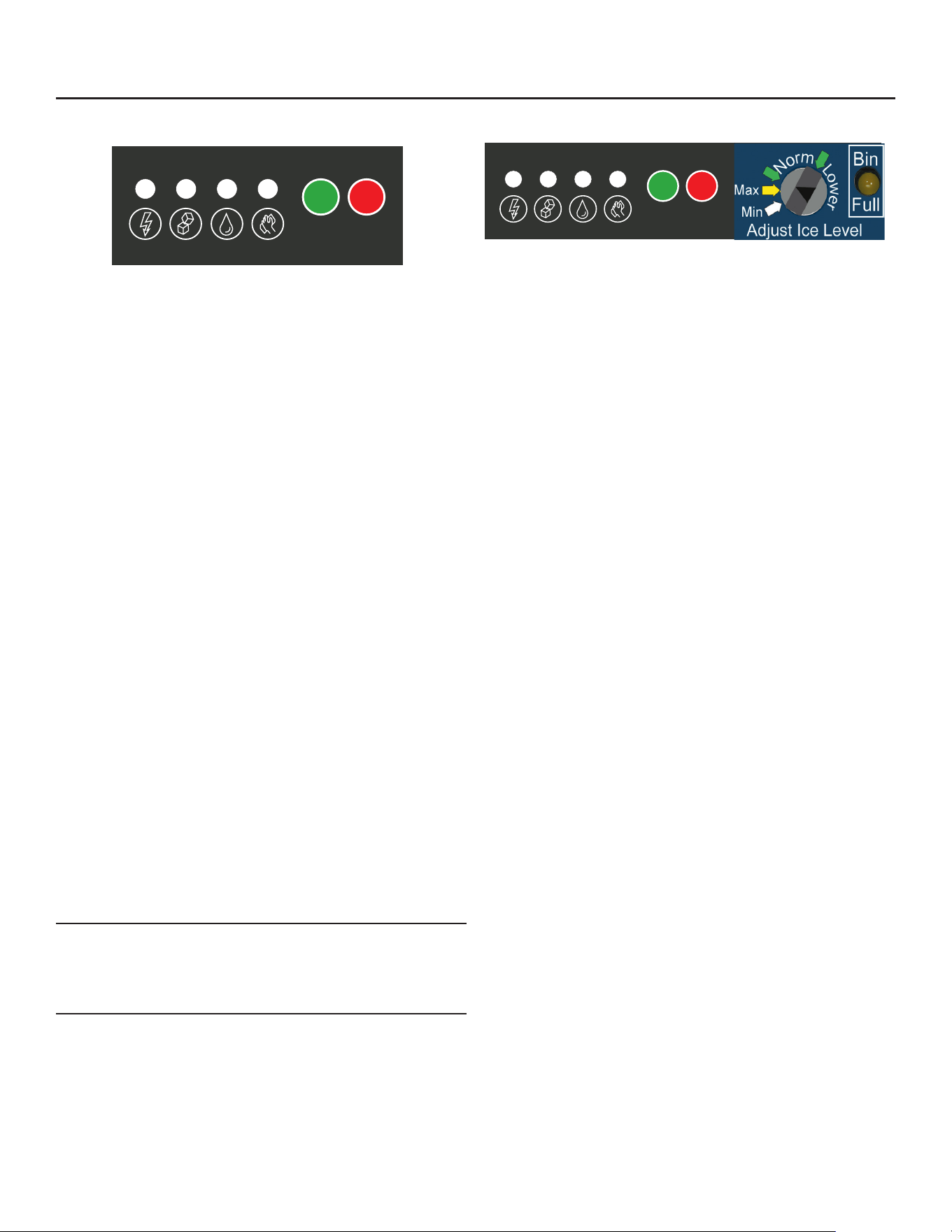
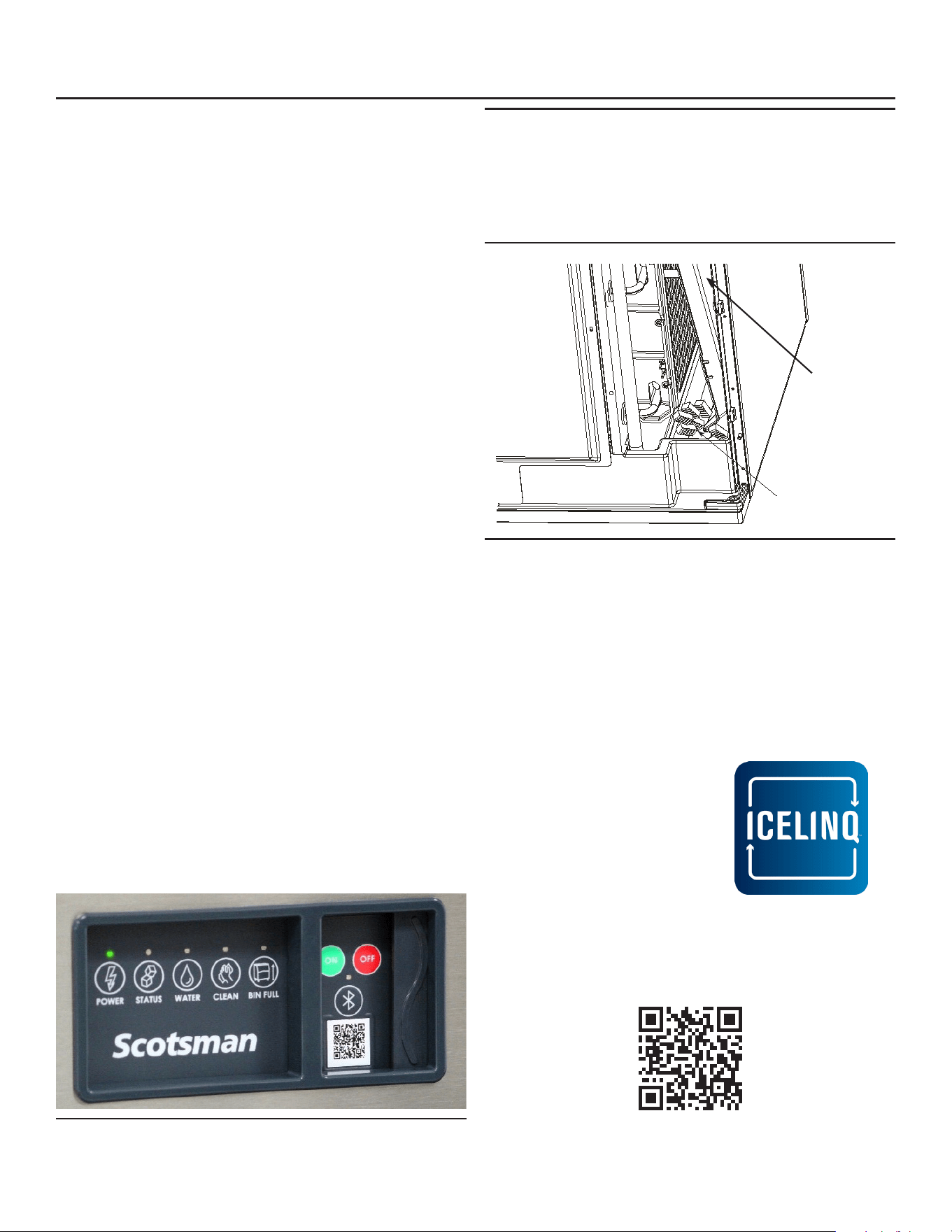
There are ve indicator lights at the front of the
machine that provide information on the condition of
the machine.
Indicator Lights:
• Power
• Status
• Water
• Clean (De-scale & Sanitize)
• Bin Full
Indicator Lights & Their Meanings
Power Status Water De-Scale & Sanitize Bin Full
Steady
Green
Normal Normal – bin full or
making ice
- - Bin is full
Blinking
Green
Self Test
Failure
Switching on or o - -
Blinking
Red
- Diagnostic shutdown or, if
making ice, temperature
sensor failure
Lack of water -
Yellow - - - Time to de-scale and
sanitize
Blinking
Yellow
- - - Preservation Mode is
active or clean cycle is
in progress
Light o No power Switched o Normal Normal Bin is not
full
If the Water light is on, the machine has sensed a
lack of water. Check the water supply to the machine.
The water could have been shut o or the water lter
cartridges might need to be changed.
If the Clean light is solid yellow, the machine has
determined that it needs to be cleaned. Contact an
authorized Scotsman service agent and have the
machine cleaned, de-scaled and sanitized.
During normal operation, if the Clean light begins to
blink yellow, the machine is in Preservation mode,
which initiates a timed freeze in response to short
freeze errors. Contact an authorized Scotsman
service agent to service the machine immediately.
It is likely that the machine needs to be cleaned
(de-scaled and sanitized), but may need additional
service.
Note: A Component Indicator Light switches ON to
indicate that the component is operating.
Note: There are two Curtain Switch lights, SW1 and
SW2. These single plate models have one curtain
switch light on all the time, as a curtain switch light is
ON when a curtain is either open or not present.
MC0322X through MC1030X R290X
Air and Water Cooled User Manual
December 2024
Page 18
Control Switches
The On and O switch buttons are front accessible.
To switch the machine OFF, push and release the O
button. The machine will shut o at the end of the next
cycle. To shut the machine o immediately, push and
hold the O button for 3 seconds.
To switch the machine ON, push and release the
On button. The machine will go through a start up
process and then resume ice making.
Control Options
There are two optional, eld installed controls that can
be added to this machine.
• Vari-Smart™ adjustable ice level control
• Smart-Board™ advanced control board and data
logger
Adjustable ice level control
When this option is present there is an adjustment
post and an additional indicator light to the right
of the controller switches. The ultrasonic ice level
control allows the user to control the point that the
ice machine will stop making ice before the bin or
dispenser is full. Reasons for this include:
• Seasonal changes in ice used
• Planning to sanitize the bin
• Faster turnover for fresher ice
• Certain dispenser applications where maximum
ice level is not desired
Note: Ice will build up in the bin or dispenser at an
angle, the distance set will be from the sensor to the
top of the ice. The sensor position is shown in the
cabinet layout diagrams.
The actual distance between the highest point of the
ice may be closer or further away than the distance
set, depending upon the angle of the ice.
Use of control
There are several positions the ice level can be set to,
including O or Max (knob and label indicators lined
up), where it lls the bin until the standard bin control
shuts the machine o. See the kit’s instructions for
complete details.
Rotate the adjustment post to the desired ice level.
The machine will ll up to that level and when it shuts
o the Bin Full indicator light will be On.
Ice
The cuber drops ice in large sections. That ice will
break up into random parts as it falls into the bin, but
some large sections may remain on top of the ice
in the bin. In a dispenser, this ice will break up into
mostly individual cubes as the dispense mechanism
moves the ice. The ice in the bin will normally slope
down from the right to the left.
Heat
When making ice, air-cooled models will discharge
hot air out the back of the cabinet.
Noise
The ice machine will make noise when it is in ice
making mode. The compressor, fan motor(s) if air
cooled, and water pump all produce some sound. It
is also normal to hear some cracking just before the
harvest cycle begins. In addition, during the harvest
cycle the harvest mechanism may click twice as it
pushes the ice out and returns to its normal position.
The ice harvests as a unit or slab, which makes some
noise when it impacts the bin or dispenser. These
noises are all normal for this machine.
POWER STATUS WATER CLEAN
ICE PRODUCTION
MANUAL
HARVEST
INITIATE
CLEAN
OPTIONAL KVS PLACED HERE
(Vari-Smart
TM
Adjustable Ice Level Control)
The following codes will be displayed when
unit is operating as expected:
F
- Freeze
H
- Harvest
B
- Bin Full
O
- Standby/Off
Additional operational and error codes can
be found on the inside of the front panel.
Scan QR code to download the Scotsman ICELINQ™ App:
Connect to this machine via Bluetooth to access additional machine operations,
view error information, adjust settings, and initiate self-guided cleaning.
ON OFF
02-5166-01
OPTIONAL KSBU, KPAS, KSBU-N PLACED HERE
(Smart-Board™ Advanced Control Panel)
Component Operation Indicator Lights
POWER STATUS WATER CLEAN
ICE PRODUCTION
MANUAL
HARVEST
INITIATE
CLEAN
OPTIONAL KVS PLACED HERE
(Vari-Smart
TM
Adjustable Ice Level Control)
The following codes will be displayed when
unit is operating as expected:
F
- Freeze
H
- Harvest
B
- Bin Full
O
- Standby/Off
Additional operational and error codes can
be found on the inside of the front panel.
Scan QR code to download the Scotsman ICELINQ™ App:
Connect to this machine via Bluetooth to access additional machine operations,
view error information, adjust settings, and initiate self-guided cleaning.
ON OFF
02-5166-01
OPTIONAL KSBU, KPAS, KSBU-N PLACED HERE
(Smart-Board™ Advanced Control Panel)
Component Operation Indicator Lights
MC0322X through MC1030X
Air and Water Cooled User Manual
December 2024
Page 19
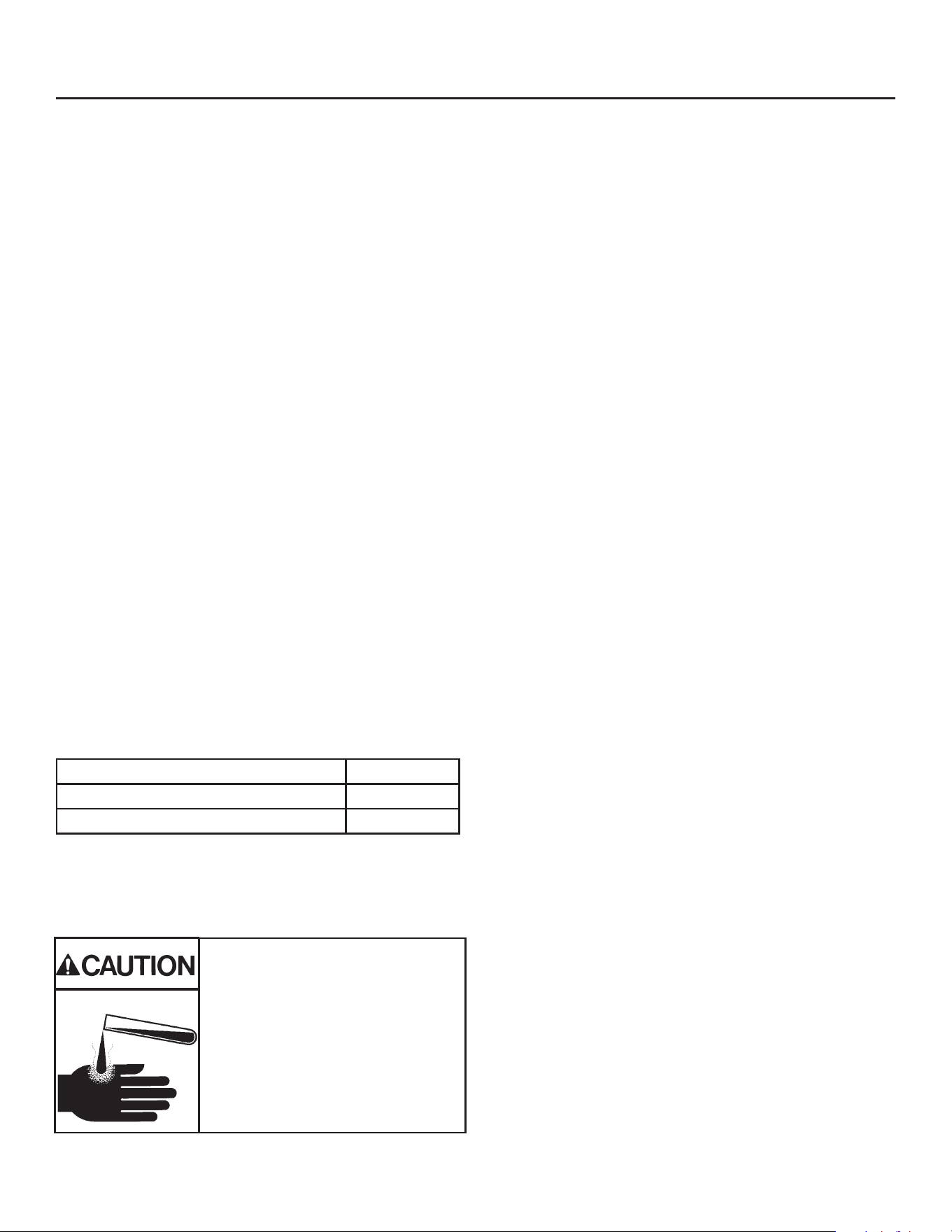
Ice machine cleaner contains acids.
Acids can cause burns.
If concentrated cleaner comes in
contact with skin, ush with water. If
swallowed, do NOT induce vomiting.
Give large amounts of water or milk.
Call Physician immediately. Keep
out of the reach of children.
Cleaning, Sanitation and Maintenance
This ice system requires three types of maintenance:
• Remove the build up of mineral scale from the ice machine’s water system and sensors.
• Sanitize the ice machine’s water system and the ice storage bin or dispenser.
• Clean or replace the air lter and clean the air cooled condenser (air cooled models only).
It is the User’s responsibility to keep the ice machine and ice storage bin in a sanitary condition. Without
human intervention, sanitation will not be maintained. Ice machines also require occasional cleaning of their
water systems with a specically designed chemical. This chemical dissolves mineral build up that forms during
the ice making process.
The ice machine’s water system should be cleaned and sanitized a minimum of twice per year. Sanitize the
ice storage bin as frequently as local health codes require, and every time the ice machine is cleaned and
sanitized.
Preparing to Clean:
1. Remove the front panel.
2. Remove the evaporator cover.
Scale Removal:
3. Push and release the Clean button. The yellow
Clean light will blink and the display will show C.
The machine will harvest any ice, drain the reservoir
and begin to rell it.
4. Observe code display, when it blinks the characters
“A D 1” immediately go to the next step.
5. Pour the below specied amount Scotsman Clear
1 ice machine scale remover into the reservoir. The
unit will circulate the scale remover, then drain and
ush it. This will take 35 minutes, then the machine
will stop and the display will show O.
Note: Using chemicals or dilution ratios other than
what is specied will damage the ice machine and
signicantly aect the performance and life of the ice
machine.
Clean internal parts:
6. Mix a cleaning solution of 6oz of Scotsman Clear
1 scale remover with 9 cups (72oz) of 105-115° F
potable water.
7. In a separate bucket, mix a sanitizing solution of 1.6
oz of locally approved sanitizer or equivalent with 1
gallon (128 oz) of 105-115 degree F. potable water.
8. Remove air lter(s)(if applicable), water level sensor
and housing, water distributor(s), curtain(s), ice
thickness sensor, and splash panel for additional
cleaning.
9. Soak and scrub each part (including the
evaporator cover!) using the previously prepared
solution of Scotsman Clear 1 scale remover and a
nylon brush, and then rinse with water. Save scale
remover solution.
10. Soak and scrub each part using the previously
prepared sanitizing solution. No rinse needed. Save
sanitizing solution.
11. Using a non-metallic scouring pad, scrub spillway
with sanitizer to remove any material buildup and
debris.
12. Reinstall ice thickness sensor, curtain(s), splash
panel, water distributor(s), and water level sensor in
their original positions. Be sure water level sensor
and ice thickness sensor are completely dry.
MC0322X, MC0330X 8 ounces
MC0522X, MC0530X or MC0630X 10 ounces
MC0722X, MC0830X or MC1030X 12 ounces
MC0322X through MC1030X R290X
Air and Water Cooled User Manual
December 2024
Page 20
Cleaning, Sanitation and Maintenance Continued
Sanitize:
13. Push and release the Clean button. The yellow
Clean light will blink and the display will show C.
The machine will go through a harvest cycle, drain
the reservoir and begin to rell it.
14. Observe code display, when it blinks the
characters “A D 1” immediately go to the next
step.
15. Pour the previously prepared sanitizing solution
into the reservoir until it is full. The unit will circulate
the sanitizer, then drain and ush it. This will take
35 minutes, then the machine will stop and the
display will show O.
16. Remove all ice from storage bin or dispenser and
sanitize bin or dispenser with remaining sanitizing
solution while machine completes sanitizing cycle.
Pour excess sanitizer down drain.
Finish Cleaning Process:
17. Reinstall evaporator cover and front panel (with
air lter(s) if applicable) in their original positions.
18. Push and release the “ON” button to resume ice
making.
Want more guidance?
Scan QR Code to download the Scotsman ICELINQ®
App to connect to this machine via Bluetooth® and
access the self-guided cleaning process.
Additional maintenance:
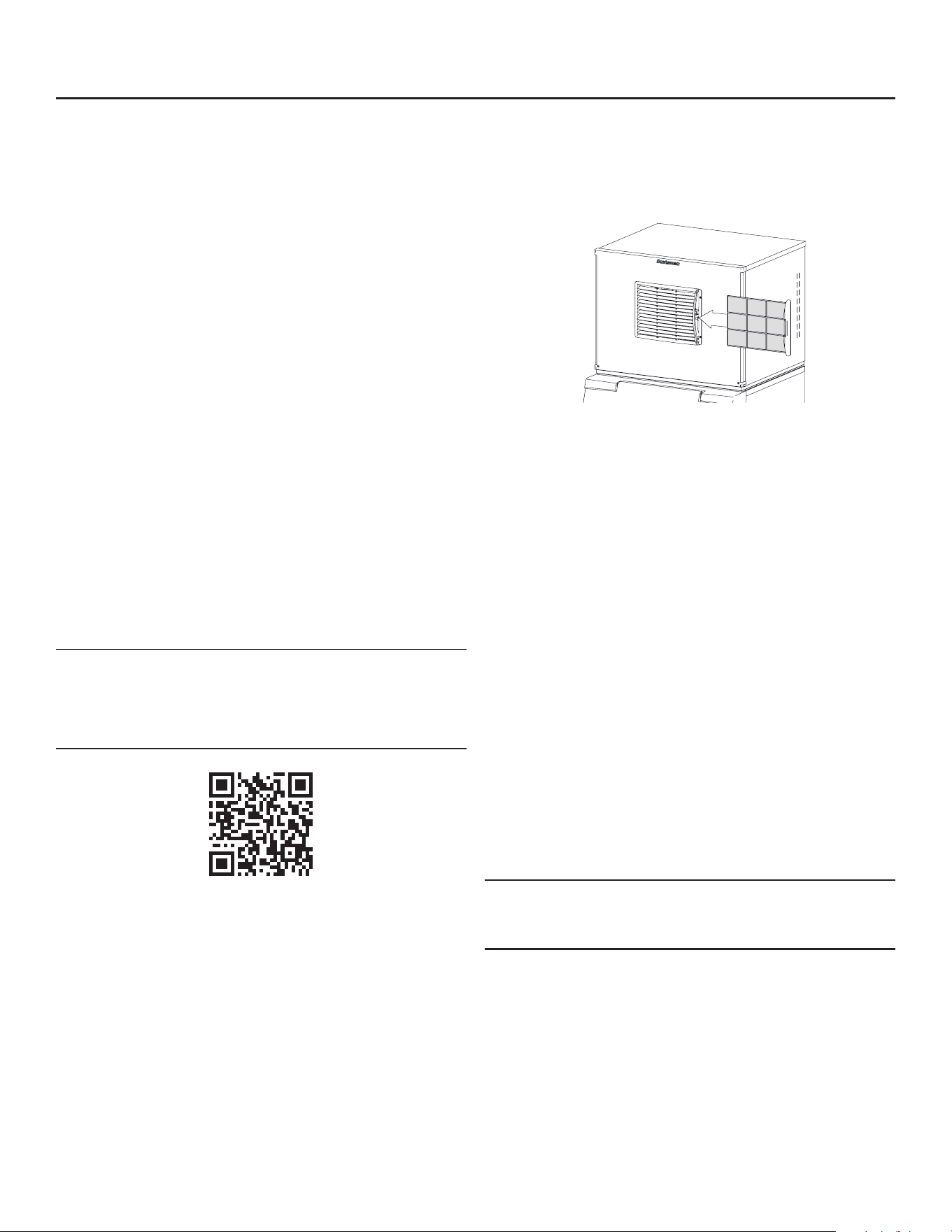
Air lter (air-cooled models)
Clean air lters when they become visibly dirty. They
will need cleaning more often than the other items.
1. Pull air lter(s) from the front panel.
2. Wash the dust and grease o the lter.
3. Return it to its original position.
Do not operate the machine without the lter in place
except during cleaning.
Condenser (air-cooled models)
If the machine has been operated without a lter the
air cooled condenser ns will need to be cleaned.
They are located under the fan blades. The services
of a refrigeration technician will be required to clean
the condenser.
Exterior panels
The front, top and side panels are durable stainless
steel. Fingerprints, dust and grease will require
cleaning with a good quality stainless steel cleaner.
Note: If using a sanitizer or a cleaner that contains
chlorine on the panels, after use be sure to wash the
panels with clean water to remove chlorine residue.
Water lters
If the machine has been connected to water lters,
check the cartridges for the date they were replaced
or for the pressure on the gauge. Change cartridges
if they’ve been installed more than 6 months or if the
pressure drops too much when the ice machine lls
with water.
MC0322X through MC1030X
Air and Water Cooled User Manual
December 2024
Page 21
What to do before calling for service
Reasons the machine might shut itself o:
• Lack of water.
• Freeze cycle takes too long.
• Harvest cycle takes too long.
• High discharge temperature.
• Controller self test failure.
Check the following:
1. Has the water supply to the ice machine or
building been shut o? If yes, the ice machine will
automatically restart within 25 minutes after water
begins to ow to it.
2. Has power been shut o to the ice machine? If
yes, the ice machine will automatically restart
when power is restored.
3. Has someone shut the water o to a water
cooled unit? If yes, after the water supply has
been restored the ice machine may need to be
manually reset.
4. Is the curtain open because some ice is stuck
under it? If so, remove the ice and the machine
should start in a few minutes.
To Manually Reset the machine.
• Open the switch door
• Push and release the O button.
• Push and release the On button.
To Shut the Machine O:
1. Push and hold the O button for 3 seconds or until
the machine stops.
2.
Note: Curtain can be removed & replaced anytime the
machine is in a standby mode or when it is in a freeze
cycle. However, removal of the curtain during freeze
will result in water owing into the bin. Removal of the
curtain during harvest terminates harvest at that point
and, if left o, will result in the machine shutting o.
Scotsman ICELINQ® Mobile App
All Prodigy Elite® models are Bluetooth® enabled and
are compatible with the Scotsman ICELINQ® app,
available on both the Apple App Store and Google
Play Store.
The ICELINQ mobile app uses Bluetooth connectivity
to allow users to easily monitor, control, and maintain
their machine:
• View machine status
• Control machine operation
• Adjust machine settings
• View active errors with troubleshooting tips
• Initiate self-guided cleaning
• Access service resources and warranty info
Scan QR Code to download the
Scotsman ICELINQ® App
Curtain
Clear Ice
From Here
Clear Ice From Beneath Curtain
Open Door to Reset or Switch O

MC0322X through MC1030X R290X
Air and Water Cooled User Manual
December 2024
Page 22
For the Service Tech - R290
Refrigeration service should only be attempted by
a trained trade professional certied to work on
R290 systems.
Critical service items.
This list does not qualify anyone to service the unit. It
is a reminder and checklist for the service tech. Keep
these in mind for R290 service:
• Wire nuts are NOT to be used when changing an
electrical part
• The process tubes are to be used for service
access.
• Cut out (with tubing cutter) refrigeration
components that are to be replaced. Do NOT un-
braze.
• Because R290 can be vented into the air during
service, the venting MUST be in an area free from
ame or spark. It must be near an opened window
or door.
• A sign noting service of a system containing
propane must be attached to the unit during
refrigeration service.
• A combustible gas leak detector must be used
to inform anyone in the area when propane is
present in the air.
Evacuation: It is critical that a refrigeration system
be leak free and internally dry. A thorough evacuation
with a good vacuum pump with a micron gauge
attached is the only way to ensure that the system is
dry and ready for a charge of refrigerant.
Charging: The system is critically charged and the
proper type and amount MUST be weighed in plus
minus 3 gr. (or 11 oz.) from name plate.

MC0322X through MC1030X
Air and Water Cooled User Manual
December 2024
Page 23
Only qualied technicians familiar with R290 refrig-
erant should decommission a machine, as special
tools and containers are required for the removal,
transportation, and disposal of this highly ammable
substance.
• Before attempting the procedure:
* Ensure that all protective gear is present and
used throughout the procedure.
* Make sure recovery equipment and containers
are available and ready for use. All containers
used for recovery must be rated for R290
refrigerant and must be labeled as such.
* Weigh any refrigerant prior to reclaiming.
• Maintain safety through standard operating proce-
dures as outlined on page 20 of this document. Be
sure to follow local, state, and federal guidelines
for proper disposal.
• Do not ll containers more than 80% and do not
exceed the pressure limits of the container. Make
sure the machine to be decommissioned is in
satisfactory working order and that the electrical
components of the machine are properly sealed to
prevent ignition.
• Recovered refrigerant should not be charged into
another refrigerating system or mixed in another
container.
• Make sure to safely transport the refrigerant in line
with standard operating procedures.
• All recovered refrigerant must be returned to re-
frigerant supplier for proper disposal.
• If compressor or compressor oils are removed
ensure it has been removed to an acceptable level
so the ammable refrigerant does not remain in
the lubricant.
Decommissioning

17-3854-01 Rev. B
SCOTSMAN ICE SYSTEMS
101 Corporate Woods Parkway
Vernon Hills, IL 60061
www.scotsman-ice.com
800-726-8762