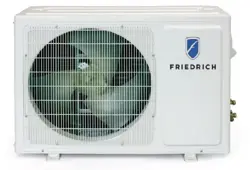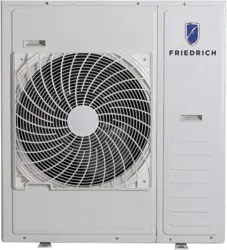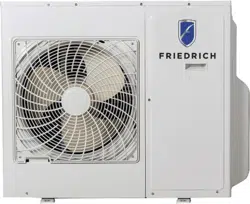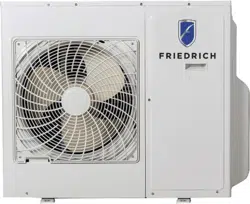
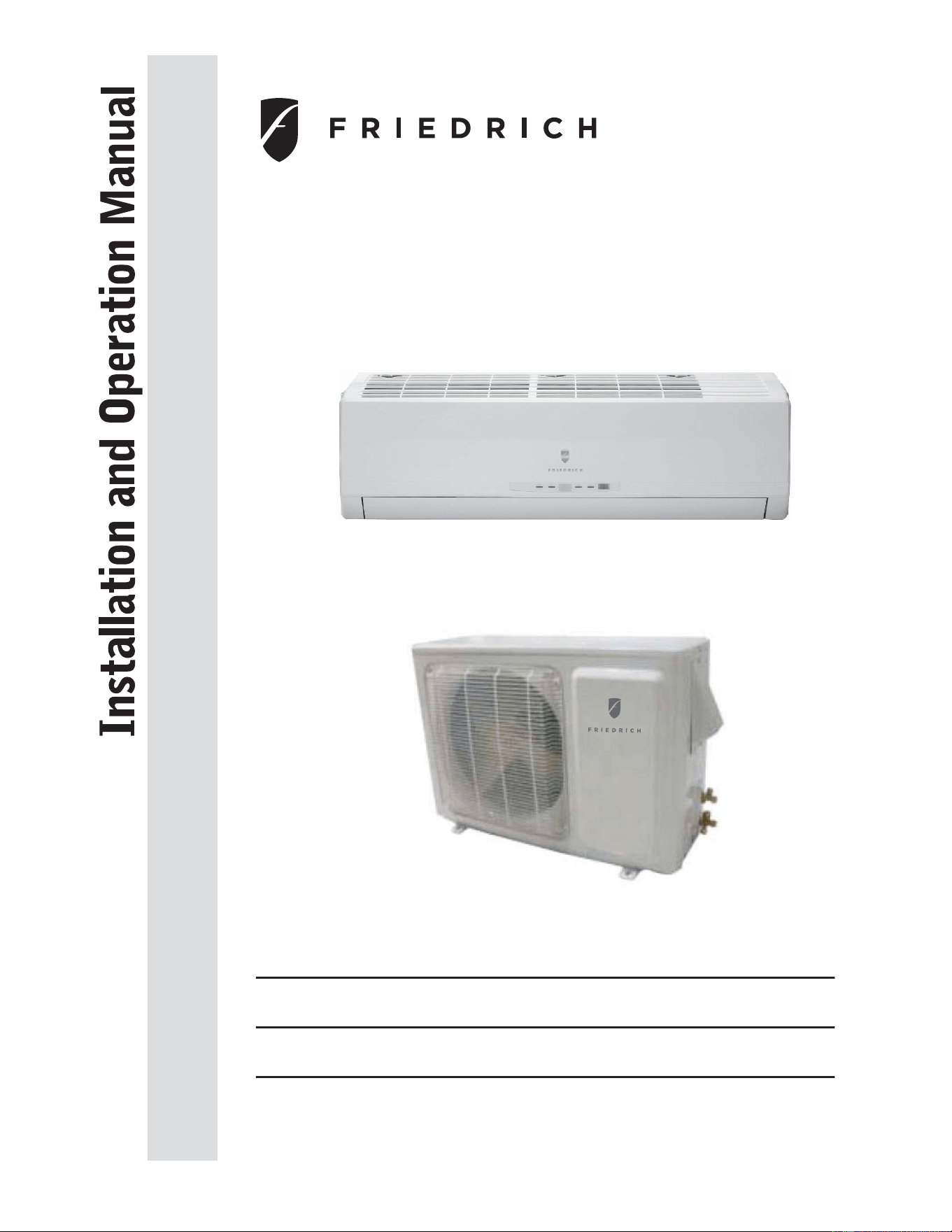
Models
Indoor Unit
Outdoor Unit
MW09C1H
MW
12C1H
MR09C1H
MR12C1H
920-088-01

CONTENTS
This symbol stands for the items
should be forbidden.
This symbol stands for the items
should be followed
Ƶ
Ƶ
Ƶ
Ƶ
Ƶ
Ƶ
Ƶ
Ƶ
Operation and maintenance
Notices for use
Ƶ
Installation service
Install indoor unit
Install outdoor unit
Do not dispose this product as unsorted municipal waste.
Collection of such waste separately for special treatment
is necessary.
carefully before operating the unit and keep it carefully for consulation.
unless they have been given supervision or instruction concerning use of the appliance
Children should be supervised to ensure that they do not play with the appliance.
Image shown in this operating instruction manual here is
indicative only. Actual product you receive may differ!
Thank you for choosing , please read this owner's manual
Friedrich Air Conditioning
physic
This appliance is not intended for use by persons (including children) with reduced
al
, sensory or mental capabilities or lack of experience and knowledge,
by a person reponsible for thei safety.r
Typical Unit Components
Remote Control Instructions
Routine Maintenance
Basic Troubleshooting
installation
Typical Unit Dimensions
Checklist
Ƶ
Ƶ
Operation of remote controll
er
3
4
7
11
12
16
18
19
21
22
Ƶ
15
Service & Assistance
Congratulations
Thank you for your decision to purchase Friedrich. Your new Friedrich has been carefully engineered and manufactured to give you many years of dependable,
HI¿FLHQWRSHUDWLRQPDLQWDLQLQJDFRPIRUWDEOHWHPSHUDWXUHDQGKXPLGLW\OHYHO0DQ\H[WUDIHDWXUHVKDYHEHHQEXLOWLQWR\RXUXQLWWRDVVXUHTXLHWRSHUDWLRQ
the greatest circulation of cool, dry air, and the most economic operation.
General Instructions
This Installation and Operation Manual has been designed to insure maximum satisfaction in the performance of your unit. For years of trouble-free service,
please follow the installation instructions closely. We cannot overemphasize the importance of proper installation.
Here are some suggestions to help you use your
new Friedrich most efficiently:
1. Carefully read and follow the installation instructions.
2. Make sure the unit is the right capacity for the area being cooled.
An undersized unit makes the unit work too hard, using more
electricity than needed and increases wear. An oversized unit
will cycle on and off too rapidly, and therefore cannot control
humidity as well.
3. &OHDQWKH¿OWHUIUHTXHQWO\6HH5RXWLQH0DLQWHQDQFH3DJH
4. 'RQRWEORFNWKHDLUÀRZWRDQGIURPWKHXQLW
5. $GLUW\¿OWHURULPSURSHUO\VHWFRQWUROVFDQDIIHFWWKHFRROLQJ
ability of the unit.
6. ,IFRROLQJLVZHDNDQG\RXKDYHYHUL¿HGWKDWWKH¿OWHULVFOHDQ
WARNING
Read Installation Operation
Manual
Please read this manual thoroughly prior to
equipment installation or operation.
It is the installer’s responsibility to properly
apply and install the equipment. Installation
must be in conformance with the NFPA 70
-2008 National Electric Code or current edition,
International Mechanic Code 2009 or current
edition and any other applicable local or
national codes.
Failure to do so can result in property damage,
personal injury or death.
WARNING
Refrigeration system
under high pressure
Do not puncture, heat, expose to flame or
incinerate.
Only certified refrigeration technicians should
service this equipment.
Only use gauge sets designed for use with
R410A. Do not use standard R22 gauge sets.
R410A systems operate at higher pressures
than R22 equipment. Appropriate safe
service and handling practices must be used.
and the controls are properly set, the unit may need service and
you should call your Friedrich service provider to check the unit.
7. Keep blinds, shades and drapes closed on the sunny side of the
room being cooled to reduce radiant heat.
8. Proper insulation helps your unit maintain the desired inside
temperature.
9. Whenever possible, shade south and west facing windows.
10. .HHSZLQGRZFRYHULQJVDZD\IURPWKHXQLWWRSURYLGHIUHHDLUÀRZ
NOTICE
CAUTION
ANIN
Your safety and the safety of others are very important.
We have provided many important safety messages in this manual and on your appliance. Always read and obey all
safety messages.
This is a safety Alert symbol.
This symbol alerts you to potential hazards that can kill or hurt you and others.
All safety messages will follow the safety alert symbol with the word “WARNING”
or “CAUTION”. These words mean:
Indicates a hazard which, if not avoided, can result in severe personal injury or
death and damage to product or other property.
Indicates a hazard which, if not avoided, can result in personal injury and
damage to product or other property.
All safety messages will tell you what the potential hazard is, tell you how to reduce the chance of injury, and tell you
what will happen if the instructions are not followed.
Indicates property damage can occur if instructions are not followed.
WARNING
Notices for use
Working principle and special functions for cooling
Principle:
Anti-freezing function:
Working principle and special functions for heating
Principle:
Defrosting:
Air conditioner absorbs heat in the room and transmit to outdoor and discharged, so that
indoor ambient temperature decreased, its cooling capacity will increase or decrease by
outdoor ambient temperature.
, the
indoor unit microcomputer will stop compressor running and protect the unit.
Air conditioner absorbs heat from outdoor and transmits to indoor, in this way to increase
room temperature. This is the heat pump heating principle, its heating capacity will be
reduced due to outdoor temperature decrease.
If outdoor temperature becomes very low, please operate with other heating equipments.
When outdoor temperature is low but high humidity, after a long while running, frost will
form on outdoor unit, that will effect the heating effect, at this time, the auto defrosting
function will act, the heat running will stop for 8-10mins.
During the auto defrosting, the fan motors of indoor unit and outdoor unit will stop.
During the defrosting, the indoor indicator flashes, the outdoor unit may emit vapor.
This is due to the defrosting, it isn't malfunction.
After defrosting finished,the heating will recover automatically.
F
º
the heat exchanger, when indoor heat exchanger temperature decrease below 32s
If the unit is running in COOL mode and in low temperature, there will be frost formed on
1
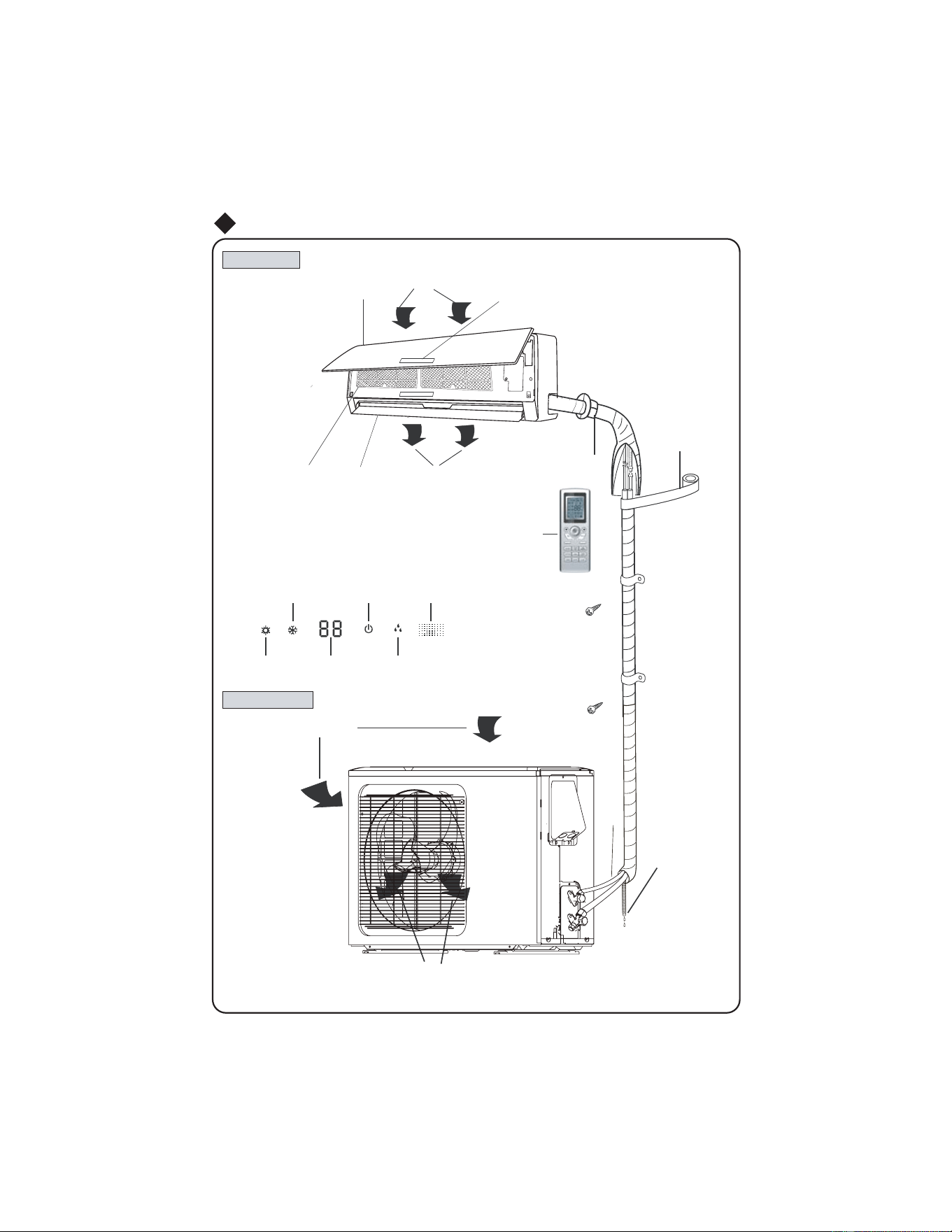
Indoor unit
Ou
tdoor unit
Wall Pipe
Drainage
hose
Air
in
Air
out
Wrapping Tape
epip noitcennoC
Air inlet
(Image shown here is indicative only. Actual product you receive may differ)
Front Panel
Air outlet
Filter
Guide panel
Wireless remote control
Set temp.
Heating
Display icon˄Only for some Units˅:
Cooling
Power/Run
Dehumidify
Receiver
Typical Unit Components
Display
3
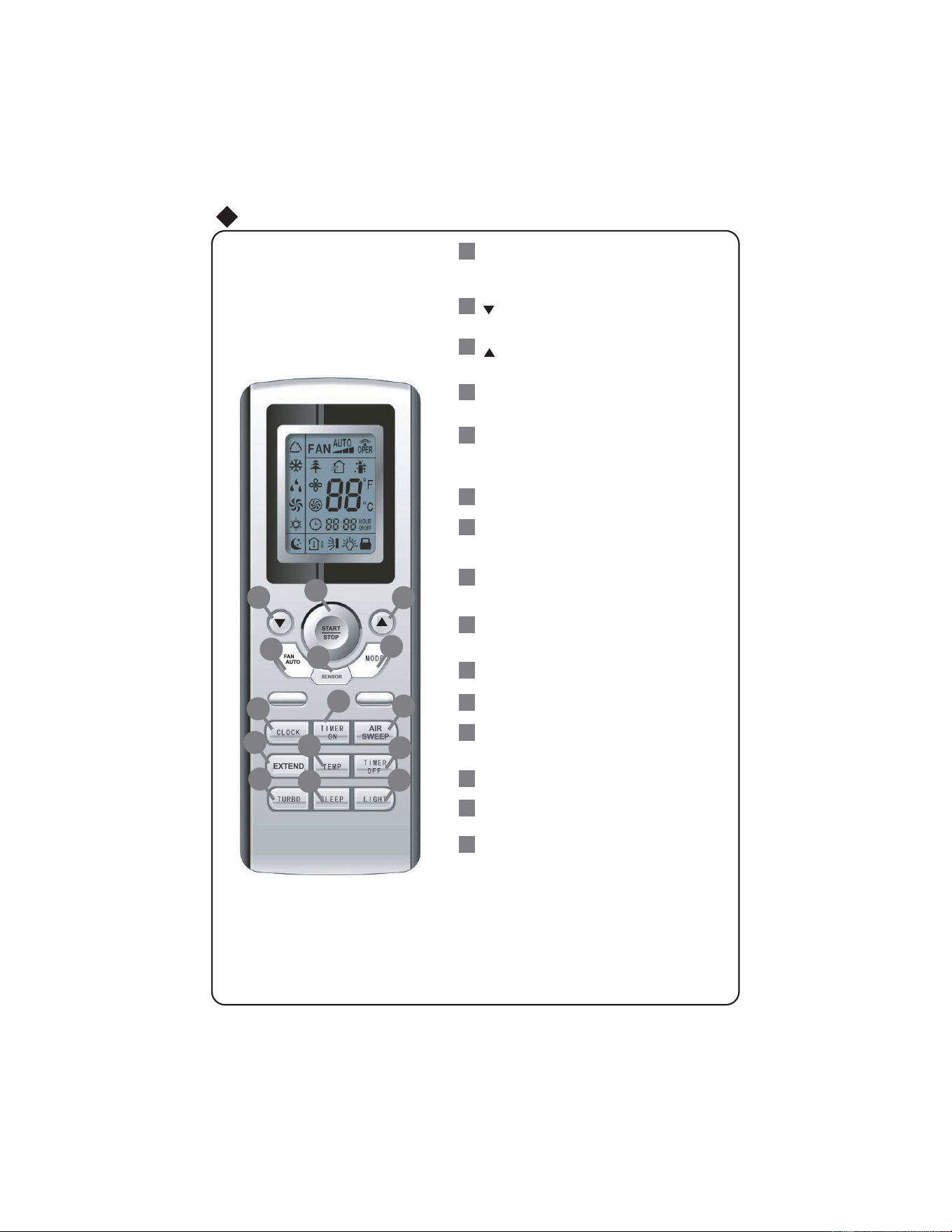
MODE
(AUTO/COOL/DRY/FAN/HEAT).
setting.
: Press to decrease temperature
setting.
FAN
Press it set swing angle.
TIMER ON
TIMER OFF
CLOCK
TEMP
TURBO
SLEEP
LIGHT
Press it to set auto-on timer.
Press it to set auto-off timer
Press it set clock.
1
6
7
5
3
2
4
11
10
14
9
12
13
15
Operation of Remote Controller
3
9
10
13
12
5
4
11
8
7
2
1
6
8
Press it to turn on/off the light.
Press to start or stop operation.
: Press to increase temperature
Press to set fan speed.
Press to select operation mode
SENSOR
AIR SWEEP
EXTEND
AUTO
17
15
14
START / STOP
4
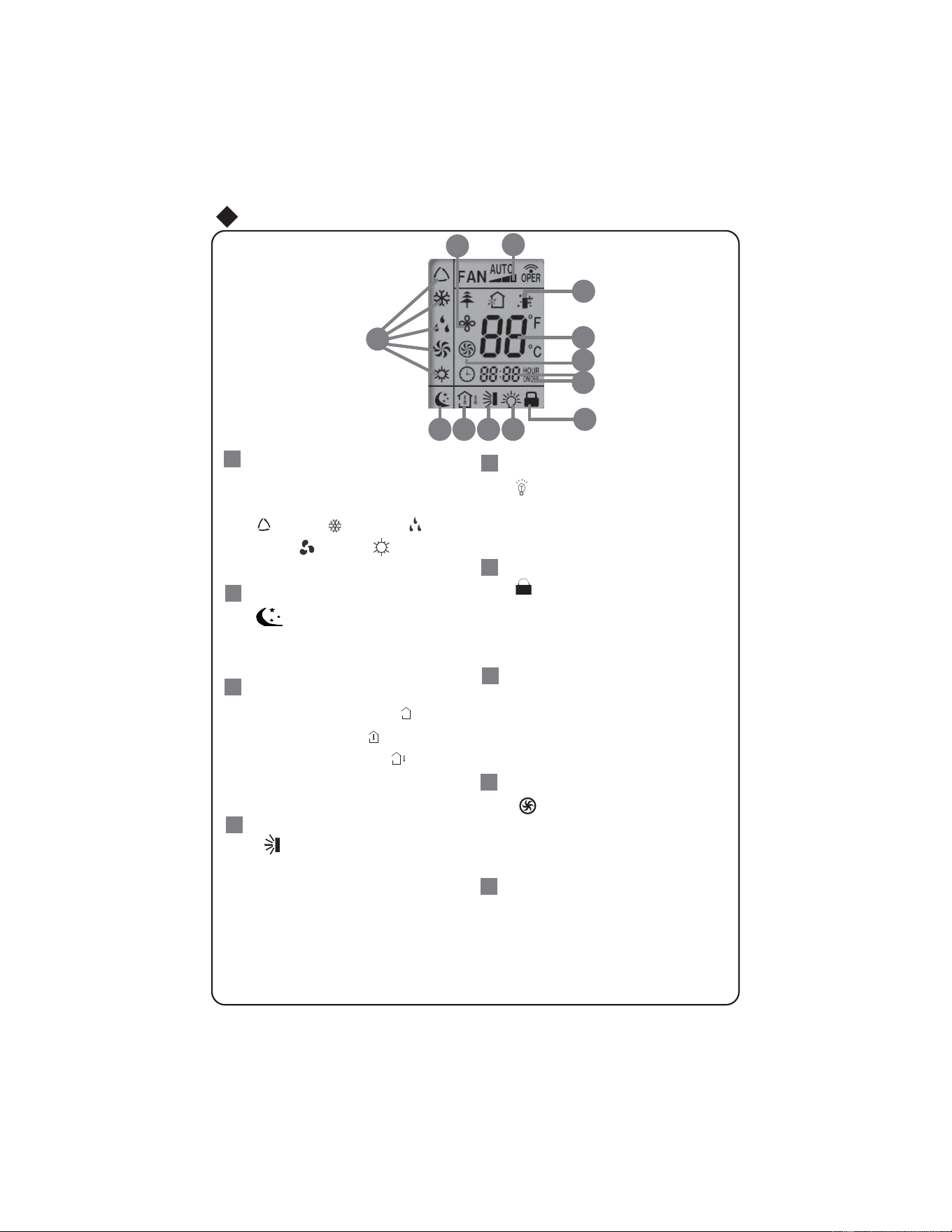
This area will show the set tempe-
rature. In SAVE mode,"SE" will be
displayed. During defrosting opera-
tion, “H1” will be displayed.
DIGITAL display:
LOCK icon:
is displayed by pressing "+"
and “-” buttons simultaneously. Press
them again to clear the display.
LIGHT icon:
is displayed by pressing the
LIGHT button. Press LIGHT button
again to clear the display.
22
MODE icon:
If MODE button is pressed,
current operation mode icon
(AUTO), ( COOL),
(DRY), (FAN) or (HEAT
only for heat pump models) will show.
18
is displayed when pressing
display.
After pressing TIMER button, ON or
OFF will blink.This area will show
the set time.
SET TIME display:
Pressing TEMP button,
(set temperature),
ambient temperature)
(outdoor ambient temperature)
and blank is displayed circularly.
(indoor
TEMP icon:
SLEEP icon :
is displayed by pressing
the SLEEP button. Press this
button again to clear the display.
19
is displayed when pressing the
nottub siht sserP.nottub OBRUT
again to clear the display.
TURBO icon:
Operation of Remote Controller
icon:
AIR SWEEP
16
17
21
20
23
24
1
6
1
7
18
19
20
21
22
23
24
the
button.
AIR SWEEP
Press this button again to clear the
27
26
25
5
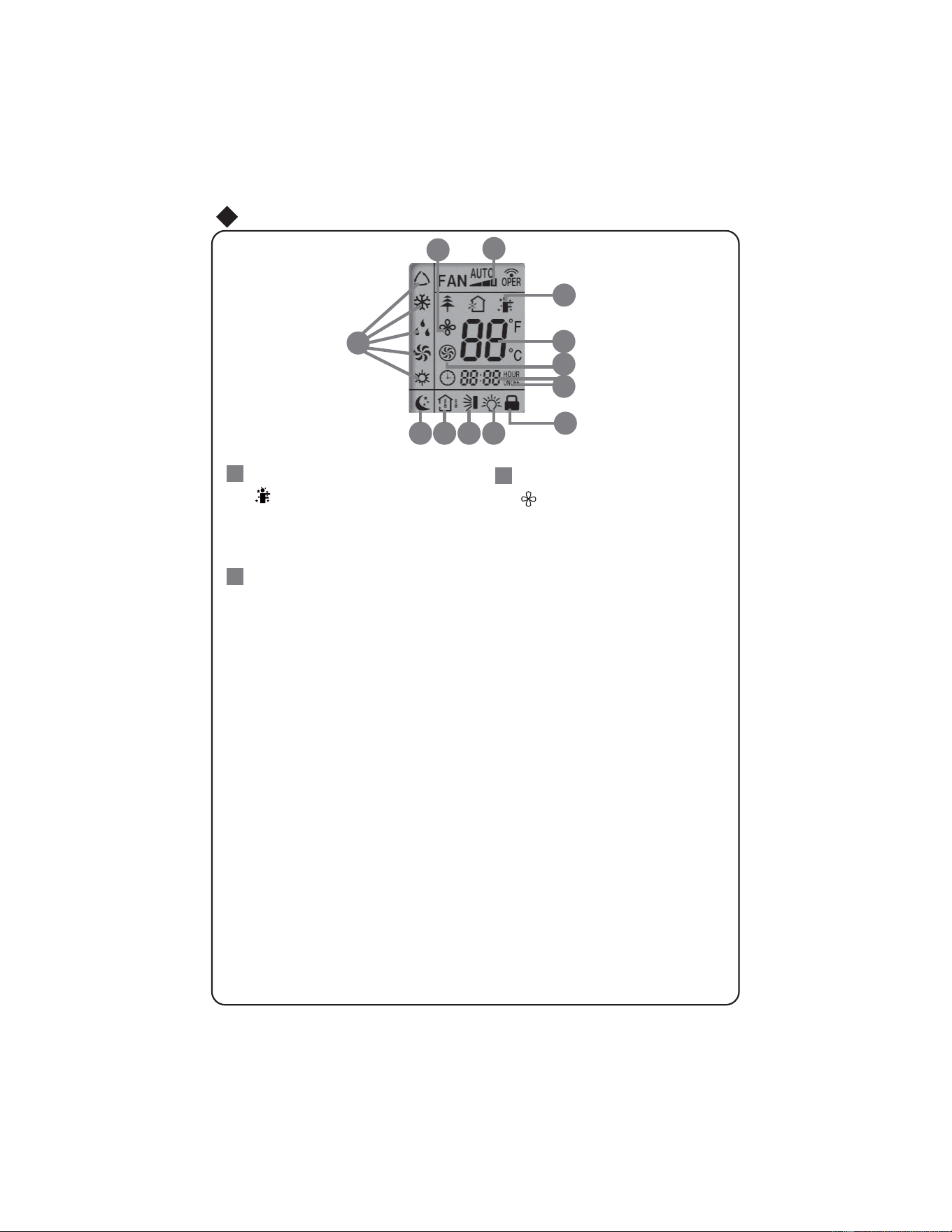
is displayed when pressing the
again to clear the display.
Press FAN button to select the
desired fan speed setting (AUTO-
Low-Med-High).Your selection will
be displayed in the LCD windows,
except the AUTO fan speed.
FAN SPEED display:
is displayed when pressing the
to clear the display.
Operation of Remote Controller
icon:
SENSOR
icon:
EXTEND
EXTEND
button. Press this button
26
25
27
16
1
7
18
19
20
21
22
23
24
27
26
25
6
SENSOR
button. Press this button
again
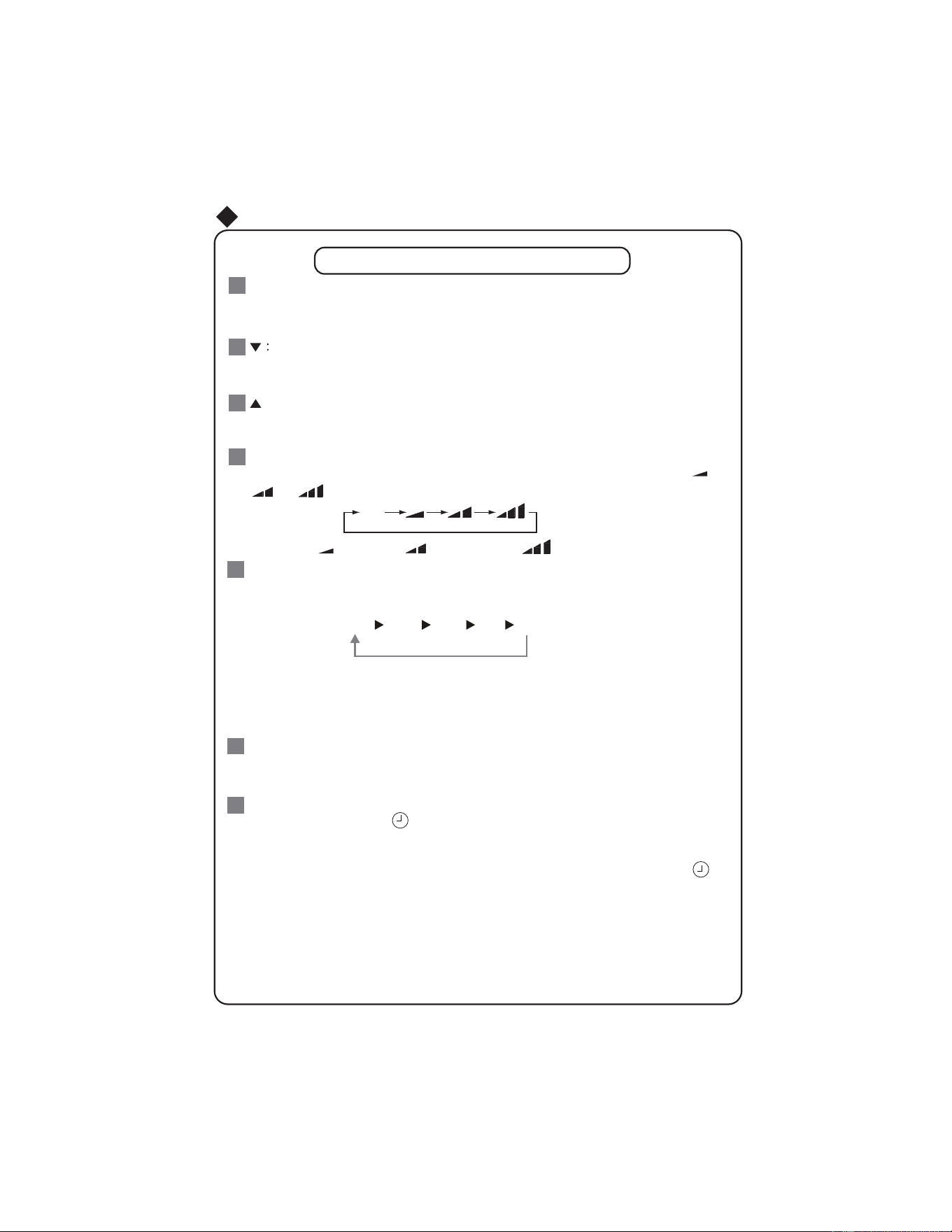
Pressing CLOCK button,
blinks. Within 5 seconds , pressing + or - button adjusts the
present time. Holding down either button above 2 seconds increases or decreases the
CLOCK :
time by 1 minute every 0.5 second and then by 10 minutes every 0.5 second. During
blinking after setting, press CLOCK button again to confirm the setting, and then
will
be constantly displayed.
7
Remote Controller Description
:
This button is used for setting Fan Speed in the sequence that goes from AUTO,
to
then back to Auto.
,
,
,
FAN
:
6
MODE :
5
Each time you press this button, a mode is selected in a sequence that goes from AUTO,
COOL,DRY, FAN,and HEAT
*
, as the following:
AUTO
COOL
DRY
FAN HEAT
*
*Note: Only for models with heating
function.
After energization, AUTO mode is defaulted. In AUTO mode, the set temperature will not
be displayed on the LCD, and the unit will automatically select the suitable operation
mode in accordance with the room temperature to make indoor room comfortable.
1
3
2
4
Press this button to turn on the unit .Press this button again to turn off the unit.
Press this button to decrease set temperature. Hold it down for above 2 seconds to
rapidly decrease set temperature. In AUTO mode, set temperature is not adjustable.
Press this button to increase set temperature. Hold it down for above 2 seconds to
rapidly increase set temperature. In AUTO mode, set temperature is not adjustable.
Auto
Low speed
Medium speed
High speed
Remote Control Instructions
SENSOR
:
SENSOR
according to the sensed temperature. Press this button again to cancel function.
START / STOP
:
AUTO
7
Press this button to turn on function. The unit automatically adjust temperature
SENSOR
13
TEMP:
ambient temperature, 5s later or within 5s, it receives other remote control signal that will
return to display the setting temperature. if the users haven't set up the temperature
displaying status,that will display the setting temperature.(This function is not applicable
for some models).
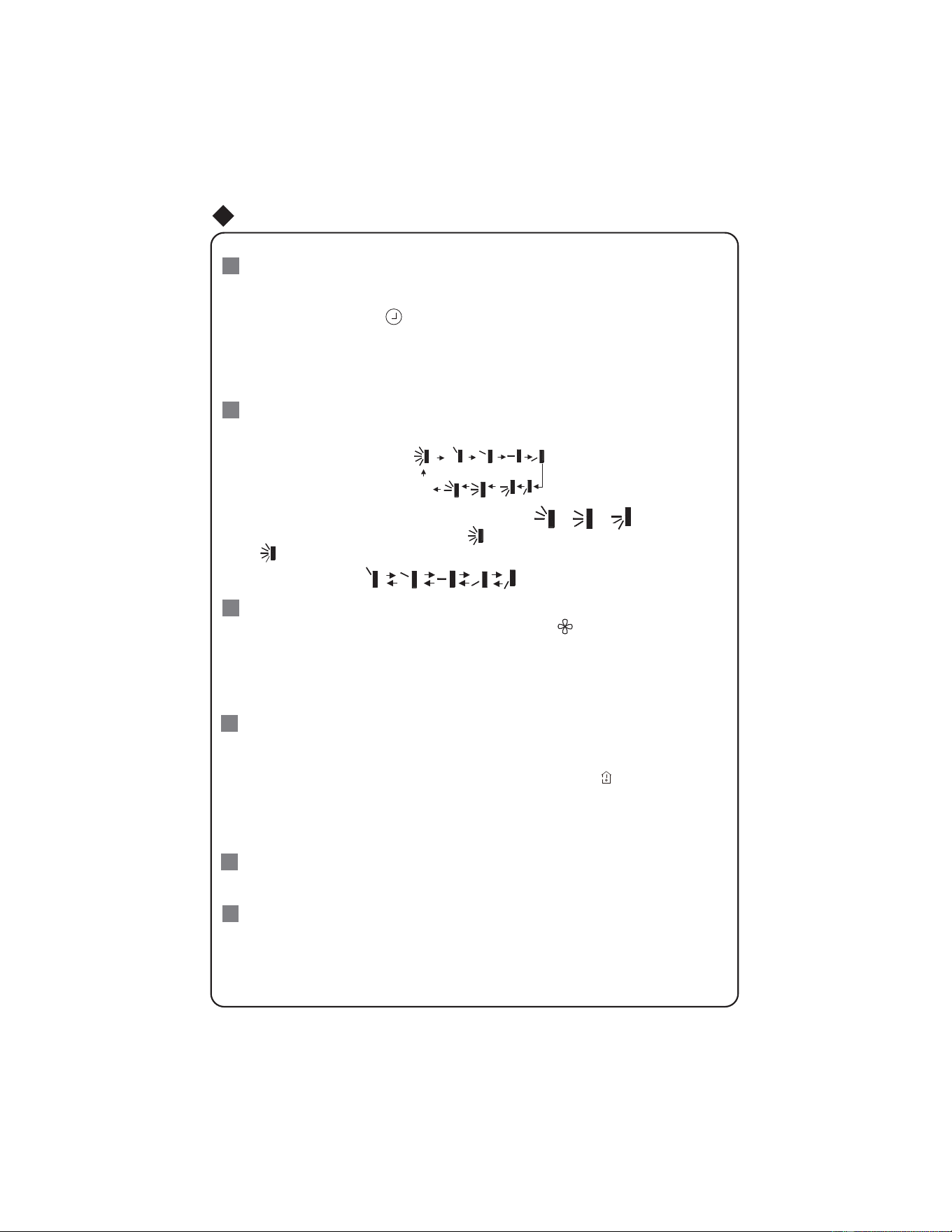
TIMER ON :
TIMER OFF :
11
10
TURBO:
12
Press this button to initiate the auto-ON timer. To cancel the auto-timer program, simply
press this button again.
After pressing this button, disappears and "ON "blinks
. 0
0:00 is displayed for ON time
setting. Within 5 seconds, press + or - button to adjust the time value. Every press of either
button changes the time setting by 1 minute. Holding down either button rapidly changes the
time setting by 1 minute and then 10 minutes. Within 5 seconds after setting, press TIMER
ON button to confirm.
Press this button to set up & down swing angle, which circularly changes as below:
OFF
This remote controller is universal. If any command , or is sent out,
the unit will carry out the command as
indicates the guide louver swings as:
fan will continue operation for 10 min utes in order to dry the indoor unit even though you
have turned off the unit.
HEAT mode.
Press this button to activate / deactivate the Turbo function which enables the unit to
reach the preset temperature in the shortest time. In COOL mode, the unit will blow strong
cooling air at super high fan speed. In HEAT mode, the unit will blow strong heating air
at super high fan speed. (This function is not applicable for some models).
Press this butto
n to initiate the auto-off timer. To cancel the auto-timer program, simply
press the button again.TIMER OFF setting is the same as TIMER ON.
9
8
AIR SWEEP:
EXTEND:
Pressing button in COOL or DRY mode, the icon is displayed and the indoor
After energization,
OFF is defaulted. is not available in AUTO, FAN or
EXTEND
EXTEND
EXTEND
Remote Control Instructions
the indoor setting temperature or indoor ambient
By pressing this button you can display
temperature.When the indoor unit it will display the setting temperature,
is first powered on
if the temperature's display status is changed from other status to" ",displays the
8
ƾ
●
●
●
●
●
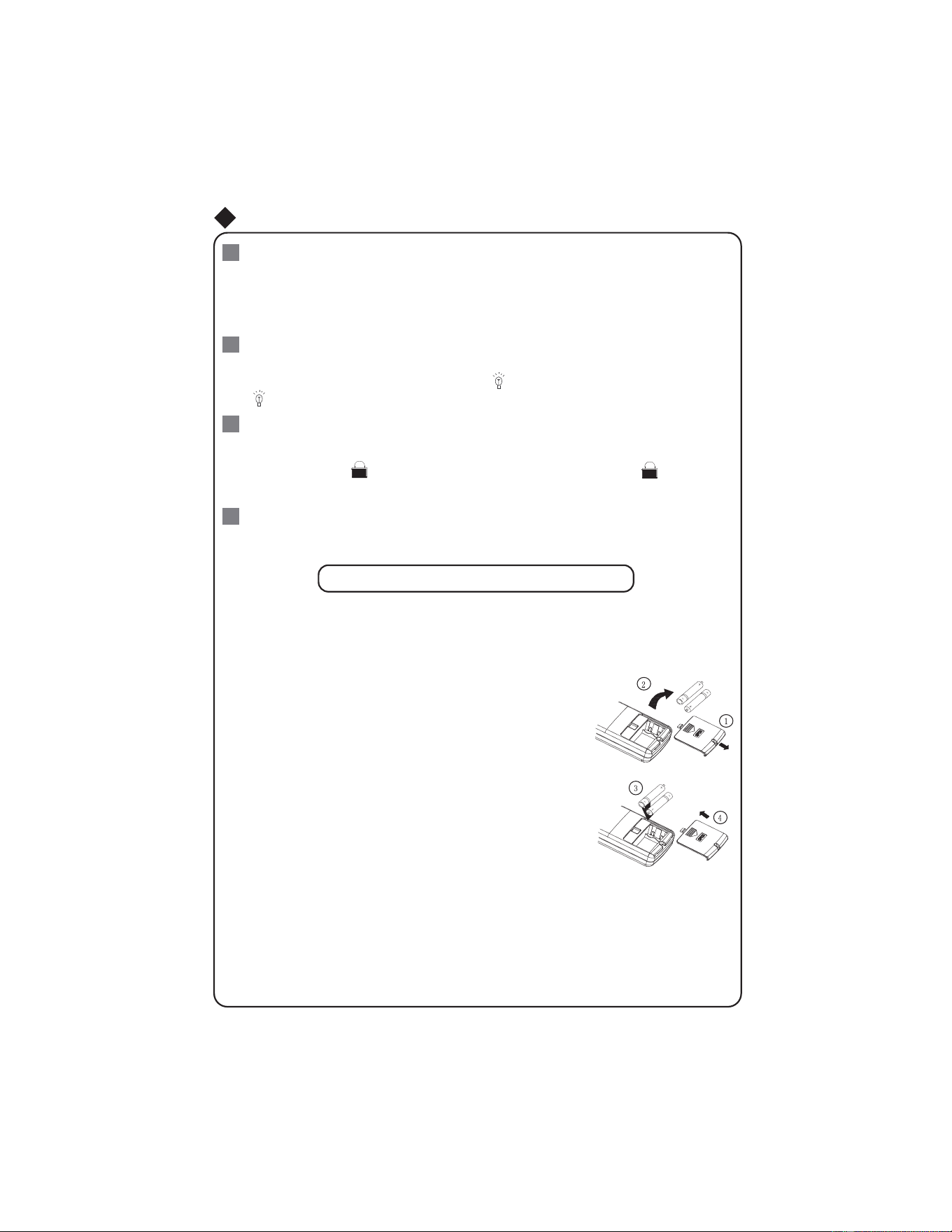
1.Remove the battery cover plate from the rear of the remote controller.
(As shown in the figure)
2.Take out the old batteries.
3.Insert two new AAA1.5V dry batteries, and pay attention to the polarity.
4. Reinstall the battery cover plate.
When replacing the batteries, do not use old or different types of batteries,
If the remote controller will not be used for a long time, please
otherwise, it may cause malfunction.
remove batteries to prevent batteries from leaking.
The operation should be performed in its receiving range.
If the remote controller does not operate normally, please take the
batteries out and reinsert them after 30 seconds. If it still can't operate properly,
Notes:
replace the batteries.
Sketch map for
replacing batteries
Replacement of Batteries
Press "+
+
" and "-
-
" buttons simultaneously
to lock or unlock the keypad. If the remote
controller is locked, is pressing any button, blinks
three times.
ć
SLEEP:
LIGHT:
16
Press this button to go into the SLEEP operation mode. Press it again to cancel this
Press LIGHT button to turn on the display's light and press this button again to turn off
disappears.
Combination of "+" and "-" buttons: About lock
14
15
or DRY mode to maintain the most
comfortable temperature for you.
Remote Control Instructions
17
Combination of "MODE" and "-" buttons:
, press "MODE"
displayed. In this case,
Allows you to toggle between Fahrenheit and Celsius.
When the unit is OFF
and "
-
" buttons simultaneously to switch between and .
3 feet
It should be kept away from the TV set or stereo sound sets.
9
the display's light. If the light is turned on, is displayed. If the light is tunrned off ,
function. This function is available in COOL
If the wireless remote control is lost
or broken, please use the manual switch
Auto mode, but the temperature and fan
pressing this button. In which case,the diss-
player indicator light will be on if the AC receives
be off if the AC receives this signal.
ć
ƽ
ƽ
ƽ
ć
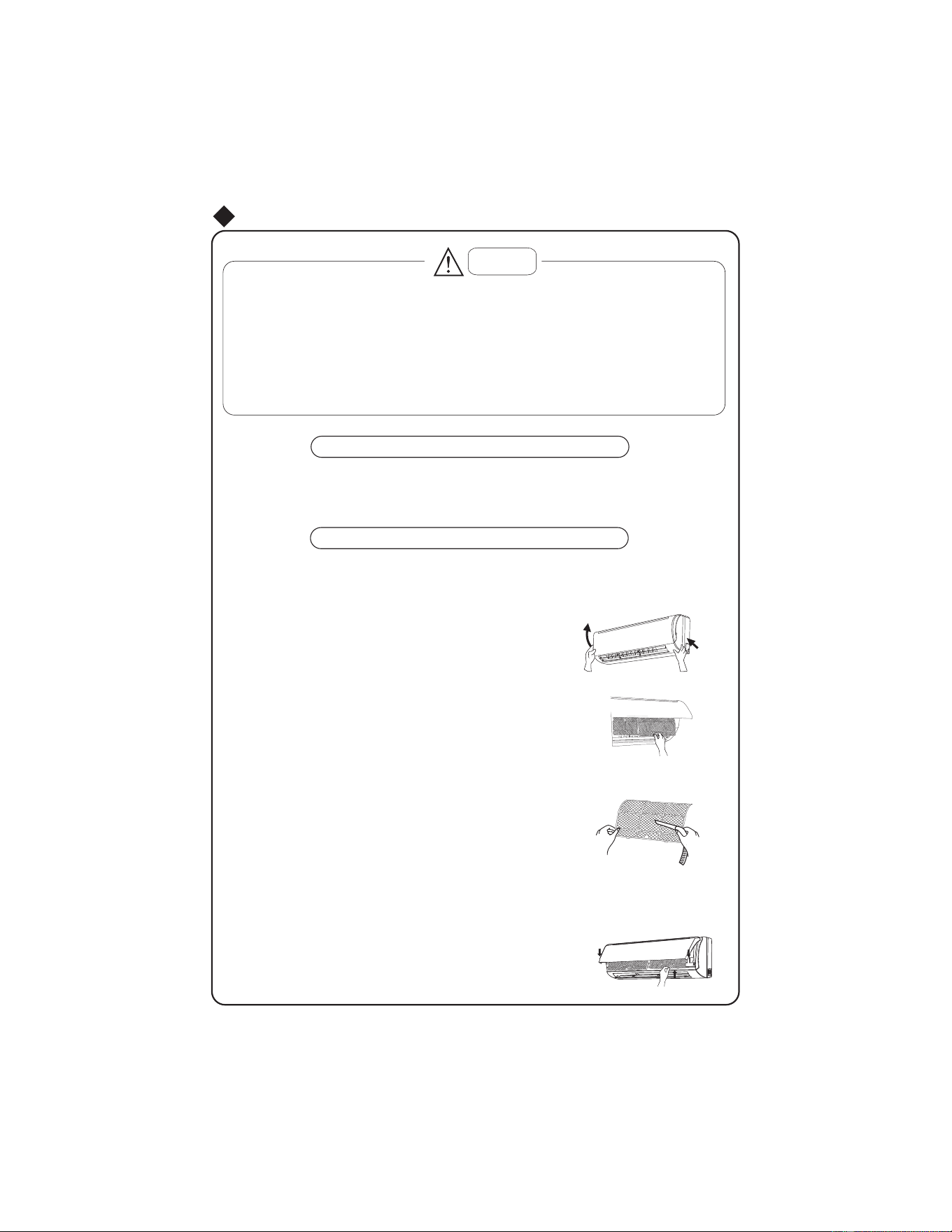
ĸ Clean the air filter
Ĺ
ķ
D
E
Caution
Turn power off and pull out the power plug before cleaning air conditioner, or it may cause electric
shock.
Never sprinkle water on the indoor unit and the outdoor unit for cleaning because it can cause an
electric shock.
Volatile liquid (e.g. thinner or gasoline) will damage the air conditioner. (So wipe the units with a
dry soft cloth, or a cloth slightly moistened with water or cleanser.)
Clean the front panel
Clean the air filter (Recommended once every three months)
Take down the air filter
At the slot of surface panel to open an angle, pull the air fil
ter
downward and take it out, please see the Fig. 4(a, b).
To clean the dust adhering to the filters, you can either
use a vacuum cleaner, or wash them with warm water
the water with the neutral detergent should below 45
degree) ,and dry it in the shade.
NOTE: Never use water above 45 to clean, or it can
Insert the air filter
Reinsert the filters along the direction of arrowhead, and
then to cover the cover and clasp it.
Fig.4
When cleaning the front panel, please dip the cloth into the water temperature of 45 below, then to dry
the cloth and wipe the dirty part.
Note: Please do not to immerse the front panel in water, due to there are microcomputer components and
circuit diagrams on the front panel.
Routine Maintenance
If there is an excessive amount of dust around the air conditioner,
to moderate personal injury.
the air filter should
be cleaned more frequently. Once filters are removed
Failure to do so can result in minor
do not touch fins, edges may
be
sharp.
cause deformation or discoloration.
NOTE:
11
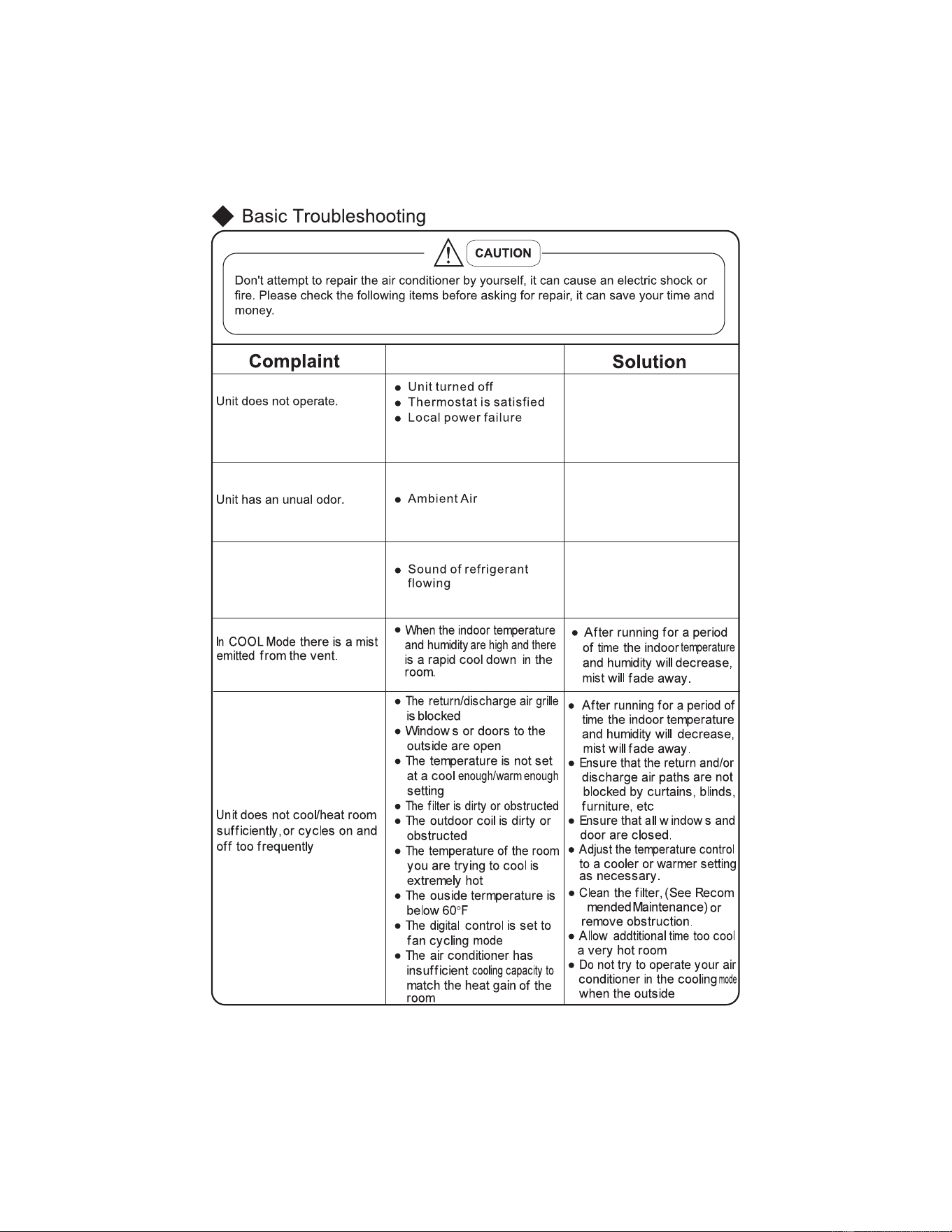
The sound of water flow
during operation.
● Turn unit on.
● Raise/Lower temperature
setting.
● Unit will resume normal
operation once power
has been restored.
● Clean air filter.
● Clean air conditioner.
Please contact an
Authorized Friedrich
Service Agency
● When the compressor
starts or stops running
you may here a swoosh
or gugle, this isn't
a malfunction.
-
Cause
12
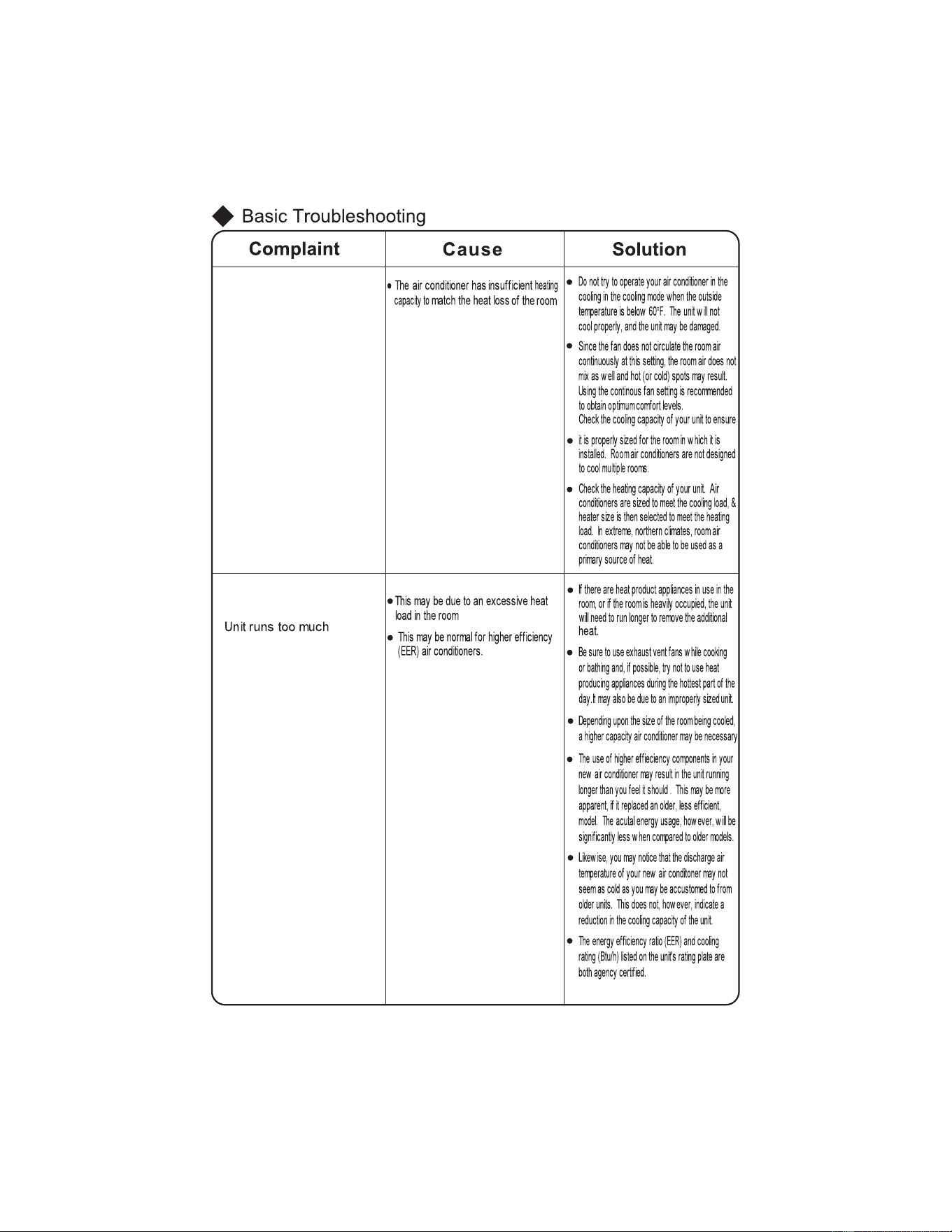
13
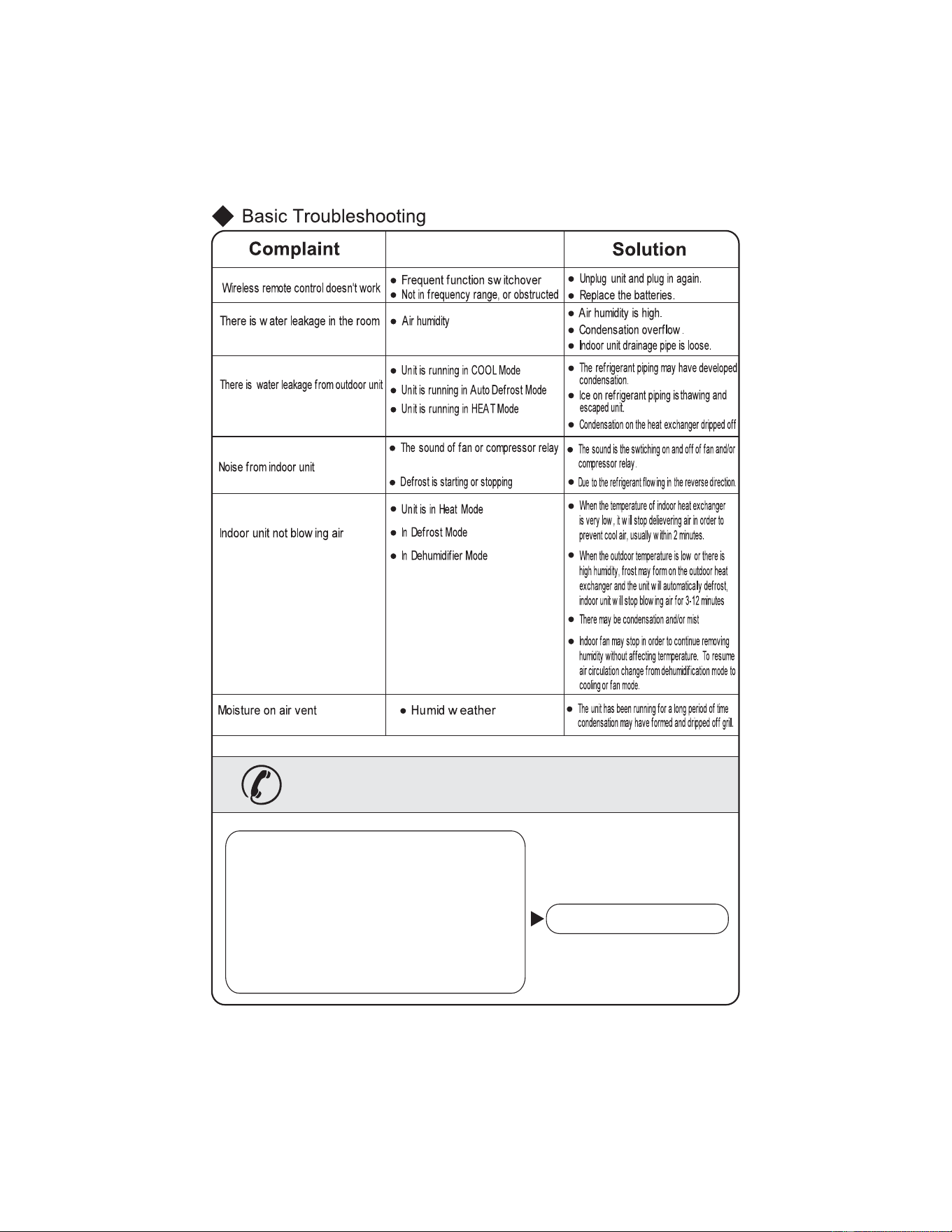
Cause
Immediately stop all operations and plug out, contact
the dealer in following situations
occur.
There is harsh sound during operation.
The terrible odors emitted during operation.
Water is leaking in the room.
Air switch or protection switch often breaks.
There is an abnormal heat in power supply cord
and power plug.
splash water or something into unit.
Accidently
Turn off unit and switch off breaker.
14
Service & Assistance
Troubleshooting" section and still need help, here is
a list of available services:
1
2
3
15
Select a position where the condensing water can be easily drained out, and the place
is easily connected for outdoor unit.
Can select the place where is strong enough to withstand the full weight and vibration of
the unit. And will not increase the noise.
Make sure that the indoor unit installation should accord with installation dimension
diagram requirements.
Select a location from which noise and outflow air emitted by unit will not inconvenience
neighbors, animals, plants.
Select a location where there should be sufficient ventilation.
Select a location where there should be no obstructions cover the inlet and outlet vent.
The location should be able to withstand the full weight and vibration of the outdoor unit
and permit safe installation.
Select a dry place, but do not expose under the direct sunlight or strong wind.
Select a location where the children can not reach.
Important Notices
The air inlet and outlet vent should be far from the obstruction, make sure that the air
can be blown through the whole room.
Be sure to leave enough space to allow access for routine maintenance. The height of the
Select a place where the filter can be easily taken out.
dimension diagram, convenient for maintenance, repair.
Select a place where it is out of reach for the children.
Select a place where will not block the passage and do not influence the city appearance.
Do not use the unit in the immediate surroundings of a laundry a bath a shower or a
swimming pool.
Installation
Indoor Unit
Placement
Select a place about or more away from TVset or any other electric appliances.
installed location should be or more from the floor.
3 ft
8 ft
Outdoor Unit
Placement
Make sure that the outdoor unit installation dimension with installation
are in accordance
tubing within .
33 ft
The height difference of connecting the tubing within
16 ft
, the length of connecting the
16
Safety Requirements For Electric Appliances
Note:
Make sure that the Live wire or Zero line as well as the earth wire in the family power
socket can not be wrong connected, there should be reliable and no short circuit in the
diagram.
wrong connection may cause fire.
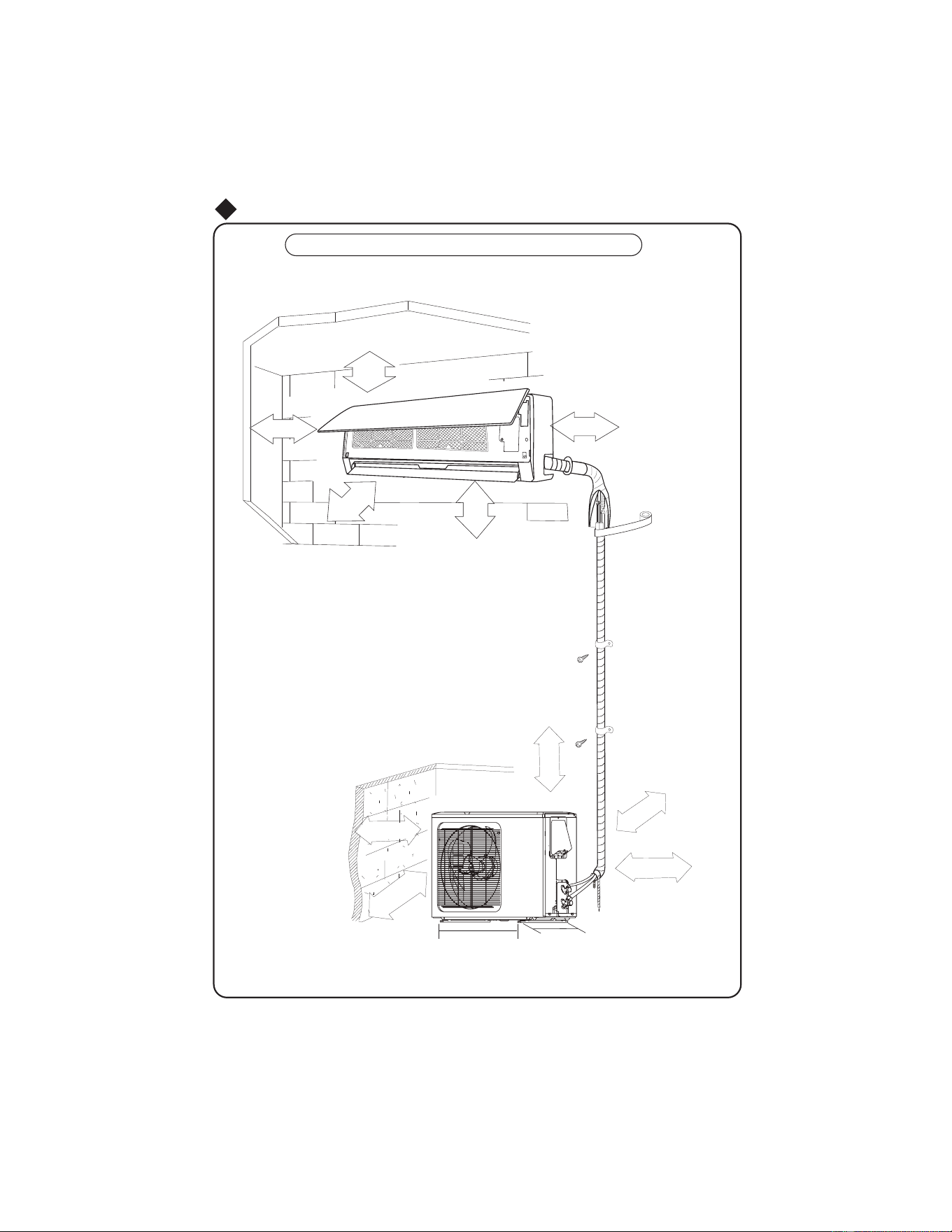
Space to the wall
e
vobA
e
v
o
bA
Installation dimension diagram
Space to the ceiling
Space to the wall
Space to the wall
Air outlet side
Space to the floor
Above
Above
Above
Above
Above
The dimensions of the space necessary for correct
installation of the appliance including the minimum
permissible distances to adjacent structures
ƽ
Space to the obstruction
Air outlet side
Space to the wall
Air inlet side
e
v
obA
Above
ev
o
b
A
Typical Unit Dimensions
6 in
6 in
6 in
10 ft
8
ft
12 in
7 ft
20 in
12 in
12 in
18
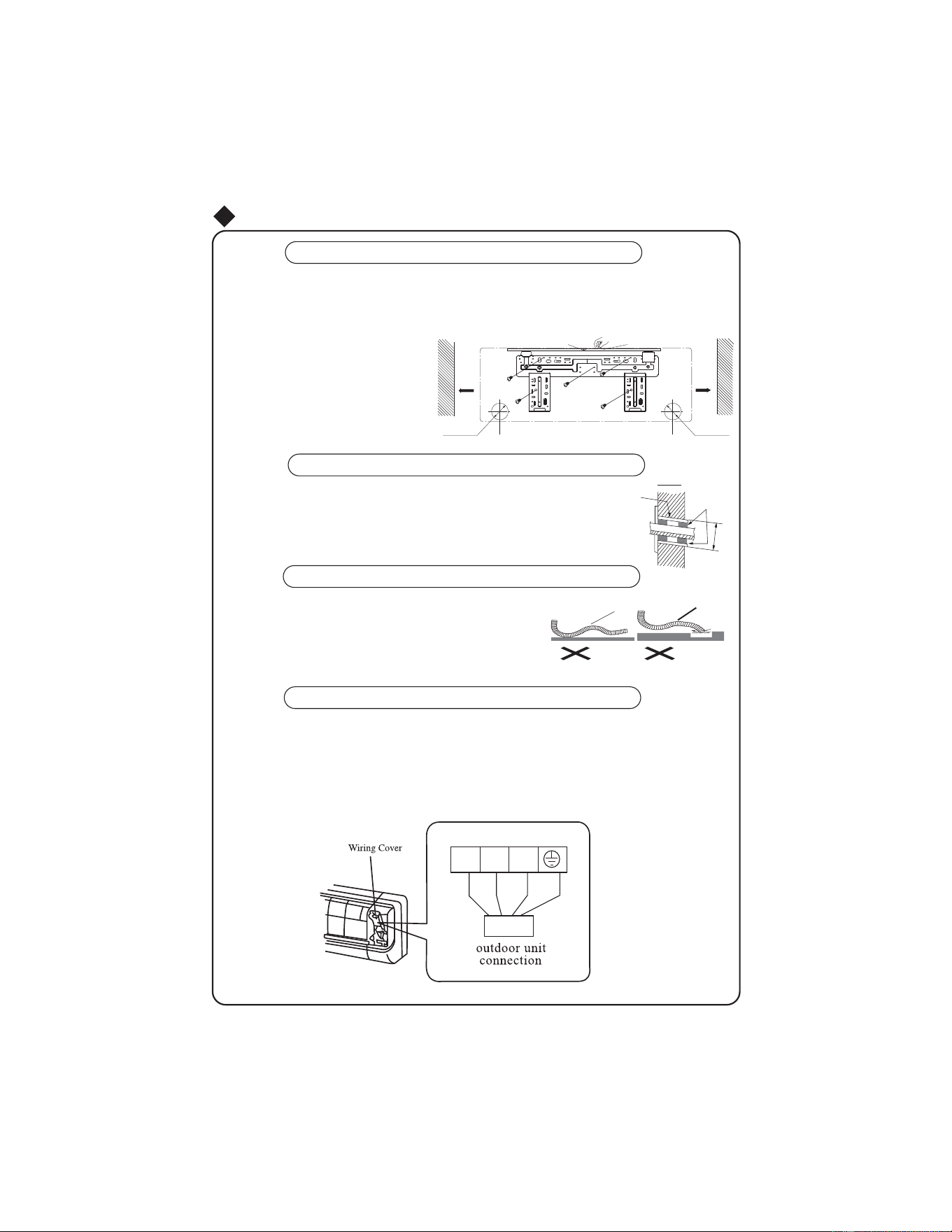
Install indoor unit
Ø
Install the rear panel
1.Always mount the rear panel horizontally. Due to the water tray of indoor unit has been adopted the
both-way drainage design, the outlet of water tray should be adjusted slightly down when installing, that is
taking the outlet of the water tray as the center of a circle, the included angle between the evaporator and
level should be 0 or more, that is good for condensing water drainage.
2.Fix the rear panel on the wall with screws.
(Where is pre-covered with plastic granula)
3.Be sure that the rear panel has been fixed
firmly enough to withstand the weight of an
adult of 60kg, further more, the weight should
be evenly shared by each screw.
Install the piping hole
2.Insert the piping-hole sleeve into the hole to prevent the connection piping
and wiring from being damaged when passing through the hole.
Install the water drainage pipe
1.For well draining, the drain hose should be placed at a downward slant.
2.Do not wrench or bend the drain hose or flood its end by water.
3.When the long drainage hose passing through indoor,
should wrap the insulation materials.
Wrenched
Bent
Flooded
Indoor Outdoor
Wall pipe
Seal pad
Fig.5
Wall
Wall
Mark on the middle of it
Gradienter
Left
Right
(Rear piping hole)
(Rear piping hole)
Space
to the
wall
above
Space
to the
wall
above
Connect indoor and outdoor electric wires
1.Open the surface panel.
2.Remove the wiring cover Fig 6.
3.Route the power connection cord and signal control wire (for cooling and heating unit only) from the
4.Reassemble the clampand wiring cover.
5.Recover the surface panel.
back of the indoor unit and pull it toward the front through the wiring hole for connection.
Fig.6
1
%8
%. %1 <(*1
6 in
6 in


19
1/2 in2
1/2
2
in
outdoor side.
1.Make the piping hole (Ф ) in the wall at a slight downward
slant to the
1/22
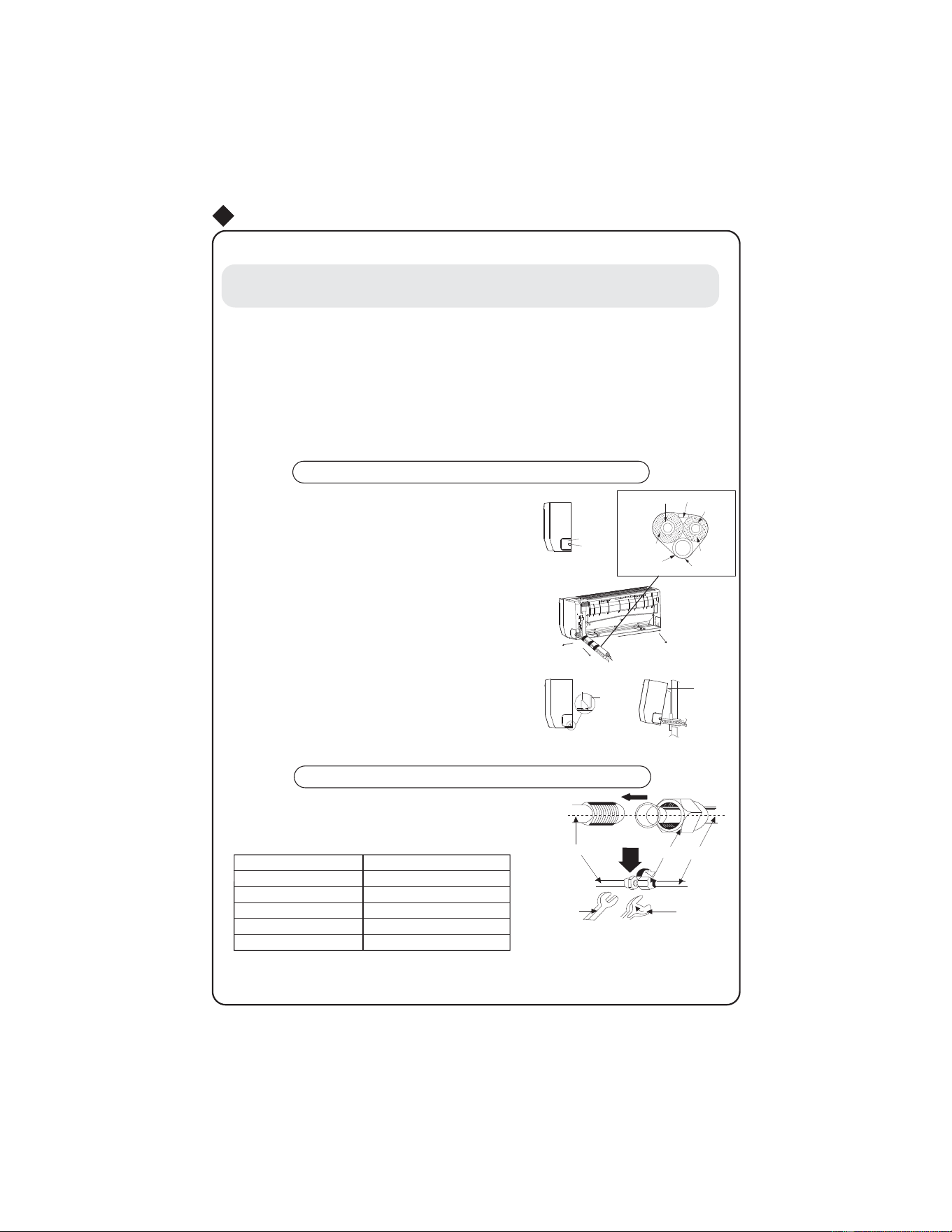
ƽ
ƽ
ƽ
After tighten the screw, slight pull the wire and confirm whether is it firm or not.
ƽ
ƽThe cover plate must be fixed, and tighten the connection wire, if it is poor installed, that
Install indoor unit
NOTE:
When connecting the electric wire if the wire length is not enough, please contact with
the authorized service shop to buy a exclusive electric wire that is long enough and the
joint on the wire are not allowed.
The electric wiring must be correctly connected, wrong connection may cause spare parts
malfunction.
Tighten the terminal screw in order to prevent loose.
If the earth wire is wrong connection, that may cause electric shock.
the dust, moisture may enter in or the connection terminal will be affected by outside force,
and will cause fire or electric shock.
েৢ
ƽ
Ł
ł
Install the indoor unit
The piping can be lead out from right, right rear, left
left rear.
When routing the piping and wiring from the left
or right side of indoor unit, cut off the tailings
from the chassis in necessary(Show in Fig.7)
Cut off the tailings 1 when routing the wiring only;
Cut off the tailings 1 and tailings 2 when routing
both the wiring and piping.
Take out the piping from body case, wrap the piping
electric wire, water pipe with tape and pull them
through the piping hole (As show in Fig.8)
Hange the mounting slots of the indoor unit on the
upper tabs of the rear panel and check if it is firm
enough.(As show in Fig.9)
or more from the floor.
Install the connection pipe
Align the center of the piping flare with the relevant valve.
Screw in the flare nut by hand and then tighten the
nut with spanner and torque wrench refer to the
following:
Spanner
Torque
wrench
Piping
Taper nut
Indoor unit piping
Fig.9
Mounting
plate
Fixing hook
Mounting
baord
Right
Right rear
Fig.8
Left rear
Left
Fig.7
Tailing 1
Tailing 2
Finally wrap it
with tape
Gas side piping
insulation
Water drainage pipe
Liquid side
Piping insulation
Gas side pipe
External connection
electric wire
Liquid side piping
Ф
Ф
Ф
Ф
Ф
Hex nut diameter
Tightening torque
The water drainage pipe can also be installed on the left of
the indoor-uint.
The height of the installed location should be
8 ft
(lb . ft)
11~14.7
22.8~25.8
36.9~40.6
44.3~47.9
51.6~55.3
Note: First connect pipe to indoor unit, then to outdoor unit. Pay
attention not to bending
piping as this may cause damage. Do not overtighten joint nut as this may
cause
leakage.
20
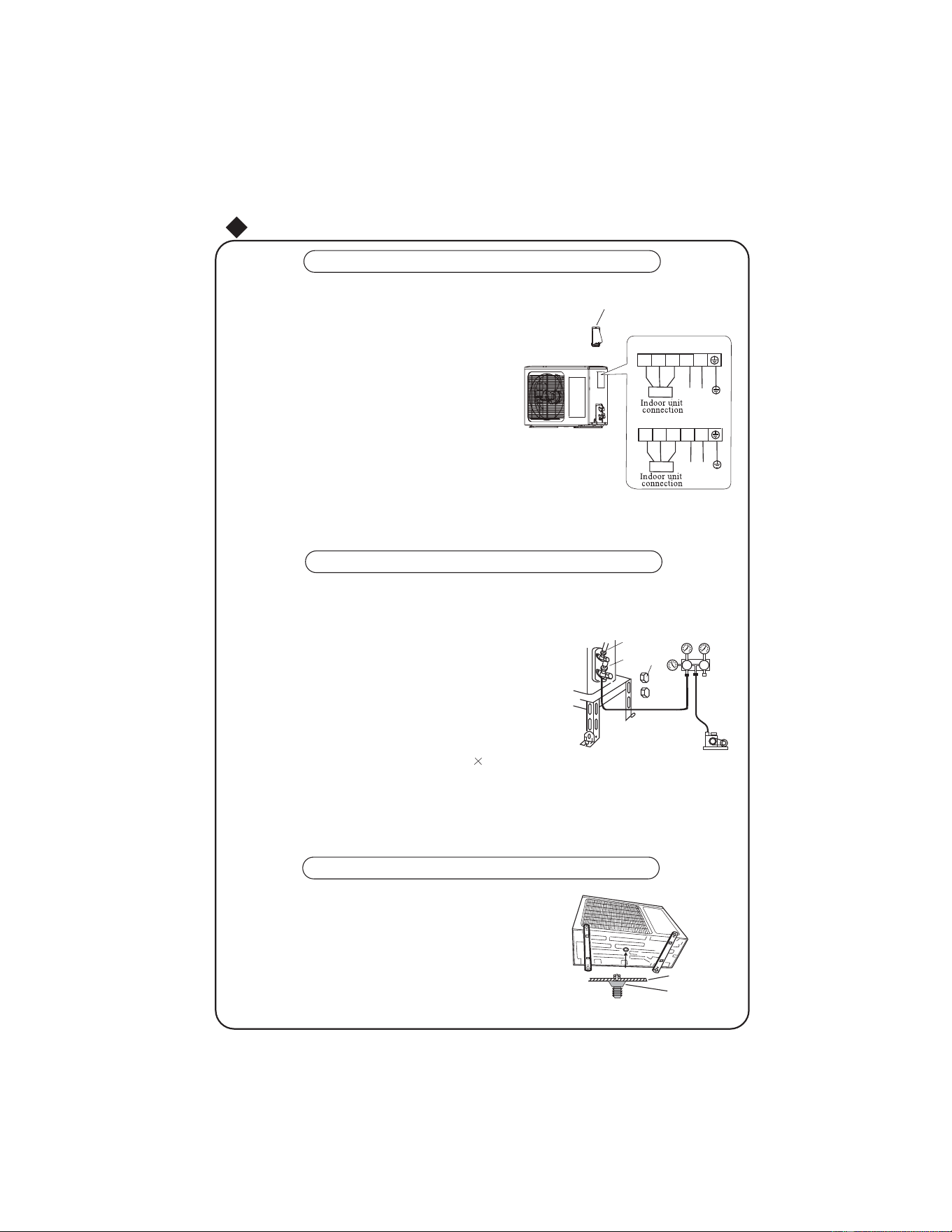
Ø
Condensate drainage of outdoor unit (no for cooling only)
The condensate and defrosting water formd during heating
in the outdoor unit can be properly discharged by drainage
pipe .
Installation method:set the drain connection in 25 hole of the
chassis has been installed and then connect
drainage pipe
with drain nozzle,so that condensate and defrosting waer can
be properly discharged
Chassis
Drain
connection
ƽ
ƽ
Install outdoor unit
Electric wiring
NOTE:
Wrong wiring may cause spare parts malfunction.
After the cable fixed, make sure there should be a free space between the connection
and connection and fixing place on the lead wire.
Cable Cross Plate sub-assy
1
%8 %. %1
%1
Air purging and leakage test
Disassemble the cable cross plate sub-assy on the outdoor unit
right side plate.
Take off wire clamp. Connect and fix power connect
cord (for cooling and heating unit,connect and fix power
connect cord and signal control wire)to terminal of line
Fix the power connection cable
with wire clamp,
(for cooling and heating unit, use the wire clamp
to fix the power connection cable and the signal
control wire), then connect the corresponding
Ensure wire has been fixed well.
Install the cable cross plate sub-assy.
connector.
bank. Wiring should fit that of indoor unit.
5
SD
FP+J
Fig.
1. Connect charging hose of manifold valve to charge end of low pressure
valve (both high/low pressure valves must be tightly shut).
2. Connect joint of charging hose to vacuum pump.
3. Fully open handle handle of Lo manifold valve.
4. Open the vacuum pump to evacuate. At the beginning, slightly
loosen joint nut of low pressure valve to check if there
is air coming inside. (If noise of vacuum pump has
been changed, the reading of multimeter is 0) Then
tighten the nut.
5. Keep evacuating for more than 15mins and make
sure the reading of multi-meter is
6. Fully open high/low pressure valves.
7. Remove charging hose from charging end of low pressure valve.
8. Tighten bonnet of low-pressure valve. (As shown in Fig.10)
Liquid pipe
Gas pipe
Valve
cap
Vacuum
gauge
Vacuum pump
/
1
1
/
%8
<(*1
1
%8 %. %1
%1
/
/
/
/
%8
<(*1
For 115V Uints
For 208~230V Uints
Power
Power
21
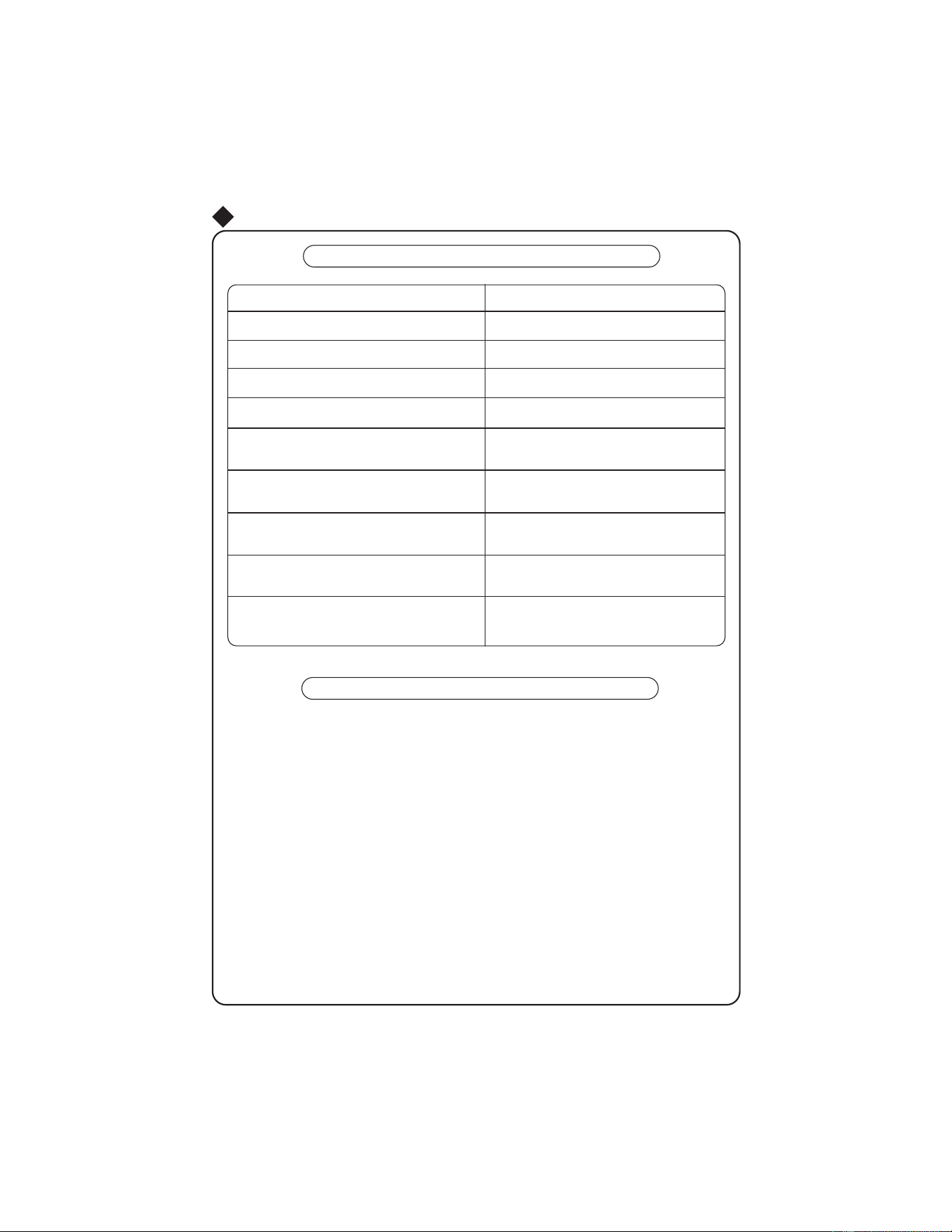
Electric wiring must be connected correctly and securely.
Cut-off valves of the connection pipes should be opened.
the operation.
Check after installation
Items to be checked Possible malfunction
Has it been fixed firmly?
The unit may drop, shake or emit noise.
Have you done the refrigerant leakage test?
It may cause insufficient cooling(heating)
capacity
Is heat insulation sufficient?
It may cause condensation and dripping.
Is water drainage well?
It may cause condensation and dripping.
Is the voltage in accordance with the rated
voltage marked on the nameplate?
It may cause electric malfunction
or damage the part.
Is the electric wiring and piping
connection installed correctly and securely?
It may cause electric malfunction
or damage the part.
Has the unit been connected to a secure
earth connection?
It may cause electrical leakage.
Is the inlet and outlet been covered?
It may cause insufficient cooling(heating)
capacity.
Has the length of connection pipes
and refrigerant capacity been recorded?
The refrigerant capacity is not accurate.
Test Operation
Before test operation
All the impurities such as scraps and thrums must be cleared from the unit.
Test operation method
Do not switch on power before installation
is completely finished.
Press MODE button, to select the COOL,
or/and
FAN to check whether
the operation is normal or not.
Checklist
22
START / STOP
Switch on power, press "
" button on the wireless remote control
to start

Friedrich Air Conditioning Co.
10001 Reunion Place, Suite 500 • San Antonio, Texas 78216
1.800.541.6645
www.friedrich.com
66129907272