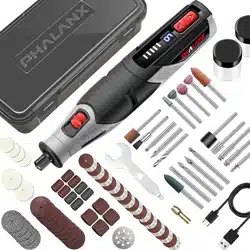

Model: PRT0036
When using electrical tools, follow all precautions to reduce
the risk of fire, electric shock, and other personal injury.
Read all instructions and product labels.
3.7V Cordless
Mini Rotary Tool

1
Manual
Content Page
Safety Instruction for Power tools-----------------------------3
Safety Rules for Rotary Tools---------------------------------5
Description and Features-------------------------------------8
Operation Instruction----------------------------------------9
Clean and Maintenance-------------------------------------13
Storage--------------------------------------------------- 14
Customer Service & Warranty--------------------------------16
Read all instructions and product labels
When using electrical tools, follow all the precautions to reduce the
risk of fire, electric shock, and other personal injury.

2
Safety Instructions
Warning: Read the safety warnings and all ins「t uctions before
use.
Failure to follow the warnings and instructions may result in
electric shock,
fire and/or serious injury. Save all warnings and instructions
for future reference
1.
Work Area Safety
a.
Always keep work area clean and bright. Cluttered and dark areas
easily induce accidents
b.
Do not operate power tools on explosive atmospheres, such as
flammable liquids, gases or dust. Power tools may cause sparks to
ignite the dust of fumes.
c.
Keep children and bystanders away while operating a power tool
Distractions could cause you to lose control.
2. Electrical Safety
a.
Power tool plugs must match the outlet. Never modify the plug in any
way. Do not use any adapter plugs with earthed (grounded) power
tools. Unmodified plugs and matching outlets will reduce risk of electric
shock
b.
Avoid body contact with earthed or grounded surfaces such as pipes,
radiators, ranges and refrigerators. It will increase the risk of electric
shock if your body is earthed or grounded
c.
Do not expose power tools to rain or wet conditions. Water entering a
power tool will increase the risk of electric shock
d.
Do not abuse the cord. Never use the cord for carrying, pulling or
unplugging the power tool. Keep cord away from heat, oil, sharp
edges or
moving parts. Damaged or entangled cords will increase the risk of
electric shock.
e.
When operating a power tool outdoor, use a probably extension cord
suitable for outdoor use. Use a probably cord suitable for use
outdoor
will reduce the risk of electric shock
3.
Personal Safety
a.
Stay alert, watch out what you are doing and use common sense when
operating a power tool. Do not use a power tool while you are tired or
under the influence of drugs, alcohol or medication. A moment of
inattention while operating power tools may result in serious personal
injury.

3
b.
Use personal protective equipment. Always wear eye protection.
Always use protective equipment such as dust mask, non-skid safety
shoes, hard hat, or heating protection for appropriate conditions will
reduce personal injuries.
c.
Prevent unintentional starting. Ensure the switch is in the off- position
before connecting to power source and/or battery pack, picking up or
carrying the tool. Carrying power tools with your finger on the switch or
energizing power tools that have the switch on invites accidents.
d.
Remove any adjusting key or wrench before turning on the power tool.
A wrench or key left attached part of the power tool may result in
personal injury.
e.
Do not overreach. Keep proper footing and balance all the times. It will
enable you got better control once power tool in unexpected situations
f.
Dress properly. Do not wear loose clothing. Keep your hair, clothing and
gloves away from working parts. Loose clothes or long hairs can be
caught in working parts.
g.
If devices are provided for the connection of dust extraction and
collection facilities, ensure these are connected and properly used. Use
of these devices can reduce dust-related hazards.
4.
Power Tool Use and Care
a.
Do not force the power tool. Use correctly the power tool for your
application. To use correctly the power tool will get the better
performance and more safety.
b.
Do not use the power tool if the switch doesn't work. Any power tool
cannot be controlled if switch is fault. If it is happened, please contact
the authorized service center
c.
Please disconnect the power source before adjusting, changing
accessories or storing power tools. It will prevent the risk of starting the
power tools accidentally.
d.
Keep the power tools away from children and do not allow persons
who unfamiliar or without this instructions to operate the power tool
Power tools are dangerous to untrained users.
e.
Maintain power tools. Check for misalignment of binding of moving
parts, breakage of parts and any other condition that may affect the
operation of power tools. If damaged, send the power tool to repair
before use. Many accidents are caused by poorly maintained power
tools.

4
f.
Use the power tool, accessories and tool bits, etc., in accordance w
ith
these
instructions
and
in
the
manner intended
for
the
particular
type of
power tool, taking into account the working conditions and the work to
be performed. Use of the power tool for operations
different from
intended could result in a hazardous situation.
5.
Battery Tool Use and Care
a.
Ensure the switch is in the off position before inserting battery pack.
Inserting the battery pack into power tools that have the switch on
invites accidents
b.
Recharge only with the charger specified by the manufacturer. A
charger that is suitable for one type of battery pack
c.
Use power tools only with specifically designated battery packs Use
of any other battery packs may create a risk of injury and fire
d.
When battery pack is not in use, keep it away from other metal objects
like paper clips, coins, keys, nails, screw, or other small metal objects
that can make a connection from one terminal to another. Shorting the
battery terminals together may cause burns or fire
e.
Under abusive conditions, liquid may be ejected from the battery, avoid
contact, if contact accidentally occurs, flush with water. If liquid
contacts eyes, additionally seek medical help. Liquid ejected from the
battery may cause irritation or burns.
5
Description
1.
Technical Data
Voltage rating: 3.7V
Battery type:3.7V Li-on / 0.6Ah
Charging voltage: 5V DC (USB) Charging
time : 2hr
No load speed: 5000/10000/15000 rpm, charging port type: micro usb
2.
User Guide
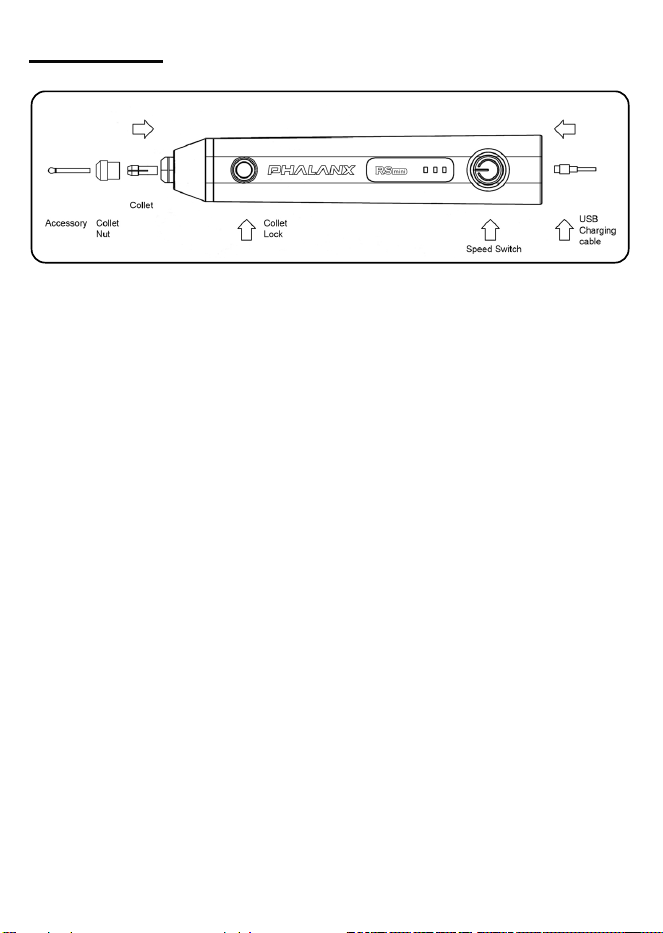
Hold the tool as if you hold a pen or pencil in your hands. Please do not
push the spindle lock while using the engraver (motor running). The tool
can be switched on or off, and the speed can be set by pushing the
switcher at the top of the engraver pen.

6
3.
Changing the Parts
a.
Turn the device off and ensure that the rotating part is stopped.
b.
Push and hold the spindle lock then turn the chuck until the button is fully
pushed in.
c.
When the rotating part is clicked in, turn the locking collar down and
pull the parts/bit out from the tool.
d.
Insert the new accessories into the chuck then fix the screw on while
pushing the locking collar
e.
Finally, release the spindle lock
4.
Warning!
a.
Before using the tool, ensure that it is ready and safe to use.
b.
Do not use in wet condition and environment
c.
Never use the tool near to flammable gas or liquids.
d.
If the tool stops unexpectedly or appears to break down in use,
disconnect from the power supply before handling moving parts
e.
For your protection always wear safety goggles and breathing mask,
keep fingers, hair and clothing clear of moving parts
f.
Do not touch the drill/grinding tip during operation (even if it is at
low
speed), because it can cause injury.
5.
Charging the Tool
a.
Connect the power supply (DC5V 500mA to
1
OOOmA), insert Micro
USB
into the machine.
Red light=charging Green light=Charging completed
b.
Charger will automatically stop charging when it is completed. It is ok to
leave tool on charger continually
NOTE! A battery pack that has been unused for a while or never been
charged must be charged before reuse or first use.
CAUTION! Do not charge battery frequently in quick succession,
which may result in danger for overcharging the battery pack
7
6.
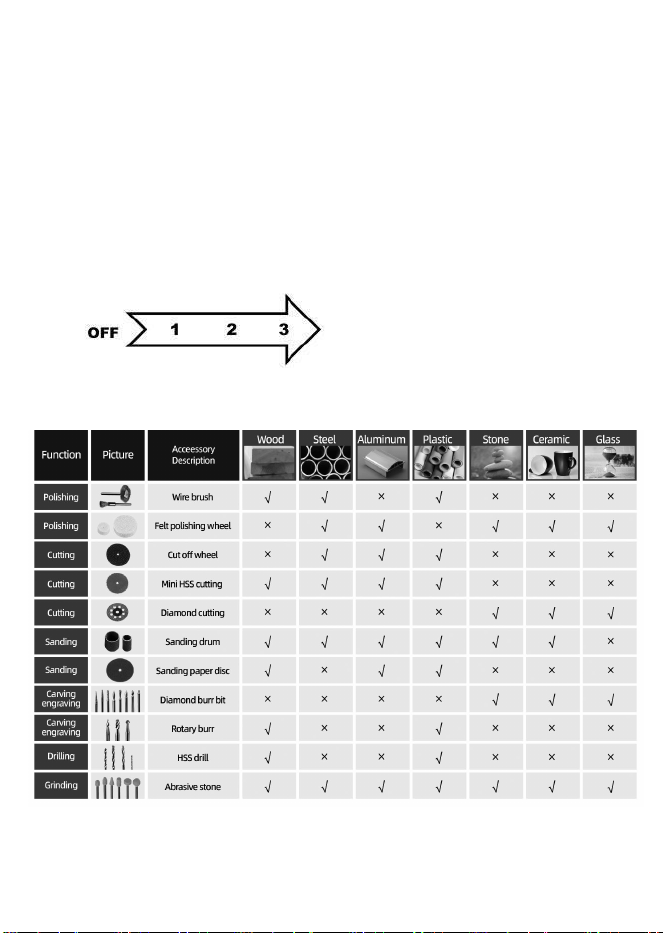
Operation
a.
Press switch once to turn on the tool, and the LED1 will be light on. The
speed will be fast at the beginning and then back to 6,000 rpm as set for
speed 1 after 2 seconds
b.
Press switch once again, LED2 will be light on, and speed will change to
10,000rpm.
c.
Press switch once again, LED3 will be light on, and speed will change to
15,000rpm
d.
Press switch four times to turn off the rotary tool, and LED indicator will
be off
e.
The
rotary tool
can be turned off by pressing the switch for 2 seconds
during operation
7.
MATERIALS AVAILABLE FOR ROTARY ACCESSORIES

8
Cleaning and Maintenance
Always pull out the mains power plug before starting any cleaning work
1.
Cleaning
a.
Keep all safety devices, air vents and the motor housing free of dirt and
dust as far as possible.
b.
Wipe the equipment with a clean cloth or blow it with compressed air at
low pressure.
c.
Always clean the tool after each use.
d.
Clean the equipment regularly with a moist cloth and some soft soap.
Do not use cleaning agents or solvents, which may attack the plastic
parts of the equipment. Ensure that no water can seep into the device
2.
Maintenance
There are no parts inside the equipment which require additional
maintenance
3.
Environmental Protection
Waste electrical products should not be disposed of with
household waste. Please recycle where facilities exist. Check with
your Local Authority or retailer for recycling advice

9
Customer Service & Warranty
This tool is guaranteed for 1 years from the date of purchase, if bought in
store, delivered or if bought online. You may only make a claim under this
guarantee upon presentation of your sales receipt or purchase invoice.
Please keep your proof of purchase in a safe place.
This guarantee covers product failures and malfunctions provide PHALANX
power tool was used for the purpose for which it is intended and subject to
installation, cleaning, care and maintenance in accordance with standard
practice and with the information contained above and in the user manual.
This guarantee does not cover defects and damage caused by or resulting
from:
• Normal wear and tear
• Overload, misuse or neglect
• Repairs attempted by anyone other than an authorized agent
• Cosmetic damage
• Damage caused by foreign objects, substance or accidents
• Accidental damage or modification
• Failure to follow manufacture’s guidelines
The product is designed for home usage only. If used for commercial or rental
purposes. This warranty applies only for 30 days from the date of purchase.
In the United States, to contact to a customer service representative,
mail our Technical Service at service@phalanxtools.com 24/7. We will
get back to you within 24 hours.