User Manual
Specifications
PMN: Wireless FM Transmitter
Model: BT27
HVIN: BT27
Software Version: V1.
Hardware Version: BT27-AC6956C-V1.0
0
Wireless Version: V5.4
DC Input: 12V-24V
FM Frequency Range (US/CA): 88.1-107.9MH
Buletooth Frequency Range: 2402.00-2480.00MHz
z
FM Frequency Range (JP): 76-108.0MHz
FM Frequency Range (UK/EU): 87.5-108.0MHz
FM Transmitting Power (UK/EU): -46.8dBm(EIRP)
Receiver Category: 2
Extreme Temperature: -20-45℃
The USB port in product shall only be connected to a
USB interface of version USB3.0 and below.
Wireless Connection Distance: 10m
PD30W Charging port
:
5V/3A, 9V/3A, 12V/2.5A
1x FM Transmitter
1x User Manual
Package Content
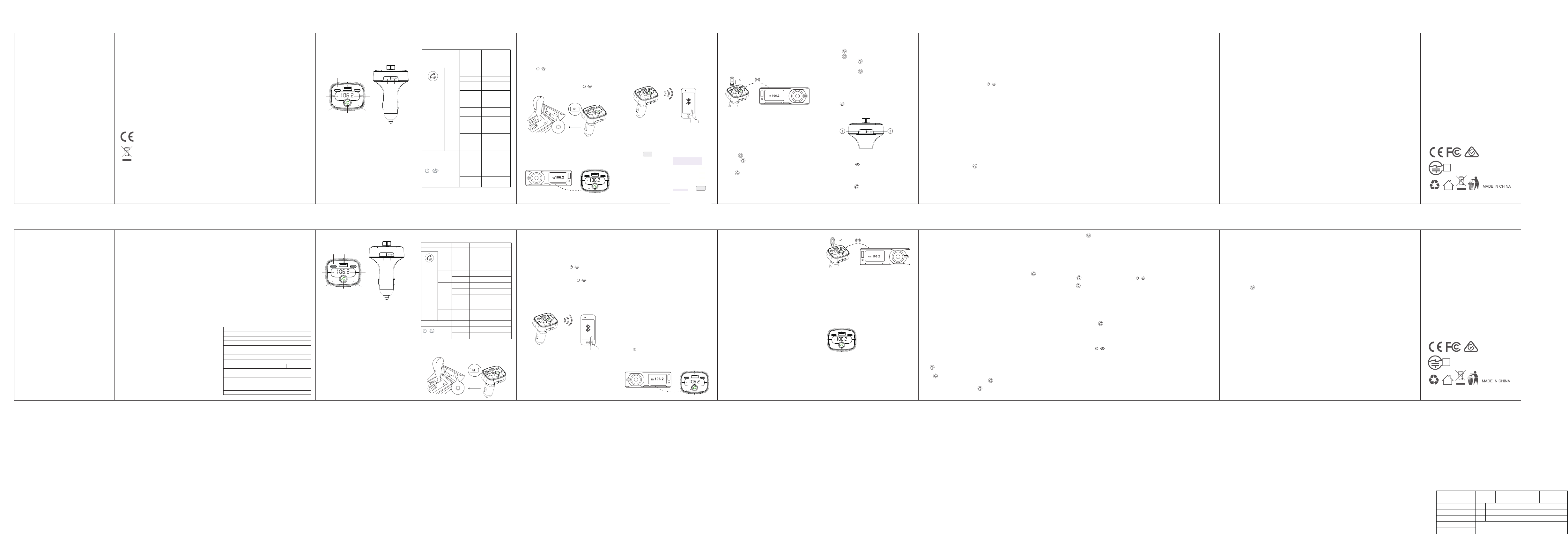
How to Install
1.Microphone
2.LED Display
3.FM frequency-
4.FM frequency+
5.knob key
a Answer/Hang up/Call back
b Play/Pause music
c turn left for volume-/ turn right for volume+
d Press and hold for 5 seconds to activate phone
voice assistance, such as SIRI&Google assistant
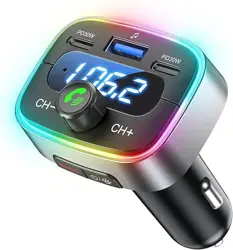
6.Type-C PD30W Charging Port
7.Type-C PD30W Charging Port
8.USB Flash Drive Port
9.Bass Button
10. A.Press to turn on/off the LED light
B.Press and hold for 5 seconds to
turn on/off the transmitter
Product Diagram
1.Start the car,insert the FM transmitter into the
car cigarette lighter.
The LED display willshow the car battery voltage
first,then “FM frequency”,if not,the power
button“ ”on the side of the transmitter
for 3-5 seconds to turn it on.
Tips :If the display has been turned on, but the LED
light is not on, you can press the “ ” button
to turn on the light.
Sound is not good
1.The original FM station chose might be busy or
not clear enough, please try to use another blank
FM station.
2.For the best audio quality, please set the volume
of your phone and FM transmitter to the max, and
then adjust the car volume to an appropriate level .
PD3
0W
PD30W
CH-
CH+
BASS
/
PD30W
PD30W
CH-
CH+
BASS
/
2.Tune your car radio to a clean, empty station
with no programming.
Tips: What is a blank station? -A blank station is a
channel with no programming or no broadcasting.
There is only a slight rustle sound.
4.Activate your phone's Wireless and select "BT27"
to connect. The display will stop flashing once it is
connected successfully. If a password is required,
please enter “0000”.
3.Pair the frequency on the transmitter with the
same one of your car radio.
Press button “ CH+ ”“ CH- ” on the transmitter,
set it to the one you want.
5.You can play music from your phone.
Tips: For the best audio quality, please set the
volume of your phone to the max, and then adjust
the car volume to an appropriate level.
USB Flash Drive Playing
If you want to use the U disk to play music, please
also set up the device from step 1-3, then insert the
U disk into the USB flash drive port"♫ ".
The transmitter will read the U disk and play
music automatically.
If not working
(1)Please confirm if the U disk is in FAT32 format.
Tips: (U disk music does not support playing
music in folders, please do not store the songs
in folders by category.)
Music Playing Function:
1.Volume Adjustment
turn left “ ”for volume-
turn right “ ”for volume+
2.Music Control
Press “ ” to play/pause music
3.Bass Sound Adjustment
Press “ b ” button
Phone Calling Function
1.Press “ ” to answer or hang up the call
2.Press “ ” twice to call back
3.Press and hold “ ” for 5 seconds to
reject coming call
4.Press and hold “ ” during a call to
switch Handset/Hands-free answering mode
Read the instructions carefully before using this product.
Avoid extreme temperatures.
Do not use this product if it is broken.
Do not disassemble this product without permission.
Incorrect reassembly may result in a risk of electric shock.
Use original or certified cables.
Unplug this product before attempting any maintenance or
cleaning.
Exposing this product to open flames may cause it to
explode.
Use a dry, soft lint-free cloth to clean.
Always obey traffic laws and pay attention to the road.
Safety Instructions
Notice
This product complies with the radio interference
requirements of the European Community.
This symbol means the product must not be
discarded as household waste, and should be
delivered to an appropriate collection facility for
recycling. Proper disposal and recycling helps
protect natural resources, human health and the
environment. For more information on disposal
and recycling of this product, contact your local
municipality, disposal service, or the shop where
you bought this product.
PD30W PD30W
CH- CH+
PD30W PD30W
CH- CH+
PD30W PD30W
CH- CH+
/
/
Trouble Shooting:
Transmitter does not turn on
1.Press and hold the power button “ ” for
5 seconds to turn on the transmitter.
2.Check if the cigarette lighter is functional.
USB Charging Function
The port marked with“PD30W" supports type C
PD 30W fast charge. The max output of the port
is 5V/6A when both of the ports work simultaneously.
Can not play USB flash drive
Can not play phone music
1.Check if the capacity of the USB flash drive is
within 64GB.
2.Check if the USB flash drive is in FAT32 format.
3.Music can not be put into folders.
1.If the wireless is connected successfully, make
sure you have used a blank radio station and make
sure the station on the transmitter is set to the same
one as the radio.
Can not hear the voice of other party
1.Try to press an hold the “ ” button during a
call to switch from "Handset Mode " to "Hands-
Free mode ”.
/
Turn on/off the FM Transmitter
If you want to listen to the car radio or when you
leave the car, you can press and hold the power
button “ ” for 5 seconds to turn off the
FM transmitter. The Wireless function will be turned
off then, but the USB charging function will still work.
BASS
/
Turn on/off LED light
Press and hold “ ” button on the side of the
transmitter to turn on/off the LED light
① ②
⑤
⑥
③
④
⑦
⑨
⑧
⑩
PD30W PD30W
CH- CH+
BASS
/
① ②
⑤
⑥
③
④
⑦
⑨
⑧
⑩
PD30W PD30W
CH- CH+
BASS
/
BT27
PD3
0W
PD30W
CH-
CH+
BASS
/
BT27
PD30W
PD30W
CH-
CH+
BASS
/
PD30W
PD30W
CH-
CH+
BA
SS
/
( 64G)
PD30W
PD30W
CH-
CH+
BASS
/
( 64G)
Bluetooth FM
Transmitter
Model: BT27
尺寸:50*85 mm 单黑印刷 折页
HUNDRUP
Wireless FMトランスミッター
型番:BT27
取扱説明書
お問い合わせ先:[email protected]
保証書とアフターサービスいついて
ご使用中、もし何かご質問、ご相談などがございま
したら、注文番号・型番・お問い合わせ内容などの
情報をご用意の上、メールにでご連絡ください。 24
時間以内に誠心誠意に対応させていただきます。
万が一、初期不良、何か不具合があった場合は至急
新品交換・全額返金などのサービスを対応いたしま
す。ご安心くださいませ。
お問い合わせ先:[email protected]
受付時間: 9:00-18:00 平日のみ (土・日・祝日・当
社休業日を除く)
※レシートや納品書などの購入証明書は、ご購入日を
証明する大切な書類となりますので、保証規定と併
せて大切に保管願います。
※マニュアル文書の記載に従った正常状態で故障した
場合には、保証規定内容に基づき修理または交換を
無料で致します。
保証期間内でも以下の場合の修理または交換は有償
となります。
弊社および弊社が指定するサービス機関以外で修
理、調整、改良された場合。
マニュアル、文書、説明ファイルに記載の使用方
法、および注意に反するお取り扱いによって生じた
故障、損傷の場合。
この度は、お買い上げいただき誠にありがとうごさ
います。この取扱説明書では,本製品の使用方法や安
全にお取扱いいただくための注意事項を記载してい
ます。ご使用の前によくご覧ください。
読み終わったあともこの取扱説明書は大切に保管し
てください。
デザイン及ひ仕様については改良のため予告なしに
変更することがあります。
本書に記載の社名及び製品名は各社の商標又は登録
商標です。
最初にご確認ください
お使いになる前に、セット内容がすべて揃っている
かご確認ください。
万一、足りないものがありましたら、お買い求めの
販売店にご連絡ください。
せッ卜内容
①本製品のシガープラグを車のアクセサリーソケッ
トに挿入します。
②車のエンジンを始動すると、本製品の電源が自動
的にONになります。
LED表示画面が車のバッテリー電圧と表示されたあ
と、約3秒間入力FM周波数を表示します。
※表示されない場合は、FMトランスミッター側面の
ライトボタン/電源ボタン“ ”を3~5秒間長押
しして電源を入れてください。
※画面は点灯しているがLEDライトが点灯しない場
合、ライトボタン/電源ボタン“ ”を短く押す
とライト機能をONにできます。
※直射日光の当たる所や炎天下の車内など、高温にな
る場所には放置しないでください。
2.スマートフオンとペアリング
(1)[設定]→[Wireless]を選択します。
(2)[Wireless]をONにし、[BT27]を選択します。
※パスキ一を要求された場合は[0000]を入カしてくだ
さい。
操作画面は参考です。ご使用のスマートファンの
OS、機種により画面は異なります。
②接続が正常に完了すると、ディスプレイの点滅が
停止します。
※一度Wireless接続設定をすると、次回以降工ンジン
をかけると自動的にFMトランスミッターとWireless
接続されます。
(スマ 側がWireless機能をONにした状態に限る)
3.周波数を設定する
①車載FMラジオの電源を入れ、空き周波数(放送局
の電波を受信していないチャンネル)に合わせてく
ださい。
※「空き周波数」とは、番組の放送が行われておら
ず、サーッというノイズ(砂嵐音)のみが聞こえる
チャンネルを指します。
②トランスミッターの周波数を、ラジオと同じ周波
数に設定してください。
「CH+」「CH-」ボタンを使って、希望の周波数
を選択します。
※設定可能な周波数範囲:76.0~108MHz
なるベく高音質で音楽再生をする方法
FM周波数を「76.0MHzまたは90MHzに近い数値」
かつ「FMラジオが流れていない数値」を設定してい
ただくことで高音質再生が可能となります。
※最初はГ76.0MHz」を使用していただくことを推奨
しております。
注意点
既にラジオ放送などで使用されているFM周波数を使
用すると、ノイズ発生やWireless接続が途切れる原
因になりますので使用しないでください。
最適な音質を得るため、スマートフォンの音量を最
大に設定した上で、車の音量を適切に調整してくだ
さい。
※音量調整の優先順位は、(1)FMトランスミッター
(2)スマートフォン(3)車内音量の順でお願い致しま
す。
③再生機器で音楽を再生し、車のスピーカーから音
楽が聞こえると接続完了です。
4.USBメモリの挿入方法
①USBメモリ内の音楽を再生するには、以下の手順1
および3に従ってデバイスの設定を行った後、USBメ
モリをポートに挿入してください。
②FMトランスミッターが自動的にUSBメモリを認識
し、音楽の再生を開始します。
※動作しない場合の確認事項
①USBメモリがFAT32形式でフォーマットされてい
ることを確認してください。
②音楽ファイルはフォルダ内に保存せず、USBメモ
リのルートディレクトリに直接保存してください。
5.機器を充電する
Type-C充電ポートに充電ケーブルを接続することで、
スマートフォンなどの機器を充電できます。
※「PD 30W」と記載されたポートは、Type-C PD
30W高速充電に対応しています。
両方のポートを同時に使用する場合の最大出力は
5V/1.6Aです。
音楽再生中の音量が小さい場合(iPhoneの場合)
iPhoneの場合、初期状態で音量ボリューム制限がか
かっている可能性がございます。
iPhone設定画面によりiPhoneのミュージックアプリ
で最大音量を設定することができます。
設定手順:
①トップ画面より「設定」を選択
②「ミュージック」を選択します
③「音量制限」「音量の自動調整」をオフにしてく
ださい。
▲This may cause a fire, malfunction or damage.
●Do not open, repair, or modify this product
yourself.
Doing so will void the warranty.
▲This may cause fire, electric shock, or
malfunction.
Do not wet this product with water or other
liquids, or allow liquids or metal objects to enter
the product.
Be careful not to let foreign objects such as
these get into the device.
▲This may cause fire, electric shock, or
malfunction.
Do not store this product in locations with high
moisture or humidity, in direct sunlight, in
locations with a lot of dust or oily smoke, or near
heating appliances.
Do not install or store in a high temperature
location.
▲This may cause fire, electric shock, or
malfunction.
● Place it in a place that does not interfere with
driving and where the car's functions (brakes)
are not affected.
Be sure to install it in a location that does not
interfere with other equipment (e.g., the handle,
etc.).
So lame.
Incorrect installation may result in a traffic
accident.
●Do not operate this product or any connected
devices while driving Sai.
▲It may cause an accident. It is very dangerous
so please do not do this under any
circumstances.Please do.
This product runs on electricity and may pose a
risk of fire.
If smoke or an unusual odor is observed,
immediately.
Remove the product from the accessory socket
and discontinue use.
So lame.
For good communication
●For Bluetooth connection, wireless LAN and
other wireless devices around devices that emit
radio waves such as microwave ovens, and
around obstacles.
Do not use the device in areas with a lot of noise
or other environments with poor signal reception.
If the connection is frequently interrupted or the
communication speed drops dramatically,
or an error may occur.
● IEEE802.11g/b wireless LAN devices and
Bluetooth such as this product
The devices use the same frequency band, so
they may cause interference if used nearby.
This can cause radio interference, slowing down
communication speeds or making it impossible
to connect.
In this case, turn off the power to the equipment
you are not using, please turn it off.
If you are unable to communicate properly near
a radio or broadcast station, please change the
location.
FCC Warnning:
This equipment has been tested and found to
comply with the limits for a Class B digital
device, pursuant to part 15 of the FCC Rules.
These limits are designed to provide reasonable
protection againstharmful interference in a
residential installation. This equipment
generates,uses and can radiateradio frequency
energy and, if not installed and used
inaccordance with the instructions, maycause
harmful interference to radio communications.
However, there is no guarantee thatinterference
will not occur in a particular installation. If
thisequipment does cause harmfulinterference to
radio or television reception, which can be
determined by turning the equipmentoff and on,
the user is encouraged to try to correct the
interference by one or more of thefollowing
measures:
• Reorient or relocate the receiving antenna.
• Increase the separation between the
equipment and receiver.
• Connect the equipment into an outlet on a
circuit different from that to which the receiver is
connected.
• Consult the dealer or an experienced radio/TV
technician for help.
Caution: Any changes or modifications to this
device not explicitly approved by manufacturer
could void your authority to operate this
equipment.
This device complies with part 15 of the FCC
Rules. Operation is subject to the following two
conditions:
1)This device may not cause harmful
interference, and (2) this device must accept any
interference received, including interference that
may cause undesired operation.
This equipment complies with FCC radiation
exposure limits set forth for an uncontrolled
environment. This equipment should be installed
and operated with minimum distance 20 cm
between the radiator and your body.
Precautions for safe use (please be sure to
follow these instructions)
●Use with the specified power supply voltage.
▲This may cause fire, electric shock, or
malfunction.
If thunder starts to rumble, do not touch this
product or any cables or plugs.
Please do not be.
▲There is a risk of electric shock due to
lightning strikes.
●Do not touch this product with wet or dirty
hands.
▲This may result in electric shock or
malfunction.
● If dust or dirt accumulates on the accessory
socket of this product,do not install the product
while it is in this position.
やすくなるため、スマートフォン側の音量を【最
大】にした上で、カーオディオ側で細かい音量調整
をしてください。
スマートフォン側の音量を【最大】にせず、カー
オーディオ側の音量を上げるとノイズが入りやすく
なり、高音質な音楽再生ができなくなります。
安全にお使いいただくためのご注意(必ずお守りくだ
さい)
●定められた電源電圧で使用してください。
▲火災や感電、故障の原因となる恐れがあります。
●雷が鳴りだしたら、本製品やケーブル・プラグなど
に触れないでください。
▲落雷により感電する恐れがあります。
●濡れた手や汚れた手で本製品に触らないでくださ
い。
▲感電や故障の原因となる恐れがあります。
●本製品のアクセサリソケット部にホコリ、ゴミが付
着し
ている状態で取付けないでください。
▲火災や故障、破損の原因となる恐れがあります。
●お客様ご自身で本製品の内部を開けたり、修理・改
造しないでください。分解した場合、保証は無効に
なります。
▲火災や感電、故障の原因となる恐れがあります。
●本製品を水などの液体で濡らしたり、内部に液体・
金属などの異物が入らないようにしてください。
▲火災や感電、故障の原因となる恐れがあります。
●本製品を水分や湿気の多い場所、直射日光の当たる
場所、ホコリや油煙などの多い場所、暖房器具のそ
ばなどの高温となる場所に設置したり、保管しない
でください。
▲火災や感電、故障の原因となる恐れがあります。
●運転の妨げにならない場所、また、自動車の機能
(ブレーキ、ハンドル等)の妨げにならない場所に確実
に取付けてください。
▲誤った取付けは、交通事故の原因となります。
●運転中の本製品および、接続機器の操作はしないで
ください。
▲事故の原因となります。大変危険ですので絶対に
しないでください。
●本製品は電気で動作しておりますので、発火する恐
れがあります。万一煙が出たり異臭がした場合は、
ただちに本製品をアクセサリソケットから取外し、
使用を中止してください。
良好な通信を行うために
●Wireless接続においては、無線LANその他の無線機
器
の周囲、電子レンジなど電波を発する機器の周囲、
障害物の多い場所、その他電波状態の悪い環境で使
用しないでください。接続が頻繁に途切れたり、通
信速度が極端に低下したり、エラーが発生する可能
性があります。
●IEEE802.11g/bの無線LAN機器と本製品などの
Wireless機器は同一周波数帯を使用するため、近く
で使用すると互いに電波障害を発生し、通信速度が
低下したり接続不能になる場合があります。この場
合は、使用しない機器の電源を切ってください。
●無線機や放送局の近くで正常に通信できない場合
は、使用場所を変更してください。
①車と接続すると、自動でベアリングモードに入り
ます。再生機器でBluetooth機器を検索し、[BT27]
が表示されたら選択します。
①FMトランスミッターx1台
②取扱説明書·保証書(本書)x1部
商品仕様
1.マイク
2.LED表示
3.FM周波数-
4.FM周波数+
5.多機能ボタン
6.Type-C充電ポート
7.Type-C充電ポート
8.USBメモリ用ポート
9.「BASS」ボタン(重低音ブーストボタン)
10.ライトボタン/電源ボタン
各部の名称とはたらき
ボタン操作機能
接続方法
1.アクセサリソケットに接続
型番 BT27
適合規格 Wireless Ver.5.4
通信範囲 約10m(理論値)
対応車種 12V-24V車種
周波数範囲 周波数範囲 76.0~108.0MHz ※0.1MHz刻み
定格入力 DC12-24V
Type-C 出力 5V=3A 9V=3A 12V=2.5A (PD30W最大)
合計出力 最大出力60W
使用温度範囲 -10~40℃ 保存温度範囲 -20~60℃
U-Disk対応 ≤64GB((FAT32 フォーマット)
サイズ·重 量 W40xD50xH80mm 約80g
ポート数
3ポート
Type-C充電ポート2つとUSBメモリ差込口
対応オーディ
オフォーマット
MP3,WMA,WAV,FLAC
CH- 短押し FM周波数が下がります
CH+ 短押し FM周波数が上がります
右回転 音量アップ
左回転 音量ダウン
短押し 再生/一時停止
短押し 応答する
5秒間長押し 通話を拒否する
短押し 電話を切る
2回短く押す 折り返し電話する
多機能
ボタン
音楽モ
ード
着信モ
ード
通話中
長押し プライベート通話(携帯電話)
とハ ンズフリー通話を切り
替えます。
5秒間長押し
短押し 低重音モードに入る
5秒間長押し FMトランスミッターON/OFF
短押し 雰囲気照明ON/OFF
「BASS」ボタン
ライトボタ
ン/電源ボタン
長押しすると Siri/Googleアシ
スタントが起動します。
/
ハンズフリー通話をする
本製品とスマートフォンをWireless接続して着信時に
ハンズフリー操作ができます。※「接続方法」参照
〇着信に出る:電話がかかってきたら多機能ボタン
“ ”を1回短押します。
〇通話を拒否する:電話がかかってきたら多機能ボタ
ン“ ”を5秒間長押しして、電話を切ります。
〇通話を切る: 通話中に多機能ボタン“ ”を1回短
押します。
〇折り返し電話: 多機能ボタン“ ”を2回短く押す
と、最後にかけていた電話に折り返し発信できます。
〇オーディオ切替え: 多機能ボタン“ ”を長押し
するとプライベート通話(携帯電話)とハンズフ
リー通話を切り替えます。
音楽を再生する
接続したスマートフォンや挿入したUSBメモリから
音楽を再生できます。※「接続方法」「4.USBメモリ
の挿入方法」参照
〇再生/一時停止:音楽モードで、多機能ボタン
“ ”を1回短押します。
〇音量アップ:多機能ボタン“ ”時計回りに回
す。
〇音量ダウン:多機能ボタン“ ”反時計回りに回
す。
周波数調整機能
〇FM周波数アップ:CH+ボタンを短く押す。
〇FM周波数ダウン:CH-ボタンを短く押す。
※0.1MHz刻み
専用機能ボタン
〇音声アシスタントを起動:多機能ボタン“ ”を
5秒間長押しすると、SiriやGoogleアシスタントを起
動します。
※FMトランスミッターで通話中は使用できません。
〇低音強化モードに入る:「BASS」ボタンを1回短
く押すと、低音強化モードに入ります。
〇FMトランスミッターをオン/オフする:“ ”
ライトボタン/電源ボタンを5秒間長押しでFMトラン
スミッターをオフにできます。
※電源ボタンを5秒間長押しすると、FMトランス
ミッター・Wireless機能はオフになりますが、
Type-Cの充電機能はオフになりません。
充電モード
この車用Wirelessトランスミッターが車のアクセサ
リソケットから電力を供給され、PD Type-C充電
ポート充電ケーブル(別売り)を接続してスマートフォ
ンなどの機器を充電することができます。
/
こんな時には
● 音が出ない
①ラジオ・FMトランスミッター、Wireless接続して
いる外部機器の音量を確認してください。
②FMトランスミッターとカーラジオの周波数が同じ
数字に設定することかを確認してください。
● FMトランスミッターのディスプレイが黒い
①FMトランスミッターが12V-24V車のソケットに正
しく差し込まれていることを確認してください。
②“ ”ライトボタン/電源ボタンを5秒間押し
続けてFMトランスミッターの電源を入れます。
③シガーライターが機能しているか確認してくださ
い。
● 充電されない
①対応機種がしっかりとFMトランスミッターに接続
されたことをご確認ください。
②車のエンジニアがかかっているかを確認してくだ
さい。
③充電ケープルを入れ替えて、も う一度試してみて
ください。
● 音が小さい
①接続したポータプルオーディオ機器の音量が小さ
い・音がひずまない範囲でポ一タプルオ一ディオ機
器の音量を上げます。それでも音が小さい場合は、
カーFMラジオの音量を上げます。
● ポータプルオーディオ機器の音がカーラジオから
聞こえない
①本機がシガレットライターソケットやスマホ機器
へ正しく接続されていない→正しく 接続してくださ
い。
②本機で選んだ送信周波数とカーFMラジオの周波数
が一致していない→本機の送信周波数とカーFMラジ
オの周波数を一致させ、送受信可能な状熊にしてく
ださい。
/
③接続したスマホ機器からの音が出ていない→スマ
ホ機器を再生状態にして、音がひずまない範囲でス
マホ機器の音量を上げます。
● USBメモリを再生できません
①USBメモリの容量が64 GB以内であることを確認し
てください。
②USBメモリがFAT32形式であるかどうかを確認し
ます。
③音楽はフオルダに入れることはできません。
● 相手の声か聞こえない
①通話中に“ ”ボタンを長押して、「八ンド
セットモード」から「ハンズフリーモー」に切り替
えてみてください。
● ノイズがある
①「FM周波数を76.0~90.0MHzに設定する」 ※日本
に最適なFM周波数は76.0~90.0MHzです 設定する
FM周波数は、【ラジオが流れていないFM周波数
域】をお選びください。 他のラジオが使用している
周波数で設定すると、FM周波数によって通常ラジオ
で入るようなノイズが入ることがございます。
なお、ノイズが入りやすいFM周波数はお住いの地域
や時間帯によって異なりますので、ノイズが入りづ
らいFM周波数をお客様自身で見つけていただく必要
がございます。
最適なFM周波数を見つければ、ほとんどノイズが入
ることはなくなり最高音質で音楽再生が可能になり
ます。
②「スマートフォン側の音量調整を最大にする」 ス
マートフォン側の音量を【最大】にして、カーオー
ディオ側の細かい音量を調整してください FM電波に
限らずカーディオ側の音量を上げるとノイズが入り
/
/
Activate Phone Voice Assistant
Press and hold “ ” for 5 seconds to activate
phone voice assistance, such as SIRI & Google
assistant.
Button operation function
CH- Short press
CH+ Short press
Right
rotation
Multifunction
button
Music
Mode
Volume Up
Rotate left Volume Down
Short press Play/Pause
Short press Respond
Press and
hold for 5
seconds
Reject a call
" BASS " button Short press
Light button
/ power button
/
Incoming
call
mode
During
a call
Short press hang up
Press twice
briefly
Call back
Press and
hold
Switch between
private (mobile)
and hands-free
calls.
Press and
hold for 5
seconds
Press and
hold for
5 seconds
Short press
FM transmitter
ON/OFF
Ambient lighting
ON/OFF
Press and hold
to activate
Siri/Google
Assistant
Enter low
volume
mode
Maximum output power
:
60W
U-Disk Capacity: ≤64GB (FAT32 format),
music format :MP3,WMA,WAV, FLAC
FM frequency
goes down
FM frequency
increases
R
219-259108
Transmitter beeps, keeps out of syn or
radio changes station by itself
1. Please turn off or disable the “TA” function if
there is a “TA” button on your car to avoid
interference when you use this product.
型号
名 称
1:1
±0.25
±0.20
尺寸小于100
尺寸大于100
重量
日期
日期
尺寸小于50
尺寸小于20
日期
材料
比例
尺寸小于1
±0.05
±0.10
±0.15
审核
设计
制图
未注公差要求
深圳市捷美斯实业有限公司
(mm)
R
219-259108
Sound and haptics
selection
selection
In-flight Mode
Unconnected
Unconnected
Unconnected
Unconnected
Unconnected
Online
Mobile Communication
Internet Sharing
Notification
While Bluetooth settings are open, this iPhone
will be discoverable under the name “iPhone”.
My Device
Other Devices