
MAGIC ZOOM
Quick Start Guide 1.0
(MATE ULTRA S60R / MATE H50R / MATE H38R)

The MATE series supports the MAGIC ZOOM function, which has
two functions:
1. During the day scope zooming in, the UI icon can always be
seen through the eyepiece of the day scope.
2. During the day scope zooming in, the image quality will be
improved by R+ automatically when observing through the
high-magnification day scope.
Connection:(When you receive a new MATE, MAGIC ZOOM and
MATE are already connected in factory. If you replace a new
MAGIC ZOOM accessories or upgrade the MATE program in the
future, MAGIC ZOOM needs to be connected to MATE again)
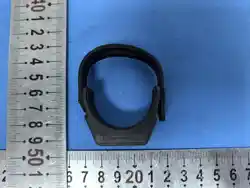
1. Install MATE in front of the day scope; select a suitable strap
to fix MAGIC ZOOM on the magnification adjustment ring of the
day scope; and install the battery of MAGIC ZOOM;
2. Turn on MATE, press and hold the power button of MAGIC
ZOOM for 3 seconds, the MAGIC ZOOM light will turn green and
then turn off, indicating that MAGIC ZOOM has been turned on;
3. After the MAGIC ZOOM is turned on, short press the MAGIC
ZOOM power button for 6 times in a row. The red light will flash
for each of the first 5 short presses. After the 6th short press, the

red light will turn on for 3 seconds and then turn off, indicating
that MAGIC ZOOM has started to connect with MATE;
(Press the power button of MAGIC ZOOM 6 times should be
within the first 90 seconds of MATE turning on)
4. Wait for 10 seconds, the MAGIC ZOOM icon will appear in the
bottom right corner, indicating that MAGIC ZOOM has been
successfully connected to MATE;
5. After the connection is successful, short press the MAGIC
ZOOM power button. The green light indicates that the battery is
full power, and the red light indicates that the battery needs to be
charged in time;
Calibration:
1. Open the MAGIC ZOOM option in the main menu, and the
prompt "MAGIC ZOOM Calibration?" will pop up.
Press the Menu button to select Yes to perform MAGIC ZOOM
calibration; or select No to exit the calibration process. During the
calibration process, please keep the rifle within 30 degrees of
vertical tilt angle.


2. Please make sure the MAGIC ZOOM has been fixed on the
magnification adjustment ring of the day scope, then click
“NEXT” by Menu button.
3. Please adjust the day scope to 3X, then click “NEXT” by Menu
button, (If your day scope does not have a 3X magnification,
please adjust it to the closest magnification to 3X)
4. Please adjust the day scope to 6X, then click “NEXT” by Menu
button, (If your day scope does not have a 6X magnification,
please adjust it to the closest magnification to 6X)

5. Please adjust the day scope to 9X, then click “NEXT” by Menu
button, (If your day scope does not have a 9X magnification,
please adjust it to the closest magnification to 9X).
Then the prompt "Calibration completed, Let’s start MAGIC
ZOOM" will pop up, indicating that MAGIC ZOOM has been
calibrated and can be used normally.
Note:
After MAGIC ZOOM is calibrated, if the battery is low, just replace
a MAGIC ZOOM battery, don’t remove MAGIC ZOOM from the
day scope.
If MAGIC ZOOM is removed from the day scope, you need to
recalibrate it again.

FCC Statement
FCC ID: 2BHFB-MATE-00
Labeling requirements
This device complies with part 15 of the FCC Rules. Operation is
subject to the following two conditions: (1) This device may not
cause harmful interference, and (2) this device must accept any
interference received, including interference that may cause
undesired operation.
Information to the user
Any Changes or modifications not expressly approved by the
party responsible for compliance could void the user's authority
to operate the equipment.

Inlumen Technologies Co., Ltd.
Room 806, A1, Phase 3, Innovation Industrial Park,
High-tech Zone, Hefei City, Anhui Province, China.
www.nocpix.com