TE-3 User Manual | Page 1
TE-3 Wireless Transmitter
User Manual / Operation Guide
1. Product Overview
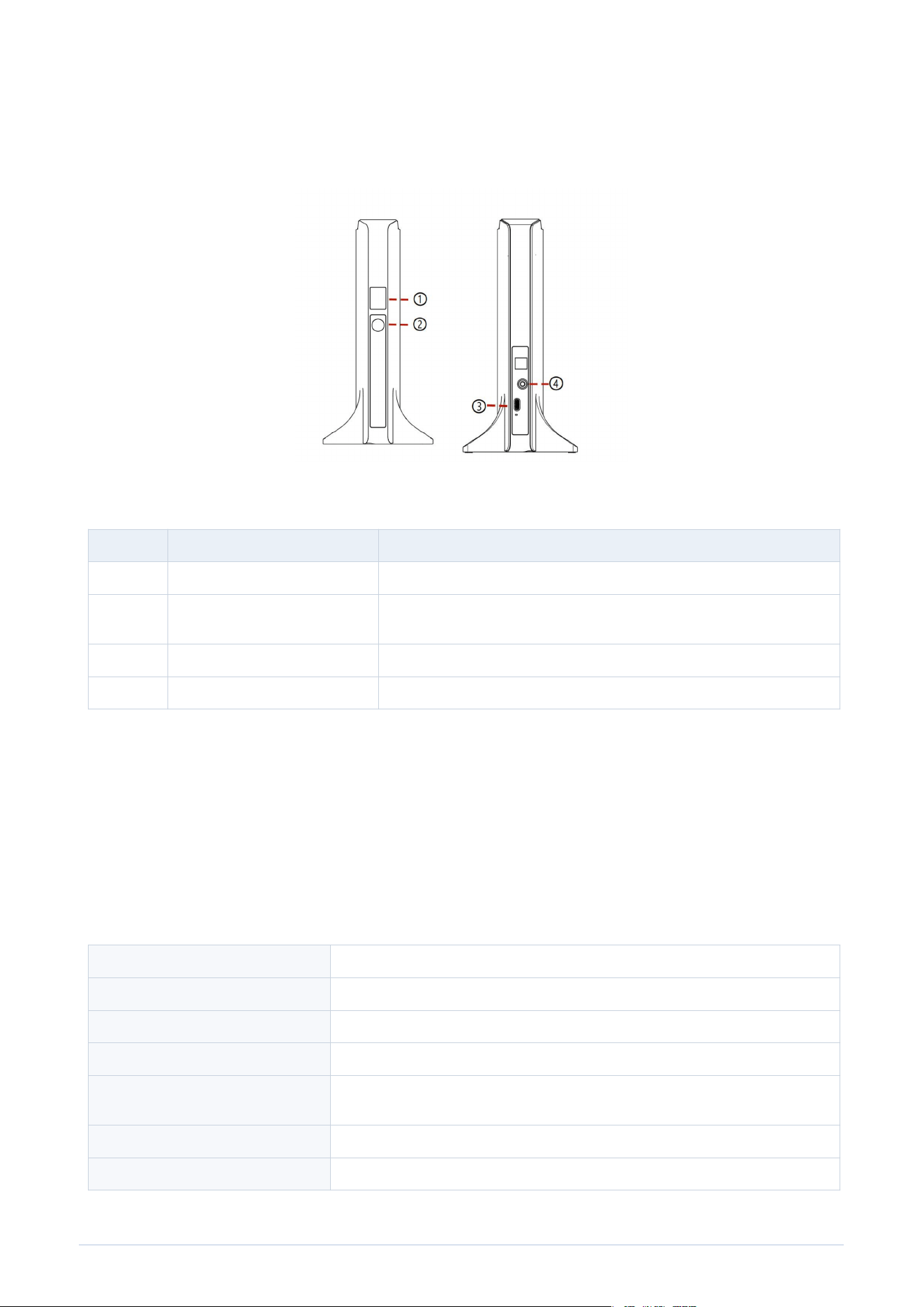
No. Name Function
1 Channel display screen Shows the current transmission channel.
2 Power / channel button Long press for 5 seconds to power on/off. Short press for 1 second to
switch channels.
3 DC 5V/2A power port Connect the supplied 5V/2A adapter for power supply.
4 Audio input Connect an audio source using the 3.5 mm audio cable.
2. Package Contents
- TE-3 wireless transmitter x 1
- 5V/2A power adapter x 1
- 3.5 mm audio cable x 1
- User manual x 1
3. Technical Parameters
Input working voltage DC 5V/2A
Working current 400 mA to 500 mA
Frequency range 2.4 GHz
Modulation method GFSK
Transmission distance Up to 60 meters in open area. Actual distance may vary depending on the
environment.
Audio input interface 3.5 mm stereo jack
RF transmission power Approximately 20 dBm, within 100 mW

TE-3 User Manual | Page 2
4. Operation Instructions
4.1 Power Connection
- Place the transmitter on a stable, dry surface.
- Connect the supplied 5V/2A adapter to the DC 5V power port.
- Use only a qualified DC 5V/2A power adapter. Do not use a higher-voltage adapter.
4.2 Audio Connection
- Connect one end of the 3.5 mm audio cable to the transmitter audio input.
- Connect the other end to the audio source, such as a mixer, phone, tablet, computer, MP3 player, or
other compatible audio output device.
- Start with a low volume on the audio source, then gradually adjust to a comfortable level after the
headphones receive the signal.
4.3 Power On / Power Off
- Power on: long press the power/channel button for about 5 seconds until the channel display turns on.
- Power off: long press the same button for about 5 seconds until the display turns off.
4.4 Channel Selection
- Short press the power/channel button for about 1 second to switch channels.
- Set the receiver/headphones to the same channel as the transmitter. The headphones can receive
audio only when the channel matches.
- When using multiple transmitters in the same area, set each transmitter to a different channel to
reduce signal conflict.
4.5 Normal Use
- After the transmitter is powered on and connected to the audio source, play audio from the source
device.
- Confirm that the receiver/headphones are powered on and set to the same channel.
- Adjust volume from the audio source and/or receiver according to the actual use environment.
- For best performance, keep the transmitter in an open position and avoid placing large metal objects
or thick walls between the transmitter and receivers.
5. Troubleshooting
Problem Possible Cause Suggested Solution
No power / display off Power adapter not connected or wrong
adapter used.
Check the DC 5V/2A adapter and reconnect
the power cable.
No sound from
headphones
Audio cable not connected, audio
source muted, or channel mismatch.
Check the 3.5 mm cable, start audio
playback, increase volume, and confirm the
receiver is on the same channel.
Short receiving distance Obstacles, interference, or low
transmitter position.
Place the transmitter higher and in an open
area; avoid walls, metal barriers, and
strong 2.4 GHz interference.
Noise or unstable audio Input volume too high/low, poor cable
contact, or interference.
Adjust input volume, reconnect or replace
the audio cable, and move away from other
wireless devices if needed.

TE-3 User Manual | Page 3
6. Safety and Maintenance
- Keep the product away from water, rain, high humidity, fire, and high-temperature environments.
- Do not disassemble, modify, drop, crush, or repair the product by yourself.
- Disconnect the power adapter when the product will not be used for a long time.
- Clean the surface with a dry soft cloth. Do not use corrosive chemicals or solvents.
- Keep the equipment installed and operated at least 20 cm away from the human body.
Note: Product specifications may be updated without prior notice. Please refer to the actual product received.
7. FCC Statement
This equipment has been tested and found to comply with the limits for a Class B digital device, pursuant to part
15 of the FCC Rules.
These limits are designed to provide reasonable protection against harmful interference in a residential
installation.
This equipment generates, uses and can radiate radio frequency energy.
If not installed and used in accordance with the instructions, it may cause harmful interference to radio
communications.
However, there is no guarantee that interference will not occur in a particular installation.
If this equipment does cause harmful interference to radio or television reception, which can be determined by
turning the equipment off and on, the user is encouraged to try to correct the interference by one or more of the
following measures:
- Reorient or relocate the receiving antenna.
- Increase the separation between the equipment and receiver.
- Connect the equipment into an outlet on a circuit different from that to which the receiver is connected.
- Consult the dealer or an experienced radio/TV technician for help.
Caution: Any changes or modifications to this device not explicitly approved by manufacturer could void your
authority to operate this equipment.
This device complies with part 15 of the FCC Rules. Operation is subject to the following two conditions: (1) This
device may not cause harmful interference, and (2) this device must accept any interference received, including
interference that may cause undesired operation.
RF Exposure Information
This equipment complies with FCC radiation exposure limits set forth for an uncontrolled environment. This
equipment should be installed and operated with minimum distance 20 cm between the radiator and your body.