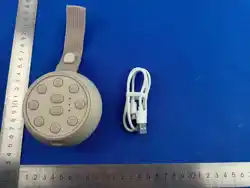
Sleep Aid Speaker
User Manual
Product Overview
Packing List: Sleep Sound Speaker & A Type-C cable & Manual
�.Before You Star
�. Operating Instructions
�. Technical Specification
�.Safety & Precaution
�.� Precautions Before Use
➀ Remove all packaging materials
➁ Place the device on a stable, flat surface — keep it at least � metre from the bed for infants
➂ Plug in the power cable (or ensure battery is charged)
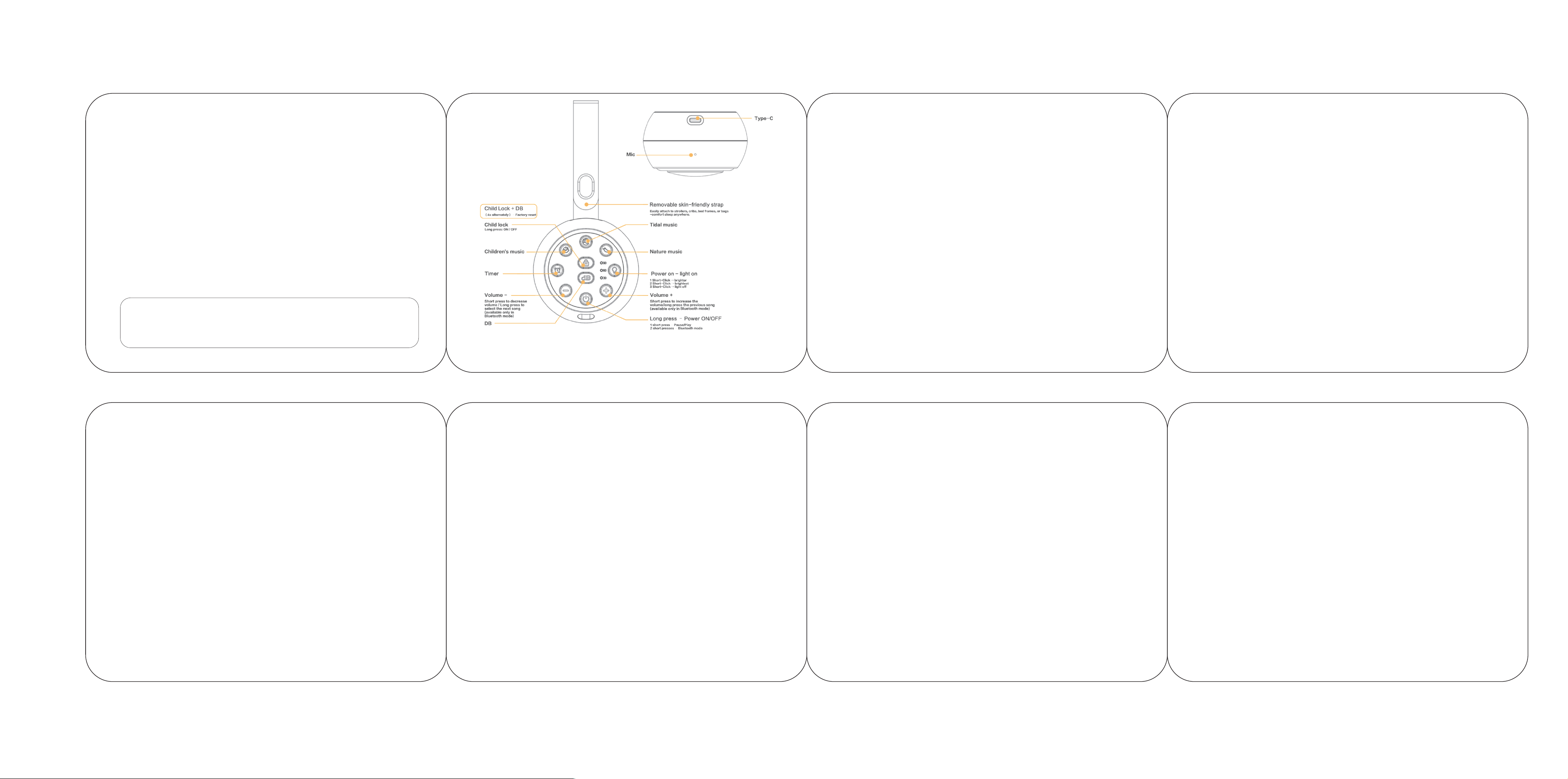
➃ To use Bluetooth, please double-press the Power button to enable Bluetooth mode, then connect and ensure a stable connection.
(Unable to connect in non-Bluetooth mode)
➄ Set the volume to the lowest level before first use
�.� Charging Instructions:
�.� Powering On / Off
➀ Type-C charging (use included charger recommended)
➁ When the voice prompt says "Low Battery", please charge immediately.
➂ While charging: Red indicator light stays on.
➃ When fully charged: The indicator Light turns green, you can unplug the plug.
Power On
➀ Long press the Power button for � seconds until the indicator light turns on.
➁ The unit powers on with startup voice prompt "Hi, Lulla here", and resumes the last-used sound mode.
Power Off
➀ Long press the Power button for � seconds.
➁ The unit plays shutdown prompt "Sweet dreams", then powers off completely.
Play / Pause
➀ Short press the Power button to pause playback.
➁ Short press again to resume.
�.� Selecting a Sound Mode
Children's Music
➀ Press the Children's Music button once.
➁ The device plays a curated playlist of gentle children's songs.
➂ Press again to switch to the next children's song.
Tidal Music (recommended for pre-sleep and bedroom relaxation)
➀ Press the Tidal Music button once.
➁ Soft ocean and tidal soundscapes begin playing.
➂ Press again to switch to the next tidal sound.
Introduction
�
�. Product Overview
�. Before You Start
�. Operating Instructions
�. Technical Specification
�. Safety & Precautions
�. Troubleshooting & FAQs
�. Warranty & Support
�
�
�
�
�
�
�
.........................................................
...........................................................
....................................................
...................................................
......................................................
...................................................
.......................................................
� �
The DC�� Sleep Speaker caters to families with infants, people suffering from insomnia, and all users in need of daily
relaxation. This all-in-one device integrates white noise, sleep sounds, kids' music, tidal sounds and natural soundscapes,
an adaptive decibel sensor, dimmable ambient light and a built-in timer, helping you enjoy sound sleep and create a
soothing home atmosphere.
�.� Child Lock
�.�.� Press and hold the Child Lock button for � seconds to activate (Voice prompt "Child Lock" → Child lock is ON).
�.�.� All buttons are locked (excluding the Power button)— no accidental changes can be made.
�.�.� To unlock: Press and hold the Child Lock button for � seconds again (Voice prompt "Unlock" → Child lock is OFF).
Recommended: Always activate Child Lock after setting up the device in a child's room.
�.� Warranty
�.� Contact Us
Our warranty is �� months from the date of purchase.
This warranty becomes invalid if the factory-supplied serial number or "warranty void" sticker has been removed or altered
on the product.
This warranty does not cover:
➀ Appearance damage or artificial damage.
➁ Accident, misuse, abuse, negligence or modification of any part of the product
➂ Damage due to improper operation or maintenance, connection to improper equipment or attempted repair by anyone
else, not from us.
For any inquiries and after-sales service requirements , or product user experience feedback, please feel free to contact us.
�.Speaker: �Ω & �W*�
�.Interface: Type-c
�.Power Adapter: �V/�A
�.Build in Memory: SDnand+�MB
�.Bluetooth: BT �.�
�.LED Light Number: LED*��
�.MIC * � PCS
�.Built-in Battery: Polymer Lithium-ion Battery/����mAh
�.Dimension: ��.�*��mm
��.Sleep Timer: ��/��/��-minute timer
��.Operation System: RT-Thread
��.MCU: Bluetooth chip AB����B _ Amplifier XA����D
��.OSD Language: Default English
��.Special Design: Macaron Colors /Power Button/Child lock/Volume+/- / Lighting Key/Sound Function Button/Setting Key
⚠ Volume Control
Max �� dB near infants. Long exposure to loud sound damages hearing. Do not use at high volume continuously.
⚠ Placement
Keep out of infants’ reach. Do not put in cribs. Maintain a minimum �m safety distance. Use on flat stable surfaces.
⚠ Moisture Warning
Non-waterproof. Keep away from water, humidifiers and wet areas. Do not touch with wet hands.
⚠ Anti-Overheating
Do not cover or enclose the device. Ensure good ventilation during use. Stop use if overheated.
⚠ Child Lock
Enable Child Lock in kids’ rooms. Never leave unattended with the lock off. Keep small parts away from young children.
⚠ Battery & Charging
Use only matched charger. Do not disassemble the built-in battery. Avoid long-time unattended charging.
⚠ Maintenance
Clean with dry cloth only. No chemical cleaners. Do not disassemble the device arbitrarily.
�. Troubleshooting & FAQs
�.� Why is there no sound even though the device is turned on?
Please check that the volume is not muted and press Volume + to turn it up. If there is still no sound, the audio may be paused.
Short press the Power button to pause playback, and press it again to resume.
�.� Why doesn’t long-pressing Volume +/- skip tracks?
Track switching via long press is only available in Bluetooth mode. Please connect to a Bluetooth device first, then try again.
�.� Why isn’t the DB (noise) detection working?
Please press and hold the DB key for � seconds. You will hear voice prompts when detection starts and finishes.
�.� All buttons stop responding.
The child lock function may be enabled. Press and hold the Child Lock key for � seconds to unlock the device.
�.� The alarm fails to ring at the set time.
Re-enter the alarm settings to check the hour and minute. Make sure the alarm indicator lights up after saving the settings.
�.� The sound stops when I turn off the E-Light.
Turning off the E-Light only disables the light function, while audio will keep playing. To fully power down the device, long
press the Power button.
�. Warranty & Support
�.�.� Choose a brightness level or mode suitable for the environment.
�.�.� Select Off in the cycle if no light is needed while sound continues playing.
Note: Selecting Off in the E-Light cycle only turns off the light — sound continues playing. To power off the entire device, long press the Power button.
� �
�.� FCC Warning
This device complies with part �� of the FCC Rules. Operation is subject to the following two conditions:(�) This device may not cause harmful
interference, and (�) this device must accept any interference received, including interference that may cause undesired operation.
Any Changes or modifications not expressly approved by the party responsible for compliance could void the user's authority to operate the equipment.
This equipment has been tested and found to comply with the limits for a Class B digital device, pursuant to part �� of the FCC Rules. These limits are
designed to provide reasonable protection against harmful interference in a residential installation. This equipment generates uses and can radiate
radio frequency energy and, if not installed and used in accordance with the instructions, may cause harmful interference to radio communications.
However, there is no guarantee that interference will not occur in a particular installation. If this equipment does cause harmful interference to radio
or television reception, which can be determined by turning the equipment off and on, the user is encouraged to try to correct the interference by one
or more of the following measures:
- Reorient or relocate the receiving antenna.
- Increase the separation between the equipment and receiver.
- Connect the equipment into an outlet on a circuit different from that to which the receiver is connected.
- Consult the dealer or an experienced radio/TV technician for help.
The device has been evaluated to meet general RF exposure requirement. The device can be used in portable exposure condition without restriction.
�
�.� Adjusting Volume
➀ Short press Volume + to increase volume one step.
➁ Short press Volume − to decrease volume one step.
➂ Adjust until the sound is comfortable — avoid high volumes, especially around infants.
Nature Music (recommended for stress relief and living room use)
➀ Press the Nature Music button once.
➁ Nature soundscapes (forest, rain, birdsong, etc.) begin playing.
➂ Press again to switch to the next nature sound.
�.� Switching Songs (Bluetooth Mode Only)
➀ Connect the device to your phone or tablet via Bluetooth.
➁ Long press Volume + to skip to the next track.
➂ Long press Volume − to return to the previous track.
➃ Note: Long-press track switching is only available in Bluetooth mode. In other sound modes, long pressing Volume +/− has no effect.
�.� dB Smart Detection
➀ Long press the dB Detection button to enable the function, and the unit outputs voice prompt "Sleep mode, �dB, sleep detection in progress".
➁ The device monitors ambient noise in real time and automatically adjusts playback volume in � dB increments to maintain a consistent sound environment.
➂ A distinct closing voice prompt "�dB, sleep detection complete" sounds upon automatic exit after detection, and the unit reverts to manual volume control.
➃ Tip: DB Detection is especially useful for infants — it raises volume slightly when external noise increases, helping maintain an uninterrupted sleep environment.
�.� Timer
Press the Timer button to set the Timer mode:
➀ �st Press: ��-minute timer.
➁ �nd Press: ��-minute timer.
➂ �rd Press: ��-minute timer.
➃ �th Press: Turn off.
�.� E-Light
�.�.� Press the E-Light button to cycle through brightness levels and modes:
➀ �st Press: Breathing light mode.
➁ �nd Press: Fixed brightness mode.
➂ �rd Press: Brightest light mode.
➃ �th Press: Light off.
�