INSTRUCTION MANUAL
DOWNLOAD THE
hOn APP
P2
P3
P4
P5
P6
P7
P8
P8
P9
P10
P10
P11
P11
Instructions for safe use.........................
1. Getting to know your cleaner................
2. Preparing your cleaner........................
3. Using your cleaner
3.1 Upright mode..............................
3.2 Upright - Accessory mode...............
3.3
PUSH & LIFT - Above oor mode.......
4. Cleaner maintenance
4.1 Dust bin....................................
4.2 Dust bin - Allergy users..................
4.3 Filters.......................................
4.4 Brushbar
4.5 Clearing a blockage......................
5. Troubleshooting................................
6. Important information........................
CONTENTS
MANUAL
LABEL
P2
INSTRUCTIONS FOR SAFE USE
This appliance should only be used for domestic cleaning, as
described in this user guide. Please ensure that this guide is
fully understood before operating the appliance.
Do not leave the appliance plugged in. Always switch o and
remove the plug from the socket after use, or before
cleaning the appliance or any maintenance task.
This appliance can be used by children aged from 8 years and
above and persons with reduced physical, sensory or mental
capabilities or lack of experience and knowledge if they have
been given supervision or instruction concerning use of the
appliance in a safe way and understand the hazards involved.
Children shall not play with the appliance. Cleaning and user
maintenance shall not be made by children without
supervision.
If the power cord is damaged stop using the appliance
immediately. To avoid a safety hazard, an authorised Hoover
service engineer must replace the power cord.
Keep hands, feet, loose clothing and hair away from rotating
brushes.
Use only attachments, consumables or spares recommended
or supplied by Hoover.
When using cleaning tools ensure that the appliance is kept
in the upright (parked) position. This will avoid possible
damage to the carpet or oor covering. When cleaning stairs,
do not position the appliance above you.
Static electricity: Some carpets can cause a small build up of
static electricity. Any static discharge is not hazardous to
health.
Do not use your appliance outdoors, on any wet surface or
for wet pick up.
Do not pick up hard or sharp objects, matches, hot ashes,
cigarette ends or other similar items.
Do not spray with or pick up ammable liquids, cleaning
uids, aerosols or their vapours.
Do not run over the power cord when using your appliance or
remove the plug by pulling on the power cord.
Do not continue to use your appliance if it appears faulty.
Hoover service: To ensure the continued safe and ecient
operation of this appliance we recommend that any servicing
or repairs are only carried out by an authorised Hoover
service engineer.
Do not stand on or wrap the cord around arms or legs when
using your appliance.
Do not use the appliance to clean animals or people.
When using the cleaning tools, ensure to always steady the
appliance with your other hand. This will ensure that
the appliance does not fall while in use.
This product contains magnetic material. Please
contact your doctor if you have any questions on
whether this might aect your implanted medical device.
WARNING: A thermal cut out switches o the appliance to prevent overheating
if it is used when full or there is a blockage or dirty lters. If this should
happen then switch o, unplug and correct the fault. It will take approximately
1 hour for the cut out to automatically reset.
The Environment
The symbol on this appliance indicates that this appliance may not
be treated as household waste. Instead it must be handed over to the
applicable collection point for the recycling of electrical and electronic
equipment. Disposal must be carried out in accordance with local
environmental regulations for waste disposal. For more detailed
information about treatment, recovery and recycling of this appliance,
please
contact your local city oce, your household and waste disposal service or
the shop where you purchased the appliance.
This appliance complies with the European Directives 2014/35/EU,
2014/30/EU and 2011/65/EU.
CANDY HOOVER GROUP S.r.l. Via Comolli,16, 20861 Brugherio (MB) Italy
P3
Q
O
P
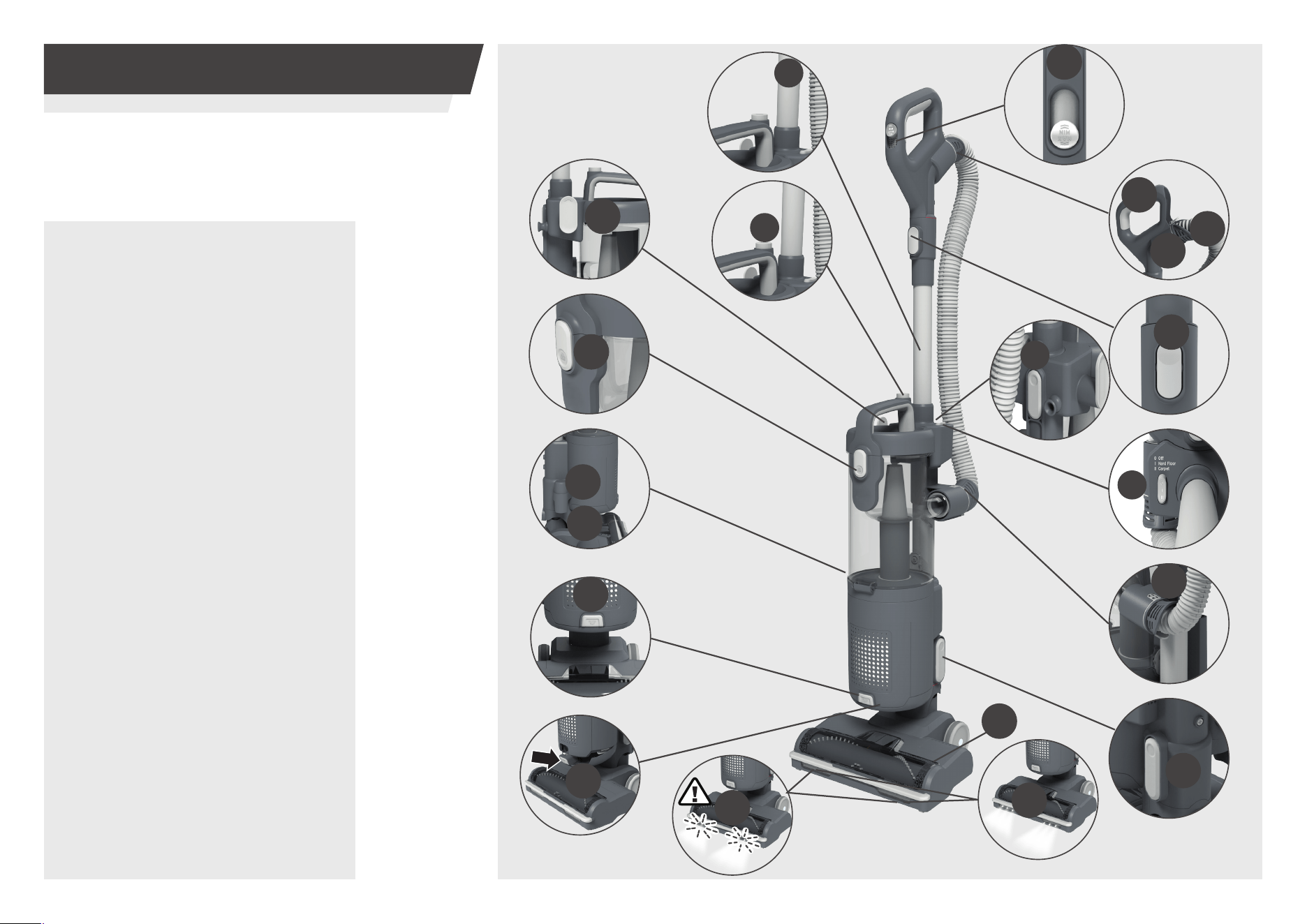
1. GETTING TO KNOW YOUR CLEANER
Thank you for purchasing your new
Hoover upright vacuum cleaner HL4.
MAIN COMPONENTS:
A. Wand
B. Dust bin release button
C. Upper cord storage hook
D. Dust bin lid release button
E. Accessory holder
F. Lower cord storage hook
G. Exhaust lter cover release
button
H. Exhaust lter cover
I. Floorhead
I.1 Floorhead LED lights
I.2 Flashing LED brushbar
warning lights
J. PUSH&LIFT button
K. Lower hose connector
L. Power switch
M. Handle release button
N. Wand release button
O. Upper hose connector
P. Hose
Q. Handle
R. Suction control
I1
I
I2
G
H
D
R
M
B
A
C
E
F
J
K
L
N
P4
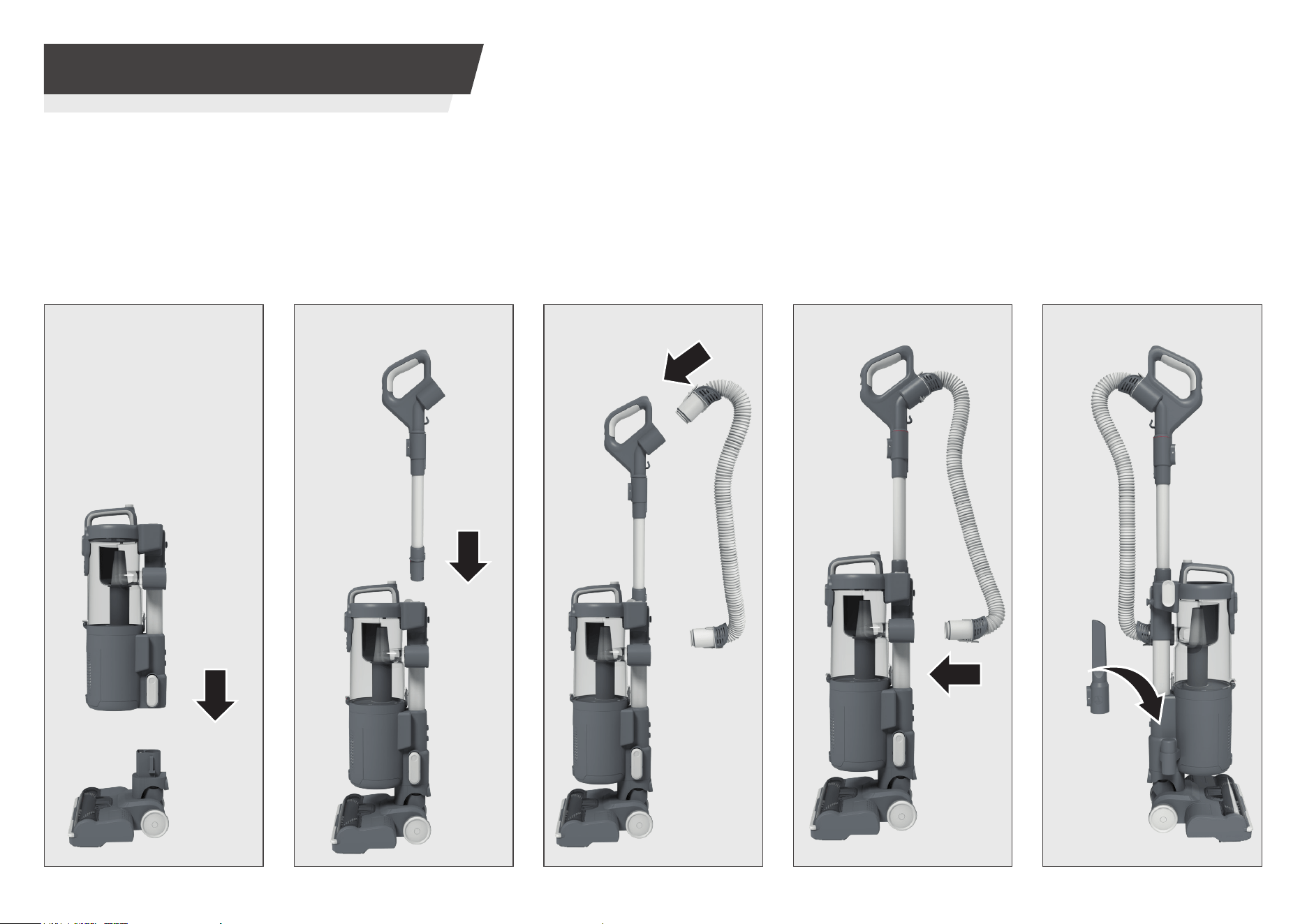
2. PREPARING YOUR CLEANER
STEP 1:
Fit the main product unit into
the oor nozzle.
STEP 2:
Fit the wand into the main
product unit.
STEP 4:
Fit the lower hose connector
to the main product.
STEP 5:
Fit the crevice tool to the
accessory holder.
STEP 3:
Fit the hose connector into
handle assembly.
Remove all product parts from the packaging and assemble your cleaner.
IMPORTANT: Accessories included are dependant on your model. Full specication
details for your product are included on your product packaging.
CLICK
CLICK
CLICK
CLICK
P5
3. USING YOUR CLEANER
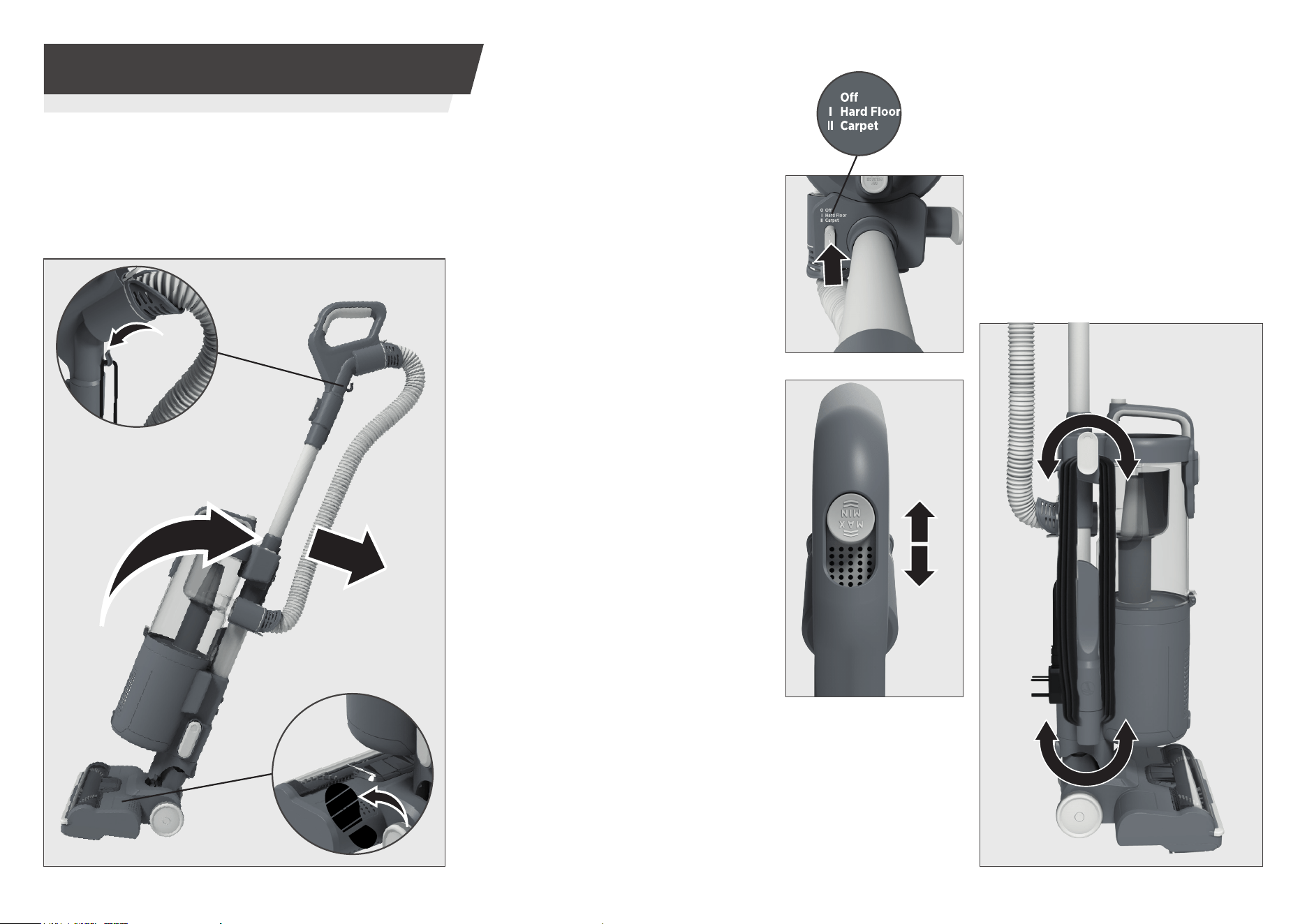
3.1 UPRIGHT MODE
STEP 1:
Plug the power cord into the socket.
Place your foot onto the nozzle and pull the handle
backwards to your desired operating level.
STEP 3:
Adjust the suction control located on the
handle to the required level suitable for
your oor covering.
1. MIN SETTING: Minimum suction level
for long pile carpets or rugs.
2. MEDIUM SETTING: Medium suction level
for medium pile carpets.
3. MAX SETTING: Maximum suction level
for hard oors or short pile carpets.
NOTE: If the LED lights (brushbar
warning lights) on the front of the
oorhead start ashing (I.2), check that
there is no blockage (see page 10) or
that the power switch is on the correct
Carpet or Hardoor mode. If ashing
still occurs make an adjustment to the
suction control located on the handle to
medium or minimum setting.
STEP 4:
Tu r n your cleaner o by switching the Power
Switch to “O - Power O” position. Remove
the plug from the power socket and wind the
power cable around upper and lower cord
storage hook.
STEP 2:
Select the setting according to the surface:
O - Power O
I - Hard Floor mode: For hard oors, the
brushbar works at a low speed.
II - Carpet mode: For carpets, the brushbar
works at high speed for deep cleaning.
To avoid damaging the
power cord during use,
t the power cord into
the cord clip on the
handle.
To use your product in Upright mode:
0
P6
3. USING YOUR CLEANER
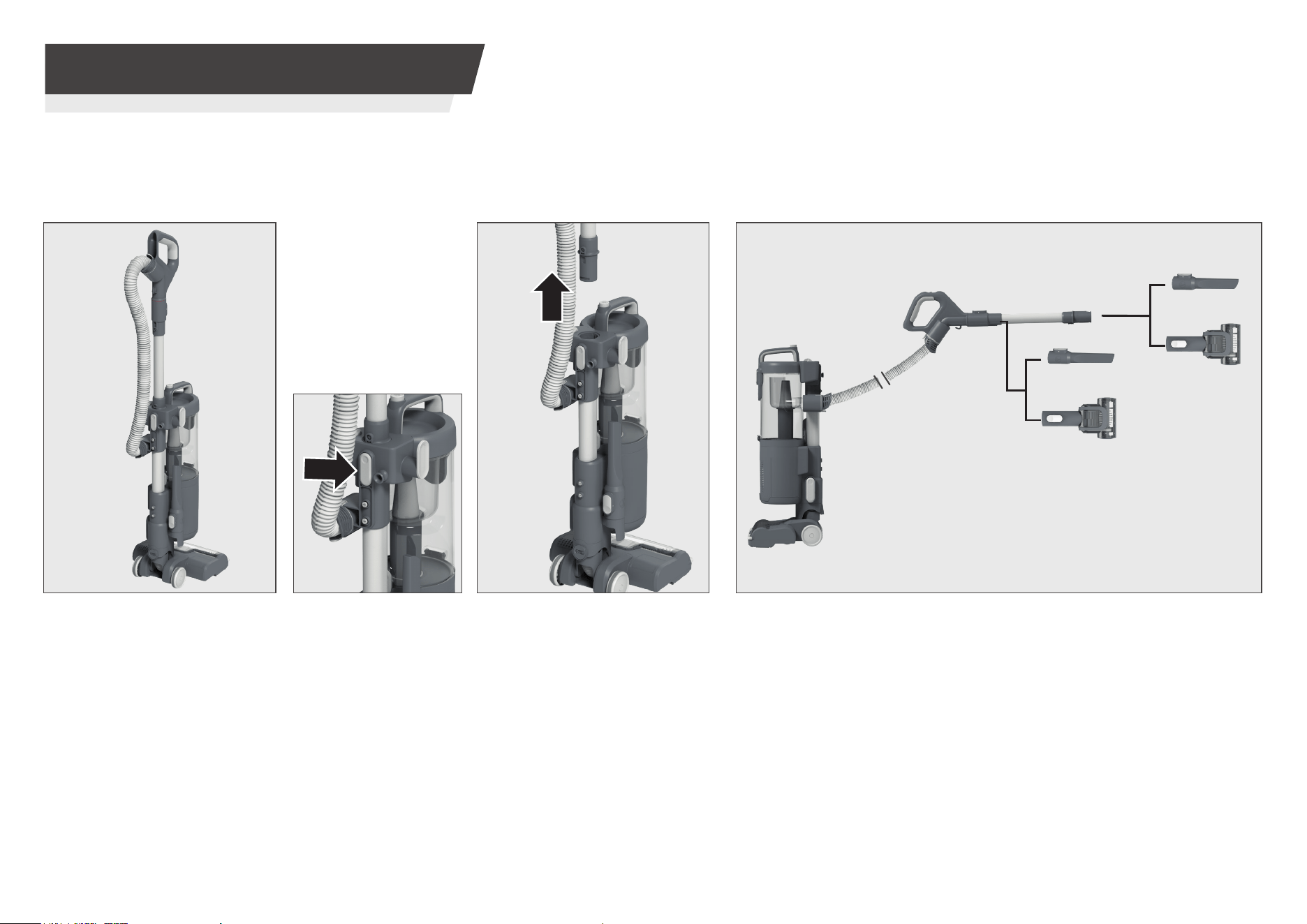
3.2 UPRIGHT - ACCESSORY MODE
IMPORTANT: When using cleaning tools in upright accessory mode, please hold or support the cleaner in a safe position whilst using the wand.
Accessories will t directly onto the end of the
wand and handle for above oor and direct
cleaning using the latch t mechanism.
To use your product in Upright-Accessory mode:
STEP 1:
Place your product in the
upright position.
STEP 3:
Remove the handle & wand from
the main product.
STEP 4:
Attach your required accessory to the end of the wand or handle.
STEP 2:
Press the wand release
button to release the
wand.
To use your accessories in upright mode:
* Certain Models Only
*
*
P7
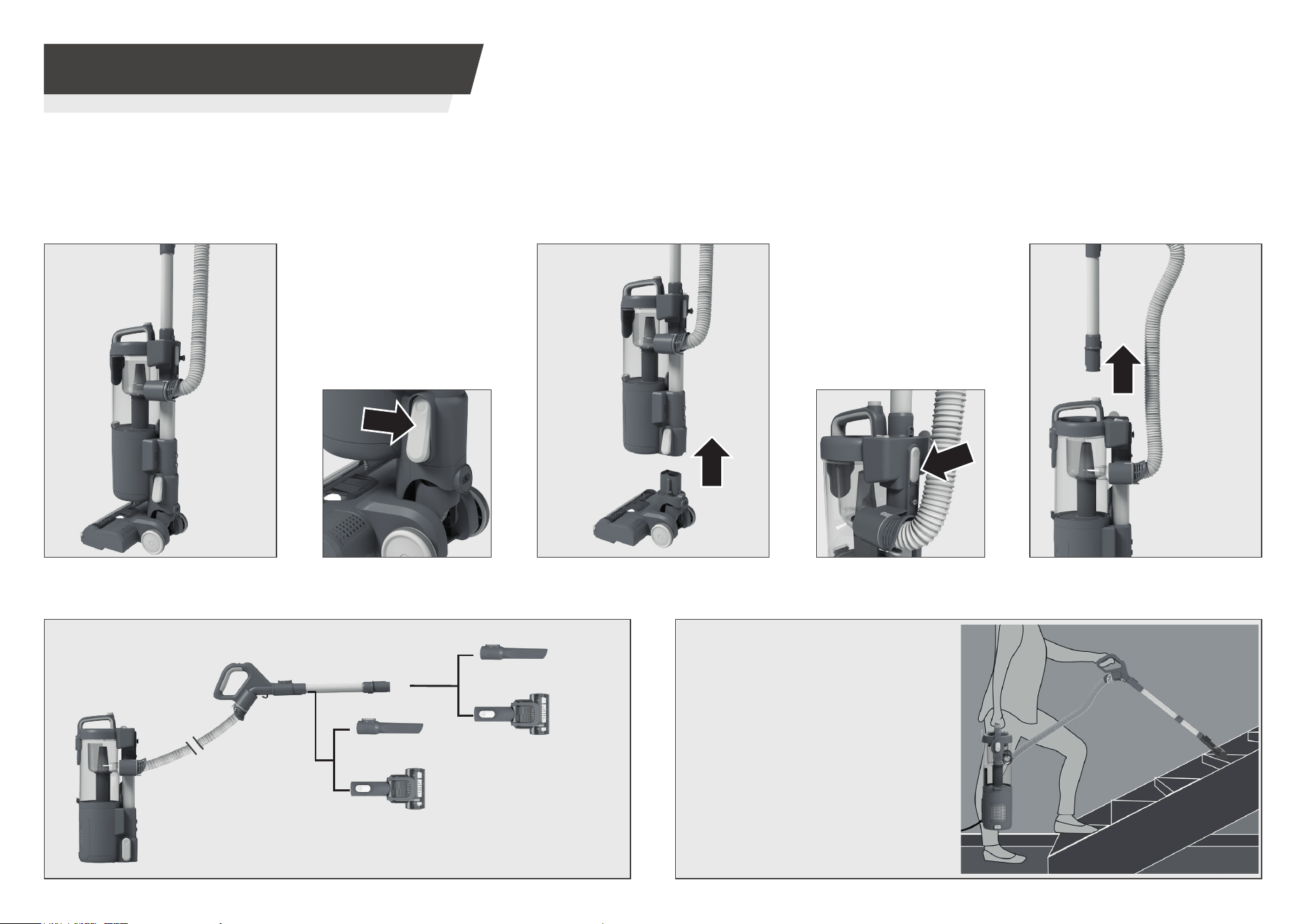
STEP 4:
Press the wand release
button to release the wand.
STEP 2:
Press the PUSH&LIFT
button to release the
portable unit.
STEP 1:
Place your product in the upright
position.
STEP 6:
Attach your required accessory to the end of the wand or handle.
STEP 5:
Remove the handle & wand from
the main product.
STEP 3:
Remove the main unit from the
oorhead.
3. USING YOUR CLEANER
3.3 PUSH&LIFT ABOVE FLOOR MODE
To use your product in PUSH&LIFT above oor mode:
To use your accessories in PUSH&LIFT mode:
Accessories will t directly onto the end of the wand and handle
for above oor and direct cleaning using the latch t mechanism.
PUSH&LIFT above oor mode converts
your cleaner into a versatile &
portable vacuum for all your above
oor cleaning needs, such as stairs &
even the car.
* Certain Models Only
*
*
P8
To ret the dust bin to your cleaner, follow the above instructions in reverse.
4. CLEANER MAINTENANCE
4.1 DUST BIN
When emptying any vacuum cleaner it is dicult to avoid exposure to dust.
To minimize this risk, please ensure that you encase the dust bin in a large bag to empty it and close the bag as tightly as possible around the dust bin.
Remove the dust bin and close the bag as tightly and quickly as possible and dispose of this immediately.
It is advised to wear disposable gloves and a face mask while emptying the cleaner.
If possible, ask a non allergy suerer to empty the dust bin when required.
4. CLEANER MAINTENANCE
4.2 DUST BIN - ALLERGY SUFFERERS
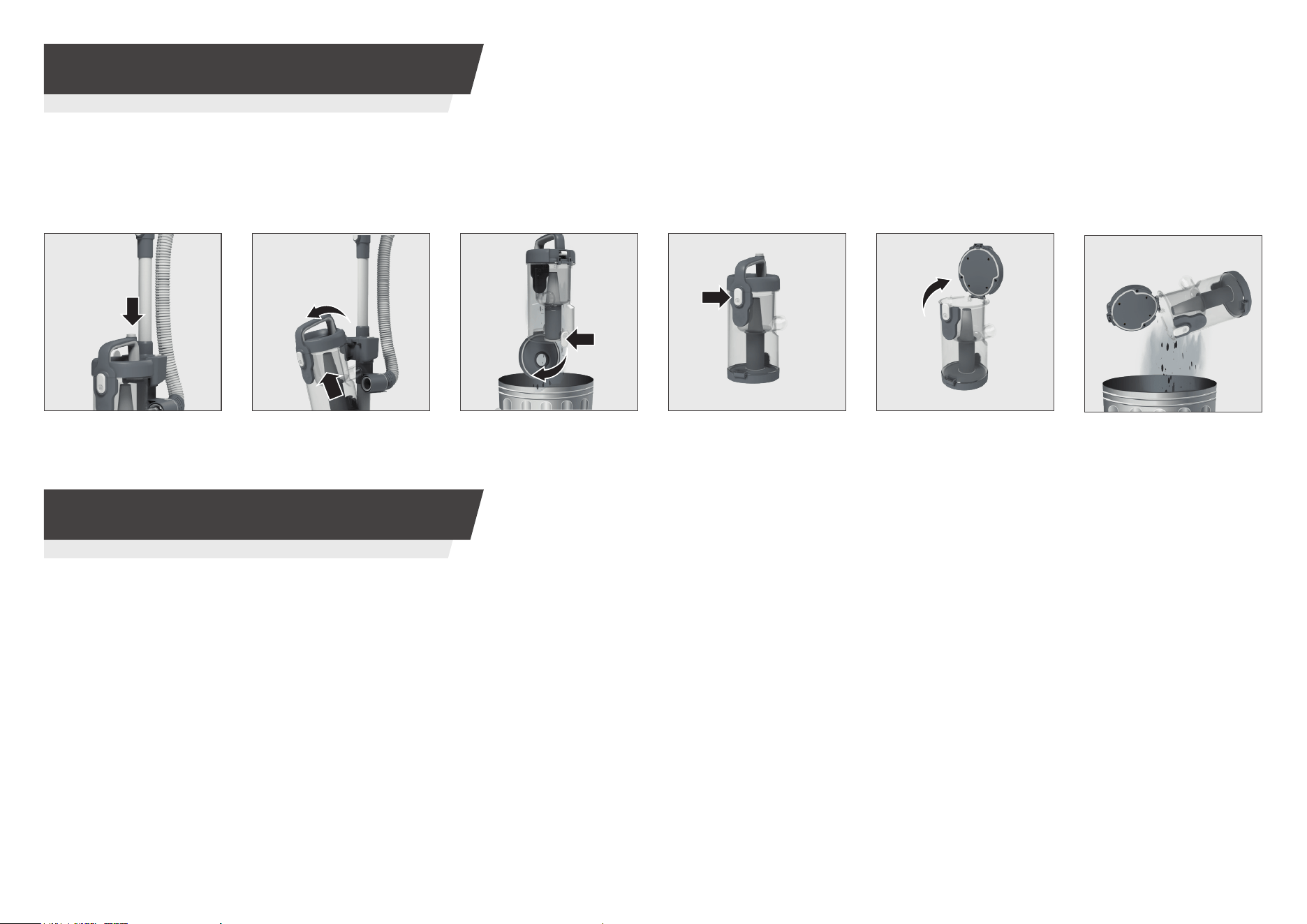
Emptying the dust bin
IMPORTANT: Before performing any maintenance task, always ensure your product is
switched o and unplugged from the electricity supply.
Emptying the dust bin
STEP 2: Remove the
dust bin assembly from
your cleaner.
STEP 3:
Press the dust
bin empty button over a
rubbish bin to empty.
STEP 4:
Press the dust
bin lid button to release
the bin lid.
STEP 5:
Open the dust
bin lid.
STEP 6:
Remove excess
debris over a rubbish bin.
STEP 1:
Press and hold
the dust bin release
button.
P9
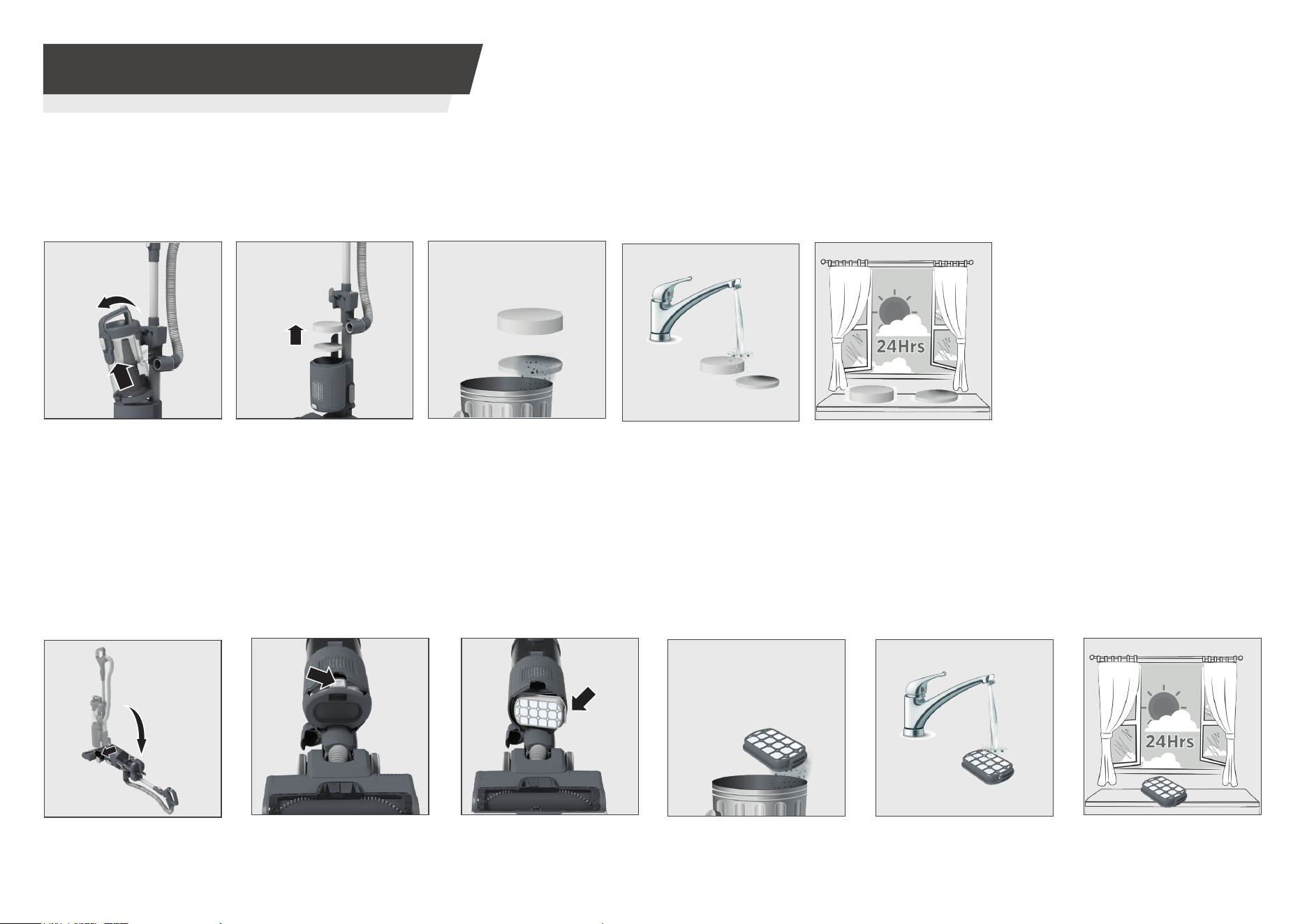
STEP 2: Push the
exhaust lter cover
release button upwards.
Remove the exhaust
lter cover from your
cleaner.
STEP 3:
Press the
exhaust lter release
latches and remove the
lter.
STEP 6:
Leave the lter
to dry for 24Hrs before
re-tting.
STEP 5: Clean the lter
using lukewarm water.
STEP 4:
Remove any
excess debris from the
lter.
To ret the exhaust lter to your cleaner, follow the instructions above in reverse.
STEP 1:
Lay down main
product placing your
foot onto the nozzle
and pulling the handle
backwards completely
on the ground.
Cleaning the exhaust lter
4. CLEANER MAINTENANCE
4.3 FILTERS
To ret the pre-motor lters (foam lter being on top) to your cleaner, follow the instructions above in reverse.
Cleaning the pre-motor lters
STEP 2: Remove both
pre-motor lters from
the main product unit.
STEP 1:
Remove the dust
bin assembly from your
cleaner.
STEP 6:
Leave the lters
to dry for 24Hrs before
re-tting.
STEP 5:
Clean the lters
using lukewarm water.
STEP 3:
Remove any
excess debris from the
lters.
IMPORTANT: Do not ret the lters until they are completely dry.
IMPORTANT: for optimum performance, always keep your lters clean.
We recommend that the lters should be washed at least once a month.
P10
4. CLEANER MAINTENANCE
4.5 CLEARING A BLOCKAGE
FLOOR NOZZLE:
1. Remove the brushbar to visually identify any obstructions and remove them.
2. Thoroughly clean underneath the comb area to remove excess dust and debris.
3. Visualy check the nozzle neck for any blockages and remove them.
OTHER COMPONENTS & ACCESSORIES:
Remove the hose, handle, wand, crevice tool and mini turbo nozzle from
your product.
Vigorously shake the hose and visually check all components for any
obstructions and remove them.
11
2
3
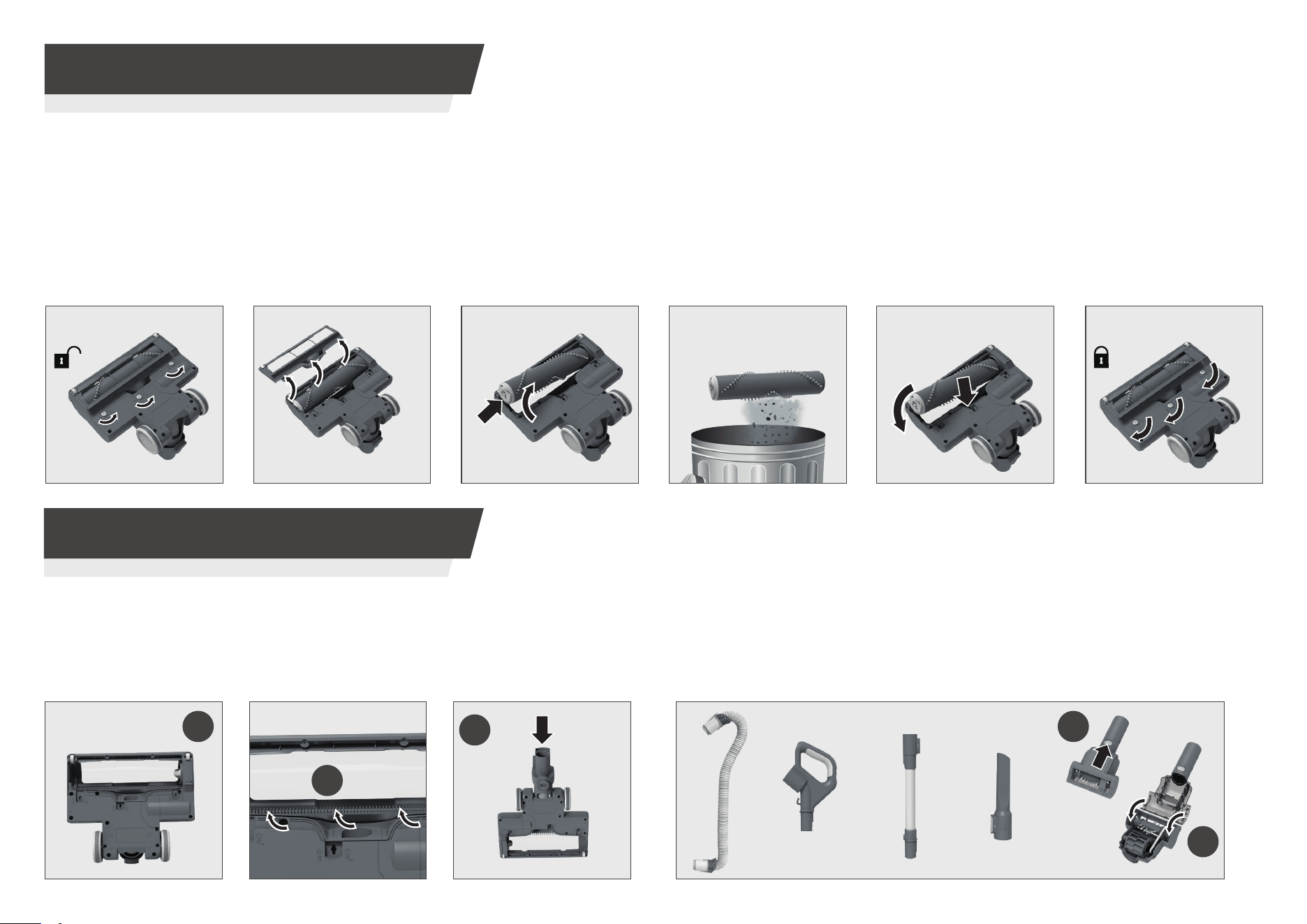
STEP 3: Lift the brushbar
end latch to release the
brushbar and remove
from the nozzle.
STEP 1:
Turn the cleaner
over to access the nozzle.
Using a coin or screwdriver,
rotate 3 x locking clips 90°to
unlock the brush guard.
STEP 2: Remove the
brushbar guard.
STEP 4: Remove the
brushbar from nozzle and
remove any excess debris.
STEP 5: Ret the brushbar
to the nozzle.
4. CLEANER MAINTENANCE
4.4 BRUSHBAR
Thanks to ANTI-TWIST, your new upright vacuum features an integrated comb which helps to prevent hair wrapping around the brushbar. However,
if your cleaner is not picking up eciently, or the LED lights on the nozzle are ashing (brushbar status indicator), your brushbar may need to be
cleaned.
2
STEP 6: Using a coin or
screwdriver, rotate 3 x
locking clips 90°to lock the
brush guard.
* Certain Models Only
*
P11
5. TROUBLESHOOTING
Hoover Spares and Consumables
Always replace parts with genuine Hoover spares. These are available from your local dealer or direct from Hoover. When ordering parts always quote your model number.
Quality
Hoover’s factories have been independently assessed for quality. Our products are made using a quality system which meets the requirements of ISO 9001.
Your Guarantee
The guarantee conditions for this appliance are as dened by our representative in the country in which it is sold. Details regarding these conditions can be obtained from
the dealer from whom the appliance was purchased. The bill of sale or receipt must be produced when making any claim under the terms of this guarantee.
Subject to change without notice.
6. IMPORTANT INFORMATION
The following is a list of commonly encountered problems and solutions.
If there is any doubt call the our Service Oce for advice, they may be able to assist you over the telephone. A service charge will be made if the cleaner is examined and
found to be in working order, has not been assembled in accordance with these instructions or has been used incorrectly.
Fault Solutions
The cleaner does not switch on. Unplug the cleaner and check the power supply with another appliance.
Cleaner is not picking up debris. Empty the dust bin and clean the lters. (see pages 8 & 9)
Check your brushbar for excessive debris and blockages. (see page 10)
Check your oorhead, hose, handle and accessories for blockages. (see page 10)
Brushbar is not turning.
The frontal LED lights on the oorhead
(brushbar warning lights) are ashing.
a. Check your brushbar for excessive debris and blockages. (see page 10)
b. Check the power switch is on the correct Carpet or Hardoor mode. (see page 5)
c. Adjust the suction control located on the handle to medium or minimum setting. (see page 5)
Cleaner cuts out. Your cleaner is tted with a thermal cut out to prevent overheating by automatically turning your cleaner o.
Once activated, as a safety precaution, unplug the cleaner and do not turn on or use again for 1 hour.
If your cleaner does cut out, perform all maintenance tasks contained in the manual before resuming.(see pages 8,9 &10)

Printed in P.R.C.
Part No. : 48700231/01