THE EVERYDAY
EARBUDS
https://rayconglobal.com
01
02
03
04
05
INTRODUCTION
OVERVIEW ( FEATURES )
WHAT’S IN THE BOX
UNIT AT A GLANCE
FUNCTIONS
CONTENTS
05
06
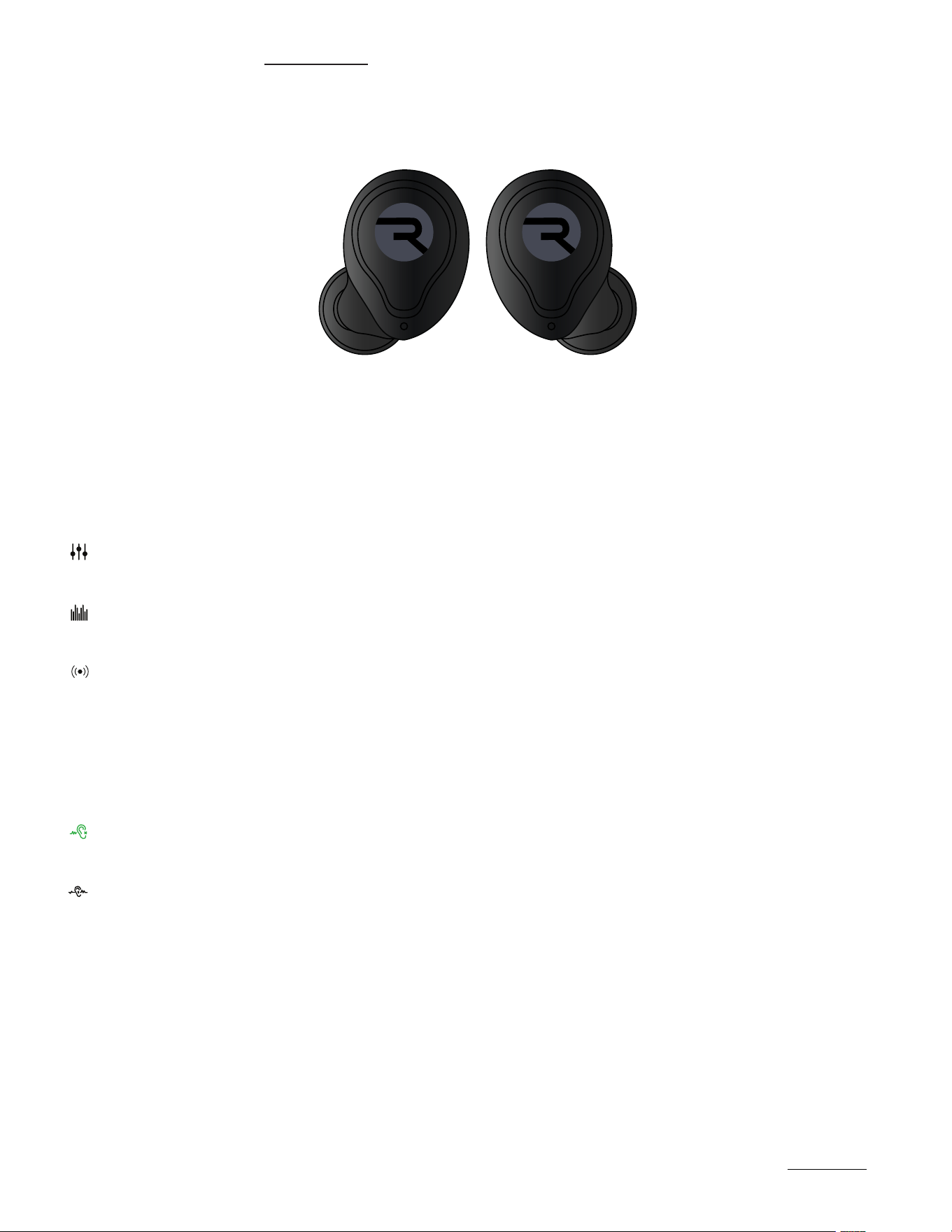
Touch Controls
Sound Features
07
07
08
09
USING YOUR EARBUDS
Connecting via Bluetooth
Charging Your Device
LED Status
10
FINDING THE BEST FIT
11
12
14
15
ADVANCED FEATURES
TROUBLESHOOTING / FAQ
COMPLIANCE & REGULATORY INFORMATION
SAFETY & WARRANTY

INTRODUCTION
01
https://rayconglobal.com
Introducing your new Everyday Earbuds – an audio companion as strong as you are.
At Raycon, we believe in creating innovative tech designed to embrace and empower your every
day. We’ve teamed up with expert engineers, leading taste-makers, and platinum artists to design
wireless audio you’ll love to use and every day tech that can take whatever life throws your way. We
believe in the early risers and the one-more-milers of the world. Premium audio, inspired by you.
To get the most out of your Everyday Earbuds, we strongly encourage you to fully read through
this user guide. You can also visit our support center at www.rayconglobal.com/support. This web
page has more specific guidelines and helpful videos for you to navigate your product. For best
performance, charge fully before first use.

FEATURES AT A GLANCE
https://rayconglobal.com
02
IMMERSIVE NOISE CONTROL
CRYSTAL CLEAR COMMUNICATION
VERSATILE CONNECTIVITY
• Dive into audio excellence with our most advanced noise cancellation yet: ANC oers
superior noise isolation and enhanced Awareness mode allows for amplified ambient
sounds. Tailor your auditory experience to perfection, enjoying a seamless blend of
immersive audio and environmental awareness in any setting.
• Immerse yourself in a continuous auditory journey with earbuds that boast an impressive
total battery life of 32 hours. Revel in 8 hours of playtime per earbud, ensuring a seamless
audio experience that lasts throughout the day. With this remarkable endurance, these
earbuds redefine your on-the-go listening, providing an unparalleled blend of convenience
and performance.
• Dive into a world of pristine audio with earbuds featuring an advanced setup of four
carefully placed microphones. Ideal for calls, virtual meetings, or eortless voice
commands, these earbuds redefine your auditory experience, ensuring impeccable sound
quality in any setting. Relax knowing that you can seamlessly engage in conversations,
whether you’re on the move or immersed in your daily routine, for an enhanced and
unparalleled audio journey.
• Enhance your connectivity experience with headphones equipped with Multipoint
Technology. Seamlessly connect to both your laptop and phone simultaneously, ensuring
you stay connected and productive without missing crucial calls or emails. Enjoy the
flexibility to eortlessly switch between devices, providing a seamless transition between
work and leisure, all while enjoying your favorite audio content.
Active Noise Cancellation & Awareness Mode
32 Hours of Total Battery Life
Four High-Performance Microphones
Multipoint Technology
EXTENDED EARBUD ENDURANCE
32
03
WHAT’S IN THE BOX
https://rayconglobal.com
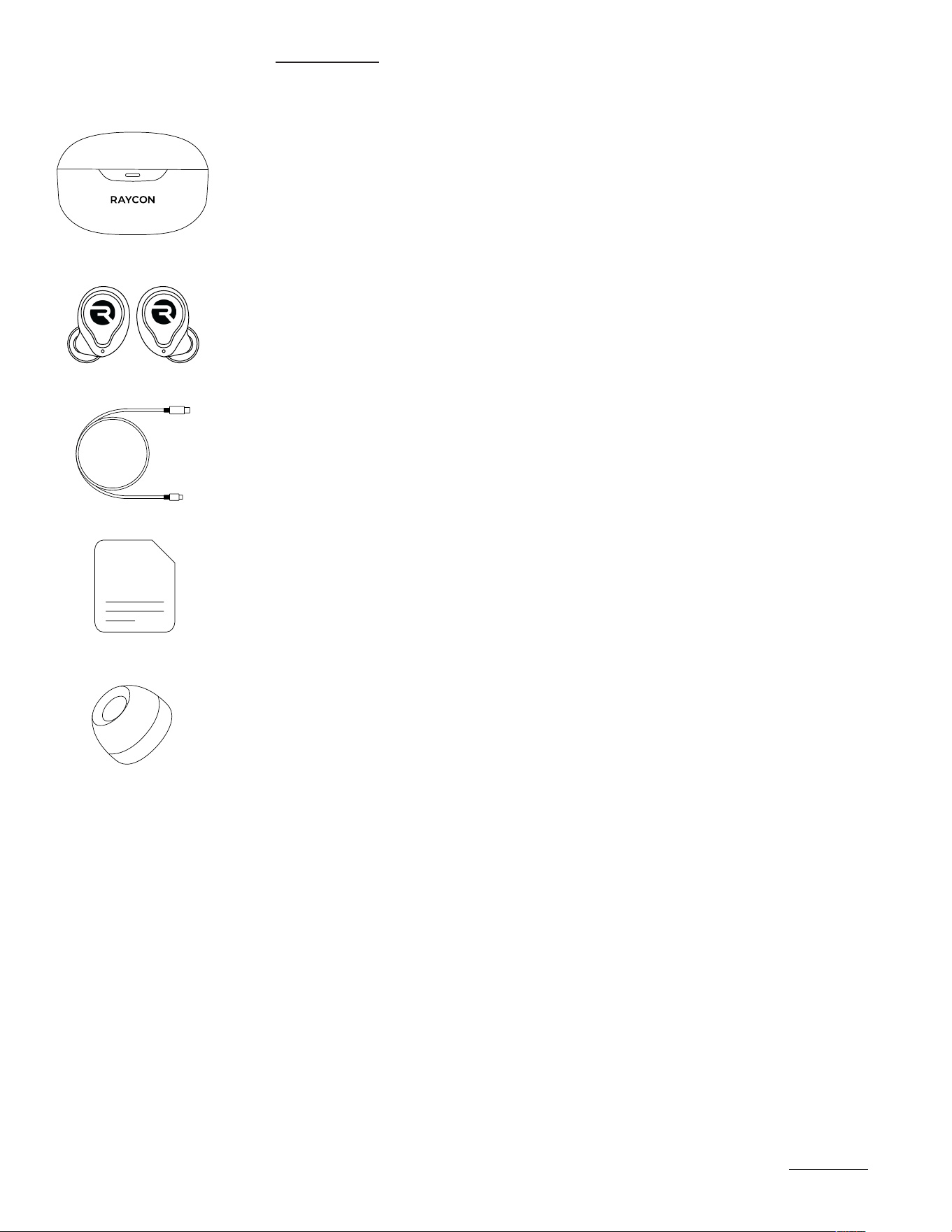
Charging Capsule
Raycon Everyday Earbuds
USB to USB-C Charging Cable
Quick Start Guide & Compliance Booklet
Gel Tips (5 Sets)
1.
5.
2.
3.
4.
UNIT AT A GLANCE
https://rayconglobal.com
04
6
5
2
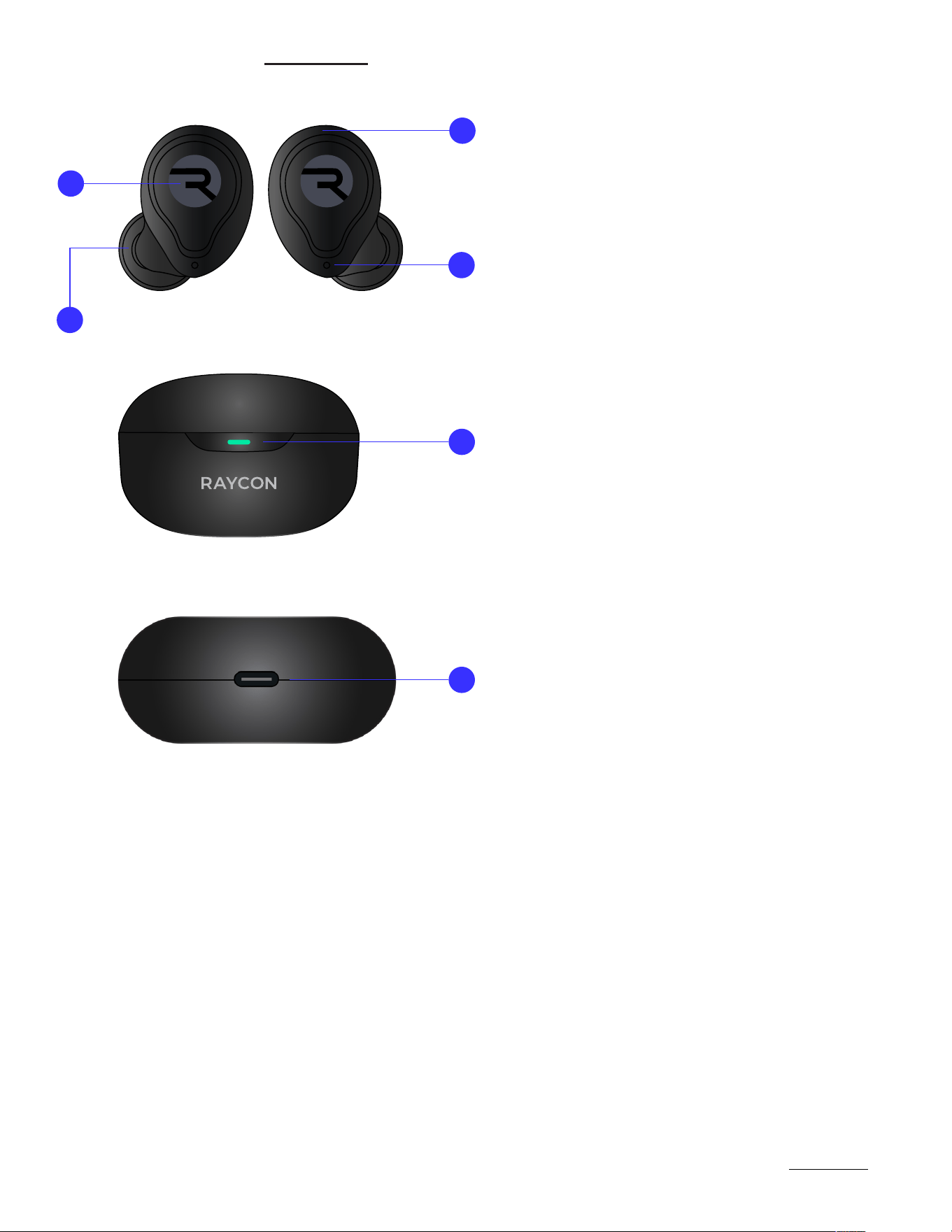
Microphone (4 total)
LED Status Indicator
Touch Control Surface
Gel Tip
LED Battery Indicator
Capsule Charging Port
1.
5.
2.
6.
3.
4.
1
3
4
https://rayconglobal.com
05
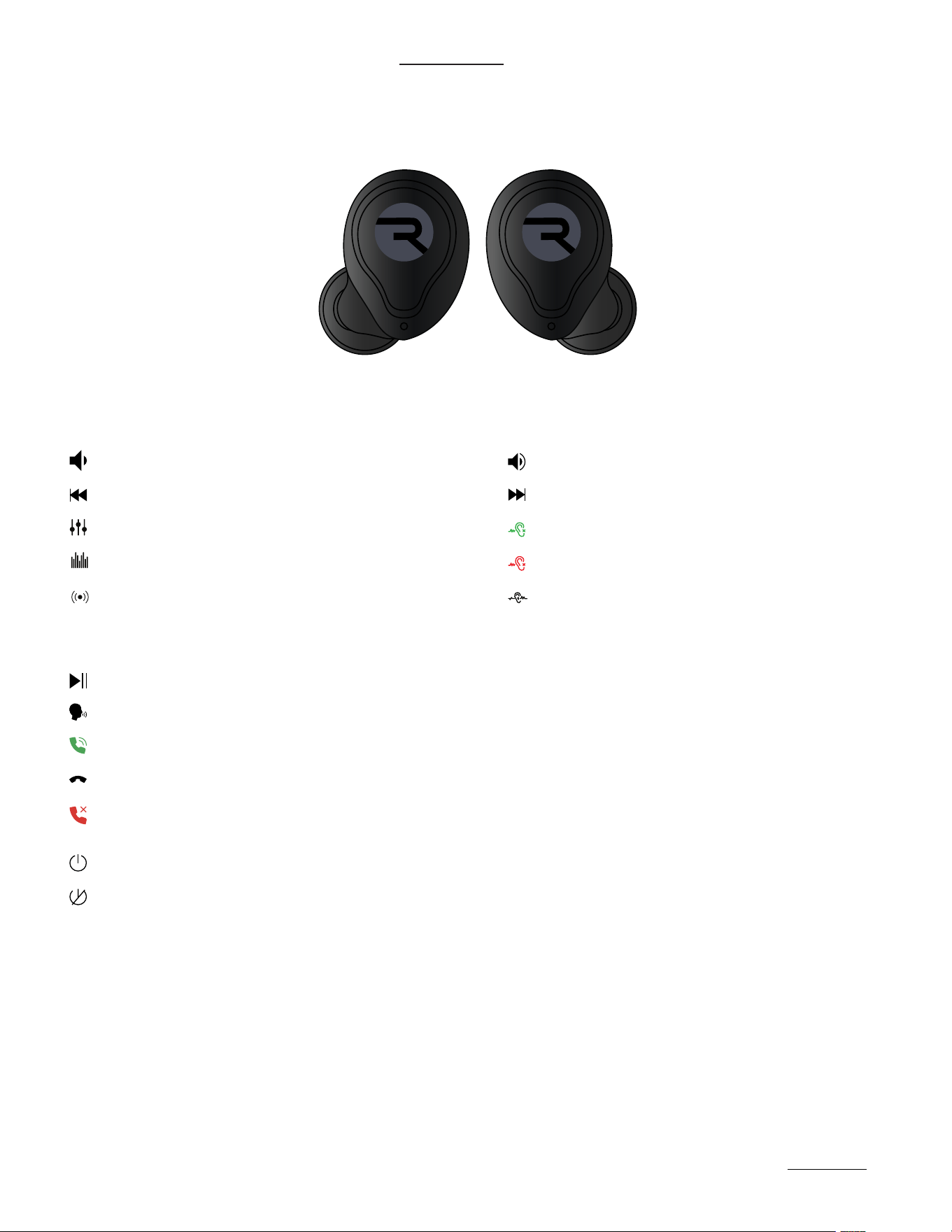
FUNCTIONS / TOUCH CONTROL
RIGHT EARBUD CONTROLS:
LEFT/RIGHT EARBUD CONTROLS:
LEFT EARBUD CONTROLS:
L R
Play/Pause
Voice Command
Tap twice
Tap 4 times
Tap OnceTap Once
Tap Twice
Tap 3 times
Tap 3 times
Volume Up Volume Down
Answer Call
Previous Track
Balanced Sound
Bass Sound
Pure Sound
Skip Track
ANC On
ANC O
Awareness Mode
Tap TwiceEnd Call
(While receiving a call)
Hold for 3 Seconds
Hold for 1.5 Seconds
Hold for 1.5 Seconds
Hold for 1.5 Seconds
Hold for 1.5 Seconds
Hold for 1.5 Seconds
Hold for 1.5 Seconds
Reject Call
Hold for 2 Seconds
Hold for 10 Seconds
Power On
Power O
https://rayconglobal.com
06
SOUND FEATURES
EQUALIZER CONTROLS AND NOISE CONTROLS
LEFT EARBUD
RIGHT EARBUD
Hold for 1.5 seconds to toggle between EQ Profiles
Hold for 1.5 seconds to toggle between Noise Cancellation and Awareness Mode
Balanced Sound: A leveled sound that is great
for all around performance and warmth
Active Noise Cancellation (ANC): Uninterrupted focus by
blocking out unwanted noise - our best yet!
Awareness Mode: Enhance and stay connected to the
world around you by amplifying external noise.
Bass Sound: Our bass boosted sound, great for
songs with strong beats and a go-to for bass lovers.
Pure Sound: Our most refined sound,perfect clarity to
hear every single note.
L R
https://rayconglobal.com
07
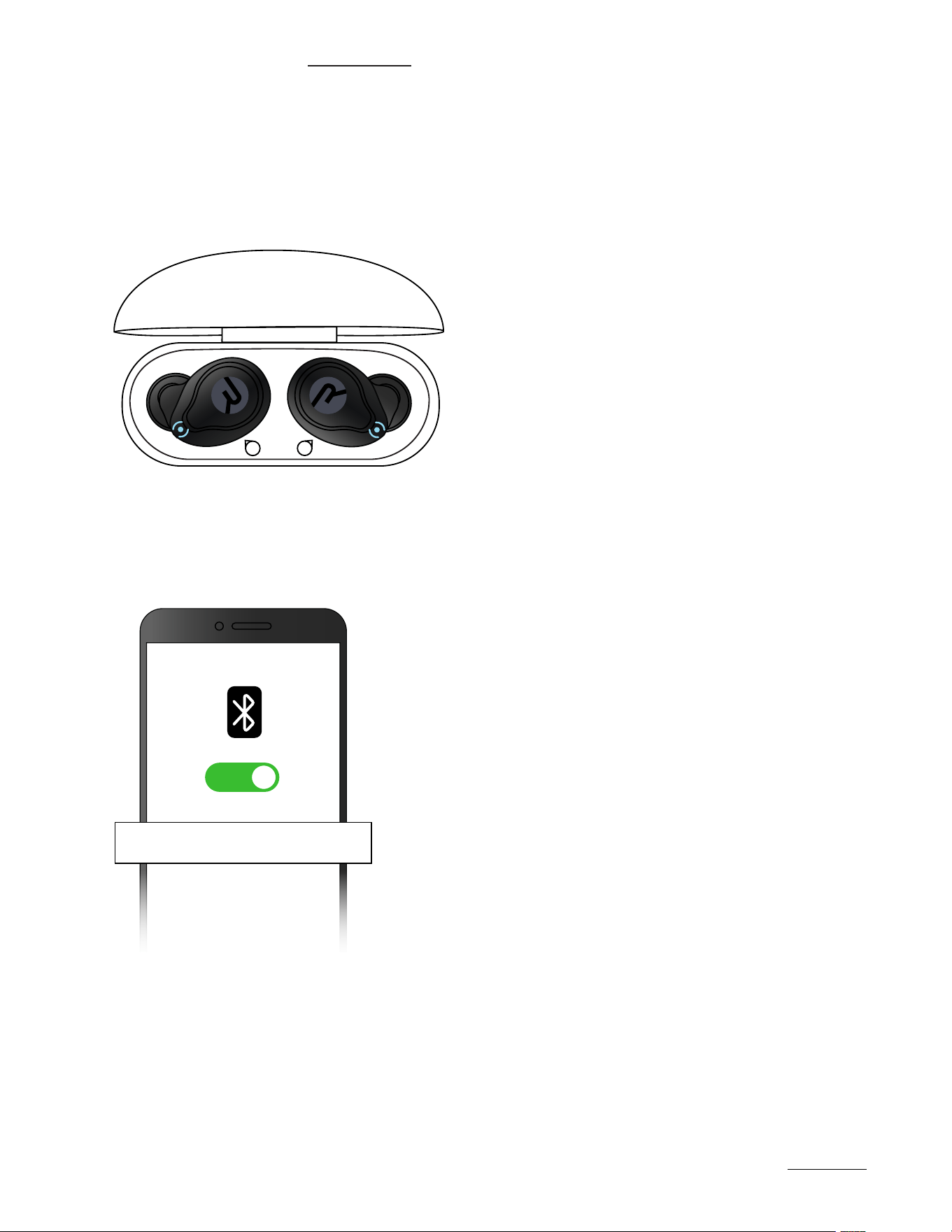
Take your earbuds out of the capsule. Both earbuds will connect to each
other automatically and will enter Pairing Mode.
From the source device, go to Bluetooth settings and ensure Bluetooth is
on. Search for “Raycon Everyday Earbuds” and select it to pair.
1.
2.
CONNECTING VIA BLUETOOTH
L
R
Raycon Everyday Earbuds
ON
USING YOUR EARBUDS
https://rayconglobal.com
08
CHARGING YOUR DEVICE
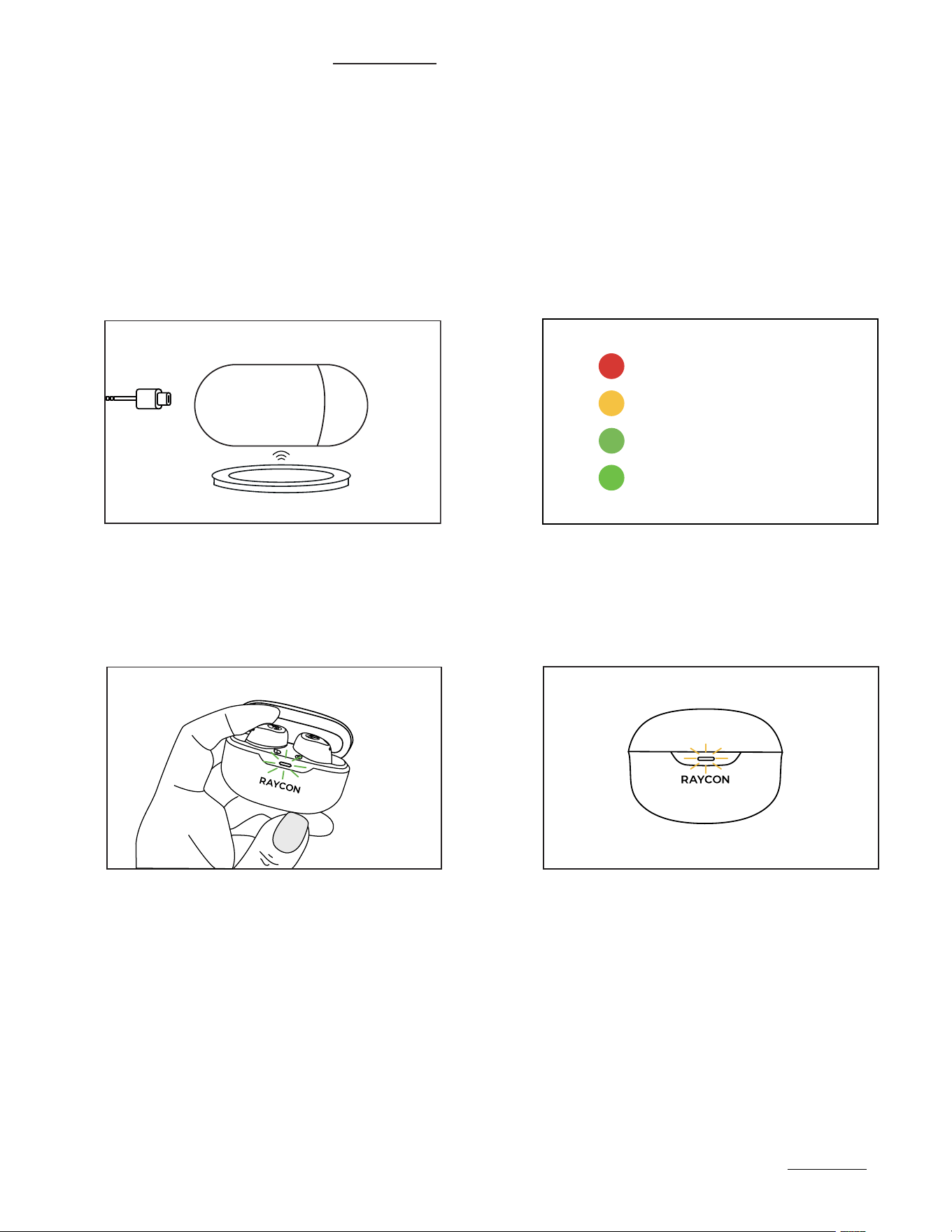
Plug the USB-C connector in the
capsule port or place on Wireless
Charging Pad.
When charging, the Capsule LED will
start to breath. The LED color will indicate
capsule battery. Once fully charged, the
LED will hold a Green light. Our Everyday
Earbuds are also equipped with Fast
Charging: 10 minutes will get you over
1.5 hours of Playback.
1.
2.
When placing or removing the
earbuds in the capsule, the LED
will blink Green.
A breathing Amber LED indicates that
the earbuds are charging.
3.
4.
<25% Battery
25% - 75% Battery
>75% Battery
LED Stays green
https://rayconglobal.com
09
LED STATUS
STATUS MEANING
LED INDICATION
CAPSULE LED
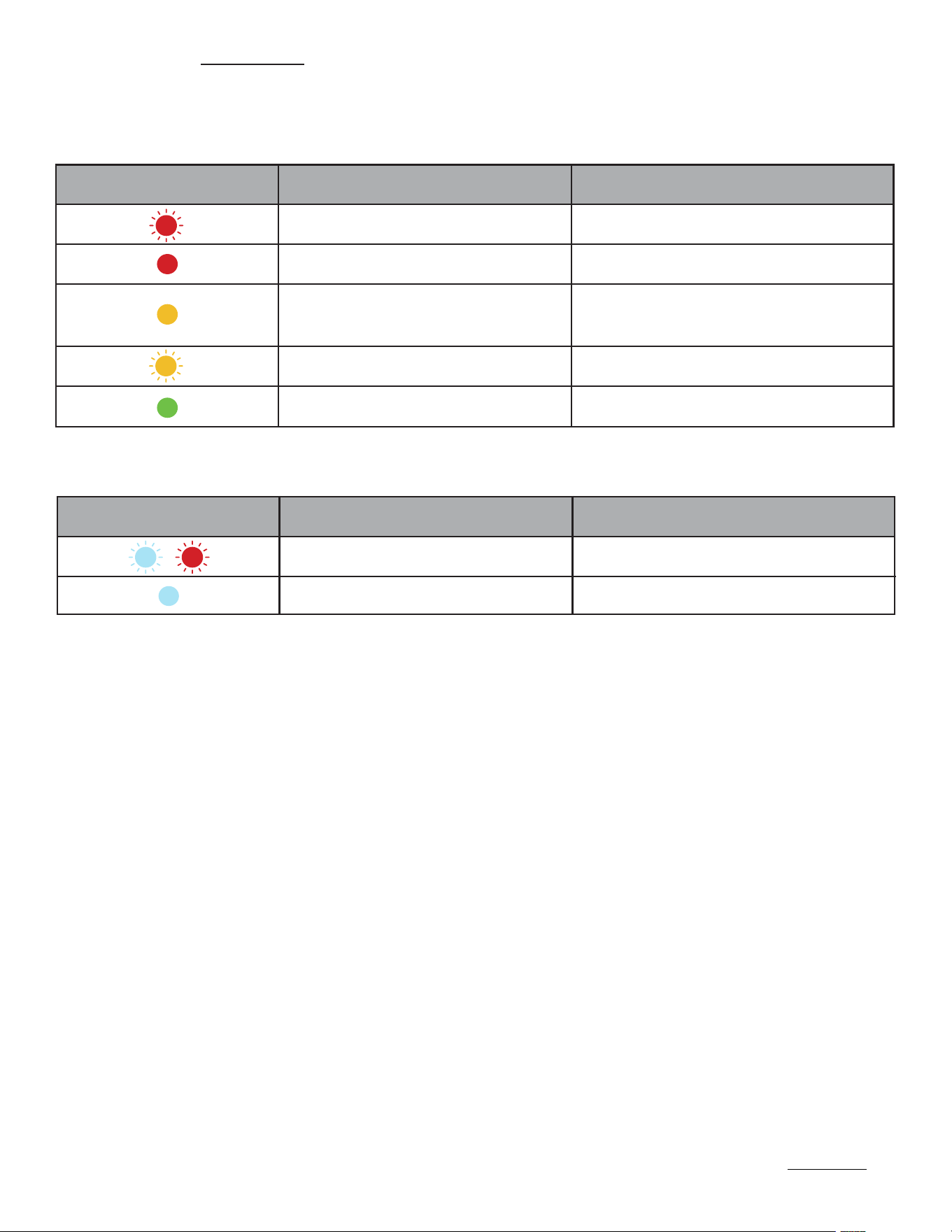
Blinking Red LED
Solid Red LED
Capsule battery is less than 5%
Capsule battery is less than 25%
Earbuds are charging in the capsule
Capsule battery is greater than 75%
Solid Amber LED
Capsule battery is between
25% - 75% battery life
Breathing Amber LED
Solid Green LED
STATUS MEANING
LED INDICATION
EARBUD LED
Alternating Blue and Red Lights
Solid Blue LED
Earbuds are in Pairing Mode
Earbuds are connected
https://rayconglobal.com
10
FINDING THE BEST FIT
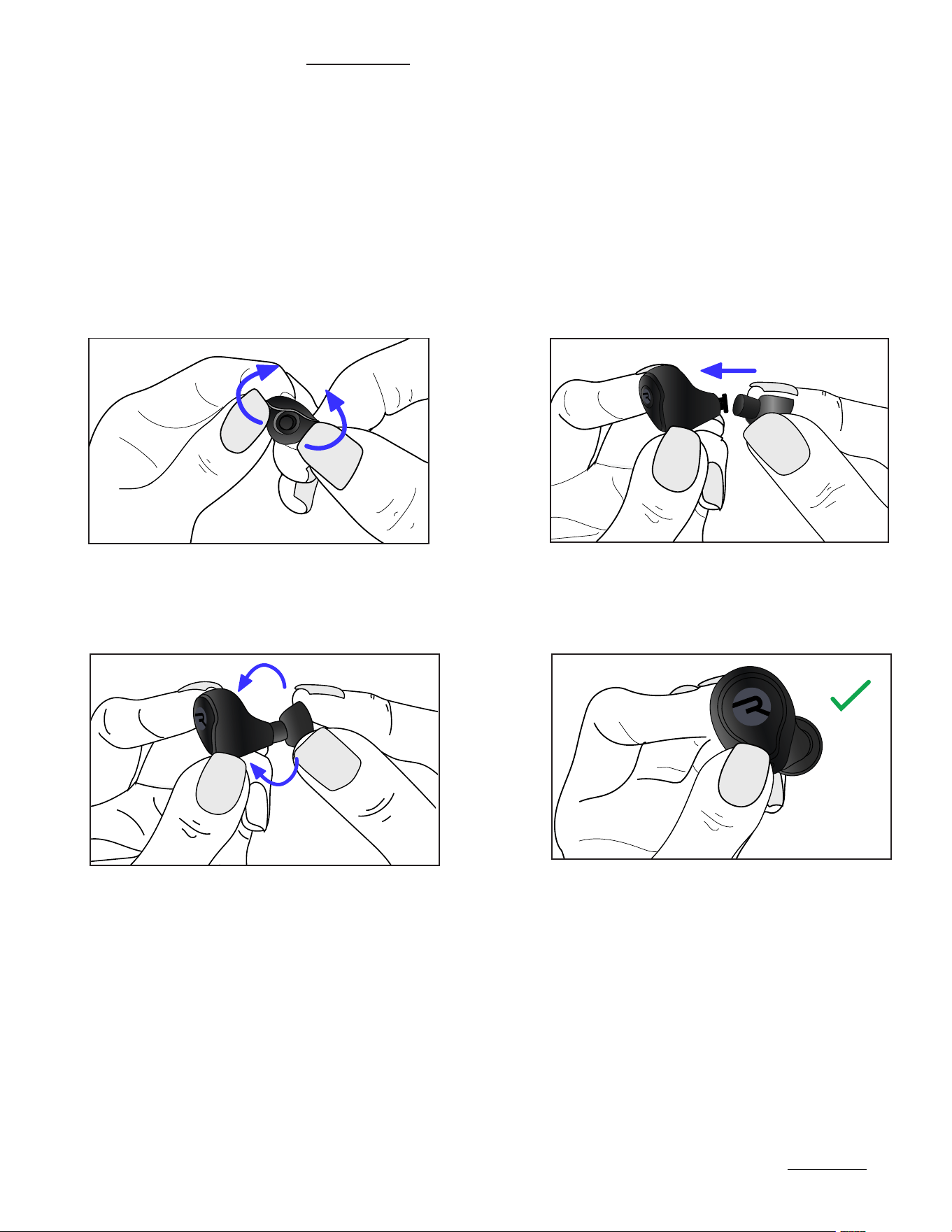
CHANGING GELTIPS:
Experience a personalized fit, featuring multiple size geltips for customizable comfort. Install
the tip that gives you the most comfortable and secure fit.
Note: Your ears can vary in size, so using dierent size geltips for each ear may be necessary.
Flip the gel tip inside out. Align new gel tip with the earbud nozzle
and insert until a click is heard.
Flip the gel tip back to its original position and ensure it is securely attached before use.
1.
2.
3.
https://rayconglobal.com
11
MULTIPOINT
ADVANCED FEATURES
WHAT IS MULTIPOINT?
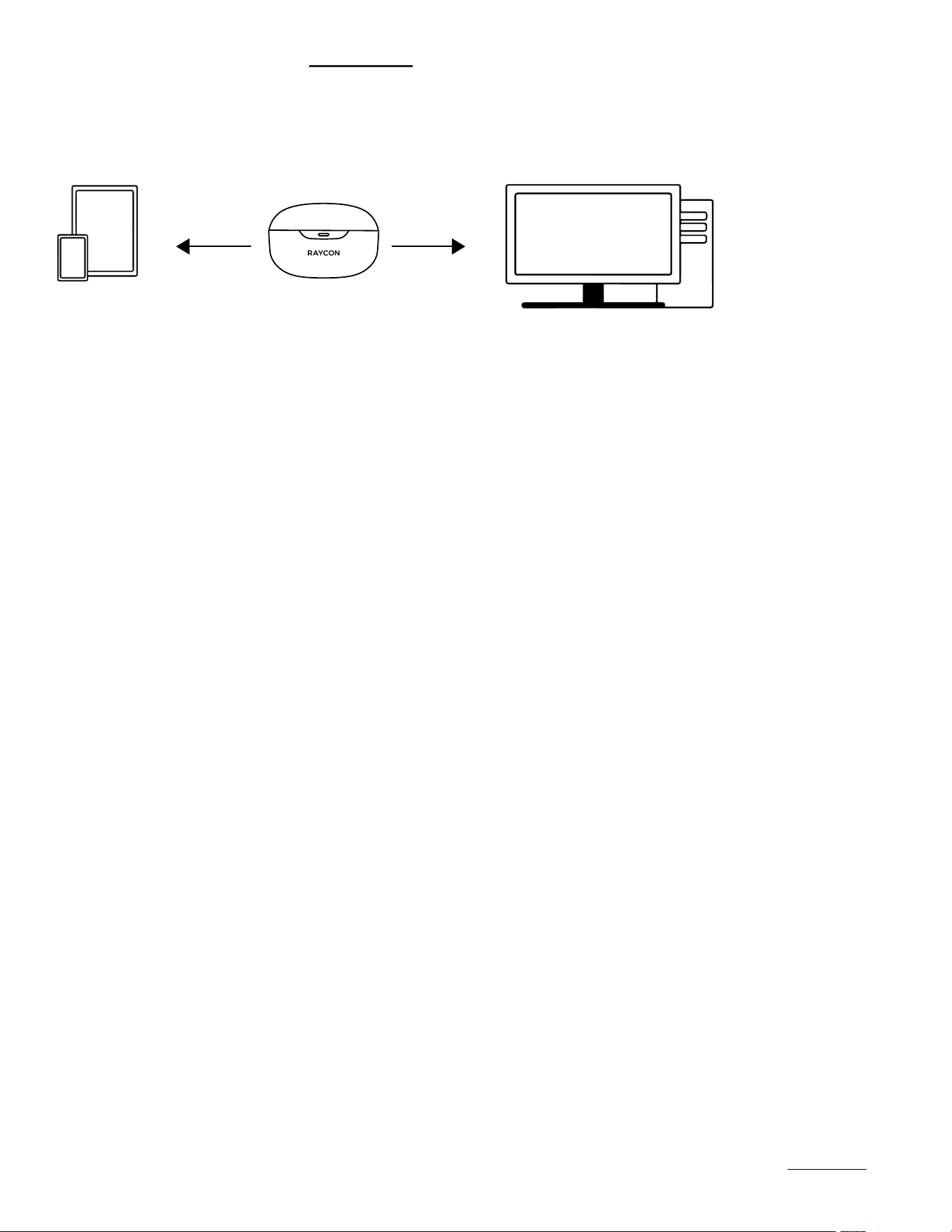
Multipoint allows you to connect your earbuds to up to two devices simultaneously, such as your
smartphone, laptop, or tablet - the combinations are endless!. This means you can easily switch
between devices without having to disconnect and reconnect each time. Once you have paired
your Everyday Earbuds with both devices, they will automatically switch to whichever device
is playing audio. With Multipoint, you can connect your earbuds to both your phone and your
laptop, allowing you to easily switch between your workout playlist and work calls without any
interruptions.
To use this feature, make sure both devices are within the Bluetooth range and have
Bluetooth enabled.
Pair the earbuds with
your first device
(e.g. your smartphone).
Put the earbuds back
into the charging case
and close the lid to
turn them o.
Remove the earbuds
from the case.
The earbuds will now
be able to connect to
both of your devices
when turned back on.
Disconnect the earbuds from
your first device using the
Bluetooth settings on the
device. The earbuds will re-
enter Pairing Mode.
Pair the earbuds with
your second device
(e.g. your laptop) via
its Bluetooth settings.
HOW DO YOU SET UP MULTIPOINT?
1.
4. 5. 6.
2.
3.

TROUBLESHOOTING / FAQ
https://rayconglobal.com
12
BLUETOOTH CONNECTION / SOUND INTERFERENCE:
CAPSULE WILL NOT CHARGE:
EARBUDS WILL NOT CHARGE:
MULTIPOINT IS NOT WORKING:
RESETTING YOUR EARBUDS:
• Ensure speaker is within 10 meters (33 feet) of connected Bluetooth device
• Check the battery level: If the battery level of either the earbuds or your connected
device is low, it can cause the connection to be weak or to drop.
• Using the provided USB-C charging cable, make sure that the cable is firmly
plugged into the charging case and USB-C power adapter.
• If using a wireless charging pad, ensure that the cable is firmly plugged into the
charging pad and that the other end is correctly plugged into a power outlet.
• Ensure the charging case is charged, indicated by LED on the front: should be an
amber or green color.
• Confirm there is nothing blocking the earbuds from the connection to the case.
• Insert earbuds into the case, and confirm a blinking amber LED on the front of the
case, which indicates that the earbuds are charging.
• Confirm both earbuds are charged and that they are disconnected from any
Bluetooth device.
• Confirm Earbuds are in pairing mode and reconnect devices to Bluetooth.
• Delete “Raycon Everyday Earbuds” from the bluetooth settings on your device, and
place the earbuds back in its case.
• For a hard reset, simply place both earbuds inside the charging capsule, close the
capsule lid and wait 5-10 seconds.

TROUBLESHOOTING / FAQ
https://rayconglobal.com
13
CLEANING INSTRUCTIONS:
GEL TIPS:
EARBUD NOZZLES:
CHARGING CAPSULE:
• Remove the attachments from earbuds and wash them with mild detergent and
water, then rinse and dry before reattaching. Avoid using harsh chemicals.
• Use a so-bristled brush or a dry cotton swab to remove any visible debris or
earwax. Avoid using liquid or wet cleaning agents as they may damage the inner
electronics of the earbuds.
• Use a so, dry cloth or a slightly damp cloth and wipe the surface gently. Avoid
using harsh chemicals, water, or excessive moisture, which can damage the
electronic components.

SAFETY & WARRANTY
https://rayconglobal.com
14
PRODUCT SPECIFICATIONS
Model Number: RBE726
Bluetooth Pairing Name: Raycon Everyday Earbuds
Bluetooth Version: 5.3
Power Input: DC 5V / 1A
Capsule Battery Capacity: 500mAh
Call / Play Time: About 8 hours
Charging Time: About 1.5 hours
Total Play Time: About 32 hours
Support Profiles: HSP / HFP / A2DP / AVRCP
Sensitivity: 102 ‡ 3dB
Frequency Response Range: 20-20000Hz
Bluetooth Range: Up to 10 Meters
IP Rating: IP66
LIMITED WARRANTY
Your Everyday Earbuds are covered by a limited warranty. Please visit our website at
www.rayconglobal.com/warranty for more details.
SUPPORT
If your device is not functioning properly, please visit www.rayconglobal.com/support for customer
support, and we will be more than happy to help you.
SAFETY GUIDELINES
• Be wary of any edges, uneven surfaces, and metal parts, including on accessories and
product packaging, to prevent any possible injury or damage.
• Listen to music at proper volume to avoid damaging your hearing and earbuds
• Do not store in high temperatures, such as in a hot vehicle or in direct sunlight
• Do not expose the earbuds or any of its supplied parts to rain or other liquids for extended
periods of time.
• Do not drop or cause undue impact to the earbuds
• Do no modify, repair, or dismantle the product on your own
• Do not use any diluent or volatile liquid to clean the product
• Do not use the product in a hazardous location.
• Ensure all port covers are securely closed if exposing charging capsule to liquid
• Do not expose the speaker to water while charging, as doing so may result in damage to
the speaker or the power source
• When cleaning this speaker, use a so dry cloth. For more severe stains, dampen the cloth
with water only. Anything else increases the chance of dissolving the paint or damaging
the plastic

COMPLIANCE & REGULATORY INFORMATION
https://rayconglobal.com
15
FCC WARNING
This device complies with Part 15 of the FCC Rules. Operation is subject to the following two
conditions:
• This device may not cause harmful interference, and
• The device must accept any interference received, including interference that may cause
undesired operation. Any changes or modifications not expressly approved by the party
responsible for compliance could void the user’s authority to operate the device.
NOTE: This equipment has been tested and found to comply with the limits for a Class B
digital device, pursuant to Part 15 of the FCC Rules. Those limits are designed to provide
reasonable protection against harmful interference in a residential installation. This equipment
generates, uses, and can radiate radio frequency energy and, if not installed and used in
accordance with the instructions, may cause harmful interference to radio communications.
However, there is no guarantee that interference will not occur in a particular installation.
If this equipment does cause harmful interference to radio or television reception, which can be
determined by turning the equipment o and on, the user is encouraged to try to correct the
interference by one or more of the following measures.
• Reorient or relocate the receiving antenna.
• Increase the separation between the equipment and receiver.
• Connect the equipment into an outlet on a circuit on a circuit dierent from that to which
the receiver is connected.
• Consult the dealer on an experienced radio/TV technician for help. The device has been
evaluated to meet general RF exposure statements. The device can be used in portable
exposure conduction without restriction.
IC WARNING
RF EXPOSURE STATEMENT:
This device contains license-exempt transmitter(s)/receiver(s) that
complies with Innovation, Science and Economic Development Canada’s licence-exempt
RSS(s). Operation is subject to the following two conditions:
The device has been evaluated to meet general RF exposure requirement. The device can be
used in portable exposure condition without restriction.
• This device may not cause interference.
• This device must accept any interference, including interference that may cause undesired
operation of the device.