13
14
14
15
16
16
16
17
17
17
18
18
18
18
19
19
19
20
20
20
21
21
21
22
23
24
25
25
26
27
27
27
27
27
28
28
30
30
30
30
31
31
31
31
31
31
31
31
31
31
32
32
32
32
32
33
33
33
33
33
33
34
34
34
34
34
34
34
35
35
35
35
35
35
35
35
36
36
36
36
36
36
36
36
37
37
37
37
37
37
37
38
38
38
38
39
39
39
39
39
39
39
39
40
40
40
40
40
41
41
41
41
41
41
42
42
42
42
42
42
42
42
42
42
44
44
45
45
45
45
46
47
48
48
50
51
51
51
52
53
54
43PUG7674/F6
50PUG7674/F6
43PUG7674/F7
50PUG7674/F7
Dolby, Dolby Vision, Dolby Atmos,
and the double-D symbol are
registered trademarks of Dolby
Laboratories Licensing Corporation
Manufactured under license from
Dolby Laboratories. Con�dential
unpublished works.Copyright
@ 2012-2024 Dolby Laboratories.
All rights reserved.
18
708
14
551
50PUG7674/F6
50PUG7674/F7
43PUG7674/F6
43PUG
7674/F7
50
left
right
50PUG7674/F6
50PUG7674/F6
43PUG7674/F6
43PUG
7674/F7
UP:M6 x 0.47”
(12mm)×2
DOWN:M6 x 0.31”
(8mm)×2
UP:M6 x 0.47”
(12mm)×2
DOWN:M6 x 0.31”
(8mm)×2
7.87“ x 7.87”
(200 x 200mm)
7.87“ x 7.87”
(200 x 200mm)
-
+
-
+
-
+
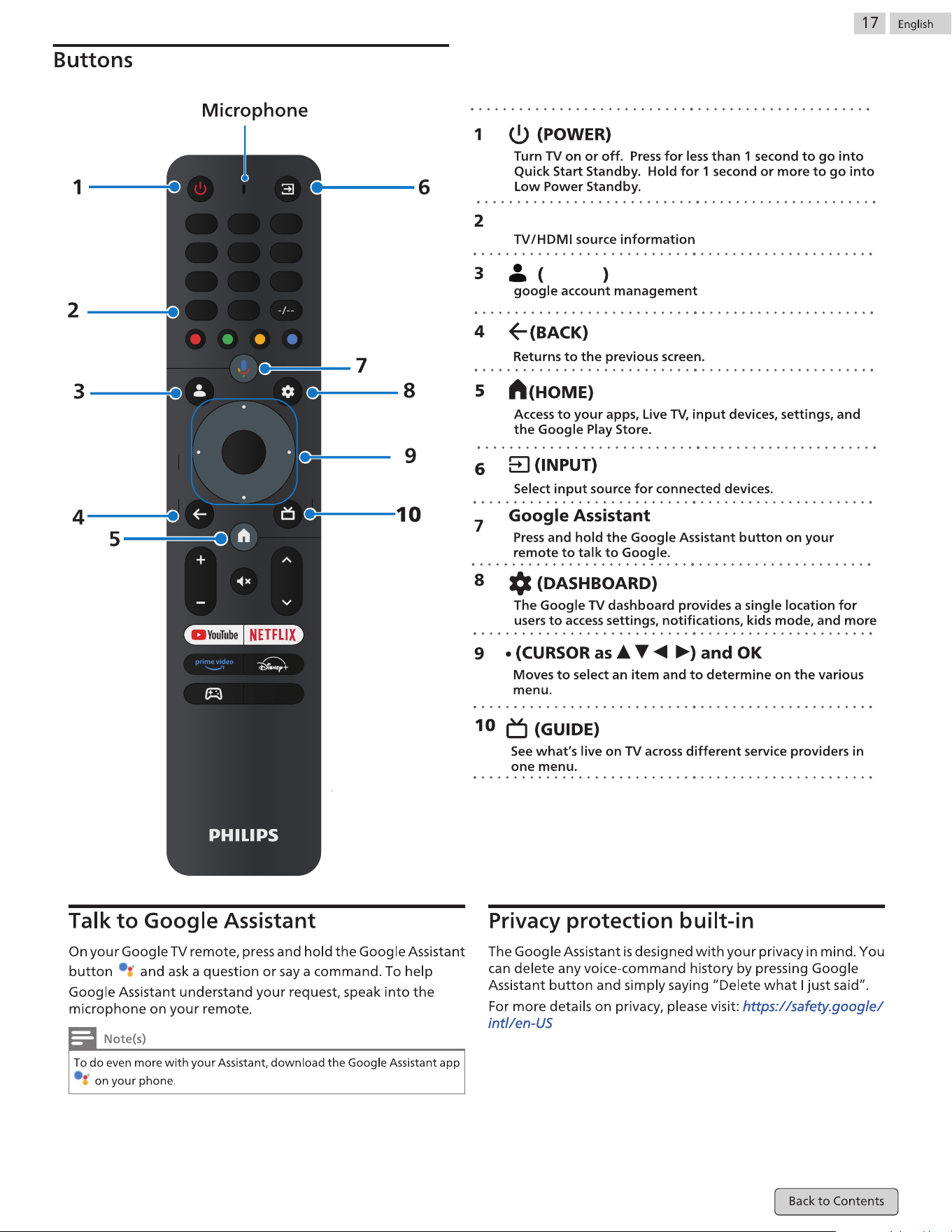
INFO
OK
VOL CH
CC
1
4 5 6
7 8
0
9
2 3
Pro�le
INFO
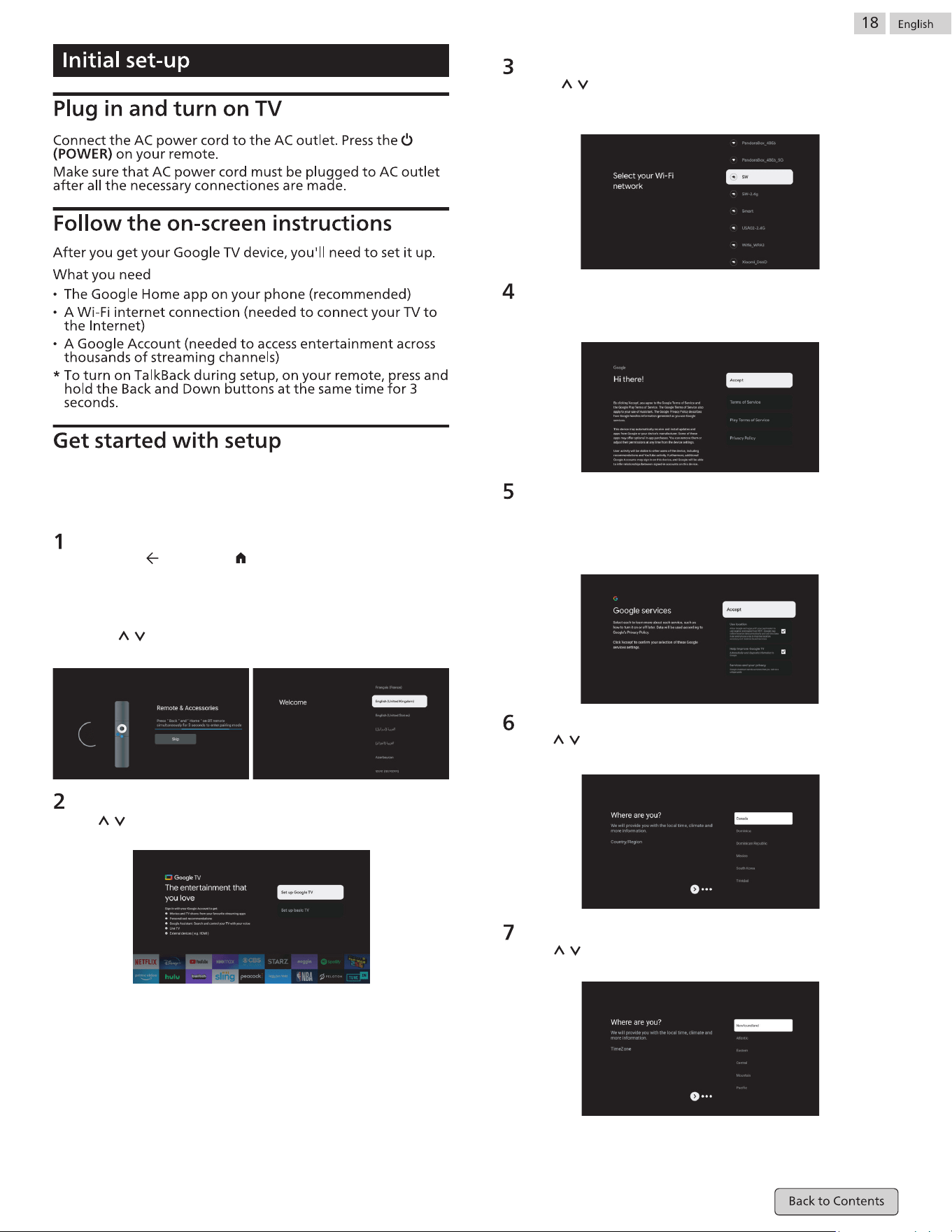
Region or Country select
Use / buttons to select your region or country, then press
OK to con�rm.
Press ‘BACK ’ and ‘Home ’ simultaneously on remote control
to enter the Bluetooth pairing mode.The indicator light on
remote control will �ash when starting the pairing mode.
1.1 Select the ‘Skip’ icon to skip the pairing mode.
1.2 Use / buttons to select system languages, then press
【OK】to con�rm.
Pairing Bluetooth Remote
For the �rst initial setup, the on-screen setup guide will guide
you through setting up your TV.Please follow the guide to
setup your TV correctly.
TV Set-up select
Use / buttons to select your TV setup, then press【OK】to
con�rm.
Con�gure the wi� network
Press / buttons to select Wi-Fi you wish to connect to,enter
the password and then con�rm to connect. If you select “Skip”,
it could be performed in homepage or settings menu.
Terms of Service
By accepting the Terms of Service to improve the product
experience, select “Accept” to proceed with this condition.
Google Services
Select “Accept” to con�rm if you want your location
identi�ed on your Google TV and agree to automatically
send diagnostic information to help improve your
experience.
TimeZone
Use / buttons to select your TimeZone, then press OK to
con�rm.
Set up Google TV™
Use your Android™ Smart phone to download and open
the Google Home app on your phone.
Use the Google Home to scan the QR code on the TV device.
Follow the instructions in the Google Home app.
Note: Press “BACK” to cancel
If you just want to use your TV normally, please select “Set up basic TV”
Set up basic TV
Press “OK” button enter to the next page to Select your wi� network.
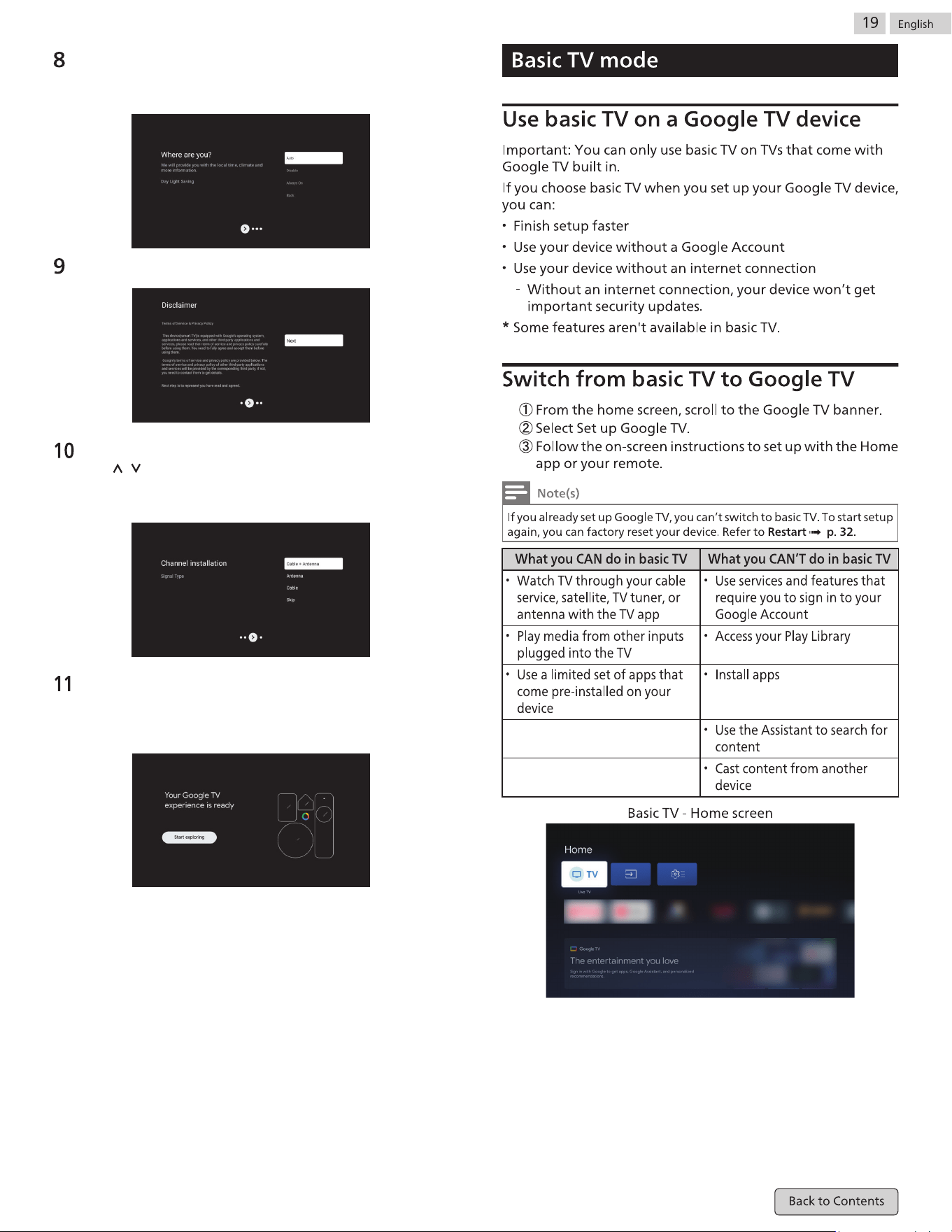
Day Light Saving
Use / buttons to select Auto/Disable/Always On, then
press OK to con�rm.
Disclaimer Terms.
Tuner mode Setting
Use / buttons to select Cable+Antenna/Antenna/Cable
to scan TV channel, then press OK to con�rm. If you select
“Skip”, the channel scan could be performed in menu.
Play Auto Installs
Select install or un-install the recommended apps by
using this process.
Select “Start exploring” to the next page.
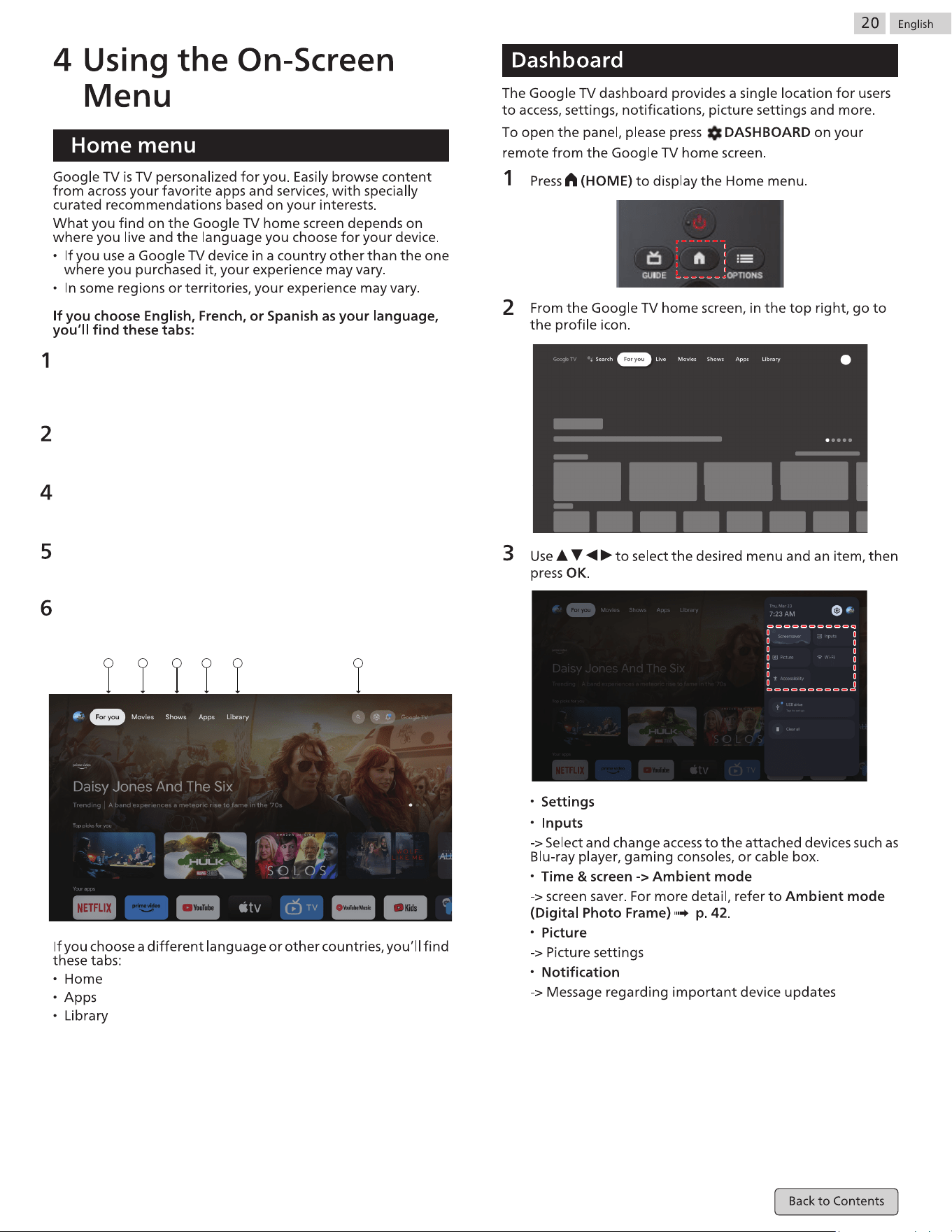
For you
Browse 400,000+ movies and TV episodes from across yor
streaming services, all in one place and organized into topics
and genres based on what interests you.
Movies& 3.Shows
Binge watch your favorite TV shows and discover new
favorites all in one place.
Apps
Download and access your favorite apps to discover movies,
shows, games, and more.
Library
When you see an interesting show or movie, add it to your
Watchlist to keep track of youi new discoveries.
Search
Thousands of movies and shows at the sound of your voice.
Ask Google Assistant to quickly �nd what you want to watch.
1 2 3 4 5 6
Dynamic
ECO
Gentle
Sport
Standard
Cinema
Music
News
Personal
Personal
The customized settings you preferred.
WCG
Wide Color Gamut,you can choose Standard 、WCG 、 Auto.
Dolby Atmos
An audio technology that provides listeners with a more
realistic and immersive audio experience by using multiple
speakers and precise positioning of audio objects in a movie
theater, home theater, or music venue.
Surround mode
An audio processing technique that allows the listener to feel
the effect of sound coming from all directions by distributing
sound between multiple speakers.
Sound only
Media content with only sound and no images or video.
Suitable for watching sports pictures
Reduce eye strain for a comfortable
viewing experience.
Sharpen images by increasing contrast,
brightness, and sharpness.
The power saving function allows you to
change the Settings of the TV to reduce
energy consumption
For normal TV viewing.
Powerful sound settings for a cinematic
experience.
Optimized for music playback.
Set the anchor's voice at a comfortable
volume.
The customized settings you preferred.
Audio Output Type:
24
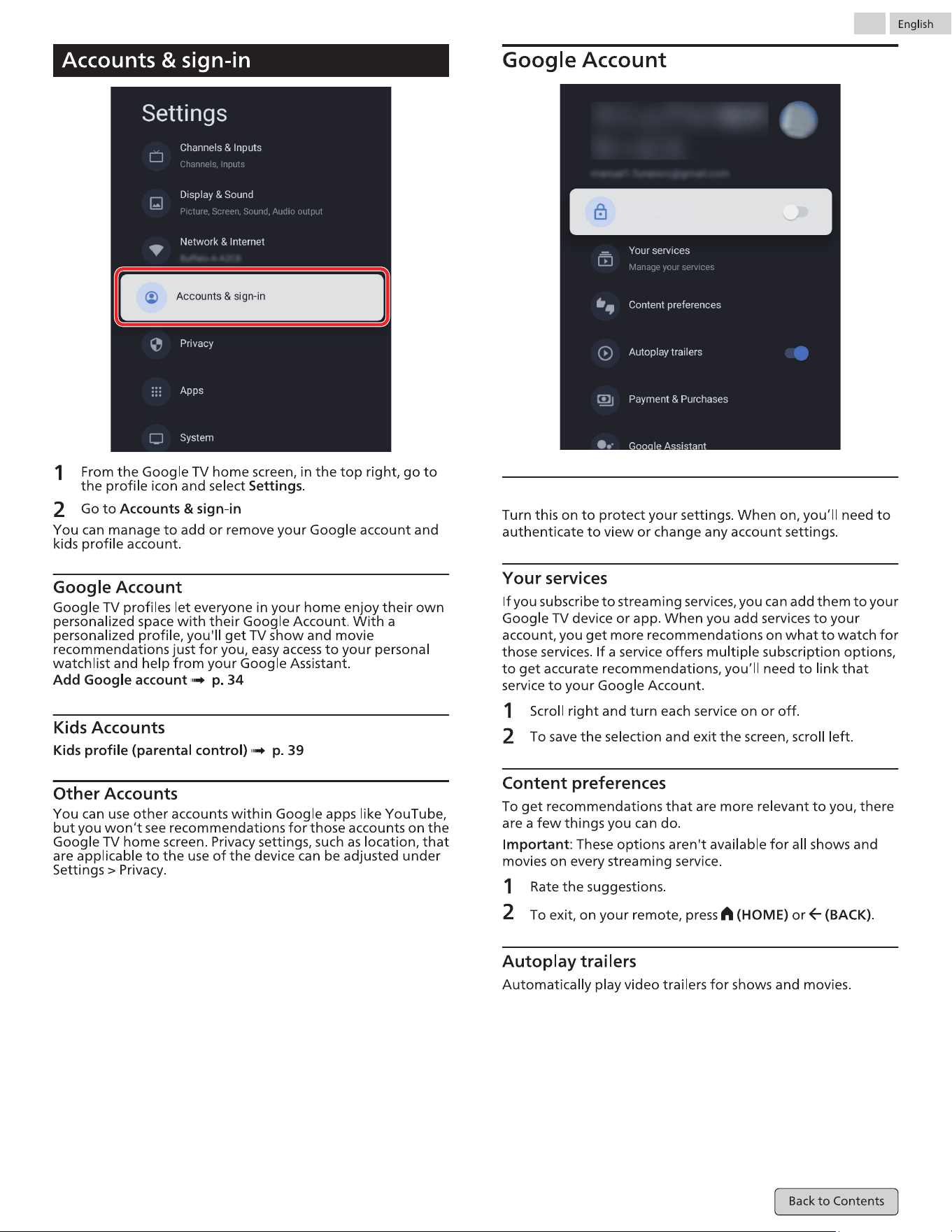
Profile lock
25
Pro�le lock
26
27
28
29
30
Envionment
Select Home or Shop
Shop Mode is only for store use.When Select Shop Mode the
advertisement would be appeared when you wratch TV.
System running time
Free up storage
Sleep Timer
Televlslon
Settings Exit Timer
Idle TV Standby
Shop Mode
31
Select Home or Shop
Shop Mode is only for store use.When Select Shop Mode the
advertisement would be appeared when you wratch TV.
Visit Google Ty Help at g.co/tv/help
32
33
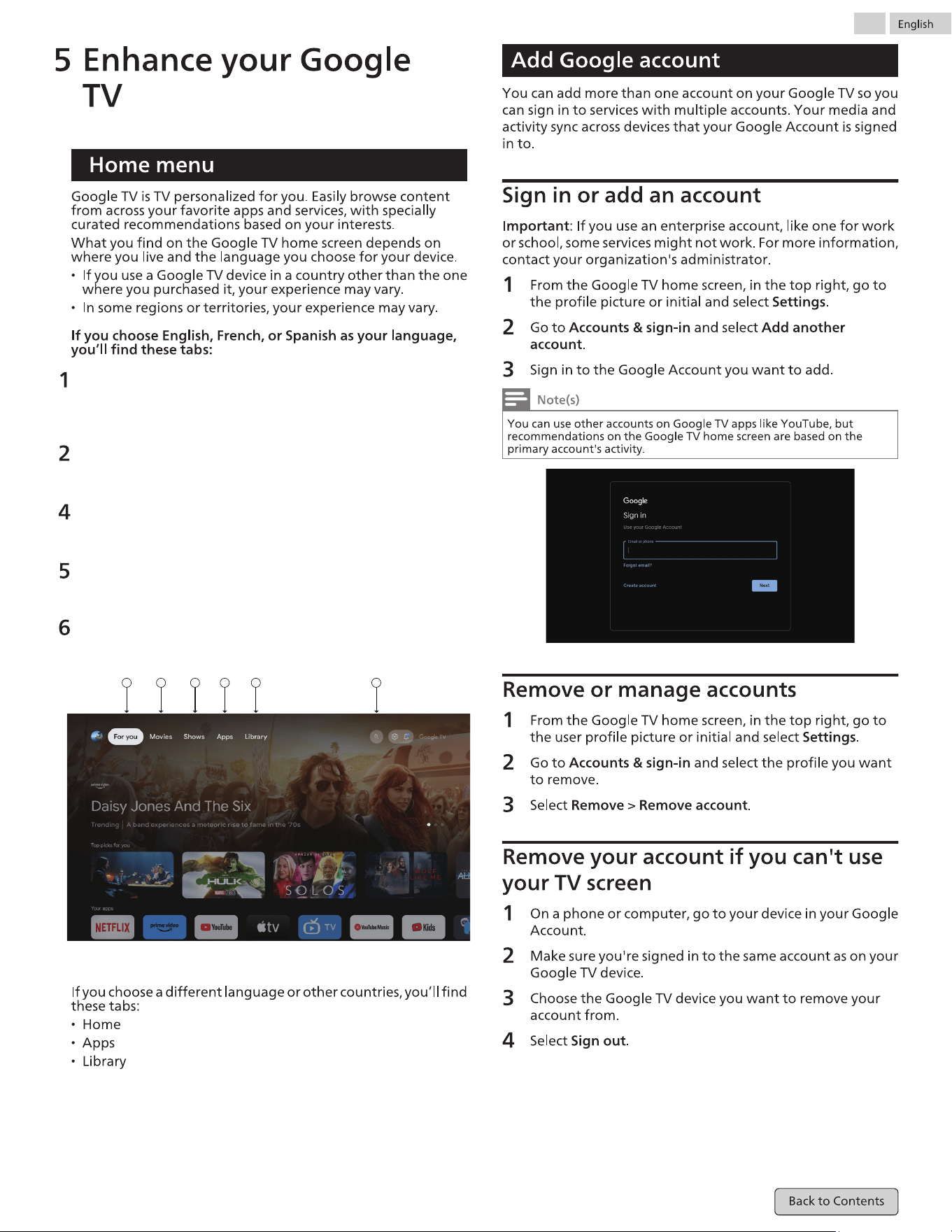
For you
Browse 400,000+ movies and TV episodes from across yor
streaming services, all in one place and organized into topics
and genres based on what interests you.
Movies& 3.Shows
Binge watch your favorite TV shows and discover new
favorites all in one place.
Apps
Download and access your favorite apps to discover movies,
shows, games, and more.
Library
When you see an interesting show or movie, add it to your
Watchlist to keep track of youi new discoveries.
Search
Thousands of movies and shows at the sound of your voice.
Ask Google Assistant to quickly �nd what you want to watch.
1 2 3 4 5 6
34
35
36
37
38
39
40
41
42
43
1000
44
"Google Meet is not pre-installed"
Checkif USB camera has a built-in mic
and supports
Android 11.0 or later. (May be listed on
USB camerapackaging or manufacturer'
s website)
Check if your microphone is muted.
(Please unmuteif so)
Check if USB camera is connected to
the TV.Turn off the TV and disconnect/
reconnect USBcamera. Turn theTV back
on and reopen the Meetapp.
�ssues remain, please visit the Meet
support pageand check the Troubleshoot
section.
Check if the volume of the TV is muted or
very low.(Please unmute or turn the
volume up if so)
Check if USB camera is connected to the
TV Turn off the TV and disconnect/
reconnect USBcamera. Turn theTV back
on and reopen the Meetapp.
If issues remain, please visit the Meet
support page and check the Troubleshoot
section.
3
https://www.download.p4c.
philips.com/�les/5/50pul7552_f7/50pul7552_f7_hug_aen.pdf
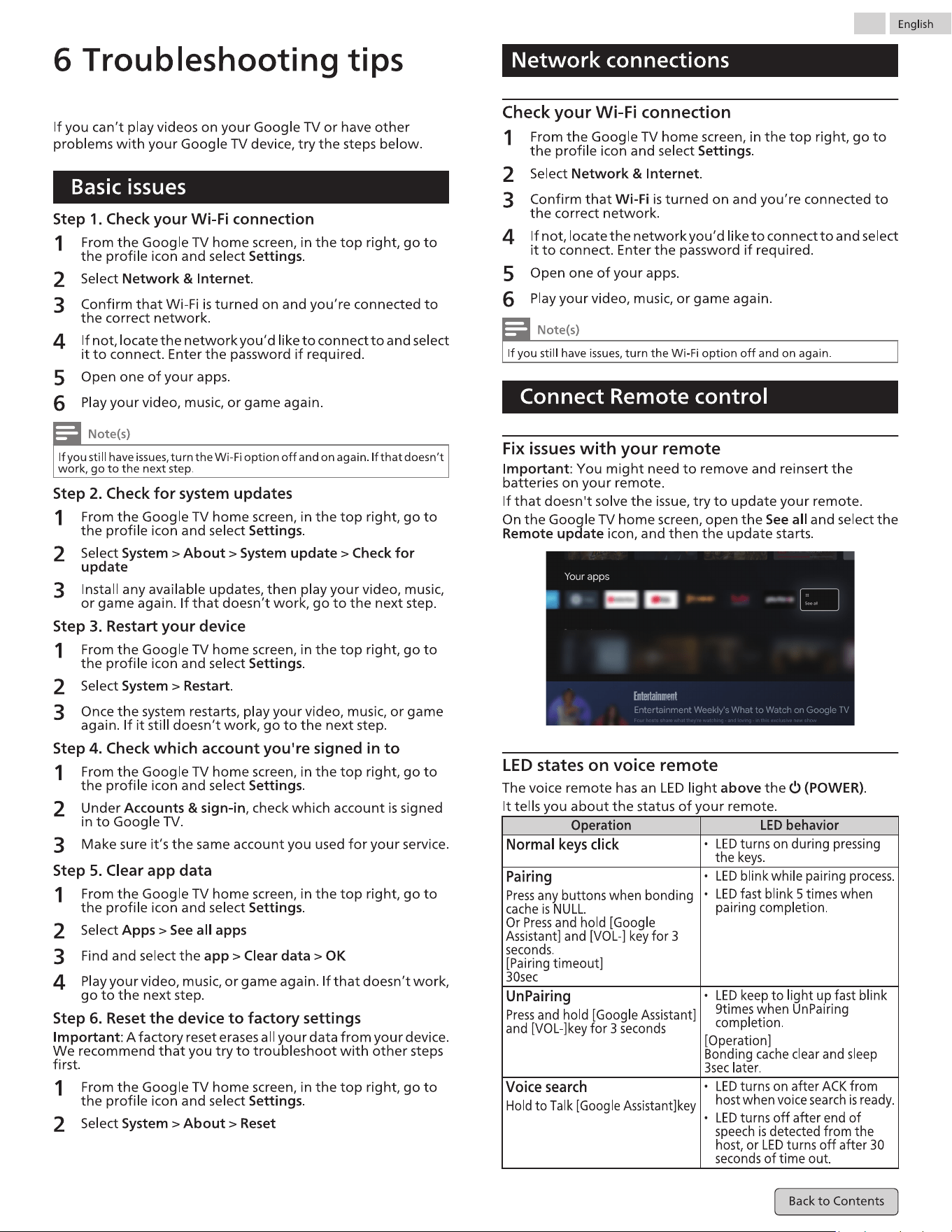
45
46
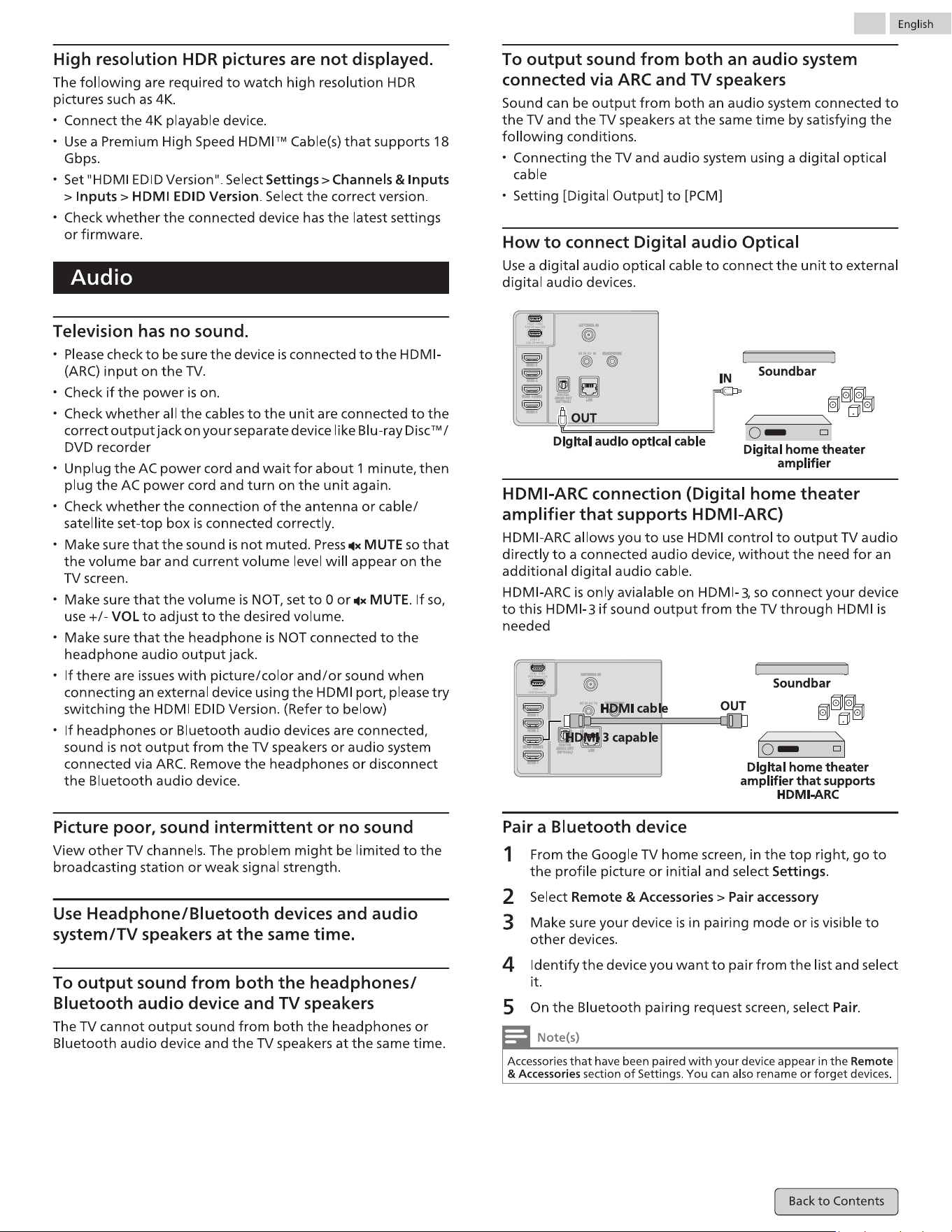
47
3
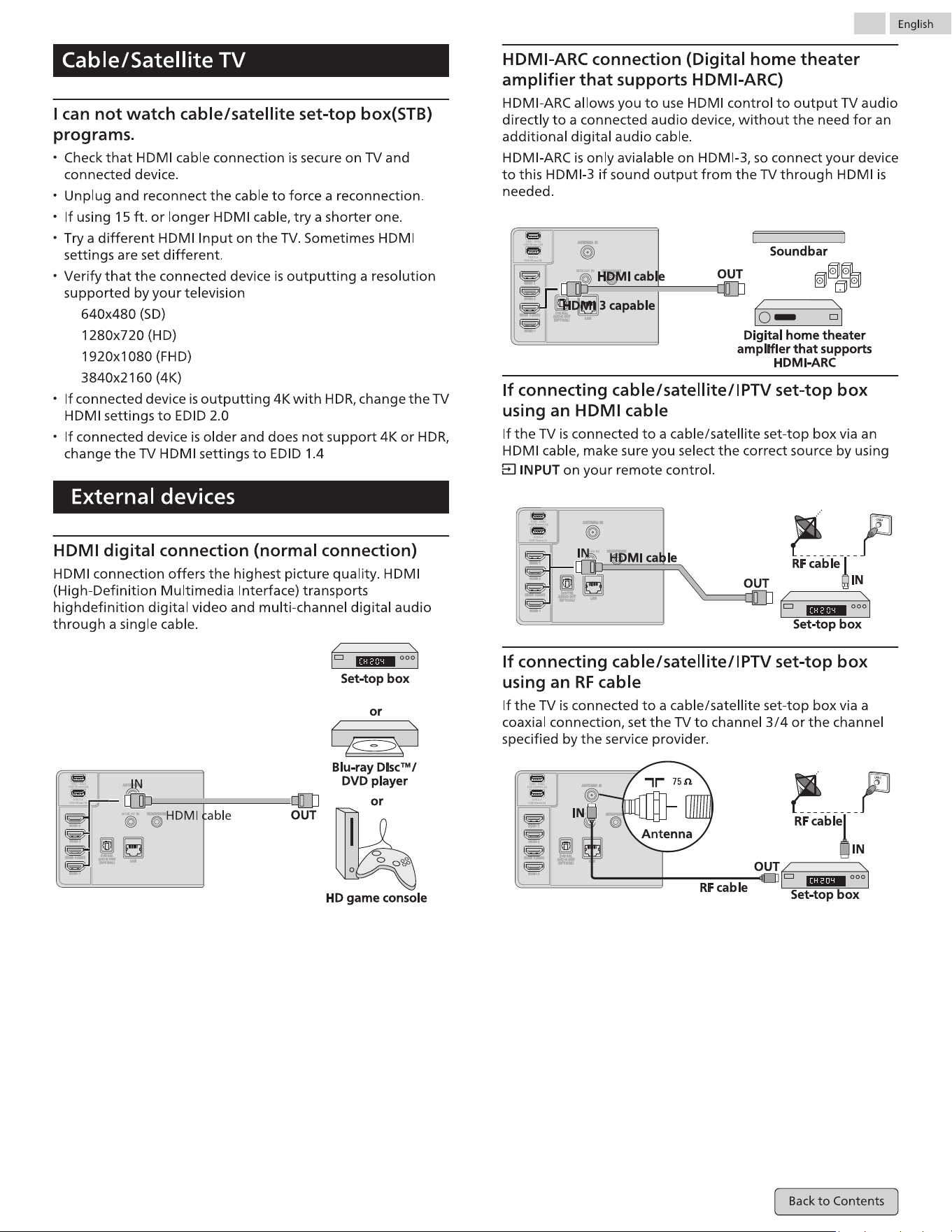
48
49
50
3
51
52

Warranty
This warranty gives you speci�c legal rights. You may have other rights which vary from state/province to state/province.
LIMITED WARRANTY
ONE (1) YEAR
WARRANTY COVERAGE:
This warranty obligation is limited to the terms as set forth below.
WHO IS COVERED:
This product warranty is issued to the original purchaser or the
person receiving the product as a gift against defects in materials
and workmanship as based on the date of original purchase
(“Warranty Period”) from an Authorized Dealer. The original sales
receipt showing the product name and the purchase date from an
authorized retailer is considered such proof.
WHAT IS COVERED:
This warranty c
overs new products if a defect in material or
workmanship occurs and a valid claim is received within the
Warranty Period. At its option, the company will either (1) repair the
product at no charge, using new or refurbished replacement parts,
or (2) exchange the product with a product that is new or which has
been manufactured from new, or serviceable used parts and is at
least functionally equivalent or most comparable to the original
product in current inventory, or (3) refund the original purchase
price of the product.
Replaceme
nt products or parts provided under this warranty are
covered against defects in materials and workmanship from the
date of the replacement or repair for ninety (90) days or for the
remaining portion of the original product’s warranty, whichever
provides longer coverage for you. When a product or part is
exchanged, any replacement item becomes your property and the
replaced item becomes company property. When a refund is given,
your product becomes company property.
Note: Any product sold and identi�ed as refurbished or renewed
carries a ninety (90) day limited warranty.
Replacement
product can only be sent if all warranty requirements
are met. Failure to follow all requirements can result in delay.
WHAT IS NOT COVERED - EXCLUSIONS AND LIMITATIONS:
This Limited Warranty applies only to new company manufactured
products that can be identi�ed by the trademark, trade name, or
logo affixed to it. This Limited Warranty does not apply to any
hardware product or any software, even if packaged or sold with the
product, as manufacturers, suppliers, or publishers may provide a
separate warranty for their own products packaged with the
bundled product.
The company is not liable for any damage to or loss of a
ny programs,
data, or other information stored on any media contained within the
product, or other additional product or part not covered by this
warranty. Recovery or reinstallation of programs, data or other
information is not covered under this Limited Warranty.
This warranty does not apply (a) to damage caused by accident,
abuse, misuse, neglect, misapplication, or non-supplied product, (b)
to damage caused by service performed by anyone other than
company approved Authorized Service Location, (c) to a product or a
part that has been modi�ed without written company permission,
or (d) if any serial number has been removed or
defaced, or (e)
product, accessories or consumables sold “AS IS” without warranty of
any kind by including refurbished product sold “AS IS” by some
retailers.
This Limited Warranty does not cover:
• Shipping charges to return defective product.
• Labor charges for installation or setup of the product, adjustment
of customer controls on the product, and installation or repair of
antenna/signal source systems outside of the product.
• Product repair and/or part replacement because of improper
installation or maintenance, connections to improper voltage
supply, power line surge, lightning damage, retained images or
screen markings resulting from viewing �xed stationary content
for extended periods, product cosmetic appearance items due to
normal wear and tear, unauthorized repair or other cause not
within the control of the company.
• Damage or claims for products not being available for use, or for
lost data or lost software.
• Damage from mishandled shipments or transit accidents when
returning product.
• A product that requires modi�cation or adaptation to enable it to
operate in any country other than the country for which it was
designed, manufactured, approved and/or authorized, or repair
of products damaged by these modi�cations.
• A product used for com
mercial or institutional purposes
(including but not limited to rental purposes).
• Product lost in shipment and no signature veri�cation receipt can
be provided.
• Failure to operate per User manual.
TO OBTAIN ASSISTANCE…
Contact the Customer Care Center at:
1-833-978-3323
or chat with us via the Philips website...
REPAIR OR REPLACEMENT AS PROVIDED UNDER THIS WARRANTY IS
THE EXCLUSIVE REMEDY FOR THE CONSUMER, WITH THE ISSUING
COMPANY NOT LIABLE FOR ANY INCIDENTAL OR CONSEQUENTIAL
DAMAGES FOR BREACH OF ANY EXPRESS OR IMPLIED WARRANTY
ON THIS PRODUCT. EXCEPT TO THE EXTENT PROHIBITED BY
APPLICABLE LAW, ANY IMPLIED WARRANTY OF MER
CHANTABILITY
OR FITNESS FOR A PARTICULAR PURPOSE ON THIS PRODUCT IS
LIMITED IN DURATION TO THE DURATION OF THIS WARRANTY.
Some states do not allow the exclusions or limitation of incidental or
consequential damages, or allow limitations on how long an implied
warranty lasts, so the above limitations or exclusions may not apply
to you.
Skyworth USA Corporation Inc. Service, 2950 Toy Road, Groveport, OH 43125, USA

License
Skyworth USA Corporation, Inc. hereby offers to deliver, upon request, a copy
of the complete corresponding source code for the copyrighted open-source
code packages, on an “AS IS” basis, used in this product for which such offer is
requested by the respective licenses. This offer is valid up to three years after
the product purchase to anyone in receipt of this information. To obtain source
code, please contact Skyworth USA Corporation, Inc. You should write to:
Skyworth USA Corporation Inc. Service
OSS Request,
2950 Toy Road, Groveport, OH 43125, USA
Skyworth USA Corporation, Inc. disclaims any and all warranties and
representations with respect to such software and related source code
including quality, reliability, usability, and accuracy, and further disclaim all
express, implied, statutory or otherwise, including without limitation, any
implied warranties of title, non-infringement, merchantability, or fitness for a
particular purpose. Skyworth USA Corporation, Inc. shall not be liable to make
any corrections to the open-source software or source code or to provide any
support or assistance with respect to it. Skyworth USA Corporation, Inc.
disclaims any and all liability arising out of or in connection with the use of this
software and/or source code.