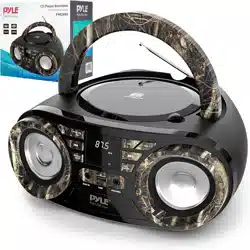

PBMSPG19
Portable Bluetooth Wireless BoomBox Stereo System,
Built-in Rechargeable Battery, MP3/Micro SD Reader,
FM Radio
USER MANUAL

For correctly opera�ng, please read this manual carefully before using. Any content revision of the
manual won’t declare again, and we are not responsible for consequence caused by fault or
oversight of this manual.
FEATURES:
1. 2.1 outdoor Ac�ve HIFI Bluetooth Speaker with 3 inch subwoofer;
2. Output very clear sound and heavy bass, dynamic sound effect;
3. With A2DP stereo Bluetooth, wireless stream music from any Bluetooth-enabled device such
as your mobile phone, notebook, iPhone or
iPad.
4. Secure simple pairing for user-friendly opera�ng
5. 10 meters opera�ng range
6. With Micro SD card suppor�ng
7. With FM radio
8. With Line-in func�on, suitable for PC, MID, TV and other audio device.
9. Built-in lithium rechargeable ba�ery 1800mAh
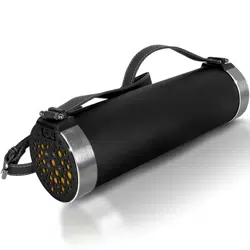
10. With strap, easy to take out.
11. Aluminum case and water resistant design
What’s in the Box:
Wireless Tube Speaker
USB Charging Cable
Audio Connec�on Cable
Pyle BT Portable Speaker
PBMSPG19 USER GUIDE
www.PyleUSA.com

INSTRUNCTION FOR APPEARANCE AND KEY:
1. Micro SD card slot 2.Charging jack 3.Aux-in jack
4. ON/OFF and Play/pause 5.Volume +/next 6. Mode
7. Volume -/Previous
www.PyleUSA.com

Bluetooth Connec�on:
1. Long press the “Pause” bu�on to turn on the speaker, The LED light will turn blue and twinkle
quickly and beep twice.
2. Ac�vate Bluetooth of mobile phone and search for device name “S30” then connect it. The
blue LED light twinkle slowly and beep third �mes once connected successful.
3. Play the music from your mobile phone and enjoy.
4. Short press Previous or NEXT bu�on on the devices or on Mobile phones to select songs you
like.
5. Short press Play
/pause bu�on on the devices or on Mobile phones to play/stop the music
6. Long Press the “Volume+/- “to adjust volume up and down. Or adjust the mobile phones’
volume.
Playing music from TF card:
1. Turn on the speaker.
2. Insert TF card into slot, the music stored will be played automa�cally and blue LED light always
keep ligh�ng.
3. Under playing mode, short press Previous or NEXT bu�on to select songs you like
4. Press PLAY/PAUSE to play or pause.
5. Please long press Pause bu�on to tur
n off the speaker while without use.
Remark: Under Bluetooth or FM mode, if a TF will be inserted, it will automa�cally starts playing it.
To return to the previous mode, use the MODE bu�on.
How to Use FM Radio:
1. Under FM radio state, the audio cable provided treat as antenna. Please insert the audio cable
to get the best FM signal before using.
2. Turn on the speaker, press the “MODE” bu�on to switch to FM radio state.
3. Under playing mode, short press “Play
/pause” bu�on to auto search the FM Channel and store
it automa�cally.
4. Press Previous or NEXT bu�on to change the stored FM channel.
www.PyleUSA.com

AUX-IN:
This product support other devices: Mp3/4, Laptop, etc. Using the audio cable provided. Plug one
jack into this product. The other end into normal Mp3/4, Laptop…Play the music from Mp3/4,
Laptop then enjoy…
When using an external device, all func�ons will be controlled by the external device except the
“Play/pause” bu�on.
Ba�ery Charging:
1. Power off the unit, put the charging cable into the charge slot of unit, connect the other end to
5V, 1A adapter, the r
ed charging indicator will keep ligh�ng.
2. Charge �me should be 3-5 hours. When charging full, the indicator light will switch off.
3. In order to prolong the life of ba�ery, please do not charge more than 8 hours.
Note:
1. The unit will operate without the wire connec�on using the lithium ba�ery. The amount of
ba�ery life depends on how hard the unit is working. Heavy, loud, bass music will use more energy
to produce than spoken word.
2. The built-in rechargeable ba�ery is not replacea
ble. Do not remove or replace it, do not throw
in the trash or in the fire.
3. When cleaning the product, use a so� dry cloth. For more severe stains, please dampen the
cloth with water only. Anything else has the chance of dissolving the paint or damaging the plas�c.
www.PyleUSA.com